by Contributed | Feb 8, 2021 | Technology
This article is contributed. See the original author and article here.
Initial Update: Monday, 08 February 2021 09:06 UTC
We are aware of issues within Application Insights and Azure Log Analytics and are actively investigating. Some customers may experience data access issue and issues with missed or delayed Log Search alerts in East US region
- Work Around: NA
- Next Update: Before 02/08 12:30 UTC
We are working hard to resolve this issue and apologize for any inconvenience.
-Deepika
by Contributed | Feb 8, 2021 | Technology
This article is contributed. See the original author and article here.
Dear IT pros,
As you knew it, starting with Microsoft Endpoint Configuration Manager – MCM version 1906 (SCCM version 1906) you could enable co-management for Endpoint Manager -MEM (Intune) devices in the Azure Public Cloud, Azure US Government Cloud.
The co-management period could last as long as you wish.
Also, you could enable autoenrollment devices into MEM using your CM (SCCM) console.
- Microsoft brings together Configuration Manager and Intune into a single console called Microsoft Endpoint Manager admin center.
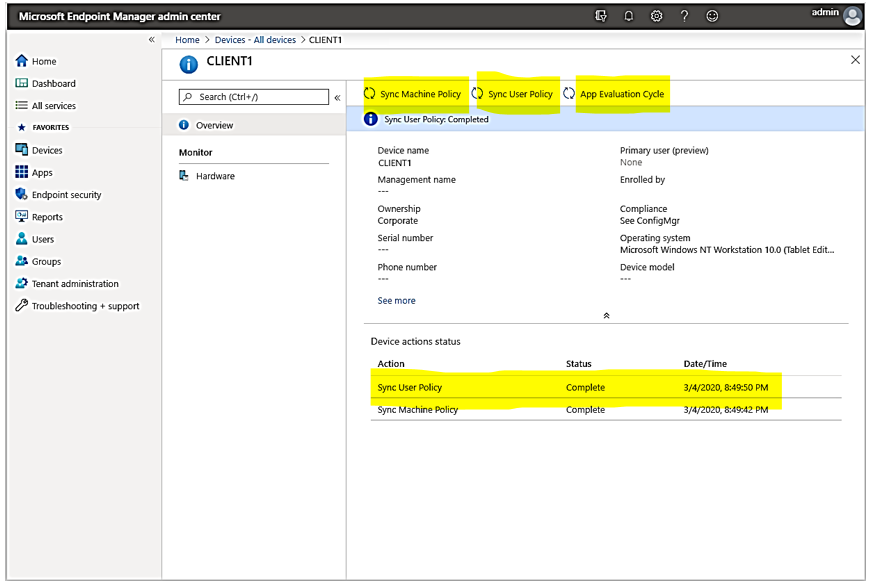
- Starting in Configuration Manager version 2002, you can upload your Configuration Manager devices to the cloud service and take actions from the Devices blade in the admin center as shown here:
Planning for Co-management using Endpoint Manager Admin Center:
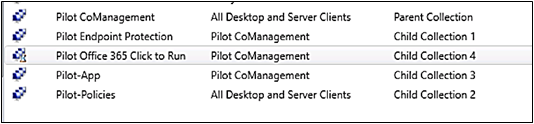
- Make a Parent Collection for All Co-management devices with limit collection search to “All system” , the “Pilot CoManagement” collection in the following example is used as a superset of all the other staging collections contained all of the clients you want to onboard into co-management .
- Make the child collections for related managed devices based on work load, for example:
3. Configure Cloud attach
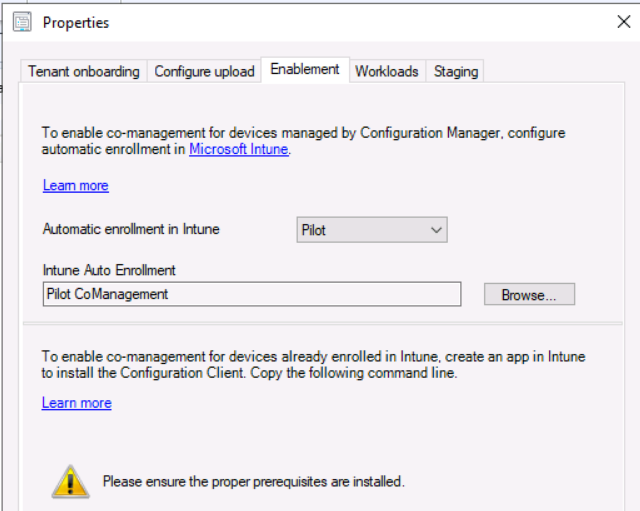
4. Configure Upload in Co-Management for the parent collection “All Co-Management devices”
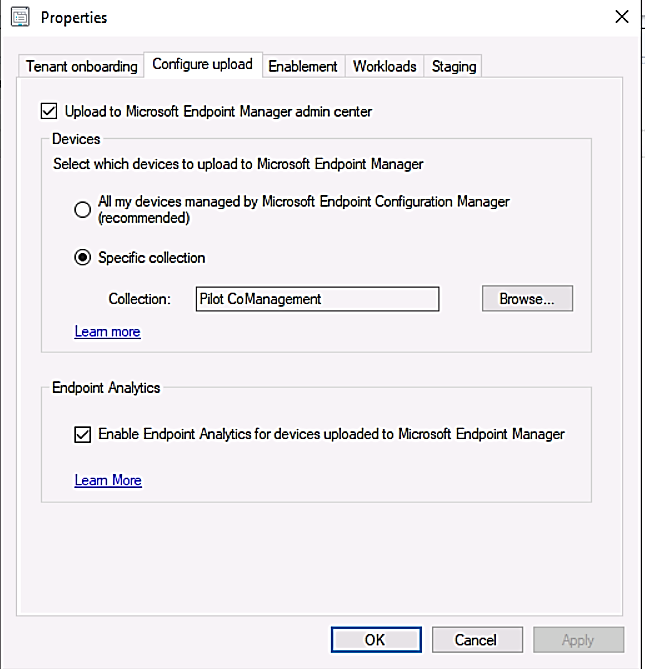
In each parent and child collections, configuring them to be used for MEM policy assignments:
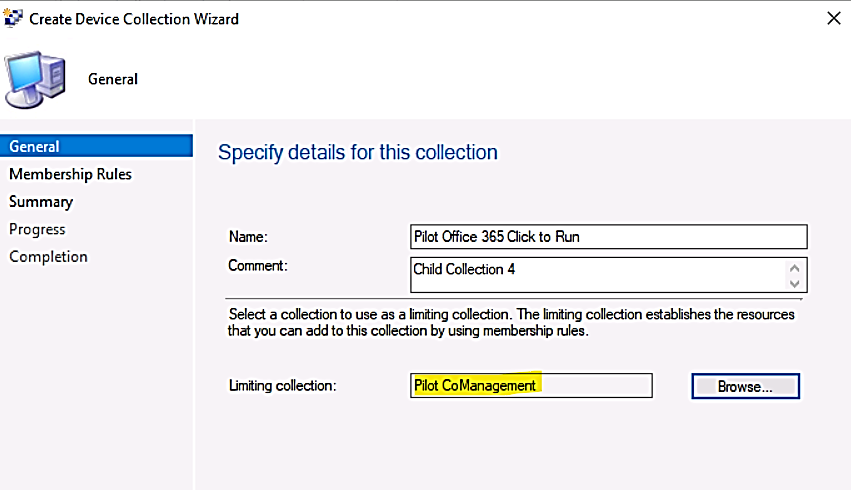
- Child Collection for Pilot Co-management, limiting collection example:
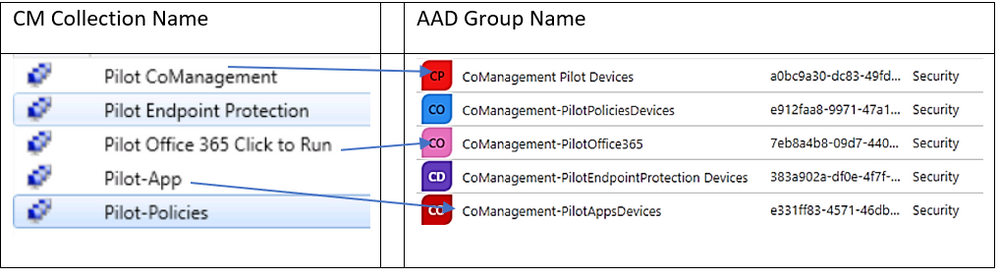
- Map 1-1 between the collections and Azure AD Group:
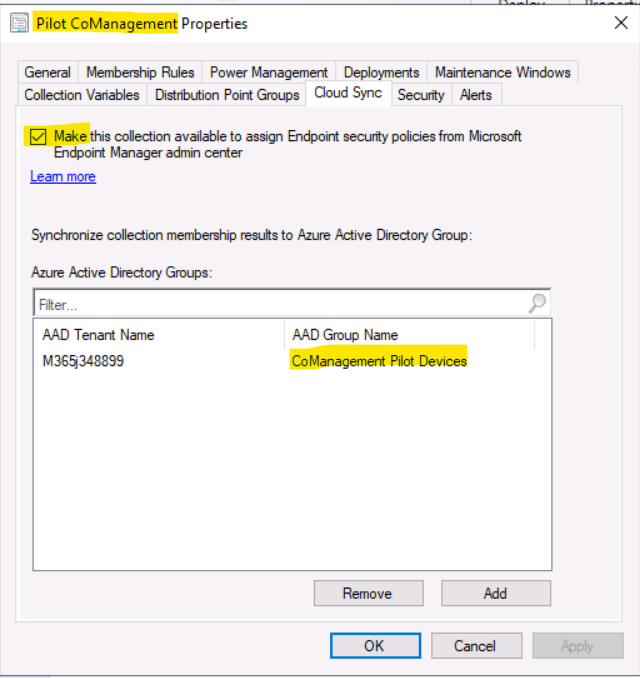
- Cloud Sync for parent collection:
- Cloud Sync for child collection:
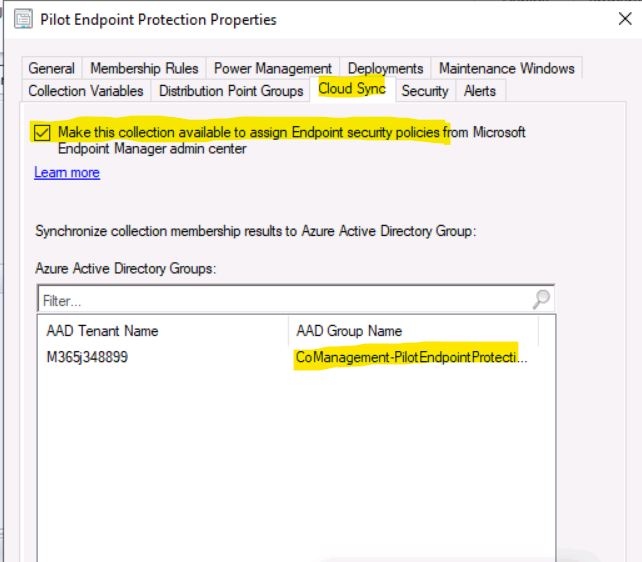
The Result:
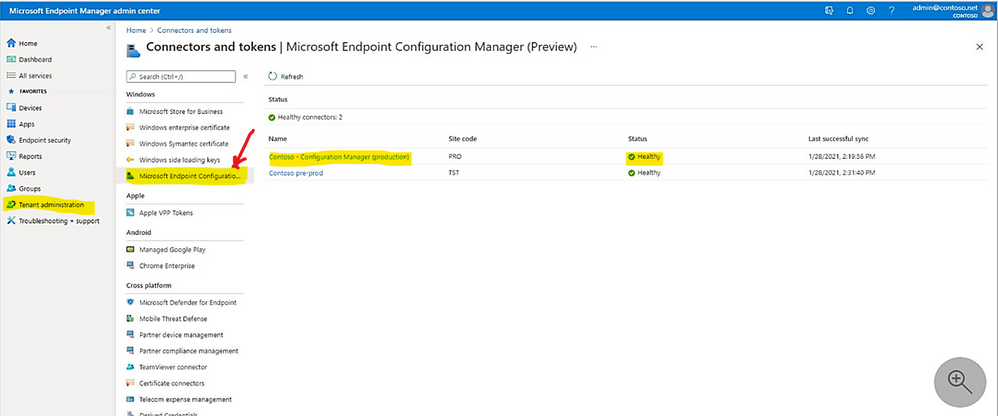
From the Microsoft Endpoint Manager admin center, you can review the status of your Configuration Manager connector.
- Display the connector status:
> Tenant administration
> Connectors and tokens.
> Microsoft Endpoint Configuration Manager.
> Select a Configuration Manager hierarchy (running version 2006, or later) to display additional information about it.
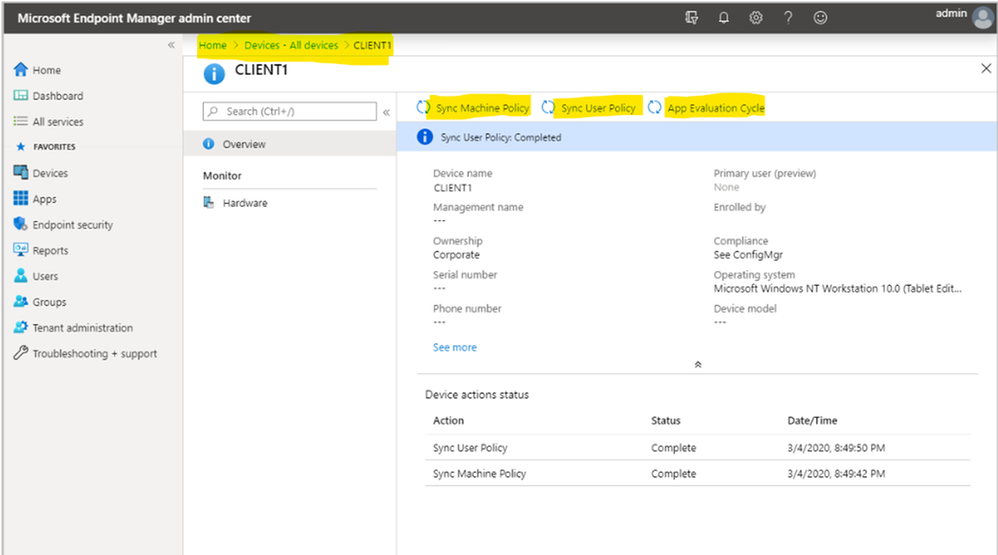
> from the Microsoft Endpoint Manager admin center
> double click on the synchronized clients.
> Choose one of the following actions: Sync Machine Policy, Sync User Policy, App Evaluation Cycle
Troubleshooting:
Error: “This collection cannot be made available to assign policies from Microsoft Endpoint Manager admin center.”
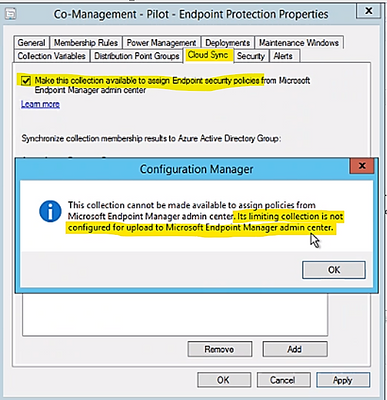
Solution: I would like to thank mindcore.dk for the below solution
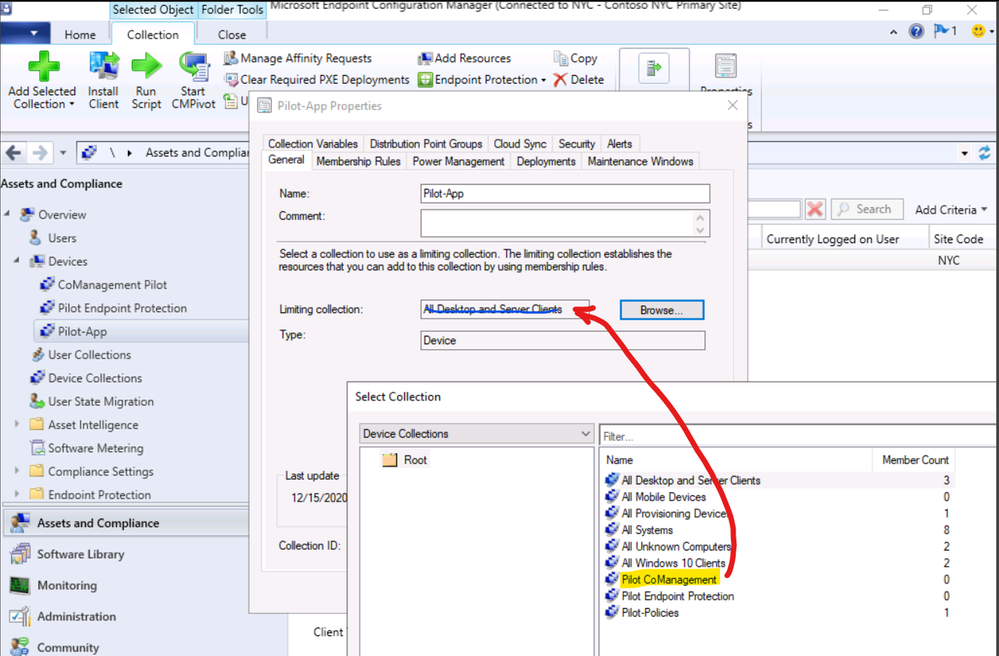
Also, make sure the Child Collection property configured with correct limiting collection as shown in the following example:
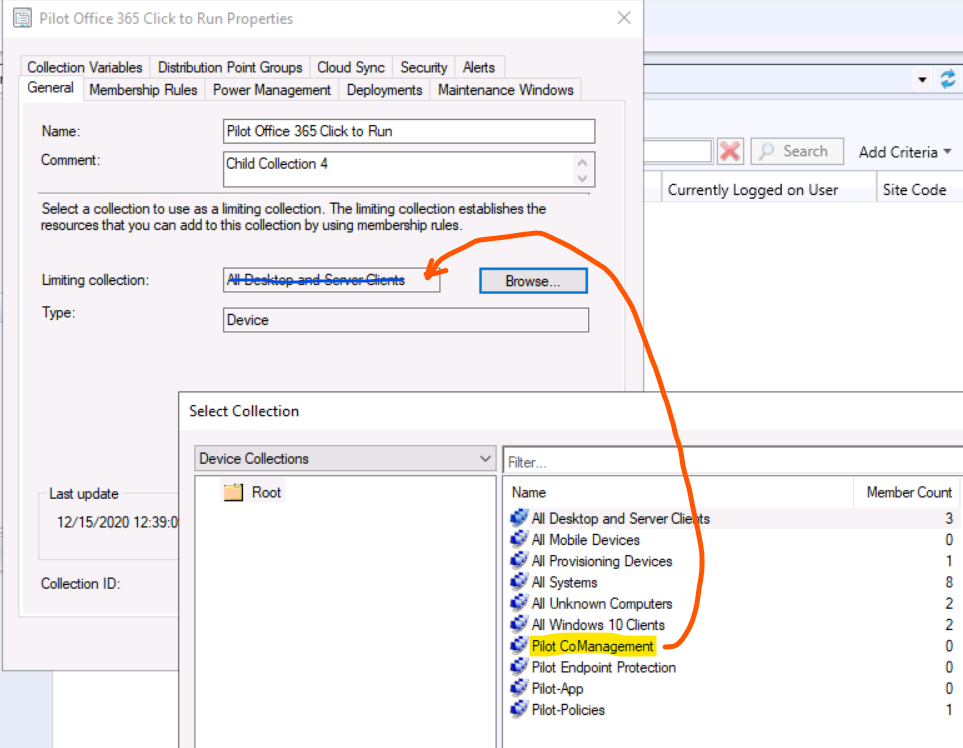
If you could not correct it with the right collection, you may have to create new collection and delete the old one.
more troubleshooting tips from Microsoft site.
Preview Feature:
Synchronizing Microsoft Defender for Endpoint – MDE Policy by Configuration Manager (version 2006) Cloud Sync in Collection Properties. The following operating systems are supported for deployment of Microsoft Defender ATP Endpoint Detection and Response (EDR) onboarding policies:
- Windows 10 and later (x86, x64, ARM64)
- Windows 8.1 (x84, x64)
- Windows Server 2019 and later (x64)
- Windows Server 2016 (x64)
- Windows Server 2012 R2 (x64)
To Sync MDE policy to CM Collection
> From a Configuration Manager console connected to your top-level site, right-click on a device collection that you synchronize to Microsoft Endpoint Manager admin center and select Properties.
> On the Cloud Sync tab, enable the option to Make this collection available to assign Endpoint security policies from Microsoft Endpoint Manager admin center.
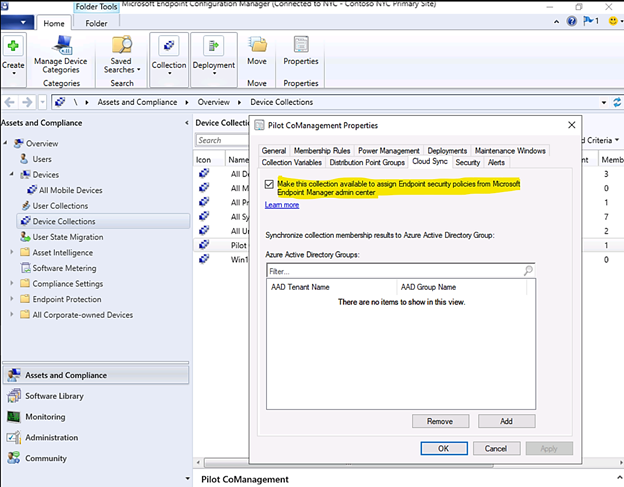
You can’t select this option if your Configuration Manager hierarchy isn’t tenant attached.
The collections available for this option are limited by the collection scope selected for tenant attach upload, in our case, the attached collection name is “Pilot CoManagement” and its included Collection Members.
I hope the information is useful.
Until next time
Reference:
Disclaimer

The sample scripts are not supported under any Microsoft standard support program or service.
The sample scripts are provided AS IS without warranty of any kind.
Microsoft further disclaims all implied warranties including, without limitation,
any implied warranties of merchantability or of fitness for a particular purpose.
The entire risk arising out of the use or performance of the sample scripts and documentation
remains with you. In no event shall Microsoft, its authors, or anyone else involved in the creation,
 production, or delivery of the scripts be liable for any damages whatsoever
(including, without limitation, damages for loss of business profits, business interruption,
loss of business information, or other pecuniary loss) arising out of the use of or inability
 to use the sample scripts or documentation, even if Microsoft has been advised of the possibility of such damages.

by Contributed | Feb 8, 2021 | Technology
This article is contributed. See the original author and article here.
Later in February, the Azure Data Factory UI will get a new set of updates to the command bar that bring together the pipelines experience in ADF to be more aligned with the Synapse pipeline experience.
To help with a few over-crowding issues ADF is facing in the global command bar, we’ll soon move some of those options to the local command bars.
Today’s ADF command bar:

An example of what that will look like with some of those controls moved on to the local command bars:
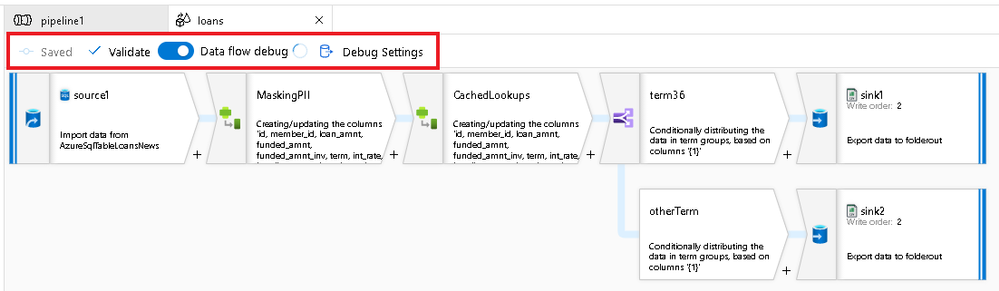
If you have been using Azure Synapse Pipelines, you’ll notice that this updated command bar design has already been present there:

by Contributed | Feb 7, 2021 | Technology
This article is contributed. See the original author and article here.
News this week includes:
Introducing Microsoft Viva
Introducing the Mixed Reality Feature Tool for Unity
Important updates to Guest Access defaults in Teams starting in February 2021
Ganesh Sanap is our member of the week and a great contributor in the SharePoint Community.
View the Weekly Roundup for Feb 1-5th in Sway and attached PDF document.
https://sway.office.com/s/aoIQgI9QCyqll5uO/embed

by Contributed | Feb 7, 2021 | Technology
This article is contributed. See the original author and article here.
The threshold of temp table in stored procedure is little bit tricky, it doesn’t exactly follow the regular threshold.
First of all, you can’t use the modification_counter to determine when auto update statistics happens. Because the data in tempdb is deleted every time after execution, replying on the data that that already deleted is pointless.
Secondly, the algorithm is different:
Here is the original threshold of temp table that are not in stored procedure.
Here is the new algorithm. (note, compatibility of user database decides old threshold or sublinear threshold, the compatibility of tempdb does not matter)
Table cardinality (n)
|
Old threshold
|
Sublinear threshold
|
n < 6
|
>=n+6
|
>=n+6
|
6 <= n <= 500
|
>=n+500
|
>=n+500
|
500<n <=19682
|
>= n+(500 +0.2*n)
or
<= n-(500+0.2*n)
|
>= n+(500 +0.2*n)
or
<= n-(500+0.2*n)
|
n >19682
|
500 + (0.20 * n)
|
>= n+sqrt(1000*n)
or
<=n-sqrt(1000*n)
|
Here is an example in compatibility level 150 in SQL 2019.
1.Enable the AUTO_update_STATISTICS for temp table and create a table with 30,000 rows.
alter database tempdb set AUTO_update_STATISTICS on–
go
use dbstat
go
create table table1(c1 int,c2 int,c3 int)
———— ——–INSERT 30,000 rows to table table1
go
with cte
as
(
select top 30000 ROW_NUMBER() over(order by c.object_id) id from sys.columns c cross join sys.all_objects
)
insert table1
select id,id,id from cte
go
2.Create a stored procedure. In this stored procedure, it imports the data from table1 created in step1, into the temp table #t1, then run select query against the temp table #t1
create proc procTempTable
@num int
as
create table #t1(c1 int index ic nonclustered,c2 int,c3 int)—create temp table with primary key
insert #t1 select top(@num) * from table1 order by c1—insert data to temp table
select * from #t1 where c1=@num
select object_id(‘tempdb.dbo.#t1’) as TableId
3.Let’s run the stored procedure which parameter 2.
exec procTempTable 2
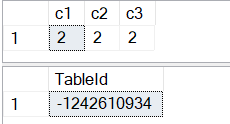
4.Here is what happened when the stored procedure is created the first time.
1)The temp table #t1 is created, and it will be cached for reuse until the stored procedure gets recompiled.
If you’re not familiar with the temp table caching, please refer Paul White’s article.
2)Because index ic on column1 is specified inline in the create table DDL, a statistics with same name is created at the same time when table #t1 is created.
3)The statistics is refreshed when following query is executed.
select * from #t1 where c1=@num
4).Here is the statistics info
use tempdb
go
select sp.*From sys.stats s cross apply sys.dm_db_stats_properties(s.object_id,s.stats_id) sp where s.object_id=-1242610934

4.For temp table that are not in stored procedure, the statistics is updated after the threshold is reached and a query running against the statistics.
But it’s totally different if the temp table is in stored procedure, the threshold does not depend on the modification_counter, which is a cumulative value.
For example, I run the stored procedure 200 times, the modification_counter increase to 1002, but update statistics will not happen.
exec procTempTable 2
go 200

To trigger the auto update statistics, the number of row change has before the temp table is deleted in single execution has to reach the threshold.
In this case, the cardinality is 2, the threshold is n+6=2+6=8.
Running following t-sql will trigger the auto update statistics.
use dbstat
go
exec procTempTable 8
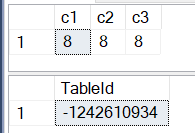

N<500
Now the cardinality of temp table becomes 8, the threshold become n+500=508 according to the formula.
Running following t-sql will trigger the auto update statistics.
use dbstat
go
exec procTempTable 508
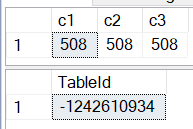

500<n<=19682
a)According to the formula:
the number of data change is >= n+(500 +0.2*n)=508+(500+508*0.2)=1109
or
the number of data change is <= n-(500 +0.2*n)=508-(500+508*0.2)= -93,which is not possible
exec procTempTable 1109
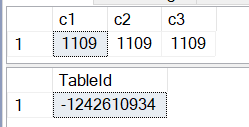

b)1109 is still less than 19682, According to the formula:
the number of data change is >= n+(500 +0.2*n)= 1109+(500+1109*0.2)= 1830
or
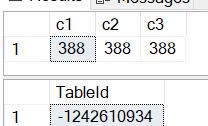
the number of data change is <= n-(500 +0.2*n)= 1109-(500+1109*0.2)= 388.
Let’s use 388 this time.
exec procTempTable 388

n>19682
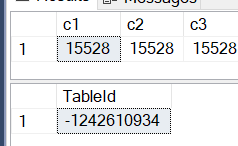
Now we have 20,000 rows by running the exec procTempTable 20000

The threshold is
>= n+sqrt(1000*n)= 20000+sqrt(1000*20000) = 24472
or
<= n-sqrt(1000*n)= 20000- sqrt(1000*20000) = 15528.

by Contributed | Feb 6, 2021 | Technology
This article is contributed. See the original author and article here.
Once you start using the Citus extension to distribute your Postgres database, you may never want to go back. But what if you just want to experiment with Citus and want to have the comfort of knowing you can go back? Well, as of Citus 9.5, now there is a new undistribute_table() function to make it easy for you to, well, to revert a distributed table back to being a regular Postgres table.
If you are familiar with Citus, you know that Citus is an open source extension to Postgres that distributes your data (and queries) to multiple machines in a cluster—thereby parallelizing your workload and scaling your Postgres database horizontally. When you start using Citus—whether you’re using Citus open source or whether you’re using Citus as part of a managed service in the cloud—usually the first thing you need to do is distribute your Postgres tables across the cluster.
What is undistribute_table()?
To distribute your Postgres tables with the create_distributed_table() function of Citus, you first need to make some decisions, such as: which column to choose as the distribution column, how many shards you need, and which Postgres tables you need to distribute. If you just want to try different settings and go back when you want to, you’re now in luck. Our Citus team introduced the undistribute_table() function in the Citus 9.5 release—enabling you to turn distributed Citus tables back into regular Postgres tables.
If you are one of the Citus users who has asked for the ability to undistribute your Citus tables—like in the request below from Matt Watson of Stackify—we hope this new feature will help you.
Also, is there a way to convert a distributed table to not being distributed? I could then change it back to distributed and fix my colocate… without having to drop the table.
The new undistribute_table() function will:
- return all the data of a distributed table from the Citus worker nodes back to the Citus coordinator node,
- remove all the shards of the distributed table from the Citus workers,
- make the previously distributed table a local Postgres table on the Citus coordinator node
Here is the simplest code example of going distributed with Citus and coming back:
-- First distribute your table
SELECT create_distributed_table ('my_table', 'id');
-- Now your table has shards on the worker nodes and any data that was in the table is distributed to those shards.

-- To go back to local, just call the undistribute_table function with your table as parameter
SELECT undistribute_table('my_table');
-- Now your table is only on the coordinator node just like before you distributed.
Undistributing a Citus table is as simple as the one line of SQL code in the code block above.
Note that when you distribute a Postgres table with Citus you need to pass the distribution column into the create_distributed_table() function—but when undistributing, the only parameter you need to pass into the undistribute_table() function is the table name itself.
After undistributing, the distribution column becomes a regular column. If in the future, you want to distribute your Postgres table again, you can just pick another distribution column (or use the same one).
In the past, before we introduced the undistribute_table() function in Citus 9.5, if you wanted to turn a distributed table back into a local table, you would have had to create a new Postgres table on your coordinator node. Then, you would have needed to move all the data from the distributed table to this new local table. However, Citus did not have an easy way to move data from distributed Citus tables to local Postgres tables so you would have had to do some workarounds. Let me explain:
The usefulness of INSERT INTO local SELECT .. FROM distributed
To undistribute a table, distributed data needs to be moved back to the Citus coordinator from all the shards in the cluster. But prior to the Citus 9.4 release, Citus did not support queries that SELECT from distributed tables and INSERT into local tables. So, there was a need to implement support for:
INSERT INTO local_table SELECT * FROM distributed_table;
In fact, the INSERT INTO local SELECT .. FROM distributed feature was introduced in Citus 9.4 to make the undistribute_table() function possible.
Other than being necessary for undistributing tables, inserting distributed data into local tables has some more beneficial use cases.
Rollup Tables
A rollup table in Postgres is a table that you pre-aggregate your data into. Before we introduced INSERT INTO local SELECT .. FROM distributed in Citus 9.4, you could still have rollup tables. (And many of you did!) But your rollup tables had to be distributed tables, which may not have been the best option in every case. Especially if your rollup table was a very small table.
Let me give you an example.
Let’s say you have a distributed table and a graph that shows some daily statistics of the data on that table. Instead of calculating the statistics from scratch every time you open the graph, you can now create a local Postgres table on the Citus coordinator that you will rollup into. Every night, you can calculate the statistics value for the day and insert the result of the calculations to the rollup table. When you open the graph, the data will be readily available.
-- Every midnight
INSERT INTO rollup_table SELECT your_analysis_function(statistics_column) FROM distributed_table WHERE date = CURRENT_DATE;

-- When you need the graph
SELECT * FROM rollup_table;
ETL in the Database
ETL (Extract, Transform, Load) is the process of gathering data from a data source, transforming the data into a more meaningful form, and then storing the transformed data. Imagine running an online store, and imagine you have a distributed table for customer data and another distributed table for purchases the customers made. What if you need to find the best 100 customers and send them e-mails about a special discount for the top customers?
With the new INSERT INTO local SELECT .. FROM distributed feature and the ETL logic, you can create a local Postgres table for your best customers.
-- Create the table for the top customers
CREATE TEMP TABLE top_customers (customer_id bigint primary key, email text, total_purchase money);

-- Find the best customers and put their data into the top_customers table
INSERT INTO top_customers
SELECT customer_id, email, total_purchase
FROM customers JOIN
(
    SELECT sum(amount) AS total_purchase, customer_id
    FROM purchases
    GROUP BY customer_id
) total_purchases ON customers.id = total_purchases.customer_id
ORDER BY total_purchase DESC
LIMIT 100;

-- Load the top customer IDs back into the distributed table
UPDATE customers SET is_top_customer = true WHERE id IN (SELECT customer_id FROM top_customers);
Increased support for INSERT SELECT in Citus
As of Citus 9.4 any INSERT SELECT command works!
The logic for INSERT INTO local SELECT .. FROM distributed queries is quite similar to the logic for SELECT .. FROM distributed. When you just want to get the distributed data with SELECT, Citus will:
- gather data from the Citus distributed worker nodes
- combine the data, on the Citus coordinator node
- return the combined data back to you
If you want to INSERT INTO local SELECT .. FROM distributed, Citus does all the steps the same way, except for the last one. In the last step, instead of returning the combined data to you, Citus inserts the data to the local Postgres table on the Citus coordinator node.
After all the engineering effort, it would be selfish to keep the INSERT INTO local SELECT .. FROM distributed feature just for internal use. So, we added support for the feature in Citus 9.4.
What does the Citus undistribute_table() function do, under the hood?
So as of Citus 9.4, with help from the new INSERT INTO local SELECT .. FROM distributed feature, you could undistribute your tables manually, if you needed to revert. To undistribute Citus tables manually, you used to have to:
- Create a new Postgres table
- Insert Select everything from your old, distributed table into the new Postgres table
- Drop the old table and rename the new table.
That might seem easy enough, but that’s not all. Some of the things you might have also had to deal with:
- keep the Postgres indexes you had on the old distributed Citus table in mind…
- create partitions again, if your table was a partitioned table…
- deal with the fact that while dropping your table, you also dropped any views that depended on your distributed table—and the views that depended on those views, too.
The good news is that as of Citus 9.5 or later—you can now use the new undistribute_table() function and let Citus seamlessly handle everything. Specifically, when you use the undistribute_table() function, Citus automatically:
- creates the indexes you had for the distributed table,
- handles sequences owned by the table so they continue from where you left off,
- recursively finds the views that directly or indirectly depend on your table and moves them to the new Postgres table,
- preserves constraints, and the table owner,
- if your table was a partitioned table, does all these steps for the partitions,
- and more…
Bottom line: undistribute_table() makes it easier to experiment with Citus distributed tables
Hopefully it’s interesting to know a bit more about why our Citus team introduced the INSERT INTO local SELECT .. FROM distributed feature in Citus 9.4—and the undistribute_table() function in Citus 9.5.
The most important thing to know is that distributing a Postgres table with Citus is not a one-way street. It’s easy to go back and to undistribute a Citus table. So if you want to get started with Citus, it’s now easier to experiment—as long as you’re running Citus 9.5 or later. After downloading the Citus open source packages—or provisioning a Hyperscale (Citus) server group on Azure—you can distribute your tables or make your tables reference tables and then undistribute back to local Postgres tables—and find what data model works best for you and your application. And if you change your mind later, you can just undistribute again.

by Contributed | Feb 5, 2021 | Technology
This article is contributed. See the original author and article here.
CIS Microsoft Azure Foundations Benchmark v1.3.0
Today the Center for Internet Security (CIS) announced the CIS Microsoft Azure Foundations Benchmark v1.3.0. The scope of CIS Microsoft Azure Foundations Benchmark is to establish the foundation level of security while adopting Microsoft Azure Cloud. This benchmark includes the following control areas:
- Identity and Access Management
- Security Center
- Storage Accounts
- Database Services
- Logging and Monitoring
- Networking
- Virtual Machines
- Other Security Considerations
- AppService
Azure Security Benchmark v2.0
On the Microsoft side, Azure Security Benchmark is the benchmark developed by Azure that includes a collection of high-impact security recommendations that you can use to secure the services in Azure. The Azure Security Benchmark includes security controls and service baselines:
- Security controls: These recommendations are a high-level description of a feature or activity that needs to be addressed and is not specific to a technology or implementation. The controls are applicable across customer Azure tenant and Azure services. Each recommendation identifies a list of stakeholders that are typically involved in planning, approval, or implementation of the benchmark. Customers may use this stakeholder to determine the persona and assign role and responsibilities when implementing these recommendations. There are a total of 11 security control domains included in the Azure Security Benchmark v2.
- Service baselines: These apply the controls to individual Azure services to provide recommendations on that service’s security configuration. The baseline currently covers over 85 Azure services.
The CIS Microsoft Azure Foundations Benchmarks v1.3.0 is in alignment with Microsoft recommended security best practices. A mapping between the Azure Security Benchmark v2 and CIS Microsoft Azure Foundations Benchmark v1.3.0 is available here. If you are already using either benchmark to secure your Azure environment, this mapping provides a direct reference of the synergy between the CIS Microsoft Azure Foundations Benchmark v1.3.0 and Azure Security Benchmark v2.
What’s next…
Azure Security Center now provides monitoring of Azure Security Benchmark by default to all Azure Security Center customers, including Azure Security Center free tier as well as the existing Azure Defender customers. You can also monitor the compliance status with the CIS Microsoft Azure Foundations Benchmark in the Azure Security Center Regulatory Compliance Dashboard by enabling Azure Defender. We currently support monitoring the version v1.1 of the CIS Microsoft Azure Foundations Benchmark and are working towards the release of an update to monitor the new v1.3.0 Benchmark and mapping to ASB v2 in upcoming weeks.
We would love to hear your feedback on how our benchmark is working for you. You can reach us by sending an email.
by Contributed | Feb 5, 2021 | Technology
This article is contributed. See the original author and article here.
Hello,
This is the second post in the “Ten Reasons to Love Passwordless” blog series. Last time, we talked about the flexibility and multi-platform benefits of FIDO2 open standards based technology. The second reason to love passwordless is it brings the highest levels of security to your organization. Passwordless multifactor authentication (MFA) eliminates the need to memorize passwords and as such makes it 99.9% harder to compromise an account. Using built-in crypto keys in your software or hardware from passwordless solutions, you get the security assurance that meets the highest standards. Helping our customers achieve these MFA goals is music to my ears!
Security assurance with NIST (800-63)
Let’s start with the National Institute of Standards and Technology (NIST) which develops the technical requirements for US federal agencies implementing identity solutions. NIST’s 800-63 Digital Identity Guidelines Authentication Assurance Levels (AAL) is a mature framework used by federal agencies, organizations working with federal agencies, healthcare, defense, finance, and other industry associations around the world as a baseline for a more secure identity and access management (IAM) approach. How does passwordless and multifactor authentication align with NIST’s requirement? And how can the required AALs be met?
Before diving into the details, let us align some terminology:
- Authentication – The process of verifying the identity of a subject.
- Authentication factor – Something you know, something you have, or something you are: Every authenticator has one or more authentication factors.
- Authenticator – Something the subject possesses and controls that is used to authenticate the subject’s identity.
Multifactor Authentication
Multifactor authentication can be achieved by either a multifactor authenticator or by a combination of multiple single factor authenticators. A multifactor authenticator requires two authentication factors to execute a single authentication transaction.
Multifactor authentication using two single factor authenticators
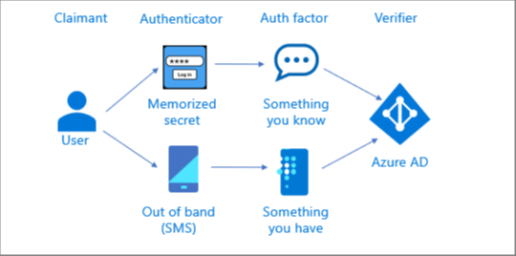
The illustration below shows how a multifactor authentication can be performed using a memorized secret (something you know) authenticator along with an out of band (something you have) authenticator. The user performs two independent authentication transactions with Azure AD.
Multifactor authentication using a single multifactor authenticator
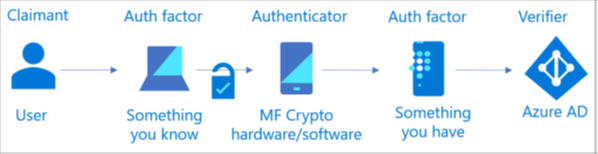
The illustration below shows how a multifactor authentication is performed using a single multifactor cryptographic authenticator requiring one authentication factor (something you know or something you are) to unlock a second authentication factor (something you have). The user uses a single authentication transaction with Azure AD.
Microsoft Passwordless Authenticators mapped to NIST 800-63 AALs
Microsoft passwordless authenticators allow multifactor authentication using a single authenticator and eliminate the dependency on memorized secret (password) authenticator and the associated password attacks (see Your Pa$$word doesn’t matter).
Authentication method
|
NIST Authenticator type
|
AAL
|
Windows Hello for Business
|
Multi-factor cryptographic hardware (with TPM)
Multi-factor cryptographic software (without TPM)
|
AAL3
AAL2
|
Microsoft Authenticator app
|
Multi-factor cryptographic hardware (iOS)
Multi-factor cryptographic software (Android)
|
AAL2
AAL2
|
FIDO2 security keys*
|
Multi-factor cryptographic hardware
|
AAL3
|
*FIDO2 Security Key partners such as Feitian, Thales (formerly Gemalto), TrustKey (formerly eWBM), and Yubico, are in the process of certifying their FIDO2 security keys with FIPS 140.
Federal agencies, organizations working with federal agencies and organizations in regulated industries seeking Federal Information Processing Standards 140 (FIPS 140) verification are advised to reference Achieving National Institute of Standards and Technology Authenticator Assurance Levels with the Microsoft Identity Platform and conduct risk assessment and evaluation before accepting these authenticators as AAL2/3.
Check out the other posts in this series:
Learn more about Microsoft identity:
by Contributed | Feb 5, 2021 | Technology
This article is contributed. See the original author and article here.
On January 28, 2021 Microsoft released its first Environmental Sustainability Report “A Year of Action” documenting progress the company made since announcing its 2020 commitments to become a carbon negative, water positive, zero waste company that protects more land than it uses by 2030. Read more on those commitments in my previous blog post “2020 The Year of Sustainability.”
At 96 pages, one could spend weeks digesting the report and the companion blog posts published by Chief Environmental Officer Lucas Joppa and President Brad Smith. Lucky for you, I read all of them and have distilled the report down to three short blog posts. This first post will focus on overall impressions, highlights, and key takeaways – think of it as the cliff notes version. The second post will cover the carbon negative and water positive commitments, and the third will close out with a deeper look at zero waste and ecosystems, including the mysterious Planetary Computer.
First Impressions
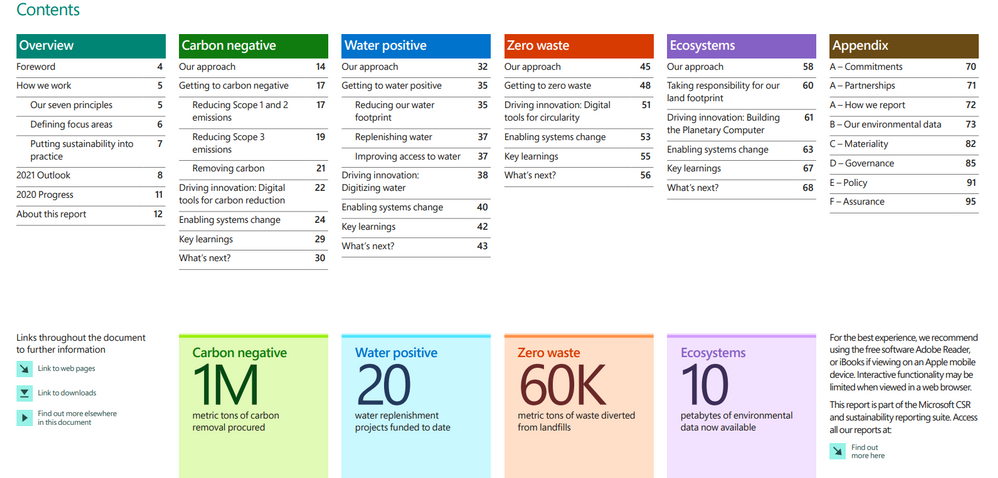
Table of Contents
“A Year of Action” is beautiful, rich, and frankly, dense. Each page is a wealth of information, conveyed through brightly colored infographics, text, data visualizations and hyperlinks that take the reader across the web to learn more about sustainability. The sheer volume of information included says a lot about the progress Microsoft has made in year one and just as importantly, its commitment to transparency. Brad Smith addresses this in the forward:
“In Microsoft’s first annual sustainability report, we look back at how and why we made our commitments, details about them, progress to date, and key lessons we have learned. We intend to not only share our successes, but also share our challenges.”
And there are plenty of challenges here. Beneath the flashy appearance and abundance of data in this report lies a simple but unavoidable truth: what Microsoft is attempting to do is unprecedented and damn near impossible, not just for a single company, but for human civilization. This report is a microcosm of what we must do as a global society to successfully avoid the worst-case scenarios of a climate disaster. I work at Microsoft, I work in sustainability, I know many of the people who put this report together and still, I was awe struck by the depth and complexity of what the team attempted to do in year one. Reading between the lines, I got a sense of how complicated and difficult it was to achieve even the modest gains outlined in the report.
Highlights and progress to date
The bulk of the report focuses on progress made in each of the company’s four environmental focus areas: carbon, water, waste and ecosystems. First, let’s start with the big picture:
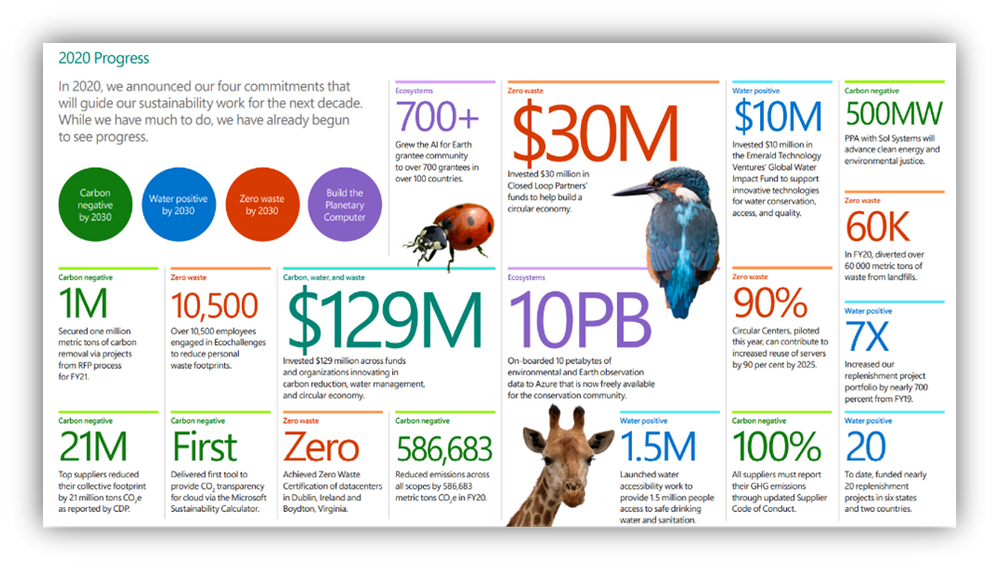 A short list of high level accomplishments in year one
- All up, Microsoft invested $129M across funds and organizations innovating in carbon reduction, water management, and circular economy (a system in which economic activity is decoupled from the consumption of scarce resources; waste is designed out, and there is an emphasis on repair, disassembly, and reuse.)
- The biggest barrier to more progress isn’t something Microsoft can directly control. Universally accepted methodologies and standards for measuring and reporting on sustainability data don’t exist yet. In some cases, Microsoft is leading the charge to create them. From what risk means, to carbon accounting standards, and the digitization of waste and water data, Microsoft spent its first year operating in uncharted territory as it tried to measure and report on its own progress in this space. Until we are all speaking the same language and using the same standards of measurement, progress will be incremental and fragmented. Here’s a short list of the accomplishments so far. If you want to know more, be sure to check back in on Part Two and Three of this series, where I’ll go deeper on these focus areas.
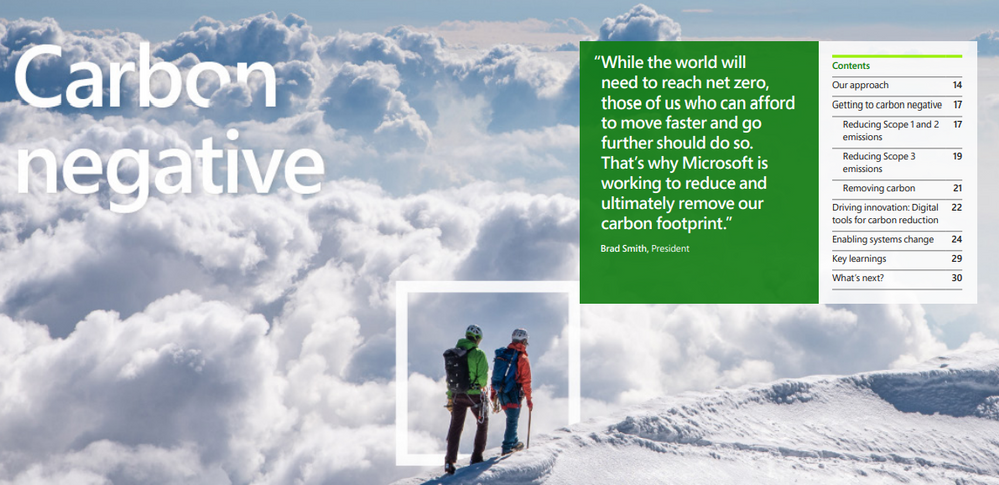 Carbon Negative
A company is carbon negative when it removes more carbon from the atmosphere than it emits each year. Microsoft will achieve this through a combination of reduction and removal, making deep reductions first and foremost, then using removal only for the residual footprint.
- Reduced emissions by 6% from 11.6M metric tons to 10.9M metric tons
- Removed 1M metric tons of carbon from the atmosphere (commonly referred to as carbon sequestration) via Request for Proposal (RFP)
- Delivered first tool to provide CO2 transparency for Azure via the Microsoft Sustainability Calculator
- Became a founding member of the Transform to Net Zero coalition alongside other large corporates like Mercedes-Benz AG, Starbucks, Unilever and Wipro
- Required that suppliers must report their GHG emissions through the updated Supplier Code of Conduct
- Secured a Power Purchase Agreement (PPA) with Sol Systems worth 500 megawatts to advance clean energy and environmental justice
- Top suppliers reduced their collective footprint by 21M metric tons
- Extended internal carbon fee emissions to include Scope 3 (indirect emissions from Microsoft’s supply and value chain)
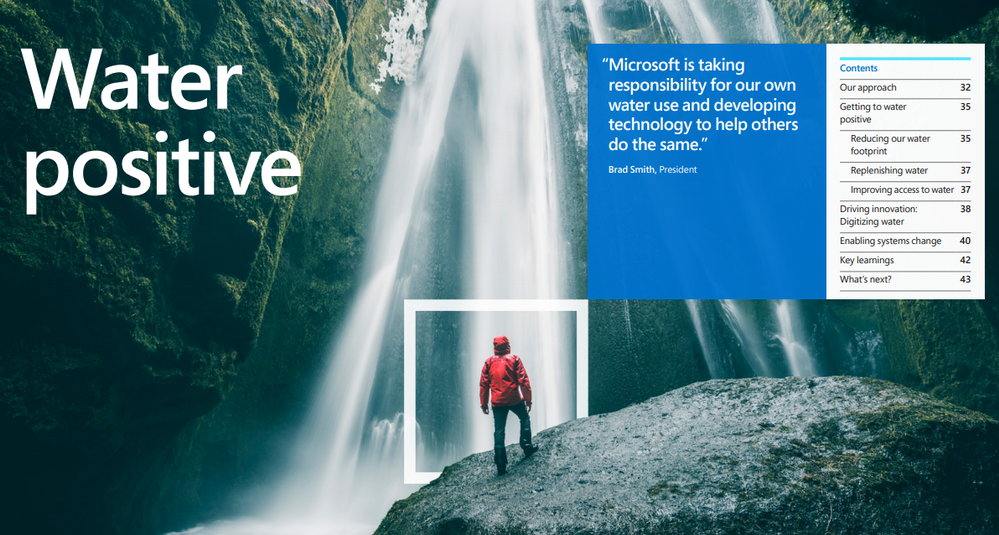 Water Positive
A company is water positive when it puts more water back into the environment than it consumes. Microsoft will accomplish this in a similar fashion as its carbon negative commitment, through a combination of reduction and in this case, replenishment.
- Funded 20 water replenishment projects
- Invested $10M in the Emerald Technology Ventures Global Water Impact Fund to support innovative technologies for water conservation, access and quality
- Increased replenishment project portfolio by nearly 700% from fiscal year 2019
- Launched water accessibility work to provide 1.5 million people access to safe drinking water and sanitation
- Co-founded the Water Resilience Coalition in partnership with the United Nations Global Compact CEO Water Mandate
 Zero Waste
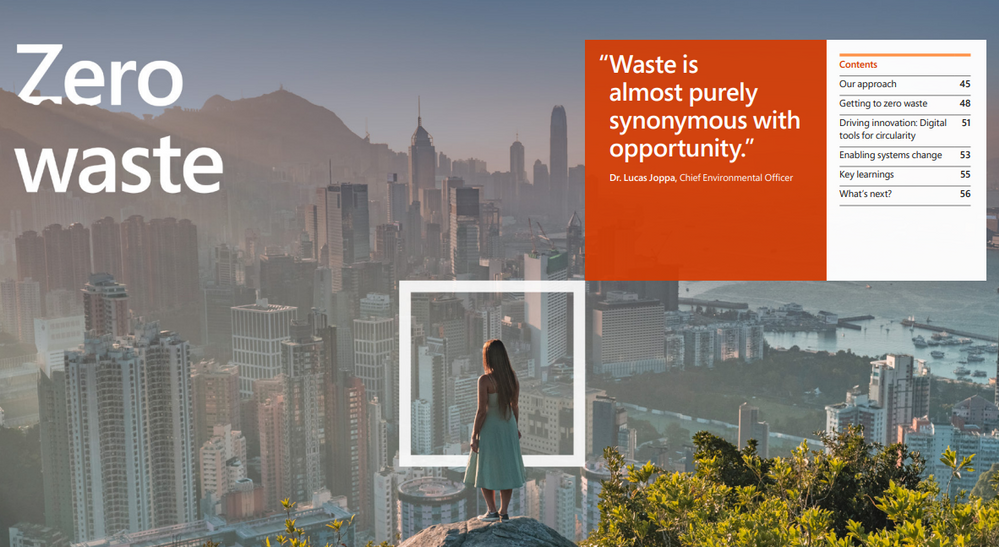
Zero waste is a set of principles focused on waste prevention that encourages the redesign of resource life cycles to reduce or eliminate waste generation. The goal is for no trash to be sent to landfills, incinerators or the ocean. In practice, for most individuals and companies, 100% waste diversion or elimination is simply not achievable so the goal is 90% diversion from landfill to achieve TRUE Zero Waste certification.
- Diverted 60K metric tons of waste from landfills
- Engaged 10,500 employees in Ecochallenges to reduce personal waste footprints
- Achieved Zero Waste Certification of datacenters in Dublin, Ireland and Boydton, Virginia
- Piloted Circular Centers, which set the company on a path to increase reuse of servers in data centers by 90% by 2025
- Invested $30M in Closed Loop Partners’ funds to help build a circular economy
- 100% recyclable Surface devices (in applicable countries) by 2030
- Will eliminate single-use plastics in all Microsoft primary product packaging and all IT asset packaging in datacenters (100% of all cloud packaging will be reusable, recyclable or compostable by 2025)
 Ecosystems
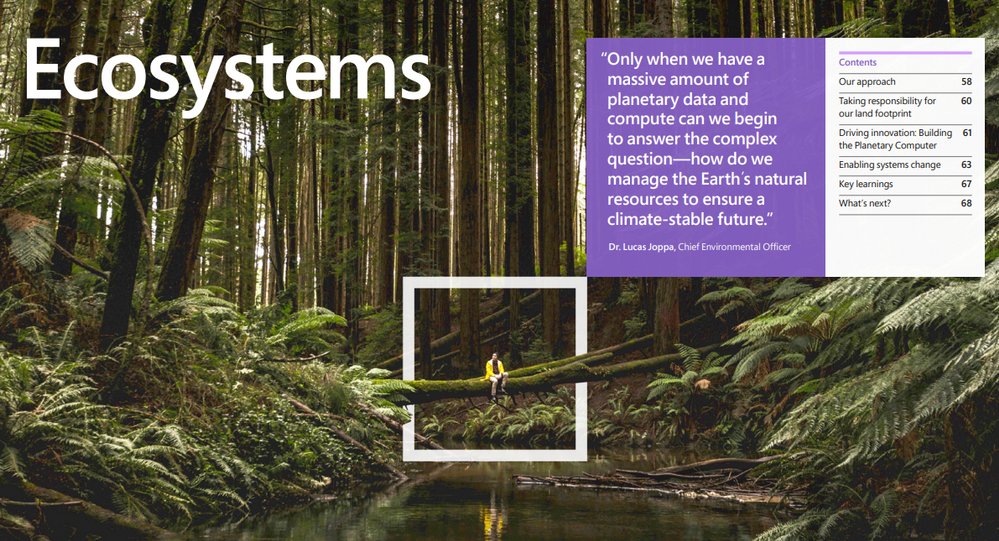
Nature, and the benefits that it provides, are the foundation of our society, cultures and the global economy. We depend on well-functioning ecosystems for clean air, water, food, medicine, energy and resources. Simply put, there is no human civilization if we continue to destroy the complex web of life around us.
- Begun process of protecting more land than we use by 2025 (which is 11K acres or 44,515 square meters)
- 10 petabytes of environmental data now available for free on Azure to the conservation community (a laptop hard drive is typically around 512GB now, so 10PB is around 20,000 typical laptops of data)
- 700+ grantees in the AI for Earth program from over 100 countries
- Began developing a Planetary Computer to better monitor, model and manage the world’s ecosystems
Conclusion
Each of the above bullet points represents an enormous amount of work and an audacious desire to push the envelope on what role the private sector can play in transitioning the global economy to a more sustainable future. After all, governments make the rules society operates within, and governments around the world have utterly failed in their response to the climate crisis. Even a company as large and powerful Microsoft has limited influence, but this report proves that the company is willing to see just how far that influence can go. Further, “A Year in Action” provides a behind the scenes look at how Microsoft thinks about, and is now acting on, its attempt to become one of the most sustainable companies on Earth. In the process, it hopes to create a wave of sustainable change across the entire economy.
My favorite sections were the “Key Learnings” at the end of each focus area where we get a glimpse of what went well, and more importantly, what didn’t. The humble approach and willingness to share this information is critical to ensuring others avoid the pitfalls Microsoft stumbled through. This open approach increases the chances that we make the broad societal changes required for a livable future within the time frame. Over the next nine years, we will find an answer to the big question – will it be enough? Lucas Joppa sums up the challenge, and consequences of failure, as succinctly as anyone:
“We have a limited amount of time to accomplish what will be the most significant behavioral and technological societal transformation in modern human history. By 2030, society must be well on its way to mitigating and adapting to rapidly changing climates, ensuring resilient water supplies, reducing the amount of waste we generate, and reversing the ongoing and catastrophic degradation of ecosystems while halting the extinction of species. That is why this must be a decade of ambition and action.”
If you want to know more, check back on Part Two and three of this post. Comments, questions, and conversation welcome below!
-Drew

by Contributed | Feb 5, 2021 | Technology
This article is contributed. See the original author and article here.
CIS Microsoft Azure Foundations Benchmark v1.3.0
Today the Center for Internet Security (CIS) announced the CIS Microsoft Azure Foundations Benchmark v1.3.0. The scope of CIS Microsoft Azure Foundations Benchmark is to establish the foundation level of security while adopting Microsoft Azure Cloud. This benchmark includes the following control areas:
- Identity and Access Management
- Security Center
- Storage Accounts
- Database Services
- Logging and Monitoring
- Networking
- Virtual Machines
- Other Security Considerations
- AppService
Azure Security Benchmark
On the Microsoft side, Azure Security Benchmark is the benchmark developed by Azure that includes a collection of high-impact security recommendations that you can use to secure the services in Azure. The Azure Security Benchmark includes security controls and service baselines:
- Security controls: These recommendations are a high-level description of a feature or activity that needs to be addressed and is not specific to a technology or implementation. The controls are applicable across customer Azure tenant and Azure services. Each recommendation identifies a list of stakeholders that are typically involved in planning, approval, or implementation of the benchmark. Customers may use this stakeholder to determine the persona and assign role and responsibilities when implementing these recommendations. There are a total of 11 security control domains included in the Azure Security Benchmark v2.
- Service baselines: These apply the controls to individual Azure services to provide recommendations on that service’s security configuration. The baseline currently covers over 85 Azure services.
The CIS Microsoft Azure Foundations Benchmarks v1.3.0 is in alignment with Microsoft recommended security best practices. A mapping between the Azure Security Benchmark v2 and CIS Microsoft Azure Foundations Benchmark v1.3.0 is available here. If you are already using either benchmark to secure your Azure environment, this mapping provides a direct reference of the synergy between the CIS Microsoft Azure Foundations Benchmark v1.3.0 and Azure Security Benchmark v2.
What’s coming next?
Azure Security Center now provides monitoring of Azure Security Benchmark by default to all Azure Security Center customers, including Azure Security Center free tier as well as the existing Azure Defender customers. You can also monitor the compliance status with the CIS Microsoft Azure Foundations Benchmark in the Azure Security Center Regulatory Compliance Dashboard by enabling Azure Defender. We currently support monitoring the version v1.1 of the CIS Microsoft Azure Foundations Benchmark and are working towards the release of an update to monitor the new v1.3.0 Benchmark and mapping to ASB v2 in upcoming weeks.
We would love to hear your feedback on how our benchmark is working for you. You can reach us by sending an email.


Recent Comments