
by Contributed | Feb 11, 2021 | Technology
This article is contributed. See the original author and article here.
Hi everyone and welcome to chapter 14 of 2020! It’s been a little while since we talked about standards for passwordless so we’re excited to tell you about some new enhancements and features in FIDO2 land that you’ll start seeing in the wild in the next few months!
Specification Status
The Web Authentication API (WebAuthn) Level 2 specification is currently a Candidate Recommendation at the W3C. “Level 2” essentially means major version number 2.
The version 2.1 of the Client to Authenticator Protocol (CTAP) specification is a Release Draft at the FIDO Alliance. This means the spec is in a public review period before final publication.
These new draft versions are on their way to becoming the next wave of FIDO functionality (as of the writing of this blog, we support Level 1 of WebAuthn and CTAP version 2.0). We think you might want to hear about what we think is especially fun about WebAuthn L2 and CTAP 2.1.
Enterprise Attestation (EA)
Enterprise Attestation is a new feature coming as part of WebAuthn L2 and CTAP 2.1 that enables binding of an authenticator to an account using a persistent identifier, similar to a smart card today.
FIDO privacy standards require that a “a FIDO device does not have a global identifier within a particular website” and “a FIDO device must not have a global identifier visible across websites”. EA is designed to be used exclusively in enterprise-like environments where a trust relationship exists between devices and/or browsers and the relying party via management and/or policy. If EA is requested by a Relying Partying (RP) and the OS/browser is operating outside an enterprise context (personal browser profile, unmanaged device, etc), the browser is expected to prompt the user for consent and provide a clear warning about the potential for tracking via the persistent identifier being shared.
Authenticators can be configured to support Vendor-facilitated and/or Platform-managed Enterprise Attestation. Vendor-facilitated EA involves an authenticator vendor hardcoding a list of Relying Party IDs (RP IDs) into the authenticator firmware as part of manufacturing. This list is immutable (aka non-updateable). An enterprise attestation is only provided to RPs in that list. Platform-managed EA involves an RP ID list delivered via enterprise policy (ex: managed browser policy, mobile application management (MAM), mobile device management (MDM) and is enforced by the platform.
Spec reference:
CTAP 2.1 – Section 7.1: Enterprise Attestation
WebAuthn L2 – Section 5.4.7: Attestation Conveyance Preference
Authenticator Credential Management and Bio Enrollment
Credential Management is part of CTAP 2.1 and allows management of discoverable credentials (aka resident keys) on an authenticator. Management can occur via a browser, an OS settings panel, an app or a CLI tool.
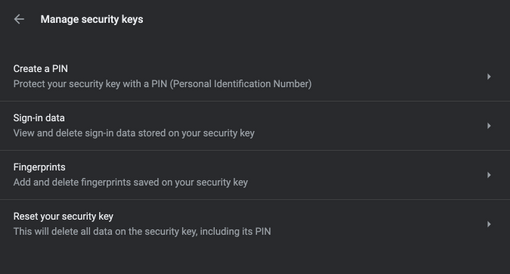
Here’s an example of how the Credential Management capability is baked into Chrome 88 on macOS (chrome://settings/securityKeys). Here I can manage my PIN, view discoverable credentials, add and remove fingerprints (assuming the authenticator has a fingerprint reader!) and factory reset my authenticator.
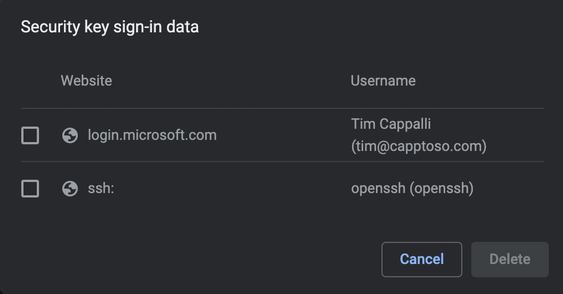
Clicking on “Sign-in data” shows the discoverable credentials on the authenticator and allows me to remove them. This security key has an Azure AD account and an identity for use with SSH.
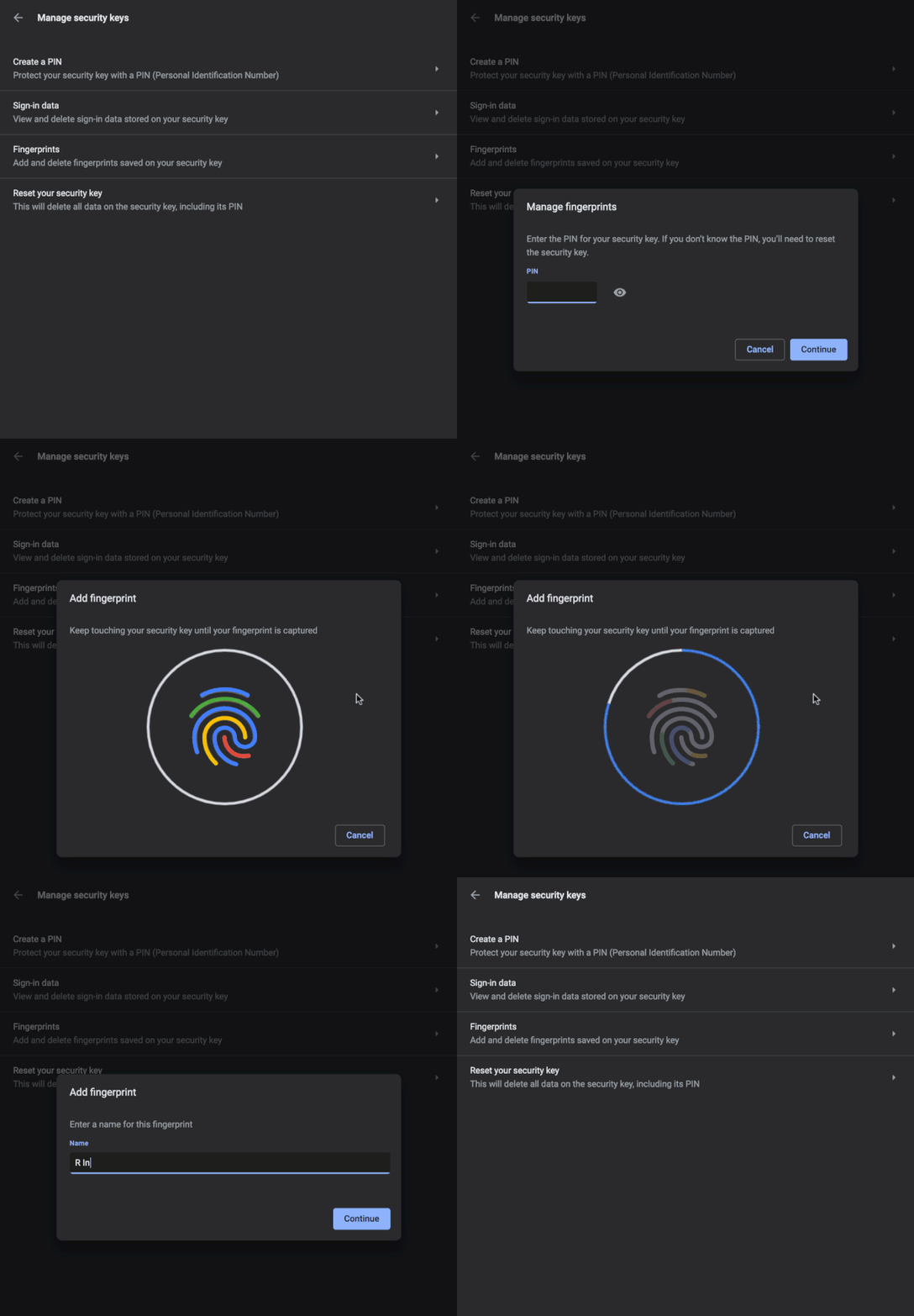
Bio Enrollment allows the browser, client, or OS to aid in configuring biometrics on authenticators that support them. This security key has one finger enrolled. I can either remove the existing finger or add more.
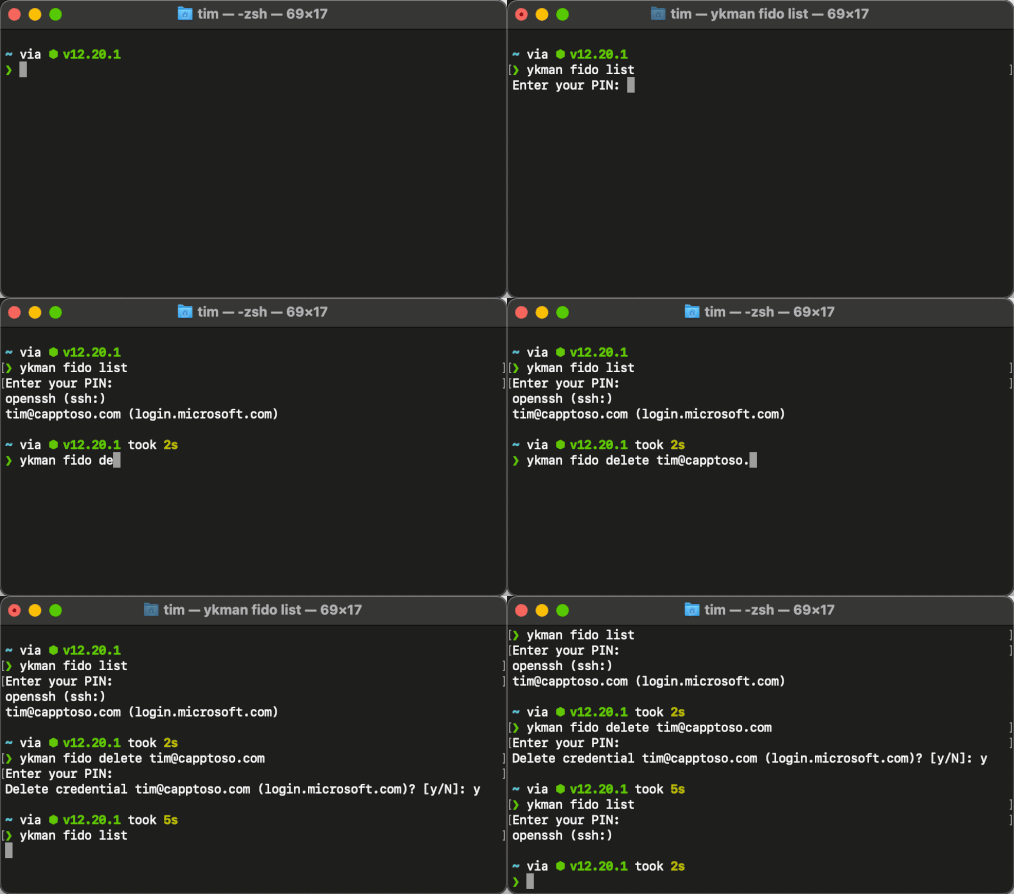
Here’s an example of authenticator credential management via a CLI tool, ykman from Yubico.
Spec references:
CTAP 2.1 – Section 5.8: Credential Management
CTAP 2.1 – Section 5.7: Bio Enrollment
Set Minimum PIN Length and Force Change PIN
CTAP 2.1 allows an RP to require a minimum PIN length on the authenticator. If the existing PIN does not meet the RP’s requirements, a change PIN flow can be initiated.
An authenticator can also be configured with a one-time use PIN that must be changed on first use. This is an additional layer of protection when an authenticator is pre-provisioned by an administrator and then needs to be sent to an end user. The temporary PIN can be communicated to the end user out of band. We see this being used in conjunction with Enterprise Attestation to create a strong relationship between an authenticator and a user.
Spec reference:
CTAP 2.1 – Section 7.4: Set Minimum PIN Length
Always Require User Verification (AlwaysUV)
AlwaysUV is part of CTAP 2.1 and allows the user to configure their authenticator to always prompt for user verification (PIN, biometric, etc), even when the Relying Party does not ask for it. This adds an extra layer of protection by ensuring all credentials on the authenticator require the same verification method.
Spec reference:
CTAP 2.1 – Section 7.2: Always Require User Verification
Virtual Authenticator DevTool
This one is not tied to updates of either specification but we love it and wanted to share! Chrome and Edge (version 87+) now include a virtual authenticator as part of DevTools. It started as a Chromium extension back in 2019 and is now native! Oh, and the code is on Github!

It is a great tool for testing, debugging and learning! Try it with one of the awesome WebAuthn test sites: Microsoft WebAuthn Sample App, WebAuthn.io, Yubico WebAuthn Demo.
To access the tool, open Developer Tools ( F12 or Option + Command+ I ), click the Menu icon on the top right (…) then More tools and WebAuthn.

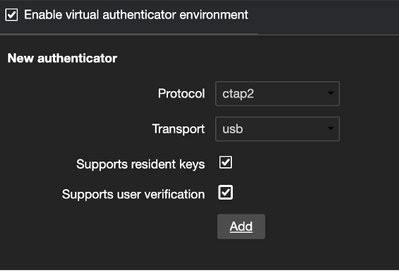
Enabling the virtual authenticator environment will allow you to create a new authenticator by picking a protocol (CTAP2 or U2F), transport (USB, Bluetooth, NFC or internal), resident key (discoverable) and user verification support.
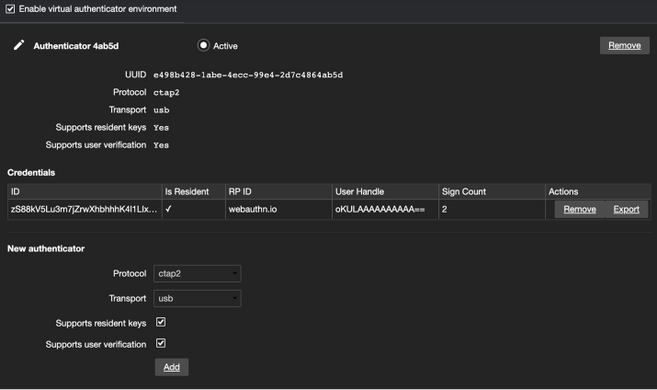
As new credentials are created, you’ll see them listed and the sign count will increase as the credential is used.
Want to know more? Here’s an amazing blog by Nina Satragno from the Chrome team over at Google who created this amazing DevTool!
How we built the Chrome DevTools WebAuthn tab
Wrap Up
That rounds out the major features we believe will have the most impact. Here’s a few other enhancements and features that are important to mention!
If you’d like to hear more about any of these enhancements/features (or anything else identity related, let’s be honest), leave us a note :backhand_index_pointing_down: in the comments.
Thanks for reading!
Tim Cappalli | Microsoft Identity | @timcappalli
by Contributed | Feb 11, 2021 | Technology
This article is contributed. See the original author and article here.
Digital transformation has been with us for some years, but with the global pandemic, it has quickly become an urgent reality for many organizations. With the various lockdowns around the globe, companies suddenly had to adjust their business processes and enable workers to work from home (WFH) while others are in the office. IT professionals must ensure printing is still secure when supporting a hybrid workforce.
The market movement towards cloud has accelerated rapidly during the COVID-19 pandemic and Kyocera believes Universal Print will play an integral part in the new normal.
Microsoft 365 brings together Office, Enterprise Mobility + Security, and Windows 10 Enterprise to empower people with the most innovative productivity tools. Universal Print is a new innovative technology that delivers a flexible printing environment using a cloud-based service that is part of Microsoft 365.
Universal Print is a multi-tenant, cloud-based modern print service. It moves printing to the cloud by removing the need for the on-premises print servers and Active Directory domain controllers that have been traditionally necessary for printing. Instead, Universal Print uses Azure Active Directory (Azure AD) and enables IT administrators to share printers across their organization, regardless of where the end users are located. It also adds key functionality such as security groups for printer access, location-based printer discovery, and a comprehensive administrator experience.
Kyocera believes that Universal Print will accelerate the transition to a cloud-based print infrastructure as organizations look to deliver an efficient, secure and cost-effective print environment that supports today’s rapidly evolving hybrid workplace. Kyocera is working with Microsoft to offer integration with the Universal Print service on selected Kyocera devices for organizations to manage their print infrastructure through Microsoft 365 cloud services. This integration should be complete in early 2021.
Ultimately, Universal Print can be an effective tool in helping to support the printing needs of the hybrid workplace, providing remote workers with a secure way to submit print jobs either to home office printers or to any office location. Universal Print is a good answer to enterprises that are limiting their dependency on on-premises servers (including print servers),and want a more centralized approach to print management. This will help to better control costs, and reduce IT complexity as it relates to printers.
After the general availability of Universal Print, Kyocera will begin releasing new devices that natively support the platform without needing the proxy connector, and offer firmware updates for existing devices. The shift to native Universal Print will allow realizing an even more tightly integrated and seamless user and administrator experience. We believe Universal Print is certainly the way forward as organizations navigate the new demands on their traditional print infrastructure.
Kyocera looks forward to continuing the journey with Microsoft as the market continues the adoption of Universal Print.
by Contributed | Feb 11, 2021 | Technology
This article is contributed. See the original author and article here.
Hi everyone,
We are considering replacing the Lab Account experience with a slightly different concept in the future. Please help us name this new concept by taking a quick 3-minute survey: https://www.surveymonkey.com/r/79MJ8GN
The survey will describe the new concept and the naming options.
We’d love to hear any feedback on how the different term options influence your perspective of what this new concept does.
Thank you!
by Contributed | Feb 11, 2021 | Technology
This article is contributed. See the original author and article here.
At Printix, we designed and built our cloud print management platform from the ground up as a Microsoft Azure hosted solution.
Our aim is to transform traditional print management, allowing organizations of any size to benefit from the flexibility, productivity, cost savings and sustainability contributions offered by a modern workplace printing solution.
To help end-customers achieve this we embrace a cloud first, mobile first strategy; simplify and automate print related admin tasks; turn big data into actionable insights to obtain better decisions for companies; and offer the entire package as the first Print Management as a Service business model with usage-based pricing.
We support Universal Print by Microsoft as a hand in glove solution embracing common objectives of modern workplace print management.
Integrate Universal Print with Printix
Organizations running Universal Print can extend the capabilities with support for all current printers and multifunction devices along with additional printing capabilities.
- Direct print. Keep documents local and ensure print availability if Internet is down.
- Secure document release with Printix App to print when and where you want from any smartphone, tablet, or computer to any printer.
- Secure document release with Printix Go. Integrates with your printer’s touchscreen control panel, offering secure print release, copy control, card-based authentication and more.
- Mobile Printing from iOS and Android
- Google Workspace and Chromebook support for mixed environments.
- Windows Virtual Desktop, Citrix or RDS support.
Additionally, the Printix solution can benefit Universal Print users by delivering:
- Support for Windows, Mac and Chrome OS as well as Android and iOS/iPadOS
- Leverage Printix’s proven solution to translate printer capabilities from printer vendor specific drivers to Universal Print printer attributes
- Support for Mac with native driver print
How it works
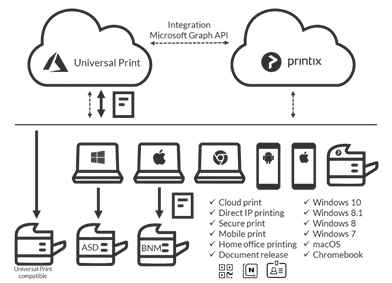
Microsoft Graph API integration connects Printix and Universal Print to a single managed cloud service with extended features, security, management, and reporting.
Integration is Key
In successfully partnering as a co-sell ready Microsoft ISV for several years now, Printix continues to support Microsoft and its channel partners with tightly integrated solutions. Supporting Universal Print is the latest in a long line of Microsoft integrations provided by Printix including:
by Contributed | Feb 11, 2021 | Technology
This article is contributed. See the original author and article here.
The integration
Our integration with Universal Print by Microsoft enables dealers to provide customers with a cost-effective cloud-based print management service that is very easy to activate and simple to onboard. This, in turn, helps build even stronger client relationships, increases the chances of contract renewals, and creates a solid base for business growth.
MPS Monitor multi-tenant cloud service automatically syncs with Microsoft Azure Active Directory to activate the Universal Print service for each selected customer.
Once the service is active, the on-premises Data Collection Agent (DCA) is automatically enabled to work as a Universal Print Connector, avoiding the need to install any additional software or hardware components on the customer’s network.
Dealer and customer benefits
Dealers may enable customers using Microsoft 365 subscriptions to access Universal Print at no additional cost. As part of their MPS engagements, Managed Print providers can assist customers with managing Universal Print accounts as an additional value-added service — much in the same way as customers might employ a third-party to look after their emails and web servers.
A win for everyone
We believe giving dealers the tools to help customers transition painlessly to a cloud-based print management environment is a win for everyone. Customers will be grateful that many of the barriers previously associated with moving away from more traditional printer management models have been removed. At the same time, dealers have the chance to offer a new service to their client base and demonstrate that they are at the forefront of an evolving industry.
For more information on how to access Universal Print by Microsoft within MPS Monitor 2.0, visit www.mpsmonitor.com/up.
by Contributed | Feb 11, 2021 | Technology
This article is contributed. See the original author and article here.
The 9th cumulative update release for SQL Server 2019 RTM is now available for download at the Microsoft Downloads site. Please note that registration is no longer required to download Cumulative updates.
To learn more about the release or servicing model, please visit:
• CU9 KB Article: https://support.microsoft.com/en-us/help/5000642
Starting with SQL Server 2017, we adopted a new modern servicing model. Please refer to our blog for more details on Modern Servicing Model for SQL Server
• Microsoft® SQL Server® 2019 RTM Latest Cumulative Update: https://www.microsoft.com/download/details.aspx?id=100809
• Update Center for Microsoft SQL Server: https://docs.microsoft.com/en-us/sql/database-engine/install-windows/latest-updates-for-microsoft-sql-server
by Contributed | Feb 11, 2021 | Technology
This article is contributed. See the original author and article here.
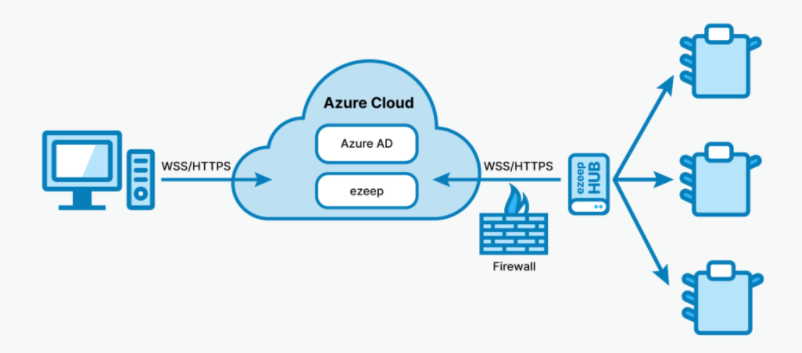
With ezeep’s Hub for Universal Print any existing printer can support Universal Print. The Hub can service single printers in home offices as well as fleets of printers in offices.
While printer manufacturers, many of which ezeep partners with – are working to add support for Universal Print to new printers there are millions of printers and even more users out there that could greatly benefit from Universal Print’s capabilities. Adding support to existing printers is cost effective, ecological, and quick.
ezeep Hub is the best way to connect existing printers to Universal Print. It is an affordable, solid-state micro-appliance that can be deployed to home offices, offices, and remote locations alike. With just an Ethernet connection and power needed it detects printers on its local network and adds them to a Universal Print account so they can be assigned to the users.
ezeep Hub was developed because software connectors require too much know how to be rolled out and a computer or server has to be set aside, maintained, secure and kept running at all times, costing around $2000 per year according to Quocirca. That is significantly less economic and ecological as a solid-state micro-appliance that can be powered with any micro-USB power cord, configured with a simple web interface, and doesn’t need maintenance or security updates thanks to a customized, locked-down and hardened OS.
Each ezeep Hub is tied to a Microsoft Azure account and its printers are accessible only from within this account ensuring printers can only be used by authorized users and print data cannot be seen by unauthorized parties.
Creating an outbound connection, to avoid complex firewall configurations, from its location ezeep Hub authorizes with Microsoft Azure and reports the printers it detected – particularly stubborn printers can be added manually – to the organization’s account where they can be assigned to the respective users and appear within their Universal Print interfaces.
Once a user initiates a printout their job is sent as a securely sent from Microsoft Universal Print to the respective ezeep Hub which routes the job to the printer on the local job. This setup also keeps printers and the sensitive data they process shielded from direct connections to the internet.
ezeep Hub for Universal Print also offers an upgrade path to the full ezeep solution for customers looking for extra features like support for MacOS, iOS, iPadOS and Android as well as secure printing and others.
ezeep is part of the ThinPrint family of products and draws on more than 20 years of experience in providing print management and optimization to more than 30,000 customers in 126 countries around the world with solutions for single users as well as for deployments are large as 300,000 users.
Visit our site to learn more about ezeep Hub for Universal Print.

by Contributed | Feb 11, 2021 | Technology
This article is contributed. See the original author and article here.
Azure Accelerated Networking is now available on HBv2, HC and HB virtual machines (VMs). Enabling this feature improves networking performance between VMs when connecting over the Ethernet-based vNICs, which is useful for scenarios like high-performance filesystems created on Azure VMs and mounted against client compute VMs. In this article we measure the network latency, bandwidth and I/O performance connecting HPC VMs to an NFS server, with Accelerated Networking enabled and disabled to see the impact. This article also covers network tuning to get the best performance with Accelerated Networking on HBv2 and HB VMs.
Ethernet network latency and bandwidth benchmarks
The ntttcp tools was used to perform Accelerated Networking bandwidth tests.
The following command line parameters were used
ntttcp -r -m 64,* –show-tcp-retrans –show-nic-packets eth0   (on receiver)
ntttcp -s -m 64,*,$server_ip –show-tcp-retrans –show-nic-packets eth0  (on sender)
Network latencies were measured using the linux sockperf tool.
/usr/sbin/sysctl -w net.core.busy_poll=50
/usr/sbin/sysctl -w net.core.busy_read=50
sockperf server -i $server_ip –tcp -p 8201   (on receiver)
sockperf sockperf ping-pong -i $server_ip -p 8201 -t 20 –tcp –pps=max  (on sender)
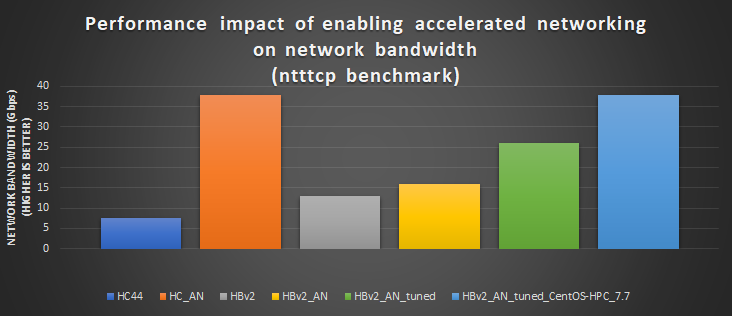
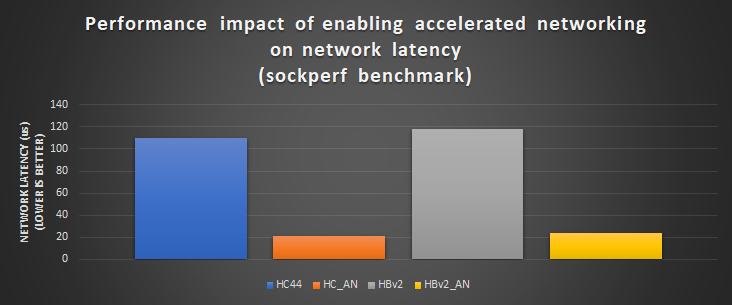
NOTE: CentOS-HPC 7.8 was used for all network latency and bandwidth benchmarks. The HBv2 network
      bandwidth test applying the network tuning described below did not achieve the expected ~38 Gbps,
      but using CentOS-HPC 7.7 we were able to achieve ~38 Gbps. An updated version of CentOS-HPC 7.8
      will be released at a later date to correct this performance problem.
Ethernet network tuning for HB120_v2 and HB60
On HB120_v2 and HB60 some manual network tuning is needed to see the performance benefits of accelerated networking.
NOTE: Network tuning will be included in future Marketplace HPC images
Here are the manual network tuning steps
- Change the number of multi-purpose channels for the eth2 network device. The default number of multi-purpose channels on HBv2, HB and HC SKU’s is 31. In out testing, 4 multi-purpose channels gives the best performance.
ethtool -L eth2 combined 4
- Pin the first four multi-purpose channels of device eth2 to vNUMA 0
To get the first four multi-purpose channel indices
ls /sys/class/net/eth2/device/msi_irqs
Map first four multi-purpose channel to vNUMA 0
echo “0” > /proc/irq/${irq_index[0]}/smp_affinity_list
echo “1” > /proc/irq/${irq_index[1]}/smp_affinity_list
echo “2” > /proc/irq/${irq_index[2]}/smp_affinity_list
echo “3” > /proc/irq/${irq_index[3]}/smp_affinity_list
NOTE: There is a script called map_irq_to_numa.sh in the azurehpc git repo to do this automatically. (here)
- Pin your executable (i.e ntttcp) to vNUMA 0
taskset -c 0-3 ntttcp <ntttcp_args>
I/O Performance benchmark
We performed synthetic I/O benchmarks (FIO) on HC44 and HB120_v2 connected to an NFS server, to determine the performance impact of Accelerated Networking on network storage I/O performance.
NFS server configuration
D64s_v4 (6 x P30 disks)
NFS server used CentOS 7.8 and HPC I/O clients used CentOS-HPC 7.8
Expected theoretical peak I/O performance = ~1200 MB/s (Due to D64s_v4 and P30 disk limits)
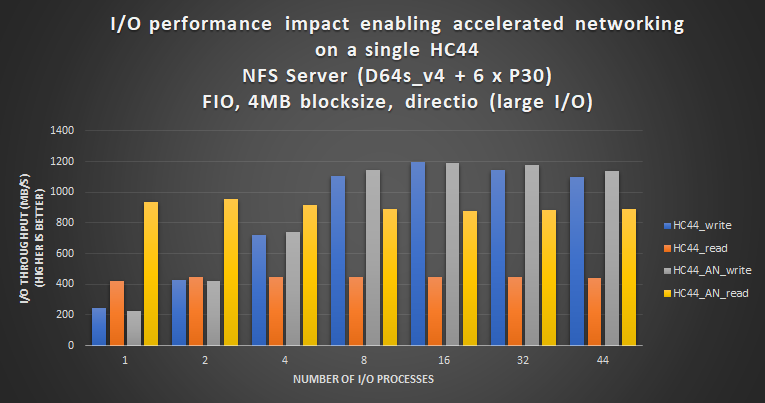
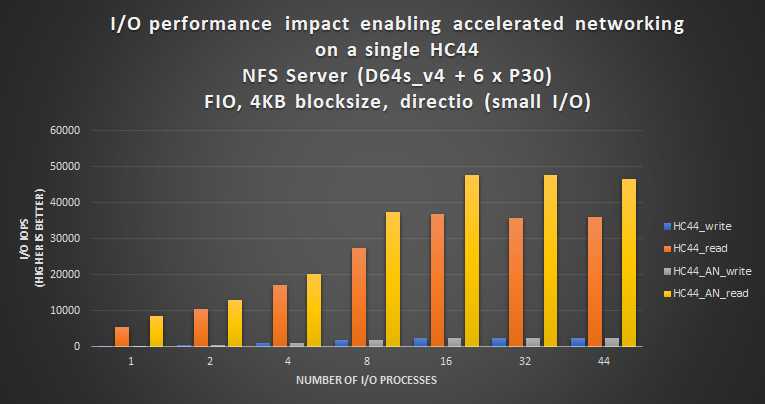
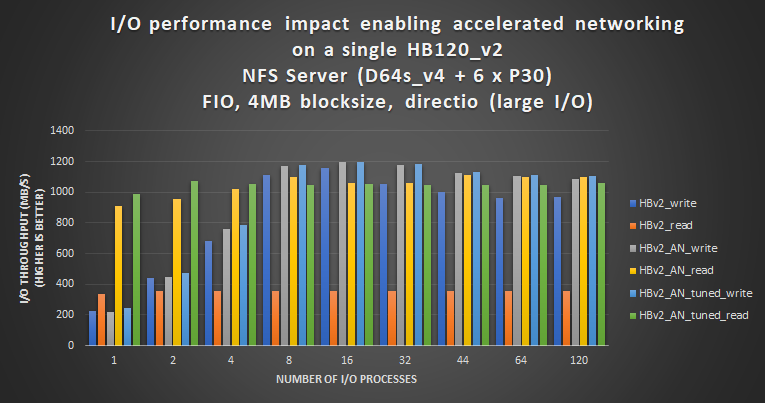
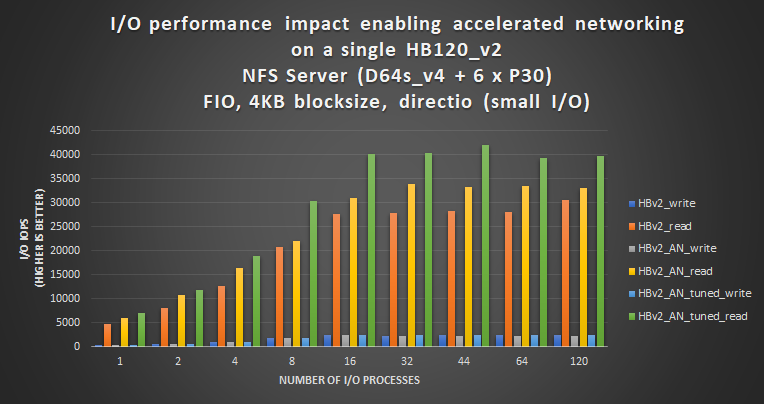
NOTE: In this I/O benchmark an NFS server was used in which the D64s_v4 and P30 disk limits restricted I/O performance
      even though the network had more bandwidth to go faster. If a network storage solution is used with faster disks
      or higher throughput, greater gains in I/O performance would be expected by enabling Accelerated Networking.
Summary
- Enabling accelerated networking on HPC VMs has a significant impact on front-end network performance (latency and bandwidth).
- HB120_v2 and HB60 SKUs require network tuning to benefit from Accelerated Networking.
- Accelerated networking improves network storage I/O performance, especially read I/O at lower client counts.
by Contributed | Feb 11, 2021 | Technology
This article is contributed. See the original author and article here.
The 16th cumulative update release for SQL Server 2016 SP2 is now available for download at the Microsoft Downloads site. Please note that registration is no longer required to download Cumulative updates.
To learn more about the release or servicing model, please visit:
by Scott Muniz | Feb 11, 2021 | Security, Technology
This article is contributed. See the original author and article here.
In response to recent events where unidentified cyber actors obtained unauthorized access to the supervisory control and data acquisition (SCADA) system at a U.S. drinking water treatment facility, CISA, the Federal Bureau of Investigation, the Environmental Protection Agency, and the Multi-State Information Sharing and Analysis Center have released joint Cybersecurity Advisory AA21-042A: Compromise of U.S. Water Treatment Facility. This advisory outlines how cyber criminals exploit desktop sharing software and end-of-life operating systems to gain unauthorized access to systems.


Recent Comments