This article is contributed. See the original author and article here.
Malware Analysis Report
10322463.r7.v1
2021-02-12
Notification
This report is provided “as is” for informational purposes only. The Department of Homeland Security (DHS) does not provide any warranties of any kind regarding any information contained herein. The DHS does not endorse any commercial product or service referenced in this bulletin or otherwise.
This document is marked TLP:WHITE–Disclosure is not limited. Sources may use TLP:WHITE when information carries minimal or no foreseeable risk of misuse, in accordance with applicable rules and procedures for public release. Subject to standard copyright rules, TLP:WHITE information may be distributed without restriction. For more information on the Traffic Light Protocol (TLP), see http://www.us-cert.gov/tlp.
Summary
Description
This Malware Analysis Report (MAR) is the result of analytic efforts among the Federal Bureau of Investigation (FBI), the Cybersecurity and Infrastructure Security Agency (CISA), and the Department of Treasury (Treasury) to highlight the cyber threat to cryptocurrency posed by North Korea, formally known as the Democratic People’s Republic of Korea (DPRK), and provide mitigation recommendations. Working with U.S. government partners, FBI, CISA, and Treasury assess that Lazarus Group—which these agencies attribute to North Korean state-sponsored advanced persistent threat (APT) actors—is targeting individuals and companies, including cryptocurrency exchanges and financial service companies, through the dissemination of cryptocurrency trading applications that have been modified to include malware that facilitates theft of cryptocurrency.
This MAR highlights this cyber threat posed by North Korea and provides detailed indicators of compromise (IOCs) used by the North Korean government. The U.S. Government refers to malicious cyber activity by the North Korean government as HIDDEN COBRA. For more information on other versions of AppleJeus and recommended steps to mitigate this threat, see Joint Cybersecurity Advisory AA21-048A: AppleJeus: Analysis of North Korea’s Cryptocurrency Malware at https://www.us-cert.cisa.gov/ncas/alerts/AA21-048A.
There have been multiple versions of AppleJeus malware discovered since its initial discovery in August 2018. In most versions, the malware appears to be from a legitimate-looking cryptocurrency trading company and website, whereby an unsuspecting individual downloads a third-party application from a website that appears legitimate.
The U.S. Government has identified AppleJeus malware version—Ants2Whale—and associated IOCs used by the North Korean government in AppleJeus operations.
Ants2Whale, discovered in October 2020, is a legitimate-looking cryptocurrency trading software that is marketed and distributed by a company and website—Ants2Whale and ants2whale[.]com, respectively—that appear legitimate. Some information has been redacted from this report to preserve victim anonymity.
This OSX program from the Ants2Whale site is an Apple DMG installer. The OSX program does not have a digital signature and will warn the user of that before installation. As all previous versions of AppleJeus, the Ants2Whale installer appears to be legitimate and installs “Ants2Whale”(D5AC680E14B013E0624470DA7F46E84809D00B59A7544F6A42B110CF0E29254E) in the “/Applications/Ants2whale.app/Contents/MacOS/Ants2whale” folder and a program named Ants2WhaleHelper (BB430087484C1F4587C54EFC75681EB60CF70956EF2A999A75CE7B563B8BD694) also in the “/Library/Application Support/Ants2WhaleSupport/” folder.
Similar to all previous OSX AppleJeus variants, there is a postinstall script and a plist file which creates a LaunchDaemon to automatically run the Ants2WhaleHelper program.
ants2whale.com
Relationships
ants2whale.com
Downloaded
[Redacted]
Description
The website appears to show a legitimate cryptocurrency company and application, though it does contain multiple spelling and grammar mistakes indicating the creator may not have English as a first language. The website states that in order to download, a user must contact the administrator as their product is “premium package.”
The domain ants2whale.com had a legitimately signed Sectigo Secure Sockets Layer (SSL) certificate, which was “Domain Control Validated” just as all previous AppleJeus domain certificates. The certificate was is valid from 09/21/2020 – 09/21/2021.
The domain is registered with NameCheap at the IP address 198.54.114.237 with ASN 22612. This IP is on the same ASN as the CoinGoTrade (AppleJeus variant 5 and Dorusio IP addresses (AppleJeus variant 6).
Screenshots
Figure 1 – Screenshot the ants2whale.com site.
Figure 2 – Screenshot of how to download Ants2Whale.
This OSX sample was contained within Apple DMG installer “Ants2Whale.dmg.” Ants2Whale is likely a copy of an open source cryptocurrency wallet application. When ran it loads a legitimate looking program which is fully functional and is very similar to the AppleJeus variant 5 “CoinGoTrade” application. Similar to CoinGoTrade there are references to “CryptoMex” in the Ants2Whale application.
Similarly to the CoinGoTrade application, the strings from Ants2Whale reveal the C2 hxxp[:]//45.147.231.77:3000. Investigation revealed the IP address 45.147.231.77 was hosted at Combahton GMH.
Screenshots
Figure 3 – Screenshot of the “Ants2Whale” application.
45.147.231.77
Tags
command-and-control
Ports
Whois
Queried whois.ripe.net with “-B 45.147.231.77″…
% Information related to ‘45.147.228.0 – 45.147.231.255’
% Abuse contact for ‘45.147.228.0 – 45.147.231.255’ is ‘abuse@combahton.net’
a variant of OSX/TrojanDownloader.NukeSped.B trojan
Emsisoft
Trojan.MAC.Generic.105439 (B)
Ikarus
Trojan-Downloader.OSX.Nukesped
Lavasoft
Trojan.MAC.Generic.105439
McAfee
OSX/Nukesped.h
Quick Heal
MacOS.Trojan.40149.GC
Symantec
OSX.Trojan.Gen
Zillya!
Downloader.NukeSped.OSX.13
YARA Rules
No matches found.
ssdeep Matches
No matches found.
Relationships
bb43008748…
Contained_Within
[Redacted]
bb43008748…
Connected_To
qnalytica.com
Description
This OSX sample was contained within Apple DMG installer “Ants2Whale.dmg.” Ants2WhaleHelper is similar to variants of AppleJeus. The Ants2WhaleHelper program contains the custom C++ “Barbeque” class for network communication as seen in the unioncryptoupater program. The C2 for this program is hxxps[:]//www[.]qnalytica.com/wp-rss.php.
qnalytica.com
Tags
command-and-control
URLs
qnalytica.com/wp-rss.php
Whois
Whois for qnalytica.com had the following information: Registrar: ENOM INC Creation Date: 2020-08-11 Registrar Registration Expiration Date: 2021-08-11
The domain qnalytica.com has a legitimately signed SSL certificate from cPanel. cPanel is a hosting platform and certificate authority which is a reseller for Sectigo. The domain is registered with NameCheap at the IP address 194.36.191.196 with ASN 60117.
CISA recommends that users and administrators consider using the following best practices to strengthen the security posture of their organization’s systems. Any configuration changes should be reviewed by system owners and administrators prior to implementation to avoid unwanted impacts.
Maintain up-to-date antivirus signatures and engines.
Keep operating system patches up-to-date.
Disable File and Printer sharing services. If these services are required, use strong passwords or Active Directory authentication.
Restrict users’ ability (permissions) to install and run unwanted software applications. Do not add users to the local administrators group unless required.
Enforce a strong password policy and implement regular password changes.
Exercise caution when opening e-mail attachments even if the attachment is expected and the sender appears to be known.
Enable a personal firewall on agency workstations, configured to deny unsolicited connection requests.
Disable unnecessary services on agency workstations and servers.
Scan for and remove suspicious e-mail attachments; ensure the scanned attachment is its “true file type” (i.e., the extension matches the file header).
Monitor users’ web browsing habits; restrict access to sites with unfavorable content.
Exercise caution when using removable media (e.g., USB thumb drives, external drives, CDs, etc.).
Scan all software downloaded from the Internet prior to executing.
Maintain situational awareness of the latest threats and implement appropriate Access Control Lists (ACLs).
Additional information on malware incident prevention and handling can be found in National Institute of Standards and Technology (NIST) Special Publication 800-83, “Guide to Malware Incident Prevention & Handling for Desktops and Laptops”.
Contact Information
CISA continuously strives to improve its products and services. You can help by answering a very short series of questions about this product at the following URL: https://us.cert.cisa.gov/forms/feedback/
Document FAQ
What is a MIFR? A Malware Initial Findings Report (MIFR) is intended to provide organizations with malware analysis in a timely manner. In most instances this report will provide initial indicators for computer and network defense. To request additional analysis, please contact CISA and provide information regarding the level of desired analysis.
What is a MAR? A Malware Analysis Report (MAR) is intended to provide organizations with more detailed malware analysis acquired via manual reverse engineering. To request additional analysis, please contact CISA and provide information regarding the level of desired analysis.
Can I edit this document? This document is not to be edited in any way by recipients. All comments or questions related to this document should be directed to the CISA at 1-888-282-0870 or CISA Service Desk.
Can I submit malware to CISA? Malware samples can be submitted via three methods:
CISA encourages you to report any suspicious activity, including cybersecurity incidents, possible malicious code, software vulnerabilities, and phishing-related scams. Reporting forms can be found on CISA’s homepage at www.cisa.gov.
This article is contributed. See the original author and article here.
Malware Analysis Report
10322463.r6.v1
2021-02-12
Notification
This report is provided “as is” for informational purposes only. The Department of Homeland Security (DHS) does not provide any warranties of any kind regarding any information contained herein. The DHS does not endorse any commercial product or service referenced in this bulletin or otherwise.
This document is marked TLP:WHITE–Disclosure is not limited. Sources may use TLP:WHITE when information carries minimal or no foreseeable risk of misuse, in accordance with applicable rules and procedures for public release. Subject to standard copyright rules, TLP:WHITE information may be distributed without restriction. For more information on the Traffic Light Protocol (TLP), see http://www.us-cert.gov/tlp.
Summary
Description
This Malware Analysis Report (MAR) is the result of analytic efforts among the Federal Bureau of Investigation (FBI), the Cybersecurity and Infrastructure Security Agency (CISA), and the Department of Treasury (Treasury) to highlight the cyber threat to cryptocurrency posed by North Korea, formally known as the Democratic People’s Republic of Korea (DPRK), and provide mitigation recommendations. Working with U.S. government partners, FBI, CISA, and Treasury assess that Lazarus Group—which these agencies attribute to North Korean state-sponsored advanced persistent threat (APT) actors—is targeting individuals and companies, including cryptocurrency exchanges and financial service companies, through the dissemination of cryptocurrency trading applications that have been modified to include malware that facilitates theft of cryptocurrency.
This MAR highlights this cyber threat posed by North Korea and provides detailed indicators of compromise (IOCs) used by the North Korean government. The U.S. Government refers to malicious cyber activity by the North Korean government as HIDDEN COBRA. For more information on other versions of AppleJeus and recommended steps to mitigate this threat, see Joint Cybersecurity Advisory AA21-048A: AppleJeus: Analysis of North Korea’s Cryptocurrency Malware at https://www.us-cert.cisa.gov/ncas/alerts/AA21-048A.
There have been multiple versions of AppleJeus malware discovered since its initial discovery in August 2018. In most versions, the malware appears to be from a legitimate-looking cryptocurrency trading company and website, whereby an unsuspecting individual downloads a third-party application from a website that appears legitimate.
The U.S. Government has identified AppleJeus malware version—Dorusio—and associated IOCs used by the North Korean government in AppleJeus operations. Some information has been redacted from this report to preserve victim anonymity.
Dorusio, discovered in March 2020, is a legitimate-looking cryptocurrency trading software that is marketed and distributed by a company and website— Dorusio Wallet and dorusio[.]com, respectively—that appear legitimate. There are Windows and OSX versions of Dorusio Wallet. As of at least early 2020, the actual download links result in 404 errors. The download page has release notes with version revisions claiming to start with Version 1.0.0, which was released on April 15, 2019.
Composite Document File V2 Document, Little Endian, Os: Windows, Version 10.0, MSI Installer, Security: 0, Code page: 1252, Number of Words: 2, Subject: Dorusio, Author: Dorusio Service Ltd, Name of Creating Application: Advanced Installer 14.5.2 build 83143, Template: ;1033, Comments: This installer database contains the logic and data required to install Dorusio., Title: Installation Database, Keywords: Installer, MSI, Database, Number of Pages: 200
This Windows program from the Dorusio Wallet site is a Windows MSI Installer. This installer appears to be legitimate and will install “Dorusio.exe” (78b56a1385f2a92f3c9404f71731088646aac6c2c84cc19a449976272dab418f) in the “C:Program Files (x86)Dorusio” folder. It will also install “DorusioUpgrade.exe” (21afaceee5fab15948a5a724222c948ad17cad181bf514a680267abcce186831) in the “C:Users<username>AppDataRoamingDorusioSupport” folder. Immediately after installation, the installer launches “DorusioUpgrade.exe.” During installation, a Dorusio folder containing the “Dorusio.exe” application is added to the start menu.
Screenshots
Figure 1 – Screenshot of the Dorusio Wallet installation.
dorusio.com
Tags
command-and-control
URLs
dorusio.com/dorusio_update.php
Whois
Whois for dorusio.com had the following information: Registrar: NAMECHEAP INC Creation Date: 2020-03-30 Registrar Registration Expiration Date: 2021-03-30
The domain “dorusio.com” had a legitimately signed Sectigo SSL certificate, which was “Domain Control Validated” similar to the domain certificates for previous AppleJeus domain certificates. Investigation revealed the point of contact listed for verification was support[@]dorusio.com. No other contact information was available as the administrative or technical contact for the domain.
The domain is registered with NameCheap at the IP address 198.54.115.51 with ASN 22612. This IP is on the same ASN as the AppleJeus version 5 “CoinGoTrade” IP address.
Screenshots
Figure 2 – Screenshot of the Dorusio site.
Figure 3 – Screenshot of the Dorusio download page.
This file is a 64-bit Windows executable contained within the Windows MSI Installer “dorusio_win_v2.1.0.msi.” When executed, “Dorusio.exe” loads a legitimate looking cryptocurrency wallet application with no signs of malicious activity. Aside from the “Dorusio” logo and two new services, the wallet appears to be the same as the AppleJeus version 4 “Kupay wallet.”
This application appears to be a modification of the opensource cryptocurrency wallet Copay, which is distributed by Atlanta based company BitPay. According to the website “bitpay.com,” “BitPay builds powerful, enterprise-grade tools for crypto acceptance and spending”.
In addition to application appearance being similar, a DNS request for “bitpay.com” is always sent out immediately after a DNS request for “dorusio.com” and the company listed for “Dorusio” is Bitpay.
In addition, the GitHub “Commit Hash” listed in the “Dorusio” application “638b2b1” is to a branch of Copay found at hxxps[:]//github.com/flean/copay-1.
Screenshots
Figure 4 – Screenshot of the Dorusio application.
Figure 5 – Screenshot of the “Dorusio.exe” file information.
This file is a 64-bit Windows executable contained within the Windows MSI Installer “dorusio_win_v2.1.0.msi.” When executed, “DorusioUpgrade.exe” first installs itself as a service, which will automatically start when any user logs on. The service is installed with a description of “Automatic Dorusio Upgrade.”
After installing the service, “DorusioUpgrade.exe” has similar behavior to the upgrade components of Kupay Wallet (AppleJeus variant 4) and CoinGoTrade (AppleJeus variant 5). On startup, “DorusioUpgrade.exe” allocates memory in order to later write a file. After allocating the memory and storing the hardcoded string “Latest” in a variable, the program attempts to open a network connection. The connection is named “Dorusio Wallet 2.1.0 (Check Update Windows)”, likely to avoid suspicion from a user.
Similar to previous AppleJeus variants, “DorusioUpgrade.exe” collects some basic information from the system as well as a timestamp and places them in hard-coded format strings. Specifically, the timestamp is placed into a format string “ver=%d×tamp=%lu” where ver is set as the 201000, possibly referring to the Dorusio Wallet version previously mentioned (Figure 5).
This basic information and hard-coded strings are sent via a POST to the command and control (C2) “dorusio.com/dorusio_update.php.” If the POST is successful (i.e. returns an HTTP response status code of 200) but fails any of multiple different checks, “DorusioUpgrade.exe” will sleep for two minutes and then regenerate the timestamp and contact the C2 again.
After receiving the payload from the C2, the program writes the payload to memory and executes the payload.
The payload could not be downloaded as the C2 server dorusio.com/dorusio_update.php is no longer accessible. In addition, the sample was not identified in open source reporting for this sample.
Screenshots
Figure 6 – Screenshot of the format string and version.
[Redacted]
Tags
droppertrojan
Details
Name
dorusio_osx_v2.1.0.dmg
Size
[Redacted] bytes
Type
zlib compressed data
MD5
[Redacted]
SHA1
[Redacted]
SHA256
[Redacted]
SHA512
[Redacted]
ssdeep
[Redacted]
Entropy
[Redacted]
Antivirus
No matches found.
YARA Rules
No matches found.
ssdeep Matches
No matches found.
Relationships
[Redacted]
Downloaded_By
dorusio.com
Description
This OSX program from the Dorusio Wallet site is an Apple DMG installer. The OSX program does not has a digital signature and will warn the user of that before installation. As all previous versions of AppleJeus, the Dorusio Wallet installer appears to be legitimate, and installs both “Dorusio” (a0c461c94ba9f1573c7253666d218b3343d24bfa5d8ef270ee9bc74b7856e492) in the “/Applications/Dorusio.app/Contents/MacOS/” folder and a program named “dorusio_upgrade” (dcb232409c799f6ddfe4bc0566161c2d0b372db6095a0018e6059e34c2b79c61) also in the “/Applications/Dorusio.app/Contents/MacOS/” folder. The installer contains a postinstall script (Figure 7).
The postinstall script is identical in functionality to the postinstall scripts from previous AppleJeus variants and is identical to the CoinGoTrade (version 5) postinstall script. The postinstall script creates a “DorusioDaemon” folder in the OSX “/Library/Application Support” folder and moves “dorusio_upgrade” to it. The “Application Support” folder contains both system and third-party support files which are necessary for program operation. Typically, the subfolders have names matching those of the actual applications. At installation, Dorusio placed the plist file (com.dorusio.pkg.wallet.plist) in “/Library/LaunchDaemons/.”
As the LaunchDaemon will not be run immediately after the plist file is moved, the postinstall script then launches the dorusio_upgrade program in the background.
Screenshots
Figure 7 – Screenshot of the postinstall script.
Figure 8 – Screenshot of “com.dorusio.pkg.wallet.plist.”
This OSX sample was contained within Apple DMG installer “dorusio_osx_v2.1.0.dmg.” Similar to the Windows version, “Dorusio” is likely a copy of Copay from BitPay and is almost identical to the AppleJeus variant 4 OSX “Kupay” program.
This OSX sample was contained within Apple DMG installer “dorusio_osx_v2.1.0.dmg.” The program “dorusio_upgrade” is similar to AppleJeus variant 4 OSX sample “kupay_upgrade” and AppleJeus variant 5 OSX sample “CoinGoTradeUpgradeDaemon.”When executed, “dorusio_upgrade” immediately sleeps for five seconds then tests to see if the hard-coded value stored in “isReady” is a 0 or a 1. If it is a 0, the program sleeps again, and if it is a 1, the function “CheckUpdate” is called. This function contains most of the logic functionality of the malware. “CheckUpdate” sends a POST to the C2 hxxps[:]//dorusio.com/dorusio_update.php with a connection named “Dorusio Wallet 2.1.0 (Check Update Osx).
Just as the Kupay and CoinGoTrade malware, the timestamp is placed into a format string “ver=%d×tamp=%ld” where ver is set as the 20100, possibly referring to the Dorusio Wallet version previously mentioned.
If the C2 server returns a file, it is decoded and written to /private/tmp/dorusio_update,” with permissions by the command “chmod 700” (only the user can read, write, and execute). The stage2 (/private/tmp/dorusio_update) is then launched and the malware dorusio_upgrade returns to sleeping and checking in with the C2.
The payload could not be downloaded as the C2 server dorusio.com/dorusio_update.php is no longer accessible. In addition, the sample was not identified in open source reporting for this sample.
Screenshots
Figure 9 – Screenshot of the C2 loaded into the variable.
CISA recommends that users and administrators consider using the following best practices to strengthen the security posture of their organization’s systems. Any configuration changes should be reviewed by system owners and administrators prior to implementation to avoid unwanted impacts.
Maintain up-to-date antivirus signatures and engines.
Keep operating system patches up-to-date.
Disable File and Printer sharing services. If these services are required, use strong passwords or Active Directory authentication.
Restrict users’ ability (permissions) to install and run unwanted software applications. Do not add users to the local administrators group unless required.
Enforce a strong password policy and implement regular password changes.
Exercise caution when opening e-mail attachments even if the attachment is expected and the sender appears to be known.
Enable a personal firewall on agency workstations, configured to deny unsolicited connection requests.
Disable unnecessary services on agency workstations and servers.
Scan for and remove suspicious e-mail attachments; ensure the scanned attachment is its “true file type” (i.e., the extension matches the file header).
Monitor users’ web browsing habits; restrict access to sites with unfavorable content.
Exercise caution when using removable media (e.g., USB thumb drives, external drives, CDs, etc.).
Scan all software downloaded from the Internet prior to executing.
Maintain situational awareness of the latest threats and implement appropriate Access Control Lists (ACLs).
Additional information on malware incident prevention and handling can be found in National Institute of Standards and Technology (NIST) Special Publication 800-83, “Guide to Malware Incident Prevention & Handling for Desktops and Laptops”.
Contact Information
CISA continuously strives to improve its products and services. You can help by answering a very short series of questions about this product at the following URL: https://us-cert.cisa.gov/forms/feedback/
Document FAQ
What is a MIFR? A Malware Initial Findings Report (MIFR) is intended to provide organizations with malware analysis in a timely manner. In most instances this report will provide initial indicators for computer and network defense. To request additional analysis, please contact CISA and provide information regarding the level of desired analysis.
What is a MAR? A Malware Analysis Report (MAR) is intended to provide organizations with more detailed malware analysis acquired via manual reverse engineering. To request additional analysis, please contact CISA and provide information regarding the level of desired analysis.
Can I edit this document? This document is not to be edited in any way by recipients. All comments or questions related to this document should be directed to the CISA at 1-888-282-0870 or CISA Service Desk.
Can I submit malware to CISA? Malware samples can be submitted via three methods:
CISA encourages you to report any suspicious activity, including cybersecurity incidents, possible malicious code, software vulnerabilities, and phishing-related scams. Reporting forms can be found on CISA’s homepage at www.cisa.gov.
This article is contributed. See the original author and article here.
Malware Analysis Report
10322463.r5.v1
2021-02-12
Notification
This report is provided “as is” for informational purposes only. The Department of Homeland Security (DHS) does not provide any warranties of any kind regarding any information contained herein. The DHS does not endorse any commercial product or service referenced in this bulletin or otherwise.
This document is marked TLP:WHITE–Disclosure is not limited. Sources may use TLP:WHITE when information carries minimal or no foreseeable risk of misuse, in accordance with applicable rules and procedures for public release. Subject to standard copyright rules, TLP:WHITE information may be distributed without restriction. For more information on the Traffic Light Protocol (TLP), see http://www.us-cert.gov/tlp.
Summary
Description
This Malware Analysis Report (MAR) is the result of analytic efforts among the Federal Bureau of Investigation (FBI), the Cybersecurity and Infrastructure Security Agency (CISA), and the Department of Treasury (Treasury) to highlight the cyber threat to cryptocurrency posed by North Korea, formally known as the Democratic People’s Republic of Korea (DPRK), and provide mitigation recommendations. Working with U.S. government partners, FBI, CISA, and Treasury assess that Lazarus Group—which these agencies attribute to North Korean state-sponsored advanced persistent threat (APT) actors—is targeting individuals and companies, including cryptocurrency exchanges and financial service companies, through the dissemination of cryptocurrency trading applications that have been modified to include malware that facilitates theft of cryptocurrency.
This MAR highlights this cyber threat posed by North Korea and provides detailed indicators of compromise (IOCs) used by the North Korean government. The U.S. Government refers to malicious cyber activity by the North Korean government as HIDDEN COBRA. For more information on other versions of AppleJeus and recommended steps to mitigate this threat, see Joint Cybersecurity Advisory AA21-048A: AppleJeus: Analysis of North Korea’s Cryptocurrency Malware at https://www.us-cert.cisa.gov/ncas/alerts/AA21-048A.
There have been multiple versions of AppleJeus malware discovered since its initial discovery in August 2018. In most versions, the malware appears to be from a legitimate-looking cryptocurrency trading company and website, whereby an unsuspecting individual downloads a third-party application from a website that appears legitimate.
The U.S. Government has identified AppleJeus malware version—CoinGoTrade—and associated IOCs used by the North Korean government in AppleJeus operations.
CoinGoTrade discovered in October 2020, is a legitimate-looking cryptocurrency trading software that is marketed and distributed by a company and website—CoinGoTrade and coingotrade[.]com, respectively—that appear legitimate. Some information has been redacted from this report to preserve victim anonymity.
Composite Document File V2 Document, Little Endian, Os: Windows, Version 10.0, MSI Installer, Security: 0, Code page: 1252, Number of Words: 2, Subject: CoinGoTrade, Author: CoinGoTrade, Name of Creating Application: Advanced Installer 14.5.2 build 83143, Template: ;1033, Comments: This installer database contains the logic and data required to install CoinGoTrade., Title: Installation Database, Keywords: Installer, MSI, Database, Number of Pages: 200
This Windows program from the CoinGoTrade site is a Windows MSI Installer. The installer appears to be legitimate and will install “CoinGoTrade.exe” (3e5442440aea07229a1bf6ca2fdf78c5e2e5eaac312a325ccb49d45da14f97f4) in the “C:Program Files (x86)CoinGoTrade” folder. It will also install “CoinGoTradeUpdate.exe” (572a124f5665be68eaa472590f3ba75bf34b0ea2942b5fcbfd3e74654202dd09) in the “C:Users<username>AppDataRoamingCoinGoTradeSupport” folder. Immediately after installation, the installer launches “CoinGoTradeUpdate.exe.” During installation, a “CoinGoTrade” folder containing the “CoinGoTrade.exe” application is added to the start menu.
Screenshots
Figure 1 – Screenshot of “CoinGoTrade” installation.
coingotrade.com
URLs
coingotrade.com/update_coingotrade.php
hxxps[:]//coingotrade.com/download/[GUID]
Whois
Whois for coingotrade.com had the following information: Registrar: NAMECHEAP INC Creation Date: 2020-02-28 Registrar Registration Expiration Date: 2021-02-28
The domain “coingotrade.com” had a legitimately signed Sectigo Secure Sockets Layer (SSL) certificate, which was “Domain Control Validated,” similar to the domain certificates for previous AppleJeus variants. Investigation revealed the point of contact listed for verification was support[@]coingotrade.com. No other contact information was available as the administrative or technical contact for the coingotrade.com domain.
The domain is registered with NameCheap at the IP address 198.54.114.175 with ASN 22612.
Investigation revealed the IP address 198.54.114.175 was hosted at NameCheap, but no records were available at the time of writing.
Screenshots
Figure 2 – Screenshot of the “CoinGoTrade” website.
This file is a 32-bit Windows executable contained within the Windows MSI Installer “CoinGoTrade.msi.” When executed, “CoinGoTrade.exe” loads a legitimate looking cryptocurrency wallet application with no signs of malicious activity. The strings for “CoinGoTrade.exe” contain the command and control (C2) “hxxp[:]//23.152.0.101:8080/ which was also identified in the MacOS CoinGo_Trade (527792dfab79f026eaa6930d2109c93e816ed31826dba0338a9223db71aced18) and the Kupay Wallet Stage 2 from AppleJeus version 4. In addition, a build path is present in the strings “U:workCryptoMexteobotteobotobjReleaseCoinGoTrade.pdb” and the file properties description also states “CryptoMex.” CryptoMex is likely an open source cryptocurrency application which was copied in order to create this application.
Screenshots
Figure 3 – Screenshot of “CryptoMex” listed in CoinGoTrade.exe” properties.
23.152.0.101
Tags
command-and-control
Ports
Whois
Queried whois.arin.net with “n 23.152.0.101″…
NetRange: 23.152.0.0 – 23.152.0.255 CIDR: 23.152.0.0/24 NetName: CROWNCLOUD-V6V4 NetHandle: NET-23-152-0-0-1 Parent: NET23 (NET-23-0-0-0-0) NetType: Direct Allocation OriginAS: AS8100 Organization: Crowncloud US LLC (CUL-34) RegDate: 2015-11-23 Updated: 2015-11-23 Comment: IPs in this block are statically assigned, please report any abuse to admin@crowncloud.us Ref: https://rdap.arin.net/registry/ip/23.152.0.0
OrgName: Crowncloud US LLC OrgId: CUL-34 Address: 530 W 6th St Address: C/O Cid 4573 Quadranet Inc. Ste 901 City: Los Angeles StateProv: CA PostalCode: 90014-1207 Country: US RegDate: 2014-07-25 Updated: 2017-10-10 Ref: https://rdap.arin.net/registry/entity/CUL-34
This file is a 32-bit Windows executable contained within the Windows MSI Installer “CoinGoTrade.msi.” When executed, CoinGoTradeUpdate.exe will installs itself as a service, which will automatically start when any user logs on. The service is installed with the description of “Automatic CoinGoTrade Upgrade.”
After installing the service, “CoinGoTradeUpdate.exe” has similar behavior to the updater component for AppleJeus version 4 “Kupay Wallet.” On startup “CoinGoUpdate.exe” allocates memory to write a file. After allocating the memory and storing the hard-coded string “Latest” in a variable, the program attempts to open a network connection. The connection is named “CoinGoTrade 1.0 (Check Update Windows),” which is likely to avoid suspicion from a user.
Similarly, to previous AppleJeus variants, “CoinGoTradeUpdate.exe” collects some basic information from the system as well as a timestamp, and places the collected information in hard-coded format strings. Specifically, the timestamp is placed into a format string “ver=%d×tamp=%lu” where “ver” is set as the 1000, possibly referring to the CoinGoTrade version previously mentioned. This basic information and hard-coded strings are sent via a POST to the C2 “coingotrade.com/update_coingotrade.php.” If the POST is successful (i.e. returns an HTTP response status code of 200) but fails any of multiple different checks, “CoinGoTradeUpdate.exe” will sleep for two minutes and then regenerate the timestamp and contact the C2 again.
After receiving the payload from the C2, the program writes the payload to memory and executes the payload.
The payload for the Windows malware could not be downloaded, as the C2 server “coingotrade.com/coingotrade_update.php” was no longer accessible. In addition, the sample was not identified in open source reporting for this sample. The Windows payload is likely similar in functionality to “prtspool” (5e40d106977017b1ed235419b1e59ff090e1f43ac57da1bb5d80d66ae53b1df8) the OSX stage 2 sample.
Screenshots
Figure 4 – Screenshot of the format string and version.
This OSX program from the CoinGoTrade site is an Apple DMG installer. The installer was hosted at hxxps[:]//coingotrade.com/[GUID]. The [GUID] is a unique file that is crafted for a specific victim and is being withheld to preserve the identity of the intended recipient. The OSX program is an Apple DMG installer with the file name CoinGoTrade.dmg.
The OSX program does not have a digital signature and will warn the user of that before installation. As all previous versions of AppleJeus, the CoinGoTrade installer appears to be legitimate and installs both “CoinGo_Trade” (527792dfab79f026eaa6930d2109c93e816ed31826dba0338a9223db71aced18) in the “/Applications/CoinGoTrade.app/Contents/MacOS/” folder and a program named “CoinGoTradeUpgradeDaemon” (326d7836d580c08cf4b5e587434f6e5011ebf2284bbf3e7c083a8f41dac36ddd) also in the “/Applications/CoinGoTrade.app/Contents/MacOS/” folder. The installer contains a postinstall script (Figure 5).
The postinstall script is identical in functionality to the postinstall scripts from previous AppleJeus variants and is identical to the AppleJeus variant 4 “Kupay” postinstall script without the “launchctl” command. The postinstall script creates a “CoinGoTradeService” folder in the OSX “/Library/Application Support” folder and moves “CoinGoTradeUpgradeDaemon” to it. The “Application Support” folder contains both system and third-party support files which are necessary for program operation. Typically, the subfolders have names matching those of the actual applications. At installation, CoinGoTrade placed the plist file (com.coingotrade.pkg.product.plist) in “/Library/LaunchDaemons/.”
As the LaunchDaemon will not be run immediately after the plist file is moved, the postinstall script then launches the “CoinGoTradeUpgradeDaemon” program in the background.
Screenshots
Figure 5 – Screenshot of the postinstall script.
Figure 6 – Screenshot of “com.coingotrade.pkg.product.plist.”
This OSX sample was contained within Apple DMG installer “CoinGoTrade.dmg.” “CoinGo _Trade” is likely a copy of an open source cryptocurrency application. The strings for “CoinGo_Trade” contain the C2 hxxp[:]//23.152.0.101:8080, which is also found in the Windows CoinGoTrade.exe (3e5442440aea07229a1bf6ca2fdf78c5e2e5eaac312a325ccb49d45da14f97f4) and the Kupay Wallet Stage 2 from AppleJeus version 4.
This OSX sample was contained within Apple DMG installer “CoinGoTrade.dmg.” “CoinGoTradeUpgradeDaemon” is similar to “kupay_upgrade” from AppleJeus version 4. When executed, “CoinGoTradeUpgradeDaemon” will immediately sleep for five seconds and then test to see if the hard-coded value stored in “isReady” is a 0 or a 1. If it is a 0, the program sleeps again and if it is a 1, the function “CheckUpdate” is called. This function contains most of the logic functionality of the malware. “CheckUpdate” sends a POST to the C2 hxxps[:]//coingotrade.com/update_coingotrade.php with a connection named “CoinGoTrade 1.0 (Check Update Osx).
If the C2 server returns a file, it is decoded and written to “/private/tmp/updatecoingotrade” and the permissions are set with the command “chmod” 700 (only the user can read, write, and execute). The stage 2 malware (/private/tmp/updatecoingotrade) is then launched and the malware “CoinGoTradeUpgradeDaemon” returns to sleeping and checking in with the C2 server.
The stage 2 payload for CoinGoTrade was no longer available from the specified download URL, however, there was a file “prtspool” (5e40d106977017b1ed235419b1e59ff090e1f43ac57da1bb5d80d66ae53b1df8) submitted to VirusTotal by the same user on the same date as “CoinGoTradeUpgradeDaemon.” This suggests the submitted file may be related to the OSX malware and could be the downloaded payload. Analysis by Crowdstrike showed the file has the same encryption algorithm and initial key values as a Lazarus Group implant known as HOPLIGHT or MANUSCRYPT.
Screenshots
Figure 7 – Screenshot of the C2 loaded into variable.
This file is a OSX samples that was likely the payload for the sample “CoinGoTradeUpgradeDaemon.”This file “prtspool” is a 64-bit MACHO executable with the following capabilities:
–Begin capabilities– Perform a heart-beat check in with the current C2 Sleep for the specified number of minutes Ensure a copy of the current configuration data is written to the file on disk Delete the configuration file and exit the implant. Upload the current in memory configuration data. Download a new configuration, overwrite the current in memory configuration and write the data to the file /private/etc/krb5d.conf Perform a secure delete or file wipe the specified file by overwriting it with all zeros before deleting it from the system. Download a file from the C2 and write it to the specified path. Upload a file from the specified file to the C2 server. Execute the specified command on the OS shell, pipe the output to a temporary file, and upload it to the C2. Execute the specified process. List the files and directories in the specified path. Perform a TCP connection to the specified IP address and port and report the status back to the C2. Set the current working directory to the specified path. –End capabilities–
The file has three C2 URLs hard-coded into the file. In communicating with these servers, the file uses an HTTP POST with multipart-form data boundary string “–N9dLfqxHNUUw8qaUPqggVTpX.” Similar to other Lazarus malware, “prtspool” uses format strings to store data collected about the system and sends it to the C2s.
The domain “airbseeker.com” has a legitimately signed Sectigo SSL certificate, which was “Domain Control Validated.” The domain was at the IP address 68.65.122.160 with ASN 22612.
globalkeystroke.com
Tags
command-and-control
Whois
Whois for globalkeystroke.com had the following information: Registrar: NAMECHEAP INC Created: 2019-11-11 Expires: 2020-11-11
The domain “globalkeystroke.com” has a legitimately signed Sectigo SSL certificate, which was “Domain Control Validated.” Investigation revealed the point of contact listed for verification was admin[@]globalkeystroke.com. No other contact information was available as the administrative or technical contact for the globalkeystroke.com domain.
The domain is registered with NameCheap at the IP address 68.65.122.160 with ASN 22612. The IP address of 185.228.83.129 belongs to Access2.it Group B.v. ISP of the Netherlands. Whois information for the IP revealed the network name as belonging to CrownCloud of Australia.
On October 11, 2019, the IP address 185.228.83.129 was hosting the domain dev.jmttrading.org according to PassiveDNS. JMT Trading was the second variant of the AppleJeus malware.
woodmate.it
Tags
command-and-control
Whois
Whois for woodmate.it had the following information: Registrar: REGISTRYGATE GMBH Created: 2014-05-07 Expires: 2020-05-07
The domain “woodmate.it” has a legitimately signed Let’s Encrypt certificate. Let’s Encrypt is a nonprofit Certificate Authority which provides free and automated TLS/SSL certificates for anyone running their software. They do not perform any identity validation.
The domain is registered with RegistryGate GMBH of Germany at the IP address 85.13.146.113 with ASN 34788.
The IP address 85.13.146.113 is hosted by Neue Medien Muennich Gmbh of Germany.
CISA recommends that users and administrators consider using the following best practices to strengthen the security posture of their organization’s systems. Any configuration changes should be reviewed by system owners and administrators prior to implementation to avoid unwanted impacts.
Maintain up-to-date antivirus signatures and engines.
Keep operating system patches up-to-date.
Disable File and Printer sharing services. If these services are required, use strong passwords or Active Directory authentication.
Restrict users’ ability (permissions) to install and run unwanted software applications. Do not add users to the local administrators group unless required.
Enforce a strong password policy and implement regular password changes.
Exercise caution when opening e-mail attachments even if the attachment is expected and the sender appears to be known.
Enable a personal firewall on agency workstations, configured to deny unsolicited connection requests.
Disable unnecessary services on agency workstations and servers.
Scan for and remove suspicious e-mail attachments; ensure the scanned attachment is its “true file type” (i.e., the extension matches the file header).
Monitor users’ web browsing habits; restrict access to sites with unfavorable content.
Exercise caution when using removable media (e.g., USB thumb drives, external drives, CDs, etc.).
Scan all software downloaded from the Internet prior to executing.
Maintain situational awareness of the latest threats and implement appropriate Access Control Lists (ACLs).
Additional information on malware incident prevention and handling can be found in National Institute of Standards and Technology (NIST) Special Publication 800-83, “Guide to Malware Incident Prevention & Handling for Desktops and Laptops”.
Contact Information
CISA continuously strives to improve its products and services. You can help by answering a very short series of questions about this product at the following URL: https://us-cert.cisa.gov/forms/feedback/
Document FAQ
What is a MIFR? A Malware Initial Findings Report (MIFR) is intended to provide organizations with malware analysis in a timely manner. In most instances this report will provide initial indicators for computer and network defense. To request additional analysis, please contact CISA and provide information regarding the level of desired analysis.
What is a MAR? A Malware Analysis Report (MAR) is intended to provide organizations with more detailed malware analysis acquired via manual reverse engineering. To request additional analysis, please contact CISA and provide information regarding the level of desired analysis.
Can I edit this document? This document is not to be edited in any way by recipients. All comments or questions related to this document should be directed to the CISA at 1-888-282-0870 or CISA Service Desk.
Can I submit malware to CISA? Malware samples can be submitted via three methods:
CISA encourages you to report any suspicious activity, including cybersecurity incidents, possible malicious code, software vulnerabilities, and phishing-related scams. Reporting forms can be found on CISA’s homepage at www.cisa.gov.
This article is contributed. See the original author and article here.
Malware Analysis Report
10322463.r4.v1
2021-02-12
Notification
This report is provided “as is” for informational purposes only. The Department of Homeland Security (DHS) does not provide any warranties of any kind regarding any information contained herein. The DHS does not endorse any commercial product or service referenced in this bulletin or otherwise.
This document is marked TLP:WHITE–Disclosure is not limited. Sources may use TLP:WHITE when information carries minimal or no foreseeable risk of misuse, in accordance with applicable rules and procedures for public release. Subject to standard copyright rules, TLP:WHITE information may be distributed without restriction. For more information on the Traffic Light Protocol (TLP), see http://www.us-cert.gov/tlp.
Summary
Description
This Malware Analysis Report (MAR) is the result of analytic efforts among the Federal Bureau of Investigation (FBI), the Cybersecurity and Infrastructure Security Agency (CISA), and the Department of Treasury (Treasury) to highlight the cyber threat to cryptocurrency posed by North Korea, formally known as the Democratic People’s Republic of Korea (DPRK), and provide mitigation recommendations. Working with U.S. government partners, FBI, CISA, and Treasury assess that Lazarus Group—which these agencies attribute to North Korean state-sponsored advanced persistent threat (APT) actors—is targeting individuals and companies, including cryptocurrency exchanges and financial service companies, through the dissemination of cryptocurrency trading applications that have been modified to include malware that facilitates theft of cryptocurrency.
This MAR highlights this cyber threat posed by North Korea and provides detailed indicators of compromise (IOCs) used by the North Korean government. The U.S. Government refers to malicious cyber activity by the North Korean government as HIDDEN COBRA. For more information on other versions of AppleJeus and recommended steps to mitigate this threat, see Joint Cybersecurity Advisory AA21-048A: AppleJeus: Analysis of North Korea’s Cryptocurrency Malware at https://www.us-cert.cisa.gov/ncas/alerts/AA21-048A.
There have been multiple versions of AppleJeus malware discovered since its initial discovery in August 2018. In most versions, the malware appears to be from a legitimate-looking cryptocurrency trading company and website, whereby an unsuspecting individual downloads a third-party application from a website that appears legitimate.
The U.S. Government has identified AppleJeus malware version—Kupay Wallet—and associated IOCs used by the North Korean government in AppleJeus operations.
Kupay Wallet, discovered in March 2020, is a legitimate-looking cryptocurrency trading software that is marketed and distributed by a company and website—Kupay Service and kupaywallet[.]com, respectively—that appear legitimate. Some information has been redacted from this report to preserve victim anonymity.
Composite Document File V2 Document, Little Endian, Os: Windows, Version 10.0, MSI Installer, Security: 0, Code page: 1252, Number of Words: 2, Subject: Kupay, Author: Kupay Service, Name of Creating Application: Advanced Installer 14.5.2 build 83143, Template: ;1033, Comments: This installer database contains the logic and data required to install Kupay., Title: Installation Database, Keywords: Installer, MSI, Database, Number of Pages: 200
This Windows program from the Kupay Service site is a Windows MSI Installer with the file name Kupay[GUID].msi. The installer was hosted at hxxps[:]kupaywallet.com/product/[GUID]. The [GUID] is a unique file that is crated for a specific victim and is being withheld to preserve the identity of the intended recipient.
The installer looks legitimate and will install the “Kupay.exe” (1b60a6d35c872102f535ae6a3d7669fb7d55c43dc7e73354423fdcca01a955d6) file in the “C:Program Files (x86)Kupay” folder. It also installs “KupayUpgrade.exe” (fc1aafd2ed190fa523e60c3d22b6f7ca049d97fc41c9a2fe987576d6b5e81d6d) in the “C:Users<username>AppDataRoamingKupaySupport” folder. Immediately after installation, the installer launches the “KupayUpgrade.exe” binary.
Screenshots
Figure 1 – Screenshot of “Kupay.msi” installation.
kupaywallet.com
Tags
command-and-control
URLs
kupaywallet.com/kupay_update.php
kupaywallet.com/product/
Whois
Whois for kupaywallet.com had the following information: Registrar: NAMECHEAP INC Creation Date: 2020-02-21 Registrar Registration Expiration Date: 2021-02-21
The domain kupaywallet.com had a legitimately signed Sectigo Secure Sockets Layer (SSL) certificate, which was “Domain Control Validated” just as all previous AppleJeus domain certificates. Investigation revealed the point of contact listed for verification was admin[@]kupaywallet.com. No other contact information was available as the administrative or technical contact for the kupaywallet.com domain.
The domain is registered with NameCheap at the IP address 104.200.67.96 with ASN 8100.
In addition to the site kupaywallet.com, a Twitter account @kupayservice is associated with the company. This account tweets out general cryptocurrency articles and information and replies to various related tweets. The first tweet was on May 23, 2019, while the last was on July 11, 2019. Twitter lists the joined date for @kupayservice to be October 2018.
Screenshots
Figure 2 – Screenshot of KupayService Twitter account.
This file is a 64-bit Windows executable contained within the Windows MSI Installer “Kupay.msi.” When executed, “Kupay.exe” loads a legitimate looking cryptocurrency wallet application with no signs of malicious activity. This application appears to be a modification of the open source cryptocurrency wallet Copay, which is distributed by Atlanta based company BitPay. According to their website bitpay.com, “BitPay builds powerful, enterprise-grade tools for crypto acceptance and spending.”
In addition to application appearance being similar, a DNS request for “bitpay.com” is always sent out immediately after a DNS request for “kupaywallet.com” and the company listed in the version information for Kupay is Bitpay.
Lastly, the GitHub “Commit Hash” listed in the Dorusio application “638b2b1” is to a branch of Copay found at hxxps[:]//github.com/flean/copay-1 (Figure 5).
Screenshots
Figure 3 – Screenshot of the Kupay Wallet application.
Figure 4 – Screenshot of the Bitpay site displaying the application.
This file is a 64-bit Windows executable contained within the Windows MSI Installer “Kupay.msi.” When executed, “KupayUpgrade.exe” first installs itself as a service, which will automatically start when any user logs on. The service is installed with a description stating “Automatic Kupay Upgrade.”
On startup, “KupayUpgrade.exe” allocates memory in order to later write a file. After allocating the memory and storing the hard-coded string “Latest” in a variable, the program attempts to open a network connection. The connection is named “Kupay Wallet 9.0.1 (Check Update Windows)”, likely to avoid suspicion from a user.
Similarly to previous AppleJeus variants, “KupayUpgrade.exe “collects some basic information from the system as well as a timestamp, and places them in hard coded format strings. Specifically, the timestamp is placed into a format string “ver=%d×tamp=%lu” where ver is set as the 90001, possibly referring to the Kupay Wallet version previously mentioned (Figure 7).
This basic information and hard-coded strings are sent via a POST to the C2 kupaywallet.com/kupay_update.php. If the POST is successful (i.e. returns an HTTP response status code of 200) but fails any of multiple different checks, “KupayUpgrade.exe” will sleep for two minutes and then regenerate the timestamp and contact the C2 again.
After receiving the payload from the C2, the program writes the payload to memory and executes the payload.
The payload for the Windows malware could not be downloaded, as the C2 server “kupaywallet.com/kupay_update.php” was no longer accessible. In addition, the sample was not identified in open source reporting for this sample.
In March 2020, a download link for the OSX version of Kupay Wallet was found to be hosted at hxxps[:]//kupaywallet.com/[GUID]. The OSX program from the Kupay Wallet download link is an Apple DMG installer. The [GUID] is a unique file that is crafted for a specific victim and is being withheld to preserve the identity of the intended recipient. The OSX program uses a DMG installer with the file name Kupay[GUID].dmg.
The OSX program does not have digital signature, and will warn of that before installation. Just as JMTTrader, CelasTradePro, and UnionCrypto, the Kupay installer appears to be legitimate, and installs both “Kupay” in the “/Applications/Kupay.app/Contents/MacOS/” folder and a program named kupay_upgrade also in the “/Applications/Kupay.app/Contents/MacOS/” folder. The installer contains a postinstall script (Figure 8).
The postinstall script is identical in functionality to the postinstall scripts from previous AppleJeus variants, though accomplishes the same functions in a different way than previously done. The postinstall script creates a “KupayDaemon” folder in the OSX “/Library/Application Support” folder, and moves kupay_upgrade to it. The “Application Support” folder contains both system and third-party support files which are necessary for program operation. Typically, the subfolders have names matching those of the actual applications. At installation, Kupay placed the plist file (com.kupay.pkg.wallet.plist) in “/Library/LaunchDaemons/”.
While previous versions of AppleJeus simply moved the plist file to the LaunchDaemons folder and waited for a restart for it to be loaded, the Kupay postinstall runs the command “launchctl load” to load the plist without a restart. The postinstall then launches the kupay_upgrade program in the background.
Screenshots
Figure 8 – Screenshot of the postinstall script.
Figure 9 – Screenshot of “com.kupay.pkg.wallet.plist.”
This OSX sample was contained within Apple DMG “Kupay.dmg.” Kupay is likely a copy of an open source cryptocurrency wallet application. When ran it loads a legitimate looking wallet program, which is fully functional, and is identical to the Windows Kupay.exe program.
This OSX sample was contained within Apple DMG “Kupay.dmg.” When executed, “kupay_upgrade” immediately sleeps for five seconds and then tests to see if the hard-coded value stored in “isReady” is a 0 or a 1. If it is a 0, the program sleeps again, and if it is a 1, the function “CheckUpdate” is called. This function contains most of the logic functionality of the malware. “CheckUpdate” sends a POST to the C2 hxxps[:]//kupaywallet.com/kupay_update.php with a connection named “Kupay Wallet 9.0.1 (Check Update Osx).”
Just as the Windows malware, the timestamp is placed into a format string “ver=%d×tamp=%ld” where ver is set as the 90001, possibly referring to the AppleJeus version 4 Kupay Wallet (Figure 11).
If the C2 server returns a file, it is decoded and written to “/private/tmp/kupay_update”, with permissions by the command chmod 700 (only the user can read, write, and execute). The stage2 (/private/tmp/kupay_update) is then launched, and the malware kupay_upgrade returns to sleeping and checking in with the C2 server.
Screenshots
Figure 10 – Screenshot of the C2 loaded into variable.
This file is the stage 2 payload for the OSX KupayWallet. The stage 2 payload for the OSX KupayWallet was decoded and analyzed, and file properties are related to the decoded file. The stage 2 kupay_update has a variety of functionalities. Most importantly, kupay_update checks in with the C2 levelframeblog.com/felix.php. After connecting to the C2, kupay_update can send or receive a payload, read and write files, execute commands via the terminal, etc.
If a payload is received or is going to be sent, kupay_update will base64 encode/decode and XOR encode/decode the data before sending or after receiving. The functions which base64 encode and decode are named b64_encode and b64_decode.
The functions which XOR encodes and decodes is XEncoding, and it uses a 32-byte XOR key which is hardcoded into kupay_update. The key is “wLqfM]%wTx`~tUTbw>R^0x18#yG5R(30x7FC:;” where all values are in ASCII except for 0x18 and 0x7F as those are non-readable characters in ASCII. This key is also used in the DecryptPayload and CryptPayload functions. These two functions implement the XOR encode or decode without calling XEncoding, and also call the b64_decode and b64_encode functions.
Kupay_update checks in with the C2 frequently, in order to execute or preform whatever commands and requests the server sends. There are multiple “sleep” calls throughout the function to dictate when the contact with the C2 is made.
Screenshots
Figure 12 – Screenshot of the portion of b64_encode.
Figure 13 – Screenshot of XOR Loop in function XEncoding
levelframeblog.com
Tags
command-and-control
URLs
levelframeblog.com/felix.php
Whois
Whois for levelframeblog.com had the following information: Registrar: NAMECHEAP INC Created: 2019-11-14 Expires: 2020-11-14
CISA recommends that users and administrators consider using the following best practices to strengthen the security posture of their organization’s systems. Any configuration changes should be reviewed by system owners and administrators prior to implementation to avoid unwanted impacts.
Maintain up-to-date antivirus signatures and engines.
Keep operating system patches up-to-date.
Disable File and Printer sharing services. If these services are required, use strong passwords or Active Directory authentication.
Restrict users’ ability (permissions) to install and run unwanted software applications. Do not add users to the local administrators group unless required.
Enforce a strong password policy and implement regular password changes.
Exercise caution when opening e-mail attachments even if the attachment is expected and the sender appears to be known.
Enable a personal firewall on agency workstations, configured to deny unsolicited connection requests.
Disable unnecessary services on agency workstations and servers.
Scan for and remove suspicious e-mail attachments; ensure the scanned attachment is its “true file type” (i.e., the extension matches the file header).
Monitor users’ web browsing habits; restrict access to sites with unfavorable content.
Exercise caution when using removable media (e.g., USB thumb drives, external drives, CDs, etc.).
Scan all software downloaded from the Internet prior to executing.
Maintain situational awareness of the latest threats and implement appropriate Access Control Lists (ACLs).
Additional information on malware incident prevention and handling can be found in National Institute of Standards and Technology (NIST) Special Publication 800-83, “Guide to Malware Incident Prevention & Handling for Desktops and Laptops”.
Contact Information
CISA continuously strives to improve its products and services. You can help by answering a very short series of questions about this product at the following URL: https://us-cert.cisa.gov/forms/feedback/
Document FAQ
What is a MIFR? A Malware Initial Findings Report (MIFR) is intended to provide organizations with malware analysis in a timely manner. In most instances this report will provide initial indicators for computer and network defense. To request additional analysis, please contact CISA and provide information regarding the level of desired analysis.
What is a MAR? A Malware Analysis Report (MAR) is intended to provide organizations with more detailed malware analysis acquired via manual reverse engineering. To request additional analysis, please contact CISA and provide information regarding the level of desired analysis.
Can I edit this document? This document is not to be edited in any way by recipients. All comments or questions related to this document should be directed to the CISA at 1-888-282-0870 or CISA Service Desk.
Can I submit malware to CISA? Malware samples can be submitted via three methods:
CISA encourages you to report any suspicious activity, including cybersecurity incidents, possible malicious code, software vulnerabilities, and phishing-related scams. Reporting forms can be found on CISA’s homepage at www.cisa.gov.
This article is contributed. See the original author and article here.
Malware Analysis Report
10322463.r2.v1
2021-02-12
Notification
This report is provided “as is” for informational purposes only. The Department of Homeland Security (DHS) does not provide any warranties of any kind regarding any information contained herein. The DHS does not endorse any commercial product or service referenced in this bulletin or otherwise.
This document is marked TLP:WHITE–Disclosure is not limited. Sources may use TLP:WHITE when information carries minimal or no foreseeable risk of misuse, in accordance with applicable rules and procedures for public release. Subject to standard copyright rules, TLP:WHITE information may be distributed without restriction. For more information on the Traffic Light Protocol (TLP), see http://www.us-cert.gov/tlp.
Summary
Description
This Malware Analysis Report (MAR) is the result of analytic efforts among the Federal Bureau of Investigation (FBI), the Cybersecurity and Infrastructure Security Agency (CISA), and the Department of Treasury (Treasury) to highlight the cyber threat to cryptocurrency posed by North Korea, formally known as the Democratic People’s Republic of Korea (DPRK), and provide mitigation recommendations. Working with U.S. government partners, FBI, CISA, and Treasury assess that Lazarus Group—which these agencies attribute to North Korean state-sponsored advanced persistent threat (APT) actors—is targeting individuals and companies, including cryptocurrency exchanges and financial service companies, through the dissemination of cryptocurrency trading applications that have been modified to include malware that facilitates theft of cryptocurrency.
This MAR highlights this cyber threat posed by North Korea and provides detailed indicators of compromise (IOCs) used by the North Korean government. The U.S. Government refers to malicious cyber activity by the North Korean government as HIDDEN COBRA. For more information on other versions of AppleJeus and recommended steps to mitigate this threat, see Joint Cybersecurity Advisory AA21-048A: AppleJeus: Analysis of North Korea’s Cryptocurrency Malware at https://www.us-cert.cisa.gov/ncas/alerts/AA21-048A.
There have been multiple versions of AppleJeus malware discovered since its initial discovery in August 2018. In most versions, the malware appears to be from a legitimate-looking cryptocurrency trading company and website, whereby an unsuspecting individual downloads a third-party application from a website that appears legitimate.
The U.S. Government has identified AppleJeus malware version—JMT Trading—and associated IOCs used by the North Korean government in AppleJeus operations.
JMT Trading malware, discovered by a cybersecurity company in October 2019, is a legitimate-looking cryptocurrency trading software that is marketed and distributed by a company and website—JMT Trading and jmttrading[.]org, respectively—that appear legitimate.
Composite Document File V2 Document, Little Endian, Os: Windows, Version 6.1, MSI Installer, Last Printed: Fri Dec 11 11:47:44 2009, Create Time/Date: Fri Dec 11 11:47:44 2009, Last Saved Time/Date: Fri Dec 11 11:47:44 2009, Security: 0, Code page: 1252, Revision Number: {A2814B39-244E-4899-81F9-F995B8DC1A80}, Number of Words: 2, Subject: JMTTrader, Author: JMT Trading Group LLC, Name of Creating Application: Advanced Installer 14.5.2 build 83143, Template: ;1033, Comments: This installer database contains the logic and data required to install JMTTrader., Title: Installation Database, Keywords: Installer, MSI, Database, Number of Pages: 200
This Windows program from the JMTTrade GitHub site is a Windows MSI Installer. The installer looks legitimate and previously had a valid digital signature from Comodo (Sectigo). The signature was signed with a code signing certificate purchased by the same user as the SSL certificate for “jmttrading.org.” The installer asks for administrative privileges to run and while installing “JMTTrader.exe” (081d1739422bf050755e6af269a717681274821cea8becb0962d4db61869c5d6) in the “C:Program Files (x86)JMTTrader” folder, it also installs “CrashReporter.exe” (9bf8e8ac82b8f7c3707eb12e77f94cd0e06a972658610d136993235cbfa53641) in the “C:Users<username>AppDataRoamingJMTTrader” folder. Immediately after installation, the installer launches “CrashReporter.exe” with the “Maintain” parameter.
Screenshots
Figure 1 – Screenshot of the JMTTrader Installation.
jmttrading.org
Tags
command-and-control
Whois
Whois for jmttrading.org had the following information on October 11, 2019: Registrar: NameCheap Created: July 11, 2019 Expires: July 11, 2020 Updated: September 10, 2019
This site contained a “Download from GitHub” button which takes the user to the JMTTrader GitHub page (github.com/jmttrading/JMTTrader/releases) where both Windows and OSX versions of JMTTrader were available for download. There are also zip and a tar.gz files containing the source code. JMT Trading has a legitimately signed Sectigo SSL certificate. The SSL certificate was “Domain Control Validated,” just as the Celas LLC certificate for AppleJeus variant 1. The domain was registered at the IP address 198.187.29.20 with ASN 22612.
This file is a 32-bit Windows executable contained within the Windows MSI Installer “JMTTrader_Win.msi.” When executed, “JMTTrader.exe” asks for the user’s exchange, and then loads a legitimate cryptocurrency trading platform with no signs of malicious activity.
“JMTTrader.exe” is similar in appearance to version 1 and QT Bitcoin Trader. In addition to similar appearance, many strings found in “JMTTrader.exe” have QT Bitcoin Trader references and parameters being set to “JMT Trader” including but not limited to:
–Begin similarities– String_ABOUT_QT_BITCOIN_TRADER_TEXT=JMT Trader String_ABOUT_QT_BITCOIN_TRADER_TEXT=JMT Trader is a free Open Source project<br>developed on pure C++ Qt and OpenSSL. QtBitcoinTraderClass July IGHOR (note: Ighor July is one of the developers of QT Bitcoin Trader) –End similarities–
The strings also reference the name “Gary Mendez” with email garyhmendez@yahoo.com as the author of “JMTTrader.exe.” There is also reference to an additional GitHub repository under the name Gary Mendez “github.com/garymendez/JMTTrader/issues.”
While the JMTTrader application is likely a modification of QT Bitcoin Trader, the legitimate QT Bitcoin Trader for Windows is not available for download as an MSI, but only as a Windows portable executable. This is a singular file named “QtBitcoinTrader.exe” and does not install or run any additional programs. The JMTTrader MSI contains “JMTTrader.exe,” the modified version of QT Bitcoin Trader, as well as the additional “CrashReporter.exe” (9bf8e8ac82b8f7c3707eb12e77f94cd0e06a972658610d136993235cbfa53641) executable not included with the original QT Bitcoin Trader.
Screenshots
Figure 2 – Screenshot of the JMTTrader Application.
This file is a 32-bit Windows executable contained within the Windows MSI Installer “JMTTrader_Win.msi.” Unlike the first version of the malware, “CrashReporter.exe” is installed in the “C:Users<username>AppDataRoamingJMTTrader,” which is a different folder than “JMTTrader.exe.” “CrashReporter.exe” is heavily obfuscated with the ADVObfuscation library, which has been renamed “snowman” by the malware writer. ADVObfuscation is described as using C++ 11/14 language to generate, at compile time, obfuscated code without using any external tool and without modifying the compiler and introduces some form of randomness to generate polymorphic code like the encryption of strings literals and the obfuscation of calls using finite state machines. Due to this obfuscation, detailed functionality can be difficult to determine to the extent of the non-obfuscated “Updater.exe” binary.
At launch, “CrashReporter.exe” first checks for the “Maintain” parameter and if not found, exits the program to likely evade detection in a sandbox environment. The malware collects basic victim information and encrypts the data with the hardcoded XOR key “X,%`PMk–Jj8s+6=15:20:11.”
The encrypted data is sent to “hxxps[:]//beastgoc.com/grepmonux.php” with a multipart form data separator “–wMKBUqjC7ZMG5A5g.”
The malware’s capabilities include reading/writing itself to various directories, querying/writing to the registry, searching for files, extract/decode payload, and terminating processes. “CrashReporter.exe” also creates a scheduled SYSTEM task named “JMTCrashReporter,” which runs the “CrashReporter.exe” program with the “Maintain” parameter at the login of any user.
Screenshots
Figure 3 – Hard-coded XOR key and XOR encryption.
Figure 4 – Screenshot of the “JMTCrashReporter” scheduled task.
beastgoc.com
Tags
command-and-control
URLs
https[:]//beastgoc.com/grepmonux.php
Whois
Whois information for the domain beastgoc.com on October 11, 2019 was as follows: Registrar: NameCheap Created Date: July 19, 2019 Expiration Date: July 19, 2020
The site “beastgoc.com” had as valid digital signature signed by Sectigo. This is a “Domain Control Validated” signature, which is the lowest level of validation. The domain was registered at the IP address 185.228.83.32 with ASN 205406.
This OSX program from the JMTTrader GitHub is an Apple DMG installer. The OSX program has very similar functionality to the Windows program, but does not have a digital signature. Again, the installer appears to be legitimate and installs both JMTTrader in the “/Applications/JMTTrader.app/Contents/MacOS/” folder and a hidden program named “.CrashReporter” in the “/Applications/JMTTrader.app/Contents/Resources/” folder. The installer contains a postinstall script (see Figure 5).
This postinstall script has similar functionality to the postinstall script of the first version but has a few additional features. It still moves the hidden plist file (.com.jmttrading.plist) to the LaunchDaemons folder, but also changes the file permissions on the plist. Once in the LaunchDaemons folder, this program will be ran on system load as root for every user, which will launch the CrashReporter program with the Maintain parameter.
The postinstall script also moves the “.CrashReporter” program to a new location “/Library/JMTTrader/CrashReporter” and makes it executable. Like CelasTradePro, as the LaunchDaemon will not run automatically after the plist file is moved, the postinstall script then launches the CrashReporter program with the Maintain parameter and runs it in the background (&).
The package also has “Developed by Gary Mendez. JMTTrading Group” in the Info.plist properties file.
Screenshots
Figure 5 – Screenshot of the postinstall script included in OSX JMTTrader installer.
Figure 6 – Screenshot of the “com.jmttrading.plist” file.
This OSX sample was contained within Apple DMG Installer “JMTTrader_Mac.dmg.” When exexuted, JMTTrader has identical functionality and appearance to the Windows JMTTrader.exe. It asks for the user’s exchange and loads a legitimate cryptocurrency trading application with no signs of malicious activity. While the appearance has changed slightly from the CelasTradePro application, JMTTrader is close in appearance to both CelasTradePro and QT Bitcoin Trader, and is likely a modification of the OSX QT Bitcoin Trader.
In addition to similar appearance, many strings found in JMTTrader have QT Bitcoin Trader references and parameters being set to “JMT Trader” including but not limited to:
–Begin similarities– String_ABOUT_QT_BITCOIN_TRADER_TEXT=JMT Trader String_ABOUT_QT_BITCOIN_TRADER_TEXT=JMT Trader is a free Open Source project<br>developed on pure C++ Qt and OpenSSL. User-Agent: Qt Bitcoin Trader v1.40.42 July IGHOR (note: Ighor July is one of the developers of QT Bitcoin Trader) –End similarities–
The strings also reference the name “Gary Mendez” with email garyhmendez@yahoo.com as the author of JMTTrader.exe. There is also reference to an additional GitHub repository under the name Gary Mendez “github.com/garymendez/JMTTrader/issues.”
While the JMTTrader application is likely a modification of QT Bitcoin Trader, the legitimate QT Bitcoin Trader DMG for OSX does not contain the postinstall script nor the plist file which creates a LaunchDaemon. When executed, only QTBitcoinTrader will be installed, and no additional programs will be created, installed, or launched.
In contrast, the JMTTrader DMG contains the CelasTradePro OSX executable, the modified version of QT Bitcoin Trader, as well as the additional CrashReporter OSX executable not included with the original QT Bitcoin Trader.
This OSX sample was contained within Apple DMG Installer “JMTTrader_Mac.dmg.” CrashReporter likely functions very similarly to the Windows CrashReporter.exe program, but unlike the Windows program, it is not obfuscated. This lack of obfuscation makes it easier to determine the program’s functionality in detail.
Upon launch, the malware checks for the “Maintain” parameter, and will exit if the parameter is not found, likely to avoid sandbox analysis.
CrashReporter then creates a randomly generated token (identifier) and collects the binary’s version and process ID to send to the server. This data is XOR encrypted with the hard-coded key “X,%`PMk–Jj8s+6=x02” (last value is a non-printable ASCII character which is hexadecimal x02). While the key is different than the XOR key for the Windows sample, the first 16 bytes are the same.
The encrypted data is sent to the same C2 server as the Windows sample at hxxps[:]//beastgoc.com/grepmonux.php with the multipart data form separator “jGzAcN6k4VsTRn9”. CrashReporter also has a hard-coded user-agent string: “Mozilla/5.0 (Windows NT 10.0; Win64; x64) AppleWebKit/537.36 (KHTML, like Gecko) Chrome/72.0.3626.121 Safari/537.36” along with other hard-coded values sent with the data including “token,” “query,” and “mont.jpg.”
If CrashReporter receives a response with the HTTP code 200 (successful), it will invoke another function which will wait for tasking from the C2 server. When a tasking is received, the function decrypts the data with the same hardcoded XOR key and processes the tasking. Accepted tasking commands include the following:
–Begin accepted tasking commands– “exit”: this command will cause CrashReporter to gracefully exit “up”: this command will upload a file from the C2 server to the infected host “stand ”: this command will execute commands from the server via the shell using the popen API (the “popen()” function opens a process by creating a bidirectional pipe, forking, and invoking the shell) –End accepted tasking commands–
These possible commands from the C2 server gives the remote attacker full control over the OSX system. It is likely that the functionality of the Windows CrashReporter.exe is the same as this OSX malware, as the original AppleJeus had the same functionality on both operating systems.
Screenshots
Figure 7 – Screenshot of the maintain parameter verification in CrashReporter.
Figure 8 – Screenshot of the hard-coded XOR key and XOR encryption.
Figure 9 – Screenshot of various hard-coded values in CrashReporter.
Soon after October 11, 2019, the files on GitHub were updated to clean, non-malicious installers. Then on October 13, 2019, a different cyber security organization published an article detailing the OSX JMTTrader, and soon after the C2 “beastgoc.com” went offline. There is not a confirmed sample of the payload to analyze at this point.
Recommendations
CISA recommends that users and administrators consider using the following best practices to strengthen the security posture of their organization’s systems. Any configuration changes should be reviewed by system owners and administrators prior to implementation to avoid unwanted impacts.
Maintain up-to-date antivirus signatures and engines.
Keep operating system patches up-to-date.
Disable File and Printer sharing services. If these services are required, use strong passwords or Active Directory authentication.
Restrict users’ ability (permissions) to install and run unwanted software applications. Do not add users to the local administrators group unless required.
Enforce a strong password policy and implement regular password changes.
Exercise caution when opening e-mail attachments even if the attachment is expected and the sender appears to be known.
Enable a personal firewall on agency workstations, configured to deny unsolicited connection requests.
Disable unnecessary services on agency workstations and servers.
Scan for and remove suspicious e-mail attachments; ensure the scanned attachment is its “true file type” (i.e., the extension matches the file header).
Monitor users’ web browsing habits; restrict access to sites with unfavorable content.
Exercise caution when using removable media (e.g., USB thumb drives, external drives, CDs, etc.).
Scan all software downloaded from the Internet prior to executing.
Maintain situational awareness of the latest threats and implement appropriate Access Control Lists (ACLs).
Additional information on malware incident prevention and handling can be found in National Institute of Standards and Technology (NIST) Special Publication 800-83, “Guide to Malware Incident Prevention & Handling for Desktops and Laptops”.
Contact Information
CISA continuously strives to improve its products and services. You can help by answering a very short series of questions about this product at the following URL: https://us-cert.cisa.gov/forms/feedback/
Document FAQ
What is a MIFR? A Malware Initial Findings Report (MIFR) is intended to provide organizations with malware analysis in a timely manner. In most instances this report will provide initial indicators for computer and network defense. To request additional analysis, please contact CISA and provide information regarding the level of desired analysis.
What is a MAR? A Malware Analysis Report (MAR) is intended to provide organizations with more detailed malware analysis acquired via manual reverse engineering. To request additional analysis, please contact CISA and provide information regarding the level of desired analysis.
Can I edit this document? This document is not to be edited in any way by recipients. All comments or questions related to this document should be directed to the CISA at 1-888-282-0870 or CISA Service Desk.
Can I submit malware to CISA? Malware samples can be submitted via three methods:
CISA encourages you to report any suspicious activity, including cybersecurity incidents, possible malicious code, software vulnerabilities, and phishing-related scams. Reporting forms can be found on CISA’s homepage at www.cisa.gov.
This article is contributed. See the original author and article here.
Malware Analysis Report
10322463.r3.v1
2021-02-12
Notification
This report is provided “as is” for informational purposes only. The Department of Homeland Security (DHS) does not provide any warranties of any kind regarding any information contained herein. The DHS does not endorse any commercial product or service referenced in this bulletin or otherwise.
This document is marked TLP:WHITE–Disclosure is not limited. Sources may use TLP:WHITE when information carries minimal or no foreseeable risk of misuse, in accordance with applicable rules and procedures for public release. Subject to standard copyright rules, TLP:WHITE information may be distributed without restriction. For more information on the Traffic Light Protocol (TLP), see http://www.us-cert.gov/tlp.
Summary
Description
This Malware Analysis Report (MAR) is the result of analytic efforts among the Federal Bureau of Investigation (FBI), the Cybersecurity and Infrastructure Security Agency (CISA), and the Department of Treasury (Treasury) to highlight the cyber threat to cryptocurrency posed by North Korea, formally known as the Democratic People’s Republic of Korea (DPRK), and provide mitigation recommendations. Working with U.S. government partners, FBI, CISA, and Treasury assess that Lazarus Group—which these agencies attribute to North Korean state-sponsored advanced persistent threat (APT) actors—is targeting individuals and companies, including cryptocurrency exchanges and financial service companies, through the dissemination of cryptocurrency trading applications that have been modified to include malware that facilitates theft of cryptocurrency.
This MAR highlights this cyber threat posed by North Korea and provides detailed indicators of compromise (IOCs) used by the North Korean government. The U.S. Government refers to malicious cyber activity by the North Korean government as HIDDEN COBRA. For more information on other versions of AppleJeus and recommended steps to mitigate this threat, see Joint Cybersecurity Advisory AA21-048A: AppleJeus: Analysis of North Korea’s Cryptocurrency Malware at https://www.us-cert.cisa.gov/ncas/alerts/AA21-048A.
There have been multiple versions of AppleJeus malware discovered since its initial discovery in August 2018. In most versions, the malware appears to be from a legitimate-looking cryptocurrency trading company and website, whereby an unsuspecting individual downloads a third-party application from a website that appears legitimate.
The U.S. Government has identified AppleJeus malware version—Union Crypto—and associated IOCs used by the North Korean government in AppleJeus operations.
Union Crypto, discovered by a cybersecurity company in December 2019, is a legitimate-looking cryptocurrency trading software that is marketed and distributed by a company and website—Union Crypto and unioncrypto[.]vip, respectively—that appear legitimate.
This Windows program from the Union Crypto Trader site is a Windows executable. This executable is actually an installer, and will first extract a temporary MSI named UnionCryptoTrader.msi (af4144c1f0236e6b59f40d88635ec54c2ef8034f6a96a83f5dbfd6b8ea2c0d49) to the “C:Users<username>AppDataLocalTemp{82E4B719-90F7-4BD1-9CF1-56CD777E0C42}” folder, which will be executed by “UnionCryptoTraderSetup.exe” and deleted after it successfully completes the installation.
Whois for unioncrypto.vip had the following information on December 8, 2019: Registrar: NameCheap Created: June 5, 2019 Expires: June 5, 2020 Updated: June 5, 2019
While this site is no longer available, a download link of hxxps[:]//www[.]unioncrypto.vip/download/W6c2dq8By7luMhCmya2v97YeN was discovered by a cyber-security researcher and is recorded on VirusTotal for the OSX version of UnionCryptoTrader. In contrast, open source reporting disclosed the Windows version may have been downloaded via Telegram, as it was found in a “Telegram Downloads” folder on an unnamed victim. Union Crypto Trader has a legitimately signed Sectigo SSL certificate, which was “Domain Control Validated” just as the previous version certificates. .
The domain is registered with NameCheap at the IP address 104.168.167.16 with ASN 54290.
Screenshots
Figure 1 – Screenshot of the Union Crypto Trader website.
Composite Document File V2 Document, Little Endian, Os: Windows, Version 10.0, MSI Installer, Number of Characters: 0, Last Saved By: InstallShield, Number of Words: 0, Title: Union Crypto Trader, Comments: Contact: Your local administrator, Keywords: Installer, Subject: Smart Cryptocurrency Arbitrage Trading Platform, Author: UnionCryptoTrader, Security: 1, Number of Pages: 200, Name of Creating Application: InstallShield 2018 – Premier Edition with Virtualization Pack 24, Last Saved Time/Date: Tue Aug 6 23:59:58 2019, Create Time/Date: Tue Aug 6 23:59:58 2019, Last Printed: Tue Aug 6 23:59:58 2019, Revision Number: {44311F94-C85D-4688-996A-4888F2D32062}, Code page: 1252, Template: x64;1033
This Windows program is a Windows MSI Installer. The MSI installer will install “UnionCryptoTrader.exe”(0967d2f122a797661c90bc4fc00d23b4a29f66129611b4aa76f62d8a15854d36) in the “C:Program FilesUnionCryptoTrader” folder and also install UnionCryptoUpdater.exe (01c13f825ec6366ac2b6dd80e5589568fa5c8685cb4d924d1408e3d7c178902f) in the “C:Users<username>AppDataLocalUnionCryptoTrader” folder. Immediately after installation, the installer launches “UnionCryptoUpdater.exe.”
Screenshots
Figure 2 – Screenshot of the UnionCryptoTrader Installation.
This file is a 64-bit Windows executable contained within the Windows MSI Installer “UnionCryptoTrader.msi.” When executed, “UnionCryptoTrader.exe” loads a legitimate cryptocurrency arbitrage application with no signs of malicious activity. (Note: arbitrage is defined as “the simultaneous buying and selling of securities, currency, or commodities in different markets or in derivative forms in order to take advantage of differing prices for the same asset”).
This application does not appear to be a modification of the Windows QT Bitcoin Trader, but may be a modification of Blackbird Bitcoin Arbitrage.
In addition to the “unioncrypto.vip” site describing “UnionCryptoTrader.exe” as a “Smart Cryptocurrency Arbitrage Trading Platform,” many of the strings found in “UnionCryptoTrader.exe” have references to Blackbird Bitcoin Arbitrage including but not limited to:
–Begin similarities– Blackbird Bitcoin Arbitrage | Blackbird Bitcoin Arbitrage Log File | output/blackbird_result_ outputblackbird_log_ ERROR: Blackbird needs at least two Bitcoin exchanges. Please edit the config.json file to add new exchanges –End similarities–
The strings also contain the links and references to all fourteen exchanges listed as implemented or potential on the Blackbird GitHub page. In addition, the “config.txt” file found in the “C:Program FilesUnionCryptoTrader” folder with “UnionCryptoTrader.exe” also contains references to all fourteen exchanges, as well as sets the database file to “blackbird.db.” The file “blackbird.db” is also found in the same folder.
Screenshots
Figure 3 – Screenshot of the “UnionCryptoTrader.exe”application.
This file is a 64-bit Windows executable contained within the Windows MSI Installer “UnionCryptoTrader.msi.” When executed, “UnionCryptoUpdater.exe” first installs itself as a service, which will automatically start when any user logs on. The service is installed with a description stating it “Automatically installs updates for Union Crypto Trader.”
After installing the service, “UnionCryptoUpdater.exe” collects different information about the system the malware is running on. Specifically, it uses Windows Management Instrumentation (WMI) Query Language (WQL) to collect this information. “UnionCryptoUpdater.exe” first finds the BIOS Serial Number by using the “SELECT * FROM Win32_Bios” WMI filter as a WQL Query String (Figure 4).
This returns SMBBIOSBIOSVersion, Manufacturer, Name, SerialNumber, and Version. The function later pulls the “SerialNumber” from this returned data (Figure 5).
The same process is followed to pull the operating system version and build number. The WQL Query String is “SELECT * FROM Win32_OperatingSystem,” and the fields pulled are “Caption” and “BuildNumber.” Note that the “Caption” field contains the OS version for the computer running the malware.
After collecting the system data, “UnionCryptoUpdater.exe” then builds a string consisting of the current time and the hard-coded value “12GWAPCT1F0I1S14.” The current time is stored in the “auth_timestamp” variable.
This combined string is MD5 hashed and stored in the “auth_signature” variable. These variables are sent in the first communication to the command and control (C2) server, and are likely used to verify any connections to the server are actually originating from the “UnionCryptoUpdater.exe” malware.
These variables are sent via a POST the C2 hxxps[:]//unioncrypto.vip/update along with the collected system data. The system data is sent in this specific format:
–Begin format– rlz=[BIOS serial number]&ei=[OS Version] (BuildNumber)&act=check –End format–
These values, along with a hard-coded User Agent String of “Mozilla/5.0 (Windows NT 10.0; Win64; x64) AppleWebKit/537.36 (KHTML, like Gecko) Chrome/75.0.3770.142 Safari/537.36” can be found in the malware data section.
If the POST is successful (i.e. returns an HTTP response status code of 200), but returns a string of “0”, UnionCryptoUpdater.exe will sleep for ten minutes and then regenerate the “auth_timestamp” and “auth_signature” to contact the C2 again.
If the POST is successful and the C2 server does not return the string “0”, the malware will decode the base64 payload and decrypt it. It then uses built in C++ functions to allocate memory, write the payload to memory, and executes the payload. If this is successful, the malware will send another POST to the C2 with the value “act=done” replacing the “act=check” for the previously specified format (Figure 9).
Screenshots
Figure 4 – Screenshot of the “UnionCryptoUpdater” Service.
Figure 5 – Screenshot of the “SELECT * FROM Win32_Bios” query string.
Figure 6 – Screenshot of the “SerialNumber” selection.
Figure 7 – Screenshot of the “UnionCryptoUpdater.exe” getting current time and combining with hard-coded value.
Figure 8 – Screenshot of the hard-coded values and User Agent in “UnionCryptoUpdater.exe.”
Figure 9 – Screenshot of the hard-coded “&act=done” value.
This file is a 64-bit dynamic-link library (DLL). This file was identified as a payload for the Windows malware. This stage 2 is not immediately downloaded by “UnionCryptoUpdater.exe,” but instead is downloaded after a period of time likely specified by the C2 server at “hxxps[:]//unioncrypto.vip/update.” This delay could be implemented to prevent researchers from immediately obtaining the stage 2 malware.
The C2 and build path are visible from the “NodeDLL.dll” strings. The C2 for the malware is hxxp[:]//216.189.150.185:8080/push.jsp.
The build path found in the strings is “Z:Opalbinx64_ReleaseNodeDll.pdb.” This stage 2 is likely part of a project named “Opal” by the actors, due to the folder in the build path.
NodeDLL.dll has multiple functionalities which can be verified by examining the program imports and strings. Functionalities with corresponding strings/imports include but are not limited to: 1. Get/Update implant configuration a. Imports: GetComputerNameA, GetCurrentDirectoryW, GetStartupInfoW, GetTimeZoneInformation b. Strings: CurrentUser 2. Get/Put a file or directory a. Imports: WriteFile 3. Execute a program a. Imports: CreateProcessW 4. Directory listing a. Imports: GetCurrentDirectoryW 5. Active Drive Listing (C:, D:, etc.) a. Imports: GetLogicalDrives, GetDriveTypeW 6. Move a file/directory a. Imports: CreateDirectoryW, MoveFileExW 7. Delete a file/directory a. Imports: DeleteFileW 8. Screenshot active desktop a. Imports: GetDIBits, CreateCompatibleBitmap, BitBlt, etc from gdi32 9. Execute a shell command through cmd.exe a. Imports: GetCommandLineW, GetCommandLineA, CreateProcessAsUserW 10. Check IPv4 TCP connectivity against specified target a. Imports: connect, bind, send, socket, getaddrinfo, etc. from ws2_32 b. Strings: Network unreachable, HTTP/1.%d %d, httponly, Remote file not found 11. Update configuration (beacon interval, AP address, etc.) a. Strings: Host: %s%s%s:%d, Set-Cookie:
The “NodeDLL.dll” strings also show a hard-coded user agent string: “Mozilla/5.0 (Windows NT 10.0; Win64; x64) AppleWebKit/537.36 (KHTML, like Gecko) Chrome/64.0.3282.140 Safari/537.36 Edge/17.17134”. Finally, a format string which matches the HostUS C2 is found in the strings: “%s://%s%s%s:%d%s%s%s,” along with many references to proxies or proxy configurations.
OrgName: HostUS OrgId: HOSTU-4 Address: 125 N Myers St City: Charlotte StateProv: NC PostalCode: 28202 Country: US RegDate: 2013-07-26 Updated: 2019-10-23 Comment: IP addresses from this network are further reallocated or assigned to customers. Comment: Please send all abuse reports to abuse@hostus.us. Comment: Abuse reports must be submitted through email with the IP address in title. Ref: https://rdap.arin.net/registry/entity/HOSTU-4
This OSX program from the “UnionCrypto” download link is an Apple DMG installer.
The OSX program does not have a digital signature, and will warn the user of that before installation. Just as previous versions, the UnionCrypto installer appears to be legitimate and installs both “UnionCryptoTrader” (6f45a004ad6bb087f733feb618e115fe88164f6db9562cb9b428372c9add75f0) in the “/Applications/UnionCryptoTrader.app/Contents/MacOS/” folder and a hidden program named “.unioncryptoupdater” (631ac269925bb72b5ad8f469062309541e1edfec5610a21eecded75a35e65680) in the “/Applications/UnionCryptoTrader.app/Contents/Resources/” folder. The installer contains a postinstall script (see figure 10).
This postinstall script is identical in functionality to the postinstall script for the second version. It moves the hidden plist file (.vip.unioncrypto.plist) to the LaunchDaemons folder and changes the file permissions for the plist to be owned by root. Once in the LaunchDaemons folder, this program will be ran on system load as root for every user. This will launch the unioncryptoupdater program.
The postinstall script also moves the hidden “.unioncryptoupdater” binary to a new location “/Library/UnionCrypto/unioncryptoupdater” and makes the file executable. As the LaunchDaemon will not be run immediately after the plist file is moved, the postinstall script then launches the unioncryptoupdater program in the background (&). In contrast to the CelasTradePro “Updater” binary and JMTTrader “CrashReporter” binary, the unioncryptoupdater binary is not launched with any parameters.
Screenshots
Figure 10 – Screenshot of the postinstall script included in UnionCryptoTrader installer.
Figure 11 – Screenshot of the “vip.unioncrypto.plist” file.
This OSX sample was contained within Apple DMG Installer “UnionCryptoTrader.dmg.” When executed, UnionCryptoTrader loads a legitimate cryptocurrency arbitrage application with no signs of malicious activity. (Note: arbitrage is defined as “the simultaneous buying and selling of securities, currency, or commodities in different markets or in derivative forms in order to take advantage of differing prices for the same asset”). This application does not appear to be a modification of the OSX QT Bitcoin Trader, but may be a modification of Blackbird Bitcoin Arbitrage11. In addition to the “unioncrypto.vip” site describing UnionCryptoTrader as a “Smart Cryptocurrency Arbitrage Trading Platform,” may of the strings found in UnionCryptoTrader have references to Blackbird Bitcoin Arbitrage including but not limited to:
–Begin similarities– Blackbird Bitcoin Arbitrage | Blackbird Bitcoin Arbitrage Log File | output/blackbird_result_ output/blackbird_log_ ERROR: Blackbird needs at least two Bitcoin exchanges. Please edit the config.json file to add new exchanges –End similarities–
The strings also contain the links and references to all fourteen exchanges listed as implemented or potential on the Blackbird GitHub page.
This OSX sample was contained within Apple DMG Installer “UnionCryptoTrader.dmg.” This malware is signed adhoc, meaning it is not signed with a valid code signing ID.
When executed, unioncryptoupdater immediately calls the “onRun()” function, which contains most of the logic and functionality for this malware. This function first collects different information about the system the malware is running on. It uses IOKit, which is an Apple framework designed to allow programs to gain user-access to hardware devices and drivers. IOKit is specifically used to retrieve the system serial number with IOPlatformSerialNumber global variable (Figure 12).
The function then collects the operating system version by reading the system file at “/System/Library/CoreServices/SystemVersion.plist,” and specifically extracting the ProductVersion and ProductBuildVersion from the system file (Figure 13).
After collecting the system data, unioncryptoupdater then builds a string consisting of the current time and the hard-coded value “12GWAPCT1F0I1S14″ (Figure 14).
This string is MD5 hashed and stored in the “auth_signature” variable and the current time (used to create string for “auth_signature”) in the “auth_timestamp” variable. These variables are sent in the first communication to the C2 server and are likely used to verify any connections to the server are actually originating from the unioncryptoupdater malware.
All collected data and the “auth_signature” and “auth_timestamp” are sent to hxxps[:]//unioncrypto.vip/update using the Barbeque::post() method. The Barbeque class is custom made C++ class which has both a post() and a get() method, which utilize libcurl to perform network communications for the malware. Barbeque::post() sends the system data in this specific format:
–Begin format– rlz=[device serial number]&ei=[ProductVersion] (ProductBuildVersion)&act=check –End format–
These values are found as described above or are hard-coded into the malware data section (Figure 15).
If the C2 server returns the string “0,” unioncryptotrader will sleep for ten minutes and then regenerate the auth_timestamp and auth_signature to contact the C2 again via the same Barbeque::post() method.
If the C2 server does not return the string “0,” the malware will decode the base64 payload, and decrypt it using the C++ aes_decrypt_cbc function. After decryption, the malware uses the OSX function mmap to allocate memory with read, write, and execute permissions. This is specified by the 7 loaded into the edx register before mmap is called. (Note: the 7, or binary 111, comes from OR’ing the read (100), write (010), and execute (001) binary values together, just as file permissions are often set). If mmap is successful in allocating the memory, the function then uses memcpy to copy the decrypted payload into the mmap’d memory region (Figure 16).
After the decrypted payload is copied into memory, unioncryptoupdater calls a function named memory_exec2, which utilizes Apple API NSCreateObjectFileImageFromMemory to create an “object file image” from the memory, and Apple API NSLinkModule to link the “object file image”. The API calls are necessary to allow the payload in memory to execute, as files in memory are not simply able to execute as files on disk are (Figure 17).
Once the malware has mapped and linked the payload in memory, it searches the mapped memory for “0xfeedfacf,” which is the magic number for 64-bit OSX executables. This check is likely included to verify the payload was properly decoded, decrypted, and memory mapped before attempting execution (Figure 18).
After verifying the magic number, the malware searches for the address 0x80000028, which is the address of the LC_MAIN Load Command. Load Commands are similar to a table of contents for an OSX executable which contain commands and command positions in the binary. Offset 0x8 of the LC_MAIN load command contains the offset of the OSX executable entry point (Figure 19). This entry point is placed in register r8, and is called by the malware.
This process of allocating memory, copying the payload into memory, and calling the entry point achieves pure in-memory execution of the remotely downloaded payload. As such, if this is successful, the payload can be executed exclusively in memory and is never copied to disk. If any part of the memory code execution process fails, unioncryptoupdater will write the received payload to “/tmp/updater” instead and execute it with a call to system (Figure 20).
The payload for this OSX malware could not be downloaded, as the C2 server “unioncrypto.vip/update” is no longer accessible. In addition, the payload was not identified in open source reporting.
Screenshots
Figure 12 – Screenshot of the IOPlatformSerialNumber reference in unioncryptoupdater.
Figure 13 – Screenshot of the unioncryptoupdater collecting OS version.
Figure 14 – Screenshot of unioncryptoupdater getting current time and combining with hard-coded value.
Figure 15 – Screenshot of the various hard-coded values in unioncryptoupdater.
Figure 16 – Screenshot of mmap and memcpy in unioncryptoupdater.
Figure 17 – Screenshot of NSCreateObjectFileImageFromMemory.
Figure 18 – Screenshot of 39FEEDFACF in unioncryptoupdater.
Figure 19 – Screenshot of the load and call entry point of payload.
Figure 20 – Screenshot of the write payload to disk and execute.
CISA recommends that users and administrators consider using the following best practices to strengthen the security posture of their organization’s systems. Any configuration changes should be reviewed by system owners and administrators prior to implementation to avoid unwanted impacts.
Maintain up-to-date antivirus signatures and engines.
Keep operating system patches up-to-date.
Disable File and Printer sharing services. If these services are required, use strong passwords or Active Directory authentication.
Restrict users’ ability (permissions) to install and run unwanted software applications. Do not add users to the local administrators group unless required.
Enforce a strong password policy and implement regular password changes.
Exercise caution when opening e-mail attachments even if the attachment is expected and the sender appears to be known.
Enable a personal firewall on agency workstations, configured to deny unsolicited connection requests.
Disable unnecessary services on agency workstations and servers.
Scan for and remove suspicious e-mail attachments; ensure the scanned attachment is its “true file type” (i.e., the extension matches the file header).
Monitor users’ web browsing habits; restrict access to sites with unfavorable content.
Exercise caution when using removable media (e.g., USB thumb drives, external drives, CDs, etc.).
Scan all software downloaded from the Internet prior to executing.
Maintain situational awareness of the latest threats and implement appropriate Access Control Lists (ACLs).
Additional information on malware incident prevention and handling can be found in National Institute of Standards and Technology (NIST) Special Publication 800-83, “Guide to Malware Incident Prevention & Handling for Desktops and Laptops”.
Contact Information
CISA continuously strives to improve its products and services. You can help by answering a very short series of questions about this product at the following URL: https://us-cert.cisa.gov/forms/feedback/
Document FAQ
What is a MIFR? A Malware Initial Findings Report (MIFR) is intended to provide organizations with malware analysis in a timely manner. In most instances this report will provide initial indicators for computer and network defense. To request additional analysis, please contact CISA and provide information regarding the level of desired analysis.
What is a MAR? A Malware Analysis Report (MAR) is intended to provide organizations with more detailed malware analysis acquired via manual reverse engineering. To request additional analysis, please contact CISA and provide information regarding the level of desired analysis.
Can I edit this document? This document is not to be edited in any way by recipients. All comments or questions related to this document should be directed to the CISA at 1-888-282-0870 or CISA Service Desk.
Can I submit malware to CISA? Malware samples can be submitted via three methods:
CISA encourages you to report any suspicious activity, including cybersecurity incidents, possible malicious code, software vulnerabilities, and phishing-related scams. Reporting forms can be found on CISA’s homepage at www.cisa.gov.
This article is contributed. See the original author and article here.
Jigar Dani, Principal PM Manager, Microsoft Sriram Srinivasan, Principal Software Engineering Manager, Microsoft
Over a decade ago, Skype invented the Silk audio codec to transmit speech over the internet and it catalyzed the voice over internet protocol (VoIP) industry. The primary codec used in VoIP then was G.722 that required 64 kbps to transmit wide band (16 kHz) speech, Silk on the other hand offered wideband quality starting at just 14 kbps. Additionally, Silk was an adaptive variable bitrate codec that seamlessly switched from delivering narrow band (8 kHz) speech at ultra-low bandwidth of 6 kbps to offer a near transparent quality of speech at higher bit rates. This was critical for dial-up and limited broadband internet available at that time and served us well as the default codec for Skype and Microsoft Teams. Silk is also the basis of voice mode in the Opus codec, one of the default WebRTC codecs.
As we enter a new decade, users can now choose from several high-end connectivity alternatives such as high-speed broadband, optical fiber, and 5G. Yet, large segments of Microsoft’s user base are still limited to low cable internet speeds or slower 3G and 4G cellular networks. They often experience situations with over 50% packet loss and sporadic loss of coverage when moving between cell towers, commuting, or switching between network types. Network availability can even be unpredictable in their homes where many share bandwidth with others who are working and learning remotely. After all these years, it turns out that utilization of available bitrate is every bit as important today as it was in the dial-up world. Any bitrate savings can be used to provide additional resiliency and improve experiences on other workloads like modern video or content sharing.
Our challenge is to deliver a virtual voice experience that’s as good as talking in person even over ultra-low bandwidth and in highly constrained network conditions. To truly serve our customers, we know they need to be able to communicate and collaborate on the go, on all device types, over any network, in every environment.
That’s why we’re excited to share the details of our new AI-powered audio codec named Satin. Satin can deliver super wide band speech starting at a bitrate of 6 kbps, and full-band stereo music starting at a bitrate of 17 kbps, with progressively higher quality at higher bitrates. Satin has been designed to provide great audio quality even under high packet loss. In addition, its great quality at low bitrates allows us to use more of the available bandwidth for providing better resiliency to packet loss. Here is the net effect of our improved resiliency algorithms and new Satin codec (please use your favorite headset to hear the two audio files).
Silk at 6 kbps, burst packet loss:
Satin at 6 kbps with improved resilience, burst packet loss:
Our team built this new codec by combining decades of algorithmic experience and advanced machine learning techniques. Let’s take a deeper dive into how Satin works.
What’s narrowband, wideband, and super wideband voice? Our ear can generally perceive sounds that range in frequency from 20 Hz to 20 kHz. When dealing with discrete time signals, we need to sample the audio waveform at a minimum of twice the highest frequency we wish to reproduce. This is generally why CD-quality music is sampled at 44.1 kHz (44100 samples per second) or 48 kHz. Early telephony systems used a sampling rate of 8 kHz and could reproduce frequencies up to 4 kHz (in practice up to 3.4 kHz), which was considered sufficient at the time for speech communication. While a lower sampling rate implies fewer bits per second to transmit over the wire, it resulted in the all too familiar tinny voice quality over the phone as the higher vocal frequencies present in natural speech could not be reproduced. VoIP solutions, which were no longer limited by the narrowband telephony infrastructure, introduced us to the magic of wideband speech (reproduce up to 8 kHz, sampled at 16 kHz) and users were immediately able to appreciate the crisper, more natural and intelligible sound.
Codecs like Silk and Opus took this a step further with the introduction of super wideband voice, capturing frequencies up to 12 kHz, sampled at 24 kHz (energy drops off rapidly at frequencies above 12 kHz for human voice). As mentioned earlier, higher sampling rates imply a higher bitrate. Satin re-defines super wideband to cover frequencies up to 16 kHz (sampled at 32 kHz) for greater clarity and sibilance, and its efficient compression enables super wideband voice at 6 kbps.
Frequency components of the sound /t/ in the word “suit.” There is a significant amount of energy well beyond the narrowband cutoff of 4 kHz and even the wideband cutoff of 8 kHz. Preserving energy in the higher spectral components results in more natural sounding speech.
Listen to these two samples below on your headphones. The Satin super wideband speech sample sounds a lot more natural and intelligible, much like what you hear when you are talking to someone in person.
Silk narrowband at 6 kbps:
Satin super wideband at 6 kbps:
How do you achieve super wideband at 6 kbps? To achieve super wideband quality at 6 kbps, Satin uses a deep understanding of speech production, modelling and psychoacoustics to extract and encode a sparse representation of the signal. To further reduce the required bitrate, Satin only encodes and transmits certain parameters in the lower frequency bands. At the decoder, Satin uses deep neural networks to estimate the high band parameters from the received low band parameters, and a minimal amount of side information sent over the wire.
While this approach solved the primary challenge of reproducing super wideband voice at ultra-low bitrates, it introduced a new challenge of computational complexity. The analysis of the input speech signal to extract a low dimensional representation is computationally intensive. Real-time inference on deep neural networks adds even more complexity. To solve this, the team then focused on both algorithmic optimizations as well as techniques like loop vectorization beyond what the compiler could achieve. This achieved nearly 40% reduction in computational complexity and allowed us to run on all our users’ devices.
As with all new features, we A/B tested Satin before widely rolling it out—both to ensure there were no regressions, as well as to quantify the positive impact for our users. The A/B tests showed a statistically significant increase in call duration for Satin compared to Silk at these low bitrates. Offline, crowdsourced subjective tests to evaluate codec quality at 6 kbps showed the mean opinion score (MOS) rating of Satin to be 1.7 MOS higher than Silk.
How resilient is Satin to packet loss? The majority of calls are on Wi-Fi and mobile networks, where packet loss is common and can adversely affect call quality. Satin is uniquely positioned to compensate for this. Unlike most other voice codecs, Satin encodes each packet independently, so the effect of losing one packet does not affect the quality of subsequent packets. The codec is also designed to facilitate high quality packet loss concealment in an internal parametric domain. These features help Satin seamlessly handle random losses where one or two packets are lost at a time.
Another type of packet loss, which is even more detrimental to perceived quality, is when several packets are lost in a burst. Here, Satin’s ability to deliver great audio at a low rate of 6 kbps provides the flexibility to use some of the available bitrate to add redundancy and forward error correction to quickly recover from these situations. Satin does this without compromising overall audio quality.
Satin is already being used for all Teams and Skype two-party calls and will roll out for Teams meetings soon. It currently operates in wideband voice mode within a bitrate range of 6 – 36 kbps and will be extended to support full-band stereo music at a maximum sampling rate of 48 kHz in the near future. We are very excited for you to try this new codec and let us know what you think.
This article is contributed. See the original author and article here.
Malware Analysis Report
10322463.r1.v1
2021-02-12
Notification
This report is provided “as is” for informational purposes only. The Department of Homeland Security (DHS) does not provide any warranties of any kind regarding any information contained herein. The DHS does not endorse any commercial product or service referenced in this bulletin or otherwise.
This document is marked TLP:WHITE–Disclosure is not limited. Sources may use TLP:WHITE when information carries minimal or no foreseeable risk of misuse, in accordance with applicable rules and procedures for public release. Subject to standard copyright rules, TLP:WHITE information may be distributed without restriction. For more information on the Traffic Light Protocol (TLP), see http://www.us-cert.gov/tlp.
Summary
Description
This Malware Analysis Report (MAR) is the result of analytic efforts among the Federal Bureau of Investigation (FBI), the Cybersecurity and Infrastructure Security Agency (CISA), and the Department of Treasury (Treasury) to highlight the cyber threat to cryptocurrency posed by North Korea, formally known as the Democratic People’s Republic of Korea (DPRK), and provide mitigation recommendations. Working with U.S. government partners, FBI, CISA, and Treasury assess that Lazarus Group—which these agencies attribute to North Korean state-sponsored advanced persistent threat (APT) actors—is targeting individuals and companies, including cryptocurrency exchanges and financial service companies, through the dissemination of cryptocurrency trading applications that have been modified to include malware that facilitates theft of cryptocurrency.
This MAR highlights this cyber threat posed by North Korea and provides detailed indicators of compromise (IOCs) used by the North Korean government. The U.S. Government refers to malicious cyber activity by the North Korean government as HIDDEN COBRA. For more information on other versions of AppleJeus and recommended steps to mitigate this threat, see Joint Cybersecurity Advisory AA21-048A: AppleJeus: Analysis of North Korea’s Cryptocurrency Malware at https://www.us-cert.cisa.gov/ncas/alerts/AA21-048A.
There have been multiple versions of AppleJeus malware discovered since its initial discovery in August 2018. In most versions, the malware appears to be from a legitimate-looking cryptocurrency trading company and website, whereby an unsuspecting individual downloads a third-party application from a website that appears legitimate.
The U.S. Government has identified AppleJeus malware version—Celas Trade Pro—and associated IOCs used by the North Korean government in AppleJeus operations.
In August 2018, open source reporting revealed information about a Trojanized version of a legitimate cryptocurrency trading application on a victim’s computer (Note: identity of the victim was not disclosed). The malicious program, known as Celas Trade Pro, is a modified version of the benign QT Bitcoin Trader application. This incident led to the victim company being infected with the malware known to the U.S. Government as FALLCHILL, a North Korean remote administration tool (RAT). According to CISA, FALLCHILL “is a fully functional RAT with multiple commands that the actors can issue from a command and control (C2) server to a victim’s system via dual proxies. FALLCHILL typically infects a system as a file dropped by other HIDDENCOBRA malware. Because of this, additional HIDDENCOBRA malware may be present on systems compromised with FALLCHILL.”
Celas Trade Pro had been recommended to the victim company via a phishing email from a company known as Celas Limited. The email provided a link to the Celas Limited website (https://www[.]celasllc.com), where the user could download a Windows or MacOS version of the Celas Trade Pro software.
Composite Document File V2 Document, Little Endian, Os: Windows, Version 10.0, MSI Installer, Last Printed: Fri Dec 11 11:47:44 2009, Create Time/Date: Fri Dec 11 11:47:44 2009, Last Saved Time/Date: Fri Dec 11 11:47:44 2009, Security: 0, Code page: 1252, Revision Number: {A3B40756-2C9C-4167-9296-5DD2DAF7973E}, Number of Words: 2, Subject: CelasTradePro, Author: CELAS LLC, Name of Creating Application: Advanced Installer 14.5.2 build 83143, Template: ;1033, Comments: This installer database contains the logic and data required to install CelasTradePro., Title: Installation Database, Keywords: Installer, MSI, Database, Number of Pages: 200
This Windows program from the Celas LLC site is a Windows MSI Installer. The installer looks legitimate and previously had a valid digital signature from Comodo (Sectigo). The signature was signed with a code signing certificate purchased by the same user as the Secure Sockets Layer (SSL) certificate for “celasllc.com.” The installer asks for administrative privileges to run and while installing “CelasTradePro.exe” (a84ed8ce714dff76b48b26414de9f045de561146d7eaa09019cbfbb2586c9765) it also installs “Updater.exe” in the “C:Program Files (x86)CelasTradePro” folder. Immediately after installation, the installer launches “Updater.exe” (bdff852398f174e9eef1db1c2d3fefdda25fe0ea90a40a2e06e51b5c0ebd69eb) with the “CheckUpdate” parameter.
Screenshots
Figure 1 – Screenshot of the CelasTradePro installation.
celasllc.com
Tags
command-and-control
URLs
celasllc.com/checkupdate.php
Whois
Whois for celasllc.com had the following information in August 2018: IP Address: 185.142.236.213 Registrant Name: John Broox Registrant Organization: Registrant Street: 2141 S Archer Ave Registrant City: Chicago Registrant State/Province: Illinois Registrant Postal Code: 60601 Registrant Country: US Registrant Phone: +1.8133205751 Registrant Email: johnbroox200@gmail.com Name server: 1a7ea920.bitcoin-dns.hosting Name Server: a8332f3a.bitcoin-dns.hosting Name Server: ad636824.bitcoin-dns.hosting Name Server: c358ea2d.bitcoin-dns.hosting Created: May 29, 2018 Expires: May 29, 2019 Updated: Sep 9, 2018
The Celas Limited website had a professional appearance, and at the time had a valid Secure Sockets Layer (SSL) certificate issued by Comodo (now Sectigo). The SSL certificate was “Domain Control Validated,” which is a weak security verification level for a webserver. Typically, this is a fully automated verification where the certificate requester only needs to demonstrate control over the domain name (i.e. with an email like admin[@]celasllc.com). This type of certificate necessitates no validation of the identity of the website’s owner, nor the existence of the actual business. At the time of analysis, the domain celasllc.com resolved to IP address 185.142.236.213, which belongs to the Netherlands Amsterdam Blackhost Ltd ISP, AS174, Cogent Communications.
This file is a 32-bit Windows executable contained within the Windows MSI Installer “celastradepro_win_installer_1.00.00.msi.” When executed, “CelasTradePro.exe” asks for the user’s exchange and then loads a legitimate cryptocurrency trading platform with no signs of malicious activity.
CelasTradePro is extremely similar in appearance to a version of an open source cryptocurrency trading platform available around the same timeframe known as QT Bitcoin Trader (screenshots 3 and 4). In addition to similar appearance, many strings found in CelasTradePro have QT Bitcoin Trader references and parameters being set to “Celas Trade Pro” including but not limited to:
–Begin similarities– String_ABOUT_QT_BITCOIN_TRADER_TEXT=Celas Trade Pro QtBitcoinTrader String_ABOUT_QT_BITCOIN_TRADER_TEXT=Celas Trade Pro is a free Open Source project developed on pure C++ Qt and OpenSSL. julyighor@gmail.com (note: Ighor July is one of the developers of QT Bitcoin Trader) –End similarities–
The strings also reference the name “John Broox” as the author of CelasTradePro.
While the CelasTradePro application is likely a modification of QT Bitcoin Trader, the legitimate QT Bitcoin Trader for Windows is not available for download as an MSI, but only as a Windows portable executable. This is a singular file named “QtBitcoinTrader.exe” and does not install or run any additional programs. The CelasTradePro MSI contains “CelasTradePro.exe,” the modified version of QT Bitcoin Trader, as well as the additional “Updater.exe” (bdff852398f174e9eef1db1c2d3fefdda25fe0ea90a40a2e06e51b5c0ebd69eb) executable not included with the original QT Bitcoin Trader.
Screenshots
Figure 3 – Screenshot of the CelasTradePro application.
Figure 4 – Screenshot of the QT Bitcoin Trader application.
This file is a 32-bit Windows executable contained within the Windows MSI Installer “celastradepro_win_installer_1.00.00.msi.” “Updater.exe” has the same program icon as CelasTradePro. Updater.exe was likely developed under the name “jeus” based on the build path “Z:jeusdownloaderdownloader_exe_vs2010Releasedloader.pdb” found in the code (partial origin of the name AppleJeus).
“Updater.exe” collects victim host information and sends it back to the server. At launch the malware first checks for the “CheckUpdate” parameter and if not found, exits the program. This is likely to evade detection in a sandbox environment. If the “CheckUpdate” parameter is found, the malware creates a unique identifier for the system following the format “%09d-%05d.” It then collects process lists excluding the “System” processes and queries the registry at “HKLMSOFTWAREMicrosoftWindow NTCurrentVersion” for the following values:
–Begin values– ProductName (Windows OS Version) CurrentBuildNumber (Windows 10 build version) ReleaseID (Windows 10 version information) UBR (Sub version of Windows 10 build) BuildBranch (Windows 10 build branch information) –End values–
After collecting this information, “Updater.exe” encrypts the data with the hard-coded XOR key “Moz&Wie;#t/6T!2y,” prepends the encrypted data with “GIF89a” (image header) and sends the data to “celasllc.com/checkupdate.php.”
The malware also uses a hard-coded User-Agent string “Mozilla/5.0 (compatible; MSIE 10.0; Windows NT 6.1; Trident/6.0” and multipart form data separator “jeus.” If the malware receives a response with HTTP code 200, it will decode the base64 payload, then decrypt the result using the hard-coded RC4 decryption key “W29ab@ad%Df324V$Yd.” The raw data is then written to a file prepended with the “MAX_PATHjeusD” string.
Screenshots
Figure 5 – Screenshot of the “CheckUpdate” parameter verification in “Updater.exe.”
Figure 6 – Hard-coded XOR key and XOR encryption in “Updater.exe.”
This OSX program from the Celas LLC site is an Apple DMG Installer. The OSX program has very similar functionality to the Windows program and also previously had a valid digital signature from Comodo. Again the installer appears to be legitimate, and installs CelasTradePro as well as a program named “Updater” in the “/Applications/CelasTradePro.app/Contents/MacOS/” folder. The installer contains a postinstall script (see figure 6).
A postinstall script is a sequence of instructions which runs after the successful installation of an OSX application. This script moves the hidden “.com.celastradepro.plist” file from the installer package to the LaunchDaemons folder. This file is hidden because the leading “.” causes it to not be shown to the user if they view the folder in the Finder application. Once in the LaunchDaemons folder, this plist file will be ran on system load as root for every user. This will launch the Updater program with the CheckUpdate parameter.
As the LaunchDaemon will not run automatically after the plist file is moved, the postinstall script then launches the Updater program with the CheckUpdate parameter and runs it in the background (&). The package also has “Developed by John Broox. CELAS LLC” in the Info.plist properties file.
Screenshots
Figure 7 – Screenshot of the postinstall script included in OSX Celas installer.
Figure 8 – Screenshot of the “com.celastradepro.plist” file.
This OSX sample was contained within Apple DMG Installer “celastradepro_mac_installer_1.00.00.dmg.” When executed, CelasTradePro has identical functionality and appearance to the Windows version CelasTradePro.exe. It asks for the users’ exchange and loads a legitimate cryptocurrency trading application with no signs of malicious activity. As functionality and appearance are the same, it follows that CelasTradePro is a modification of the OSX QT Bitcoin Trader. In addition to similar appearance, many strings found in CelasTradePro have QT Bitcoin Trader references and parameters being set to “Celas Trade Pro” including but not limited to:
–Begin similarities– String_ABOUT_QT_BITCOIN_TRADER_TEXT=Celas Trade Pro String_ABOUT_QT_BITCOIN_TRADER_TEXT=Celas Trade Pro is a free Open Source project<br>developed on pure C++ Qt and OpenSSL. String_APPLICATION_TITLE=Qt Bitcoin Trader julyighor@gmail.com (note: Ighor July is one of the developers of QT Bitcoin Trader) –End similarities–
The strings also reference the name “John Broox” as the author of CelasTradePro.
While the CelasTradePro application is likely a modification of QT Bitcoin Trader, the legitimate QT Bitcoin Trader DMG for OSX does not contain the postinstall script nor the plist file which creates a LaunchDaemon. When ran, only QTBitcoinTrader will be installed, and no additional programs will be created, installed, or launched.
The CelasTradePro DMG contains the CelasTradePro OSX executable (the modified version of QT Bitcoin Trader) as well as the additional Updater OSX executable not included with the original QT Bitcoin Trader.
Screenshots
Figure 9 – Screenshot of the legitimate QTBitcoinTrader DMG contents.
This OSX sample was contained within Apple DMG Installer “celastradepro_mac_installer_1.00.00.dmg.” Updater functions very similarly to the Windows Updater.exe, and collects victim host information to send back to the server. Upon launch, the malware checks for the “CheckUpdate” parameter, and just as the Windows sample, will exit if the parameter is not found. This is likely to avoid sandbox analysis. If the “CheckUpdate” parameter is found, the malware then creates a unique identifier for the system following the format “%09d-%06d.”
Updater then uses dedicated QT classes to get system information including host name, OS type and version, system architecture, and OS kernel type and version. The QT Framework is a cross-platform toolkit designed for creating multi-platform applications with native Graphical User Interfaces (GUI) for each platform.
After collecting this data, Updater follows the same process as the Windows “Updater.exe” to encrypt and send the data. All data is XOR encrypted with the hard-coded key “Moz&Wie;#t/6T!2y”, prepended with “GIF89a” (image header), and sent to www[.]celasllc.com/checkupdate.php. The malware uses the same multipart form data separator “jeus” but has a different hard-coded user-agent string of “Mozilla/5.0 (Macintosh; Intel Mac OS X 10_12_6) AppleWebKit/537.36 (KHTML, like Gecko) Chrome/66.0.3359.139 Safari/537.36.”
If Updater receives a response with the HTTP code 200, it will decode the base64 payload, and decrypt it using the same hard-coded RC4 key “W29ab@ad%Df324V$Yd” as the Windows malware. The decrypted data is then saved to the hard-coded “/var/zdiffsec” file location, file permissions are changed to executable for all users, and the file is started with the hard-coded command line argument “bf6a0c760cc642.”
Screenshots
Figure 10 – Screenshot of the “CheckUpdate” parameter verification in “Updater.”
Figure 11 – Screenshot of various hard-coded values in “Updater.”
After a cyber-security organization published a report detailing the above programs and their malicious extras, the Celas LLC site was no longer accessible. As this site was the command and control server (C2), the payload cannot be confirmed. The cyber security organization who published the AppleJeus report states the payload was an encrypted and obfuscated binary which eventually drops FALLCHILL onto the machine and installs it as a service.
The FALLCHILL sample found by the cyber security organization had two default C2 server addresses: 196.38.48.121 – South Africa Internet Solutions, AS3741 185.142.236.226 – Netherlands Amsterdam Blackhost Ltd ISP, AS174 Cogent Communications
The C2 185.142.236.226 resides in the same Autonomous System Number (ASN) and ISP as the celasllc.com domain. Furthermore, these IP addresses have been used in three earlier versions of FALLCHILL for C2 according to open source reporting:
–Begin MD5 and timestamp– 94dfcabd8ba5ca94828cd5a88d6ed488 2016-10-24 02:31:18 14b6d24873f19332701177208f85e776 2017-06-07 06:41:27 abec84286df80704b823e698199d89f7 2017-01-18 04:29:29 –End MD5 and timestamp–
File Properties for this sample of FALLCHILL after decryption: MD5: d7089e6bc8bd137a7241a7ad297f975d SHA-1: 15062b26d9dd1cf7b0cdf167f4b37cb632ddbd41 SHA-256: 08012e68f4f84bba8b74690c379cb0b1431cdcadc9ed076ff068de289e0f6774
FALLCHILL malware uses a RC4 encryption algorithm with a 16-byte key to protect its communications. According to reporting from the cyber-security organization that published the original AppleJeus report, the key extracted from the FALLCHILL variant used in the Celas Trade Pro application is “DA E1 61 FF 0C 27 95 87 17 57 A4 D6 EA E3 82 2B.” This RC4 key has also been used in a previous version of FALLCHILL used by DPRK actors, as further documented in the US-CERT Malware Analysis Report AR18-165A released on June 14, 2018. This report was a joint effort by the FBI and DHS, while working with other U.S. Government partners, to analyze and attribute computer intrusion activity from the DPRK.
Note: The version numbers for AppleJeus correspond to the order the campaigns were identified open source or through investigative means. These versions may or may not be in the correct order for development or deployment of the AppleJeus campaigns.
Recommendations
CISA recommends that users and administrators consider using the following best practices to strengthen the security posture of their organization’s systems. Any configuration changes should be reviewed by system owners and administrators prior to implementation to avoid unwanted impacts.
Maintain up-to-date antivirus signatures and engines.
Keep operating system patches up-to-date.
Disable File and Printer sharing services. If these services are required, use strong passwords or Active Directory authentication.
Restrict users’ ability (permissions) to install and run unwanted software applications. Do not add users to the local administrators group unless required.
Enforce a strong password policy and implement regular password changes.
Exercise caution when opening e-mail attachments even if the attachment is expected and the sender appears to be known.
Enable a personal firewall on agency workstations, configured to deny unsolicited connection requests.
Disable unnecessary services on agency workstations and servers.
Scan for and remove suspicious e-mail attachments; ensure the scanned attachment is its “true file type” (i.e., the extension matches the file header).
Monitor users’ web browsing habits; restrict access to sites with unfavorable content.
Exercise caution when using removable media (e.g., USB thumb drives, external drives, CDs, etc.).
Scan all software downloaded from the Internet prior to executing.
Maintain situational awareness of the latest threats and implement appropriate Access Control Lists (ACLs).
Additional information on malware incident prevention and handling can be found in National Institute of Standards and Technology (NIST) Special Publication 800-83, “Guide to Malware Incident Prevention & Handling for Desktops and Laptops”.
Contact Information
CISA continuously strives to improve its products and services. You can help by answering a very short series of questions about this product at the following URL: https://us-cert.cisa.gov/forms/feedback/
Document FAQ
What is a MIFR? A Malware Initial Findings Report (MIFR) is intended to provide organizations with malware analysis in a timely manner. In most instances this report will provide initial indicators for computer and network defense. To request additional analysis, please contact CISA and provide information regarding the level of desired analysis.
What is a MAR? A Malware Analysis Report (MAR) is intended to provide organizations with more detailed malware analysis acquired via manual reverse engineering. To request additional analysis, please contact CISA and provide information regarding the level of desired analysis.
Can I edit this document? This document is not to be edited in any way by recipients. All comments or questions related to this document should be directed to the CISA at 1-888-282-0870 or CISA Service Desk.
Can I submit malware to CISA? Malware samples can be submitted via three methods:
CISA encourages you to report any suspicious activity, including cybersecurity incidents, possible malicious code, software vulnerabilities, and phishing-related scams. Reporting forms can be found on CISA’s homepage at www.cisa.gov.
This article is contributed. See the original author and article here.
Imagine not doing so and your employees stay, say HSO managers
This post is based on a conversation with four people at HSO: Henk-Jan Brommer, Manager HSO Academy, which is Netherlands-based with a global reach; Rebecca Fox, Learning and Development Manager, HSO UK; Kristen Ramerini, Vice President, Human Resources, HSO US; and Kevin Moore, Human Resources Director, HSO Germany. In a spirit of collaboration, they stepped out of their daily tasks to reflect together on the challenges and achievements of the company’s journey to making training and certification integral to its organization, and they blended their voices into one representing the company’s passion and commitment.
Upskilling workers for the digital transformation of business is a necessity today. HSO, a global solution integrator with a hands-on attitude that facilitates companies’ digital transformation, knows this well, and it has established programs and processes to encourage and support tech learning. Training and certification in tech skills are integral to its success strategy—for its customers, its employees, and itself.
Founded in 1989, HSO built a track record helping enterprise systems adopt and use smart technology systems to empower their employees and become more efficient. In 2002, it moved to Microsoft Business Applications, first as a Dynamics ERP implementation partner and then adding Dynamics CRM, Analytics, Azure, Modern Workplace, Dynamics 365, and Microsoft Power Platform. Over the years, it has earned many gold and silver Microsoft awards, and it’s been an Inner Circle Partner for more than 10 years. In 2020, HSO won the Microsoft Partner of the Year award in the “Modernize Finance and Operations” category, and it was a finalist for Microsoft Partner of the Year in “Connected Field Service.”
To provide its customers with the best service, the company is committed to a “hands-on attitude.” Its consultants, who operate out of 27 offices around the world, are experienced solution architects and trusted advisors for enterprise clients across Dynamics 365 and other Microsoft platform technologies. Experts who specialize in global implementations, they work “up close and personal” with companies in a year-long dynamic process of analysis and design, matching the company’s business processes to Microsoft technologies, training the company to use the technologies, and supporting the implementation. That means HSO consultants need to know not just the customer but also which technologies will help that customer. In other words, they need soft skills and hard (or application) skills. “That’s why the company is committed to effective training and certification for all its consultants,” HSO managers say, “why we’re so passionate about it. By training our people effectively and supporting their technical knowledge with soft skills, we ensure that we have the best people to help our customers.”
A program and corporate academy to train and certify all employees
That commitment to training and certification is real. The company has always had a strong culture of learning and development. But, although its consultants always had the technical knowledge they needed for their work, they didn’t always get officially certified. Over the years, however, more and more customers requested that the HSO consultants working with them be certified. So, in 2019, when Microsoft initiated role-based certifications, HSO started a program to get every employee certified in Dynamics 365 and Microsoft Power Platform. Before this, many HSO consultants were getting certified in Dynamics 365, but there was no company policy supporting certification. After 2019, the company added certification as a primary focus alongside training. This is supported by its own corporate academy, HSO Academy, which was established in 2014, providing all employees with training and support for certification so they “are able to work for HSO with pleasure and with the right knowledge.”
The program and Academy started with the Dynamics 365 Fundamentals certification. The biggest challenge with that first wave of company-wide fundamentals certification, the managers say, was streamlining the training and certification for such a large number of people—more than a thousand. At one point, HSO Academy was delivering a Dynamics 365 Fundamentals training nearly every day of the week.
As Microsoft continued to update and add new certifications in Dynamics 365 and Microsoft Power Platform, HSO followed suit. For example, the company will be supporting the two new Dynamics 365 fundamentals certifications that in February 2021 will replace the Dynamics 365 Fundamentals certification it taught in its first certification push: one in Customer Engagement Apps (CRM) and one in Finance and Operations Apps (ERP). For all of its training, it uses the learning material on Microsoft Learn, plus Microsoft Official Curriculum. To this it adds its own training in soft business skills, including communication, handling different situations, and being a role model.
HSO intentionally incorporates training and support for certification for all its employees—all the way from consultants to noncustomer-facing employees and from new hires to experienced consultants.
Masterclass for young professionals and onboarding for all new hires
As part of HSO Academy, HSO offers a five-week training program for every young professional who is new to HSO: the Masterclass. The Masterclass, led by Henk-Jan Brommer, a Microsoft Certified Trainer (MCT), quickly prepares trainees for their role at HSO—from consultancy skills to application skills in the context of the digital transformation of business. “Even if they don’t have an IT background,” Brommer says, “we make sure they’re prepped for their first assignment with the customer in five weeks. Specifically, we train them in our HSO-led Dynamics 365 and HSO-led Power BI courses, with the goal of earning Microsoft Certification in Dynamics 365 for Finance and Operations or Dynamics 365 Customer Engagement by the end of the class. After a year, they’ve often earned two or more additional certifications.”
The practical examples and situations of the Masterclass keep the training hands-on rather than theoretical, and they help stimulate group dynamics. An added value to the Masterclass, Brommer notes, is that participants come from all over the world. In the process of learning together, they form “friendships for life” that carry over into their later work for the company’s customers, because they can more easily share their knowledge and experience with one another. This bond is nurtured after the Masterclass ends, when participants are placed on a team that works with a mentor or senior consultant on a client project, with the aim of running a client project as an independent junior consultant by the end of one year.
All new hires—junior or senior, tech-experienced or not—are encouraged and supported to get trained and certified. “In Germany, for example,” Moore explains, “HSO has an onboarding program in which we look at new hires’ career level and experience and determine with them which certifications they have to do, at which level.” Then, in the first six months, in addition to having a mentor, they have two or three meetings with HR to make sure they’re getting what they need, to see whether there are any roadblocks. “We want to make sure the people we hire are successful, that they’re growing, not stagnating,” the managers point out. “Competence leads to confidence. When people have knowledge, the skills they need, they’re better able to work independently and think outside the box. They can be creative and ask, How can I use Microsoft Power Platform to solve this problem?How can I make this solution work better? They have fun in their projects, and when you have fun, you have more success.”
Investing in people
The company’s commitment to training and certification is appreciated by HSO’s customers, and it has also resulted in greater acknowledgement and deeper partnership with Microsoft. But it’s much more than that, these managers say. For HSO, training and certification are “a way of investing in people.” When a person leaves the company, they take their knowledge, experience, and certifications with them. This doesn’t hold HSO back, however, because “the skills and knowledge of our employees are what differentiate us from the competition.”
“For our HSO employees, as well as for candidates during the recruiting process, one of the major factors in choosing HSO and remaining loyal to the company is our continuous learning and development culture. We see it this way: if we can enable our colleagues through trainings and certifications, they will be successful. And when they are successful, HSO is successful. This is a win-win-win situation for the employee, for HSO, and for our customers!”
When asked, “What is the value of training and certification for your company?,” the group shared this story that “says it all”:“A CFO says to a CEO: ‘I see that many people are being trained. Do you have any clue what that costs? What if they leave?’ To which the CEO replies: ‘Imagine not training them and they stay…’”
This investment in people is built into the structure of the company. Certification is a fully integrated part of the company’s Career and Performance Development Plan and each employee’s Personal Development Plan. In fact, it’s at the top of the list. Every year, managers work with each employee to choose which certification best suits them and together they make a plan to train for and earn that certification. They then follow up with regular conversations throughout the year to help them achieve their goals. “There’s a direct correlation between the level and type of certification and the career level of our people to fulfill their respective roles,” the managers note.
The fact that more and more Microsoft Certifications are becoming available makes it easier to tailor certification for employees. “That’s what we’re most enthusiastic about—the move to role-based certifications, the addition of so many more certifications, and the massive improvements in Microsoft Learn to support those certifications. Our options are no longer limited. It’s like we now have this candy store to pick and choose from. And Microsoft Learn is now an efficient one-stop shop for learning, whereas before we had to scrape together bits and pieces to get adequate training.”
This encouragement and support to learn and grow extends to employees who work in noncustomer-facing areas, such as Rebecca Fox, who works in Learning and Development, and Kristen Ramerini and Kevin Moore, who work in Human Resources. Ramerini and Moore are planning to work toward one of the new Dynamics 365 fundamentals certifications soon. Fox just passed Exam MB-901: Microsoft Dynamics 365 Fundamentals to earn her first certification. “If I can do it, anyone can!” she says. ”After I passed, I got lots of emails saying ‘Well done! You inspired me to get going on one.’”
Fox particularly appreciated the blended approach to learning of the virtual instructor-led training (VILT) that prepared her to take her certification exam. An instructor can talk people through the content, apply it to a specific area, and respond to questions. That’s what made it so exciting for her. The combination of Microsoft Learn content with engaging virtual instruction from a trainer is a winning one, Brommer agrees. Microsoft is on the right track with instructor-led training for exam preparation, he says, because it enables instructors—like those at HSO Academy—to take the Microsoft Learn building blocks and provide that “last mile” of a practical approach, tailoring the instruction to very specific areas, such as finance for retail or finance for the public sector. Not all companies can invest in their own in-house instructors and training like HSO, however, and that’s where Microsoft Learning Partners come in. Learning Partners offer exam prep courses led by MCTs. Companies can support individual employees in taking VILT training from Learning Partners and even arrange for custom trainings for their teams or groups.
With the support of the Academy, HSO also runs two-day regional training conferences for its employees. In the United Kingdom, for example, it runs a conference every 18 months for all employees in the region, consultant or not, so everyone has access to the Academy. Trainers teach the soft skills and bring in Brommer and others to help people learn the skills needed to pass certification exams, especially in Dynamics 365 or Microsoft Power Platform fundamentals. Another advantage of the Academy is that as an entity independent of a region it can bring together people from the company’s different regions and build learning communities in which people can share their knowledge, support one another in earning certifications, and nurture close bonds. “Creating learning communities,” these managers say, “is one of the things we’d advise other partners to consider.”
Employees who are trained, certified, and invested in learning and growing
Currently, the vast majority of HSO employees are certified in Dynamics 365, and the number certified in Microsoft Power Platform is increasing fast, especially because Microsoft Power Platform is one of the company’s main areas of investment for 2021 and beyond. Before, when doing its fit-gap analysis, the organization would offer customization as an option. With Microsoft Power Platform, customization has become the last option, because it offers so many more possibilities to fit business processes into the applications that the company recommends. Fortunately, this group says, HSO employees feel not only challenged but also encouraged and supported by this emphasis on certification. “Because our company culture is so focused on learning and development,” Ramerini explains, “we tend to attract people who are also invested in learning and growing. So there’s a natural flow. Our employees are proactive, and they work independently toward their goals, with our support.”
The company does try to add an element of fun to upskilling and certification by making it a friendly game. It sponsors games like “Who will be the first person with four different Dynamics 365 Fundamentals certificates?” or “Who will be the first person to get certified in two different areas?” Recently, it held a competition to use Microsoft Power Platform to create an app that would be useful in the HSO organization, with a prize of £5,000. “People took the initiative to upskill themselves using Microsoft Learn just to be able to participate,” the managers report. A number of the apps that employees created for the company are being used for HSO’s customers too, such as the Workplace Wizard, which creates a map of a workplace that calculates and displays social-distancing possibilities for COVID-19 on any particular day.
Clearly HSO has created a corporate culture and structured its organization to enhance learning and development. When asked what advice they would give other Microsoft partners about helping their employees get trained and certified in Dynamics 365 and Microsoft Power Platform, these managers replied: “Rewarding and recognizing employees for their efforts in getting trained on new technologies and obtaining the corresponding certifications is very important. We’ve found that rewarding team members with exam bonuses helps, as does recognizing people’s efforts multiple times and in many ways, for instance by posting announcements on Yammer, offering congratulations on earning certification in team and company meetings, and displaying achievements on an internal dashboard so everyone is aware of it. We recommend that other partners consider doing these things—and coming up with more ways.”
HSO’s commitment to training and certification is part of its strategy to help businesses future-proof themselves by digital transformation and to help their employees future-proof their careers by acquiring and validating the latest tech skills for business. So what is HSO planning for its own future? “We aim to be the leading global provider of technology-driven business solutions that improve the performance and results of our clients.” How does it plan to get there? “We plan to accelerate what we’re doing to keep up with and keep ahead of rapid changes. We want to keep moving forward and quickly adopt new Microsoft Certifications as soon as they become available. We’ve even offered to assist Microsoft in setting up additional certifications and helping to create content for that. Partnership in learning is the way forward.”
This article is contributed. See the original author and article here.
Overview
This blog provides guidance to perform the steps during the failover of SAP ASCS/ERS HA VMs in Linux cluster to the DR region in Azure using ASR. We will have details of changes to be made in the DR environment to re-configure the pacemaker cluster to start the ASCS/ERS HA environment with Azure Fence agent as STONITH device. Steps cover both SUSE Linux and RHEL OS. In SUSE Pacemaker cluster, we can also use SBD device (in place of Azure Fence agent) for fencing which requires additional VMs and its DR setup will require additional changes which is not covered in this blog.
Note : The specific procedures described have been exercised with these OS releases • OS release #1 : SUSE Linux 12 SP5 • OS release #2 : RHEL 8.1 Please note that the procedures described have not been coordinated with the OS providers and therefore might not work in completeness with your specific implementations or with future OS releases. As a result you should test the procedures described thoroughly in your environment.
Also note that the procedure as described works only with Azure Fencing Agent and not with iSCSI SBD devices.
Disaster Recovery Architecture for SAP ASCS HA Cluster
The SAP ASCS/ERS HA cluster design in the primary and DR region in Azure is as described in the diagram and can be used as reference architecture for SAP HA & DR setup in Azure. Highly Available NFS File share to be used for common file systems of SAP. Azure Site Recovery (ASR) is recommended to be used for across region replication of the VMs for DR setup. An NFS fileshare needs to be available in the respective region for starting the SAP ASCS/ERS application services and should be synchronized between region for availability of latest data.
Preparations
Configure ASR for both the nodes of ASCS in the primary region.
Deploy the Resource Group, VNet, Subnet and Recovery Vault in the Secondary Region.
Click on the ‘Disaster recovery’ for the ASCS/ERS VMs. Select the DR region (e.g. West US 2).
In advanced settings, Select the target Resource Group, Vnet, Recovery vault, AV Set(if needed), PPG (if needed) and disks to be included.
Review the settings and start the Replication.
Check that ASR replication is 100% and its healthy.
Deploy Azure ILB for ASCS & ERS in DR region.
Define frontend IP, backend pool, Probe port and loadbalancing rules. Frontend IP would be different in the DR region. Probe port can be same as primary region ASCS/ERS cluster.
Front-end IP
Backend Pool
Health probe port
Load balancing rule
172.10.0.45
(ASCS Virtual IP – HA)
azshafsascs1
and
azshafsascs2
64300
Enable HA Port,
Enable Floating IP,
Idle Timeout (30 Minutes)
172.10.0.46
(AERS Virtual IP – HA)
64302
Enable HA Port,
Enable Floating IP,
Idle Timeout (30 Minutes)
173.30.0.45
(ASCS Virtual IP – DR)
azshafsascs1-test
and
azshafsascs2-test
64300
Enable HA Port,
Enable Floating IP,
Idle Timeout (30 Minutes)
173.30.0.46
(AERS Virtual IP – DR)
64302
Enable HA Port,
Enable Floating IP,
Idle Timeout (30 Minutes)
NFS files shares synchronization
NFS Fileshare for ‘sapmnt’, ‘trans’ and ‘usr/sap’ must be must be synchronized with Primary Region and available/mounted in the DR region. New location/path of NFS files needs to be updated in ‘/etc/fstab’ and cluster configuration the DR ASCS VMs.
Note: One of the options for NFS FileShare is to use Azure File NFS. As ASR can’t replicate NFS sources, one of the methods to replicate is to Copy the data to locally attached disk in the ASCS/ERS VMs using cronjob(for frequent interval copy) so that ASR can replicate the data to DR region. Detailed steps are described in Appendix.
ASCS/ERS DR Failover
The following items are prefixed with either [A – DR] – applicable to all nodes of DR ASCS/ERS, [1-DR] – only applicable to node 1 of DR ASCS/ERS or [2-DR] – only applicable to node 2 of DR ASCS/ERS
Perform the ‘Failover’ OR ‘Test Failover’ of ASCS/ERS Cluster VMs using ASR to the DR region.
[A – DR] Update the IP addresses of the VMs and virtual IPs either in AD/DNS or in ‘hosts’ file.
[A – DR] Mount the NFS filesystems for ‘sapmnt’, ‘trans’ and ‘SYS’. Mounting process depends on the NFS Share type (ANF / Azure Files NFS(in preview as of February 2021)).
[A – DR] Ensure that contents of ‘sapmnt’, ‘trans’ and ‘SYS’ filesystems are synchronized from Primary Region.
[A – DR] Update the VMs physical IP addresses in /etc/corosync/corosync.conf
nodelist {
node {
ring0_addr: 173.30.0.61
nodeid: 1
}
node {
ring0_addr: 172.30.0.62
nodeid: 2
}
Note: This step is only required in SUSE Linux.
[A – DR] Start the pacemaker cluster using the command.
[1-DR] Update the pacemaker configuration and save the changes.
For SUSE Linux : The properties of the resources can be changed in the GUI tool ‘Hawk’ (https://<hostname>:7630/) or using the syntax “crm configure edit” (use ‘vi’ editor commands to update the content)
For RHEL : The properties of the resources can be changed using the ‘PCSD web UI’ (https://<hostname>:2224/). Once you start the pcs web UI, click on ‘+Add Existing’ and enter hostname of the cluster to see the properties.
Fileshare location of ‘ASCS’ and ‘ERS’.
Probe Port numbers of ILB for ASCS and ERS (if different probe port numbers are used in Primary and DR)
Frontend IP (virtual IP) defined in ILB for ASCS and ERS.
Azure Fence Agent.
We can reuse the Azure Fence agent API created for ASCS/ERS cluster(in the primary region) in the DR region. Optionally, we can create a new Azure Fence Agent API.
Assign the custom role to the Service Principle for the DR VMs as per the link.
Update the Azure Fence agent details (new resource group) in the cluster configuration.
Note : While performing ‘Test Failover’ in ASR, VM name created in the DR Region will be suffixed by ‘-test’ but hostname at operating system will be same as Primary Region VMs. Since VM name doesn’t match with node name(hostname) in the cluster, we need to add parameter ‘pcmk_host_map’ and map hostname & VM name in Azure Fence Agent configuration in the pacemaker. This will ensure fencing of the VM during cluster testing.
[A – DR] Ensure that ‘ASCS<nr>’ and ‘ERS<nr>’ filesystems contents are synchronized with the data from Primary region.
[1-DR] Remove the maintenance mode and cleanup cluster resources (if required).
Continue with the DR activation tasks for DB and application servers.
Perform the DR validation tasks and cluster testing in the DR environment.
Once DR test is completed, ‘Cleanup test failover’ in ASR for both ASCS/ERS VMs.
Appendix
This section describes steps to synchronize Azure Files NFS between primary and secondary region. This method of synchronization is one of the several possible ways to achieve data synchronization.
To setup ASCS/ERS cluster with Azure Files NFS(in public preview as of February 2021), please refer to the blog.
High level steps
Attach and Mount Azure premium disks to the VMs in the primary region ASCS/ERS VMs.
Regularly Copy the NFS share data/files into an azure disk using cronjob script.
ASR will be able copy Azure Disk to DR region. Ensure this disk included in the ASR replication.
During DR activation, Once the VMs are available, mount the Azure Files NFS from the DR region.
Copy the data/files from local disks to Azure Files NFS mount points.
Detailed Steps:
Provided steps as reference by considering SAP SID as T01, ASCS system number as ‘00’ and ERS system number as ‘02’.
In Primary Region
[A] Add azure premium disk to both of VMs of ASCS/ERS cluster and mount the filesystem (e.g. /sapfoldercopy ).
[A] Create folders in the filesystem.
sudo mkdir -p /sapfoldercopy/T01ASCS00
sudo mkdir -p /sapfoldercopy/T01ERS02
sudo mkdir -p /sapfoldercopy/sapmntT01
sudo mkdir -p /sapfoldercopy/trans
sudo mkdir -p /sapfoldercopy/usrsapT01
chown <sid>adm:sapsys /sapfoldercopy/*
[A] Create shell script to copy data from NFS fileshare to local azure disk.
In Secondary Region, during DR activation OR DR testing
[A – DR] Update the /etc/fstab files to mount the Azure Files NFS in the secondary region.
>> mount -a
[1-DR]Update the cluster configuration to update the Azure Files location for ASCS00 and ERS02 folders. Details are described in the main section of this document.
[A – DR] Copy the contents from Azure local disk filesystem (/sapfoldercopy) to Azure Files NFS filesystem paths in respective locations.

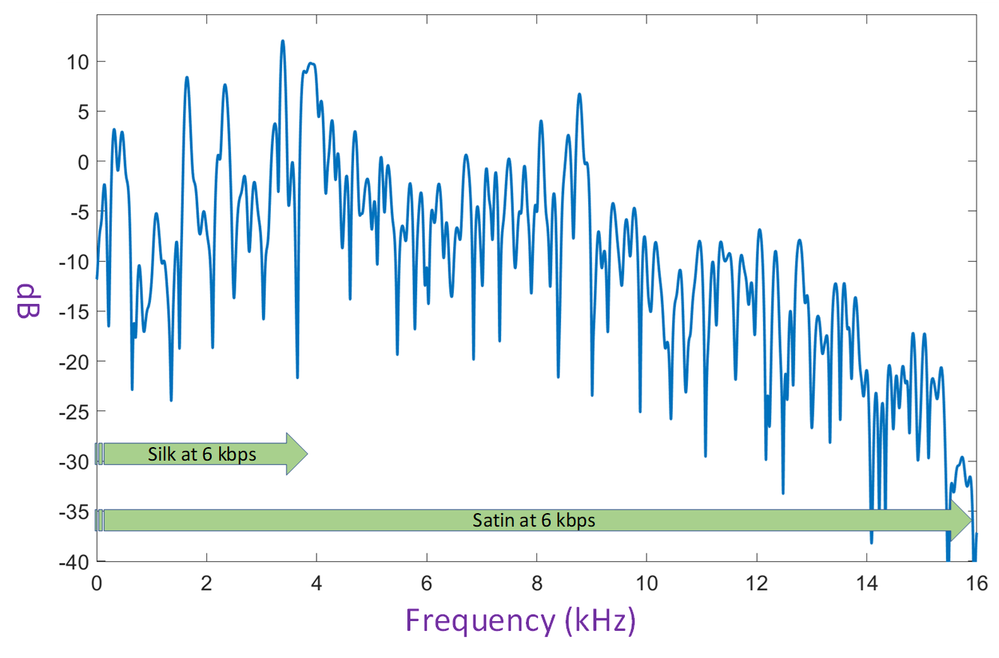
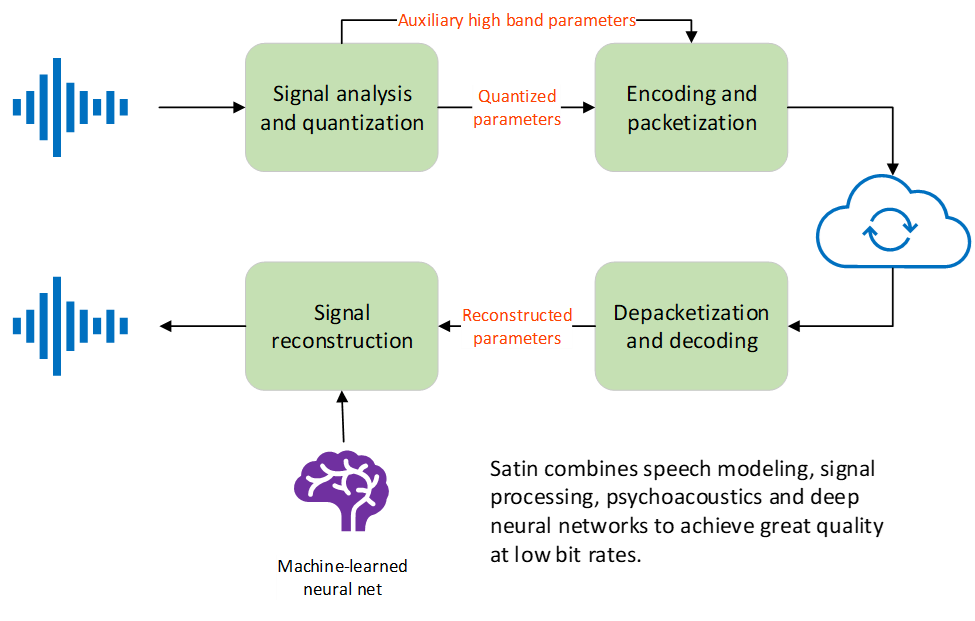

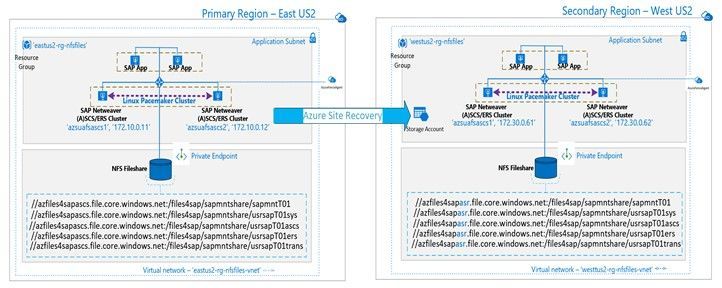
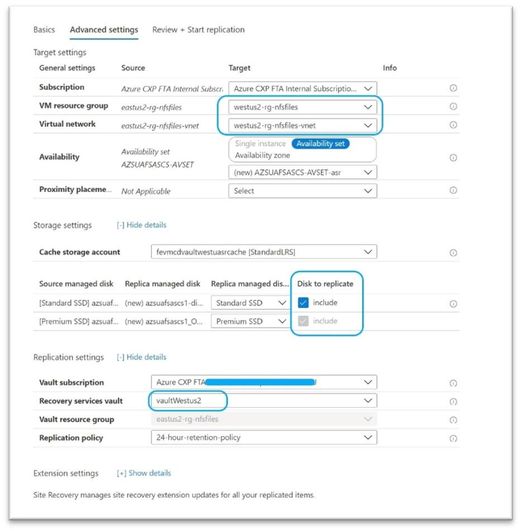





Recent Comments