by Contributed | Feb 19, 2021 | Technology
This article is contributed. See the original author and article here.
Just under two weeks before MS Ignite but the news keeps on coming. This week’s news includes Cross Region Restore of Azure VMs now generally available, Azure Firewall Premium now in public preview, Azure role-based access control (RBAC) for Azure Key Vault data plane authorization is now generally available, Azure Machine Learning updates for native terminal is now generally available and as always, the Microsoft Learn Module of the Week.
Cross Region Restore of Azure VMs now generally available
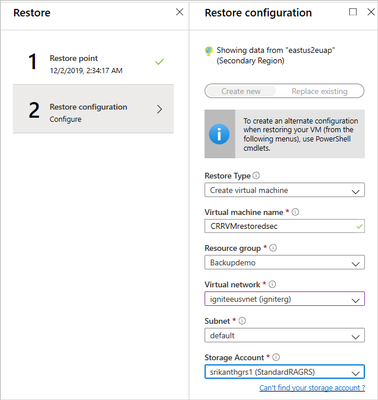
The backup data in the Azure Backup Recovery service vault stores backup data which defaults storage settings to geo-redundancy, and the backed up data in the primary region is geo-replicated to an Azure-paired secondary region. The data replicated to the secondary region is available to restore in the secondary region only if Azure declares a disaster in the primary region. Customers who opt-in for this feature can initiate restores in the secondary region at any time making the customer controlled secondary region restores possible in both times of primary region being available or unavailable.
Further details can be found here: Cross Region Restore
Azure Firewall Premium now in public preview
The following capabilities can now be preformed under the new Azure Firewall Premium public preview:
- Transport Layer Security (TLS) Inspection: decrypts outbound traffic, performs the required value-added security functions and re-encrypt the traffic which is sent to the original destination.
- Intrusion Detection and Prevention System (IDPS): provides signature-based IDPS to allow rapid detection of attacks by looking for specific patterns, such as byte sequences in network traffic, or known malicious instruction sequences used by malware.
- Web Categories: Allows admins to allow or deny user access to the Internet based on categories (e.g. social networking, search engines, gambling), reducing the time spent on managing individual FQDNs and URLs. This capability is also available for Azure Firewall Standard based on FQDNs only.
- URL Filtering: Allow users to access specific URLs for both plain text and encrypted traffic, typically being used in congestion with web categories.
For more information, see the Azure Firewall Premium documentation.
Azure role-based access control (RBAC) for Azure Key Vault data plane authorization is now generally available
System admins can now achieve unified management and access control across Azure Resources with Azure role-based access control (RBAC) for Azure Key Vault on data plane. This capability now allows the ability to manage RBAC for Key Vault keys, certificates, and secrets with roles assignment scope available from management group to individual key, certificate, and secret. When enabled, Azure AD users and services will be validated exclusively by Azure RBAC.
Further details can be found here: Provide access to Key Vault keys, certificates, and secrets with an Azure role-based access control
Azure Machine Learning updates for native terminal now generally available
Terminal in Azure Machine Learning can now be used to perform any CLI operation directly in the Azure Machine Learning studio. CLI operations include cloning notebook files from Git Repository , installing a Python package, and executing Python Files.
For more information, see the Azure Machine Learning CLI documentation.
Community Events
- Microsoft Ignite – Registration is now available for the upcoming event. Stay tuned for more details as they become available.
- Azure admin jump start – Live, demo-heavy deep dives into scenarios detailing core Azure services, workloads, security, and governance.
MS Learn Module of the Week

Deploying and managing compute resources for Azure administrators
The goal of this Azure fundementals learning path is to learn how to deploy and configure virtual machines, containers, and Web Apps in Azure.
This 11 hour learning path can be completed here: Deploy and manage compute resources for Azure administrators
Let us know in the comments below if there are any news items you would like to see covered in the next show. Be sure to catch the next AzUpdate episode and join us in the live chat.
by Contributed | Feb 18, 2021 | Technology
This article is contributed. See the original author and article here.
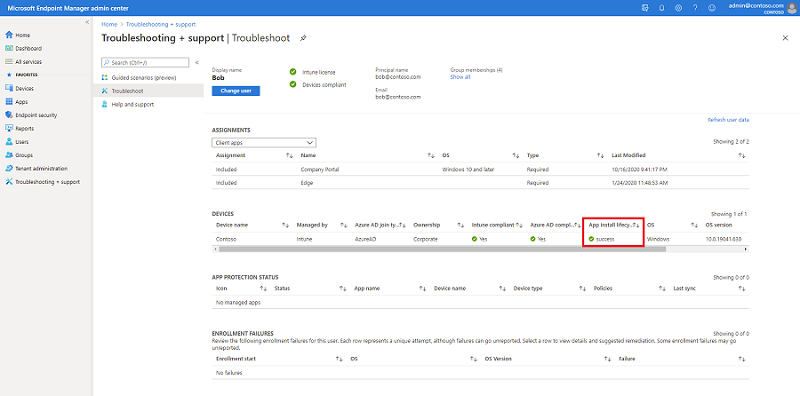
We recently discovered an issue within the Troubleshooting + support blade where the Devices table > column App install lifecycle might not be showing an accurate status. We’ve received customer feedback where the column is showing “Failure” but upon investigation the apps are not failing to deploy and there are no issues with the apps on devices.
Additionally, if you select the impacted device, load the “Managed Apps” view, select one of the apps targeted to the device and click the app, the app install history may show the status as “Failed to install”, however the app is present on the device.
Both these issues are related to each other because the App install lifecycle is computed from the app install history. The issue appears at random so you may not be impacted, keep on reading to learn more.
Steps to reproduce:
Navigate to the Microsoft Endpoint Manager admin center
Click Troubleshooting + support
Select a user
Under the Devices table, view the status of the App install lifecycle column
Confirm if the status is correct by checking Device Install status for getting the accurate installation status for an app for a device.
Troubleshoot blade in the MEM admin center
How to check Device Install status:
Navigate to the Microsoft Endpoint Manager admin center
Click Apps > All apps
Select an app
Click Device install status
The correct status will be displayed in the Status column
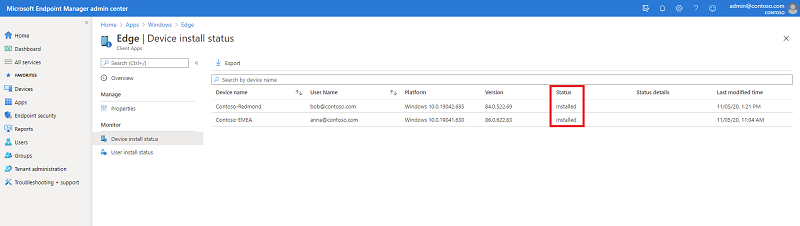 Device install status blade in the MEM admin center
If the App install lifecycle column in the Troubleshooting blade shows a different status than the Device Install status, you have run into this problem. To workaround this issue, our recommendation is to use the Device Install status for understanding the correct install status of the app for the affected device.
Our engineering team is actively working to fix this issue, we’ll update this post as additional information becomes available. If you have any questions, let us know in the comments on this post or tagging @IntuneSuppTeam on Twitter.
by Contributed | Feb 18, 2021 | Technology
This article is contributed. See the original author and article here.
Azure Service Bus is the enterprise messaging PaaS of choice for customers looking for a cloud native service with familiar queue and topic subscription semantics using the industry driven Advanced Message Queuing Protocol (AMQP). By virtue of being a modern PaaS offering on Azure, Azure Service Bus aims to bring deeper integrations with Azure’s services along with high availability, secure design and scalability built into the platform as a first-class experience to the application integration space.
As businesses, from retail to finance, and manufacturing to transportation, accelerate their digitalization efforts and further embrace the cloud, many are moving and modernizing existing Java-based workloads that lean on enterprise messaging brokers like IBM MQ, TIBCO EMS or JBoss A-MQ through the JMS 2.0 application interface.
With Azure Service Bus Premium expanding its feature set to provide JMS 2.0 specification compliance, businesses can leave the complexity and cost of licensing, maintaining, and operating these legacy broker infrastructures behind and switch to Azure Service Bus as the reliable and highly available backbone of their critical applications. For multi-site systems that use centralized broker infrastructures in on-premises datacenters, Azure Service Bus is also a very attractive, cost efficient, managed PaaS alternative to running such infrastructure even if many of the attached workloads remain on-premises.
Today, we’re ecstatic to announce the general availability for Java Message Service (JMS) 2.0 for enterprise workloads on Azure Service Bus Premium tier.
Seamlessly migrate and connect existing applications with Azure Service Bus over AMQP
By leveraging Azure Service Bus JMS support, customers can avoid the overhead of procuring licenses, managing an enterprise messaging broker on their own IaaS Compute, simplify cost management with a fixed price per messaging unit, and by leveraging automatic scale up/down to address variability in workloads.
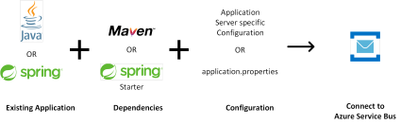
We also continue to promise the simplicity of configuration only code changes to enable our customers to bring their existing JMS client applications.
Utilize existing JMS enterprise application integration (EAI) connectors and tooling to interact with Azure Service Bus
With full support for Java Message Service (JMS) 2.0 on Azure Service Bus, the possibilities for interacting with Azure Service Bus are virtually endless. Our customers can now utilize existing EAI connectors that leverage JMS APIs to perform management and data plane operations on Azure Service Bus.
We’ve also added support for the JMS toolbox tool to interact with Azure Service Bus, enabling customers to have a familiar tool used with various JMS message brokers.
Get Started Today
To learn more about Azure Service Bus and try out the Java Message Service (JMS 2.0), check out the below links

by Contributed | Feb 18, 2021 | Technology
This article is contributed. See the original author and article here.
Today, we are sharing an update on the roll out status of the Windows 10 Team 2020 Update, following our previous update in January.
Throughout January, we listened to and worked closely with customers to resolve some of the issues reported on the known issues list, which will now be offered to customers updating to Windows 10 Team 2020.
Surface Hub 2S
Today, we are making the Windows 10 Team 2020 Update available for Germany and the Netherlands via Windows Update. The update will become available worldwide via Windows Update on February 23, 2021, completing the update offering for Surface Hub 2S devices anywhere on the planet.
The Windows 10 Team 2020 Update is also offered via Windows Update for Business, and we now offer an updated Bare Metal Recovery (BMR) image on the Surface Recovery Image webpage.
Surface Hub (first-generation)
We remain committed to starting Windows 10 Team 2020 Update rollout in late February as communicated in the previous update. More details will be provided closer to the release date.
Support for Microsoft Edge Legacy
Following the Microsoft Edge team’s announcement on Friday, February 5, 2021, about the end of support for Microsoft Edge Legacy on March 9, 2021, we encourage customers to install the new Microsoft Edge browser on all Surface Hub and Surface Hub 2S devices running the Windows 10 Team 2020 Update. The Microsoft Edge Legacy browser will remain the default browser on Surface Hubs until its replacement in a future update later this year.
As mentioned earlier, Windows 10 Team, version 1703 will remain supported through March 16, 2021. Please make sure to read the known issues list before updating your devices to Windows 10 Team 2020.
by Contributed | Feb 18, 2021 | Technology
This article is contributed. See the original author and article here.
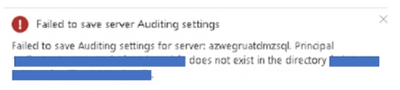
I have been working on a support ticket were customer was getting the following error trying to save Auditing settings.
“Failed to save Auditing settings for server: xxx .Principal xxx does not exist in the directory xxx”.
During auditing configuration , customer had selected, an storage account that was being used by other Azure SQL server to save their auditing logs.
We confirmed that storage account was configured with firewall enabled
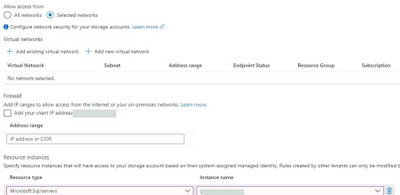
The problem came because, identity assignment was not getting saved correctly.
Executing the following query we could see that identity was not getting saved
select * from sys.database_scoped_credentials
The solution was reassign the Identity and resave auditing executing the following PowerShell command
Set-AzSqlServer -ResourceGroupName <NameofTheRG> -ServerName <NameOFTheServer> -AssignIdentity
If server also has TDE with AKV you will need to run :
$server = Get-AzSqlServer -ResourceGroupName rgname -ServerName server
$objectid = $server.Identity.PrincipalId
Set-AzKeyVaultAccessPolicy -VaultName vault -ObjectId $objectid -PermissionsToKeys get, wrapKey, unwrapKey
After apply mitigation, “select * from sys.database_scoped_credentials” output was the following, and auditing configuration could be saved correctly

Enjoy!
by Contributed | Feb 18, 2021 | Technology
This article is contributed. See the original author and article here.
The Azure Sphere OS update 21.02 is now available for evaluation in the Retail Eval feed. The retail evaluation period provides 14 days for backwards compatibility testing. During this time, please verify that your applications and devices operate properly with this release before it is deployed broadly via the Retail feed. The Retail feed will continue to deliver OS version 21.01 until we publish 21.02 in two weeks. For more information on retail evaluation see our blog post, The most important testing you’ll do: Azure Sphere Retail Evaluation.
The evaluation release includes an OS update only; it does not include an updated SDK.
Areas of special focus for compatibility testing with the 21.02 release should include:
- Apps and functionality utilizing /proc/<pid>/syscall.
- SNTP server functionality.
In addition, the 21.02 release includes updates to mitigate against the following CVEs:
- CVE-2021-3336
- CVE-2020-8285
- CVE-2020-8286
- CVE-2020-8284
- CVE-2020-8231
For more information on Azure Sphere OS feeds and setting up an evaluation device group, see Azure Sphere OS feeds and Set up devices for OS evaluation.
For self-help technical inquiries, please visit Microsoft Q&A or Stack Overflow. If you require technical support and have a support plan, please submit a support ticket in Microsoft Azure Support or work with your Microsoft Technical Account Manager. If you would like to purchase a support plan, please explore the Azure support plans.
by Contributed | Feb 18, 2021 | Technology
This article is contributed. See the original author and article here.
A Deep Dive into Serverless Applications on Power Apps and Azure
Overview
In 2021, each month we will be releasing a monthly blog covering the webinar of the month for the Low-code application development (LCAD) on Azure solution. LCAD on Azure is a new solution to demonstrate the robust development capabilities of integrating low-code Microsoft Power Apps and the Azure products you may be familiar with.
This month’s webinar is ‘A Deep Dive into Serverless Applications on Power Apps and Azure’ In this blog I will briefly recap Low-code application development on Azure, provide an overview of serverless, why to build a serverless Power App, and what to look forward to in the webinar’s demos.
What is Low-code application development on Azure?
Low-code application development (LCAD) on Azure was created to help developers build business applications faster with less code, leveraging the Power Platform, and more specifically Power Apps, yet helping them scale and extend their Power Apps with Azure services.
For example, a pro developer who works for a manufacturing company would need to build a line-of-business (LOB) application to help warehouse employees’ track incoming inventory. That application would take months to build, test, and deploy, however with Power Apps’ it can take hours to build, saving time and resources.
However, say the warehouse employees want the application to place procurement orders for additional inventory automatically when current inventory hits a determined low. In the past that would require another heavy lift by the development team to rework their previous application iteration. Due to the integration of Power Apps and Azure a professional developer can build an API in Visual Studio (VS) Code, publish it to their Azure portal, and export the API to Power Apps integrating it into their application as a custom connector. Afterwards, that same API is re-usable indefinitely in the Power Apps’ studio, for future use with other applications, saving the company and developers more time and resources.
Serverless Applications
You may be wondering what a serverless application is? Serverless is a cloud computing execution model where the cloud provider dynamically manages the allocation and provisioning of servers. A serverless application runs in stateless compute containers that are event-triggered, ephemeral, and fully managed by the cloud provider. In turn this model greatly benefits the developer and team by reducing their workload by reducing the need to manage servers, and this model is much cheaper because teams don’t incur the hardware and associated costs.
A logical next question is “in what scenario(s) do I go serverless?” You can choose it when you have asynchronous and concurrent tasks to be executed, when you have infrequent requests and spiky traffic where you don’t have a dependency on latency. Also, when you’re looking to quickly iterate your development, build MVPs, change your code or change business requirements to immediately deploy that code.
You’re now convinced of serverless code’s benefits, but how do you get started? At the core are cloud functions that enable you to write code in containers. In reaction to an event execution can be triggered by any of the managed services or any custom sources you might be defining that are important for your application. Due to durable functions you can write stateful functions in a serverless compute environment. Lastly, serverless code is event driven, running in response to specific triggers which can be a HTTP or a blob trigger when running code in response to a file being uploaded to a storage account number.
Serverless Power Apps
Building serverless applications on Azure sound great by themself, why would you bother to build your using Microsoft Power Apps? Building business applications quickly is not easy when utilizing several different frameworks, hosting options, and complex integrations between systems. Leveraging serverless technologies (Azure Functions and Logic Apps) can provide the building blocks for APIs to connect to custom backends, services, or a Data Model (Dataverse) that stores data across many applications. Leverage these APIs to deeply integrate with PowerApps or Power Automate and extend the data that is most critical to business users with apps that are quickly built, managed, and distributed. Moreover, with the development of ‘Fusion Development’ teams a term coined by analysts, developers can build back-end serverless APIs and import them via Azure API management directly into Microsoft Power Apps as custom connectors. ‘Citizen Developers’ or those who aren’t professional developers, can leverage these APIs in their Power App, reducing the overall work of the developer, by not having to build front-end code. Thus, piling on the time and resources saved by building serverless applications.
What to expect in the webinar?
Simona will cover first build a web API that generates jokes, throughout this process she will test and debug her APIs. Afterward publishing the API to which is available to test at aka.ms/joke which generates jokes using random words. Lastly, she exports the API to Power Apps via the Azure portal and challenges the viewers to extend her app with Power Automate AI chatbots that send jokes as text messages.
Summary
Make sure to tune into the webinar on February 25th to learn more about serverless APIs and how to export them into your Power Apps. Moreover, there will be a Low-code application development on Azure ‘Learn Live’ session during Ignite, the data loss prevention and new governance policies for Power Apps at Ignite, and an SAP on Azure Power Apps webinar in March.
Resources
Low Code Application Development on Azure
LCAD on Azure
Azure plus Power Apps for pro developers
Low Code Application Development on Azure – YouTube
Power Apps x Azure documentation
Azure integration document
Azure API Management integration announcement
Azure API Management integration documentation
Serverless documentation
Compare serverless options
Compare serverless options module
Azure Functions documentation
Azure Functions website
by Contributed | Feb 18, 2021 | Technology
This article is contributed. See the original author and article here.
A Deep Dive into Serverless Applications on Power Apps and Azure
Overview
In 2021, each month we will be releasing a monthly blog covering the webinar of the month for the Low-code application development (LCAD) on Azure solution. LCAD on Azure is a new solution to demonstrate the robust development capabilities of integrating low-code Microsoft Power Apps and the Azure products you may be familiar with.
This month’s webinar is ‘A Deep Dive into Serverless Applications on Power Apps and Azure’ In this blog I will briefly recap Low-code application development on Azure, provide an overview of serverless, why to build a serverless Power App, and what to look forward to in the webinar’s demos.
What is Low-code application development on Azure?
Low-code application development (LCAD) on Azure was created to help developers build business applications faster with less code, leveraging the Power Platform, and more specifically Power Apps, yet helping them scale and extend their Power Apps with Azure services.
For example, a pro developer who works for a manufacturing company would need to build a line-of-business (LOB) application to help warehouse employees’ track incoming inventory. That application would take months to build, test, and deploy, however with Power Apps’ it can take hours to build, saving time and resources.
However, say the warehouse employees want the application to place procurement orders for additional inventory automatically when current inventory hits a determined low. In the past that would require another heavy lift by the development team to rework their previous application iteration. Due to the integration of Power Apps and Azure a professional developer can build an API in Visual Studio (VS) Code, publish it to their Azure portal, and export the API to Power Apps integrating it into their application as a custom connector. Afterwards, that same API is re-usable indefinitely in the Power Apps’ studio, for future use with other applications, saving the company and developers more time and resources.
Serverless Applications
You may be wondering what a serverless application is? Serverless is a cloud computing execution model where the cloud provider dynamically manages the allocation and provisioning of servers. A serverless application runs in stateless compute containers that are event-triggered, ephemeral, and fully managed by the cloud provider. In turn this model greatly benefits the developer and team by reducing their workload by reducing the need to manage servers, and this model is much cheaper because teams don’t incur the hardware and associated costs.
A logical next question is “in what scenario(s) do I go serverless?” You can choose it when you have asynchronous and concurrent tasks to be executed, when you have infrequent requests and spiky traffic where you don’t have a dependency on latency. Also, when you’re looking to quickly iterate your development, build MVPs, change your code or change business requirements to immediately deploy that code.
You’re now convinced of serverless code’s benefits, but how do you get started? At the core are cloud functions that enable you to write code in containers. In reaction to an event execution can be triggered by any of the managed services or any custom sources you might be defining that are important for your application. Due to durable functions you can write stateful functions in a serverless compute environment. Lastly, serverless code is event driven, running in response to specific triggers which can be a HTTP or a blob trigger when running code in response to a file being uploaded to a storage account number.
Serverless Power Apps
Building serverless applications on Azure sound great by themself, why would you bother to build your using Microsoft Power Apps? Building business applications quickly is not easy when utilizing several different frameworks, hosting options, and complex integrations between systems. Leveraging serverless technologies (Azure Functions and Logic Apps) can provide the building blocks for APIs to connect to custom backends, services, or a Data Model (Dataverse) that stores data across many applications. Leverage these APIs to deeply integrate with PowerApps or Power Automate and extend the data that is most critical to business users with apps that are quickly built, managed, and distributed. Moreover, with the development of ‘Fusion Development’ teams a term coined by analysts, developers can build back-end serverless APIs and import them via Azure API management directly into Microsoft Power Apps as custom connectors. ‘Citizen Developers’ or those who aren’t professional developers, can leverage these APIs in their Power App, reducing the overall work of the developer, by not having to build front-end code. Thus, piling on the time and resources saved by building serverless applications.
What to expect in the webinar?
Simona will cover first build a web API that generates jokes, throughout this process she will test and debug her APIs. Afterward publishing the API to which is available to test at aka.ms/joke which generates jokes using random words. Lastly, she exports the API to Power Apps via the Azure portal and challenges the viewers to extend her app with Power Automate AI chatbots that send jokes as text messages.
Summary
Make sure to tune into the webinar on February 25th to learn more about serverless APIs and how to export them into your Power Apps. Moreover, there will be a Low-code application development on Azure ‘Learn Live’ session during Ignite, the data loss prevention and new governance policies for Power Apps at Ignite, and an SAP on Azure Power Apps webinar in March.
Resources
Low Code Application Development on Azure
LCAD on Azure
Azure plus Power Apps for pro developers
Low Code Application Development on Azure – YouTube
Power Apps x Azure documentation
Azure integration document
Azure API Management integration announcement
Azure API Management integration documentation
Serverless documentation
Compare serverless options
Compare serverless options module
Azure Functions documentation
Azure Functions website
by Contributed | Feb 18, 2021 | Technology
This article is contributed. See the original author and article here.
Overview
In 2021, each month we will be releasing a monthly blog covering the webinar of the month for the Low Code Application Development on Azure solution. Low-code app dev on Azure is a new solution to demonstrate the robust development capabilities of integrating low-code Microsoft Power Apps and the Azure products you may be familiar with.
This month’s webinar is ‘Develop Application Lifecycle Management (ALM) processes with GitHub Actions and Power Apps.’ In this blog I will highlight what LCAD on Azure is, the 3 most prevalent products in the webinar and use cases and provide supporting documentation for you to learn more about the webinar’s content.
What is Low-code application development (LCAD) on Azure?
Low Code Application Development on Azure was created to help developers build business applications faster with less code, leveraging the Power Platform, and more specifically Power Apps, yet helping them scale and extend their Power Apps with Azure services.
For example, a pro developer who works for a manufacturing company would need to build a line-of-business (LOB) application to help warehouse employees’ track incoming inventory. That application would take months to build, test, and deploy, however with Power Apps’ it can take hours to build, saving time and resources.
However, say the warehouse employees want the application to place procurement orders for additional inventory automatically when current inventory hits a determined low. In the past that would require another heavy lift by the development team to rework their previous application iteration. Due to the integration of Power Apps and Azure a professional developer can build an API in Visual Studio (VS) Code, publish it to their Azure portal, and export the API to Power Apps integrating it into their application as a custom connector. Afterwards, that same API is re-usable indefinitely in the Power Apps’ studio, for future use with other applications, saving the company and developers more time and resources.
This is just one scenario that highlights the capabilities of the LCAD on Azure solution. To learn more about the solution itself there is a link at the bottom of this blog in the supporting documentation section. This month’s webinar will focus on the capability to automate application lifecycle management, like the above scenario, with GitHub Actions to further expedite and streamline the development process for developers.
Webinar Content
The webinar explains ‘Fusion Development’ a process that leverages the citizen developer to build low-code applications themselves, further reducing strain on development teams, but professional developers meeting citizen developer’s half-way by extending these applications with custom code.
The webinar includes 2 demos, one on the integration of API management and Power Apps, how to create a CI/CD pipeline using GitHub Actions.
The integration of API management and Power Apps will cover the no cliff extensibility capabilities of Power Apps and Azure together, how to export APIs to Power Apps, and how to connect API management with Power Apps via Microsoft Teams for free.
We introduced Azure API Management connectors to quickly publish Azure API Management backed APIs to the Power Platform for easy discovery and consumption, dramatically reducing the time it takes to create apps connecting to Azure services.
This means that enterprises can now truly benefit from existing assets hosted on Azure, by making these available to Citizen developers with just a few clicks in the Azure portal, thereby eliminating the additional steps to go create custom connectors in the Power Apps or Power Automate maker experiences.
The GitHub Actions demo will cover developer’s ability to build automated software development lifecycle workflows. With GitHub Actions for Microsoft Power Platform, developers can create workflows in their repository to build, test, package, release, and deploy apps; perform automation; and manage bots and other components built on Microsoft Power Platform.
Conclusion
The webinar is currently available on-demand, and the webinar in February will cover the integration of SAP on Azure and Power Apps.
Support Documents
Power Apps x Azure websites
Power Platform x Azure API Management Integration
Power Platform x GitHub Actions Automated SDLC workflows

by Contributed | Feb 18, 2021 | Technology
This article is contributed. See the original author and article here.
TLDR; Azure Space Mystery is an interactive experience teaching you about Space, women scientist and how you can interact with LEARN to solve mysteries in the game. Blast off for the Azure Space Mystery
Location: 400 km above Earth, traveling at 27,600 km/h. The space crew is in a good mood. They are looking forward to today’s return to Earth. We have made groundbreaking discoveries that will change the way we understand the …
Suddenly, a voice emanates from your communication console. “Captain, we have received an SOS message from the International Space Station. Their solar array wing was knocked off by debris. They are quickly running out of power! They need our help to collect the four missing pieces and deliver them back to the ISS as soon as possible.”
When that SOS call comes from the International Space Station, you know that you’re the person for the job!
Push the buttons and start your adventure! Will you embark on either the Rosetta, SOHO, Magnet, or Cluster Missions?
Azure Advocates and Community Advocacy PMs are excited to offer our third mystery experience, the Azure Space Mystery! Following on the Azure Mystery Mansion and the Azure Maya Mystery, this adventure sends you on missions in space to collect the four missing pieces of the wing. Store each piece in your space ship’s Collection Bay and find your way to the ISS to save the day.

During your mission, you will have to solve code challenges and unlock elements of the ship to collect the items. Can you figure out the circumference of the spool around which you must wrap the missing wire? Can you find the keyword on Microsoft Learn to unlock the door so you can complete your space walk? What if you fly into the tail of a comet?
Curious how we built this game? It uses the same architecture as the Azure Maya Mystery: TailwindCSS, VuePress, and an Azure Static Web App.
Every great explorer finds helpers along the way, and the Space Mystery is no different. You will be helped at strategic moments by four famous women who, in history, helped advance scientific inquiry. You’ll have to play the game to discover who they are, but get ready to meet a mathematician, a pilot, a scientist, and an astronomer whose work spanned 14 centuries.
You’ll not only meet these inspiring scientific women in the game, but you can also meet them in Minecraft!
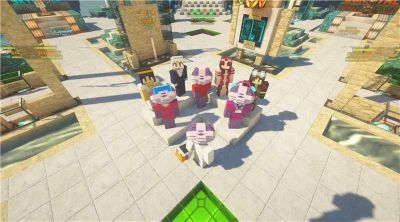
The connection between the Space Mystery game and Minecraft is made by your acquisition of a final badge, available when you complete your missions. Collect your Space Learner badger badge and use it in the MyMetaverse Minecraft server.
In the server, this badger token will give you exclusive access to a Heroes Hangout dedicated for Azure Heroes users. The server is accessible in Minecraft Java edition at mc.mymetaverse.io. To use the badge in the server, link an Enjin Wallet, which is the app where Azure Heroes tokens are stored.
The Azure Space Mystery was brought to you in honor of the 6th International Day for Women and Girls in Science. This day was founded by the “Space Princess”: H.R.H. Princess Dr. Nisreen El-Hashemite. It is our hope that our game will teach a little about other famous and impactful women in Science.
But wait, there’s more! Download free wallpapers of our bespoke cosmic art for your video call backgrounds!

We would like to acknowledge the folks who contributed to the content of the game: Marc Duiker who did the pixel art, and Dr. Mark Looper, who provided space-focused technical expertise. Many thanks to the ‘mystery team’ of Cloud Advocates, Chris Noring and myself (Jen) and to our mysterious PM team, in particular Lucie Simeckova, Floor Drees, and Adam Jackson, Eva Amezua de Casado, Jan Schenk, Adi Stein Ben-Nun, and Cynthia Zanoni for overseeing production.
Are you ready to accept your mission to explore space? Let’s go! Blast off for the Azure Space Mystery


Recent Comments