This article is contributed. See the original author and article here.
Join the MidDay Café crew with our special guest Microsoft’s Dan Holme, Principal Program Manager, Microsoft. Dan will be talking all things communities and Yammer and show how organizations can digitally transform and create a more employee centric, engaging environment, that foster increased company loyalty while increasing productivity and job satisfaction.
Join us Monday, 03-01-2021 at 12 noon eastern for “Engaging Employees Using Communities and Microsoft Yammer with Dan Holme!”
MidDay Café 03/01/2021 Agenda:
Welcome and Introductions.
Mid-Day Café News and Events
Engaging Employees Using Communities and Microsoft Yammer with Dan Holme, Principal Program Manager, Microsoft.
This article is contributed. See the original author and article here.
On 02/22, at 12 noon eastern, we hosted Microsoft’sBill Baer, Senior Technical Product Manager for Microsoft Search. Search at Microsoft has been a rapidly evolving service building upon the power of the Microsoft Graph. Properly leveraged within an organization the power of search, search driven, applications can be transformational. As Senior Technical Product Manager for Microsoft Search,Bill Baerbrought us the latest in Microsoft search to help organizations unlock the potential in their Microsoft 365 data and more. Check out the recording below:
This article is contributed. See the original author and article here.
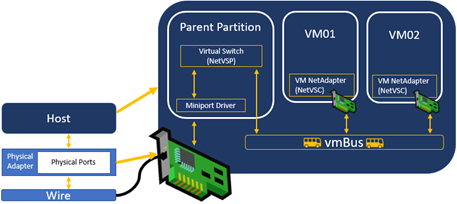
Hi Folks – Most often, when a virtual machine or container is receiving network traffic, the traffic passes through the virtualization stack in the host. This requires host (parent partition) CPU cycles.
Synthetic Data Path
If the amount of traffic being processed exceeds that which a single core can handle, the received network traffic must be spread across multiple CPUs. This “spreading” can occur in the operating system – at the expense of more CPU cycles, or hardware (the NIC) as an offload. In hardware, we call this capability Virtual Machine Multi-Queue. The benefit of VMMQ is actually two-fold:
It allows you to reach higher throughput into your virtual systems (VMs/Containers)
It reduces the cost (in terms of host resources) of processing that network traffic
VMMQ is a combined feature of the NIC, driver/firmware, and operating system. All of these must support VMMQ and be configured properly for you to leverage this offload.
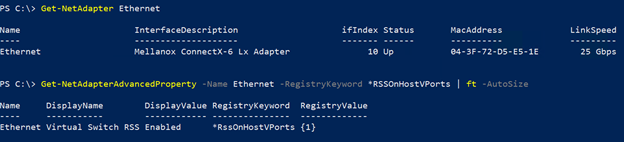
To identify if your adapter supports VMMQ, use the Get-NetAdapterAdvancedProperty cmdlet to see the advanced registry property *RSSOnHostVPorts or “Virtual Switch RSS” – We won’t go into what the naming means but suffice to say that if you see this capability displayed using the command below, your NIC and driver/firmware combination supports VMMQ.
Now you simply need to follow the instructions in this article for how to configure it.
You are invited to an exclusive experience with Microsoft Teams Engineering. During this event we will show how you can leverage your investment in Microsoft Teams to drive real innovation in your organization using the Teams Platform for US Gov.
We will showcase how to extend Microsoft Teams into custom applications that accelerate and automate your processes. We will also highlight best practices from other government organizations, perform live demos surrounding real life government use cases, and tell you how to get started on your journey right away!
Following the event, we’ll connect with you (for free!) to understand your specific organizational needs.
Event Details
Available Dates/Times:
Wednesday, February 24th from 1:00pm to 2:30pm EST
Tuesday, March 2nd from 2pm to 3:30pm EST
Tuesday, March 16th from 2:00pm to 3:30pm EST
Agenda:
How to Extend Microsoft Teams into Custom Applications that Accelerate and Automate Your Processes
Live Demos of Real Life Gov Use Cases
Next Steps On How to Start Implementing Solutions Now
Presenters:
Dave Jennings, Principal Program Manager, Microsoft Teams Engineering
Joshua Armant, Technical Customer Success Manager, Microsoft Federal
This article was originally posted by the FTC. See the original article here.
Winter often brings the blues, but when it brings Arctic blasts, burst pipes, power outages, and even icicles indoors, scammers aren’t far behind with weather-related scams.
Scammers know severe weather may have shut off your electricity, heat, and water and might pose as your utility company. They might call to say that they’re sorry your power went out and offer a reimbursement, but first they need your bank account information. They might email you to say that there’s an error in their system, and you have to give them personal information so they can turn your gas on again. They could even threaten to leave your utilities shut off if you don’t send them money immediately. But those are all lies.
If you get one of these calls, texts, or emails, here are some things you can do:
If you get a call, thank the caller and hang up. Never call a number left in a voicemail, text, or email. Instead, if you’re worried, contact the utility company directly using the number on your bill or on the company’s website. Verify if the message came from them.
If you get a call out of the blue and the caller claims you have to pay a past due bill or your services will be shut off, never give banking information over the phone. To pay your bill over the phone, always place the call to a number you know is legitimate.
Utility companies don’t demand payment information by email, text, or phone. And they won’t force you to pay by phone as your only option.
If the caller tells you to pay by gift card, cash reload card, money transfer, or cryptocurrency, it’s a scam. Every time. No matter what they say.
It’s cold out there. Help protect your community by reporting any scams you see at ReportFraud.ftc.gov.
Brought to you by Dr. Ware, Microsoft Office 365 Silver Partner, Charleston SC.
This article is contributed. See the original author and article here.
Have you ever tried to cast hand shadows on a wall? It is the easiest thing in the world, and yet to do it well requires practice and just the right setup. To cultivate your #cottagecore aesthetic, try going into a completely dark room with just one lit candle, and casting hand shadows on a plain wall. The effect is startlingly dramatic. What fun!
Even a tea light suffices to create a great effect
In 2020, and now into 2021, many folks are reverting back to basics as they look around their houses, reopening dusty corners of attics and basements and remembering the simple crafts that they used to love. Papermaking, anyone? All you need is a few tools and torn up, recycled paper. Pressing flowers? All you need is newspaper, some heavy books, and patience. And hand shadows? Just a candle.
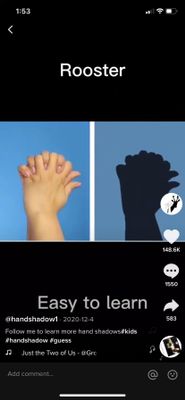
This TikTok creator has thousands of views for their handshadow tutorials
But what’s a developer to do when trying to capture that #cottagecore vibe in a web app?
High Tech for the Cottage
While exploring the art of hand shadows, I wondered whether some of therecent workI had done for body poses might be applicable to hand poses. What if you could tell a story on the web using your hands, and somehow save a video of the show and the narrative behind it, and send it to someone special? In lockdown, what could be more amusing than sharing shadow stories between friends or relatives, all virtually?
Hand shadow casting is a folk art probably originating in China; if you go to tea houses with stage shows, you might be lucky enough to view one like this!
A Show Of Hands
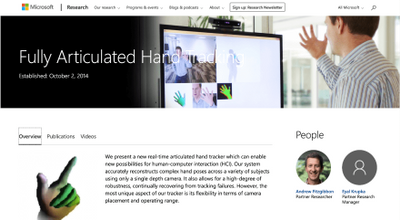
When you start researching hand poses, it’s striking how much content there is on the web on the topic. There has been work since at least 2014 on creating fully articulated hands within the research, simulation, and gaming sphere:
MSR throwing hands
There are dozens of handpose libraries already on GitHub:
There are many applications where tracking hands is a useful activity:
• Gaming • Simulations / Training • “Hands free” uses for remote interactions with things by moving the body • Assistive technologies • TikTok effects :trophy: • Useful things likeAccordion Hands apps
One of the more interesting new libraries,handsfree.js, offers an excellent array of demos in its effort to move to a hands free web experience:
Handsfree.js, a very promising project
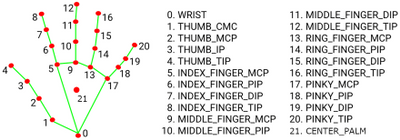
As it turns out, hands are pretty complicated things. Theyeachinclude 21 keypoints (vs PoseNet’s 17 keypoints for an entire body). Building a model to support inference for such a complicated grouping of keypoints has provenn challenging.
There are two main libraries available to the web developer when incorporating hand poses into an app: TensorFlow.js’s handposes, and MediaPipe’s. HandsFree.js uses both, to the extent that they expose APIs. As it turns out, neither TensorFlow.js nor MediaPipe’s handposes are perfect for our project. We will have to compromise.
TensorFlow.js’s handposesallow access to each hand keypoint and the ability to draw the hand to canvas as desired. HOWEVER, it only currently supports single hand poses, which is not optimal for good hand shadow shows.
MediaPipe’s handpose models(which are used by TensorFlow.js) do allow for dual hands BUT its API does not allow for much styling of the keypoints so that drawing shadows using it is not obvious.
One other library,fingerposes, is optimized for finger spelling in a sign language context and is worth a look.
Since it’s more important to use the Canvas API to draw custom shadows, we are obliged to use TensorFlow.js, hoping that either it will soon support multiple hands OR handsfree.js helps push the envelope to expose a more styleable hand.
Let’s get to work to build this app.
Scaffold a Static Web App
As a Vue.js developer, I always use the Vue CLI to scaffold an app usingvue create my-appand creating a standard app. I set up a basic app with two routes: Home and Show. Since this is going to be deployed as an Azure Static Web App, I follow my standard practice of including my app files in a folder namedappand creating anapifolder to include an Azure function to store a key (more on this in a minute).
In my package.json file, I import the important packages for using TensorFlow.js and the Cognitive Services Speech SDK in this app. Note that TensorFlow.js has divided its imports into individual packages:
We will draw an image of a hand, as detected by TensorFlow.js, onto a canvas, superimposed onto a video suppled by a webcam. In addition, we will redraw the hand to a second canvas (shadowCanvas), styled like shadows:
Working asynchronously, load the Handpose model. Once the backend is setup and the model is loaded, load the video via the webcam, and start watching the video’s keyframes for hand poses. It’s important at these steps to ensure error handling in case the model fails to load or there’s no webcam available.
asyncmounted(){ awaittf.setBackend(this.backend); //async load model, then load video, then pass it to start landmarking this.model=awaithandpose.load(); this.message=“Model is loaded! Now loading video“; letwebcam; try{ webcam=awaitthis.loadVideo(); }catch(e){ this.message=e.message; throwe; }
this.landmarksRealTime(webcam); },
Setup the Webcam
Still working asynchronously, set up the camera to provide a stream of images
asyncsetupCamera(){ if(!navigator.mediaDevices||!navigator.mediaDevices.getUserMedia){ thrownewError( “Browser API navigator.mediaDevices.getUserMedia not available“ ); } this.video=this.$refs.video; conststream=awaitnavigator.mediaDevices.getUserMedia({ video:{ facingMode:“user“, width:VIDEO_WIDTH, height:VIDEO_HEIGHT, }, });
Now the fun begins, as you can get creative in drawing the hand on top of the video. This landmarking function runs on every keyframe, watching for a hand to be detected and drawing lines onto the canvas – red on top of the video, and black on top of the shadowCanvas. Since the shadowCanvas background is white, the hand is drawn as white as well and the viewer only sees the offset shadow, in fuzzy black with rounded corners. The effect is rather spooky!
Since TensorFlow.js allows you direct access to the keypoints of the hand and the hand’s coordinates, you can manipulate them to draw a more lifelike hand. Thus we can redraw the palm to be a polygon, rather than resembling a garden rake with points culminating in the wrist.
With the models and video loaded, keyframes tracked, and hands and shadows drawn to canvas, we can implement a speech-to-text SDK so that you can narrate and save your shadow story.
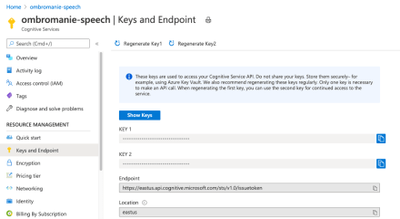
To do this, get a key from the Azure portal forSpeech Servicesby creating a Service:
You can connect to this service by importing the sdk:
import * as sdk from “microsoft-cognitiveservices-speech-sdk”;
…and start audio transcription after obtaining an API key which is stored in an Azure function in the/apifolder. This function gets the key stored in the Azure portal in the Azure Static Web App where the app is hosted.
asyncstartAudioTranscription(){ try{ //get the key constresponse=awaitaxios.get(“/api/getKey“); this.subKey=response.data; //sdk
In this function, the SpeechRecognizer gathers text in chunks that it recognizes and organizes into sentences. That text is printed into a message string and displayed on the front end.
Display the Story
In this last part, the output cast onto the shadowCanvas is saved as a stream and recorded using the MediaRecorder API:
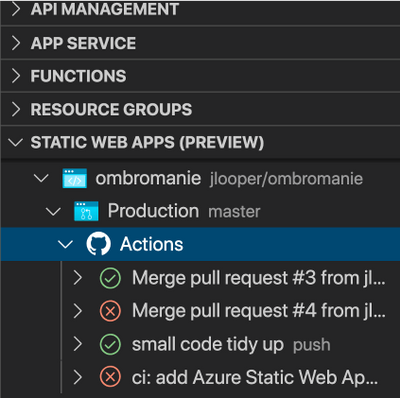
This app can be deployed as an Azure Static Web App using the excellentAzure plugin for Visual Studio Code. And once it’s live, you can tell durable shadow stories!
This article is contributed. See the original author and article here.
Update: Monday, 22 February 2021 16:52 UTC
Root cause has been isolated to one of the backend services becoming unhealthy which is impacting internal monitoring. To address this issue we are rolling back the backend service to latest healthy version.
This article was originally posted by the FTC. See the original article here.
Just under a year ago, we told you that the U.S. Department of Education announced some flexibility to federal student loan borrowers. Understanding these options can help you make more informed decisions about paying your bills and prioritizing your debts. The benefits have been extended through September 30, 2021.
So, just to recap, what does this mean for you if you have a federal student loan?
This program gives temporary payment relief to borrowers with qualifying federal student loans. But some federal student loans don’t qualify – for example, older Family Federal Education Loan (FFEL) program loans or Perkins Loans that are owned by the school you attended. Contact your federal loan servicer online or by phone to find out if your loans are eligible.
If your federal loans are covered, the U.S. Department of Education has automatically placed your loans into what’s called “administrative forbearance.” That means you can stop making payments on those loans right away, up through September 30, 2021. If your payments automatically come out of your bank account, check if any payments have been processed since March 13, 2020. If they have, you may be able to get a refund as part of administrative forbearance.
If you want to keep making payments on your qualifying federal student loan through September 30th, the interest rate is now 0%. So any payments you make during the forbearance period may help you pay off your debt faster. If you’re on an income-based repayment program and/or a forgiveness program, you should check out Federal Student Aid’s Coronavirus page to see which option makes sense for you.
If your federal student loans are in default, the U.S. Department of Education has stopped making collection calls, and sending letters or billing statements through September 30, 2021. And if your federal loans were in default and your employer continues to garnish your wages, you’ll get a refund.
This program only applies to federal student loans. Not sure what kinds of student loans you have? Here are two things you can do to find out:
Get a complete list of your private and federal student loans by pulling your credit report. (In fact, you can get your report for free every week through April 2021.) Read through it and find your student loans, taking note of the companies that are your lenders or loan servicers. Compare it to the full list of federal loan servicers found here.
Confirm which of your loans are federal. Log into FSA or call the Federal Student Aid Information Center (FSAIC) at 1-800-433-3243.
One more thing: you don’t need to hire a company to help you get this student loan payment relief. The program is already in place and there’s nothing you need to do to enroll.
Updated February 22, 2021 with new information about how payment flexibilities for federal student loan borrowers have been extended through September 30, 2021.
Brought to you by Dr. Ware, Microsoft Office 365 Silver Partner, Charleston SC.
This article is contributed. See the original author and article here.
Overview:
Azure SQL Database can be dropped through Azure SQL database API call using “Microsoft.Sql/servers/databases/delete” operation via Azure Portal, CLI, Powershell commands or Rest API call one side or at the database level another side using SQL Server Management Studio or T-SQL command: DROP DATABASE database04;
In this article, we will provide a guideline on Azure solutions to secure, protect, recover, audit and monitor Azure SQL DB against unintended deletion.
Solution:
In this section, we are listing Azure solutions to secure Azure SQL DB against unintended deletion, know who the caller for the database deletion, when this happened and how get alerted in such case. Moreover, how to recover your database.
1- Enable Azure SQL Auditing
The best resort to answer the blog main question, who dropped my database? is to enable Azure SQL Auditing, enabling auditing tracks database events and write them to audit log which can be stored into Azure storage account, Log Analytics workspace or Event Hubs.
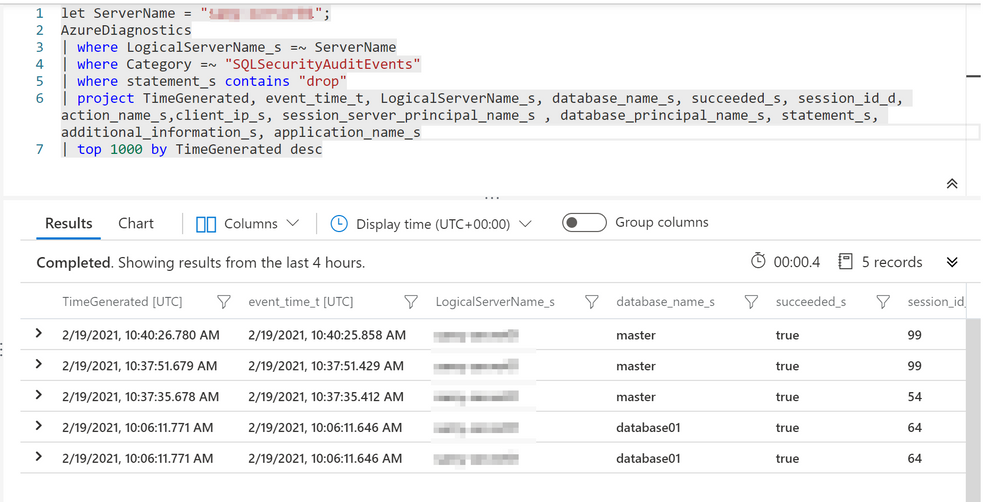
Leverage the Log Analytics to retrieve and filter the Audit records, the following example is a Kusto Query to get audit data for the dropped database:
let ServerName = "XXXXXXXXXX"; # Change the Server name to Azure SQL Server name
AzureDiagnostics
| where LogicalServerName_s =~ ServerName
| where Category =~ "SQLSecurityAuditEvents"
| where statement_s contains "DROP"
| project TimeGenerated, event_time_t, LogicalServerName_s, database_name_s, succeeded_s, session_id_d, action_name_s,client_ip_s, session_server_principal_name_s , database_principal_name_s, statement_s, additional_information_s, application_name_s
| top 1000 by TimeGenerated desc
TIP: change the time range to the roughly incident time or you can add clause | where TimeGenerated >= ago(5d)
Query Output:-
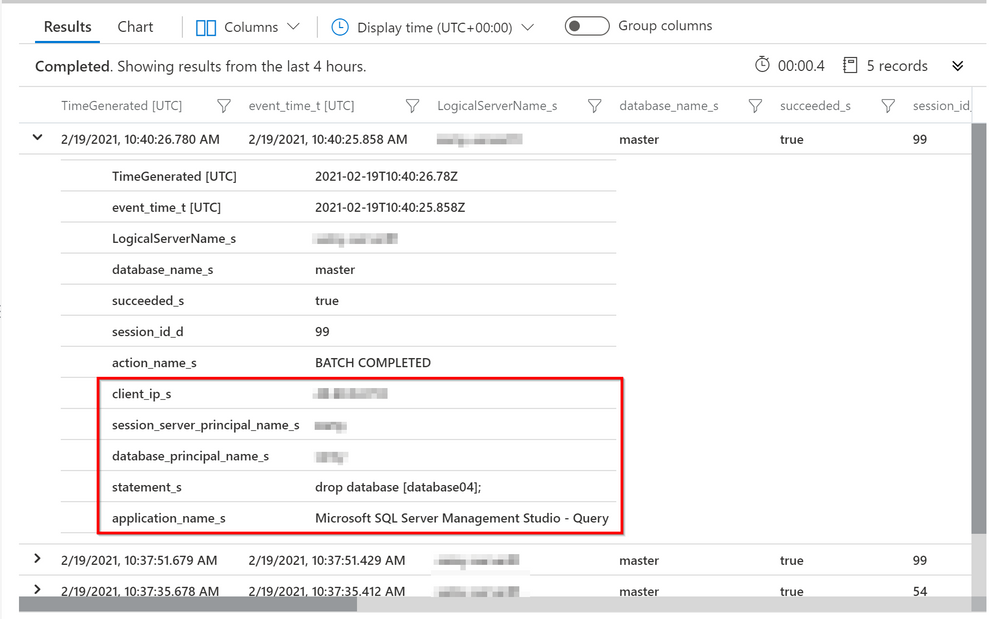
You can find more details by expanding the audit data record:-
For more examples, I would recommend review blog for colleague @FonsecaSergio:
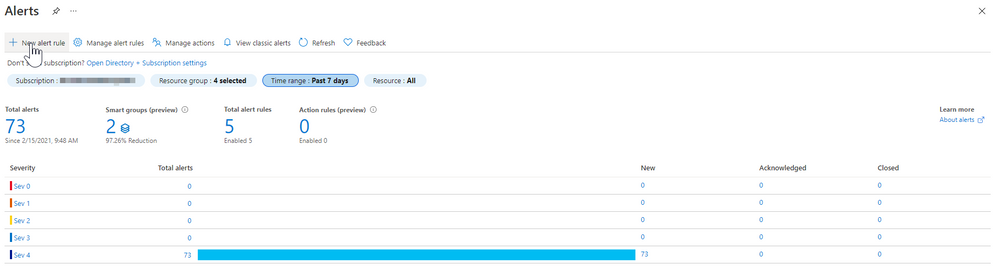
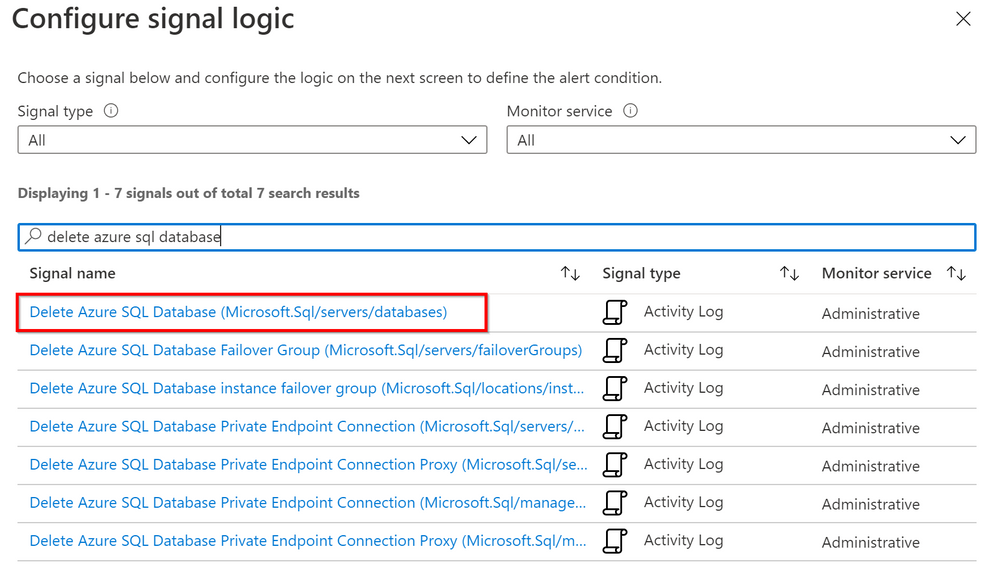
You can create an alert at different resource levels from subscription down to Azure SQL resource to get notified in case a database was deleted, you will need to enable alert for activity log “Delete Azure SQL Database (Microsoft.Sql/servers/databases)” at the preference resource level. As shown in below example:-
Choose the activity log Delete Azure SQL Database (Microsoft.Sql/servers/databases) :-
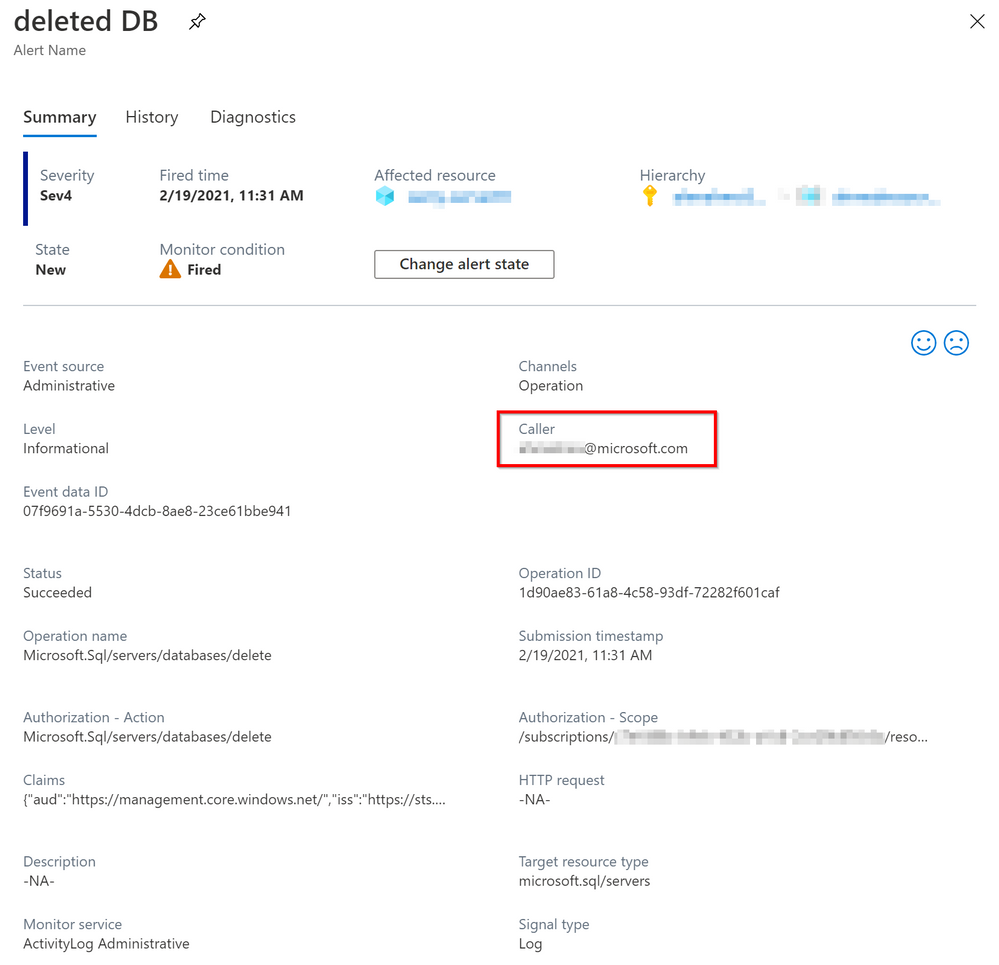
Once the activity log event triggered, you will be able to find more details by open the alert data entry:-
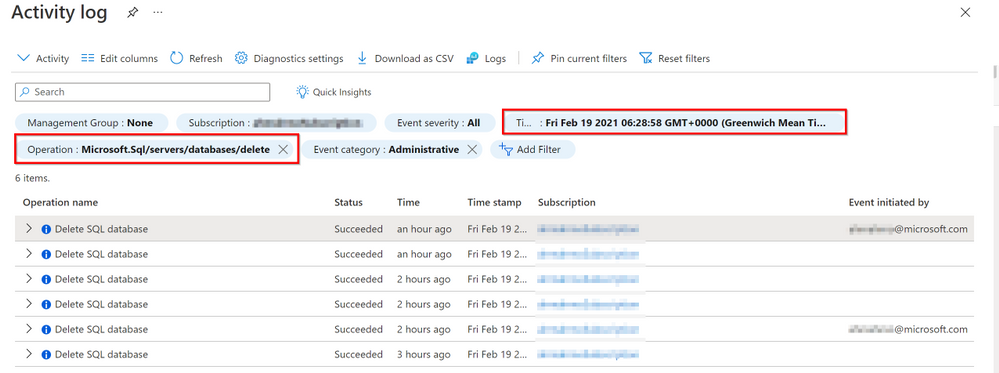
The Activity log is a platform log in Azure that provides insight into subscription-level events. This includes such information as when Azure SQL DB is deleted, You can view the Activity log in the Azure portal or retrieve entries with PowerShell and CLI, to review the activity log from Azure portal, hit the bell icon as shown below:
You can change the time range and add operation filter: “Microsoft.SQL/servers/databases/delete” to get all the deleted SQL databases in certain period, as shown in below figure:-
NOTE:- You cannot retrieve activity log entries more than 90 days in the past.
In case you want to store Activity log entries for longer than 90 days you can send to Log Analytics workspace to enable the features of Azure Monitor Logs, archive to a storage account or stream to an event hub.
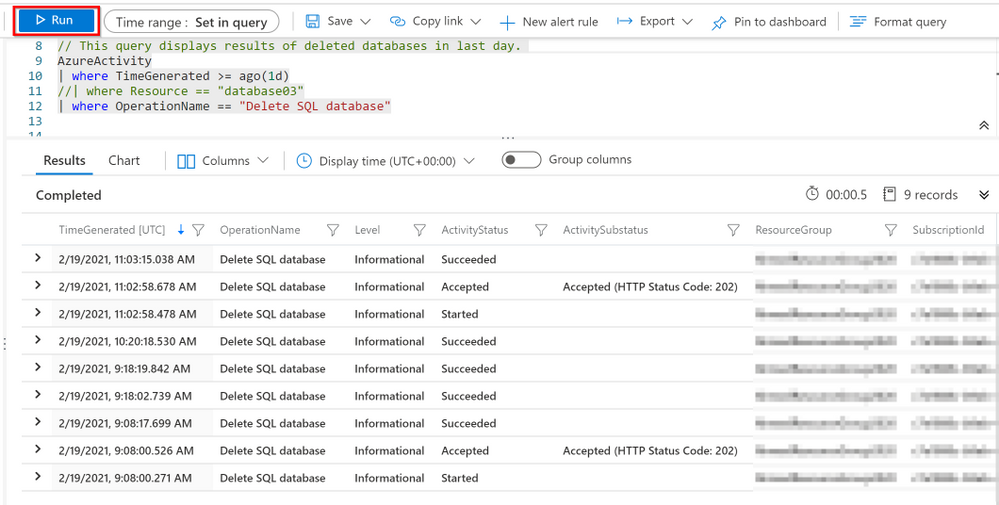
Here is a sample Kusto script to retrieve activity log for deleted SQL DB from Log Analytics :-
AzureActivity
| where Resource == "XXXXXXX"  # Change to the database name
| where OperationName == "Delete SQL database"
TIP: change the time range to the roughly incident time or you can add clause | where TimeGenerated >= ago(10d)
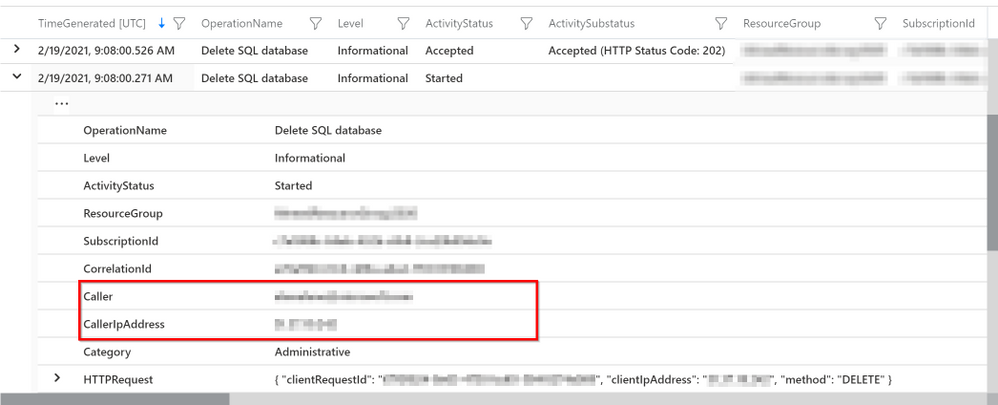
You can find more details by expanding the Activity log entry, as shown in below figure:-
In order to protect your Azure SQL Database from unintended deletion, you can enable Resource lock, it can prevent deletions on the locked resources unless the lock is explicitly removed. It is very important to notethat this does not prevent T-SQL deletions of the database.
Lastly and most importantly, Azure will allow you to recover the deleted database to the deletion time.
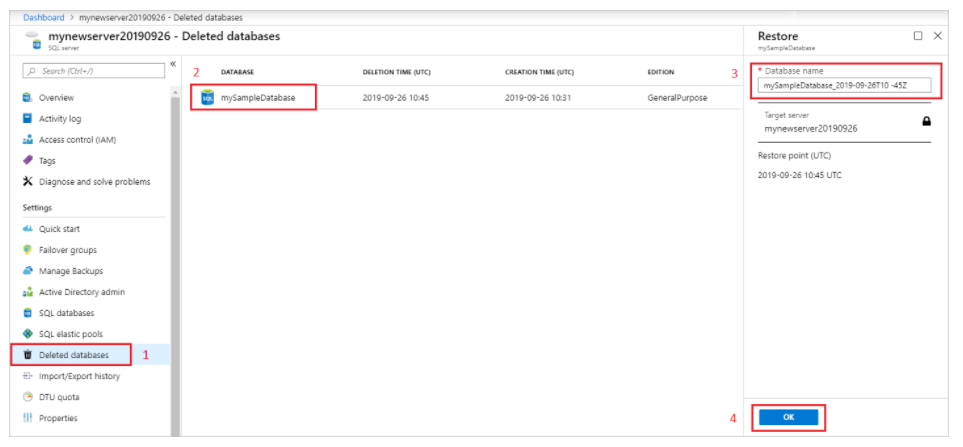
By using the Azure portal, open Azure SQL server overview page, and select Deleted databases. Select a deleted database that you want to restore, and type the name for the new database that will be created with data restored from the backup, and click OK. As shown in below figure:-
I hope you find this article helpful. If you have any feedback please do not hesitate to provide it in the comment section below.
This article is contributed. See the original author and article here.
Understanding your customers starts with gathering their feedback. But a Forrester study1 found that at the end of 2020, decision making with customer insights was organizations’ biggest challenge with marketing programs. That’s why having a voice of customer (VoC) programa program designed to capture the needs and wants of the customerin your organization is critical to improving customer experiences, driving a customer-centric culture, and delivering better business outcomes.
VoC programs need to be built on a strong foundation of principles, but it takes more than that to succeed. Our newest webinar featuring Forrester analyst Faith Adams explores what voice of customer programs are, how it can impact your business, and what steps you can take today. Watch “Build Better Customer Experiences with VoC Programs” today.
The four principles of successful VoC programs
1. Listen to your customers where they are
In today’s interconnected world, your customers exist in a variety of channels from email to social to web. If your organization can meet your customers in those channels, both in collecting feedback, closing the loop, and delivering a great experienceyou can build lifelong loyalty.
Organizations with a strong VoC program utilize its tools to deploy surveys in every channel in real time, creating a seamless and easy process for the customer. Prioritizing understanding how customers see your products and services will help every department, from marketing to sales to customer service, have a greater impact on the customer experience.
2. Maximize insights for deeper connections
A deeper connection with your customer can only form from a complete understanding of their perceptions, needs, and wants. Strong VoC programs maximize customer insights with powerful tools such as AI-analysis and customer satisfaction metrics such as NPS satisfaction over time allow organizations to continuously have a pulse on their customers’ perception.
With direct feedback analyzed and visualized in a manner that is easy to interpret, tailoring future interactions becomes easier than ever. Sales, marketing, and customer service can adjust their daily interactions and decisions to align with what matters most to customers and are empowered to develop lifelong relationships.
3. Integrate data across your organization
Data silos prevent rich customer insights and authentic experiences. Successful VoC programs truly transform data management and create a culture of customer centricity where every department has access to the right data at the right time.
Further, sharing the insights you gather from direct feedback can be utilized to create holistic customer profiles. Together with behavioral data, these unified customer profiles can be accessed directly from the VoC, elevating how organizations think about their customer and how to respond.
4. Respond quickly to build customer relationships
Finally, a VoC program needs to enable an organization to respond in the moments that matter. The combination of data from applications and the use of real-time notifications creates accelerate response times.
The most important part of the customer journey for your organization is closing the feedback loop. When customer feedback is received, 88 percent of customers expect a response from businesses within 60 minutes. That’s why VoCs let you set triggers for when customer satisfaction dips, creating an instant pathway to delivering a great customer experience.
Starting your Voice of Customer journey can be daunting, but it’s the first step to orchestrating authentic connections and responses to customer feedback. With these four principles in mind, and with all departments bought into a singular vision, organizations can improve business outcomes.
To learn how Microsoft can empower your organization to use a robust VoC to quickly collect and understand omnichannel feedback at scale, visit the Dynamics 365 Customer Voice website.













Recent Comments