by Contributed | Mar 12, 2021 | Technology
This article is contributed. See the original author and article here.
By: @Caroline_Lee
Welcome to the Real Time Controls blog series! This series will focus on the Real Time Controls pillar in Microsoft Cloud App Security (MCAS) and how to work through some unique use cases, workarounds and pointers when configuring your policies.
For those of you who are unfamiliar with Real Time Controls in Cloud App Security, check out our documentation located here: Deploy Cloud App Security Conditional Access App Control for Azure AD apps | Microsoft Docs. In short, MCAS uses a reverse proxy to monitor user sessions and apply controls in real time (i.e. Block downloads to an unmanaged device). Keep in mind, you can only leverage this feature set for the web versions of applications, not thick clients (one of the most frequently asked questions). If you’re interested in a blog dedicated to how to protect that scenario, please like this post!
For the first blog, I wanted to share a use case that has been popping up over the last couple of months.
Use Case: Block downloads to unmanaged devices for ExchangeOnline.
Current Behavior: When a user accesses the Outlook Web Application (OWA) and tries to preview a PDF attachment, they are blocked by MCAS. This is because in some browsers the PDF needs to be downloaded on the backend in order to preview it.
Technically, MCAS is satisfying the use case as expected. It recognizes a download, so it blocks the action. Some customers have expressed that blocking the preview inhibits users from completing daily tasks. Good news! We have found a workaround for this exact scenario.
There is a PowerShell module specifically for Exchange Online that will allow users to preview PDF but remove the download functionality so data will remain protected even if accessed from an unmanaged device.
Here are the steps:
Note: The “OwaMailboxPolicy-Default” is the default OWA policy in EXO. It is possible customers have deployed additional or created a custom OWA policy with a different name. If customers have multiple OWA policies, they may have those applied to specific users. Therefore, those would also need to be updated to have complete coverage.
- Download the Exchange Online Powershell Module: PowerShell Gallery | ExchangeOnlineManagement 2.0.4
- After this the user will need to connect to the module (depending on the tenant here is the list of commands):
- Connect to Exchange Online PowerShell | Microsoft Docs
- Once the user has established connection to the exchange online Powershell, they will need to update two command lines
- Set-OwaMailboxPolicy (ExchangePowerShell) | Microsoft Docs:
- Set-OwaMailboxPolicy -Identity OwaMailboxPolicy-Default -DirectFileAccessOnPrivateComputersEnabled $false -DirectFileAccessOnPublicComputersEnabled $false
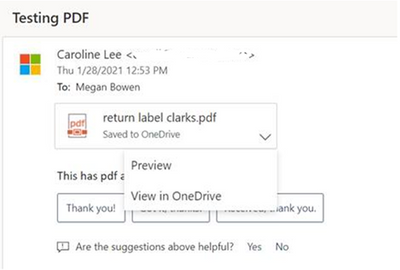
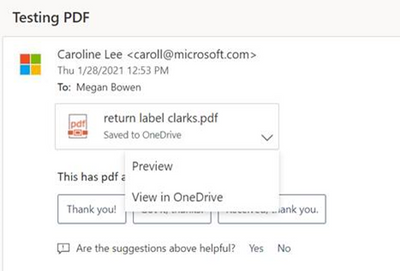
- After these parameters have been set, run a test on OWA with a PDF file & a session policy configured to block downloads. The “Download,” option should be removed from the dropdown and the user can preview the file.
- Before Powershell cmd:
After Powershell cmd:
Thanks for tuning in on the first post on Real Time Controls. Look out for these steps in the Troubleshooting guide (https://docs.microsoft.com/en-us/cloud-app-security/troubleshooting-proxy). If there are any scenarios you’re curious in seeing, please leave a comment below.
——-
Feedback
Let us know if you have any feedback or relevant use cases/requirements for this portion of Microsoft Cloud App Security by emailing CASFeedback@microsoft.com and mentioning the core area of concern.
Learn more
For further information on how your organization can benefit from Microsoft Cloud App Security, connect with us at the links below:
To experience the benefits of full-featured CASB, sign up for a free trial—Microsoft Cloud App Security.
Follow us on LinkedIn as #CloudAppSecurity. To learn more about Microsoft Security solutions, visit our website. Bookmark the Security blog to keep up with our expert coverage on security matters. Also, follow us at @MSFTSecurity on Twitter and Microsoft Security on LinkedIn for the latest news and updates on cybersecurity.
by Contributed | Mar 12, 2021 | Technology
This article is contributed. See the original author and article here.
The accelerated networking update for the HPC SKUs on Azure has caused problems for older OS distributions or any MPI versions that do not use the latest UCX. This is due to inconsistent naming for the IB devices. My recent patch to rdma-core can be used to provide consistent naming with udev rules. This following script can be used when building an image:
yum install -y cmake libnl3-devel

git clone https://github.com/linux-rdma/rdma-core.git

cd rdma-core

bash build.sh

cp build/bin/rdma_rename /usr/lib/udev/

cat <<EOF >/etc/udev/rules.d/60-ib.rules

# Accelnet board

ACTION==”add”, ATTR{board_id}==”MSF0010110035″, SUBSYSTEM==”infiniband”, PROGRAM=”rdma_rename %k NAME_FIXED mlx5_an0″

# HBv2 board

ACTION==”add”, ATTR{board_id}==”MT_0000000223″, SUBSYSTEM==”infiniband”, PROGRAM=”rdma_rename %k NAME_FIXED mlx5_ib0″

# HC board

ACTION==”add”, ATTR{board_id}==”MT_0000000010″, SUBSYSTEM==”infiniband”, PROGRAM=”rdma_rename %k NAME_FIXED mlx5_ib0″

EOF
This will name the accelerated networking mlx5_an0 and the infiniband to mlx5_ib0. Now, you can use the older MPI/UCX versions by setting:
export UCX_NET_DEVICES=mlx5_ib0:1
The script includes rules that will work for HB, HC, HBv2 and NDv2.
by Contributed | Mar 12, 2021 | Technology
This article is contributed. See the original author and article here.
Authored with Itamar Falcon, Product Manager, Microsoft Cloud App Security
Attacks don’t respect domain boundaries. They move fast across cloud applications, endpoints, user identities and data domains. They establish a foothold and move laterally across platforms. The integration of Microsoft Cloud App Security and Microsoft 365 Defender is designed to reduce the surface area for potential attack by accomplishing these three key objectives (and that’s just the start):
- Protecting against attacks and coordinating defensive responses in multi-cloud, multi-app environments and other Microsoft 365 Defender workloads through signal sharing and automated actions.
- Delivering complete narration of the attack across products for security teams by joining data on alerts, suspicious events by comparing UEBA analytics and impacted assets to incidents.
- Enabling security teams to perform detailed, effective threat hunting across all security domains.
Threat protection from your CASB should help automate your responses to incidents and alert you to risky activities in your cloud environment. Check out this brief two-minute video, which demonstrates the value of integrated threat protection in Microsoft Cloud App Security:
As organizations move increasingly to the cloud, protecting the cloud attack vector is critical. In some cases, attackers perform malicious activities on the organization’s cloud infrastructure with a limited footprint on other domains. In other cases, the cloud attack is only part of a much bigger campaign. To fully understand the connections between different alerts and signals, Microsoft 365 Defender, together with Cloud App Security, has developed unique correlations to lend SOC teams insight on the full story with less effort.
In the video below, Itamar leads a discussion on threat protection in Microsoft Cloud App Security, demonstrating:
- The flow of correlation of signals into an incident between Microsoft 365 Defender and Microsoft Cloud App Security.
- The scope of breach as coordinated by Microsoft 365 Defender advanced hunting by combining signals across workloads: classification of an alert in Microsoft Cloud App Security from the Microsoft 365 Defender portal.
These simple examples illustrate the power of integration of Microsoft Cloud App Security and Microsoft 365 Defender. This integration delivers a set of full capabilities to save time, strengthen security and quickly resolve incidents in your environment. In upcoming development cycles, you will have new threat capabilities around advanced hunting and correlations with Cloud App Security alerts.
For additional deeper information on this topic, read Sebastien Molendijk’s recent blog: Microsoft Cloud App Security: The Hunt in a multi-stage incident.
Feedback
We welcome your feedback or relevant use cases and requirements for these capabilities in Cloud App Security by emailing CASFeedback@microsoft.com and mention “Threat Protection”.
Learn more
For further information on how your organization can benefit from Microsoft Cloud App Security, connect with us at the links below:
To experience the benefits of full-featured CASB, sign up for a free trial—Microsoft Cloud App Security.
Follow us on LinkedIn as #CloudAppSecurity. To learn more about Microsoft Security solutions visit our website. Bookmark the Security blog to keep up with our expert coverage on security matters. Also, follow us at @MSFTSecurity on Twitter, and Microsoft Security on LinkedIn for the latest news and updates on cybersecurity.
by Contributed | Mar 12, 2021 | Technology
This article is contributed. See the original author and article here.
I am very excited to announce to you the monthly M365 Government Community Call – a live(ish) call occurring the second Tuesday of every month led by and for the Government Community.
This monthly call will be based here, in the Microsoft PubSec Tech Community, will include six panelists covering the latest announcements for O365 GCC, GCC-H, and DOD tenants. While each month two slots will change based on topic and availability, it will be led by the following four community leaders:
- Jeremy Wood (@geekwithin), Director of Policy & Planning at the Millennium Challenge Corporation, Organizer of Microsoft 365 for Government DC Users Group
- Rima Reyes (@rimazima), Principal Program Manager for Government at Microsoft Teams Engineering
- Sarah Gilbert (@singingtech), Community Technical Manager Public Sector at Microsoft
- Jay Leask (@jayleask), Lead Modern Workplace Strategist at AvePoint Public Sector, Organizer at NOVA365 and Azure User Group
*Special thanks to the AvePoint Public Sector team who is managing our broadcast and providing all the wonderful graphics!!!
M365 Gov Community Call Notes
YOUTUBEVIDEO: https://www.youtube.com/watch?v=AQTnHYTc_xw&list=PLyJFOtpJV3wNOExhHa6Uo5XLieb0RC_EW
https://www.youtube-nocookie.com/embed/AQTnHYTc_xw
This month brought special guests Amie Seisay (LinkedIn), DC-area O365 and SharePoint solution provider, and Matthew Littleton (LinkedIn), Global Advanced Compliance Specialist at Microsoft.
In our inaugural episode we tried to focus on Microsoft Ignite, but as the Government Community is used to, there were not a lot of GCC, GCC-H, or DOD announcements last week. So, after a brief “what was cool and exciting” segment (have you seen Mesh? or Viva? And yes, we’re assured Viva for GCC is … on the way), we moved on to Government News from February and March. Here’s a list of topics and some related links, to make sure you caught everything!
M365 Gov Community Calendar
Also, as part of our monthly community call we aim to provide a list of DC-area or Government specific events to ensure you know what is happening in the community. See below for events through the end of March:
Putting the “Community” in the Community Call
The M365 Gov Community Call is all about YOU – GCC, GCC-H, and DOD users in the Microsoft cloud, and we want to make sure you have a voice!
Monthly, second Tuesday, 11:30am Eastern
Each month we will release a new episode on the SECOND TUESDAY at 11:30am. These will go live on this M365 Gov Community Call playlist – make sure you subscribe to get notifications! And seriously, this is happening and this is YOUR CALL.
Have questions? Post them here and tag myself or @Sarah Gilbert! Tag any of us on Twitter: @geekwithin | @rimazima | @singingtech | @jayleask | @AvePointGov
Have an event? Again, let us know and we’d be THRILLED to include you in our Community Events segment!

by Contributed | Mar 12, 2021 | Technology
This article is contributed. See the original author and article here.
Building micro services through Event Driven Architecture part14 : Query API.
Gora Leye is a Solutions Architect, Technical Expert and Devoper based in Paris. He works predominantly in Microsoft stacks: Dotnet, Dotnet Core, Azure, Azure Active Directory/Graph, VSTS, Docker, Kubernetes, and software quality. Gora has a mastery of technical tests (unit tests, integration tests, acceptance tests, and user interface tests). Follow him on Twitter @logcorner.

A brief history of the Microsoft MVP Program
Hal Hostetler is an Office Apps and Services MVP who has been in the MVP program since 1996. Now retired, Hal is a Certified Professional Broadcast Engineer and remains the regional engineer for Daystar Broadcasting and a senior consultant for Roland, Schorr, & Tower. He lives in Tucson, Arizona. For more on Hal, check out his Twitter @TVWizard

Securing Microsoft Teams
Tobias Zimmergren is a Microsoft Azure MVP from Sweden. As the Head of Technical Operations at Rencore, Tobias designs and builds distributed cloud solutions. He is the co-founder and co-host of the Ctrl+Alt+Azure Podcast since 2019, and co-founder and organizer of Sweden SharePoint User Group from 2007 to 2017. For more, check out his blog, newsletter, and Twitter @zimmergren

Unit testing: How to write your first unit test for T-SQL code
Sergio Govoni is a graduate of Computer Science from “Università degli Studi” in Ferrara, Italy. Following almost two decades at Centro Software, a software house that produces the best ERP for manufacturing companies that are export-oriented, Sergio now manages the Development Product Team and is constantly involved on several team projects. For the provided help to technical communities and for sharing his own experience, since 2010 he has received the Microsoft Data Platform MVP award. During 2011 he contributed to writing the book: SQL Server MVP Deep Dives Volume 2. Follow him on Twitter or read his blogs in Italian and English.

Teams Real Simple with Pictures: App Customisation with Praise
Chris Hoard is a Microsoft Certified Trainer Regional Lead (MCT RL), Educator (MCEd) and Teams MVP. With over 10 years of cloud computing experience, he is currently building an education practice for Vuzion (Tier 2 UK CSP). His focus areas are Microsoft Teams, Microsoft 365 and entry-level Azure. Follow Chris on Twitter at @Microsoft365Pro and check out his blog here.

by Contributed | Mar 12, 2021 | Technology
This article is contributed. See the original author and article here.
SharePoint Framework Special Interest Group (SIG) bi-weekly community call recording from March 11th is now available from the Microsoft 365 Community YouTube channel at http://aka.ms/m365pnp-videos. You can use SharePoint Framework for building solutions for Microsoft Teams and for SharePoint Online.
Call summary:
New Microsoft 365 Extensibility look book gallery preview released. Work continues on Microsoft Viva Connections – an extensibility model to be previewed in weeks. Register now for March trainings on Sharing-is-caring. Latest project updates include: SPFx v1.12 release – ETA – in days. PnPjs Client-Side Libraries v2.3.0 release scheduled for March 12th, v3.0 Hub planning and discussion issues posted – issue #1636. CLI for Microsoft 365 Beta v3.7 delivered. Reusable SPFx React Controls – v2.5.0 and Reusable SPFx React Property Controls – v2.4.0 delivered. PnP Modern Search v3.18.0 released March 9th, v4.1 in progress. There were five PnP SPFx web part samples delivered last week. So useful! The host of this call is Patrick Rodgers (Microsoft) @mediocrebowler. Q&A takes place in chat throughout the call.
Actions:
- Register for Sharing is Caring Events
- First Time Contributor Session – March 22nd (EMEA, APAC & US friendly times available)
- Community Docs Session – March
- PnP – SPFx Developer Workstation Setup – April TBD
- PnP SPFx Samples – Solving SPFx version differences using Node Version Manager – April TBD
- PnP – AMA (Ask Me Anything) – SPFx Samples Edition – April 13
- First Time Presenter – March 24th
- More than Code with VSCode – March 23rd
- Maturity Model Practitioners – March 16th
- PnP Office Hours – 1:1 session – Register
- Download the recurrent invite for this call – https://aka.ms/spdev-spfx-call
Demos:
DataTable web part for rendering data from lists with advance features – this web part provides an easy way to render an interactive SharePoint custom list in DataTable view with many configuration options in the property pane. Provides all the important table formatting features like: Search & exclude from search, filter, pagination, column selection, column ordering, alternative row formatting, etc. Export the selected table data to CSV or PDF. Uses PnPjs, React property controls.
Building List Search web part for showing data flexibly from lists or libraries – this React list search web part allows the user to show data that’s pulled from different lists or libraries on multiple sites into a searchable summary list. Presenter steps through extensive, appropriate configuration options. Functionally – Select source data – sites, lists and fields, and Set up destination (summary) list columns, formatting, filtering, and on-click dynamic data functionality. Full documentation with sample.
Using a web part to control which Sites have been granted permissions in Azure AD application – the Sites Selected Admin SPFx web part enables Site Collection Admins to check which in scope apps have been added to a SharePoint site, to list Azure AD registered apps using Microsoft Graph API scope, and to add SharePoint sites to the Azure AD listed Apps. Uses functional components to granularly control apps accessing their SharePoint sites using Microsoft Graph APIs.
- No new or updated extensions last week
SPFx web part samples: (https://aka.ms/spfx-webparts)
As is the case this week, samples are often showcased in Demos. Thank you for your great work.
Agenda items:
Demos :
- DataTable web part for rendering data from lists with advance features – Chandani Prajapati | @Chandani_SPD & David Warner | @DavidWarnerII – 16:45
- Building List Search web part for showing data flexibly from lists or libraries – Alberto Gutierrez Perez (Minsait) | @albertogperez – 28:00
- Using a web part to control which Sites have been granted permissions in Azure AD application – Fredrik Thorild (Sogeti) | @taxonomythorild – 35:50
Resources:
Additional resources around the covered topics and links from the slides.
General Resources:
Other mentioned topics
Upcoming calls | Recurrent invites:
PnP SharePoint Framework Special Interest Group bi-weekly calls are targeted at anyone who is interested in the JavaScript-based development towards Microsoft Teams, SharePoint Online, and also on-premises. SIG calls are used for the following objectives.
- SharePoint Framework engineering update from Microsoft
- Talk about PnP JavaScript Core libraries
- Office 365 CLI Updates
- SPFx reusable controls
- PnP SPFx Yeoman generator
- Share code samples and best practices
- Possible engineering asks for the field – input, feedback, and suggestions
- Cover any open questions on the client-side development
- Demonstrate SharePoint Framework in practice in Microsoft Teams or SharePoint context
- You can download a recurrent invite from https://aka.ms/spdev-spfx-call. Welcome and join the discussion!
“Sharing is caring”
Microsoft 365 Patterns and Practices team – 12th of March, 2021
by Contributed | Mar 12, 2021 | Technology
This article is contributed. See the original author and article here.
With Python application, you can use OpenCensus to send the telemetry data. However, if your requirement is to use custom dimensions, you can use as below:
import logging
from opencensus.ext.azure.log_exporter import AzureLogHandler
logger = logging.getLogger(__name__)
# TODO: replace the all-zero GUID with your instrumentation key.
logger.addHandler(AzureLogHandler(
connection_string=’InstrumentationKey=00000000-0000-0000-0000-000000000000′)
)
properties = {‘custom_dimensions’: {‘key_1’: ‘value_1’, ‘key_2’: ‘value_2’}}
# Use properties in logging statements
logger.warning(‘action’, extra=properties)
|
In case, your requirement is to use correlation ID with custom dimensions, Function App does not have the feature available yet. The team is working on a solution to light up this feature.
Until then, use the example below and initialize the OpenCensus component with the correlation id in your function’s trigger.
import json
import logging
import requests
import azure.functions as func
from opencensus.ext.azure.trace_exporter import AzureExporter
from opencensus.trace import config_integration
from opencensus.trace.samplers import ProbabilitySampler
from opencensus.trace.tracer import Tracer
from opencensus.trace import execution_context
from opencensus.trace.propagation.trace_context_http_header_format import TraceContextPropagator
config_integration.trace_integrations([‘requests’])
exporter = AzureExporter(instrumentation_key=”aaaaaaaa-bbbb-cccc-dddd-eeeeeeeeeeee”)
def main(req: func.HttpRequest, context: func.Context) -> func.HttpResponse:
## these below four lines
span_context = TraceContextPropagator().from_headers({“traceparent”: context.trace_context.Traceparent, “tracestate”: context.trace_context.Tracestate})
tracer = Tracer(span_context=span_context, exporter=exporter, sampler=ProbabilitySampler(1.0))
execution_context.set_opencensus_tracer(tracer) # < — sets the passed in tracer as the current tracer
with tracer.span(“parent”):
return json.dumps({
‘method’: req.method,
‘ctx_func_name’: context.function_name,
‘ctx_func_dir’: context.function_directory,
‘ctx_invocation_id’: context.invocation_id,
‘ctx_trace_context_Traceparent’: context.trace_context.Traceparent,
‘ctx_trace_context_Tracestate’: context.trace_context.Tracestate,
})
Hope this helps!
Shashank Ranjan
Azure App Services Support Engineering
by Contributed | Mar 12, 2021 | Technology
This article is contributed. See the original author and article here.
Lots to talk about this week including: Project Narya, Azure VMware Solution now in Southeast Asia, Windows Server 2019 Datacenter: Azure Edition with Hot Patching support, PowerPoint Live in Microsoft Teams, Azure monitor for containers now supports Pods & Replica set live logs in AKS resource view and the Microsoft Learn Module of the week is all about Windows Server.
Advancing failure prediction and mitigation— Microsoft introduces Narya
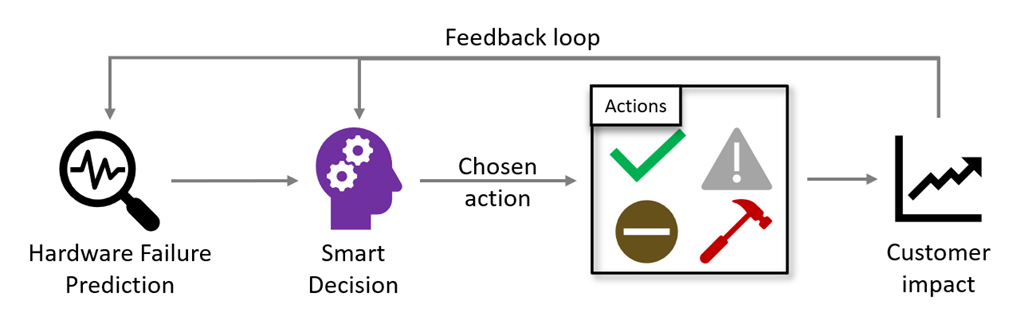
Project Narya is an end-to-end prediction and mitigation service as shared at Microsoft Ignite last week by Mark Russinovich. Not only does it predict and mitigate Azure host failures but also measures the impact of its mitigation actions and to use an automatic feedback loop to intelligently adjust its mitigation strategy.
Visit Mark’s blog post to learn more: Advancing failure prediction and mitigation with Project Narya
Azure VMware Solution now generally available in the Southeast Asia region
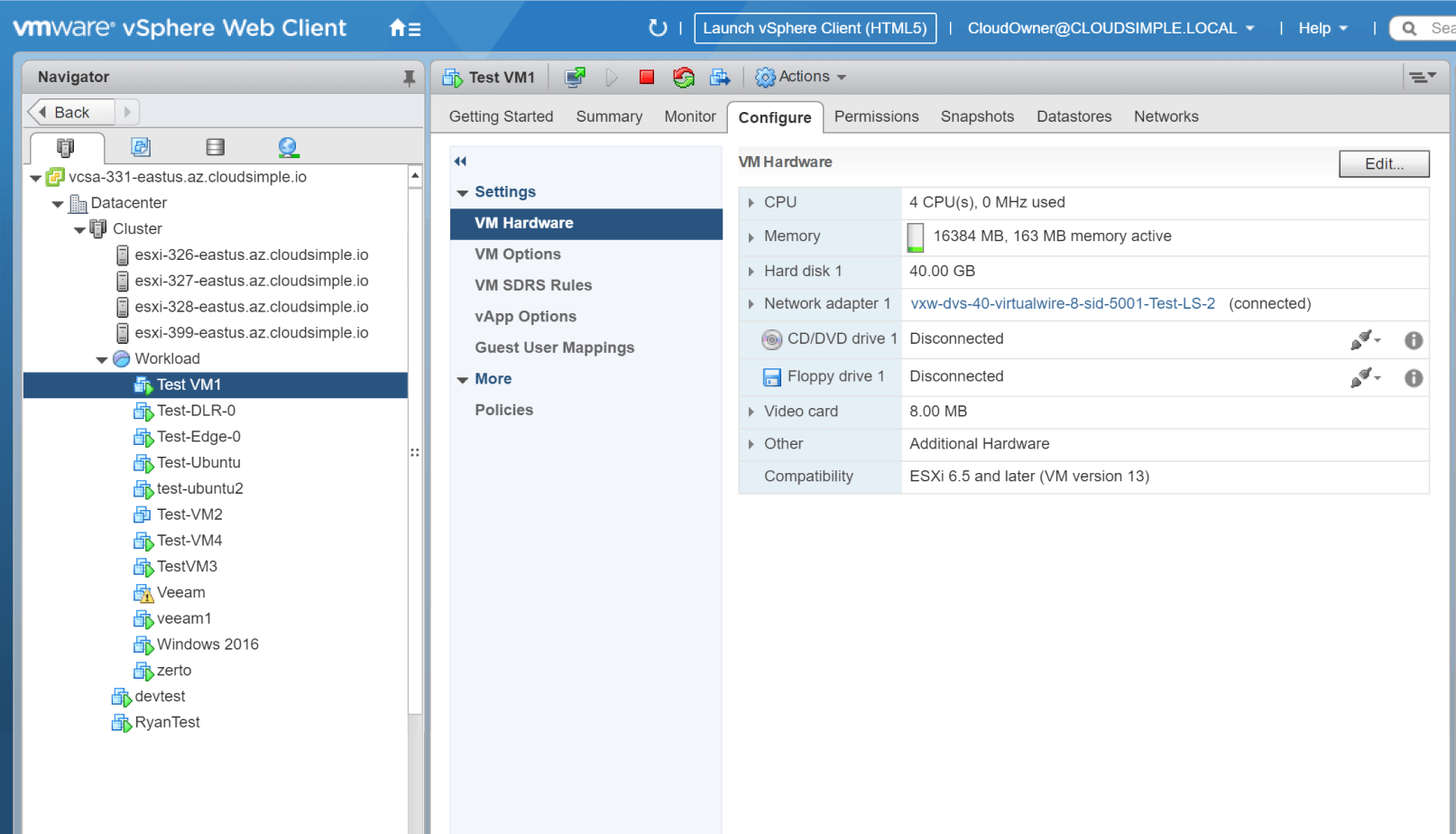
Microsoft has announced the availablity of Azure VMware Solution in the Southeast Asia (Singapore) region. Azure VMware Solution enables the ability to extend or migrate their existing on-premises VMware applications to Azure without the cost, effort or risk of re-architecting applications or retooling operations.
For updates on more upcoming region availability please visit the product by region page here: Azure VMware Solution
Windows Server 2019 Datacenter: Azure Edition with Hot Patching support
Bernardo Caldas, VP of Program Management from the Azure Edge and Platform team, recently announced the general preview of a new edition of Windows Server called Windows Server 2019 Datacenter: Azure Edition. It will be serviced in parallel to Windows Server 2019 Datacenter Core and will have the exact same feature set but will have one main addition – it supports hot patching. This enables the ability to apply patches in memory and not require a reboot of the server.
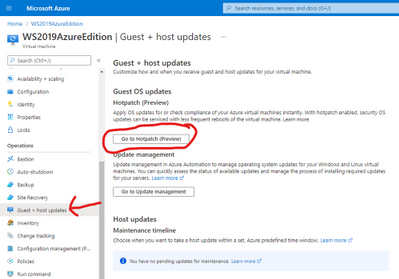
Learn more reguarding availablility and setup here: Windows Server 2019: Azure Edition
Microsoft Introduces PowerPoint Live in Microsoft Teams
The new PowerPoint Live offering offers a better experience overall for presenters and attendees in virtual meetings. PowerPoint notes now available when you share the PowerPoint within Teams. There is seamless sharing between two presenters. Also chat pops up at the top of screen for presenter even if they don’t have the chat dialog highlighted. These features have been added to further enhance the capabilities of online presenations offering an enhancement to audience participation.
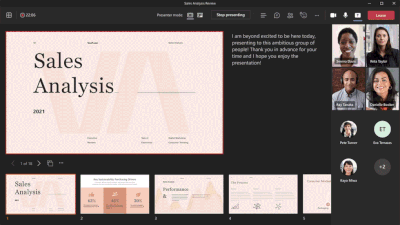
More information surrounding this can be found here: PowerPoint Live in Microsoft Teams
Azure monitor for containers now supports Pods & Replica set live logs in AKS resource view
Azure Monitor for containers now support access to pod & replica-set Live Logs of Azure Kubernetes Service (AKS) pods & replica-sets. Real-time live logs of your Kubernetes deployments can now be viewed. Admins can now search, filter, and view historic deployment pod logs in Log analytics, as well as troubleshoot and diagnose all your pod & replica-set issues.
Learn more about pod & replica-set live logs here: Viewing Kubernetes logs, events, and pod metrics in real-time
Community Events
MS Learn Module of the Week

Windows Server Deep Dive Learning paths
Built by Orin Thomas, these learning paths provide both an introduction and deep technical knowledge to including Windows Server into your organization’s infrastructure. The learning paths available include:
Our team is looking for feedback on the learning paths so let us know if anything else needed to be added or changed.

Let us know in the comments below if there are any news items you would like to see covered in the next show. Be sure to catch the next AzUpdate episode and join us in the live chat.
by Scott Muniz | Mar 12, 2021 | Security
This article was originally posted by the FTC. See the original article here.
The pandemic is still taking a toll on every kind of well-being we have. The new American Rescue Plan, just signed into law, gets the ball rolling to help out on many people’s financial well-being. Payments will soon be coming by direct deposit, checks, or a debit card to people eligible for the payment. You can learn more about who’s eligible, and the timing, at IRS.gov/coronavirus. But let me tell you what will NOT happen, so you can spot and avoid the scammers who are right now crawling out from under their rocks.
1. The government will never ask you to pay anything up front to get this money. That’s a scam. Every time.
2. The government will not call/text/email/DM you to ask for your Social Security, bank account, or credit card number. Anyone who does is a scammer.
3. Nobody legit will ever — EVER — tell you to pay by gift card, cryptocurrency, or wire transfer through companies like Western Union or MoneyGram. You know who will tell you to pay like that? A scammer.
The new law also has some language about health insurance, temporarily increasing subsidies for newly laid-off people and many people buying their own health insurance through the Affordable Care Act (ACA). Please re-read #1-3, above, because they apply here, too. Nobody legitimate will ever call, text, email, or message you out of the blue about getting or keeping health insurance coverage, or to demand payment or your account numbers. That will always be a scam.
If you spot one of these scams, please tell the Federal Trade Commission at ReportFraud.ftc.gov. We’re doing our best to stop these scammers in their tracks, and your report will help.
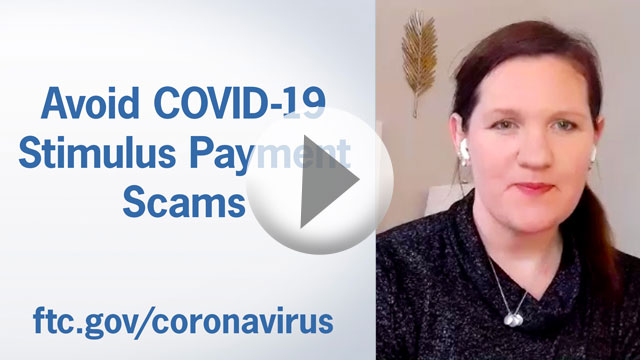
Meanwhile, check out this video for tips on avoiding economic impact payment scams.
Brought to you by Dr. Ware, Microsoft Office 365 Silver Partner, Charleston SC.
by Contributed | Mar 11, 2021 | Technology
This article is contributed. See the original author and article here.
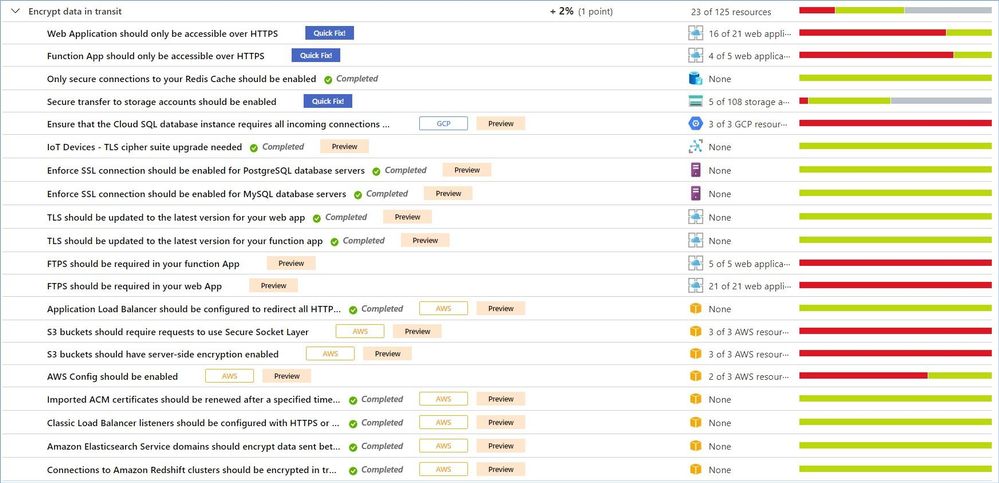
Welcome back to the Security Controls in Azure Security Center blog series! This time we are here to talk about the security control: Encrypt data in transit.
Data must be encrypted when transmitted across networks to protect against eavesdropping of network traffic by unauthorized users. In cases where source and target endpoint devices are within the same protected subnet, data transmission must still be encrypted due to the potential for high negative impact of a data breach. The types of transmission may include client-to-server, server-to-server communication, as well as any data transfer between core systems and third-party systems.
Examples of insecure network protocols and their secure alternatives include:
|
Instead of…
|
Use…
|
Web Access
|
HTTP
|
HTTPS
|
File transfer
|
FTP, RCP
|
FTPS, SFTP, SCP, WebDAV over HTTPS
|
Remote Shell
|
Telnet
|
SSH2
|
Remote desktop
|
VNC
|
RDP
|
As of this writing (March 2021) this control includes 22 recommendations, and this list constantly grows as we add additional resources, e.g. AWS or GCP services. Your actual list may be different, depending on types of resources you have in your environment. To be able to increase your Secure Score by 2% (1 point) you will have to remediate all active recommendations.
Just a reminder, recommendations flagged as “Preview” are not included in the calculation of your Secure Score. However, they should still be remediated wherever possible, so that when the preview period ends, they will contribute towards your score.
Azure Security Center provides a comprehensive description, manual remediation steps, additional helpful information, and a list of affected resources for all recommendations.
Some of the recommendations might have a “Quick Fix!” option that allows you to quickly remediate the issue. In such cases we also provide “View remediation logic” option so that you can review what happens behind the scenes when you click the “Remediate” button. In addition, you may use the remediation scripts for your own automations/templates to avoid similar issues in the future.
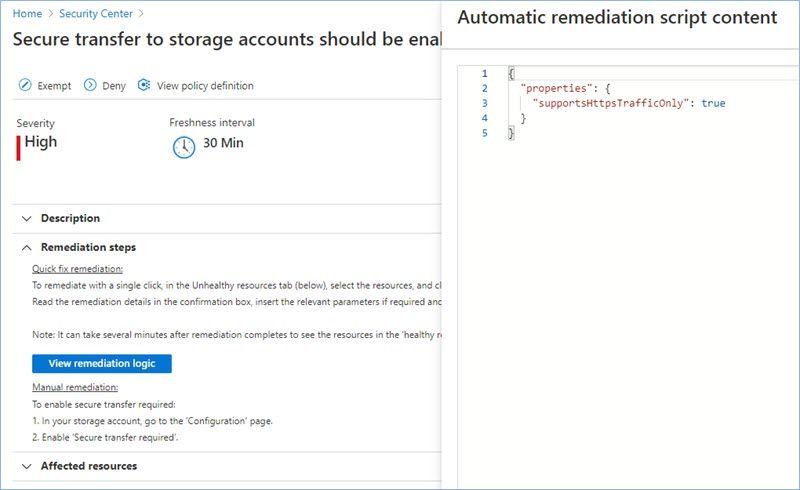
Let’s now review the most common recommendations from this security control.
Secure transfer to storage accounts should be enabled.
Secure transfer is an option that forces your storage account to accept requests only from secure connections (HTTPS). Use of HTTPS ensures authentication between the server and the service and protects data in transit from network layer attacks such as man-in-the-middle, eavesdropping, and session-hijacking.
You can find the related Azure policy here.
The manual remediation steps for this recommendation are:
- In your storage account, go to the ‘Configuration’ page.
- Enable ‘Secure transfer required’.
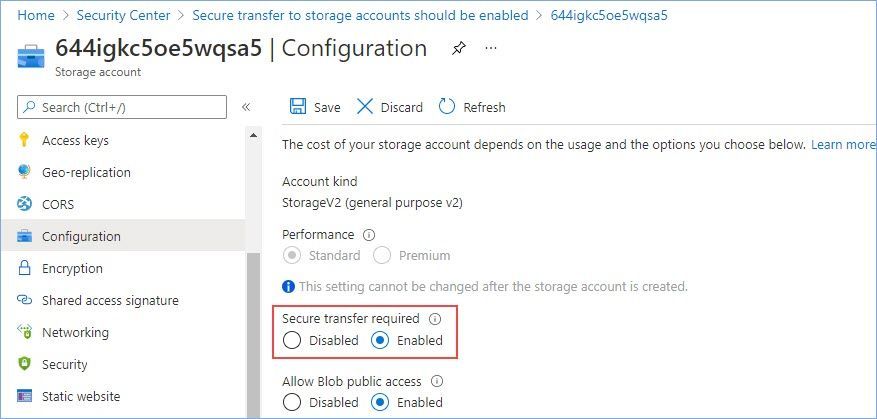
Please review our documentation to learn more about this configuration option.
Web Application should only be accessible over HTTPS.
Use of HTTPS ensures server/service authentication and protects data in transit from network layer eavesdropping attacks.
You can find the related Azure policy here.
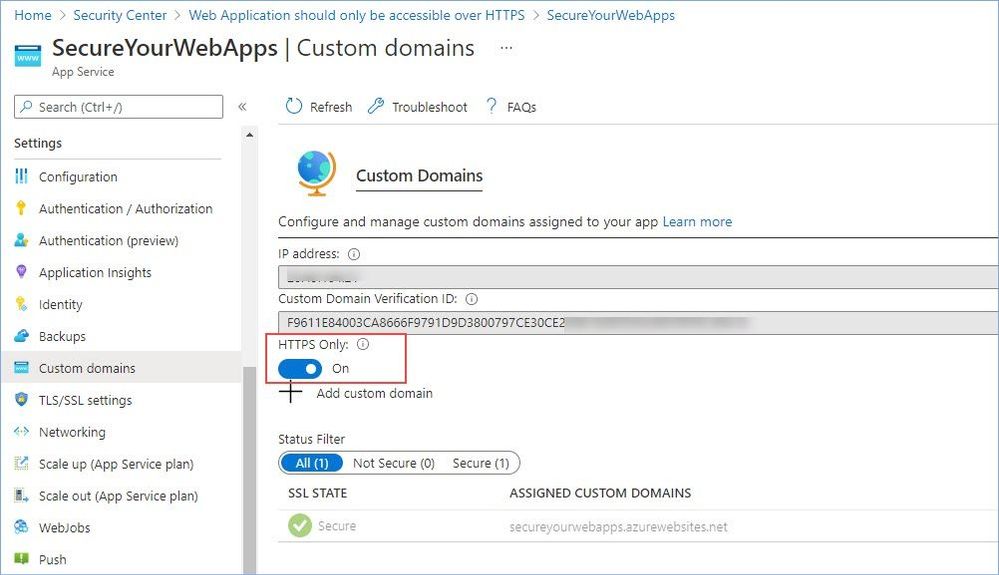
The manual remediation steps for this recommendation are:
- Go to the app service custom domains page
- In the HTTPS Only toggle select On
TLS should be updated to the latest version for your web app.
Transport Layer Security (TLS), like Secure Sockets Layer (SSL), is an encryption protocol intended to keep data secure when being transferred over a network. TLS 1.0 is a security protocol first defined in 1999 for establishing encryption channels over computer networks. Microsoft has supported this protocol since Windows XP/Server 2003. While no longer the default security protocol in use by modern Operating Systems, TLS 1.0 is still supported for backwards compatibility. Evolving regulatory requirements as well as new security vulnerabilities in TLS 1.0 provide corporations with the incentive to disable TLS 1.0 entirely.
Recommendation: Upgrade to the latest TLS version.
You can find the related Azure policy here.
The manual remediation steps for this recommendation are:
- Navigate to Azure App Service
- Select TLS/SSL settings
- Under the Protocol Settings section, choose the latest Minimum TLS Version.
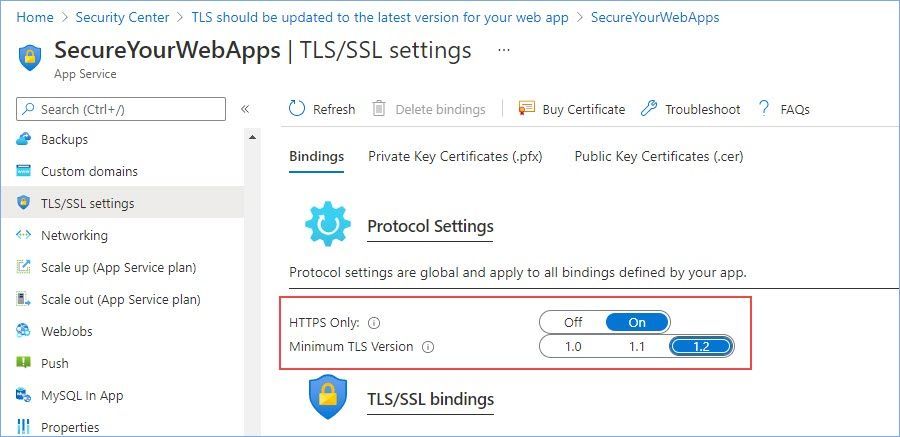
Please review our documentation to learn more about why upgrading to TLS 1.2 is very important.
FTPS should be required in your web App.
Use of HTTPS ensures server/service authentication and protects data in transit from network layer eavesdropping attacks.
You can find the related Azure policy here.
The manual remediation steps for this recommendation are:
- Go to the App Service for your API app
- Select Configuration and go to the General Settings tab
- In FTP state, select FTPS only.
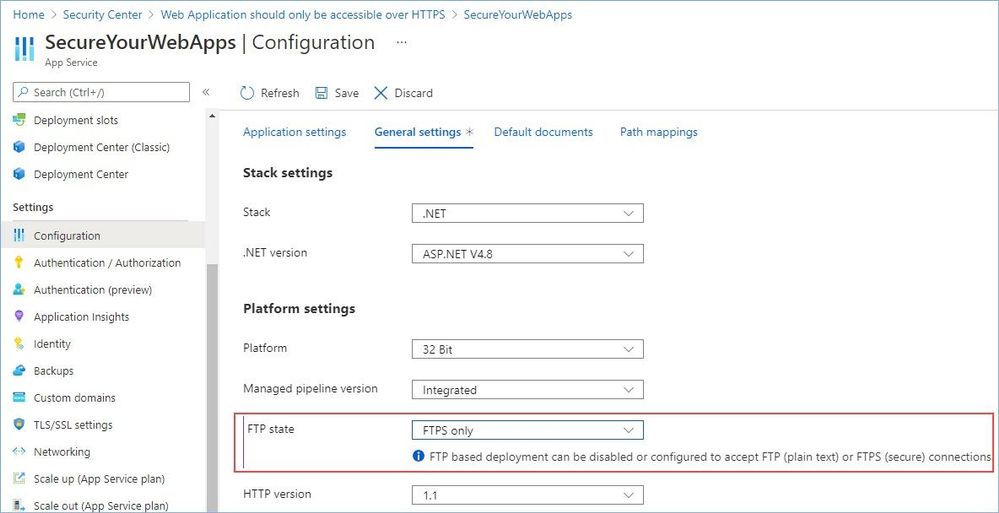
Function App should only be accessible over HTTPS.
Use of HTTPS ensures server/service authentication and protects data in transit from network layer eavesdropping attacks.
You can find the related Azure policy here.
The manual remediation steps for this recommendation are:
- Go to the Function App service custom domains page
- In the HTTPS Only toggle select On
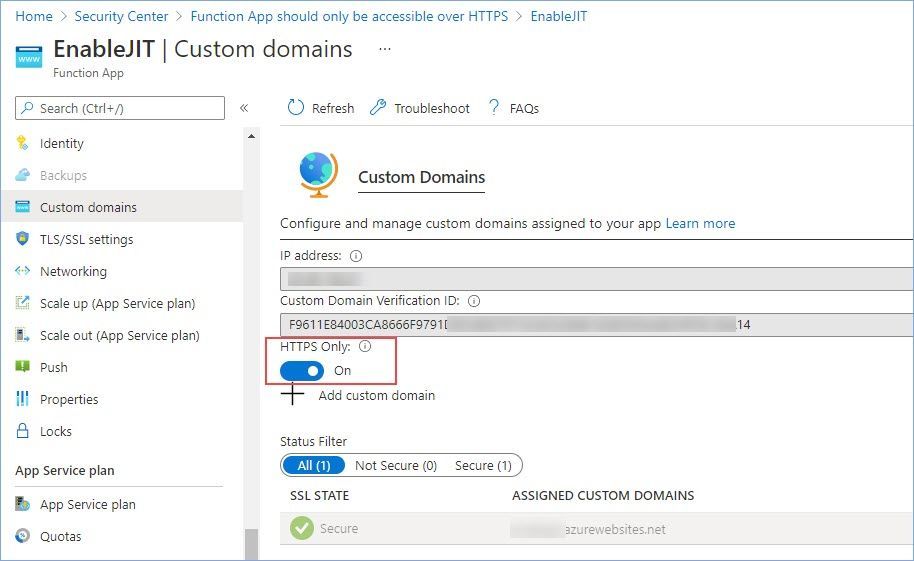
Please review our documentation to learn more about serverless functions security.
TLS should be updated to the latest version for your function app.
Azure Functions is a serverless solution that allows you to write less code, maintain less infrastructure, and save on costs. Instead of worrying about deploying and maintaining servers, the cloud infrastructure provides all the up-to-date resources needed to keep your applications running.
Recommendation: Upgrade to the latest TLS version.
You can find the related Azure policy here.
The manual remediation steps for this recommendation are:
- Navigate to Azure App Service
- Select TLS/SSL settings
- Under the Protocol Settings section, choose the latest Minimum TLS Version.
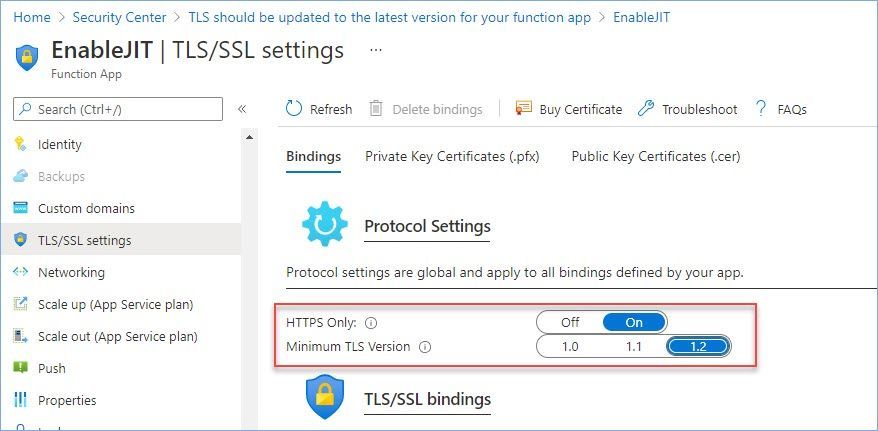
Please review our documentation to learn more about why upgrading to TLS 1.2 is very important.
FTPS should be required in your function App.
You can use FTP or FTPS to deploy your web app, function app, mobile app backend, or API app to Azure App Service. For enhanced security, you should allow FTP over TLS/SSL only. You can also disable both FTP and FTPS if you don’t use FTP deployment.
You can find the related Azure policy here.
The manual remediation steps for this recommendation are:
- Go to the App Service for your API app
- Select Configuration and go to the General Settings tab
- In FTP state, select FTPS only.
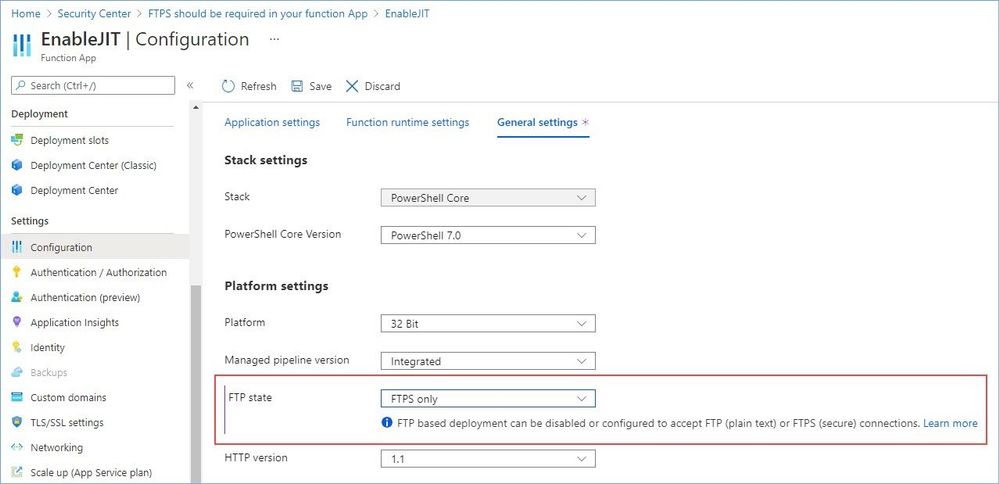
Please review our documentation to learn more about serverless functions security.
Enforce SSL connection should be enabled for MySQL database servers.
Azure Database for MySQL supports connecting your Azure Database for MySQL server to client applications using Secure Sockets Layer (SSL). Enforcing SSL connections between your database server and your client applications helps protect against ‘man in the middle’ attacks by encrypting the data stream between the server and your application. This configuration enforces that SSL is always enabled for accessing your database server.
You can find the related Azure policy here.
The manual remediation steps for this recommendation are:
- Select your Azure Database for MySQL.
- In Connection Security, set Enforce SSL connection to ‘Enabled’.
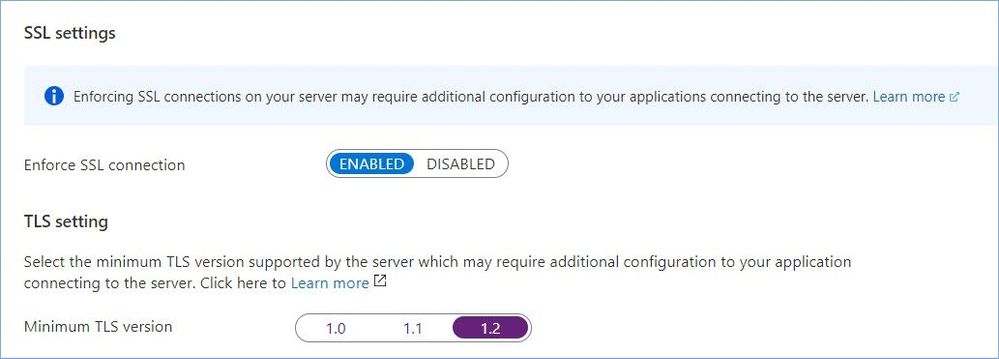
Please review our documentation to learn more about this configuration option.
Enforce SSL connection should be enabled for PostgreSQL database servers.
Azure Database for PostgreSQL supports connecting your Azure Database for PostgreSQL server to client applications using Secure Sockets Layer (SSL). Enforcing SSL connections between your database server and your client applications helps protect against ‘man in the middle’ attacks by encrypting the data stream between the server and your application. This configuration enforces that SSL is always enabled for accessing your database server.
You can find the related Azure policy here.
The manual remediation steps for this recommendation are:
- Select your Azure Database for PostgreSQL.
- In Connection Security, set Enforce SSL connection to ‘Enabled’.
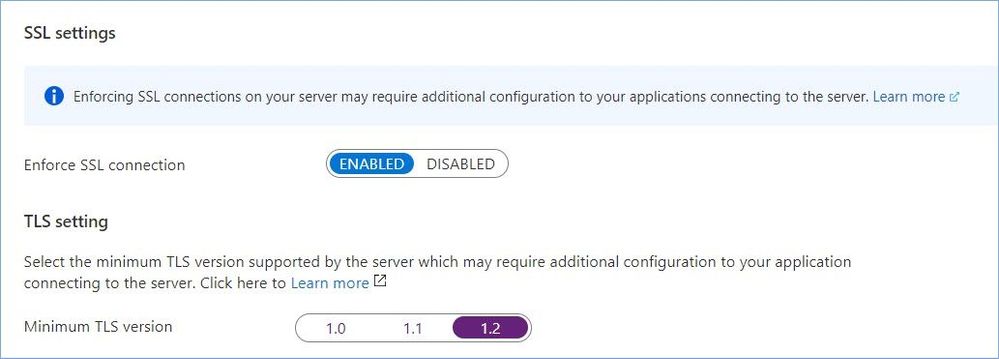
Please review our documentation to learn more about this configuration option.
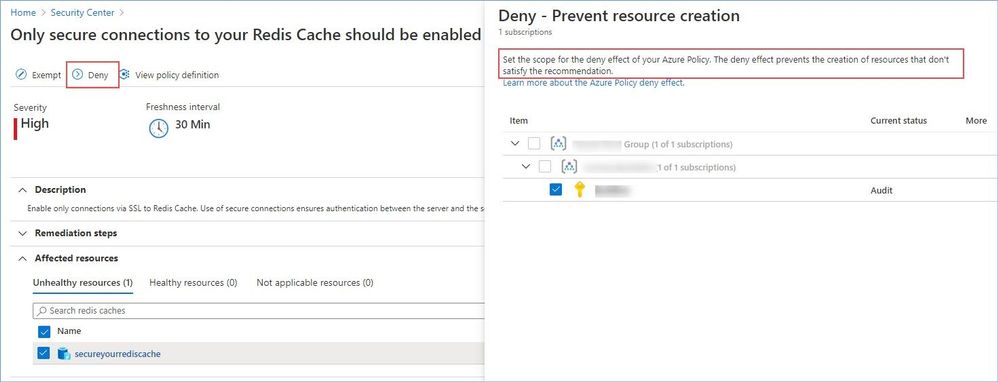
Only secure connections to your Redis Cache should be enabled.
Enable only connections via SSL to Redis Cache. Use of secure connections ensures authentication between the server and the service and protects data in transit from network layer attacks such as man-in-the-middle, eavesdropping, and session-hijacking.
You can find the related Azure policy here.
The manual remediation steps for this recommendation are:
- Go to the Redis Caches, and select your redis cache.
- Select ‘Advanced settings’.
- For ‘Allow access only via SSL’, click ‘Yes’ and then click ‘Save’.
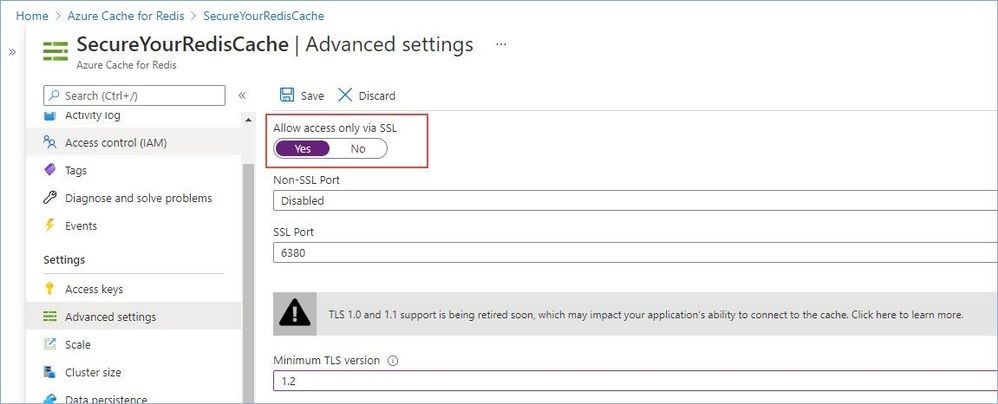
Worth mentioning that this particular recommendation has the “Deny” option that allows you to prevent creation of potentially insecure or incompliant resources, for instance:
Reference:
Security controls and their recommendations
Security recommendations – a reference guide
Recommendations with deny/enforce options
P.S. Consider joining our Tech Community where you can be one of the first to hear the latest Azure Security Center news, announcements and get your questions answered by Azure Security experts.
Reviewers
@Yuri Diogenes, Principal Program Manager, ASC CxE


Recent Comments