Practitioners guide to effectively managing insider risks (UNCOVERING HIDDEN RISKS – Episode 5)

This article is contributed. See the original author and article here.

Host:  Raman Kalyan – Director, Microsoft


Host:  Talhah Mir –   Principal Program Manager, Microsoft


Guest:  Dawn Cappelli – VP of Global Security & CISO, Rockwell Automation


The following conversation is adapted from transcripts of Episode 5 of the Uncovering Hidden Risks podcast.  There may be slight edits in order to make this conversation easier for readers to follow along.  You can view the full transcripts of this episode at:  https://aka.ms/uncoveringhiddenrisks


In this podcast we explore steps to take to set up and run an insider risk management program.  We talk about specific organizations to collaborate with, and top risks to address first.  We hear directly from an expert with three decades of experience setting up impactful insider risk management programs in government and private sector.


RAMAN:  Hi, I’m Raman Kalyan, I’m with Microsoft 365 Product Marketing Team.


TALHAH:  And I’m Talhah Mir, Principal Program Manager on the Security Compliance Team.


RAMAN:  We have more time with Dawn Cappelli, CISO of Rockwell Automation.  We’re going to talk to her about how to set up an effective insider risk management program in your organization.


TALHAH:  That’s right. Getting a holistic view of what it takes to properly identify and manage that risk and do it in a way so that it’s aligned with your corporate culture and your corporate privacy requirements and legal requirements.  Ramen and I talk to a lot of customers now and it’s humbling to see how front and center insider risk, insider threat management, has become, but at the same time, customers are still asking, “How do I get started?” 


Dawn, what do you tell those customers, those peers of yours in the industry today, with the kind of landscape and the kind of technologies and processes and understanding we have, in terms of how to get started building out an effective program?


DAWN:  First of all, you need to get HR on board. I mean, that’s essential. We have insider risk training that is specifically for HR. They have to take it every single year.  We have our security awareness training that every employee in the company has to take every year, HR in addition has to take specific insider risk training. So, in that way we know that globally we’re covered. So that’s where I started, was by training HR, and that way the serious behavioral issues, I mean, IP theft is easier to detect, but sabotage is a serious issue, and it does happen.


I’m not going to say it happens in every company, but when you read about an insider cyber sabotage case, it’s really scary, because this is where you have your very technical users who are very upset about something, they are angry with the company, and they have what the psychologists called personal predispositions that make them prone to take action. Because most people, no matter how angry you are, most people are not going to actually try to cause harm, it’s just not in our human nature.


But like I said, I worked with psychologists from day one, and they said, “The people that commit sabotage, they have these personal predispositions. They don’t get along with people well, they feel like they’re above the rules, they don’t take criticism well, you kind of feel like you have to walk on eggshells around them.” And so I think a good place to start is by educating HR so that if they see that, they see someone who has that personality and they are very angry, very upset, and their behaviors are bad enough that someone came to HR to report it, HR needs to contact, even if you don’t have an insider risk team, contact your IT security team and get legal involved, because you could have a serious issue on your hand. And so, I think educating HR is a good to start.


Of course, technical controls are a good place to start. Think about how you can prevent insider threats. That’s the best thing to do is lock things down so that, first of all, people can only access what they need to, and secondly, they can only move it where they need to be able to move information. So really think about those proactive technical controls.


And then third, take that look back, like we talked about Talhah, take that look back. Pick out just some key people, go to your key business segments and say, “Hey, who’s left in the past” I mean, as long as your logs go back, if they go back six months, you can go back six months. But just give me the name of someone who’s left who had access to the crown jewels, and just take a look in all those logs and see what you see. And you might be surprised.


TALHAH:  Dawn, we’re actually hearing that from our customers quite a bit.  The way they frame it is that, “Why don’t you look through some of the logs I already have in the system, parse through that, to give me an insider risk profile, if you will, of what’s happening, what looks like potential shenanigans in the environment, so I can get a better sense of where I need to focus and what kind of a case I need to make to my executive sponsor so I can get started.” So that’s definitely something we’re thinking about quite deeply and hearing consistently from our customers as well.


DAWN:  Yeah, because the interesting thing we found in CERT, we expected that we would find very sophisticated ways of exfiltrating information, but what we found was these are insiders, they don’t have to do anything fancy. If they can use a USB drive, they’re going to use a USB drive, especially if you don’t have an insider risk program, and so they think they can get away with it. If it’s a small amount of information, they’ll email it to their personal email account. Or if you’re an Office 365 user, just go and download the information onto a personal computer if you can, move it to a cloud site.


We found there weren’t a whole lot of really sophisticated theft of IP cases, and maybe that’s because those people weren’t caught. But if you can get to the point where you have a mature insider risk program that’s analytics based, then you have time to look at the more sophisticated ways of exfiltrating information.


RAMAN:  I had a conversation with a customer about a week and a half ago. And you talked about people who are sometimes doing things maliciously, they are also doing other things. Have you looked at things like sentiment analysis?  This customer was talking to me about hey, communications, like people in communications actually saying things that they shouldn’t be saying, maybe harassing people, and then that leading to other types of behaviors, to your point around sabotage. Would love for you to kind of, if that’s something that you have either implemented yourself, or if you’ve heard as part of the broader OSIT group, around the communications people, the harassment, and all that kind of stuff.


DAWN:  Yeah, we did look at that when I was in CERT. Back then we found that the technologies just weren’t mature enough, so we did not have any luck with it back then. And I don’t know what Dan Costa said to you as far as what they’re doing now, but in my experience, I have not found anything that really was effective.


I tried a little experiment at Rockwell, with legal approval, and just kind of looked for words like kill, and die, you know, those kinds of words, and it came back like… IT uses those words all the time. Like, “The system died, I killed the process.” It was like, oh, this just isn’t working at all. And the other thing that made it really hard, just with sentiment analysis, people were very casual in their communications. So it was the informal communications that made it really difficult to really tell the sentiment. So yeah, I’d love to hear if the tools mature to that point, that would be great.


RAMAN:  One of the things that we’ve been looking at is using Azure Cognitive Services to really start to think about natural language, to distinguish between, “That product is killer” to, “I’m going to kill you.” If we were, to your point, initially, yeah, it would be looking at keywords, and then you get overloaded with a ton of different alerts. Now if you can distinguish between the context of how the word kill was used, then you can start to highlight things like, again in a risk score type of thing, that this could be more risky communication than this other communication. Allow you to really prioritize and filter through it.


DAWN:  Hmm, interesting. Do you know if anyone has gone to the European Works Councils about that kind of technology?


RAMAN:  One of the things that we have been working on, is that we have customers in Europe using some of our solutions to start to look at communications, and they have been working with the various worker councils to start to think about, for example, pseudonymization.  You want to anonymize the user before you go down the path of really investigating them. If you’re just highlighting this could be a possible violation, you want to do that in a way that doesn’t really invite bias or discrimination.


And if he can do that upfront, then that would allow you to say, “Hey, okay, this might be something that’s a challenge.” And one of the things that we’ve seen recently, especially with COVID and all the different stressors that people are under, is that some customers are actually using machine learning classifiers that we have for threats, and really looking, not at me trying to threaten somebody else, but me maybe threatening myself. So suicide type things, people under a lot of pressure, and we’ve seen a lot of organizations start to take that route. And also, in education, where you have a lot of young folks who might be sharing things in appropriately, their imagery or bullying, that kind of stuff. That’s another area where we’re seeing some activity around this.


DAWN:  Hmm. That’s interesting. Yeah, I bring up the works councils just because when you’re talking insider risk, it’s a really important topic, that if anybody is watching this that doesn’t know what the works councils are and does business in Europe, you need to find out what they are because basically they’re there to protect the privacy of the employees in the company. And some of them have a lot of power, like in Germany, they can just block you from using a new technology, and in other countries you simply have to inform them, but they can’t stop you.


And we’re very careful about our works councils, and we have taken the approach that that’s our bar. If we can’t get something through the works councils, then we don’t do it, because we feel like they’re protecting the privacy of their employees, and all of our employees are entitled to that degree of privacy. So that’s kind of how we approach it, and so it’s kind of an all or nothing approach for us. But that’s each company’s decision to make, and it probably depends on how much business you do where and how global you really are, but it’s something that everybody should look into who’s working in insider threat.


TALHAH:  With COVID-19, it’s been sort of a punch in the gut, the whole roles, having to react, personal lives, professional lives. And clearly, we’re starting to see from our customers this insider risk becoming more heightened in terms of awareness of it, and a need to manage it. Because you have work from home, and data’s being moved all over the place. What have you seen work in this environment, with your experience, how have you adjusted to this COVID reality? Have you done things differently with your program? What kind of advice would you give to your peers in the industry and how to deal with it?


DAWN:  So, we were fortunate. I know a lot of companies, from what I’ve been reading, a lot of companies, their employees use desktops at their office. And when COVID struck, suddenly you have employees at home working on their personal computers. Fortunately, we didn’t have that. We’ve been using all laptops since I went to Rockwell in 2013, so it was easier for us because our employees are just working at home now. They’re off our network, but they’re using their same computer they always have, with the same controls that we’ve always had. But we are seeing a big uptick in them downloading, and again, this is not malicious, but downloading a game that has malware in it, downloading pirated copies of software, things like that.


Because they’re at home, and they’re sitting at their desk and I guess they figure, “Hey, I have my Rockwell computer here, I guess I’ll play my games on here and not fight with the kids, because now they’re home, they’re trying to do schoolwork, they’re trying to play games, they’re trying to watch movies. And I’m not going to compete for that computer, I’m going to use my Rockwell computer.” So, we’re catching a lot of those things. And that’s what I meant when I said that by using the analytics to give us more time, we’re not doing all those manual audits.


Now we have time that the C-CERT, they used to catch those things and they would just kind of, “Hey, you’re not allowed to do that, get that off of there.” Or just block it. But now they come to us because sometimes when you see someone downloading malware, we had an employee who downloaded malicious hacking tools, and our C-CERT contacted the insider risk team and said, “Hey, this is someone who’s a developer and downloaded a hacking tool, and so we’re going to hand it to you to investigate.” And we talked to their manager because we thought, oh, well maybe this is a pen tester and so he needed the hacking tools.


Well, there was no reason that he needed the hacking tools, and the manager was very concerned. Like, “What is that guy doing?” And he was sophisticated, we have a secure development environment that protects that development environment with additional controls. And he downloaded it to his Rockwell computer, and then he was trying to move it over into the secure development environment, so we saw what he was doing. And he had no good reason, but this is where we didn’t rely on the human social behaviors to trigger the investigation, we were able to cut, catch it quickly, because of that technical indicator, and because of the partnership with the C-CERT.


It’s interesting just to see, as you talk about the evolution of technology for insider threat over the years, it’s now to the point where we’re not just looking at theft of IP, we’re looking at those technical indicators that might indicate sabotage. We’re not so reliant on human behavior because, look at COVID. People are working at home, so are we really going to know when we have an employee who’s really angry and really upset and getting worse and worse? I don’t know. I don’t know if we’re going to be able to rely on those human behavior so much. If you’re in the office all day, people can see that, but if you’re on a phone call here and there, you might not pick that up.


TALHAH:  That’s right. And this could lead to sabotage type scenarios where, we’ve worked for our customers this ability to detect technical indicators which may indicate somebody downloading unwanted software or malicious software, or somebody trying to tamper with security controls, is so important because these could be those leading indicators, similar to behavior indicators, these are technical indicators that could indicate an oncoming potential sabotage risk.


DAWN:  We had a very interesting case, but I hate to talk about that one. Yeah, I hate to talk about that one, because this actual individual told me, I don’t want you to go out and talk about me in your conferences, Dawn, don’t ever do that. Yeah, so actually I’m not going to talk about that one. I’ll talk about a different one, though. We had a team, a test engineer team, that was under intense deadlines and really working long hours and weekends. And one day two of the employees on that team had a big, huge verbal argument. Just yelling at each other, not physical, but very, very verbal argument. So bad that someone had to go get a manager to come in and break it up. So, he broke it up. Next day the whole test environment goes down, and that’s really bad. It took three days to rebuild the environment.


When you’re working nights and weekends to make a deadline, and now you lost three days, that’s a huge deal. And the manager said, “When that first happened, I was thinking, “Well, it went down, let’s just get it back up and not worry about why until later.” But then he said, “I thought about Dawn’s insider risk presentations,” because I communicate as widely as I can around the company to everyone, not just HR, about insider risk. And he said, “I thought about Dawn’s presentation and the concerning behaviors and I thought, hmm, wonder if one of those two could have deliberately sabotage the test environment.” So, he contacted us, we got legal approval to investigate, and sure enough, when we looked, one of those guys wrote a script to bring down the entire environment.


And when we talked to him, he said, “Oh, well, I had in my goals and objectives, I had an objective that I had to write some automated scripts to maintain the environment. So, I was testing it, and it just accidentally brought everything down.” And we’re like, “Wait a second,” this was in like April, his objective was due like September 30th, the end of our fiscal year. We just didn’t buy it, and we ended up looking and we could see, he actually was executing these commands. He didn’t write a script; he was executing the commands manually and brought down the test environment.


But it was a really good case where, if that manager hadn’t thought to contact us, who knows what he would’ve done next. So, I thought that was a really good, even though we did not avert the sabotage completely, he did commit the sabotage, three days impact, which was a big deal, but it could have been much, much worse because he could have done much worse, and that could have been the next step. Just another story, Talhah.


TALHAH:  Love it.


RAMAN:  Yeah, I mean, that’s just crazy. This has been a great conversation, Dawn. The stories that you’ve told, they’ve just been captivating, and the last thing that you just mentioned, which is really, within an organization, to have a successful insider risk program, you really need to educate all levels of the organization, all the different teams so people can sort of look and be on the lookout for these types of things.  Not only to identify the risks, but to also help maybe support people who might be under intense pressure.


DAWN:  Yeah, and first of all, deterrence is huge. We talk very widely; we have an insider risk blog that we put out internally for employees. We talk about cases, we talk about what we find, because deterrence is a big thing, and I think that’s why we’re not catching as much malicious activity as we used to. Now we’re finding, almost everything we’re finding is unintentional, it’s not malicious. Because I think word has gotten around, “Hey, if you try to do that, we’re going to catch you.” We tell people that all the time, don’t even try, we’re going to catch you.


To learn more about this episode of the Uncovering Hidden Risks podcast, visit https://aka.ms/uncoveringhiddenrisks.


For more on Microsoft Compliance and Risk Management solutions, click here.


To follow Microsoft’s Insider Risk blog, click here.


To subscribe to the Microsoft Security YouTube channel, click here.


Follow Microsoft Security on Twitter and LinkedIn.


Keep in touch with Raman on LinkedIn.


Keep in touch with Talhah on LinkedIn.


Keep in touch with Dawn on LinkedIn.
Azure Marketplace new offers – Volume 123

Azure Marketplace new offers – Volume 123

This article is contributed. See the original author and article here.


We continue to expand the Azure Marketplace ecosystem. For this volume, 103 new offers successfully met the onboarding criteria and went live. See details of the new offers below:


Applications


AirlineCrewAnalytics.png

Airline Crew Analytics: Crew management is one of the most complex airline processes. ZeroG provides visualizations and machine learning applications for airline managers and crew to enable collaboration via an easy web user interface.


AlkiraCloudServicesExchangeCSX.png

Alkira Cloud Services Exchange (CSX): Alkira Network Cloud offers global unified network infrastructure as a service. With Alkira, your company can deploy a global network for end-to-end and any-to-any connectivity across users, sites, and clouds.


ALMQualityCenter.png

ALM/Quality Center: Manage software testing and quality management with this unified and flexible application lifecycle management product by Micro Focus, which provides visibility across all enterprise projects.


AssetInsightsforTransportandLogisticssector.png

Asset Insights for Transport and Logistics sector: Powered by IoT, AI, and machine learning, Mindtree’s digital solutions help logistics companies optimize operations, predict failures, increase productivity, and reduce costs in fleet operations, warehousing, and driver safety.


AssetPerformancewithAVEVA.png

Asset Performance with AVEVA: Combining operations management and asset performance technologies into one solution, AVEVA Insight delivers actionable information and AI capabilities to help improve asset reliability and operational performance.


AudixInsights.png

Audix Insights: Audix Insights brings together key data on a single dashboard. By correlating IT asset information with financial information, you will have an unprecedented view of the financial state and health of your IT infrastructure.


BeProductiveSuite.png

BeProductive Suite: To help with Microsoft 365 adoption, MIGESA will identify use cases, train your team on tools, and contribute to the productivity of each person in your organization. This application is available only in Spanish.


BIMarginsElectricityCommercialization.png

BI Margins Electricity Commercialization: Developed for the electrical marketing sector, Kiteris’ solution provides you with a detailed margin analysis based on billing information and cost structure. This application is available only in Spanish.


bridgeAvatar.png

bridge: Avatar: bridge is a revolutionary assistive technology solution for the deaf and hard-of-hearing community. bridge Avatar powers instantaneous web interpretation, social media content, self-service kiosks, and visual announcements.


CentOS74.png

CentOS 7.4: This preconfigured image is provided by Cognosys for CentOS 7.4 on Microsoft Azure. CentOS 7.4 is a Linux distribution providing a free, enterprise-class, and community-supported computing platform.


CentOS75.png

CentOS 7.5: This preconfigured image is provided by ProComputers.com for CentOS 7.5. This minimal CentOS 7.5 image comes with an auto-extending root file system and contains just enough packages to run within Microsoft Azure.


CentOS76.png

CentOS 7.6: This preconfigured image is provided by ProComputers.com for CentOS 7.6. This minimal CentOS 7.6 image comes with an auto-extending root file system and contains just enough packages to run within Microsoft Azure.


CentOS77.png

CentOS 7.7: This preconfigured image is provided by ProComputers.com for CentOS 7.7. This minimal CentOS 7.7 image comes with an auto-extending root file system and contains just enough packages to run within Microsoft Azure.


CentOS8withLVM.png

CentOS 8 with LVM: This preconfigured image is provided by ProComputers.com for CentOS 8 with Logical Volume Manager (LVM). The LVM volumes and the file systems are automatically extended during boot if the OS disk is bigger than the default one.  


ContrastSecurity-DevSecOpsforModernSoftware.png

Contrast Security – DevSecOps for Modern Software: Use the Contrast application security platform to secure your apps in Microsoft Azure by assessing vulnerabilities, mitigating risks, and preventing attacks. Ensure security and compliance by embedding self-assessment and self-protection capabilities directly into your software.


ControlPlaneSecureCommunicationsAgent.png

Control Plane Secure Communications Agent: This free virtual machine facilitates secure communications between workloads managed by Control Plane and virtual network resources. DevOps engineers can benefit from this Microsoft Azure agent to enable secure communications.


COVIDVaccinePre-screeningandBookingAssistant.png

COVID-19 Vaccine Pre-screening and Booking Assistant: Praktice.ai’s vaccine assistant virtually guides patients through the entire vaccination process, including screening, scheduling, and follow-ups. The solution helps health systems prequalify individuals and facilitate deployment.


DeepTurnaround.png

DeepTurnaround: Deployed on Azure Stack Edge devices, DeepTurnaround supplies airlines, airports, and ground service providers with automatically generated, reliable, and near real-time data of what happens at an aircraft stand.


DenodoStandard80BYOL.png

Denodo Standard 8.0 (BYOL): Denodo allows you to integrate and deliver data from any location to any consumer in real time on Microsoft Azure. Denodo Standard unleashes the power of modern data virtualization to accelerate your analytics and data services.


DNSServerIaaSonWindowsServer2016.png

DNS Server IaaS on Windows Server 2016: This preconfigured image by Virtual Pulse provides a Domain Name System (DNS) server on Windows Server 2016 that is ready to run on Microsoft Azure. DNS is a system that translates the domain names you enter in a browser to the IP address of the destination site.


DNSServerIaaSonWindowsServer2019.png

DNS Server IaaS on Windows Server 2019: This preconfigured image by Virtual Pulse provides a Domain Name System (DNS) server on Windows Server 2019 that is ready to run on Microsoft Azure. DNS is a system that translates the domain names you enter in a browser to the IP address of the destination site.


ForescoutContinuousDeviceVisibilityandControl.png

Forescout: Continuous Device Visibility and Control: Enabling organizations to reduce cybersecurity risk and operational risk, Forescout provides visibility and control of devices across cloud, datacenter, campus, industrial, and operational technology environments.


ITBusinessManagementonAzure.png

IT Business Management on Azure: ServiceNow IT Business Management enables you to create greater value from your initiatives and enable faster change across your organization. Plan, prioritize, and track work aligned to business objectives.


JupyterLab3-WebinterfaceforProjectJupyter.png

JupyterLab 3 – Web interface for Project Jupyter: Linnovate offers this preconfigured image containing installation of JupyterLab. JupyterLab enables you to work with documents and activities such as Jupyter notebooks, text editors, terminals, and custom components in a flexible, integrated, and extensible manner.


Kendis-ScalingAgilePlatform.png

Kendis – Scaling Agile Platform: Kendis offers visual dependencies management and program increment (PI) planning for remote teams to identify dependencies, log risks, and set objectives. Kendis seamlessly integrates with Azure DevOps in few clicks.


KonfluenceAI-drivenPredictiveAnalyticsplatform.png

Konfluence: AI-driven Predictive Analytics platform: Konfluence is a self-service data engineering platform that breaks down silos and simplifies data lifecycles. Enterprise users and software engineers can now get an aerial view of their data by using Konfluence on Microsoft Azure.


LegalDataScienceSolutions.png

Legal Data Science Solutions: Legal Data Science analyzes administrative and judicial data using real-time data, Microsoft Power BI, Azure Synapse Analytics, Azure Data Factory, and Azure Cosmos DB. This application is only available in Brazil.


LogilityDigitalSupplyChainPlatform.png

Logility Digital Supply Chain Platform: Logility’s platform helps accelerate planning and execution from product design to customer availability, providing collaboration across the enterprise and trading partner network.


Loglook-Microsoft365loganalysisandcollectionservice.png

Loglook – Microsoft 365 log analysis and collection service: BEBE System’s LogLook collects and analyzes audit logs and visualizes the usage of Microsoft 365. This application is available only in Japanese.


LumedicAlphalytics.png

Lumedic Alphalytics: Developed for mid-sized health systems, this predictive analytics solution uses machine learning to identify hotspots of denied claims and hidden denials from seemingly unrelated data.


ManagedWindowsVirtualDesktoponAzure.png

Managed Windows Virtual Desktop on Azure: Arxus will guide you through a step-by-step journey to take advantage of all the benefits of Windows Virtual Desktop, resulting in a desktop solution matching your business needs.


MFAacrossoperatingsystemsappsandclouds.png

MFA across operating systems, apps and clouds: The Thales Group understands that security is only as strong as your weakest link. Thales helps protect your access points with multifactor authentication (MFA) across all operating systems, on-premises and in the cloud.


MIFISafeE-invoices.png

MIFI: Safe E-invoices: MIFI is a secure e-invoice solution for Vietnam that helps businesses protect their data and comply with Vietnamese government requirements to use electronic invoices. This application is available only in Vietnamese.


MigesaEasyLogistics.png

Migesa Easy Logistics: Manage and monitor your truck logistics processes in real time. Easy Logistics helps solve the challenges of field delivery services and efficiently managing your fleets. This application is available only in Spanish.


MisignProSecureDigitalInkSolutionandSDK.png

MiSign Pro: Secure Digital Ink Solution and SDK: MiSign provides a solution to securely and electronically sign any document by using handwritten signature capture, digital signatures, or biometric data.


NexusRepositoryOSS.png

Nexus Repository OSS: Linnovate offers this preconfigured image containing Nexus Repository OSS, a free artifact repository from Sonatype with universal format support.


NoodleFactoryAIChatforLearningandEducation.png

Noodle Factory AI Chat (for Learning & Education): Noodle Factory is an AI-powered chat platform that is ideal for higher education and corporate learning. Enable educators to instantly automate adaptive tutoring, mentoring, onboarding, and administrative tasks.


NuaraHR.png

NuaraHR: This human resource management solution automates and streamlines your organization’s HR processes, including leave application, performance appraisal, time tracking, payroll, and expense management.


NutanixFrame.png

Nutanix Frame: This desktop as a service (DaaS) delivers Windows apps and desktops to users anywhere, on any device, with just a browser. Nutanix Frame is cloud native, multi-tenant native, and secure by design.


O2NetworkArchiver.png

O2 Network Archiver: Get a copy of your employees’ mobile calls and text messages in Microsoft 365. Use TeleMessage’s connector in the Microsoft 365 compliance center to import and archive messages and voice calls from the O2 U.K. mobile network.


OHplayCorporate.png

OH!play Corporate: Digible Conteudo Digital offers this event and marketing solution for streaming music content, producing broadcasts, and managing corporate events. This application is available only in Portuguese.


OHS122140BaseImageandJDK8onOL74.png

OHS 12.2.1.4.0 Base Image and JDK8 on OL7.4: Oracle America provides this virtual machine with an Oracle HTTP Server (OHS) 12.2.1.4.0 base image and JDK8 on OL7.4 for customers requiring very highly customized deployments on Microsoft Azure.


OHS122140BaseImageandJDK8onOL76.png

OHS 12.2.1.4.0 Base Image and JDK8 on OL7.6: Oracle America provides this virtual machine with an Oracle HTTP Server (OHS) 12.2.1.4.0 base image and JDK8 on OL7.6 for customers requiring very highly customized deployments on Microsoft Azure.


OpenUtilities.png

OpenUtilities: Bentley Systems enables global utilities companies to embrace digital transformation with software applications. Bentley Systems offers two OpenUtilities solutions in Microsoft Azure: Digital Twin Services and DER Integration.


PatchandAsset.png

Patch & Asset: Heimdal Security safeguards both your remote and on-site employees by eliminating risks associated with outdated operating systems and apps. Remotely install Windows and third-party application updates.


PowerBISolutionTemplateforQuickbooksOnline.png

Power BI Solution Template for QuickBooks Online: QuickBooks has discontinued use of an online connector, causing Microsoft Power BI to no longer authenticate with QuickBooks. Fresh BI provides a Power BI solution template to connect to QuickBooks Online.


PredictiveMaintenancewithAVEVA.png

Predictive Maintenance with AVEVA: AVEVA Predictive Analytics helps organizations increase returns on critical assets by supporting predictive maintenance programs. AVEVA helps asset-intensive organizations reduce equipment downtime, increase reliability, and improve performance while reducing operations and maintenance expenditures.


RecordedFuture.png

Recorded Future: Recorded Future reduces security risk by automatically positioning threat data in your Microsoft Azure environment and delivering it to Microsoft Azure Sentinel and Microsoft Defender ATP, empowering analysts to identify and triage alerts faster.


RocketChatCommunicationplatform.png

Rocket.Chat : Communication platform: Linnovate Technologies offers a preconfigured image that includes Rocket.Chat, a JavaScript-based web chat server built for communities and companies wanting to privately host their own chat service or for developers looking to build and evolve their own chat platforms.


ScoutAsia.png

ScoutAsia: ScoutAsia provides a customized dashboard that shows the latest updates on companies, persons, and trends and lets you perform a deep dive into past and present relationships among individuals and companies.


ServiceNowDevOpsforAzureDevOpsonAzure.png

ServiceNow DevOps for Azure DevOps on Azure: ServiceNow DevOps ties your entire DevOps toolchain together with Microsoft Azure DevOps while delivering streamlined reporting, actionable insights, and automated control and governance. The Now Platform hosted on Azure is available in Azure regions in France and Singapore for highly regulated industries.


ServiceNowHRServiceDeliveryServiceNowDC.png

ServiceNow HR Service Delivery (ServiceNow DC): Boost productivity and give your employees the experience they deserve with ServiceNow HR Service Delivery. With ServiceNow’s solution, you can capture and utilize knowledge that resides across teams and individuals, provide a single place for employees to get help, and automate onboarding and transitions.


ServiceNowITAssetManagementonAzure.png

ServiceNow IT Asset Management on Azure: ServiceNow IT Asset Management lets you optimize hardware, software, and cloud costs while reducing risk. With this platform, you can automate workflow actions from a native configuration management database and simplify asset management across your organization.


ServiceNowITServiceManagementServiceNowDC.png

ServiceNow IT Service Management (ServiceNow DC): ServiceNow IT Service Management (ITSM) provides a modern, cloud-based solution that lets you consolidate your IT tools into a single data model, transform the service experience, automate workflows, gain real-time visibility, and improve IT productivity.


SHIELDriverealdrive.png

SHIELDrive (real drive): SHIELDrive is a cloud storage security broker that encrypts files and obfuscates filenames when files are uploaded. The app works via browser or as a Microsoft Teams app. SHIELDrive lets users manage their own unique encryption keys from creation to destruction.


SingleStoreManagedService.png

SingleStore Managed Service: Get SingleStore’s speed, scale, and capability without the headaches of installing, configuring, and maintaining software. SingleStore is a scalable SQL database that ingests data continuously to perform operational analytics.


Smarter365IPSolution.png

Smarter 365 IP Solution: Deploy your modern workplace and business applications in 15 minutes without any IT-specific knowledge with Eshgro’s Smarter 365 platform. This application is available only in Dutch.


SoapboxEngage.png

Soapbox Engage: From fundraising to advocacy, PICnet provides online engagement tools. Join a community of changemakers who use Soapbox Engage to propel their organizations’ online engagement with their communities.


SpheraCloud.png

SpheraCloud: SpheraCloud operationalizes, scales, and optimizes integrated risk management strategies to identify, manage, and mitigate risk in the areas of environment, health, safety, sustainability, and product stewardship.


SwiftKanban.png

SwiftKanban: SwiftKanban by Digite is a lean, agile, and visual work management tool to improve your work continuously. Based on the powerful principles of the Kanban method, SwiftKanban combines workflow modeling and flow metrics.


TalkProcessforms.png

TalkProcess forms: This business process mapping software collects process information digitally. The tool supports all project phases, including preparation, planning, communication, and information aggregation. This application is available only in Brazilian Portuguese.


TelusNetworkArchiver.png

TELUS Network Archiver: Integrated with the TELUS Canada mobile network, the TeleMessage connector in the Microsoft 365 compliance center imports and archives SMS and MMS messages from the TELUS network.


TeradiciAzureVirtualDesktopsforManufacturing.png

Teradici Azure Virtual Desktops for Manufacturing: Teradici Cloud Access Software, powered by PC-over-IP technology, provides secure access to graphics-intensive computer-aided design and other manufacturing applications, virtual desktops, and workstations running on Microsoft Azure.


TeradiciVirtualDesktopFederalandPublicSector.png

Teradici Virtual Desktop: Federal & Public Sector: Teradici Cloud Access Software provides secure Microsoft Windows and Linux virtual desktop access to graphics-intensive and CPU-based productivity applications from Microsoft Azure and Azure Stack for the federal and public sectors.


TeradiciVirtualDesktopsforGameDevelopers.png

Teradici Virtual Desktops for Game Developers: Game development demands high frame rates, low latency, and amazing responsiveness. Teradici Cloud Access Software enables game developers to work remotely, accelerate game production, and secure sensitive assets in Microsoft Azure.


TrialaccesstoPIIVaultfortestingvalidation.png

Trial access to PII Vault for testing, validation: PII Vault was built for organizations that need to combine private data from different sources or use their production data in non-production environments. Anonomatic enables those sources to anonymize their data behind their firewall.


VERA.png

VERA: Validated Electronic Record Approval (VERA) is a software as a service application running on Tx3’s Helios platform to control life science quality assurance data and standardize approval lifecycles without restricting core functionality.


VMwareNSX-CloudServiceManager.png

VMware NSX – Cloud Service Manager: VMware NSX Cloud is a networking and security solution. The VMware NSX – Cloud Service Manager appliance provides a single-pane-of-glass visibility plane for managing your public cloud inventory.


VMwareNSX-PolicyManager.png

VMware NSX – Policy Manager: The VMware NSX – Policy Manager appliance provides a single-pane-of-glass management endpoint to define and manage networking and security policy constructs for hybrid cloud workloads and services.


WindowsServer2019withFilezillaFTPServer.png

Windows Server 2019 with Filezilla FTP Server: This preconfigured image by Virtual Pulse provides Windows Server 2019 with Filezilla file transfer protocol (FTP) server. Filezilla FTP Server enables file downloads and uploads, server-client transfers, and connections from multiple computers.


Consulting services


AWStoAzure-1weekassessment.png

AWS to Azure – 1-Week Assessment: Moresi.com can migrate your servers and databases quickly and safely from Amazon Web Services (AWS) to Microsoft Azure. Relying on Azure Migrate or Azure Site Recovery, Moresi.com can offer near-real-time data replication.


AzureCloudFoundationACF-1hourbriefing.png

Azure Cloud Foundation (ACF) – 1-Hour Briefing: With over 500 public cloud projects delivered, Nordcloud will help build a Microsoft Azure landing zone in alignment with the architectural approach and reference implementation of the Microsoft Cloud Adoption Framework for Azure (CAF) Foundation.


AzureDevOpsServicesand1-DayWorkshops.png

Azure DevOps Services and 1-Day Workshops: Companies that can react quickly to change have a competitive advantage. Medium-sized companies can benefit from novaCapta’s detailed DevOps analysis and customized recommendations to address your business needs. This offer is available only in German.


AzureInfraQuickStart1-DayWorkshop.png

Azure Infra: Quick Start 1-Day Workshop: Adfolks will help your technical and business leaders understand Microsoft Azure infrastructure solutions and service models and how to utilize these services during the cloud adoption journey.


AzureIoT3-DayWorkshop.png

Azure IoT: 3-Day Workshop: Lufthansa Industry Solutions will demonstrate how to build, configure, and test an end-to-end IoT solution using the Microsoft Azure command-line interface and Visual Studio Code. This service is available only in German.


AzureSecurityCheck1-DayAssessment.png

Azure Security Check: 1-Day Assessment: Somnitec’s assessment helps optimize and secure your Microsoft Azure environment. Somnitech will help minimize risk, recommend security adjustments, and provide clarity about your existing Azure usage. This application is available only in German.


AzureSiteRecovery8-HourAssessment.png

Azure Site Recovery: 8-Hour Assessment: ITsavvy complements your business continuity and disaster recovery (BC/DR) strategies with a custom-built and custom-configured Microsoft Azure Site Recovery disaster recovery as a service (DRaaS) solution.


AzureSQLMigration2-Hourassessment.png

Azure SQL Migration 2-Hour Assessment: Are you looking for a database platform that scales as your performance requirements change? Primend can upgrade your existing databases to Azure SQL Server and configure all the necessary services and connections.


AzureVMwareAVSmigration-1-HourBriefing.png

Azure VMware (AVS) migration – 1-Hour Briefing: Nordcloud can migrate your on-premises VMware workloads to Microsoft Azure fast and risk-free. Running on Azure infrastructure, Azure VMware Solution is a Microsoft service verified by VMware.


Azure-basedDamageDetection-8-WeekImplementation.png

Azure-based Damage Detection – 8-Week Implementation: Affine enables defect detection and classification for the manufacturing and consumer packaged goods (CPG) verticals using Azure Cognitive Services and an automated machine vision detection framework.


Bechtle Managed Azure Sentinel - 1-Day CIO Workshop.png

Bechtle Managed Azure Sentinel – 1-Day CIO Workshop: Bechtle’s managed Microsoft Azure Sentinel service helps improve your company’s security. Bechtle will demonstrate a security information and event management cloud solution to modernize your security operations center.


BoostyourMigrationtoAzure-1-WeekAssessment.png

Boost your Migration to Azure – 1-Week Assessment: Whether you choose a full-cloud or a hybrid scenario, Moresi.com provides a complete solution for a safe and easy migration to Microsoft Azure, predicting duration, feasibility, and costs.


CloudAmbition-3-WeekAssessment.png

Cloud Ambition – 3-Week Assessment: What is your cloud ambition? KPMG can review your current cloud strategy and define or optimize a cloud vision underpinned with a set of key performance indicators (KPIs). KPMG will also prepare and facilitate a Cloud Ambition workshop.


CloudApplicationsAssessment-7weeks-Assessment.png

Cloud Applications – 7-Week Assessment: After an applications landscape assessment, KPMG will classify your applications, identify a migration strategy, develop business cases, and define a migration roadmap to Microsoft Azure.


CloudCostControl-10days-Assessment.png

Cloud Cost Control – 10-Day Assessment: KPMG’s cloud cost management maturity assessment focuses on people, process, technology, and governance. By evaluating current cost management activities, KPMG will advise on the optimal ways to run workloads in Microsoft Azure.


Conversion410-WeekImplementation.png

Conversion / 4: 10-Week Implementation: All for One Group offers a unique subscription for SAP S/4HANA conversion, which includes Microsoft Azure infrastructure, fully managed services, support, and upgrades. This service is available only in German.


DataModernizeandVisualization2-WeekImplementation.png

Data Modernization & Visualization: 2-Week Implementation: Adfolks offers rapid deployment of data modernization and Microsoft Power BI. Built on Microsoft Azure data technologies, Adfolks has designed a BI/ETL reference architecture for advanced analytics and machine learning.


DatacenterMigration6-WeekImplementation.png

Datacenter Migration: 6-Week Implementation: Arxus delivers datacenter migration using a programmatic approach. Arxus’ Microsoft Azure Migration Program provides architects, engineers, and a project manager from Arxus’ Fast Track for Azure team.


DeveloperVelocityAssessment2-DayAssessment.png

Developer Velocity Assessment: 2-Day Assessment: Arxus will assess your application team on the four most crucial elements of DevOps: lead time, implementation frequency, failure rate, and recovery time. This assessment will shed light on which tools can provide improvement.


Energycontrol4-WeekProofofConcept.png

Energy control: 4-Week Proof of Concept: SYNNEX’s Forest Movement combines an Azure-powered Internet of Things (IoT) solution and expert consulting services to help organizations control their energy use, cut costs, lower their carbon footprint, and become more sustainable.


FinOps1-DayAssessment.png

FinOps: 1-Day Assessment: FinOps teams combine IT and finance functions. AG Tech will conduct an assessment to discuss how your cloud financial management needs could be addressed with FinOps practices in Microsoft Azure.


HostingTransformationStrategy6-WeekAssessment.png

Hosting Transformation Strategy: 6-Week Assessment: Aligning application needs with technology demand and business requirements, CS Technology (Australia) will develop a hosting transformation strategy to deliver a financial model, business case, and roadmap to Microsoft Azure.


IAM-initialanalysisprocesses1-DayWorkshop.png

IAM – initial analysis processes: 1-Day Workshop: End the confusion with countless usernames and passwords for your employees. The All for One Group will work with you to optimize and automate your identity lifecycle management. This service is available only in German.


KudelskiSecurity5-DayCloudSecurityAssessment.png

Kudelski Security 5-Day Cloud Security Assessment: The Kudelski Group will help you understand the business and technical risks of moving to Microsoft Azure and identify vulnerabilities in your infrastructure, while defining security requirements, controls, standards, and policies.


ManagedServices30-MinuteImplementation.png

Managed Services: 30-Minute Implementation: Modality will establish a link to your tenant using Azure Lighthouse to provide a range of Microsoft Azure management services while you maintain control.


MigesaCloudInfrastructureDiscovery3-WeekAssesment.png

Migesa Cloud Infrastructure Discovery: 3-Week Assesment: Migesa will review your inventories, capabilities, and dependencies in preparation for migrating to Microsoft Azure. You will get a roadmap to reduce costs and maximize security. This service is available only in Spanish.


MigratetoAzure-ProofofConcept-2Weeks.png

Migrate to Azure – Proof of Concept – 2 Weeks: Hitachi Solutions will help you understand Microsoft Azure to accelerate your cloud transformation journey, giving your organization a competitive advantage. You will also learn how to align IT infrastructure with business goals.


MigrationExpert10-WeeksImplementation.png

Migration Expert: 10-Week Implementation: The All for One Group will migrate your encrypted emails from Lotus Notes to Microsoft Exchange supported by Azure Active Directory. Your emails remain protected even after the migration. This service is available only in German.


NordcloudAzureoptimizedcapacity-1-HourBriefing.png

Nordcloud Azure optimized capacity – 1-Hour Briefing: Save on your cloud costs when you buy through Nordcloud. Cloud capacity experts will deliver improved public cloud control and lower total cost of ownership to your business, ensuring quality performance and high cost efficiency.


SogetieAPMAssessment1Week.png

Sogeti eAPM Assessment 1 Week: economic Application Portfolio Management (eAPM) from Sogeti, part of Capgemini, is an analysis tool with a graphical visualization layer to provide an in-depth view into an organization’s entire IT portfolio.


SogetiEMPManagedServices1-DayAssessment.png

Sogeti EMP Managed Services 1-Day Assessment: Sogeti, part of Capgemini, offers its Enterprise Portfolio Modernization (EPM) initiative, a suite of services that aligns application lifecycle and modernization capabilities with Microsoft Azure to offer a modern end-to-end approach to digital transformation.


Virtualdesktopenablement-1-HourBriefing.png

Virtual desktop enablement – 1-Hour Briefing: To support your organization’s remote work, Nordcloud can help with migrating to Windows Virtual Desktop in Microsoft Azure. Provide the familiarity and compatibility of Windows 10 with the new scalable multi-session experience.


WintellectAppModernization-2-WeekAssessment.png

Wintellect App Modernization – 2-Week Assessment: Wintellect can move your legacy line-of-business applications to the modern web and desktop, then add the power of Microsoft Azure with modern DevOps processes, advanced security, and easy-to-configure backup and disaster recovery services.


New Capabilities from Azure Live Video Analytics

New Capabilities from Azure Live Video Analytics

This article is contributed. See the original author and article here.

We just released new features and capabilities to the Microsoft Live Video Analytics (LVA) service and if you are thinking about Live Video Analytics (LVA) on a Windows IoT device, an Azure Percept DK (dev kit), or on other edge devices powered by AI acceleration from NVIDIA and Intel, then you will really want to learn more about it! Organizations can now drive the next wave of business automation via AI-powered, real-time analytic insights from their own video streams with Microsoft Live Video Analytics (LVA).


In line with Microsoft’s vision of simplifying AI and IoT at the edge from silicon to service, the new features and capabilities we announced at the Microsoft Ignite 2021 event will allow you to deploy LVA capabilities seamlessly on Windows IoT devices, for you to build intelligent video analytics systems leveraging and capitalizing on your Windows expertise and investments. We have also ensured that LVA functions on the new family of Azure Percept devices and works seamlessly across our partner platforms such as Intel and NVIDIA.


With our focus on ensuring a consistent experience for video analytics solutions developers, irrespective of the OS and of underlying hardware acceleration platform, here are the new capabilities that help complete your end-to-end scenarios:


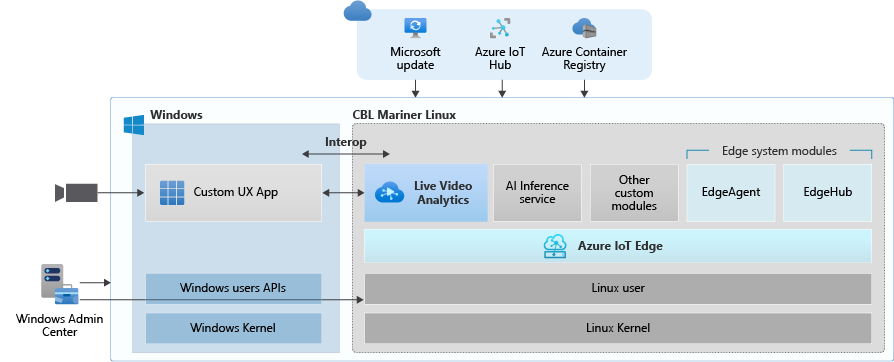
  • Deploy LVA with Azure IoT Edge for Linux on Windows (EFLOW) : Leverage LVA to build and deploy Video Analytics workflows on Windows IoT devices with EFLOW.

  • LVA with Azure Percept: At Ignite 2021, we announced Azure Percept, an end-to-end platform for creating edge AI solutions in minutes with hardware accelerators built to integrate seamlessly with Azure AI and Azure IoT services. LVA can be leveraged on Percept to record and stream videos from edge to cloud to help you deliver business insights in real time.

  • Intel OpenVINO DL Streamer – Edge AI Extension with LVA: With the latest release of OpenVINO’s DL Streamer – Edge AI Extension from Intel, you can leverage it alongside LVA to detect, classify, and track multiple object classes (e.g., person, vehicle, bike) at high efficiency on a variety of Intel HW architectures

  • NVIDIA DeepStream — AI Skills and AI Acceleration for LVA: With the latest DeepStream release (5.1), you can now deploy LVA across multiple cameras for  object detection, classification and tracking on NVIDIA GPUs.


Since the preview launch of the Live Video Analytics (LVA) platform on June 2020, we evolved product capabilities and strengthened our platform to meet partner and customers’ needs in the version 2.0 refresh announced in Feb 2021 and related announcements. Additionally, we have a set of exciting capabilities that are not in the public domain yet, but we are getting ready to announce them soon at Build 2021. Please reach out to us (amshelp@microsoft.com) to learn more.


Leverage Windows edge devices as LVA processors


As a customer in industries like Manufacturing, Retail, Public Safety etc. you may have many Windows devices that are enabled as IoT sensors and processing devices. Along with Windows IoT, there is also a growing trend of Linux based containerized microservices backed by cloud-based ISV ecosystem especially for video analytics in real time. Many customers we talk to want to leverage their existing assets, be it cameras, Windows IoT devices or other IoT sensors to derive real time business intelligence by applying AI to video.


Using LVA on EFLOW you get the best of both worlds – a Windows IoT device that leverages existing Windows tooling, infrastructure investment and IT knowledge, Azure managed and deployed as well as gathering business insights via Linux based Live Video Analytics. At Ignite 2021, we delivered a set of simple steps, that can help you bring LVA and EFLOW together and unleash the power of LVA’s media graph on Windows IoT Edge devices.


eflow.png


As an example, you could be a retail store owner with cameras and network video recorders powered by Windows IoT and today the video might be archived and manually reviewed. With LVA and EFLOW, the operator can easily deploy Linux-based Azure Live Video Analytics on Windows, leveraging their existing Windows expertise and investments and could go from having a basic video recording system to an intelligent video analytics solution that can trigger actions driven by AI. You can also learn more about EFLOW, currently in Public preview about its features and deployments.


Live Video Analytics with Azure Percept


At Ignite 2021, our leadership team has announced Azure Percept that focuses on extending AI to the edge with an end-to-end platform that integrates Intel Movidius Myriad X vision processing unit (VPU) hardware accelerators with Azure AI and Azure IoT services and is designed to be simple to use and ready to go with minimal setup.


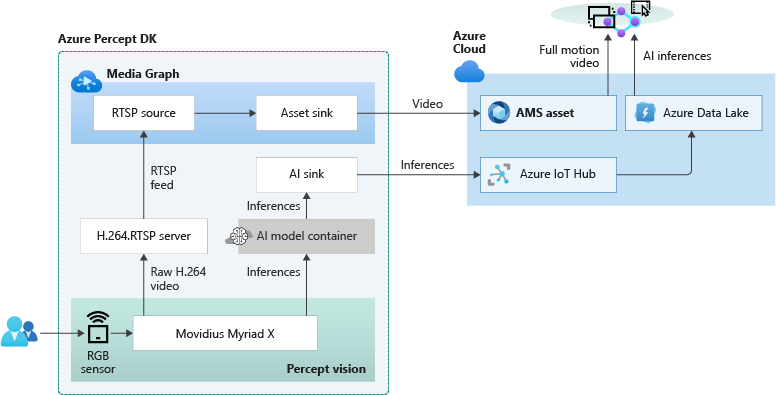
Percept helps customers overcome one of the key challenges of navigating the end-to-end edge AI solution creation. As a solution builder, you might already have a working AI model that you want to leverage as part of an end-to-end video analytics solution. We have partnered with the Azure Percept team to provide you with a reference solution. You can get started today by ordering your dev kit and leveraging the GitHub code.


As seen from the reference solution’s architecture below, Azure Percept leverages LVA to record video to the cloud, so that when combined with analytics metadata from the AI, you get a solution for object counting in pre-defined zones. You can visualize the results thanks to video streaming and playback capabilities of LVA.

azure-percept-device.png


LVA with Intel’s OpenVINO DL Streamer – AI Edge Extension


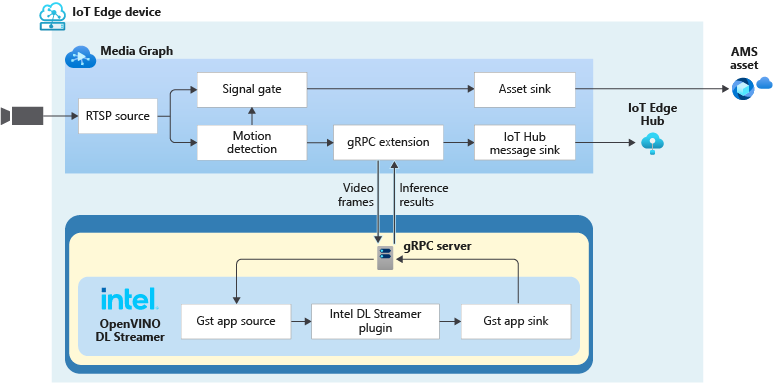
Last year, we announced an integration of LVA with Intel’s OpenVINO Model Server –Edge AI Extension module via LVA’s HTTP extension processor. This enabled our customers to run AI inferences such as object detection and classification on a variety of Intel hardware architectures (CPU, iGPU, VPU) at the edge and use cloud services like Azure Media Services and Azure IoT. At Ignite 2021, with the announcement of the OpenVINO DL Streamer – AI Edge Extension module, we are enabling additional capabilities over a highly performant gRPC extension processor while keeping the core OpenVINO inference engine the same to scale across the Intel architectures. With this integration you can now get object detection, classification and tracking for high frame rate video across multiple classes. See this tutorial for more details.


With the pre-validated configurations, pre-trained models as well as scalable hardware, users can jump start solutions to improve business efficiencies across variety of use cases such as retail, industrial, healthcare or smart cities. For example, with the vehicle classification model you can see the type of vehicle and add your own business logic i.e., validate certain vehicle types are parked in the designated area. With the object tracker you can track objects of interest and map on a timeline.


Get Started Today!


  • Deploy LVA with Intel DL Streamer – Edge AI Extension using this tutorial

  • Explore and deploy Intel DL Streamer – Edge AI Extension Module from Azure Marketplace

  • Watch the Intel Ignite 2021 session


gRPC-media-graph-extended.png


LVA with NVIDIA’s DeepStream SDK – AI Skills and AI Acceleration


LVA and NVIDIA DeepStream SDK can be used to build hardware-accelerated AI video analytics apps that combine the power of NVIDIA graphic processing units (GPUs) with Azure cloud services, such as Azure Media Services, Azure Storage, Azure IoT, and more.


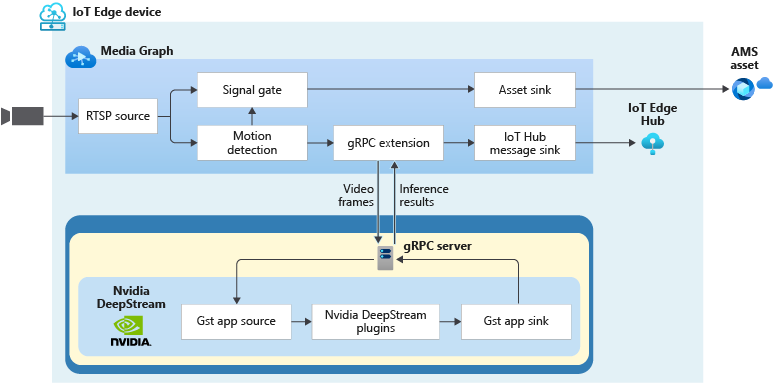
NVIDIA recently released DeepStream SDK 5.1, bringing support for NVIDIA’s Ampere architecture GPUs for massive acceleration to inference.  With this release, you can leverage LVA to build video workflows that span the edge and cloud, and then combine DeepStream SDK 5.1 to build pipelines to extract insights from video.


topology_nvidia_deepstream.png


Imagine you work for a county or city government that wants to understand traffic patterns across certain times, a retailer that wants to deliver curbside pickup to certain vehicle types, or a parking lot operator that wants to understand parking lot utilization, traffic flows and monitor in real time. With LVA managing video workflows and NVIDIA DeepStream’s investment in providing optimized AI for their underlying hardware architecture combined with the power of the Azure platform, you can now develop such video analytics pipelines from cloud to edge.


You can explore some samples on GitHub that showcase the composability of both platforms and have been tested for vehicle detection, classification, and tracking on high frame rate video. Feel free to add additional object classes such as bicycle, road sign etc. to leverage detection and tracking capability.


Get Started Today!


In closing, we’d like to thank everyone who is already participating in the Live Video Analytics on IoT Edge public preview. For those of you who are new to our technology, we encourage you to get started today with these helpful resources:


And finally, the LVA product team wants to hear about your experiences with LVA. Please feel free to contact us via TechCommunity  to ask questions and provide feedback including what future scenarios you would like to see us focusing on.


**Intel, the Intel logo, and other Intel marks are trademarks of Intel Corporation or its subsidiaries.


Announcing General Availability for Organizational Reporting

Announcing General Availability for Organizational Reporting

This article is contributed. See the original author and article here.

As a team manager or training manager, you know how important it is to support your learners on their training and certification journeys. Professionals who offer technical training to students at schools, colleges, and universities also understand this critical need. A key part of that support is getting insight into the learners’ and students’ journeys and achievements: Which roles and technologies are they investing their skills on? Have they completed any learning paths? How many modules have they finished? When a manager or trainer knows the details of a learner’s learning and development progress, they can help fill training gaps, measure and visualize what success means—both to the learner and to the organization—encourage them along the way, and celebrate their achievements.


To address this need, we’re happy to announce the General Availability of Microsoft Learn Organizational Reporting. This valuable service offers enterprise customers, partners, and academic institutions the ability to view and report on Microsoft Learn training progress and achievements for individuals within their organization’s tenant. The data used from Azure Data Share will incur costs associated with data storage within your existing Microsoft Azure subscription, but no separate or additional billing will occur.


Reporting details


Managers and trainers can explore and report on many activities of their employees, including:


  • Microsoft Learn units and modules that are in progress and completed.

  • Microsoft Learn learning paths completed.

  • Badges, trophies, and experience points earned.

  • Microsoft Certification (coming soon).


Please note that training service providers, like Learning Partners, can track their own employees’ progress but does not extend to accessing their clients’ learning specific data.


How it works


The system uses Azure Data Share to extract, transform, and load (ETL) user progress data into data sets, which can then be processed further or displayed in visualization tools, like Power BI. You can store data sets to Azure Data Lake, Azure Blob Storage, Azure SQL Database, or Azure Synapse SQL Pool. And you can create and manage your data share with the Azure Data Share no-code UI.


With Microsoft Learn Organizational Reporting, each user is assigned a unique object ID, and no personally identifiable information (PII) is stored in the data set. (Individuals can be identified by sending the object ID to the Microsoft Identity service.)


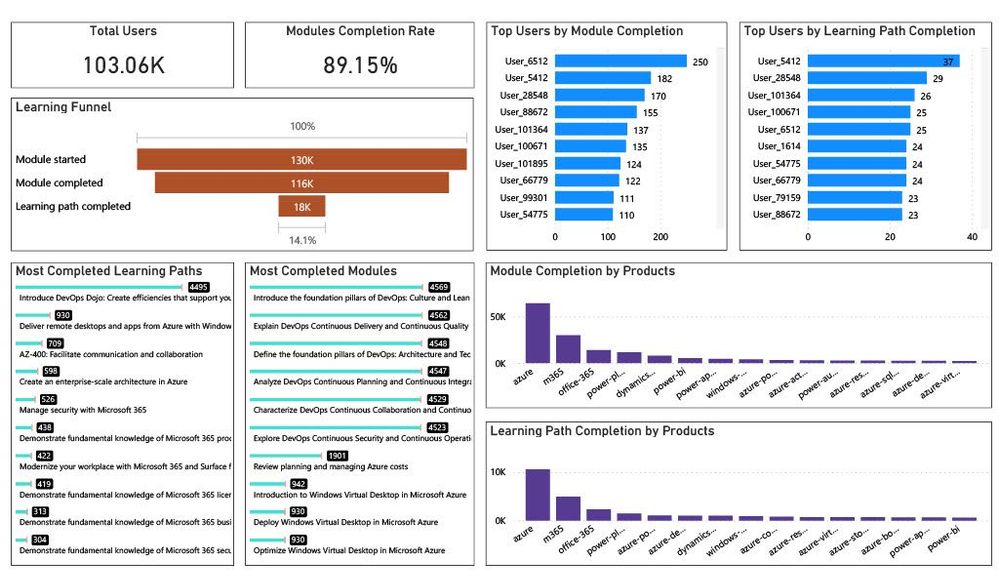
With this information, get the details on the number of users, most completed learning paths and modules, top users, completion rates (percentages), and more. And visualize the data in ways that support your learners and offer insight to your organization.


organization reporting power bi1.jpg


Figure 1. Sample Microsoft Learn Organizational Reporting in Power BI.


Setting up


It’s very straightforward to set up an Azure Data Share for Microsoft Learn Organizational Reporting. Use your Azure subscription and be sure your Azure Active Directory (Azure AD) account is attached to your organization’s tenant, since Azure AD will need access to the tenant’s Azure portal.


Next steps


If you’re ready to support your learners on their training and certification journeys with this practical information, set up Microsoft Learn Organizational Reporting. In just a few steps, you’ll have the details you need to keep current on what they’re learning and to visualize, report on, and celebrate their achievements. This service can give you deeper insight into your team’s progress to help reinforce training foundations and set them up for further success for specific job roles—a win-win for learners and organizations alike.

Using CHIRP to Detect Post-Compromise Threat Activity in On-Premises Environments

This article is contributed. See the original author and article here.

CISA Hunt and Incident Response Program (CHIRP) is a new forensics collection tool that CISA developed to help network defenders find indicators of compromise (IOCs) associated with the SolarWinds and Active Directory/M365 Compromise. CHIRP is freely available on the CISA GitHub repository.

Similar to the CISA-developed Sparrow tool—which scans for signs of APT compromise within an M365 or Azure environment—CHIRP scans for signs of APT compromise within an on-premises environment.

CISA Alert AA21-077A: Detecting Post-Compromise Threat Activity using the CHIRP IOC Detection Tool provide guidance on using the new tool. This Alert is a companion to AA20-352A: Advanced Persistent Threat Compromise of Government Agencies, Critical Infrastructure, and Private Sector Organizations and AA21-008A: Detecting Post-Compromise Threat Activity in Microsoft Cloud.

CISA encourages users and administrations to review the Alert for more information. For more technical information on the SolarWinds Orion supply chain compromise, see CISA’s Remediating Networks Affected by the SolarWinds and Active Directory/M365 Compromise web page. For general information on CISA’s response to the supply chain compromise, refer to cisa.gov/supply-chain-compromise.

Set up a proactive, always-on service in Dynamics 365

Set up a proactive, always-on service in Dynamics 365

This article is contributed. See the original author and article here.

Set up a proactive and always-on service organization with Dynamics 365, from self–service automated actions using intelligent and conversational chatbots and IoT, to high touch customer agent and frontline technician support. Expert Deanna Sparks joins host Jeremy Chapman to share how to combine automation, intelligence and live personnel engagement to take customer support to the next level.


1_U7bnFxYWf8zii9QYuH5YKw.png


Build a better customer support experience:


  • Provide intelligent, proactive and automated self-service

  • Issue resolution through conversational IVA

  • IVA supports intelligent routing using AI models to escalate customer service requests to field technicians

  • Connect to experienced front-line workers through Remote Assist


QUICK LINKS:


01:56 — Self-service


03:40 — How to ensure quality of customer experience


06:03 — Field technician’s experience: Field service mobile app


07:16 — Remote assist


07:50 — Self service IVA setup


08:52 — Voice control setup


09:50 — Phone number setup


10:52 — Smart assist setup


11:55 — Field technician setup


12:48 — Wrap up


Link References:


Watch our Dynamics 365 series with Vanessa Fournier at https://aka.ms/Dynamics365forIT


Set up the Dynamics 365 modules and configure Dynamics 365 with Azure IoT at https://aka.ms/DynamicsAlwaysConnected


Check out our shows on PVA creation at https://aka.ms/PVAmechanics


Unfamiliar with Microsoft Mechanics?


We are Microsoft’s official video series for IT. You can watch and share valuable content and demos of current and upcoming tech from the people who build it at Microsoft.


Video Transcript:


– Up next, as part of our series on Dynamics 365, we’re joined by expert Deanna Sparks to show you how you can set up a proactive and always connected service organization from self-service automated actions using intelligent and conversational chatbots and IoT, all the way through to high-touch customer agent and frontline technician support. So, Deanna, welcome to Microsoft Mechanics.


– Thanks for having me on the show.


– And thanks for joining us today. So, this is a really topical show. Over the past year in particular, most customer facing businesses have had to adapt to more agile ways of engaging with their customers. You know, self-service online is now often the first contact-free point of engagement to be able to respond to customers fast, and at scale. And how well that experience goes can be the difference between keeping or losing business.


– That’s true, Jeremy, and creating that experience is not easy for service organizations. Today’s customers don’t just engage in one way anymore. It’s often multiple ways, such as phone, web, and their preferred social channels. So, to get this experience right, it can often involve multiple tools and a lot of integration work. That’s really the whole premise of Dynamics 365. We take away all of that complexity with modular applications that natively work together. And a lot of this can be automated to provide your customers with self-service options, wherever they choose to engage. For example, if your customer prefers to solve an issue on their own, they can, by enabling intelligent virtual agents using our Power Platform, extending even further when you enable connected devices with Azure IoT. Or you can build intelligent escalation paths to hand off to the right person. From there, you can pull in expert support with seamless collaboration tools. And if an on-site expert is needed, since everything is connected, it’s easy to provide your customers with experienced frontline workers. These turnkey applications and services can be configured for your organization. And today, it’s a lot easier to set up than you might think.


– So, can we see it in action?


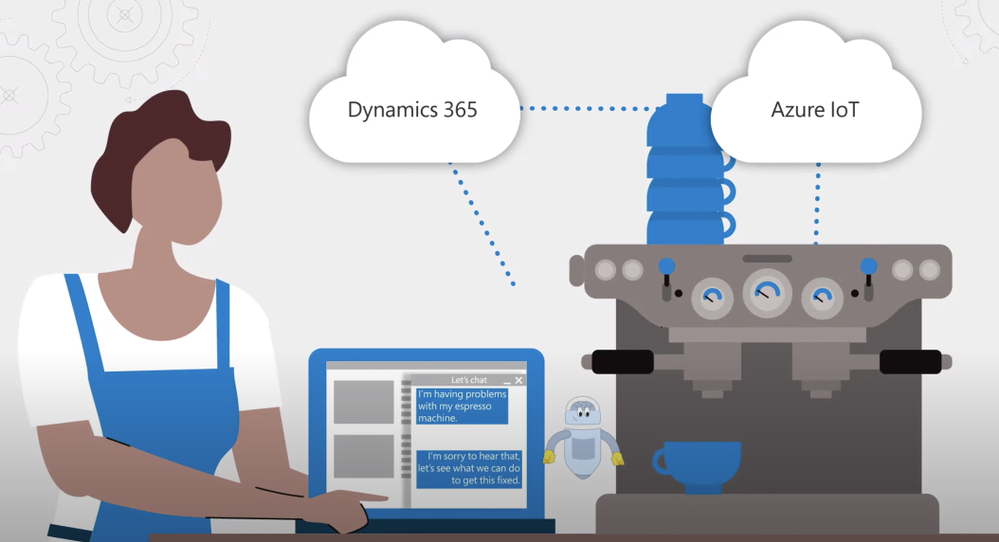
– So, let’s start with the self-service experience. I’m on the Contoso Coffee website and I want to report an issue with the espresso machine my coffee shop has purchased. It’s connected to Contoso Coffee via Dynamics 365 and Azure IoT. Now, most of us are familiar with text-based chat, but this takes things to the next level with voice assistance. I can dial a 1–800 number and I’ll be greeted by a virtual agent.


– [Agent] Hello, Fourth Coffee, thanks for calling Contoso Coffee support. Who am I speaking with?


– This is Deanna from the Bellevue location.


– [Agent] How can I help you today, Deanna?


– We have a two group coffee machine that we purchased from you, and we’ve noticed that it’s slow to respond to commands.


– [Agent] Okay, let me check on a few things.


– Okay, so while the bot is doing that, let me explain what is happening behind the scenes. You can see here in the PVA flow, that it is instructed to check on the device. It’s tapping into the device readings in IoT and Dynamics 365, and it recognizes that the firmware is out of date. The virtual agent was able to see the history of the device controller and that an update was needed. And by the way, because the IoT is surfaced through field service, it’s accessible to others in the organization. So, the virtual agent can now respond to me.


– [Agent] Thanks for waiting. It looks like your machine’s firmware is out of date. Can I get your permission to update it?


– Yes.


– [Agent] Thanks. This will take a few moments. We will update your machine’s controller.


– Thank you. So now, behind the scenes, the virtual agent is interfacing with field service and the command gets pushed down through the IoT hub to my espresso machine to update the firmware.


– Right, and this really feels like a high-touch experience because of the voice and intelligence that’s baked into the interaction that really allows the bot then to figure out the situation and take action. That said, though, how do you ensure the quality of the customer experience for things that might be outside of the realm of the bot’s diagnostic and kind of configuration power?


– Exactly, not every issue can or should be fixed by software and automated responses. Let’s say the machine is not performing consistently. Maybe the water isn’t flowing properly. A lot of different variables could cause this. So, here’s a standard text-based exchange. In this case, the virtual agent has identified the store as well as the equipment available to troubleshoot. The virtual agent is asking the customer to describe the issue. The customer is concerned about the inconsistent water flow. Now, behind the scenes intelligent routing uses AI models and rules to assess incoming service requests. This ensures that all customer interactions are routed to the correct customer service agent without constant queue supervision. Switching to the customer service agent’s point of view, they accept the incoming chat requests. This loads the previous virtual assistant conversation with associated cases and customer information. A benefit here is that it is the same agent experience whether the customer is reaching out from the web, email, social channels or phone. Before the agent greets the customer, highlighted on the left, the virtual agent suggests what to investigate first. In this scenario, it’s the water quality issue in the area. The agent uses quick replies to easily respond to the personalized greeting. Now, as the agent reviews, built-in AI has already linked the conversation to the proper case, tracking the root cause. In this scenario, it’s the King County water quality impact case. While the conversation continues on the left, on the right, Smart Assist suggests related knowledge articles. The top ranked article provides guidance on how Contoso should handle issues related to water quality and mineral content. The agent clicks on the article. There are recommendations of actions to take, including in this scenario sending a technician to install a water filtration system to fix the issue permanently. As a premium customer, they have access to a one-day SLA to provide onsite maintenance, and now the agent can notify the customer a technician will be sent. Next, an automated process creates the work order. And intelligence scheduling can pick a time and date within the SLA for when an appropriate technician can be onsite.


– So, now the appointment is all scheduled, but what does the field technician’s experience then look like?


– The main experience for a frontline worker is primarily surfaced through the field service mobile app. They can see complete information about their day in a familiar calendar view, similar to Outlook. When selecting a work order, the customer’s information and location are available. Once on site, frontline workers can follow the predefined guided tasks based off of the type of service they’re performing. Here, I’ve already completed the first two service tasks. But let’s say I want to follow along the third service task, which includes the inspection to ensure the successful installation of the water filtration system. This predefined checklist makes it easy for the technician to perform their work. In our case, we select the root cause of the installation as the county water supply. I mark that Fourth Coffee’s installation is covered under SLA. As I follow the precise installation process, I mark each step complete. When I finish the installation, I ensure the water is flowing well through the filter system and make sure there are no leaks. I move the progress to 100% and indicate the inspection as passed. Now that all of the tasks are done, I scroll up and save my work. Then at this point, I can go to the notes tab and capture a signature from the customer directly from my device.


– So now, the technician’s work is done, but what happens then if the customer has a question that really falls outside the expertise of the worker that’s on site? For example, what if they want to know if their coffee is pouring right?


– Well, that’s a great use case for remote assist. Not all technicians will know what the perfect cup of coffee looks like. To avoid sending another technician onsite, frontline workers can immediately connect with the Contoso Coffee Brewmasters. So, we’ll launch the remote assist experience. This connects to a remote expert that the field tech can share video with. Then, we’ll check the pour of the coffee and the remote expert can see things like the speed and color of the pour to say if everything looks good.


– This all looks pretty awesome. But what does it take then to set the experience up and why don’t we start with the self-service IVA?


– So, for the self-service experience, you need two things outside of core customer service and field service apps, the Omnichannel add-in, and your Power Virtual Agent. Once you have acquired the license for Omnichannel, the application appears in your Power Platform admin center under D365 apps. You’ll select the environment and which Omnichannel needs to be set up and select Manage. This takes you to the Omnichannel page and the Dynamics 365 admin center. We provide a guided experience to set up your different customer communication channels and additional settings. The second thing you need is to create the Virtual Agent flow. Here on the Power Virtual Agent author in Canvas, you can see the flow of what I just showed. You can see there’s logic and conditional branching and the prebuilt connectors make it easy to connect to Azure IoT for device readings.


– Right, and by the way, we’ve also recently done several shows on Power Virtual Agents, which you can check out at aka.ms/PVAMechanics. So, how do you get all this to work with the voice control that we saw?


– Actually, that’s the new part. To do that, you need to follow the previous setup experience for our new voice channel and link it to a preexisting Virtual Agent, just like you saw. So, starting in the Omnichannel admin center, click Set up voice demo. This will kick off an automated process to set up the work stream, acquire a phone number, set up your voice channel, create a queue service and wire up the Power Virtual Agent services. Once these automatic processes are complete, you can instantly try it by clicking on Open voice demo. At this point, you can test out the voice-to-agent escalation by calling the number and opening the agent experience. Since we just got this configured, you’ll land on a fresh agent dashboard. Now, you’ll see the call is coming in, so, I’ll accept the call. Accepting the call opens the ongoing conversation page. Notice the live voice-to-text transcript happening in real time. And you can even determine your customer’s mood by looking at the customer sentiment at the top of the conversation.


– What happens if I want to have a different phone number, or maybe I want to bring in my own phone number to the service?


– You can either acquire a different phone number, or bring your existing one into the service. You can do that from the new Omnichannel admin center, just click Set up voice. And from there, you can configure your phone number or get a new one.


– Okay, so once that’s configured, your call center is now set up, but how does the routing work then to get to the right agent?


– So, that’s out-of-the-box, so, it’s also pretty easy. We actually showed that earlier in our example. Still in the Omnichannel admin center, I’ll click into the work distribution. These settings define how conversations should be allocated to agents within a queue. And now, we’re ready to add our Virtual Agent, the same one that I showed you earlier. To do that, I’ll select Add Bot, and from the dropdown list, I’ll select my Power Virtual Agent. Now, my phone number is linked to my Power Virtual Agent, and it’s ready to go.


– One thing to note here is that behind the scenes, we’re actually using Azure Communication Services that leverages the same enterprise-grade foundation for Microsoft Teams that brings in voice and PSTN calling and integration with Power Virtual Agents. Moving on further into our setup experience, another pivotal part of the experience that you showed was that escalation to the customer service agent from the bot and how they have the knowledge articles that they needed to troubleshoot further with the help of Smart Assist. How do you get all that working?


– Again, this is pretty easy to enable in the same admin center. Here, if I click into the Analytics and insights setting, you’ll see that I’ve already enabled Omnichannel historical analytics and topic clustering. Historical analytics gives you a complete view of your service organization with things such as caseload volume by channel, escalation rate, sentiment, and CSAT, just to name a few. And topic clustering uses natural language understanding to synthesize the root causes for why your customers are calling. And to get the matching Smart Assist knowledge articles to appear, you need to enable premium AI, which I’ll do by simply clicking into Manage. All I need to do to leverage Microsoft’s powerful machine learning models is to enable similar cases and knowledge article suggestions. I also have the option to update the data mapping to tailor results to how my organization collects data, but I’ll leave that for later and click Save and Close.


– Let’s switch gears to the field technician. What did you have to do to set up the mobile app? Was that easy to configure as well?


– There are just a couple steps to get that configured. With the latest update to field service, the mobile app will appear automatically in your tenant. So, here in the apps menu, from the Field Service Mobile app tile, we’ll select Manage roles, then choose all of the field service roles here, admin, dispatcher, inventory, resource manager, and save it. This will give anyone with the right permissions to access the application, using their existing field service login credentials. Now, we’ll open it in the app designer, and this is just like customizing any other power app. You just select the components you want to display, and those will be available to anyone who uses the app with appropriate permissions.


– And this is really an awesome example of how you can combine automation and intelligence and live personnel engagement to take customer support to the next level. But what would you recommend for the folks watching who want to learn more?


– So, in the interest of time, we showed you the core experience and setup, but we have much more detailed guidance on everything that I showed you, from setting up Dynamics 365 modules to configuring Dynamics 365 with Azure IoT, available at aka.ms/DynamicsAlwaysConnected.


– Thanks, Deanna, this is amazing stuff. And to get familiar with all of what’s possible with Dynamics 365, I really recommend that you check out our series with Vanessa Fournier at aka.ms/Dynamics365forIT. Be sure to subscribe to Mechanics if you haven’t already yet. Thanks for watching, we’ll see you next time.


Information Governance and Records Management is generally available to GCC, GCC High, and DoD

Information Governance and Records Management is generally available to GCC, GCC High, and DoD

This article is contributed. See the original author and article here.

Governing data is critical to adhere to compliance regulations. In a world where government employees work and provide public services remotely, information is stored across numerous devices in multiple disparate locations from on-premises to the cloud. This situation makes it challenging to secure and govern data and to comply with regulations.


Today we are excited to announce the general availability of Microsoft 365 Information Governance and Records Management for the Government Community Cloud (GCC), GCC High, and Department of Defense (DoD) customers. These capabilities provide government organizations with significantly greater depth in governing critical data. 


Information Governance 


Microsoft Information Governance helps government organizations manage risk by discovering, classifying, labeling, and deleting their data. It allows organizations and agencies to reduce risk by providing lifecycle management across their Microsoft 365 data.  


Records Management 


Records Management provides government organizations with the ability to manage content to meet regulatory requirements. With Records Management, government organizations can: 


  • Classify, retain, and manage content according to your retention schedule without compromising end-user productivity. 

  • Defensibly dispose of files, including review and approval. 

  • Demonstrate compliance with regulations through defensible audit trails and proof of destruction. 


Records Management is accessible in the Microsoft 365 Compliance Center. 


Picture3.jpg


  • Strike the right balance between governance and productivity: Records Management is built into Microsoft 365 collaboration and productivity tools, easing the friction between enforcing governance controls and user productivity. Users can work as they would typically, and records management happens in the background without the user being aware of it. You can accomplish this by using automatic retention policies based on the content, its metadata, the file location, or the presence of sensitive data. These different auto-classification methods provide the flexibility you need to manage the increasing volume of data. With Records Management, you can balance rigorous enforcement of data controls with helping your organization to be fully productive. Learn more about auto-applying retention. 


  • Build trust, transparency, and defensibility: Building trust and providing transparency is crucial to managing records. Microsoft Records Management includes disposition approval and proof of disposalfor all items deleted via a record label. Proof of disposal helps provide the defensibility you need to meet legal and regulatory requirements.  Learn more about content disposal. 

  • Help ensure immutability of files: Confidentiality, integrity, and availability of records are vital principles that must guide companies as they govern business-critical information. Highly regulated government agencies and contractors need the most stringent controls to ensure records integrity. Regulatory record labels further enhance immutability by preventing metadata changes, records movements, records versioning, and blocking users and admins from removing the label once applied. Learn more about regulatory record labels. 


Get started today 


We hope you are excited to try these new features of Microsoft Information Governance and Records Management. You can learn more about all these updates in our technical documentation. 


APPENDIX: 


As the advanced compliance specialist for Microsoft 365 compliance solutions, you can connect with me here. Check out other Microsoft 365 compliance resources for US government. 


Evaluate your CMMC postures with Compliance Manager in GCC, GCC High 


https://aka.ms/ComplianceManagerGovBlogMar21  


Microsoft CMMC Acceleration Program Update – January 2021 


https://aka.ms/CMMCAccelerationProgramUpdate  


Using Advanced Audit for your forensic investigation capability 


https://aka.ms/AdvAuditBlog  


Advanced eDiscovery demo for Gov cloud (video) 


https://aka.ms/GovAdvancedeDiscoveryVideo  


Enhanced regulatory, legal and forensic investigation capabilities now in the Government Cloud  


https://aka.ms/M365ComplianceforGovBlog  


Microsoft 365 Public Roadmap link to check status on upcoming Microsoft 365 compliance solution features  


Microsoft 365 Roadmap: Microsoft 365 compliance solutions 


[DevTest Labs] Decommissioning preview API's '2015-05-21-preview' & '2017-04-26-preview' in 90 days

This article is contributed. See the original author and article here.

There were a few preview API’s that were made available in the previous years for Azure DevTest Labs, with the goal of enabling early access to certain features and functionalities.


We have incorporated all the functionalities related to below preview API’s in the latest API specs, that were generally made available and we have decided to decommission below DTL preview API’s by June 17, 2021.


  •   2015-05-21-preview

  •   2017-04-26-preview


If you are still using any of the above preview API’s, We recommend to migrate and use the latest DTL REST API Specs that were generally made available. The decommissioning does not impact our current API version in preview, 2018-10-15-preview.


2015-05-21-preview’ and2017-04-26-previewAPI versions would be decommissioned on June 17, 2021 and if you are using the preview API’s, we request you to kindly migrate before June 17, 2021.


As always, please reach out to us in case of any questions or concerns.


–  DevTest Labs Product Team


Hidden Treasure Part 1: Additional Performance Insights in DISKSPD XML

Hidden Treasure Part 1: Additional Performance Insights in DISKSPD XML

This article is contributed. See the original author and article here.

Written by Jason Yi, PM on the Azure Edge & Platform team at Microsoft. 


Acknowledgements: Dan Lovinger


Imagine this, you have an Azure Stack HCI cluster set up and ready to go. But you have that lingering question: What is your cluster’s storage performance potential? In such cases, you can rely on micro-benchmarking tools such as DiskSpd. And if you are not aware, the tool helps you customize and configure your own synthetic workloads by tweaking built in parameters. For more information, you can read about it here.


“Visible” and Clean Data


Most folks who already have experience with DiskSpd are likely familiar with the txt output option, which is also displayed in the terminal. The purpose behind this output was to present the data in a human readable format. We also aggregated some of the finer details to generate practical metrics for the users. This also means that we determined which metrics would be considered valuable. But, did you know that there is an option to output in XML, which reveals additional, granular data such as the total IOs achieved per second.


Let’s first take a few moments to review the txt output. As you may know, this output is split into four different sections:


Input settings:


Picture1.png


CPU utilization details:


Picture2.png


Total IO performance metrics:


Picture3.png


Latency percentile analysis (-L parameter):

Picture4.png


This result produces a detailed view of a couple performance metrics. That’s great, but what if you are interested in other data insights? If you did not read carefully through the DiskSpd wiki page, you may have missed the fact that there is a “hidden feature.” There is another output format that generates an XML file. This can be invoked by the -Rxml parameter and piped into an XML file with your preferred file name. But wait, there’s more! If you peep into the XML file, you will notice that there is more data than what was originally shown in the txt output, such as the total IOs achieved per second. More specifically, the XML output reveals more granular data as opposed to the aggregated data for the human eyes. If you wish to take a look, be warned – your eyes will burn from the squinting.


Table of Contents: XML


Before your eyes burn, let’s create a brief table of contents for the XML file.


<System> Under this element, you have some basic information regarding the system itself, such as the server/VM name, DiskSpd version, number of processors, etc.


Picture5.png


<Profile> Under this element, you will find your input parameters from when you ran DiskSpd. To name a few, this includes the queue depth, thread count, warm up time, test duration, etc. There are quite a few sub-elements within this section. Luckily, most of them are self-explanatory, and so let us focus on a few of them.


  • <TimeSpans> Under this element, you will find <TimeSpan> elements. Each of those <TimeSpan> elements represent one DiskSpd test run. As you may have guessed, the content within <TimeSpan> contains a set of parameters that you, the user, specifies. For example, you can see that the <requestcount> element is set to 32 since we initially set the queue depth to be 32 when we ran DiskSpd. You can think of this section as being analogous to the “input settings” result in the txt output.


Picture6.png


<TimeSpan> This element is not to be confused with the above <TimeSpan> element. This section contains the results of your DiskSpd test. It is similar to the data presented in the txt file, but with added granular data. More specifically, you can view the CPU usage, IOPS statistics and latency statistics (average total milliseconds, standard deviation, etc.), in their respective sub-elements:


  • <CpuUtilization>

    • The CPU data is broken down per core.


  • <Latency>

    • The latency data is broken down into separate “buckets” where each bucket corresponds to 1 percentile rank, in ascending order from 0 to 100%.


  • <Iops>

    • The IOPS data is broken down into separate “buckets” where each bucket corresponds to the IO data for 1 millisecond.


Picture7.png


This may give rise to the question; can you modify the contents of this XML file and pipe it back into DiskSpd? Yes, you absolutely can! In fact, there is another parameter precisely for this purpose (-X). Here are the following steps to get you started: (great for batch testing!)


  1. Before using this parameter (-X), you will need to preserve the contents within the <Profile> element. Any other data that exists in the XML file may be discarded. If you plan to run the DiskSpd test with modified input parameters, be sure to make the appropriate changes in the <Profile> section.

  2. Optional: If you plan to run multiple DiskSpd tests, you can add more <TimeSpan> elements under <Profile>, with your desired input parameters.

  3. You can then run DiskSpd with the -X parameter which will take the XML file path as input and output a new XML (or txt) file with the newly generated result.



Picture8.png


Bonus: Script to Extract IOPS


In case you wanted to start somewhere, I’ve included a short script that takes in a DiskSpd XML output named “output.xml” and extracts the total IOs achieved per second into a neat CSV file for you to view (ensure they are in the same path). This might be a good place to start if you want to get more data insights about IOPS. **Foreshadowing**


Final Remarks


Hopefully, this provides a solution for those situations where you always wanted a more detailed form of data or to run DiskSpd batch tests. You can also imagine that there are a variety of ways you can manipulate the XML output through PowerShell scripts. Alas, this is for another day.


*Script Below*


# Written by Jason Yi, PM
# 12/2020


<#
.PARAMETER d
integer number of diskspd runs (can consider it as duration since each run is one second long)
.PARAMETER path
the path to the test file
.PARAMETER rw_flag
the default is 0. 0 represents that the user wants to input their custom read/write ratio whereas 1 represents that the user wants a randomized read/write ratio
.PARAMETER g_min
the minimum g parameter (g parameter is the throughput threshold)
.PARAMETER g_max
the maximum g parameter (g parameter is the throughput threshold)
.PARAMETER b
the block size in bytes
.PARAMETER r
random IO aligned to specified size in bytes
.PARAMETER o
the queue depth
.PARAMETER t
the number of threads
.PARAMETER w
the ratio of write tests to read tests
#>
Param (
[Parameter(Position=0,mandatory=$true)][int]$d,
[Parameter(Position=2,mandatory=$true)][string]$path, # C:ClusterStorageCSV01IO.dat
[int]$rw_flag = 0,
[int]$g_min = 0,
[int]$g_max = 8000,
[int]$b = 4096,
[int]$r = 4096,
[int]$o = 32,
[int]$t = 4,
[int]$w = 0)


Function Create-Timespans{
<#
.DESCRIPTION
This function takes the input number of diskspd runs (or duration) and lasts for that input number of seconds while randomizing
the throughput threshold within a specified range. Includes same parameters initially passed in by user.
#>
Param (
[int]$d,
[string]$path,
[int]$g_min,
[int]$g_max,
[int]$b,
[int]$r,
[int]$o,
[int]$t,
[int]$w,
[int]$rw_flag
)


[xml]$xml=@”
<Profile>
<Progress>0</Progress>
<ResultFormat>xml</ResultFormat>
<Verbose>false</Verbose>
<TimeSpans>
<TimeSpan>
<CompletionRoutines>false</CompletionRoutines>
<MeasureLatency>true</MeasureLatency>
<CalculateIopsStdDev>true</CalculateIopsStdDev>
<DisableAffinity>false</DisableAffinity>
<Duration>1</Duration>
<Warmup>0</Warmup>
<Cooldown>0</Cooldown>
<ThreadCount>0</ThreadCount>
<RequestCount>0</RequestCount>
<IoBucketDuration>1000</IoBucketDuration>
<RandSeed>0</RandSeed>
<Targets>
<Target>
<Path>$path</Path>
<BlockSize>$b</BlockSize>
<BaseFileOffset>0</BaseFileOffset>
<SequentialScan>false</SequentialScan>
<RandomAccess>false</RandomAccess>
<TemporaryFile>false</TemporaryFile>
<UseLargePages>false</UseLargePages>
<DisableOSCache>true</DisableOSCache>
<WriteThrough>true</WriteThrough>
<WriteBufferContent>
<Pattern>sequential</Pattern>
</WriteBufferContent>
<ParallelAsyncIO>false</ParallelAsyncIO>
<FileSize>1073741824</FileSize>
<Random>$r</Random>
<ThreadStride>0</ThreadStride>
<MaxFileSize>0</MaxFileSize>
<RequestCount>$o</RequestCount>
<WriteRatio>$w</WriteRatio>
<Throughput>0</Throughput>
<ThreadsPerFile>$t</ThreadsPerFile>
<IOPriority>3</IOPriority>
<Weight>1</Weight>
</Target>
</Targets>
</TimeSpan>
</TimeSpans>
</Profile>
“@


# 1 flag means that the user wishes to randomize the rw ratio
# 0 flag means that the user wishes to control the rw ratio
# Basically, throw an error when the flag is no 0 or 1
if ( ($rw_flag -ne 1) -and ($rw_flag -ne 0) ){
throw “Invalid rw_flag value. Please choose 0 to provide your own rw ratio, or 1 to randomize the rw ratio.

}


$path = Get-Location
# loop up until the number of runs (duration) and add new timespan elements
for($i = 1; $i -lt $d; $i++){


$g_param = Get-Random -Minimum $g_min -Maximum $g_max
$true_w = Get-Random -Minimum 0 -Maximum 100


# if there is only one timespan, add another
if ($xml.Profile.Timespans.ChildNodes.Count -eq 1){


# clone the current timespan element, modify it, and append it as a child
$new_t = $xml.Profile.Timespans.Timespan.Clone()
$new_t.Targets.Target.Throughput = “$g_param”
if ($rw_flag -eq 1){
$new_t.Targets.Target.WriteRatio = “$true_w”
}
$null = $xml.Profile.Timespans.AppendChild($new_t)


}
else{


# clone the current timespan element, modify it, and append it as a child
$new_t = $xml.Profile.Timespans.Timespan[1].Clone()
$new_t.Targets.Target.Throughput = “$g_param”
if ($rw_flag -eq 1){
$new_t.Targets.Target.WriteRatio = “$true_w”
}
$null = $xml.Profile.Timespans.AppendChild($new_t)


}
}


# show updated result
$xml.Profile.Timespans.Timespan
# save into xml file
$xml.Save(“$pathexpand_profile.xml”)


}
#
# SCRIPT BEGINS #
#


# create the xml file with diskspd parameters
Create-Timespans -d $d -g_min $g_min -g_max $g_max -path $path -b $b -r $r -o $o -t $t -w $w -rw_flag $rw_flag


# create path, input file, and node variables
$path = Get-Location
# feed profile xml to DISKSPD with -X parameter (Running DISKSPD)
Invoke-Expression “.diskspd.exe -X’$pathexpand_profile.xml’ > output.xml”

$file = [xml] (Get-Content “$pathoutput.xml”)


$nodelist = $file.SelectNodes(“/Results/TimeSpan/Iops/Bucket”)
$ms = $nodelist.getAttribute(“SampleMillisecond”)


# store the bucket objects into a variable
$buckets = $file.Results.TimeSpan.Iops.Bucket


# change the millisecond values to seconds
$time_arr = 1..$d
foreach ($t in $time_arr){
$buckets[$t-1].SampleMillisecond = “$t”
}


# select the objects you want in the csv file
$nodelist |
Select-Object @{n=’Time (s)’;e={[int]$_.SampleMillisecond}},
@{n=’Total IOs’;e={[int]$_.Total}} |
Export-Csv “$pathiops_stat_seconds.csv” -NoTypeInformation -Encoding UTF8 -Force # Have to force encoding to be UTF8 or data is in one column (UCS-2)



# import modified csv once more


$fileContent = Import-csv “$pathiops_stat_seconds.csv”


# if duration is less than 7 (number of percentile ranks), then add empty rows to fill that gap

if ($d -lt 7 ) {
for($i=$d; $i -lt 7; $i++) {
# add new row of values that are empty
$newRow = New-Object PsObject -Property @{ “Time (s)” = ” }
$fileContent += $newRow
}
}


# show output in the terminal
$fileContent | Format-Table -AutoSize


# export to a final csv file
$fileContent | Export-Csv “$pathiops_stat_seconds.csv” -NoTypeInformation -Encoding UTF8 -Force