by Contributed | Mar 25, 2021 | Technology
This article is contributed. See the original author and article here.
In the fourth video in our Azure API for FHIR series, we join Marc Kuperstein, Senior Director at Microsoft Health Next, as he discusses Security and Compliance within the Azure API for FHIR.
As a regulated industry, security and compliance are of particular importance when building technology and solutions. When Protected Health Information (PHI) is involved, several regulations come into play including HIPAA, HITRUST & GDPR. In this video we discuss what provisions are laid down by these regulations, what are the penalties for non compliance and how Azure API for FHIR is designed for security and compliance.
by Contributed | Mar 25, 2021 | Technology
This article is contributed. See the original author and article here.
Azure Data Factory adds new authentication mechanisms in Azure Data Explorer, SFTP, REST and HTTP connectors to provide you more flexible and secure ways to access the data stores.
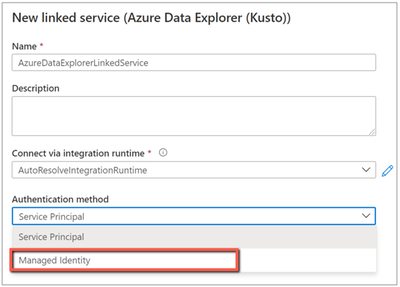
Azure Data Explorer connector adds managed identity authentication
When you copy data from/to Azure Data Explorer (ADX), look up data or invoke ADX command, you can now use managed identity authentication in addition to service principal authentication. Learn more about Azure Data Explorer connector.
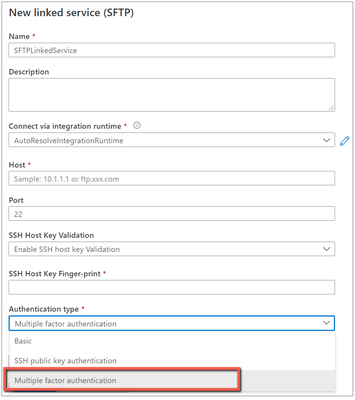
SFTP connector adds multi-factor authentication
Data Factory enables multi-factor authentication for SFTP connector so as to fulfill enterprise’s advanced security requirement. You can now access your SFTP server using multi-factor authentication which requires both username/password and SSH key. Learn more about SFTP connector.
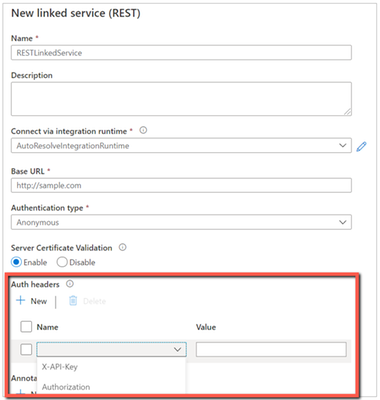
REST and HTTP connectors add authentication header in linked service
REST and HTTP connectors have been supporting custom request header settings at activity level. While if your request leverages the header for authentication, you would need to specify the secret in plain text and also duplicate this setting in each activity.
Now you have a new option to configure such auth header once and in secure manner in linked service, which support referencing secret in Azure Key Vault or inline encryption like we do for other credentials. On the UI, you can choose from the pre-populated well-known auth headers or input your own. Auth header can work in conjunction with supported authentication types. And you can keep configuring additional headers in activity as usual for non-auth functionalities. Learn more about REST connector and HTTP connector.

by Contributed | Mar 25, 2021 | Technology
This article is contributed. See the original author and article here.
Out of the tens of thousands of students from 163 countries who registered for the 2021 Imagine Cup, 39 teams advanced to the World Finals to showcase their original tech innovations.
Our World Finalists represent four competition categories: Earth, Education, Healthcare, and Lifestyle. Using Artificial Intelligence, IoT, Augmented Reality, gamification, and so much more, these students have developed their ideas into impactful and inspiring solutions to make a difference. During Round 1 of the World Finals, each team gave a 3-minute project pitch followed by a demo presented to expert judges, answering questions and discussing their ideas in depth.
Twelve teams were selected to move forward based on their innovative use of Azure technology, diversity and inclusive design, and potential to make an impact in their selected category. They’re heading on to Round 2 of the World Finals – congratulations to all these incredible students for making it this far!
Meet the World Finalists!
Intelligent Hives, Poland
Earth category
Project: Intelligent Hives – Bee Monitoring System
On average, 30% of bee colonies are unable to survive into the next season. Intelligent Hives brings beekeeping into the 21st century. The team’s intelligent solution helps save bees, beekeepers, money, and time. |
|
ProTag, New Zealand
Earth category
Project: ProTag
ProTag is a smart ear tag for livestock that can detect the early onset of illness in real-time, lowering costs and increasing animal welfare along with farmers’ peace of mind.
|
 |
Virtual Radiologist, Nepal
Earth category
Project: Pico Sat
Pico Sat is a miniature version of an environmental satellite, which provides users information about environmental parameters like altitude, temperature, humidity, pressure, dust, and pressure.
|
 |
Hands-On Labs, United States
Education category
Project: Hands-On Labs – How can we enable every student to have a truly ‘hands-on’ learning experience’ online?
Hands-On Labs is a set of remote laboratories that allows students to observe and remotely control physical tools online in real-time for their courses. The team aims to provide an active learning experience to students from any background all around the world.
|
 |
Nyansapo AI, United States
Education category
Project: Digital Literacy Assessment
The team’s mobile app enables instructors to assess the literacy level of multiple children at once and track the individual literacy progress of children over time. As a digital assessment tool, the projects makes it easy for instructors to collect, organize, and analyze assessment data to effectively place students in the best educational level.
|
 |
Tandemly, United States
Education category
Project: Tandemly
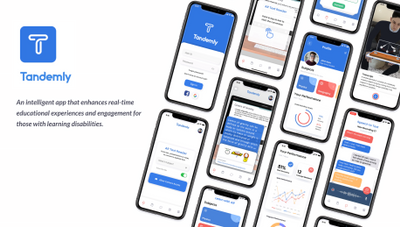
Using an array of built-in services and Augmented Reality, Tandemly aims to enhance and transform the educational experience for individuals with learning disabilities. |
 |
Cepha, United States
Healthcare category
Project: Cepha
Team Cepha created an early detection platform for Parkinson’s disease utilizing smartphone sensor data.
|
 |
Intelli-Sense, India
Healthcare category
Project: Vision – the Blind Assist
The solution seeks to aid difficulties faced by blind individuals in understanding their surroundings in situations such as walking through a road or reading a book. The solution’s main goal is to provide a sense of vision to the visually impaired.
|
 |
REWEBA, Kenya
Healthcare category
Project: REWEBA (Remote Well Baby)
The team’s solution is an early warning system that digitally monitors growth parameters of babies and sends data to doctors remotely for timely intervention. It combines a variety of technologies to provide innovative functionalities for infant screening.
|
 |
Assurance Team, United States
Lifestyle category
Project: Assurance – Re(Imagine) Safety
Team Assurance created a proactive and affordable system to prevent mass shootings. It works by scanning the aggregate input from security camera feeds for firearms and alerts all parties it needs to alert as soon as a firearm is detected. The system is fully extensible and is able to run on low-cost hardware.
|
 |
DataMasker, China
Lifestyle category
Project: WellMask
WellMask is an Artificial Intelligence social mask based on semantic extraction & symbol communication. The team hopes to solve the problems of inefficient communication and high social threshold caused by masks, so that masks are no longer synonymous with isolation.
|
 |
Threeotech, Thailand
Lifestyle category
Project: JustSigns
JustSigns is a web application for content creators to create sign language captions to improve media accessibility for hard-of-hearing viewers.
|
 |
Follow these teams’ journeys on Instagram and Twitter as they advance to the next round of the World Finals. Four winning teams will be selected, taking home USD10,000 and Azure credits. These teams will also move forward to the World Championship for the chance to win USD75,000 and mentorship with Microsoft CEO, Satya Nadella. Two runner-up teams in each category will take home USD2,500 plus Azure credits. Good luck to all our competitors!
by Contributed | Mar 25, 2021 | Technology
This article is contributed. See the original author and article here.
this blog post we will provide Microsoft Azure Sentinel customers with hunting queries to investigate possible on-premises Exchange Server exploitation and identify additional attacker IOCs (Indicators of compromise) such as IP address and User Agent. These hunting techniques can also be applied to web shell techniques targeting other web applications.
The techniques we discuss below have been adapted from the June 2020 blog post: Web shell threat hunting with Azure Sentinel and Microsoft Threat Protection. The previous blog post analysed an attack against a SharePoint server, however, many of the techniques can also be applied to Exchange servers since it also uses IIS to host its web interfaces.
Recent vulnerabilities in on-premises Microsoft Exchange servers have led to deployment of web shells by threat actors. More information on these vulnerabilities can be found in this MSRC blog, details on threat actor HAFNIUM using these vulnerabilities can be found in this MSTIC blog. MSRC has also provided guidance for responders, a one-click tool for remediation and automatic remediation is delivered through Microsoft Defender for Endpoint.
Our colleagues in Microsoft Defender Threat Intelligence have authored another blog that provides additional details on use of web shells in attacks taking advantage of the Exchange Server.
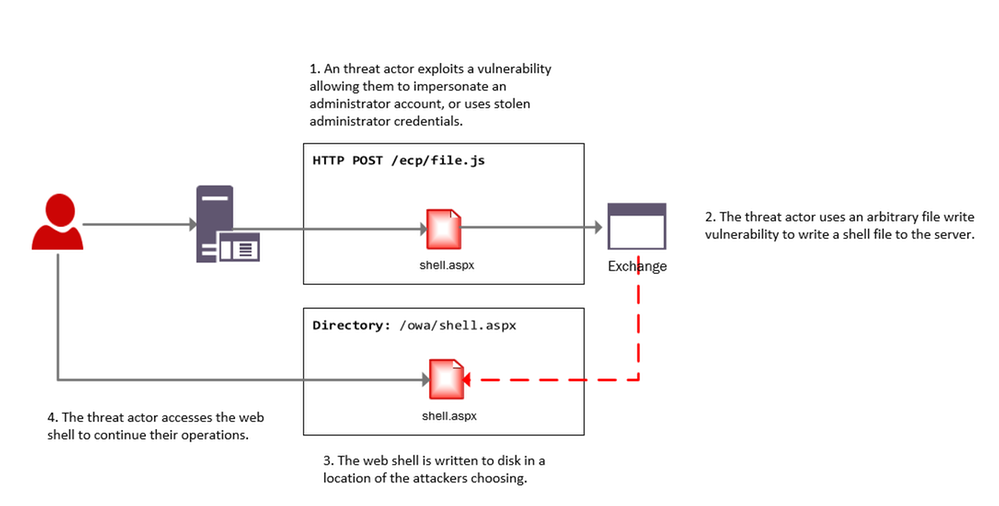
The below diagram provides a high-level overview of an attacker leveraging these vulnerabilities to install a web shell on an Exchange server.
Investigating web shell alerts
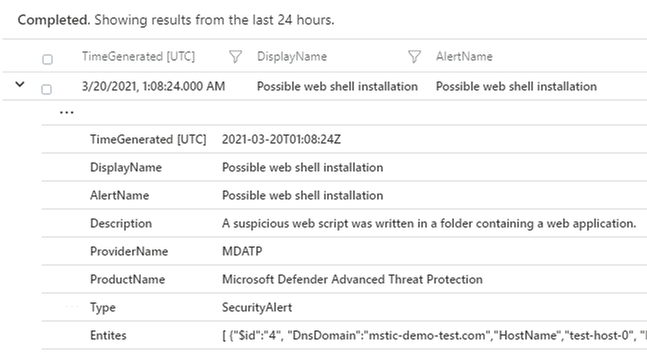
Microsoft 365 Defender (M365D) detects web shell installation and execution activity. Security alerts and incidents generated by M365D can be written to the SecurityAlert table in Azure Sentinel by enabling the appropriate connector. An example of a web shell installation alert in the Azure Sentinel SecurityAlert table can be seen below.
These alerts can be enriched in Azure Sentinel with new information from other log sources. When dealing with remote attacks on web application servers, one of the best enrichment sources available are the web logs that have been generated. In the case that the application server is Microsoft Exchange the W3CIISLog can be used to enrich M365D alerts with potential attacker information. Information on collecting IIS logs using the Log Analytics agent can be found here.
Identifying the Attacker IP address from Microsoft 365 Defender alerts
The query below extracts alerts from M365D where a web script file has been observed as part of the alert. In the below example, alerts containing ASP, ASPX, ASMX and ASAX files will be extracted; these are web script files commonly used by Exchange servers.
After extracting relevant web shell alerts the query will join the alert information with the W3CIIS log, this allows the query to identify any clients that have accessed the potential shell file, allowing the potential attacker to be identified. A version of the query below is already available as an Azure Sentinel detection and can be found here.
let timeWindow = 3d;
//Script file extensions to match on, can be expanded for your environment
let scriptExtensions = dynamic([".asp", ".aspx", ".asmx", ".asax"]);
SecurityAlert
| where TimeGenerated > ago(timeWindow)
| where ProviderName == "MDATP"
//Parse and expand the alert JSON
| extend alertData = parse_json(Entities)
| mvexpand alertData
| where alertData.Type == "file"
//This can be expanded to include more file types
| where alertData.Name has_any(scriptExtensions)
| extend FileName = tostring(alertData.Name), Directory = tostring(alertData.Directory)
| project TimeGenerated, FileName, Directory
| join (
W3CIISLog
| where TimeGenerated > ago(timeWindow)
| where csUriStem has_any(scriptExtensions)
| extend splitUriStem = split(csUriStem, "/")
| extend FileName = splitUriStem[-1]
| summarize StartTime=min(TimeGenerated), EndTime=max(TimeGenerated) by AttackerIP=cIP, AttackerUserAgent=csUserAgent, SiteName=sSiteName, ShellLocation=csUriStem, tostring(FileName)
) on FileName
| project StartTime, EndTime, AttackerIP, AttackerUserAgent, SiteName, ShellLocation
Identifying Exchange Servers & Associated Security Alerts
Exchange servers can be challenging to identify in default log data; however using data available in W3CIISLog, Exchange servers can be identified using predictable URI strings without relying on the hostname or site name.
The query below extracts the host name from W3CIISLog where a known Exchange URI path is observed, this provides a list of hostnames that are running Exchange. This list of host names can then be used to aggregate information from the alerts in the SecurityAlert table.
W3CIISLog
| where csUriStem has_any("/owa/auth/", "/ecp/healthcheck.htm", "/ews/exchange.asmx")
| summarize by computer=tolower(Computer)
| join kind=leftouter (
SecurityAlert
| extend alertData = parse_json(Entities)
| mvexpand alertData
| where alertData.Type == "host"
| extend computer = iff(isnotempty(alertData.DnsDomain), tolower(strcat(tostring(alertData.HostName), "." , tostring(alertData.DnsDomain))),tolower(tostring(alertData.HostName)))
| summarize Alerts=dcount(SystemAlertId), AlertTimes=make_list(TimeGenerated), AlertNames=make_list(AlertName) by computer
) on computer
| project ExchangeServer=computer, Alerts, AlertTimes, AlertNames

The results of the query provide insights into whether additional security alerts beyond web shell alerts have been observed on the host. Following deployment of a web shell it’s highly likely the threat actor will begin to execute further commands on the server, triggering additional alerts. In the above example three Exchange servers were observed with security alerts.
This same technique can be used to locate other web applications within the network that use common or predictable web paths.
W3CIISLog Analysis
W3CIISLog provides detailed logging on actions performed on Microsoft Internet Information Servers (IIS). Even when an Endpoint detection alert is not available, it is possible to explore W3CIISLogs for indicators of compromise. W3CIISLog can also provide additional insights into which hosts in the network are web application servers.
Note: As part of the original Microsoft HAFNIUM blog post, several hunting and detection queries were created to search for artefacts specific to the use of recent vulnerabilities.
Identifying generic exploitation activity
If the URI associated with the vulnerable file on the server is known, a query can be constructed to identify log entries that match the URI pattern. W3CIIS logging stores the URI in the column named “csUriStem”, the below query can be used to search for a specific URI in logs and provide information on which clients have accessed them. Local IP addresses have been removed.
W3CIISLog
| where TimeGenerated > ago(3d)
| where not(ipv4_is_private(cIP))
//Insert potentially exploited URI here
| where csUriStem =~ "/owa/auth/x.js"
| project TimeGenerated, sSiteName, csMethod, csUriStem, sPort, cIP, csUserAgent

For HAFNIUM attacks observed by MSTIC an indicator feed has been made available (CSV, JSON). A detection query, that will check for the presence of indicators in multiple data sources, has also been made available by the Azure Sentinel team. The detection can be found here, and IOC’s released as feeds by MSTIC can be found in this directory.
The recent Exchange vulnerabilities do not need to be targeted at a specific file. Analysis of automated exploitation tools online shows that many randomise the filenames used; this means that no legitimate user will visit these files as they do not exist on the server. As these filenames are randomly generated, static string matching cannot be used.
The Kusto “matches_regex” function can be used to perform regular expression matching on URI’s. The below example extracts events where the URI matches files associated with the exploitation of CVE-2021-27065 from W3CIISLog.
W3CIISLog
| where TimeGenerated > ago(3d)
| where not(ipv4_is_private(cIP))
| where (csUriStem matches regex @"/owa/auth/[A-Za-z0-9]{1,30}.js") or (csUriStem matches regex @"/ecp/[A-Za-z0-9]{1,30}.(js|flt|css)")
| project TimeGenerated, sSiteName, csMethod, csUriStem, sPort, cIP, csUserAgent

The previous queries can be limited when the files being exploited are commonly accessed. They would produce many candidate attacker IP addresses, making analysis challenging.
Microsoft has seen malicious automated tools released publicly that are being used to exploit the Exchange vulnerabilities. These tools are designed to only visit specific URIs on the server that are required to perform the exploit. This activity differs from normal and legitimate Administrator or User application browsing activity and if observed should be investigated.
It is possible to craft a query that uses basic statistical analysis to identify instances where a client has visited a disproportionately high number of exploit-related URI’s when compared to other URIs on the site., The query below calculates the total number of suspicious URIs that have been visited by each user, it then calculates the total number of URIs visited by the user. Where the number of exploit related URIs is a significant proportion of URIs visited, a result is returned. default, the query requires over 90% of the URIs visited by the user to be suspicious.
let timeRange = 7d;
//Calculate number of suspicious URI stems visited by user
W3CIISLog
| where TimeGenerated > ago(timeRange)
| where not(ipv4_is_private(cIP))
| where (csUriStem matches regex @"/owa/auth/[A-Za-z0-9]{1,30}.js") or (csUriStem matches regex @"/ecp/[A-Za-z0-9]{1,30}.(js|flt|css)") or (csUriStem =~ "/ews/exchange.asmx")
| extend userHash = hash_md5(strcat(cIP, csUserAgent))
| summarize susCount=dcount(csUriStem), make_list(csUriStem), min(TimeGenerated), max(TimeGenerated) by userHash, cIP, csUserAgent
| join kind=leftouter  (
//Calculate unique URI stems visited by each user
W3CIISLog
| where TimeGenerated > ago(timeRange)
| where not(ipv4_is_private(cIP))
| extend userHash = hash_md5(strcat(cIP, csUserAgent))
| summarize allCount=dcount(csUriStem) by userHash
) on userHash
//Find instances where only a common endpoint was seen
| extend containsDefault = iff(list_csUriStem contains "/ews/exchange.asmx", 1, 0)
//If we only see the common endpoint and nothing else dump it
| extend result = iff(containsDefault == 1, containsDefault+susCount, 0)
| where result != 2
| extend susPercentage = susCount / allCount * 100
| where susPercentage > 90
| project StartTime=min_TimeGenerated, EndTime=max_TimeGenerated, AttackerIP=cIP, AttackerUA=csUserAgent, URIsVisited=list_csUriStem, suspiciousPercentage=susPercentage, allUriCount=allCount, suspiciousUriCount=susCount
While this query is designed to detect recent Exchange exploit activity, it can be easily adapted to other exploit chains if the pages or URIs used are known.
Rare Client File Access
A previously published hunting query can be used to detect instances where resources on a server are requested by a single client – a behaviour that should be investigated in the context of web shell exploits. After the actor creates web shell on the server, it’s likely that they will be the only user to access the file to complete their intended objective.
Investigating the Attacker
In the previous blog post covering SharePoint exploitation, a Jupyter Notebook Guided Investigation is provided. This notebook can also be used to investigate on-prem Exchange compromises within your environment.
The notebook extracts alerts from Microsoft 365 Defender related to web shell activity, these can then be enriched with information from W3CIIS to identify the attacker IP and User Agent. The attackers IP and User Agent can be used to hunt through multiple log sources for potential post-compromise activity.
After the attacker details have been identified, the notebook can be used to locate files that were accessed by the attacker prior to the web shell being installed. The notebook will also locate the first instance that the attacker visited the server.
Azure-Sentinel-Notebooks/Guided Investigation – MDE Webshell Alerts.ipynb at master · Azure/Azure-Sentinel-Notebooks (github.com)
Instructions for getting the notebook up and running can be found in the original blog post, under the title “Building out the Investigation using Jupyter Notebooks”.
You can stay up to date with the latest information at https://aka.ms/exchangevulns.
by Contributed | Mar 25, 2021 | Technology
This article is contributed. See the original author and article here.
Today we begin the rollout of Windows release health to the Microsoft 365 admin center. Windows and Microsoft 365 IT admins now have easy, integrated access to essential information about monthly quality and feature updates, the latest features and enhancements for IT, servicing milestones, and lifecycle updates. The Windows release health experience on the admin center also offers insights into known issues, workarounds, and resolutions related to Windows updates. This will be a phased rollout and we expect this information experience to be available to all applicable customers by the end of April.
As we announced at Microsoft Ignite 2021, our goal is inform you about known issues and give you the information you need to roll out Windows feature updates and monthly quality updates effectively and without end user disruption. We also want to ensure that you have early awareness of policy changes, new resources, deprecations, and advisories.
In order to access Windows release health in the admin center, you will need an applicable Microsoft 365[1] or Windows[2] licensing subscription, and to have the role of Service support admin for your tenant.
To find Windows release health in the Microsoft 365 admin center, visit https://admin.microsoft.com, log in, and scroll down to Health in the navigation menu. Windows release health will be listed underneath the existing Service health menu option.
In addition, you can also see Windows-related notifications in the Message center and customize your notification preferences just as you would for any other product or service in the Microsoft 365 admin center. If you do not automatically see these messages once Windows release health appears in your Health menu, select Message center and then Preferences. Once in the Preferences pane, select Microsoft Windows in the Custom View tab.
You can also opt in to receive a weekly digest via email for Windows-related updates posted to the Message center by selecting the Email tab in Preferences. Select the box for Microsoft Windows and the box for Send me a weekly digest about services I select. You can enter up to two additional email addresses to receive those notifications. For more information about how to use the Message center, see Manage messages in Message center.
What does Windows release health in the admin center provide?
For IT admins managing complex Windows environments, the public Windows release health hub and known issues pages (example) provide an authoritative place to check for known issues, safeguard holds, servicing announcements, and important reminders.
At this point, you might be asking: Will the Windows release health content published on the Microsoft 365 admin center be different? The answer is yes. Because the admin center is specifically designed for IT admins, you will find greater technical detail about known issues, earlier reminders about important milestones like end of service, and more resources to help you plan for and deploy Windows updates. Our goal is to help you diagnose issues in your environment fast, provide steps to mitigate them quickly, and provide a root cause analysis for better support.
For further guidance on how to navigate Windows release health on Microsoft 365 admin center, see How to check Windows release health.
If you are not familiar with the Microsoft 365 admin center, and its ability to make it easier for you to manage applications, services, data, devices, and users across your Microsoft 365 services, see About Microsoft 365 admin center.
[1] Requires Microsoft 365 Enterprise E3/A3/F3 or Microsoft 365 Enterprise E5/A5
[2] Requires Windows 10 Enterprise E3/A3 or Windows 10 Enterprise E5/A5

by Contributed | Mar 25, 2021 | Technology
This article is contributed. See the original author and article here.
One of the performance projects I’ve focused on in PostgreSQL 14 is speeding up PostgreSQL recovery and vacuum. In the PostgreSQL team at Microsoft, I spend most of my time working with other members of the community on the PostgreSQL open source project. And in Postgres 14 (due to release in Q3 of 2021), I committed a change to optimize the compactify_tuples function, to reduce CPU utilization in the PostgreSQL recovery process. This performance optimization in PostgreSQL 14 made our crash recovery test case about 2.4x faster.
The compactify_tuples function is used internally in PostgreSQL:
- when PostgreSQL starts up after a non-clean shutdown—called crash recovery
- by the recovery process that is used by physical standby servers to replay changes (as described in the write-ahead log) as they arrive from the primary server
- by VACUUM
So the good news is that the improvements to compactify_tuples will: improve crash recovery performance; reduce the load on the standby server, allowing it to replay the write-ahead log from the primary server more quickly; and improve VACUUM performance.
In this post, let’s walk through the change to compactify_tuples, how the function used to work, and why the newly-rewritten version in Postgres 14 is faster.
Profiling the recovery process highlighted a performance problem
In PostgreSQL, the write-ahead log (called the WAL) contains sets of records with instructions and data to go with the instructions. These WAL records describe changes which are to be made to the underlying data. WAL is used to make sure each change to the data is durable in the event that PostgreSQL stops running before the underlying data is written to disk. When PostgreSQL restarts after a shutdown, all of the WAL since the last checkpoint must be replayed as part of the recovery process. The WAL is replayed in order, to reapply changes to pages which may not have been written out to disk before the database shutdown.
We did some profiling of the PostgreSQL recovery process after purposefully crashing the database after running a benchmark of an UPDATE-heavy, OLTP type workload. These profiles showed that much of the CPU load was coming from the replay of “HEAP2 CLEAN” WAL records. HEAP2 CLEAN records defragment pages in tables to remove free space left by dead tuples. HEAP2 CLEAN records are added to WAL whenever the page becomes full and more space is needed on the page.
A tuple is PostgreSQL’s internal representation of a row in a table. A single row may have many tuples representing it, but only one of these tuples will be applicable at any single point in time. Older running transactions may require access to older versions of the row (another tuple) so they can access the row as it was at the point in time when the transaction started. UPDATEs to rows cause new versions of the tuple to be created. Creating multiple versions of each row in this way is called multi-version concurrency control (MVCC.)
Removing unused space from heap pages
To understand what HEAP2 CLEAN does in PostgreSQL, we’ll need to peer into the heap page format. Let’s look at a typical (simplified) heap page with some tuple fragmentation:
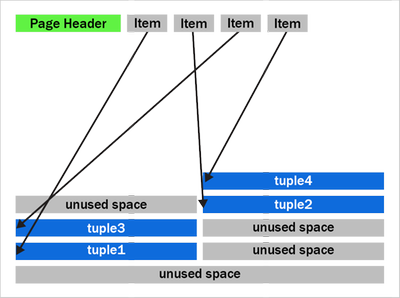 Figure 1: A PostgreSQL heap page with fragmentation due to removed tuples
We can see that after the page header comes an array of “items.” The items act as pointers to the start of each tuple. PostgreSQL writes tuples to the page starting at the end and works backwards. The page is full when the item array and tuple space would overlap.
You should also notice that the tuples at the end of the page are not exactly in the reverse order of the item pointers. Tuples 2 and 3 appear out of order here. Tuples can become out of order after some records have been updated in the page and an old item pointer gets reused.
We can also see that that there’s quite a bit of unused space on the page in figure 1. The unused space is due to VACUUM removing tuples. The HEAP2 CLEAN operation will get rid of this unused space.
In PostgreSQL 13 and earlier, the HEAP2 CLEAN operation would turn the above into:
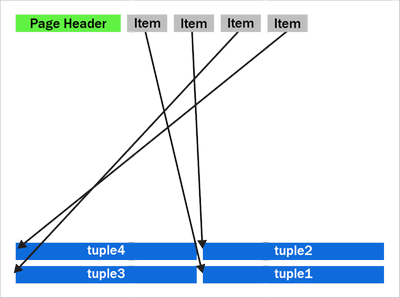 Figure 2: A defragmented heap page in PostgreSQL before the performance improvement in PostgreSQL 14 that speeds up the recovery process and VACUUM.
We can see that the empty space is gone and the tuples are now pushed up to the end of the page. Notice the tuples remain in the same order as they were, with tuples 2 and 3 remaining in the same swapped order.
How heap page compactification used to work, prior to PostgreSQL 14
The compactify_tuples function takes care of the page compactification operation for us. All the changes made are in the compactify_tuples function. Before this change, the compactify_tuples function would perform a sort on a copy of the items array. This sort allowed the tuples to get moved starting with tuples at the end of the page. In this case, the tuples are moved starting with tuple1, followed by tuple3, tuple2 and tuple4. To determine which tuples to move first, compactify_tuples used the generic C qsort function with a custom comparator function. Sorting the item array in reverse tuple offset order allowed the tuples to be moved starting at the tuples at the end of the page.
Since heap pages can contain up to a few hundred tuples, and due to how often pages can be compactified in UPDATE-heavy workloads, the qsort call could use a lot of CPU. The sort overhead was not as bad with pages just containing a few tuples.
Do we really need to sort? … Well, yes and no. If we moved tuples in item array order and didn’t sort, then we could overwrite tuples later in the page. For example, in figure 2, if we moved tuple2 toward the end of the page before moving tuple3, then we’d overwrite tuple3. When moving the tuples in-place like this, we must make sure we move tuples at the end of the page first. So, we must sort when doing this in-place move.
How to make HEAP2 CLEAN faster?
To speed up the page compactification done during HEAP2 CLEAN, we could have written a custom qsort function which inlines the comparator function. Creating a custom qsort would have reduced some function call overhead, but, no matter what we did, qsort would still average an O(n log n) complexity. It would be nice to get rid of the sort completely.
The qsort is only required so that we don’t overwrite any yet-to-be-moved tuples. So, instead of sorting, we could instead copy those tuples to a temporary in-memory buffer, that way the order we move the tuples does not matter.
The new version of compactify_tuples in PostgreSQL 14 completely eliminates the need to use qsort. Removing the sort allows us to move tuples to the end of the page in item-array order. The temporary in-memory buffer removes the danger of tuples being overwritten before they’re moved and also means that the tuples are put back in the correct order with the first tuple at the end of the page.
The new heap page format, after compactification in PostgreSQL 14, looks like this:
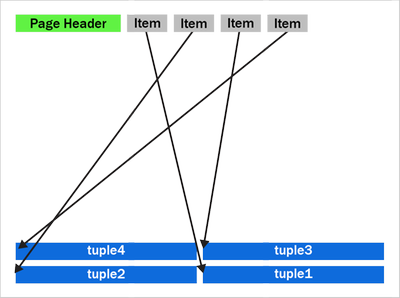 Figure 3: A newly compactified heap page after the performance improvement in PostgreSQL 14.
Notice that tuples 2 and 3 have now swapped places and the tuples are now in backwards item array order.
The new Postgres 14 code is further optimized by having a pre-check to see if the tuples are already in the correct reverse item pointer offset order. If the tuples are in the correct order, then there is no need to use the temporary buffer. We then move only tuples that come earlier (working backwards) in the page than the first empty space. The other tuples are already in the correct place. Also, now that we put the tuples back into reverse item pointer order again, we hit this pre-sorted case more often. On average, we’ll only move half the tuples on the page. New tuples which generate a new item pointer will also maintain this order for us.
Having the tuples in reverse item order may also help some CPU architectures prefetch memory more efficiently than if the tuples were in a random order in the page.
How much faster is the recovery process now in PostgreSQL 14?
My test case used a table with two INT columns and a “fillfactor” of 85 with 10 million rows. Accounting for the tuple header, this allows a maximum of 226 tuples to fit on each 8 kilobyte page.
To generate some WAL to replay, I used pgbench, a simple benchmarking program that comes with PostgreSQL, to do 12 million UPDATEs to random rows. Each of the 10 million rows will receive an average of 12 updates. I then did an unclean shutdown of PostgreSQL and started it back up again, forcing the database to perform crash recovery. Before the performance improvement, crash recovery took 148 seconds to replay the 2.2 GB of WAL.
The new version of the compactify_tuplescode took the same test 60.8 seconds. With this change and the given test case, PostgreSQL’s crash recovery became about ~2.4x faster.
|
Before the change to compactify tuples |
After the change to compactify tuples |
Performance impact of compactify tuples change |
Time to replay a
2.2 GB WAL as part of crash recovery |
148 sec |
60.8 sec |
~2.4X faster |
Previously, before the compactify_tuples change, pages with large numbers of tuples were the slowest to compactify. This was due to the qsort taking longer with large arrays. After changing compactify_tuples the performance is much more consistent with varying numbers of tuples on the page. The change does still result in a small speedup on pages even with very few tuples per page. However, the change helps the most when the number of tuples per page is large.
VACUUM performance also improved in PostgreSQL 14
VACUUM (and autovacuum) happens to make use of the same code after they remove dead tuples from a heap page. So, speeding up compactify_tuples also means a nice performance improvement for vacuum and autovacuum, too. We tried performing a VACUUM of the table updated my benchmark from earlier and saw that VACUUM now runs 25% faster in PostgreSQL 14 than it did before the compactify_tuples change. Previously it took 4.1 seconds to VACUUM the table and after the change that time went down to 2.9 seconds.
Speeding up the recovery process also means that physical standby servers are more likely to keep up pace and replay the primary’s WAL as quickly as it is being generated. So making this change to compactify_tuples also means that standby servers are less likely to lag behind the primary.
So the recovery process and vacuum will be faster in PostgreSQL 14—and there’s more work in progress, too
The change to compactify_tuples does help improve the performance of the recovery process in many cases. However, it’s also common for the recovery process to be bottlenecked on I/O rather than CPU. When recovering databases which are larger than the system’s available RAM, recovery must often wait for a page to be read from disk before any changes can be applied to it. Luckily, we’re also working on a way to make the recovery process pre-fetch pages into the kernel’s page cache so the physical I/O can take place concurrently in the background rather than having the recovery process wait for it.
For those of you who want an even bigger peek into how Postgres development happens, you can subscribe to any of the Postgres mailing lists. The PostgreSQL mailing list archives are also searchable. And if you want to learn even more about this compactify_tuples performance fix, here is the text of the actual commit to PostgreSQL 14, plus a link to the discussion on this optimization topic on the pgsql-hackers mailing list.
Author: David Rowley <drowley@postgresql.org>
Date: Wed, 16 Sep 2020 01:22:20 +0000 (13:22 +1200)
commit 19c60ad69a91f346edf66996b2cf726f594d3d2b

Optimize compactify_tuples function

This function could often be seen in profiles of vacuum and could often
be a significant bottleneck during recovery. The problem was that a qsort
was performed in order to sort an array of item pointers in reverse offset
order so that we could use that to safely move tuples up to the end of the
page without overwriting the memory of yet-to-be-moved tuples. i.e. we
used to compact the page starting at the back of the page and move towards
the front. The qsort that this required could be expensive for pages with
a large number of tuples.

In this commit, we take another approach to tuple compactification.

Now, instead of sorting the remaining item pointers array we first check
if the array is presorted and only memmove() the tuples that need to be
moved. This presorted check can be done very cheaply in the calling
functions when the array is being populated. This presorted case is very
fast.

When the item pointer array is not presorted we must copy tuples that need
to be moved into a temp buffer before copying them back into the page
again. This differs from what we used to do here as we're now copying the
tuples back into the page in reverse line pointer order. Previously we
left the existing order alone.  Reordering the tuples results in an
increased likelihood of hitting the pre-sorted case the next time around.
Any newly added tuple which consumes a new line pointer will also maintain
the correct sort order of tuples in the page which will also result in the
presorted case being hit the next time.  Only consuming an unused line
pointer can cause the order of tuples to go out again, but that will be
corrected next time the function is called for the page.

Benchmarks have shown that the non-presorted case is at least equally as
fast as the original qsort method even when the page just has a few
tuples. As the number of tuples becomes larger the new method maintains
its performance whereas the original qsort method became much slower when
the number of tuples on the page became large.

Author: David Rowley
Reviewed-by: Thomas Munro
Tested-by: Jakub Wartak

by Contributed | Mar 25, 2021 | Technology
This article is contributed. See the original author and article here.
For the next four weeks MidDay Café is moving to an Open Q&A format. Have questions around Microsoft Teams voice, Viva, SharePoint, Teams administration, and more? Bring ‘em to MidDay Café and let’s get those questions answered. In addition to Open Q&A the MidDay Café crew will have the weekly news, upcoming events, plus some surprise tips and tricks!
Join us Monday’s 3/29, 4/5, 4/12, and 4/19 for MidDay Café Open QA Sessions.
MidDay Café Open QA Sessions Agenda:
- Welcome and Introductions.
- Mid-Day Café News and Events
- Tips and Tricks of the Week.
- Open Q&A
- Wrap Up
For the Event:
Keep up to date with MidDay Café:
Thanks for visiting – Michael Gannotti LinkedIn | Twitter
 Michael Gannotti
by Contributed | Mar 25, 2021 | Technology
This article is contributed. See the original author and article here.
Discover how Microsoft enabled a highly regulated SAP landscape for the new MS-Federal entity, how to adopt a Zero Trust Security architecture for SAP deployments, understand implementation of SAP S/4HANA Central Finance, unlocking business value with cloud economics, and more!
Microsoft & SAP jointly participated at the SAPInsider event on Finance, GRC and Cybersecurity from Mar 13-15. In case you missed the event, watch the sessions on-demand now through Apr 15. Click on the links below and use MICROSOFTGUEST to register.
by Contributed | Mar 25, 2021 | Technology
This article is contributed. See the original author and article here.
We continue to expand the Azure Marketplace ecosystem. For this volume, 102 new offers successfully met the onboarding criteria and went live. See details of the new offers below:
|
Applications
|
|
adenin Digital Assistant: Developed by adenin TECHNOLOGIES, Digital Assistant is an AI-powered chatbot that connects to your business applications to boost productivity, reduce workplace distractions, and provide notifications for upcoming tasks.
|
 |
AlmaLinux 8.3 Beta: This preconfigured image from ProComputers.com provides a minimal installation of AlmaLinux 8.3 Beta. AlmaLinux is an open-source, community-driven project that is mainly used as a common base system on top of which other appliances are built and tested.
|
 |
Anti-Microbial Stewardship-Zevac: Zevac from Circle of Life Healthcare is an AI-powered antimicrobial stewardship solution designed to help hospitals stop the inappropriate or unnecessary use of antibiotics.
|
 |
Apache Solr Helm Chart: Bitnami offers this Helm Chart of Apache Solr for deployment on Kubernetes. Apache Solr is a powerful, open-source enterprise search platform built on Apache Lucene.
|
 |
Ataccama ONE Data Quality Management: Ataccama ONE on Microsoft Azure automates data quality management at any scale. Get the tools and functionalities required for a wide range of use cases, including standardization and cleansing, de-duplication, reporting, and data masking.
|
 |
Ataccama ONE Master Data Management: Ataccama ONE combines features from prominent master data management (MDM) styles and gives you the freedom to manage your master data your way. Consolidate data from various sources, create a 360-degree view of any domain, publish changes directly to golden records, and more.
|
 |
AuditeCloud: AuditeCloud extends Microsoft Teams messaging and collaboration capabilities to enable customer service operators to communicate with customers via any social network or social messenger. This application is available only in Italian.
|
 |
Bella Education Suite: Available in Portuguese and English, Bella Education Suite uses artificial intelligence to help improve the quality of your institution’s educational services. Gain actionable insights into teaching methods and differentials while exploring new ways to teach and evaluate.
|
 |
BigBlueButton: Online Learning: BigBlueButton is an open-source web conferencing system for online learning that enables teachers to share audio, video, screens, and more in real time with their students. A simple API makes it easy to integrate BigBlueButton with existing apps and systems.
|
 |
BitwardenRS: Password storing and management: Linnovate Technologies’ BitwardenRS is an unofficial Bitwarden server implementation written in Rust. Featuring end-to-end encryption, BitwardenRS provides a safe and easy way for teams and individuals to store and share sensitive data from any device.
|
 |
CHASE Waste management SaaS platform: Available only in Traditional Chinese, the Chase waste management platform combines artificial intelligence with big data analytics to help organizations deal with their waste quickly and efficiently.
|
 |
Climb: Developed by RockStep Solutions, Climb is a SaaS collaboration suite for managing in vivo drug discovery data and operations. Empower lab managers, study directors, and scientists with on-demand data access and full situational awareness of their research.
|
 |
Concept Encoder: Concept Encoder is an AI-powered solution that uses vectorization of words and documents to digitize and analyze natural sentences in healthcare and life sciences. This application is available only in Japanese.
|
 |
Contract Management Software for Dynamics 365 Customer Engagement: Contracts 365 for Microsoft Dynamics 365 is a fully integrated contract lifecycle management module that facilitates the synchronization of data between Contracts 365 Standard or Enterprise Edition and Dynamics 365. Reduce cycle times, facilitate transparency, and more.
|
 |
Core Intranet: Good internal communications tools are key in today’s workplace. Sigma’s Core Intranet is a fast, intuitive intranet and digital workspace solution that delivers customizable information to employees across an organization.
|
 |
Crestron Flex: Built on the Crestron XiO Cloud, Crestron Flex is a portfolio of IoT-enabled automation and control devices that help organizations improve productivity, optimize space utilization, reduce energy use, and make informed decisions about current and future resource needs based on real-time data.
|
 |
Crestron XiO Cloud: The Crestron XiO Cloud helps increase productivity, improve facility efficiencies, and strengthen decision-making by enabling organizations to provision, monitor, and manage IoT-enabled devices that control room scheduling, environment, and collaboration technologies.
|
 |
Data Mobility and Migration: Data Dynamics’ Unified Unstructured Data Management Platform leverages automation to help you move data from heterogenous storage environments to Microsoft Azure. Optimize your storage infrastructure by ensuring you have the right data in the right location at the right time.
|
 |
Dealer Management System: Excellon 5 is a cloud-based dealer management solution for managing complex sales, distribution, and service networks. Leverage multi-channel workloads and manage all your leads, customers, call centers, and campaigns with Excellon 5.
|
 |
Digital Adoption Solution for Microsoft 365 and Azure: Vitalyst’s Digital Adoption Solution helps facilitate a deep learning culture and Microsoft product usage at scale across your organization. Features include end user skilling and one-on-one coaching to improve organizational mastery of Microsoft products and technologies.
|
 |
Evventa: Evventa on Microsoft Azure is an events, protocol, and ceremonials management suite of web-based solutions. It automates the ins and outs of complex events and protocols to facilitate work completion while ensuring a high level of security across branches and departments.
|
 |
F5 Platform: Created for capital-intensive midsize and large industrial enterprises, F5 Platform is a powerful data analytics framework that empowers you to build business applications quickly and provide valuable insights for your business. This application is available only in Russian.
|
 |
factoHR HRMS Application: factoHR is a mobile-first, hire-to-retire HCM platform that enables businesses to automate their daily HR functions. Simplify talent discussions and gain actionable insights to help build a great place to work and achieve business objectives faster.
|
 |
Fiscal Attach: Fiscal Attach is an optical character recognition (OCR) service that reads files sent by your service providers and turns them into JSON or XML files to be imported into your organization’s management system. This application is only available in Portuguese.
|
 |
Gamified Esport Fan Monetization: Omnicoach helps e-sport businesses boost fan monetization by connecting brands with fans. The AI-based analytics solution provides measurable data points in gaming videos and enables the creation of customized quests and rewards linked to moments in games to engage users.
|
 |
Ghost: Publishing Platform Based on Node.js: Ghost is a modern publishing solution featuring a rich editor designed to provide great writing experiences. Leverage image galleries, embeds, Markdown, HTML, and more while developing direct relationships with your audience and generating revenue.
|
 |
Guide Modern: Guide Modern from Sigma is a quality management system that helps employees and managers work systematically across their business. All information is stored in SharePoint Online and is searchable from Microsoft 365 and SharePoint.
|
 |
Incident Management System: CogniTensor’s Incident Management System is a combination of correlation analytics and predictions dashboards designed to enable emergency response teams to track and manage any incidents that may arise.
|
 |
Insighta: Available from eSense Software, Insighta extends your enterprise performance management solution to mobile devices along with analytics, actionable data, and reports. Gain quick, on-the-go insights into your organization’s projects, budgets, invoices, and more.
|
 |
Inspector Cloud Camera 2: Powered by computer vision, Inspector Cloud is a SaaS solution that recognizes products to help CPG companies check their shelf KPIs. Gain visibility into your sales team’s efficiency and reduce manual inspection times and human error with Inspector Cloud.
|
 |
Intelligent Forecasting and Scenario Modeling: Powered by Microsoft technologies, EY Global’s Intelligent Forecasting and Scenario Modeling solution is an AI forecasting engine that leverages machine learning to address business planning needs and challenges across an enterprise.
|
 |
Intelligent Health Management Platform: Saans Health Labs’ intelligent health management platform uses artificial intelligence, machine learning, and analytics to help healthcare providers predict the onset of chronic conditions and their associated costs.
|
 |
Intranet Out-of the-Box Solution: Cambay’s Intranet Out-of-the-Box Solution is a unified collaboration platform for corporate communication and document management. Built on Microsoft Azure, the cloud-first, mobile-first solution offers seamless mobile experiences to keep users engaged from any device.
|
 |
invested.ch: Designed to level the financial playing field by enabling everyone to profit from growing economies, invested.ch delivers intuitive tools to support those who have never bought a stock. Learn how to start owning stocks simply, transparently, and affordably.
|
 |
JiVS IMP: JiVS IMP helps you manage the lifecycle of company data independently of other systems and applications. Reduce operating and migration costs, along with the total cost of ownership, with support for more than 2,000 business objects, including SAP and non-SAP systems.
|
 |
Kortext: Universities use Kortext to deliver course texts to students around a single aggregated bookshelf. The platform empowers universities to deliver connected, enhanced learning experiences to help ensure no student is left behind.
|
 |
KrakenD API Gateway: KrakenD is an open-source API gateway that aggregates and manipulates multiple data sources to provide you with exactly the API your products need while offering a premium user experience and advanced performance.
|
 |
LoRaWAN No-Code End-to-End Solution Builder: Webee’s fully managed, no-code IoT solution enables Microsoft Azure customers to connect and manage wireless devices that use long-range, low-power wide-area network (LoRaWAN) connectivity. Accelerate IoT application development using Azure services.
|
 |
LTI SWITCH: Hosted on Microsoft Azure, SWITCH is an insurance book transfer and rollover solution for eliminating manual tasks during the book transfer process. The SaaS platform uses Azure Cognitive Services to build core business logic and is available on a subscription basis.
|
 |
mAdvisor AutoML: Marlabs Global Development Center’s mAdvisor is an automated machine learning (AutoML) platform that translates data from enterprise systems into meaningful insights and predictions. Identify new revenue streams and enhance productivity and customer experience.
|
 |
ManageEngine ADManager Plus (1 Domain 5 Help Desk): ADManager Plus is an integrated Active Directory (AD), Exchange Server, Microsoft 365, and Skype for Business management and reporting solution that enables you to securely delegate organizational unit and group-based AD tasks to help your desk technicians.
|
 |
ManageEngine ADManager Plus (1 Domain): ADManager Plus is an integrated Active Directory (AD), Exchange Server, Microsoft 365, and Skype for Business management and reporting solution that enables you to securely delegate organizational unit and group-based AD tasks to help your desk technicians.
|
 |
ManageEngine PAM360 (10 Admins, 25 Keys): ManageEngine PAM360 is an enterprise-grade unified privileged access management solution. It enables password administrators and privileged users to gain granular control over critical IT assets, such as passwords, SSH keys, digital certificates, and license keys.
|
 |
Manty Decision: Manty Decision is a data visualization platform for public administrations and local authority managers. Available only in French, Decision connects to a community’s data sources and centralizes all data in a unified data lake to drive informed decision-making.
|
 |
Maxis I.Protect BaaS: Maxis I.Protect is a data protection lifecycle management engine that enables users to run self-service automation processes from a web console. Streamline and automate critical data management tasks, including backup and disaster recovery, to Microsoft Azure or on-premises.
|
 |
mDERMS: Developed by mPrest Systems, mDERMS on Microsoft Azure is a utility orchestration and optimization platform. The solution helps organizations manage distributed energy resources while optimizing their dispatch and facilitating end-to-end visibility and monitoring.
|
 |
Minecraft (Java) Server on Windows Server 2016: Virtual Pulse offers this preconfigured image of a Minecraft Java game server on Windows Server 2016. Prepare for a grand adventure as you build, mine, battle mobs, and explore the ever-changing Minecraft landscape.
|
 |
Minecraft (Java) Server on Windows Server 2019: Virtual Pulse offers this preconfigured image of a Minecraft Java game server on Windows Server 2019. Prepare for a grand adventure as you build, mine, battle mobs, and explore the ever-changing Minecraft landscape.
|
 |
moreReception: Available only in Japanese, moreReception greatly reduces the burden and cost of reception for multi-tenant buildings. The Microsoft Teams-based solution calls corporate personnel via a simple touch panel to help ensure their customers aren’t left waiting in the lobby.
|
 |
Morphisec Keep for Azure: The Morphisec Keep server threat prevention platform for Microsoft Azure uses moving-target defense to proactively prevent cyberattacks on your physical and virtual servers without relying on signatures, attack patterns, or machine learning algorithms.
|
 |
MySQL 5.7 with Red Hat 7.9: This preconfigured image from Cognosys provides MySQL 5.7 with Red Hat 7.9. MySQL is a popular open-source relational SQL database management system used for developing web-based applications.
|
 |
MySQL 8.0 with Red Hat 7.9: This preconfigured image from Cognosys provides MySQL 8.0 with Red Hat 7.9. MySQL is a popular open-source relational SQL database management system used for developing web-based applications.
|
 |
nC Navigator for Microsoft Teams : novaCapta’s Navigator app for Microsoft Teams extends Teams by enabling the mapping of hierarchies and dependencies with structured, multi-level navigation. This application is available only in German.
|
 |
NGINX with Red Hat 7.9: Cognosys offers this preconfigured image of NGINX with Red Hat 7.9. NGINX is an all-in-one API gateway, cache, load balancer, web application firewall, and web server.
|
 |
Novari MIRM: Novari’s Medical Imaging Requisition Management (MIRM) solution eliminates paper and dramatically improves requisition workflows for radiologists, technologists, clerical staff, and hospital leadership. Streamline your requisition workflows for all modalities with MIRM.
|
 |
Office FlexiSpace – Office Workplace Reservations: Office FlexiSpace on Microsoft Azure enables your employees to quickly and easily reserve a workplace in the office. Employees can book rooms via a web browser, a chatbot in Microsoft Teams, or a mobile app. This application is available in Russian.
|
 |
OfficeExpert EPM: OfficeExpert EPM provides detailed performance data on all Microsoft Teams calls and meetings. The integrated solution gathers information from localized agents running on computer endpoints to provide accurate metrics for measuring performance and identifying UX issues.
|
 |
Payment Analysis System: CogniTensor’s Payment Analysis System is a combination of correlation analytics and prediction dashboards designed to help you address various finance objectives. Features include AI-powered predictions, a real-time reminder system, and a comprehensive grading system.
|
 |
Preppio: Preppio for Microsoft Teams serves as a culture and process assistant for everything related to employee onboarding. It automates communication between new hires and HR managers to help ensure an engaging, high-quality onboarding process.
|
 |
Purple’s WiFi Analytics and Marketing Automation: Purple on Microsoft Azure is a cloud-based platform designed to turn Wi-Fi networks into revenue-generation tools for businesses through social media integration, intuitive analytics, and profile-based marketing.
|
 |
Ramco HR Software and Global Payroll Suite: Ramco Systems’ Global Payroll is a comprehensive HR solution that uses artificial intelligence and machine learning to detect payroll fraud, provide facial recognition-based time and attendance functionality, and more.
|
 |
Recorded Future Express: Recorded Future Express provides instant access to threat intelligence for web-based resources. The extension provides real-time risk scores for domains, IP addresses, hashes, and URLs, enabling you to quickly understand and act on potential threats.
|
 |
Recruitment Smart: Recruitment Smart offers a deep-tech HR platform that automates the end-to-end talent supply chain for organizations. The solution integrates seamlessly with resident applicant tracking systems to help you find, qualify, and hire talent according to your business needs.
|
 |
Rendezvous Occupancy Sensors: Rendezvous Occupancy Sensors use real-time data to deliver an accurate breakdown of desk and space use in your office. See how your space is being used, set up real-time alerts to monitor when space is underused and overused, and more.
|
 |
Repstance Advanced Edition: Repstance is an enterprise-class data replication and migration tool for Microsoft SQL Server, Oracle, and Snowflake that enables you to deploy, distribute, update, and use your most valuable asset – your data.
|
 |
Safe Steps: Safe Steps is an IoT solution that helps businesses manage employee and visitor safety during the COVID-19 pandemic by automating social distancing and contract tracing. Wearable devices use BLE-based proximity technology to detect social distancing violations and notify users.
|
 |
SafeGUARD Backup and Archiving: SafeGUARD is a policy-driven, cloud-based data management solution that enables users to discover, manage, and protect all their data, including data stored in Microsoft 365 applications.
|
 |
SAS SaaS Contract Analytics: The process of legal reasoning and decision-making relies heavily on information stored in text. SAS SaaS Contract Analytics uses natural language processing to automate tasks such as due diligence, contract review, and legal discovery and help you save time and money.
|
 |
Sayint Contact Center Intelligence: Tech Mahindra’s Sayint on Microsoft Azure is a speech analytics platform that uses artificial intelligence, machine learning, and natural language processing to uncover actionable insights from customer conversations.
|
 |
Sendmarc: Sendmarc uses the DMARC email authentication protocol to protect your domain from email phishing and impersonation domains. Gain visibility into all email sent from your domain, drive compliance, and control how your domain is used.
|
 |
SFTP – OpenSSH FTP Server on CentOS 7.8: This preconfigured image from Virtual Pulse provides SFTP – OpenSSH FTP server on CentOS 7.8. SFTP is a secure file transfer protocol that protects against password sniffing and man-in-the-middle attacks while supporting the security and authentication functionalities of SSH.
|
 |
Sharecare Health Security Vaccination Platform: Built using Microsoft Cloud for Healthcare and Azure Health Bot, Sharecare is a vaccine distribution platform that addresses healthcare technology infrastructure needs for scheduling, onboarding, tracking, and monitoring COVID-19 vaccinations.
|
 |
Sinequa for Azure: Optimized for Microsoft Azure, Sinequa’s intelligent search platform surfaces the right information to the right people at the right time regardless of source, format, or language. Accelerate innovation, foster collaboration, ensure compliance, and increase productivity.
|
 |
SOP Management SaaS: DHC VISION SOP & Training Manager supports all aspects of regulatory-compliant document management, from creation and editing to approval, distribution, training, and archiving. This application is available in German and English.
|
 |
TeamViewer: TeamViewer is a comprehensive remote access, remote control, and remote support solution that works with most desktop and mobile platforms, including Windows, macOS, Android, and iOS. TeamViewer uses Azure Active Directory to manage user access, provision accounts, and enable SSO.
|
 |
Ticketing: kitameraki’s ticketing app for Microsoft Teams helps boost company efficiency and productivity by handling your service desk incidents and requests. The industry-agnostic solution benefits any team that provides an internal service to the rest of the company.
|
 |
TraceSCAN: TraceSCAN on Microsoft Azure is a comprehensive, customizable contact tracing solution that aims to halt the spread of COVID-19 by alerting users who have been in close contact with individuals who have tested positive for the disease.
|
 |
Turicode – Document Processing & Data Extraction: Turicode’s intelligent document processing solution enables users to train machine learning models to automate the processing of all kinds of documents, including customs documents, salary statements, and pension fund statements.
|
 |
UST Healthy Spaces: UST Healthy Spaces provides enterprise-class tools to ensure proper health, safety, protective equipment, and sanitary conditions are maintained across your organization. The solution provides entry control, PPE detection, sanitation management, and more.
|
 |
UST Omni: UST Omni provides end-to-end supply chain visibility at a granular SKU level during every stage of your organization’s supply chain. Be more demand-driven and market-driven, improve your service levels, and make your supply chain more responsive to market dynamics with UST Onmi.
|
 |
UST SmartOps: UST SmartOps is an intelligent process automation platform that automatically learns and improves your business processes while digitizing and compressing repetitive human-intensive tasks.
|
 |
Utilmate – Your Utility Billing Solution: Utilmate is an industry-compliant data-to-cash utility billing solution for suppliers of electricity, gas, water, and solar energy. Utilmate features a streamlined set-up process to get you up and running quickly.
|
 |
VNS3 5.x Firewall/Router/VPN: Cohesive Networks’ VNS3 firewall/router/VPN solution on Microsoft Azure enables you to deliver improved security, connectivity, and compliance while minimizing the complexity of your organization’s IT environment.
|
 |
VNS3 NATe – NAT Gateway Appliance: Built on Cohesive Networks’ VNS3 Platform, VNS3 NATe is a preconfigured NAT gateway appliance. All VNS3 controllers can be live upgraded to provide the capabilities your cloud use case requires.
|
 |
Wipster Enterprise: Wipster Enterprise is a comprehensive review and approval platform for video. Streamline your video review cycles with on-frame commenting, version control and comparison, media sharing, and support for a wide variety of files.
|
 |
WordPress with Red Hat 7.9: This preconfigured, ready-to-run image from Cognosys provides WordPress 5.6.1 with Red Hat 7.9. WordPress is a popular open-source content management system based on PHP and MySQL.
|
 |
WordPress with Red Hat 8: This preconfigured, ready-to-run image from Cognosys provides WordPress 5.6.1 with Red Hat 8.3. WordPress is a popular open-source content management system based on PHP and MySQL.
|
 |
XpenseCo Travel and Expense: The XpenseCo app for Microsoft Dynamics 365 makes it easy to book travel by providing visibility into travel and expense spending and enabling finance teams to provide spend forecasts by employee, project, and business unit.
|
 |
YourVoice – User feedback and idea management: YourVoice for Microsoft 365 drives continuous improvement across your organization by enabling you to manage employee feedback and suggestions for improving your service offerings. This application is available in German and English.
|
 |
Zero Trust Secure Remote Access: Block Armour offers an enterprise-grade zero-trust solution to facilitate secure and compliant remote access for your hybrid or distributed IT environment. Empower teams of remote workers without sacrificing security or productivity.
|
Consulting services
|
 |
App Identity Evaluation Workshop: 1 Day: This App Identity Evaluation workshop from KiZAN Technologies will help you simplify the management and security of your applications by establishing the use of Azure Active Directory as a single solution for your cloud and on-premises applications.
|
 |
Azure Admin for AWS SysOps: 2-Day Workshop: Dynamics Edge’s two-day offering is designed for AWS SysOps administrators who are interested in learning how Microsoft Azure is different from AWS and how Azure is administered. The workshop covers Azure networking, compute, storage, and governance.
|
 |
Azure Cloud Security Assessment: 4 Weeks: Gain comprehensive insight into your cloud security posture along with a pathway to achieving security maturity with Sourced’s Microsoft Azure Cloud Security Assessment. Deliverables include a roadmap with recommendations to meet your cybersecurity risk-management objectives.
|
 |
AzureReady Health Check: 2-Week Assessment: 3Cloud’s AzureReady Health Check is designed to evaluate the cost, security, scalability, and manageability of your organization’s Microsoft Azure environment. Make sure your Azure environment is configured properly, backed up, and secure.
|
 |
Cloud4C Azure Managed Services – Security: Cloud4C Services combines technology, intelligence, and security operation center expertise to offer comprehensive managed security services for Microsoft Azure. Get real-time monitoring and event analysis for protection from advanced tactics, techniques, and procedures.
|
 |
Data Platform Modernization: 5-Day Assessment: Data is your organization’s most valuable asset. Lucient’s four-step process (assessment, justification, project execution, and governance) helps you understand the different options for your data, including each option’s pros and cons and associated costs.
|
 |
HCL PICASSO: Half-Day Workshop: HCL Technologies’ half-day workshop will cover use-case scenarios that take advantage of the Microsoft Connected Vehicle Platform on Microsoft Azure and Azure IoT Hub. Learn how to maximize efficiency with real-time intelligence, increase speed to market, and more.
|
 |
Managed Security: Armis offers a 24×7 managed cyber risk mitigation service that integrates Microsoft’s cloud-native security information and event management solution, Azure Sentinel. Proactively detect and respond to security incidents and defend your organization against attacks.
|
 |
Migrate SQL Workloads to Azure: 2-Day Workshop: Learn about Azure SQL Database and what is required to migrate your MySQL and PostgreSQL workloads to Azure SQL Database in Dynamics Edge’s two-day workshop. Understand the benefits and limitations of each target platform and how each can be used to fulfill your requirements.
|
 |
Office Line Lighthouse: Office Line will prepare your environment for a Microsoft Azure migration by implementing an Azure Landing Zone, then deliver proactive maintenance, update management, and recommendations for improvement. |
 |
PEI Azure Managed Services: Have you recently deployed solutions to Microsoft Azure and want help managing them? Performance Enhancements provides full production support and management for your environment, no matter where your organization is in its Azure journey.
|
 |
Quest Technology Management Azure Lighthouse: Quest Media & Supplies offers a host of managed services for Quest clients using Microsoft Azure, including consulting, infrastructure and cost management, and security audits.
|
|
by Contributed | Mar 25, 2021 | Technology
This article is contributed. See the original author and article here.
Blog Overview
This blog will provide an overview of Modern application development. The blog will first define the modern application development approach. Then delve into the ‘7 building blocks’ of the approach starting with cloud native architecture, followed by AI, Integration, Data, Software delivery, Operations, and Security.
Each segment will define and explain the ‘building block’ and how the modern application development approach leverages the ‘building blocks’ to produce more robust applications.
What is Modern Application Development (MAD)?
Modern application development is an approach that enables you to innovate rapidly by using cloud-native architectures with loosely coupled microservices, managed databases, AI, DevOps support, and built-in monitoring.
The resulting modern applications leverage cloud native architectures by packaging code and dependencies in containers and deploying them as microservices to increase developer velocity using DevOps practices.
Subsequently modern applications utilize continuous integration and delivery (CI/CD) technologies and processes to improve system reliability. Modern apps employ automation to identify and quickly mitigate issues applying best practices like infrastructure as code and increasing data security with threat detection and protection.
Lastly, modern applications are faster by infusing AI into native architecture structures to reduce manual tasks, accelerating workflows and introducing low code application development tools to simplify and expedite development processes.
Cloud-native architectures
According to The Cloud Native Computing Foundation (CNCF), cloud native is defined as “Cloud-native technologies empower organizations to build and run scalable applications in modern, dynamic environments such as public, private, and hybrid clouds.
Containers, service meshes, microservices, immutable infrastructure, and declarative APIs exemplify this approach.
These techniques enable loosely coupled systems that are resilient, manageable, and observable. Combined with robust automation, they allow engineers to make high-impact changes frequently and predictably with minimal toil.”
Utilizing that definition, what are the key tenants of a cloud-native approach, and how does each tenant benefit you?
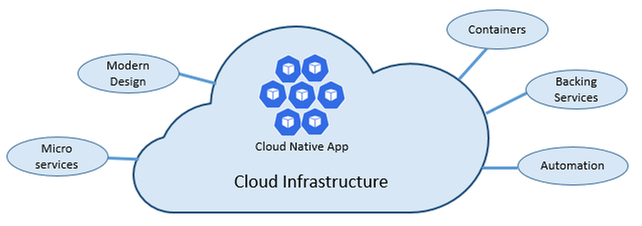
As stated above, cloud-native architectures center on speed and agility. That speed and agility are derived from 6 factors:
- Cloud infrastructure
- Modern design
- Microservices
- Containers
- Backing services
- Automation.
Cloud infrastructure is the most important factor that contributes to the speed and agility of cloud-native architecture.
3 Key Factors
- Cloud-native systems fully leverage the cloud service model using PaaS compute infrastructure and managed services.
- Cloud-native systems continue to run as infrastructure scales in or out without worrying about the back end because the infra is fully managed.
- Cloud-native systems have auto scaling, self-healing, and monitoring capabilities.
Modern Design is highly effective in part due to the Twelve-Factor Application method, which is a set of principles and practices that developers follow to construct applications optimized for modern cloud environments.
Most Critical Considerations for Modern Design
- Communication – How front ends communication with back-end services, and how back-end services communicate with each other.
- Resiliency – How services in your distributed architecture respond in less-than-ideal scenarios due to the in-process, out-process network communications of microservices architecture.
- Distributed Data – How do you query data or implement a transaction across multiple services?
- Identity – How does your service identify who is accessing it and their allotted permissions?
What are Microservices?
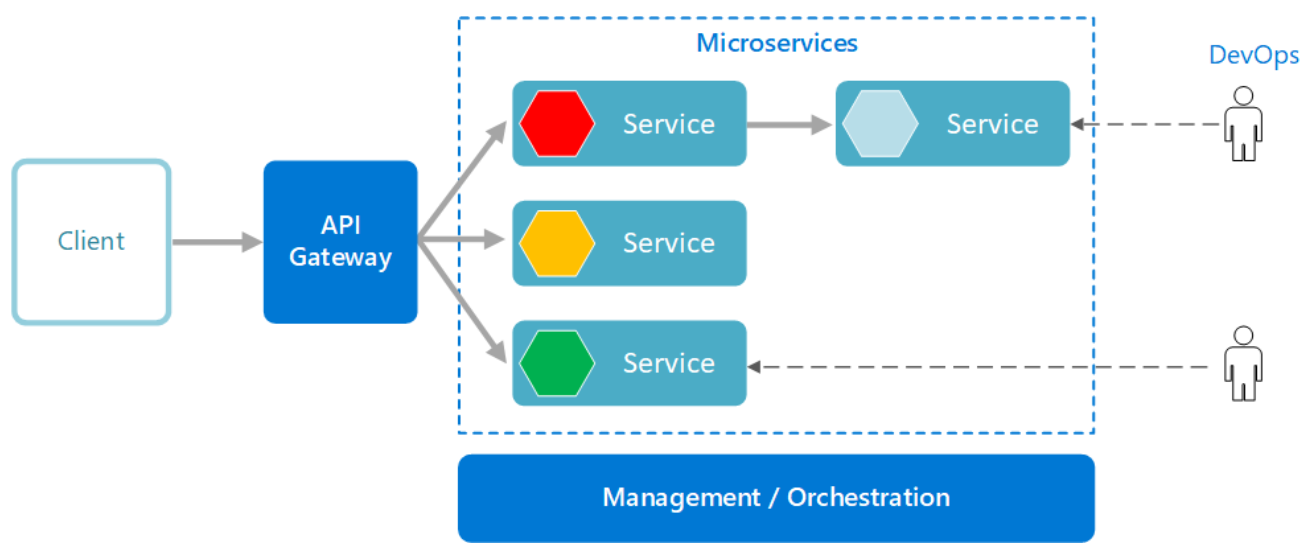
Microservices are built as a distributed set of small, independent services that interact through a shared fabric.
Improved Agility with Microservices
- Each microservice has an autonomous lifecycle and can evolve independently and deploy frequently.
- Each microservice can scale independently, enabling services to scale to meet demand.
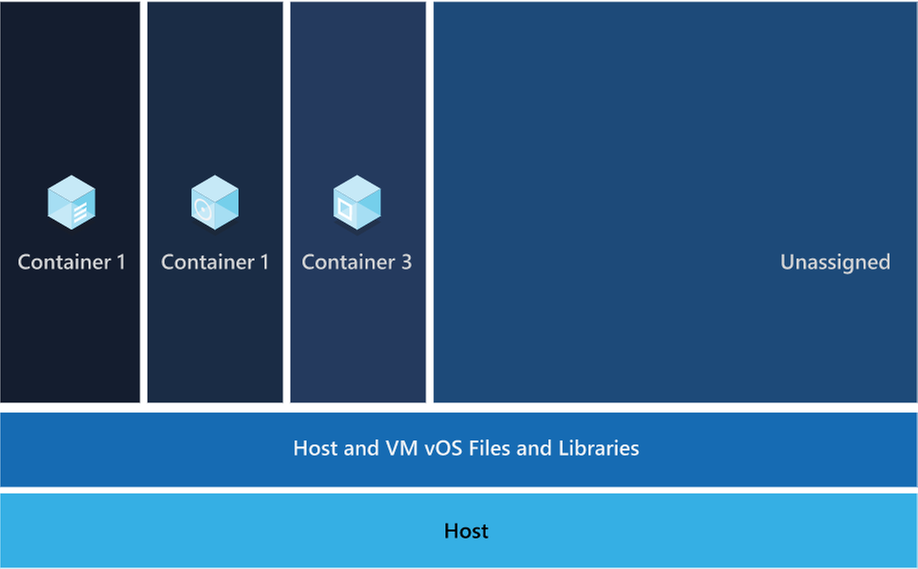
Those microservices are then packaged a container image, those images are stored in container registry. When needed you transform the container into a running container instance, to utilize the stored microservices. How do containers benefit cloud native apps?
Benefits of Containers
- Provide portability and guarantee consistency across environments.
- Containers can isolate microservices and their dependencies from the underlying infrastructure.
- Smaller footprints than full virtual machines (VMs). That smaller size increases density, the number of microservices, that a given host can run at a time.
Cloud native solutions also increase application speed and agility via backing services.
Benefits of Backing Services
- Save time and labor
- Treating backing services as attached resources enables the services to attach and detach as needed without code changes to the microservices that contain information, enabling greater dynamism.
Lastly, cloud-native solutions leverage automation. Using cloud-native architectures your infrastructure and deployment are automated, consistent, and reputable.
Benefits of Automation
- Infrastructure as Code (IaC) avoids manual environment configuration and delivers stable environments rapidly at scale.
- Automated deployment leverages CI/CD to speed up innovation and deployment, updating on-demand; saving money and time.
Artificial Intelligence
The second building block in the modern application development approach is Artificial intelligence (AI).
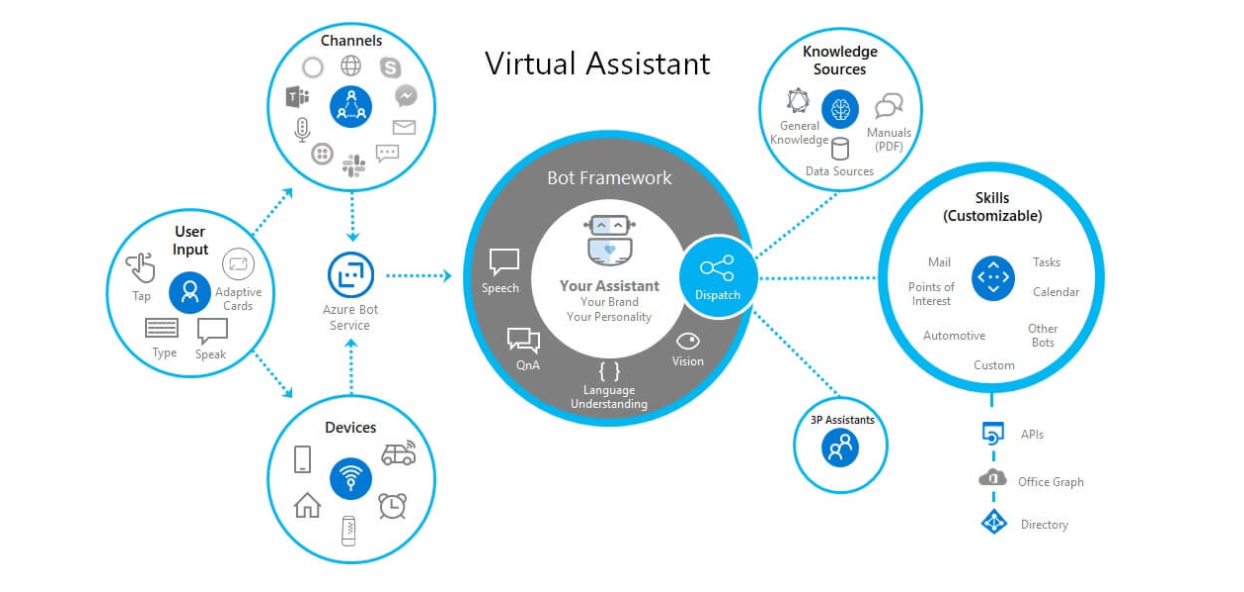
What comprises artificial intelligence? How do I add AI to my applications? Azure Artificial Intelligence is comprised of machine learning, knowledge mining, and AI apps and agents. Under the apps and agent’s domain there are two overarching products, Azure Cognitive Services and Bot Service, that we’re going to focus on.
Cognitive services are a collection of domain specific pre-trained AI models that can be customized with your data. Bot service is a purpose-built bot development environment with out-of-the-box templates. To learn how to add AI to your applications watch the short video titled “Easily add AI to your applications.”
Innate Benefits
User benefits: Translation, chatbots, and voice for AI-enabled user interfaces.
Business benefits: Enhanced business logic for scenarios like search, personalization, document processing, image analytics, anomaly detection, and speech analytics.
Modern Application Development unique benefit:
Enable developers of any skill to add AI capabilities to their applications with pre-built and customizable AI models for speech, vision, language, and decision-making.
Integration
The third building block is integration.
Why is integration needed, and how is it accomplished?
Integration is needed to integrate applications by connecting multiple independent systems. The four core cloud services to meet integration needs are:
- A way to publish and manage application programming interfaces (APIs).
- A way to create and run integration logic, typically with a graphical tool for defining the workflow’s logic.
- A way for applications and integration technologies to communicate in a loosely coupled way via messaging.
- A technology that supports communication via events
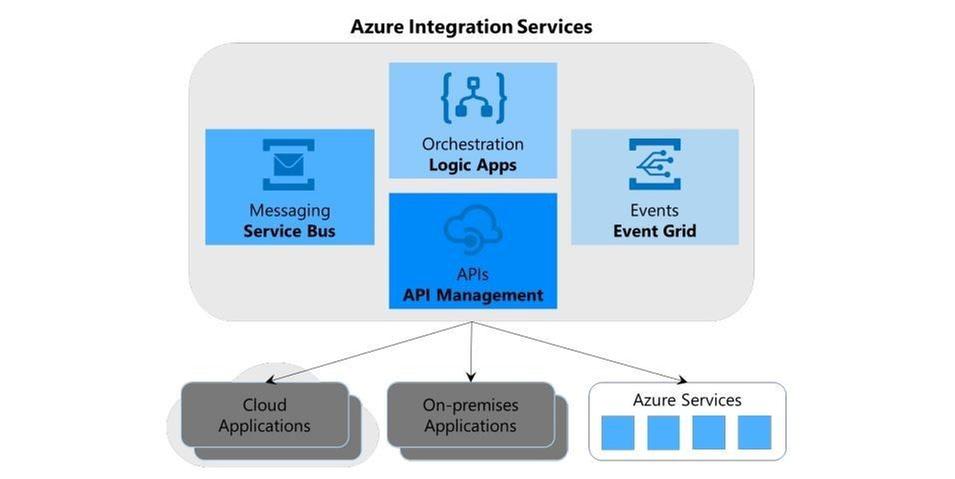
What are the benefits of Azure integration services and how do they translate to the modern app dev approach?
Azure meets all four needs, the first need is met by Azure API management, the second is met by Azure Logic Apps, the third is Azure Service Bus, and the final is met by Azure Event Grid.
The four components of Azure Integration Services address the core requirements of application integration. Yet real scenarios often require more, and this is where the modern application development approach comes into play.
Perhaps your integration application needs a place to store unstructured data, or a way to include custom code that does specialized data transformations.
Azure Integration Services is part of the larger Azure cloud platform, making it easier to integrate data, APIs, and into your modern app to meet your needs.
You might store unstructured data in Azure Data Lake Store, for instance, or write custom code using Azure Functions, to meet serverless compute tech needs.
Data
The fourth building block is data, and more specifically managed databases.
What are the advantages of managed databases?
Fully managed, cloud-based databases provide limitless scale, low-latency access to rich data, and advanced data protection—all built in, regardless of languages or frameworks.
How does the modern application development approach benefit from fully managed databases?
Modern application development leverages microservices and containers, the benefit to both technologies is their ability to operate independently and scale as demand warrants.
To ensure the greatest user satisfaction and app functionality the limitless scale and low–latency access to data enable apps to run unimpeded.
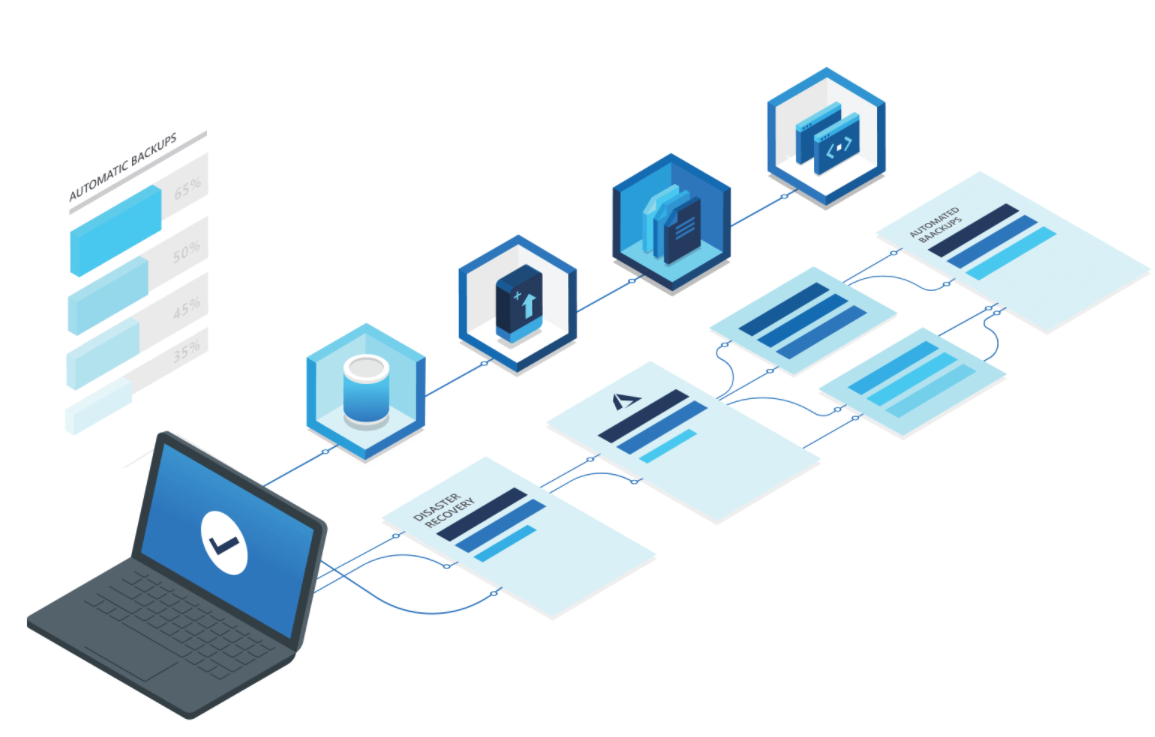
Software Delivery
The fifth building block is software delivery.
What constitutes modern development software delivery practices?
Modern app development software delivery practices enable you to meet rapid market changes that require shorter release cycles without sacrificing quality, stability, and security.
The practices help you to release in a fast, consistent, and reliable way by using highly productive tools, automating mundane and manual steps, and iterating in small increments through CI/CD and DevOps practices.
What is DevOps?
A compound of development (Dev) and operations (Ops), DevOps is the union of people, process, and technology to continually provide value to customers. DevOps enables formerly siloed roles—development, IT operations, quality engineering, and security—to coordinate and collaborate to produce better, more reliable products.
By adopting a DevOps culture along with DevOps practices and tools, teams gain the ability to better respond to customer needs, increase confidence in the applications they build, and achieve development goals faster.
DevOps influences the application lifecycle throughout its plan, develop, deliver, and operate phases.
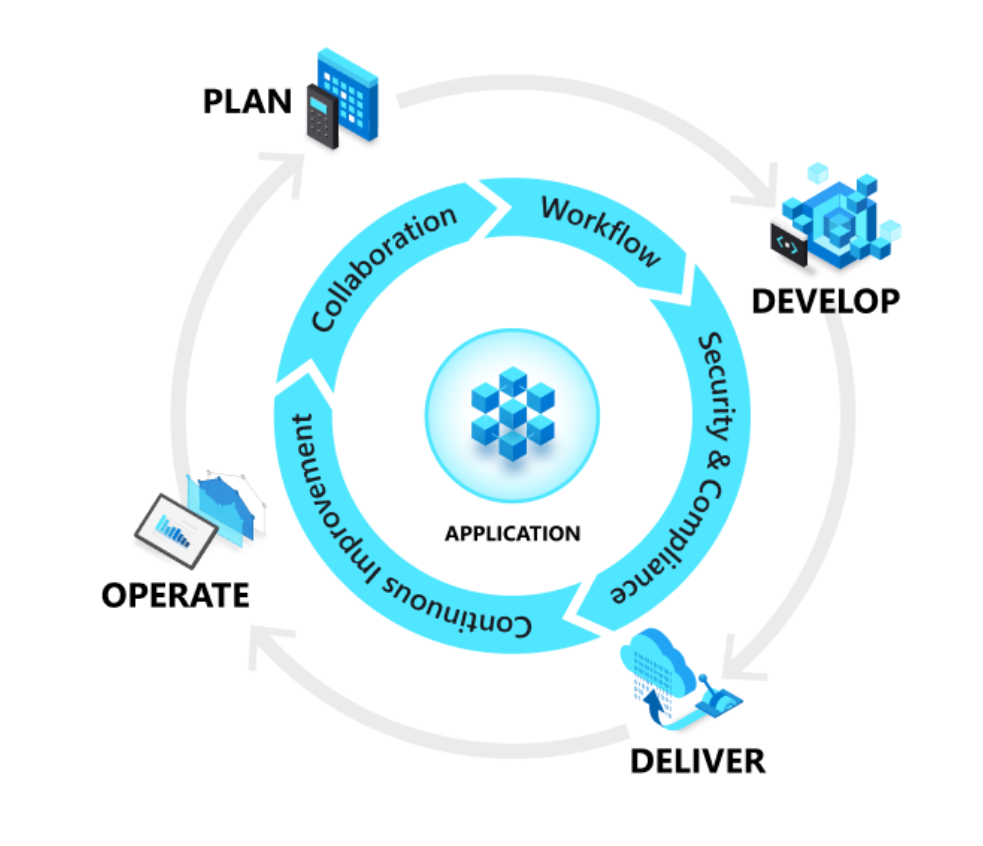
Plan
In the plan phase, DevOps teams ideate, define, and describe features and capabilities of the applications and systems they are building. Creating backlogs, tracking bugs, managing agile software development with Scrum, using Kanban boards, and visualizing progress with dashboards are some of the ways DevOps teams plan with agility and visibility.
Develop
The develop phase includes all aspects of coding—writing, testing, reviewing, and the integration of code by team members—as well as building that code into build artifacts that can be deployed into various environments. To develop rapidly, they use highly productive tools, automate mundane and manual steps, and iterate in small increments through automated testing and continuous integration.
Deliver
Delivery is the process of deploying applications into production environments and deploying and configuring the fully governed foundational infrastructure that makes up those environments.
In the deliver phase, teams define a release management process with clear manual approval stages. They also set automated gates that move applications between stages until they’re made available to customers.
Operate
The operate phase involves maintaining, monitoring, and troubleshooting applications in production environments. In adopting DevOps practices, teams work to ensure system reliability, high availability, and aim for zero downtime while reinforcing security and governance.
What is CI/CD?
Under continuous integration, the develop phase—building and testing code—is fully automated. Each time you commit code, changes are validated and merged to the master branch, and the code is packaged in a build artifact.
Under continuous delivery, anytime a new build artifact is available, the artifact is automatically placed in the desired environment and deployed. With continuous deployment, you automate the entire process from code commit to production.
Operations
The sixth building block is operations to maximize automation.
How do you maximize automation in your modern application development approach?
With an increasingly complex environment to manage, maximizing the use of automation helps you improve operational efficiency, identify issues before they affect customer experiences, and quickly mitigate issues when they occur.
Fully managed platforms provide automated logging, scaling, and high availability. Rich telemetry, actionable alerting, and full visibility into applications and the underlying system are key to a modern application development approach.
Automating regular checkups and applying best practices like infrastructure as code and site reliability engineering promotes resiliency and helps you respond to incidents with minimal downtime and data loss.
Security
The seventh building block is multilayered security.
Why do I need multi-layered security in my modern applications?
Modern applications require multilayered security across code, delivery pipelines, app runtimes, and databases. Start by providing developers secure dev boxes with well-governed identity. As part of the DevOps lifecycle, use automated tools to examine dependencies in code repositories and scan for vulnerabilities as you deploy apps to the target environment.
Enterprise-grade secrets and policy management encrypt the applications and give the operations team centralized policy enforcement. With fully managed compute and database services, security control is built in and threat protection is executed in real time.
Conclusion
While modern application development can seem daunting, it is an approach that can be done iteratively, and each step can yield large benefits for your team.
Access webinars, analyst reports, tutorials, and more on the Modern application development on Azure page.


Recent Comments