
by Contributed | Mar 26, 2021 | Technology
This article is contributed. See the original author and article here.
Welcome to our new series highlighting Microsoft Learn Student Ambassadors who achieved the Gold milestone and have recently graduated from university. Each blog will feature a different student and highlight their accomplishments, their experience with the Student Ambassador program, and what they’re up to now.
Today, we’d like to introduce Manbir Singh who graduated last fall from Bharati Vidhyapeeth’s College of Engineering in New Delhi and recently joined Packt, a learning platform for professional developers. As a developer advocate, he manages a global community of more than 3000 influential developers, authors, and technical reviewers and works alongside the Packt product team to provide educational content to aspiring developers.
Responses have been edited for clarity and length.
Q: Hi Manbir. Thanks for taking the time to meet with us. When you joined the Microsoft Learn Student Ambassador program, did you have specific goals you wanted to reach, and did you achieve them? How has the program helped to prepare you for the next chapter in your life?
A: The only goal for me when I joined the program was to keep learning and helping people around me in any capacity possible and to fill the gaps that might exist in a community be it based on any tech stack or in general. The program didn’t just help me achieve my goal; it also helped me figure out the path that I wanted to walk ahead in my life. I’ve always been passionate about technology and communities as a whole, and thanks to Microsoft for igniting the passion for developer relations in me. It helped me improve my tech skills as well as soft skills.
I’ve learned the value of being more empathetic and inclusive while being a part of a community and the value of collaboration. It connected me with growth–oriented peers—not just from India but across the globe, and it surely instilled a long-term passion for people and technology within me. Even though I’ve been into communities for more than four years now, I have never experienced such a vibrant and welcoming environment that I experienced being a Microsoft Student Ambassador. It made me realize that even if even when we’re not traveling, even when we are locale–restricted, we can create an impact globally if only we have the right mindset and a pinch of willingness.
Q: What was the transition like for you going from school into your career?
A: Stepping into developer relations straight from being a student was definitely unconventional because companies really don’t prefer to offer DevRel roles to students, someone who is just graduating from college. So that was really tough for me, but it’s everything that I used to do as a student.
Q: What is the biggest lesson that you’ve learned as you’ve started your career and entered into this field that you’re so passionate about?
A: One thing that I’ve learned is learning never stops. As we progress in our journey in our careers, into life as a whole, we get to learn something new at every point of our life, be it from people, from academics or resources. Learning never stops, and it’s always important to stay curious and keep progressing in life.
Q: In the Student Ambassador program, what was the one accomplishment that you’re the proudest of and why?
A: I have conducted and participated in various workshops, technical talks, and hackathons such as Azure sessions, HackCBS held by Major League Hacking in partnership with Microsoft in Delhi, the Microsoft Student Ambassador Summit where I hosted a GitHub booth as well, and workshops on Open Source where there were over a hundred participants. I’ve impacted thousands of students in a short span of less than a year, I got selected for the Asia Summit among 10 students from India, and I presented a session at Microsoft Ignite last year with Arkodyuti Saha, Program Manager on the Microsoft Developer Relations team.
Q: What advice would you give to new Student Ambassadors?
A: I don’t have 1, but 5 pieces of advice actually.
- First of all, being a student, the most important thing to do is to explore as many opportunities as you can, meet and learn from as many people as possible. That expands your horizons and helps you better understand in which direction you should head towards.
- Second, focus on quality over quantity. One quality project over ten incomplete projects, one productive hackathon over ten events that you just join to hang out at, one hour of dedicated learning over ten hours of sitting in front of the screen waiting for miracles to happen.
- Third, collaborate with people. We learn the best while we’re working together. No matter if you are helping people or seeking help from them, there’s a win–win situation in both cases.
- Fourth, don’t just follow the trends, but be a trend. Think out of the box. That’s when you are the most creative, that’s when your originality comes out and makes you stand out.
- Fifth, give up on the fear of making mistakes. You are not learning enough if you keep living with the fear of failure because those setbacks are really what define you and would help you grow.
Q: If you were to describe the program to a student who is interested in joining, what would you say to them?
A: If you’re passionate about technology learning and contributing towards the growth of your peers, then the Microsoft Learn Student Ambassador program is where you can shine. Come join us and be a part of our vibrant community where we learn and thrive–together!
At the close of the interview, we asked Manbir for his motto in life; what drives him. He stated that “Technology is just a medium. What I love is to be a part of people’s journey towards success and to help them in any and every possible way that I can in any capacity. Impact is what I truly seek in life.”
Good luck to you, Manbir, in all your future endeavors!
by Contributed | Mar 26, 2021 | Technology
This article is contributed. See the original author and article here.
Hi!
It is known that SQL Server can be accessed with many different authentication methods. We often recommend the use of Integrated Security using Kerberos mainly because it allows delegated authentication, besides being an efficient method compared to others such as NTLM, for example.
On today’s post we will be following the steps to help you configuring Kerberos on Linux and test it by connecting to a SQL Server instance found On-Premise/Virtual Machine .
The steps will be covered in the following sections:
- Joining the Linux Server to the Windows Domain
- Setting Kerberos on Linux
- Testing the connection
- Troubleshooting
1 – Joining the Server to the Windows Domain:
To join Linux server into a Windows Domain it is needed to change the network device to look for the right DNS entries.
This can be done by editing the files /etc/network/interfaces on Ubuntu versions < 18 or /etc/netplan/******.yaml on newer Ubuntu
Ubuntu 16: Join SQL Server on Linux to Active Directory – SQL Server | Microsoft Docs
Ubuntu 18: Join SQL Server on Linux to Active Directory – SQL Server | Microsoft Docs
Red Hat 7.x: Join SQL Server on Linux to Active Directory – SQL Server | Microsoft Docs
Suse 12: Join SQL Server on Linux to Active Directory – SQL Server | Microsoft Docs
The final files may vary depending on the distro. As an example, this is the outcome for Ubuntu 18 (available on Azure):
Test environment:
Domain Name: BORBA.LOCAL
Domain Controller (BORBADC.borba.local) IP: 10.0.1.4
File /etc/netplan/50-cloud-init.yaml :
# This file is generated from information provided by the datasource.  Changes
# to it will not persist across an instance reboot.  To disable cloud-init’s
# network configuration capabilities, write a file
# /etc/cloud/cloud.cfg.d/99-disable-network-config.cfg with the following:
# network: {config: disabled}
network:
    ethernets:
        eth0:
            dhcp4: true
            dhcp4-overrides:
                route-metric: 100
            dhcp6: false
            match:
                driver: hv_netvsc
                macaddress: 00:0d:3a:da:4d:53
            set-name: eth0
            nameservers:
                addresses: [10.0.1.4]
    version: 2
As soon as you change the yaml file under /etc/netplan you will need to apply the same by running the following command-line:
netplan apply
You will also need to add your DNS to /etc/resolv.conf:
File /etc/resolv.conf:
# This file is managed by man:systemd-resolved(8). Do not edit.
#
# This is a dynamic resolv.conf file for connecting local clients to the
# internal DNS stub resolver of systemd-resolved. This file lists all
# configured search domains.
#
# Run “systemd-resolve –status” to see details about the uplink DNS servers
# currently in use.
#
# Third party programs must not access this file directly, but only through the
# symlink at /etc/resolv.conf. To manage man:resolv.conf(5) in a different way,
# replace this symlink by a static file or a different symlink.
#
# See man:systemd-resolved.service(8) for details about the supported modes of
# operation for /etc/resolv.conf.
nameserver 10.0.1.4
options edns0
search borba.local
Now that your DNS settings are properly set, you can test it by running a nslookup with the domain controller as parameter. On my environment the domain controller is called “BORBADC”. Check the output from nslookup command below:
Testing name resolution with the command “nslookup borbadc.borba.local”:
dineu@LinuxDev:~$ nslookup borbadc
Server:         10.0.1.4
Address:        10.0.1.4#53

Name:   borbadc.borba.local
Address: 10.0.1.4
You’ve just finished the first part :grinning_face:
As we could see, nslookup is correctly resolving the names for the realm BORBA.LOCAL.
2- Setting Kerberos on Linux:
Now that your Linux server is joined to the Windows Active Directory, we will now continue configuring settings for Kerberos.
The process goes through two simple steps:
- Installing the required libraries
- Adapting Kerberos Configuration file.
2.1) Installing the required libraries:
As usual, the command lines may vary depending on what is you Linux distro. I will be sharing two solutions that can be used if your Linux is Ubuntu or Red Hat.
Ubuntu:
sudo apt-get install realmd krb5-user
RedHat:
sudo yum install realmd krb5-workstation
Once the libraries are installed, you can move on to the next step.
2.2) Adapting Kerberos Configuration File
The whole settings for Kerberos are defined in one single file called “krb5.conf”.
This is found under /etc/krb5.conf and you will need to adapt the following sections:
- [libdefaults]
- [realms]
- [domain_realm]
As an example, please check the final version of my krb5.conf used to configure the settings in the same Test Environment:
[libdefaults]
        default_realm = BORBA.LOCAL
        dns_lookup_kdc = true
        dns_lookup_realm = true
# The following krb5.conf variables are only for MIT Kerberos.
        kdc_timesync = 1
        ccache_type = 4
        forwardable = true
        proxiable = true

[realms]
        BORBA.LOCAL = {
                kdc = BORBADC.BORBA.LOCAL
                admin_server = BORBADC.BORBA.LOCAL
        }

[domain_realm]
        .borba.local = BORBA.LOCAL
3- Testing the connection
Ok, so you have the server joined to the domain and also finished configuring the Krb5.conf.
As you know, Kerberos relies on a ticket-granting service and you will need to have this first ticket (TGT) if you want to connect to any service using your credentials.
This process responsible for asking and receiving the TGT is called “kinit”.
Once you get the TGT, other processes (such as your application that connects to SQL Server) will be able to ask another ticket called Ticket-Granting-Service (TGS).
1.1) Get Ticket-Granting Ticket
To test the connection on Linux you will first need to get a TGT (Ticket-Granting-Ticket). This is done throgh the command kinit as follow:
kinit username@DOMAIN.COMPANY.COM
*** Please notice that realm is in capital letters
In our example, this was the output:
dineu@LinuxDev:~$ kinit dineu@BORBA.LOCAL
Password for dineu@BORBA.LOCAL:
dineu@LinuxDev:~$
You can see the ticket received by running the command “klist” (see the krbtgt in the output):
aa
dineu@LinuxDev:~/JavaTest$ klist
Ticket cache: FILE:/tmp/krb5cc_1000
Default principal: dineu@BORBA.LOCAL
Valid starting Expires Service principal
03/26/21 13:02:41 03/26/21 23:02:41 krbtgt/BORBA.LOCAL@BORBA.LOCAL
renew until 03/27/21 13:02:38
1.2) Connect to SQL Server
Brillant!
I see you already have a TGT from the output of your klist. Now it is time to test our connection to SQL Server.
1.2.1) Testing the connection using sqlcmd:
To test the connection using SQLCMD you will first need to install it:
Once the tool is installed, you can can connect to one of your SQL Instances as below:
aa
dineu@LinuxDev:~$ sqlcmd -S MySQLInstance.borba.local -E
1> SELECT auth_scheme from sys.dm_exec_connections where session_id = @@SPID;
2> GO
auth_scheme
—————————————-
KERBEROS
(1 rows affected)
1.2.2) Testing the connection using Microsoft JDBC (MS-JDBC):
To test the connection using Microsoft JDBC please ensure you have the latest JRE and JDK properly installed on your server
- Please check the steps 1.2 and 1.3 of the following article:
https://sqlchoice.azurewebsites.net/en-us/sql-server/developer-get-started/java/ubuntu/
1.2.2.1) Create / Compile you Java file to test the connection:
Connection String used as an example:
jdbc:sqlserver://MySQLInstance.borba.local:1433;databaseName=master;integratedSecurity=true;authenticationScheme=JavaKerberos
And this is our sample script (found as a sample code when you install MS-JDBC) adapted with the connection string that will ensure Kerberos is used:
File ConnectUrl.java:
import java.sql.Connection;
import java.sql.DriverManager;
import java.sql.ResultSet;
import java.sql.SQLException;
import java.sql.Statement;

public class ConnectURL {
    public static void main(String[] args) {
        // Create a variable for the connection string.
        String connectionUrl = “jdbc:sqlserver://MySqlInstance.borba.local:1433;databaseName=master;integratedSecurity=true;authenticationScheme=JavaKerberos”;

        try (Connection con = DriverManager.getConnection(connectionUrl); Statement stmt = con.createStatement();) {
            String SQL = “SELECT auth_sceme from sys.dm_exec_connections where session_id = @@SPID”;
            ResultSet rs = stmt.executeQuery(SQL);

            // Iterate through the data in the result set and display it.
            while (rs.next()) {
                System.out.println(rs.getString(“auth_scheme”));
            }
        }
        // Handle any errors that may have occurred.
        catch (SQLException e) {
            e.printStackTrace();
        }
    }
}
Compile the script by running the command below:
javac ConnectURL.java
Finally, you can now call java to execute the script (don’t forget to inform the path for the MSJDBC jar files):
java -cp .:/home/dineu/JavaTest/mssql-jdbc-8.4.0.jre8.jar ConnectURL
Output: If the settings were properly configured, you will find the following output:
KERBEROS
…and this is Done! If you found Kerberos as the output of the execution, you’ve finished to configure Kerberosn on your Linux Environment.
4 – Troubleshooting
Okay, we know sometimes things may behave in an unexpected way. I would like to share here some error messages that you may find and also some suggestions on how to collect more information if you get stuck anywhere while configuring all these settings.
4.1) Error Messages
Please find below some error messages that you may find along this journey:
Error #1) kinit: Cannot find KDC for realm “borba.local” while getting initial credentials
– Check if the name of your realm is being correctly resolved:
– You can find the IP Address of your DNS under /etc/resolv.conf
– You can also test it by running the nslookup: nslookup YourDomain or nslookup YourDomainController
Error #2) kinit: KDC reply did not match expectations while getting initial credentials
This message says the kinit failed to get the TGT. Possible reasons are:
– Realm was not in capital letters. Example: (wrong) kinit myuser@domain.com versus (right) kinit myuser@DOMAIN.COM.
– Krb5.conf was not properly configured (please review the sections [libdefaults], [realms] and [domain_realm] under /etc/krb5.conf
Error #3) Cannot generate SSPI context.
Usually the error message “Cannot Generate SSPI Context” comes with some other error messages, just like below:
Testing from SQLCMD:
dineu@LinuxDev:~/JavaTest$ sqlcmd -S sqlao1 -E
Sqlcmd: Error: Microsoft ODBC Driver 17 for SQL Server : SSPI Provider: Server not found in Kerberos database.
Sqlcmd: Error: Microsoft ODBC Driver 17 for SQL Server : Cannot generate SSPI context.
Testing from MS-JDBC:
aa
com.microsoft.sqlserver.jdbc.SQLServerException: Integrated authentication failed. ClientConnectionId:….
Caused by: GSSException: No valid credentials provided (Mechanism level: Server not found in Kerberos database (7)
Caused by: KrbException: Server not found in Kerberos database (7)
Caused by: KrbException: Identifier doesn’t match expected value (906)
In this case, it is clearly saying that the SPN was not found.
Therefore you can check if the SPNs for SQL Service are properly registered to the SQL Service Account.
More info: Register a Service Principal Name for Kerberos Connections
4.2) Logs
If you find an unexpected error, the following logs can help to understand what could be causing the problem.
4.2.1) Provider Logs:
You can always collect provider logs from ODBC or MSJDBC.
4.2.2) Network Traces:
You may consider to use a network capture tool (such as tcpdump) on Linux and then filter by the Kerberos messages.
The following command line will start a circular capture in the server. It will create up to 10 files, each one containing the maximum size of 2Gb
sudo tcpdump -i any -w /var/tmp/trace -W 10 -C 2000 -K -n
Once you start capturing the traces, reproduce the issue and then press Ctrl+C to stop capturing them.
The files would be stored in the same folder used in the command line (in this case, /var/tmp).
…and that’s all folks!
I would love to hear your feedback..!
Did you find the steps described in this article helpful?
What else would you like to have added to this post?
We hope you have enjoyed reading about this content.
See you in the next post!

by Contributed | Mar 26, 2021 | Technology
This article is contributed. See the original author and article here.
What is Microsoft Graph Explorer

Microsoft Graph offers us a single endpoint https://graph.microsoft.com to access data in Microsoft 365, Windows 10, and Enterprise Mobility and Security and can be used by makers and developers. To get started to use the Graph API, the Graph Team offers us a very fantastic tool called Graph Explorer.
What does it do? Well, it lets us explore Graph! It’s a learning playground where we can try out requests, get responses, learn about permission scopes, and more. To access Graph Explorer, visit aka.ms/ge and make yourself familiar with it:
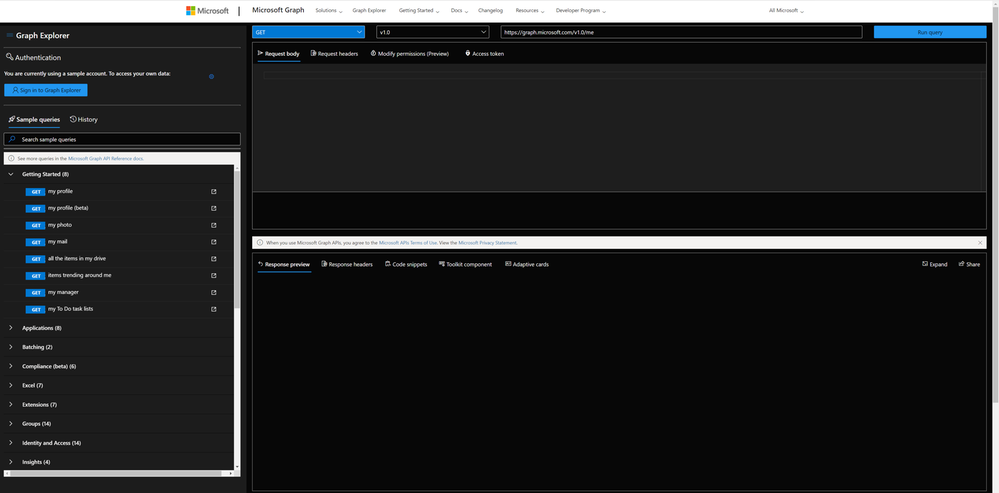
Authentication
You can decide if you want to sign in or if you want to try out with sample data provided by Microsoft. I recommend ‘playing’ in your developer tenant; if you don’t have one, learn here how to join the Microsoft 365 developer program and get a developer tenant. The benefit of signing in with your (developer) account is, that you can execute all requests including POST and DELETE requests, which is not possible in the sample account.
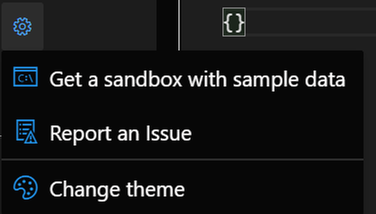
When you click the gear icon, you will find a shortcut to the Microsoft 365 developer program website (to get your sandbox with sample data), and you can change the theme as it suits your needs best. I like dark mode most :black_heart:.
Sample queries
You will find sample queries below authentication – some may be disabled if you are not logged in. If you click on a sample, like I did in the screenshot below, Graph Explorer will send this HTTP request to Microsoft Graph – and get my joined teams. We can see this in the request area (upper part) and the response area (lower part):
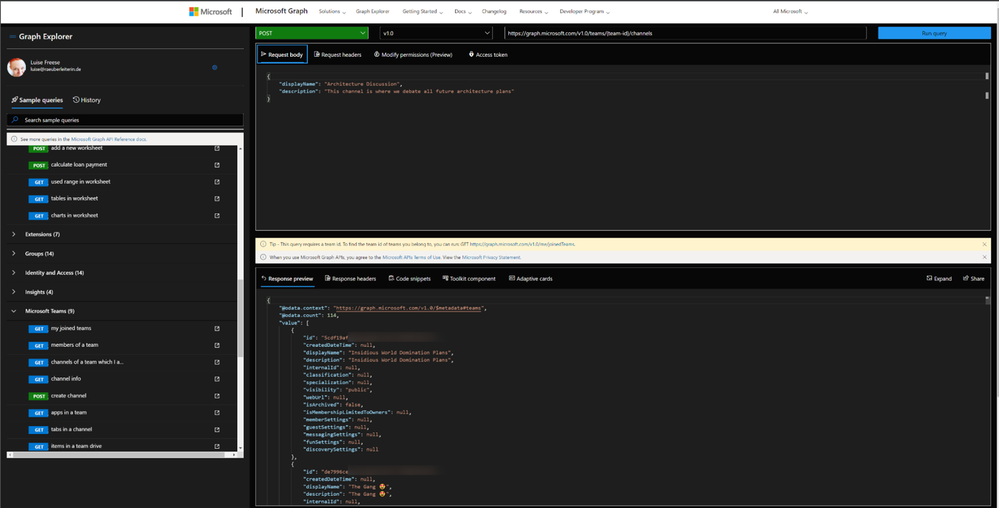
We now want to create a channel called ‘Microsoft Graph’ in the Team ‘Insidious Word Domination Plans’. We first copy the ID of the Team from the response of that request and then use this ID in the next sample we try out, which is:

We then replace the `{teams-id}` placeholder with the copied ID value from the previous request and change the body to our needs:

In the **Modify permissions** tab, we can learn about – and consent to permissions needed to execute this request:
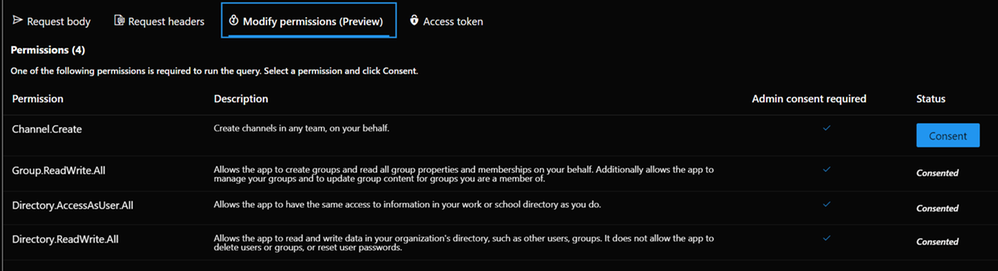
But the awesomeness of this tool doesn’t stop here – we get ready-to-use code snippets in different languages to insert them into our applications:
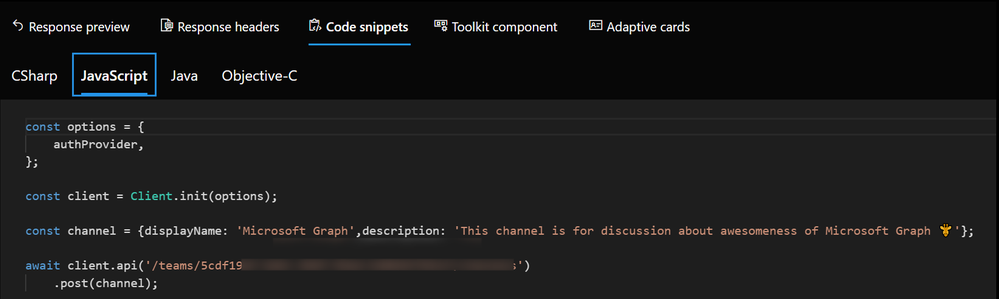
And for some GET requests, we even get Adaptive Cards:
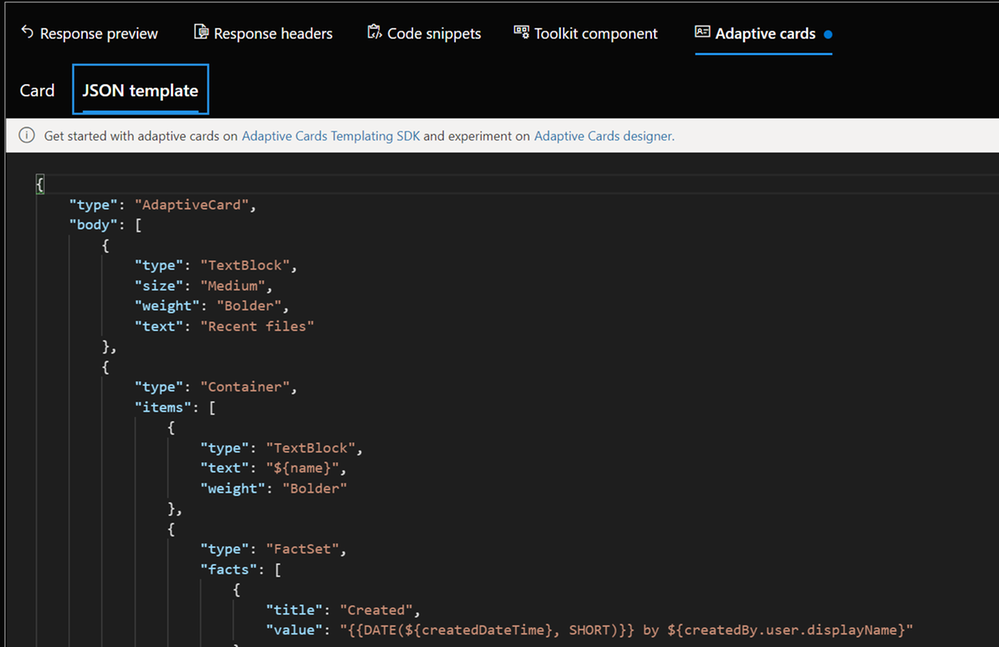
We can also try out Microsoft Graph Toolkit components right here, although I would personally recommend doing this in the dedicated Microsoft Graph Toolkit Playground. If you are unfamiliar with Microsoft Graph Toolkit, you can read how I started to use it – in my blog series about MGT – I also recommend having a look at the beautiful [Microsoft Graph component](https://developer.microsoft.com/en-us/graph/components ) browser.
Last but not least: Documentation to every sample is nicely tied in – click on the pop-out icon next to the sample queries:

How does Graph Explorer help building apps?
I use Microsoft Graph in Power Apps with custom connectors or in Power Automate and Azure Logic Apps with the HTTP action to execute actions that are not present (yet). If you never did that but want to learn about it, here are two blog posts that will get you started:
* How to use a custom connector
* How to get started with HTTP requests in Power Automate
To get from the rough idea to a working up, I follow this process:
- Read the docs. I mean, seriously. learn, which endpoint you will need to call, which permissions you will need.
- Try out in Graph Explorer; when it works, proceed to step 3, in case it doesn’t, go back to step 1 :’)
- Register your application in Azure AD with the permission scope that was needed for the request in Graph Explorer
- Try out the flow/the action of your custom connector in a basic sample flow/app.
- Now replace all hard-coded values like a Teams ID with Dynamic Content from within your flow
You see, Graph Explorer is an amazing tool to learn and try out – it gets you a step closer to a working solution, but you do not need to worry upfront about app registration, permissions etc. It’s a cool way to do a proof of concept – trying out if you can get, post, patch, update or delete the resources you like to before you start building your app.
Feedback and what’s next?
I am curious – which other tools help you developing with Microsoft Graph? Recently, Elio Struyf published a VSCode extension, that auto-completes Graph URLs for you, read more about it here. Also, please share below what you build with Microsoft Graph? And how you use Graph Explorer? If you like to contribute, you can check out Graph Explorer on GitHub. I am looking forward to your feedback!
❤ Sharing is Caring
by Contributed | Mar 26, 2021 | Technology
This article is contributed. See the original author and article here.
The following two procedures guide on how to collect traces of exceptions when the application is not using a logging or telemetry solution – such as Application Insights – to record those exceptions. This post complements my article about how exceptions are handled and how to collect memory dumps to study them.
Both tools below – ProcDump and DebugDiag – work similarly: they can attach themselves as debuggers to a process, then monitor and log exceptions for that process. Optionally, these tools can collect a memory dump for the monitored process under certain conditions – such as when specific exceptions occur.
Both tools need administrative rights to be run.
DebugDiag is the preferred tool, since it automates some steps, adds more explicit context, and includes automated memory dump analysis capabilities too. While ProcDump will report exceptions occurring, DebugDiag will also collect thread call stack information.
Using the command-line ProcDump
ProcDump does not require installation. But one needs to be specific about the PID to which it is attaching. That PID needs to be determined prior to starting ProcDump. This may be tricky when the respective process is crashing and restarting frequently, with a different PID; such as when Asp.Net apps are causing their w3wp.exe to crash and restart.
- Download the tool and copy it on a disk folder, for example D:Temp-Dumps
https://docs.microsoft.com/en-us/sysinternals/downloads/procdump
- Open an administrative console from where to run commands.
Navigate to the disk folder above (D:Temp-Dumps).
- Find the process ID, the PID, of the IIS w3wp.exe worker process executing your application.
Use the AppCmd IIS tool to list processes for application pools:
C:WindowsSystem32InetSrvappcmd.exe list wp
- Execute the following command to collect the traces:
D:Temp-Dumps> procdump.exe -accepteula -e 1 -f “” [PID]
You may want to redirect the console output of ProcDump to a file, to persist the recording of the encountered exceptions:
D:Temp-Dumps> procdump.exe -accepteula -e 1 -f “” [PID] > Monitoring-log.txt
Replace [PID] with the actual Process ID integer number identified at the step 2.
- Start reproducing: issue requests from the client (browser?) that you know it would trigger exception(s); usually, HTTP response “500, Server-side processing error“.
Or simply wait or make requests to the IIS/Asp.Net app until the exception(s) occur(s).
You should end up with a console output revealing the exceptions, or
a .TXT log with them in the location where ProcDump.exe was saved (example: D:Temp-Dumps).
Using the UI tool DebugDiag, Debug Diagnostics Collection
DebugDiag requires installation, but it is able to determine itself the whatever process instance – PID – happens to execute for an application pool at some point in time; even when that process may occasionally crash, hence restart with different PID.
1.
Download Debug Diagnostic and install it on IIS machine:
https://www.microsoft.com/en-us/download/details.aspx?id=49924 v2.2
https://www.microsoft.com/en-us/download/details.aspx?id=58210 v2.3
https://www.microsoft.com/en-us/download/details.aspx?id=102635 v2.3.1
2.
Open Debug Diagnostic Collection.
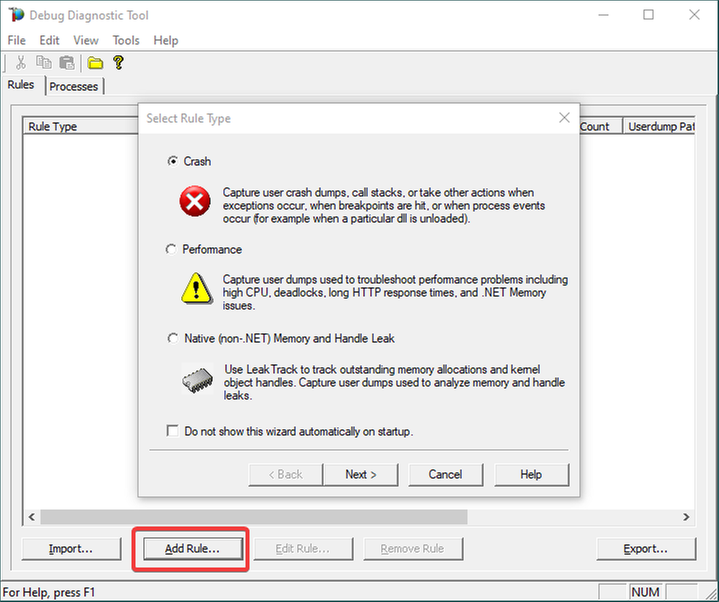
If a wizard does not show up, click Add Rule.
3.
Choose Crash and click Next.
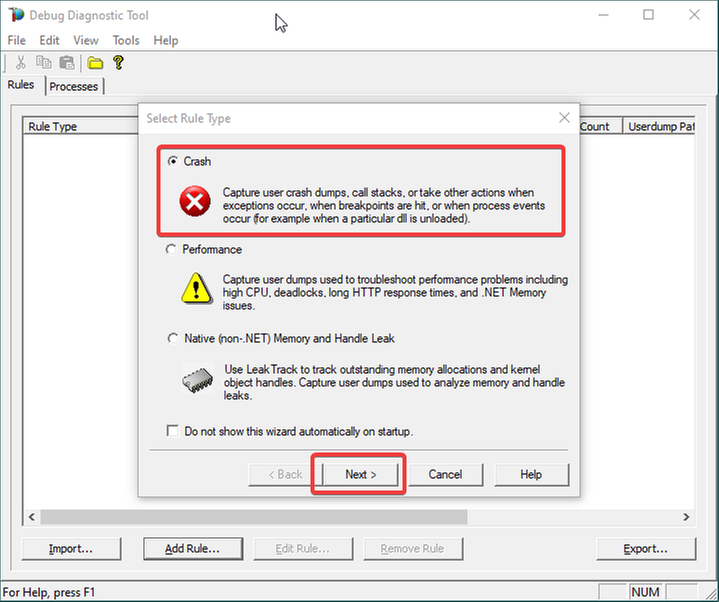
4.
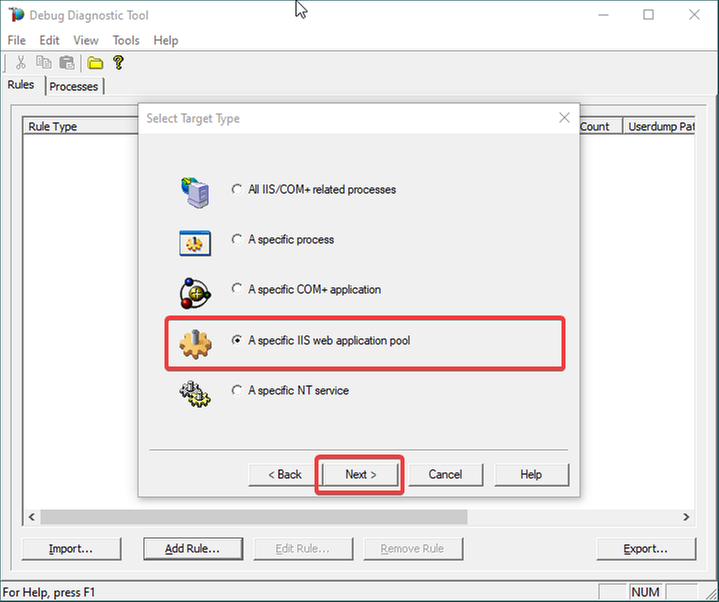
Choose “A specific IIS web application pool” and Next.
5.
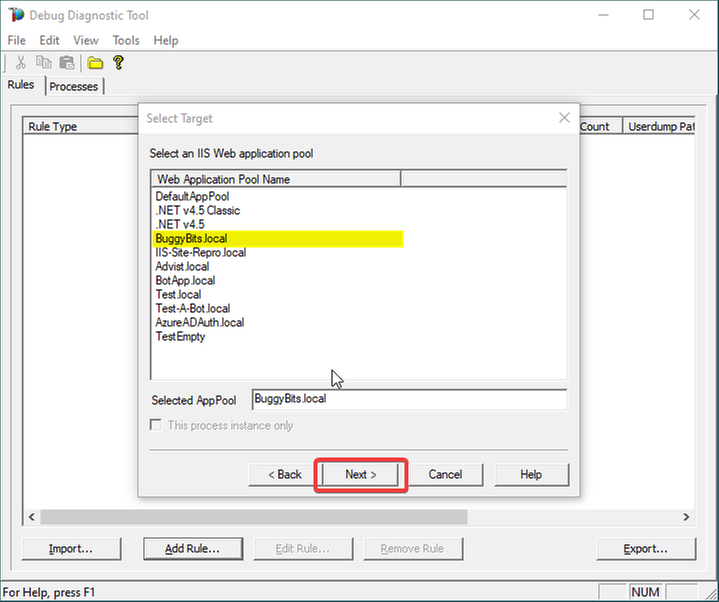
Select the application pool which runs the problematic application and then click Next.
6.
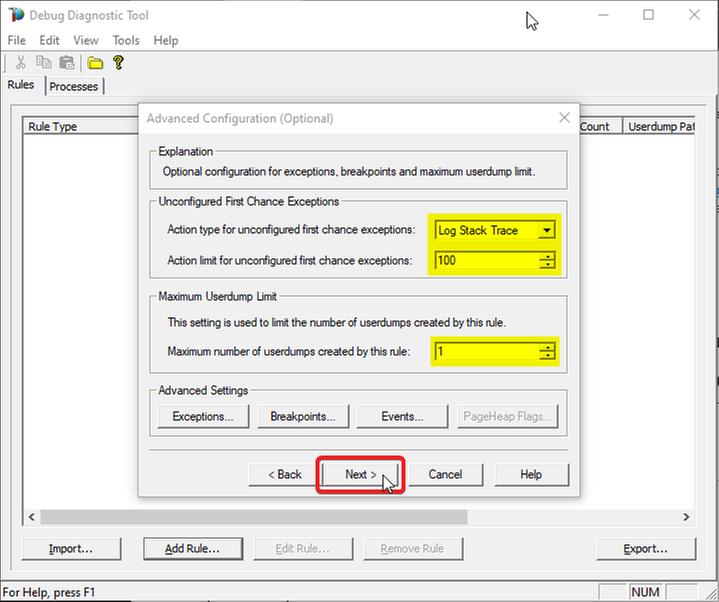
The Unconfigured First-Chance Exceptions are the unknown ones that we want to determine…
Let’s Log Stack Trace for these; say the first 100 occurrences.
Lower the Maximum number of userdumps created by the rule to 1 (would only get a dump if we have a crash; but at this stage we’re not after dumps).
Then click Next…
7.
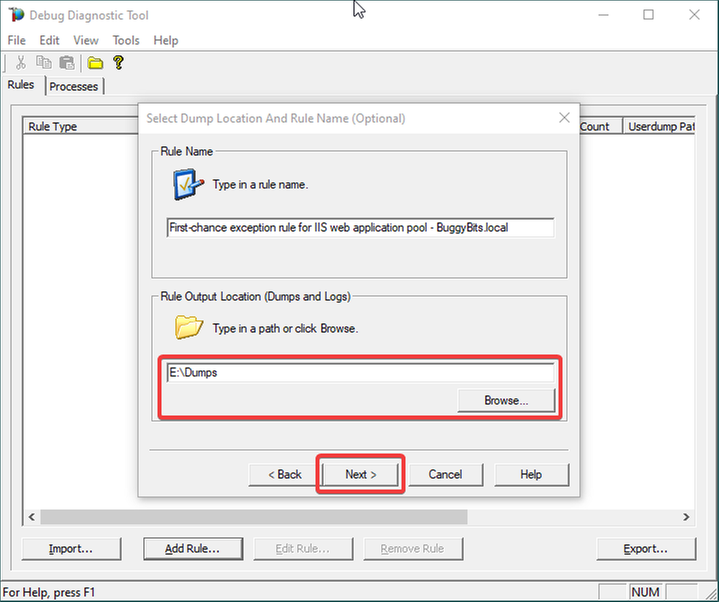
Configure the file location where the (potential) dump file(s) will be generated/written.
A dump would only be collected on crash, if it happens; otherwise, we should only have a text file as output: a monitoring log, where occurred first-chance exceptions are recorded.
Please note that a dump file is a snapshot of the process memory, written in disk; size will be similar to process memory as seen in the Task Manager.
For example, if you see that w3wp.exe uses around 5 GB of memory in Task Manager, then the dump of that process will be around 5 GB on the disk.
Please do not choose a disk in network/UNC; choose a local disk.
8.
Click Next and Finish by selecting to Activate the rule now.
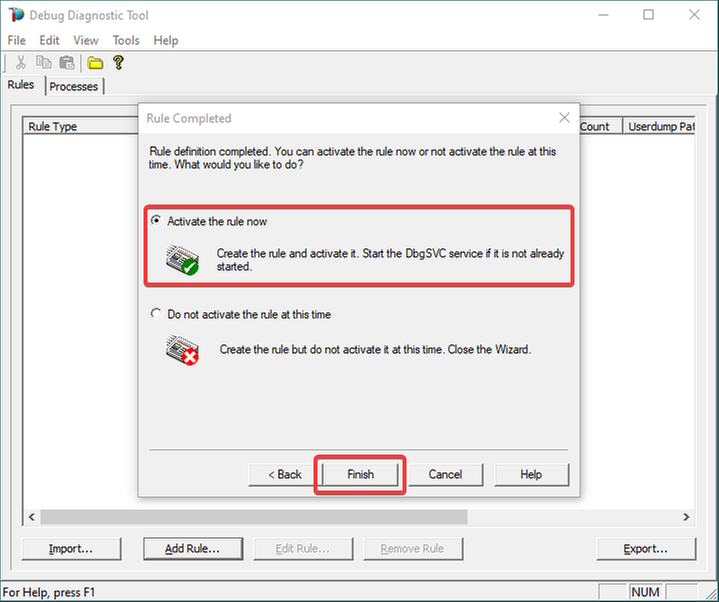
9.
Unknown/Unconfigured first-chance exceptions will be recorded; therefore, revealed.
If the application pool’s w3wp.exe process would crash with an unhandled exception, we would also get a memory dump.
If dump is generated, archive in a ZIP and hand over to the support engineer or to the development team that should be aware of these exceptions.
Remember my article about how exceptions are handled and how to collect memory dumps to study them. We can double check if a crash occurred or not: read about w3wp.exe crashes.

by Contributed | Mar 26, 2021 | Technology
This article is contributed. See the original author and article here.
Create a read-only user on Azure SQL Server
Oscar Garcia is a Principal Software Architect who resides in South Florida. He is a Developer Technologies MVP and certified solutions developer with many years of experience building software solutions. He specializes in building cloud solutions using technologies like AWS, Azure, ASP.NET, NodeJS, AngularJS as well as BI projects for data visualization using tools like Power BI, Tableau and JMP. You can follow Oscar on Twitter @ozkary or his blog at ozkary.com

Windows Admin Center v2103 Available!
James van den Berg has been working in ICT with Microsoft Technology since 1987. He works for the largest educational institution in the Netherlands as an ICT Specialist, managing datacenters for students. He’s proud to have been a Cloud and Datacenter Management since 2011, and a Microsoft Azure Advisor for the community since February this year. In July 2013, James started his own ICT consultancy firm called HybridCloud4You, which is all about transforming datacenters with Microsoft Hybrid Cloud, Azure, AzureStack, Containers, and Analytics like Microsoft OMS Hybrid IT Management. Follow him on Twitter @JamesvandenBerg and on his blog here.

How to use “Definite Guide” for the new Microsoft Teams Breakout Rooms
Vesku Nopanen is a Principal Consultant in Office 365 and Modern Work and passionate about Microsoft Teams. He helps and coaches customers to find benefits and value when adopting new tools, methods, ways or working and practices into daily work-life equation. He focuses especially on Microsoft Teams and how it can change organizations’ work. He lives in Turku, Finland. Follow him on Twitter: @Vesanopanen

Teams Real Simple with Pictures: Hyperlinked email addresses in Lists within Teams
Chris Hoard is a Microsoft Certified Trainer Regional Lead (MCT RL), Educator (MCEd) and Teams MVP. With over 10 years of cloud computing experience, he is currently building an education practice for Vuzion (Tier 2 UK CSP). His focus areas are Microsoft Teams, Microsoft 365 and entry-level Azure. Follow Chris on Twitter at @Microsoft365Pro and check out his blog here.

C#.NET: HOW TO CONVERT LIST TO STRING ARRAY INSIDE LIST DATA TYPE
Asma Khalid is an Entrepreneur, ISV, Product Manager, Full Stack .Net Expert, Community Speaker, Contributor, and Aspiring YouTuber. Asma counts more than 7 years of hands-on experience in Leading, Developing & Managing IT-related projects and products as an IT industry professional. Asma is the first woman from Pakistan to receive the MVP award three times, and the first to receive C-sharp corner online developer community MVP award four times. See her blog here.
by Contributed | Mar 26, 2021 | Technology
This article is contributed. See the original author and article here.
One common characteristic of recent attacks is the attempt to evade detection by using different techniques. To evade security software and analyst tools, some malware will enumerate the target system looking for certain running processes, loaded drivers, and registry keys, with the goal of disabling them. When using a Cloud Workload Protection Platform (CWPP) such as Azure Defender, you will have different levels of threat detections according to the plan that you are using. The available plans are:
There are some scenarios in which the alert that you are receiving in Azure Defender could be a false positive for your environment. If you want to avoid receiving that specific alert, you can create an alert suppression rule. Although the alert suppression is a feature that can be used to optimize your experience, it can also be used with malicious intent in case a user wants to evade detection. To create or delete alert suppression rules, you need to be Security admin or Subscription Owner. If you just need to view the rules, you need to be Security reader or Reader.
Hardening Alert Suppression Creation
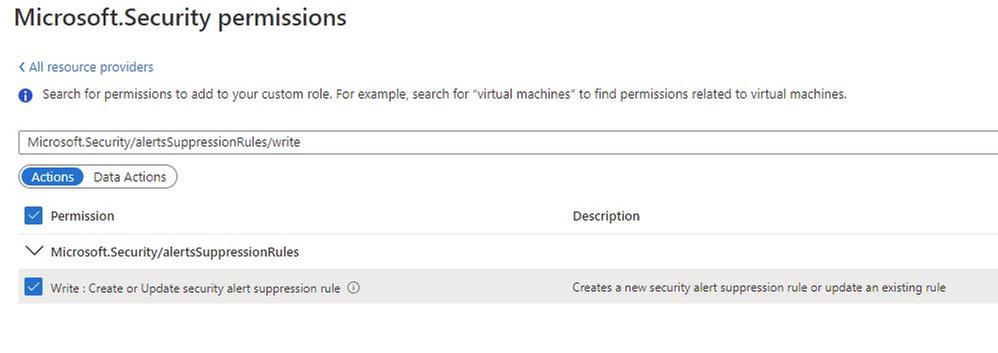
If you don’t want to give full Security Admin access to an individual but you still want that individual to create suppression rules, you should create a custom Azure Role with only the necessary privilege to do that. To be able to create alert suppression rules, the user must have the following privilege:
In addition, you should also give Reader role privilege to allow the user to see the alert suppression rules that exist.
Tracking changes to suppression rules
After hardening the privilege to create suppression rules, you can start tracking changes. To do that, you will use Azure Activity Log. The operation that has the alert suppression creation is shown below:

You can open this operation and look at the JSON tab to obtain more details. You will see the name of the rule that was created or modified, as shown in the example below:
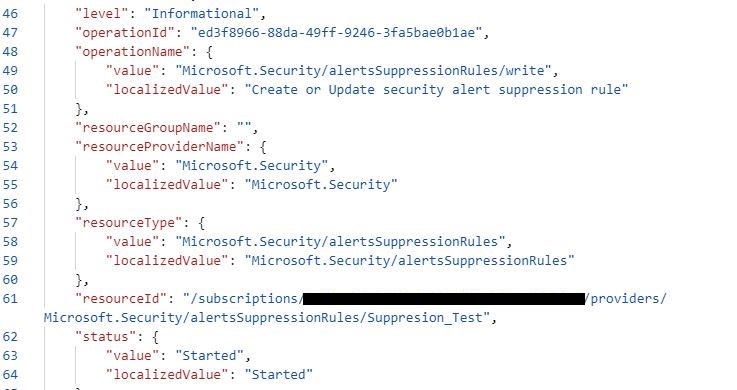
At this point you can also create a new Alert rule in Azure Activity Log using the New alert rule option in the summary tab, as shown below:
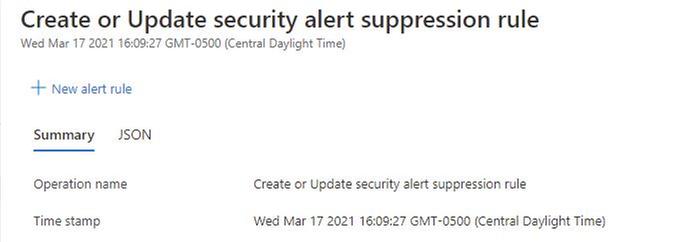
To learn more about how to create alerts using Azure Activity Log, read this article. If you are ingesting Azure Activity Log in Azure Sentinel, you can also create an incident based on this operation.
Reviewer
Tal Rosler, Program Manager
by Contributed | Mar 26, 2021 | Technology
This article is contributed. See the original author and article here.
Today, I worked on a very interesting case that our customer is facing the following error message connecting to Azure SQL DB and/or Azure Managed Instance “Connection is not available, request timed out after ..”.
Following, I would like to share with you my lessons learned about why and how this error message is fired in two different situations:
- All the connections in the Hikari pooling are in use.
- The session limit for the database has been reached.
In order to review these two things, I included the Hikari connection pooling based on this article: Improve Java application reliability with Azure SQL Database using JDBC and connection pooling. – Microsoft Tech Community, and modifying the current Java code that you could find in this GitHub
My database is a standard 1 database that we have a session limit in 900. The first thing to probe my theory about the connection pooling is to configure setmaxiumpoolsize parameter to 50 and setCloseConnection to false to open this number of connections without closing any of them. In this situation, once I reached the connection number 51 I got the error message “Connection is not available”
    public static void main(String[] args) throws Exception{
        System.out.println("Testing connection JAVA! (Hikari)");
        ErrorClientHikari oErrorClient = new ErrorClientHikari();
                    oErrorClient.setCloseConnection(false);
                    oErrorClient.setReadingSQLData(false);
                    oErrorClient.setTotalIteractions(30000);
                    oErrorClient.setSQLReadToExecute("SELECT count(*) Id FROM PerformanceVarcharNVarchar where TextToSearch =N'Value'");
                    oErrorClient.setSQLCommandTimeout(30000);
                    oErrorClient.setServerName("servername.database.windows.net");
                    oErrorClient.setDatabaseName("dbname");
                    oErrorClient.setUserName("username");
                    oErrorClient.setPassword("password");
                    oErrorClient.setMaximumPoolSize(50);
                    oErrorClient.setConnectionTimeout(5000);
                    oErrorClient.LoadData();
In this similar situation, I’m going to modify the setmaxiumpoolsize parameter to 1000 to know what happen when I reached more connections that the session limit of my Azure SQL Database Standard 1. At this time, I got the same error message: “Connection is not available, request timed out after..” so, that means, that both situations will report the same error message.
    public static void main(String[] args) throws Exception{
        System.out.println("Testing connection JAVA! (Hikari)");
        ErrorClientHikari oErrorClient = new ErrorClientHikari();
                    oErrorClient.setCloseConnection(false);
                    oErrorClient.setReadingSQLData(false);
                    oErrorClient.setTotalIteractions(30000);
                    oErrorClient.setSQLReadToExecute("SELECT count(*) Id FROM PerformanceVarcharNVarchar where TextToSearch =N'Value'");
                    oErrorClient.setSQLCommandTimeout(30000);
                    oErrorClient.setServerName("servername.database.windows.net");
                    oErrorClient.setDatabaseName("dbname");
                    oErrorClient.setUserName("username");
                    oErrorClient.setPassword("password");
                    oErrorClient.setMaximumPoolSize(1000);
                    oErrorClient.setConnectionTimeout(5000);
                    oErrorClient.LoadData();
    }
Enjoy!

by Contributed | Mar 26, 2021 | Technology
This article is contributed. See the original author and article here.
Which community project do you maintain?
PnPjs; Microsoft 365 learning pathways
How does it help people?
PnPjs:
PnPjs is a collection of fluent libraries for consuming SharePoint, Graph, and Office 365 REST APIs in a type-safe way. You can use it within SharePoint Framework, Nodejs, or any JavaScript project.
Microsoft 365 Learning Pathways:
Provides a framework to administer and surface in any site collection learning content from
– Microsoft content curated into playlists by Microsoft’s documentation team
– Custom content you build on your own in SharePoint and surface as playlists
– Content curated by third parties that you include as content packs
What have you been working on lately?
PnPjs: Planning V3 of the library.
Microsoft 365 learning pathways: We’ve recently brought the code base for the web parts to open source and a content update for Microsoft’s playlists was updated for Q1 – 2021.
What do you do at work?
As a member of a small consulting company my role is to try and stay on top of all things development related with Microsoft 365 platform. My favorite part of that task is working on client-side solutions but I also write a lot of integrations which utilize my C# chops.
Why are you a part of the M365 community?
Because contributing to the community and being part of the community lifts all boats. I try to help people and people try to help me succeed with this platform and these tools which is rewarding in many ways.
What was you first community contribution?
In sp-dev-solutions the Multilingual Pages solution: https://github.com/pnp/sp-dev-solutions/tree/master/solutions/MultilingualPages/SPFxExt
One tip for someone who’d like to start contributing
If you’re familiar with GitHub and working on a team, just read the contribution guidelines for the repo you want to contribute to. Should be all there is to it. If you have an idea for an enhancement submit an issue to the issues list to indicate, you’d like to work on a particular enhancement and ask for feedback that way you know that your enhancement idea is in line with how the maintainers envision the project evolving. If you’re not super familiar with GitHub and intimidated by the process, check out a Sharing is Caring event to get some guidance.

by Contributed | Mar 26, 2021 | Technology
This article is contributed. See the original author and article here.
SharePoint Framework Special Interest Group (SIG) bi-weekly community call recording from March 25th is now available from the Microsoft 365 Community YouTube channel at http://aka.ms/m365pnp-videos. You can use SharePoint Framework for building solutions for Microsoft Teams and for SharePoint Online.
Call summary:
Welcome Luise Freese | @LuiseFreese to the Sharing is Caring team and Joel Rodrigues | @JoelFMRodrigues who is a new maintainer on the Reusable SPFx Controls team. Register now for April trainings on Sharing-is-caring. SharePoint Framework v1.12 has been deprecated due to unexpected regressions. Discussion later in the call on SharePoint Framework v1.12.1 capabilities to be released shortly. Latest project updates include: PnPjs Client-Side Libraries v2.3.0 released and please provide feedback on v3.0 Hub planning and discussion issues posted – issue #1636. CLI for Microsoft 365 GA v3.7 delivered. Reusable SPFx React Controls – v2.6.0 and v3.0.0 (SPFx v1.12 support) and Reusable SPFx React Property Controls – v2.5.0 and v3.0.0 (SPFx v1.12 support) delivered. Released PnP SPFx Generator v1.16.0 (Angular 11 supported), PnP Modern Search v3.18.1 released March 9th and v4.1.0 released March 20th. There were six PnP SPFx web part samples delivered last 2 weeks. Great work! The host of this call is Patrick Rodgers (Microsoft) @mediocrebowler. Q&A takes place in chat throughout the call.
Actions:
Demos:
Building extension to save documents as PDF in tenant document libraries – updated list extension first created 2 years ago for converting one or more selected documents into pdfs using internal SharePoint REST APIs. 2 methods – Export (create) and Save As (download). Saves pdfs to current library. Step through the conversion and render code – copy entire document and metadata to blob, writes data into pdf. Tenant wide extension automatically created in App Catalog.
Sending messages to Microsoft Teams using Microsoft Graph from SharePoint Framework solution – a simple web part for sending a message from a SharePoint page to a recipient’s mailbox or into a Microsoft Teams chat using Microsoft Graph. Conversation elements include send email, my profile information, target user’s principal name, get chat ID (determines if existing chat or creates new). Uses Graph APIs, PnP People Picker, React hooks and code snippets in Graph Explorer.
Update:
Latest on SharePoint Framework – SPFx v1.12.1 includes additional functionality over v1.12 for creating complex Microsoft Teams solutions including SPFx elements. In addition to corrections to SPFx v1.12, v1.12.1 includes Node v12/v14 and Gulp support, more access to page structure, embed manifest configuration option, support for Teams meeting apps and for Microsoft Teams SDK v1.8. Post v1.12.1 – integration in Microsoft Viva Connections, Teams Development, Store, Communications and Quality improvements.
- No new or updated extensions last week
SPFx web part samples: (https://aka.ms/spfx-webparts)
As is the case this week, samples are often showcased in Demos. Thank you for your great work.
Agenda items:
Demos:
Update:
Resources:
Additional resources around the covered topics and links from the slides.
General Resources:
Other mentioned topics
Upcoming calls | Recurrent invites:
PnP SharePoint Framework Special Interest Group bi-weekly calls are targeted at anyone who is interested in the JavaScript-based development towards Microsoft Teams, SharePoint Online, and also on-premises. SIG calls are used for the following objectives.
- SharePoint Framework engineering update from Microsoft
- Talk about PnP JavaScript Core libraries
- Office 365 CLI Updates
- SPFx reusable controls
- PnP SPFx Yeoman generator
- Share code samples and best practices
- Possible engineering asks for the field – input, feedback, and suggestions
- Cover any open questions on the client-side development
- Demonstrate SharePoint Framework in practice in Microsoft Teams or SharePoint context
- You can download a recurrent invite from https://aka.ms/spdev-spfx-call. Welcome and join the discussion!
“Sharing is caring”
by Contributed | Mar 26, 2021 | Technology
This article is contributed. See the original author and article here.
Continuing our coverage on all things Azure, this week the team will be reporting on Expanding Microsoft’s DR scenarios to new zonal capabilities with Azure Site Recovery, Azure Security Center Regulatory Compliance dashboard, AzCopy currently in preview to import from GCP to Azure Block Blobs, Publishing VM Images from Shared Image Gallery to Azure Marketplace and an architectural focused Microsoft Learn module of the week.
Expanding DR scenarios to new zonal capabilities with Azure Site Recovery
Azure Site Recovery replicates workloads running on virtual and physical machines from a primary site to a secondary location so when an outage occurs at the primary site, failover to a secondary location occurs, and apps are then accessed from there.
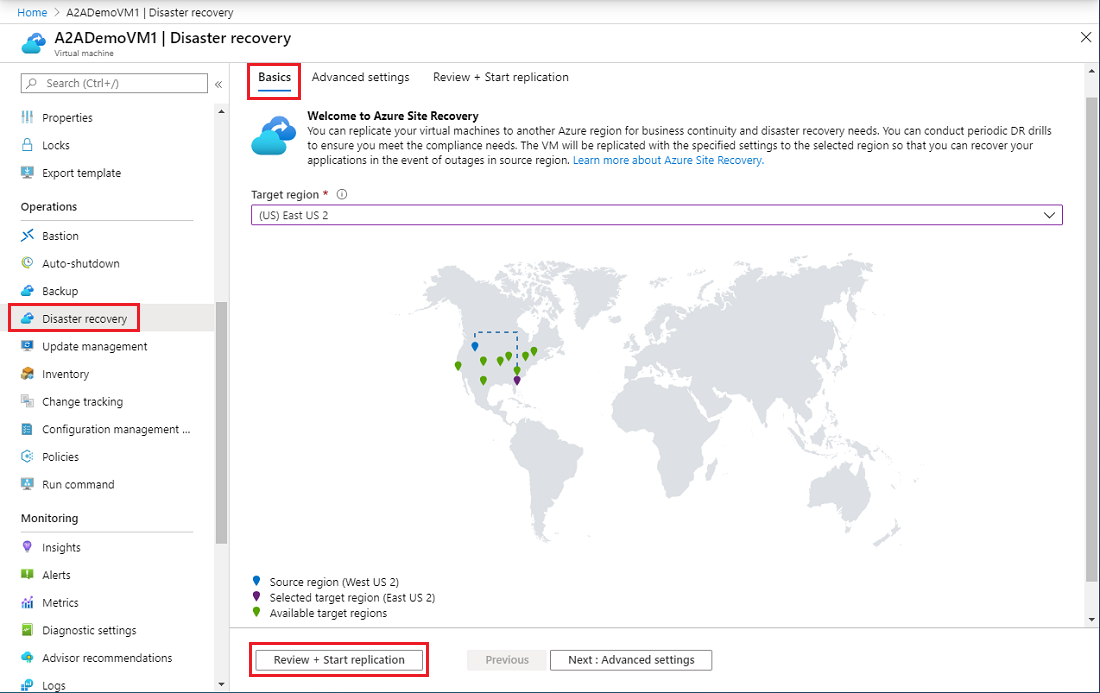
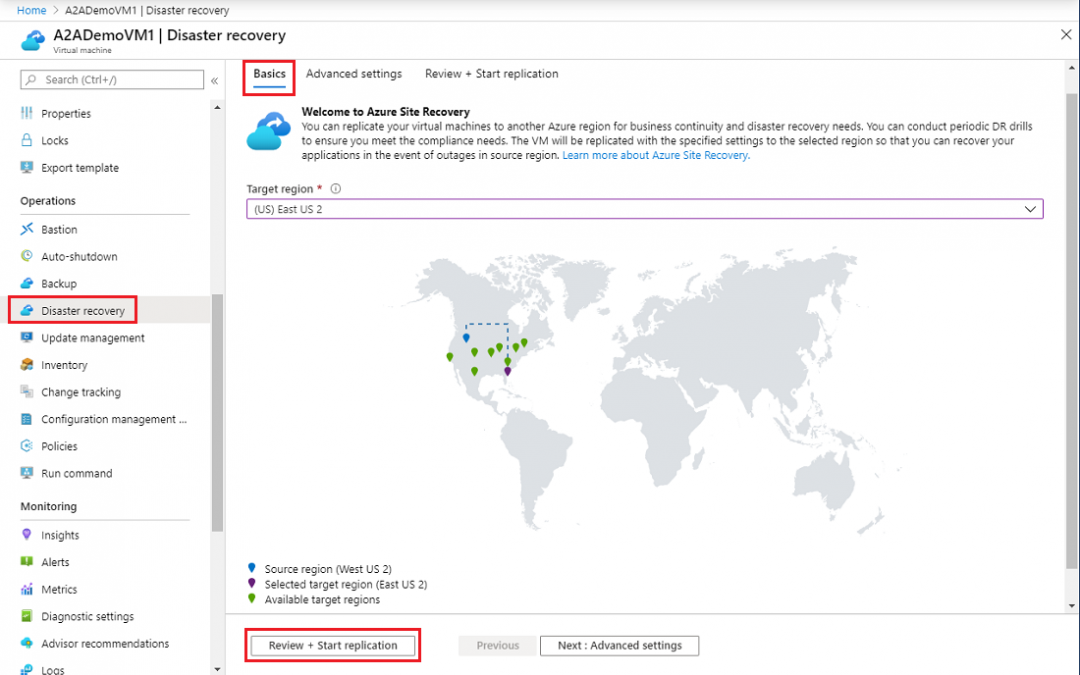
With the zonal disaster recovery capability, Microsoft is making it possible to replicate and orchestrate the failover of applications in Azure across Azure Availability Zones within a given region. Zone to Zone disaster recovery options with Azure Site Recovery is on its way to being available in all regions with Azure Availability Zones (AZs). Availability Zones, fault-isolated locations within an Azure region, provide redundant power, cooling, and networking, allowing customers to run mission-critical applications with higher availability and fault tolerance to datacenter failures. Azure Availability Zones will be available in every country Microsoft Azure publicly operates in by the end of 2021.
Further details can be found here: Set up Site Recovery Zone to Zone Disaster Recovery
Microsoft Strengthens compliance story in Azure Security Center
Microsoft has recently launched many big upgrades to the compliance management experience in Azure Security Center, including Azure Security Benchmark integration with Secure Score, a new section for downloading audit certification reports, integration of shared responsibility model details into the product, and Workflow Automation functionality.
The Azure Security Center team is encouraging organizations to try out these new compliance capabilities in Azure Security Center, and are hoping for feedback. For more information on regulatory compliance in Security Center, check out this documentation:
AzCopy v10.9.0 now in public preview: import from GCP to Azure Block Blobs
Currently in preview, AzCopy v10.9.0 now supports importing from Google Cloud Platform (GCP) Storage to Microsoft Azure Storage Block Blob. This version will also have support for scanning logs that can have low or high output based on debugging needs. Tags will be preserved when copyng blobs and the list command will include Last Modified Time information.
If you are interested in utilizing this version of AzCopy, please follow the Getting Started guide.
Publishing VM Images from Shared Image Gallery to Azure Marketplace now Generally Available
Microsoft has now enabled the ablity to publish a VM Image in Shared Image Gallery (SIG) to Azure Marketplace. This capability simplifies image preparation, testing, and submission process as it is no longer required to extract vhds, upload them, and generate SAS URIs. With this capability, organizations can now manage the full image lifecycle within Azure. Simply create an image from the VM or a vhd into Shared Image Gallery,then select the SIG Image to publish it in Partner Center.
Learn more about publishing your VM image using Shared Image Gallery here.
Community Events
- Hello World – Special guests, content challenges, upcoming events, and daily updates
- Patch and Switch – Patch and Switch are back to share thier “from the trenches” stories
MS Learn Module of the Week

Architect migration, business continuity, and disaster recovery in Azure
Learn how to migrate resources to Azure, how to provide site recovery for your applications in Azure and on-premises, and how to your applications are available through service interruptions and changes in load.
Modules include:
- Design your migration to Azure
- Protect your on-premises infrastructure from disasters with Azure Site Recovery
- Protect your Azure infrastructure with Azure Site Recovery
- Protect your virtual machines by using Azure Backup
- Back up and restore your Azure SQL database
- Build a scalable application with virtual machine scale sets
- Dynamically meet changing web app performance requirements with autoscale rules
- Scale an App Service web app to efficiently meet demand with App Service scale up and scale out
- Design a geographically distributed application
Learn more here: Architect migration, business continuity, and disaster recovery in Azure

Let us know in the comments below if there are any news items you would like to see covered in the next show. Be sure to catch the next AzUpdate episode and join us in the live chat.


Recent Comments