
by Contributed | Apr 5, 2021 | Technology
This article is contributed. See the original author and article here.
COMING SOON: After each level, we will offer you a knowledge check based on the training material you have just finished! Since there’s a lot of content, the goal of the knowledge checks is to help ensure understanding of the key concepts that were covered. Lastly, there’ll be a fun certificate issued at the end of the training! Disclaimer: This is not an official Microsoft certification and only acts as a way of recognizing your participation in this training content.
Note: Threat protection product names from Microsoft have recently changed. Read more about this and other updates here.
Microsoft 365 Defender (previously Microsoft Threat Protection)
Microsoft Defender for Endpoint (previously Microsoft Defender Advanced Threat Protection)
Microsoft Defender for Office 365 (previously Office 365 Advanced Threat Protection)
Microsoft Defender for Identity (previously Azure Advanced Threat Protection)
Please let us know what you think about this training here: https://aka.ms/MDONinjasurvey
P.S. I wanted to give my colleague, @Heike Ritter a big thank you for laying the groundwork for Ninja Training and for all of her help, along with @Giulian Garruba & @Bruno Nowak! Thank you!
__________________________________________________________________________________
Table of Contents
Email Security – Fundamentals
(Deployment / Migration)
Module 1. Technical overview
Module 2. Getting started
(Prevention & Detection)
Module 3. Configuration (Part I)
(Awareness)
Module 4. General Awareness
Email Security – Intermediate
(Prevention & Detection)
Module 1. Configuration (Part II)
Module 2. Alert Management
Module 3. Mail flow
Module 4. Zero Hour Auto-Purge (ZAP)
(Investigation & Hunting)
Module 5. Investigating Alerts
Module 6. Advanced hunting (overview)
Module 7. Automated Investigation and Remediation (AIR)
Module 8. Threat Insights
(Response & Remediation)
Module 9. Alert Handling
Module 10. Manage Quarantined Messages
(Reporting)
Module 11. Reporting
Security Operations – Advanced
(SOC Flows)
Module 1. SIEM Integration & APIs
Module 2. False Positive/False Negative Management Flows
Module 3. Automation
(Investigation & Hunting)
Module 4. Advanced hunting (Kusto training)
(Training)
Module 5. Attack Simulation Training
Supplemental Content (Tech Community links)
Legend:
Docs on Microsoft
|
 Blogs on Microsoft Blogs on Microsoft
|
 Product videos Product videos
|
 Webcast recordings Webcast recordings
|
 Tech Community Tech Community
|
 Interactive guides Interactive guides
|
⤴ External
|
 GitHub GitHub
|
Email Security – Fundamentals
(Deployment / Migration)
Module 1. Technical overview
Module 2. Getting started
(Prevention & Detection)
Module 3. Configuration (Part I)
(Awareness)
Module 4. General Awareness
Email Security – Intermediate
(Prevention & Detection)
Module 1. Configuration (Part II)
Module 2. Alert Management
Module 3. Mail flow
Module 4. Zero-Hour Auto Purge
(Investigation & Hunting)
Module 5. Investigating Alerts
Module 6. Advanced Hunting (overview)
Module 7. Automated Investigation and Remediation
Module 8. Threat Insights
(Response & Remediation)
Module 9. Alert handling
Module 10. Manage quarantined messages
(Reporting)
Module 11. Reports / Custom Reporting
Security Operations – Advanced
(SOC Flows)
Module 1. SIEM Integration & APIs
Module 2. False Positive / False Negative Management Flows
Module 3. Automation
(Investigation & Hunting)
Module 4. Advanced Hunting (Kusto training)
(Training)
Module 5. Attack Simulation Training
Supplemental Content
Please let us know what you think about this training here: https://aka.ms/MDONinjasurvey
Interested in other ninja trainings? There are also ninja trainings for:
Microsoft Defender for Endpoint (MDE) – http://aka.ms/mdeninja
Microsoft Cloud App Security (MCAS) – http://aka.ms/mcasninja
Microsoft Defender for Identity (MDI) – http://aka.ms/mdininja
Follow us on LinkedIn as #DefenderForOffice365. Bookmark the Security blog to keep up with expert coverage on security matters. Also, follow @MSFTSecurity on Twitter and Microsoft Security on LinkedIn for the latest news and updates on cybersecurity.
by Contributed | Apr 5, 2021 | Technology
This article is contributed. See the original author and article here.
Update 2103 for Microsoft Endpoint Configuration Manager current branch is now available. Microsoft Endpoint Manager is an integrated solution for managing all your devices. Microsoft brings together Configuration Manager and Intune into a single console called Microsoft Endpoint Manager admin center.
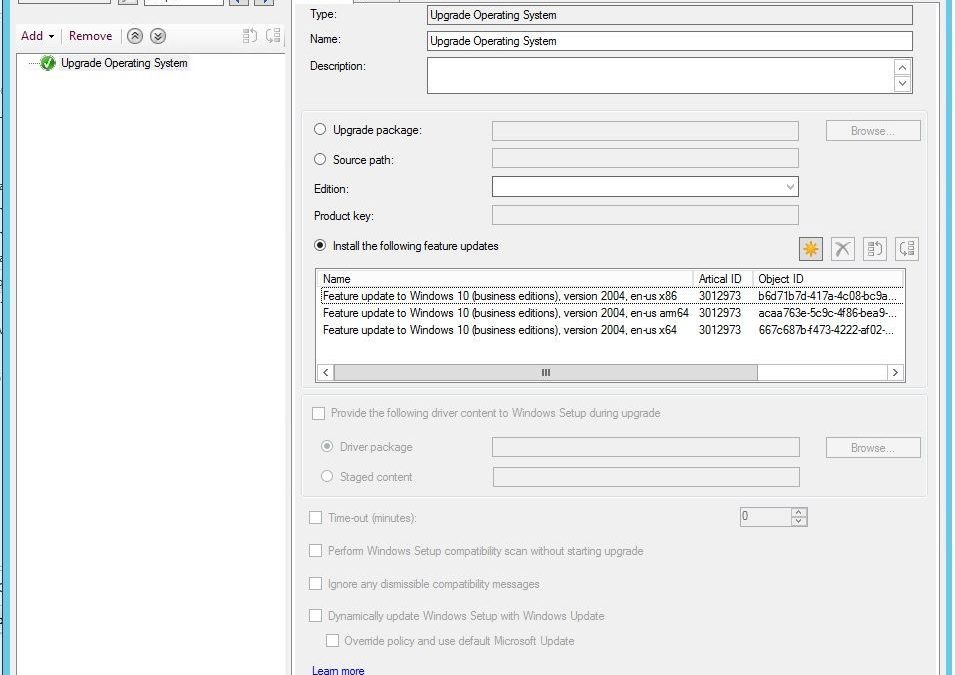
You can now upgrade a client’s Windows OS by using a feature update deployed with a task sequence. This integration combines the simplicity of Windows servicing with the flexibility of task sequences. Servicing uses content that you synchronize through the software update point. This process simplifies the need to manually get, import, and maintain the Windows image content used with a standard task sequence to upgrade Windows.
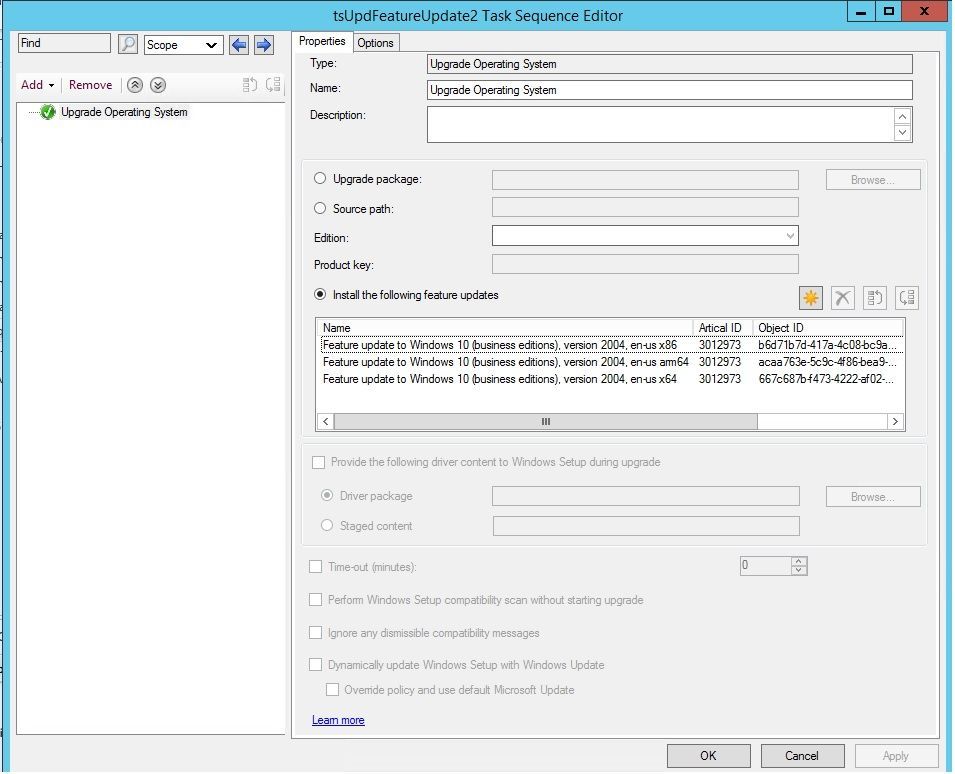 feature update with task sequence
The size of the servicing ESD file is generally smaller than the OS upgrade package and WIM image file. You can also use Windows features such as Dynamic Update and Delivery Optimization. This type of task sequence extends support to Windows 10 on ARM64 devices.
For more information, see the following articles:
This release also includes:
Microsoft Endpoint Manager tenant attach
Display all applications for a device in Microsoft Endpoint Manager admin center – The Applications view for a tenant attached device in Microsoft Endpoint Manager admin center now displays more applications from Configuration Manager. Displayed applications include applications that are:
- Deployed to the device
- Deployed to a user that’s logged in to the device, primary user of the device, and applications previously installed for the user
The option, An administrator must approve a request for this application on the device, is no longer required to be set on the device available deployment for applications to be listed in the admin center. This improvement allows you to review when application installations are expected to occur on a device.
Tenant attach: Antivirus policy exclusions merge – When a tenant attached device is targeted with two or more antivirus policies, the settings for antivirus exclusions will merge before being applied to the client. This change results in the client receiving the exclusions defined in each policy, allowing for more granular control of antivirus exclusions.
Site infrastructure
Allow exclusion of organizational units (OU) from Active Directory User Discovery – You can now exclude OUs from Active Directory User Discovery.
New prerequisite checks
When you install or update to version 2103, there are several new warning prerequisite checks.
- Enable the site for HTTPS-only or enhanced HTTP – If your site is configured to allow HTTP communication without enhanced HTTP, you’ll see this warning. To improve the security of client communications, in the future Configuration Manager will require HTTPS communication or enhanced HTTP. Plan to configure the site for HTTPS only or to Use Configuration Manager-generated certificates for HTTP site systems.
- Deprecated Azure Monitor connector – We continue to see broad adoption of native Azure Monitor log query groups as customers shift more of their workloads to the cloud. Because of this reason, starting in November 2020, the Configuration Manager feature to synchronize collections to Azure Monitor was deprecated.
When you update to this release, this check warns about the presence of the Log Analytics connector for Azure Monitor. (This feature is called the OMS Connector in the Azure Services wizard.) This connector is deprecated, and will be removed from the product in a future release. At that time, this check will be an error that blocks upgrade.
- SQL Server Express version – If you have a secondary site that uses SQL Server Express edition, this check warns if the version is earlier than SQL Server 2016 with service pack 2 (13.0.5026.0). Microsoft recommends that you keep SQL Server Express up to date.
Collections
Improvements to the collection relationships viewer – Starting in version 2010, you can view dependency relationships between collections in a graphical format. The relationships for a collection were presented as two hierarchical trees, one for dependents and the other for dependencies. In this release, you can view both parent and child relationships together in a single graph. This change allows you to quickly see an overview of all the relationships of a collection at once and then drill down into specific related collections. It also includes other filtering and navigation improvements.
Improvements to query preview – You now have more options when using the collection query preview. The following improvements have been made to previewing collection queries:
- Limit the number of rows returned.
- Omit duplicate rows from the result set.
- Review statistics for the query preview such as number of rows returned and elapsed time.
Improvements to collection evaluation view – The following improvements were made to the collection evaluation view:
- The central administration site (CAS) now displays a summary of collection evaluation status for all the primary sites in the hierarchy.
- Drill through from collection evaluation status queue to a collection.
- Copy text to the clipboard from the collection evaluation page.
- Configure the refresh interval for the collection evaluation statistics page.
Software Center
Change foreground color for Software Center branding – Software Center already provides various controls for you to customize the branding to support your organization’s brand. For some customers, their brand color doesn’t work well with the default white font color for a selected item. To better support these customers and improve accessibility, you can now configure a custom color for the foreground font.
Improved user experience and security with Software Center custom tabs – Since current branch version 1906, you can add up to five custom tabs to Software Center. These custom tabs let you give your users easy access to common web apps and other sites. Previously, to display websites Software Center used the Windows built-in Internet Explorer browser control.
Starting in this release, Software Center can now use the Microsoft Edge WebView2 browser control. The WebView2 browser control provides improved security and user experience. For example, more websites should work with these custom tabs without displaying script errors or security warnings.
Application management
Disable application deployments – You can now disable application deployments. Other objects already have similar behaviors:
- Software update deployments: Disable the deployment
- Phased deployments: Suspend the phase
- Package: Disable the program
- Task sequence: Disable the task sequence
- Configuration baseline: Disable the baseline
For device-based deployments, when you disable the deployment or object, use the client notification action to Download Computer Policy. This action immediately tells the client to update its policy from the site. If the deployment hasn’t already started, the client receives the updated policy that the object is now disabled.
Operating system deployment
Windows 10 Servicing dashboard changes – We’ve simplified the Windows 10 Servicing dashboard to make it more relevant. The new Quality Update Versions chart displays the top five revisions of Windows 10 across your devices. The Latest Feature Update chart shows the number of devices that installed the latest feature update. The Windows 10 Usage chart, showing the distribution of Windows 10 major releases, was renamed to Feature Update Versions. Servicing plan and Windows 10 ring information were removed from the dashboard.
Task sequence error shows more check readiness details – The task sequence progress can now display more information about readiness checks. If a task sequence fails because the client doesn’t meet the requirements configured in the Check readiness task sequence step, the user can now see more details about the failed prerequisites.
Encryption algorithm to capture and restore user state – The task sequence steps to Capture User State and Restore User State always encrypt the USMT state store. Previously, Configuration Manager configured USMT to use the 3DES algorithm. Starting in this release, both steps now use the highest supported encryption algorithm, AES 256.
Protection
Improvements to BitLocker management – In current branch version 2010, you can manage BitLocker policies and escrow recovery keys over a cloud management gateway (CMG). This support included a couple of limitations.
Starting in this release, BitLocker management policies over a CMG support the following capabilities:
- Recovery keys for removable drives
- TPM password hash, otherwise known as TPM owner authorization
This release also provides support for the following features:
- Enhanced HTTP
- The recovery service on management points that use a database replica.
Software updates
Approved scripts for orchestration groups – You can now select from scripts that have already been approved when configuring pre and post-scripts for an orchestration group. When in the Create Orchestration Group Wizard, you’ll see a new page called Script Picker. Select your pre and post scripts from your list of scripts that are already approved. You can still add scripts manually on the pre and post-script pages. Additionally, you can also edit scripts that you pre-populated from the Script Picker.
Change default maximum run time for software updates – Configuration Manager sets the following maximum run time for these categories of software updates:
- Feature updates for Windows: 120 minutes
- Non-feature updates for Windows: 60 minutes
- Updates for Microsoft 365 Apps (Office 365 updates): 60 minutes
All other software updates outside these categories, such as third-party updates, were given a maximum run time of 10 minutes. Starting in this release, the default maximum run time for these updates is 60 minutes rather than 10 minutes. The new maximum run time will only apply to new updates that are synchronized from Microsoft Update. It doesn’t change the run time on existing updates.
TLS certificate pinning for devices scanning HTTPS-configured WSUS servers – Further increase the security of HTTPS scans against WSUS by enforcing certificate pinning. To enable this behavior:
- Ensure your software update points are configured to use TLS/SSL
- Add the certificates for your WSUS servers to the new WindowsServerUpdateServices certificate store on your clients
- Verify the Enforce TLS certificate pinning for Windows Update client for detecting updates software updates client setting is set to Yes (default).
Community hub
Download Power BI report templates from Community hub – Community hub now supports contributing and downloading Power BI report template files. This integration allows administrators to easily share and reuse Power BI reports. Contributing and downloading Power BI report template is also available for current branch versions of Configuration Manager.
Access the top queries shared in the Community hub from CMPivot – You can now access the top CMPivot queries shared in the Community hub from on-premises CMPivot. By leveraging pre-created CMPivot queries shared by the broader community, CMPivot users gain access to a wider variety of queries. On-premises CMPivot accesses the Community hub and returns a list of the top downloaded CMPivot queries. Users can review the top queries, customize them, and then run on-demand. This improvement gives a wider selection of queries for immediate usage without having to construct them and also allows information sharing on how to build queries for future reference.
Configuration Manager console
Centralized management of console extensions
Configuration Manager now supports a new style of console extensions that have the following benefits:
- Centralized management of console extensions for the site from the console instead of manually placing binaries on individual consoles.
- A clear separation of console extensions from different extension providers.
- The ability for admins to have more control over which console extensions are loaded and used in the environment, to keep them more secure.
- A hierarchy setting that allows for only using the new style of console extension.
The old style of console extensions may start being phased out in favor of the new style, which is more secure and centrally managed.
Add a report as a favorite – Configuration Manager ships with several hundred reports by default, and you may have added more to that list. Instead of continually searching for reports you commonly use, you can now make a report a favorite. This action allows you to quickly access it from the new Favorites node.
Improvements to the product lifecycle dashboard – This release includes improvements to the product lifecycle dashboard to make it more actionable for you.
- Customize the timeframe on the charts for your preference.
- Search, sort, and filter the data.
- View a list of devices with products that are near or at end of support, and you need to update.
Support Center
Improvements to Support Center – Support Center is now split into the following tools:
- Support Center Client Data Collector: Collects data from a device to view in the Support Center Viewer. This separate tool encompasses the existing Support Center action to Collect selected data.
- Support Center Client Tools: The other Support Center troubleshooting functionality, except for Collect selected data.
Support Center Viewer, Support Center OneTrace and Support Center Log File Viewer are still a part of Support Center.
OneTrace support for jump lists – Support Center OneTrace now supports jump lists for recently opened files. Jump lists let you quickly go to previously opened files, so you can work faster.
There are now three methods to open recent files in OneTrace:
- Windows taskbar jump list
- Windows Start menu recently opened list
- In OneTrace from File menu or Recently opened tab.
Other
For more information on changes to the Windows PowerShell cmdlets for Configuration Manager, see version 2103 release notes.
For more details and to view the full list of new features in this update, check out our What’s new in version 2103 of Microsoft Endpoint Configuration Manager documentation.
Note: As the update is rolled out globally in the coming weeks, it will be automatically downloaded, and you’ll be notified when it’s ready to install from the “Updates and Servicing” node in your Configuration Manager console. If you can’t wait to try these new features, see these instructions on how to use the PowerShell script to ensure that you are in the first wave of customers getting the update. By running this script, you’ll see the update available in your console right away.
For assistance with the upgrade process, please post your questions in the Site and Client Deployment forum. Send us your Configuration Manager feedback through Send-a-Smile in the Configuration Manager console. Continue to share and vote on ideas about new features in Configuration Manager.
Thank you,
The Configuration Manager team
Additional resources:
by Contributed | Apr 5, 2021 | Technology
This article is contributed. See the original author and article here.
Howdy folks,
I’m excited to announce that staged rollout to cloud authentication is now generally available! This feature allows you to selectively test groups of users with cloud authentication methods, such as pass-through authentication (PTA) or password hash sync (PHS), while all other users in the federated domains continue to use federation services, such as AD FS, Ping Federate, Okta, or any other federation services to authenticate users.
Moving your Azure AD authentication from federation services to the cloud allows you to manage user and device sign-in from a single control plane in Azure AD. Some of the benefits using cloud authentication include reducing the dependency on on-premises infrastructure, which typically includes a farm of servers and proxies that need to be accessible from the internet. In addition, you can take advantage of security capabilities like: Azure AD multifactor authentication (MFA), Conditional Access, Identity Protection for leaked credentials, Identity Governance, and more.
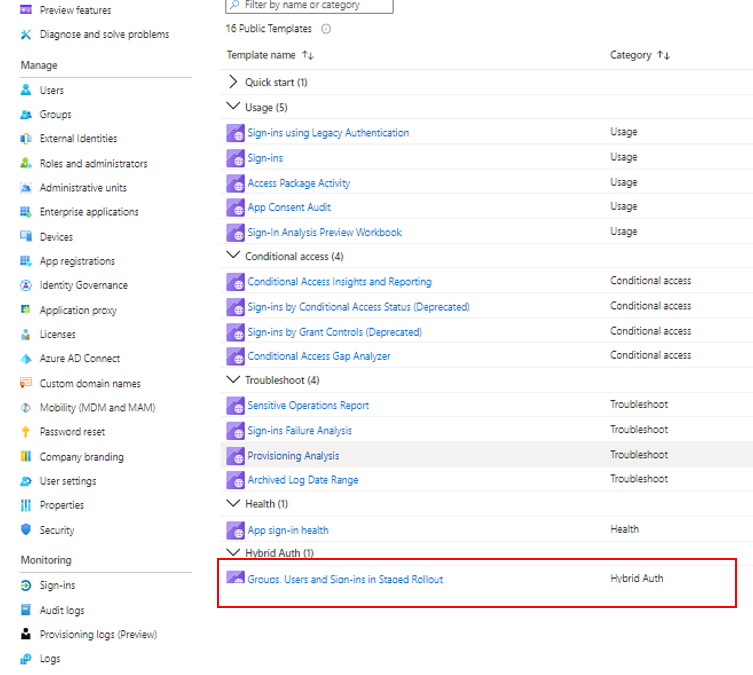
New with the general availability, we’ve added the ability to monitor the users and groups added or removed from staged rollout and users sign-ins while in staged rollout, using the new Hybrid Auth workbooks in the Azure portal. In addition, we’ve built a staged rollout interactive guide to help you learn more and deploy this feature.
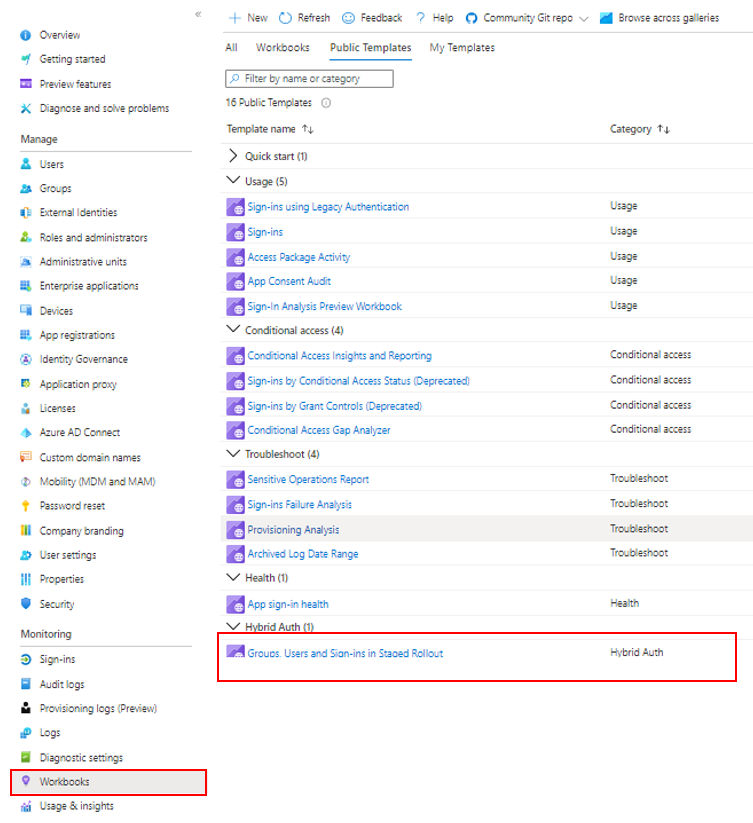
Hybrid Auth workbook
As always, we’d love to hear your feedback or suggestions in the comments or on Twitter (@AzureAD).
Alex Simons (@Alex_A_Simons)
Corporate VP of Program Management
Microsoft Identity Division
Learn more about Microsoft identity:
by Contributed | Apr 5, 2021 | Technology
This article is contributed. See the original author and article here.
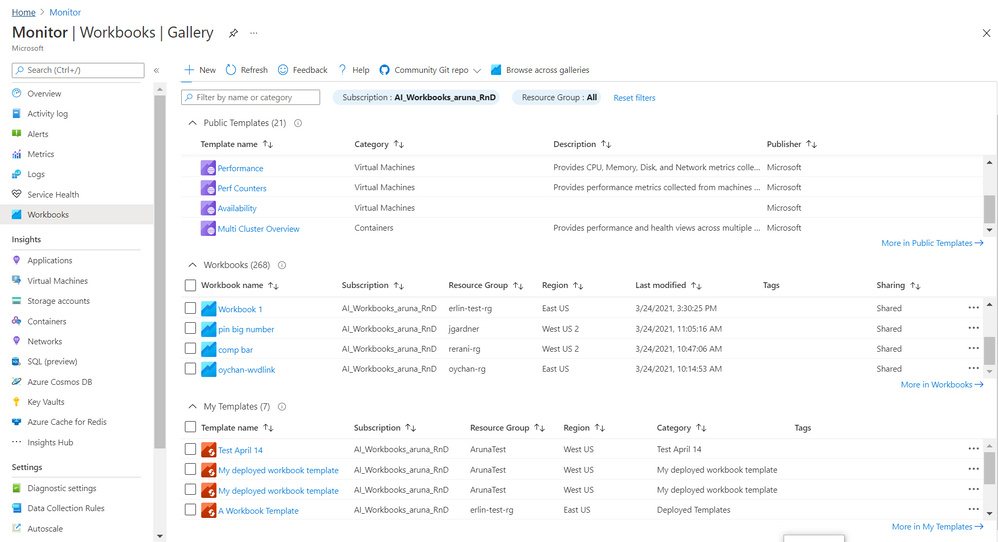
Gallery! It is Azure Portal blade where you manage and use
Azure Workbooks. We recently rolled out a
new and improved experience 
for Gallery to make it
convenient and meet growing demand for organizing, sorting, managing all workbook types – templates and your workbooks.
Here are some of the salient features
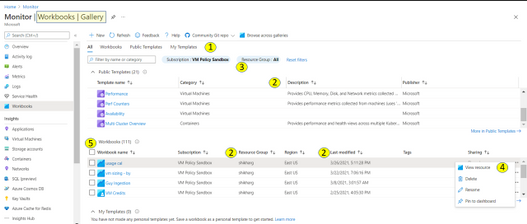
1. There are 4 tabs to help organize workbook types
- All (default) is a composite and allows to search across these types.
- Public Templates
 – Ready to use, get started functional workbooks published by Microsoft
- My Workbooks
 – Workbooks you create or are shared with you
- My Templates
 – Templates you create or are shared with you
Each tab has a full list and a total count for that type.

2. The list provides a grid with
a) info on workbook/ template beyond just the name. This includes description, last modified date, Tags, home (subscription, resource group, region), etc..
b) ability to sort on these elements (columns)

3. There is additional filter by resource group which applies to your workbooks and your templates. Note – currently it is possible to select only one subscription. When private workbooks are deprecated, it will be possible to select multiple subscription.
4. For each workbook there is an action ellipse that allows to
- View resource – Access Workbook Resource blade to get information such as resource id of the workbooks and/ or add tags to the workbook, manage locks etc
- Delete or Rename workbook
- Pin workbook to dashboard
- [coming soon] Copy Link
5. It is now possible to select multiple workbooks and do a bulk operation like delete
6. Community Git Repo on toolbar has a link to Azure Community Github Repo and in some special cases like Azure Security Center gallery it has addition link to it’s specific Repo
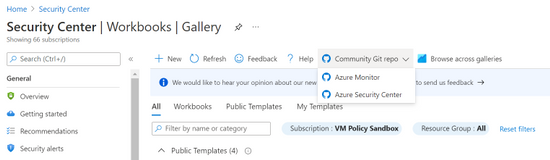
7. Browse across galleries is retained and allows to search for any workbook or template by its name independent of its home or association to a resource/ gallery
Learn more here and we would love to hear from you so share your feedback with us.
Thanks,
Azure Workbooks Team
by Contributed | Apr 5, 2021 | Technology
This article is contributed. See the original author and article here.
by Contributed | Apr 5, 2021 | Technology
This article is contributed. See the original author and article here.
Under (hopefully) rare circumstances, after developing a training script and thorough local testing, it can still happen that the same script fails when executed on a remote AML compute target. Here, we are sharing some best practices around how to debug remote workloads on Azure ML.
Debugging remote workloads can be broken down into two basic steps:
- Getting access to a command line on the remote AML compute target.
- Using command line tools for investigation and debugging.
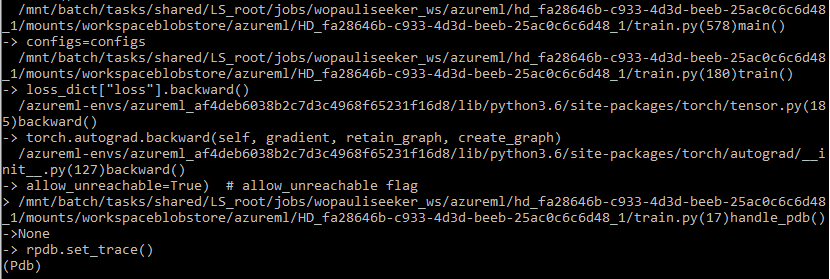
The below snapshot shows what your stack trace may look like if you follow the steps below.
Enable SSH access to your remote AML compute target
You will have to be able to connect to your remote compute target via SSH. By default, SSH access is disabled, so you will have to make sure you enable SSH access during the provisioning of the compute target. The below screenshot shows where to find the option.
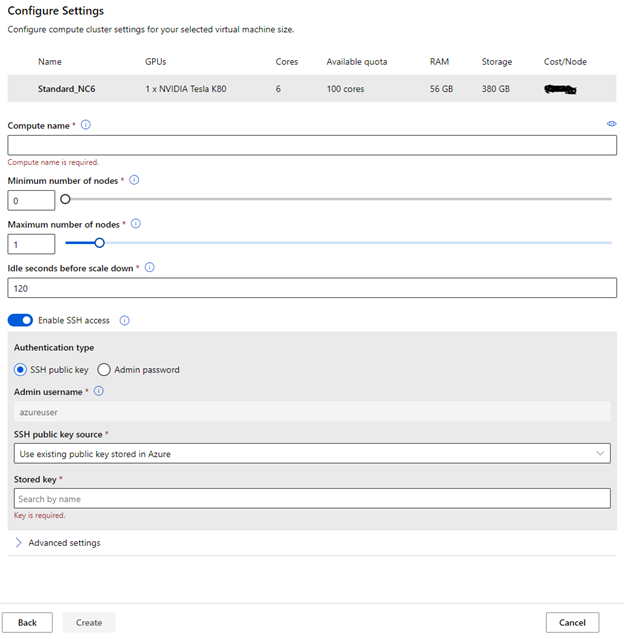
RPDB
For debugging, we are using rpdb, a wrapper for the python debugger pdb, which is part of the Python Standard Library. Using rpdb, we can connect to and debug a running process.
One of the really convenient aspects of using rpdb is that it won’t affect the performance of your training script, unless you set a breakpoint, either statically or dynamically, as described below.
Software Prerequisites
We recommend you install at least two packages, to make this work (1) rpdb and (2) netcat-openbsd. You can simply add rpdb to the pip packages of your Conda dependencies in your AzureML environment.
Netcat-openbsd can be either installed manually, when you start to debug a run (after attaching to running docker container, see below), or you can build a custom docker image for execution. For this we recommend starting from one of the base Docker images for AzureML containers, and simply adding netcat-openbsd to the packages installed by the apt package manager.
Modifying the training script for debugging
Consider the following two scenarios. Either you want to set a breakpoint and then step through the code from there, to see what is going wrong. In this case, you only have to add one line to your training script (towards the top of the training script) to create a breakpoint:
import rpdb; rpdb.set_trace()
Alternatively, you may have a training script that just somehow gets stuck, without failing. In this case, you can’t really set a breakpoint, because you don’t know where the script gets stuck. We experienced this situation when we trained a pytorch model, using multiple workers for data loading. A thread contention caused the data loader to hang, and we needed to know where/why the thread contention occurred.
If you are facing this situation, you can make some modifications to the training script that will allow you to send a signal to the training script, which will dynamically set a breakpoint at the current execution step, so you can use the debugger to figure out what is going on. To do this, add the following code to your training script.
import rpdb
def handle_pdb(sig, frame):
    rpdb.set_trace()
Then add the following code, so that the above method is called when SIGUSR1 signal is sent to the python process.
if __name__ == "__main__":
    import signal
    signal.signal(signal.SIGUSR1, handle_pdb)
Connect to your remote compute target
This first thing to do is to go to the list of nodes on your compute target, identify the run that you would like to debug, and copy the “Connection string”. This is shown in the following screenshot.
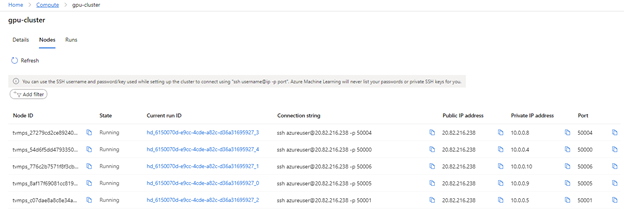
You can then use the terminal of your choice (e.g. Anaconda command prompt) to connect to the node via SSH. Once logged in, you can use the usual commands for investigation (e.g. vmstat, top, free)
Debugging
If you want to dig deeper, you can attach to the docker container, inside of which your training script is running, and start debugging.
To do this, you have to first get the ID of the running container (using “docker ps”). Then you can attach to it, using “docker attach <id>”. If you didn’t include netcat-openbsd in your docker image, you can do so after attaching to the container.
If you set a breakpoint (by adding the line “rpdb.set_trace()”, mentioned above), you can now connect to the process, using the binary “nc” from the netcat-openbsd package: “nc 127.0.0.1 4444”. This will get you to pdb for debugging. If you have never used pdb, just type “help”, and you will find the usual commands for debugging.
If you followed the above instructions, for handling the SIGUSR1 signal, you can also send a signal, to pause execution, and continue in debug mode. In other words, this allows you to set a breakpoint at the current execution step.
First, send the signal: kill -n 10 <proc_id> (or kill -s SIGUSR1 <proc_id>)
Then you can use “nc” again for connecting to pdb.
Note: Think carefully before you start debugging a running process with pdb, because you won’t be able to leave the pdb session without killing the process. You can, however, keep the job running, you’ll just have to leave the pdb session open.
Closing remarks
We hope you found this blog post useful. Our intent was to demystify remote workloads, getting you closer to debugging them like you would, if your scripts were being executed locally. Please leave questions and suggestions in the comments below!
by Contributed | Apr 5, 2021 | Technology
This article is contributed. See the original author and article here.
2020 has been a year like no other. In just a few months’ time, businesses have transformed and have accelerated their efforts to migrate to the cloud. Following our announcement of Azure VMware Solution (AVS) last year, we have been helping customers accelerate this move to cloud by providing an easy lift and shift migration. Albeit customers love the same operational experience for VMware workloads and use familiar VMware technologies like vCenter, NSX Manager, HCX etc. in AVS, they also want to leverage security integrations that they have invested in for years. Below are a few common questions that we get from customers around this topic.
How can they use the same firewalls/tools that they have been using for years?
How do they maintain the same security posture?
How can they use the same firewall for both Azure and VMware workloads in AVS?
In this blog series, we plan to discuss native security options, 3rd party firewall integration with AVS along with a deep dive into configuration details. First in the series, this blog would summarize the security options available at your disposal.
Let’s start with the built-in security capabilities that you can leverage in AVS.
Built-in security/firewall with VMware NSX-T – VMware NSX-T is the default networking stack in AVS and it provides out-of-box security features that you can use to protect your workloads. Following are the capabilities that you can leverage.
Distributed Firewall (DFW) –A stateful L3-L7 firewall that powers micro-segmentation and runs on your ESXi hosts in your AVS private cloud. DFW rules are enforced on the vNIC level of a VM workload and what that means is that the traffic is either allowed or dropped on the vNIC level based on the rule you defined. So, there is no more hair-pinning that traffic through a centralized or perimeter firewall. From a feature standpoint, it’s rich and allows you to define security rules using network or application constructs. You could group the workloads using static (IPSet/NSX constructs like Segment etc.) or dynamic membership (VM tags, guest OS etc.). Even when you have a perimeter firewall, you should secure your East-West traffic.
Gateway Firewall – A L4-L7 aware stateful North-South firewall that can be configured on NSX-T Tier-1 Gateway in AVS. It can also be used as an Inter-tenant or Inter-zone firewall i.e. filtering traffic between different tenants of your organization each with a dedicated Tier-1 Gateway.
Azure Firewall – A managed, stateful firewall with built-in HA and SLA of 99.99% (when deployed in two or more availability zones). Customers can configure L3-L7 policies to filter traffic and take advantage of threat intelligence-based filtering to alert and deny traffic from/to known malicious IP addresses and domains. Please refer to the Azure firewall feature set here.
If you are already using Azure firewall capabilities deployed in Azure Virtual WAN to protect resources in VNETs, you can connect the same virtual WAN hub over an express route connection to AVS and route internet traffic from AVS to Azure firewall.
Let’s switch gears and talk about the 3rd party firewall integration with Azure VMware Solution. There is a strong desire from customers to continue using the same firewall in AVS that they have been using in an on-premises datacenter. Based on the use-case, you could deploy a 3rd party firewall NVA in AVS private cloud or SDDC or leverage a firewall from Azure marketplace. Let’s double click on both options.
3rd Party firewall deployed as NVA in AVS private cloud or SDDC –Before we discuss this integration, it’s important to understand NSX-T deployment in AVS private cloud. When you create a private cloud in AVS, a default NSX-T Tier-0 Gateway configured in Active/Active mode and a default NSX-T Tier-1 Gateway configured in Active/Standby mode is deployed for you. Users can connect segments (logical switches) and provide East-West and North-South connectivity to the workloads connected on these segments.
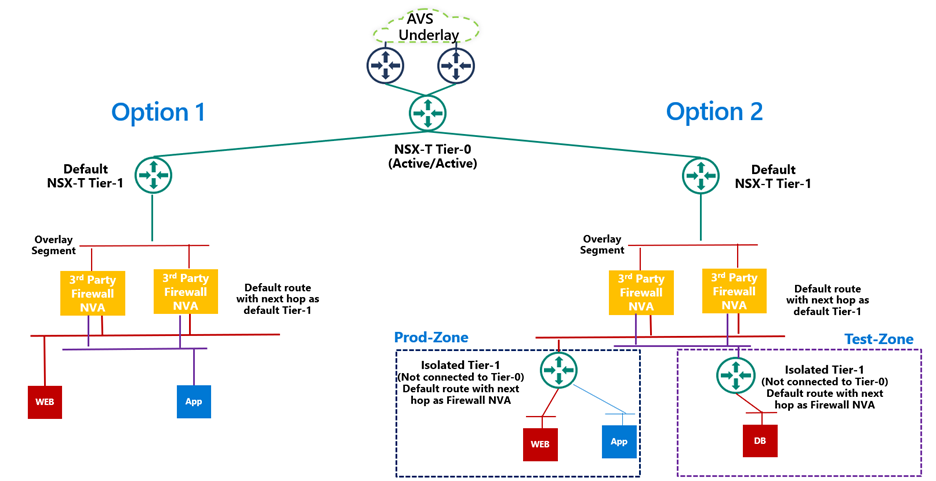
A 3rd party firewall NVA can be connected southbound to the default NSX-T Tier-1 gateway and this firewall can act as a North-South firewall or East-West firewall depending upon your use case. This integration is supported in following topologies.
- Option 1: Workload segments are directly connected to the firewall and the gateway on workloads is 3rd party firewall. This topology restricts the users with numerous segments as the vNICs on the NVA becomes a limiting factor.
- Option 2: Workload segments are connected to an isolated Tier-1 and this Tier-1 gateway provides northbound connectivity to a 3rd party firewall. This topology solves the problem of limited number of vNICs on NVA as you connect 100s of workload segments to an isolated Tier-1 which connects to the firewall NVA northbound. In this topology, isolated Tier-1s simulate security zones and the firewall can provide East-West filtering between security zones and North-South filtering for all traffic.
We will discuss routing and other configuration details for these topologies in next part of this blog series.
3rd Party firewall deployed in Azure VNET – Customers can also deploy a 3rd party firewall in Azure VNET and route traffic from AVS to this firewall via Azure Virtual WAN hub. To redirect internet traffic from AVS VMs to the firewall NVA, you need to connect AVS to an express route gateway in Azure virtual WAN and propagate a default route. Next, you configure a default route in Azure Virtual WAN hub to direct internet bound traffic to a NVA in spoke VNET.

We will go through the configuration details in greater detail in upcoming blogs. Stay tuned!
Summary
Azure VMware Solution customers have multiple security options available to protect their workloads. Some of these firewalling capabilities can be used out of the box to provide East-West and North-South firewalling. Along with the built-in security capabilities, customers can also leverage the 3rd party firewalls or next-gen firewalls to provide additional security and maintain the same security posture as they have on-premises.
Following are a few resources to learn more about Azure VMware Solution.
Learn Azure VMware Solution Networking
Try Azure VMware Solution Hands-on-lab

by Scott Muniz | Apr 5, 2021 | Security
This article was originally posted by the FTC. See the original article here.
If you’re a college student, faculty, or staff member, you’re going to want to pay attention to this one. IRS imposters are sending phishing emails to people with “.edu” email addresses, saying they have information about your “tax refund payment.” What do they really want? Your personal information.
Scammers are sending emails with subject lines like, “Tax Refund Payment” or “Recalculation of your tax refund payment.” The email asks you to click a link and submit a form to claim your “refund.”

What happens if you click the link? The website asks for personal information, including your name, Social Security number (SSN), date of birth, prior year’s annual gross income (AGI), driver’s license number, address, and electronic filing PIN. Scammers can use or sell this information for identity theft.
The emails can look really real and include the IRS logo. But no matter what the email looks like or says, one thing stays true: the IRS will not first contact you by email. They will always start by sending you a letter. And, to confirm that it’s really the IRS, you can call them directly at 800-829-1040.
If you clicked a link in one of these emails and shared personal information, file a report at IdentityTheft.gov to get a customized recovery plan based on what information you shared.
If you spotted this scam, the IRS is asking you to forward the email as an attachment to phishing@irs.gov. And tell us too, at ReportFraud.ftc.gov.
Looking to find the status of your pending refund? Go to Where’s My Refund on IRS.gov.
Brought to you by Dr. Ware, Microsoft Office 365 Silver Partner, Charleston SC.

by Contributed | Apr 5, 2021 | Technology
This article is contributed. See the original author and article here.
You may have heard that the Kubernetes v1.20 release deprecated dockershim. Our friends in the community published a DON’T PANIC blog that does a great job of clarifying, since a lot of people kind of freaked out.
Jim Linwood, CC BY 2.0, via Wikimedia Commons
This didn’t quite do the trick, so they wrote a FAQ too. Still, the message hasn’t landed everywhere it needs to. And none of these publications address the specialness that is Windows head-on. So, we felt we need to share what this means to you as a user of Windows Server containers in Kubernetes (K8s). As dockershim slowly exits Kubernetes, building containers is no different. For both Windows and Linux, containers built with different toolsets can be run with different runtimes. This is no different for Kubernetes. Containers built with Docker will run without modification in Kubernetes with containerd. Microsoft contributes to containerd to ensure that running those containers on Windows takes advantage of the latest and greatest the platform has to offer. For fun, we thought we’d share some of the myths about what all this means for Windows containers and bust (dispel) them for you.
Myth – the K8s docker shim deprecation will break my Windows container builds for Kubernetes!
Busted – Docker Desktop for Windows will continue to build containers! That is what Docker makes it to do! Kubernetes can run those containers using containerd. (The small print: if your containers depend on Docker sockets (aka docker in docker), you’re out of luck.)
Myth – Docker Desktop for Windows uses containerd already!
Busted – Docker Desktop for Windows uses Docker Engine which is built on moby. Moby, as of this writing, partially depends on containerd. There is ongoing work to adapt moby to use more of containerd on Windows.
Myth – All of my Docker CLIs I depend on my local machine for build process are broken!
Busted – Docker CLIs on your dev box are not being affected, and you may continue to use them to build container images. All this works thanks to the way Docker, containerd, and other tools conform to the Open Container Initiative (OCI) – a set of standards which help ensure tools used to build, publish, and run containers all interoperate together.
Myth – If I upgrade my Azure Kubernetes Service (AKS) cluster to Kubernetes v1.24 (when dockershim is currently planned for removal from kubelet) my Windows containers won’t run!
Busted – Your upgrade will deploy the new containerd runtime on the Windows nodes. But the containers will run just fine.
Myth – I must rebuild all my containers and K8s clusters to use containerd!
Busted – The containerd change is only on the host runtime. Container images build with Docker and other tools that are OCI compliant do not require you to rebuild. You can still use the same container image to run with Kubernetes and containerd. If you are using AKS, all you need to do is deploy your workload on a host which has containerd runtime. For more detail read the Don’t Panic blog.
Myth – I’m running my own DIY (do it yourself – unmanaged) K8s cluster and not using a distro and removing dockershim will break me!
Busted – The K8s community has tested the containerd container runtime for both Linux and Windows to ensure that containers that work with the Docker Engine runtime work with the containerd. Before the should replace your docker runtime on both Windows Server nodes and Linux nodes with containerd. You can find instructions on how to configure runtimes in the community documentation.
Myth – My air-gapped Kubernetes cluster will break with the move to containerd!
Busted – Air-gapped k8s operation still requires your container images to be available to the Windows host in the same way, either from a local container registry, or baked into the OS image’s local containerd image store. This is no different whether you are using dockershim or not.
Finally, a note for customers looking into adopting AKS-HCI: The current preview release uses dockershim as the runtime on Windows. Containerd will be the default runtime in a future release and just like AKS, customers can expect a smooth transition – along with documented instructions on how to upgrade.
As a part of the Kubernetes community, we are working to make sure you are covered. Docker and other tools that build OCI containers will work with the containerd runtime in Kubernetes. These topics, and more, are covered in the Kubernetes Special Interest Group for Windows (SIG Windows) where all are welcome. Please reach out to us if you have questions or feedback.
by Contributed | Apr 5, 2021 | Technology
This article is contributed. See the original author and article here.
Howdy folks,
We started on a journey with the open standards community to empower everyone to own and control their own identity. I’m thrilled to share that we’ve achieved a major milestone in making this vision real. Today we’re announcing that the public preview for Azure AD verifiable credentials is now available: organizations can empower users to control credentials that manage access to their information.
This blog post provides an overview of our standards-based platform, and the first solution we’ve built on that platform–to enable a new form of identity verification. We’re also sharing lessons learned from customers during private preview and next steps for improving interoperability with other standards-based systems. Ankur Patel from my team is here to share more.
Best Regards,
Alex Simons (Twitter: @Alex_A_simons)
Corporate Vice President Program Management
Microsoft Identity Division
—————————————————————–
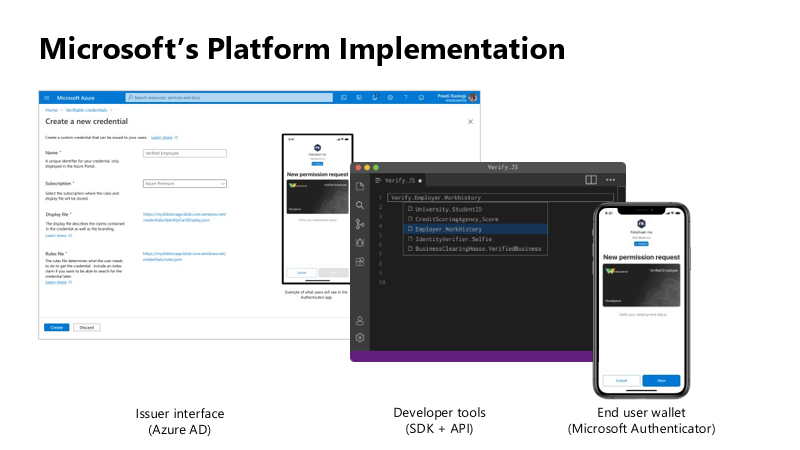
Hello again. In June 2020, we reported on the open standards community’s progress on decentralized identity. The Verifiable Credentials (VC) and Decentralized Identifiers (DID) standards have been ratified. Today, I’m thrilled to share details about the public preview capabilities of Microsoft’s platform, based on these standards, called Azure AD verifiable credentials.
Azure AD customers can now easily design and issue verifiable credentials to represent proof of employment, education, or any other claim, so that the holder of such a credential can decide when, and with whom, to share their credentials. Each credential is signed using cryptographic keys associated with the DID that the user owns and controls.
Please visit http://aka.ms/verifyonce to learn more.
Unlike current proprietary identity systems, verifiable credentials are standards-based which makes it easy for developers to understand, and doesn’t require custom integration. Applications can request and verify the authenticity of credentials from any organization using APIs included in the platform SDK.
Just as they manage any other permission requests, users can manage and present credentials using Microsoft Authenticator, with one key difference under the hood. Unlike domain-specific credentials, verifiable credentials function as “proofs” that users control, even when they’re issued by organizations. Because verifiable credentials are attached to DIDs that users own, they can be confident that they—and only they—control who can access them and how.
Government of Flanders is one of the many early customers that leveraged the private preview capabilities to make it easier for citizens to start a new business. Today, a citizen must provide proof of income and citizenship. By presenting verifiable credentials issued by their bank as proof of income and by their government as proof of citizenship, they could easily meet these requirements. This is one of the many scenarios that came to life during private preview.
In addition to announcing public preview of the Azure AD verifiable credentials platform, we’re excited to share with you a new solution based on this approach. Usually, highly regulated interactions, such as pre-employment checks or applying for a loan, are expensive and time-consuming. Microsoft is partnering with industry leading identity verification service providers to make it possible to verify an identity once and present it to anyone. Azure AD customers can leverage this solution to validate official documents and electronic records across 192 countries to confidently verify identities. End-users can present these credentials to quickly start a job, apply for a loan, or access secure apps and services—without having to repeatedly share their sensitive information.
Please visit http://aka.ms/verifyonce to learn more about all our partners.
We’re grateful for everything we’ve learned from our customers, and to members of Decentralized Identity Foundation, Open ID Foundation, and W3C who collaborated with us to develop new standards that enable individuals and organizations to verify credentials directly.
While this is an important milestone, we have a lot of work ahead to enable verification on a larger scale while protecting individual privacy. Now that we have built the foundation, we are working on our next key milestone: continue to enrich credentials with implementations that enable additional privacy preserving features and increase our interoperability with solutions from other members of the Decentralized Identity and Verifiable Credentials community.
Let’s build a more trustworthy internet together. We were amazed by the variety of ideas that customers presented to us during private preview. We can’t wait for you to try the new platform!
Ankur Patel (@_AnkurPatel)
Principal Program Manager
Microsoft Identity Division
Resources:
Learn more about Microsoft identity:

Understanding where Microsoft Defender for Office 365 fits in the Microsoft 365 Security Center
What is Microsoft Defender for Office 365?
Introducing Microsoft Defender for Office 365
Secure by default in Office 365
The unified Microsoft 365 security center overview
Get the most out of Office 365 ATP (Microsoft Defender for Office 365) in the shift to remote work
Evaluate Microsoft Defender for Office 365
Evaluation Mode in Microsoft Defender for Office 365
ORCA (Office 365 Advanced Threat Protection Recommended Configuration Analyzer)
Enhanced Filtering for Connectors: Supporting hybrid mail routing configurations in Office 365
Mastering Configuration in Microsoft Defender for Office 365
Report messages and files to Microsoft
User submissions policies (add-in for end users)
Use Admin Submission to submit suspected spam, phish, URLs, and files to Microsoft
Protecting against coronavirus themed phishing attacks
New Threat analytics report shares the latest intelligence on recent nation-state cyber attacks
Safety tips in email messages
Assess and Optimize Defender for Office 365 Configuration
Managing Alerts: Alert policies in the Security & Compliance Center
Announcing Priority Account Protection in Defender for Office 365
Outbound spam protection in Exchange Online Protection
Mail flow insights in the Security & Compliance Center
Mail flow rules (transport rules) in standalone Exchange Online Protection
Message trace in the Security & Compliance Center

Get more out of Microsoft Defender for Office 365 with Microsoft 365 Defender
Investigating alerts
Microsoft Defender for Office 365 investigation improvements coming soon
Investigate malicious email that was delivered in Office 365
Microsoft Defender for Office 365 gets even better with Incidents and Advanced Hunting
AIR Overview: Automated investigation and response (AIR) in Microsoft Defender for Office 365
How automated investigation and response works in Microsoft Defender for Office 365
Details and results of an automated investigation in Microsoft 365
Self-healing in Microsoft 365 Defender
Walkthrough – Spoof intelligence insight in Microsoft Defender for Office 365
Business Email: Uncompromised – Part One
Business Email: Uncompromised – Part Two
Business Email: Uncompromised – Part Three
Remediation actions in Microsoft Defender for Office 365
Review and manage remediation actions in Office 365
Announcing Campaign Views and Compromised User Detection and Response

Smart reports and insights in the Security & Compliance Center
View Defender for Office 365 reports in the Reports dashboard in the Security & Compliance Center
Say hello to the new Microsoft Threat Protection APIs!
Best practices for leveraging Microsoft 365 Defender API’s – Episode One
Best practices for leveraging Microsoft 365 Defender API’s – Episode Two
Improve the Effectiveness of your SOC with Office 365 ATP and the O365 Management API
Custom or third-party reporting solutions for Microsoft Defender for Office 365
Manually submit messages to Microsoft for analysis (FP/FN submission)
Handle FPs/FNs: How to report false positives/negatives in automated investigation and response capabilities
KQL part 1 of 3: Learn the KQL you need (part of Azure Sentinel webinar series)
KQL part 2 of 3: KQL hands-on lab exercises (part of Azure Sentinel webinar series)
KQL part 3 of 3: Optimizing KQL queries (part of Azure Sentinel webinar series)
Attack simulation training in Microsoft Defender for Office 365 now Generally Available
Get started using Attack Simulation Training in Microsoft Defender for Office 365
Attack Simulation Training is now available!
Microsoft Defender for Office 365 – Microsoft Tech Community
Microsoft Security and Compliance – Microsoft Tech Community

Recent Comments