
by Contributed | Apr 7, 2021 | Dynamics 365, Microsoft 365, Technology
This article is contributed. See the original author and article here.
Businesses need to deliver exceptional Customer Experiences (CX) to be successful. Customer experiences are critical whether your customers are individuals involving business-to-consumer marketing (B2C) or other businesses in the form of business-to-business marketing (B2B)happy customers are loyal customers, and they impact your bottom line. Since last year’s release wave 2 for Microsoft Dynamics 365 Marketing, we’ve been hard at work refining and enhancing product features across the board that can help you up your CX game. Here are highlights from three capabilities that will launch with Dynamics 365 Marketing 2021 release wave 1 that I think you’ll be excited about, I know I am. Real-time customer journey orchestration. Get ready for a more intuitive journey designer with a huge, game-changing element: the ability to trigger customer journeys in real-time, pick the right channel for each individual, and react to customer-led actions in the moments that matter. A completely redesigned email editor. Take advantage of AI to help you quickly create impactful, professional, and personalized content and deliver it at the right time. Enhanced integration with Microsoft Teams. This integration is more powerful than ever thanks to the new webinar capabilities within Teams and the improved event participant engagement functionalities within Dynamics 365 Marketing. Read on for more details on how each one of these capabilities can help you transform how you engage with your customers. Real-time, event-based customer journey orchestration in preview Move up from the segment-based marketing campaigns to moments-based interactions to deliver a highly personalized experience for each individual. Journeys can be triggered based on real-world interactions, like walking into a store and connecting to Wi-Fi, or be triggered by virtual interactions such as visiting a shopping site. The real-time nature of the journey ensures that you can respond to customers immediately and convert their expression of interest into a sale. An easy-to-use and delightful journey designer The new journey designer is intuitive, flexible, and infused with AI-powered capabilities throughout. To create the steps along your journeys, use the built-in events catalog, create your own, or use natural language to specify conditions and branches. Use AI-guided channel optimization to ensure your message is delivered in the right communication channel for your individual customer for even more personalization. The beauty of using AI optimization is that it analyzes behavior data, learns from it, then picks what is right for each individual, automatically. Deliver just-in-time experiences with event-triggers The power of event-triggers is hard to overstate. Journeys created with Dynamics 365 Marketing are customer-led, they can start (or stop) when an event is (or is not) triggered. You can orchestrate journeys quickly and easilywith no coding requiredwhen you use the intuitive event trigger catalog with both built-in and custom events, such as “new opportunity created” or “incident resolved.” Or, for unlimited flexibility and integration, connect to external systems, such as a web page or payment application, to raise events to respond to unique customer interactions. With the right event triggers in place, you can break silos between your business functions and applications and remove clutter and potential errors from the journey so you can focus on the actual customer experience rather than exception paths. Analytics and insights right where you want Once the journey is running, you can monitor how many customers are flowing through various paths, plus see relevant analytics for the business and user goals you set, all on the same canvas you used to design the journey. In today’s always-connected online world, customer experiences transcend the physical and digital divide. Real-time, event-based customer journey orchestration lets you deliver customer experiences at the right moment and at the right touchpoint. These features will be available in preview in North America the last week of April and in Europe in early May. Create emails quickly and personalize with ease, without compromises, using the new email editor Email continues to thrive as an essential channel for reaching people throughout the customer lifecycle, and marketers spend a big part of their work hours crafting emails. To address the top requests we heard from you, we built a completely new email editing experience to make email authoring much easier and more productive, and we went a step further and infused it with AI throughout to give you suggestions and aids to assist you in creating the most engaging content for your messages. New look, better productivity, easier personalization: better emails We have completely streamlined the creation process. The new layout has a modern look and feel with much more editing space, thanks to a slim header and significantly fewer tabs and menus. We have also redesigned the toolbox, all property panes, and given you an intuitive point-and-click interface that guides you through all your available data, so you can personalize your messages with speed and ease. In addition to spam score and auto-scheduler, take advantage of other new AI-powered capabilities that the new editor offers. Use the new centralized library which lets you upload files then AI automatically tags them for you. Use AI-driven recommendations for the best media to complement the content. Everything is simpler to find and use. Now, you can quickly create professional emails, personalized for each individual, leading to messages that better resonate with your customers. More editing capabilities You requested it, we made it happen: expanded editing capabilities including more flexible layouts, easier image resizing, and text line-height adjustmentsno HTML coding skills required. But, if you still want to use our HTML editor, no problemit’s still available, and with improvements. An improved email rendering and preview experience so you can trust that your target audience will receive the email you meant to send, regardless of the recipient’s device or email client. We look forward to hearing from you about our new email experience. This is just the beginning, and there will be a lot more comingstay tuned. These capabilities will be available to all regions by the last week of April. Teams webinars and Dynamics 365 Marketing integration, the new secret for online events The new Teams webinars capabilities are remarkable by themselves, but when you add the integration with Dynamics 365 Marketing into the mix, the capabilities are extraordinary. The power, flexibility, and unlimited possibilities that these two products working together can offer will change the way that you interact with your event attendees. Organizing your webinar your way The option is yourscreate a webinar from within Teams or from within Dynamics 365 Marketing; both ways are easy and intuitive and have improved functionality. If you already use Event Management from within Dynamics 365 Marketing, when you create your online event, you will now see a more robust set of event management options that allow you to have better control over your webinar. Let’s say that you’re a Dynamics 365 Marketing user but don’t already use Event Management, great, we have exciting news for you too. You can create your online event from within Teams and have the power of Dynamics 365 Marketing in your back pocketthat secret kicks in after the event. Whichever way you choose to create your event, you can send the automatically generated registration link to webinar invitees through the communication channel you prefer. Registration and attendance information is tracked using the event or session registration and check-in records within Dynamics 365 Marketing. Effortless post-event follow-up The new Teams webinars automatically track attendee engagement information. You now have insights into which registrants attended, canceled, or did not attend, plus the join and leave time for each attendee, as well as summary data for the event, like the total number of attendees. For Dynamics 365 Marketing customers who use Event Management, you can use this new data to fine-tune segments, create specific messaging for each of those segments, and launch each off on the journeys you create in the new journey designer. If you’ve organized your event from Teams, on the other hand, with a single mouse click, all that rich attendee engagement data is transferred seamlessly into Dynamics 365 Marketing and automatically populated into pre-built, commonly used segments, such as “attended,” “canceled,” and “did not attend.” Each of those segments corresponds to built-in, ready-to-send, editable email templates for your post-event communications. The powerful integration of Teams and Dynamics 365 Marketing allows you to convert a single interaction into an ongoing relationship to win customers and earn their loyalty. These features will be available to all regions by the last week of May. We look forward to hearing from you about the release wave 1 updates for Dynamics 365 Marketing and what’s even more exciting is that we have a lot more coming, stay tuned
The post Highlights of the Dynamics 365 Marketing 2021 release wave 1 appeared first on Microsoft Dynamics 365 Blog.
Brought to you by Dr. Ware, Microsoft Office 365 Silver Partner, Charleston SC.
by Contributed | Apr 7, 2021 | Technology
This article is contributed. See the original author and article here.
Today and every Wednesday Data Exposed goes live at 9AM PT on LearnTV. Every 4 weeks, we’ll do a News Update. We’ll include product updates, videos, blogs, etc. as well as upcoming events and things to look out for. We’ve included an iCal file, so you can add a reminder to tune in live to your calendar. If you missed the episode, you can find them all at https://aks.ms/AzureSQLYT.
You can read this blog to get all the updates and references mentioned in the show. Here’s the April 2021 update:
Product updates
In the last news update, I covered what happened at Ignite. I won’t duplicate here, but check it out here, there are some things you won’t want to miss!
In mid-March, there were several exciting announcements and releases. First, dynamic data masking (DDM) became generally available with the specific capability that allows you to grant and deny UNMASK permissions at the schema-level, table-level, and column-level, providing a more granular way to manage control and limit access.
Machine Learning Services on Azure SQL Managed Instance also recently became generally available with the capability to operate your own R or Python runtime with increased performance and do things like in-database machine learning. Michelle Wallig came on the show to talk more about these investments and the future of ML with Azure SQL and SQL Server.
There are other Azure SQL Managed Instance capabilities that landed recently in public preview. The first is support for cross-instance message exchange with Service Broker, allowing you to host a data tier of applications that distribute work across multiple instances (think: different regions, subscriptions, tenants!). Azure SQL Managed Instance also released Long-term backup retention (LTR) in public preview. This capability has been much anticipated since it is already available in Azure SQL Database. It allows you to retain database backups for up to 10 years.
The next announcement is a big one – Azure Monitor SQL insights for Azure SQL was announced in public preview! As someone who’s gotten to see this get built, it’s so exciting and I think you’ll find it exciting too – monitor all your SQL resources from one place, with easily accessible insights and drill downs so you can troubleshoot issues quickly. Bob Ward came on to demo it, you’ll want to check it out for yourself though. Additionally, Alain Dormehl, the PM behind it, will be coming on Data Exposed Live in May, so be sure to subscribe!
Finally, the public preview of a zone redundant configuration for Azure SQL Database serverless was announced last week. This update means all General purpose and Business critical Azure SQL Database customers can now opt for a zone redundant configuration. Learn more about the latest zone redundancy announcement here.
While it may not seem directly related to Azure SQL at first glance, I wanted to also call out that Azure Resource Mover recently became generally available. This service greatly simplifies how you move multiple resources between Azure regions. Learn more here.
Azure Data Factory product updates
We had a special guest, product leader of Azure Data Factory, Wee Hyong Tok, on the show to talk about the latest updates in Azure Data Factory. These updates include new regions, new Azure Data Factory and Azure Purview integrations, new connectivity and data flow improvements, and more! To get more information, refer to the Azure Data Factory April product updates blog.
Videos
We continued to release new and exciting Azure SQL episodes this month. Here is the list, or you can just see the playlist we created with all the episodes!
- Mohamed Kabiruddin: Get Started with the New Database Migration Guides to Migrate your Databases to Azure
- David Trigano: Granular Permissions for Azure SQL Dynamic Data Masking
- [MVP Edition] Gaston Cruz: Easy Ways to Refresh Tabular Models
- Amit Khandelwal: How to Enable AD Authentication for SQL 2019 Containers in Less than 5 Minutes
- David Trigano: What’s New in Azure SQL Auditing
- Aaron Nelson: How to Run SQL Assessment Checks in Azure SQL MI
- Silvano Coriani: How to Create Operational Analytics with Window Functions in Azure SQL, Part 3
We’ve also had some great Data Exposed Live sessions. Subscribe to our YouTube channel to see them all and get notified when we stream. Here are some of the recent live streams.
- Ask the Experts: SQL Edge to Cloud
- Something Old, Something New: You have to draw the line somewhere
- Deep Dive: The Architecture of Azure SQL
- Deep Dive: Azure SQL Virtual Machine Sizing
- Discover & Assess SQL Server Data Estate Migrating to Azure SQL Using Azure Migrate
Blogs
As always, our team is busy writing blogs to share with you all. Blogs contain announcements, tips and tricks, deep dives, and more. Here’s the list I have of SQL-related topics you might want to check out.
- Azure Blog, data-related
- SQL Server Tech Community
- Azure SQL Tech Community
- Azure SQL Devs’ Corner
- Azure Database Support (SQL-related posts)
Upcoming events
As always, there are lots of events coming up this month. Here are a few to put on your calendar and register for:
4/7: South Florida SQL Server User Group
SQL Edge to Cloud, Bob Ward
4/8: Azure Migration Virtual Event
.NET App Modernization and Migration from End to end, using data migration tools and Azure SQL, Raj Pochiraju
4/12: Azure SQL Fundamentals (Ep.5)
Deliver Consistent Performance with Azure SQL, Anna Hoffman and Bob Ward
4/19: Azure SQL Fundamentals (Ep. 6)
Putting it All Together with Azure SQL, Anna Hoffman and Bob Ward
4/28: Database Administration Virtual Group
SQL Edge to Cloud, Bob Ward
Coming May 4, learn how to build scalable and intelligent apps on Azure SQL faster with this free digital event. Register today!
In addition to these upcoming events, here’s the schedule for Data Exposed Live:
4/7: Azure SQL April 2021 News Updates
4/21: Azure SQL Security Series
4/28: Something Old, Something New: Do Kangaroos Prefer Cake Or Frosting, Generally Speaking?
Plus find new, on-demand Data Exposed episodes released every Thursday, 9AM PT at aka.ms/DataExposedyt
Featured Microsoft Learn Module
Learn with us! This month I highlighted the Optimize performance with Azure SQL Check it out!
Anna’s pick of the month: Learn Live! Azure SQL Fundamentals
On March 15th, Bob Ward and I started delivering one module per week from the Azure SQL Fundamentals learning path (https://aka.ms/azuresqlfundamentals ). This week we did the performance module which is also the module of the month! Head over to https://aka.ms/learnlive to watch the on-demand episodes, but join us every Monday LIVE on https://aka.ms/LearnTV at 2PM for a few more weeks!
Until next time…
That’s it for now! Be sure to check back next month for the latest updates, and tune into Data Exposed Live every Wednesday at 9AM PST on LearnTV. We also release new episodes on Thursdays at 9AM PST and new #MVPTuesday episodes on the last Tuesday of every month at 9AM PST at aka.ms/DataExposedyt.
Having trouble keeping up? Be sure to follow us on twitter to get the latest updates on everything, @AzureSQL. You can also download the iCal link with a recurring invite!
We hope to see you next time, on Data Exposed :)
–Anna and Marisa
by Contributed | Apr 7, 2021 | Dynamics 365, Microsoft 365, Technology
This article is contributed. See the original author and article here.
Customers are looking for connected business applications to increase productivity and agility. With digital selling, it’s imperative to have a landscape of work tools that orchestrate seamlessly across a seller’s workflow. For the best outcome, solutions must offer automated and integrated workflows, enhanced with prescriptive, yet configurable intelligence. The combination of Microsoft Teams, LinkedIn, and Microsoft Dynamics 365 generates insights directly into Dynamics 365 mobile and desktop workflows. And, our passion for intuitive user interfaces is showcased through a streamlined pipeline manager workspace with data visualizations that keep sellers on top of their key metrics. As part of release wave 1, updates for Dynamics 365 Sales showcase the best of Microsoft productivity, collaboration, and intelligence in one business appwith the sole purpose of guiding sellers to close deals faster. Keep sellers closing deals with an integrated workflow A complete digital selling solution with Microsoft Teams in Dynamics 365 Sales: In our 2021 release wave 1, an embedded Teams chat experience allows sellers to remain focused on sales motions while collaborating with stakeholders. While in Teams, a seller can search for Dynamics 365 information and share it with participants in Teams chats and channels. Also, a seller can log an activity, note, or other action in Dynamics 365 while having a Teams conversation. From Dynamics 365, sellers can access linked Teams chats and channels and view recent Teams chat lists. A seller can immediately act on important action items and information generated from deal-related Teams chats. Additionally, sellers can see a message preview, a collaborator’s Team avatar, and their meeting availability all from within Dynamics 365. LinkedIn Sales Insights in Dynamics 365: Sales teams will discover valuable account data in Dynamics 365 thanks to real-time market and company information powered by the LinkedIn network. Our solution brings up-to-date company profile data from LinkedIn to Dynamics 365 and associates it with every matched account. We remove the time-consuming and manual labor involved in reconciling out-of-date and irrelevant data. Now, it’s even easier to identify the fastest-growing target buyers and make key prioritization decisions when account planning. Optimized opportunity management with pipeline manager: In this release, we’re introducing an optimized seller workspace focused on opportunity management workflows. Sellers can immediately understand pipeline health with out-of-box interactive charts and metrics, and course-correct fading deals with AI-driven relationship and opportunity scores. One-click actions and built-in collaboration from Teams keep sellers focused on their sales workflow and remove the need to bounce in and out of disparate sales tools. Sellers can update key information fast with access to robust data that can be searched, filtered, and personalized in many ways. Automating sales tasks: The most common, mundane tasks that sellers are often required to perform can now be automated. No longer will a sales rep have to manually manage menial follow-up tasks based on a change to customer status. Creating a new email, editing an email with relevant information, sending an email to customers, and manually checking for responses can now be automated to keep sellers focused on selling, not juggling administrative busy-work. Level up sellers with intelligence across the deal cycle Conversational intelligence: Dynamics 365 Sales automatically extracts actionable business insights directly from sales calls. Dynamics 365 Sales processes and analyzes conversations across multiple channels and multiple formats, such as inbound and outbound audio and video calls, and calls that are made from a desktop computer, mobile device, and desk phone. Teams calls can be made directly from Dynamics 365 Sales. And, we have extended these capabilities to third-party telephony providers and other recording platforms used by our customers through admin configuration. Pipeline telemetry: Simple, intuitive, and out-of-the-box pipeline data visualizations will give sellers clear visibility into the deals in their pipeline. In this release, sales managers can enable KPIs for their sales teams through a new dashboard that allows them to track team progress in real time, providing insightful coaching and guidance throughout the sales cycle. Likewise, sellers can see their performance against management key metrics and proactively adjust to meet management expectations. Manager KPIs include a number of active leads in the org versus previous periods, conversion ratio between leads and opportunity, leads by source types, and per seller. Seller KPIs include a number of qualified leads, number of calls made, number of meetings scheduled, and estimated deal value. Activate a mobile safety net for successful customer engagements Meeting preparation card: The new Dynamics 365 Sales native mobile app provides sellers with relationship and logistics data sourced from LinkedIn, Microsoft Outlook, and Dynamics 365 Sales. In a single meeting card, the seller knows key meeting details and attendee responses from Outlook, paired with up-to-date LinkedIn information. Dynamics 365 Sales data is pulled so the seller sees associated opportunity title, estimated revenue, closed date, pipeline phase, notes, and AI-generated reminders. Push notifications, smart deep linking, and lookups for Outlook calendars, emails, files, notes, and one-click launch of Teams meetings are additional key release wave 1 highlights for the Dynamics 365 Sales mobile app. Conversation transcripts with follow-up actions: The mobile features introduced in release wave 1 save sellers from missing details from customer engagements. Sellers conduct numerous customer interactions from their mobile devices. Nuances can be easily overlooked, especially if the seller’s attention is spread across multiple items while speaking. Call transcriptions with market-leading natural language processing are now available in the Dynamics 365 Sales mobile app. The app will apply AI insights, sentiment analysis to the call transcripts, and provide suggested follow-up actions for the seller. And, each call will be automatically assigned to its relevant Dynamics 365 entity and populate the appropriate data fields within Dynamics 365, taking manual data management out of a seller’s day-to-day activities. Personalize your customer outreach for a seamless brand experience Enhanced Dynamics 365 Customer Voice surveys with customized scoring matrices: Gather and track the customer metrics that matter to your business, and respond swiftly, with Dynamics 365 Customer Voice. In this release, Dynamics 365 Customer Voice introduces enhanced headers, allowing users to upload custom images, specific branding imagery, and format text to create a more personalized survey experience. Additionally, significant survey scoring enhancements now include the ability to customize satisfaction metrics, creating a scoring index with points assigned to survey questions so organizations can analyze data in their preferred way. Dynamics 365 Customer Voice, automatically available for users with select Dynamics 365 applicationssuch as Dynamics 365 Sales, Microsoft Dynamics 365 Customer Service, Microsoft Dynamics 365 Customer Insights, and Microsoft Dynamics 365 Marketingtransforms the organization’s ability to understand their customers. Sellers have been operating, and will continue to operate, in an almost entirely digital world. What has been made clear over the past year is that in order to succeed, sellers need a consolidated, streamlined, and integrated set of sales tools that allow them to conduct their day-to-day selling activities in a frictionless environment. And not only that, with the abundance of digital signals being created by the customers in a digital world, AI intelligence can guide sellers to more deals won, more often. Learn more Activate digital selling with Dynamics 365 Sales and realize your sales goals. Check out additional information about the 2021 release wave 1 highlights for Dynamics 365 Sales. Or, if you are ready to get started, discover how Dynamics 365 Sales can transform the way you do business
The post Intelligence and collaboration converge in Dynamics 365 Sales appeared first on Microsoft Dynamics 365 Blog.
Brought to you by Dr. Ware, Microsoft Office 365 Silver Partner, Charleston SC.
by Contributed | Apr 7, 2021 | Technology
This article is contributed. See the original author and article here.
Hear the experience of 2 nurses heeding the call of service to volunteer with their local Medical Reserve Corps to vaccinate their communities
Claire Bonaci
You’re watching the Microsoft US health and life sciences, Confessions of Health Geeks podcast, a show that offers Industry Insight from the health geeks and data freaks of the US health and life sciences industry team. I’m your host, Claire Bonaci. On today’s episode, Molly McCarthy and Kathleen McGrow discuss the complexities of volunteering at a COVID-19 vaccination clinic and their concerns and hopes for the future for the COVID-19 vaccination process. Hi, Molly. Hi, Kathleen, and welcome to the podcast.
Molly McCarthy
Hi, Claire. It’s great to see you.
Kathleen McGrow
Hi, Claire.
Claire Bonaci
So you both had volunteered with your local Maryland Medical Reserve Corps vaccination clinics and you had very different experiences. Do you mind sharing with our listeners what your experiences were like? Molly, you can go first.
Molly McCarthy
Sure. Well, it was just a privilege to be able to get back into clinical practice. Through the Maryland Medical Reserve Corps, I’m actually licensed in the District of Columbia. But thanks to Kathleen, she informed me that because they have reciprocal license and compact licensure I could work in Maryland as well. So I signed up and went through an orientation process. So I spent an entire day at the end of February volunteering actually, in montgomery county, our sights are done at the local high schools. So I worked from about 8am till 4:30pm. vaccinating primarily group one B, so a lot of our senior population from around our county. And luckily for myself, I had the opportunity to actually focus my time on vaccinations. I wasn’t I didn’t have to document we I actually had a scribe so there were 15 tables at our clinic and I had the privilege of welcoming the, the the elders and vaccinating them while I had a scribe documenting everything and actually inputting it into the computer system. And I know Kathleen, would love to hear from you too, about what what you saw up in Baltimore.
Kathleen McGrow
Yeah, Molly, I think we had similar experiences, but a little bit dissimilar, as well. So I look to volunteer a few times a month. So I’ve gone I think about three times now, I usually do a set day of the week because they like the consistency. I’m also through Maryland responds and as a vaccinator. And my site is Baltimore City Community College. The process at my site is very organized, we work in what you call pods, which stands for point of dispensing. There’s a very purposeful workflow. And it’s all about getting the person who needs a vaccine, their vaccine, it needs to be timely and as pleasant experience as possible. And they actually brief us every morning. And explain this to us. Because you never know if there’s like new people that are coming into volunteer work for the day. And to make it a pleasant experience. This really takes a large number of people. So if you look through the pods documentation, there’s actually 19 identified roles from director to greeter that touch people as they come in to get their vaccination. Some of the differences from Molly’s process is that we had the medical physicians in the line when people were waiting to do the pre screening and they actually wrote on the paper how long the person would need to wait either 15 or 30 minutes after their injection. And I was the only person at my table, I did not have a scribe, I would ask the person their name. And just to clarify who it was and to look at it in the prep mode, which is the name of the of the of the computer program that we’re using to get that data entry into. And then just their date of birth to verify that it was them. And I was doing mostly second doses for one A’s and one B so I worked a lot with emfs police, fire school teachers, homeless advocates, nurses, so it really was a great experience. Mostly overall, I think that they’re doing a great job at at the place where I am, but it is very, very much a set process. I think process wise they’re doing a really good job there.
Molly McCarthy
I think the process is it’s a well oiled machine. It was my first time volunteering. I’m going back again next week. And I my my focus was very much vaccinating the patients. You know, we did have that flow as well Kathleen, and there was a we call it an observation area where they sent everyone afterwards for a 15 minute watch, so to speak. That the the part that was is a little bit challenging for me is that in Montgomery county, we actually sign up on a on a weekly basis. is through signup genius. So we don’t necessarily have visibility for the whole month, which is frustrating, but yet well understood, because we’re not exactly sure how many appointments, how many people we can get through the process, and how many vaccines are available. I think with Johnson and Johnson being approved more recently, we should really see an uptick here over the next couple of months.
Claire Bonaci
So do you – either of you really attribute that smooth process at your clinics to anything in particular? And it sounds like you were using different technology or different systems, both for sign up? And for actually inputting the piece of information? Was there anything in particular that you thought Yes, this is what’s causing it to be really smooth, whether that was management or or technology or something in between?
Kathleen McGrow
I think actually, the dispensing and getting the process where I was coming in actually getting a shot in the arm was very well organized. I think it’s the registration process that people can struggle with. And then I think it’s potentially you know, how many vaccines like Molly said, you know, how many we every when we every day we go in, they tell us how many vaccinations we actually have, how many vaccines are available, but they may not know today? How many they have, you know, early next week, right? It’s, it’s pretty much I think it’s like a four to seven day lead time. And that’s, I think, problematic, and I totally agree with Molly, with more vaccinations coming into the market, I think that’ll help some of that process.
Molly McCarthy
Yeah, and from my perspective, again, I think, you know, what went well, for us? And when I say for us, I’m gonna really reference the vaccinators is that we had a very strict process in terms of, you know, we were each so I was doing the majorna vaccine, and I was doing both first back vaccinations as well as second. So it would just depend upon who, who was brought to my table. And we, you know, it’s a it’s a 10 dose vial, you know, half a cc 10 doses is very strict count on everything from the band aids, to the syringes to the needles to the alcohol pads, as well as the CDC vaccine card. So we know we were only given a lot at a certain amount. And by the end of the day, we actually would, you know, we would get be given a vial between two tables and have to share that vile back and forth. So that really at the end was to prevent any waste.
Kathleen McGrow
So I think that was a big difference in the process, my, my place, we actually had fillers that were in a separate room isolated from everyone. So you weren’t allowed to go in that room, I could go to the door of the room and ask for equipment if I needed it. But they we had a runner, when our cooler lid was up, that meant we didn’t have any more vaccines and the runner would come over and bring vaccines in the beginning of the day, we would get lots of five syringes into the end of the cooler. When your lid went up, they brought you more and at the end of the day, I think probably similar to Mali, we had two or maybe one and then sometimes they would let the queue of people form and then they would crack open the vial. And they would go ahead and pull up similar. We have materna that was 10 pen 10 per mile. But I did not have to fill my medications. We did not have that strictness of supplies. If I needed additional white cards, I could go back, which is the CDC card, I could go back and I could get cards or band aids or whatever else was needed. And you know, we kind of set our table up how we did our work. And everyone did it maybe just a little bit differently. But everyone was really helpful. My we had 15 we had 15 vaccinators it was two nurses, five nursing students who had an instructor and everyone else was a paramedic, or Baltimore City paramedic, which was nice. And people help each other out if they were new that day, the folks like myself who had been there previously, we kind of told him, here’s how you kind of set it up and help each other out. So I think there was a lot of camaraderie and we had a person who was in charge of the area who came often and asked if we needed anything. We had a runner. And then we had flags red flag and yellow flag yellow flag was you’re ready for your next person red flag was I need a physician to come to the table if there was specific questions.
Claire Bonaci
Well, it does sound like a well oiled machine in general for both of the counties. So that’s good. And I know, you know, I just want to say first of all, thank you both for for volunteering to do that. I think we need a lot of volunteers to administer somebody’s vaccines. So thank you both for doing that. And in helping just given the issues that you had seen with the process on your side, what do you think needs to be changed? Or what is the longer term issues that you see arising from the issues that you experienced?
Kathleen McGrow
Yeah, thanks, Claire. Yeah, I described a really great process and then we talk about an issue and the issue was my personal issue. And that was really when it was my time to get vaccinated because I was considered an add on I was not in the computer. So I completed a paper form. Once I had my vaccination and had completed all the paperwork. I had a paramedic Give it to me. She was great. I handed it off to the person who was going to do the manual entry within to the system. And of course, you know, being that I’m in the system I went in and I double checked and my name was misspelled my last name was misspelled by one character. And of course, I didn’t want to be an alarmist and really like, say, Hey, you know, this is a huge problem. But I did go to the person and say, you know, I’m a little concerned about this, and initially told it would be taken care of, but I never really saw a correction. So actually, the next time I volunteered, I did a double check. When I was able to get in the system, it was still spelled incorrectly. So I escalated to someone who went in and made that correction. And she actually showed me where in the system it went both to the state and then to the federal. So she was able to track it all the way through. So that when I did come in for my second injection, I was in the system, they were able to enter me in and did a system and make sure that it was documented. So it was a not a manual process. But to be honest with you, I’ve really started thinking about, wow, this could be a problem, because what’s going to happen? And what are the ramifications if I have to show proof of vaccination for travel? And if it needs to be digitized, and I couldn’t because of my last name being spelled incorrectly. And how ironic is that, that the informatics nurse has her last name spelled incorrectly and can’t get it fixed. So I’m not really sure that I have any answers. But I do think that this probably happens more frequently than we realize. And I think that we really need to understand that we should be concerned about data integrity, data issues, these are all really important. And even more so now, especially as we come to this process of having to do this mass vaccination of so many people in a really short period of time. And it happens, right? It could be fat fingered, there’s any any any in wonders or reasons it could happen. But I’m glad I was able to catch it and get it repaired.
Molly McCarthy
Were able to get back to it because I was not, I was told that we had to volunteer at least three times. So again, I think in general, it’s great. But but big picture, there are a little law, systemic processes, which could be streamlined, quite frankly, for future reference. And I think, you know, Maryland, I hope will and and the rest of the country will look at this this process and think how can we take the good, bad and ugly and move forward? For future not even just even like flu vaccine or thinking about vaccines for kids and documenting that? So lot lots of learnings.
Claire Bonaci
Yes, and I do think it’s so interesting that both of you in Maryland is in the same state, but just different counties are doing things so differently. So I just find that very interesting that obviously, it’s not even a state to see issuers the state, you know, difference, it really is just, you know, a county to county problem. So I think obviously, many states are experiencing the same issues that you you both brought up, how do you see technology playing a role in either streamlining that process or just helping with future vaccination processes, whether that’s for the flu shot or for a COVID? vaccine?
Molly McCarthy
Yeah, so I guess I’ll maybe take a stab at that. And then so to speak, and then let Kathleen finish finish it off, I think, you know, again, from from our perspective here at Microsoft is thinking about, you know, just from the COVID testing, and actually, you know, having proof I recently traveled and had to be tested. Before I was I left the country and then coming back into the country, it was a paper form. So thinking about that process and how we could streamline that. So that tech not to say that my test results, for example, are part of my airline pass or whatever it may be. And I know there are some companies that are looking at that, because I was checking into them over the weekend. But really around the vaccination process. You know, I’m sending these individuals home with a car that has, you know, their first and second dose the lot number, you know, where they were vaccinated my signature on it, as you know, the either the first or second vaccinator. And I’ve been telling everyone take a picture of that card. That card is like your passport. I’m not sure exactly how you’ll need it. But to some extent you will need it and I think, you know, obviously we can think about the vaccine credentialing initiative that Microsoft is involved with, at, you know, at early stages in terms of advising through the commons project. But But I think just how can we streamline technology along the way so that even within a state from county to county, where at least you know, using similar systems and bigger picture. You know, I think the key really is interoperability. So no matter what system you’re using, it’s able to be connected to Wherever you need to get the information to and from. And then of course back to your point, Kathleen about the data integrity. And I’ll let you take it from there.
Kathleen McGrow
Yeah, I totally agree with Molly that we need this interoperability because now we have even more disparate systems that we have to pull all this data together, it could be a matter of just your day to day activity, like going into an office building, you know, or getting on a plane or things like that, like Molly described, I still can’t believe as digitized as we are. And with so many, you know, when you think about all the different technology we use every day, we have to rely on a paper card. And I did the same thing I said, You know, I highly suggest I took a photo of mine take a picture just in case you lose it. But Molly’s right that had my signature on it as well and where they had gotten it. And I saw a lot of people were posting their cards on social media. And that made me really worried because you know, anyone could steal your identity with your name and your birthdate. Oh, and by the way, my name is on there, too, although my signature is not so readable, to be frankly honest, which is a little teeny, tiny space. But I think that it was just a great opportunity to give back to be frankly, honest with you, Claire, I really loved it because I actually got to talk to people outside of my bubble. And it was really nice, and they were so grateful everyone was so grateful. Even the people that were Frankly, I’m afraid of needles, you know, you do you kind of put your nurse hat on and you do your best to reassure them that you know, it’s gonna be okay, and it’s not gonna hurt that much. So I guess you know, my message really, for the end is if you have an opportunity, get vaccinated doesn’t matter what the vaccine is, please just get your vaccine to keep us all safe. keep yourself safe, your family safe, so that we can kind of move on and figure out the next steps and how we’re going to be getting through that to this new normal, which I’m not sure there’s going to be a new normal. I think we’re just gonna have to move forward.
Claire Bonaci
Perfect. Well, on that note, I would love to thank you guys again for being part of the podcast and sharing your experience and for doing all of the vaccinations. So thank you again.
Molly McCarthy
Great, thanks, Claire. Thanks, Claire.
Claire Bonaci
Thank you all for watching. Please feel free to leave us questions or comments below and check back soon for more content from the HLS industry team.
by Contributed | Apr 7, 2021 | Technology
This article is contributed. See the original author and article here.
This is already the third part of my little series on what it takes to do the Microsoft Graph Fundamentals Learning Path on Microsoft Learn. If you missed part 1 or part 2, it would be a good idea to catch up first, as the parts build upon each other.
After we already saw how easily we could configure a JavaScript application to retrieve Microsoft 365 data using Microsoft Graph in the last module, we will focus this time on how to access user photo information by using Microsoft Graph.
This module is supposed only to take 17 minutes to complete – timer set :smiling_face_with_halo:.
intro
Our goal is to insert a user profile in our app that we already used in the last module. We will need to authenticate our user using Microsoft identity and receive an access token and call Microsoft Graph API with this token. – If you now wonder, ‘wait, but why?’ it’s a good idea to reread part 2 of my summary or do the last module.
After making us aware of WHY we should display a user picture, we learn that there are several ways to get profile picture information with Microsoft Graph, for example
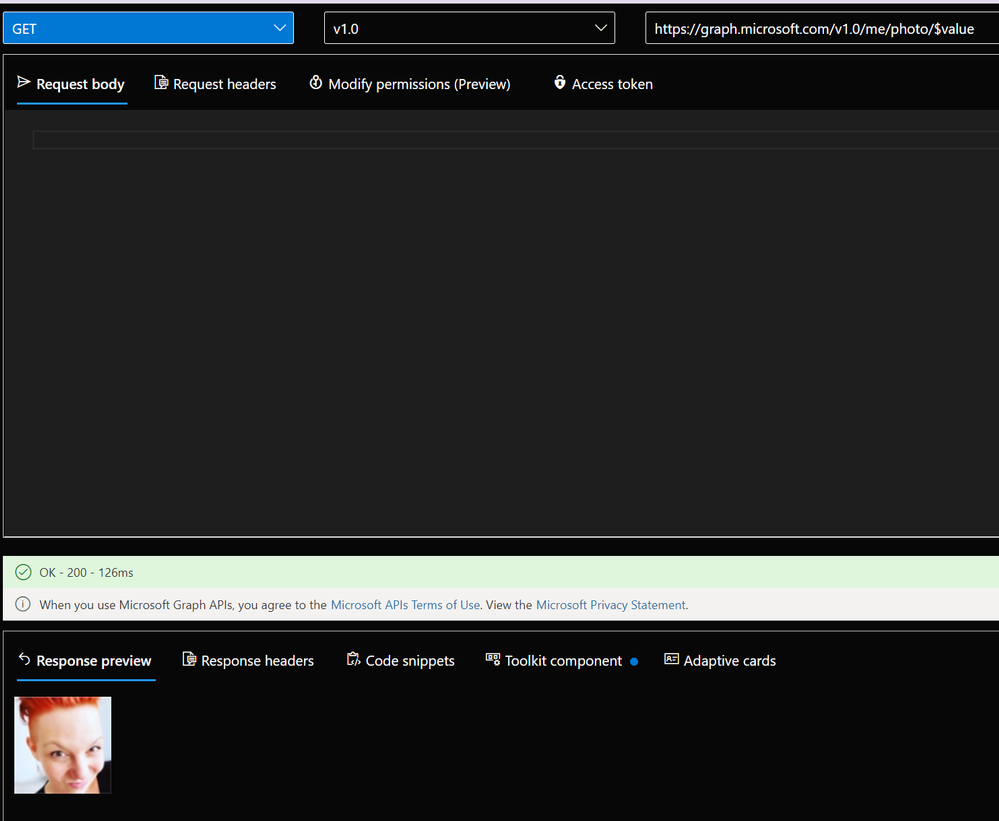
`GET https://graph.microsoft.com/v1.0/me/photo/$value` gets us the image of the signed-in user itself. I used the Graph Explorer to check that:
Let’s do an exercise:
Exercise – Use Microsoft Graph in your web application to retrieve a user’s profile photo
build upon module 2
As we are building upon the last module, we will not need to clone the repository again. The unit quickly walks us through the four primary files for our app `index.html`, `auth.js`, `graph.js` and `ui.js` to make us aware of what they will do and repeats the steps we did in module 2 to insert tenant ID and application ID.
Now the new part
1. copy – paste two code snippets into the `index.html` file to create and style a button with an image element
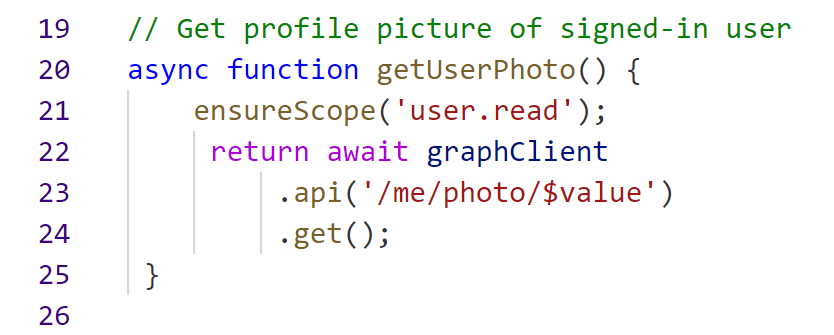
2. add a function to the `graph.js` file to call Microsoft Graph API and retrieve the photo of the signed-in user
3. add a function to the `ui.js` file that displays the image that we got from Graph into the image element that we created and styled in step 1
4. copy-paste a snippet to show a button that a signed-in user can click on to view their profile picture.
time to run our app
Like in Module 2, open your terminal (I use the built-in Powershell in Visual Studio Code) and type in `npm start`, which will open your browser with `localhost:8080`.
* Click on **Sign in with Microsoft**
* Click the `show profile picture` button
* see that profile pic? YAY – time for a happy dance- You made it!
conclusion
As I did module 2 just a couple of days before, I did not need to reinvent the wheel, and it took me way less than 17 minutes to complete this module 3 – but I realized that I could reuse this app over and over again to whenever I need to sign-in a user or want to display information that I can get from Microsoft Graph API.
I wrote this summary of the whole learning path because I worked with Microsoft Graph before, and although I don’t write (a lot) of code daily, these modules felt doable – even if you are not a super experienced developer. I hope there will be even more cool content!
If you now read this and wonder if you could build applications with Microsoft Graph as well: Yes, you can! To learn more – from developers, please join Microsoft’s Learn Together event: Building apps with Microsoft Graph on April 14!
I would love to hear your feedback! Did you start this learning path? Or completed it? What were your aha moments? Where did you struggle? What content is now needed to take you to the next level? Please comment below!
?





Recent Comments