
by Contributed | Apr 13, 2021 | Technology
This article is contributed. See the original author and article here.
Building a timeline of a cyber security incident is one of the most critical parts of affective incident investigation and response. It is essential in order to understand the path of the attack, its scope and to determine appropriate response measures.
Now in public preview, we are redesigning the Azure Sentinel full incident page to display the alerts and bookmarks that are part of the incident in a chronological order. As more alerts are added to the incident, and as more bookmarks are added by analysts, the timeline will update to reflect the information known on the incidents.
For each alert and bookmark, a side panel will be displayed to show details such as the entities involved, the status, the MITRE tactics used, custom details defined and many other details. Having these details available without further navigation can help with incident trigate and can reduce the overall investigation time.
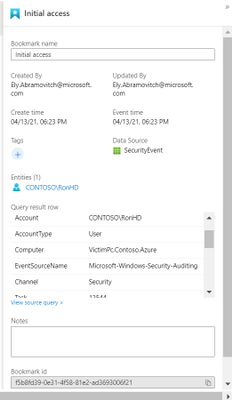

We plan to extend this offering by adding additional elements to the timeline such as anomalies or activities and including elements from the incident response world such as analyst or automation actions. We will appreciate your feedback as to what will help with you procceses.
For further reading:
by Contributed | Apr 13, 2021 | Technology
This article is contributed. See the original author and article here.
Guest post from the Azure Storage team
We are excited to announce Azure Storage Day, a free digital event on April 29, 2021, where you can explore cloud storage solutions for all your enterprise workloads. Join us to:
- Understand cloud storage trends and innovations—and plan for the future.
- Map Azure Storage solutions to your different enterprise workloads.
- See demos of Azure disk, object, and file storage services.
- Learn how to optimize your migration with best practices.
- Find out how real customers are accelerating their cloud adoption with Azure Storage.
- Get answers to your storage questions from product experts.
This digital event is your opportunity to engage with the cloud storage community, see Azure Storage solutions in action, and discover how to build a foundation for all of your enterprise workloads at every stage of your digital transformation.
The need for reliable cloud storage has never been greater. More companies are investing in digital transformation to become more resilient and agile in order to better serve their customers. The rapid pace of digital transformation has resulted in exponential data growth, driving up demand for dependable and scalable cloud data storage services.
Register here.
Hope to see you there!
– Azure Storage Marketing Team


by Scott Muniz | Apr 13, 2021 | Security
This article was originally posted by the FTC. See the original article here.
When it comes to scammers, nothing is sacred — including the bond between grandparent and grandchild. Lately, grandparent scammers have gotten bolder: they might even come to your door to collect money, supposedly for your grandchild in distress.
These kinds of scams still start with a call from someone pretending to be your grandchild. They might speak softly or make an excuse for why they sound different. They’ll say they’re in trouble, need bail, or need money for some reason. The “grandkid” will also beg you to keep this a secret — maybe they’re “under a gag order,” or they don’t want their parents to know. Sometimes, they might put another scammer on the line who pretends to be a lawyer needing money to represent the grandchild in court.
But, instead of asking you to buy gift cards or wire money (both signs of a scam), the scammer tells you someone will come to your door to pick up cash. Once you hand it over, your money is gone. But you might get more calls to send money by wire transfer or through the mail.
To avoid these scams and protect your personal information:
- Take a breath and resist the pressure to pay. Get off the phone and call or text the person who (supposedly) called. If you can’t reach them, check with a family member to get the real story. Even though the scammer said not to.
- Don’t give your address, personal information, or cash to anyone who contacts you. And anyone who asks you to pay by gift card or money transfer is a scammer. Always.
- Check your social media privacy settings and limit what you share publicly. Even if your settings are on private, be careful about what personal identifiers you put out on social media.
If you lost money to this kind of scam, it was a crime, so file a report with local law enforcement. And if you get any kind of scam call, report it at ReportFraud.ftc.gov.
Brought to you by Dr. Ware, Microsoft Office 365 Silver Partner, Charleston SC.

by Contributed | Apr 13, 2021 | Technology
This article is contributed. See the original author and article here.
By Go Komatsu – Sr. Program Manager | Windows and Aasawari Navathe, Program Manager II | Microsoft Endpoint Manager
Many organizations are looking to manage their endpoints via modern management to support the growing remote workforce and remove the need for on-premises connectivity. Years ago, the industry was starting to standardize on mobile management for endpoint management (through the Mobile Device Management (MDM) policy delivery channel). For Windows, it began standardizing with Windows Phone. At that time, it didn’t make sense to move over all Group Policy settings into modern management (via MDM). This resulted in an initial gap in management capabilities on MDM. Over time, with new Windows releases, we’ve continued to add more settings to MDM, but there were still some gaps that resulted in blocking customer migrations to modern management. Filling this long tail of MDM settings parity drove the need to focus on improvements to provide the best experience for customers.
Microsoft heard that customer feedback on MDM settings availability. Over the past year, both Windows and Microsoft Endpoint Manager – Intune teams were laser focused in closing that gap. If you are in the Windows Insider program, you may have noticed since H2 CY2020, new settings have become available in the Policy Configuration Service Provider (CSP) that were previously never available to customers in MDM. This was an intensive effort between several Windows component teams all trying to make sure that admins no longer considered setting availability in MDM as a blocker to move to modern management.
Over the past year, we also released Group Policy analytics in public preview. It is a tool and feature in Intune that analyzes your on-premises group policy objects (GPOs). It helps you determine how GPO settings translate to the cloud. The output shows which settings are supported by MDM providers, deprecated settings, or settings not available to MDM providers. There’s also the capability to directly migrate to a profile with those MDM settings in Endpoint Manager. Group Policy analytics also lists the settings and categories as they would be named when you make your eventual Device Configuration policy in MDM.
With the March, 2103 release of Microsoft Endpoint Manager and coming soon (expected), in the April, 2104 release of Intune, you will find:
- The device configuration settings catalog has been updated to list thousands of settings that previously were not available for configuration via MDM (Figure 1). You will see these as being marked as available for Windows Insiders only. These include settings from Windows components like Control Panel (Figure 2), which are critical for security and desktop standardization.
Figure 1: Device configuration settings catalog
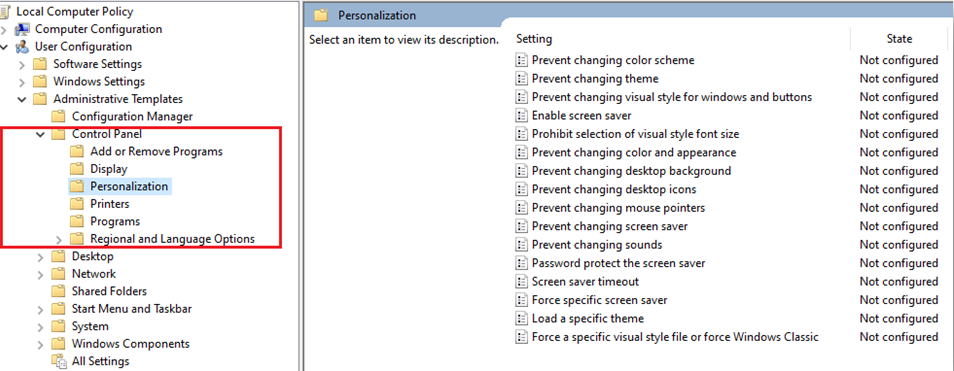 Figure 2: Control Panel
2. The Group Policy analytics (preview) tool has been updated so that when you now go through the import process of your Group Policy object (GPO), the MDM Support column will reflect the newly available settings.

Call to action: If you want to try out these new settings, you can target any devices on a Windows Insiders build (Build 21343 or later).
Further, you can also import your GPO into the Group Policy analytics tool for the latest data in the MDM Support column.
Feedback
You can provide feedback on Group Policy analytics when you select Got feedback. To get information on the customer experience, the feedback is aggregated, and sent to Microsoft. Entering an email is optional, and may be used to get more information.
Upcoming milestones
The next key milestone will be a backport of these settings to in-market Windows versions. This will result in settings availability on Windows 10 2004 and newer releases. The estimated timeline for this backport will be H2 CY2021.
Learn more
https://aka.ms/gpanalyticsdocs
Policy CSP – Windows Client Management | Microsoft Docs
Let us know if you have any questions by replying to this post or reaching out to @IntuneSuppTeam on Twitter.
by Contributed | Apr 13, 2021 | Technology
This article is contributed. See the original author and article here.
Microsoft has released security updates for vulnerabilities found in:
- Exchange Server 2013
- Exchange Server 2016
- Exchange Server 2019
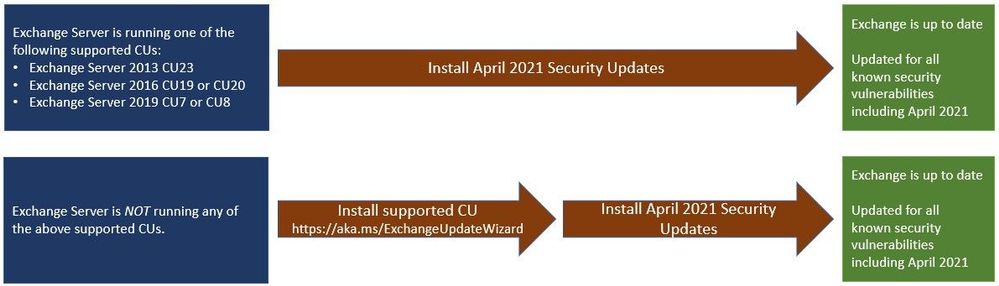
These updates are available for the following specific builds of Exchange Server:
IMPORTANT: If manually installing security updates, you must install .msp from elevated command prompt (see Known Issues in update KB article).
- Exchange Server 2013 CU23
- Exchange Server 2016 CU19 and CU20
- Exchange Server 2019 CU8 and CU9
Vulnerabilities addressed in the April 2021 security updates were responsibly reported to Microsoft by a security partner. Although we are not aware of any active exploits in the wild, our recommendation is to install these updates immediately to protect your environment.
These vulnerabilities affect Microsoft Exchange Server. Exchange Online customers are already protected and do not need to take any action.
For additional information, please see the Microsoft Security Response Center (MSRC) blog. More details about specific CVEs can be found in Security Update Guide (filter on Exchange Server under Product Family).
Two update paths are:
Inventory your Exchange Servers
Use the Exchange Server Health Checker script, which can be downloaded from GitHub (use the latest release), to inventory your servers. Running this script will tell you if any of your Exchange Servers are behind on updates (CUs and SUs).
Update to the latest Cumulative Update
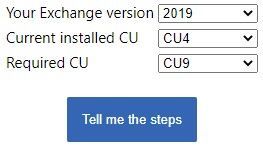
Go to https://aka.ms/ExchangeUpdateWizard and choose your currently running CU and your target CU. Then click the “Tell me the steps” button, to get directions for your environment.
If you encounter errors during or after installation of Exchange Server updates
Make sure to follow the ExchangeUpdateWizard instructions and best practices for installation of updates carefully, including when to install using elevated command prompt. If you encounter errors during or after installation, see Repair failed installations of Exchange Cumulative and Security updates.
FAQs
My organization is in Hybrid mode with Exchange Online. Do I need to do anything?
While Exchange Online customers are already protected, the April 2021 security updates do need to be applied to your on-premises Exchange Server, even if it is used only for management purposes. You do not need to re-run the Hybrid Configuration Wizard (HCW) after applying updates.
Do the April 2021 security updates contain the March 2021 security updates for Exchange Server?
Yes, our security updates are cumulative. Customers who installed the March 2021 security updates for supported CUs can install the April 2021 security updates and be protected against the vulnerabilities that were disclosed during both months. If you are installing an update manually, do not double-click on the .msp file, but instead run the install from an elevated CMD prompt.
Is Microsoft planning to release April 2021 security updates for older (unsupported) versions of Exchange CUs?
No, we have no plans to release the April 2021 security updates for older or unsupported CUs. In March, we took unprecedented steps and released SUs for unsupported CUs because there were active exploits in the wild. You should update your Exchange Servers to supported CUs and then install the SUs. There are 47 unsupported CUs for the affected versions of Exchange Server, and it is not sustainable to release updates for all of them. We strongly recommend that you keep your environments current.
Can we use March 2021 mitigation scripts (like EOMT) as a temporary solution?
The vulnerabilities fixed in the April 2021 updates are different from those we fixed before. Therefore, running March 2021 security tools and scripts will not mitigate the vulnerabilities fixed in April 2021. You should update your servers as soon as possible.
Do I need to install the updates on ‘Exchange Management Tools only’ workstations?
Servers or workstations running only Microsoft Exchange Management Tools (no Exchange services) do not need to apply these updates.
Why are there security updates two months in a row?
Microsoft regularly releases Exchange Server security updates on ‘patch Tuesday’. We are always looking for ways to make Exchange Server more secure. You should expect us to continue releasing updates for Exchange Server in the future. The best way to be prepared for new updates is to keep your environment current.
Is there no update for Exchange Server 2010?
No, Exchange 2010 is not affected by the vulnerabilities fixed in the April 2021 security updates.
Is there a specific order of installation for the April 2021 security updates?
We recommend that you update all on-premises Exchange Servers with the April 2021 security updates using your usual update process.
NOTE: This post might receive future updates; they will be listed here (if available).
The Exchange Team
by Contributed | Apr 13, 2021 | Technology
This article is contributed. See the original author and article here.
Final Update: Sunday, 11 April 2021 11:24 UTC
We’ve confirmed that all systems are back to normal with no customer impact as of 04/08, 13:45 UTC. Our logs show the incident started on 03/31, 15:45 UTC and that during the 7 days and 22 hours that it took to resolve the issue some customers may have experienced
misfired alerts when using Azure Metric Alert Rules on Log Analytics resources in West Europe region.
Root Cause: We determined that a backend service responsible for processing alerts became unhealthy due to a configuration issue.- Incident Timeline: 7 Days & 22 Hours – 03/31, 15:45 UTC through 04/08, 13:45 UTC
We understand that customers rely on Metric Alerts as a critical service and apologize for any impact this incident caused.
-Madhav
by Contributed | Apr 13, 2021 | Technology
This article is contributed. See the original author and article here.
Final Update: Tuesday, 13 April 2021 11:43 UTC
We’ve confirmed that all systems are back to normal with no customer impact as of 04/13, 11:10 UTC. Our logs show the incident started on 04/13, 10:00 UTC and that during the 1hour & 10 minutes that it took resolve the issue some customers may have experienced data access issue, missed or delayed log search alerts in West Europe region
- Root Cause: The failure was due to one of our backened service
- Incident Timeline: 1 Hours & 10 minutes – 04/13, 10:00 UTC through 04/13, 11:10 UTC
We understand that customers rely on Azure Log Analytics as a critical service and apologize for any impact this incident caused.
-Deepika
by Scott Muniz | Apr 13, 2021 | Security, Technology
This article is contributed. See the original author and article here.
Microsoft’s April 2021 Security Update mitigates significant vulnerabilities affecting on-premises Exchange Server 2016 and 2019. An attacker could exploit these vulnerabilities to gain access and maintain persistence on the target host. CISA strongly urges organizations to apply Microsoft’s April 2021 Security Update to mitigate against these newly disclosed vulnerabilities. Note: the Microsoft security updates released in March 2021 do not remediate against these vulnerabilities.
In response to these the newly disclosed vulnerabilities, CISA has issued Supplemental Direction Version 2 to Emergency Directive (ED) 21-02: Mitigate Microsoft Exchange On-Premises Product Vulnerabilities. ED 20-02 Supplemental Direction V2 requires federal departments and agencies to apply Microsoft’s April 2021 Security Update to mitigate against these significant vulnerabilities affecting on-premises Exchange Server 2016 and 2019.
Although CISA Emergency Directives only apply to Federal Civilian Executive Branch agencies, CISA strongly encourages state and local governments, critical infrastructure entities, and other private sector organizations to review ED 21-02 Supplemental Direction V2 and apply the security updates immediately. Review the following resources for additional information:
by Scott Muniz | Apr 13, 2021 | Security, Technology
This article is contributed. See the original author and article here.
Adobe has released security updates to address vulnerabilities in multiple Adobe products. An attacker could exploit these vulnerabilities to take control of an affected system.
CISA encourages users and administrators to review the following Adobe Security Bulletins and apply the necessary updates.
by Contributed | Apr 13, 2021 | Technology
This article is contributed. See the original author and article here.
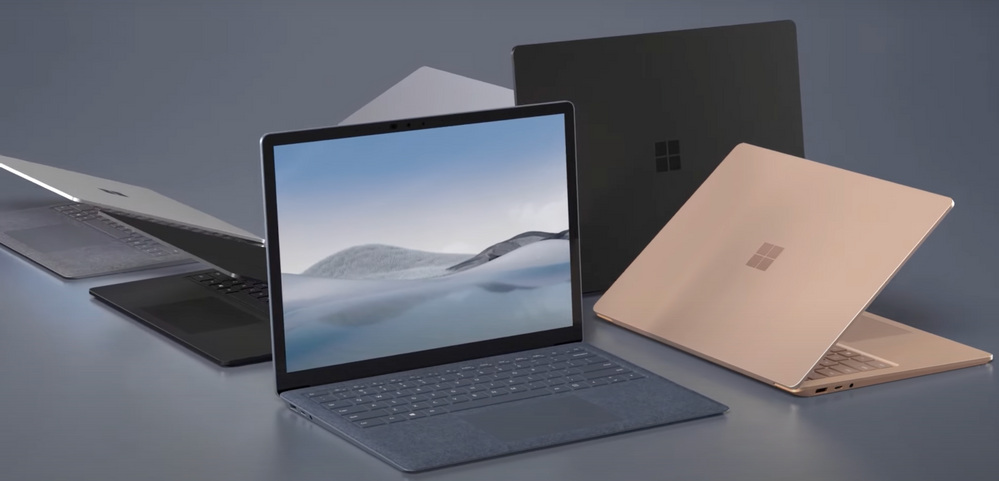
Get an insider’s look at the latest Surface Laptop 4. While Surface Laptop’s familiar signature sleek form factor has been retained, under the covers you’ll find major optimizations to bring the overall performance, battery life and device experience to the next level.
Taking a tour of the internals, both Intel™ and AMD processors are now available on 13.5″ and 15″ models. Models with AMD chipsets are now equipped with 7 nanometer multi-threaded Ryzen™ 5 & Ryzen™ 7 Microsoft Surface Edition processors. Models with Intel® chipsets now use 11th Gen Core™ i5 & Core™ i7 quad core and multi-threaded processors with integrated Intel™ Iris® Xe graphics.
New to Surface Laptop 4 is the addition of Dolby® Atmos™. There’s also an HD camera array with integrated IR sensor for Windows Hello-based authentication. Surface Laptop 4 is equipped with a full-sized USB-A port, USB-C® 3.2 Gen 2 supporting display output and charging, a 3.5mm audio jack, and Surface Connect port.
QUICK LINKS:
00:56 — Color options
01:16 — Processor options from AMD and Intel
03:00 — Wi-Fi and Bluetooth connectivity
04:06 — Speakers and microphone
04:57 — Camera performance
05:40 — USB connectivity and ports
06:14 — Replaceable SSD and serviceable components
06:30 — IT management capabilities
06:59 — Wrap Up
Link References:
Learn more at https://www.surface.com
Unfamiliar with Microsoft Mechanics?
We are Microsoft’s official video series for IT. You can watch and share valuable content and demos of current and upcoming tech from the people who build it at Microsoft.
Video Transcript:
Welcome to Microsoft Mechanics, in the next few minutes we’ll give you an insider’s look at the latest Surface Laptop, now in its 4th generation. Offered in both 13.5 and 15-inch options, Surface Laptop 4 is designed to balance premium comfort, productivity, and performance.
The experience starts with one finger open and fast login; then the backlit keyboard has 1.3mm key travel for comfortable typing; and is paired with a full-sized precision trackpad. The color calibrated PixelSense displays compared to typical 16×9 laptop displays, offer 18% more vertical screen real estate with their signature 3×2 aspect ratio. They also have 10-point multi-touch and a built-in digitizer for inking. Combined with powerful multi-tasking performance across your favorite apps; and cinematic audio; — everything about the Surface Laptop device experience is designed to keep you in your flow.
All in all, the Surface Laptop’s familiar signature sleek form factor has been retained, while adding more options for customization. Along with Platinum, Matte Black and Sandstone, we’ve now added a brand-new Ice Blue option with premium Alcantara available for the 13.5-inch model.
Next, major optimizations under the covers bring the overall performance, battery life and device experience to the next level. We worked closely with both AMD and Intel to tune processor performance for Surface Laptop and Windows 10.
Taking a tour of the internals, both Intel and AMD processors are now available on 13.5″ and 15″ models, whether you’re buying as a consumer or as an organization. The CPU combined with Windows platform efficiencies, along with further work to optimize efficiency across power states, also helps achieve substantially improved battery life, all without increasing the size of the battery. Models with AMD chipsets are now equipped with 7 nanometer multi-threaded Ryzen™ 5 & Ryzen™ 7 Microsoft Surface Edition processors. Ryzen 7 doubles the core count from 4 to 8 and runs at a higher clock speed. And Ryzen 5 increases the core count from 4 to 7, vs. other 4000-series Ryzen 5 processors with 6 cores. The extra core is used for GPU.
And each has integrated AMD Radeon™ graphics Models with Intel® chipsets now use 11th Gen Core™ i5 & Core™ i7 quad core and multi-threaded processors with integrated Iris® Xe graphics Across both processor options, this equates to more speed and multitasking power than before.
To complement faster CPUs, with Surface Laptop 4, you can choose from options of up to 32 gigabytes of fast 42,66MHz memory. And for storage, Surface Laptop 4 can now be configured with up to a 1 terabyte NVMe SSD. Surface Laptop 4 universally supports — 802.11ax Wi-Fi 6 — and Bluetooth® 5.0 wireless connectivity. Commercial devices include a discrete TPM 2.0 chip for enterprise-grade security. And models with AMD processors are the first to ship as certified Windows 10 Secured-core PCs.
Now at the heart of the experience is the work we’ve done to improve thermal design. The active cooling system combined with smart logic ensures the Surface Laptop 4 remains whisper quiet. Our virtual temperature sensor uses advanced techniques and readings from multiple sources across the board to provide the best performance, while keeping the device within controlled touch temperature ranges. So, in normal use the fan will not need to be powered on and is quiet when it is triggered under heavy load.
Additionally, thermals and power profile settings are manually configurable with the performance slider in Windows, each setting has unique power and performance characteristics. For example, you can lower the setting to extend the battery on a flight or raise it before gaming.
Next, the audio video experience with Surface Laptop 4 is optimized for more immersive online meetings with Microsoft Teams. New to Surface Laptop 4 is the addition of Dolby® Atmos™ to deliver rich full-range and accurate spatial sound from its stereo omnisonic speakers, which fire through the keyboard to avoid showing visible speaker ports and use the screen to reflect sound. The bass response has also been extended for when you’re listening to music or watching movies. Along the top of the display, you’ll find the dual Studio Microphone array designed for accurate voice capture, this includes auto-leveling when used with Microsoft Teams that keeps sound levels consistent if you move away from the device while talking, as well as more accurate speech-to-text transcription and better interactions for more natural conversation in multi-party meetings.
Here you’ll also find the HD camera array with integrated IR sensor for Windows Hello-based authentication. The camera image processing is hardware-accelerated for noise reduction, sharpness, and contrast. Its F2 aperture and 1.4-micron pixel sensor let in about 60% more light compared to common 1.1-micron pixel sensors in other HD laptop cameras, resulting in better low light capture.
Then in software, starting with face detection, exposure and white balance have been tuned to allow our image processing algorithms to give more accurate skin tones and improve picture quality in real time. Along the base of Surface Laptop 4, you’ll continue to find USB-A and USB-C 3.2 Gen 2 ports and a 3.5mm headset jack on the left. The USB-C port also supports display output and charging. On the right of the device, there is a Surface Connect + port with support for fast charging or docking your Surface Laptop.
… In fact, when paired with the optional Surface Dock 2, it will drive two 4k displays at 60 hertz along with its internal LCD display… And for IT, Surface Laptop 4 hardware is designed to be serviceable. The SSD is removable and replaceable by skilled on-site technicians. Additionally, the display cover, and the keyboard cover can be replaced by authorized service centers. Models with AMD processors now also benefit from the same enterprise deployment and management tools as models equipped with Intel chips. Both can be personalized with required apps and policies using zero touch deployment with Windows Autopilot. This allows Surface devices to be directly shipped from the factory to users. Equally, Microsoft Endpoint Manager with Device Firmware Configuration Interface policies, also extend to Surface Laptop 4 models with AMD chips.
So that was a quick tour of the new Surface Laptop 4, designed to balance premium comfort, productivity, and performance. Check out surface.com for availability and more information. And thanks for watching.


Recent Comments