by Contributed | Apr 22, 2021 | Technology
This article is contributed. See the original author and article here.
Hopefully, you have read my previous blog posts about Azure Purview access management Part 1 and Part 2 to find about Azure Purview control plane and data plane roles and tasks. In this post, I will cover the following topic:
- Overview of dashboards and roles required to extend your M365 Sensitivity Labels to Azure Purview.
By extending M365 Sensitivity Labels to Azure Purview you can automatically assign labels to files and database columns in Azure Purview.
In order to bring Sensitivity Labels from M365 to Azure Purview, you may need to work with other teams in your organization. The following table summarizes tasks, required to extend the labels to Azure Purview including dashboards and roles required to perform each step:
Task
|
What portal to use
|
Who can perform this task
|
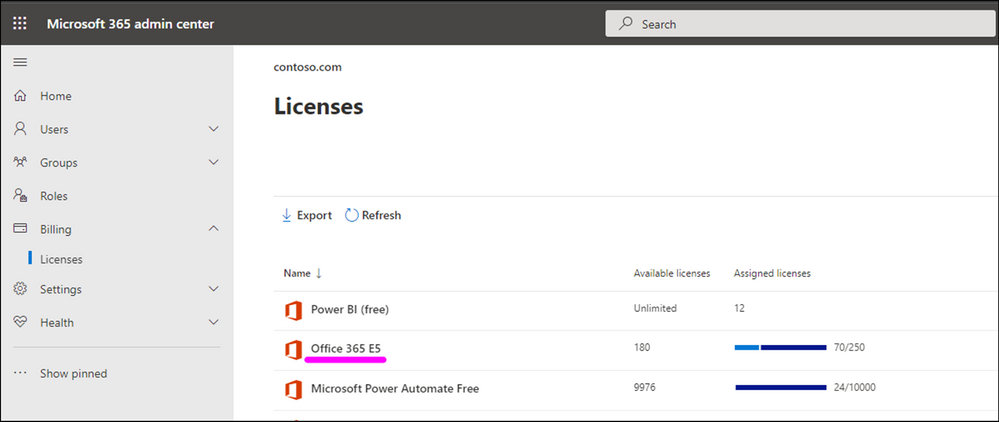
Verify if you have at least one M365 E5 License in your Azure AD tenant
|
Azure Portal (https://portal.azure.com/) OR
M365 Admin Center (https://admin.microsoft.com/AdminPortal/)
|
Any Azure AD role (e.g. Global Reader)
|
Consent “Extend labeling to assets in Azure Purview”
|
Microsoft 365 Security and Compliance Center (http://compliance.microsoft.com/)
|
Azure AD Roles:
Compliance Administrator
OR
Global Administrator
|
Create and update Sensitivity Labels in M365
|
Microsoft 365 Security and Compliance Center
|
Azure AD Roles:
Azure Information Protection Administrator
OR
Global Administrator
|
Register Data Sources in Azure Purview
|
Azure Purview Studio
(https://web.purview.azure.com/)
|
Azure Purview Roles (data plane:(
Purview Data Source Administrator + Purview Data Curator
AND
Azure Roles (control plane)
Reader (on data sources)
|
Scan Data Sources in Azure Purview
|
Azure Purview Studio
|
Azure Purview Roles (data plane):
Purview Data Source Administrator + Purview Data Curator
OR
Purview Data Source Administrator + Purview Data Reader
|
Search Catalog and filter assets based on Sensitivity Labels
|
Azure Purview Studio
|
Azure Purview Roles (data plane):
Purview Data Reader
OR
Purview Data Curator
|
View Sensitivity Labels Insights reports
|
Azure Purview Studio
|
Purview Data Reader
OR
Purview Data Curator
|
Verify if you have at least one M365 E5 License in your Azure AD tenant
Use your M365 Admin center to check if you already have M365 E5 Licenses in your tenant:
If you do not have this license in place, please work with your finance team to obtain the required licenses. Microsoft 365 E5 | Microsoft 365 Enterprise.
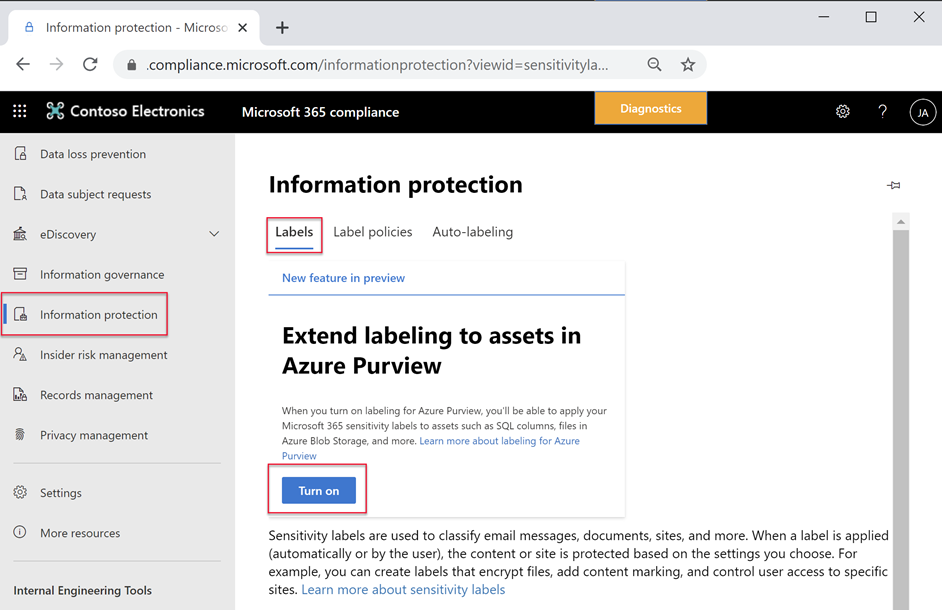
Consent “Extend labeling to assets in Azure Purview”.
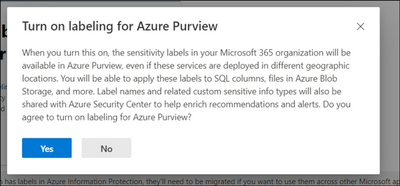
By default, Sensitivity Labels are only available for assets in M365. With this one-time operation at your Azure AD tenant level, you will allow M365 Sensitivity Labels to be extended to assets in Azure Purview. Use Microsoft 365 Security and Compliance Center to consent.
Create or update M365 Auto-labeling Rules
It is important to identify which team in your organization is responsible for defining Sensitivity Labels in Microsoft 365.
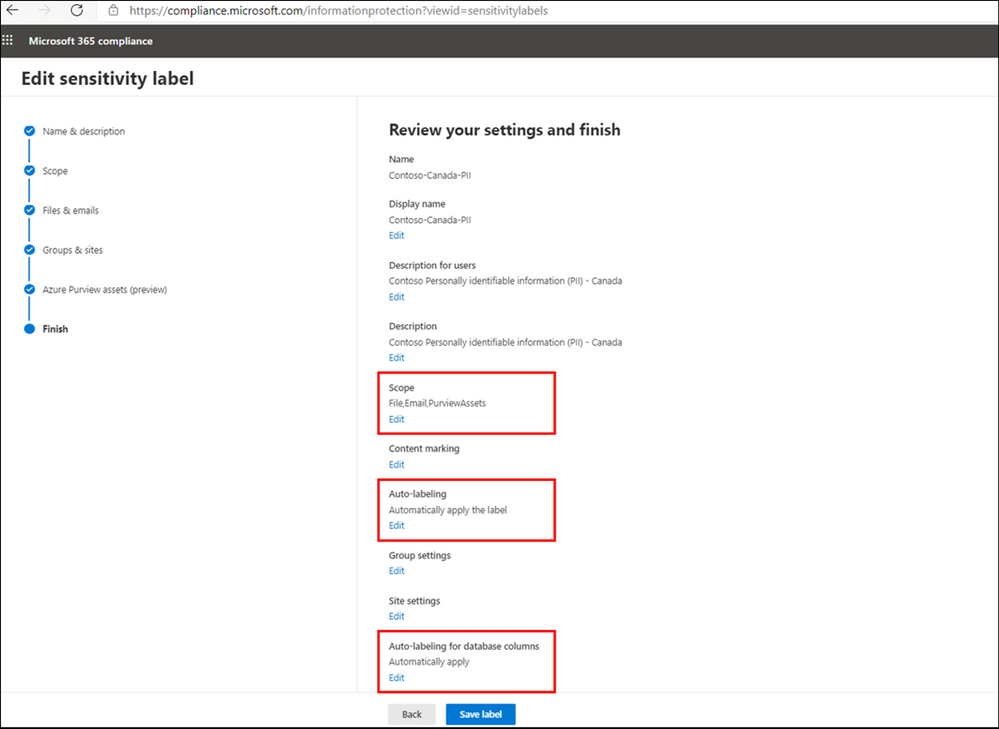
To extend a label to Azure Purview, you can create a new M365 Sensitivity Label or update an existing one in Microsoft 365 Security and Compliance Center, by configuring the following settings:
- From Define the scope for this label enable Azure Purview Assets.
- Add Auto-labeling rule
- From Auto-labeling for database columns enable Auto-labeling for database columns.
Information Protection Administrator or Global Administrator roles can be used to create or update Sensitivity Labels.
If you are looking to expand visibility of your M365 Sensitivity Labels to other teams, you can provide them with Read-only access to view of M365 Sensitivity Labels in your tenant, you can assign the user with Security Reader role in Azure AD or more specifically assign them with Sensitivity Label Reader in Microsoft 365 Security and Compliance Center.
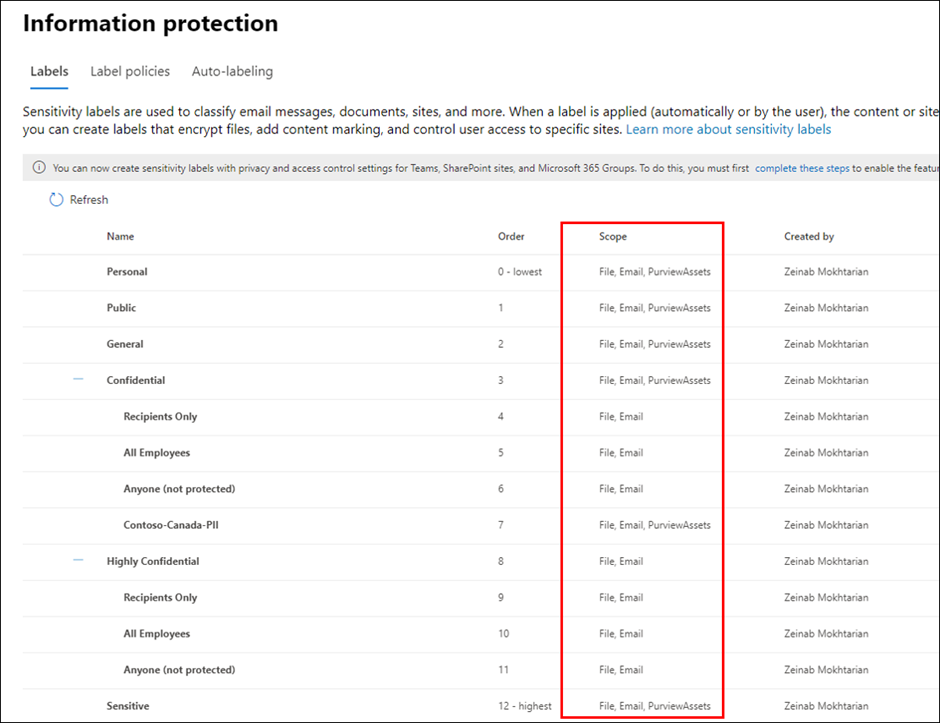
Register and Scan data sources in Azure Purview
Use Azure Purview Studio to register data sources such as Azure SQL Servers or Blob Storage. Once you scan your data sources, Sensitivity Labels are automatically assigned based on auto-labeling rules and then you will be search, browse and filter assets based on Sensitivity Labels or view Insights Reports. View my past blog post to read more about setting up and exploring assets by Sensitivity Labels in Azure Purview.
Purview Data Curator + Data Source Administrator or Purview Data Reader + Data Source Administrator roles can be used to scan data in Azure Purview. To search assets and view reports, you can use at least Purview Data Reader role.
Summary and Call to Action
Through close integration with Microsoft Information Protection offered in Microsoft 365 Azure Purview enables direct ways to extend visibility into your data estate, and classify and label your data.
We would love you hear your feedback and know how Azure Purview helped tracking your sensitive data estate using automatic labeling.
- Create an Azure Purview account now and extend your M365 Sensitivity Labels across your files and database columns in Azure Purview.
- Use Sensitivity Labels Insights to get a bird’s eye view of your data estate by the sensitivity labels.
- Learn more about Azure Purview Autolabeling and Sensitivity Label Insights.
- Provide your feedback.
by Contributed | Apr 22, 2021 | Technology
This article is contributed. See the original author and article here.
Microsoft Forms aims to help you make better decisions with data. As we improve Forms’ intelligence service, we support you in not just creating surveys and polls more easily, but also in extracting key insights from data in an understandable way. Read on to learn about three of these improvements: Estimated Time, the Insights button, and Word Clouds.
Automatically Add Estimated Response Time (Design Intelligence)
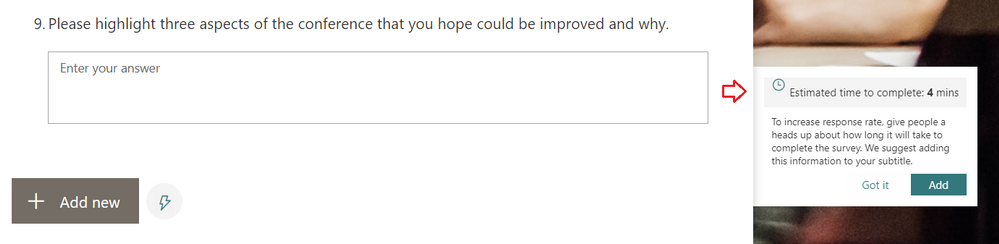
You may have noticed that while creating your surveys, Forms now provides an estimated response time for longer surveys. Our intelligence service can now predict the approximate time it will take for someone to complete the form, depending on the types and number of questions on the form. You can add this estimated response time (as seen below) in the subtitle of the form, which can help increase the form’s response rates.
Add Estimated Time to Encourage Response Completion
Engage in a New Experience for Forms Data Insights
In the past, after collecting a few dozen responses in your survey, you may have noticed the “Ideas” button appear at the top of the Responses tab of your Forms design page. By clicking on “Ideas,” you would have seen intelligence-based data insights on your responses.
From now on, you might instead see an “Insights” button under a particular question. If the Forms service can provide insights on the responses to that question—which is dependent on the number of responses and the data itself—you will see this “Insights” button. With this change, you can more clearly interpret the insights Forms provides for a specific question.
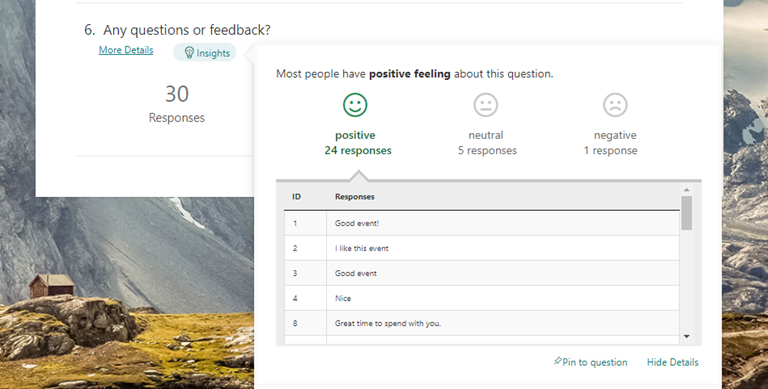 Click the Insights button to uncover analysis of your responses
As some of you are already familiar, these insights include sentiment analysis on open-response questions, score distribution for ratings questions, and association rule analysis, which notices patterns in responses across multiple choice questions. These insights are presented in easy-to-read data visualizations, which you can pin for quick future reference.
Visualize Open-Text Responses with Word Clouds (Insights)
We are excited to introduce a new intelligence-based data insight type: word clouds for open-text questions in Forms. The key phrases from the response to that question will be extracted and be visualized in a word cloud, offering you a quick view on the top text phrases among the responses.
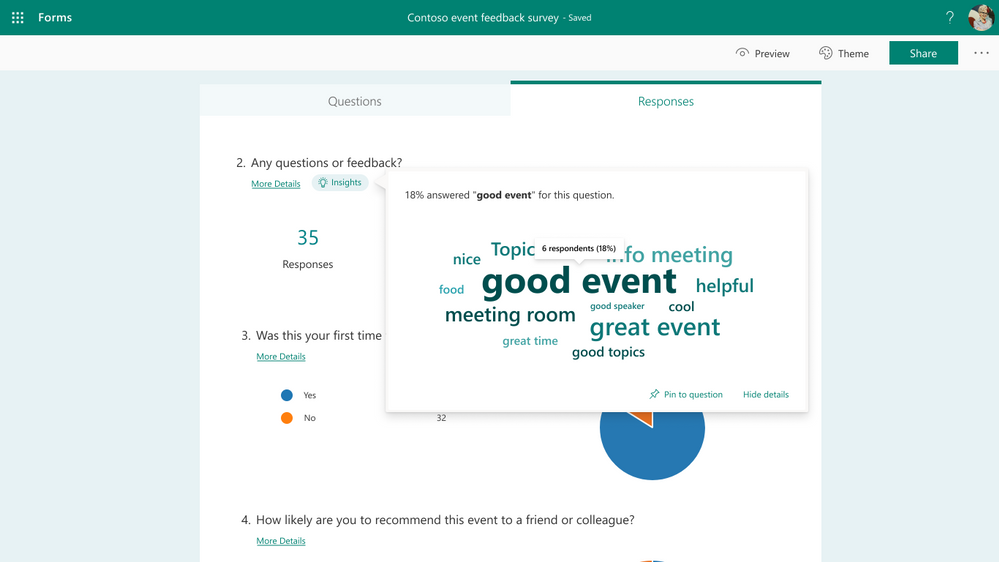 View open-text responses in word clouds
As seen above, when you click any key phrase in the word cloud, you can find statistics on how many respondents and what percentage of respondents mentioned this phrase in their response.
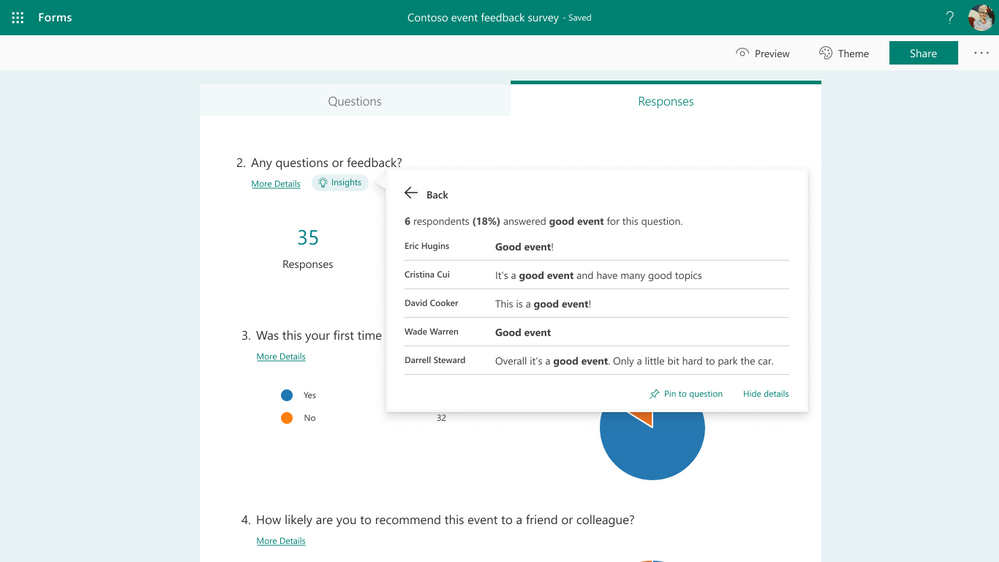 Click the word cloud to see exact responses
Additional FAQ:
When will this become available?
We will begin roll out of word clouds to open-text questions in regular forms at the end of April. Meanwhile, as Open-Text Polls for Microsoft Teams meetings start rollout at the end of May or early June, word clouds for these polls will become available as well.
Which languages are supported?
Word clouds will support English and Chinese text in our first stage of this work. We will expand to additional languages in the near future—please stay tuned.
Will I always get a word cloud for my open-text questions?
No, not always—this is because the Forms service may not have found any meaningful results to show, especially if you have only received a small number of total responses. You can come back to check for a word cloud after collecting more responses.
Next Steps
We hope you explore these latest updates as they become available to you. If you have additional questions on Forms surveys, quizzes, or polls, please visit our Support page. You can also join discussions in the Microsoft Forms Tech Community and follow the Forms Blog to stay updated in the future. Thank you.
by Contributed | Apr 22, 2021 | Technology
This article is contributed. See the original author and article here.
Track what matters most from the comforts of a larger touch screen device. We’re pleased to share Microsoft Lists for iOS now supports iPad. AKA, no more lists at 2x. You’ll get a beautiful native experience to track, manage and share your information. We, too, have enabled Conditional Access to Lists for iOS, and updated an important fix when a list is deleted from your iPhone or iPad.
Get Microsoft Lists for iOS today.
Let’s dive into all the updates below.
Microsoft Lists for iOS: iPad support [Roadmap ID: 70748]
Microsoft is expanding device support on iOS to now include iPad. Microsoft Lists for iOS looks great on iPhone and iPad, scaling the user-friendly user interface to give you the best access to create, edit, and share your information from your iOS device.
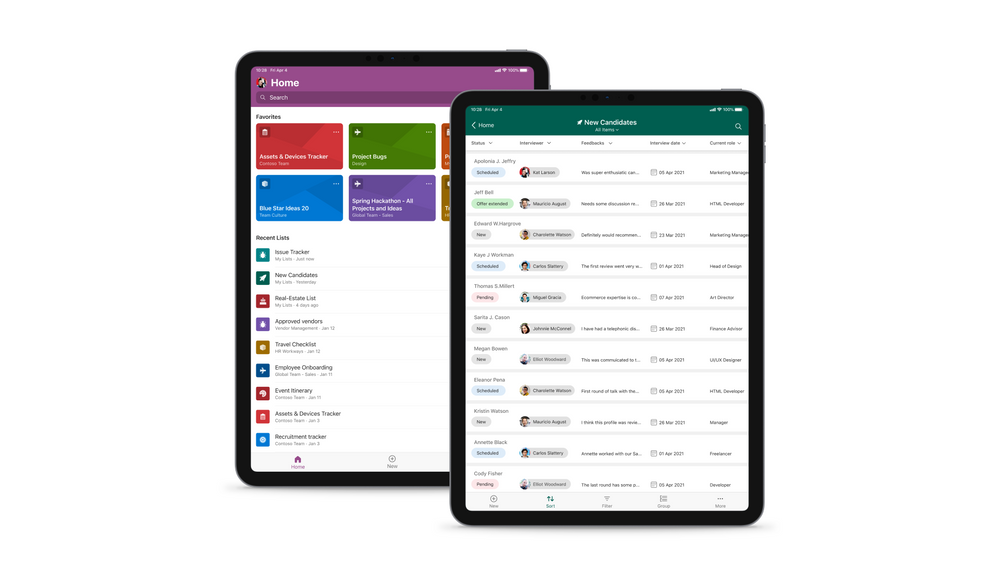
Microsoft Lists for iOS on an iPad, showing the main home screen with Search, and Favorites and Recent lists (left), and working on an individual ‘New Candidates’ list (right).
With the extra screen real estate, you can easily search for lists, list items, and tap directly into your favorite and recent lists – directly from the home screen. Lists looks great in both portrait and landscape modes. And it mirrors the Lists Web experience, blended within the common design of iOS.
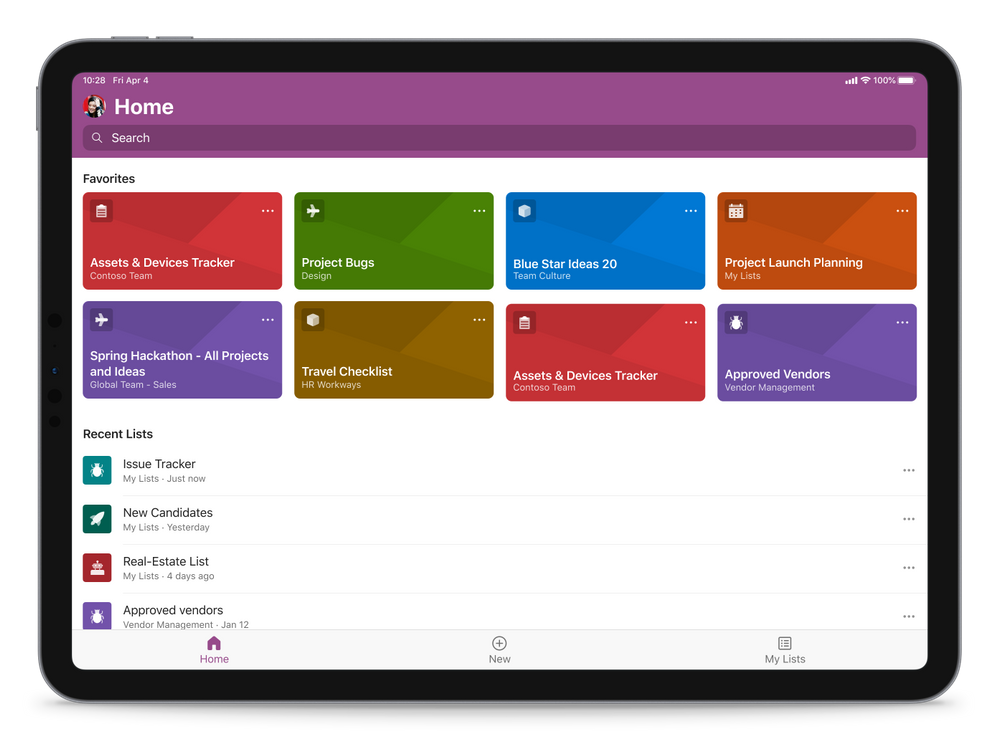 Microsoft Lists for iOS on an iPad, showing the main home screen with Search, and Favorites and Recent lists (in landscape mode)
Once in a list, you’ll swipe up and down, left to right to navigate your list. You’re able to tap into a specific list item to see it’s full view form. And you can refine the view of information using filter, group by, and tapping into individual fields to make changes to drop-down menus or enter text.
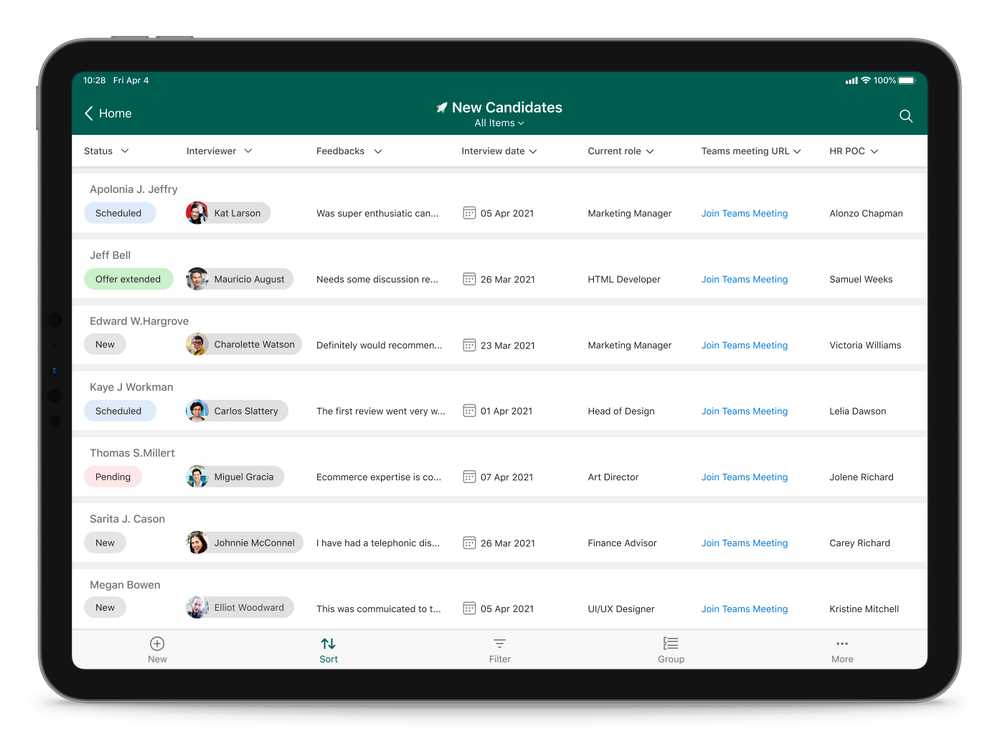 Microsoft Lists for iOS on an iPad, working on an individual ‘New Candidates’ list (in landscape mode)
Admins: Manage Microsoft Lists for iOS using InTune app protection policies (APP)
The Microsoft Lists iOS app is now configurable as a public app in Intune app protection policy (APP) through the Microsoft Endpoint Manager admin center. This allows app to be targeted to ensure that the data accessed is protected by app protection policies.
The app now also supports conditional access deployment through Azure admin portal. Please note that ‘Require app protection policy’ is supported which provides higher level of assurance. Lists app doesn’t currently support ‘Require approved client app’ grant access.
Learn more how to enable InTune app protection policies (APP) for Lists for iOS, which includes how to create and assign app protection policies (via docs.microsoft.com).
Bug fix update for lists deleted from an iPhone or iPad
Lists deleted from Lists for iOS can now be restored from the corresponding site recycle bin. We appreciate everyone who brought this to our attention, and for your patience while our development team addressed the issue.
Additional resources
To learn more about Lists throughout the year, please visit our updated Microsoft Lists resource center for blogs, demos, videos, podcasts, and more.
Get more done with Microsoft Lists on the go.
Thanks, Mark Kashman – senior product manager – Microsoft 365
by Contributed | Apr 22, 2021 | Technology
This article is contributed. See the original author and article here.
Avtex, a Microsoft Gold Partner, knows well the value of training and how it helps build loyalty—both with its clients and among its employees. We recently spoke with Steven Jacobowitz, Avtex Director of Capabilities, about how the company maintains its technical expertise and Gold Partner status with a dedicated program of workforce training.
“We made an investment in our people, and they appreciate that,” Jacobowitz explains. “It makes a difference in how our clients trust our expertise. The training has also been a real morale booster for our teams.”
Staying Gold in an ever-changing digital world
Since the 1970s, Avtex has helped its clients build and retain their customers with marketing and communications solutions. These days, Avtex guides its clients through digital transformation initiatives using cloud solutions powered by Microsoft Dynamics 365, Azure, and Microsoft 365. The company also partners with Genesys, one of the largest call center applications in use today.
As a Microsoft Gold Partner, Avtex hires highly skilled technicians and consultants who must stay up to date on the Microsoft technologies that support its clients. Avtex team members have passed hundreds of exams and assessments on technical competencies and have earned hundreds of Microsoft Certifications—all of which give its clients a deep pool of talent to depend on.
To maintain Gold Partner status, Avtex supports ongoing training and certifications. To achieve and retain this level of partnership requires a huge learning commitment.
Before Jacobowitz came to Avtex, the training process was informal. “Part of my job is to work with our technicians’ careers and make sure that they’re upskilling all the time,” he says. “Before, everybody was scrambling at the end of the year to get to those certifications so we could remain Gold.”
Jacobowitz himself holds more than 40 Microsoft Certifications, including every available Dynamics 365 certification and some legacy Dynamics certifications. He’s a big believer in the value of certifications, which have helped him earn promotions and bigger salaries over the years. Now, he reports, “I’m at a point in my career where I can do that for others.”
Jacobowitz initiated a more methodical approach to tracking the progress of his team members against their learning goals and to publicly celebrating their achievements. These efforts are part of his drive to enhance the culture of learning that Avtex promotes.
“It’s just so important to be more educated in the technologies that we’re supporting,” he notes. “I want everybody to know that our people are passing exams and getting certified.”
Advocating for training and advancing team skills
Training has become a key part of the employee review process at Avtex, where Jacobowitz maintains a skills matrix of the training and certification achievements for his team of technicians. He built the skills matrix using Microsoft Power Platform as a way to assess skill gaps while also boosting his knowledge of the low-code app building platform.
“I’m already planning, based on each one of my technician’s abilities, what they should be focusing on,” he explains. “Then I try to gently push them into the right direction. So far, it’s been working.”
For example, Jacobowitz wants to build more Microsoft Power Platform competency inside of Avtex this year. Some of his technicians are ramping up on the technology by training and studying for Exam PL-100: Microsoft Power Platform App Maker to earn the Microsoft Certified: Power Platform App Maker Associate certification.
More advanced technicians are aiming for the coveted “architect” title and preparing for Exam PL-600: Microsoft Power Platform Solution Architect, currently in beta, to earn the Microsoft Certified: Power Platform Solution Architect Expert certification. Still others are working on the requirements for Exam MB-230: Microsoft Dynamics 365 Customer Service for the Microsoft Certified: Dynamics 365 Customer Service Functional Consultant Associate certification. You can explore these Dynamics certifications and more on our website.
Tracking progress helps to keep people focused on their goals, Jacobowitz reports. Microsoft also recognizes the benefits and recently launched a learning management system called Microsoft Learn Organizational Reporting. This valuable service offers enterprise customers, partners, and academic institutions the ability to view and report on Microsoft Learn training progress and achievements for individuals within their organization’s tenant.
For Jacobowitz, helping his people learn has become job one. “I get to help them grow their own careers, which is really important. I get more thrill out of that than anything else I could possibly do at this point.”
The value of working with Microsoft Learning Partners
Last year, Jacobowitz initiated an effort at Avtex to roll out a new approach to training, starting with key technical people in the organization. Training is delivered through authorized Microsoft Learning Partners, which provide all the resources and course materials based on Microsoft Official Courseware (MOC).
Jacobowitz chose Learning Partners based on unusual but practical criteria. “I clicked on their websites to see whose was fastest. I didn’t want anything to hinder class sign-ups!”
Learning Partners help companies like Avtex meet their specific training and certification goals. In addition to delivering content, instructor-led trainings, and other material and logistical support, Learning Partners can help with assessing skill gaps and tracking progress, although that’s Jacobowitz’s role at Avtex.
Microsoft even commissioned a study by global research corporation IDC to find out more about the value that Learning Partners bring to organizations. For details, see Leveraging Microsoft Learning Partners for Innovation and Impact.[1]
Avtex is working with two Microsoft Learning Partners—Global Knowledge and Learning Tree—that take care of the details for the approximately 50 employees going through the new training program. This support frees Jacobowitz to focus on building his team’s skills.
“I have a philosophy of never leaving anybody behind,” he explains. “I get to focus on mentoring my people.”
‘I didn’t know Microsoft can do that!’
A culture of learning takes time to build. For the consultants who say they don’t have time for certifications, Jacobowitz has prepared a motivating response. “I say to them, ‘Look, if you’re not willing to invest in your own career, how do you think you’re ever going to get ahead in this industry?’”
Jacobowitz believes so firmly in the value of training that he convinced his executive team to set aside a week during which each consultant and technician in the program can focus on training and prepare for exams. It’s a big investment, as he notes.
“From our point of view, it isn’t just the cost of the training per employee, but it’s a week’s worth of missed billings that we’re also investing in. So it’s really a true partnership between Avtex and Microsoft.”
Participants in the training program are surveyed about their experience. Their feedback has included comments like, “I didn’t know Microsoft can do that!” and, “Wow, this is really better than I thought it was.”
Jacobowitz adds that as more Avtex technicians earn their certifications, they can better represent Microsoft products. More certifications also mean that the company can better serve its customers, and Avtex retains its Gold Partner status.
As Jacobowitz says, “Everybody wins in this situation.”
[1] Source: IDC white paper, sponsored by Microsoft, Leveraging Microsoft Learning Partners for Innovation and Impact, #US47225021, January 2021.
Learn more
Microsoft Certifications
Microsoft Learning Partners
Microsoft Learn Organizational Reporting
by Scott Muniz | Apr 22, 2021 | Security, Technology
This article is contributed. See the original author and article here.
CISA has released AR21-112A: CISA Identifies SUPERNOVA Malware During Incident Response to provide analysis of a compromise in an organization’s enterprise network by an advance persistent threat actor. This report provides tactics, techniques, and procedures CISA observed during the incident response engagement.
CISA encourages organizations to review AR21-112A for more information.
by Scott Muniz | Apr 22, 2021 | Security, Technology
This article is contributed. See the original author and article here.
This Alert uses the MITRE Adversarial Tactics, Techniques, and Common Knowledge (ATT&CK®) framework. See the ATT&CK for Enterprise framework for all referenced threat actor techniques.
The Cybersecurity and Infrastructure Security Agency (CISA) recently responded to an advanced persistent threat (APT) actor’s long-term compromise of an entity’s enterprise network, which began in at least March 2020. The threat actor connected to the entity’s network via a Pulse Secure virtual private network (VPN) appliance, moved laterally to its SolarWinds Orion server, installed malware referred to by security researchers as SUPERNOVA (a .NET webshell), and collected credentials.
SUPERNOVA is a malicious webshell backdoor that allows a remote operator to dynamically inject C# source code into a web portal to subsequently inject code. APT actors use SUPERNOVA to perform reconnaissance, conduct domain mapping, and steal sensitive information and credentials. (Note: for more information on SUPERNOVA, refer to Malware Analysis Report MAR-10319053-1.v1 – SUPERNOVA.) According to a SolarWinds advisory, SUPERNOVA is not embedded within the Orion platform as a supply chain attack; rather, an attacker places it directly on a system that hosts SolarWinds Orion, and it is designed to appear as part of the SolarWinds product.[1] CISA assesses this is a separate actor than the APT actor responsible for the SolarWinds supply chain compromise described in Alert AA20-352A: Advanced Persistent Threat Compromise of Government Agencies, Critical Infrastructure, and Private Sector Organizations. Organizations that find SUPERNOVA on their SolarWinds installations should treat this incident as a separate attack.
This report provides tactics, techniques, and procedures (TTPs) CISA observed during an incident response engagement. (Note: this threat actor targeted multiple entities in the same period; some information in this Analysis Report is informed by other related incident response engagements and CISA’s public and private sector partners.) This APT actor has used opportunistic tradecraft, and much is still unknown about its TTPs.
For a downloadable copy of indicators of compromise (IOCs) associated with this malware, see AR21-112A.stix and Malware Analysis Report MAR-10319053-1.v1.stix.
From at least March 2020 through February 2021, the threat actor connected to the entity via the entity’s Pulse Secure VPN appliance (External Remote Services [T1133]). The threat actor connected via the U.S.-based residential IP addresses listed below, which allowed them to masquerade as teleworking employees. (Note: these IP addresses belong to routers that are all similar models; based on this activity, CISA suspects that these routers were likely exploited by the threat actor.)
by Scott Muniz | Apr 22, 2021 | Security, Technology
This article is contributed. See the original author and article here.
Drupal has released security updates to address a vulnerability affecting Drupal 7, 8.9, 9.0, and 9.1. An attacker could exploit this vulnerability to take control of an affected system.
CISA encourages users and administrators to review Drupal Advisory SA-CORE-2021-002 and apply the necessary updates or mitigations.

by Contributed | Apr 22, 2021 | Technology
This article is contributed. See the original author and article here.
Join @Karuana Gatimu, @Josh Leporati , @Matt Wolodarsky, and @Ryan McKinney for this month’s community call where we will continue with our every 4th Tuesday of the month schedule, occurring on April 27th! Join us at either 8:00 AM or 5:00 PM PT.
We will be covering topics around the Viva platform and new resources for the Hybird Workplace like SharePoint templates and end user training modules.
If you have not yet joined our champion community, signup here to get the resource links that contain access to the call calendar, invites, program assets, and previous calls!
http://aka.ms/m365champions
We look forward to seeing you there!
/Josh
by Contributed | Apr 22, 2021 | Technology
This article is contributed. See the original author and article here.
Final Update: Thursday, 22 April 2021 08:47 UTC
We’ve confirmed that all systems are back to normal with no customer impact as of 04/22, 08:45 UTC. Our logs show the incident started on 04/22, 07:00 UTC and that during the 1 hour and 45 minutes that it took to resolve the issue some customers may have experienced issues with missed or delayed Log Search Alerts in USGov Virginia region.
Root Cause: The failure was due to configuration changes.
- Incident Timeline: 1 Hour & 45 minutes – 04/22, 07:00 UTC through 04/22, 08:45 UTC
We understand that customers rely on Log Search Alerts as a critical service and apologize for any impact this incident caused.
-Mohini
by Contributed | Apr 22, 2021 | Technology
This article is contributed. See the original author and article here.
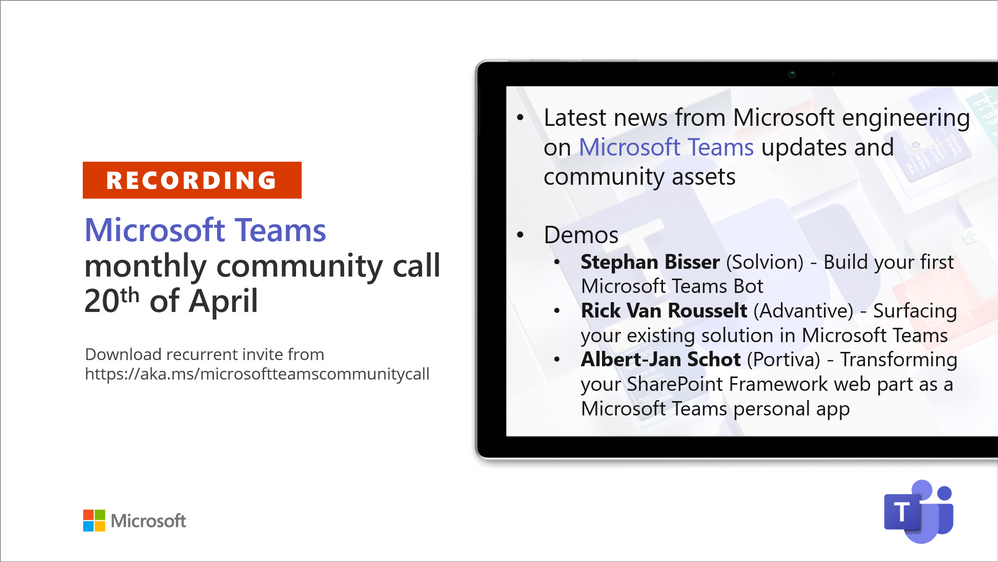
Recording of the Microsoft Teams monthly community call from April 20, 2021.
Call Summary
Latest news from Microsoft engineering on Microsoft Teams updates and community assets.
Visit the Microsoft Teams samples gallery to get started with Microsoft Teams development, hear and see the new Microsoft 365 Extensibility look book gallery co-developed by Microsoft Teams and Sharepoint engineering. Quick demo of the Extensibility look book at Microsoft Adoption site >> Solutions>>Extensibility look book. Select a Product, Type of app or Scenario. To see the Microsoft 365 extensibility options for your selection. Download showcase apps, samples and documentation. Register now for April trainings on Sharing-is-caring. Give us feedback, the Microsoft 365 developer community survey is now open. Download articles 1 and 2 of a 3-part series of articles called: “Build quality Microsoft Teams apps with these best practices.” Get the Microsoft Teams Toolkit (Controls) – “Designing your Microsoft Teams app” with layout guidance and reusable assets. The host of this call was Vesa Juvonen (Microsoft) | @vesajuvonen. Q&A takes place in chat throughout the call.
Actions:
- Complete the Microsoft 365 Developer Community Survey – https://aka.ms/m365pnp/survey
- Register for Sharing is Caring Events:
- First Time Contributor Session – April 27th (EMEA, APAC & US friendly times available)
- Community Docs Session – April
- PnP – SPFx Developer Workstation Setup – April 29th
- PnP SPFx Samples – Solving SPFx version differences using Node Version Manager – May TBD
- AMA (Ask Me Anything) – May 2021 – Tech Community – May 11th
- First Time Presenter – May TBD
- More than Code with VSCode – April 28th
- Maturity Model Practitioners – May TBD
- PnP Office Hours – 1:1 session – Register
- Download the recurrent invite for this call – https://aka.ms/microsoftteamscommunitycall
- Call attention to your great work by using the #PnPWeekly on Twitter.
Microsoft Teams Development Samples: (https://aka.ms/TeamsSampleBrowser)

It’s all about Community – Hello Microsoft Teams community!
Demos delivered in this session
Build your first Microsoft Teams Bot – Bots are used for Chat, Messaging Extensions, Task Modules, and more. 3 options for building Bots – Bot Framework SDK, Bot Framework Composer, and Power Virtual Agents. Same technology behind scenes, just matter of abstraction and options for extensibility. The recommended low code and very extensible option with templates containing triggers and dialogs for Microsoft Teams is Composer. Tour latest capabilities, install and configure.
Surfacing your existing solution in Microsoft Teams – if you have web-based apps, they can be surfaced in Microsoft Teams tab (iFrame). Security options – protection built into your app and external access control by Teams. Add apps on Personal (static) or Group (Teams aware static) tabs after adding app to App Studio. Build tips: Make your app Teams aware, use different contentUrl and websiteUrl, use responsive apps, use simple app navigation.
Transforming your SharePoint Framework web part as a Microsoft Teams personal app – easily extend Teams by embedding client-side SPFx web parts or personal applications (not Teams applications) in Teams tabs. Requires running SPFx v1.8 or later and execution is in the context of the SPO site behind the Team. No coding, no hosting, no Azure registration, just package and deploy. Step through app creation using SharePoint generator, create a Teams tab, add it to a Team.
Thank you for your work. Samples are often showcased in Demos.
Topics covered in this call
- Tour the Microsoft 365 Extensibility look book gallery – 5:20
- Latest News – Vesa Juvonen (Microsoft) | @vesajuvonen – 9:07
- Demo: Build your first Microsoft Teams Bot – Stephan Bisser (Solvion) | @stephanbisser – 11:53
Demo: Surfacing your existing solution in Microsoft Teams – Rick Van Rousselt (Advantive) | @RickVanRousselt – 27:48
Demo: Transforming your SharePoint Framework web part as a Microsoft Teams personal app – Albert-Jan Schot (Portiva) | @appieschot – 43:20
Resources:
Additional resources around the covered topics and links from the slides.
General resources:
Upcoming Calls | Recurrent Invites:
Microsoft Teams monthly community calls are targeted at anyone who’s interested in Microsoft Teams development topics. This includes Microsoft Teams, Bots, App templates, Samples, and more. Details on the Microsoft 365 community from http://aka.ms/m365pnp. We also welcome community demos, if you are interested in doing a live demo in these calls!
You can download recurrent invite from https://aka.ms/microsoftteamscommunitycall. Welcome and join in the discussion. If you have any questions, comments, or feedback, feel free to provide your input as comments to this post as well. More details on the Microsoft 365 community and options to get involved are available from http://aka.ms/m365pnp.
“Sharing is caring”
Microsoft 365 PnP team, Microsoft – 21st of April 2021


Recent Comments