Social Sessions with Mike Gannotti – Alfred Ojukwu 2 of 2

Social Sessions with Mike Gannotti – Alfred Ojukwu 2 of 2

This article is contributed. See the original author and article here.

Social Sessions with Mike GannottiSocial Sessions with Mike Gannotti  During last weeks session with Alfred Ojukwu we discussed how Microsoft Surface devices uniquely light up the remote work from home scenarios encountered by employees these days. This week we switched gears in the second part of a two-part series to address a topic with significant implications for individuals’ careers and aspirations.

In the Social Sessions with Mike Gannotti I sit down with Microsoft’s Alfred Ojukwu to discuss the importance of having a personal board of directors. This is a subject that Alfred is passionate about and which he frequently speaks on within Microsoft as well as to outside entities.

Resources:

* The full unedited, machine learning, transcript can be read below.

Thanks for visiting – Michael Gannotti   LinkedIn | Twitter | Facebook | Instagram

Michael GannottiMichael Gannotti


Transcript from Record Personal Board of Directors Social Sessions

Michael Gannotti9:15 AM

No agenda, no takes and no rooms. Social sessions with Mike Janani.

And we are back with another social sessions and this is part two of two without further adieu coup.

Alfred Ojukwu9:16 AM

Are do France right the the?

Michael Gannotti9:16 AM

But the.

You speak French.

Alfred Ojukwu9:16 AM

That is, we divide your problems there.

Michael Gannotti9:16 AM

Geneva

Alfred Ojukwu9:16 AM

Yeah, Bob are.

Michael Gannotti9:16 AM

that’s all I can say. Jennifer Juniper, France.

Alfred Ojukwu9:16 AM

Using the power bar.

Michael Gannotti9:16 AM

Um, I took it in 7th Grade. I was not a good student.

Alfred Ojukwu9:16 AM

Oh my goodness, 7th grade doesn’t count. It has to be at least high school and.

Michael Gannotti9:16 AM

I will, I will say women. So do you take it in high school French?

Alfred Ojukwu9:16 AM

I took high school and college.

Michael Gannotti9:16 AM

I just

high school and college wow. Very cool. Any any particular reason?

Alfred Ojukwu9:16 AM

Yeah.

Yeah.

Yeah.

Ah, because I thought it would be something a challenging to do, and I did the I did it at the Middlebury School College, Middlebury College for summer intensive and then ever since then, this has been attached in mind, you know.

Michael Gannotti9:17 AM

Have have you gone where you have the opportunity to speak French?

Well, you got it.

Alfred Ojukwu9:17 AM

Yeah, I’m not as traveled as you are. I’m working on there, that’s when things I’m working on. I’ll get there so.

Michael Gannotti9:17 AM

Good good.

You need the yeah IA spent a bunch of time in France the last several years and it’s funny ’cause you know, as long as you can do enough to order food and make the effort. The people were super gracious. So I always heard about the French. When you go over there. Oh they don’t like it and they don’t like travelers and stuff. and I found every time if you made I just know a little bit you know and just enough to be able to ask a question or or something.

And then they say you speak English. It’s no problem. And then they were like just great. So it was awesome.

Alfred Ojukwu9:18 AM

You have.

Yeah, they usually just for you, so I think better off to just go ahead and speak English than to try to speak French all the time. So it’s just a just depends. So interesting.

Michael Gannotti9:18 AM

Yeah, so it was awesome. So here we are. This is Part 2 another. the French we’re going to be talking English today and last week we talked about devices and you were sharing and we had some pretty exciting news. I know this the other day. Internally I don’t want to give away numbers and stuff but we saw that devices in fact.

Huge interest, evidently this last year from customers.

Alfred Ojukwu9:18 AM

Yeah, I think it’s been huge because of, you know the work from home scenario. Making sure you have devices to you know be able to get connected while you’re at home and that’s been you know we’ve seen both frontline workers or people need it in the in the hospitals working with their patients and also just working from home. And some industries really have reduced staff. So in those industries there wasn’t necessarily an interest for devices, but it just depends.

Michael Gannotti9:19 AM

No.

Yeah.

Alfred Ojukwu9:19 AM

Um, you know, just depends on the scenario so.

Michael Gannotti9:19 AM

So you know, it’s interesting when we talk about the work from home and devices. I was just thinking about this that it were often times right now. A lot of us have been very isolated from others and that means you’re only getting you know input.

More infrequently, via channels like we’re in now in teams, but you get more. You know a lot of that real personal input you get from your family and friends as you’re doing social interactions and other things, but.

Oh, I think it was a little over a week ago. You gave a presentation internally on personal board of directors and about creating this intentional environment.

Where an an.

No, I’m gonna let you go through it all but this this intentional piece where it’s really, I think of the you know, iron and steel, right? We use we sharpen and we because you know we sharpen our edges we become a better person by the input. Sometimes the friction that’s created through healthy.

Honest interactions.

But you have a whole approach to it that I I just found fascinating, so.

Alfred Ojukwu9:20 AM

Yeah.

Well, I think every time you say personal board of directors, I kind of perk up because even just hearing those words is really the first step in figuring out a.

What is it that I wanna do right and and really, the the challenge I have with each and every individual that?

Take this journey is to figure out who you know. Where are you? Where do you want to go? How do you want to get there? But most importantly, who’s going to help you get there? Because here’s the thing, you can’t do it by yourself, right? Everyone believes that you can actually get out there and just figure all these things out, but you’ve got people you gotta surround yourself with people that really are going to help you figure it out. So the session I did was around it was again. It was around finding the.

Michael Gannotti9:21 AM

Yeah.

Yep.

Alfred Ojukwu9:21 AM

Environment that helps you succeed the most. That’s what I loved about it. You know what I mean so.

Michael Gannotti9:21 AM

Right?

Yeah, yeah, and it’s positive growth. I mean it’s it’s a.

It just for me the the the approach you took being very intentional about that and proactive. I thought it was phenomenal, and although it’s not tech.

It certainly applies to everybody who’s working in our field in technology, Healthcare, Life Sciences, an im just and life in general I think.

And we’re gonna stop recording.

Now.

Michael Gannotti stopped transcribing
Microsoft Threat Protection advanced hunting cheat sheet

Microsoft Threat Protection advanced hunting cheat sheet

This article is contributed. See the original author and article here.

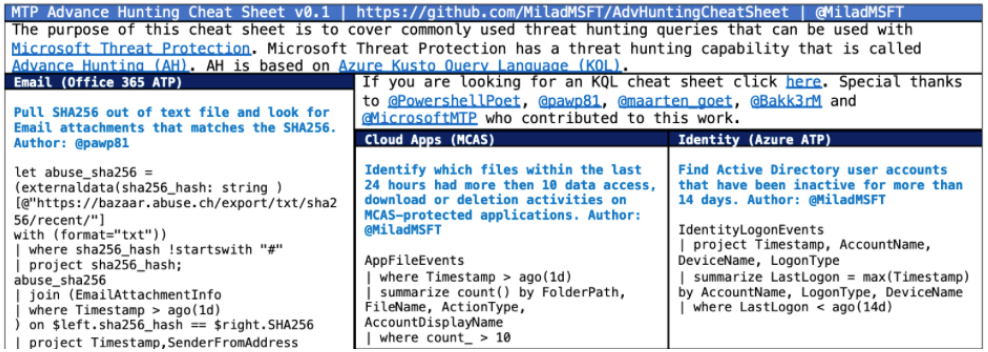
Cheat sheets can be handy for penetration testers, security analysts, and for many other technical roles. They provide best practices, shortcuts, and other ideas that save defenders a lot of time. They are especially helpful when working with tools that require special knowledge like advanced hunting because:


  • The required syntax can be unfamiliar, complex, and difficult to remember.
  • Often someone else has already thought about the same problems we want to solve and has written elegant solutions.
  • We can use some inspiration and guidance, especially when just starting to learn a new programming or query language.
  • Examples of the most frequently used cases and queries can help us quickly understand both the problem space and the solution.

In the area of Digital Forensics Incident Response (DFIR), there are some great existing cheat sheets. Many of them are bookmarked or, in some cases, printed and hanging somewhere in the Security Operations Center (SOC).


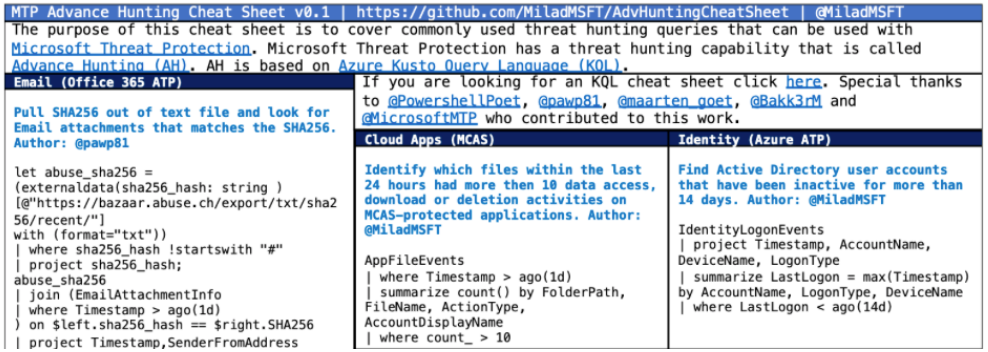
Recently, several Microsoft employees and security analysts from large enterprise customers and partners came together to work on a community project to build the very first cheat sheet for advanced hunting in Microsoft Threat Protection. To get it done, we had the support and talent of  Marcus Bakker, Maarten Goet, Pawel Partyka, Michael Melone, Tali Ash,and Milad Aslaner.


Screenshot 2020-07-06 at 1.26.17 PM.png


You can get the cheat sheet in light and dark themes in the links below:


Microsoft Threat Protection’s advanced hunting community is continuously growing, and we are excited to see that more and more security analysts and threat hunters are actively sharing their queries in the public repository on GitHub. This GitHub repo provides access to many frequently used advanced hunting queries across Microsoft Threat Protection capabilities as well as new exciting projects like Jupyter Notebook examples and now the advanced hunting cheat sheet.


You can explore and get all the queries in the cheat sheet from the GitHub repository.


For more information about advanced hunting and Kusto Query Language (KQL), go to:


Stay safe and happy hunting!

Getdate()  seems wrong it shows UTC…

Getdate() seems wrong it shows UTC…

This article is contributed. See the original author and article here.

Note the follow commands running in a on prem environment will return to you the date and time of your server region configuration, except for GetUTCdate, this one will return UTC per definition:
SELECT SYSDATETIME() 

    ,SYSDATETIMEOFFSET() 

    ,SYSUTCDATETIME() 

    ,CURRENT_TIMESTAMP 

    ,GETDATE() 

    ,GETUTCDATE();
 
 
As you can see here the doc confirms: “Returns the current database system timestamp as a datetime value without the database time zone offset. This value is derived from the operating system of the computer on which the instance of SQL Server is running.”
 
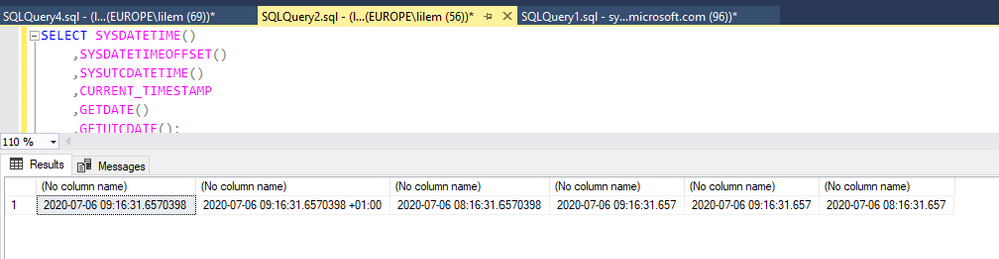
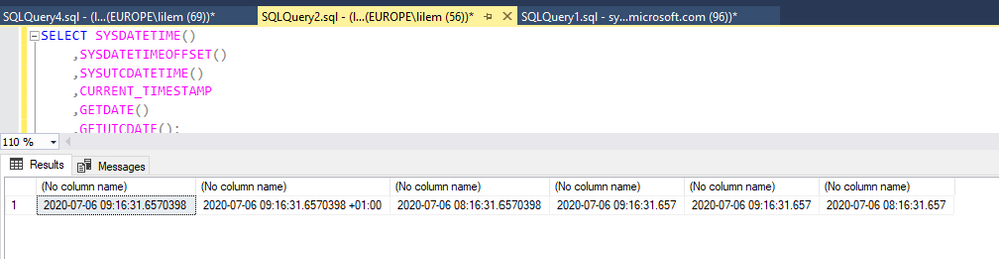
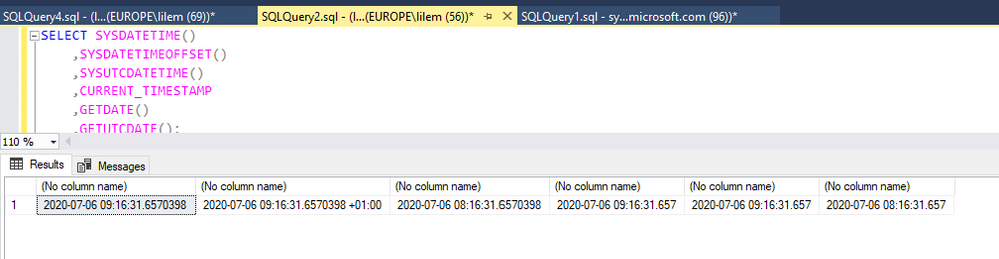
This is my on-prem instance example. I am based in UTC+1, now is 09:15AM. So the results make sense as Fig. 1 shows:
UTC_onpre.png
 

Fig 1 OnPrem


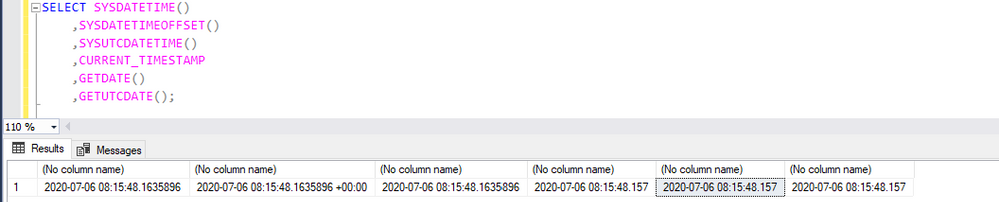
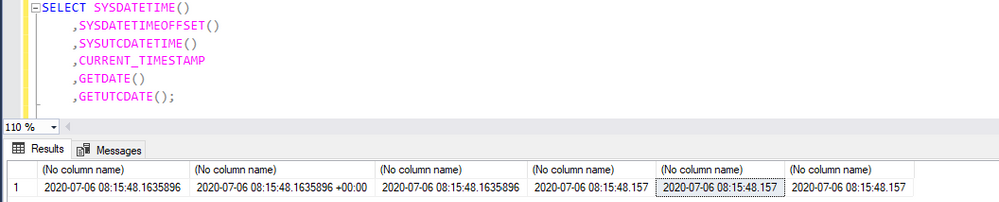
If you are running against a PaaS environment such as Azure SQL DW. The same will show UTC, as Fig 2 shows:

UTC_Paas.png

Fig 2 ADW


So if you want to convert to your timezone you can use the following.

For example for IST timezone:


SELECT CONVERT(datetime, '03/14/2016 01:01:00')
AT TIME ZONE 'India Standard Time'


SELECT *
FROM sys.time_zone_info
where name like '%india%'

Other very good links about this:


https://techcommunity.microsoft.com/t5/azure-database-support-blog/lesson-learned-4-modifying-the-default-time-zone-for-your-local/ba-p/368798


https://thomaslarock.com/2016/03/sql-server-2016-time/


Liliam C Leme

Engineer UK

Getdate()  seems wrong it shows UTC…

Getdate() seems wrong it shows UTC…

This article is contributed. See the original author and article here.

Note the follow commands running in a on prem environment will return to you the date and time of your server region configuration, except for GetUTCdate, this one will return UTC per definition:
SELECT SYSDATETIME() 

    ,SYSDATETIMEOFFSET() 

    ,SYSUTCDATETIME() 

    ,CURRENT_TIMESTAMP 

    ,GETDATE() 

    ,GETUTCDATE();
 
 
As you can see here the doc confirms: “Returns the current database system timestamp as a datetime value without the database time zone offset. This value is derived from the operating system of the computer on which the instance of SQL Server is running.”
 
This is my on-prem instance example. I am based in UTC+1, now is 09:15AM. So the results make sense as Fig. 1 shows:
UTC_onpre.png
 

Fig 1 OnPrem


If you are running against a PaaS environment such as Azure SQL DW. The same will show UTC, as Fig 2 shows:

UTC_Paas.png

Fig 2 ADW


So if you want to convert to your timezone you can use the following.

For example for IST timezone:


SELECT CONVERT(datetime, '03/14/2016 01:01:00')
AT TIME ZONE 'India Standard Time'


SELECT *
FROM sys.time_zone_info
where name like '%india%'

Other very good links about this:


https://techcommunity.microsoft.com/t5/azure-database-support-blog/lesson-learned-4-modifying-the-default-time-zone-for-your-local/ba-p/368798


https://thomaslarock.com/2016/03/sql-server-2016-time/


Liliam C Leme

Engineer UK

HTTP OPTIONS and Default page vulnerabilities

HTTP OPTIONS and Default page vulnerabilities

This article is contributed. See the original author and article here.

Penetration tools may alert if IIS server is accepting requests with HTTP OPTIONS method. This is because the response to these requests may reveal what other methods are supported by the web server.


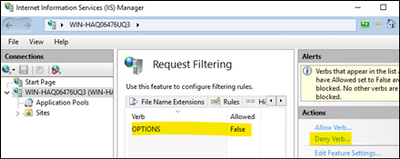
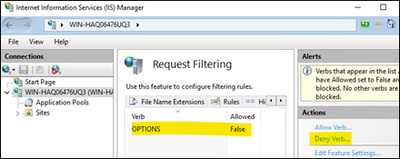
Follow the steps below to disable OPTIONS method.

  1. Open IIS Manager
  2. Click the server name
  3. Double click on Request Filtering
  4. Go to HTTP Verbs tab
  5. On the right side, click Deny Verb
  6. Type OPTIONS. Click OK

Nedim_0-1593978360292.png


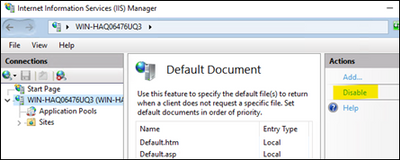
Penetration tools may also raise an alarm if the default IIS page is still available in your server. This page comes by default when you install Web Server role.


Follow the steps below to disable it so this vulnerability don’t come up in the reports anymore.

  1. Open IIS Manager
  2. Click the server name
  3. Double click on Default Document
  4. On the right side, click “Disable”

Nedim_1-1593978360298.png