This article is contributed. See the original author and article here.
The purpose of this series of articles is to describe some of the details of how High Availability works and how it is implemented in Azure SQL Managed Instance in both Service Tiers – General Purpose and Business Critical.
In this post, we shall introduce some of the high availability concepts and then dive into the details of the General Purpose service tier.
Introduction to High Availability
The goal of a high-availability solution is to mask the effects of a hardware or software failure and to maintain database availability so that the perceived downtime for users is minimized. In other words, high availability is about putting a set of technologies into place before a failure occurs to prevent the failure from affecting the availability of data.
The two main requirements around high availability are commonly known as RTO and RPO.
RTO – stands for Recovery Time Objective and is the maximum allowable downtime when a failure occurs. In other words, how much time it takes for your databases to be up and running.
RPO – stands for Recovery Point Objective and is the maximum allowable data-loss when a failure occurs. Of course, the ideal scenario is not to lose any data, but a more realistic (and also ideal) scenario is to not lose any committed data, also known as Zero Committed Data Loss.
In SQL Managed Instance the objective of the high availability architecture is to guarantee that your database is up and running 99.99% of the time (financially backed up by an SLA) minimizing the impact of maintenance operations (such as patching, upgrades, etc.) and outages (such as underlying hardware, software, or network failures) that might occur.
High Availability in the General Purpose service tier
General Purpose service tier uses what is called the Standard Availabilitymodel. This architecture model is based on a separation of compute and storage. It relies on the high availability and reliability provided by the remote storage tier. This architecture is more suitable for budget-oriented business applications that can tolerate some performance degradation during maintenance activities.
The Standard Availability model includes two layers:
A stateless compute layer that runs the sqlservr.exe process and contains only transient and cached data, such as tempdb database, that resides on the attached SSD Disk, and memory structures such as the plan cache, the buffer pool, and columnstore pool that resides on memory.
It also contains a stateful data layer where the user database data & log files reside in an Azure Blob storage. This type of repository has built-in data availability and redundancy features (Local Redundant Storage or LRS). It guarantees that every record in the log file or page in the data file will be preserved even if sqlservr.exe process crashes.
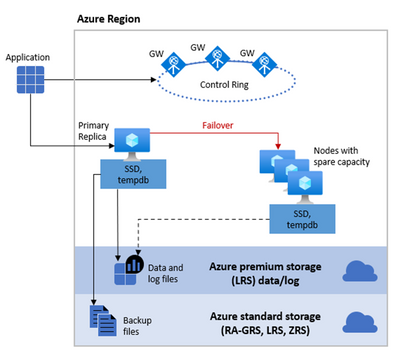
The behavior of this architecture is similar to an SQL Server FCI (SQL Server Failover Cluster Instance) but without all the complexity that we currently have on-premises or in an Azure SQL VM. In that scenario we would need to first create and configure a WSFC (Windows Server Failover Cluster) and then create an SQL Server FCI (SQL Server Failover Cluster Instance). All of this is done behind the curtains for you when you provision an Azure SQL Managed Instance, so you don’t need to worry about it. As you can see from the diagram on the picture above, we have a shared storage functionality (again like in an SQL Server FCI), in this case in Azure premium storage, and also we have a stateless node, operated by Azure Service Fabric. The stateless node not only initializes sqlservr.exe process but also monitors & controls the health of the node and, if necessary, performs the failover to another node from a pool of spare nodes.
All the technical aspects and fine-tuning of a cluster (i.e. quorum, lease, votes, network issues, avoiding split-brain, etc.) are covered & managed transparently by the Azure Service Fabric. The specific details of Azure Service Fabric go beyond the scope of this article, but you can find more information in the article Disaster recovery in Azure Service Fabric.
From the point of view of an application connected to an Azure SQL Managed Instance, you don’t have the concept of Listener (like in an Availability Groups implementation) or Virtual Name (like in an SQL Server FCI) – you connect to an endpoint via a Gateway. This is also an additional advantage since the Gateway is in charge of “redirecting” the connection to the Primary Node or a new Node in case of a Failover, so you don’t have to worry about changing the connection string or anything like that. Again, this is the same functionality that the Virtual Name or Listener provides, but more transparently to you. Also, notice in the Diagram above that we have redundancy on the Gateways to provide an additional level of availability.
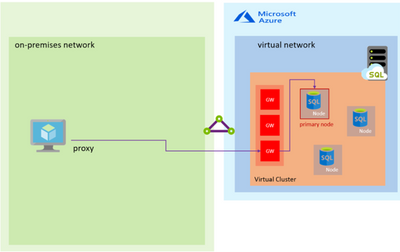
Below is a diagram of the connection architecture, in this case using the Proxy connection type, which is the default:
In the Proxy connection type, the TCP session is established using the Gateway and all subsequent packets flow through it.
Storage
Regarding Storage, we use the same concept of “Shared Storage” that is used in a FCI but with additional advantages. In a traditional FCI On-Prem the Storage becomes what is known as a “Single Point of Failure” meaning that if something happens with the Storage – your whole Cluster solution goes down. One of the possible ways customers could work around this problem is with “Block Replication” technologies of the Storage (SAN) Providers replicating this shared Storage to another Storage (typically between a long distance for DR purposes). In SQL Managed Instance we provide this redundancy, using Azure Premium Storage for Data and Log files, with Local Redundancy Storage (LRS) and also separating the Backup Files (following our Best Practices) in an Azure Standard Storage Account also making them redundant using RA-GRS (Read Access Geo Redundant Storage). To know more about redundancy of backups files take a look at the post on Configuring backup storage redundancy in Azure SQL.
For performance reasons, the tempdb database is kept local in an SSD where we provide 24 GB per each of the allocated CPU vCores.
The following diagram illustrates this storage architecture:
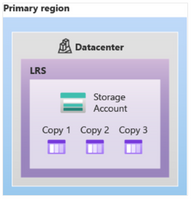
It is worth mentioning that Locally Redundant Storage (LRS) replicates your data three times within a single data center in the primary region. LRS provides at least 99.999999999% (11 nines) durability of objects over a given year.
The process of Failover is very straightforward and of course you can have either a “planned failover” – such as a user-initiated manual failover or a system-initiated failover taking place because of a database engine or operating system upgrade operation, and an “unplanned failover” taking place due to a failure detection (i.e. hardware, software, network failure, etc.).
Regarding an “unplanned” or an “unexpected” failover, when there are critical errors in the Azure SQL Managed Instance functioning, an API call is made to communicate the Azure Service Fabric that a Failover needs to happen. Of course, the same happens when other errors (like a faulty node) are detected. In this case, the Azure Service Fabric will move the stateless sqlservr.exe process to another stateless compute node with sufficient free capacity. Data in Azure Blob storage is not affected by the move, and the data/log files are attached to the newly initialized sqlservr.exe process. After that a Recovery Process on the Databases is initiated. This process guarantees 99.99% availability, but a heavy workload may experience some performance degradation during the transition since the new sqlservr.exe process starts with cold cache.
Since a Failover can occur unexpectedly, customer might need to determine if such event took place and for that purpose customer can determine the timestamp of the last Failover with the help of T-SQL as described in the article How-to determine the timestamp of the last SQL MI failover from the SQL MI how-to series.
Also, you could see the Failover event listed in the Activity Log using the Azure Portal.
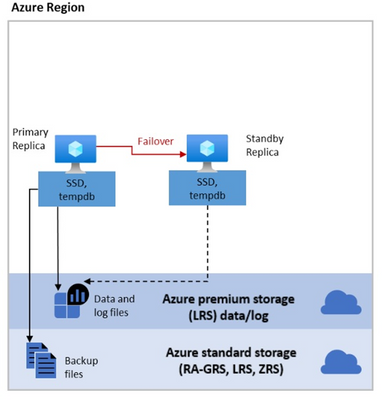
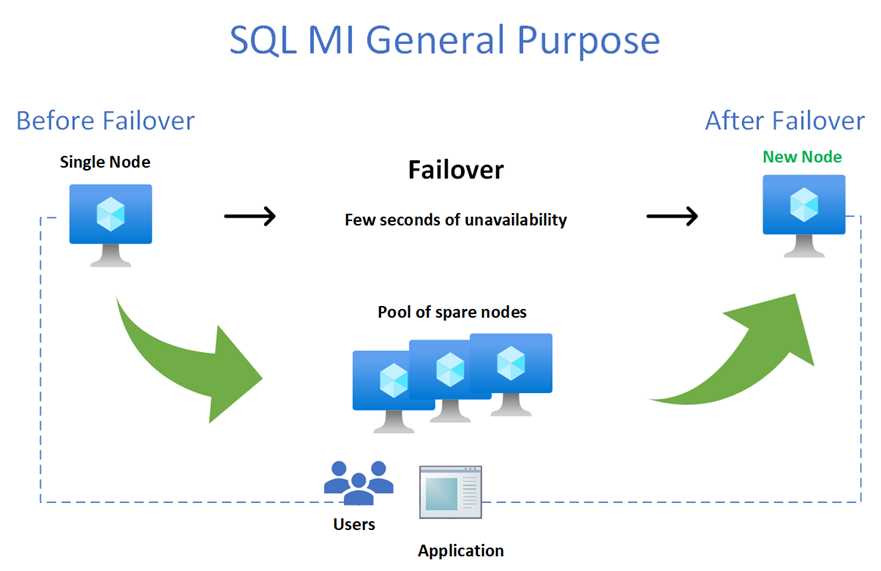
Below is a diagram of the failover process:
As you can see from the diagram, on the picture above, the Failover process will introduce a brief moment of unavailability while a new node from the Pool of spares nodes is allocated. In order to minimize the impact of a failover you would need to incorporate in your application a retry-logic. This is normally accomplished detecting the transient errors during a failover (4060, 40197, 40501, 40613, 49918, 49919, 49920, 11001) within a try-catch block of code, waiting a couple of seconds and then retrying the connection (re-connect). Alternatively, you could use the Microsoft.Data.SqlClient v3.0 Preview NuGet package in your application that have already incorporated a retry logic. To know more about this driver see the following article: Introducing Configurable Retry Logic in Microsoft.Data.SqlClient v3.0.0
Notice that that currently that only one failover call is allowed every 15 minutes.
In this article we have introduced the concepts of high availability and explained how it is implemented for the General Purpose service tier. In the second part of where we will cover High Availability in the Business Critical service tier.
This article is contributed. See the original author and article here.
Governments are increasingly turning to data to address their most urgent issues. But many struggle to unlock the value of their business data to meet the challenges facing their communities. Housing, economic recovery, public safety, and infrastructure are more complex, requiring coordination and data-sharing among many departments and agencies. The pandemic has only reinforced this challenge to turn to digital government services and programs to meet changing expectations and new social norms.
The Microsoft Dynamics 365 government accelerator acts as an information blueprint for partners and developers who are building solutions for government organizations to advance their missions in an all-digital world. An industry-specific data model and building blocks fast-track the development of government business processes and applications in the areas of public finance, public health and social services, public safety and justice, and critical infrastructure. It’s available as a standalone data model that partners can use and build on.
The first release of the government data model supports use cases centered around policy, services, programs, benefits, eligibility, licenses, permits, grants, and more. This standardized data blueprint improves interoperability by unifying and shaping the data in a consistent way for easy use across government applications, processes, and workflows in Microsoft Power Platform, Dynamics 365, and the entire Microsoft technology stack. With a shared understanding of the data, partners and developers can use these data elements to accelerate their time to value and deliver mission-focused solutions for government agencies.
In addition to the data model, the government accelerator includes:
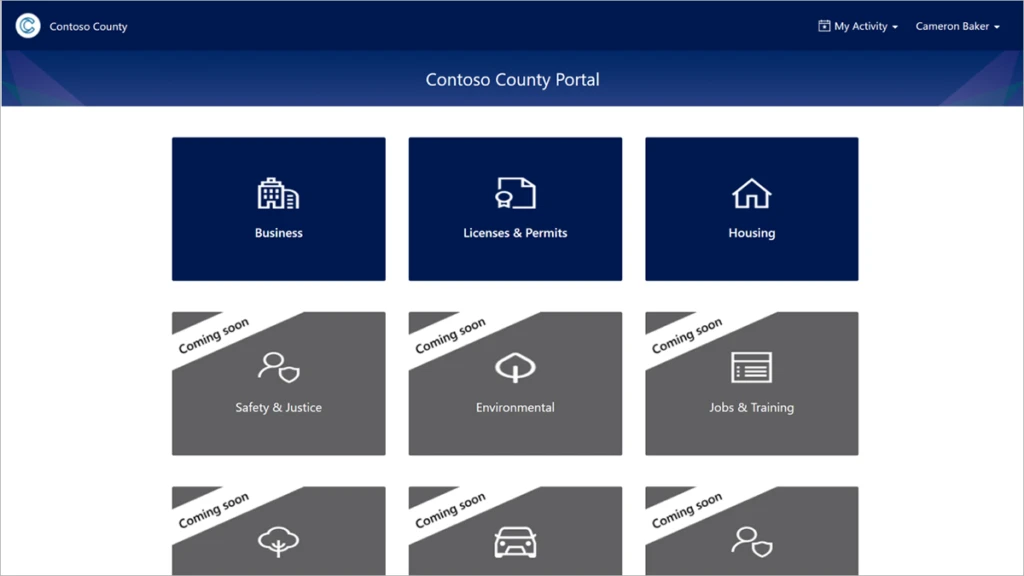
A customizable Power Apps sample portal that residents and businesses can use to apply for government services, programs, and benefits.
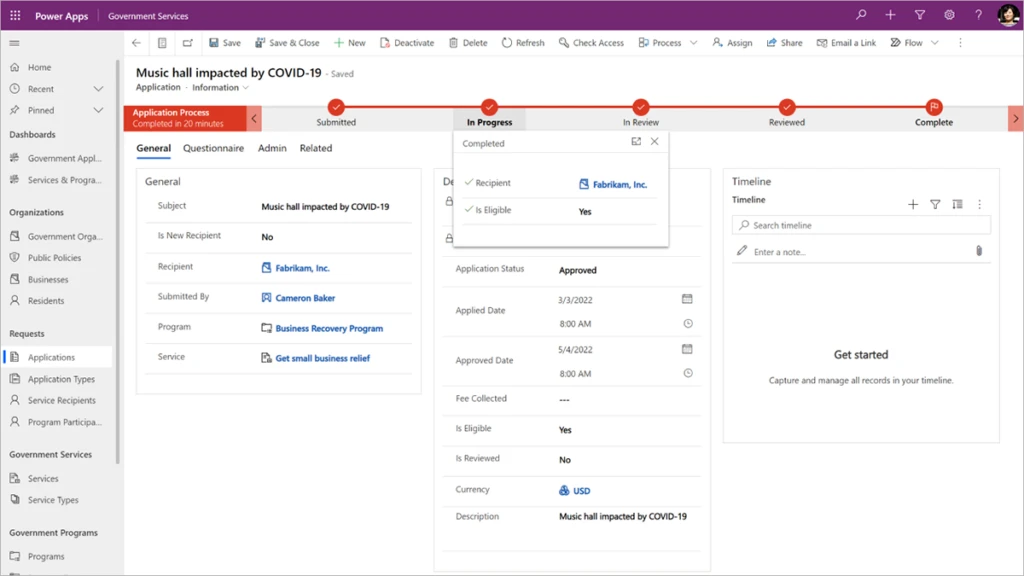
A customizable sample app for digital government services, programs, and benefits to show how Power Platform and Dynamics 365 can use the data model to manage applications and approvals, and transform government programs and services.
Partner and developer documentation, reference guides, entity relationship diagrams, and metadata documentation on the data model, all available on GitHub.
The government data model was built in collaboration with over a dozen partners, including the following founding partners.
Arctic IT is excited to partner with Microsoft on the development of a data model designed for the needs of government organizations. The new data model allows Arctic IT to start with a defined data structure that will enable our government clients to bring multiple departments to work together like never before. This government data model will open opportunities to generate greater citizen insights and actions to improve service delivery and help deliver mission-focused solutions.
Bryan Schmidt, Principal Solution Architect, Arctic IT
We are excited to partner with Microsoft on this project, it’s been great to collaborate with the team on a common data model for government and the public sector. This alignment not only helps build on our partnership with Microsoft, but also provides great value to our joint Government clients using Dynamics 365 and Power Apps. It will enable government organisations to increase productivity, accelerate time to value, and deepen trust.
Jacques Le Grange, Principal Consultant, The Factor
When it comes time to provide the customer with the detailed documentation needed to properly scope out an implementation, the Microsoft Public Sector data models aid in the solution design process and provide a way to respond much faster and more economically to the customer.
Adam Brun, Public Sector Industry Lead Ellipse Solutions
Having a Public Sector unified data platform provides consistency and assists our government clients to deliver on their initiatives more effectively. IBM is partnering with Microsoft to deliver a data model that will allow us to bring our clients’ data and applications together enabling us to deliver government solutions on Dynamics 365 and the Power Platform.
Darren Clark, Associate Partner, IBM Consulting
Using federal or state funds to deliver grants and other assistance to citizens, businesses, and other government agencies is a complicated process. The number of stakeholders involved, type of recipients, size of transactions, use of disparate systems, and lack of a common data model present challenges for which many state and local governments are not prepared.
These challenges along with the demand for speed, efficiency, and compliance must be met with feature-rich enterprise solutions that can scale to support future programs. Stralto has implemented enterprise grant management solutions on the Dynamics 365 and Power App platform, and we are excited to partner with Microsoft on a government data model that will help improve interoperability and break down the siloed information so agencies can deliver improved experiences.
Shane Lucas, President, Stralto, Inc.
Next steps
To learn about and explore the Dynamics 365 government accelerator, get it now on AppSource or download it from GitHub.
Learn more about our intelligent government solutions to see how Microsoft and our partners drive economic growth and development, enable personalized digital experiences, deliver trusted and secure services, and build a resilient, sustainable future for many government agencies around the world.
This article is contributed. See the original author and article here.
On November 10, 2020, we announced the first preview of Az.Tools.Predictor, a PowerShell module suggesting the Azure cmdlet to use with parameters and suggested values.
Today, we are announcing the general availability of Az.Tools.Predictor.
How it all started
During a study about a new module for Azure, I was surprised to see how difficult it was for the participant to find the correct cmdlet to use. Later, I was summarizing the learnings of the study, and though it would be great if we could have a solution that could help people finding the right cmdlet to use.
At the same time, we were starting to work on Predictive IntelliSense in PowerShell and after a couple of meetings with Jason Helmick, it became clear that this would be a great mechanism to address the challenge I had seen few days before by providing, in the command line, suggestions about cmdlet to use.
We quickly thought that some form of AI could help providing accurate recommendations so we involved Roshanak, Yevhen and Maoliang from our data science team to work with us on how we could build an engine that would provide recommendations for PowerShell cmdlets based on the user’s context.
Behind the scenes
Once a functional prototype was built, we wanted to confirm its usability before considering any public previews. For our team usability is important, over time certain key combinations became a reflex and we knew that we had to fit in the existing memory muscle and become intuitive for PowerShell. For predictors to be successful, we organized several usability studies with prototypes of Az Predictors and addressed several improvements, like the color of the suggested text or the key combination to use to accept or navigate amongst predictions.
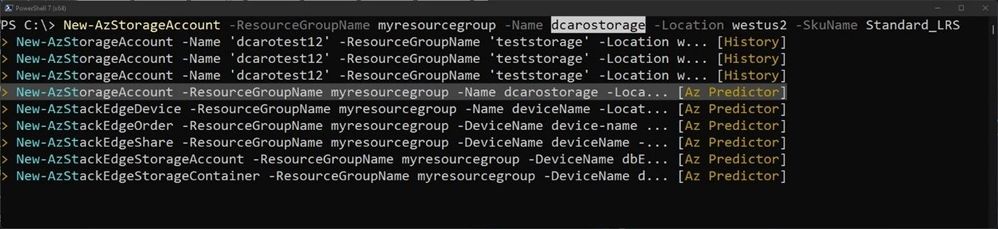
One of our initial prototypes was using the color scheme below, we wanted to have a clear color-based differentiation between typed characters and suggestions hoping this would help user navigate the suggestion. We worked with our design team to address the issue and evolve our design towards the current design.
We also evaluated if the information provided in the suggestions is helpful. Below is another of our early designs. By listening to our customers and observing how they are using the tool, we learned that showing cmdlets first then parameters and associated value samples was not as useful as showing the full line and not using more space in the terminal which is our current design.
During the last months we have done a few previews (read about preview 5) to stabilize the module as PowerShell and PS Readline which we depend on became stable. We have also improved our model based on the feedback we have collected and addressed issues reported.
Getting started
We would like to invite you to try the stable version of Az.Tools.Predictor. To get started, follows these steps:
Once enabled, the default view is the “inline view” as shown in the following screen capture:
This mode shows only one suggestion at a time. The suggestion can be accepted by pressing the right arrow or you can continue to type. The suggestion will dynamically adjust based on the text that you have typed. You can accept the suggestion at any time then come back and edit the command that is on your prompt.
List view mode
This is my favorite mode!
Switch to this view either by using the “F2” function key on your keyboard or run the following command:
This mode shows from your current prompt a list of possible matches for the command that you are typing. It combines suggestions from your local history and from Az Predictor.
Select a suggestion and then navigate through the parameter values with “Alt + A” to quickly fill replace the proposed values with yours.
Next steps
This is just the beginning of our journey to improving the usability of Azure PowerShell!
We will be carefully listening to every feedback that you send us:
We will share soon more about how we plan to expand this experience to other environments.
Credits
“It takes a village to raise a child” Az.Tools.Predictor is the result of the close collaboration of several teams distributed across continents and time zones working hard during the pandemic.
This article is contributed. See the original author and article here.
We are excited to share two new investments in Microsoft Dynamics 365 supply chain portfolio that we are launching in preview. We had announced a partnership between FedEx and Microsoft, in January of 2022, to launch a cross-platform, logistics-as-a-service solution for brands. This partnership is now in preview. As e-commerce is exploding, businesses are challenged with growing their brand affinity while operating profitably to meet their consumer expectation like delivering orders in two days and offering a seamless returns experience. To achieve this, we are combining data insights from FedEx with order insights from Dynamics 365 Intelligent Order Management so that brands can optimize their transportation, and proactively overcome delays and disruptions enroute to deliver customer orders on time, in a cost-effective manner.
This embed requires accepting cookies from the embed’s site to view the embed. Activate the link to accept cookies and view the embedded content.
This partnership will also bring a powerful returns management experience to Dynamics 365, including hassle-free returns options at over 60,000 FedEx drop-off locations, convenient at-home pickups, printer-less QR return labels, and no-box returns. Ultimately, Microsoft and FedEx’s intelligence-driven logistics return services will empower brands with end-to-end visibility of customer returns while also allowing them to update consumers in real-time on the status of their return and refund generation.
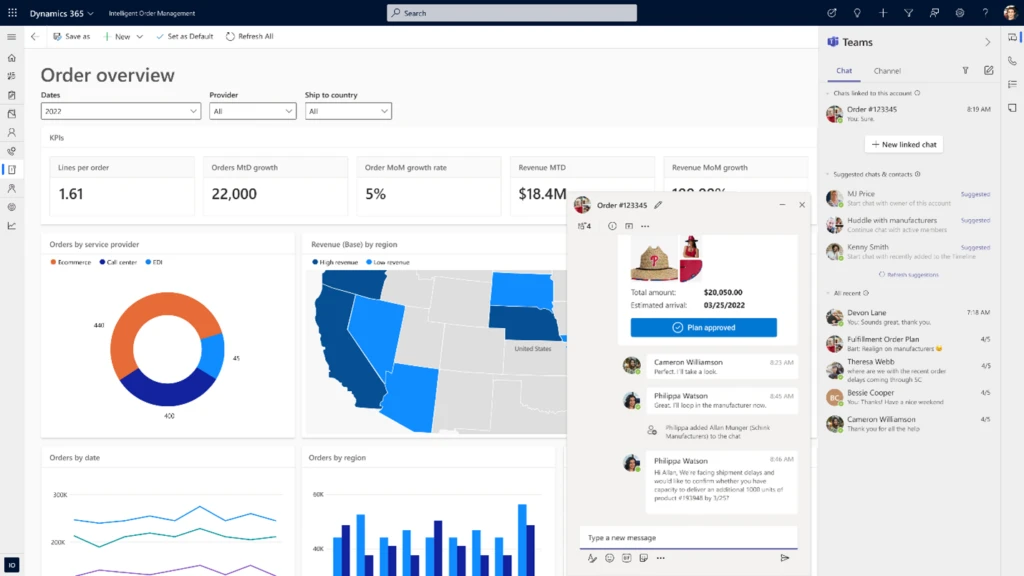
Next, we are also excited to announce that we will launch embedded Microsoft Teams collaboration within Dynamics 365 Intelligent Order Management in preview on May 15, 2022.
This enables hybrid supply chain teams to seamlessly connect over chat, share screens for discussion, post updates on issues in Teams. On top of improving communications, users will also be able to collaborate by sharing sales orders, return orders, and fulfillment order tracking data more effectively, all without exiting their flow of work within Dynamics 365 Intelligent Order Management. These capabilities help build a hyperconnected business that empowers people to collaborate as one business, everywhereso people can thrive wherever, and however, they work.
Digital transformation of supply chains
We recommend three initiatives to kick start the digital transformation of your supply chains for a resilient and sustainable futureenhancing supply chain visibility, improving collaborative capabilities for better decision making, and designing sustainable operations with a circular economy in mind. You can achieve this by surrounding your existing supply chain and ERP systems without replacing them. Let us dive deeper into these areas and get a sneak peek into how some of our customers are transforming their supply chains.
Enhancing supply chain visibility
It is easier said than done to get real-time supply chain data across the value chain. At Microsoft, we have been investing in bringing new capabilities within our Dynamics 365 Supply Chain portfolio to market over the last year to really help organizations enhance visibility into every aspect of their value chain.
With the latest enhancements to Inventory Visibility Add-in, a highly scalable microservice for Dynamics 365 Supply Chain Management, companies can pull inventory from multiple third-party systems, allowing them to create a single, global view of all inventories. By creating one pool of global inventory from which all orders can pull, companies can often increase inventory accuracy and thereby maximize sales opportunities. Plus, when coupled with the soft reservation capability, sales order fulfillment can avoid over-selling, effectively mitigating the risk of missed sales opportunities that may challenge some organizations.
Coca-Cola Beverages Africa (CCBA) is the number one Coca-Cola bottler in Africa and the eighth largest globally by revenue.
“CCBA is currently implementing a set of Dynamics products including Dynamics 365 Supply Chain Management with Inventory Visibility, Field Service, and Customer Engagement products. CCBA envisage using Inventory Visibility to provide critical parts availability to field service technicians and to validate in near real-time the sales demands generated from Dynamics Customer Engagement. It will also be a key component of CCBA’s integrated Advance Warehouse Management solution. Eventually, all the orders and inventory journals will be synced or directly created in Dynamics 365 Supply Chain Management for financial and logistics processing.”Elmar Els, Enterprise and Integration Architect, Coca-Cola Beverage Africa (CCBA).
Improve decision making with enhanced collaboration and a data-first approach
From a commissioned study conducted by Forrester Consulting on behalf of Microsoft in March 2022, we learned that over one-third of supply chain and operations leaders surveyed are taking steps to improve productivity through system and process improvements to mitigate future challenges.1 While it is imperative to generate insights from real-time supply chain data, the ability to act quickly on these insights is a whole different ball game. Organizations need to collaborate effectively across the different functions globally and with external suppliers and logistics partners to proactively overcome disruptions so that the orders can be delivered on time.
From the Forrester study, it’s clear that transformation is taking place across the entire customer journey, with nearly a third of businesses wanting to improve their operating model by making processes more streamlined across the board. To achieve their goals, companies require a tactical focus on being data-driven, improving the customer journey, and driving operational efficiency at scale.1
Peet’s Coffee is a California-based brand that delivers craft coffee and tea. They offer a variety of productsfrom a single cup to k-cups, capsules to whole beansfor sale in its stores, online, and in the supermarket.
Pre-2020, Peet’s Coffee ran the business on a dated and highly customized, on-premises system and Excel spreadsheets. The company had reached the point where the legacy system was near the end of its life and, after a rigorous software selection process, found Dynamics 365 to be the most comprehensive solution for a multi-channel organization with the best flexibility to adapt to the unique needs of coffee production.
“Dynamics 365 gives us the cloud-based architecture we require to support the growth requirements of the business. The combination of Dynamics 365, Power Platform, and Azure cloud services provides Peet’s with a scalable and supportable technology foundation for the future.”Allan Smith, Chief Information Officer, Peet’s Coffee.
By the early days of 2020, Peet’s Coffee had begun a digital transformation process by implementing Dynamics 365 Finance and Dynamics 365 Supply Chain Management. But what Peet’s Coffee couldn’t have planned for was the dramatic shift in demand that stay-at-home orders would create with the onset of the pandemic. Suddenly, Peet’s Coffee saw sales volume from its traditional channels, wholesale and coffee shops, plummet, while direct-to-consumer (DTC) and grocery channel sales surged 2x. Peet’s Coffee radically modified its implementation plan for Dynamics 365 to support immediate business needs. Ultimately, Peet’s Coffee adopted a new business model (DTC) and pivoted to supply grocery demand while successfully completing the implementation.
“with the pandemicit has been a heck of a year. I’m pleased with the investments we made. I’m pleased with the Blue Horseshoe relationship. I’m glad Dynamics 365 is live at Peet’s. But I wish we had done it earlier.”Eric Lauterbach, President, Peet’s Coffee.
Reverse supply chains and circular economies
One way that manufacturing organizations are improving sustainability is by standing up circular economies. Circular economy, or circularity, is rooted in reverse supply chain management, which deals with what happens after a product’s useful life.
Setting up these circular economy flows can be challenging without an agile and composable supply chain management application. The Microsoft Circular Center program uses Dynamics 365 Supply Chain Management and Microsoft Power Platform to facilitate the reuse and recycling of servers and hardware within our datacenters, which is part of our commitment to achieving zero-waste and carbon-negative operations by 2030. To date, the Circular Centers model has achieved 83 percent reuse and 17 percent recycling of critical parts while contributing to the reduction of carbon emissions by 145,000 metric tons CO2 equivalent.
“We were looking for a warehouse management system that would allow us to model all the product flows that we needed while also connecting to datacenters and other systems used to manage our cloud assets. Dynamics 365 had all these functionalities to build exactly what we needed.”Anand Narasimhan, General Manager of Cloud Supply Chain Sustainability, Microsoft.
Microsoft Dynamics 365 Supply Chain solutions enable organizations to create a digital supply chain that connects global teams, suppliers, and logistic partners for end-to-end visibility and frictionless collaboration. Our agile and composable Supply Chain solutions unify siloed data sources in real-time to detect opportunities, predict and overcome disruptions, and deliver sustainable competitive advantage. Reach out to learn more or get started with a free trial of Dynamics 365 Intelligent Order Management.
This embed requires accepting cookies from the embed’s site to view the embed. Activate the link to accept cookies and view the embedded content.
1- A commissioned study conducted by Forrester Consulting on behalf of Microsoft. March 2022.
Gartner does not endorse any vendor, product or service depicted in its research publications and does not advise technology users to select only those vendors with the highest ratings or other designation. Gartner research publications consist of the opinions of Gartner’s Research & Advisory organization and should not be construed as statements of fact. Gartner disclaims all warranties, expressed or implied, with respect to this research, including any warranties of merchantability or fitness for a particular purpose.
GARTNER and MAGIC QUADRANT are trademarks and service marks of Gartner, Inc. and/or its affiliates and are used herein with permission. All rights reserved.
This article is contributed. See the original author and article here.
This month, we’re adding new capabilities to make everyone more comfortable in meetings, feel empowered in the diverse hybrid workplace, and be able to switch devices more easily.








Recent Comments