Voices of Healthcare Cloud brings you “Machine Vision Pilot for Central Line Dressing Maintenance “

Voices of Healthcare Cloud brings you “Machine Vision Pilot for Central Line Dressing Maintenance “

This article is contributed. See the original author and article here.

On March 15, Synaptiq and Microsoft issued a press release announcing a new Machine Vision pilot program for hospitals. In collaboration with Microsoft, Synaptiq built a demo solution to proactively inform care teams of potential Central Line dressing compliance issues.


The pilot program is designed to help reduce preventable injuries from hospital-borne Central Line-Associated Bloodstream Infections (CLABSIs) and improve speed of care and patient outcomes. It also helps providers standardize care for new and existing staff, identify education opportunities, and decrease documentation time.


According to the NIH, CLABSIs are largely preventable infections that occur in more than 400,000 patients annually in the United States alone, resulting in over 28,000 deaths and costing U.S. hospitals $2 billion. A key piece of preventing CLABSIs is maintaining Central Line dressings as clean and intact as possible.


Machine vision is a type of artificial intelligence (AI) that enables computers to derive information from visual inputs. It is able to collect more precise visual data than human vision ever could, and uses processing power to analyze the visual data faster and more thoroughly than the human mind.


Because visual cues play such a vital role in ensuring patient safety and preventing CLABSIs, machine vision has the potential to exponentially enhance care teams’ ability to recognize and respond to possible infections – before the human eye can even detect a problem is present.


I am truly excited to provide our Voices of Healthcare viewers with a first-look at this incredibly important pilot. I had the opportunity to assist in building the demo solution alongside Synaptiq and cannot wait to see how it helps save many, many lives in the years to come.


For this session on May 11, 2022, Synaptiq’s CEO Stephen Sklarew and Mariana Gattegno, Quality and Patient Safety consultant at Volpini Solutions LLC, will discuss the current status of Central Line dressing maintenance in hospitals today, review the pilot program details, and demo the solution. They will also answer questions and discuss how hospitals joining this effort will benefit.


ShellyAvery_0-1651005692911.png


Synaptiq’s solution to assess Central Line dressings using Microsoft Technologies


Synaptiq’s Machine Vision Pilot Program for Central Line Dressing Maintenance is an example of how Microsoft Cloud for Healthcare can rapidly deliver a machine vision application that works seamlessly with care teams to help provide superior patient experiences.


We see many benefits, such as:


  • Hospitals in the pilot program will have an exclusive early adopter opportunity to test the solution first-hand, and their care teams will be able to help design the future solution that best meets their needs.

  • It is powered by Microsoft Cloud for Healthcare and leverages many Microsoft technologies that are already licensed by most major hospital systems in the United States.

  • There are three applications that are part of the solution that support this process: The Central Line Assessment app (Microsoft PowerApps); CLABSI Prevention Team (Microsoft Teams); and Central Line Maintenance dashboard (Microsoft Power BI)

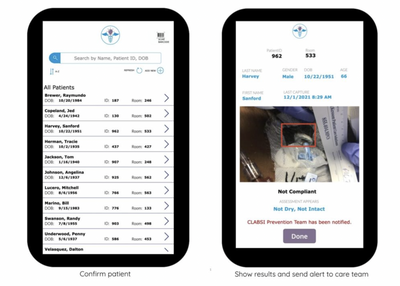
  • The Central Line Assessment app runs on a smartphone for convenient bedside access and is used to capture and analyze photos of patients’ dressings. If a potential compliance issue is identified, the care team is alerted to take action. Over time, data from the provider’s electronic medical record (EMR) system accumulates information from the Central Line Assessment app and the patient’s medical record, and the Central Line Maintenance dashboard provides canned reports and ad hoc analysis capabilities to identify trends.

  • Most importantly, Synaptiq’s Pilot Program for this solution is an example of how Microsoft Cloud for Healthcare can rapidly deliver a machine vision application that works seamlessly with care teams to help provide superior patient experience – and help save lives.


Come join us to hear how this hospital pilot program will work and how your organization can get involved.


This session will be on May 11th at 11:00 PT / 12:00 MT/ 1:00 CT / 2:00 ET


Please click here to join or download the calendar invite here


As always, we will record the session and post the recording afterward for future consumption. We have a new landing page for this series, so favorite or follow https://aka.ms/VoicesofHealthcareCloud to make sure you never miss a future session.


Please follow the aka.ms/HLSBlog for all this great content.
How Dynamics 365 Mixed Reality on HoloLens 2 is accelerating ROI for the healthcare industry

How Dynamics 365 Mixed Reality on HoloLens 2 is accelerating ROI for the healthcare industry

This article is contributed. See the original author and article here.

Healthcare providers around the world are accelerating their digital journey and embracing secure solutions that empower health team collaboration and boost clinician productivity. Embracing mixed realitya set of technologies that superimposes digital data and images in the physical worldbrings new opportunities for healthcare providers to work together more effectively, optimize operations, and accelerate learning all while improving patient care.

With HoloLens 2 and mixed reality, health professionals can connect with remote experts, and call up patient data and go beyond x-rays to consult Magnetic Resonance Imaging (MRI) images in 3D at the point of care. Microsoft’s comprehensive ecosystem of mixed reality solutions, including Microsoft HoloLens 2, Microsoft Dynamics 365 Remote Assist, and Microsoft Dynamics 365 Guides, empower teams to cooperate more effectively and reduce time-to-care.

The benefits of adopting mixed reality in healthcare are significant. According to the commissioned Total Economic Impact of Mixed Reality Using Microsoft HoloLens 2 (“HoloLens 2 TEI study”), Forrester found that healthcare organizations experienced the following benefits:

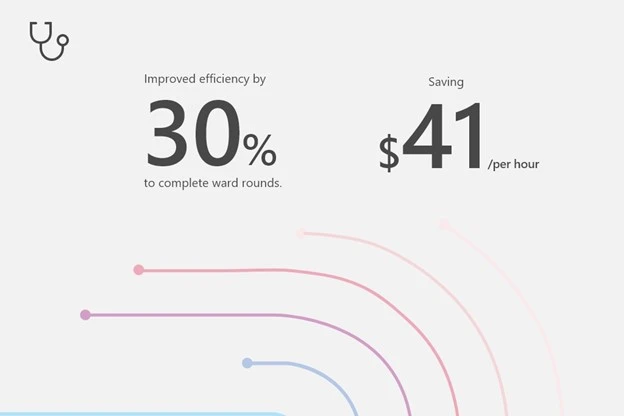
  • Improved efficiency to complete ward rounds by 30 percent at an average savings of $41 per hour.
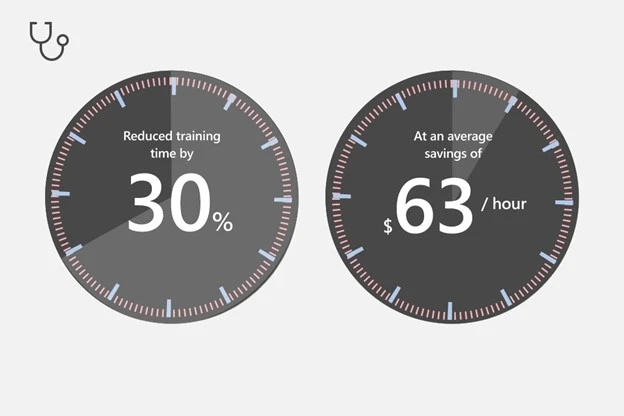
  • Reduced training time by 30 percent, at an average savings of $63 per labor hour.
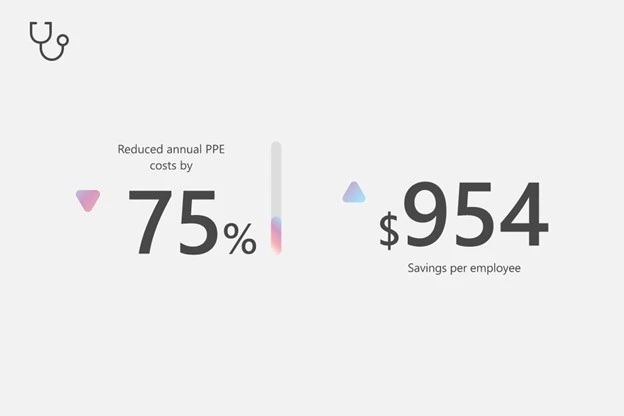
  • Reduced average annual PPE costs by 75 percent, saving $954 per employee.  

Forrester also estimates an ROI of 177 percent and a net present value of $7.6 million over three years with a payback of 13 months with HoloLens 2 and mixed reality.

Adapt to the speed of change and improve clinical operations

Dynamics 365 mixed reality on HoloLens 2 is enabling healthcare providers to train medical staff more effectively and efficiently with holographic step-by-step guidance. Dynamics 365 Guides on HoloLens 2 enables medical institutions to provide continuous learning and widespread knowledge sharing while removing the need for subject matter experts to be physically present. Simply use your PC and the HoloLens app to author instructions and easily place 2D and 3D content in the real-world environment, showing users how and where to complete tasks.

Dynamics 365 Guides on HoloLens 2 empowers doctors, nurses, and technicians to train and to practice using hands-on, simulated learningensuring the entire organization keeps pace with the technological advances in science and technology. According to the HoloLens 2 TEI study, Healthcare providers reduced 80 hours of training time by 30 percent, at an average savings of $63 per labor hour.

Clock images communicating time and saving benefits.

When the pandemic hit, like many hospitals, Sheba Medical Center, a comprehensive hospital in the Middle East, sought solutions that would allow it to scale its workforce and expedite task shifting. With Dynamics 365 Guides on HoloLens 2, Sheba Medical Center deployed a self-serve training solution that supported staff to learn to operate physical ventilators quickly and easily. With holographic instructions overlaid in their physical environment, hospital staff were able to walk through a guided training simulation proficiently and successfully without requiring a supervisor. As a result, Sheba Medical Center was able to expedite task shifting across medical staff and meet staffing demands, enabling over 60 members of its staff to learn how to operate new devices in just 20 minutes.

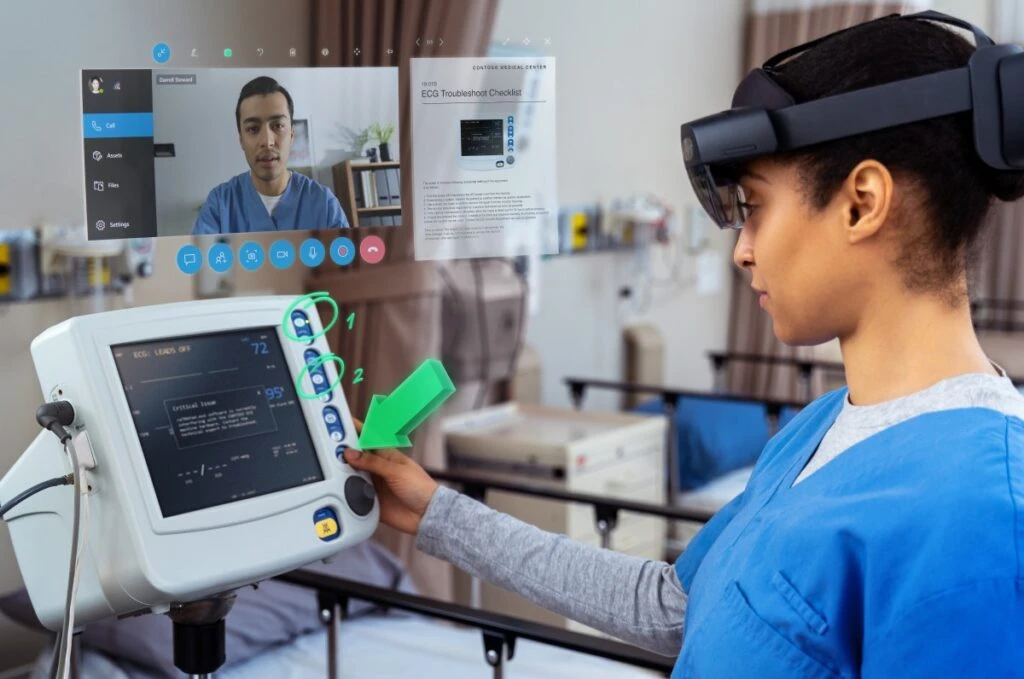
A nurse using Dynamics 365 Remote Assist on HoloLens 2 to collaborate with a remote expert in real-time to troubleshoot a piece of equipment.

“One of the key advantages of the technology is that it works on several layers of the brain you hear it talk, see the presentation in front of you, and also physically touch the ventilator. The more senses involved simultaneously, the better the brain can recall. I ‘tested’ myself later to check what my brain remembered, and it was incredible. It also gave me a sense of empowerment that I can learn and embrace new technologies.”Shiraz Shushan, Neonatal Intensive Care Unit (NICU) nurse, Sheba Medical Center. Learn more about how Sheba Medical Center optimized staff training.

Empower care teams to collaborate effectively and securely from anywhere

Multidisciplinary care teams encompassing specialized clinicians, clinical staff, and healthcare administrators often span multiple hospitals or locations, adding time, cost, and complexity to patient care. Enable care teams to collaborate remotely and conduct virtual patient consultations with real-time spatial information to accelerate diagnoses and reduce time-to-treatment with HoloLens 2 and Dynamics 365 mixed reality solutions.

Using Dynamics 365 mixed reality solutions on HoloLens 2, medical staff can consult colleagues’ heads-up, hands-free through an interactive collaborative experience from anywhere in the world. Additionally, healthcare providers can improve access and care delivery to aging and underserved populations with remote assisted care consultations. These remote consultations also lead to major cost savingsthe HoloLens 2 TEI study shows that healthcare providers reduced ward round time by 30 percent saving $41 per hour.

Track line image communicating increased efficiency and cost saving benefits.

Each year, Imperial College Healthcare NHS Trust provides acute and specialist healthcare in northwest London for over a million and a half people. Like many healthcare providers around the world, when the COVID-19 pandemic started, Imperial College Healthcare NHS Trust rapidly began to redeploy and retrain its staff while at the same time coping with an increasing number of affected patients. With Dynamics 365 Remote Assist on HoloLens 2, Imperial College Healthcare NHS Trust was able to successfully conduct virtual ward rounds and treat very ill patients while limiting staff exposure to the deadly virus. Imperial College Healthcare NHS Trust reduced ward rounds from four doctors to one doctor by holding video calls with colleagues and experts from anywhere in the world heads-up, hands free. Doctors were also able to simultaneously access patient data such as medical notes, X-rays, and MRIs to effectively treat patients.

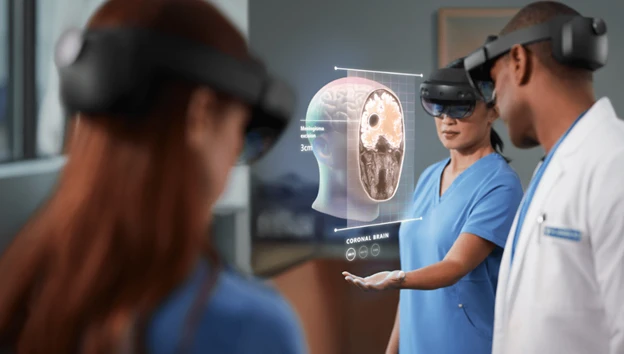
Three doctors using Microsoft HoloLens 2 to analyze the human brain. Contains hologram scenario.

“What it means is that you have all the information, all the specialist care you need at the patient’s bedside there and then and it’s all in one headset.”Dr. James Kinross, consultant surgeon and senior lecturer, Imperial College Healthcare NHS Trust. Learn more about how Imperial College NHS Trust enabled virtual ward rounds.

Preparing the next generation of healthcare professionals while reducing costs

According to World Health Organization (WHO), to achieve the goal of universal health coverage by 2030, the world needs nine million more nurses and midwives.2 Dynamics 365 mixed reality and HoloLens 2 are advancing the learning of nurses and removing location barriers of in-person training while reducing costs.

Dynamics 365 Guides on HoloLens 2 enables healthcare providers and institutions to enhance the upskilling of nurses and reduce PPE costs with continuous, hands-on learning experiences remotely. Instructors and supervisors can track and monitor student and faculty progress with Power BI dashboards that pull in real-time performance data to maximize participant development and identify areas for operational improvements. The HoloLens TEI study reports that healthcare providers reduced annual PPE costs by 75 percent, saving $954 per employee.

Bar graph image communicating the reduced cost benefits.

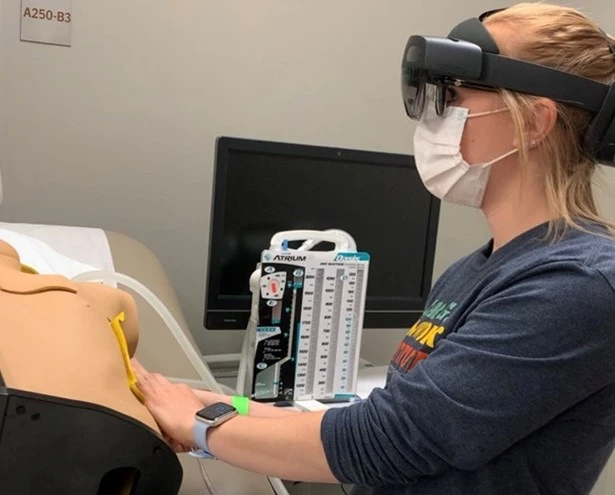
The pandemic disrupted the operations of institutions around the world casting a clear gap in the effectiveness of hybrid learning tools. The School of Nursing at the University of Michigan (the University) turned to Dynamics 365 Guides on HoloLens 2 to support hybrid learning because of its ability to provide hands-on skills to nursing students remotely. The University piloted a program allowing students to conduct simulated, repeatable augmented medical procedures one step at a time. Dynamics 365 Guides on HoloLens 2 enabled students to follow the guided training heads-up, hands-free and simultaneously perform the procedures on mannequins. The University is continuing to develop and scale the program for more advanced nursing procedures.

Nursing student conducting guided training on a mannequin with HoloLens 2.

Once we were introduced to HoloLens 2 we learned about Dynamics 365 Guides, and it was pretty exciting because we realized that we could use the guides to create training tools to teach the nursing students how to do these necessary, rudimentary, required skills, and procedures that they have to do in order to move to the next level and go out and practice.”Deborah Lee, clinical assistant professor, School of Nursing at the University of Michigan. Learn more about how University is transforming nursing education.

Next steps

Our customer evidence stories, in addition to the material ROI showcased above, demonstrate that Microsoft offers not only innovative results, but long-term and sustainable solutions for healthcare organizations and beyond.

Learn more about how to get started today:


Sources:

1- The Total Economic Impact Of Mixed Reality Using Microsoft HoloLens 2 Report, Forrester, 2022

2- Nursing and Midwifery, World Health Organization

The post How Dynamics 365 Mixed Reality on HoloLens 2 is accelerating ROI for the healthcare industry appeared first on Microsoft Dynamics 365 Blog.

Brought to you by Dr. Ware, Microsoft Office 365 Silver Partner, Charleston SC.

Choose the Right SQL Engine Size in Synapse | Data Exposed: MVP Edition

This article is contributed. See the original author and article here.

You’ve probably been told that Azure Synapse is just for very large data projects. Which is true. It is designed for limitless storage and super powerful compute. But there are ways to start with smaller datasets and grow from there by integrating new data engines to the workspace. In this episode of Data Exposed: MVP Edition with Armando Lacerda and Anna Hoffman, you will learn how to tailor Synapse to your data volume profile and position your cloud data pipeline for growth and expansion when needed.


About Armando Lacerda:
Armando Lacerda is a 30+ years computer geek. He’s been working with SQL Server since version 6.5, Azure SQL DB since 2010 and Azure SQL DW / Synapse Dedicated SQL pool since 2017. As an independent contractor he has helped multiple companies to adopt cloud technologies and implement data pipelines at scale. Armando also contributes with multiple local user groups around the Bay Area in San Francisco/CA and around the world. He has presented in multiple conferences on data platform topics as well as Microsoft certification prep. You can also find him riding his motorcycle up and down highway 1.


About MVPs:
Microsoft Most Valuable Professionals, or MVPs, are technology experts who passionately share their knowledge with the community. They are always on the “bleeding edge” and have an unstoppable urge to get their hands on new, exciting technologies. They have very deep knowledge of Microsoft products and services, while also being able to bring together diverse platforms, products and solutions, to solve real-world problems. MVPs make up a global community of over 4,000 technical experts and community leaders across 90 countries/regions and are driven by their passion, community spirit, and quest for knowledge. Above all and in addition to their amazing technical abilities, MVPs are always willing to help others – that’s what sets them apart. Learn more: https://aka.ms/mvpprogram


Resources:
Linked services in Azure Data Factory and Azure Synapse Analytics
Create an Azure AD user from an Azure AD login in SQL Managed Instance
Configure and manage Azure AD authentication with Azure SQL

4 trends to watch in consumer goods

4 trends to watch in consumer goods

This article is contributed. See the original author and article here.

There’s no doubt about it: technology has revolutionized how we do business. But the same technologies that allow consumer goods brands to reach customers worldwide have created an environment in which change happens fast and continually, competition is fiercer than ever before, and even incremental adjustments in strategy can significantly impact a company’s profitability and growth. At the same time, the past two years’ events have laid bare how companies of all sizes are vulnerable to global, social, political, and economic disruptions. With so much change it can be difficult to understand what trends are worth the investment, which is why we’ve taken a data-driven approach to cut through the noise. Four key trends are highlighted below and a more in-depth look can be read in the Consumer Goods Trends in 2022 report by Microsoft Dynamics 365 Commerce.

1. Social commerce makes every online touchpoint a potential storefront

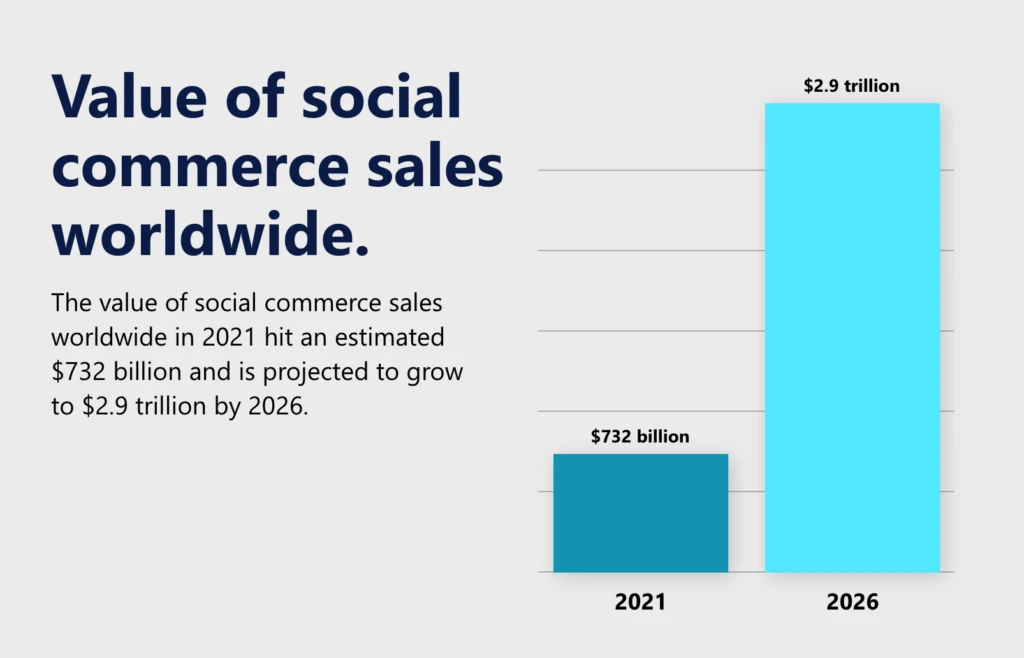
Social media has revolutionized how people connect and is now transforming the way consumers discover and engage with brands. One clear example is social commerce, which is an integrated and seamless strategy for allowing customers to discover, browse, share, and purchase without ever leaving a social media platform. Now brands are opening significant new revenue streams by delivering seamless purchasing experiences to consumers on the social media platform of their choice. The results are staggering, with the value of social commerce sales worldwide in 2021 hitting an estimated $732 billion and projected to grow to $2.9 trillion by 2026.1

Chart showing value of social commerce sales from 2021 to 2026.

Unsurprisingly, social commerce, or live commerce according Gartner Hype Cycle  for Retail Technologies, 2021, “can increase brand awareness and generate a large amount of traffic in a short time.”2 One country that is leading the live commerce trend is China.

Dynamics 365 Commerce can help organizations consistently deliver great customer experiences on any social channel or front-end application. This is because Dynamics 365 Commerce can utilize both headless and other modern commerce architectures to seamlessly connect enterprise systems, such as payment processing, content management, and omnichannel inventory.

2. Digital shelf analytics improve online merchandising

In 2021, US merchants recorded a record $870.8 billion in online sales, an increase of 14.2 percent compared to the year prior.3 As online sales continue to increase in volume and importance, brands will need to collect, measure, and monitor product and sales data from a growing variety of sources. One way brands can stay on top of this information is by using digital shelf analytics (DSA) to improve online merchandising.

DSA applications give retailers the ability to monitor data and metrics from all their digital sales channels, including retail digital commerce sites and online marketplaces. DSA solutions may often provide product data from social sites and collect competitive pricing data. These applications use API connections and automated website scraping to ingest data on metrics such as ratings and reviews, product availability and placement, search rankings, and product information content quality, alerting users to updated content.

Another technology related to DSA is the Smart Shelf. According to Gartner, “Smart shelf refers to the connected shelf in a physical retail store, which can include computer vision, weight or other sensors, electronic shelf labels (ESL) or LCD displays.” Gartner classifies the technology as “emerging” with a “high” benefit rating,2 which we believe makes it a technology to watch in the near future.

Dynamics 365 Commerce offers retailers robust DSA capabilities, including a unified view of content, assets, promotions, inventory, and pricing across physical and digital channels.

3. Immersive commerce helps retailers combat the rising cost of returns

One technology trend helping companies improve how they interact with consumers is immersive commerce (IC). IC reinvents customer experiences by integrating physical and virtual worlds via augmented reality (AR), virtual reality (VR), and mixed reality. With IC, brands can give customers a new way of visualizing a product in their space, such as seeing the way a Microsoft Surface Laptop looks on a desk in a home office or how different shades of makeup look before ordering online. Experts believe that AR-enabled shopping will soon become a must-have for furniture retailers. Home Depot, Wayfair, Target, Overstock, and Houzz have already adopted the technology.4 Significantly though, IC goes beyond improving and augmenting the customer experience. It also presents opportunities to solve costly inefficiencies, the most obvious and expensive being returns.

The growth in e-commerce and virtual shopping that accompanied the pandemic led to a corresponding increase in returns. In 2020, total return losses, including the value of lost sales, reached $428 billion, with an estimated $101 billion purely from returns.5 The loss from returns is expected to increase in the next several years, eventually reaching $1 trillion annually. According to Gartner, “Size and ‘best fit’ recommendations using AR can drastically reduce return rates and improve conversion.”2 We agree and believe that in the face of growing losses from returns, brands will likely increase their investments in AR because of its ability to help consumers avoid returns altogether. For example, by allowing customers to see how furniture will look in their house or how clothes will look in a virtual fitting room, they are more likely to purchase the product they need and will enjoy.

Immersive commerce solution from Hexaware.

Add AR, VR, and mixed reality capabilities to your digital storefronts using apps available in Microsoft AppSource, like Web AR with D365 Commerce from Hexaware Technologies.

4. Supply chain resilience is more crucial than ever

The events of 2020 unleashed a series of disruptions to global supply chains, such as border closures, stay-at-home orders, severely depressed demand in industries like travel and in-person services, and demand booms in others, such as healthcare equipment and operating supplies. The cost of these disruptions is significant: in a study conducted by Deloitte, 32 percent of chief financial officers (CFOs) said that shortages and delays were responsible for depressed sales, and 44 percent said that their costs have increased by 5 percent or more this year as a result.6

For retailers and consumer packaged goods (CPG) brands, a primary beneficiary of supply chain resilience is the consumer, who will switch retailers if an item is out of stock and expects to be able to order from any channel with fast and convenient delivery to anywhere. This means that retailers need technology solutions that enable omnichannel retail and fulfillment while also ensuring inventory availability.

Delivery person handing a package to a satisfied customer at the customer’s doorstep. Keywords: Dynamics 365; purchase; online ordering; ecommerce; delivering a box; Surface tablet; at home; receiving an order; driver; man; woman

Interested in learning more about live commerce or digital shelf analytics? Need to cut through market hype to prioritize your retail technology investments? Download Gartner Hype Cycle for Retail Technologies, 2021.

What’s next?

These are just a few trends that you can find inside our report on Consumer Goods Trends in 2022. In the full report, you’ll find relevant and impactful insights drawn from extensive research curated by industry professionals, subject matter experts, and thought leaders. Download your copy of the Consumer Goods Trends in 2022 report. And, be sure to register for the corresponding webinar on Top Retail Trends which you can attend live on Wednesday, May 4, 2022, 11:00 AM to 12:00 PM Pacific Time or watch afterward on-demand.


Sources:

1- Statista, 2021, Value of social commerce sales worldwide from 2020 to 2026

2- Gartner, 2021. Hype Cycle for Retail Technologies, 2021

3- U.S. Department of Commerce, 2022. Quarterly Retail E-commerce Sales

4- Postindustria, 2021. Top 10 AR Furniture Shopping Apps that Change the Future of Business

5- National Retail Federation, 2021. $428 billion merchandise returned in 2020

6- Deloitte, 2021. CFO Signals: 3Q 2021

Gartner does not endorse any vendor, product or service depicted in its research publications and does not advise technology users to select only those vendors with the highest ratings or other designation. Gartner research publications consist of the opinions of Gartner’s Research organization and should not be construed as statements of fact. Gartner disclaims all warranties, expressed or implied, with respect to this research, including any warranties of merchantability or fitness for a particular purpose.

GARTNER and HYPE CYCLE are registered trademarks of Gartner, Inc. and/or its affiliates in the U.S. and internationally and are used herein with permission. All rights reserved.

The post 4 trends to watch in consumer goods appeared first on Microsoft Dynamics 365 Blog.

Brought to you by Dr. Ware, Microsoft Office 365 Silver Partner, Charleston SC.

Enhanced Antimalware Protection in Microsoft Defender for Endpoint Android

Enhanced Antimalware Protection in Microsoft Defender for Endpoint Android

This article is contributed. See the original author and article here.

We are excited to share major updates to the Malware protection capabilities of Microsoft Defender for Endpoint on Android. These new capabilities form a major component of your next-generation protection in Microsoft Defender for Endpoint. This protection brings together machine learning, big-data analysis, in-depth threat research, and the Microsoft cloud infrastructure to protect Android devices (or endpoints) in your organization.


Today, we are thrilled to announce the public preview of this new, enhanced anti-malware engine capability!


What to expect with this enhancement:


  • Cloud Integration with support for metadata-based ML models, file classifications and reputation-based ML models, etc.

  • Better support for false positive and false negative prevention.

  • Reduced memory and CPU footprints.

  • Integrates seamlessly with Microsoft 365 Defender portal across platforms.

  • Threat nomenclature: The change in threat / malware name will now be in accordance with the standard naming scheme followed across all platforms, including Windows. This is part of the effort for aligning our nomenclature across all platforms and having a single naming mechanism for consistency.


  Changes to Android Threat names as depicted in the security center portal will be as under:


<Platform>.<Category>.<Family>.variant     —->     [Threat Type]:[Platform]/[Malware Family].[Variant]?![Suffixes]?


Example:


Old Syntax                                                     New Syntax


Android.Trojan.FakeInst.YB


TrojanSpy:AndroidOS/Nyleaker.B


There are no changes to the user experience aside from the threat naming: 


  Screenshot showing a threat detection on the deviceScreenshot showing a threat detection on the device 


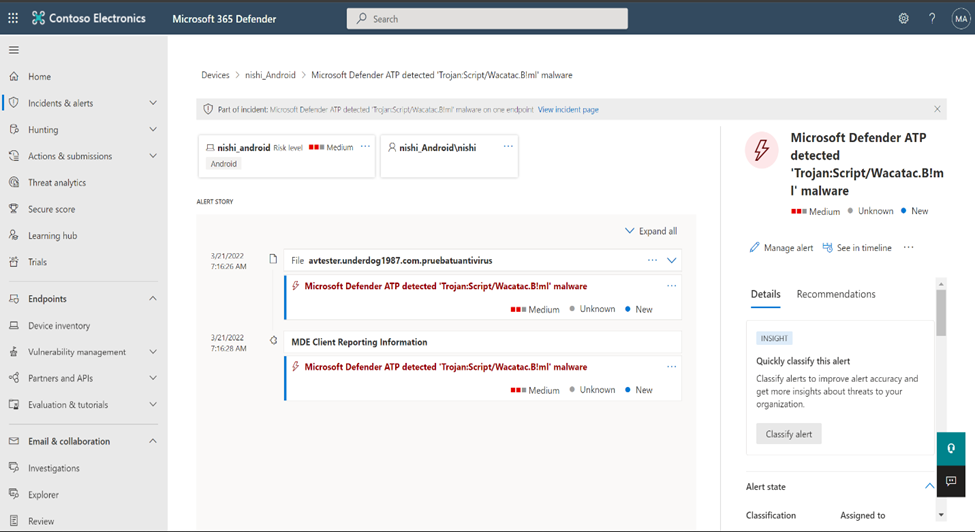
Microsoft 365 Defender portal example: 

Screenshot showing an alert in the portal with the new naming conventionScreenshot showing an alert in the portal with the new naming convention


Getting started with the preview: 


To get started, an IT Admin needs to use Microsoft Endpoint Manager (MEM) – Intune – to manage deployments from Managed Google Play’s pre-production tracks for Android.


https://docs.microsoft.com/en-us/microsoft-365/security/defender-endpoint/android-intune?view=o365-worldwide


Use the recommended minimum version as 1.0.3825.0301. Sometime after GA, APKs older than version 1.0.3825.0301 would stop getting Antimalware protection, so it’s recommended to plan for an upgrade.


We welcome your feedback and look forward to hearing from you! You can submit feedback through the Microsoft Defender Security Center or through the Microsoft 365 security center.