This article is contributed. See the original author and article here.
Unified routing in Dynamics 365 Customer Service considers both work item requirements and your agents’ capabilities to direct incoming work items to the agent that’s best suited to handle them. Routing configurations can be complex. When unified routing issues occur and work items aren’t assigned as expected, you need to track down and fix the problem.
Unified routing diagnostics help by giving you advanced tools for analyzing your routing configurations. Often, however, you have to verify settings manually in different parts of the system, requiring a call to customer support. To help you resolve these routing issues on your own, unified routing diagnostics now include assignment trace and error indication capabilities.
Diagnose assignment issues with assignment trace
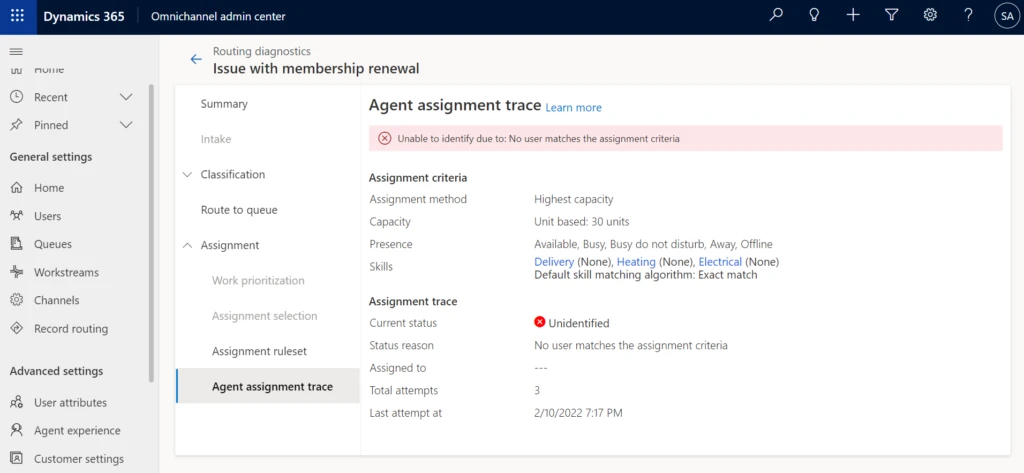
Assignment trace gives you insights into why some work items are taking longer to get assigned. In addition to showing the current assignment status, it provides details of the assignment criteria to help you understand why a certain work item is getting assigned incorrectly or is not getting assigned at all.
Identify routing issues with error indicators
Error indicators help you identify and understand the configuration misses that may be preventing a work item from being classified and assigned to the right agent. You can access these enhanced diagnostics at the record level in the Diagnostics tab in the system.
Scenario: Issue with skill matching algorithm criteria
Let’s consider a scenario with Contoso Coffee, which sells coffee beans. A new queue in its Consumer Division handles high-priority queries from Contoso Club members. Renee, the supervisor, added two new agents to the queue. While doing her daily analytics report check, she observes that although there is a new work item in the queue, it has not been assigned yet. She decides to diagnose the reason for it.
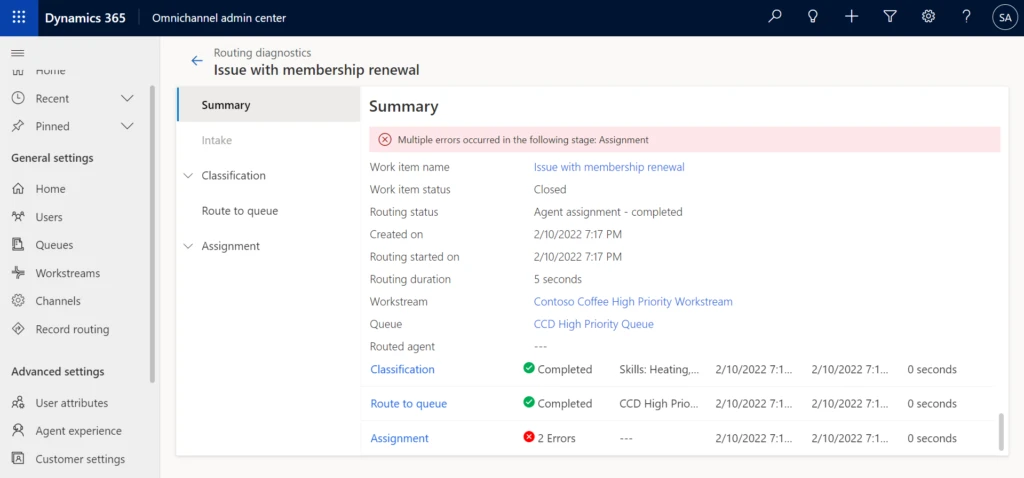
Drilling down into the logs per routing stage, Renee quickly finds out with the help of the new error indicator that no agent matched the criteria that were specified in the routing rules. She decides to take a closer look at the assignment trace details to understand the assignment criteria. After looking at the criteria, Renee realizes that the default skill matching algorithm has been set to Exact Match. Although both agents have the required skills to handle the work item, their skills weren’t an exact match. Since the criteria weren’t met, the work item wasn’t assigned.
Having error messages and assignment trace with criteria specified in the diagnostics saved Renee a great deal of time. She has all the information she needs to diagnose and fix the problem, all in one place.
This article is contributed. See the original author and article here.
Continuous integration and continuous delivery (CI/CD) culture started to get popular, and it brought the challenge of having everything automatized, aiming to make processes easier and maintainable for everyone.
One of the most valuable aspects of CI/CD is the integration of the Infrastructure as Code (IaC) concept, with IaC we can version our infrastructure, save money, creating new environments in minutes, among many more benefits. I won’t go deeper about IaC, but if you want to learn further visit: The benefits of Infrastructure as Code
IaC can also bring some challenges when creating resources needed for the projects. This is mostly due to creating all the scripts for the infrastructure is a task that is usually assigned to the infrastructure engineers, and it happens that we can’t have the opportunity to be helped for any reason.
As a Data Engineer, I would like to help you understand the CI/CD process with a hands-on. You’ll learn how to create Azure Databricks through Terraform and Azure DevOps, whether you are creating projects by yourself or supporting your Infrastructure Team.
In this article, you´ll learn how to integrate Azure Databricks with Terraform and Azure DevOps and the main reason is just because in this moment I’ve had some difficulties getting the information with these 3 technologies together.
First of all, you’ll need some prerequisites
Azure Subscription
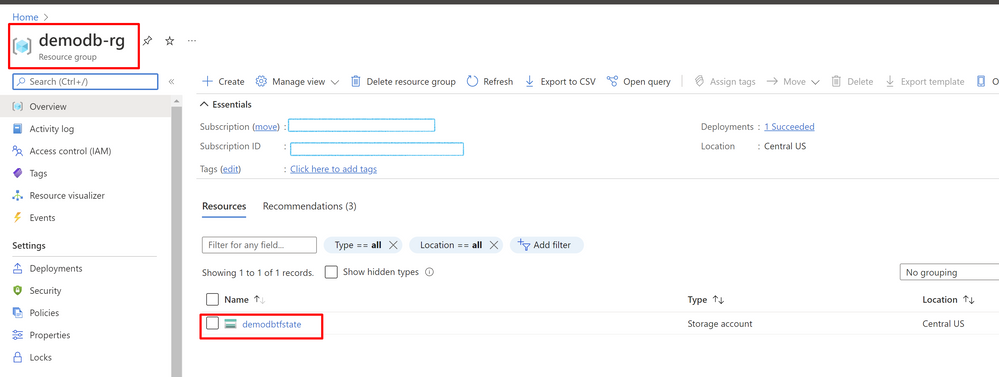
Azure Resource Group (you can use an existing one)
Azure DevOps account
Azure Storage Account with a container named “tfstate”
Visual Studio Code (it’s up to you)
So, let’s start and have some fun
Please, go ahead and download or clone this GitHub repository databrick-tf-ado and get demo-start branch.
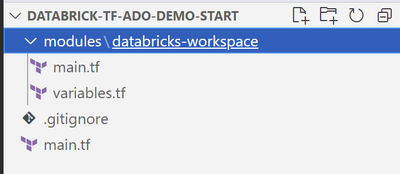
In the folder you’ll see a file named main.tf and 2 more files in the folder modules/databricks-workspace
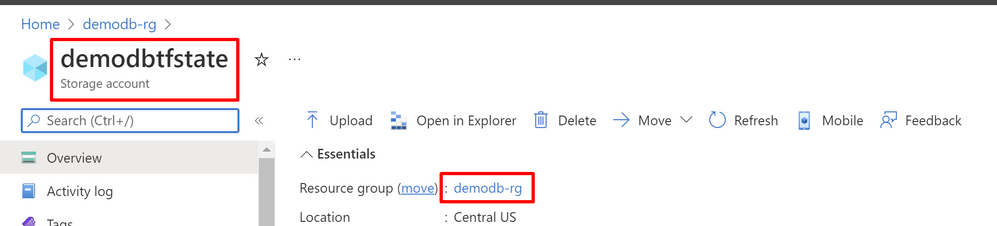
there you need to change the value of resource_group_name and storage_account_name for the values of you subscription, you can find those values in your Azure Portal, they need to be already created.
In main.tf file inside root folder there’s a reference to a module called “databricks-workspace”, now in that folder you can see 2 more files main.tf and variables.tf.
main.tf contains the definition to create a databricks workspace, a cluster, a scope, a secret and a notebook, in the format that terraform requires and variables.tf contains the information of the values that could change depending on the environment.
Now that you changed the values mentioned above into a GitHub or DevOps repository if you need assistance for that visit these pages: GitHub or DevOps.
At this moment we have our github or devops repository with the names that we require configured, so let´s create our pipeline to deploy our databricks environment into our Azure subscription.
First go to your azure subscription and check that you don’t have a databricks called demodb-workspace
You’ll need to install an extension so DevOps can use terraform commands so go to Terraform Extension.
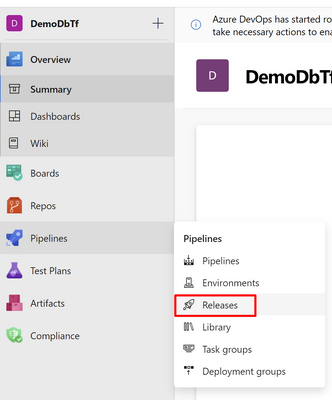
Once is installed in your project in Azure DevOps click on Pipelines-Release and Create “new pipeline”, it appears the option by creating the pipeline with YAML or with the Editor, I’ll choose the Editor so we can see it clearer.
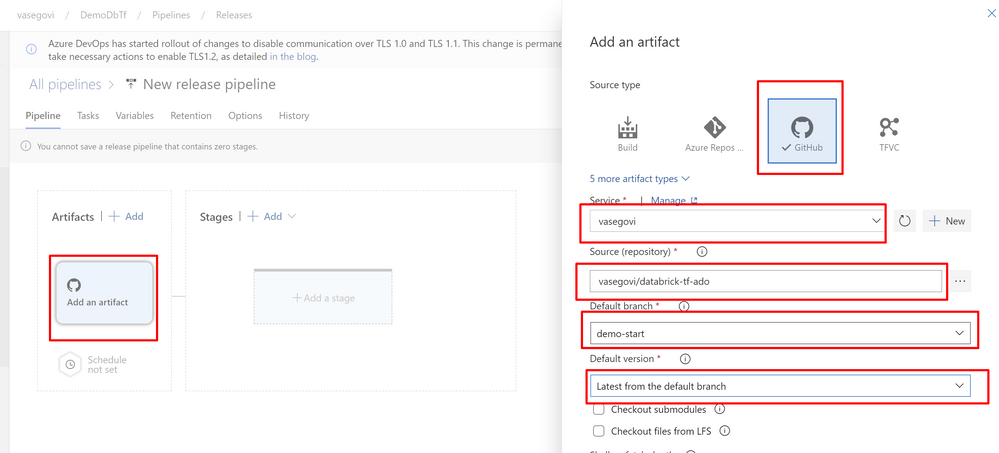
In Add an Artifact in the Artifact section of the pipeline select your source type (provider where you uploaded your repository) and fill all the required information, like the image below and click “Add”
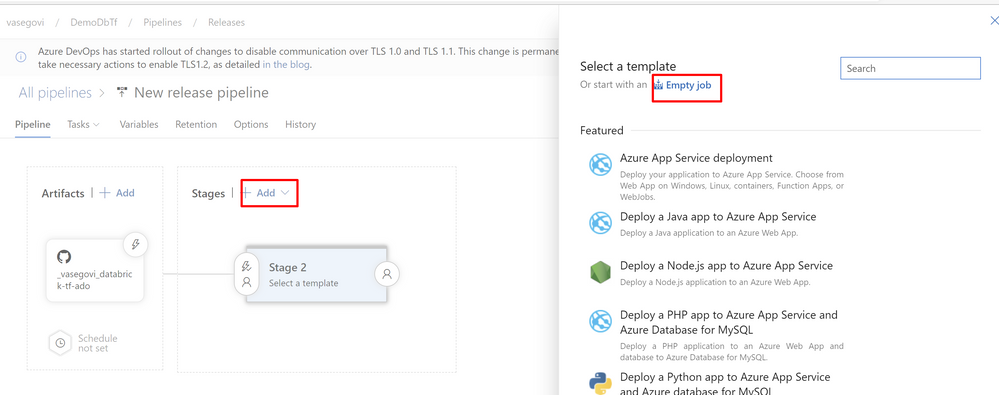
Then click on Add stage in Stages section and choose empty Job and name the stage as “DEV”
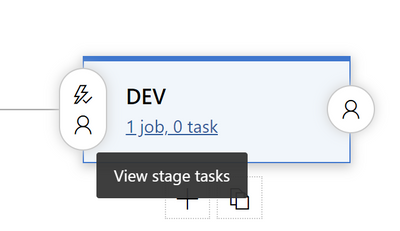
After that click on Jobs below the name of the stage
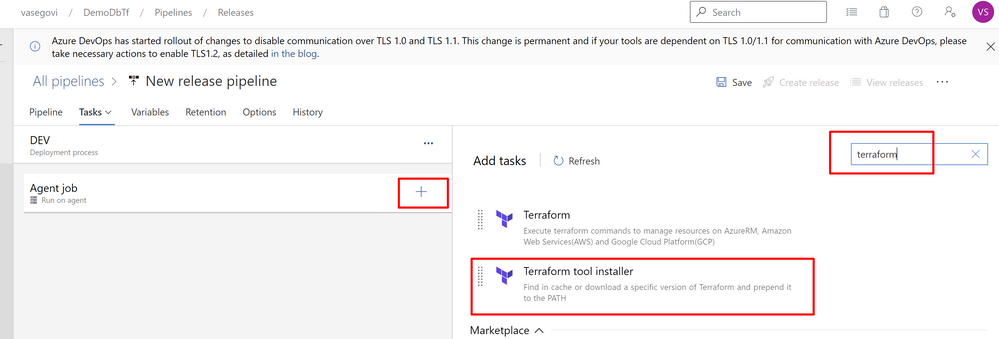
In the Agent job, press the “+” button and search for “terraform” select “Terraform tool installer”
Leave the default information
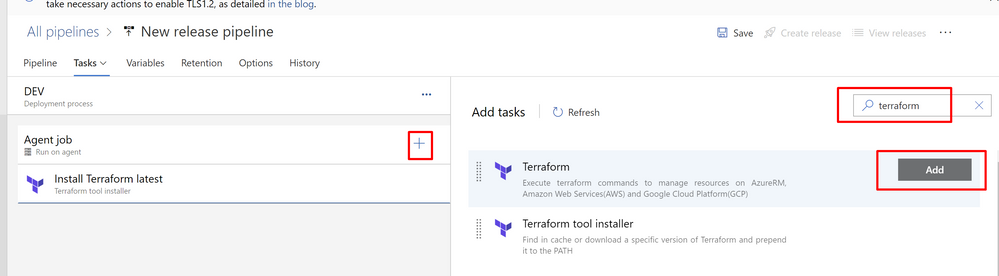
Then Add another 3 tasks of “Terraform” task
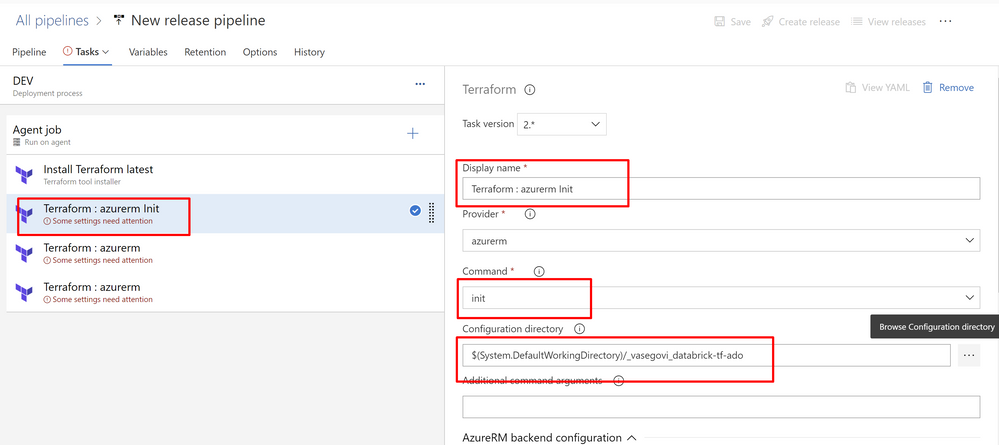
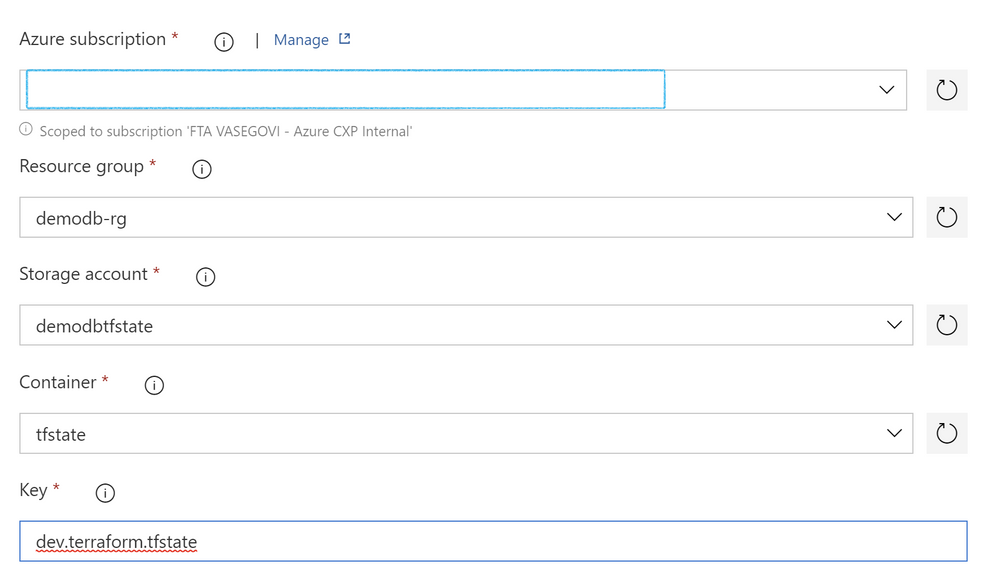
Name the second task after Installer as “Init” and fill the information required like the image:
For all these 3 tasks set the information of your subscription, resource group, storage account and container, and there’s also a value labeled key, there you have to set “dev.terraform.tfstate” is a key that terraform uses to keep tracking of your Infrastructure changes.
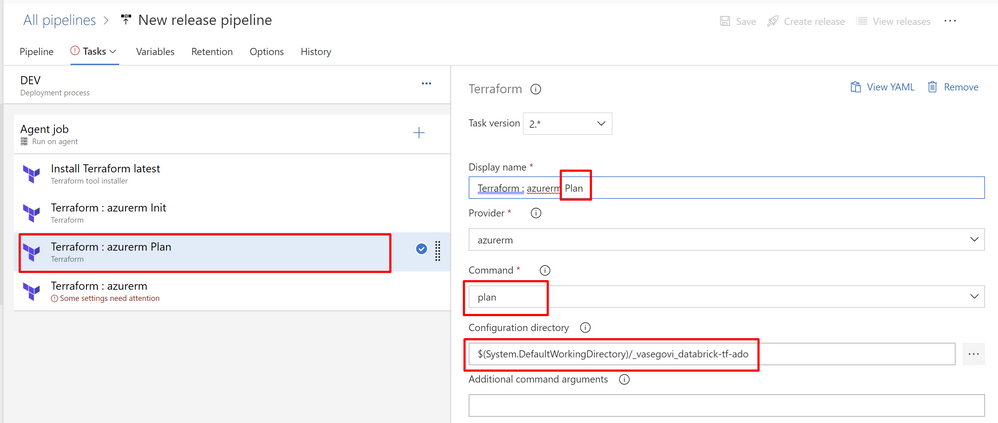
Name next task as “Plan”
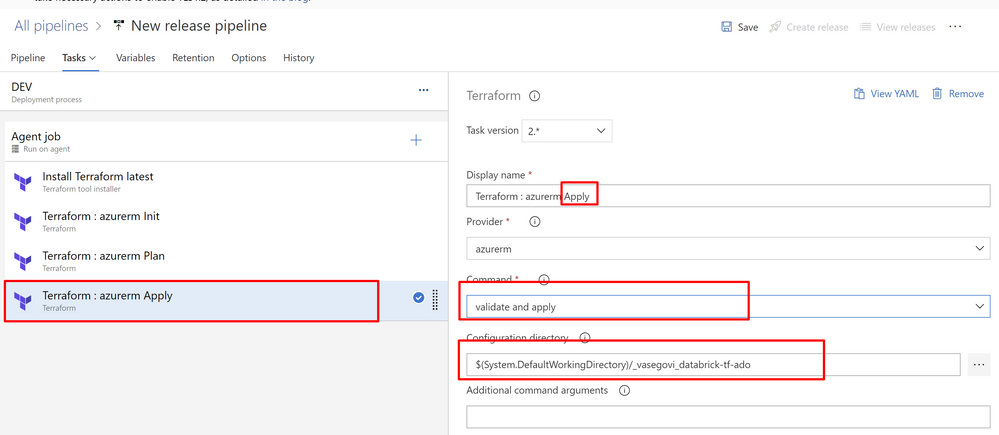
Next task “Apply”
Now change the name of your pipeline and save it
And we only need to create a Release to test it
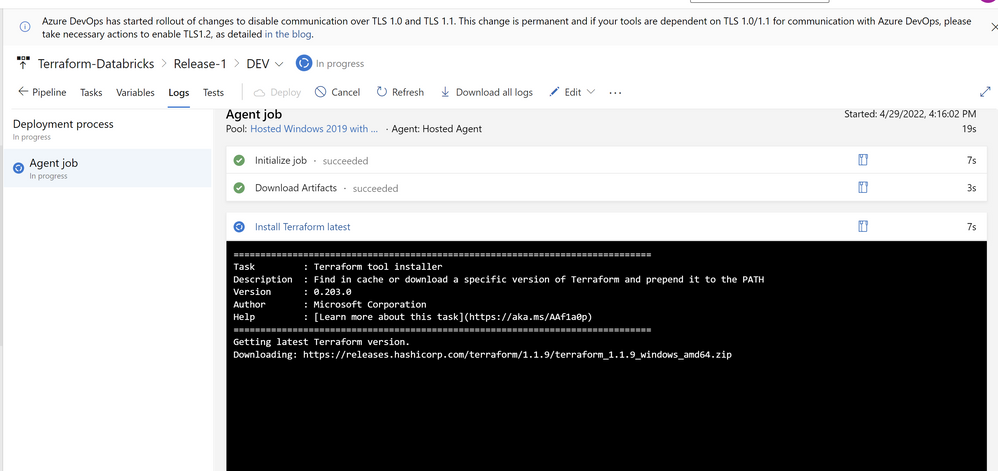
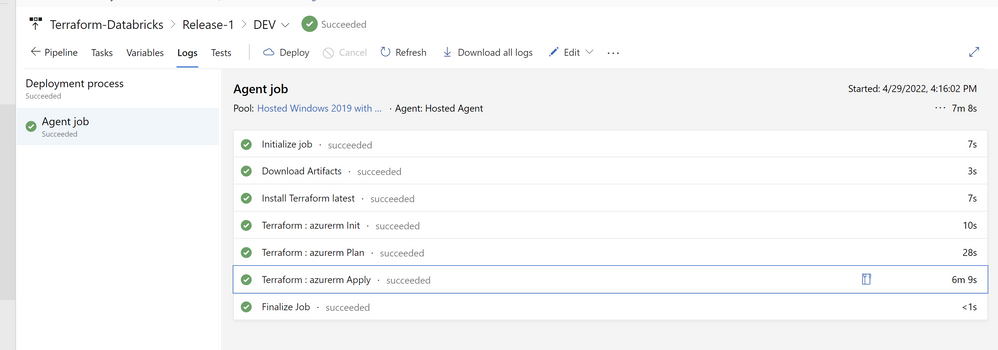
You can monitor the progress
When it finished, if everything was good you’ll see your pipeline as successful
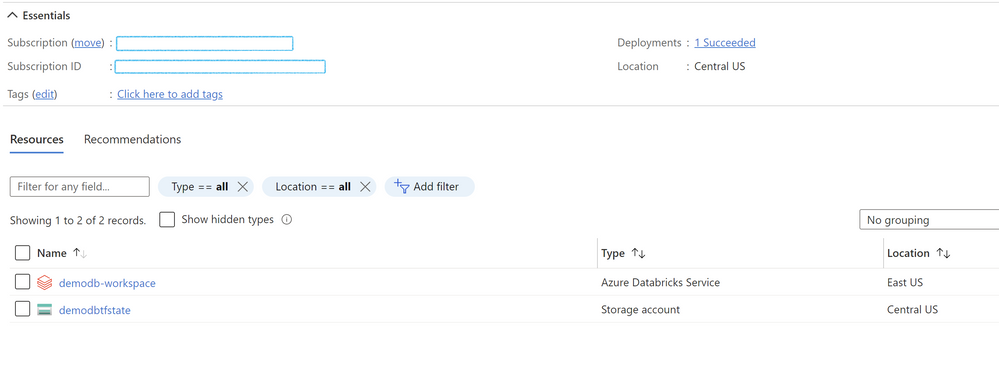
Lastly let´s confirm in the azure portal that everything is created correctly
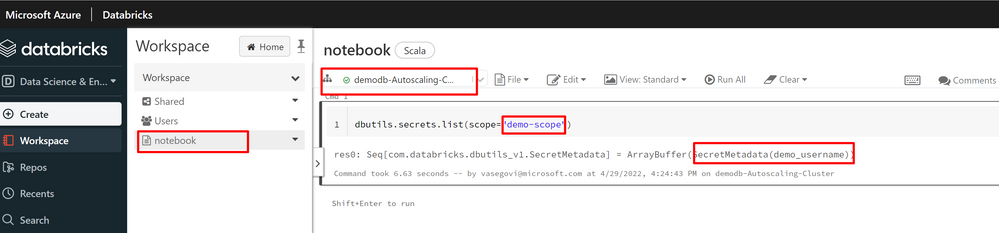
then login in your workspace and check the and run the notebook, so you can test that the cluster, the scope, the secret and the notebook are working correctly.
With that you can easily maintain your environments safe from the changes that contributors can do, only one way to accept modifications into your infrastructure.
This article is contributed. See the original author and article here.
The role of the chief financial officer (CFO) has been evolving for some time, from hindsight report generation to forward-looking advisor, business innovator, and change agent. During the pandemic, many finance leaders took ownership of large-scale digital transformation effortsa trend that is only accelerating. Indeed, a central lesson learned through the challenges of the past two years is the advantage of being able to rapidly adapt an organization to minimize the impact, or avoid altogether, the effects of disruption. Even as we move into a post-pandemic world, disruptive events are here to stayincreasing in both severity and frequency. At the same time, new business models are emerging, such as the subscription economy and service-based experiences like platform-as-a-service (PaaS), that require significant changes to financial and operational models.
Taken together, the need to adapt and overcome disruption and the opportunity presented by emerging business models offer a clear justification of why organizationsand in particular the futurist, change-making CFOmust develop flexibility and adaptability to achieve resilience. This point has not gone unnoticed. According to McKinsey, only 11 percent of companies believe their current business models will be economically viable through 2023, while another 64 percent say their companies need to build new digital businesses to help them get there.1 Despite having so much at stake, many finance leaders face roadblocks on the journey to become more agile. Therefore, this blog looks at 3 forces driving adaptability for CFOs with Microsoft Dynamics 365 Finance.
The first force driving adaptability is the modernization of enterprise resource planning (ERP) systems. Recent technological advances, such as the shift from the rigid structures of monolithic ERP to highly adaptable, composable business applications, are a primary benefit driver of ERP modernization. This is perhaps one reason that, according to Gartner, by 2023, organizations that have successfully renovated their ERP platforms will achieve at least a 40 percent improvement in IT agility to deliver business outcomes.2 This will not surprise companies that had completed ERP modernization before or during the pandemic. These businesses grew US corporate equity, assets, and profit ten times faster than corporate debt during the 21 months of the pandemic3proving that savvy companies, boosted by digital transformation, can rapidly pivot to new sales and services models.
Dynamics 365 Finance offers businesses standardized capabilities on a composable ERP platform. Plus, it can function as both a stand-alone solution, allowing organizations to avoid costly rip-and-replace of legacy technology or as a tightly integrated and extensible system. As CFOs look to modernize existing ERP solutions as a path to unlocking adaptability, Dynamics 365 is enabling the transformation and improving IT agility to embrace new business models.
Though expensive to maintain and resource-intense to customize, legacy ERP often becomes highly customized and fragmented as businesses grow and add new solutions, such as customer relationship management (CRM) or warehouse management systems (WMS). These additions are disparate and disconnected from a central ERP, leaving data silos that are difficult to integrate and reconcile. Without unified data available in real-time across the organization, finance leaders can remain stuck in the function of economic guardians and unable to rise to the role of business innovators.
Dynamics 365 Finance is built on a modern, open platform that can be easily connected to both legacy internal solutions and modern, cloud-based systems via RESTful APIs. This flexibility and extensibility serve to unlock adaptability, automate data harmonization, and create a single source of truth. Ultimately, this allows finance teams and the broader organization to confidently make quicker, data-first decisions.
3. Deliver AI-driven insights
As we have discussed previously, AI is poised to transform the finance function. The core set of financial management processes that support the work of every organization are often highly manual, making them slow to innovate and challenging to transform. While progress has been made through automation, specific tasks, like predicting when a customer will pay an invoice or creating an intelligent cash flow forecast, require more person-hours than are available in a month, let alone on demand. This is because these tasks require comprehensive knowledge of large, complex data setsa job ideally suited to the application of AI and machine learning.
Dynamics 365 Finance recently announced the general availability of finance insights, a set of AI-powered capabilities that help companies improve the efficiency and quality of financial processes by leveraging intelligent automation. Finance insights provide three new financial management tools: customer payment insights, cash flow forecasting, and budget proposals. When combined with Dynamics 365 Finance, these tools improve business decision-making by delivering AI-driven business insights that are clearer and faster while also improving operational efficiency by utilizing intelligent automation.
As we have seen here, businesses and the finance leaders who support them need the right technology solutions to drive adaptability if they are to thrive in an era of disruption and to capitalize on emerging trends, such as PaaS, direct-to-consumer (DTC), and the subscription economy. To this end, we walked through three forces that are driving adaptability for CFOs with Dynamics 365 Finance: modernizing ERP systems, enabling a real-time, single version of truth, and delivering AI-driven insights.
GARTNER and Magic Quadrant are registered trademarks and service mark of Gartner, Inc. and/or its affiliates in the U.S. and internationally and are used herein with permission. All rights reserved.
This article is contributed. See the original author and article here.
Restrict ADF pipeline developers to create connection using linked services
Azure Data Factory has some built-in role such as Data Factory Contributor. Once this role is granted to the developers, they can create and run pipelines in Azure Data Factory. The role can be granted at the resource group or above depending on the assignable scope you want the users or group to have access to.
When there is a requirement that the Azure Data Factory pipeline developers should not create or delete linked services to connect to the data sources that they have access to, the built-in role (Data Factory Contributor) will not restrict them. This calls for the creation of custom roles. However, you need to be cognizant about the number of role assignments that you can have depending on your subscription. This can be verified by choosing your resource group and selection the Role assignments under Access Control (IAM).
How do we create a custom role to allow the Data Factory pipeline developers to create pipelines but restrict them only to the existing linked service for connection but not create or delete them?
The following steps will help to restrict them:
In the Azure portal, select the resource group where you have the data factory created.
Select Access Control (IAM)
Click + Add
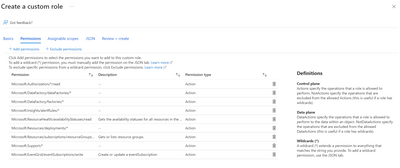
Select Add custom role
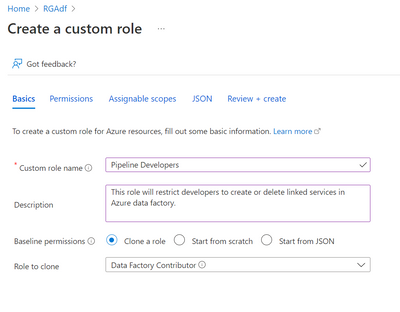
Under Basics provide a Custom role name. For example: Pipeline Developers
Provide a description
Select Clone a role for Baseline permissions
Select Data Factory Contributor for Role to clone
Click Next
Under Permissions select + Exclude permissions
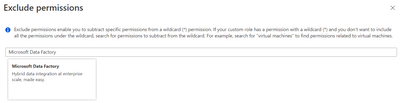
Under Exclude Permissions, type Microsoft Data Factory and select it.
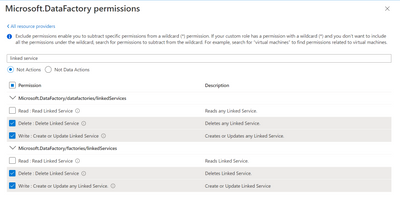
Under Microsoft.DataFactory permissions, type Linked service
Select Not Actions
Select Delete: Delete Linked Service and Write: Create or Update any Linked service
Click Add
Click Next
Under Assignable Scopes, make sure you want assignable scope to resource group or subscription. Delete and Add assignable scopes accordingly
Go over the JSON Tab
Click Review + create
Once validated, click create
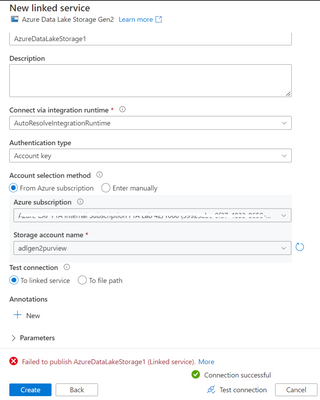
Note: Once the custom role is created, you can assign a user or group to this role. You can login with this user to Azure Data Factory. You will still be able to create a linked service but will not be able to save/publish.
This article is contributed. See the original author and article here.
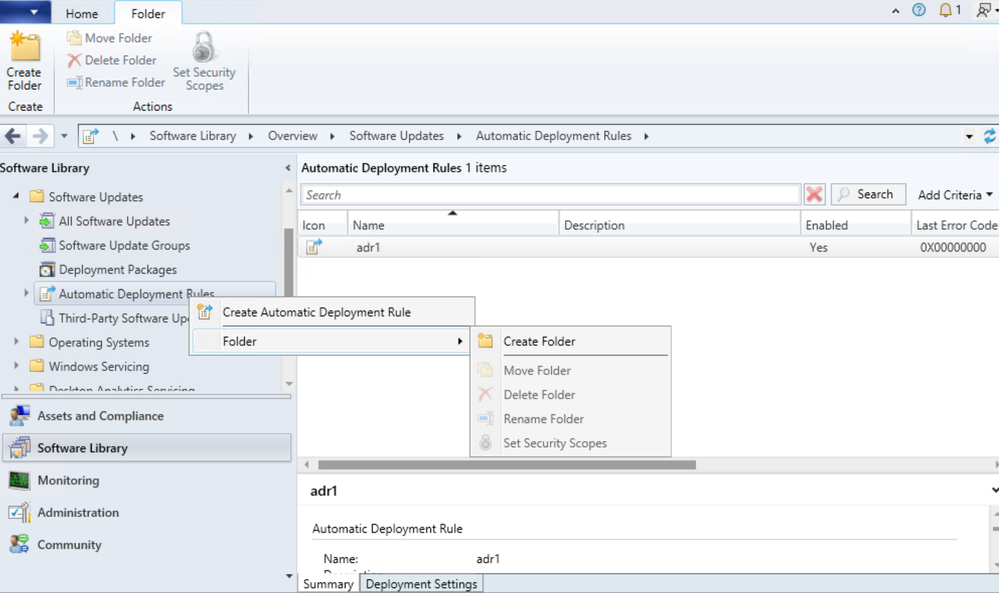
Update 2204 for the Technical Preview Branch of Microsoft Endpoint Configuration Manager has been released. In this release, administrators can now organize automatic deployment rules (ADR) using folders. This feature helps to enable better categorization and management of ADRs. Folder management is also supported with PowerShell Cmdlets.
This preview release also includes:
Administration Service Management option
When configuring Azure Services, a new option calledAdministration Service Managementis now added for enhanced security. Selecting this option allows administrators to segment their admin privileges betweencloud management gateway (CMG)andadministration service. By enabling this option, access is restricted to only administration service endpoints. Configuration Management clients will authenticate to the site using Azure Active Directory.
Note:
Currently, the administration service management option can’t be used with CMG.
Update 2204 for Technical Preview Branch is available in the Microsoft Endpoint Configuration Manager Technical Preview console. For new installations, the 2202 baseline version of Microsoft Endpoint Configuration Manager Technical Preview Branch is available on the Microsoft Evaluation Center. Technical Preview Branch releases give you an opportunity to try out new Configuration Manager features in a test environment before they are made generally available.
We would love to hear your thoughts about the latest Technical Preview! Send us feedback directly from the console.




Recent Comments