This article is contributed. See the original author and article here.
Microsoft is looking to understand employee experience sentiment in government organizations. Fill out our quick poll question below to help shape our products! Microsoft would love to hear from you! Which answer best fits you?
* Please take a few minutes to complete our survey. Please ensure you are authorized to provide this information and not violating any company policies. Your responses will be kept confidential with restricted access. For more information, see the Microsoft Privacy Statement. If you have questions about this survey, please contact TechCommunity@microsoft.com
This article is contributed. See the original author and article here.
The OneDrive team is excited to share all the recent OneDrive updates and feature releases we’ve released between April and June 2022. We’re continuing to do everything we can to provide you with a seamless experience for accessing and sharing files with your teammates and external colleagues, to keep you productive in this new world of hybrid work.
Here are the OneDrive features we’ve released in full or in preview in Q2 of 2022:
April 2022
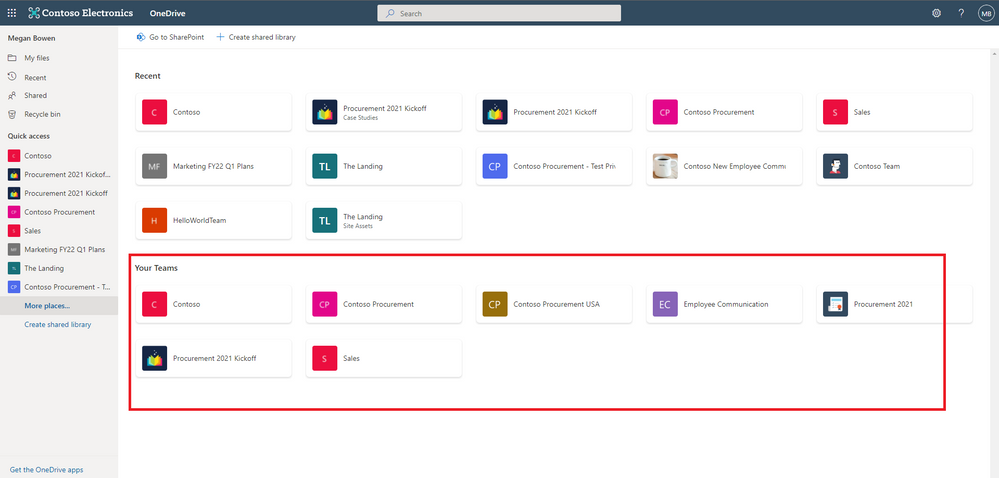
Easily navigate to all your Teams files from OneDrive (88912)
In OneDrive, we are adding a “Your Teams” section to the “More Places” page to allow you to easily find and work with all your files in Teams.
To help you keep your workspace uncluttered, we’ve added the ability for you to delete large folders (with up to 10,000 items) at one time. This means that when you’re finished with a project, you can quickly remove all the files you no longer need from your OneDrive and SharePoint libraries.
Microsoft Stream: Comment on a video or audio file in SharePoint and OneDrive (88521 )
Now, users with view permissions can leave comments in video or audio files. This can be helpful when collaborating on files to share with a larger audience, or for addressing questions of people who were unable to attend a call or meeting.
May 2022
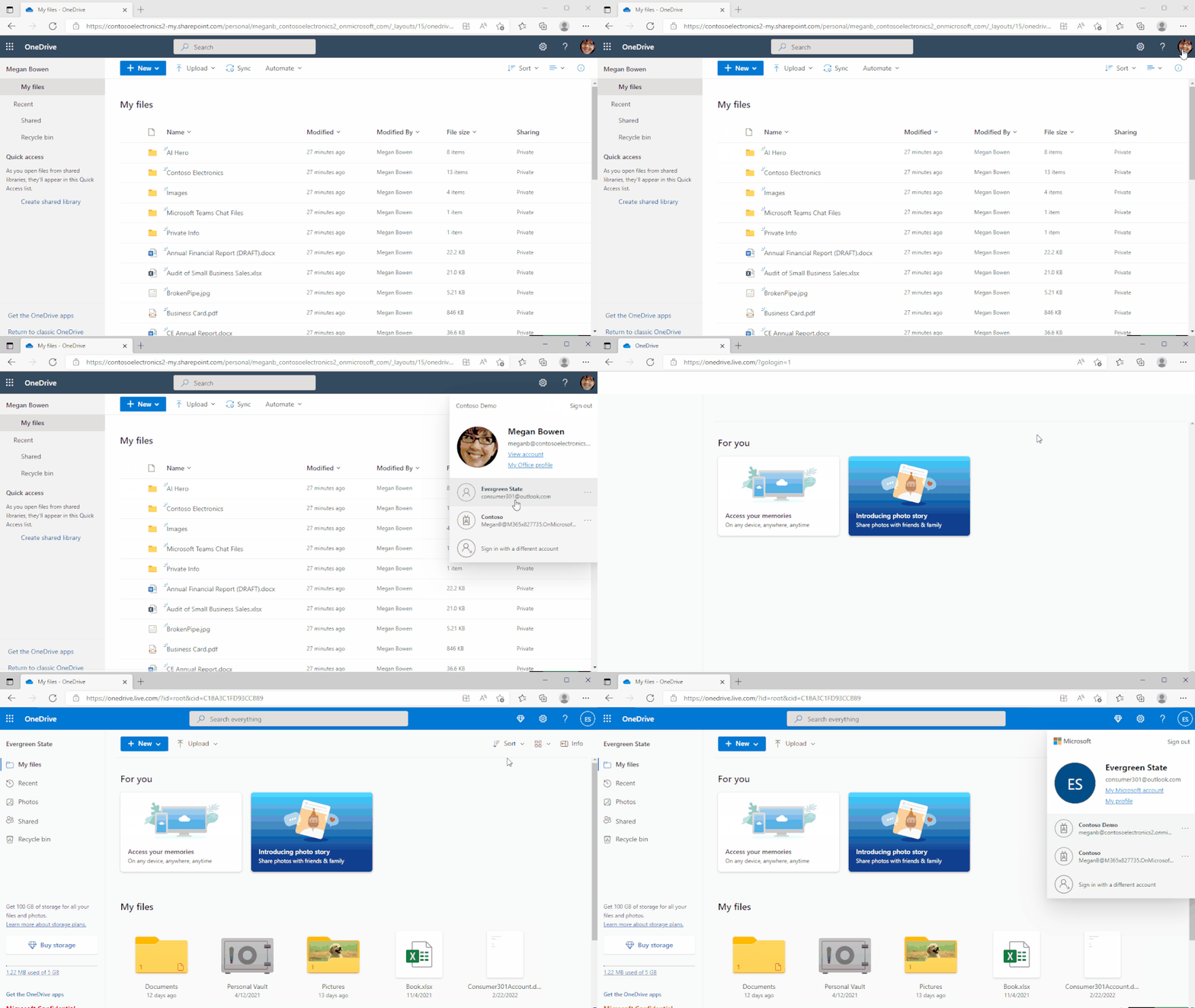
Shift between work and personal files in OneDrive
We’ve made it simpler for you to switch between your professional and personal OneDrive accounts, or even between separate professional accounts you might maintain for multiple clients if you’re a consultant or freelancer. By selecting your profile picture at the top right of the OneDrive page, you’ll see a list of all your Microsoft accounts, or the option to add a new one.
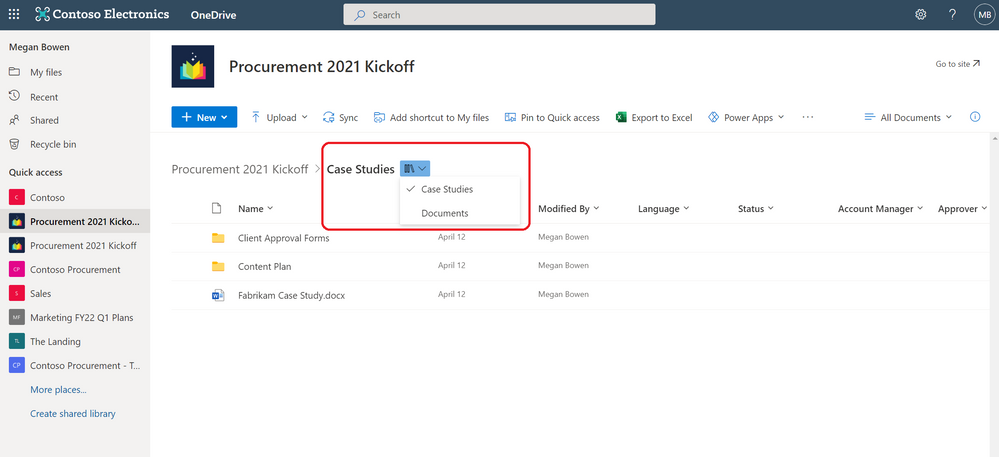
Quickly switch between document libraries
We’ve added a dropdown to OneDrive and SharePoint that lets you easily switch between multiple document libraries associated with a Teams team or a SharePoint Site. You can easily select the Dropdown library icon to switch between document libraries.
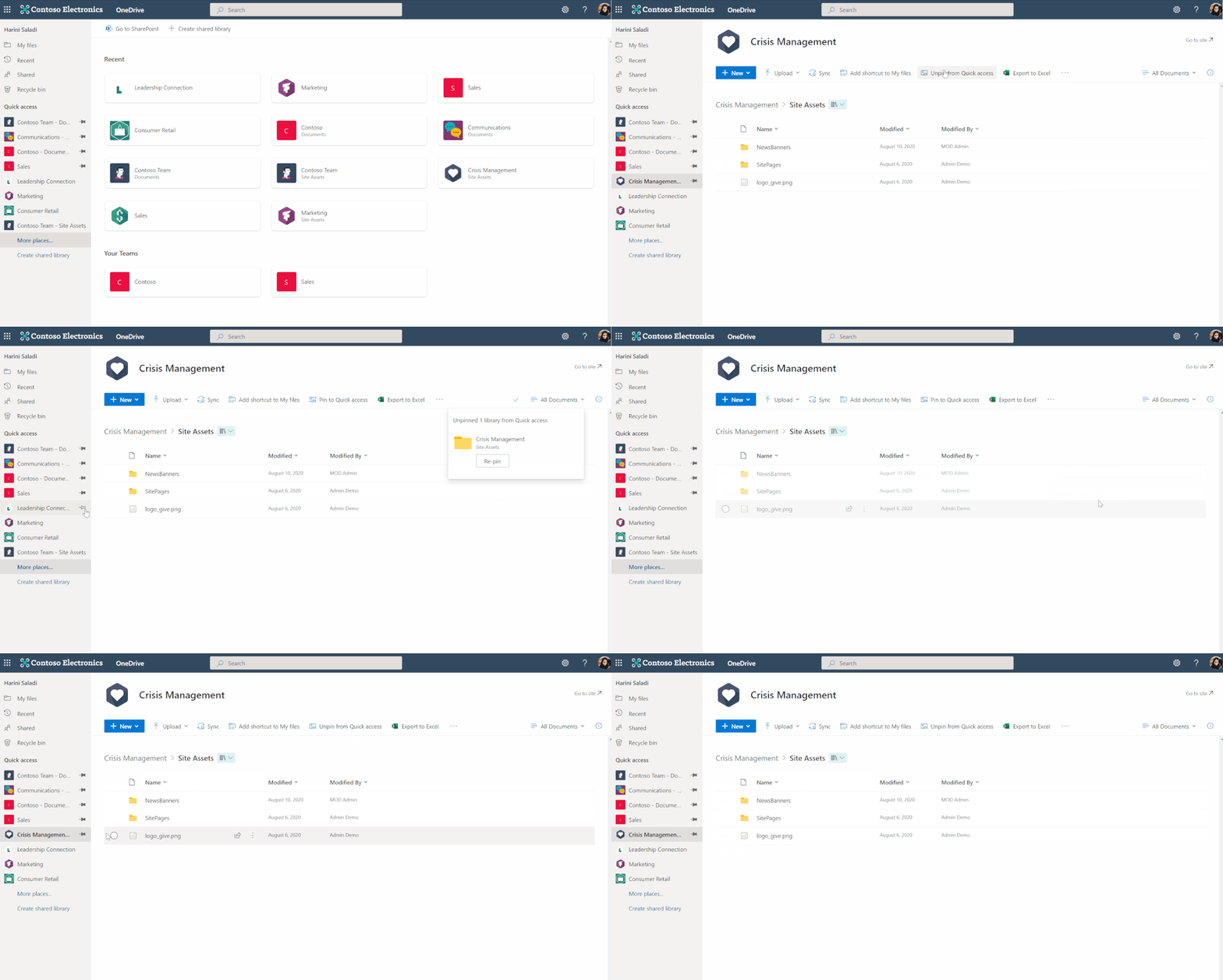
Pin important files to Quick Access
To easily find and access the places where you regularly work, you can pin shared libraries to the Quick Access section in the left nav of OneDrive. Pinning a document library adds it to the top of the Quick Access section. You can also un-pin document libraries from the Quick Access section.
June 2022
File browsing in Teams
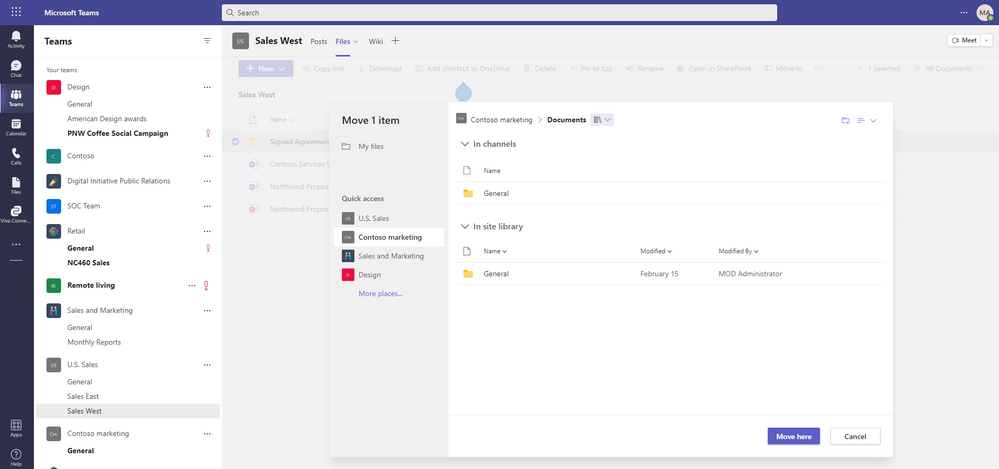
Now when you browse to a Teams channel and click the Files tab at the top, this experience will be powered by OneDrive. For example, you’ll be able to leverage familiar controls to easily move or copy your file to another library within Microsoft Teams. You can also switch between document libraries associated with specific Teams channels (standard or private) directly in Microsoft Teams and access your files as you would directly in OneDrive and SharePoint.
Add to OneDrive in Teams
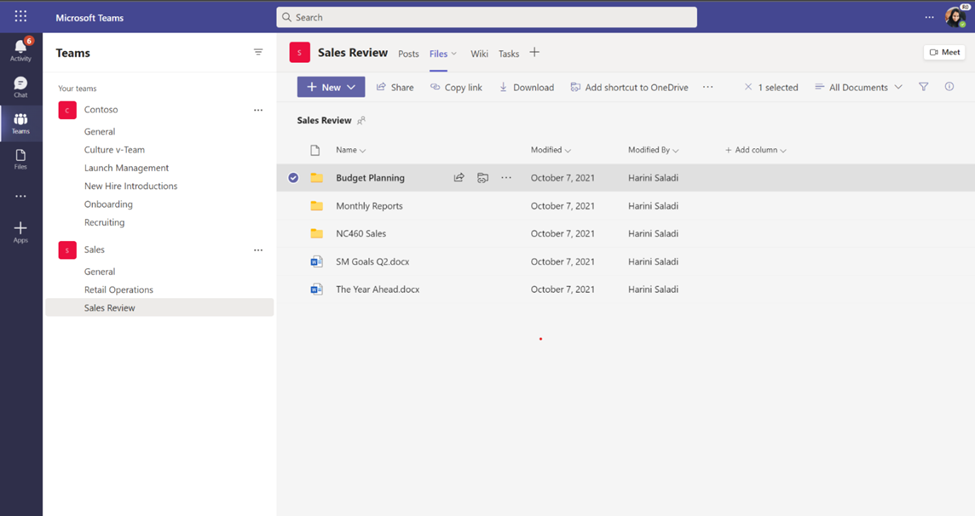
You can now use Add shortcut to OneDrive in Teams to give yourself quick access in OneDrive to the Teams files you work with most frequently. Any changes that occur in Teams are also synced, so your files are also up to date. This feature helps you keep all your files organized in one place, no matter where they are stored.
OneDrive and SharePoint: Access your Teams standard and private channel files (88911)
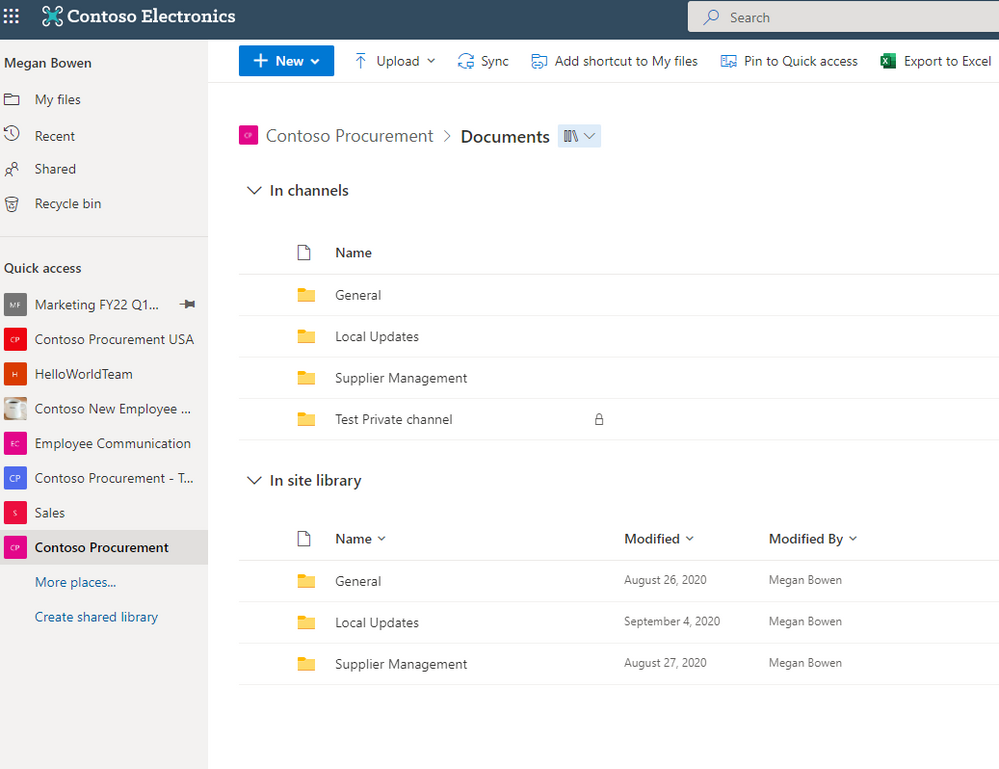
When you navigate to a site in SharePoint or OneDrive, you’ll be able to access the files stored in the Teams standard and private channels associated with that site.
OneDrive Sync Admin reports for macOS in Public Preview (81982)
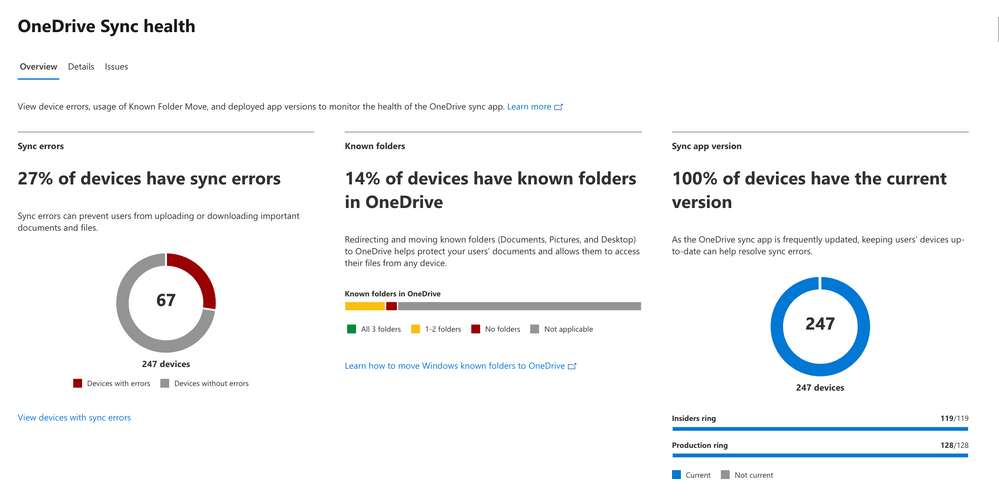
OneDrive Sync Admin Reports for macOS give you more visibility into who in your organization is running the OneDrive Sync client on macOS and any errors they might be experiencing. When you open the OneDrive Sync health dashboard, you’ll see an executive summary of what’s going on with OneDrive Sync in your organization. On the left, you can see how many devices have at least one sync error. In the middle, you can see at a glance what percentage of the devices in your organization have known folders OneDrive is helping to protect. You can see what percentage of devices have the Desktop and Documents folders syncing with OneDrive, which have only one and which have not opted in to sync those folders at all, meaning if something were to happen to those devices, all the contents of those folders would be lost. On the right, you can see how many devices are running on the current version of OneDrive, meaning they have all the latest and greatest fixes and features from Microsoft.
We’ve added the ability to rename shortcuts you’ve added using the “Add to OneDrive” feature within OneDrive web.
Access your Teams standard and private channel files (88911)
When you navigate to a site in SharePoint or OneDrive, you’ll be able to access the files stored in the Teams standard and private channels associated with that site.
Microsoft Stream Generate captions for a video uploaded to SharePoint and OneDrive for GCC and GCC High (85644)
Users with edit permissions to a video file uploaded to SharePoint and OneDrive can click a button in the player to generate closed captions in English.
OneDrive File Picker v8
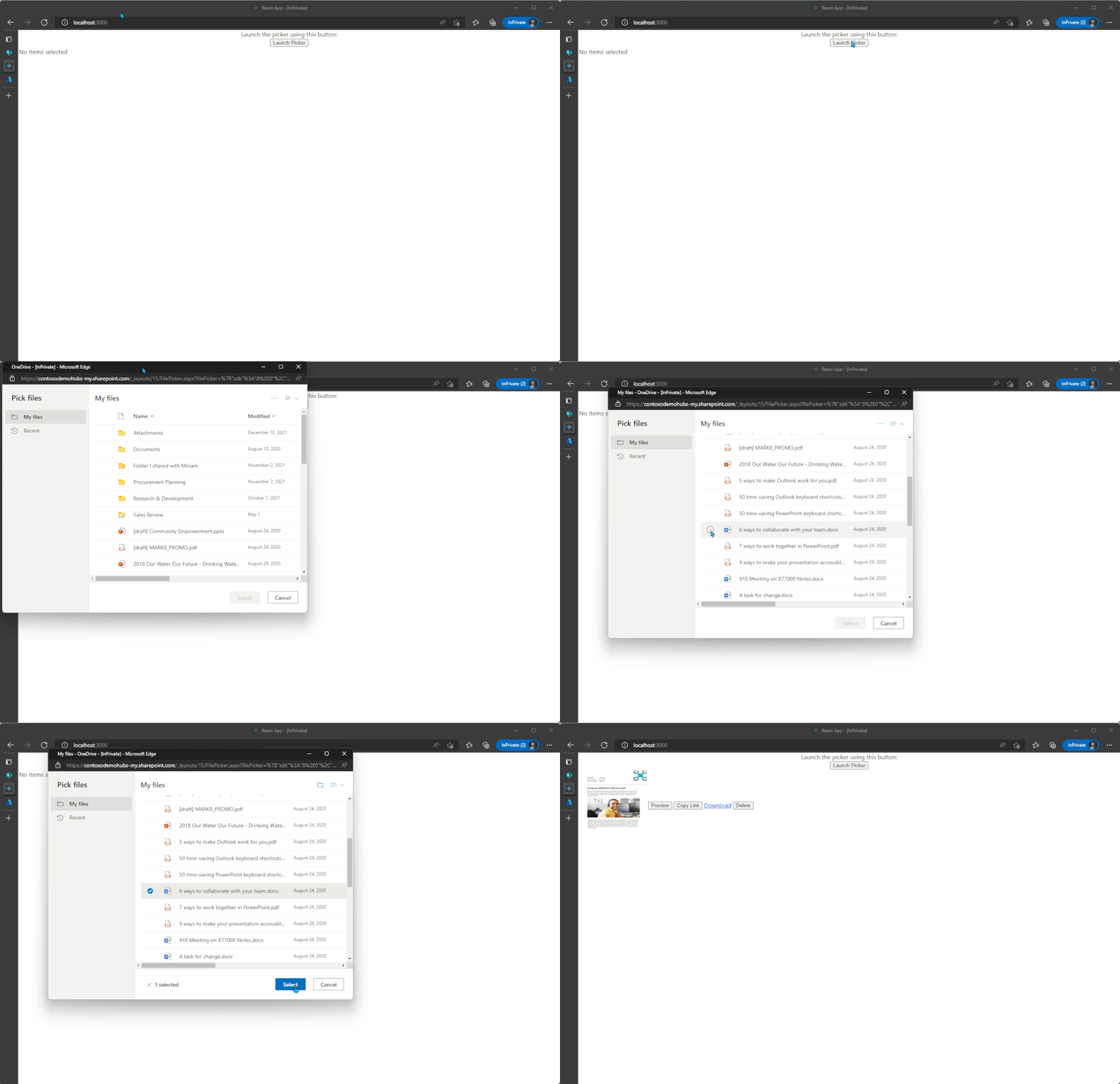
The OneDrive File Picker lets you connect your custom web apps to content stored in OneDrive (both the commercial and business versions) and SharePoint. With File Picker v8, you can integrate directly with the Microsoft 365 service, saving you complexity and time during the development phase and providing your users with the same rich, familiar user experience of OneDrive or SharePoint. Users who are already logged into Microsoft 365 can seamlessly access files and content through your web app, without having to log into the Microsoft 365 account a second time.
File picker v8 experience
Learn more..
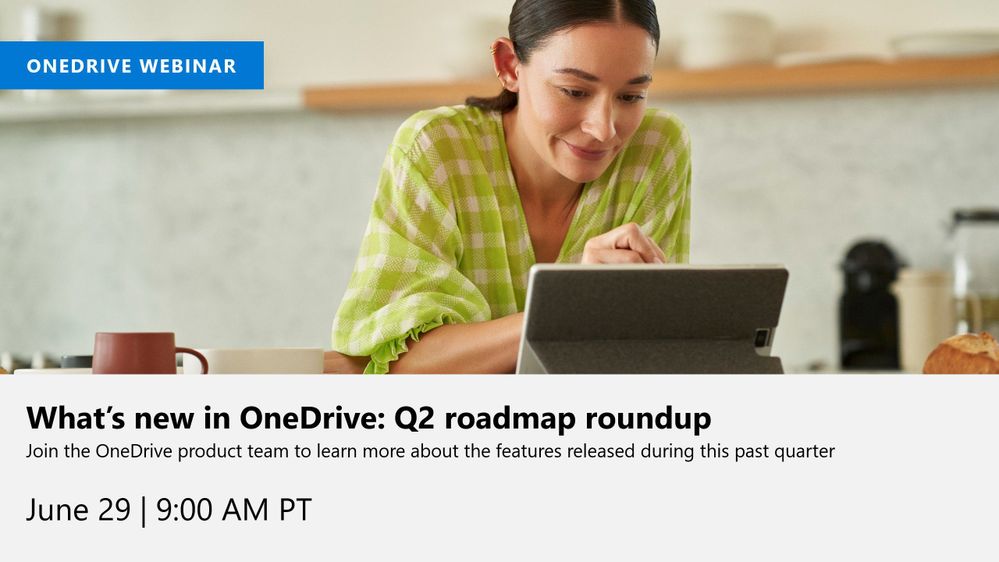
We hope you’re as excited as we are about these new features. Join us for a free webinar tomorrow to learn more about these innovations.
We continue to evolve OneDrive as a place to access, share, and collaborate on all your files in Office 365, keeping them protected and readily accessible on all your devices, anywhere.
Thank you again for your support of OneDrive. We look forward to your continued feedback and hope to connect with you at another upcoming Microsoft or community-led event.
This article is contributed. See the original author and article here.
Over the last few years, organizations have increasingly adopted cloud-native SaaS applications to meet changing agility and productivity needs. While the growth of SaaS apps has enabled cost savings and other gains for organizations, it has also raised a significant challenge for security teams. Ensuring a secure way to use essential productivity-enhancing tools has become a critical strategic priority for security teams. Today, we are thrilled to announce the public preview of SaaS Security Posture Management capabilities in Microsoft Defender for Cloud Apps that will enable you to view, identify, and remediate misconfigurations across your applications to improve your organizational security.
Lack of visibility, misconfigurations, and sophisticated attacks are some of the common threats that put your sensitive data and users of SaaS apps at risk. In today’s threat landscape, customers need a new approach to:
Proactively strengthen the security posture of SaaS apps enabled in your enterprise.
Detect any breach/attack on these applications and respond quickly.
Prevent any sensitive data leakage even in the case of an attack.
Microsoft Defender for Cloud Apps is designed to help secure your SaaS applications and protect sensitive data in your organization against evolving threats. Empower your security teams with enhanced visibility and assessment tools to identify usage patterns, assess risk and business levels, and manage more than 31,000 SaaS applications to defend against threats.
For each application, you have visibility into its users, their IPs, and their traffic volumes to detect anomalous behavior. Further, you can view the security, compliance, and legal risk levels (e.g. SOC2, ISO27001, GPDR, encryption protocol, etc.) of every application in your organization. After approving specific apps, access deeper protections to ones containing sensitive information with tools to detect attack attempts, suspicious behaviors, and potential data leakages.
New integrated SaaS security posture management with Microsoft Secure Score
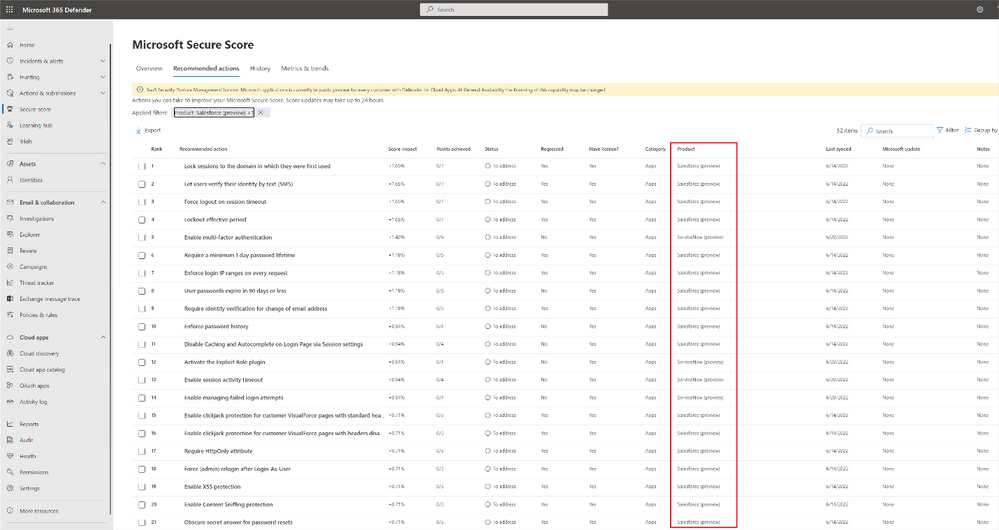
It’s not enough to only know which SaaS apps are being run in your environment – for security teams, understanding best practices and managing the configurations across your organization’s SaaS apps are of equal importance. Microsoft Defender for Cloud Apps not only helps you discover all the SaaS apps in your environment but with new security posture management (SSPM) capabilities, you can also get deeper visibility and automatically identify misconfigurations and gaps in each app. Today, you can access security posture insights across Office 365, Salesforce (preview), and ServiceNow (preview), with additional SaaS apps to be added in the coming months. This experience is integrated into the Microsoft 365 Defender dashboard to enable security teams to see their holistic security posture across the enterprise with Microsoft Secure Score.
Figure 1 Microsoft Defender for Cloud apps enables you to manage your security posture of apps such as Salesforce directly within Microsoft Secure Score.
Within the Microsoft Secure Score blade, your security teams can identify misconfigurations and get a step-by-step remediation guide for every risky security configuration in your environment for the related SaaS apps.
Start today
Defender for Cloud Apps helps you gain visibility of your cloud apps, discover shadow IT, protect sensitive information anywhere in the cloud, enable protection against cyber threats, assess compliance, and manage your security posture across cloud apps. In addition to Azure and Office 365 applications, Microsoft Defender for Cloud Apps enables you to protect your assets across the use of many applications including Atlassian, Box, Dropbox, Google Workspace, OneLogin, Okta, Cisco WebEx, Salesforce, Slack, ServiceNow, DocuSign, NetDocuments, GitHub, Zoom (preview), Workplace by Meta (preview), Egnyte (Preview), and more. With Defender for Cloud Apps’ extensive coverage, gain the right visibility tools to detect and prevent attacks and data leakages.
If you are already using Defender for Cloud Apps, you can start using the new SSPM security posture management capabilities by connecting Salesforce or connecting ServiceNow (if you already have an existing connector to Salesforce or ServiceNow, you can immediately use the new capabilities). Security assessments and recommendations will be shown automatically in Microsoft 365 Defender portal under security recommendations.
This article is contributed. See the original author and article here.
The momentum of e-commerce continues. In fact, McKinsey & Company has stated that e-commerce shopping has 30 percent higher penetration than pre-COVID-19 pandemic, and that this pandemic has also accelerated e-commerce growth by five years.1 The COVID-19 pandemic certainly explains part of the growth in the demand, but it is not the whole story. Other factors such as increased mobile commerce, accelerated business-to-business (B2B) and direct-to-consumer (DTC) e-commerce adoption, and new technological advances have created both opportunities and challenges for companies that embrace omnichannel retailing.
Retailers must either build new or infuse present strategies, systems, and processes with a composable approach to obtain omnichannel commerce experience. Let’s look at how Microsoft Dynamics 365 modular and composable cloud-based solutions help organizations provide their customers with unified commerce experiences.
Agility improves operational execution
Retailers are investing in integrating experiences and agile solutions for a good reason. McKinsey & Company states that the new bar for omnichannel excellence is 10 or more channels over three engagement modes (in-person, remote, and self-service), delivered 24/7.2 Omnichannel fulfillment retail tactics, such as buy online pickup in store (BOPIS), buy online pickup at curbside (BOPAC), reserve online pickup in store (ROPIS), buy online return in store (BORIS), or locker, ship from store, ship to store, endless aisle, two-day delivery, and more, are adding more complexity and challenges for retailers to deliver on their order promise.
Hence, in these environments, unifying data across internal and external networks to include physical and digital touchpoints requires agile and resilient solutions for faster responses to market changes and disruptions. At the pandemic’s beginning, many retailers, manufacturers, distributors, and consumer packaged goods (CPG) companies accelerated their digital transformation journey to adapt to changing customers’ needs quickly.
“With Dynamics 365, we can make decisions much more quickly and respond in near real-time to consumer demand. What used to take two days now happens almost immediately.”
Russell Anderson, Senior Director, Retail Operations Columbia Sportswear
A modern microservices-based order management system (OMS) helps organizations incrementally replace modular components of their existing infrastructure to gradually advance wherever they are in their supply chain and commerce digital transformation journey. It also allows organizations to avoid costly and time-consuming rip-and-replace projects by seamlessly integrating with existing enterprise resource planning (ERP) investments, unifying data across disparate systems, and unlocking siloed inventory and operational data.
Extensibility scales end-to-end visibility and fulfillment
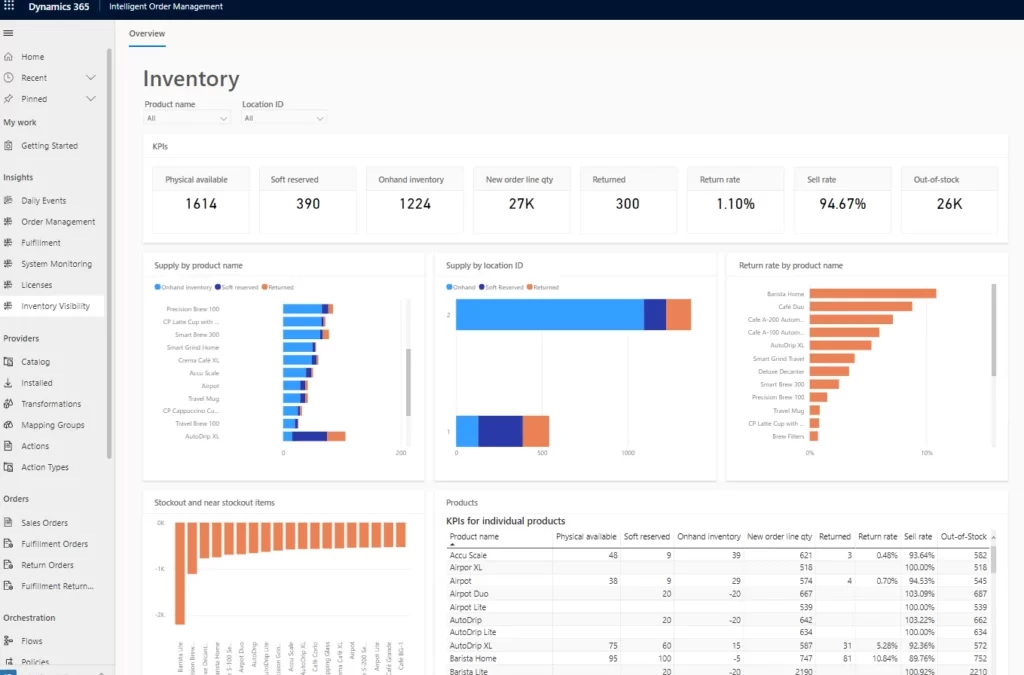
As order intake, cross-channel inventories, and third-party logistics providers (3PLs) intersect at order management, end-to-end visibility becomes an imperative. More than 80 percent of shoppers said it is important for retailers to provide the estimated date/time of arrival for products on their website, and 78 percent said providing in-store availability was important to them.3
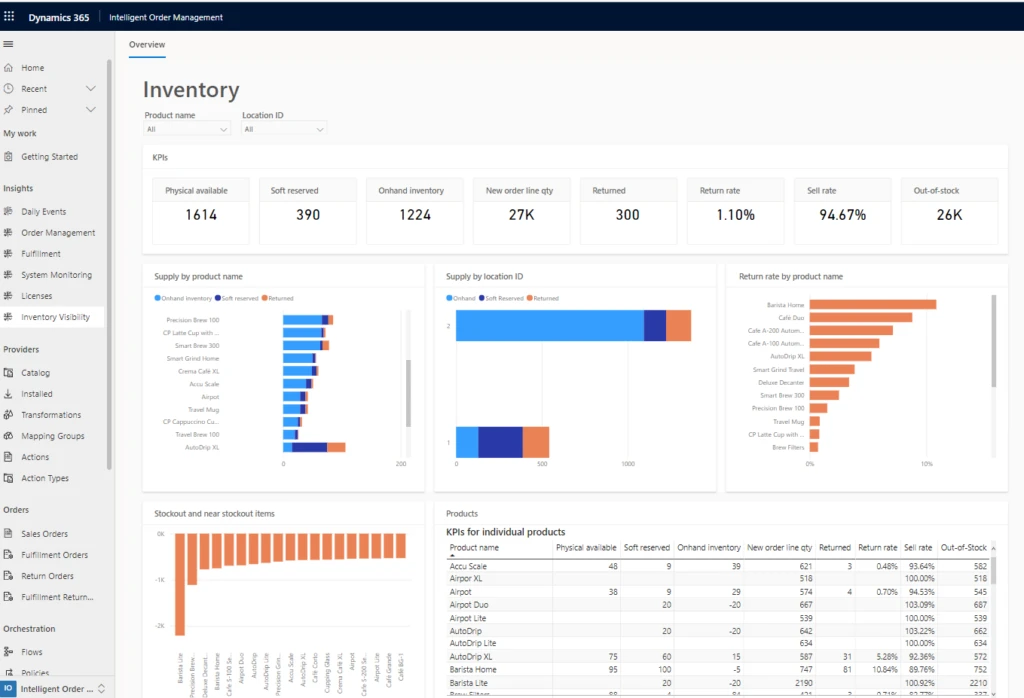
Figure 1: Inventory visibility dashboard in Dynamics 365 Intelligent Order Management. Learn how to set up the inventory visibility connector in the product documentation page.
Dynamics 365 Intelligent Order Management helps organizations achieve end-to-end order visibility through its fulfillment optimization engine that uses real-time inventory visibility and AI. More than half, 66 percent, of retailers surveyed said inventory accuracya core capability for omnichannel fulfillmentwas very or somewhat challenging when setting up their omnichannel program.4
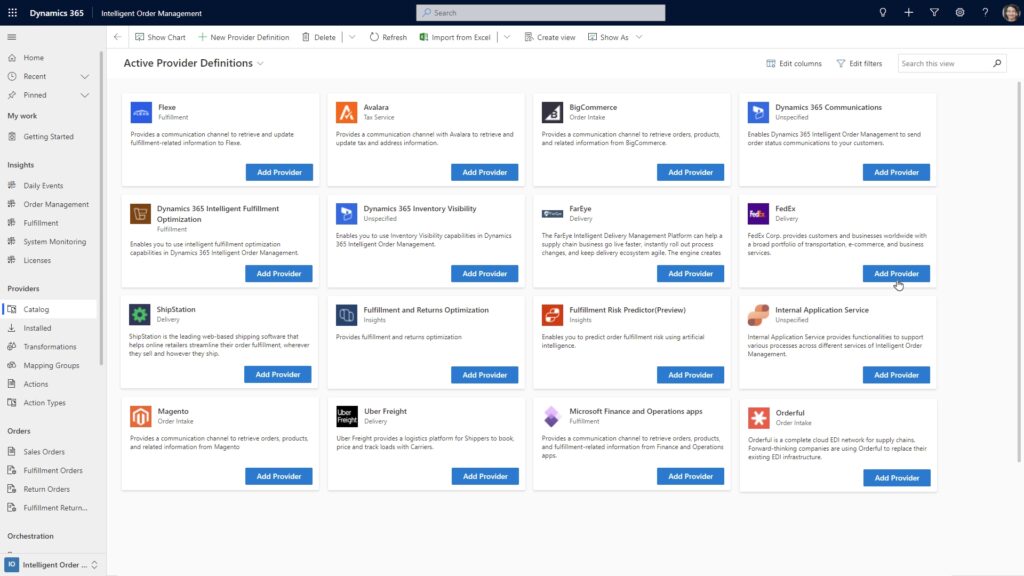
Dynamics 365 Intelligent Order Management also extends its intelligent fulfillment optimization capabilities with out-of-the-box, pre-built connectors to an ecosystem of specialized partners for e-commerce, delivery, transportation, warehouse management, tax compliance, price calculation, and other logistics services.
Figure 2: Partial view of the pre-built connectors catalog in Dynamics 365 Intelligent Order Management.
For example, consider our pre-built connector to our partner Flexe, the programmatic logistics leader. The Dynamics 365 Intelligent Order Management Flexe connector expands the fulfillment capabilities, processes purchase orders from Flexe, and adds flexible warehouse management service. It also provides Dynamics 365 Intelligent Order Management users the option to rapidly expand network capacity, or allocate inventory closer to the customers and avoid the long-term contracts or fixed costs of traditional warehouse solutions.
With the ability to extend business capabilities through pre-built partner connectors, organizations can improve omnichannel strategies in step with their retail supply chain digital transformation processes. This allows organizations to incrementally scale their offering with modular, composable, and cloud-based business applications, bringing more agility and resilience into their omnichannel distribution network.
Composability enables omnichannel success
According to Gartner, by 2024, 60 percent of intelligent software as a service (SaaS) will be composed from packaged business capabilities providing data, analytical insight, and operational application services.5 And by 2024, the design mantra for new SaaS and custom applications will be “composable API-first or API-only,” rendering traditional SaaS and custom applications “legacy.”6
Dynamics 365 unlocks composability and helps organizations achieve a unified commerce experience. It seamlessly integrates with existing ERP and customer relationship management (CRM) systems so that retailers can respond faster to customers’ needs by extending their business capabilities through out-of-the-box connectors to an ecosystem of specialized logistics services. This intelligent and modern platform provides a single view of orders across channels. Our fulfillment optimization engine uses a rules-based system, real-time inventory visibility, and AI to determine the most cost-efficient order fulfillment.
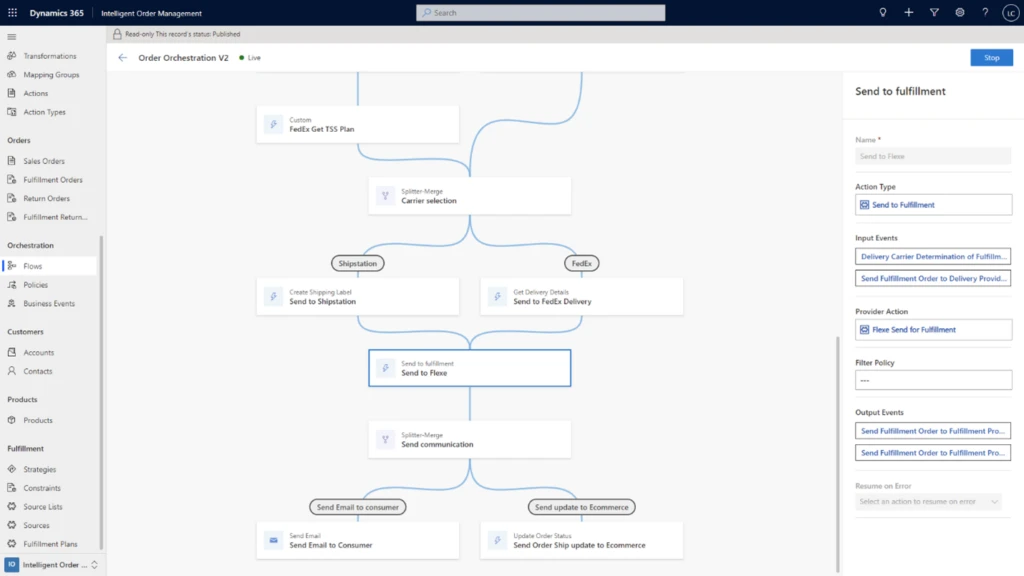
Figure 3: Embedded orchestration policy designer to configure order flows in Dynamics 365 Intelligent Order Management.
According to Forrester, 68 percent of global retail and wholesale purchase influencers plan to invest in AI solutions.7 Retail supply chain and commerce professionals can take advantage of the machine learning, AI, and low-code/no code features of Dynamics 365 Intelligent Order Management. They can easily reconfigure order flows and proactively overcome bottlenecks by modeling the order journey through an easy-to-use orchestration designer built in the fulfillment optimization engine.
This embed requires accepting cookies from the embed’s site to view the embed. Activate the link to accept cookies and view the embedded content.
Watch the video above to learn how to automate and optimize fulfillment with Dynamics 365 Intelligent Order Management. Experience a free trial or take a guided tour to learn more.
Create more agile and resilient supply chains
Dynamics 365 supply chain solutions helps build agile and resilient supply chains through easy-to-use, modular, and composable cloud-based business applications. Dynamics 365 Intelligent Order Management works seamlessly with existing ERP and CRM systems so that retailers can get to market faster, even when dealing with the complexities and challenges of omnichannel retail and fulfillment. They can also respond faster to customer needs by extending their fulfillment services through a composable and API-first connectivity architecture with out-of-the-box connectors to market-leading 3PL software solutions. With easy-to-deploy omnichannel fulfillment solution, retailers, manufacturers, distributors, and CPG companies can accelerate their supply chain digital transformation and turn order fulfillment into a competitive advantage.
This article is contributed. See the original author and article here.
Hi folks! My name is Felipe Binotto, Senior Azure Customer Engineer, based in Australia.
The purpose of this article is to demonstrate how you can have different Backup Tiers for your VMs and how you can automate the backup configuration leveraging Azure Tags and Azure Automation.
The prerequisites are:
Automation Account
Az.ResourceGraph module must be installed
Az.RecoveryServices module > 5.4.0 must be installed
Runtime version 5.1 (it should also work with 7.1 but it was not tested)
Recovery Services Vault with system or user managed identity
If you have many Recovery Services Vaults, you should create a user managed identity so it can be used across all of them, and you just have to set permissions to one identity
This identity should be assigned Backup Operator and Virtual Machine Contributor roles
Virtual Machine
Now you are thinking, why do I need multiple Backup Tiers?
Imagine you have two workloads. Workload-1 is business critical, and it can only afford losing up to 4 hours of data and it should be fully recovered in no longer than 24 hours. Backups should be retained for a minimum of 90 days. Workload-2 is important but not that critical so it can afford losing up to 12 hours of data and it should also be fully recovered in no longer than 24 hours. Backups should be retained for a minimum of 30 days.
So, what do you do? You create two Backup Policies. One for each workload based on their requirements. Each workload has its own RPO/RTO and retention requirements.
Let’s say you have analysed all your workloads and established that most of them will fit in one of the following tiers.
Tier
RPO
RTO
Retention
TIER-1
4 hours
1 day
90 days
TIER-2
6 hours
1 day
60 days
TIER-3
12 hours
1 day
30 days
TIER-4
24 hours
2 days
15 days
Note: although we are specifying RTO in this example, the focus is RPO and Retention, because RTO will depend on other factors such as size of backup (the larger the backup the longer it will take to restore) and backup availability (LRS vs ZRS vs GRS).
Azure Backup for VMs
Virtual Machines in Azure can be backed up to Recovery Service Vaults. When you are preparing the VM for backup, you must select a Backup Policy which defines how often the VM should be backed up, what is the retention period and other settings.
Until recently, you could only configure a Backup Policy to perform the backup once a day. However, now you can use the new Enhanced type of Backup Policy, currently in public preview, to set backups to be performed up to 6 times a day (every 4 hours).
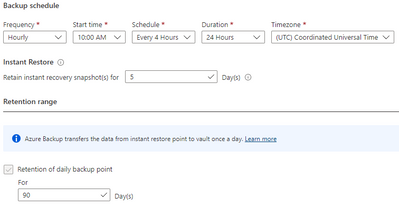
The figure below provides an example on how an Enhanced Backup Policy would be configured to fulfill the requirements of TIER-1.
Backup Policies
OK, we have defined all the basics. Now let’s create all the required Backup Policies. You can download the script from my Github Repo. This script will iterate through all Recovery Services Vaults in all subscriptions and create three Enhanced and one Standard Backup Policies according to the requirement of each tier. Policies are named as per the Tier names.
The table below provides details about the policies created after the script is executed.
Policy Name
Frequency
Start Time
Schedule
Duration
Timezone
Daily retention
TIER-1
Hourly
6:00AM
4 hours
24 hours
UTC
90 days
TIER-2
Hourly
6:00AM
6 hours
24 hours
UTC
60 days
TIER-3
Hourly
6:00AM
12 hours
24 hours
UTC
30 days
TIER-4
Daily
6:00AM
N/A
N/A
UTC
15 days
You should see the new Backup Policies in each of your Recovery Services Vaults as per the figure below.
VM Tag
Next step is to tag the VMs to be backed up. There are a few points to be considered as follows:
VMs without tags will not be backed up
VMs which are already backed up and are not tagged will remain with their existing backup configuration
VMs which are not backed up and are tagged will be backed up
VMs which are backed up and are tagged will have a new Backup Policy assigned if using the incorrect policy.
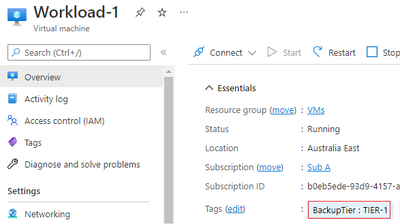
We will tag the VMs with a tag named BackupTier.
The code below will retrieve the VM objects and tag them.
Once you tag the Workload-1 and Workload-2 VMs they will look like the figures below.
Azure Automation
Before we get to the last piece of the puzzle, let me clarify something that may be in your mind. You may be wondering why using Azure Automation and PowerShell instead of using the built-in Azure Policies for Azure Backup. A few reasons for that:
The Azure Policies for Azure Backup cannot be applied at Management Group level
Depending on the number of subscriptions and tiers you use in your solution, you could end up with hundreds or even thousands of Azure Policy Assignments
The built-in policies must be customized to change an existing backup policy. By default, they just enable backup based on a tag
A policy remediation is required to enable backup for existing VMs and to change the backup policy of VMs when tag values are changed.
OK, now that we have cleared that up, let’s get started with the Azure Automation account.
Now to the last piece of the puzzle. You need to create a new Runbook and copy the code from this script in my Github Repo.
You need to provide values for the following three variables:
accountId – the object ID for the Automation Account managed identity
vaultRGName – the resource group name for the Recovery Services Vault
vaultName – the Recovery Services Vault name
The last step is to run the Runbook. Don’t forget about the prerequisites listed in the beginning of the article. It will not work without those in place.
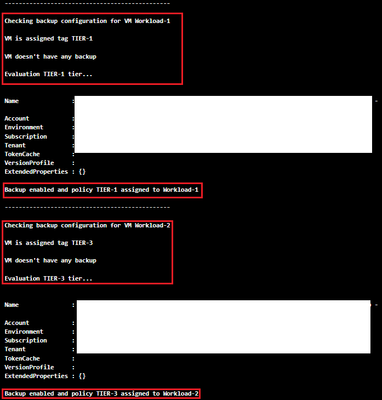
After the runbook completes successfully, you should see the following in the Output tab.
Once you are satisfied the Runbook works as expected, create a schedule based on your requirements and link it to the Runbook.
A couple last comments about the runbook:
If the backup of a VM is in a Soft-Delete state, it will fail, and the reason will be displayed in the Outputs tab
If the VM is using Shared Disks, it will not try to back it up as it is an unsupported scenario
Feel free to fork the repo or do pull requests if you have new features or bug fixes to be incorporated into the code.
I hope this was informative to you and thanks for reading. Add your experiences or questions in the comments section.
Disclaimer
The sample scripts are not supported under any Microsoft standard support program or service. The sample scripts are provided AS IS without warranty of any kind. Microsoft further disclaims all implied warranties including, without limitation, any implied warranties of merchantability or of fitness for a particular purpose. The entire risk arising out of the use or performance of the sample scripts and documentation remains with you. In no event shall Microsoft, its authors, or anyone else involved in the creation, production, or delivery of the scripts be liable for any damages whatsoever (including, without limitation, damages for loss of business profits, business interruption, loss of business information, or other pecuniary loss) arising out of the use of or inability to use the sample scripts or documentation, even if Microsoft has been advised of the possibility of such damages.



Recent Comments