This article is contributed. See the original author and article here.
The Same KPIs, Different Department
Scenario: You have different managers requesting to see the same KPIs (Customer Count, Revenue Generated, Products Performance, etc) for their different region. Data privacy requires that the various managers only see reports for their regions. A simple way to think about this is by creating different reports for the managers making a total of 3 Reports.
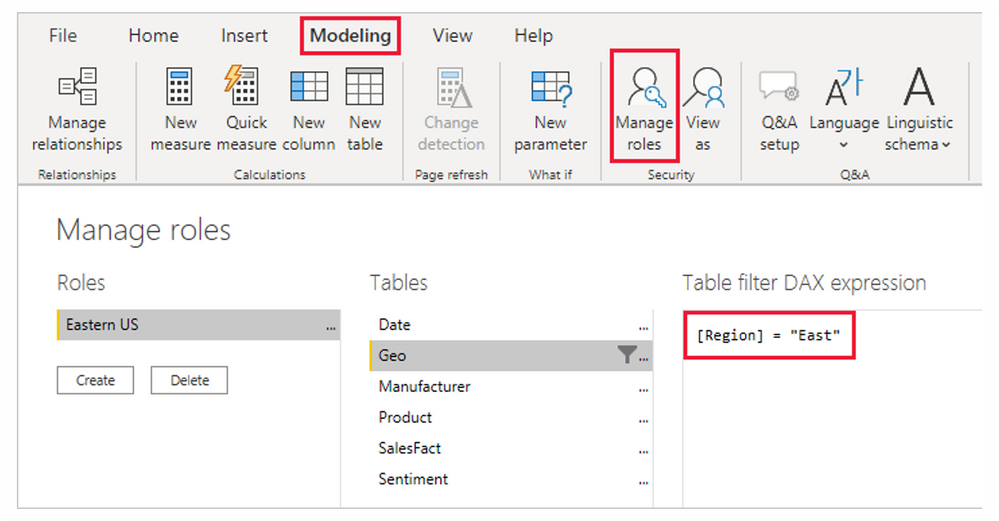
I am sure you will agree with me that this isn’t effective. more efforts and it is not scalable. what if it is a large multinational – country manager, regional manager, group manager, unit head, team leads all across the world? will you also build different reports for over 500 people? With Row Level Security, you can easily address this challenge by building a single Reports and set roles and rules to filter what everyone can see.
This article is contributed. See the original author and article here.
The sales accelerator in Dynamics 365 provides a tailored experience for sellers by minimizing the time spent searching for the best next customer to reach out to. It’s a workspace optimized with AI and suggested activities that guide sellers through customer interactions. The sales accelerator enables your sales team to prioritize their pipeline, reach out to prospects most likely to buy, and respond to recommendations, speeding up the sales process.
Our teams are constantly reviewing customer feedback and optimizing the experience. We have two new updates you’ll see immediately in your environments:
Sales Hub users now get out-of-the-box access to the sales accelerator workspace. (If you use a custom app, additional steps might be required to surface the capabilities.)
Sales engagement managers can discover and configure the sales accelerator in a newly streamlined onboarding process.
Let’s take a deeper look at these improvements.
Out-of-the-box access to the sales accelerator workspace
Sales Hub users will now be able to instantly access the sales accelerator from the left pane on the site map menu. As they access the sales accelerator, sellers will immediately see any activities scheduled for them in the worklist. Without navigating away from the screen, they can see who to contact next, filter and sort the records to their chosen priority, and then take the best next action.
Sales Hub is a Microsoft app that’s designed around the sales processes that most organizations follow. If you’re new to Dynamics 365 Sales and wondering whether to use the Sales Hub app or create a custom app, this comparison will help you decide.
The following improvements help sales engagement managers and admins discover and engage with the right options to implement and deploy the sales accelerator more efficiently:
Independently configured sales accelerator workspace and optimized assignment rules
Context-specific settings
Setup recommendations
Independently configure access to the workspace and assignment rules
Assignment rules enable new leads and opportunities to be automatically assigned to sellers or sales teams. This helps reduce the time and effort required to manually assign records, prevent the loss of unassigned records, and balance assignments among sellers.
Assignment rules can now be independently used or aligned to the use of the sales accelerator. This allows you to select the right options for your sellers and ensure they receive the records to work on, regardless of workspace area. We’ve introduced the ability to set security roles to separately control access to the sales accelerator workspace and assignment rules.
A security role defines how users may access different types of records. You can modify existing security roles, create new security roles, or change which security roles are assigned to each user. Learn more about security roles.
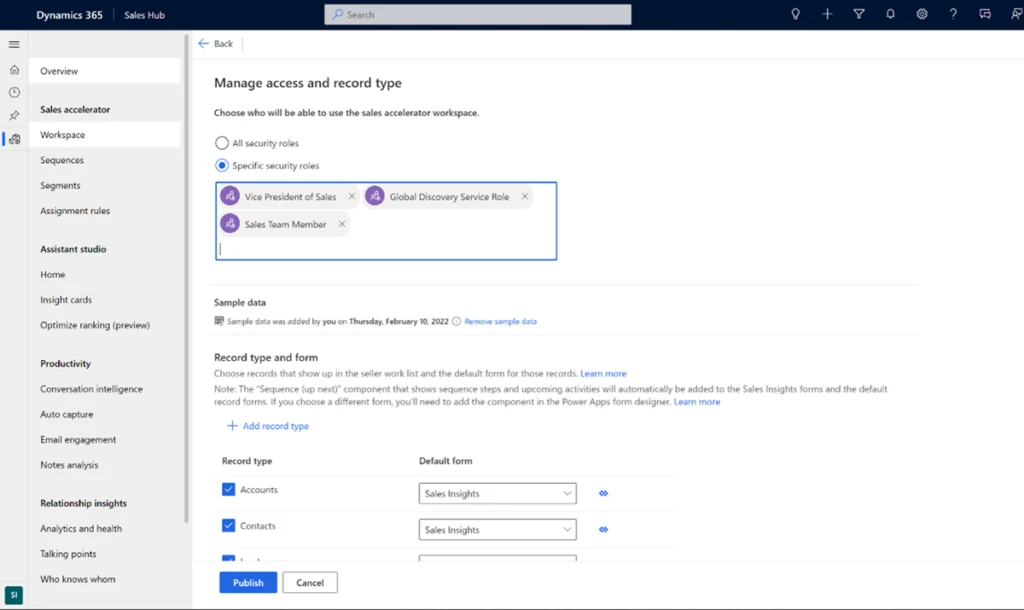
To configure access to the sales accelerator workspace, choose security roles in the Manage access and record type section of the workspace settings page.
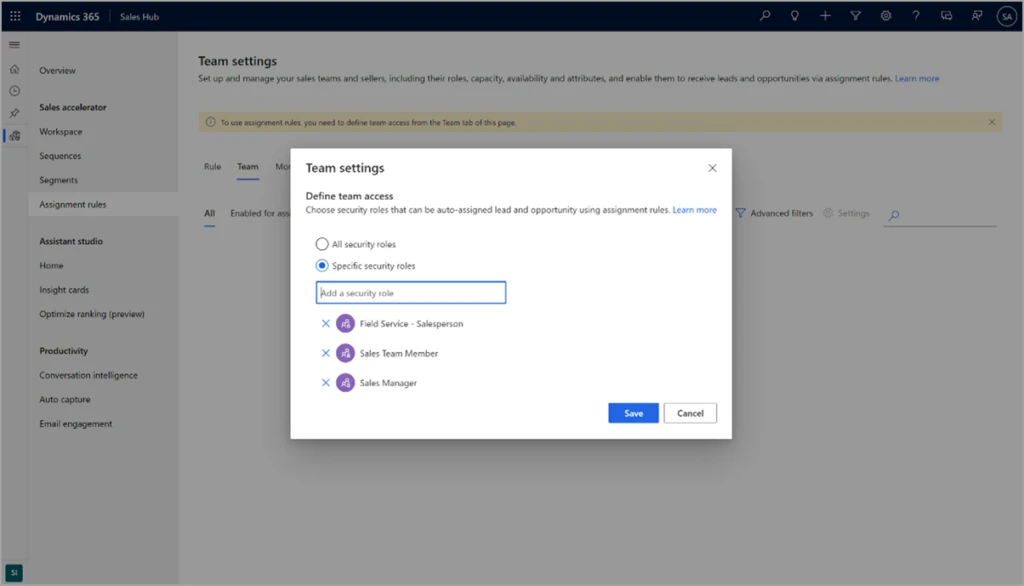
To configure access to assignment rules, choose security roles in the Team settings section of the assignment rules settings page.
Context-specific settings
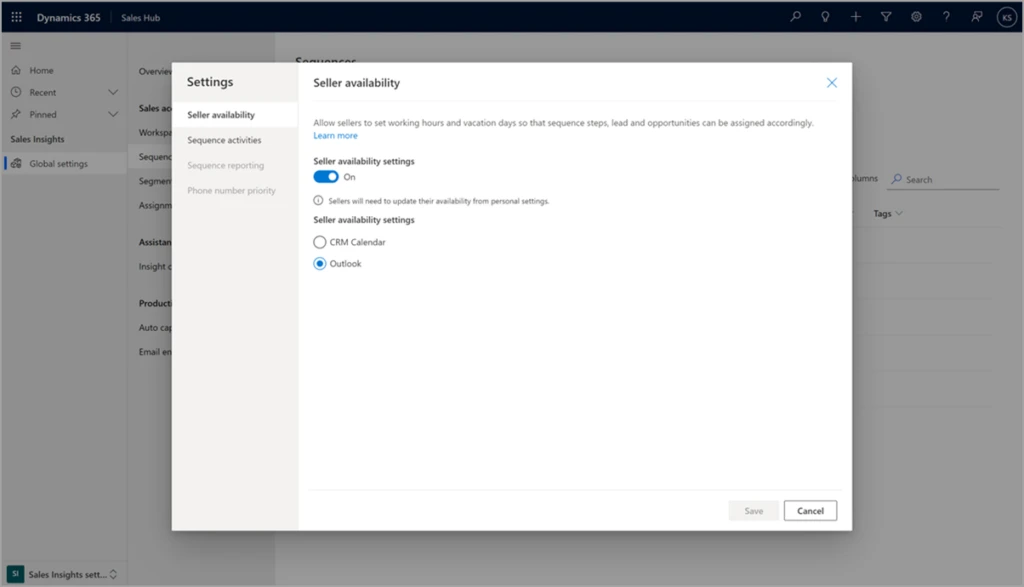
Advanced settings for sequences, assignment rules, and sales teams are now available in context, on the page, rather than requiring navigation to another settings area. This screenshot shows an example of the new in-context settings, using seller availability:
Personalize your workspace
To improve sellers’ productivity, we help them focus on who to engage next. To that end, you can now customize the workspace filters. For example, sellers might want to filter work items based on the lead source, such as website inquiry. Add a filter based on Lead as the record type and Leadsource as the field.
We encourage you to try out different capabilities to get the most out of the sales accelerator. To help you discover its capabilities, we show recommended next steps in workspace settings. Recommendations are tailored to the sales process and based on where your organization is in the setup process, taking away the guesswork and guiding you on a recommended path for a successful implementation.
Stay tuned for more exciting improvements to come, such as customizable worklist cards, advanced sorting, and a new sequence designer experience!
This article is contributed. See the original author and article here.
The Office Mobile team is excited to announce the availability of Quick Access filters in Office Mobile on Android phones and tablets! This feature can help you increase your productivity while customizing Office on your Android mobile device, so it works best for you.
Locate your content easily with Quick Access filters
We heard you! We know that you would like to navigate your Office app more efficiently, especially when it comes to accessing your content. Quick Access filters provide you with easy navigation and personalization options, helping you locate your content more quickly.
With Quick Access, you can utilize multiple filters to view different content types. Content-usage filters, such as, “RECENT”, “SHARED”, and “OPENED” help users find their content based on interactions, while content-type filters, such as, “WORD”, “EXCEL”, and “PDF” make it easier to filter by file type. Users can personalize their home screen by adding, removing, or organizing these filters for quick access.
How to get Quick Access filters in Office app for Android
If you don’t have the Office app, you can download it from the Google Play store. If you already have the Office app on your Android device, download the latest version. The next time the app is launched, you will immediately see a guided experience introducing you to this new feature.
To start using the new Quick Access filters experience in the Office app for Android, follow these steps:
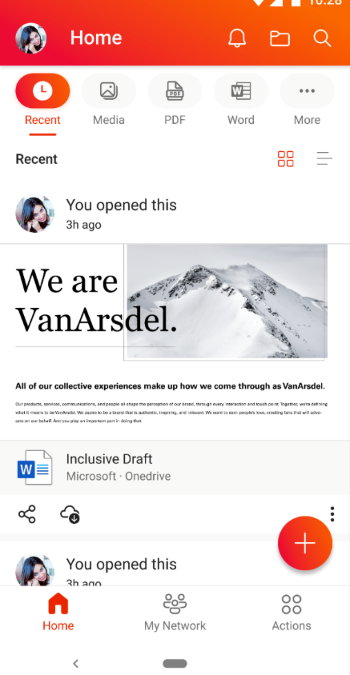
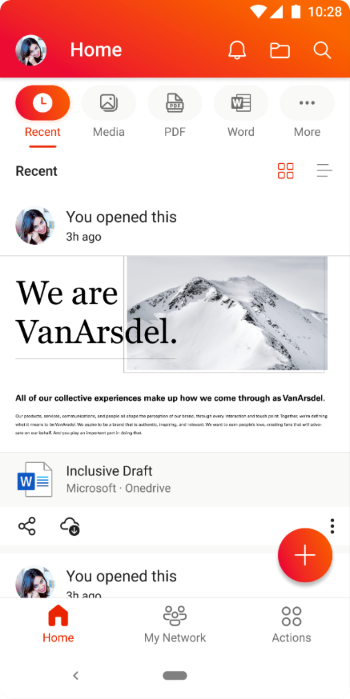
Open the Office app on your Android device and locate the Quick Access options at the top of your home screen.
An image demonstrating the Quick Access options available on the Office app home screen on an Android device.
NOTE: These options have replaced the “Recent” and “Shared” options on the home screen.
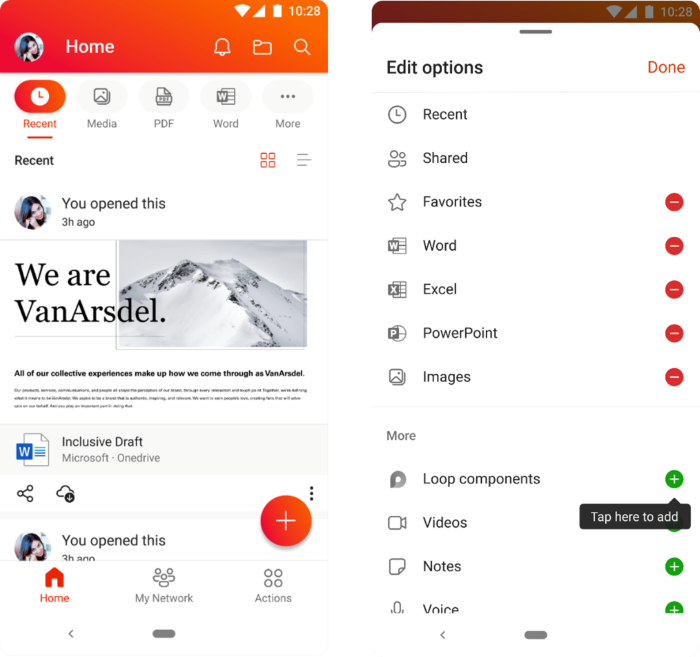
Tap on a Quick Access option to see filtered content based on the filter you choose. You can add or remove options on the Quick Access bar by tapping the […] More option at the end.
An image demonstrating the additional options available when users click the “More” option on the Quick Access bar on the Office app home screen on an Android device.
Availability
Quick Access for the Office app for Android has been rolled out worldwide and is available on app versions 16.0.5102.20000 and later. To learn more about Office app for Android, check out this helpful Microsoft Support article.
Last but not the least, we are always listening to feedback from users. You can send us in-app feedback or leave us a comment below!
Continue the conversation by joining us in the Microsoft 365 Tech Community! Whether you have product questions or just want to stay informed with the latest updates on new releases, tools, and blogs, Microsoft 365 Tech Community is your go-to resource to stay connected!
This article is contributed. See the original author and article here.
The ways we work have changed dramatically over the past several years, and those changes go so much further than whether work happens at home, in an office, or somewhere in between. In this collaboration-first world, every organization needs a digital fabric that binds people together—from the C-suite to the frontline, and across every role and function.
This article is contributed. See the original author and article here.
At some point, we’ve all experienced regret over not doing something.
Opportunity passes us due to our over analysis, indecision, and uncertainty. Even though we’ve all done this, we rarely seek the advice of others, thinking our situation is somehow unique or different.
This rationale is common among the on-premises organizations we speak to. They understand the benefits for moving to the cloud but chose to focus on all the reasons not toaging infrastructure, manual processes, and siloed data notwithstanding.
Hearing how others are approaching this critical technological evolution can be invaluable. Not to mention relatable. Here are a few customer stories we’ve collected; perhaps you might recognize yourself or the circumstances?
Discover other Dynamics AX and Dynamics CRM customer stories to learn about migration best practices and the benefits others are seeing in the cloud.
A small company with sizeable goals
Sonee Sports, is a small 28-year-old, family-run retail chain in the Maldives. The company moved its Microsoft Dynamics AX to Dynamics 365 in the cloud to streamline its resource planning, point of sale, and relationship management activities. Sonee Sports has grown from a single desk in a hardware store to 10 stores across the Maldives however, this growth didn’t come without challenges, particularly when it came to technology.
Maumoon Abdullah, Sonee Sports’s co-founder, has long advocated for using technology to understand, retain, and engage new customers. “In 2016, we had a customer churn rate of 10 percentnot good. We knew that technology was key to keeping our business afloat,” Abdullah said. However, their previous enterprise resource planning (ERP) took hours to generate reports, the data was inaccurate, so decision makers stopped using it. In time, Sonee Sports realized it had to move its entire business to the cloud.
With help from Mumbai-based CloudFronts, a Microsoft Partner Network partner, Sonee Sports upgraded to Microsoft Dynamics 365, deployed Microsoft Power BI for analytics, and rolled out a cloud-based e-commerce system. “We needed an all-around ERP system that was reliable, easy to use, and mobile-friendly and that offered a host of options for accessing information. Dynamics 365 Retail fits these criteria very well.” Abdullah says.
With this setup, Sonee Sports has cut its IT maintenance costs by 38 percent and improved customer retention by over 8 percent.
“With Dynamics 365, we finally have the data we need to understand our customers.” Abdullah says. “The value of this is priceless.”
It can be easy to forget that cities are a lot like corporationsthey provide services to their “customers,” often relying on technology to deliver the goods.
Bristol is a diverse city in southwest England, with more than 90 languages spoken and a population of just over 463,000. Bristol City Council is the unitary authority and is responsible for a wide range of services including taxation, waste management, education, etc. Like many struggling municipalities, Bristol City Council felt it could no longer rely on its IT system to meet day-to-day demands of the city. Its systems weren’t agile or mobile-friendly and lacked a unified platform to support collaboration or leverage data insights.
“The council was historically, deeply dissatisfied with its IT systems and processes.” says Simon Oliver, Director of Digital Transformation at Bristol City Council.
Bristol City Council realized the only way forward was to modernize its Dynamics CRM 2016 instance to Dynamics 365, which would improve efficiency and collaboration. Moving, however, was a significant undertaking, involving migrating 54 workloads and orchestrating nearly 500 ecosystem partners, and staff.
Built on Microsoft Azure, with Microsoft Power Platform and Office 365, Bristol City Council deployed Dynamics 365 alongside toolsets to increase productivity. “Working with Microsoft has given us an opportunity to look at our entire approach to delivering IT services, to reshape our way of thinking and the culture of the IT department,” explains Oliver.
Peet Limited, a leader in Australia’s property industry, believes in helping people gain peace of mind through property ownership. And their commitment to IT innovation has enabled them to remain competitive through market disruptions.
As part of its ongoing mission to offer quality service, the company partnered with Microsoft to upgrade its IT systems and move critical line-of-business applications to the cloud. Justyn Bridge, IT Manager at Peet Limited, explained, “Microsoft 365 is a complete, intelligent solution…it empowers Peet employees to be creative and work together.” Peet Limited had confidence in Microsoft because the organization was already using both Dynamics CRM and Dynamics AX, for its customer relationship management (CRM) and ERP, respectively.
Peet Limited designed its cloud strategy around security with the goal of end-to-end protection in mind; for them, security promoted value. Bridge explains that one of the best benefits of using Microsoft 365 is having a “single pane of glass” to view Peet Limited’s security landscape. Using Microsoft’s Advanced Threat Analytics, Peet Limited had a succinct, real-time view of an attack timeline with the ability to analyze and identify normal versus suspicious user or device behavior.
Considering the project, Bridge notes, “We sought better end-to-end protection, and Microsoft 365 gave us that. Our business has gained security in both protection and mindset.”
When you’re ready to migrate, Microsoft is here to help
We all have stories that define us. Organizations are no different. Whether you’re looking to grow your footprint, improve services, or modernize your underlying technology, the Microsoft Cloud can meet your changing needs. While migrating to the cloud should be a business priority, the experiences above illustrate the importance of planning. When you’re ready to migrate your on-premises solution to the cloud, Microsoft is here to support your journey.






Recent Comments