
by Contributed | Mar 11, 2021 | Technology
This article is contributed. See the original author and article here.
(guest post from Amrit Shandilya from the Microsoft File System Minifilter Team)
Hello! We are excited to announce that Plugfest 33 has been scheduled!
In light of global health concerns due to novel coronavirus (COVID-19), Plugfest is going virtual for the first time ever! Health and well-being of our employees, partners, customers and other guests remain our ultimate priority. In this Virtual Plugfest, VMs hosted on Azure will take the place of physical HW.
Below you will find details, useful resources, and a registration link. If you are interested in attending this online event, please review the below information and register for the event by March 23, 2021.
What is Plugfest?
The goal of Plugfest is to help you prepare your file system minifilter, network filter, or boot encryption driver for the next version of Windows by performing interoperability testing with other products.
When is Plugfest 33?
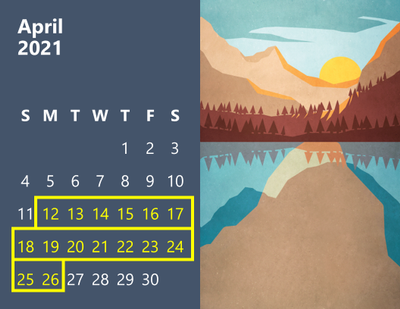
Plugfest 33 will take place in batches between Monday, April 12, 2021 and Monday, April 26, 2021.
Who are we looking for?
Independent Software Vendors (ISVs), developers writing file system minifilter drivers and/or network filter drivers for Windows.
How much does it cost?
FREE – There is no cost to attend this event.
Why should I go?
Here are four major benefits of Plugfest:
- The opportunity to test products extensively for interoperability with other vendors’ products and with Microsoft products. This has traditionally been a great way to understand interoperability scenarios and flush out any interoperability-related bugs.
- Get exclusive talks and informative sessions organized by the File System Minifilter team about topics that affect the filter driver community.
- Great opportunity to meet with the file systems team, the network team, the cluster team, and various other teams at Microsoft and get answers to your unanswered technical questions.
- Early exposure to new hardware innovations, that affect filter functionality
How do I register?
To register, please complete the Registration Form at your earliest convenience (registration closes 03/23/2021). PLEASE NOTE: We will confirm your registration via email. Confirmation emails will be sent out after registration closes.
You can learn more about File System Minifilters and Network Filters in the given links.
If you have any additional questions please email us at amshandi@microsoft.com (Amrit Shandilya).
– Amrit & The Microsoft File System Minifilter Team


by Contributed | Mar 11, 2021 | Technology
This article is contributed. See the original author and article here.
With Power Apps, we can rapidly build custom business applications that connect to our business data in a low code manner. This means that not only professional developers can develop applications but that a lot more people will be able to make apps that fit their specific use cases.
But as development is not only writing code, there are certainly some things we should do before we hit make.powerapps.com. Many developers will agree that development is 20% about writing code and 80% about communications (meetings, gathering requirements, adjusting things).
If we now introduce ‘low code development’, we work on these 20%, not on those 80%.
The issue with that is that the narrative of ‘everyone should make apps’ doesn’t reflect that there is much content out there to teach business users how to use controls, components, connectors, and ask the community when in doubt which function they should use. But there is about near to zero guidance around making better decisions about how we should approach building apps. Regardless of by whom it is developed, every app needs to be documented, maintained, and supported. Pro-developers are very aware of this, as DevOps is what they live and breathe every single day. But apart from IT departments, who will need to care about governance, application lifecycle management, etc., there are some things on the business user side that we should consider.
This post will list ten things that we should think about before we start building our apps
1- which problem does the app solve?
This sounds obvious that one would first do a proper analysis of value proposition and if the app they have in mind is a must-have solution to a specific business case or if it’s more or less ‘yet another thing to use’, although there are working alternatives in place.
understand your market
Let us take some time to segment our market and understand who (even if we build for our colleagues) needs our app. There will be roles that will rely on our app, and it will become mission-critical to them. Others will have already found applications that do similar things, or the app doesn’t solve a relevant problem. We can specifically look at underserved groups, such as blue-collar workers, and see if we can address their needs. Becoming obsessed with solving specific needs without assumptions is critical here. This means that we will need to validate the market that we have in mind. Even if we consider ourselves a business user/power user /citizen developer, doesn’t necessarily mean that we are our user and precisely know what they need.
psychological strain vs. energy of change
To make users love an app, we will need to solve their pains or address their needs and make it not too hard for them to change their behavior. If the energy they will need to change their behavior is higher than the psychological strain they face right now, they will not adopt your app. It’s unfortunately as simple as that.
2- calculate value
Now you have a fair idea of who will use your app for which use cases and also know what users are doing now:
- abuse other tools
- work on paper
- purchase 3rd party tools
- use unapproved shadow IT tools
and to which results this leads
- be busy with tasks that don’t add value
- lose information
- cause additional costs
- severe risks in terms of data security, governance, compliance etc.
tl;dr: it costs time & money
But we need to make an effort to calculate the higher costs in terms of money and time and make an estimation for the next 12 or 24 months in order. This will also help with any approval process/ get funding.
If the app we have in mind doesn’t create (enough) value, we can take this as a learning opportunity better to meet the needs of our (internal) customers.
The goal is to provide more value, not to deliver a poorly designed app that costs a little less. Of course, we can build apps ‘for fun’ or because we want to learn, or ‘just because we can’, but we should carefully distinguish those apps from apps that we want to pitch and ‘sell internally’.
3- scope
The mother of all questions: Does it scale? Will our app be something for our personal productivity? Ease a workload for a small team? Or do we talk about a mission-critical process? And even if we start with a small group of users to try out, is there a way where a broader audience could want to use it? We need to carefully identify our app’s scope, as this will impact many decisions.
4- data model
Let’s talk about our data model. Which data source will you need to get data, in which services will you write data? Which dependencies do you have, which other apps, flows, bots will be part of the solution? Of course, the consultant answer on when to use what will always be an ‘it depends’, but there are probably more reasons to look into different data sources as you are aware of:
licensing
As this is a pretty emotionally driven subject, we should handle this some more cool-headed. The idea of first understanding which needs your app solves, who would benefit from it, and how much money and time all users would save together by using it is the licensing discussion’s counterpart. Of course, organizations tend not to want to pay for additional licenses, but the idea that one could deliver excellent business value without any costs is somehow romanticized. Incorporate licensing fees for premium connectors (as you need them) in your calculation, and if the app still delivers more value than it costs, we will probably get approval/green lights for it.
If the app isn’t worth more than ~10$ per month and user, we should probably not be building it.
performance
The data sources we choose have not only impacted the licensing model but also our apps’ performance. For instance, if data needs to travel through an on-premises data gateway to a SQL server, most probably, our app will not be as fast as if the data sits in Dataverse. For an elaborated comparison on this and other data sources such as Excel, SharePoint, and more, please read this article about Considerations for optimized performance in Power Apps
developer and user experience
We can also impact the experience you as a developer will have while building the app, depending on the data source. If you ever ‘loved’ to deal with, for example, lookup columns from a SharePoint list, you will agree that you didn’t choose the easiest way to build an app. If you need to find workarounds as a developer, this will impact your user, which means that their experience won’t be as good as possible.
5- delivery
Let’s say we are about to hit make.powerapps.com, and we have a fair idea of what to do there to make an app. We will publish our app, share it, and mentally move on to something different. Now, who cares for that app? Who will maintain our app? Things can easily change when we create apps on top of cloud services. This can quickly become a not to be underestimated workload, and probably we as a business user won’t have the capacity to cover that. And even if we are not talking about adjusting to things that changed: Who will support our app? Who will answer questions? Who will implement new features?
Delivery of software should contain code (and yes, this applies to Power Apps) and proper documentation. Sharing knowledge about our app (what we use, inputs, outputs, dependencies, licensing, data model, accessibility, features, etc.) very early by writing it down to enable those who need to maintain and support our solution is essential. Making it a habit to have a changelog, where we document which features we add, remove or change, is crucial. If we think that this is too time-consuming, we should be aware that someone will need to spend more time on fixing the lack of documentation for us.
A lack of documentation will create technical debt
6- what is your minimal lvable product?
Yes, I mean it! Define your minimal lovable product. If you only heard about a minimal viable product so far, please read this article How to Build a Minimum Loveable Product. In essence? Which features will we need to make users fall in love with our app? We will build this. We will not fall into the rabbit hole of delivering the whole software in one piece but focus on the crucial parts. Once we published our first version, we gather feedback on how we can improve it. Becoming comfortable with a mindset that software is never finished can be a good idea.
7- mock-up your app
Finally- let’s talk frontend – how shall our app look like? It’s super tempting to start building screens and buttons and decide on colors etc., but we will get a better impression on the big picture of our app if we first do a mock-up. We may choose to use a professional app for that or if we will draw something (I personally do this in OneNote). Defining which screens and buttons and forms and galleries you will need will make the next steps easier.
8- componentize your app
Reinventing the wheel is always painful, and to avoid this, we can think about components in our apps so that we reuse what we (or even others in this environment in the component library) build before. While controls are an excellent way to start learning and understanding how everything works, components are the way to accelerate our process of making apps and make sure that we easily adjust them and don’t need to start over again for the next app we are making. It is also the low-code equivalent to the principle of ‘Don’t repeat yourself‘. Thinking upfront about which controls we would repeatedly use and planning to componentize these will ensure that we don’t need to start all over again. You can watch April Dunnam’s video about componetizing Power Apps to get up to speed.
9- accessibility
Accessibility is nothing that comes on top of a ready-to-publish app but should be one of your core concepts straight from the beginning. The accessibility checker in Power Apps is a good start, but it’s always worth exploring even more ideas. We can find lots of guidance on ensuring that more people can benefit from our apps, Microsoft Inclusive Design is an excellent go-to resource.
10- build in Microsoft Teams
As we are more and more working in Microsoft Teams, we should not only build applications for teams, but for (Microsoft) Teams! Considering the context of apps gives you even more ways to satisfy user needs. Coming back to the scope of our app, we need to carefully think if this app is just for our team, or if we want to make it available for the whole organization. Staying in Teams also has an impact on licensing, as you can for instance use Dataverse for Teams, which is then seeded in you Microsoft 365 license.
Conclusion
As we could see, there are quite some things to do and think about before we hit make.powerapps.com and I put these together as an approach for good practices. What do you do before you actually start developing? What would you like to add to my list?
Please comment below!
by Contributed | Mar 11, 2021 | Technology
This article is contributed. See the original author and article here.
Let’s give GlobalCon a collective high-5 and make it GlobalCon5. Hey, don’t leave me hangin’! I’m pleased to be joining in the fun along with a wonderful lineup of speakers and depth of content.
Yes, the Collab 365 team is at it again. I don’t think they ever stopped. They have been paving the way forward for virtual events for some time, and this go around won’t disappoint. They’re planning great, unique training, presented by world-class trainers and new content – across three days. It’s easy to plug in no matter where you live, engaging Q&A throughout, with much to take with you and learn at your own pace.
GlobalCon5: “I feel the need, the need for speed!” (that’s the kind of high-5 I’m talkin’ about) ;)
GlobalCon5 – March 16-18, 2021 (online training)
Microsoft 365 is big and changes often – the GC5 team could run a conference every week! Each session brings a fresh new perspective. You’ll learn the latest to keep your skills fresh. GlobalCon5 covers Teams, Power Platform, SharePoint, and everything else stacked into Microsoft 365.
Below is a quick view of the sessions by day – including my kickoff session:
- Day 1 sessions | March 16th
- Day 2 sessions | March 17th
- Day 3 workshops | March 18th
Shout out to community “high-5’ers” Helen Jones, Mark Jones, and the #GlobalCon5 crew who are navigating this conference by day and night, supporting, and promoting the knowledge and expertise that reaffirms this: Microsoft 365 has the best tech community in the world – one that spans the globe.
See you there, Mark
by Contributed | Mar 11, 2021 | Technology
This article is contributed. See the original author and article here.
Double Key Encryption (DKE) enables customers to protect their most confidential content using a key they control, thereby allowing them to comply with regulatory requirements. DKE ensures that Microsoft cannot access their data under any circumstances.
Most customers implementing DKE are trying to limit access to their most sensitive content to users of their own tenant. But some customers asked how DKE can also be used for B2B scenarios. This blog shows the additional steps for allowing Contoso to share DKE protected content with Fabrikam users.
Please observe that this blog post does not replace the official documentation for implementing DKE, it merely describes the additional steps required.
Prerequisites
This section defines the technical prerequisites.
- The URL of the DKE service https://dke.contoso.com needs to be accessible both for Contoso and Fabrikam users.
- The DKE URL needs to be based on a DNS domain registered in the Azure AD tenant of your organisation. For instance, if you plan to use the URL https://dke.contoso.com for the DKE service, the DNS domain contoso.com needs to be registered in your tenant. Please refer to our documentation for registering a custom domain.
Overview on the steps
Making DKE available for users of the Fabrikam tenant requires several steps:
- Adapt the app registration to allow «Multitenant» authentication, if that’s not already the case.
- Trusting the Fabrikam Azure AD tenant as valid token issuer and adding the email addresses of the Fabrikam users in the configuration file.
- Grant permissions to the Fabrikam users in the sensitivity label protection settings.
- Have a Fabrikam user access a DKE protected document as first step to grant consent.
- Ask the Fabrikam Global Admin to grant consent for accessing the DKE service on behalf of all Fabrikam users.
Details to these steps are provided in the following sections.
Make sure the app registration for DKE supports «Multitenant» authentication
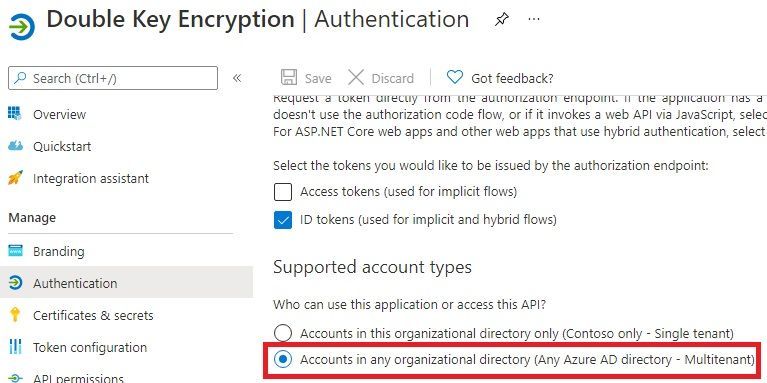
If a DKE service were meant for users of your tenant exclusively, its app registration authentication may be limited to «single tenant».
But since the DKE content needs to be accessibly to users from the Fabrikam tenants, you have to select the option «Accounts in any organizational directory (Any Azure AD directory – Multitenant)», as shown here:
Changes required on the configuration file
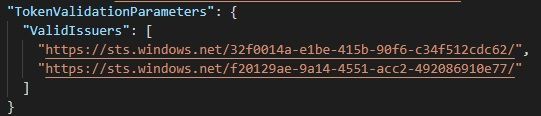
You need to ensure both the home tenant and all tenants of your business partners are contained in the configuration file.
The following configuration file excerpt shows both Contoso and Fabrikam tenants are trusted:
Email addresses of the Fabrikam users also need to be included in the configuration file. The following excerpt from the configuration file shows how Adele Wilber from Fabrikam is also allowed to access the DKE service:

Make sure the sensitivity label grants permission to Fabrikam users
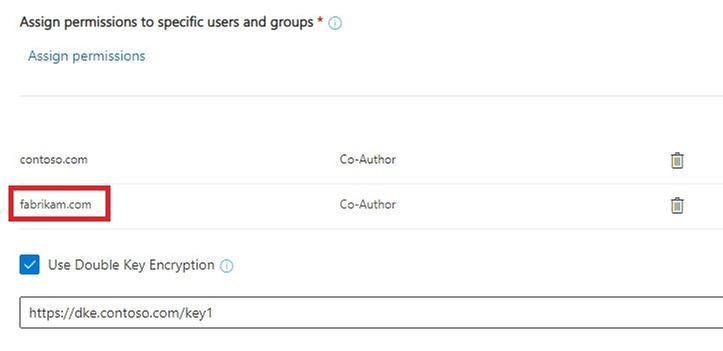
Fabrikam users may only access content from your tenant, if the respective label grants them access – this applies to DKE labels as well.
Here all users both from contoso.com and fabrikam.com may access data protected by the DKE label:
Initial steps for granting consent for users of the Fabrikam tenant
To initiate granting consent for Fabrikam users to the DKE service, a user of the Fabrikam tenant with normal privileges first needs to open a DKE protected document from Contoso.
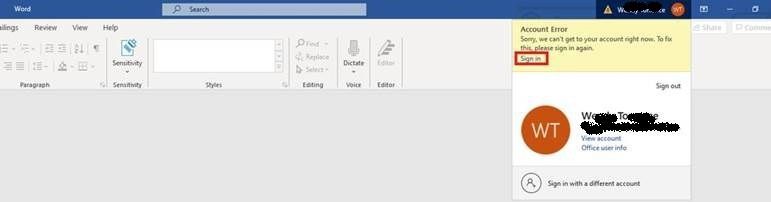
This initial attempt is expected to fail, the user will see an exclamation mark besides the account in the title bar, indicating there’s an issue with the account. (Please observe that Contoso users opening content protected by their own DKE service do not get this experience.)
The user performs the following steps:
1. Click on the account in the title bar:

2. Select «Sign in» and re-authenticate as needed:
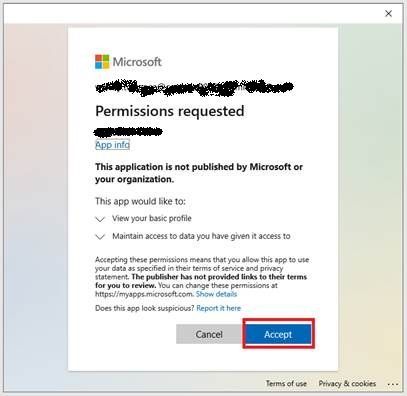
3. Accept requested permissions:
Global Admin of Fabrikam tenant grants consent for all tenant users
The following steps are needed by the Global Admin of the Fabrikam tenant in order to grant consent on behalf of his users:
1. Sign in to the Azure portal, open “Azure Active Directory” and select “Enterprise applications”.
2. Select the Contoso DKE app:
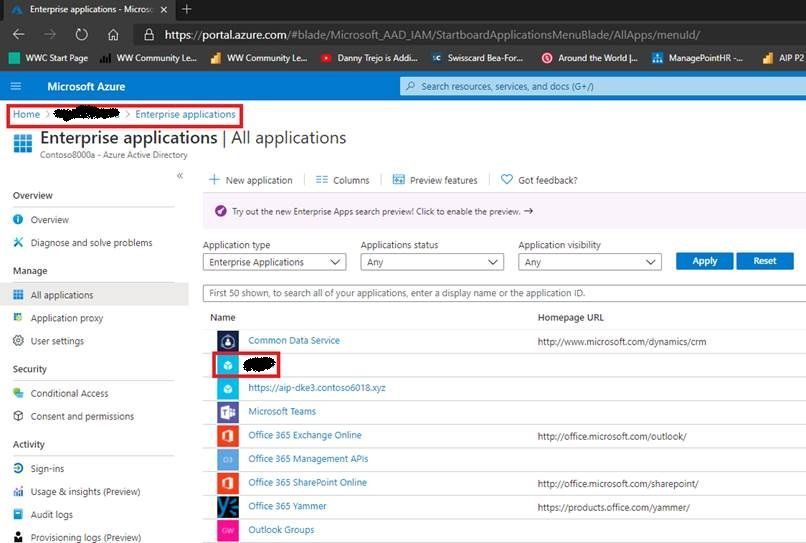
3. Select «Permissions»:
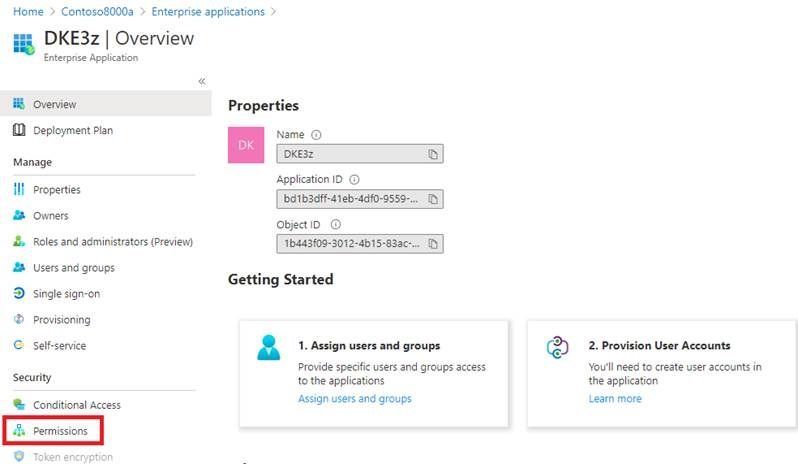
4. Select «Grant admin consent for Fabrikam»:
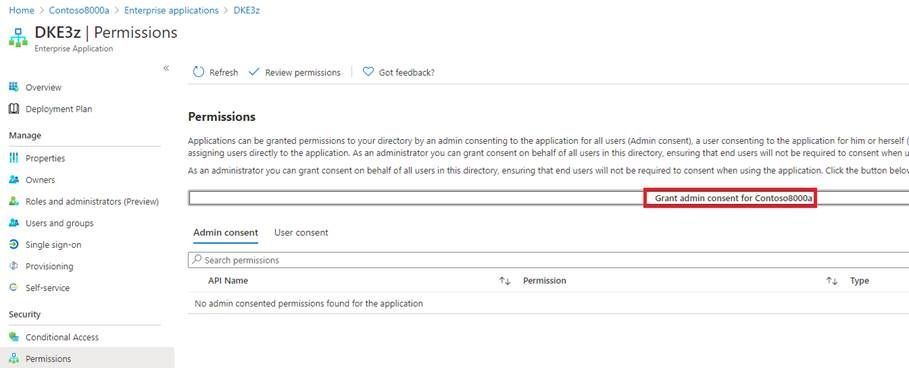
5. Re-authenticate as needed:
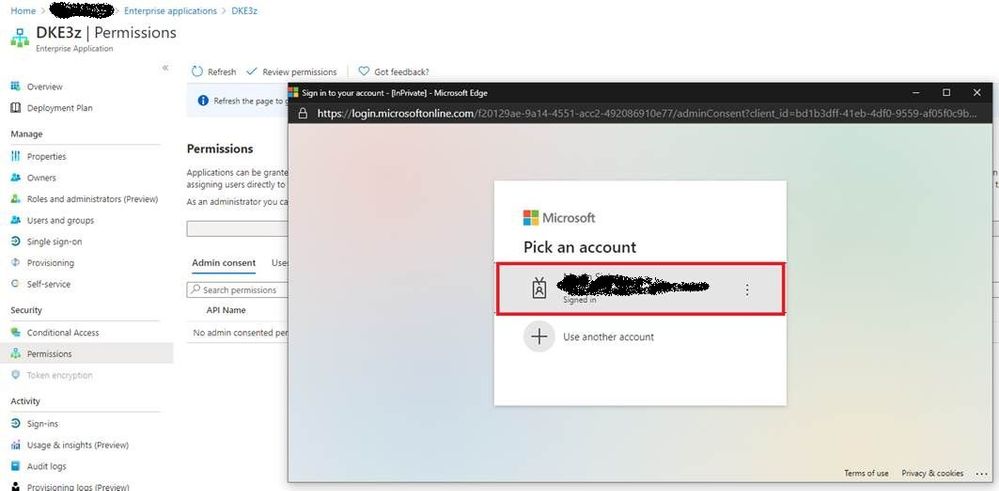
6. Accept permissions:
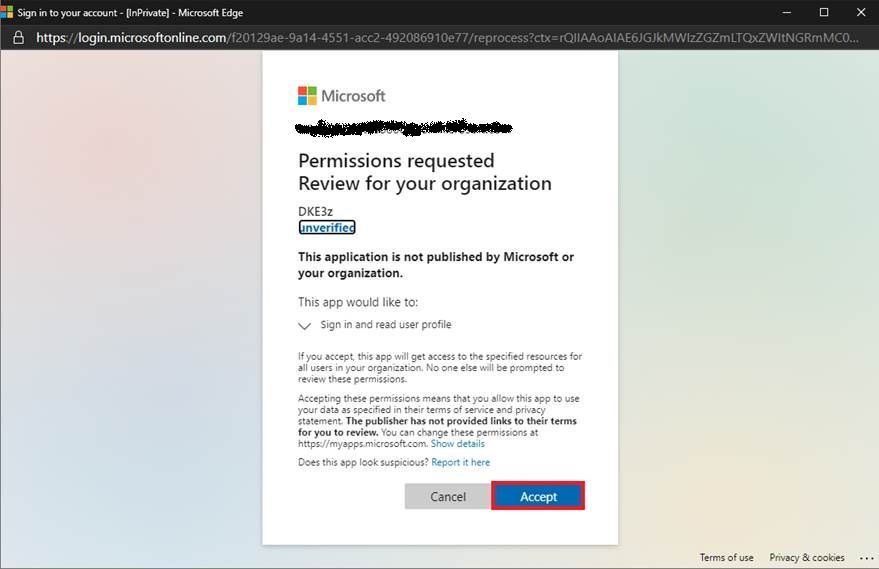
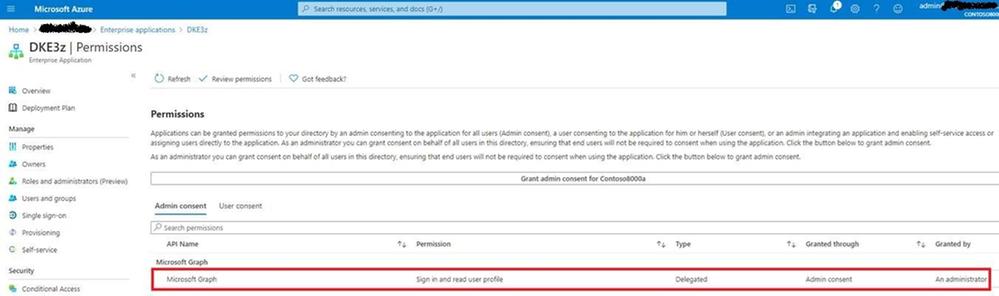
7. Refresh and verify the permissions are available:
Conclusion and next steps
After performing these steps, both Contoso and Fabrikam users may open DKE protected content by Contoso.
Please observe that Fabrikam users may not protect new content with the Contoso DKE service, they need to implement a DKE service of their own instead. If they intend to share DKE protected content with users from the Contoso tenant, they also need to go through the steps in this blog post.
If Contoso decides to share content with Woodgrove Bank as well, the steps described in this blog post need to be repeated with their tenant.


Recent Comments