by Contributed | Mar 11, 2021 | Technology
This article is contributed. See the original author and article here.
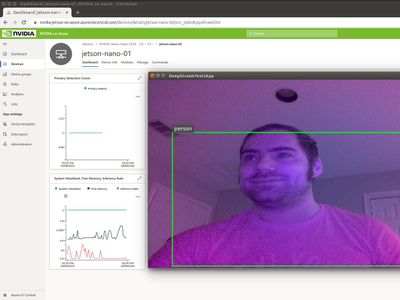
In addition to my role as a Principal Cloud Advocate and Lead for IoT Advocacy at Microsoft, I act as a professor at the University of Houston where I teach a course focused on Cloud-Powered App Development. As part of this course, we focus on AI @ the Edge Scenarios backed by Microsoft Azure IoT Services. To teach this concepts, we have chosen to target the very afforodable ($60 USD) NVIDIA Jetson Nano DevKit. This experience is catalogued in-depth in a previous article on the Microsoft Educator Developer Blog.
We find that student’s most requested point of customization for AI @ Edge solutions is in the customization of the AI models themselves. This can pose issues as there are various formats out there for developing computer vision based models, including: PyTorch, MXNet, Caffe, and Tensorflow. Oftentimes, the tooling to develop these formats results in vendor lock-in, meaning that future applications of your model may be bound by limitations depending on tooling and runtime compatibility for building and executing the model in question.
The Open Neural Network Exchange Format (ONNX) is a model standard/ format for exchanging deep learning models across platforms. It’s ability to be portable across model formats and even computer architectures makes it a prime candidate for AI model development without limitations. It can even adapt to the presence of say GPU acceleration on a given computational platform to offer enhancement of your model at runtime, without any need to redevelop your model to take advantage of those optimizations. Simply put, if you start with ONNX you can go anywhere and optimize without any extra effort.
Combining this fact with our target NVIDIA Jetson hardware, we can develop course content rooted in the development of ONNX based AI models to provide an open platform for students to build and experiment on, with the added benefit of GPU accelerated inference on low-cost embedded hardware. This allows the students to apply concepts on a device that they can physically alter with the addition of cameras, microphones, or other sensors to aid in their solutioning.
As a basis for formal understanding of how ONNX works with NVIDIA GPUs, we recommend starting with Manash Goswami’s presentation on the topic at the recent NVIDIA GTC 2020 conference (Note: that viewing this resource will require completing a free registration to NVIDIA’s Developer Program Membership).
After you have familiarized with the fundamentals, we recommend the following resources as hands-on lab or supplemental material for applying the concepts to run ONNX models on NVIDIA Jetson hardware for development of AI @ Edge solutions:
With these resources, we hope that you can employ the teaching of AI @ Edge scenarios without the fear of encountering the limitations inherent in less adaptable model formats. ONNX based model development can ensure that your models are portable across architectures and adaptable to the existence of accelerators on compatible hardware. For more information on the ONNX model format, be sure to check out https://www.onnxruntime.ai/ and for details on how to acquire NVIDIA Jetson embedded devices, check out this link.
Until next time,
Paul
by Contributed | Mar 11, 2021 | Technology
This article is contributed. See the original author and article here.
Overview
In 2021, each month we will be releasing a monthly blog covering the webinar of the month for the Low-code application development (LCAD) on Azure solution. LCAD on Azure is a new solution to demonstrate the robust development capabilities of integrating low-code Microsoft Power Apps and the Azure products you may be familiar with.
This month’s webinar is ‘Deliver Java Apps Quickly using Custom Connectors in Power Apps’ In this blog I will briefly recap Low-code application development on Azure, how the app was built with Java on Azure, app deployment, and building the app’s front end and UI with Power Apps.
What is Low-code application development on Azure?
Low-code application development (LCAD) on Azure was created to help developers build business applications faster with less code, leveraging the Power Platform, and more specifically Power Apps, yet helping them scale and extend their Power Apps with Azure services.
For example, a pro developer who works for a manufacturing company would need to build a line-of-business (LOB) application to help warehouse employees’ track incoming inventory. That application would take months to build, test, and deploy, however with Power Apps’ it can take hours to build, saving time and resources.
However, say the warehouse employees want the application to place procurement orders for additional inventory automatically when current inventory hits a determined low. In the past that would require another heavy lift by the development team to rework their previous application iteration. Due to the integration of Power Apps and Azure a professional developer can build an API in Visual Studio (VS) Code, publish it to their Azure portal, and export the API to Power Apps integrating it into their application as a custom connector. Afterwards, that same API is re-usable indefinitely in the Power Apps’ studio, for future use with other applications, saving the company and developers more time and resources. To learn more, visit the LCAD on Azure page, and to walk through the aforementioned scenario try the LCAD on Azure guided tour.
Java on Azure Code
In this webinar the sample application will be a Spring Boot application, or a Spring application on Azure, that is generated using JHipster and will deploy the app with Azure App service. The app’s purpose is to catalog products, product descriptions, ratings and image links, in a monolithic app. To learn how to build serverless PowerApps, please refer to last month’s Serverless Low-code application development on Azure blog for details. During the development of the API Sandra used H2SQL and in production she used MySQL. She then adds descriptions, ratings, and image links to the API in a JDS studio. Lastly, she applies the API to her GitHub repository prior to deploying to Azure App service.
Deploying the Sample App
Sandra leverages the Maven plug-in in JHipster to deploy the app to Azure App service. After providing an Azure resource group name due to her choice of ‘split and deploy’ in GitHub Actions she only manually deploys once, and any new Git push from her master branch will be automatically deployed. Once the app is successfully deployed it is available at myhispter.azurewebsites.net/V2APIdocs, where she copies the Swagger API file into a JSON, which will be imported into Power Apps as a custom connector.
Front-end Development
The goal of the front-end development is to build a user interface that end users will be satisfied with, to do so the JSON must be brought into Power Apps as a custom connector so end users can access the API. The first step is clearly to import the open API into Power Apps, note that much of this process has been streamlined via the tight integration of Azure API management with Power Apps. To learn more about this tighter integration watch a demo on integrating APIs via API management into Power Apps.
After importing the API, you must create a custom connector, and connect that custom connector with the Open API the backend developer built. After creating the custom connector Dawid used Power Apps logic formula language to collect data into a dataset, creating gallery display via the collected data. Lastly, Dawid will show you the data in a finalized application and walk you through the process of sharing the app with a colleague or making them a co-owner. Lastly, once the app is shared, Dawid walks you through testing the app and soliciting user feedback via the app.
Conclusion
To conclude, professional developers can rapidly build the back and front ends of the application using Java, or any programming language with Power Apps. Fusion development teams, professional developers and citizen developers, can collaborate on apps together, reducing much of the lift for professional developers. Please watch the webinar and complete the survey so, we can improve these blogs and webinars in the future.
Resources
Webinar
Low-code application development on Azure
Java on Azure resources
Power Apps resources
by Contributed | Mar 11, 2021 | Technology
This article is contributed. See the original author and article here.
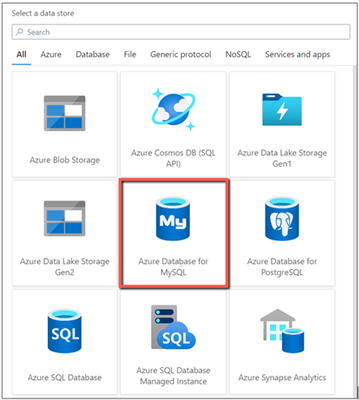
Azure Data Factory now enables Azure Database for MySQL connector in Data Flow for you to build powerful ETL processes.
With Azure Database for MySQL as source in data flows, you are able to pull your data from a table or via custom query, then apply data transformations or join with other data. When using Azure Database for MySQL as a sink, you can perform inserts, updates, deletes, and upserts so as to publish the transformation result set for downstream consumption.
You can point to Azure Database for MySQL data using either a dataset or inline mode in data flow.
Learn more from Azure Database for MySQL connector documentation.
by Contributed | Mar 11, 2021 | Technology
This article is contributed. See the original author and article here.
Today, we’re excited to announce the availability of the Azure Spring Cloud Reference Architecture. You can get started by deploying the Azure Spring Cloud Reference Architecture to accelerate and secure Spring Boot applications in the cloud at scale using validated best practices.
Over the past year, we worked with many enterprise customers to learn about their scenarios including thoughts on scaling properly, security, deployment, and cost requirements. Many of these customers have thousands of Spring Boot applications running in on-premises data centers. As they migrate these applications to the cloud, they need battle-tested architectures that instill confidence to meet the requirements set forth by their IT departments and/or regulatory bodies. In many customer environments, they also need to show direct mappings from architectures to industry-defined security controls and benchmarks. We thank these customers for the opportunity to work with them, and for helping us to build an Azure Spring Cloud Reference Architecture. Using this reference architecture, you can deploy and customize to meet your specific requirements and showcase pre-defined mappings to security controls and benchmarks.
“The availability of Azure Spring Cloud Reference architecture reduced our internal cycles of researching architecture options and Spring Cloud feature sets, which allowed us to rapidly determine how we would want to implement and scale globally.” — Devon Yost, Enterprise Architect, Digital Realty Trust
“Congratulations to you and your team for creating and providing the Azure Spring Cloud Reference Architecture free to all customers. The reference architecture is a great way for users to compare their design to how the experts at Microsoft design deployments. It is incredible for the reference architecture to include deployments using multiple technologies. We were able to compare the reference Terraform implementation and quickly understand the architecture. We have even started testing Azure DNS as highlighted in the architecture to manage our DNS using Infrastructure as Code principles.” – Armando Guzman, Principal Software Engineer, Unified Commerce, Raley’s
Ease of deploying Java applications
Azure Spring Cloud is jointly built, operated, and supported by Microsoft and VMware. It is a fully managed service for Spring Boot applications that lets you focus on building the applications that run your business without the hassle of managing infrastructure. The service incorporates Azure compute, network, and storage services in a well-architected design, reducing the number of infrastructure decisions. The Azure Spring Cloud Reference Architecture provides a deployable design that is mapped to industry security benchmarks providing a head start for compliance approval. The implementation and configuration of each service referenced in the architecture were evaluated against security controls to ensure a secure design.
Security and Managed Virtual Network
Security is a key tenet of Azure Spring Cloud, and you can secure Spring Boot applications by deploying to Azure Spring Cloud in Managed Virtual Networks (VNETs). With VNETs, you can secure the perimeters around your Spring Boot applications and other dependencies by:
- Isolating Azure Spring Cloud from the Internet and placing your applications and Azure Spring Cloud in your private networks.
- Selectively exposing Spring Boot applications as Internet-facing applications.
- Enabling applications to interact with on-premises systems such as databases, messaging systems, and directories.
- Controlling inbound and outbound network communications for Azure Spring Cloud.
- Composing with Azure network resources such as Application Gateway, Azure Firewall, Azure Front Door, and Express Route, and popular network products such as Palo Alto Firewall, F5 Big-IP, Cloudflare, and Infoblox.
Reliable deployment patterns
When you deploy a collection of Azure Resources, including Azure Spring Cloud, in your private network and interconnect these resources with on-premises systems, you can be faced with multiple questions such as:
- How do you manage costs to maximize the value delivered?
- How do you build operational processes to keep the system up and running in production?
- How do you account for performance efficiency where your system can adapt to changes in load?
- How can your system recover from failures and continue to function?
- How do you protect applications and data from threats and risks?
To address these questions, you can start with a trial-and-error approach but that takes time. The time it takes to get it right and achieve these outcomes is time not spent on your organizational objectives. A repeatable, tested deployment pattern can help you to address issues from the start.
The Azure Spring Cloud Reference Architecture addresses the following solution design components:
- Hub and spoke alignment. Aligns with the Azure landing zone, which enables application migrations and greenfield development at enterprise-scale in Azure. A landing zone is an environment for hosting your workloads, pre-provisioned through infrastructure as code.
- Well-Architected Framework. Incorporates the guiding pillars of the Azure Well-Architected Framework to improve the quality of a workload. The framework consists of five pillars of architecture excellence: Cost Optimization, Operational Excellence, Performance Efficiency, Reliability, and Security.
- Perimeter security. Secures the perimeter for full egress management, managing secrets and certificates using Azure Key Vault. Wires up with networking resources of your choice, incorporating your IT-team-supplied route tables filled with user-defined network routes. And it is ready for interacting with private links exposed by Azure resources or endpoints exposed by your on-premises systems.
- Authorized access to deployed environments. Includes securing and authorizing access into a deployed environment through a jump host machine with necessary development tools via Azure Bastion.
- Monitoring. Enables observability by wiring up for Application Performance Monitoring (APM) and publishing logs and metrics for all the resources through Azure Monitor. This provides the option to aggregate logs and metrics in an aggregator of your choice, such as Azure Log Analytics, Elastic Stack, or Splunk.
- Smoke tests. Supplies deployment scripts to deploy a line of business system and to smoke test the deployed environment.
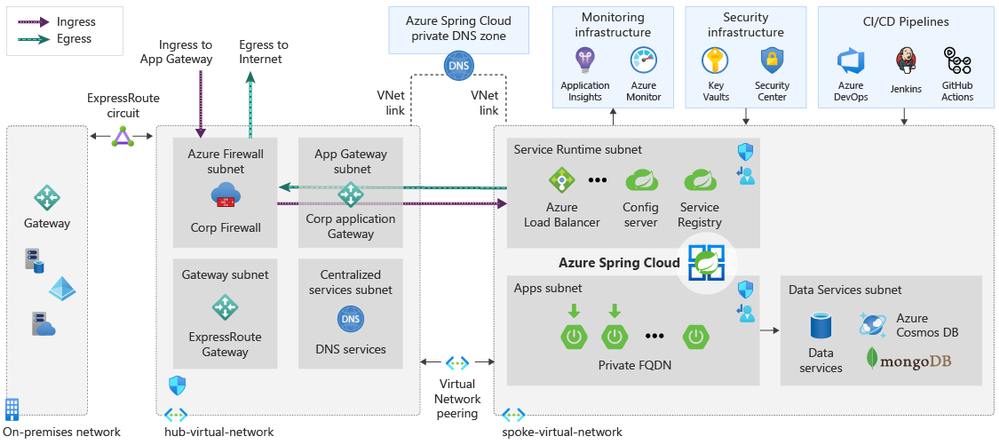
Figure 1 – the diagram represents a well-architected hub and spoke design for applications selectively exposed as public applications
Start here
This Azure Spring Cloud Reference Architecture is a foundation using a typical enterprise hub and spoke design for the use of Azure Spring Cloud. In the design, Azure Spring Cloud is deployed in a single spoke that is dependent on shared services hosted in the hub.
For an implementation of this architecture, see the Azure Spring Cloud Reference Architecture repository on GitHub. Deployment options for this architecture include ready-to-go Azure Resource Manager (ARM), Terraform, and Azure CLI scripts. The artifacts in this repository provide groundwork that you can customize for your environment and automated provisioning pipelines.
Meet the team

This Azure Spring Cloud Reference Architecture is created and maintained by Cloud Solution Architects, Java experts, and content authors at Microsoft, here in alphabetical order and row-wise from left to right:
- Armen Kaleshian – Cloud Solution Architect
- Arshad Azeem – Cloud Solution Architect
- Asir Selvasingh – Architect, Java on Azure
- Bowen Wan – Software Engineering Manager, Java on Azure
- Brendan Mitchell – Content Developer
- David Apolinar – Cloud Solution Architect
- Dylan Reed – Customer Engineer
- Karl Erickson – Content Developer
- Matt Felton – Cloud Solution Architect
- Ryan Hudson – Cloud Solution Architect
- Troy Ault – Cloud Solution Architect
Learn more about Azure Spring Cloud and start building today!
Azure Spring Cloud abstracts away the complexity of infrastructure management and Spring Cloud middleware management, so you can focus on building your business logic and let Azure take care of dynamic scaling, patches, security, compliance, and high availability. With a few steps, you can provision Azure Spring Cloud, create applications, deploy, and scale Spring Boot applications and start monitoring in minutes. We’ll continue to bring more developer-friendly and enterprise-ready features to Azure Spring Cloud.
We’d love to hear how you are building impactful solutions using Azure Spring Cloud. Get started with the Azure Spring Cloud Reference Architecture and these resources!
Resources
by Contributed | Mar 11, 2021 | Technology
This article is contributed. See the original author and article here.
SQL Assessment API provides a mechanism to evaluate the configuration of your SQL Server for best practices. The API is delivered with a ruleset containing best practice rules suggested by SQL Server Team. This ruleset is enhancing with the release of new versions but at the same time, the API is built with the intent to give a highly customizable and extensible solution. So, users can tune the default rules and create their own ones. The API can be used to assess SQL Server versions 2012 and higher and Azure SQL Managed Instance.
In this episode with Aaron Nelson, we’ll show you the basics of the SQL Assessment PowerShell commands, and how you can run the assessments for your Azure SQL Managed Instances as well as your on-prem SQL Server instances.
Watch on Data Exposed
Resources:


Recent Comments