by Contributed | Mar 15, 2021 | Technology
This article is contributed. See the original author and article here.
Time is priceless and while we can’t own it, we can make the best use of it. Balancing work and life continues to challenge us daily. Over half of working parents surveyed, said it’s been difficult balancing household demands while working from home. Using Cortana, your personal assistant in Microsoft 365, you can take back control of your day, organize your work, and plan ahead to achieve more.
Why? Because work should be impactful, seamless, and fluid… AI in Microsoft 365 lets you take control of your time.
At Microsoft Ignite we demonstrated our continued investments in bringing natural, voice-driven experiences to Microsoft 365 apps and services to help you work smarter in addition to new innovation to help individuals, managers, and leaders personalized and actionable privacy-protected insights that help everyone in an organization thrive. In this article we’ll recap announcements from Ignite 2020 and where you can learn more from Ignite 2021 sessions.
Rule your day
Never miss a beat with your daily briefing email. Planning is one of those important things we don’t have time not to do. Daily briefing emails from Cortana help you start your day on track. You get a glanceable summary of your important requests, follow-ups, and info related to upcoming meetings. Currently available in English and Spanish, briefing emails will start rolling out next quarter to users with Exchange Online mailboxes in French, German, Portuguese, Italian. And updates, including in-line action links to easily book time in the week ahead to recharge, catch up on email, or prioritize learning are now generally available in English and Spanish. Additional updates unveiled at Microsoft Ignite 2020 including an integration with Microsoft To Do and actionable reminders to improve meeting effectiveness are now rolling out in targeted release.
Learn more about how your daily briefing can help save you time and keep you focused here.
Catch up on what’s new in your inbox – while even when your hands are full –so you can get time back in your day. With Play My Emails in Outlook for iOS you can get up to speed even when you don’t have time to read. With an intelligent read out of your emails, natural language interaction with Cortana and a user interface designed for people on the move, you can stay organized, on top of what matters and get back to living life outside your inbox, so whether you’re just walking your dog, or commuting to work, Play My Emails helps keep you focused and informed. Learn more about Play My Emails in Outlook.
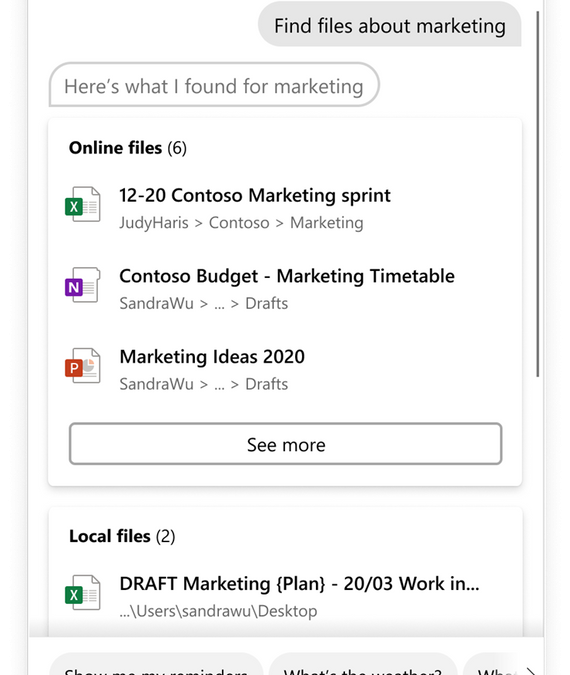
Use spoken or typed natural language to complete tasks on Windows. With the latest update Cortana can help you retrieve your Microsoft 365 files across not only your device but also cloud locations such as SharePoint and OneDrive. The Cortana experience in Windows 10 enables you to type or speak natural language commands to save time finding what you need, stay on schedule, connect with people, set reminders, and more. You can also invoke the experiences hands-free using the wake word “Cortana”.
Use Cortana to open or search files by:
- Parts of file names – “Hey Cortana, open marketing deck”
- Author names – “Hey Cortana, open budget Excel from Anthony”
- Document type – “Hey Cortana, find my recent pdfs”
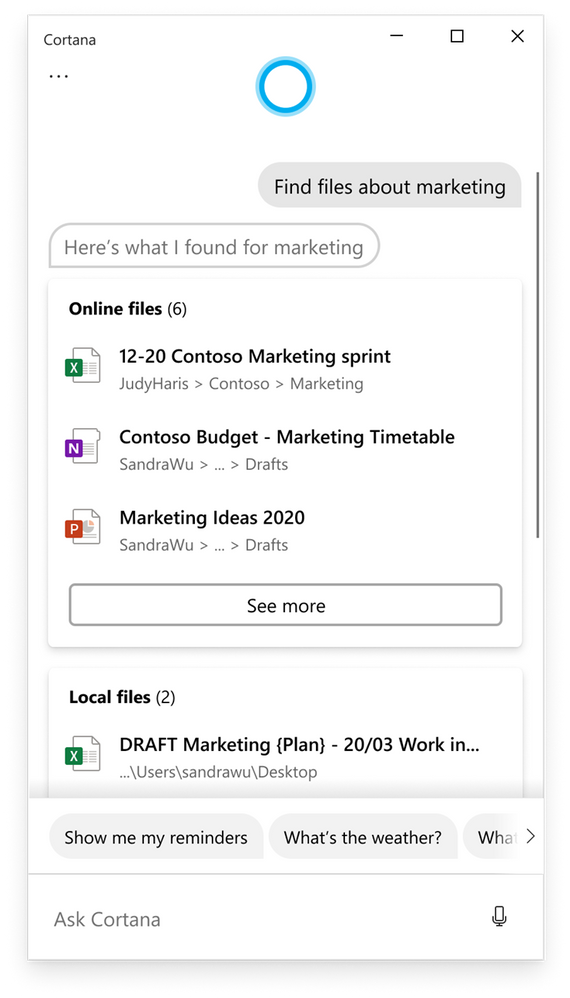
Learn more about what you can do with Cortana in Windows here.
Some things are easier said than done
Interact with your calendar and email naturally. Cortana integration with Outlook gives you a natural language productivity assistant that helps you easily get things done on an iPhone or iPad. Cortana can help schedule new events and customize the event details on screen with language that you use every day—instead of tapping or typing. You can simply ask Cortana in Outlook to “Schedule a Teams meeting with Megan and Adele for next Tuesday at 2 PM to discuss the launch.” Or find out “When is my next meeting with Nestor?” You’ll also be able to quickly compose emails using requests like “Create an email to Megan and Diego.”. We’ll start the roll out of conversational AI in Outlook for iOS in the coming weeks. Initially, this new conversational AI capability with Cortana will be available in English for customers in the United States using Outlook for iOS with a Microsoft 365 work account. This experience will roll out later this year in Outlook for Android.
Make the most of your meetings
Running late and need to send a quick message to your next Teams meeting? Cortana in the Teams mobile app helps you streamline communication, collaboration, and meeting-related tasks using your voice. Simply click the microphone in the upper right of the Teams app and say, “Send a message to my next meeting that I’ll be there soon”. Ask Cortana to check your calendar, join a meeting, make a call, share files, or find messages or chats from a particular person, topic, or time range. For example, “What’s on my calendar tomorrow?”, “Call Adrian King”, “Find the Marketing deck from last month” or “Search for messages from Megan.” Currently available in the U.S., the experience will soon be available to English speaking customers in Australia, Canada, U.K., and India.

Get the latest on what’s new for Microsoft Teams from Microsoft Ignite here.
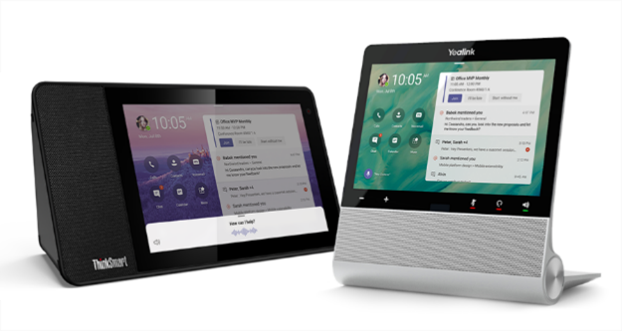
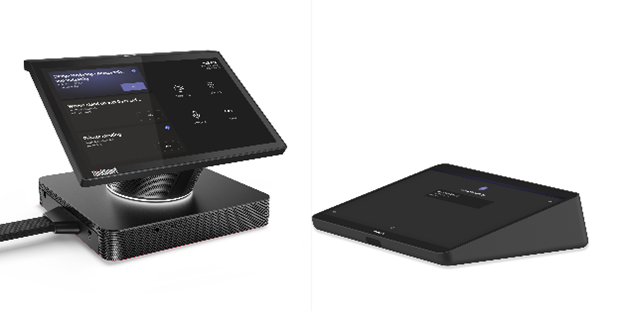
Go hands-free with Cortana on Microsoft Teams Devices. Introduced last fall at Ignite, Microsoft Teams Display is a category of all-in-one dedicated Teams devices featuring an ambient touchscreen, with a hands-free experience powered by Cortana. Using natural language, you can effortlessly join and present in meetings. You can make requests to Cortana like “What’s on my calendar today?”, “Share this document with Megan”, “Join my next meeting”, “Add Joe to the meeting”, or “Present the quarterly review deck”. We will soon make answers from Bing available, so you can check what time it is for your colleague in Europe before calling or get a quick weather report before you leave the house. Currently available in the US, Cortana on Teams displays will be expanding to more regions including Australia, Canada, the UK, and India. For folks heading back to the office, we are adding Cortana to Microsoft Team Room Devices so you can join meetings hands-free and stay safe.
Learn more about AI and Cortana in Microsoft 365 and get more productivity tips at https://go.microsoft.com/fwlink/?linkid=2131191.
by Contributed | Mar 15, 2021 | Technology
This article is contributed. See the original author and article here.
Howdy folks!
New capabilities in Azure Active Directory Domain Services will make it easier for you to move your legacy, on-premises apps to the cloud. The additional capabilities in our managed domain services solution include geo redundancy, faster sync, and resource forests.
Geo-redundancy enhances performance and disaster recovery
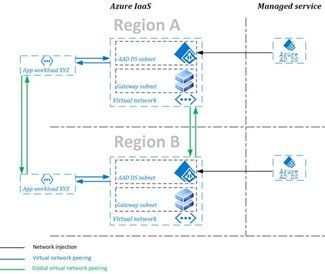
Geo-redundancy is a must for large, geographically dispersed organizations with mission critical applications. With the general availability of replica sets you can now create a replica domain controller set for your managed domain in up to four additional regions. With replica sets, your Azure AD Domain Services applications gain enhanced performance and disaster recovery for your business by adding geo-redundancy in different regions.
Diagram of Azure AD Domain Services replica set with two regions.
For most Azure AD Domain Services customers, adding another replica is a quick experience. To learn more about replica sets and how to deploy your own, visit our documentation.
Synchronization speed increases for multiple cores
When managing hybrid identity, you want to know you have the least latency possible between on-site changes and cloud-authenticated updates. To improve this experience, we’ve made changes to the synchronization engine between your managed domain and Azure AD.
We’ve made the following changes to every Azure AD Domain Services-managed domain that is on a resource manager virtual network:
- Three new attributes: CompanyName, Manager and EmployeeID are now available attributes on user objects in your managed domain.
- Faster initial sync and incremental updates: Performance testing reveals our new sync engine delivers significantly faster automation than the previous service. The upgraded service leverages multiple cores to sync memberships in parallel, resulting in the greatest performance for those customers leveraging more cores.
To learn more about synchronization for Azure AD Domain Services, visit our documentation.
Resource forest makes it easier to move legacy protocols onto Azure
You can now create a resource forest-based managed domain without password hash synchronization. In a resource forest, user objects and credentials exist in the on-premises Active Directory Domain Services forest, while still enabling you to lift your resources that use legacy authentication protocols onto Azure. This is great for customers who use smartcards to sign in to their applications.
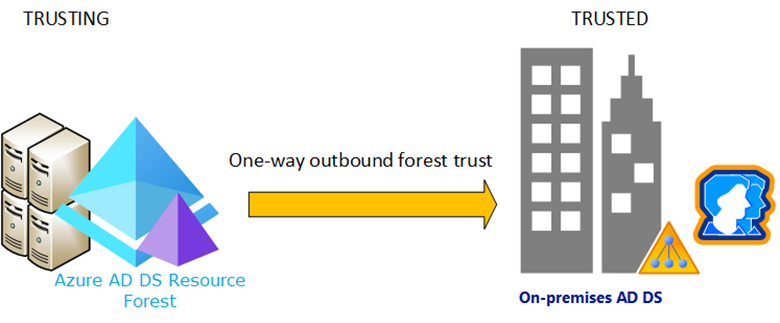
Diagram of an Azure AD Domain Services resource forest.
When determining whether to create a user forest or a resource forest, we recommend the following guides and resources to help you decide:
And as always, join the conversation in the Microsoft Tech Community and send us your feedback and suggestions. You know we’re listening!
Best regards,
Alex Simons (@Alex_A_Simons )
Corporate VP of Program Management
Microsoft Identity Division
by Contributed | Mar 15, 2021 | Technology
This article is contributed. See the original author and article here.
Article contributed by Jithin Jose, Jon Shelley, and Evan Burness
Azure HBv3 Virtual Machines for High-Performance Computing (HPC) featuring new AMD EPYC 7003 “Milan” processors are now generally available. This blog provides in-depth technical information about these new VMs. Below, based on testing across CFD, FEA, and quantum chemistry workloads, we report that HBv3 VMs are:
- 2.6x faster on small-scale HPC workloads (e.g. 16-core comparison, HBv3 v. H16mr))
- 17% faster for medium-scale HPC workloads (1 HBv3 VM v. 1 HBv2 VM)
- 12-18% faster for large-scale HPC workloads (2 – 16 VMs, HBv3 v. HBv2)
- 23-89% faster for very large HPC workloads (> 64 VMs)
- Capable of scaling MPI HPC workloads to nearly 300 VMs and ~33,000 CPU cores
HBv3 VMs – VM Size Details & Technical Overview
HBv3 VMs are available in the following sizes:
VM Size
|
CPU cores
|
Memory (GB)
|
Memory per Core (GB)
|
L3 Cache
(MB)
|
NVMe SSD
|
InfiniBand RDMA network
|
Standard_HB120-16rs_v3
|
16
|
448 GB
|
28 GB
|
480 MB
|
2 x 960 GB
|
200 Gbps
|
Standard_HB120-32rs_v3
|
32
|
448 GB
|
14 GB
|
480 MB
|
2 x 960 GB
|
200 Gbps
|
Standard_HB120-64rs_v3
|
64
|
448 GB
|
7 GB
|
480 MB
|
2 x 960 GB
|
200 Gbps
|
Standard_HB120-96rs_v3
|
96
|
448 GB
|
4.67 GB
|
480 MB
|
2 x 960 GB
|
200 Gbps
|
Standard_HB120rs_v3
|
120
|
448 GB
|
3.75 GB
|
480 MB
|
2 x 960 GB
|
200 Gbps
|
These VMs share much in common with HBv2 VMs, with two key exceptions being the CPUs and local SSDs. Full specifications include:
- Up to 120 AMD EPYC 7V13 CPU cores (EPYC 7003 series, “Milan”)
- 2.45 GHz Base clock / 3.675 GHz Boost clock
- Up to 32 MB L3 cache per core (double-wide L3 compared to 7002 series, “Rome”)
- 448 GB RAM
- 340 GB/s of Memory Bandwidth (STREAM TRIAD)
- 200 Gbps HDR InfiniBand (SRIOV), Mellanox ConnectX-6 NIC with Adaptive Routing
- 2 x 900 GB NVMe SSD (3.5 GB/s (reads) and 1.5 GB/s (writes) per SSD, large block IO)
HBv3 VMs also differ in the follow ways at the BIOS level and subsequently the VM level, as well:
BIOS setting
|
HBv2
|
HBv3
|
NPS (nodes per socket)
|
NPS=4
|
NPS=2
|
L3 as NUMA
|
Enabled
|
Disabled
|
NUMA domains within OS
|
30
|
4
|
Microbenchmarks
Below are initial performance characterizations using a variety of configurations on both microbenchmarks as well as commonly used HPC applications for which the HB family of VMs is optimized for.
MPI Latency (us)
OSU Benchmarks (5.7) – osu_latency with MPI = HPC-X, Intel MPI, MVAPICH2, OpenMPI
Message Size (bytes)
|
HPC-X
(2.7.4)
|
Intel MPI
(2021)
|
MVAPICH2
(2.3.5)
|
OpenMPI
(4.0.5)
|
0
|
1.62
|
1.69
|
1.73
|
1.63
|
1
|
1.62
|
1.69
|
1.75
|
1.63
|
2
|
1.62
|
1.69
|
1.75
|
1.63
|
4
|
1.62
|
1.7
|
1.75
|
1.64
|
8
|
1.63
|
1.69
|
1.75
|
1.63
|
16
|
1.63
|
1.7
|
1.79
|
1.64
|
32
|
1.78
|
1.83
|
1.79
|
1.79
|
64
|
1.73
|
1.8
|
1.81
|
1.74
|
128
|
1.86
|
1.91
|
1.95
|
1.84
|
256
|
2.4
|
2.45
|
2.48
|
2.37
|
512
|
2.47
|
2.54
|
2.52
|
2.46
|
1024
|
2.58
|
2.63
|
2.63
|
2.55
|
2048
|
2.79
|
2.83
|
2.8
|
2.76
|
4096
|
3.52
|
3.54
|
3.55
|
3.52
|
MPI Bandwidth (MB/s)
OSU Benchmarks (5.7) – osu_bw with MPI = HPC-X, Intel MPI, MVAPICH2, OpenMPI
Message Size (bytes)
|
HPC-X
(2.7.4)
|
Intel MPI
(2021)
|
MVAPICH2
(2.3.5)
|
OpenMPI
(4.0.5)
|
4096
|
8612.8
|
7825.14
|
6762.06
|
8525.96
|
8192
|
12590.63
|
11948.18
|
9889.92
|
12583.98
|
16384
|
11264.74
|
11149.76
|
13331.45
|
11273.22
|
32768
|
16767.63
|
16667.68
|
17865.53
|
16736.85
|
65536
|
19037.64
|
19081.4
|
20444.14
|
18260.97
|
131072
|
20766.15
|
20804.23
|
21247.24
|
20717.68
|
262144
|
21430.66
|
21426.68
|
21690.97
|
21456.29
|
524288
|
21104.32
|
21627.51
|
21912.17
|
21805.95
|
1048576
|
21985.8
|
21999.75
|
23089.32
|
21981.16
|
2097152
|
23110.75
|
23946.97
|
23252.35
|
22425.09
|
4194304
|
24666.74
|
24666.72
|
24654.43
|
24068.25
|
Application Performance – Small to Large Scale
Category: Small scale (1 node), license-bound HPC jobs
App: ANSYS Mechanical 21.1
Domain: Finite Element Analysis (FEA)
Model: Power Supply Module (V19cg-1)
Configuration Details: We used the 16-core VM version of HBv3, in order to match the per-core licensing required to support this workload on our last VM size built specifically to support high-performance at low core counts (H16/H16r/H16mr VMs based on high-frequency Xeon E5 2667 v3, “Haswell”, baseclock 3.2 GHz with Turbo frequencies of 3.6 GHz). This ensures that for customers running such a workload for which the total cost of solution is dominated by software licensing costs that performance and performance/$ gains on infrastructure are not offset or exceeded by having to pay for more per-core software licenses as well. Thus, the objective for this customer scenario is to see if HBv3 VMs with EPYC 7003 series processors can provide a performance uplift at an identical (or reduced) core count on a single VM.
|
|
HBv3 (16-core VM)
|
H16mr (16-core VM)
|
VMs
|
Cores
|
Solver Performance (GFLOPS)
|
Elapsed Time (Solver Time+ IO)
|
Solver Performance (GFLOPS)
|
Elapsed Time (Solver Time+ IO)
|
1
|
1
|
3.5
|
1035
|
1.4
|
2411
|
1
|
2
|
6.2
|
647
|
2.9
|
1327
|
1
|
4
|
16.3
|
454
|
6.2
|
909
|
1
|
8
|
27.6
|
327
|
9.3
|
547
|
1
|
16
|
42.9
|
190
|
15.3
|
400
|
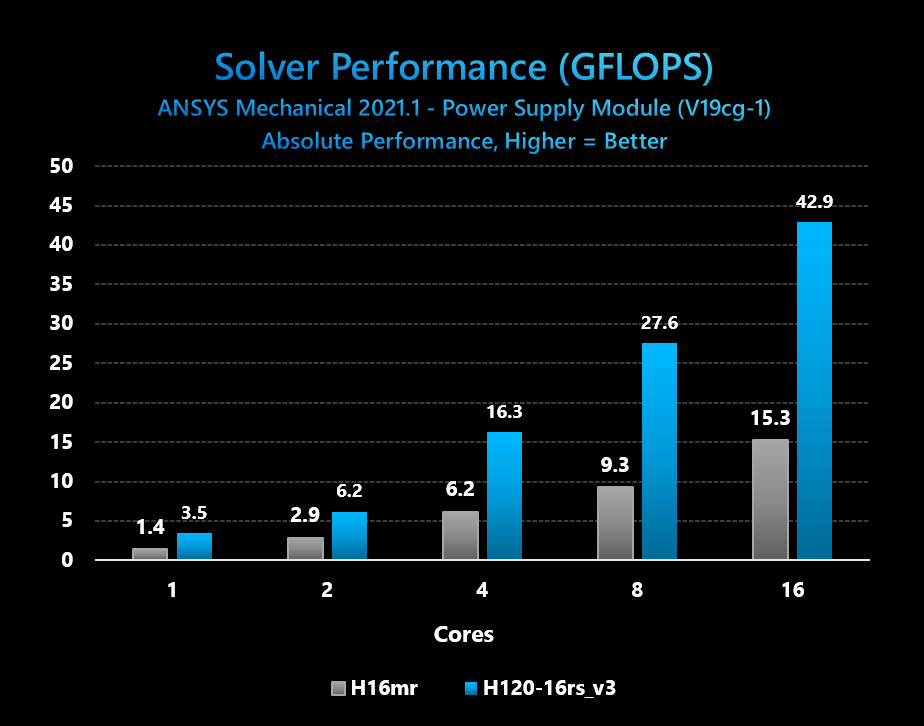
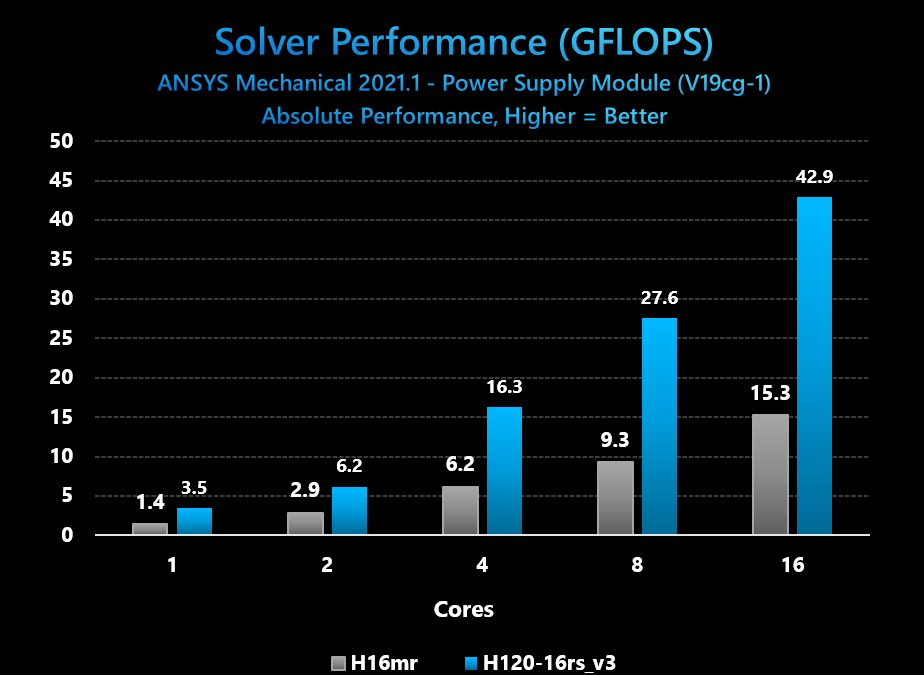
Figure 1: ANSYS Mechanical absolute solver performance comparison with incremental software licensed CPU cores on HBv3 and H16mr VMs
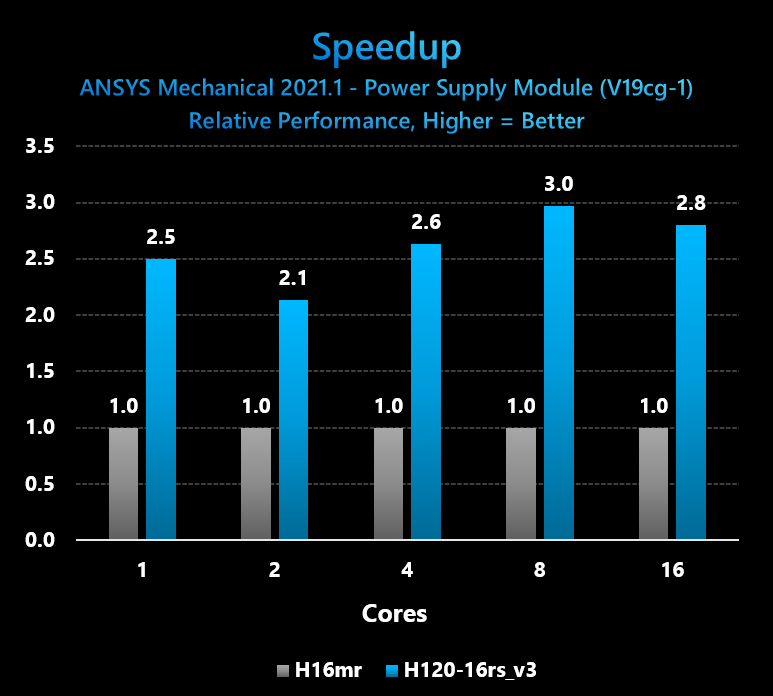
Figure 2: ANSYS Mechanical Speedup from HBv3 (16-core VM size) v. H16mr VM from 1-16 licensed CPU cores
Conclusions: Azure HBv3 VMs provide very large improvements for small, low core-count customer workloads for which software licensing is the dominant factor in a customer’s total cost of solution. Testing with the V19cg-1 benchmark running on ANSYS Mechanical shows performance speedups of 3x ad 2.6x, respectively, when running the workload at 8 and 16 cores. This addresses customer desire for improved HPC performance while keeping software licenses constant.
In addition, we observe a user can reduce licensing usage by 4x, as just 4 cores of a HBv3 VM delivers still slightly higher performance than using all 16 cores of a H16mr VM. This addresses customer desire to for lower overall total cost of solution.
Category: Medium scale HPC jobs (1 large, modern node size)
App: Siemens Star-CCM+ 15.04.008
Domain: Computational fluid dynamics (CFD)
Model: LeMans 100M Coupled Solver
Configuration Details: We used the 120-core HBv3 VM size in order to match it to the 120-core HBv2 size. HBv2, with its EPYC 7002 series (Rome) CPU cores and 340 GB/sec of memory bandwidth, is already the public cloud’s highest performing and most scalable platform for single and multi-node CFD workloads. Thus, it is important we evaluate what enhancements to CFD performance HBv3 with EPYC 7003 series (Milan) brings. A single VM test at 120 cores is also important because many Azure customer HPC workloads run at this scale, thus this comparison is highly relevant to production workload scenarios.
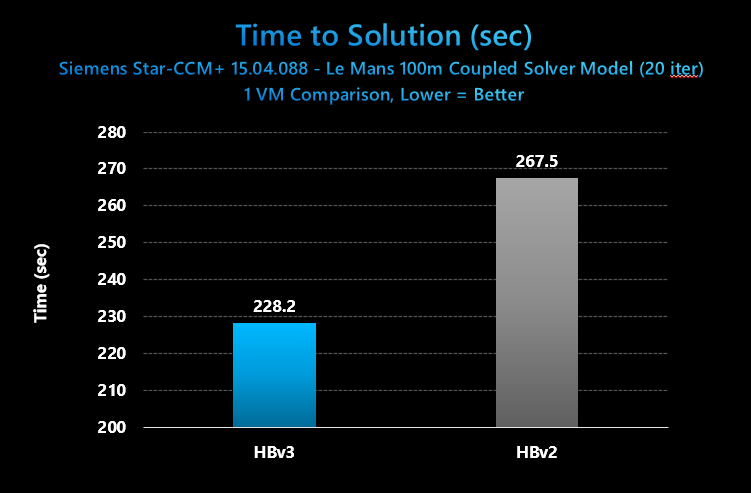
Figure 3: Star-CCM+ absolute performance in solver elapsed time for 20 iterations, Azure HBv3 and HBv2 VMs
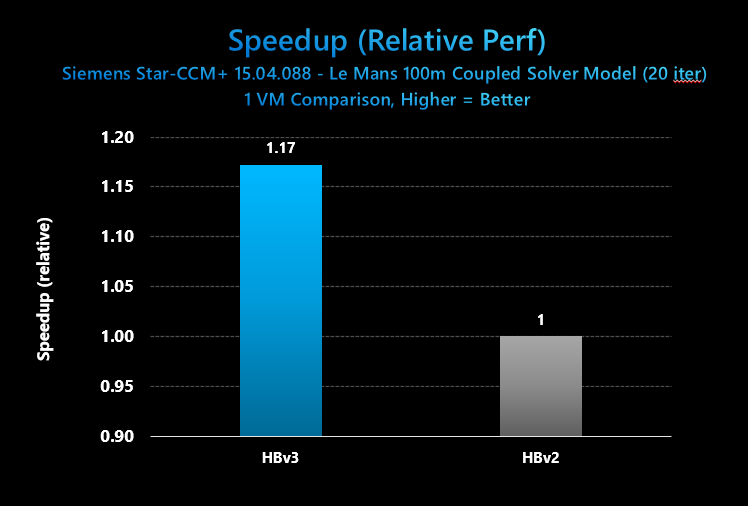
Figure 4: Star-CCM+ Speedup in relative performance, 1 HBv3 v. 1 HBv2 VM
Conclusions: In this test, Azure HBv3 VMs provide a 17% performance uplift for a medium-sized HPC workload such as the CFD benchmark 100m cell Le Mans coupled solver case from Siemens for use with Star-CCM+. These results provide a reasonably good view of the performance uplift for a non-MPI HPC workloads on a 1 VM basis for well-parallelized applications. The 17% gap corresponds closely with the 19% improvement in instructions per clock of the Zen3 core in EPYC 7003 series as compared to the Zen 2 core in EPYC 7002 series found in Azure HBv2 VMs.
Of note, the EPYC 7002-series CPUs in HBv2 still provide exceptionally good performance for this model, and aside from HBv3 VMs remain the fastest and most scalable VMs on the public cloud for HPC workloads. Siemens, itself, recommends as of Q4 2020 AMD EPYC 7002-series (Rome) over Intel Xeon for best performance and performance/$. Thus, both HBv2 and HBv3 VMs recommend exceptionally good performance and value options for Azure HPC customers.
Finally, one difference we call out is that our testing on HBv2 VMs occurred with CentOS 7.7 whereas our testing with HBv3 VMs occurred with CentOS 8.1. Both images feature the same HPC-centric tunings, but it is worth follow up investigation to determine if OS differences contribute to the performance delta measured here. Also, the HBv2 VM performance was taken with 116 cores utilized (out of 120) because it produced the best performance. On HBv3 VMs, using all 120 cores produced the best performance.
Category: Large scale HPC jobs (2 – 16 modern nodes, or ~2,000 CPU cores/job)
App: Siemens Star-CCM+ 15.04.008
Domain: Computational fluid dynamics (CFD)
Model: LeMans 100M Coupled Solver
Configuration Details: We again use the 120-core HBv3 VM size in order to match it to the 120-core HBv2 size. HBv2, with its EPYC 7002 series (Rome) CPU cores and 340 GB/sec of memory bandwidth, is already the public cloud’s highest performing and most scalable platform for single and multi-node CFD workloads. Thus, it is important we evaluate what enhancements to CFD performance HBv3 with EPYC 7003 series (Milan) brings.
Large multi–node (or, perhaps more appropriately in a public cloud context, “multi-VM”) performance up to ~2,000 processor cores is important because many Azure customers run MPI workloads at this scale, or would like to in search of faster time to solution or higher model fidelity. For both HBv2 and HBv2 VMs, we found using 116 cores out of 120 in the VM produced the best performance, and thus this setting was used for the scaling exercise. We also used Adaptive Routing in both cases, which can be employed by customers following the steps here. As mentioned above, CentOS 7.7 was used for HBv2 benchmarking, while CentOS 8.1 is used for HBv3 benchmarking.
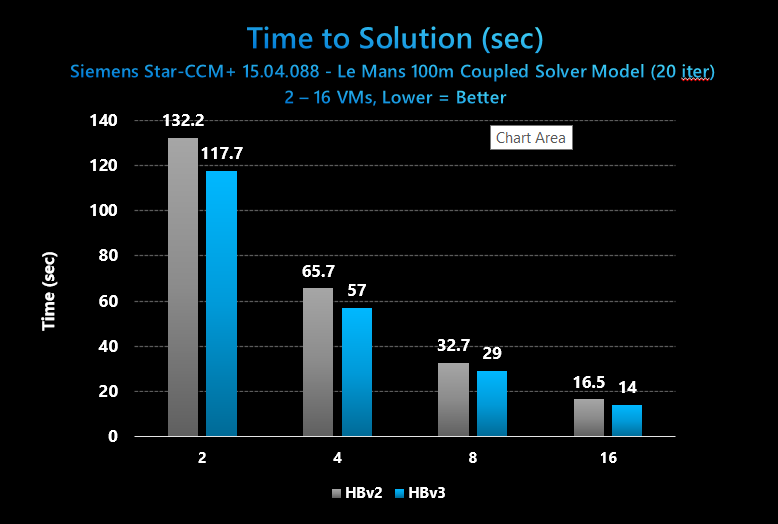
Figure 5: Star-CCM+ absolute performance in solver elapsed time for 20 iterations, 2 – 16 VMs on Azure HBv3 and HBv2 VMs
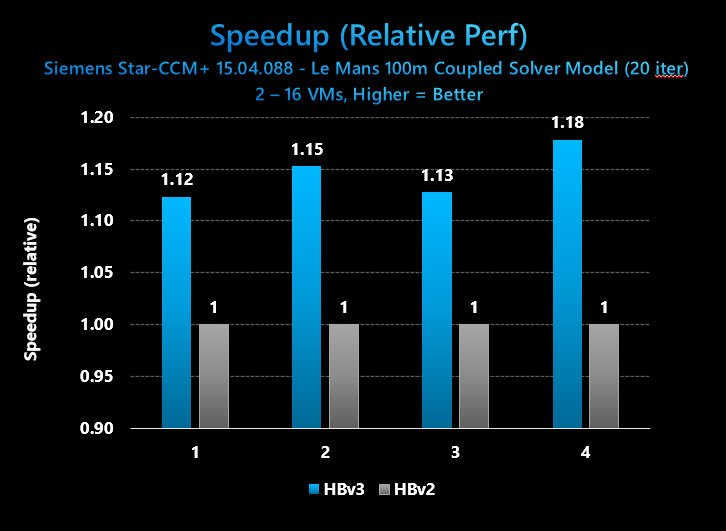
Figure 6: Star-CCM+ relative performance, 2 – 16 VMs on Azure HBv3 and HBv2 VMs
Conclusions: In this test, Azure HBv3 VMs provide a 12-18% performance uplift for large HPC workloads such as the CFD benchmark 100m cell Le Mans coupled solver case from Siemens for use with Star-CCM+ across a scale range of two to sixteen VMs (up to ~2,000 CPU cores). These results provide a reasonably good view of the performance uplift for a non-MPI HPC workloads on a 1 VM basis for well-parallelized applications. The 12-17% gap corresponds somewhat closely with the 19% improvement in instructions per clock of the Zen3 core in EPYC 7003 series as compared to the Zen 2 core in EPYC 7002 series found in Azure HBv2 VMs.
Of note, the EPYC 7002-series CPUs in HBv2 still provide exceptionally good performance for this model, and aside from HBv3 VMs remain the fastest and most scalable VMs on the public cloud for HPC workloads. Siemens, itself, recommends as of Q4 2020 AMD EPYC 7002-series (Rome) over Intel Xeon for best performance and performance/$. Thus, both HBv2 and HBv3 VMs recommend exceptionally good performance and value options for Azure HPC customers.
Significant Boosts at Very Large Scale MPI Jobs
Category: Very large scale HPC jobs (64 – 128 nodes, or ~4,000 to ~16,000 CPU cores/job)
App: OpenFOAM v1912, CP2K (latest stable), Star-CCM+ 15.04.088
Domain: Computational fluid dynamics (CFD), Quantum Chemistry
Model: 28m motorbike (OpenFOAM), H20-DFT-LS (CP2K), and Le Mans 100m Coupled Solver
Configuration Details: We again use the 120-core HBv3 VM size in order to match it to the 120-core HBv2 size. HBv2, with its EPYC 7002 series (Rome) CPU cores and 340 GB/sec of memory bandwidth, is already the public cloud’s highest performing and most scalable platform for single and multi-node CFD workloads. Thus, it is important we evaluate what enhancements to CFD performance HBv3 with EPYC 7003 series (Milan) brings.
Very large-scale multi–node (or, perhaps more appropriately in a public cloud context, “multi-VM”) performance up to ~16,000 processor cores is important because some Azure customers run MPI workloads at these kinds of scale, or would like to in search of faster time to solution or higher model fidelity.
For OpenFOAM, we tested a variety of configurations and found that the best performance settings in terms of processes per node varied from one scaling step to another. Thus, we have posted the best for each below. In other words, we have plotted the “best foot forward” for each of HBv2 and HBv3 VMs.
For CP2K and Star-CCM+, we found using 116 out of 120 processor cores per VM produced the best performance, and thus we are using this setting for this scaling exercise.
We used Adaptive Routing in for all cases, which can be employed by customers following the steps here.
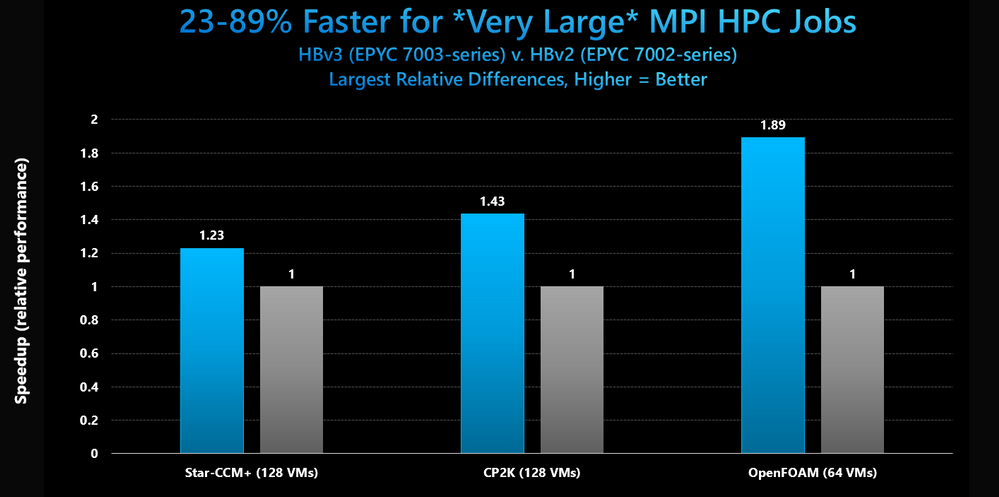
Figure 7: OpenFOAM, CP2K, and Star-CCM+ relative performance at scale v. HBv2 VMs
Conclusions: Across several widely used HPC applications, a common pattern observed is that as scaling increases, the performance difference between HBv3 VMs featuring AMD EPYC 7003 series processors and HBv2 VMs featuring AMD EPYC 7002 series processors increases substantially and often suddenly.
- In Star-CCM+, the 12-18% performance lead for HBv3 observed between 1-16 VMs grows to 23% at 128 VMs (14,848 cores)
- In CP2K, a 10-15% performance lead for HBv3 observed between 1-16 VMs grows to 43% at 128 VMs (14,848 cores)
- In OpenFOAM, a 12-18% lead for HBv2 observed between 1-16 VMs grows to a nearly 90% at 64 VMs (4,096 cores)
This is a most unique phenomenon and one that whose repeatability across several applications bodes very well for the EPYC 7003 series processor for very large scaling MPI workloads. To understand the uniqueness of what we observe here, consider that HBv2 are HBv3 VMs are identical in the following ways:
- Up to 120 processor cores (both AVX2 capable)
- ~330-340 GB/s memory bandwidth (STREAM TRIAD)
- 480 MB L3 cache per VM
- Mellanox HDR 200 Gb InfiniBand (1 NIC per VM) with common network design
It is worth noting that HBv3 VMs *can* run at a ~200-250 MHz higher frequency (~3,000-3100 MHz on HBv3 v. ~2,820 MHz for HBv2) when all (or nearly all) cores are loaded with these applications. However, this advantage is workload dependent and, even if present in the cases benchmarked above, would not come close to accounting for the widening performance gaps we have measured.
The L3 cache architecture of Milan and the Zen3 core, however, are a key difference that appears to be having a very positive affect on these workloads. While the total L3 cache per server (and per VM) is the same it is divided up far less at the hardware level. A “Rome” L3 cache boundary is every 4 cores and is 16 MB in size. A “Milan” L3 cache boundary is every 8 cores and is 32 MB in size. In other words, a dual-socket Rome server is, physically, 32 blocks each with 4 cores and 16 MB L3, whereas a Milan dual-socket server is, physically, half as many blocks (16) with 2x as many cores and 2x as much L3 (8 and 16 MB, respectively). This significantly decreases the probability of cache misses which in turns means much higher effective memory bandwidth for the workload in question.
The Azure HPC team will be following up on this discovery with additional benchmarking and profiling. In the meantime, it appears EPYC 7003 series delivers some of its largest differentiation v. its logical predecessor, Rome, for supercomputing-class MPI workloads.
Application Performance – Extreme Scale
Category: Extreme scale HPC jobs ( > 20,000 cores/job)
App: Siemens Star-CCM+ 15.04.008
Domain: Computational fluid dynamics (CFD)
Model: LeMans 100M Coupled Solver
Configuration Details: We again used the 120-core HBv3 VM size for this scaling examination, this time testing the ability of HBv3 VMs to scale to levels reserved for some of the largest supercomputers. Extreme-scale performance evaluations are critical proof points for Azure’s most demanding HPC customers such as those performing time-critical weather modeling, geophysical re-simulation, and advanced research into effective disease treatments. Here, we once more tested Star-CCM+ ver. 15.04.088 with CentOS 8.1, Adaptive Routing, and HPC-X MPI ver. 2.7.4. We performed the scaling exercise using 116 out of 120 cores available to the VM due to this configuration providing the best performance.
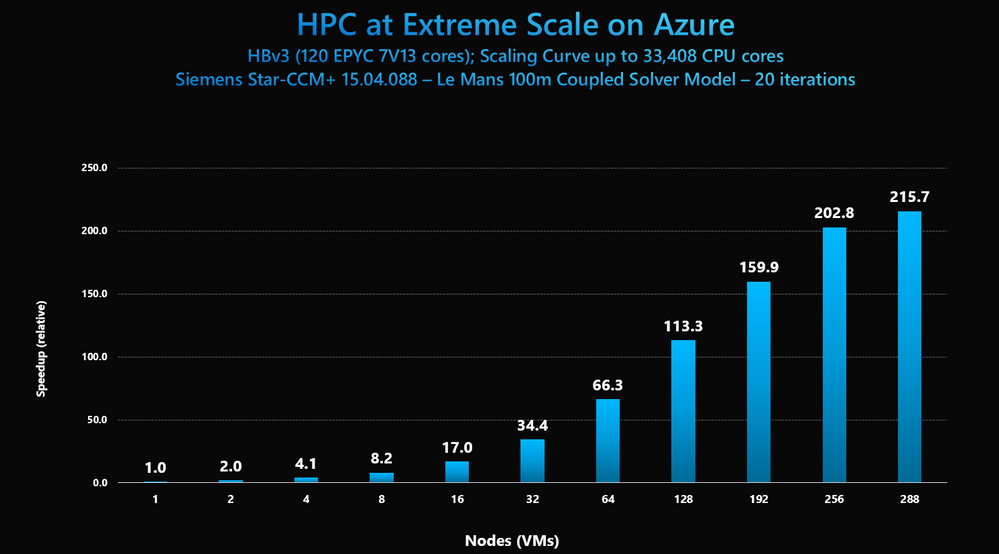
Figure 8: Star-CCM+ relative performance at scale from 1 – 288 VMs on Azure HBv3
Conclusions: In this test, Azure HBv3 VMs demonstrate speedup with scale from 1 to 288 VMs (116 to 33,408 CPU cores). Performance is linear or super linear up to 64 VMs 7,424 cores. This means HPC customers on Azure can scale realize time to solution improvements that directly correspond to the amount of HBv3 infrastructure they provision, which due to the speedup results in no additional total cost of the job. Beyond 64 VMs, the amount of work per process comes too small and scaling efficiency inevitably declines. Still, at 288 VMs, we still observe scaling efficiency of 75% and job speedup of more than 215x.



Recent Comments