by Contributed | Mar 15, 2021 | Technology
This article is contributed. See the original author and article here.
As a result of the issues currently facing Azure AAD, we are currently experiencing problems on the Microsoft Tech Community with login and authentication. This will result in users being unable to login and users already logged in getting unexpected errors as sessions timeout.
** Updated at 4pm PT **
This issue is now resolved, apologies for any inconvenience.
Note: Some Azure services may still be affected by this issue and you can find updates about this on the Azure Status pages.
Allen Smith
Technical Lead
Microsoft Tech Community
by Contributed | Mar 15, 2021 | Technology
This article is contributed. See the original author and article here.
As a result of the issues currently facing Azure AAD, we are currently experiencing problems on the Microsoft Tech Community with login and authentication. This will result in users being unable to login and users already logged in getting unexpected errors as sessions timeout.
There is currently no workaround and we are working to restore service as soon as possible, if we can, we will post updates here but also monitor the Azure Status page for updates.
Allen Smith
Technical Lead
Microsoft Tech Community

by Contributed | Mar 15, 2021 | Technology
This article is contributed. See the original author and article here.
The goal of the Hack the Climate Hackathon is to help non-governmental and non-profit organizations to solve some of their challenges with the use of technology. People of all skill levels are welcome to join – with the reservation that every team must have a minimum of one developer.
If you want to help save the climate using your technical skills, register at https://hacktheclimate.devpost.com/
You can put together your dream team by inviting your hackathon friends. At the beginning of the hackathon, we will have a match-making session. You can start looking for participants to collaborate with via a Discord channel.
The hackathon takes place online between March 22-26. But that does not mean you have to work all those days. Each team sets up a schedule that suits them. We recommend that you take part in our daily live sessions.
All challenges are presented on the Devpost page. More challenges may come in at the last minute. Stay tuned.
The purpose of a hackathon is to learn things and to have fun. It’s a great opportunity to meet other members of the community, brainstorm ideas, develop something for a greater cause, and help with the most important challenge we are facing as humans: climate change.
More information about the Hackathon
Q: What is the goal of this hackathon?
A: Challenges for the Climate hackathon are provided by different non-governmental and non-profit organizations. The goal of the hackathon is to help these organizations in solving the challenges with the use of technology. We expect solutions to be submitted as open-source, so they can help tackle the challenges other organizations have.
Q: What skills do I need to join this hackathon?
A: All skills are welcome, but please note you do need to have a developer in the team. Diversity of skills is always a good prerequisite to win any hackathon, someone will prepare the presentation, other team members will record a 3-minute video to explain the solution, and developers will give their best to create a solution or proof of concept during the hackathon.
Q: Should I already have a team to join this hackathon? How can I form a team?
A: You can always invite your friends and join as a team, but we will have a team matching session at the beginning of the hackathon where you will be able to approach other teams or you can start forming your own team, so do not hesitate to join. We have a Discord channel that you can join now as you start looking for teams or team members.
Q: Do I need to block 5 days in my calendar for this hackathon?
A: No. The hackathon takes places online between 22nd and 26th of March. We know that many people have full time jobs and can’t work on projects during the work hours. You can organize your time as you like with your team, and you can join in the evenings or contribute a few hours through the week. Your team members will do the same and we are sure you will be able to showcase your solution by end of the week.
Q: How can I get more information about each challenge?
A: All challenges are listed on the hackathon website. We are adding a few more just before the hackathon. There are many interesting organizations joining. Please feel free to check them out.
Q: Do you have any advice for people who have never been to a hackathon?
A: Yes, have fun! This is a great opportunity to meet/connect with other people, brainstorm ideas, develop something for a greater cause, and help with the most important challenge we are facing as humans: climate change.
by Contributed | Mar 15, 2021 | Technology
This article is contributed. See the original author and article here.
Discover technical and financial flexibility, efficiencies, and capabilities on the cloud that aren’t possible with on-premises IT infrastructure with cloud economics, which provides key financial and technical guidance from Azure to help you build a successful business case for cloud migration and maximize your investment. Read this blog post to get a basic understanding of cloud economics and learn the lesser-known tips for cloud migration.
by Contributed | Mar 15, 2021 | Technology
This article is contributed. See the original author and article here.
Today, we’re excited to announce the Get started with Microsoft Graph Toolkit module is available on Microsoft Learn for all learners.
If you’ve never heard of Microsoft Graph Toolkit before, you are in the right place! Microsoft Graph Toolkit is for developers interested in building web-based productivity and collaboration solutions in a simple way. Basically, Microsoft Graph Toolkit is a set of HTML components and authentication providers that help you build a complete experience with three lines of code.
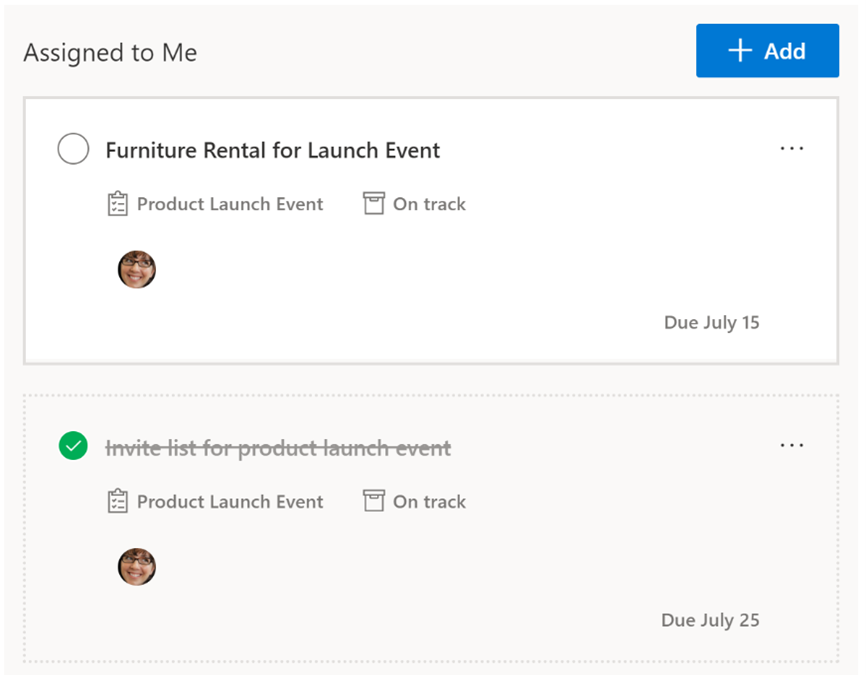
To make it easy to understand here’s an example: Let’s say you want to implement Microsoft Planner tasks in a web page. You can easily do that by using the Tasks component available in Microsoft Graph Toolkit. The beauty of these HTML components is that you don’t need to worry about back-end or front-end. A single HTML tag <mgt-tasks> handles all processes of getting the data and showing it in a pre-built UI.
Here is how you can use the Tasks component:
And here is how the result will look like right out of the box in your web page:
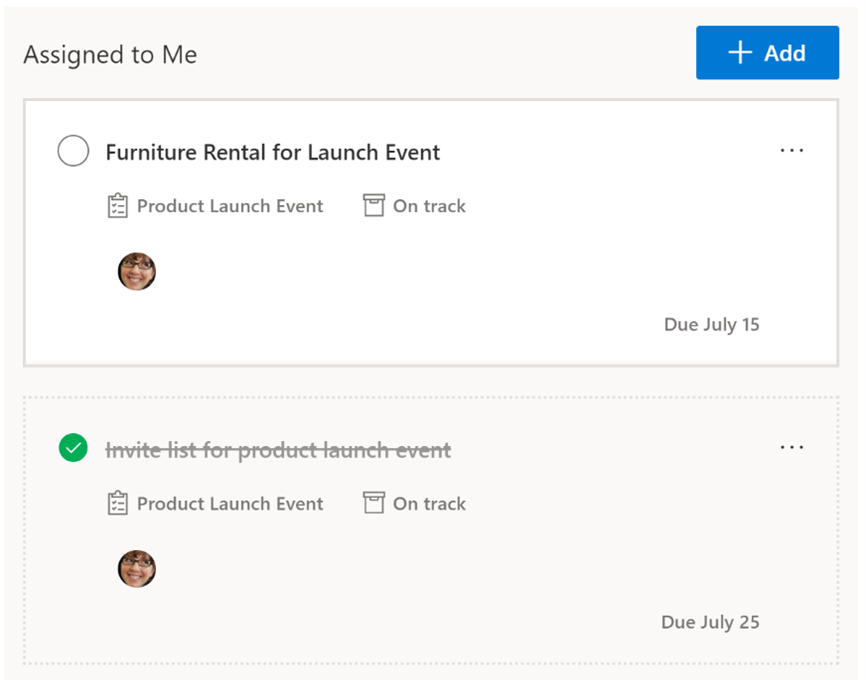 Tasks component in Microsoft Graph Toolkit
There are a lot of other components and providers in Microsoft Graph Toolkit! Are you ready to discover more?
What will you learn in the Get started with Microsoft Graph Toolkit module?
The Get started with Microsoft Graph Toolkit module will help you address questions, such as:
- What is Microsoft Graph Toolkit?
- Why should you use Microsoft Graph Toolkit and what are the benefits?
- How can you use Microsoft Graph Toolkit in web apps?
This module will help guide you through the learning process through hands-on experience that is designed for beginners who have zero knowledge about Microsoft Graph Toolkit. And, it’s no more than a couple lines of HTML!
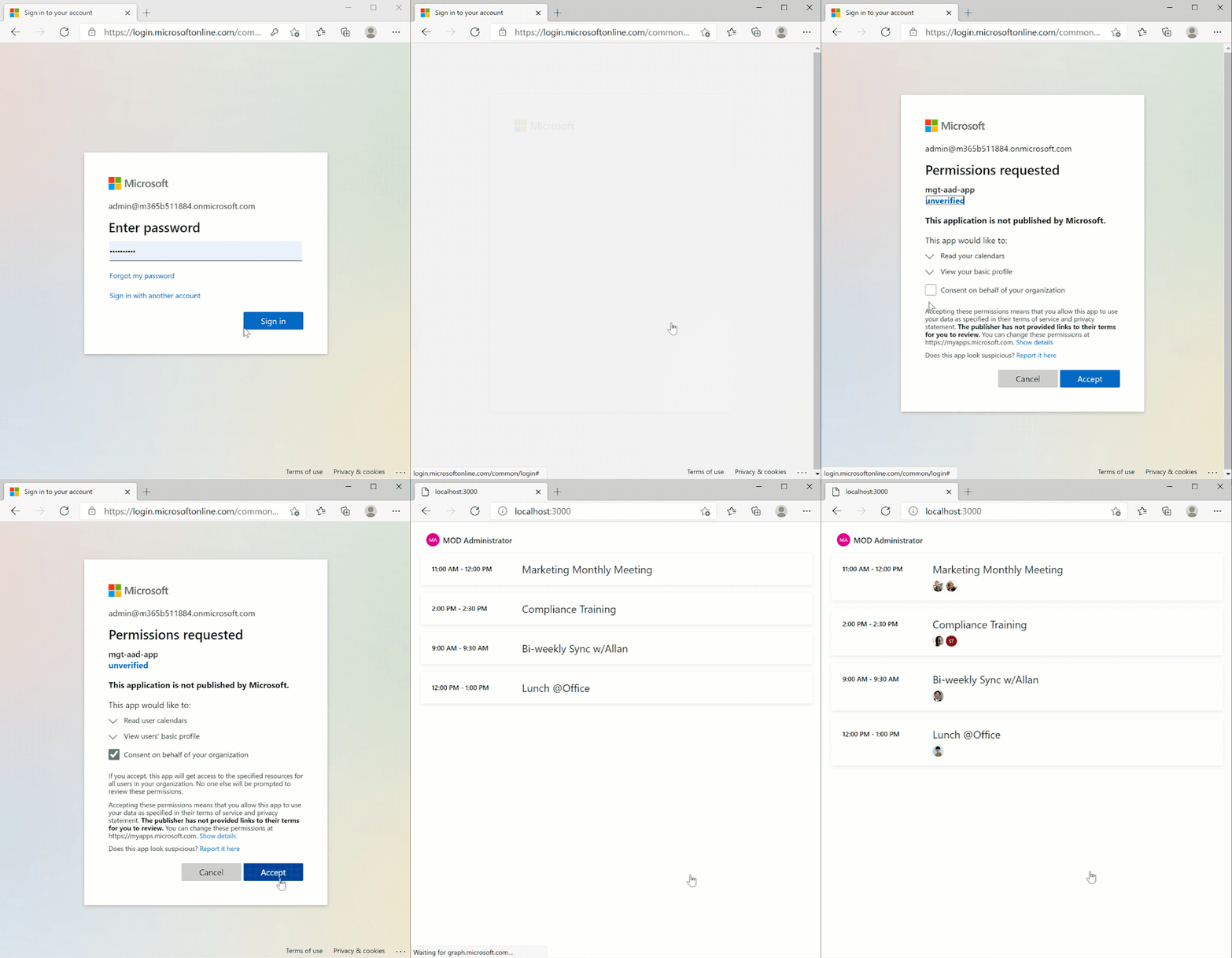
Give it a try; by the end of the module you will understand how to build the experience shown below with only four lines of HTML:
Before you start, let’s setup your environment
Before we begin, there are a few basic tools and requirements needed to complete the exercises and practice units. Here’s a step-by-step guide for what you’ll need to set up your environment:
Step 1: tenant from Microsoft 365 Developer Program
The Microsoft 365 Developer Program provides a free Microsoft 365 tenant for everyone! The program provides a free sandbox, tools, and resources to build solutions for the Microsoft 365 platform.
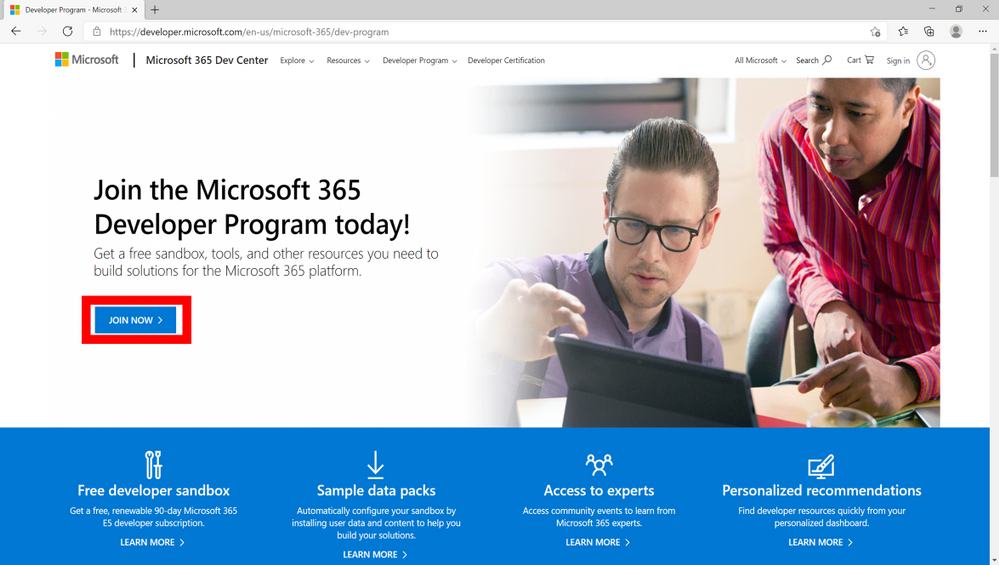
- Go to the Microsoft 365 Developer Program website and select JOIN NOW.
- Login with a Microsoft account (work, school or personal). Once logged in, you will be directed to a page to fill out the following details:
- Country/Region
- Company
- Language Preference
- Make sure to select Terms & Conditions and click Next.
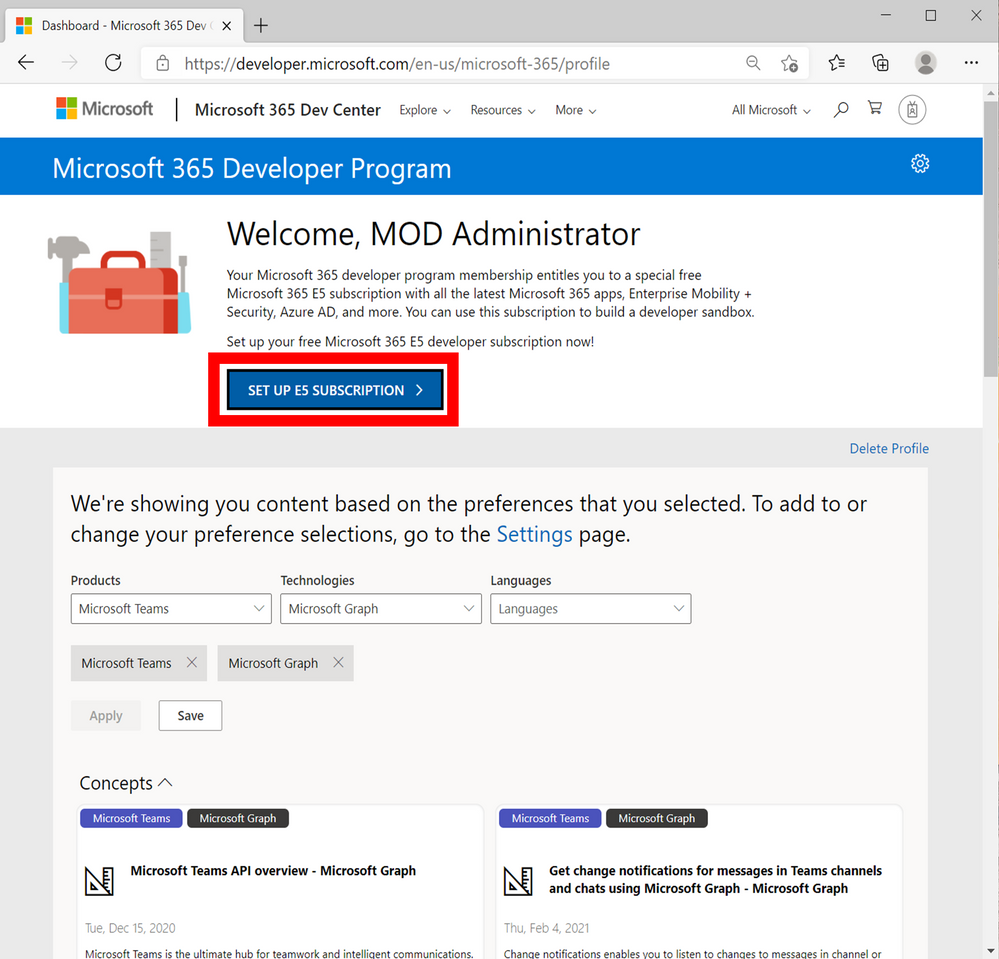
- When your profile is successfully created you will be directed to the program page. Select SET UP E5 SUBSCRIPTION to create your free tenant (as shown below):
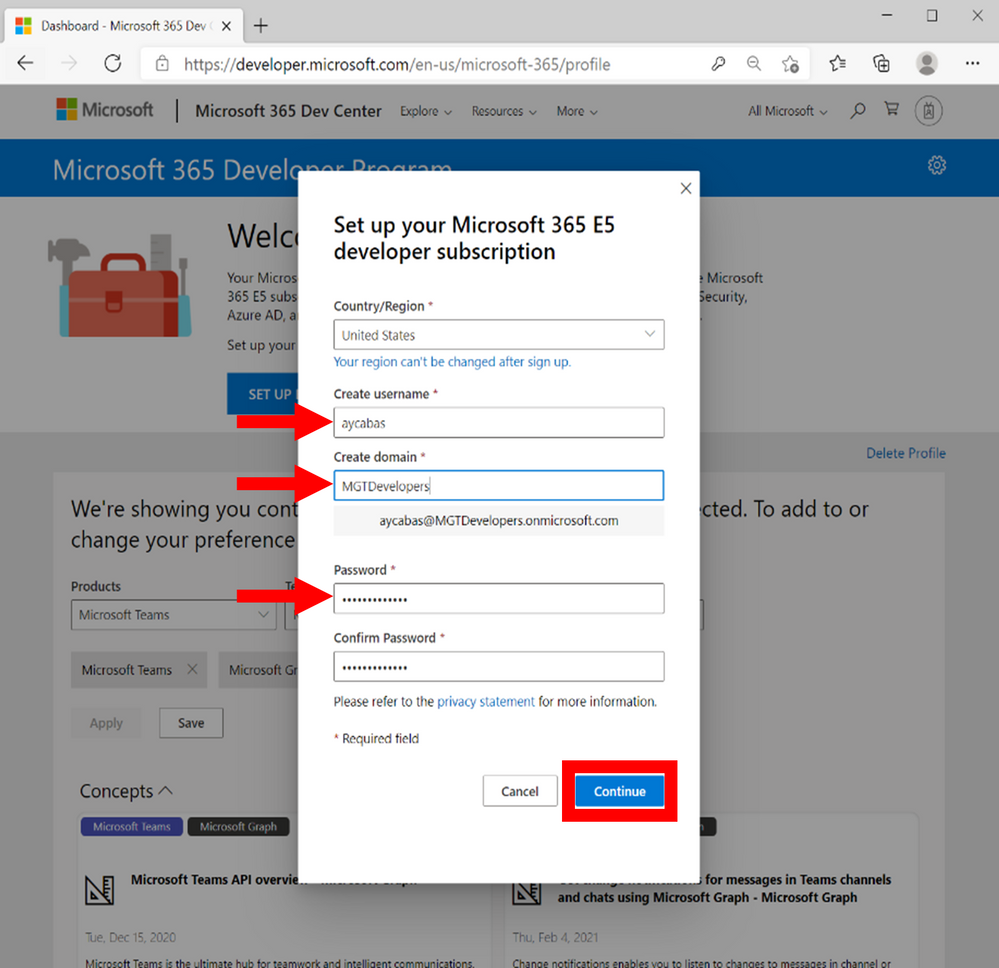
5. Fill in the following details and select Continue:
- Username
- Domain – must be globally unique
- Password
6. Add a phone number for security purposes and select Set up.
7. Congratulations! Your tenant and administrator account are successfully created.
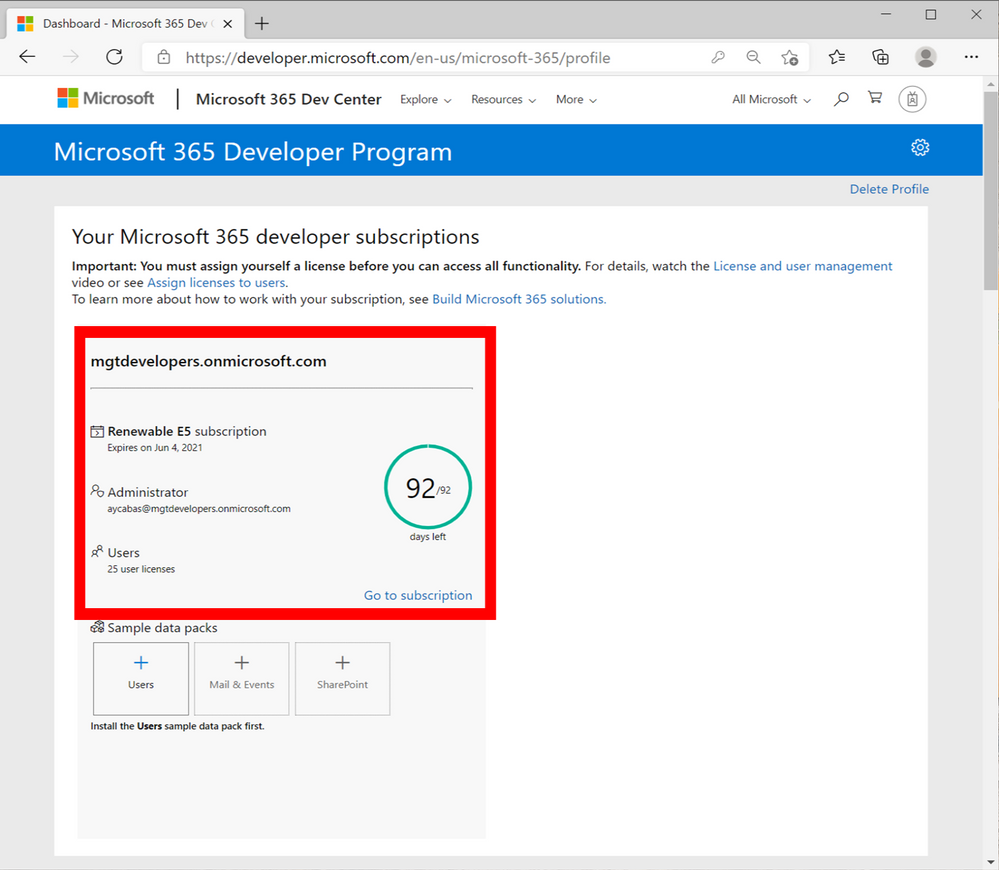
Now you can use your Administrator account to build and test your solutions for Microsoft 365 Platform.
Step 2: Install Visual Studio Code
You will use Visual Studio Code while working on practice units in the learn module. Install Visual Studio Code by visiting: https://code.visualstudio.com/download.
Step 3: Install Visual Studio Code Live Server
You will need the Visual Studio Code Live Server extension to run and test your project at the end of each practice unit in the Microsoft Learn module. Install the Visual Studio Code Live Server extension from the Marketplace: https://marketplace.visualstudio.com/items?itemName=ritwickdey.LiveServer.
Let’s start your journey with Microsoft Graph Toolkit!
Now that you have all the pre-requisites squared away…are you ready to begin your journey with Microsoft Graph Toolkit? Visit the Get started with Microsoft Graph Toolkit module and start learning how to build productivity & collaboration solutions today.
Want to learn more about Microsoft Graph Toolkit?
Join us for a 2-hr livestream event on April 14 to learn together, more information coming soon via aka.ms/learntogether-graph!


Recent Comments