by Contributed | Mar 1, 2021 | Technology
This article is contributed. See the original author and article here.
Microsoft Defender for Identity uses Active Directory signals to identify, detect, and investigate advanced threats, compromised identities, and malicious insider actions directed at your organizations. Defender for Identity monitors and analyzes user activities and information across your network, such as permissions and group membership, creating a behavioral baseline for each user that is then used to identify anomalies using built-in AI.
Many of these capabilities help to address Cybersecurity Maturity Model Certification (CMMC) requirements across several Domains. For example Audit and Accountability (AU) 3.051 states DIB suppliers must “Correlate audit record review, analysis, and reporting processes for investigation and response to indications of unlawful, unauthorized, suspicious or unusual activity.” The insights provided by Microsoft Defender for Identity can help administrators identify suspicious activities and reveal advanced threats, compromised users, and insider threats. Defender for Identity also provides security reports and analytics to help quickly identify and assess paths of attack inside your organization.
With Microsoft Defender for Identity and the integration of Azure AD Identity Protection and Cloud App Security, monitoring and alerting can be applied for identities that span both on premises and in the cloud. Learn how Microsoft Defender for Identity uses adaptive built-in intelligence, giving you insights into suspicious activities and events, revealing the advanced threats, compromised users, and insider threats facing your organization. All of this and more can assist in meeting CMMC and DFARS requirements tied to NIST 800-171 / 53.
In this video famed Microsoft Security Architect and speaker Matt Soseman (aka.ms/SosemanTV – 6K+ Subscribers) provides this excellent introduction to Microsoft Defender for Identity and how it addresses several key Practices and Domains within #CMMC.
https://www.youtube.com/watch?v=sdipZXtNEs8
https://www.youtube-nocookie.com/embed/sdipZXtNEs8
#MSDefender #MicrosoftSecurity
CMMC Audit and Accountability
https://info.summit7systems.com/blog/…
Microsoft Defender in Office 365 GCC and GCC High
https://info.summit7systems.com/blog/microsoft-defender
Session from February 2021 CS2 Conference
http://cs2.cloud
by Contributed | Mar 1, 2021 | Technology
This article is contributed. See the original author and article here.
WinObj v3.01
This minor update to WinObj fixes a crash on exit.
by Contributed | Mar 1, 2021 | Technology
This article is contributed. See the original author and article here.
Microsoft Teams, the HUB for teamwork. You have heard it before, but what does it mean?
As the appetite for new ways of working together grows, new developments, communications, mobility, and cloud services are enabling professionals to communicate and collaborate in ways that were previously not possible.
Microsoft Teams is the framework that enables individuals to blend and customize these new tools – to create unique experiences that align with their needs.
What to expect from this roadshow series?
Knowing that new tools bring new opportunity, we’ve designed this three-part series for healthcare professionals to learn, share and create innovative ideas to improve employee experiences and business value. We will guide you through the following journey, first with an overview of APPs and automation in Teams – then going into greater detail with experience demonstrations and customer success stories.
Session #1 – Teams as a Platform in Healthcare
Introduction and overview of Teams as a Platform in Healthcare. Key agenda focus areas include:
- Custom APPs in Teams
- Bringing other APPs into Teams
- Process Automation
Session #2 – Custom APPs in Teams for Healthcare
Demonstration of the following custom APPs being used through Teams for Healthcare today
- Adoption APP
- Power Virtual Agents and FAQ BOTs
- Virtual Rounding
- Company Communicator
- Inspections/Employee Ideas APPs
Session #3 – Bringing APPs together in Teams for Healthcare
Demonstration of the following 3rd party APPs being used through Teams for Healthcare today
- Service Now
- Workday
- Amion
- InCare
- AMN Translation
- AGFA
- Adobe Sign
- JIRA
How do you register to attend this roadshow series?
There is no registration required! We recommend you copy the session links below that best align with your schedule and block your calendar. See you then!
Registration Links: (two options for each session, choose the one that best aligns to your schedule)
Session #1: Teams as a Platform in Healthcare
Session #2: Custom APPs in Teams for Healthcare
Session #3: Bringing APPs together in Teams for Healthcare
by Contributed | Mar 1, 2021 | Technology
This article is contributed. See the original author and article here.
Well-running apps are critical to a great endpoint experience. Users are never happy when an app crashes or a device restarts and their flow is broken. Worst case scenario, they may even lose the work that they just did. Service desks help solve these problems, but they only have visibility into the ones that people report, not the ones where someone just suffers in silence. What is needed is greater visibility into these issues across the entire organization. The two new Microsoft Endpoint Manager features in Endpoint analytics give IT admins the visibility and insights needed to help improve this experience.
Both of these features — a new application reliability report and new data for reboot frequency in the existing startup performance report — reflect our commitment to the user experience because users are happier when work isn’t slowed down and IT can focus on helping drive the business when there are fewer support calls.
The application reliability report, available in preview and rolling out over the next few days, gives IT visibility into which desktop applications are hampering the user experience, due to frequent crashes and because they are broadly deployed to users. The report also offers suggestions for improving app performance and alerts IT to issues that users may not have created tickets for yet despite growing frustration, which can help decrease the number of support tickets in the long run.
How to use the application reliability report
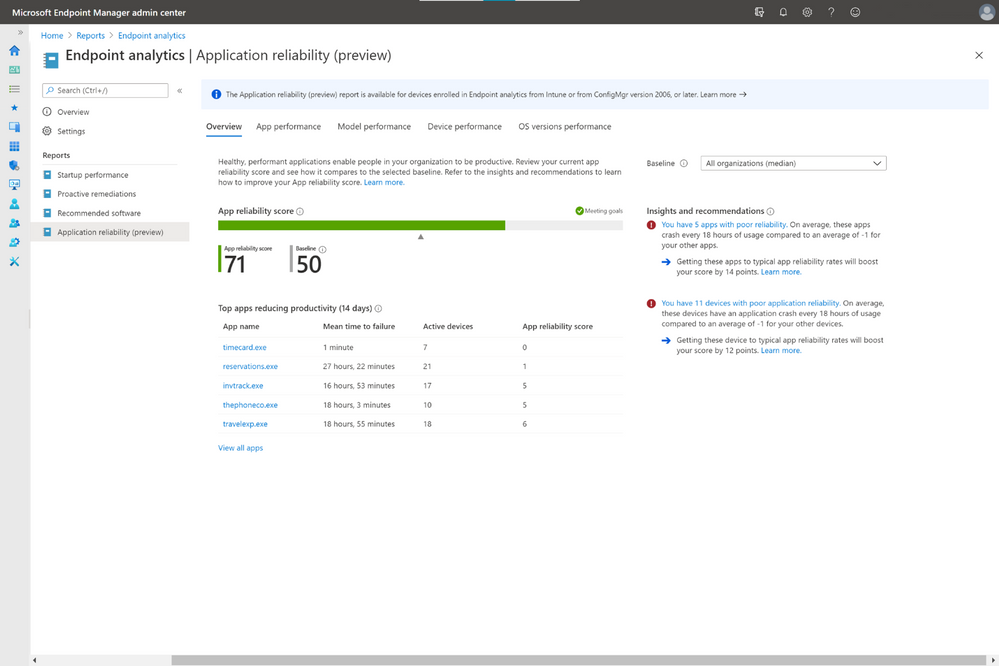
If your devices are Intune managed or co-managed, you don’t need to do anything to see the application reliability report. It sits alongside the rest of the Endpoint analytics reports in the Microsoft Endpoint Manager admin center console. If you have devices enrolled through tenant attach, upgrade to Configuration Manger 2006 for this report to populate. On the Overview page is your app reliability score as well as a baseline score, which, by default, represents the median across all commercial organizations. This can help you determine issues unique to your environment—and potentially caused by poor configurations—versus more widespread issues.
Below that is a list of the apps most likely to have reduced user productivity during the previous 14 days. This considers not only crash frequency but also usage to help reduce noise, such as one-off applications crashing 100 times on a single device. On the right column are app reliability Insights and Recommendations prioritized by which are most likely to boost your score.
In the App performance tab is a list of all your organization’s apps, which can be sorted by app name, publisher, active devices, app reliability score, and mean time to failure, which is the average number of times the app can be used across the organization between crashes.
You can also see your organization’s application reliability performance by other pivots like model, and OS version deployed, as well as troubleshoot application reliability issues with individual devices. In device performance, each device is given a device app health score, based on how often applications crashed on that device during the previous 14 days. Clicking into each device gives you a timeline of app crash and app hang events so you know exactly when crashes occurred, which can help speed troubleshooting.
New insights into device restart frequency
To help improve the user experience even further, we have also enhanced the existing startup performance report. New insights on device restart frequency, also known as reboot frequency, will help you identify problematic devices because reboots break the user from their flow and should not be needed often.
To help you better understand the type of reboots that happens, we classify each them as either normal or abnormal. Normal restarts are those that go through the normal Windows shutdown process. These include: Windows update installations, which typically occur once a month; non-update shutdowns from users, typically to save battery power; and non-update restarts, which shouldn’t occur often beyond monthly patching.
In contrast, abnormal restarts are ones that haven’t gone through the normal Windows shutdown process and could suggest problems that need to be investigated further. There are also three categories for this type of restart.
- Blue screens: This abnormal restart type is also called a stop error. Usually, less than two stop errors occur per device per year.
- Long power button press: This restart happens when a user holds down the power button to force a restart. These shutdowns are typically even less frequent than blue screens.
- Unknown: These are shutdowns that don’t fit either of the two other abnormal shutdown types. Microsoft will continue to research these to determine if additional categories should be added.
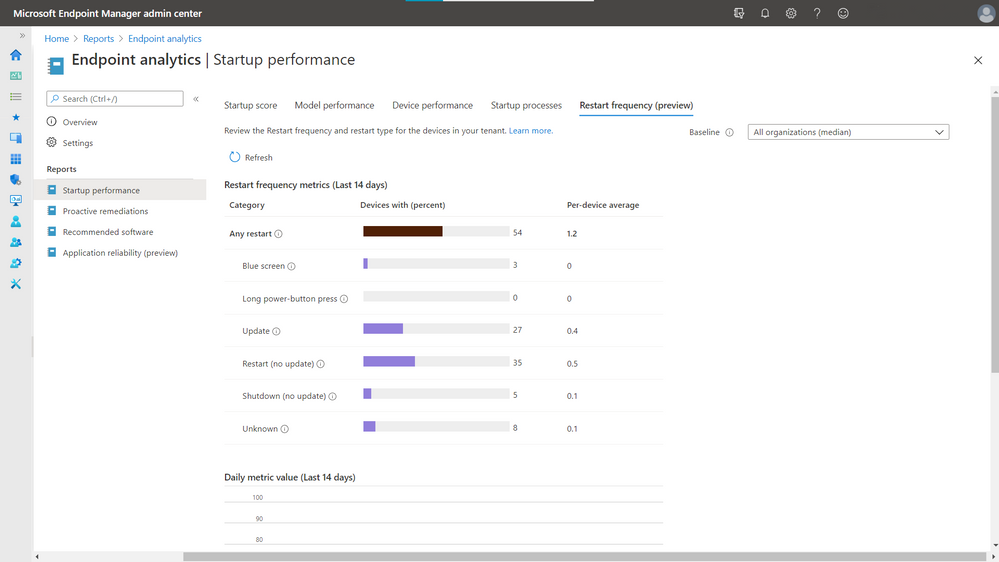
The restart frequency feature is now in preview and is rolling out to everyone over the next few days regardless of how you’ve configured the telemetry level or Windows Error Reporting in Windows Diagnostics.
Check out the rest of Endpoint analytics
There is so much more to Endpoint analytics than what we just covered. There are also reports on recommended software that help advise organizations on software that can help optimize OS and Microsoft versions for the best user experience. There is also the proactive remediations feature, giving you the power to automatically detect and remediate some of the top issues hampering users’ productivity — sometimes even before users realize something is wrong — while also helping reduce helpdesk call volume.
More information and feedback
For more information on getting started, visit the Endpoint analytics documentation, and check out the FAQ. Tweet your questions or feedback using the hashtag #MEMpowered and if you have an idea for a new feature, add it to UserVoice.
Please follow @MSIntune on Twitter
by Contributed | Mar 1, 2021 | Technology
This article is contributed. See the original author and article here.
In this series, Microsoft identity team members share their reasons for loving passwordless authentication (and why you should too!). Today, Maria Puertas Calvo, data scientist for Microsoft Identity, continues the series.
Hi!
I am honored to be among such a fine group of people bringing you the goodness of passwordless authentication. Today, I’m going to talk about how passwordless dramatically reduces the risk of phishing attacks against your organization. As a data scientist, I turned to statistics to help me explain. Let’s begin!
Phishing is a form of social engineering in which a victim is tricked into giving their credentials to an attacker. It remains one of the main points of entry into organizations by cybercriminals. The attacker generally presents the user with a sign-in page that spoofs the real authentication page and hopes that the victim enters their credentials. Even long complex passwords won’t help you in a phishing situation if you enter them exactly right unknowingly on a phishing site.
Passwords are the most commonly phished credentials, but some sophisticated attackers go one step further and perform real-time phishing attacks for multifactor authentication credentials, luring the victim to provide the one-time password (OTP) sent to their email or phone. From September 2019 to September 2020, Microsoft Defender for Office blocked 1.6 billion phishing emails linking to around 2 million phishing URL sites. In 2020, phishing incidents rose by 220% compared to the yearly average during the height of global pandemic fears.
OK, you get the point. Phishing is bad and scary, but how does passwordless protect your organization from phishing attacks?
To start, most phishing sites are designed to collect passwords. If you normally don’t use a password to log in, you will be immediately suspicious if the site is asking for it. Even if you think the site is legitimate, you will likely not know your password because you never use it! Sites that phish other credentials, such as OTPs sent to your phone app or hardware token are much less prevalent, so if you choose to go passwordless say for example with the Authenticator app for its amazing usability, you’ll also get enhanced security.
But the benefits don’t end there. Two of our main passwordless authenticators are FIDO2 based – Windows Hello for Business and security keys. If you want to make it extremely hard for your users to get phished, these two authentication methods provide phishing-resistant authentication. How? – you ask. Phishing sites rely on humans not noticing that the domain asking for their credential is not the one they registered that credential with. With FIDO, this problem is avoided because the server domain is used by the client (i.e. browser) to ask the authenticator (i.e. security key) to sign the login request. What this means in simpler words is that only when the site visited is foobar.com the authenticator will provide a credential that’s valid for foobar.com. If an attacker creates foodbar.com and tries to phish the user credentials, the authenticator will sign a message that won’t be accepted by foobar.com, hence making phishing impossible.
So that’s it, one more reason to love passwordless. Go passwordless and drive cybercriminals out of business by keeping them out of your business.
Learn more about Microsoft identity:
Check out the other posts in this series:


Recent Comments