by Contributed | Mar 1, 2021 | Technology
This article is contributed. See the original author and article here.
Problem
We’ve seen several cases come in lately where customers have been trying to use PolyBase feature and encountering “Failed to generate query plan” error. Depending on which command you run, the error will display differently.
- CREATE EXTERNAL TABLE or CREATE EXTERNAL DATA SOURCE command fails with:
Msg 110813, Level 16, State 1, Line 21
100001;Failed to generate query plan.
- SELECT from an existing external table fails with:
Msg 7320, Level 16, State 110, Line 1
Cannot execute the query “Remote Query” against OLE DB provider “MSOLEDBSQL” for linked server “(null)”. 100001;Failed to generate query plan.
In either of the above scenarios, if you open the <ServerName>_<InstanceName>_DWEngine_errors.log, you’ll see an error like the following:
{datetime} [Thread:<ThreadID>] [ServerInterface:InformationEvent] (Info, Normal): Starting processor ExecuteMemoProcessor. [Session.SessionId:SID##][Session.IsTransactional:False][Query.QueryId:QID##]
{datetime} [Thread:<ThreadID>] [EngineInstrumentation:EngineQueryErrorEvent] (Error, High):
Microsoft.SqlServer.DataWarehouse.Common.ErrorHandling.UnexpectedStatementException: 100001;Failed to generate query plan. —> Microsoft.SqlServer.DataWarehouse.Sql.Optimizer.MemoDeserializer.UnknownElementException: Unknown element DatabaseUser is found.
at Microsoft.SqlServer.DataWarehouse.Sql.Optimizer.MemoDeserializer.MemoDeserializer.ShowMemoXMLState.HandleState(XmlReader reader, MemoDeserializer deserializer)
at Microsoft.SqlServer.DataWarehouse.Sql.Optimizer.MemoDeserializer.MemoDeserializer.Deserialize(XmlReader reader)
at Microsoft.SqlServer.DataWarehouse.Sql.Optimizer.MemoProvider.AbstractMemoGenerator.DeserializeMemoFromXML(SqlXml memoXml, ExecutionEnvironment executionEnvironment)
— End of inner exception stack trace —
at Microsoft.SqlServer.DataWarehouse.Sql.Optimizer.MemoProvider.AbstractMemoGenerator.DeserializeMemoFromXML(SqlXml memoXml, ExecutionEnvironment executionEnvironment)
at Microsoft.SqlServer.DataWarehouse.Sql.Statements.OptimizedStatement.GenerateMemo(IMemoProvider memoProvider, IQPTelemetry queryProcessingTelemetry, Boolean isLocalShellSession)
at Microsoft.SqlServer.DataWarehouse.Engine.Utils.EventUtils.PublishApplicationEventAndExecute(ApplicationEventTrigger beginTrigger, ApplicationEventTrigger endTrigger, ApplicationEventTrigger errorTrigger, ApplicationEventTrigger cancelTrigger, PublishedEventPayloadDelegate payload, Action callback)
at Microsoft.SqlServer.DataWarehouse.Engine.Processors.ExecuteMemoProcessor.OnExecuteRequest()
at Microsoft.SqlServer.DataWarehouse.Engine.Utils.EventUtils.PublishApplicationEventAndExecute(ApplicationEventTrigger beginTrigger, ApplicationEventTrigger endTrigger, ApplicationEventTrigger errorTrigger, ApplicationEventTrigger cancelTrigger, PublishedEventPayloadDelegate payload, Action callback)
at Microsoft.SqlServer.DataWarehouse.Engine.Processors.AbstractProcessor.OnProcess()
at Microsoft.SqlServer.DataWarehouse.Engine.Processors.AbstractProcessor.OnExecute() [Session.SessionId:SID##][Session.IsTransactional:False][Query.QueryId:QID##]
You may also observe a memory dump file (SQLDmpr*.dmp) created in SQLServerInstallDrive:Program FilesMicrosoft SQL ServerMSSQL15.<InstanceName>MSSQLLogPolybasedump.
The problem has only been observed in SQL Server 2019 on Windows.
Cause
The problem occurs when SQL Server Engine has been patched to at least Cumulative Update 8 (15.0.4073) and the PolyBase feature hasn’t been updated to the same build.
The most common way of encountering this problem is to already have installed SQL Server 2019 and patched to CU8 and then subsequently add the PolyBase feature. When you add a feature to an existing SQL Server instance that has been patched, the feature added is still at the original RTM version. This isn’t specific to PolyBase feature, but any feature added to an existing instance that has been patched. This would lead to problem with being unable to create the external table.
In order to get the error when selecting from the external table, you must have already successfully created the external table. We’ve seen this scenario when there’s been some problem applying Cumulative Update 8 to the PolyBase feature, but installation of CU8 to the SQL Engine was successful. In scenarios like this, we’ve seen customers have uninstalled the PolyBase feature and reinstalled it, but then failed to subsequently apply CU8 to PolyBase feature.
How to Confirm
You must determine the SQL Server Engine version and PolyBase Engine version and compare.
Determine SQL Server Engine version.
This can be done a few different ways.
Check errorlog – at the top of the file errorlog (which you can find in SQLServerInstallDrive:Program FilesMicrosoft SQL ServerMSSQL15.<InstanceName>MSSQLLog) the first line in the file will show the version of SQL Server Engine. For example:
{datetime} Server Microsoft SQL Server 2019 (RTM-CU8) (KB4577194) – 15.0.4073.23 (X64)
Connect to SQL Server and run the query
SELECT @@VERSION as SQLEngineVersion
The output will look something like:
SQLEngineVersion
————————————————————————————————————
Microsoft SQL Server 2019 (RTM-CU8) (KB4577194) – 15.0.4073.23 (X64)
Sep 23 2020 16:03:08
Copyright (C) 2019 Microsoft Corporation
Developer Edition (64-bit) on Windows Server 2019 Datacenter 10.0 <X64> (Build 17763: ) (Hypervisor)
Determine PolyBase Engine version
PowerShell – if PolyBase Services are running, run the following command:
Get-Process mpdwsvc -FileVersionInfo | Format-Table -AutoSize
The output will look something like:
ProductVersion FileVersion FileName
————– ———– ——–
15.0.2000.5 2019.0150.2000.05 ((SQLServer).190924-2033) C:Program FilesMicrosoft SQL ServerMSSQL15.MSSQLSERVERMSSQLBinnPolybasempdwsvc.exe
15.0.2000.5 2019.0150.2000.05 ((SQLServer).190924-2033) C:Program FilesMicrosoft SQL ServerMSSQL15.MSSQLSERVERMSSQLBinnPolybasempdwsvc.exe
PowerShell – if PolyBase Services aren’t running, run the following command:
cd ‘C:Program FilesMicrosoft SQL Server’
ls mpdwsvc.exe -r -ea silentlycontinue | % versioninfo | Format-Table -AutoSize
The output will look something like:
ProductVersion FileVersion FileName
————– ———– ——–
15.0.2000.5 2019.0150.2000.05 ((SQLServer).190924-2033) C:Program FilesMicrosoft SQL ServerMSSQL15.MSSQLSERVERMSSQLBinnPolybasempdwsvc.exe
If for some reason the two above examples don’t work, you can use the original setup media and run SQL Discovery
- Start SQL Server setup (setup.exe)
- Click on Tools in left pane
- Click Installed SQL Server features discovery report. It will generate a Setup Discovery Report that will look something like this:
Microsoft SQL Server 2019 Setup Discovery Report
Product
|
Instance
|
Instance ID
|
Feature
|
Language
|
Edition
|
Version
|
Clustered
|
Configured
|
Microsoft SQL Server 2019
|
MSSQLSERVER
|
MSSQL15.MSSQLSERVER
|
Database Engine Services
|
1033
|
Developer Edition
|
15.0.4073.23
|
No
|
Yes
|
Microsoft SQL Server 2019
|
MSSQLSERVER
|
MSSQL15.MSSQLSERVER
|
SQL Server Replication
|
1033
|
Developer Edition
|
15.0.4073.23
|
No
|
Yes
|
Microsoft SQL Server 2019
|
MSSQLSERVER
|
MSSQL15.MSSQLSERVER
|
PolyBase Query Service for External Data
|
1033
|
Developer Edition
|
15.0.2000.5
|
No
|
Yes
|
Microsoft SQL Server 2019
|
MSSQLSERVER
|
MSSQL15.MSSQLSERVER
|
PolybaseCorePolybaseJava
|
1033
|
Developer Edition
|
15.0.2000.5
|
No
|
Yes
|
Microsoft SQL Server 2019
|
MSSQLSERVER
|
MSSQL15.MSSQLSERVER
|
Azul-Java-Runtime
|
1033
|
Developer Edition
|
15.0.2000.5
|
No
|
Yes
|
You can check KB4518398 – SQL Server 2019 build versions (microsoft.com) to see which ProductVersion value corresponds to which Cumulative Update.
Compare Versions
If the versions don’t match and PolyBase Engine version is less than SQL Server Engine, and SQL Server Engine is at least 15.0.4073, then you have confirmed the problem is due to not having applied the same Cumulative Update to PolyBase feature.
Resolution
To resolve this issue, you need to apply the same Cumulative Update to PolyBase features that SQL Engine is already on.
Additional Information
- In Cumulative Update 8 there was a change made to the XML memo that is sent from SQL Server Engine to PolyBase Engine. If the PolyBase Engine is on a build prior to CU8, it will be unable to “deserialize” the memo and throw this error because it cannot generate a query plan.
- In general, any time any feature is added to an existing SQL Server instance that has been patched, you need to reapply the same patch to bring the feature to same build.

by Contributed | Mar 1, 2021 | Technology
This article is contributed. See the original author and article here.
So, there may be six more weeks of Winter – thanks, Phil. And February may only have 28 days this go around the sun… but it was busy, no matter how long or short the groundhog shadows.
February 2021 brought some great new offerings: Microsoft Viva Topics (GA), SharePoint web part toolbox updates, Lightbox for images, Quick Links web part audience targeting, SharePoint portal launcher scheduler, Microsoft Lists: Number column updates, Managed Metadata column, Microsoft Search in classic SharePoint sites, and more. Details and screenshots below, including our audible, “groundhog, shadow-casted” companion: The Intrazone Roadmap Pitstop: February 2021 podcast episode – all to help answer, “What’s rolling out now for SharePoint and related technologies into Microsoft 365?”
In the podcast episode, I chat with Naomi Moneypenny (LinkedIn | Twitter), principal PM manager at Microsoft focused on building new capabilities in advanced content, knowledge, and search experiences in Microsoft 365. We talk about the challenges of harnessing knowledge in the enterprise, the tech behind Viva Topics, and a future glimpse of what’s to come next from she and the Project Cortex team.
Naomi Moneypenny, principal PM manager at Microsoft (Microsoft) [Intrazone guest], with Mark Kashman on a Teams interview call [host]
All features listed below began rolling out to Targeted Release customers in Microsoft 365 as of February 2021 (possibly early March 2021).
Inform and engage with dynamic employee experiences
Build your intelligent intranet on SharePoint in Microsoft 365 and get the benefits of investing in business outcomes – reducing IT and development costs, increasing business speed and agility, and up-leveling the dynamic, personalized, and welcoming nature of your intranet.
Microsoft Viva Topics (general availability)
Topics is the latest product output from Project Cortex, bringing artificial intelligence (AI) to empower people with knowledge and expertise in the apps they use every day and to connect, manage, and protect content across systems and teams. It is also the first one of four disclosed Microsoft Viva modules to be released.
Microsoft Viva is the new employee experience platform built on Microsoft 365 that empowers people and teams to be their best from wherever they work. See Viva Topics in action:
Think of Viva Topics as a Wikipedia with AI superpowers. It uses AI to automatically organize company-wide content and expertise into relevant categories like “projects,” “products,” “processes,” and “customers.”
When you come across an unfamiliar topic or acronym, just hover. No need to search for knowledge—knowledge finds you. Viva Topics automatically surfaces topic cards as people work in apps like Office, SharePoint, and Microsoft Teams. When employees click on a card, a topic page appears with documents, videos, and related people. Experts at the company can also help curate the information shown in Viva Topics by sharing knowledge through simple, highly customizable web sites called Topic Pages.
- Learn more, plus the Viva Topics Buy Now page, which includes cost information, plus licensing requirements.
- Roadmap ID: 72069.
SharePoint web part toolbox updates
This one is for page authors or site owners that design a lot of content on their site home page. If you’re new to using web parts, one thing the team discovered was the lack of discovery – of all the useful web parts.
So, to help, we are updating the web part toolbox to make it easier to find and use web parts on pages and news posts. We have added categories, a toggle to switch between a grid view and list view, web part descriptions in list view, and a section for the user’s most frequently used web parts.
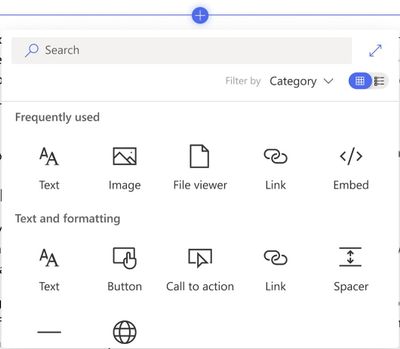 Updated web part toolbox when authoring SharePoint pages and news articles.
Bring content visualization to life across your intranet pages and news, now with greater creator visibility when using the service.
Lightbox for images on SharePoint pages
A lightbox popup is a window overlay that appears on top of a webpage. With this update, when people click or tap on an image in SharePoint, they will be able to see a larger version of the image in the lightbox. When viewing the image in the lightbox, the remainder of the page is inactivated and dimmed.
And then, it’s easy to close lightbox and turn back to the rest of the page.
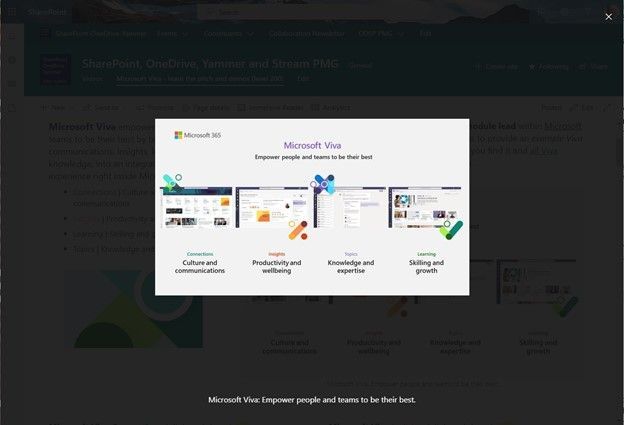 Click on an image from a SharePoint page to get a clearer, focused view of it. The rest of the page will darken, and any image captions will appear below the image.
There has been a lot of new tech for uploading and working with images during the edit phase, to crop, resize, rotate… and once you’ve gotten just the way you want it, your readers can see it best in all its glory all lit up and large in the lightbox.
SharePoint: Audience Targeting for Quick Links web part
We are adding the ability to target specific audiences per link within the Quick Links Web Part. With it, you will be able to target specific links to different audiences, helping you provide more personalized experiences on SharePoint pages.
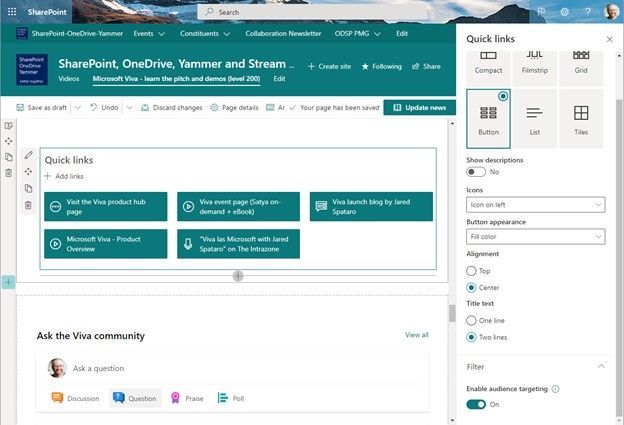 Enable audience targeting to promote links to specific audiences across the site.
SharePoint Portal Launch Scheduler
This is an admin feature designed to help coordinate and schedule launch details for SharePoint sites that are expected to receive high volumes of traffic. The Portal Launch wizard available via SharePoint PowerShell is designed to configure the deployment waves when launching a new site. It also provides an automatic redirect for users dependent on which redirect option is selected.
The Portal Launch Scheduler makes it possible for you to manage a phased rollout for a new SharePoint site. It also provides an automatic redirect for existing sites, if needed.
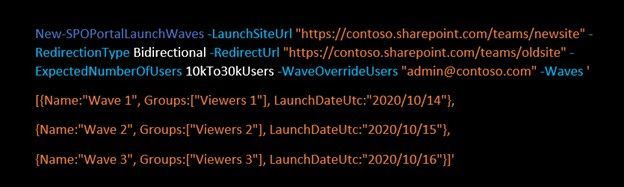 Example PowerShell command to designate portal launch waves.
During each of the waves, you can gather user feedback and monitor performance. This provides a managed way to slowly introducing the portal, giving you the option to pause and resolve issues before proceeding; ultimately ensuring a positive experience for your users from start to fully launched.
- Learn more:
- Roadmap ID: 66162.
Teamwork updates across SharePoint team sites, OneDrive, and Microsoft Teams
Microsoft 365 is designed to be a universal toolkit for teamwork – to give you the right tools for the right task, along with common services to help you seamlessly work across applications. SharePoint is the intelligent content service that powers teamwork – to better collaborate on proposals, projects, and campaigns throughout your organization – with integration across Microsoft Teams, OneDrive, Yammer, Stream, Planner and much more.
Microsoft Lists | Support for thousands separator and custom symbols in Number columns
With Microsoft Lists and SharePoint lists, owners and members have the ability to add a thousands separator to numbers and to be able to choose their preferred symbol that best represents what the numbers represent – like the various currency symbols used across the world.
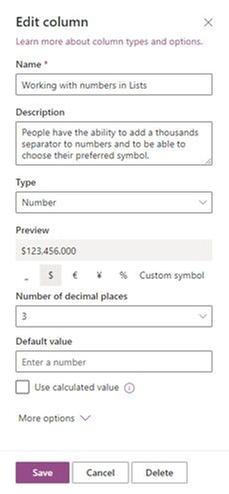 When using Number columns in lists, configure numbers based on how you want or need to present them.
There’s an important difference between the Yen and the Euro, and you want it to be as clear as it can be. The right symbol goes a long way.
Adding taxonomy columns for modern SharePoint library views
Yes, the power of metadata in the hands of those that need to manage document library content as the business prescribes. This new feature gives you the ability to add taxonomy-powered columns directly to library views in modern SharePoint libraries.
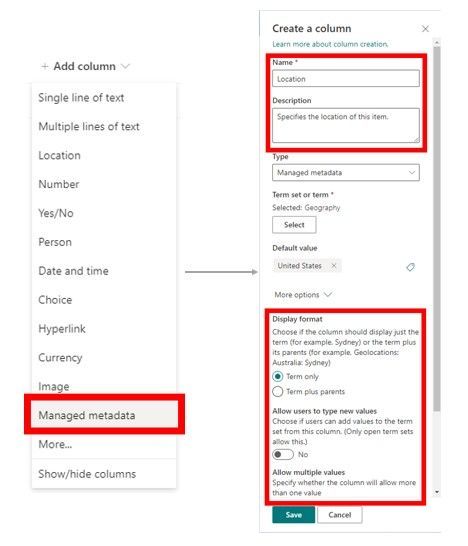 The Managed Metadata column connects your information to your organization’s term store (taxonomy).
Quick note: SharePoint document libraries are powered by lists for their row and column capabilities.
With this update, users will see a new Managed metadata option as a column type within the Add column menu in SharePoint lists and libraries. Then simply specify the column information such as name and description as well as choose their organization’s desired term set or term, to associate the column with. From there, the use of that column is driven by the managed metadata coming from the programmed, managed term set.
Microsoft Search in classic SharePoint sites
This is a quick and simple one, with lots of power for sites that have been around a while and may still be in classic mode. We are expanding the reach of Microsoft Search; classic SharePoint team sites that do not have customized search experience will be updated to the modern Microsoft Search experience, bringing improved personalization and relevance.
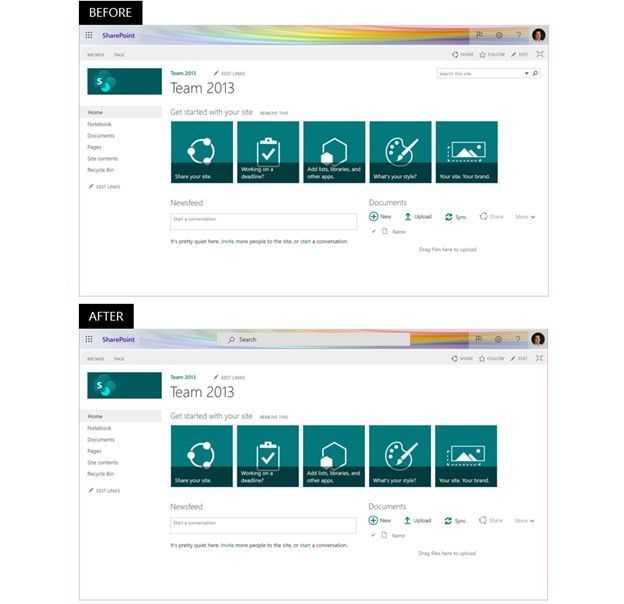 Classic SharePoint pages in Microsoft 365 will start using Microsoft Search, which provides personalized results with higher relevance. Top show the classic search experience – note the top-right search box, and the bottom shows a classic site using Microsoft Search – the search box at the center top.
That’s it. Another example of how Microsoft Search is truly powering search throughout Microsoft 365 – aka, no site left behind.
Related technology
Text predictions are coming to Word for Windows
Initially, text predictions popped up in Outlook for Windows – during composition to help users write more efficiently by predicting text quickly and accurately. Now, text predictions are coming to Microsoft Word when writing documents in English. And we know a lot of Word document are created in Teams, SharePoint, and OneDrive.
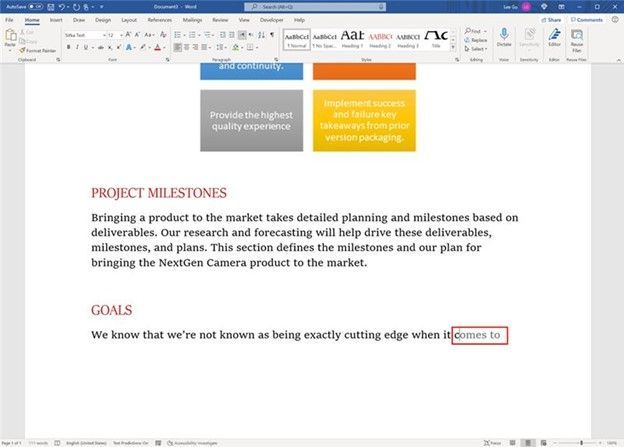 Text predictions within Word for Windows appear ahead as you type.
As you type, you’ll see suggested text, which you can accept by tapping the Tab key or they can ignore suggestions by simply continuing to type. The feature reduces spelling and grammar errors and learns over time to give the best recommendations based on your writing style.
Note: this is a Microsoft 365 connected experience, and can be turned off by going to any Microsoft 365 application such as Word, Excel, or PowerPoint and going to File > Account > Manage Settings. This feature can also be managed through the policy settings for privacy controls.
Evolution of Microsoft Lens (formerly Office Lens)
And with the evolution, beyond a new name, comes some dynamic new features, like intelligent actions into the camera, including: Image to Text, Image to Table, Image to Contact, Immersive Reader, and QR Code Scan.
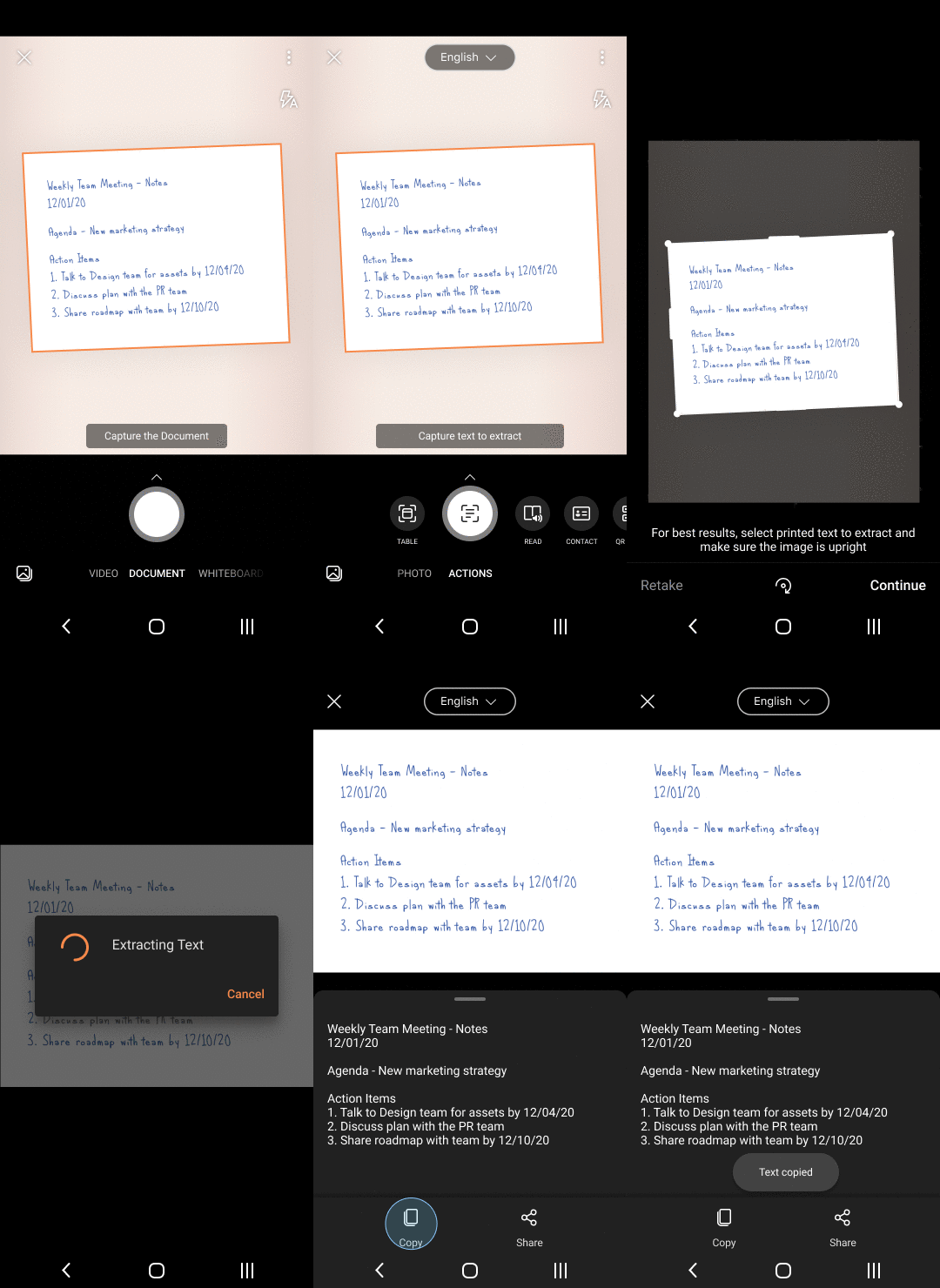 One of the new intelligent actions into the camera: Image to Text.
We are releasing an improved scan experience allowing you to re-order pages, re-edit scanned PDFs, apply a filter to all images in the document, scan up to 100 pages as images or PDFs, easily switch between local and cloud locations while saving PDF, along with an easy way to identify local and cloud files.
We’re noting it here because Microsoft Lens powers the camera in Microsoft 365 mobile apps, including Office, Microsoft Teams, Outlook, and OneDrive – yes, OneDrive loves lens – scan, scan, scan the physical world right where it needs to be stored digitally.
OneDrive for Android updates
We’re introducing an updated home screen experience for Android users, plus support for Samsung Motion Photos and 8K video. Now, you can pick up where you left off on recent and offline files, and easily re-discover memories from the past right from the home screen.
 The new home screen experience on OneDrive for Android shows recently accessed files, files downloaded for offline use, and “On This Day” photos.
For Samsung Android phones, OneDrive has always saved your Samsung Motion Photos, and now you’ll be able to view them in all their moving glory. Similarly, you’ve always been able store Samsung 8K videos with no loss or compression on OneDrive, and now you can play them back as well. Great storage always, and now rich, new viewing experiences on your Android device.
March 2021 teasers
Psst, still here? Still scrolling the page looking for more roadmap goodness? If so, here is a few teasers of what’s to come to production next month…
- Teaser #1: SharePoint app bar [Roadmap ID: 70576]
- Teaser #2: SharePoint page analytics [Roadmap ID: 70635]
… shhh, tell everyone – especially Punxsutawney Phil.
Helpful, ongoing change management resources
- Follow me to catch news and interesting SharePoint things: @mkashman; warning, occasional bad puns may fly in a tweet or two here and there, plus my new blog on Substack: The Kashbox.
Thanks for tuning in and/or reading this episode/blog of the Intrazone Roadmap Pitstop – February 2021 (blog/podcast). We are open to your feedback in comments below to hear how both the Roadmap Pitstop podcast episodes and blogs can be improved over time.
Engage with us. Ask those questions that haunt you. Push us where you want and need to get the best information and insights. We are here to put both our and your best change management foot forward.
Stay safe out there on the groundhoggy-shadowy-laden road’map, and thanks for listening and reading.
Thanks for your time,
Mark Kashman – senior product manager (SharePoint/Lists) | Microsoft)
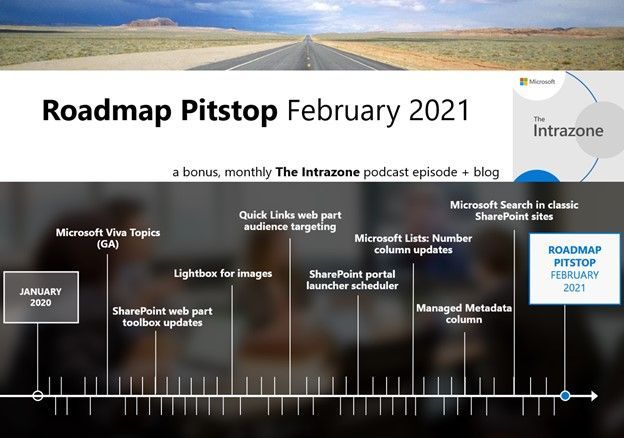 The Intrazone Roadmap Pitstop – February 2021 graphic showing some of the highlighted release features.
by Contributed | Mar 1, 2021 | Technology
This article is contributed. See the original author and article here.
This post was written in collaboration with Gabi Stein, Geri Gillespy, Brian Dang and Jon Levesque
If there is one resource that continually evades the grasp of nearly every educator on earth, it is time. With such a broad set of responsibilities, it seems there simply are not enough hours in the day for a teacher to accomplish everything. Preparing materials, organizing classes, teaching classes, engaging in professional learning, working with parents and families, and playing key roles as co-workers, school leaders, and community members only scratch the surface of what it means to be an educator. When you toss COVID-19 into the mix, it’s no wonder that teachers have even less time as they work to fulfill their important roles during a tumultuous time.
Remote and hybrid learning environments are now the predominant means for instruction. Platforms like Microsoft Teams have become the avenue through which teachers teach and students learn. It is our mission to empower every educator to achieve more and we want to help you take meaningful steps toward that end by saving you precious time.
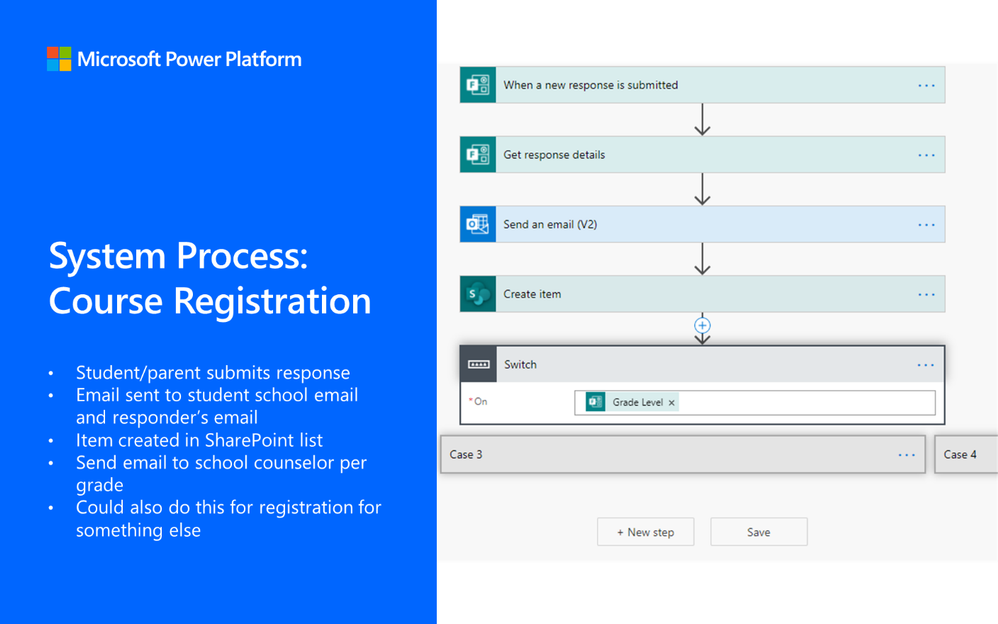
Power Automate can be a useful tool that takes everyday tasks and automates them through various “flows”. Like a “flow chart” from which it gets its name, a “flow” is a series of steps that run in order. It can look up rows from a table, send emails, create files, and even play back a set of recorded clicks and keystrokes for desktop automation. Gone are the days of repeating by hand, one by one.
As you will read in the list below, anything from course registration to scheduling announcements can be set to automatically run with very little setup beforehand. The EDU teams within Microsoft have surveyed hundreds of teachers around the world and created automated workflows on common educator tasks including:
Title
|
Description
|
Create tasks in Microsoft Planner for onboarding new teacher
|
Automatically create all the tasks and checklist items a new teacher needs to complete in Microsoft Planner.
|
Send text to office liaison to translate
|
Communication from a teacher, administrator, or anyone at the office may need to be translated for families to read in their language. This flow will help an office liaison set up a way to receive content to be translated, automate a basic translation to work from, and return a refined translation to the sender.
|
Automating registration for courses or school events
|
This flow will allow you to automatically set up course or event registrations and send confirmation emails to the organizer and attendee.
|
Collect instructional feedback or other information for staff and students
|
This flow will allow educators create an automatic system for gathering and collecting information using Microsoft Forms and SharePoint.
|
Sending posts between Teams channels
|
This flow will allow for educators to send messages from one Teams channel to a different Team without having to copy and paste. This is different from posting one message across multiple channels within the same Team
|
Scheduling posts and announcements in Teams
|
This flow will allow educators to schedule announcements and posts to be published at a designated time in Microsoft Teams such as a schedule for the week.
|
Creating an assessment calendar
|
This flow will allow for educators to create a calendar of assessments across the institution. Any teacher can submit an assessment date in a form which will add it to a calendar.
|
Notification or communication when a list item is added or changed
|
Leaders and educators may modify documents on a regular basis. This flow would allow them to create an automatic system for notifying users when a SharePoint list is updated or edited.
|
Submitting professional development (PD) requests
|
This flow tracks an approval process for professional development credits. Educators submit a form for PD requests, then an approval is automatically sent for consideration.
|
Track approvals or requests for maintenance
|
This flow will allow leaders or educators create an automatic maintenance system that involves approvals or requests using Microsoft Forms, Outlook, and SharePoint.
|
We are here to help you implement the flows you see in this list along with any others you may be able to think up. We are eager to understand how automation can become a meaningful and helpful part of your daily workflow as continue to improve them. If you have a story about how an automated process has improved your life as an educator or if you have an idea for building a new one, we want to hear it! Please contact us here.
It is our hope that these flows can free you from the manual aspects of teaching in remote and hybrid learning environments and give you back some time.


































































































Recent Comments