Windows Admin Center version 2103 is now generally available!

Windows Admin Center version 2103 is now generally available!

This article is contributed. See the original author and article here.

Today we are excited to announce the general availability of Windows Admin Center version 2103! A big THANK YOU to the Windows Admin Center community, customers, partners and fans! We have continued to listen to your feedback and, as a result, developed Windows Admin Center into a unique, multi-purpose management tool that just keeps getting better 


We have several new features in this release, including in-app updates for both the Windows Admin Center platform and extensionsWe expect this update feature to deliver continuous functionality updates and an improved user experience. Additionally, we’ve made improvements to both accessibility and to core tools like the Events tool, the Virtual Machine tooland to Azure hybrid centerOur partners have also begun releasing their integrated snap-in experiences for Azure Stack HCI workflowsproviding a seamless driver and firmware update mechanism. This ensures that IT Administrators keep their Azure Stack HCI systems up to date. 


Here’s a video demoing the new features in Windows Admin Center version 2103. 


Download Windows Admin Center v2103 today! 


New features and updates


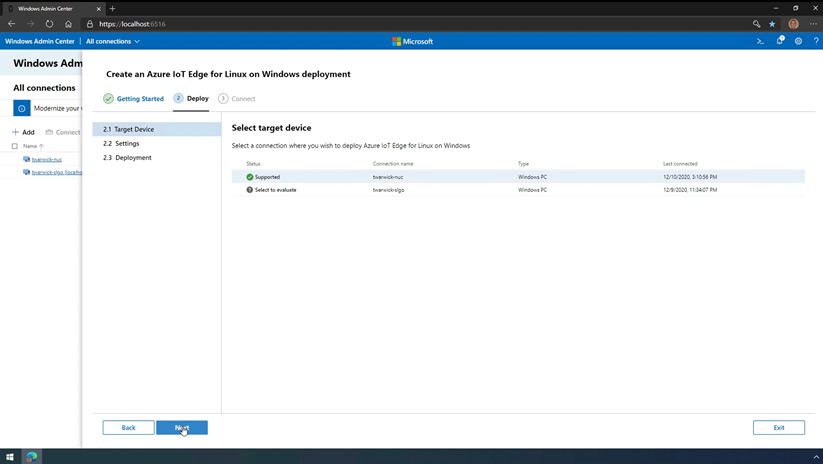
Windows Admin Center supports Azure IoT Edge for Linux on Windows


Early this year, the Azure IoT Edge team announced the public preview of Azure IoT Edge for Linux on Windows. IoT Edge for Linux on Windows works by running a Linux virtual machine on a Windows host. The Linux virtual machine comes pre-installed with the IoT Edge runtime. The IoT Edge extension for Windows Admin Center facilitates installation, configuration, and diagnostics of IoT Edge on the Linux virtual machine. By using Windows Admin Center, you can deploy IoT Edge for Linux on Windows on the local device or can connect to target devices and manage them remotely.


Prasidh_Arora_0-1614649784056.png


For more information about IoT Edge for Linux and how to get started, check out this video and see this documentation. 


Windows Admin Center in the Azure Portal is now in public preview


In addition to the general availability announcement of Windows Admin Center v2103, today we also announced the public preview of Windows Admin Center in the Azure Portal. This new capability enables seamless and granular management of your Windows Server Azure IaaS virtual machines (VMs) from within the Azure Portal. The user interface in this experience is the same as the Windows Admin Center you know and lovewhich allows you to configure, troubleshoot, and perform maintenance tasks in a familiar way, all while providing cloud capabilities that were once only available to on-premises users.


To read more about Windows Admin Center in the Azure Portal, see this documentation or visit the Azure Portal to start using it today.


What’s new in Windows Admin Center v2103


Platform updates


Automatic in-app updates


We are happy to share that we are addressing one of our oldest User Voice requests! Windows Admin Center is introducing in-app and automatic updates. Your Windows Admin Center instances are always going to be up to date with seamless auto-updating for both your gateway and extensions. This will not only allow you to get updates faster, but also reduce the bi-yearly struggle of filling out our evaluation form to get the latest updates. 


Please note that this feature is currently in preview and will be improving over our next few releases. 


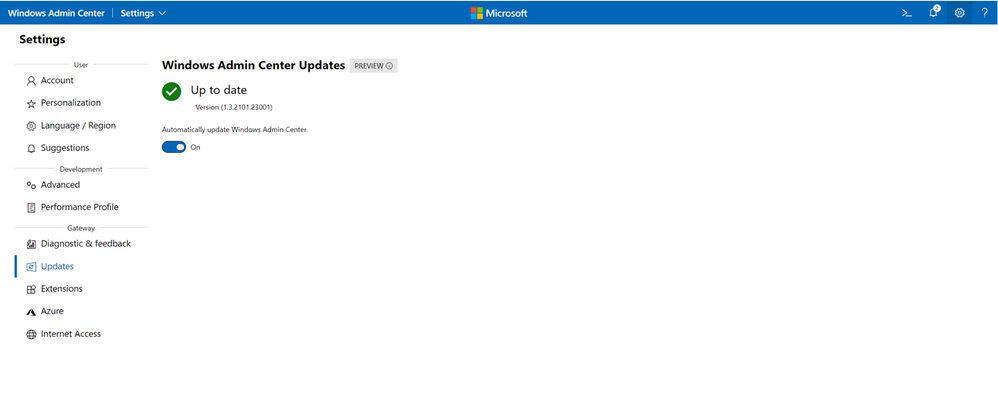
Automatic platform updates: 


  1. Navigate to the Settings menu using the gear on the top right corner 

  2. Select Updates 


Prasidh_Arora_1-1614649985236.png


Automatic extension updates 


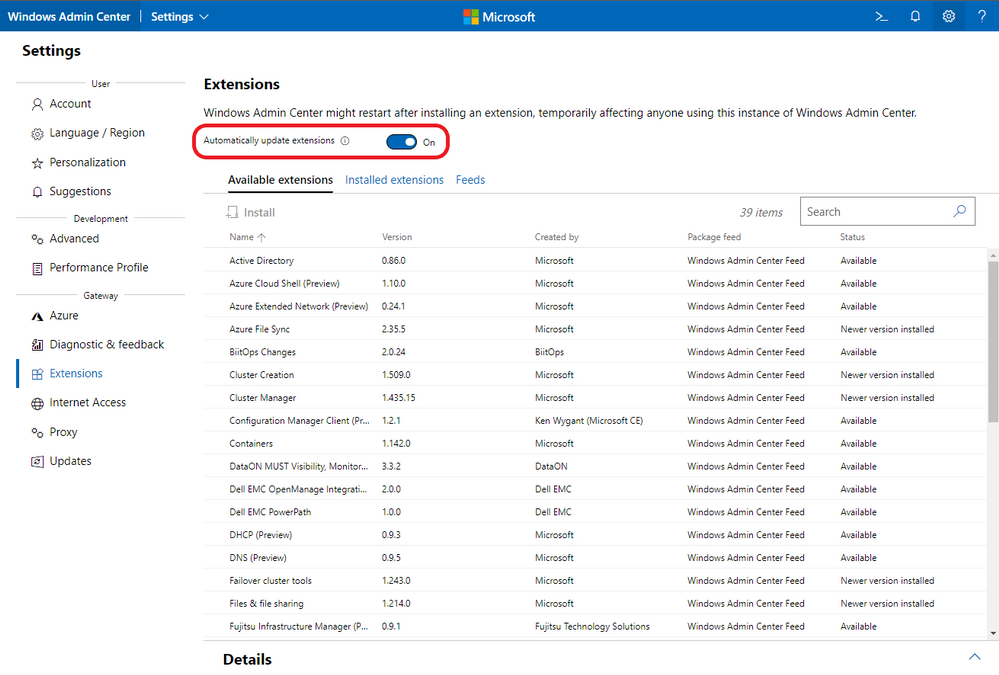
This new feature allows you to keep all your extensions up-to-date, even between releases of the Windows Admin Center platform, all by using a toggle. Manage your automatic extension updates by following these steps: 


  1. Navigate to the Settings menu using the gear on the top right corner 

  2. Select Extensions 

  3. Select the toggle near the top of the page to enable or disable automatic extension updates 

Prasidh_Arora_2-1614650260887.png


Gateway proxy support


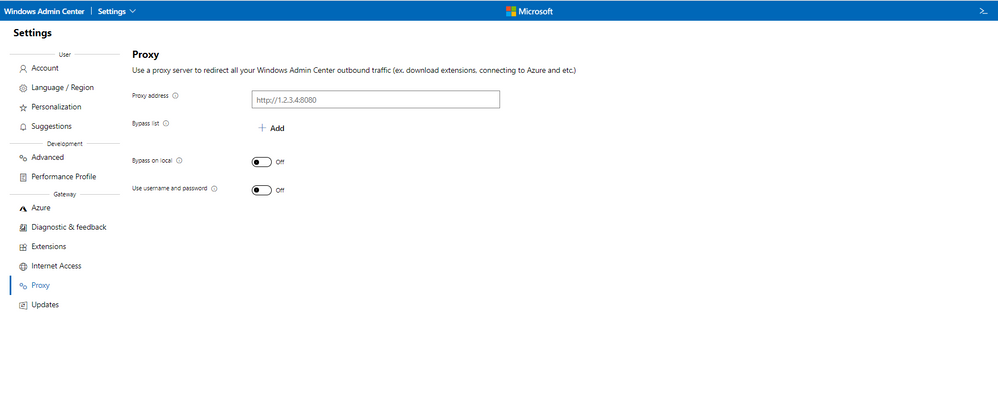
Windows Admin Center can now redirect your outbound traffic through a proxy. This means you can access Azure services, extensions, and internet communication through your custom proxy. This has been a widely requested feature for many years so we’re glad to bring this to you. Set a proxy server by navigating to the Proxy tab in settings: 


Prasidh_Arora_13-1614652625749.png


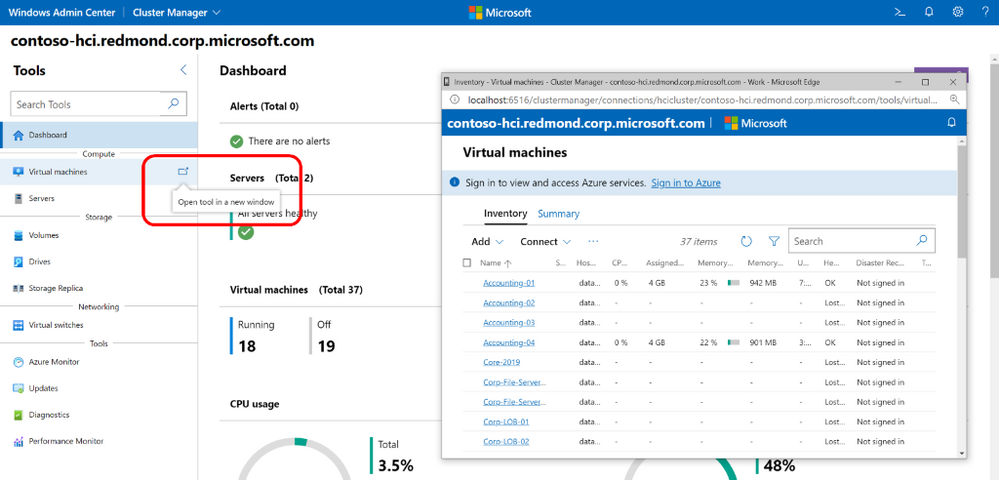
Pop-out tools


Each of the tools in Windows Admin Center can now be managed in a pop-up window. You can “pop out” the tool by hovering on the tool name in the tools list.  


Prasidh_Arora_4-1614650316365.png


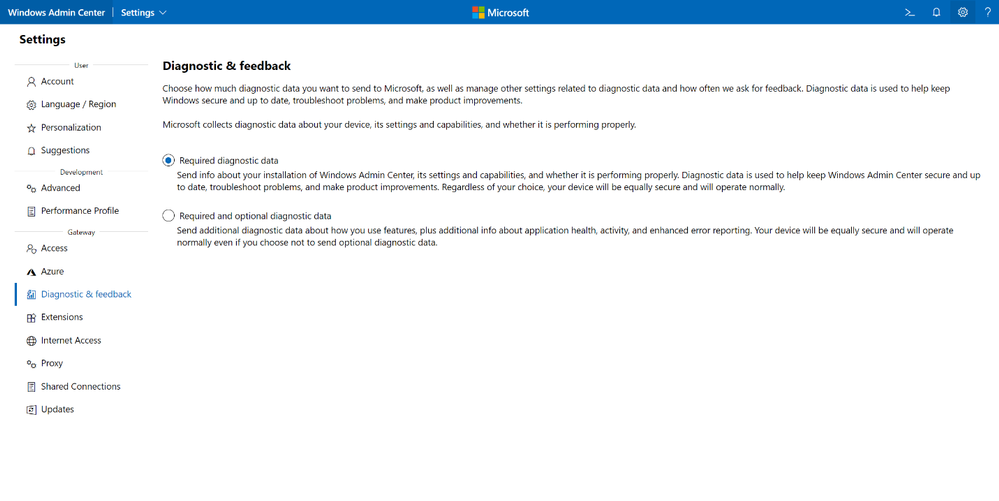
Privacy


We’re bringing your Windows Admin Center privacy settings front and center. We know that your privacy is very important. To help you manage these settings, we have a new page for you to toggle the amount of data your Windows Admin Center instance sends to Microsoft. In this release, you will see two new screens for privacy management: one in your gateway settings (Diagnostics & feedback) and one in the installer itself.


Prasidh_Arora_5-1614650350565.png


Core management tools


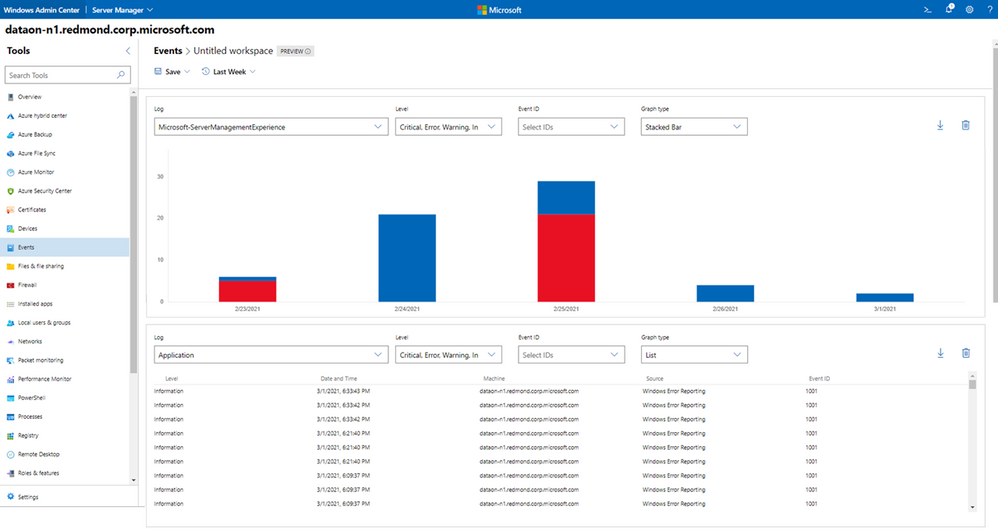
Events tool redesign


We know the Event Viewer is a staple for IT Administrators and is regularly used by customers to better understand what is going on with their systems. When you need to investigate or troubleshootthere’s no better place to turn to than Event Viewer. The classic Event Viewer interface was introduced in 1993 and hasn’t changed much since. We, on the Windows Admin Center team, believed it was about time you got an upgrade. That’s why in this release, we’ve enhanced the way in which you understand how features, apps, and devices are workingYou can access our new and improved Event Viewer by enabling the preview toggle in the top right corner of the tool. 


With this look and feel, you can tailor your experience to the specific events and severity levels you’re interested in and display the data over a period in the form of both a list and a new stacked bar format. Like our Performance Monitor tool, you can create and save workspaces, allowing you to bring up all your desired data quickly and easily. You are no longer restricted to viewing events one at a timewhich was the case in the previous Events toolNow you can easily group events from different channels. 


This tool is under active development and is still missing some crucial features. The original event viewer will remain accessible.


Prasidh_Arora_14-1614653089958.png


Virtual Machine tool


Virtual Machine management continues to be a large area of investment for the team. We are working to continuously improve the experience and bring you new features. In this release, new and improved features include:


  • Integration services settings – There is now an Integration Services tab in the VM settings menuYou can use this tab to configure settings like time synchronization, heartbeat, and shutdown. 

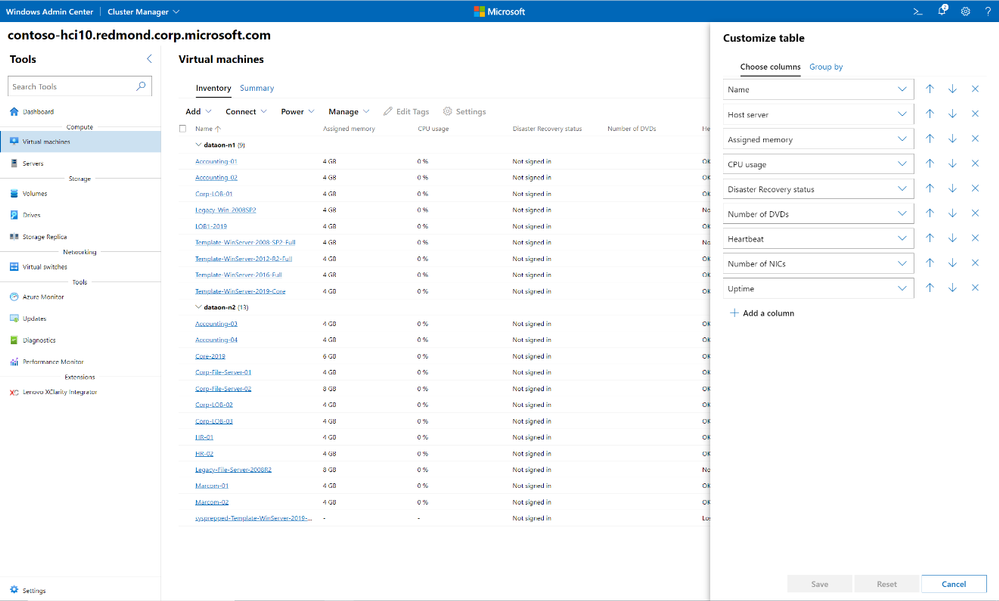
  • Editable columns and groupings – The ability to edit your columns and groupings is here. As an IT admin, you now have full control of which information about our virtual machines you are interested in and what your view looks like, whether in the server or cluster view. Just like in some of the other tools, the button is on the top right corner of the tool. 

Prasidh_Arora_7-1614650516754.png


  • Edit virtual switches during VM move – In the past, your virtual machine migration would fail if the name of the virtual switches between the source and destination were not the same. Not anymore! When migrating a VM with a virtual switch configured between nodes or clusters, you now have the option to reassign your virtual switches using a simple drop down. 
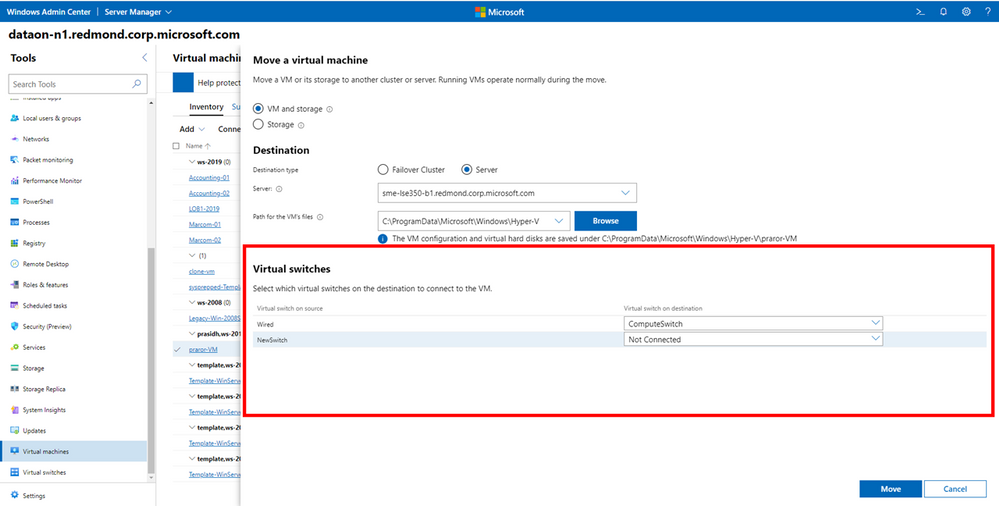

Prasidh_Arora_8-1614650516759.png


  • Bug fixes – We’ve fixed several bugs in this tool, including an error that would result when you attempted to load a cluster with a large number of nodes and a large number of clustered VMs. 


Azure hybrid center


We’re investing in improving Windows Admin Center’s Azure services, and we’re starting off with the main tool—Azure hybrid center. In this release, you’ll notice we modified the UI to make your experience of setting up Azure services more streamlined. We now recommend you onboard to Azure Arc prior to onboarding to other Azure services for the best user experience. 


Azure Stack HCI


Cluster deployment


We’ve also made improvements to networking in the deployment wizard of Windows Admin CenterSome of these improvements include addressing issues with adapter detection, management adapter teamingdetection of RDMA supportability and storage spaces configuration.  


The announcement that we are most excited about in this space is the release of integrated snap-in experiences by some of our Original Equipment Manufacturing (OEM) partners. These extensions provide a seamless integrated experience in the deployment wizard. If you are running HCI clusters on a validated OEM partner hardware, the WAC partner snapin will bring in the latest firmware and drivers to keep your cluster nodes up to date. 


These snap-in integrations are also available as part of Cluster-Aware Updating (CAU). If you’re planning on trying out a snap-in experience, make sure you have the latest version of the Cluster Manager extension. 


Partner Ecosystem


Windows Admin Center is built to be an extensible platform, and we value the contributions of our partners to the Windows Admin Center ecosystem. Our partners have been hard at work developing their integrated snap-ins for Azure Stack HCI workflows. As of today, four partners have released extensions containing snap-ins. 


Dell EMC OpenManage


The Dell EMC OpenManage extension has been updated with an integrated snap-in for both the Azure Stack HCI cluster deployment flow and Cluster-Aware Updatesas well as performance improvements. The Dell EMC OpenManage extension for Windows Admin Center enables IT administrators to manage Dell EMC PowerEdge servers as hosts, Microsoft failover clusters created with PowerEdge servers, Dell EMC Integrated System for Microsoft Azure Stack HCI, and Dell EMC HCI Solutions for Microsoft Windows Server with Dell EMC Microsoft Storage Spaces Direct Ready Nodes or AX Nodes. This simplifies the tasks of IT administrators by remotely managing PowerEdge servers, clusters, HCI and Dell EMC Solutions for Microsoft Azure Stack HCI throughout their life cycle. 
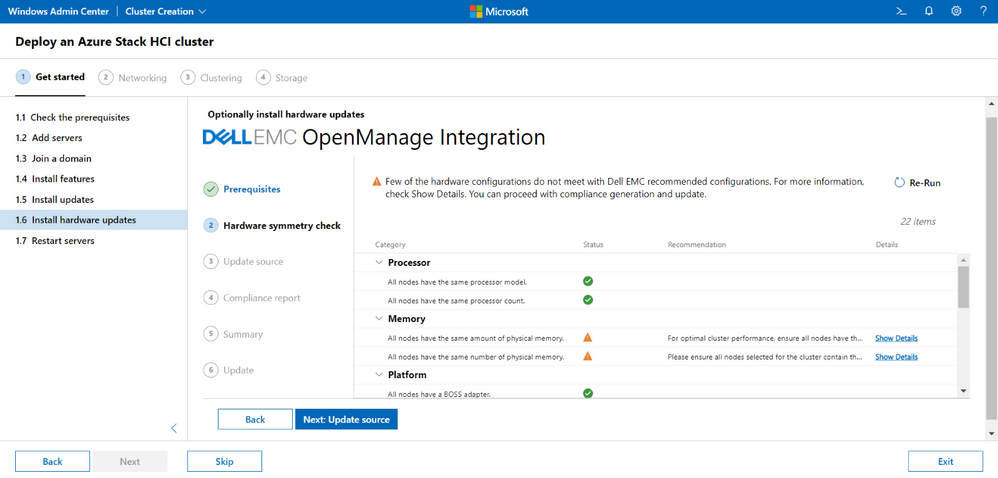


Prasidh_Arora_9-1614650828475.png


Version 2.0.0 of the Dell EMC OpenManage extension contains several major updates and feature improvements, including:  


  • Support for the management and monitoring of Azure Stack HCI version 20H2 OS 

  • Hardware, firmware, and BIOS updates in the Windows Admin Center Azure Stack HCI cluster create wizard through snap-in integration 

  • Full stack Cluster-Aware Updating through the integration of a snap-in, which provides hardware, BIOS, and firmware updates in addition to the operating system updates available in Windows Admin Center 

  • Schedule Cluster-Aware Updating for hardware updates 

  • Numerous enhancements, including support for target nodes running Windows Server Core, an improved Update Source catalog selection view, improvements in compliance generation, and a new way to view license details 
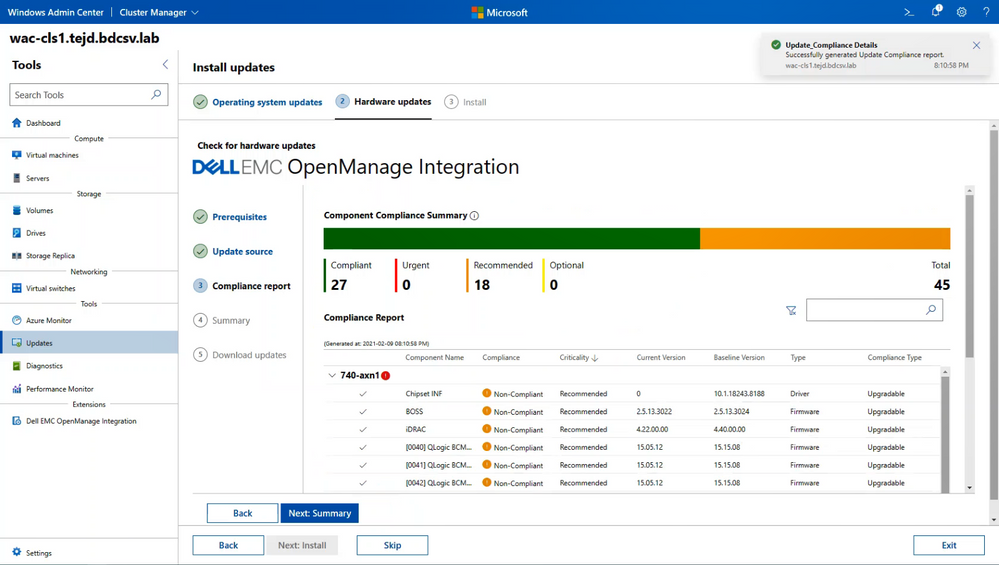

Prasidh_Arora_10-1614650850325.png


For a complete list of new features and updates, check out the Dell EMC OpenManage version 2.0.0 release notes 


Lenovo XClarity Integrator


The Lenovo XClarity Integrator extension has been updated with an integrated snap-in for the Azure Stack HCI Cluster create wizard and several new featuresThe Lenovo XClarity Integrator for Windows Admin Center provides IT administrators a smooth and seamless management experience across Windows Server hyper-converged and physical infrastructure. This standalone Windows Admin Center solution extends Server Manager, Failover Cluster Manager, Firmware Update, and Hyper-Converged Cluster Manager in a single unified UI to enable simple server management. 


Version 3.0.5 of the Lenovo XClarity Integrator extension includes the following improvements and updates: 


  • Firmware/driver update snap-in for Azure Stack HCI cluster creation 

  • Firmware/driver updates without the need for Lenovo XClarity Administrator installation 

  • Firmware/driver update package repository management 

  • HTTP proxy settings 

  • Log settings 

  • Native OS management settings 

  • Support for previous versions of Windows Admin Center and XClarity Integrator 
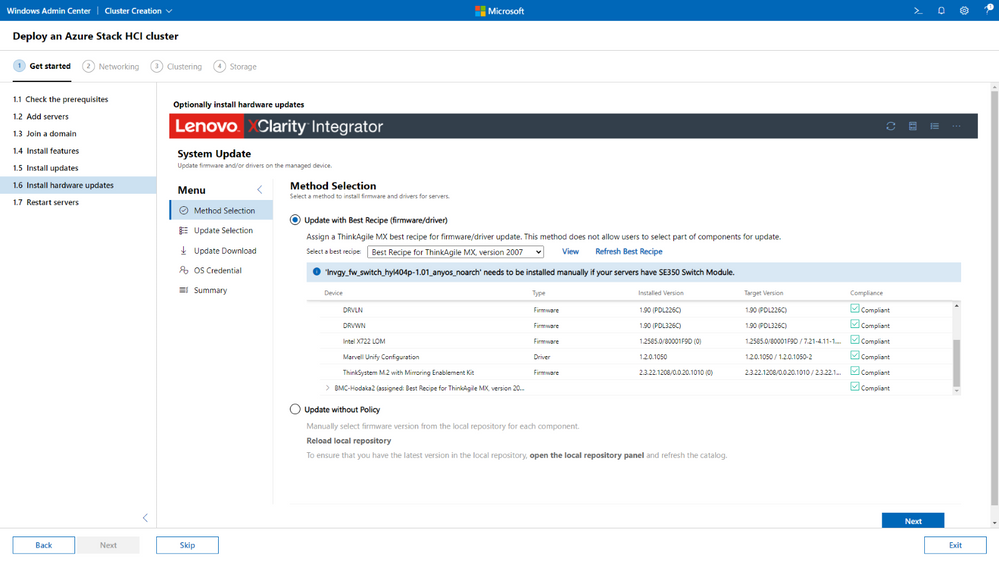

Prasidh_Arora_15-1614653418446.png


DataON MUST Pro


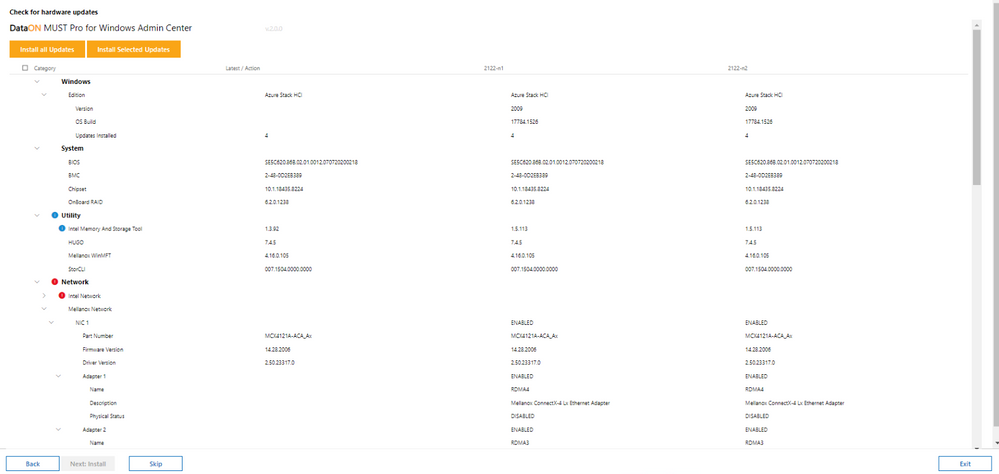
The DataON MUST Pro extension is now generally available. DataON MUST Pro integrates with the Windows Admin Center cluster deployment flow and cluster-aware updating functionality to simplify deployment and updates to Microsoft Azure Stack HCI, with minimal disruptions to your infrastructure. MUST Pro automatically compares your DataON Integrated Systems for Azure Stack HCI against DataON’s latest quarterly validated server component image baseline. It also ensures that servers have the same OS version, drivers, firmware, BIOS, and BMC, and checks the drivers and firmware for network cards, host bus adapters, and SSD and HDD drives. 


This extension release includes the following features:


  • Support initial HCI Cluster creation flow via full integration WAC   

  • Support maintenance update flow via Microsoft cluster aware update features for bios, firmware, drivers and BMC 

  • Support both Online and Offline mode 

  • Update MUST Inventory Page to support bios, firmware, drivers and BMC comparison between existing cluster hardware to latest golden image built  

  • Support DataON Integrated Systems for Microsoft Azure Stack HCI 

Prasidh_Arora_11-1614651034526.png


SecureGUARD Blazics Updates


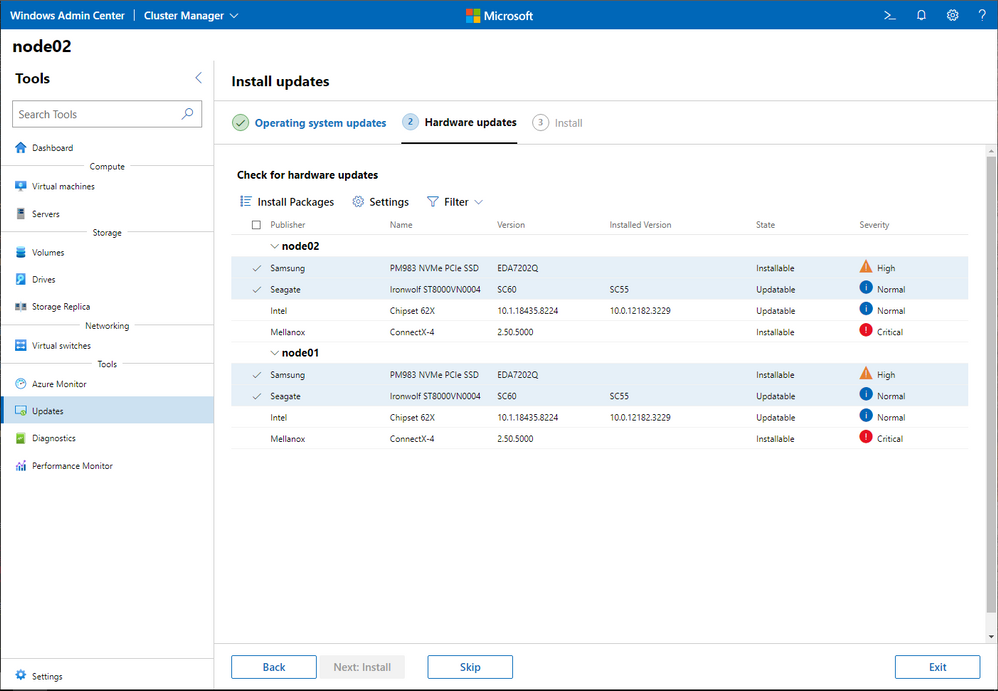
The SecureGUARD Blazics Updates extension is now generally availableThe SecureGUARD Blazics Update extension for Windows Admin Center provides an easy-to-use interface to select and install SecureGUARD-approved updates for SecureGUARD Blazics servers. The mechanisms for driver and firmware updates are directly integrated into the workflow when creating a hyperconverged cluster based on Azure Stack HCI OS 20H2 as well as the workflow for cluster-aware updates (CAU). 


This extension is a snap-in and will appear when using the cluster create wizard or cluster-aware updating (CAU) flows.


Prasidh_Arora_12-1614651154081.png


Other partner extension updates


  • QCT Management Suite – The new version of this extension includes an added firmer/driver download list. 

  • DataON MUST – The new version of this extension includes bug fixes.


Download today!


We hope you enjoy this latest update of Windows Admin Center, the various new functionality in preview, and all the extensions now available. Learn more and download today! 


As always, thanks for your ongoing support, adoption, and feedback. Your contributions through user feedback continue to be very important and valuable to us, helping us prioritize and sequence our investments. 


<3,  


Windows Admin Center Team (@servermgmt) 


AKS on Azure Stack HCI + Azure Arc = Better together!

AKS on Azure Stack HCI + Azure Arc = Better together!

This article is contributed. See the original author and article here.

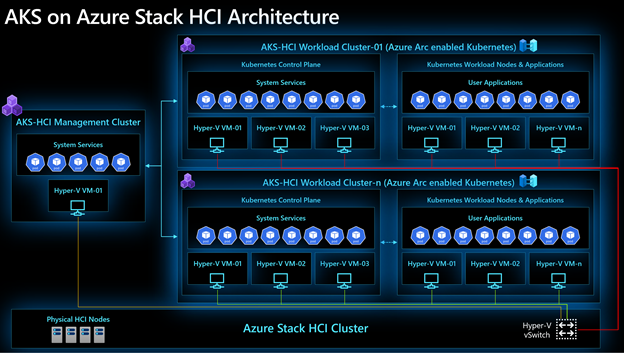
Azure Kubernetes Service on Azure Stack HCI (AKS-HCI) with Azure Arc enabled Kubernetes provides you with an environment that makes it easy to deploy, secure and monitor containerized applications at scale. By natively integrating AKS on Azure Stack HCI with Azure Arc, we make managing applications easy for you every step of the way, so you can focus on developing amazing applications.


In this blog, I will cover how AKS-HCI and Azure Arc complement one another. Before we get started, a quick, brief introduction to AKS-HCI.


Last year at Ignite 2020 we launched Azure Kubernetes Service on Azure Stack HCI (AKS-HCI) – an on-premises implementation of AKS that enables you to run containerized applications on Azure Stack HCI or Windows Server 2019 Datacenter the same way you would on AKS in Azure.


This gives you the flexibility to put your business needs first and choose a deployment model that works for you. AKS on Azure Stack HCI is built on 4 value pillars:


  • Easy to deploy and easy to use

  • Support for Linux and Windows containers

  • Secure out-of-the-box

  • Azure connected through Azure Arc


Running AKS in your datacenter does not mean you cannot enjoy Azure services like Azure Policy and Azure Monitor. Through Azure Arc, you can connect to Azure services for on-premises applications just like you would with AKS on Azure.


Furthermore, you can automate deployment of your applications and baseline configurations as Azure Arc makes it easy to implement GitOps. Connect your repository containing Kubernetes Helm charts and YAML manifests to an Azure Arc connected AKS-HCI cluster and Arc agents automatically deploy applications for you. If you want to deploy the same application at scale across multiple new and existing AKS-HCI clusters, you can use Azure Policy with a baked-in GitOps configuration.


When it comes to the security and compliance of your containerized applications and AKS-HCI clusters, Azure Policy provides a set of curated, built-in policy definitions that apply safeguards across all your AKS-HCI clusters in a consistent manner. Once you have successfully deployed and secured your application, you can use Azure Monitor for containers to monitor the health of your application and AKS-HCI clusters.


AbhilashaAgarwala_0-1614302940588.png


We have made it as easy as possible for you to connect your AKS-HCI clusters to Azure Arc. Windows Admin Center (WAC) natively integrates AKS-HCI with Azure Arc. All you need to do is provide us with your Azure subscription and resource group details and you are good to go! AKS-HCI manages the entire Azure Arc onboarding experience for you so you can focus on your applications and business needs.


Getting started


To get started with AKS on Azure Stack HCI and Azure Arc enabled Kubernetes, we have created a couple of great guides –


  1. If you have an Azure Stack HCI cluster or a Windows Server 2019 failover cluster, head over to AKS-HCI documentation for a complete list of features and how-to guides. We would love to hear from you via our GitHub project.


  2. If you do not have an Azure Stack HCI cluster lying around but are curious about AKS-HCI, you can evaluate using an Azure VM. Visit evaluate AKS-HCI and give the provided guide a go. We would love to hear from you via our GitHub project.


  3. Head over to Azure Arc enabled Kubernetes documentation to learn more about the product and its features. The Azure Arc Jumpstart team has also created a dedicated automated scenario for AKS-HCI with Azure Arc enabled Kubernetes. Give it a spin and let us know what you think!

How to build a resilient over-the-air update solution

How to build a resilient over-the-air update solution

This article is contributed. See the original author and article here.

With the growing presence of intelligence at the edge, it is critical to support a high-level of security to prevent malicious attacks on edge devices. Therefore, it is essential to build a robust and resilient update story to enable devices to be easily patched. Microsoft Azure Percept delivers a leading over-the-air update experience using services and tools native to Azure.


For Azure customers and partners, secure update is one of the first device management functionalities they want to adopt. In Azure Percept, the update stack is core to the devices and experiences. In this article, find out how to build a robust and resilient update story for your IoT and edge AI devices by harnessing the power of Azure and the recently announced Device Update for IoT Hub.


Understanding the Azure Percept update architecture


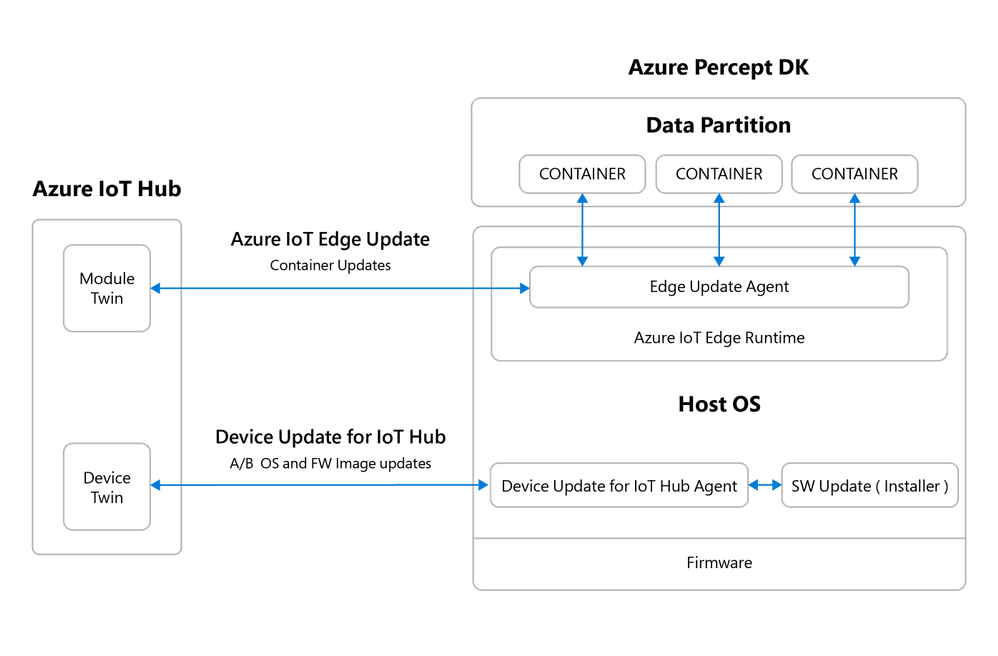
Azure Percept uses an atomic A/B image update to update the host operating system (OS) and firmware (FW) using Device Update for IoT Hub, which is a comprehensive platform to operate, maintain, and update IoT devices at scale. The business logic and AI models run as containers on the device and are updated using Azure IoT Edge.


Azure IoT Edge moves cloud analytics and custom business logic to devices so that your organization can focus on business insights instead of data management. Scale out your IoT solution by packaging your business logic into standard containers, which can be deployed to any of your devices and monitored from the cloud.


Device Update for IoT Hub empowers users to rapidly respond to security threats and to deploy new features to meet business objectives without incurring the additional development and maintenance costs of building their own update platform. Device Update for IoT Hub implements robust security measures, as well as rich management controls and reporting to help ensure customers stay in control of the update process. Device Update for IoT Hub is now available in preview in the Western U.S., Asia, and Europe.


diagrams_02162021-01.pngFigure 1: Azure Percept update architecture


Exploring the Azure Percept infrastructure


The Azure Percept engineering team used the power of Azure to develop the ideal infrastructure to build, test, and publish updates.


Azure DevOps and Build Pipeline


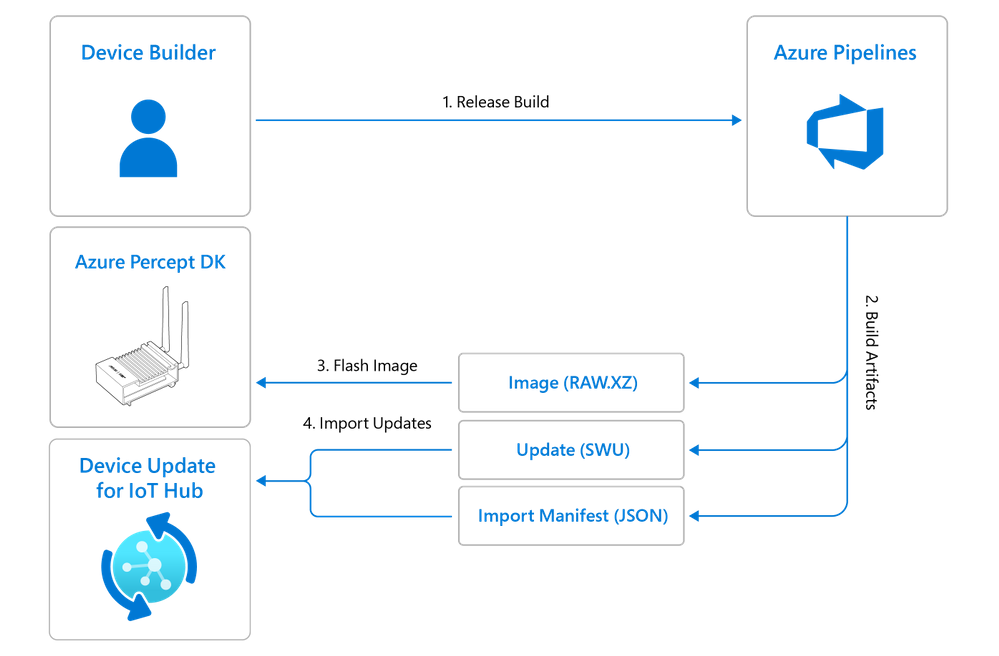
Azure Percept update artifacts are created through Azure Pipelines in Azure DevOps. Pipelines enable the engineering team to continuously build, test, and deploy to any platform and cloud. With Pipelines, we have automated the Azure Percept builds and deployments, empowering the engineering team to spend less time on manual tasks and more time being creative. The pipeline has ARM64 and X64 servers running the corresponding flavors of the Ubuntu Operating System. Azure DevOps Pipeline supplies key tasks, including the authoring of the Bash script to carry out the build task. The output artifact of the Azure DevOps pipeline includes the base image file (RAW.XZ), update image file (SWU), and the import manifest file (JSON).


Automated VM testing


An update issue can lead to a loss of devices, which increases the maintenance cost of recovering bricked units and significantly impacts end-to-end operations. Which is why Azure Percept integrates automated VM testing using Azure Pipelines. Daily automated tests validate the update stack end to end. High-level steps include:


  1. A dedicated Windows Server Machine has a base version of Azure Percept VM Image. The Azure DevOps Pipeline automatically provisions this VM Image

  2. The build pipeline creates the images and update artifacts

  3. Azure DevOps Pipeline is used to automate the following steps of import, deployment, and validation:

    1. The Device Update Import API imports the update file (SWU file) and import manifest file

    2. Upon completion, the Device Update Deployment API schedules a deployment to the VM device

    3. The VM device runs the Device Update Agent as a service. Once the deployment is scheduled, the device receives notification of the update, downloads and installs the update, and reboots to complete the update flow

    4. The Device Update Deployment API tracks the status of deployment


Signing image


To help improve the security of the update process, the SWU manifest file is signed with a dedicated key for Azure Percept update images. Manifest file creation and key signing are managed through an Azure DevOps Pipeline task.


Understanding device-side integrations


Device-side integrations, including partition layouts, agent integrations, and installer setups, are essential for enabling a resilient and robust update stack for IoT and edge AI devices.


Atomic image update


Unlike laptops or smartphones, IoT devices typically don’t have a user present to support the update process. Updates that break devices or cause operational failures can cause device downtime or other failures, leading to operational disruptions, data loss, and high replacement costs. To reduce these risks, the Azure Percept team implemented atomic image updates. Atomic updates are full image updates that target an entire device across its firmware and operating system. Instead of updating a singular component, atomic updates target all device components. The atomicity of the update minimizes the risk of an update breaking a device. Atomic updates are ideal for smaller edge devices in environments where bandwidth is not limited. To reduce the update size and accommodate larger edge devices and those in bandwidth-constrained environments, the Azure Percept team is engaging with partners and investigating feature developments.


Dual A/B partition


To deliver image updates, Azure Percept uses a dual-image partition, which supports rollback functionality and minimizes the risk of impacts to devices in operation. If an update fails on a device, rollback allows the device to return to its pre-update state.


diagrams_02162021-04.png


Figure 2: Reference partition layout for the Azure Percept device


Each update is downloaded to the data partition, where it is processed and applied to the secondary partition. The device reboots into the secondary partition after the update. If the update fails, it has the capability to rollback into the primary partition.


Running update agent as an auto-start service


Azure Percept devices have integrated the Device Update for IoT Hub agent to run as an auto-start service (adu-agent.service). The service reads the connection string information from the Azure IoT Edge configuration file (/etc/iotedge/config.yaml). The Azure Percept device is initialized via automatic device provisioning or the Onboarding Experience. This initialization phase sets the Device Provisioning Service (DPS) scope ID or the Azure IoT Hub connection string in the Azure IoT Edge config.yaml file, depending on the initialization mechanism. The service uses the information in /etc/iotedge/config.yaml to connect the digital instance of the device. The Device Update for IoT Hub agent communicates with the Device Update for IoT Hub service over the IoT Hub device twin.


SWUpdate


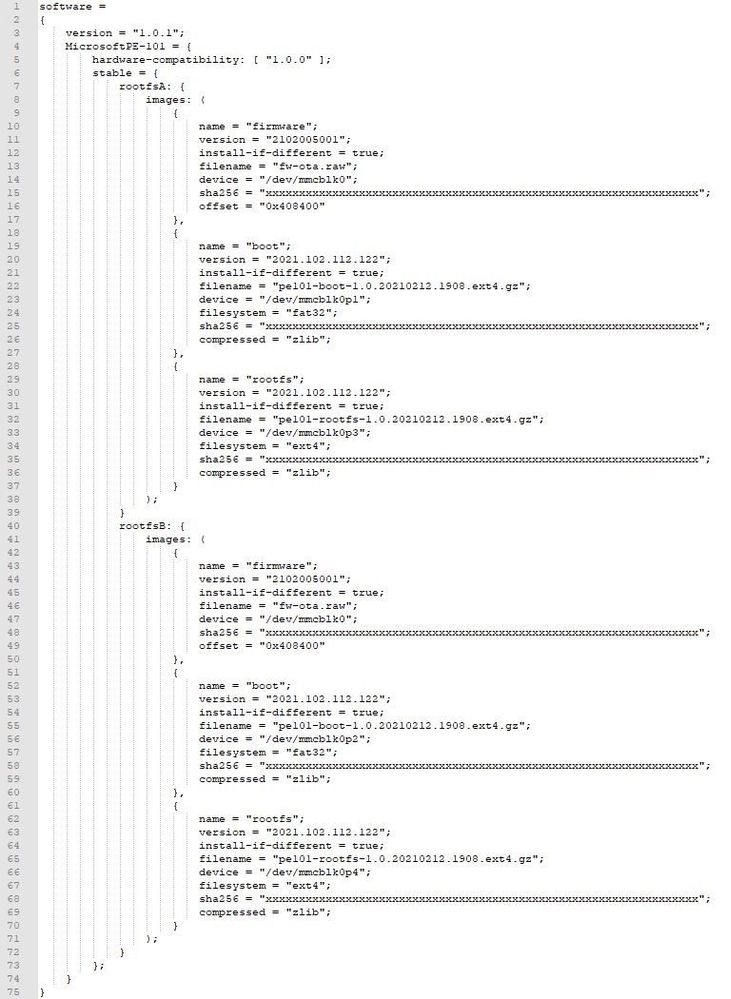
To process and install the update artifacts, Azure Percept uses SWUpdate, which is an installer implementation supported by leading Linux developers. This project is open source on GitHub and is actively maintained by the community. SWUpdate is a manifest-driven update architecture; the manifest declares the update payload and the install method. SWUpdate provides options to overwrite an entire partition with a raw disk and write a binary file to a specific disk offset. While SWUpdate has proven itself to be the best choice for Azure Percept, other installers may be used, depending on the specific scenario requirements.


ManifestFile.jpg


Figure 3: Sample manifest file showing all metadata associated with a device update for Azure Percept


Import phase


The import phase allows the device builder to import the update artifacts (update file and import manifest) to the Device Update for IoT Hub service. Once the device builder schedules a release build, Azure Pipelines creates the image file (RAW.XZ), update file (SWU), and import manifest (JSON). The image file (RAW.XZ) can be flashed to reset a device or to perform an offline USB-driven update. The device builder can use the Device Update for IoT Hub UX or API to import the update file and import manifest into the Device Update for IoT Hub service.


diagrams_02162021-03.png


Figure 4: Import phase showing how the Azure Percept team builds and imports the latest update artifacts


Deployment phase


The deployment phase allows the device builder and solution operator to deploy updates to a group of Azure Percept devices. To deploy an update to an Azure Percept device, a user must:


  1. Create device groups using the UX or APIs.

  2. Add devices to the appropriate device groups.

  3. Set a deployment start time (UTC) for each device group.


Once the user actions are completed, the Device Update for IoT Hub service communicates with the Azure Percept device via IoT Hub device twin messages. The Delivery Optimization Agent downloads the payload and the SWUpdate Agent installs the update. The Device Update for IoT Hub agent reboots the device to finalize the install. To complete the feedback loop, the device reports the update status back to Azure IoT Hub.


diagrams_02162021-02.png


Figure 5: Deployment phase showing how an IoT solution operator can deploy the latest Azure Percept updates to their devices


What’s next?


Microsoft and Azure equip you with the right tools and technology to build a resilient update stack with added security to help safeguard your edge AI devices. To use an Azure Percept device and see the update stack in action, join the Public Preview. For more information on the Azure Percept program and for developer resources, check out the community GitHub.

Microsoft Azure Purview at Spring Ignite 2021

This article is contributed. See the original author and article here.

Last December, we launched Azure Purview, a unified data governance service that enables customers to maximize the business value of data. Azure Purview enables customers to manage and govern their on-premises, multicloud, and SaaS data by creating a holistic data map powered by automated data discovery, AI-powered data classification and end-to-end lineage. This trustworthy, valuable data can then be discovered effortlessly by data consumers via the Purview Data Catalog.


The reception to Azure Purview since launch has been tremendous! We are thrilled to announce that over 14.5 Billion data assets were discovered by customers across their hybrid environments! And today, we are happy to announce that we have some great new features to help our customers do more with Azure Purview. Below are the highlights. Stay tuned for deep dive technical blogs that delve into each awesome feature over the span of Ignite (2-4). 


Extend the reach of your Azure Purview Data Map to more multicloud, on-premises and analytical sources.


1. Azure Purview now scans and classifies AWS Simple Storage Service (S3) data, in public preview


Azure Purview now can now scan and classify data stored in AWS Simple Cloud Storage (S3) in public preview. Chief Data Officers, Security and Compliance managers can now understand what data resides across their hybrid environment including multicloud sources viz. AWS S3, Azure and gain a bird’s-eye view of their data landscape.


2. Purview connectors for more on-premises sources


Azure Purview extends the Purview Data Map’s ability to automatically scan data to more on-premises sources. With this feature, you can now automatically scan and view lineage between assets for the following sources:


  • Azure Purview now supports ERP sources like SAP S/4 HANA and SAP ECC.

  • Azure Purview also supports Oracle DB as a data source


3. Scan Azure Synapse Dedicated and Serverless Pools


You can now use Azure Purview to scan Azure Synapse workspaces across serverless and dedicated SQL pools. Learn more here

4. Scan Azure resource groups & subscriptions with Purview


You can now govern multiple Azure sources within Azure Purview by registering an entire Azure subscription or a resource group. This allows you to set up scans using scan rule sets, triggers and enable discovery of assets along with their metadata, schema and classification at an azure subscription or resource group level in Azure Purview Catalog. Learn more here


Enable effortless data discovery by data scientists and data engineers within Azure Synapse Analytics.


5. Azure Purview powered search in Azure Synapse workspaces


Azure Synapse Analytics workspaces can now turn on an Azure Purview powered search. This integration allows customers to discover Azure Purview managed data assets and interact with them within the native Synapse Analytics workspace. Learn more on connecting an Azure Purview Account to Synapse and enabling effortless data discovery within the Synapse workspace!


6. Support for hierarchical business glossary within Azure Purview Data Catalog

As an Azure Purview customer, you can now implement a hierarchical business glossary in public preview. With this feature, customers can better represent real-life business vocabulary in their Azure Purview Data Catalog. They can now organize business terms in hierarchies, create same term name in different parents and allow right set of users to manage the right glossary terms. Learn more here and read the blog.


Securely manage and govern your data estate with Azure Purview


7. Azure Purview now supports private endpoint


Azure private link for Azure Purview is now available in public preview to connect securely via private endpoints. You can now set up scans on your on-premises and Azure data sources with ingestion private endpoints and a self—hosted integration runtime to ensure network isolation, and metadata traversing only via private networks end-to-end and block all access to your Purview instance from public internet. 


Join us at Ignite to learn more!


To learn about all these updates and more, please join us at Ignite:


  1. Go Limitless: with Azure Data & AI (FS174 & FS174-R1): Link, Link

  2. Manage risk and secure information across your environment (FS196, FS196-R1): Link, Link

  3. Enable unified data governance with Azure Purview (OD337): Link

  4. Build systems of intelligence with Power BI and Azure Data (OD352): Link

  5. Take charge of your data governance across your data landscape (OD358): Link


We also want to hear more from you and we have an opportunity for you to join the product team at 2 Azure Purview roundtables where you can learn about exciting new updates in Azure Purview and share your perspective and feedback on what we should be doing next. Once registered for Microsoft Ignite, simply click on one of the below links to join us:


1. Azure Purview Product Roundtable on 3/2/2021, 3-4 PM 


2. Azure Purview Product Roundtable on 3/3/2021, 12PM- 1 AM


We can’t wait to meet you at Ignite. Leave us feedback via the comments! 


To get started with Azure Purview, learn more here.

Announcing new Dynamics 365 capabilities at Microsoft Ignite

Announcing new Dynamics 365 capabilities at Microsoft Ignite

This article is contributed. See the original author and article here.

2020 was a call to actionfor every business. As we all move forward, our vision is to help empower businesses with digital technology that unlocks the potential to be resilient and sustainable through the next decade and beyond.

This morning at Microsoft Ignite, we are announcing new Microsoft Dynamics 365 capabilities that will help businesses adapt and evolve to elevate customer experiences, including:

  • The April preview (for North America and EMEA) of real-time customer-led journey orchestration capabilities in Microsoft Dynamics 365 Marketing, more insights from ecosystem-wide data in Microsoft Dynamics 365 Customer Insights, and real-time survey capabilities in Microsoft Dynamics 365 Customer Voice to help organizations drive personalized interactions with customers.
  • The April preview of Microsoft Dynamics 365 Intelligent Order Management, a new application that enables organizations to orchestrate and automate order fulfillment intelligently with a range of order capture and fulfillment options.
  • A powerful and seamless integration of Microsoft Teams and Dynamics 365 that includes embedded Teamscollaboration experiences in Microsoft Dynamics 365 Sales, Microsoft Dynamics 365 Field Service, and Microsoft Dynamics 365 Customer Service; enhanced digital selling tools in Microsoft Dynamics 365 Sales; and the ability for individuals to set up, promote, and report on events hosted on Teams directly from Dynamics 365 Marketing.

Be sure to watch today’s featured Microsoft Ignite sessionElevating the end-to-end customer experience with Dynamics 365for a deep dive into these additional capabilities. Also, be sure to catch up on what’s next for Microsoft Power Platform and watch the featured session at Microsoft Ignite to learn how low-code Power Platform solutions that can work together with Dynamics 365 to drive innovation and customer excellence across the organization.

Driving personalized interactions across the customer journey

Customer expectations have changed significantly. Marketing needs to expand from segment-based campaigns to moment-based marketing, from megaphone messaging to personalizing a holistic customer journey for each individual. Updates to Dynamics 365 Marketing, Dynamics 365 Customer Insights, and Dynamics 365 Customer Voice help businesses reach this goal.

We are announcing real-time customer journey orchestration capabilities in Dynamics 365 Marketing slated for preview release as part of the April release wave 1 updates in EMEA and North America. Any team driving customer experiences can engage customers in real-time based on interactions across marketing, sales, commerce, and service to win customers and earn loyalty faster. The solution enables teams to personalize experiences with artificial intelligence (AI) across digital and physical touchpoints, and build customer trust with a unified, adaptable platform.

At Microsoft Ignite, we are announcing updates to Dynamics 365 Customer Insights that power even greater insights from ecosystem-wide data and direct activation on new destinations, including Microsoft Advertising and third-party services. Deep integration with Microsoft Azure Synapse Analytics empowers organizations to build custom AI models and improve relevancy with advanced segmentation and targeting.

Direct feedback is key to growth, whether gathering employee feedback to improve company culture or continuously tracking customers’ perception of your services and products. At Microsoft Ignite, we are also announcing real-time survey capabilities in Dynamics 365 Customer Voice, enabling organizations to be agile in their collection and analysis of direct customer feedback. In addition, within Dynamics 365 Marketing, people can now use customer journeys to create automated campaigns with workflows triggered by survey responses. For example, if a customer is displeased with a specific product feature or service, the response can notify an account manager for follow-up or send a coupon by email.

The United Nations Children’s Fund (UNICEF) works tirelessly in more than 190 countries and territories to save the lives, defend the rights, and help fulfill the potential of millions of children, from early childhood through to adolescence. Private donors and volunteers who contribute their resources, effort, and influence to support UNICEF are essential to the mission’s success. The contributions are collected by local UNICEF committees in 35 countries, such as UNICEF Netherlands. With Microsoft Dynamics 365 Customer Insights and customer journey orchestration in Dynamics 365 Marketing, UNICEF Netherlands can better engage donors and build lifetime loyalty by delivering real-time, meaningful, and personalized messages across the right touchpoints at the right time.

Together, these connected applications help companies elevate customer experiences across all touchpoints in a customer’s journey and build deeper customer relationships with more meaningful engagement across both digital and physical channels.

Read our deep dive feature story to learn how to start driving personalized interactions across the customer journey.

Building supply chain resilience, leading through change

All customers expect seamless omnichannel buying and after-purchase experiences with multiple fast delivery options. Companies need to centrally and intelligently manage the entire lifecycle of an order from intake to fulfillment so that they respond fast to constraints and disruptions and still deliver on the order promise. And they need to do so by integrating modern solutions into existing enterprise systems, improving time to value and reducing costs.

At Microsoft Ignite, we are announcing Microsoft Dynamics 365 Intelligent Order Management, an application that enables companies tointelligently orchestrate fulfillment and automate it with a user-friendly, easily configurable rule-based system using real time omnichannel inventory data, AI and machine learning. They can measure fulfillment effectiveness and model the order fulfillment journey using easy to use designer tools. Gone are the days of static rule hard-coded into systems.

Dynamics 365 Intelligent Order Management truly enables omnichannel order capture and fulfillment. The application helps organizations easily scale to support new order intake, fulfillment, and delivery partners with pre-built connectors. Companies can get up and running quickly as it integrates seamlessly with any enterprise resource planning (ERP), customer relationship management (CRM), warehouse management, fulfillment, and delivery systems and has no dependencies on other Dynamics 365 products.

Organizations likeBreville can use Dynamics 365 Intelligent Order Management to truly enable omnichannel order capture and fulfillment. The application will help companies easily scale to support an ever-changing business landscape of new order intake, fulfilment, and delivery partners with pre-built connectors– and easily extend into new business models. Companies can get up and running quickly, as it integrates seamlessly with any order or fulfillment channel: digital ordering channels (such as e-commerce or marketplaces or apps), traditional ordering channels (such as EDI), and various fulfillment and micro-fulfillment options.

Dynamics 365 Intelligent Order Management will be available in preview in April. Watch the on-demand session Intelligent fulfillment orchestration for optimized delivery at Microsoft Ignite and read our deep dive feature story to learn more.

Improve collaboration and engagement for enhanced customer experiences with Microsoft Teams and Dynamics 365

It’s no coincidence that businesses with a culture built around teamwork and collaboration are often highly agile, innovative, and in tune with customers. Time and again, we spot this trait at organizations that use both Dynamics 365 and Microsoft Teams together to access, share, and collaborate on information.

In a featured session at Microsoft Ignite, as well as in a deep dive feature story on this blog, we’re spotlighting additional capabilities to more seamlessly collaborate and connect on business priorities.

A more connected and engaging experience with Microsoft Teams and Dynamics 365 makes it simple to meet, chat, call and collaborate right from within your Dynamics 365 workspace. Similarly, while working in Teams, you can seamlessly access and share records, and information from Dynamics 365so everything you need to stay focused and productive is in context of the task at hand.

In addition, updates to specific Dynamics 365 applications enhance collaboration experiences tailored to the way people across departments and teams work together and engage customers.

Boost collaborative digital selling and engagement

Sales teams are rapidly shifting to digital selling, where sellers guide and collaborate with customers remotely. A new embedded Teams experience helps sellers leverage Teams chat directly in Dynamics 365 Salesfor real-time collaboration with the sales team. Sellers can see chats, channels and people related to a customer record, start a conversation without leaving Dynamics 365, and see suggested actions to help close deals.

We are also introducing bothan embedded Teams dialer experience for Dynamics 365 as well as an extensibleTeams meeting experiencevideo or audiothat seamlessly ties back to Dynamics 365 Sales.Conversation Intelligence in Dynamics 365 Sales automatically transcribes calls and analyzes content, sentiment, and behavioral style. In this release, we’ll introduce the ability to generate Teams calls right from within the sellers’ workflows, inside their CRM, with conversational KPIs and advanced business insights surfaced on top of those calls. These collaborative experiences help improve the way sellers connect with other sellers, prospects, and customers.

Today, sales teams can monitor career movements of contacts using LinkedIn Sales Navigator, and can connect sales records to Teams without Leaving Dynamics 365 Sales. Now there’s a new way for sellers to get even more value from LinkedIn Sales Solutions. When you integrate LinkedIn Sales Insights with Dynamics 365 Salesyou can automatically import the latest company profile datasuch as size and growth of specific departments and job titlesfrom LinkedIn Sales Insights into a matched account in Dynamics 365, to help keep your data up to date. This combination helps sales ops teams by providing more reliable, trusted data that’s updated in real time, so that sales ops can focus sellers on building relationships with accounts with the most opportunity.

Turn event attendees into loyal customers

With Teams and Dynamics 365 Marketing, planning online events and nurturing your attendees is fast and easy. Today we’re announcing that customers can set up, promote, and report on events hosted on Microsoft Teams from within Dynamics 365 Marketing. In a few simple steps, they can export attendee data and view customer segments created in Dynamics 365 Marketing based on audience attendance. Customer journeys, including starter emails, are also automatically created to nurture attendees. Users can then further customize the content and experiences for attendees based on how they engage and orchestrate personalized customer journeys.

Also announced today, commercial Microsoft 365 E3 and E5 customers will soon get six months of Dynamics 365 Marketing at no additional cost. We’ll have more details on this offer to share soon, along with eligibility details, and we are excited to see you reap the benefits of these solutions together.

Resolve customer service issues collaboratively

As organizations leverage capabilities like Power Virtual Agents to enable customers with faster self-service, issues that get to agents are more complex. New intelligent routing and assignment capabilities leverage rule-based and machine learning classification to ensure incoming work items are routed to the best-suited agent or queue. However, sometimes customer service agents need deeper subject matter expertise from the broader organization.

With Teams capabilities embedded in Microsoft Dynamics 365 Customer Service, customer service agents can easily find and collaborate with the right, available subject matter expert directly from the flow of their work to rapidly resolve customer issues. While working on a case, agents can access queue members and supervisors, discover agents who have resolved similar cases, or subject matter experts with relevant skills. Customer service-initiated chats are visually differentiated from other Teams chats for faster discoverability.

In addition, agents can link relevant chats to the underlying records socontext is never lost. These features coupled with a new administration experience streamlines the setup and configuration of the system, enabling the organization to get up and running quickly. We are excited about how these features will empower agents to deliver timelier and more empathetic customer experiences.

Enhance collaboration across field service

Microsoft Dynamics 365 Field Service, Microsoft Dynamics 365 Remote Assist, and Microsoft Teams enable field technicians to stay connected to work orders, information, and experts in real-time. For example, Dynamics 365 Remote Assist and Teams enables surgeons at hospitals within the Mount Sinai Health System in New York to advise counterparts 7,000 miles away at Kyabirwa Surgical Centre in Eastern Uganda.

Today we are announcing new customer engagement capabilities for Dynamics 365 Field Service (generally available on April 1, 2021) that enable end customers to find their technician and rate their visit. In parallel, we are also previewing self-service scheduling on April 1, 2021, which will be generally available later in the year.

Customers can schedule on their own time directly from their devices, providing a more personalized experience, reducing scheduling errors, and rescheduling events. This can help to reduce your organization’s back-office costs by reducing scheduling call volume, freeing up resources to focus on other tasks.

Automated service visit reminders will ensure customers are ready and available when the technician arrives, eliminating wasted trips due to customer unavailability. Real-time location tracking while the technician is on route helps your customers better plan their day around a service visit. Following a service visit, customers can submit direct feedback, helping to drive improvements within your field service technician workforce.

In addition, we will introduce streamlined onboarding experiences such as adding new users, accounts, and workers. This will greatly improve administrators’ ability to deliver faster time to value to their service organizations.

Collaborate across the organization

Learn more about collaboration and engagement capabilities heading to Dynamics 365, including how we’re enabling retail teams to showcase best practices, highlight urgent tasks, and build a stronger community among store locations; as well as how HR professionals can enable employees to view time-off balances and submit leave requests from within Microsoft Teams.

We will continue our investment in innovation to turn work the way it was, into work the way we want it to be: More efficient, more collaborative, more insightfuland ultimately, more productive. The Microsoft Cloud is built from the ground up to enable just this, and we can’t wait to see what you will do with it.

Catch the next wave of Business Applications updates

These solutions join hundreds of additional capabilities that will be released between April 2021 and September 2021. You’ll learn about many of these updates over the next few days at Microsoft Ignite, so be sure to check out the full line-up of Dynamics 365 sessions and connect with your global community in the Connection Zone. To get started, check out these featured sessions:

The post Announcing new Dynamics 365 capabilities at Microsoft Ignite appeared first on Microsoft Dynamics 365 Blog.

Brought to you by Dr. Ware, Microsoft Office 365 Silver Partner, Charleston SC.