Dynamics 365 and Microsoft Teams: extend collaboration across teams

Dynamics 365 and Microsoft Teams: extend collaboration across teams

This article is contributed. See the original author and article here.

Think about the time spent between the moment you open an email or chat, find, and reply with the requested information, and then get back into the flow of your work. Add up those minutes-long interruptions, and you begin to realize why we often can’t finish everything on our to-do lists.

We want to dramatically reduce those disruptions by bringing together business processes, information, communication, and collaboration, enabling an integrated workspace for teamwork. Not only does this save time and improve collaboration throughout the day but frees up time so you can stay focused on customers.

At Microsoft Ignite, we are announcing a breadth of more connected and engaging experiences between Microsoft Dynamics 365 and Microsoft Teams, bringing together the features you depend on into a unified digital workplace for collaboration across your entire organization. These new capabilities help everyone work together from anywhere in a more seamless and natural way, as well as better engage with customers for more personalized experiences.

We’re making it simple to meet, chat, call, and collaborate right from within your Dynamics 365 workspace. For example, as you browse a customer record, you can see related conversations and people, and then start or continue a chat without switching to Teams. Similarly, while working in Teams, you can seamlessly access and share business processes, records, and information from Dynamics 365so everything you need to stay focused and productive is in context to the task at hand.

Whether you work in sales or marketing, service, finance, commerce, or human resourcesany role that depends on teamworkthe unified collaboration features in Dynamics 365 applications and Teams will help you get daily activities done in a way that simply keeps everyone connected virtually in a natural way.

Let’s take a closer look at how our approach to unified collaboration makes an impact across the organization.

Sales: boost collaborative digital selling and engagement and transform customer interactions into revenue

Strong team collaboration and communication is essential in a sales organization, helping every seller identify, track, and share leads and opportunities. With Teams and Microsoft Dynamics 365 Sales, we are helping put collaboration in context and providing actionable next steps using AI-driven insights. This allows sellers to be more productive, work together better, and build stronger customer relationships.

Today we are announcing several new capabilities for Dynamics 365 Sales to boost collaboration across sales teams.

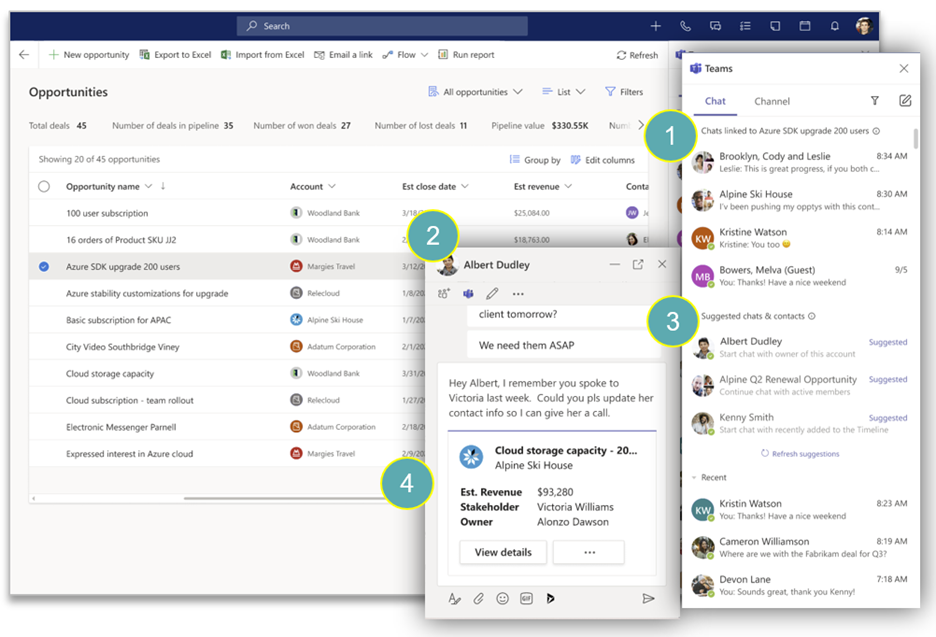
We are introducing an embedded Teams chat experience for Dynamics 365a side panel that shows recent and ongoing chats, channels, and people in Teams related to the customer record in view.
placeholder

As a seller browses customer records, the side panel displays (1) Teams chats and channels that mention the customer or account, as well as (2) suggested chats and contacts based on colleagues who are working on the account. Without switching to the Teams app, sellers can start or continue the conversation thanks to a (3) Teams chat experience which also (4) displays the customer record and quick actions to help avoid switching apps to find relevant information.

Recent years have witnessed a radical shift in buyer behavior that has led most businesses to alter traditional sales methods and adopt digital sales to stay relevant, maintain a competitive advantage, and cater to the buyer’s needs without losing the all-important personal touch. Voice and video now are important channels to ensure sellers keep connection and drive valuable conversations without missing any follow-ups.

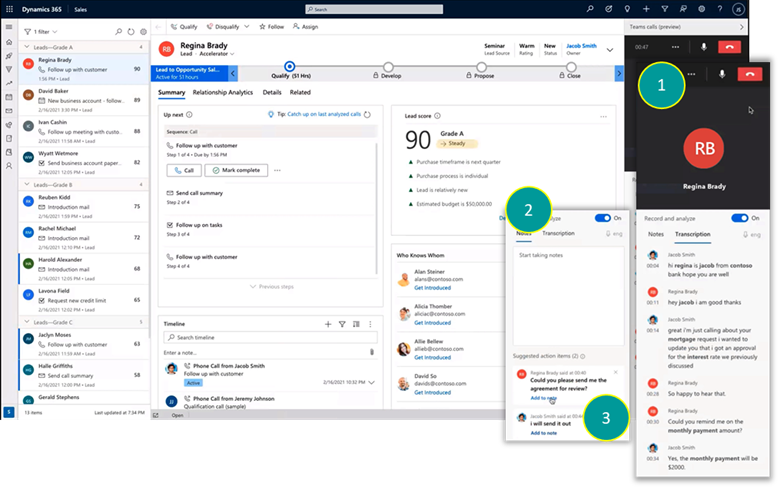
Today, we are introducing bothan embedded Teams dialer experience for Dynamics 365 as well as an extensible video or audio Teams meeting experience that seamlessly ties back to Dynamics 365 Sales.
placeholder

As a seller is presented with the next best customer to reach out to, they can click-to-calla side panel showing the teams dialer opens, including real-time business-critical insights such as transcript with important mentions highlighted (1), a place for note taking (2), and automatic detection of action items (3) sellers can ensure actions are captured ready for follow up.
placeholder

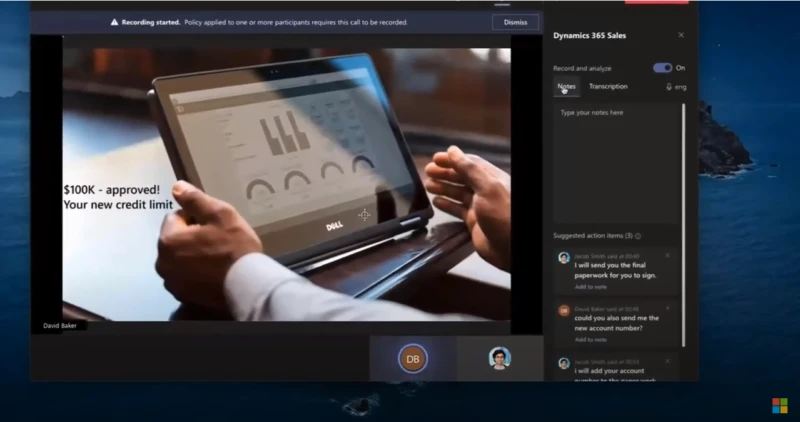
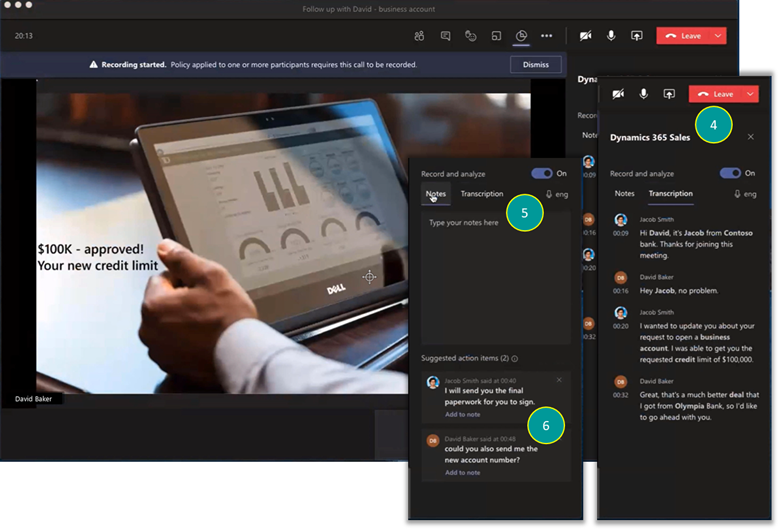
We also cater for Teams meetings that are scheduled and tracked by the seller. When they join the call from Outlook, Teams, or Dynamics 365 the familiar Teams client opens whereaside from the custom video, avatar, or shared contentthe seller will be presented with the same real-time insights as they did during the audio call, including the transcript with important mentions highlighted (4), a place for note-taking (5), and automatic detection of action items (6) sellers can ensure actions are captured ready for follow up.

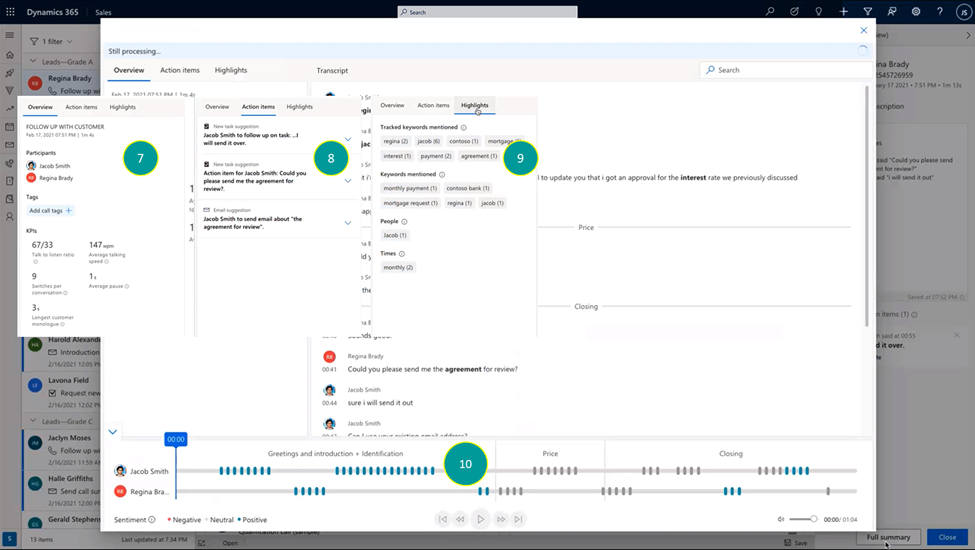
All insights are tied back to the relevant record in Dynamics 365 Sales CRM with zero effort on the seller’s side. Within seconds of completing the conversation, the summary page will be available; including conversational KPIs representing the seller’s behavior during the call (7), commitment and follow-ups made during the call (8), important mentions (9), and the full playback option alongside sentiment analysis and segmentation of the call to topics (10).
placeholder

These new team collaboration experiences are supported by multichannel engagement capabilities in Teams that help improve the way sellers connect with other sellers, prospects, and customers. The Dynamics 365 app for Mircosoft Teams enables sellers to engage with audio and video online meetings, and support for third-party outbound and inbound calling ensures advanced call control functionality is right where is should be: alongside the information that is fueling sellers’ conversations with the caller. Conversation intelligence automatically transcribes calls and analyzes content, sentiment, and behavioral styleinsights that can improve the way sellers engage with prospects and customers.

Learn how VITAS Healthcare, C.H. Robinson, Microsoft Inside Sales, and Grant Thornton transformed sales with Dynamics 365 Sales and Teams.

Marketing: turn event attendees into loyal customers

Virtual meetings and webinars are now a preferred way to connect and engage with audiences. With Teams and Microsoft Dynamics 365 Marketing, planning online events and nurturing your attendees is fast and easy.

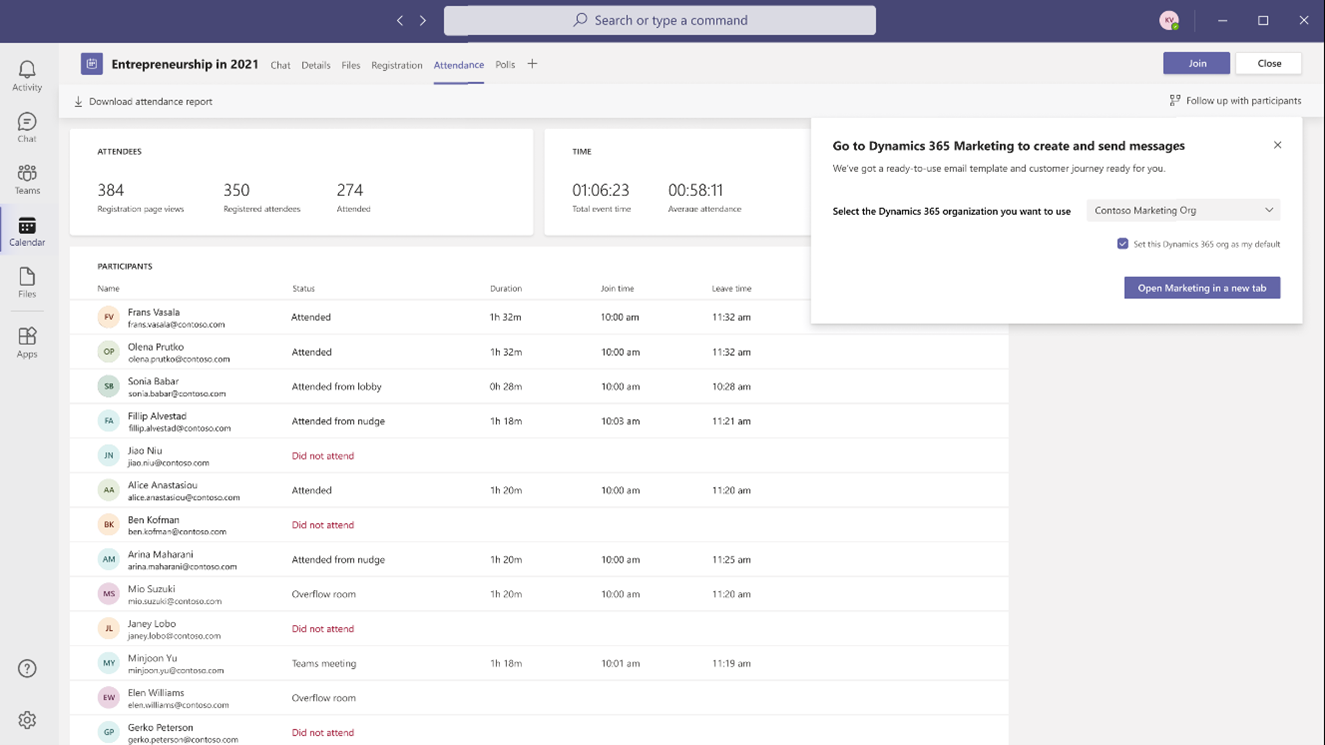
Customers can set up, promote, and report on events hosted on Teams from within DynamHRics 365 Marketing. In a few simple steps, they can export attendee data and view customer segments created in Dynamics 365 Marketing based on audience attendance. Customer journeys, including starter emails, are also automatically created to nurture attendees. Users can then further customize the content and experiences for attendees based on how they engage and orchestrate personalized customer journeys.

Today we’re announcing that commercial Microsoft 365 E3 and E5 customers will soon get six months of Dynamics 365 Marketing at no additional cost. We’ll have more details on this offer to share soon, along with eligibility details, and we are excited to see you reap the benefits of these solutions together.
graphical user interface, application, Teams

Learn more about Dynamics 365 Marketing or visit our help documentation to get started. Also, discover how Project Management Institute Minnesota and Discoveries, Inc are using these event management capabilities in the real world to improve engagement with event attendees.

Customer service: resolve customer issues faster using the power of collaboration

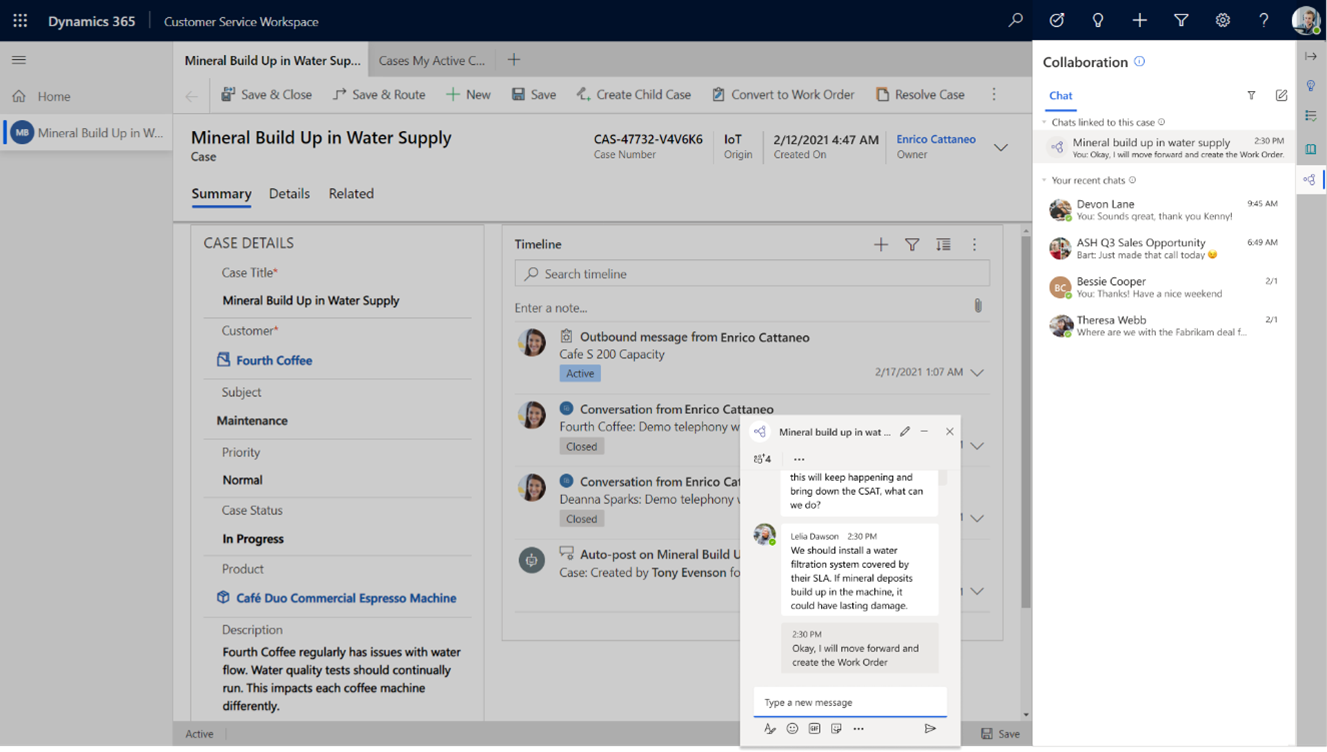
As cases that reach your live agents become increasingly more complex, it’s more important than ever that your customer service tools are designed to make life as easy as possible for your agents to resolve customer issues. This includes how cases get assigned and how your agents collaborate with Subject Matter Experts (SMEs) within your organization. Key features such as unified routing and assignment capabilities leverage rule-based and machine learning classification to ensure incoming work items are routed to the best-suited agent or queue. But, there are still times when customer service agents need support from other colleagues to quickly address customer issues without having to escalate or transfer the case. With the new embedded Teams chat capability, directly accessible from the Dynamics 365 Customer Service agent desktop, agents can collaborate with SMEs to resolve cases faster and more effectively, ultimately improve the customer experience.
graphical user interface, text, application, email

The Teams chat feature enables agents to easily start conversations with SMEs and other peers, avoiding the disruption of switching apps, while maintaining a seamless flow of work. The enhanced collaboration feature reads the context of the customer record and suggests relevant collaboration contacts for the agent. Related Teams chats initiated from Customer Service are visually differentiated to enable faster discoverability. In addition, agents can link relevant Teams chats to the customer record so that the conversation, information,and context is immediately available.

Field service: enhance collaboration across field service

Microsoft Dynamics 365 Field Service, Microsoft Dynamics 365 Remote Assist, and Teams work together to enable field technicians to stay connected to work orders, information, and experts in real-time, even from some of the most remote job sites.

Technicians and field service agents can use the integrated Teams experience within Dynamics 365 Field Service to collaborate in real-time with experts on work orders, as well as use Dynamics 365 Virtual Agents for Customer Service to enhance their productivity as they complete service tasks. Technicians can access the content they need related to the task at handfrom customer records to schematicsfrom a mobile device or for a hands-free experience, a Microsoft HoloLens mixed reality headset.

The solution is enabling surgeons at hospitals within the Mount Sinai Health System in New York to advise counterparts 7,000 miles away at Kyabirwa Surgical Centre in Eastern Uganda. “Microsoft Teams, Dynamic 365 Remote Assist, and HoloLens 2 allow us to bring our knowledge into a community, share that knowledge, and make it part of that surgical community on a long-term basis,” explains Dr. Michael L. Marin, Chairman of the Department of Surgery and Surgeon-in-Chief at Mount Sinai. “It helps us create a sustainable program of surgical care.”

Retail: maximize retail collaboration and staff efficiency

On the retail frontlines, it’s critical to have the most current and accurate product and inventory information customers need in the moment. With Teams and Dynamics 365, retailers can provide the frontline with streamlined mobile tools to connect with peers and get near-instant access to information they need to deliver exceptional customer experiences.

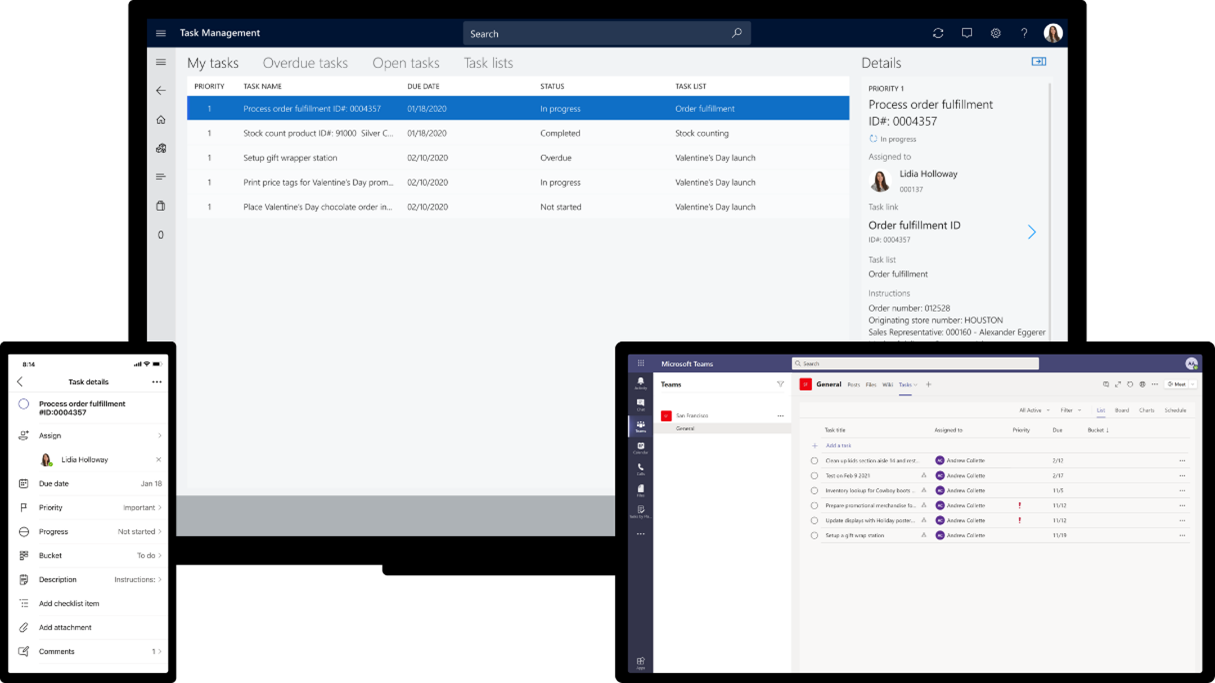
With Teams and Microsoft Dynamics 365 Commerce, we are also removing the barriers between the head office and individual stores by providing new task management functionality right within Teams. Task management functionality in Dynamics 365 Commerce allows managers and workers to create task lists, manage assignment criteria, and track task statuses integrated between Dynamics 365 Commerce back office, store commerce, and Teams applications.

Users can easily track task completion across all relevant stores, re-assign tasks, and give feedback and proof of execution where applicable.
graphical user interface, application

Learn more about Dynamics 365 Commerce and check out our task management capabilities.

Human Resources: simplify employee leave and absence management

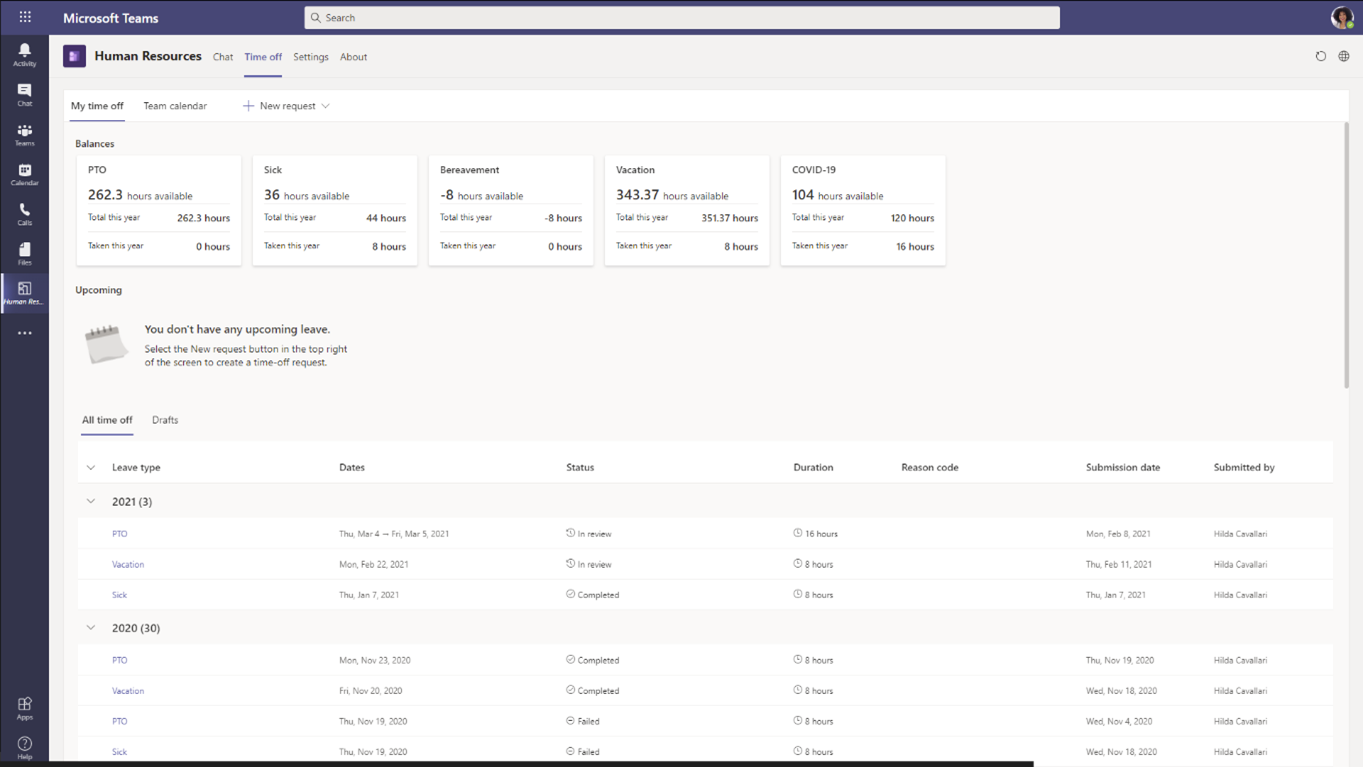
Microsoft Dynamics 365 Human Resources provides a comprehensive personnel management solution, including performance, leave and absence, and payroll integration. A new update, now generally available, enables employees to view time-off balances and submit leave requests from within Teams where they are already collaborating and getting their work done.

Employees simply type in keywords and a chatbot responds immediately to let them know leave balances or request time off. Managers can just as easily review and approve time-off requests with just a few clicks. By enabling employee and manager self-service, HR teams can stay focused on more strategic tasks while empowering employees to better manage their leave and absence benefits.
placeholder

Learn more about the employee leave and absence experience in Teams.

Boost collaboration for better customer experiences across the organization

These integrated collaboration capabilities are just the start. We continue our investment in innovation to transform work, so everyone can be more efficient, more collaborative, more insightful and ultimately, deliver the best customer experiences possible.

Learn more on the Microsoft Teams blog and explore all of the ways Dynamics 365 and Microsoft Teams help move projects forward and keep people connected with chat, suggested actions, and records in collaborative workspaces.

The post Dynamics 365 and Microsoft Teams: extend collaboration across teams appeared first on Microsoft Dynamics 365 Blog.

Brought to you by Dr. Ware, Microsoft Office 365 Silver Partner, Charleston SC.
Azure Defender and Security Center – Ignite 2021 Announcements

Azure Defender and Security Center – Ignite 2021 Announcements

This article is contributed. See the original author and article here.

Our team’s mission remains the same – to protect cloud workloads.  Last Ignite we made significant progress in multi-cloud support for GCP and AWS, as well as enabling new Azure protections for ARM and DNS.  More recently we published a TEI study that showed the cost savings and reduction of risk associated with a security breach associated with Azure Defender.


Today we are happy to announce new protections for Windows Server 2019, Windows 10 Virtual Desktop and networking as well as improved experiences for alerts and reporting.


Azure Defender for Servers now presents additional threat detection capabilities for Windows Server 2019 and Windows 10 Virtual Desktop (WVD) (in preview) by integrating the Microsoft Defender for Endpoint EDR technology.


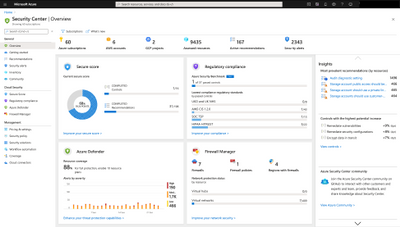
As part of helping our customers consume their security status and launch security management scenarios from a central experience, we have integrated the Azure Firewall Manager into Azure Security Center’s main dashboard. This will allow customers to check Firewall coverage status across all networks and to centrally manage Azure Firewall policies.


Here is a screenshot of the enhanced Azure Security Center dashboard:


giladelyashar_1-1614516519188.png


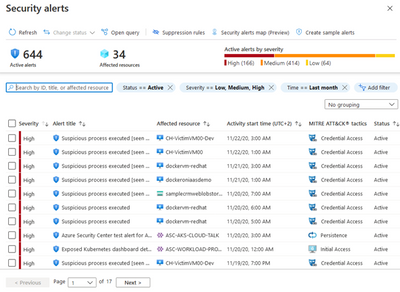
The Security Center alerts experience has been improved and simplified and is now aligned with the Azure Sentinel incident experience. We added new capabilities that help security teams to triage Azure Defender alerts easier and faster and thus reduce alerts fatigue, such as: searching, sorting, filtering and grouping capabilities, preview of alerts directly in the list, and correlation to MITRE ATT&CK tactics. In addition, we introduced new capability to create sample of Azure Defender alerts, in order to evaluate our offering around the different Azure Defender plans and test configurations around alerts such as SIEM connection, and integrated all the alerts into the Azure Resource Graph enabling customers to explore, filter, and gain additional insights on top of their alerts programmatically using KQL query language.


Our recent improvements around alerts complement the major improvements we introduced last year allowing security teams to better investigate and response to Azure Defender alerts.


Here is a screenshot of Azure Security Center’s improved alerts experience:


giladelyashar_2-1614516558681.png


In the new Workbooks area in Security Center, customers can leverage out of the box reports created as Azure Workbooks on topics like Secure Score over time, vulnerabilities and system updates. In addition, customers can create their own custom reports on top of Security Center data using Azure Workbooks or pick up workbook templates created by our community, share those across their organization and leverage to relay security status and insights across the organization.  


As always – don’t forget to enable Azure Defender for all your cloud services and especially for virtual machines, storage, and SQL databases.  Make sure you are actively working to improve your secure score to improve your security posture and please continue to reach out with feedback as we are here to help you protect your businesses from constantly evolving threats.


Learn more about the future of Microsoft Viva Topics at Microsoft Ignite

Learn more about the future of Microsoft Viva Topics at Microsoft Ignite

This article is contributed. See the original author and article here.

Last month we announced Microsoft Viva, the first Employee Experience Platform built for the digital era. Microsoft Viva includes four modules: Viva Connections, Viva Insights, Viva Learning, and Viva Topics.  


Viva Topics applies AI to empower people with knowledge in the apps they use every day, automatically organizing content and expertise across your systems and teams to create topics with built-in security, compliance, and workflow. And it’s available now for customer trials and purchases.


Microsoft Viva Topics in actionMicrosoft Viva Topics in action


This week at Microsoft Ignite we’re spotlighting our continuing enhancements to Microsoft Viva Topics. We’re also sharing an update on recent enhancements to SharePoint Syntex, and announcing our latest expansion of the Microsoft Content Services Partner Program.   Now, let’s look at Viva Topics.


Microsoft Bing integration


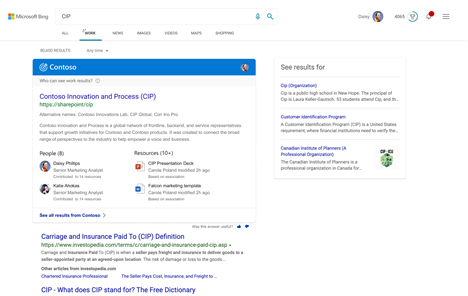
Our next updates will add new capabilities to show topic answers inside Microsoft Search via Microsoft Bing. Topic cards are already available to licensed users inside SharePoint pages and Microsoft Search. Our new integration brings knowledge from Viva Topics into Bing. All information stays within customer’s trust boundaries, and topic answers will be available to licensed users inside federated search results. Topic answers in Bing will start to rollout this spring.


Topic answers in Microsoft BingTopic answers in Microsoft Bing


Microsoft Teams


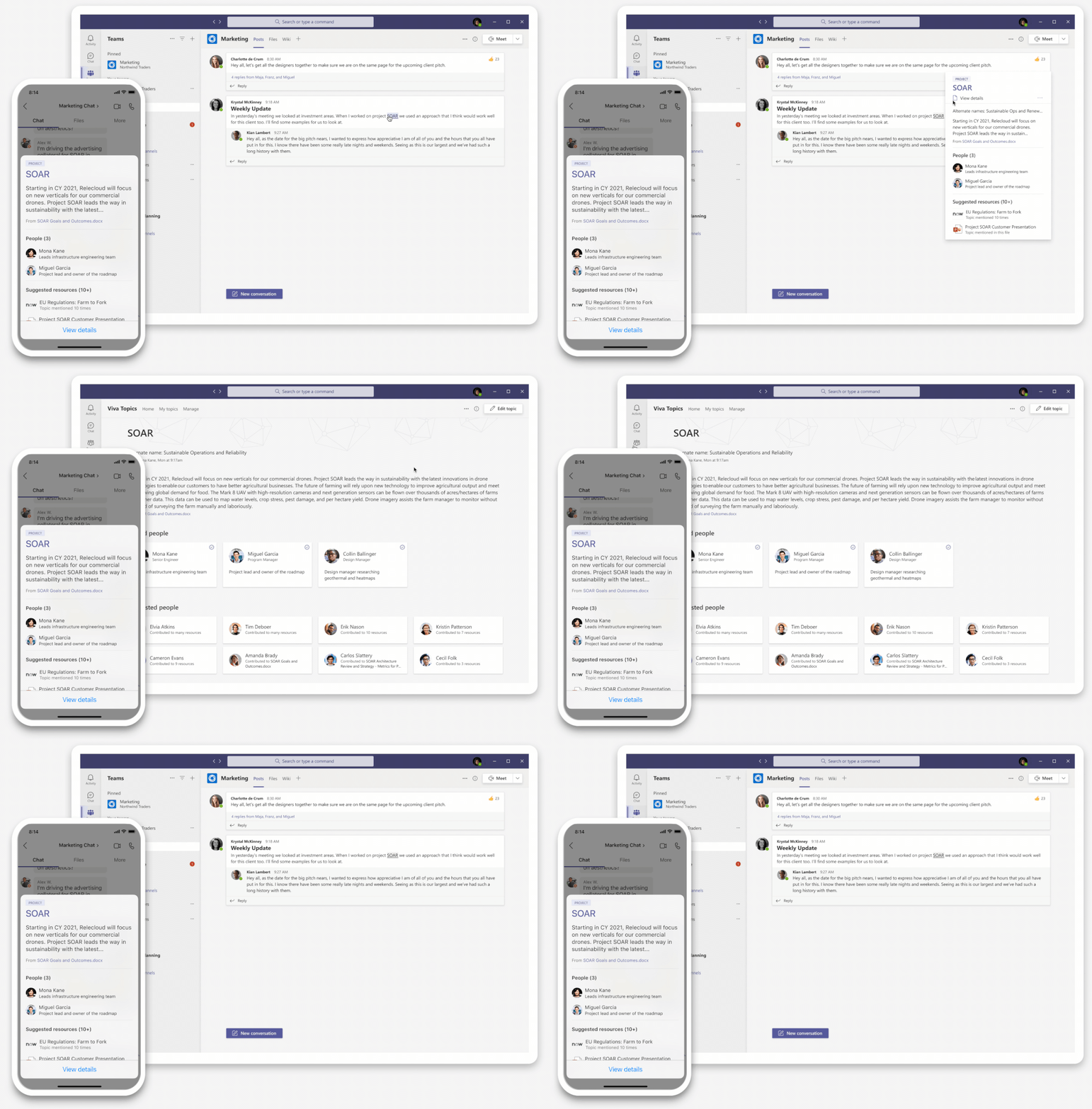
Integration to Microsoft Teams will proceed in several stages. With the rollout of Microsoft Viva Connections for the Microsoft Teams desktop, we’ll begin introducing topic cards and highlights to Microsoft Teams in SharePoint pages integrated to the Connections desktop app for Teams. We’ll have more updates to Microsoft Teams integration throughout 2021.


Roadmap


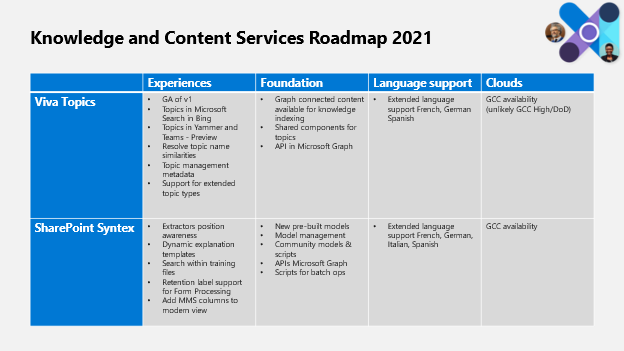
Our team is working with our customers as we deliver additional updates to Microsoft Viva Topics and SharePoint Syntex. We’ll continue to drive user experiences, foundational services and APIs, expanded language support, and government cloud coverage (GCC) as our top priorities for 2021.


KCSRoadmap.png


We’ll share more detail on all of these and more on the Microsoft 365 roadmap.


Microsoft Viva Topics at Ignite


There’s lot of great content at Microsoft Ignite this week for Microsoft Viva Topics, including:


Keynote


The hybrid workplace by Jared Spataro 
We think of 2020 as the year many of us worked from home. In fact, it’s the year that work moved to the cloud. Flexible work is here to stay. Join Jared Spataro to learn how we’re empowering people to work from home, on the go, and at the office.


Tuesday, March 2 | 9:45 – 10:15 AM PST


Tuesday, March 2 | 7:15 PM – 7:45 PM PST


Featured Session


Meet Microsoft Viva: a new kind of employee experience by Chuck Friedman 
The first employee experience platform built for the digital era, Microsoft Viva brings together communications, knowledge, learning, resources, and insights into an integrated experience that empowers people and teams to be their best, from anywhere. Join us as we introduce a new approach and a new category of technology solutions. Powered by the full breadth and depth of Microsoft 365, Viva is experienced through Microsoft Teams and other Microsoft 365 apps that people use every day.


Wednesday, March 3 | 12:00 PM – 12:30 PM PST


Wednesday, March 3 | 9:30 PM – 10:00 PM PST


Ask the Experts


ATE-FS193 | Ask the Experts: Meet Microsoft Viva: a new kind of employee experience
Now that you have the basics covered, we invite you to ask the questions that may not have been answered in other sessions. There will be a team of Subject Matter Experts available to answer questions both on camera and in chat and point you in the right direction to get started on your own Microsoft Viva journey. Come with questions about all four modules – Viva Connections, Viva Topics, Viva Learning, and Viva Insights.


Wednesday, March 3 | 2:00 PM – 2:30 PM PST


On-Demand Sessions


OD372 | Microsoft Viva Topics: Put knowledge to work with content and AI by Chris McNulty and Naomi Moneypenny
Viva Topics frees up time by making it easy for people to find information and put knowledge to work. And SharePoint Syntex uses advanced AI and machine teaching to amplify human expertise, automate content processing, and transform content into knowledge.


For details on all the Microsoft Viva sessions at Spring Ignite 2021, please read the Viva Guide to Ignite blog post.


Thanks a lot, and hope to see you at Microsoft Ignite and here on the TechCommunity.


Universal Print is ready for business

This article is contributed. See the original author and article here.

Today, we are proud to declare Universal Print is now generally available. Universal Print is the premier cloud print service available at scale to businesses and educational organizations.


Universal Print is ready for business. Thousands of customers have been using Universal Print since we announced public preview in July 2020. Universal Print has been deployed to Microsoft datacenters, and customers who have one of the following Windows or Microsoft 365 subscriptions can activate the Universal Print benefits for their workers. Go here for more detail on how to get started.


  • Microsoft 365 Business Premium

  • Windows 10 Enterprise E3, E5

  • Microsoft 365 Enterprise F3, E3, E5

  • Windows 10 Education A3, A5

  • Microsoft 365 Education A3, A5


Universal Print would not be complete without the support of print industry partners. And we are excited to see so many partners are announcing solutions that are Universal Print ready! You can easily identify hardware and software solutions on the Universal Print partner integrations page.


Many of you asked about printers supporting Universal Print out of the box, as they offer the best cloud print experience. Brother, Canon, Epson, HP, Konica Minolta, Lexmark, Ricoh, Toshiba, and Xerox are currently delivering updates to existing devices or are bringing new printers to market with native Universal Print integration either today or later this year. Some partners are bringing intelligent edge devices to market that can quickly connect one or more printers to Universal Print, functioning as a connector. And for customers looking for print management solutions, a robust set of software partners are bringing software and cloud services that build on Universal Print.


Here is a short overview:


You can start registering Brother Universal Print ready printers with updated firmware.


Canon is a pioneer of Universal Print ready devices with the imageRUNNER ADVANCE DX and imageRUNNER ADVANCE Generation 3 (III) portfolio of multifunction printers.


Celiveo 365 extends Universal Print to Intelligent Secure Pull Print and Tracking, full SAAS.


Epson will soon release a set of firmware updates so printers are Universal Print ready.


ezeep Hub by ThinPrint brings Universal Print to any printer as it functions as a secure connector device.


HP Inc has been working on a Workpath platform app so HP printers can be registered natively in Universal Print. The Workpath app will be available June 1.


Kofax has integrated Kofax ControlSuite with Universal Print delivering a seamless user experience for secure print and intelligent capture across the enterprise. Available today.


Konica Minolta partnered with Microsoft to integrate Dispatcher Paragon with Universal Print and made its bizhub i series Multifunction Printers Universal Print ready!


Kyocera will offer integration with the Universal Print on selected Kyocera devices.


Lexmark, an early Universal Print partner, has a large set of Universal Print ready printers available.


With MPS Monitor 2.0 and Universal Print integration, companies can enable printing from zero-trust networks and monitor printing devices.


MyQ made Universal Print and MyQ X integration available so customers can securely print from anywhere.


PaperCut is building native support for Universal Print into PaperCut MF and PaperCut NG. And don’t forget to read how PaperCut helped the Val Verde school district overcome the last hurdles to move to Microsoft 365 and Universal Print during the pandemic.


Pharos integrates their Beacon cloud services with Universal Print to secure your printers for authorized use, protect the confidentiality of printed documents, and enable printing from multiple desktop and mobile platforms.


PriApps’ enhanced integration with Universal Print allows users to securely release print jobs at any printer or multifunction printer, as well as track & analyze print usage, apply print rules & quotas, and assign cost codes to any print job.


Printix is a native cloud print management platform on Azure that extends the capabilities of Microsoft Universal Print with comprehensive modern printing features for all printers and multifunction devices.


Process Fusion’s UniPrint Infinity integrates with Universal Print to allow Print-to-Physical with Secure Release & Print-to-Digital for Process Automation.


Ringdale is enhancing Universal Print with FollowMe® to secure printing for hybrid environments.


Ricoh will start supporting Microsoft Universal Print including native support with our Smart Operation Panel application.


Toshiba e-BRIDGE multi-function printers have been tested to be compatible with the Universal Print connector.


With uniFLOW Online, users print from their Windows PCs to a single print queue and securely release their print jobs at any device after authentication regardless of the network configuration, including zero-trust networks with micro-segmentation.


Universal Print, together with Xerox® Workplace Cloud print management solution, adds a comprehensive layer of security and control across the print environment.


If you are looking to connect in-market printers to Universal Print, YSoft OMNI Bridge, a serverless edge device, is a secure and cost-effective cloud printing solution with high availability options that is generally available today.


YSoft SAFEQ print management solution, now offers a Universal Print connector. Y Soft is pleased to announce that it is globally available.


We are not done yet; additional partner will certainly be added as the momentum for Universal Print grows.


Universal Print will continuously evolve to meet the ever-changing needs of our customers.


Universal Print is available for Windows 10 devices today; however, workers are increasingly using smartphones and mobile devices for productivity. Today, we are announcing that later this summer workers will be able to use the browser of their choice to print documents from the OneDrive for Business web experience on any device. This functionality will be available for customers to test in preview and we will let you know in one of our next posts.


Dynamics 365 Business Central is a business application solution designed for small and midsized organizations. In release wave 1 available in April, Business Central will support printing via Universal Print so customers can send documents and reports to any of the printers registered with Universal Print.


Microsoft Endpoint Manager admins can download a Universal Print tool today that lets them deploy printers and set the default one on users’ Windows 10 devices we will make this workflow more seamless.


If you have not tried Universal Print yet, now is the time to get your feet wet. You can start small, no need to jump in headfirst. You can count on our 24/7 support to help you out or call on out FastTrack team to help you with the initial deployment.


We’d love to welcome you into the Universal Print Community where we update you on new features, partner solutions, and answer questions.


Technical details are available in the Universal Print documentation and if you cannot wait, go to TryNow.

Announcing general availability of Universal Print

This article is contributed. See the original author and article here.

Today we are announcing general availability of Universal Print. We are thankful for the support many of you gave us with your feedback, questions, and use of the service while we were in preview. We learned a lot and got better. Thank you.


We also want to thank the many partners delivering solutions that integrate with Universal Print. They have done some great things, and we are sure we have not seen the last of them.


This is not the end of the road for us, we still have a lot of work in front of us, so please keep coming back and let us know what to build. We will soon start blogging about new things to try, that you can give us feedback on.


Here are a few links to keep in your Universal Print collection:


Thank you, and see you soon.
The Universal Print team