by Contributed | Jun 11, 2021 | Technology
This article is contributed. See the original author and article here.
We are pleased to announce the general availability of our Elevation API. For any given point on the Earth’s surface, the Elevation API returns its elevation measured from the mean sea level. Azure Maps Elevation API will provide pole to pole coverage with <4M absolute and <2m relative accuracy. The elevation data uses a digital terrain model (DTM), man-made entities (e.g., buildings) are artificially flattened and elevation is measured to the ground surface.
Use cases & API Types
Azure Maps Elevation API is designed to make it easy for developers to build various scenarios leveraging elevation data. The following options are offered along with POST methods to support input of large data.
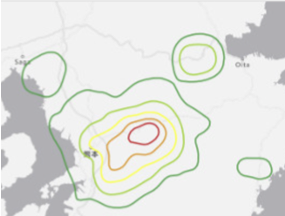
Get Elevation for Point(s)
|
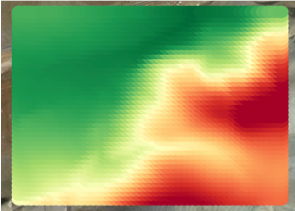
Get Elevation for Bounding Box
|
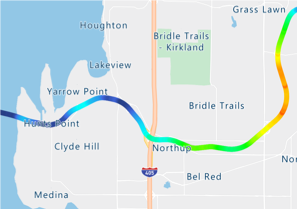
Get Elevation for Path/ Profile
|
|
|
|
Solar power plant planners can measure elevation across large number of points to determine ideal locations for placing solar panels.
|
Mining engineers can measure elevation at specified intervals in each given grid and perform cut/ fill analysis.
|
Fleet managers can measure elevation gain across routes and take appropriate safeguards e.g., refrigeration, braking etc.
|
API documentation and code samples

by Contributed | Jun 11, 2021 | Technology
This article is contributed. See the original author and article here.
Written by Patrick Chao, the Teaching Assistant for the course

In the spring semester of 2021, 19 students from The University of Texas at Austin took the Introduction to Machine Learning course taught Patrick Chao, Teaching Assistant for the course and Professor Danna Gurari

Before taking the course, nearly half of the students had no programming background. By the end of the course, the students learned the foundations of Machine Learning and gained hands-on experience developing many machine learning models for different problems in Python. As part of the course, the students also paired up to develop final projects of their own design, with many groups achieving their research goals using the power of Microsoft Azure.
In one of team’s final project, their goal was to solve a problem for small family-owned businesses with Optical Character Recognition (OCR) powered by Azure. The problem they aimed to address is that many business owners must manually enter data from printed or handwritten tickets to spreadsheets, which can be time-consuming. In the experimental results, the team explains that there is lower accuracy for tickets of certain types and provide possible solutions to improve the performance.
Another team aimed to develop a model for poetry classification based on time period. The problem is that it is not easy for human readers to grasp the characteristics of poetry in all periods. Moreover, the classification of time periods is an intense debate topic in the fields of humanities. The team used natural language processing techniques to analyze the title and content of poetry. With text analytics in the Azure Cognitive Services, they extracted key phrases from each poem as a helpful feature to train their model. Ultimately, their model could distinguish the period of poetry better than most English majors. The next step is to understand how the model can support the study of English literature today.
Lastly, another team aimed to address that vaccine hesitancy is a problem, and it slows down the speed of the population receiving the vaccine. They proposed a chatbot to answer questions and lessen worries. The chatbot detects a person’s sentiment from input questions and returns the appropriate information in a way that is tailored towards the person’s sentiment. Azure Sentiment Analysis API is used to detect the sentiment.
Detailed documentation and an easy-to-use interface are big advantages of Azure. After a brief introduction to Azure, most students could explore the Azure services on their own and leverage the services in their final projects.
Interested in Learning more see the following Microsoft Learn Modules
How to build a basic chatbot – Learn | Microsoft Docs
Create Intelligent Bots with the Azure Bot Service – Learn | Microsoft Docs
Build a chat bot with the Azure portal – Learn | Microsoft Docs
Discover sentiment in text with the Text Analytics API – Learn | Microsoft Docs
Explore Natural Language Processing in Microsoft Azure – Learn | Microsoft Docs
Evaluate text with Azure Cognitive Language Services – Learn | Microsoft Docs
Process natural language with Azure Cognitive Language Services – Learn | Microsoft Docs
Introduction to Natural Language Processing with PyTorch – Learn | Microsoft Docs
Read Text in Images and Documents with the Computer Vision Service – Learn | Microsoft Docs
![[Guest Blog] One person’s attempt to address the gender imbalance in tech](https://www.drware.com/wp-content/uploads/2021/06/fb_image-70-472x675.jpeg)
by Contributed | Jun 11, 2021 | Technology
This article is contributed. See the original author and article here.
This blog was written by Windows Development and Internet of Things (IoT) MVP Bryn Lewis. Bryn shares his work with students at an independent girl’s school, provides ideas, and seeks input for getting students to embrace a career in tech.
I have been in the software business for 30+ years building solutions predominately on the Microsoft platform. Over the years I have worked in a variety of areas including healthcare, industrial process control, mobile radio, online gambling, a couple of dotBombs, finance, and the Internet of Things(IoT). In the 2000’s I worked for Microsoft Consulting Services(MCS) in Auckland, New Zealand for a couple of years.
These days, to pay the bills, I work on an Azure Platform as a Service(PaaS) based Fintech application for managing portfolios of foreign currency instruments. My “side hustle” is building IoT solutions for customers with the Azure IoT Services. Recently, I have been working on an open source project which provides the “plumbing” for connecting embedded devices over low power wireless technologies like LoRaWAN to the Azure IoT Services.
I am also really interested in how IoT can be used for good in citizen science and education which has been at the core of one of my other projects…
For the last six years I have run weekly sessions for senior students at St Margaret’s College an independent girls’ school in Christchurch, New Zealand.
The sessions are a combination of coding, electronics, and hard materials which I continuously adapt to align with the interests of the students. The sessions compete with the school production, debating, rowing, and other official school activities so there are usually only 4-6 students.
I have always struggled with balancing making it fun/interesting and not too geeky/boring. After quite a bit of “trial and error”, (in the first year it felt like a lot of error) I found the best approach was students building “passion projects” (often with an IoT component) which were a blend of coding, electronics and hard materials.
Passion Projects
One student, who was always listening to music on her iPod, built an MP3 player with the music stored on a MicroSD, a 16×2 LCD displaying the current track and time. It had a battery powered real-time clock to keep track of the time and a five button UI (next/previous track, volume up/down and play/pause).
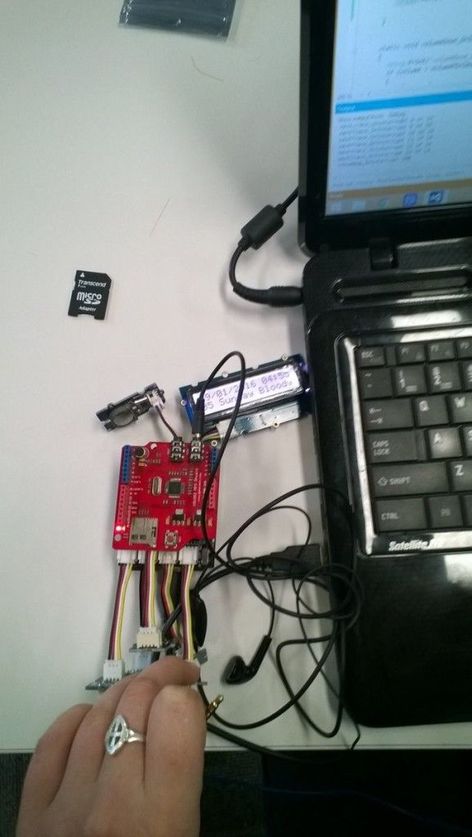
At the end of the term she said, “I’m so pleased it works but so over U2″ (I chose the playlist, figured Nine Inch Nails wouldn’t have been appropriate). I was so pleased when she went to Otago University to do a computing degree.
Mathematics by stealth
This student’s parents were first responders and her passion project was building something to monitor a patient’s pulse rate and core temperature. We started with an ear-clip sensor which could detect a heartbeat. Then she wrote code to count the individual heartbeats and convert that to beats per minute (BPM). Like a nurse manually taking a patient’s pulse, she started with counting the number of heartbeats in 15 seconds then multiplying by 4 to get the BPM.
There were many revisions where she tried longer and shorter periods, measuring the duration between heartbeats, then different averaging approaches until the solution was quick to get a reading, accurate and responsive.
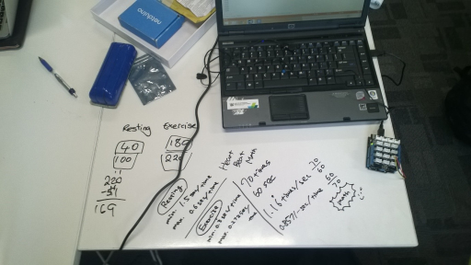
Mathematics went from a chore to something with a practical application.
Physics by stealth
This is another student working out how to convert X/Y/Z acceleration G values into pitch and yaw.
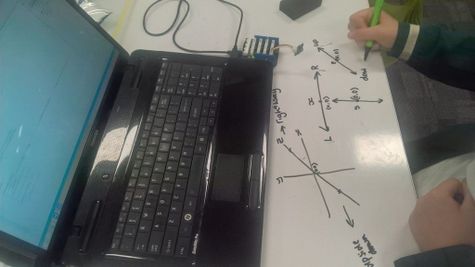
The whiteboard desks are great but do make a mess of the cuffs of white school shirts.
Skills build over time
One student had been coming to the after-school sessions for several years. This allowed her to develop her skills to a high enough level to build a quite complex solution. She built a SmartAG sensor for orchards for her final year project. She was awarded a University Scholarship for this project and is off to Otago University to study Information Systems and Law.
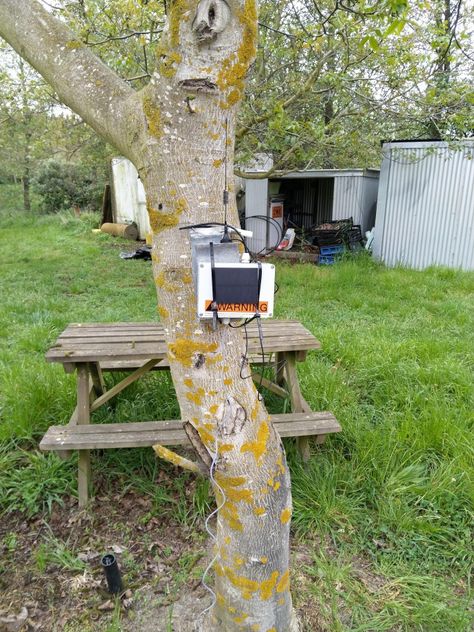
It has a robust weather proof enclosure, solar panel + lithium polymer(LiPo) battery, soil moisture, temperature + humidity sensor and a microcontroller which sends telemetry over a LoRa wireless link to a basestation.
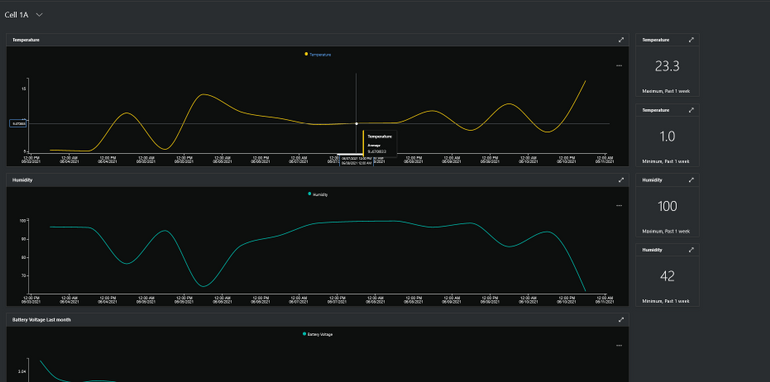
The basestation uploads the sensor data to Azure IoT Central where it can be viewed in a series of dashboards.
It’s not easy but every so often the stars align and a passion project can also result in academic success as well.
Why do I run the classes
When I was at University in the late 80’s there were lots of women in the first year classes but the numbers fell quite rapidly to between 0-5% in my final year. I have now been in the industry for more than thirty years, the gender balance has never been great and in some specialist areas, like embedded development, it is really abysmal.
Walking home one day I happened to listen to this NPR podcast. Which lead me down a rabbit hole…
So why aren’t there many women in IT now?
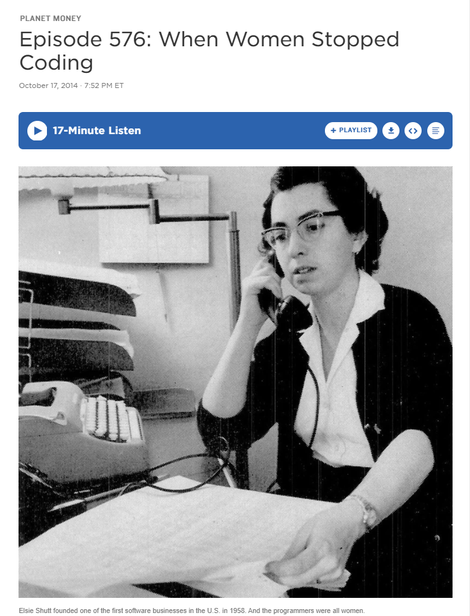
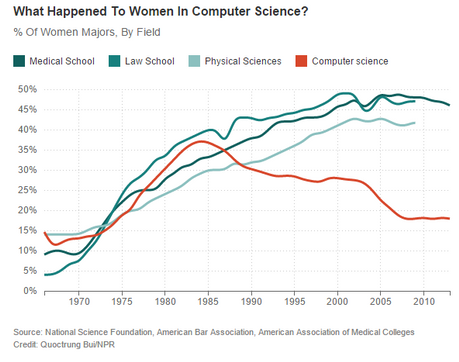
There have been great female role models in tech including:
This is Margaret Hamilton at the Houston Mission Control Center

Code: Debugging the Gender Gap explores this issue in depth
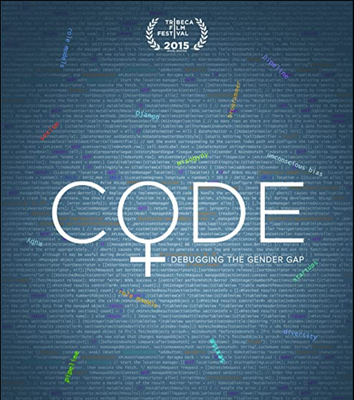
One of the key things identified in podcasts and books was the need for positive role models for female students so I figured a middle-aged (ok mid 50s) balding guy was better than nothing.
Call To Action
One of my favourite books as a child was the Lorax by Dr. Seuss. So, in the words of the Onceler, “Unless someone like you cares a whole awful lot, nothing is going to get better. It’s not.”
So, do you care enough to try and make a difference to the gender balance in computing? Then, go find a nearby school, talk to some teachers. Share with them your knowledge and help young women to understand that technology can be fun and interesting, as well as a genuine career path.
Sometimes it can be immensely satisfying and other times disappointing. But in my experience, it’s so worthwhile.
by Contributed | Jun 11, 2021 | Technology
This article is contributed. See the original author and article here.
Guest Blog Teaching Assistant: Patrick Chao

Applications that utilize machine learning have greatly improved human life in many fields. One such application is to help people who are blind or with low vision learn about their visual surroundings using computer vision. By creating such applications, people with visual impairments can more independently accomplish daily tasks such as recognizing the denomination of currency, whether their socks match, and what flavor of yogurt they select to eat for breakfast. To spur research in developing such applications, a series of VizWiz datasets were created to support several AI challenges. One such dataset challenge includes images taken by visually impaired users and an associated question about each image.
In the course “Introduction to Machine Learning,” in the spring semester of 2021, Professor Danna Gurari invited all 19 UT Austin graduate students in the class to join the visual question answering challenge. In this challenge, students would analyze the images taken by visually impaired people and their questions to each image and train a model to predict whether a question can be answered. Therefore, students would learn how to process image and text data, and combine them to train models. Before the challenge, students learned the fundamental theories of machine learning; however, the students were from various backgrounds and only few students had programming experience. For most of them, this would be their first machine learning challenge.
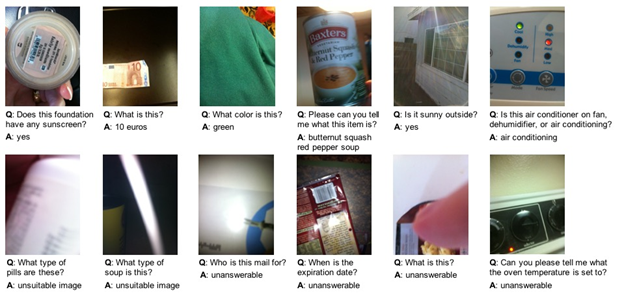
In the class, Professor Gurari introduced various methods of extracting features in Scikit-learn. Meanwhile, the professor also introduced how to use the powerful Azure API to extract more advanced features during in-class labs. After a brief introduction, even the students who did not have programming experience could easily apply Azure’s services to practice advanced feature extraction tasks for both images and text. Moreover, even if the students encountered problems, Azure provided clear documentation and learning resources so that students could explore on their own and quickly learn how to use the powerful services. The services also inspire the students with more ideas for designing experiments and finally help them train better models to complete the challenge.
Within two weeks, 70% of students completed the challenge, and almost half of the models performed with an accuracy over 60%. Students with many majors, such as User Experience, English Literature, and Library Science were all able to complete this machine learning challenge with the power of Azure services.
[1] https://vizwiz.org/
[2] https://vizwiz.org/tasks-and-datasets/vqa/
Additional Learning Resources
Interested in learning more about AI and Vision see the following:
Detect objects in images with the Custom Vision service – Learn | Microsoft Docs
Classify images with the Custom Vision service – Learn | Microsoft Docs
Explore computer vision in Microsoft Azure – Learn | Microsoft Docs
Process images with the Computer Vision service – Learn | Microsoft Docs
Classify images with the Microsoft Custom Vision Service – Learn | Microsoft Docs
Process and classify images with the Azure cognitive vision services – Learn | Microsoft Docs
Identify faces and expressions by using the Computer Vision API in Azure Cognitive Services – Learn | Microsoft Docs
Classify endangered bird species with Custom Vision – Learn | Microsoft Docs
Use AI to recognize objects in images by using the Custom Vision service – Learn | Microsoft Docs
Introduction to Computer Vision with PyTorch – Learn | Microsoft Docs
by Contributed | Jun 11, 2021 | Technology
This article is contributed. See the original author and article here.
The Microsoft Learn Student Ambassadors community is for students—like you—who want to use tech to solve real-world problems with like-minded peers, establish themselves as mentors and leaders in their community, and amplify their impact.
Student Ambassadors get the opportunity to connect with other students around the world (from 102 countries and counting!), foster their own online communities, get training and earn certifications, and tackle practical challenges, all while building key technical and soft skills to help them succeed. They can also make meaningful progress on the socially significant issues that they care about.
“I found the Student Ambassador program to be full of like-minded individuals who share an equal passion for a better world with the help of technology.”
–Basu, first-year student at ITI Institute
Let’s start at the very beginning.
So you’ve read about the community. Maybe you have a friend who is a Student Ambassador or you’ve attended an event hosted by one or you’ve read about some of the recent graduates and their experience in the community. Maybe you’ve even checked out the infographic to find out who the Student Ambassadors are, what they’re all about, and how diverse the community is. You decide to send in your application*, and hopefully you’re selected to become a Student Ambassador during one of our quarterly application reviews. What happens next?
The global community of Student Ambassadors is the heart of the program, and upon acceptance, you’re immediately connected to every other fellow Ambassador via Microsoft Teams as well as with Microsoft mentors who are there to help you along your journey.
You can collaborate with other students who share your passion in dedicated Leagues focused on various technologies and social issues and apply your collective skills towards solving real-world challenges together. You’ll then have the opportunity to show off your work in local and global challenges like the Microsoft Imagine Cup and student hackathon events. And if you’re not yet sure what your passion is, it’s okay. As long as you’re willing to explore different things and try them out, you are definitely welcome in our community!
You’ll have support from Microsoft in the form of unique access to experts like Cloud Advocates and MVPs who can offer remote mentorship, guide your League’s efforts, and provide opportunities for you to be part of the team while you prepare for graduation. These experts are also here to help you plan and run your events as you help skill people in your own local communities.
Microsoft makes it easier for you to make progress on the issue or technology that means the most to you by providing tools to help you–like monthly Azure credits, free access to Microsoft 365 apps like PowerPoint and Excel, cloud services like OneDrive and Microsoft Teams, and development tools in Visual Studio, as well as free software from our technology partners like Techsmith’s Snagit screen capture software and the Camtasia screen recorder and video editor.
Plus, you can start building valuable career skills with self-guided online courses with Microsoft Learn. If there’s a topic you’re interested in, whether it’s Machine Learning, Python, Azure static web apps, or something else, master it at your own speed with these courses that provide step-by-step guidance. When you’re done, you can get access to a free certification exam!
There are numerous event opportunities:
- Attend virtual events held by subject matter experts from Microsoft and other organizations that focus on technical skilling and professional development
- Attend virtual events held by fellow Student Ambassadors who want to share their knowledge and passion with other students.
- In turn, you’ll pay it forward and share your knowledge and passion by hosting events and offering guidance to other students. By providing your expertise and empowering your peers, you expand your impact and separate yourself from the pack by becoming a leader in your local tech community. On average, each Student Ambassador-hosted event reaches 63 peers!
- Score opportunities to attend Microsoft-hosted events. You’ll be able to attend the annual virtual Student Ambassadors Summit consisting of tech demos, panel discussions, and networking opportunities all aimed at helping you build your skills and amplify your impact in the community. You might even be invited to share your knowledge as a speaker at other events like Microsoft Build!
- And of course, there will be social/team building activities because what would a community be without those?
There are certain milestones that can be achieved by Student Ambassadors,. The first 2 are self-paced, so you get to determine when you want to attain the next level, while the 3rd one is by Microsoft team nomination only and is reserved for outstanding Ambassadors who go above and beyond in serving their community. With each milestone you reach, you are awarded additional awesome benefits.
Overall, the program was exactly what I needed as a student.
It offered me a supportive community where I could be myself, thrive, and work towards building something that was much greater than myself. This community gave me a chance to not only develop technical skills and soft skills but also have connections to cherish even after leaving the program.
–Sabiha, recent Student Ambassador graduate
So, are you ready to be a part of a global community where you can connect with peers, learn from practical experience, and teach others about the topics that drive you? Then apply to join the Microsoft Learn Student Ambassadors program today!
If you’re into tech, if you’re into learning, if you’re into being part of student communities, just join this program. Don’t think twice.
–Sukhman, recent Student Ambassador graduate
Twitter: @MSFTImagine | Instagram: @MicrosoftImagineCup | YouTube: MSFTImagine | Facebook: @MSFTImagine
*Applications are accepted all year long.




Recent Comments