by Contributed | Nov 10, 2022 | Technology
This article is contributed. See the original author and article here.
In May 2020, we announced plans to have more granular privacy controls within Microsoft products. This is part of Microsoft’s continued commitment to providing products, information and controls that lets you choose how your data is collected and used. After this announcement, several controls have been released. Now we would like to announce the release of peopleInsights admin controls.
The hundreds of millions of users of Microsoft 365 cloud services form part of the core of Microsoft Graph. The users’ data is carefully managed, protected, and with proper authorization, made available by Microsoft Graph services to drive productivity and creativity in businesses.
As ubiquitous the user’s data is in Microsoft Graph, data derived from the user’s interactions is particularly interesting. It provides intelligent insights that can be used to build smarter apps. The people API returns people ordered by relevance to a user, based on that user’s contacts, organization directory, and recent public communications on email.
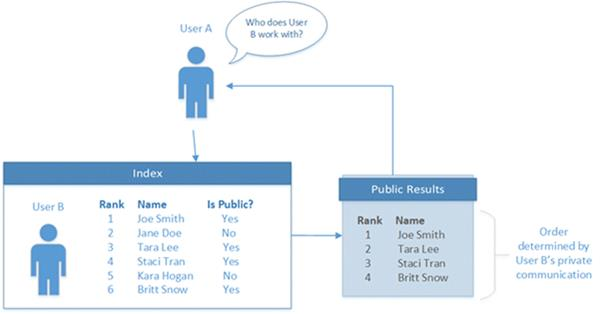
For a person to be included as relevant to or “working with” a profile owner in Office Delve, to be displayed in the owner’s profile card, or to be returned by the people API, there must be a public relationship between the person and the profile owner. The following illustration shows a User A, an index of relationships with other users (User B), and a public profile showing a subset of user relationships.
We are pleased to announce new privacy controls which provide you with the ability to configure the visibility of the list of relevant people, also called Working-with or peopleInsights. The controls will give administrators the ability to disable the controls for all users by using “isEnabledInOrganization” parameter in Microsoft Graph. Alternatively, they can disable the feature on admin center by checking the “Allow your organization to use People Insights” checkbox shown below.
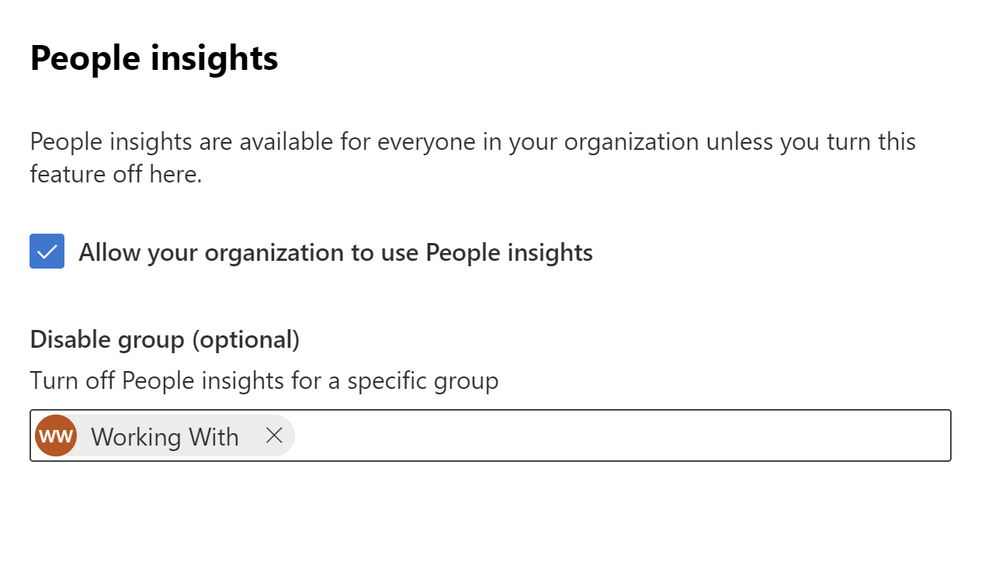
If an organization only needs to disable the feature for a group of people, they have the option of using the “disableForGroup” parameter. They will need to provide the id of an Azure AD group. The group should have all affected users. Note, only one group can be disabled. The alternative is using admin center page and adding the name of the group to be disabled for in the text field as shown above. The controls above respect the existing Office Delve settings already in place.
We are working on releasing user level controls as well in the future to ensure that at user level people have control over their own privacy.
by Scott Muniz | Nov 10, 2022 | Security, Technology
This article is contributed. See the original author and article here.
Today CISA published its guide on Stakeholder-Specific Vulnerability Categorization (SSVC), a vulnerability management methodology that assesses vulnerabilities and prioritizes remediation efforts based on exploitation status, impacts to safety, and prevalence of the affected product in a singular system.
As stated in Executive Assistant Director (EAD) Eric Goldstein’s blog post Transforming the Vulnerability Management Landscape, implementing a methodology, such as SSVC, is a critical step to advancing the vulnerability management ecosystem. Additionally, the blog details advances—including
CISA’s Known Exploited Vulnerabilities (KEV) catalog, Common Security Advisory Framework (CSAF) machine-readable security advisories, and the Vulnerability Exploitability eXchange (VEX)—that, used in conjunction with SSVC, will reduce the window cyber threat actors have to exploit networks.
CISA encourages organizations to read EAD Goldstein’s blog post and to use the following resources on the SSVC webpage to strengthen their vulnerability management processes:
- CISA’s SSVC decision tree
- SSVC Guide on using SSVC and the SSVC decision tree
- SSVC Calculator for prioritizing vulnerability responses in an organization’s respective environment
by Scott Muniz | Nov 10, 2022 | Security, Technology
This article is contributed. See the original author and article here.
Cisco has released security updates to address vulnerabilities in multiple Cisco products. A remote attacker could exploit some of these vulnerabilities to take control of an affected system. For updates addressing lower severity vulnerabilities, see the Cisco Security Advisories page.
CISA encourages users and administrators to review the following advisories and apply the necessary updates:
• Cisco Adaptive Security Appliance Software and Firepower Threat Defense Software SSL/TLS Client Denial of Service Vulnerability cisco-sa-ssl-client-dos-cCrQPkA
• Cisco Secure Firewall 3100 Series Secure Boot Bypass Vulnerability cisco-sa-fw3100-secure-boot-5M8mUh26
• Cisco Firepower Threat Defense Software Generic Routing Encapsulation Denial of Service Vulnerability cisco-sa-ftd-gre-dos-hmedHQPM
• Cisco FirePOWER Software for ASA FirePOWER Module, Firepower Management Center Software, and NGIPS Software SNMP Default Credential Vulnerability cisco-sa-fmcsfr-snmp-access-6gqgtJ4S
• Cisco Firepower Management Center and Firepower Threat Defense Software SSH Denial of Service Vulnerability cisco-sa-fmc-dos-OwEunWJN
• Cisco Adaptive Security Appliance Software and Firepower Threat Defense Software SNMP Denial of Service Vulnerability cisco-sa-asaftd-snmp-dos-qsqBNM6x
• Cisco Adaptive Security Appliance Software and Firepower Threat Defense Software Dynamic Access Policies Denial of Service Vulnerability cisco-sa-asa-ftd-dap-dos-GhYZBxDU

by Scott Muniz | Nov 10, 2022 | Security, Technology
This article is contributed. See the original author and article here.
Official websites use .gov
A .gov website belongs to an official government organization in the United States.

Secure .gov websites use HTTPS
A
lock ( )
) or
https:// means you’ve safely connected to the .gov website. Share sensitive information only on official, secure websites.
by Scott Muniz | Nov 10, 2022 | Security, Technology
This article is contributed. See the original author and article here.
CISA and the Multi-State Information Sharing & Analysis Center (MS-ISAC) have updated joint Cybersecurity Advisory AA22-228A: Threat Actors Exploiting Multiple CVEs Against Zimbra Collaboration Suite, originally released August 16, 2022. The advisory has been updated to include an additional Malware Analysis Report containing new indicators of compromise.
CISA encourages organizations to review the latest update to AA22-228A and apply the recommended mitigations.


Recent Comments