by Contributed | Apr 10, 2021 | Technology
This article is contributed. See the original author and article here.
We recently announced the addition of integration of unified data loss prevention with Microsoft Cloud App Security (MCAS), allowing you to extend data protection to non-Microsoft cloud apps. For example, say a user is trying to share a document in a third-party app on his or her mobile device. Because Microsoft Cloud App Security helps protect cloud apps, the same DLP policy will be triggered, both the end-user and the admin will receive a notification, and in this case, the link will be automatically disabled.
Watch our short video to understand how this works and don’t forget to vote for more videos!
https://8gportalvhdsf9v440s15hrt.blob.core.windows.net/videos/Security%20Privacy%20Compliance/EndpointDLPUsecasesUnallowedApps.mp4
aka.ms/mipc/vblogsvote
Thank you!
by Contributed | Apr 9, 2021 | Technology
This article is contributed. See the original author and article here.
Spring is the #1 framework for Java and millions of developers love using it. Spring Boot and Spring Cloud provide a robust platform for developing and operating microservice applications. The challenge many developers face is having to create, configure, and maintain Spring Cloud infrastructure. Setting up scaling, installing and managing multiple components, and wiring up the application to your logging can be complex and take time away from working on your apps.
That is why VMware and Microsoft teamed up to create Azure Spring Cloud – a fully managed service for Spring Boot and .NET Core apps operated by Microsoft. Azure Spring Cloud makes it easy to get your apps to production. Azure Spring Cloud abstracts away the complexity of infrastructure and Spring Cloud middleware management, so you can focus on building your business logic and let Azure take care of dynamic scaling, security patches, compliance standards, and high availability.
With a few clicks, you can provision an Azure Spring Cloud instance. After configuring a couple dependencies in your POM file, your Spring Cloud app is automatically wired up with Spring Cloud Config Server and Service Registry. Furthermore, you can deploy and scale Spring Boot applications in seconds.
Sounds great right? I bet you’re wondering how you can learn more. Microsoft and VMware have you covered with a webinar and workshop series where you can see how easy it is to get up and running with Azure Spring Cloud. It’s free and open to all – just register for using the links below. We’ll see you there!
Rapid Development with Azure Spring Cloud Webinar and Workshop
Webinar date/time: April 15 – 11:00 AM PDT and then available on-demand
Register: Sign-up now
Join Josh Long (Developer Advocate at VMware) and Julien Dubois (Cloud Developer Advocate at Microsoft) as they provide an overview of Azure Spring Cloud and demo some of the topics that will be covered in the hands-on workshop. You’ll see how to:
- Deploy an application using a JAR file or code.
- Scale up and down based on load or schedule using Autoscale.
- Monitor your apps with logs, metrics, and tracing using Application Insights.
- And more! And it can all be done in just a few minutes.
Workshop date and time options:
- April 21 – 11:00 AM PDT | 2:00 PM EDT
- April 28 – 12:00 AM PDT | 8:00 AM BST
- May 5 – 6:00 PM PDT | 9:00 AM SGT
Register: Sign-up today
Join the experts from VMware and Microsoft at this virtual event will give you an introduction to Java and Spring microservice architecture and application development You will:
- Create an Azure Spring Cloud cluster and build Spring Cloud microservices that use Azure Cosmos DB and Azure Database for MySQL.
- Configure a Spring Cloud Config server that is managed by Azure Spring Cloud and set up application logs to easily troubleshoot common issues.
- Put it all together to create a complete microservice stack and learn how to make microservices talk to each other for efficient communication.
- And more!
by Contributed | Apr 9, 2021 | Technology
This article is contributed. See the original author and article here.
Workplace collaboration is evolving—and so is Microsoft Word. Today, we’re pleased to announce expanded availability of our new modern commenting experience across Word platforms.
Modern comments sets the stage for a richer Word collaboration experience for you and your teams by enabling modern features such as @mention notifications and more. It aligns how comments work across Office on different endpoints, so that you and your team can rely on a consistent experience regardless of whether you’re using Word, Excel, or PowerPoint on any platform.
Modern comments was first introduced on the mobile and Web versions of Word where we iterated based on feedback. Now it is rolling out to Production on Word for Windows, and Current Channel (Preview) on Word for Mac!
Here’s a look at what to expect:
Stay in control
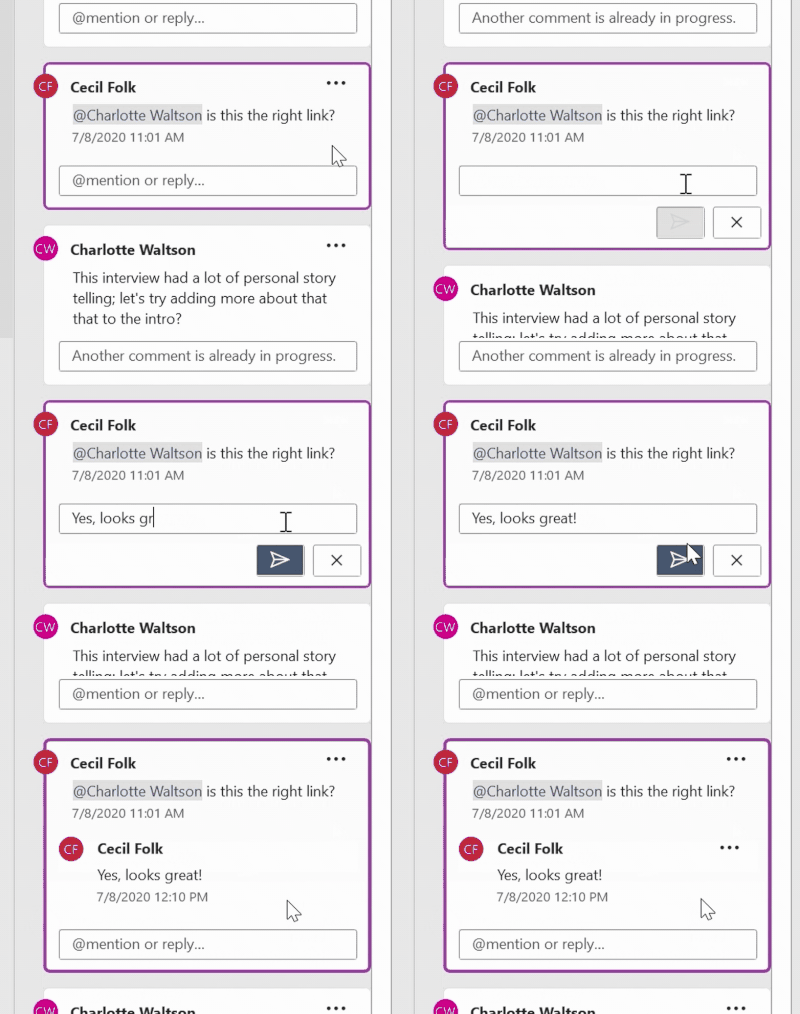
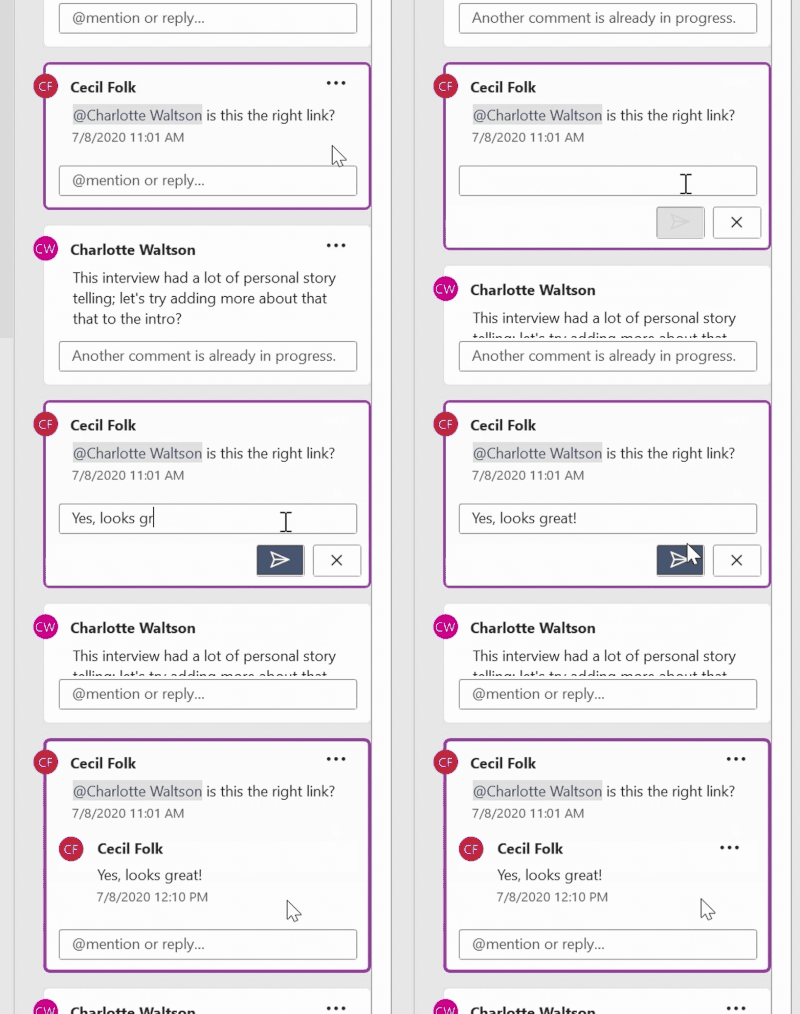
With modern comments, you no longer have to worry about your comments being seen by others before you’re finished editing them. After you draft a new comment or reply, click the Post button or use the keyboard shortcut Ctrl+Enter (Windows) or Cmd + Enter (MacOS) to share your thoughts with others. Now, a comment or reply can only be edited by the person who created it.
Flexibility in how you view and interact with comments
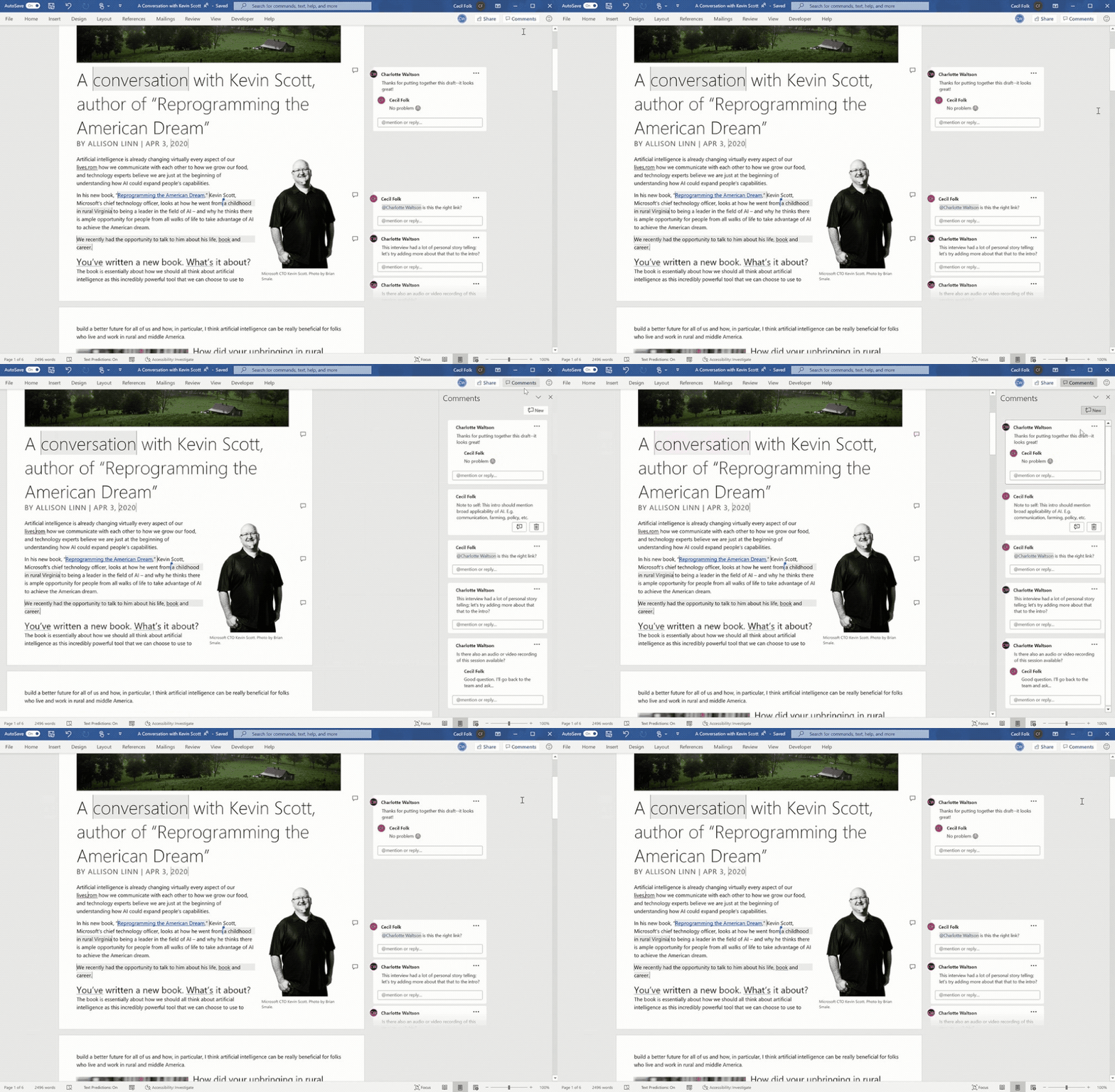
In Word you’ll find comments to the right of your page, by default. In this view, contextual comments are side-by-side with the page content, to help you focus on the feedback that’s most relevant to the part of the document you’re working on.
In the Comments pane, you can see a single list of all comments in your document, including resolved comments. To switch between the contextual view and the Comments pane, simply click the Comments button in the upper right corner of your Word window.
Resolve comment threads
Comments in documents generally represent questions, ideas, or concerns about the content. When those have been addressed, comments allow you to mark that thread as resolved. Resolved comment threads won’t appear in the contextual view (though you can still find them in the Comments pane) to help you stay focused on what’s active.
Improved @mentions in comments
Users have been adding names to comments for years. Now, if you’re an enterprise user working on cloud files, you can more easily use an @mention to call out to one or more of your colleagues in your organization or school. Just highlight some text, click the Comment button, type your comment, and @mention anyone you want to see it.
When you post your comment, anybody that you’ve @mentioned in it will get an email notification. Whoever started the comment thread will also be notified. Notification emails let your collaborators know there’s been new activity in the comment thread, gives them a preview of the document content where the comment was made, as well as the comment you left. They can reply to your comment from the email, or they can click a link in the notification email to open the document and go straight to the comment if they want to see more context.
Better collaboration practices for today’s remote world
These new commenting experiences are ideal for today’s remote teams who may be working together from across town or around the world. Comments eliminate the need to coordinate schedules or conduct in-person discussions, providing greater flexibility and enabling collaborators to provide better insights. A consistent experience across applications makes everything flow smoothly.
We’re continuing to iterate on Modern comments and other collaboration features in Office, and your feedback plays an invaluable role in the process. If you have the new commenting experience in Word, let us know what you think and what you’d like to see next!
If you don’t have Modern Comments yet but can’t wait to try it, join our Office Insider Program.
See our support page for more information: Using Modern Comments in Word.
by Contributed | Apr 9, 2021 | Technology
This article is contributed. See the original author and article here.
Customers around the world rely on Microsoft Azure to drive innovations related to our environment, public health, energy sustainability, weather modeling, economic growth, manufacturing and more. Finding solutions to these important challenges requires huge amounts of focused computing power. Customers are increasingly finding the best way to access such high-performance computing (HPC) is through the agility, scale, security, and leading edge performance of Azure’s purpose-built HPC and AI cloud services.
Azure’s market-leading vision for HPC and AI is based on a core of genuine and recognized HPC expertise, using proven HPC technology and design principles, enhanced with the best features of the cloud. The result is a capability that delivers performance, scale, and value unlike any other cloud. This means applications scaling 12 times higher than other public clouds. It means higher application performance per node. It means powering AI workloads for one customer with a supercomputer fit to be among the top five in the world. And it means delivering massive compute power into the hands of medical researchers over a weekend to prove out life-saving innovations in the fight against COVID-19.
This year during Ansys Simulation World 2021, we’re spotlighting some of the most transformational applications that highlight our commitment to IOT, AI, HPC and cloud computing. Learn more about the event and register here.
Presentations by Microsoft experts range from how to drive more productivity from simulations by leveraging the power of GPU’s on Azure to optimal setups for running complex IC simulations in the cloud to novel methods of developing advanced control algorithms using machine learning and simulations together. Overall, the conference represents many industries coming together to discuss simulation and digital transformation, and as the Diamond Sponsor, Microsoft is right in the middle of this movement.
Microsoft Sessions
Recommended Ansys Sessions
References
by Contributed | Apr 9, 2021 | Technology
This article is contributed. See the original author and article here.
By: Marc Swinnen, Dir. Product Marketing, Semiconductors, Ansys and Andy Chan, Director, Azure Global Solutions, Semiconductor/EDA/CAE
What is Ansys RedHawk-SC?
Modern semiconductor integrated circuits (IC) can contain a staggering 50 billion transistors or more and would be impossible to design without software tools grouped under the Electronic Design Automation (EDA) category that support, automate, and verify every step of the chip design process.
RedHawk-SC is an EDA tool developed by Ansys that is the market leader for power integrity and reliability sign-off, which provide a vital sign-off step in the design process for all semiconductor chip design. Sign-off algorithms are extremely resource-intensive requiring hundreds of CPU cores running over many hours, making it an ideal application for cloud computing.
Designed for the Cloud
RedHawk-SC was architected on a cloud-friendly analysis platform called Ansys SeaScape™. RedHawk-SC’s SeaScape database is fully distributed and thrives on distributed disk access across a network. RedHawk-SC distributes the computational workload across many CPUs, or “workers”, that have low memory requirements – less than 32GB per worker. This elastic compute architecture allows for instant start as soon as just a few workers become available.
The distribution of the computational workload is extremely memory efficient, allowing the optimal utilization of over 2,500 CPUs. There is also no need for a heavy master node because the distribution is orchestrated by an ultra-light master scheduler using less than 2GB for even the largest chips. The same is true for loading, viewing, or debugging results.
RedHawk-SC Workloads on Azure
EDA applications like RedHawk-SC have specific requirements for optimal cloud deployment. We can summarize these considerations with the following points:
- Sign-off generates very large workloads requiring thousands of CPUs
- Large design sizes necessitate persistent or distributed storage for data and results in the cloud
- Worker communication calls for a high-bandwidth network (10Gbps or more)
Ansys and Microsoft have worked together to evaluate the performance of realistic RedHawk-SC workloads on the Azure cloud and how to optimally configure the hardware setup.
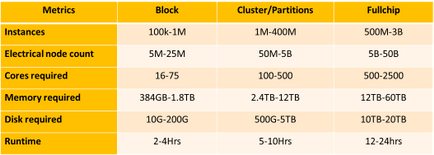
Table-1: RedHawk-SC resource requirements for representative small “Block” workloads, medium “Cluster/Partition” workloads, and large “Full Chip” workloads
Cloud Compute Models for EDA
Microsoft worked closely with Ansys to develop finely tuned solutions for RedHawk-SC running on Azure’s high-performance computing (HPC) infrastructure. These targeted reference architectures help ease the transition to Azure and allow design teams to run faster at a much lower cost.
IC design companies may choose to contract with cloud providers like Azure under an “all-in” model where the entire design project is conducted in the cloud or may look for a “hybrid” use model where cloud resources complement their existing in-house capacity (Figure-
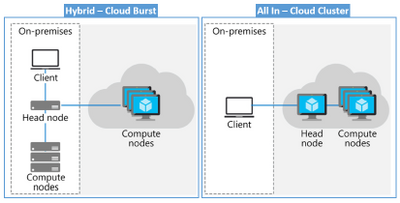
Figure-1. Hybrid versus all-in model with both the head and compute nodes in the cloud.
Ansys and Microsoft Azure have verified that RedHawk-SC successfully accommodates both “all-in” and “hybrid” use models and licensing.
Azure infrastructure optimized for EDA
To achieve the fastest possible runtimes, companies typically start by investing in processors that support the highest clock speed available. Additionally, the cloud poses other efficiency considerations such as datacenter efficiency and workflow architecture. Benchmarks show that storage in the cloud is a high-impact architectural component, as are scale technologies. Through extensive testing with realistic workloads, Microsoft and Ansys have recommended an optimized hardware configuration for running RedHawk-SC on Azure in Figure-2 (below) The Azure Silicon team selected the following infrastructure to power this test:
- AMD’s EPYC powered HBv2
- Intel Cascade Lake powered FX VM family
- Azure NetApp Files
- CycleCloud Operations Orchestration
Azure NetApp Files is a high-performance, NFS-metered file storage service enables RedHawk-SC file applications to run without the need for code changes. CycleCloud cloud-scaling was used to support RedHawk-SC in orchestrating dynamic VM deployment.
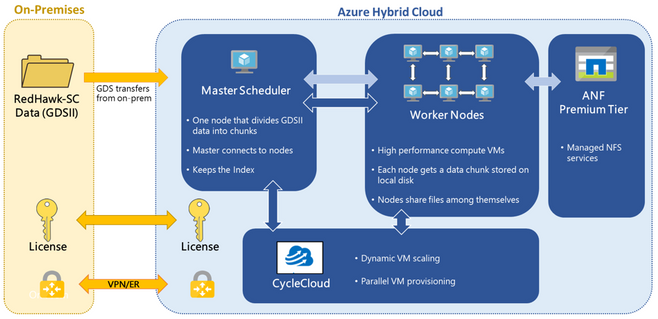
Figure-2: Reference architecture for running Ansys RedHawk-SC on an Azure hybrid cloud
RedHawk-SC shows near-linear runtime scaling as the number of CPUs is increased. This is shown for the three different workloads in Graph-1 (below). The favorable scaling reflects the efficient distribution technology underlying RedHawk-SC’s SeaScape architecture.
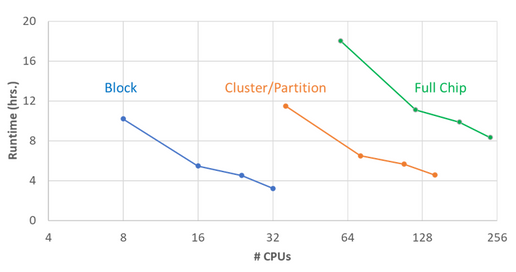
Graph-1: Runtime required to run various RedHawk-SC workloads on Microsoft Azure as a function of the number of CPUs
In a surprising finding from Graph-1, the total cost of running a RedHawk-SC job on Azure actually decreases as you increase the number of workers (up to the optimum threshold). This contradicts the commonly held assumption that the total cost will increase as you enlist more CPUs (Graph-2). The reason for this is the very high CPU utilization RedHawk-SC can achieve. The optimal number of CPUs is the number of power partitions automatically calculated by RedHawk-SC.
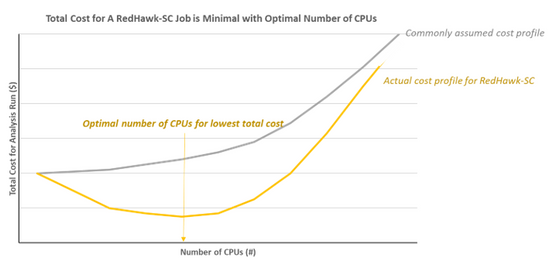
Graph-2: This plot illustrates the non-intuitive decrease in total Azure costs for RedHawk-SC runs as the number of CPUs is increased to an optimal value – the number of power partitions in RedHawk-SC
This result is not intuitively obvious and indicates that customers should not try to reduce the CPU count to save money. In fact, they should actually increase their CPU count to the optimal value to achieve lower cost and a faster runtime.
Conclusion
Extensive testing of RedHawk-SC on Azure has allowed Microsoft to identify an optimized VM configuration for cloud-based EDA work. This configuration has demonstrated excellent scalability to over 2500 CPUs running on a range of realistic EDA workloads of enormous sizes. The testing further identified the optimal number of CPUs to minimize the total cost for running RedHawk-SC on Azure. The result is that customers can easily set up their power integrity signoff analysis jobs on Azure with optimal configurations for both throughput and cost.
For further information contact your local sales representative or visit www.ansys.com.
Join us at Ansys Simulation World 2021 April 20th – 21st. Register here.


Recent Comments