
by Contributed | Apr 19, 2021 | Technology
This article is contributed. See the original author and article here.
Ivana Tilca’s tech journey is marked by a life-long passion for learning. The AI MVP from Argentina is now a tech evangelist at the top of her field, but things were not always this way.
Originally, Ivana began her academic career in journalism at National University in Cordoba, Argentina. For family reasons, however, Ivana moved back to her home city of Salta where she changed course and began studies in Information Systems.
“I started speaking at events and mentoring students at my university in my 20s, and from that moment I realized the passion I feel for technology and for sharing with the community,” Ivana says.
It was not as easy to learn then as it is now. Rather, the education experience relied on books or the little content that existed on the internet. That’s when Ivana found Microsoft Channel 9, a video platform that covered innovation and topics breaking new ground. Then, Ivana says she was later able to support those videos with MS Learn and MS Docs.
Fast forward years later and Ivana is an accomplished MVP and Quality Manager at 3XM Group. These resources changed the course of her education experience, Ivana says, especially in an ever-changing field like AI. Further, the tech evangelist continues to take advantage of online resources to study AI, autonomous systems and mixed realities.
“I believe that technology is advancing by leaps and bounds, and the reality is that those who do not spend time updating themselves lose competitiveness in the professional market,” Ivana says.
“Further, continuing to face challenges gives you motivation and passion for your profession.”
For those looking to break into AI, Ivana suggests the following open resources: Bring AI to your business with AI Builder, AI edge engineer, Build AI solutions with Azure Machine Learning, Explore computer vision in Microsoft Azure.
“I think many professions in the future will involve the use of AI,” Ivana says. “AI has existed for several years, but recently it has grown and found its place. It is a branch of technology that is just beginning and will continue to improve constantly, and personally, I believe that it has no limits.”
For more on Ivana, visit her Twitter @ivanatilca
by Contributed | Apr 19, 2021 | Technology
This article is contributed. See the original author and article here.
Microsoft.Data.SqlClient 3.0 Preview 2 has been released. This release contains improvements and updates to the Microsoft.Data.SqlClient data provider for SQL Server.
Our plan is to provide GA releases twice a year with two preview releases in between. This cadence should provide time for feedback and allow us to deliver features and fixes in a timely manner. This second 3.0 preview includes many fixes and changes over the previous 3.0 Preview 1 release.
Please note the first item in the list of breaking changes from previous releases. If you use Azure Managed Identity authentication with a user-assigned identity, you will need to update your connection information.
Breaking Changes over preview release 3.0.0-preview1
- For User-Assigned, Azure Managed Identity (MSI) authentication, the `User Id` connection property now requires `Client Id` instead of `Object Id` [read more about the new Azure.Identity library dependency]
- `SqlDataReader` now returns a `DBNull` value instead of an empty `byte[]`. Legacy behavior can be enabled by setting `AppContext` switch **Switch.Microsoft.Data.SqlClient.LegacyRowVersionNullBehavior** [read more about this change]
Preview 2 also includes many bug fixes and performance improvements. For the full list of changes in Microsoft.Data.SqlClient 3.0 Preview 2, please see the Release Notes.
If you missed our 3.0 Preview 1 announcement, the most notable new feature in 3.0 is Configurable Retry Logic.
Configurable retry logic is available when you’ve enabled an app context switch. Configurable retry logic builds significantly more transient error handling functionality into SqlClient than existed previously. It will allow you to retry connection and command executions based on configurable settings. Since it is even configurable outside of your code, it can help make existing applications more resilient to transient errors that you might encounter in real-world use.
For a detailed look into this feature, check out the blog post Introducing Configurable Retry Logic in Microsoft.Data.SqlClient v3.0.0-Preview1.
To try out the new package, add a NuGet reference to Microsoft.Data.SqlClient in your application and pick the 3.0 preview 2 version.
We appreciate the time and effort you spend checking out our previews. It makes the final product that much better. If you encounter any issues or have any feedback, head over to the SqlClient GitHub repository and submit an issue.
David Engel
by Contributed | Apr 19, 2021 | Technology
This article is contributed. See the original author and article here.
Microsoft Ignite might be done and dusted for another year, but that did not stop scores of MVPs and tech enthusiasts in both China and Japan from continuing their education journey in March.
Following the global tech conference, both communities in Asia decided to review the takeaways in their local language and focus on lessons learned.
First, Microsoft China hosted a two-day digital conference, Microsoft Ignite China, that comprised seven keynotes, 11 connection sessions and 30 featured sessions. In collaboration with the MVPs and Regional Directors (RD), the March 18 event brought to life six hours of online engagement per day, with two RDs contributing to the “Connection Zone” and nine MVPs helping with live stage sessions.
Data Platform MVP Dan Zhang says it is very important for self-learners to have an integrated and authentic learning platform in China. Microsoft Ignite China, along with resources like MS Learn, are vital to staying on top of the ever-changing world of tech, Dan says.
“Knowledge on the internet is separated and unsystematic, which will cost learners a lot of time and energy to find good resources and materials. The emergence of MS Learn is a good benefit for numbers of developers,” Dan says.
“Continuous learning in technical areas is important in China since it can help developers keep up to pace with new tech and the environment,” agrees AI MVP Yuxiang Wang. Meanwhile, Azure and AI MVP Hao Hu suggests that an additional achievement system on MS Learn could be one way to encourage developers to further their skills.
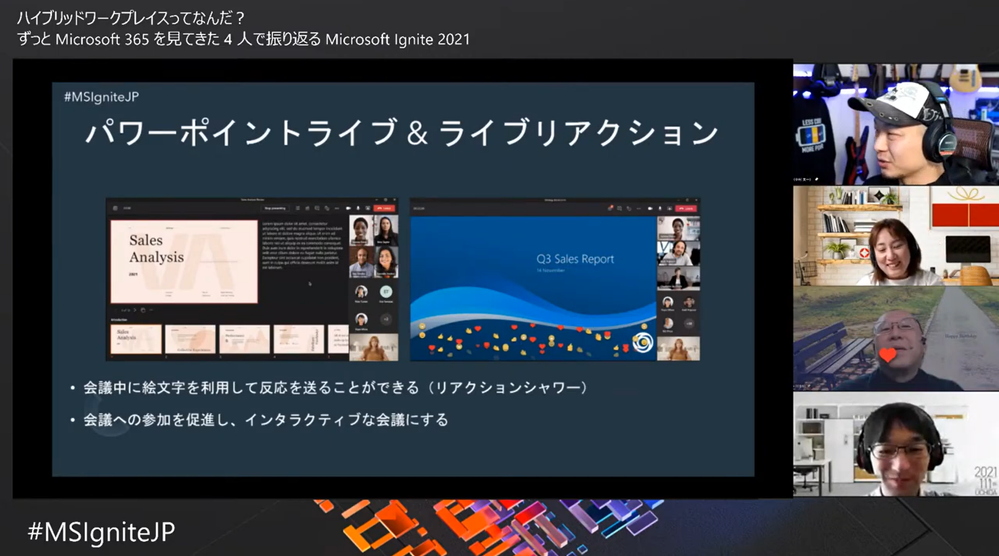
Later that month on March 24, it was time for the community-driven learning event Microsoft Ignite Recap Community Day in Japan. A total of 20 MVP/RD/community leaders contributed to 10 sessions across the 4-hour event. Not only that, but the 20 MVP/RDs also shared their Ignite recommended sessions for further member learning.
Business Applications / Office Apps & Services MVP Taichi Nakamura joined multiple sessions and shared the latest updates of Microsoft 365 & Power Platform. Taichi says he wanted to take part simply because it looked fun. “I wanted to share my joy with attendees, provide our passion to attendees, and call more attention to join a tech community,” he says.
Developer Technologies MVP and fellow session presenter Kazushi Kamegawa says the pandemic has enacted many rapid changes in the world, and education remains an important way to stay connected. “As an engineer, of course, in order to adapt to the new world in the future, I think I have to continue to learn, to identify the right information, and not to be left behind by the situation in the world.”
Azure MVP Tetsuya Odashima contributed to one of the Ignite recommended session resources and says it is important to remember that “learning is not something that is given by someone, but something that you can get by acting on your own.”
“Learning new things stimulates curiosity,” posits Enterprise Mobility MVP Yutaro Tamai. “I’d like to share this experience with more community members.”
For more information on the dual events, visit the community pages for Microsoft Ignite China and Microsoft Ignite Recap Community Day Japan.
by Contributed | Apr 19, 2021 | Technology
This article is contributed. See the original author and article here.
Today I wanted to share with you some exciting new capabilities that are now available to help Microsoft Defender for Office 365 and Microsoft 365 Defender customers investigate emails.
Investigating email threats is now easier than ever!
We know that you, the security teams, spend a lot of time diving deep into alerts, hunting threats, identifying malicious indicators, and taking remediation actions. You go through multiple workflows to take the right measures to protect your organization. These workflows involving email borne threats typically have a few steps in common – all involving analyzing an email in question and any related emails – to answer questions like: Why did the system call an email malicious? Why did an email get blocked (or delivered)? How many users (and which ones) received these emails? What actions have already been taken on these emails? And a lot more.
Answering these questions often takes time and effort. And we consistently hear how much you crave ever-increasing efficiency in the tools you use, so the effort and time involved in responding to alerts and threats is reduced.
That’s why we’re excited to introduce the new Email Entity page in Microsoft Defender for Office 365. A simple, yet rich experience that offers a single pane of glass view to answer all the questions above, greatly amplifying the efficiency with which you can investigate and respond to threats.
Introducing the new Email Entity page
The new email entity page brings a comprehensive experience that provides an exhaustive view of details critical to investigation. The email entity page gives a 360-degree view of an email in one page, and helps security analysts save time and effort, leading to more effective threat protection.
Curious why an email was delivered despite being marked as malicious? Or what the latest location of the email is? What are the rich set of details for a URL or file that was detonated? Was it sent to a priority account? The email entity page brings you the answer to these questions, and the details you need to investigate and analyze an email – overrides, exchange transport rules, latest delivery location, detonation details, tags and a lot more.
The email page has information and capabilities for analysts to dig deeper into intricate email details, and headers, look at email preview or email download. The email page also builds on our promise to integrate Defender for Office 365 tightly with other Microsoft 365 Defender experiences like hunting, alerts, investigations and more.
What’s exciting about the Email Entity page?
We are sure the single page view is appealing, but that is not it. We bring a lot more details and capabilities to the new email entity page.
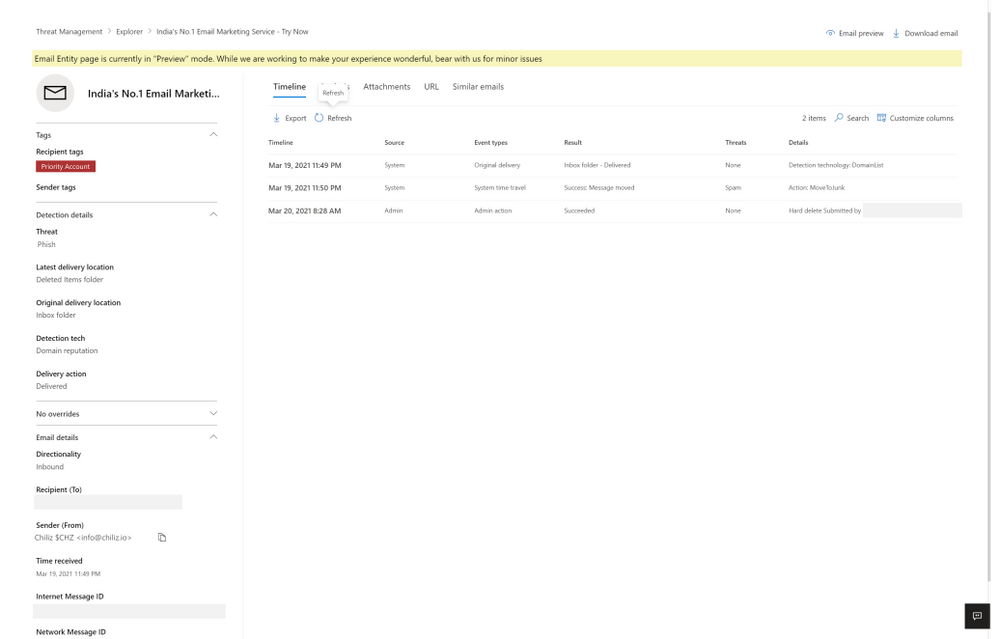
Each tab presents you with information about the email. The timeline tab has a series of events which took place on email by system, admin or user.
Figure 1: The timeline tab has a series of events which took place on email by system, admin or user.
The analysis tab shows pre and post-delivery fields about email, in addition to the headers presented in the same tab, helpful for a side-by-side analysis.
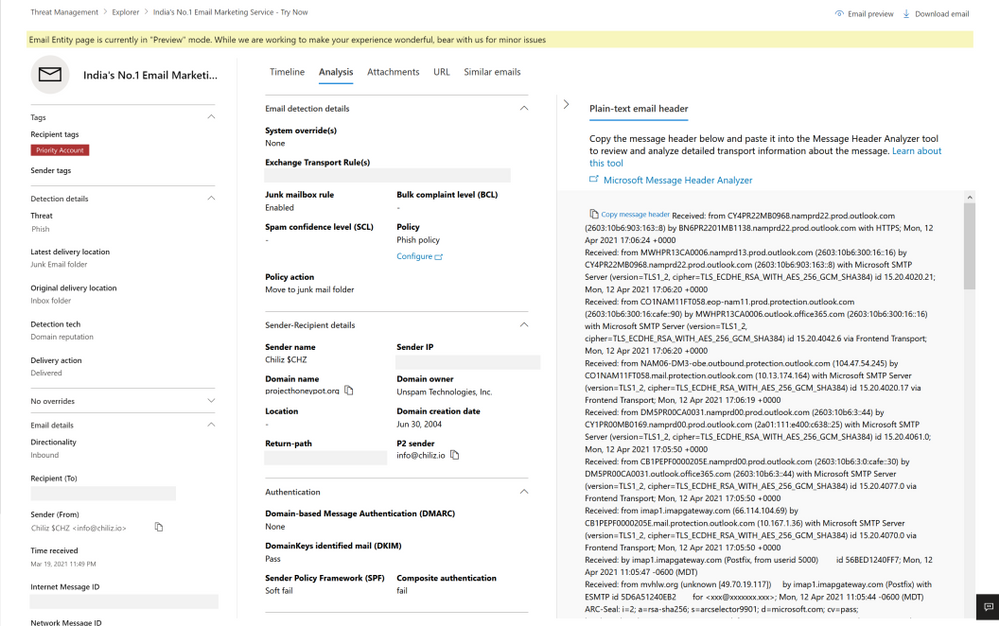
Figure 2: The analysis tab shows pre and post-delivery fields about email, in addition to the email headers
The attachment and URL tabs present detailed information about attachments and URLs present in the email, along with detonation details in case a detonation occurs (shown in the section later on detonation details).
Lastly, the similar emails tab shows emails found similar to the email. Similar emails are found using the body fingerprint i.e. the cluster ID.
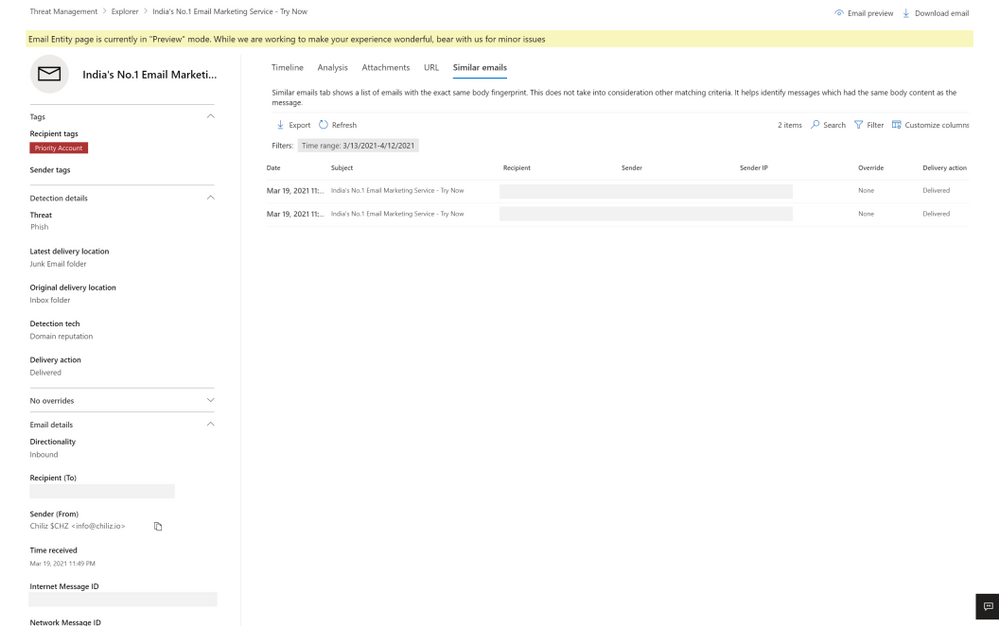
Figure 3: The similar emails tab shows emails found similar to the email, using cluster ID
The email entity page not only has enriched details, but also new capabilities to help the security operations team investigate successfully, like email preview and detonation details.
Email preview for cloud mailboxes
We now provide full previews of emails found in cloud mailboxes. No need to download a copy of a malicious message to understand what your users saw – you can now do this with the click of a button from the safety of the admin center.
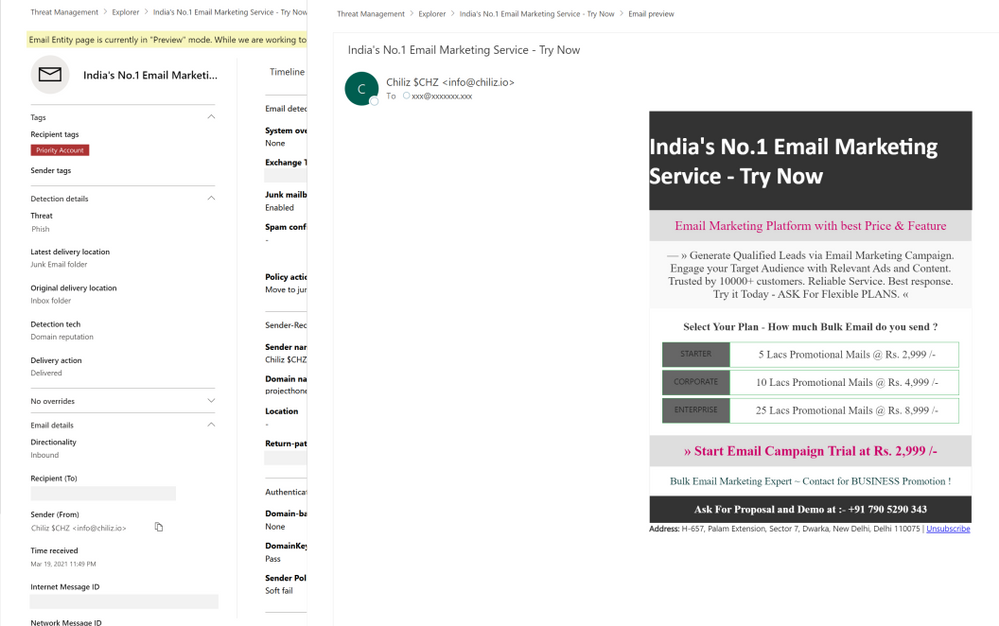
Figure 4: Email preview provides full previews of emails found in cloud mailboxes
Exposing details for detonated URLs and attachments
With the email entity page, we have greatly enhanced the level of details we present about the observations we make in the detonation chamber for entities which get detonated. When a URL or file present in an email is found malicious during detonation, we will present the information to help you understand the full scope of related threats. Detonation details reveal information like the full detonation chain, a detonation summary, a screenshot and observed behavior details. This information can help security teams understand why we reached a malicious verdict for a URL or file following a detonation.
For file detonation cases (you can filter by detection technology in Threat Explorer), the Attachments tab shows a list of attachments and their respective threats. Clicking on the malicious attachment opens the detonation details flyout for the detonated attachments. For URL detonations, the URL tab shows a list of URLs and the corresponding threats. Clicking on the malicious URL will open the detonation details flyout for detonated URLs.
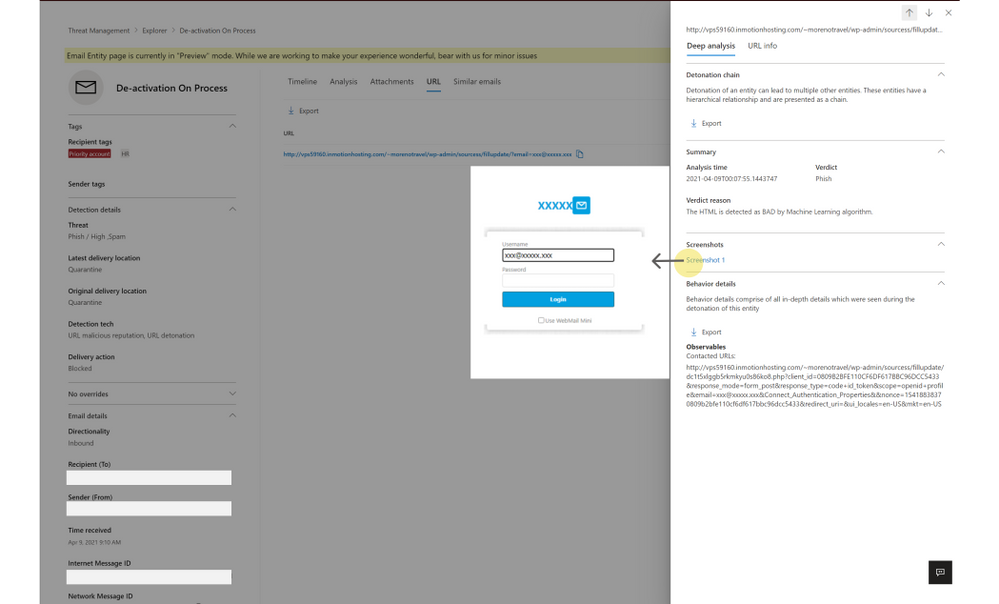
Figure 5: Detonation details shows additional details discovered during detonation of links and files
How can I get started with this new experience?
If you have Microsoft Defender for Office 365 or Microsoft 365 Defender, you can take advantage of this new experience today. When hunting for email-based threats, natively integrated into Explorer, you may now choose to navigate to the new email entity page. You can do the same with alerts experience, across both the security and protection portals at security.microsoft.com and protection.office.com respectively.
Learn more about the email entity page on Microsoft Docs, and check out a video overview of these capabilities here.
Do you have questions or feedback about Microsoft Defender for Office 365? Engage with the community and Microsoft experts in the Defender for Office 365 forum.


Recent Comments