by Contributed | May 5, 2021 | Technology
This article is contributed. See the original author and article here.
Today and every Wednesday Data Exposed goes live at 9AM PT on LearnTV. Every 4 weeks, we’ll do a News Update. We’ll include product updates, videos, blogs, etc. as well as upcoming events and things to look out for. We’ve included an iCal file, so you can add a reminder to tune in live to your calendar. If you missed the episode, you can find them all at https://aks.ms/AzureSQLYT.
You can read this blog to get all the updates and references mentioned in the show. Here’s the May 2021 update:
Product updates
The two main updates for this month are for Azure SQL Managed Instance and Azure SQL Database Hyperscale.
Azure SQL Managed Instance announced the general availability of service-aided subnet configurations. Service-aided subnet configuration allows users to remain in full control of TDS traffic, and Azure SQL Managed Instance takes responsibility to ensure uninterrupted flow of management traffic in order to meet SLAs. This configuration builds on top of the virtual network subnet delegation feature to make it easier for customers, by providing automatic network configuration management and enabling service endpoints.
These service endpoints or ‘service tags’ provide a was to reference essentially all IP addresses related to a given service in a specific region. For example, if you want to configure access to storage accounts to keep backups and audit logs in the region of West US, you could use the tag Storage.WestUs. Then, you can create a user-defined route (UDR) as the mechanism that allows traffic to leave the SQL MI virtual network and reach your storage account.
The other major announcement is a public preview for geo-replication in the Azure SQL Database Hyperscale service tier. This has been available in other Azure SQL Database tiers for a while, and this capability enables cross region business continuity and disaster recovery by allowing you to create one or more replicas in the same or different regions. This announcement brings Azure SQL Hyperscale one step closer to full feature parity with Azure SQL Database. Learn more about the preview here.
From a tools perspective, special guest Alexandra Ciortea came on to talk about SQL Server Migration Assistant (SSMA) and the latest release. She mentioned several great references for how to stay up to date, which you can find below:
Videos
We continued to release new and exciting Azure SQL episodes this month. Here is the list, or you can just see the playlist we created with all the episodes!
- Kate Smith: Understanding the Benefits of Intelligent Query Processing
- [MVP Edition] Argenis Fernandez: Storage 101 for Azure SQL and SQL Server Engineers
- Aaron Nelson: How to Parameterize Notebooks for Automation in Azure Data Studio
- Amit Khandelwal: Use Helm Charts from Windows Client Machine to Deploy SQL Server 2019 Containers on Kubernetes
- Manoj Raheja: Get Started with Azure Data Explorer using Apache Spark for Azure Synapse Analytics
- Mohamed Kabiruddin: Get Started with the New Database Migration Guides to Migrate your Databases to Azure
We’ve also had some great Data Exposed Live sessions. Subscribe to our YouTube channel to see them all and get notified when we stream. Here are some of the recent live streams.
- Something Old, Something New: Do Kangaroos Prefer Cake or Frosting?
- Azure SQL Security Series: Understanding Access and Authentication
- Ask the Experts: SQL Edge to Cloud
Blogs
As always, our team is busy writing blogs to share with you all. Blogs contain announcements, tips and tricks, deep dives, and more. Here’s the list I have of SQL-related topics you might want to check out.
- Azure Blog, data-related
- SQL Server Tech Community
- Azure SQL Tech Community
- Azure SQL Devs’ Corner
- Azure Database Support (SQL-related posts)
Special Segment: SQL in a Minute, Microsoft Docs
We introduced a new segment this month, SQL in a Minute, led by Cheryl Adams. Cheryl and Jason Roth came on to talk about the latest updates and how to contribute to Microsoft Docs. You can find the documentation at https://aka.ms/sqldocs and the contributors guide at https://aka.ms/editsqldocs.
Special Segment, Citus and Open source updates
Claire Giordano, Principal PM Manager in Azure Data, came on the show to share some resources and updates around Citus and open source databases. Here are some references if you want to learn more:
Upcoming events
As always, there are lots of events coming up this month. Here are a few to put on your calendar and register for:
May 10: SQLDay 2021
Azure SQL Workshop, Bob Ward and Anna Hoffman
Keynote, Bob Ward
SQL Day Q&A, Bob Ward and Buck Woody
Inside the Memory of SQL, Bob Ward
Presentation Skills for the Data Profession, Buck Woody
May 11: Azure Webinar Series: Debugging Web Apps on Azure App Service and Azure SQL
May 14: PyCon 2021
What we learned from Papermill to operationalize notebooks, Alan Yu and Vasu Bhog
May 15: Data Weekender
Keynote – Into the Dataverse, Buck Woody
May 15: Data Saturday Southwest US
Keynote, Buck Woody
May 18: Redgate Azure SQL Managed Instance Webinar
Inside Azure SQL Managed Instance, Bob Ward
May 18: Techorama
From Oops to Ops: Incident Response with Notebooks, Julie Koesmarno and Shafiq Rahman
May 20: Azure Webinar Series: Implementing DevOps Best Practices on Azure SQL
May 25- 27: Microsoft Build
Keynote, Rohan Kumar and Jason Anderson
Learn Live: Build full stack applications with Azure Static Web Apps and Azure SQL Database, Anna Hoffman and Davide Mauri
Roundtable: Develop Apps with SQL DB, Anna Hoffman, Davide Mauri, Sanjay Mishra
Roundtable: Mission Critical workloads on Azure SQL DB, Anna Hoffman, Abdul Sathar Sait, Sanjay Mishra, Roberto Bustos, Emily Lisa
In addition to these upcoming events, here’s the schedule for Data Exposed Live:
May 12: Azure SQL Virtual Machine Reimaged Series with David Pless and Pam Lahoud
May 19: Deep Dive: Azure SQL Insights with Alain Dormehl
Plus find new, on-demand Data Exposed episodes released every Thursday, 9AM PT at aka.ms/DataExposedyt
Featured Microsoft Learn Module
Learn with us! This month I highlighted the Deploy highly available solutions by using Azure SQL. Check it out!
By the way, did you miss Learn Live: Azure SQL Fundamentals? On March 15th, Bob Ward and I started delivering one module per week from the Azure SQL Fundamentals learning path (https://aka.ms/azuresqlfundamentals ). Head over to our YouTube channel https://aka.ms/azuresqlyt to watch the on-demand episodes!
Anna’s Pick of the Month
This month I am highlighting the Azure SQL Digital Event that happened on May 4th. This was an amazing event led by Azure Data CVP Rohan Kumar. Rohan spoke about the current and future innovations in Azure SQL, and it was hosted by Bob Ward with cameo from Scott Guthrie. I got to demo a few cool things, along with several other Microsoft Product Group members and Microsoft MVPs. You don’t want to miss the on-demand! Register at https://aka.ms/AzureSQLDigitalEvent to get the recordings.
Until next time…
That’s it for now! Be sure to check back next month for the latest updates, and tune into Data Exposed Live every Wednesday at 9AM PST on LearnTV. We also release new episodes on Thursdays at 9AM PST and new #MVPTuesday episodes on the last Tuesday of every month at 9AM PST at aka.ms/DataExposedyt.
Having trouble keeping up? Be sure to follow us on twitter to get the latest updates on everything, @AzureSQL. You can also download the iCal link with a recurring invite!
We hope to see you next time, on Data Exposed :)
–Anna and Marisa

by Contributed | May 5, 2021 | Technology
This article is contributed. See the original author and article here.
We are pleased to share a set of new resources on storytelling for Champions!
Our overall goal for delivering these new resources is to enable you and your organization to achieve greater results from your adoption and change management programs. Stories are an amazing way to connect with people through shared experiences, inspire others to act, and are an influential way to communicate. Storytelling can play a key role in any change journey as a powerful way to showcase examples of the new behavior change in action.
I have worked with enterprise customers at Microsoft for nearly two decades and have seen the impact of great adoption success stories when they are shared by champion business users who have realized the positive impact of change. This has helped them grow and enhance executive sponsorship, lowered resistance to change among later adopters, inspired new ideas, and reinforced the value of the change program.
The resources include:
- A new storytelling guide that includes:
- A framework for finding and growing good success stories: Empower, Capture, Amplify, Learn;
- A sample structure for capturing compelling stories: Situation, Complication, Resolution, The Point;
- And additional learning resources.
- A storytelling course on LinkedIn Learning where you can also earn a certificate for completion.
We encourage you to take a look and leverage with your teams. We also welcome your feedback here on how we can improve this and other resources on the site to keep inspiring your communities to achieve more!
Access the content at storytelling for Champions.


by Contributed | May 5, 2021 | Technology
This article is contributed. See the original author and article here.
By Christine Alford, Director, Commercial Marketplace Business Team
Previously, I’ve talked about Microsoft’s #BuildFor2030 campaign. As partner to the United Nations, Microsoft has pledged to support the UN Sustainable Development Goals (SDGs). The SDGs are a set of 17 initiatives adopted by member states in 2015 focused on creating a more inclusive, sustainable, and equitable world by 2030. Inspired by the UN SDGs, through the #BuildFor2030 campaign, we’re featuring Microsoft partners building solutions that enable a more inclusive economy.
This milestone of the campaign launched on Earth Day on April 22. With this milestone we are supporting climate action and sustainability by recognizing partner innovation for sustainability. Currently, on our homepages of Microsoft AppSource and Azure Marketplace you can find Microsoft partner solutions in our “featured apps” section that are innovating to build a more resilient and sustainable future.
Learn more about how Microsoft partners are helping customers leverage technology to better our environment and create a more sustainable society by reading this blog post by Nick Parker, CVP, Global Partner Solutions.
If you have a solution that supports a more inclusive, sustainable, and equitable future, we’d love to celebrate your impact. Upcoming campaign themes this year include enabling nonprofits and empowering communities. Learn more about #BuildFor2030 and how you can participate. Don’t miss out on your chance to be featured! Nominate your solution today.
by Contributed | May 5, 2021 | Technology
This article is contributed. See the original author and article here.
This blog dives into how to setup 1:1 call recording, end user experience and best practices for enabling this feature for users.
What is 1:1 call recording ?
This feature gives user the ability to record Microsoft® Teams call made to another user who is using Teams. Note that, this feature does not give you the ability to record 1:1 call with PSTN user.
How to enable call recording settings:
This is enabled using PowerShell. You need to modify the “Teams Calling Policy” using PowerShell. This setting is disabled by default – it must be enabled. You can either enable it for your global policy or you can create a custom policy, which has this feature enabled, and apply that policy to users who require this feature.
Set-CsTeamsCallingPolicy -Identity Global -AllowCloudRecordingForCalls $True
Note that, prior to April 12, 2021, this setting was controlled by the “Teams meeting policy”. If you allowed recording for teams meeting by setting “AllowCloudRecording” to true. After May 31, 2021, this particular setting in “Meeting Policy” only works for recording a meeting, it does not work for call recording.
End user experience:
After enabling this feature the user will have the option to ‘record a call’ in teams.
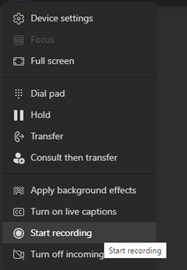
After a call is connected, users will have to click on the “more actions” icon (…) and it will give the option to start recording. In this example, John called Jane, and John started the recording.
When the recording starts the user on the other end (Jane) will get a notification that recording has started. In addition, a recording icon (red button) appears right next to the timer, even if the notification is dismissed the recording icon will stay active as long as recording is going on, so that the user is aware that the call is being recorded.
The notification still says “this meeting is being recording…” even though it is a 1:1 call, you can ignore this typo.

Where is the recording stored
The recording will be stored either in Stream or OneDrive for the user who initiated the recording. The “other” user – in this example, “Jane” will have read-only access to the recording.
Both users will be notified when the recording is ready. It will show up in the chat window for the call – in this example, John called “Jane Doe” and Jane recorded the call. The link to recording appears on both their chat window and it can be played back right on the Teams client.
In this case both John and Jane are in the same organization within the same Microsoft 365 tenant.

If the user who did not initiate the recording is an external user, then, this “recorded” user will not have access to the recording. The user who initiated the recording will have to share the recording with the user on the other organization.
After July 7, 2021, all recordings will be stored in OneDrive by default, unless your organization decides to opt-out. Following article goes into details about recording and storage for both 1:1 calls and meeting recordings.
Use OneDrive for Business and SharePoint for meeting recordings – Microsoft Teams | Microsoft Docs
This feature is for end user and does not replace or complement compliance recording. The user who initiates the recording has access to the recorded file, which in certain situation can violate compliance. For example, in certain scenarios, just the notification that the user is being recorded may not meet compliance requirement, additional disclaimers might be necessary. Another possible scenario – certain users are not allowed to keep recordings of calls in their storage. In these cases, admins need to get formal approval from the compliance team before proceeding with this setting.
Recommendation:
- Consider compliance requirement prior to enabling 1:1 recording feature.
- Start with a custom policy where this feature is enabled and add select group users to the policy. If a decision is made to enable the feature for all users, then the feature can be enabled globally.
- Both 1:1 call recording and meeting recording experience should be similar for specific users – otherwise, it can create confusion for the end-user.
- Share helpful tips with the user about where the recordings are stored.
- Consider retention policy to get remove old recordings from user’s One Drive.
Seema Rahman is the Principal Architect of Zodela Technologies. Her primary focus area is Microsoft Teams – over last 3 years, she has helped multiple mid to large size customers adopt teams as their main collaboration platform.
To write your own blog on a topic of interest as a guest blogger in the Microsoft Teams Community, please submit your idea here: https://aka.ms/TeamsCommunityBlogger
by Contributed | May 5, 2021 | Technology
This article is contributed. See the original author and article here.
This blog post is the third in a series of three examining the results of a recent IDC study, Leveraging Microsoft Learning Partners for Innovation and Impact.*
Upskilling is a key requirement in today’s IT centers, and Microsoft Learning Partners can help your organization get the greatest impact from your learning initiatives, development programs, and digital transformation efforts. Given the importance of staying ahead of quickly evolving technology, we asked IDC researchers to find out what makes a Learning Partner valuable to an organization.
Our first post in the series, New study shows the value of Microsoft Learning Partners, took a high-level look at the benefits of using a Learning Partner to meet your technical skilling needs. Among the findings: the right partner, along with high-quality content, improves outcomes. The second post, Get results from end-to-end training solutions offered by Microsoft Learning Partners, highlighted the tremendous value Learning Partners bring to organizations through their capacity to provide an end-to-end solution and to deliver value-added services to support a learner’s ability to gain and retain needed skills.
This final post explores the additional benefits. Working with a Learning Partner provides:
- Scale, flexibility, and speed. Learning Partners have the scale to support global organizations, the flexibility to tailor programs to client needs, and the speed to stand up complex programs quickly.
- Quality content and delivery. They also deliver the latest in accurate, relevant content using Microsoft Official Courseware (MOC) delivered by Microsoft Certified Trainers (MCTs).
Programs with scale, flexibility, and speed meet learning goals
Learning Partners have the scale, flexibility, and speed to set up your IT skills initiatives quickly, provide all the necessary resources, and make sure programs stay on track. As learning experts, they know how to adapt to changing circumstances and schedules and to help ensure that learning initiatives succeed.
The IDC study emphasized three areas where Learning Partners make a difference to organizations:
- The scale to work locally and globally. Whether your IT group is big or small, a Learning Partner works with you to scope and adapt their programs to your organization’s needs, such as rolling out learning across time zones.
- The flexibility to adapt to change. Learning Partners have the flexibility to adapt their deliverables to your changing requirements and business constraints.
- The speed to stay ahead of the tech. Learning Partners not only keep up with the technology but also anticipate changing requirements and help you prepare for the road ahead.
Quality always makes a difference
Quality in learning programs helps accelerate your organization’s business goals, including digital transformation. Tom O’Reilly, Head of Group Strategy at QA, talks about quality as meeting the unique needs of learners and circumstances. “You cannot execute a transformation program without offering a breadth of learning modalities and a high-quality offering in each of them,” he points out.
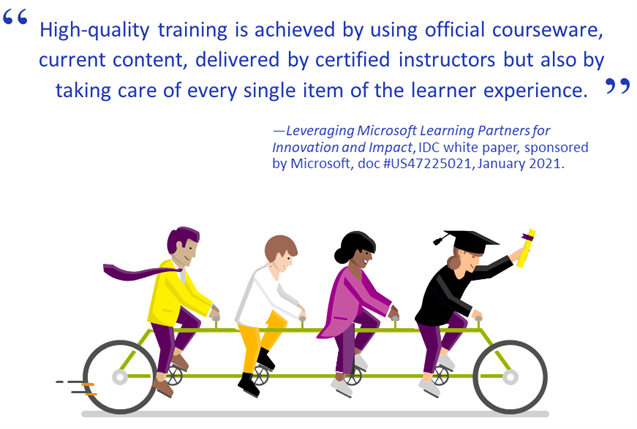
The IDC study emphasized that high-quality training comes from using official courseware and current content, delivered by certified instructors. Quality extends to the way that Learning Partners address every aspect of the learner experience—beginning with an assessment of your training needs and, for some, ending in certification exam preparation.
Some organizations view certifications as a natural outcome of a quality learning experience. Certified IT pros perform their role better,** and certifications can lead to improved IT performance. Learning Partners can help your workforce prepare for the industry’s most trusted certification.
Next step: Ask an expert about their services
To move forward with your skilling needs, consider working with a Microsoft Learning Partner with the scale, flexibility, and speed to deliver the resources that work best for your workforce—along with the quality content and instructors that can help everyone succeed.
Share your thoughts by posting your comment.
Download the IDC study white paper, Leveraging Microsoft Learning Partners for Innovation and Impact
Download the IDC study datasheet, Top reasons to get IT training from a Microsoft Learning Partner
Find a Microsoft Learning Partner

Related posts
Sharpen your technical skills with instructor-led training
Leading Learning Partners Association—a unique organization for delivering Microsoft training
Technical certifications could help drive business optimization
* IDC white paper, sponsored by Microsoft, Leveraging Microsoft Learning Partners for Innovation and Impact, #US47225021, January 2021.
** Global Knowledge, 2019 IT Skills and Salary Report, as quoted in Ten reasons to earn a Microsoft Certification.


Recent Comments