Introducing Azure Sentinel Solutions!

Introducing Azure Sentinel Solutions!

This article is contributed. See the original author and article here.

Today, we are announcing Azure Sentinel Solutions in public preview, featuring a vibrant gallery of 32 solutions for Microsoft and other products. Azure Sentinel solutions provide easier in-product discovery and single-step deployment of end-to-end product, domain, and industry vertical scenarios in Azure Sentinel. Solutions also enables Microsoft partners to deliver combined value for their integrations and productize their investments in Azure Sentinel. This experience is powered by Azure Marketplace for solutions’ discovery and deployment, and by Microsoft Partner Center for solutions’ authoring and publishing.


Azure Sentinel solutions currently include integrations as packaged content with a combination of one or many Azure Sentinel data connectors, workbooks, analytics, hunting queries, playbooks, and parsers (Kusto Functions) for delivering end-to-end product value or domain value or industry vertical value for your SOC requirements. All these solutions are available for you to use at no additional cost (regular data ingest or Azure Logic Apps cost may apply depending on usage of content in Azure Sentinel).


Few use cases of Azure Sentinel solutions are outlined as follows.


  • On-demand out-of-the-box content: Solutions unlock the capability of getting rich Azure Sentinel content out-of-the-box for complete scenarios as per your needs via centralized discovery in Solutions gallery and single step deployment capability. Feel free to customize this content per your needs post deploy!

  • Unlock complete product value: Discover and deploy a solution for not only onboarding the data for a certain product, but also monitor the data via workbooks, generate custom alerts via analytics in the solution package, use the queries to hunt for threats for that data source and run necessary automations as applicable for that product.

  • Unlock domain value: Discover and deploy solutions for specific Threat Intelligence automation scenarios or zero-day vulnerability hunting, analytics, and response scenarios.

  • Unlock industry vertical value: Get solutions for ERP scenarios or Healthcare or finance compliance needs in a single step.

  • And more to unlock complete SIEM and SOAR capabilities in Azure Sentinel.


Get Started


Select from the rich set of 30+ Solutions to start working with the specific content set in Azure Sentinel immediately. Steps to discover and deploy Solutions is outlined as follows. Refer to the Azure Sentinel solutions documentation for further details.


Discover Solutions


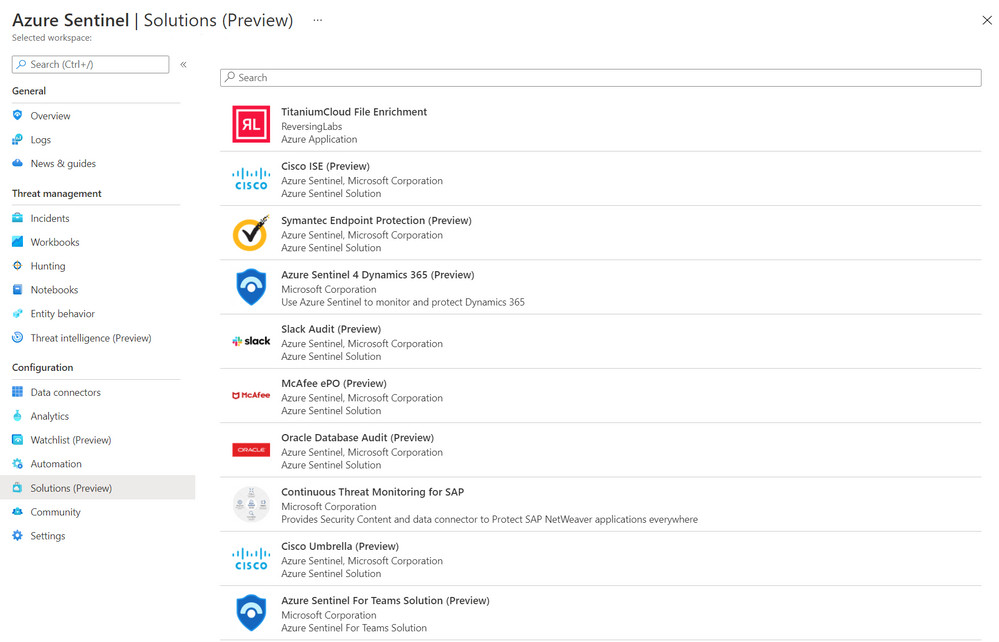
  1. Select Solutions (Preview) from the Azure Sentinel Solutions navigation menu.

  2. This displays a searchable list of solutions for you to select from.  Azure Sentinel Solutions BladeAzure Sentinel Solutions Blade


  3. Click Load more at the bottom of the page to see more solutions.

  4. Select solution of your choice and click on it to display the solutions details view.

  5. You can now view the Overview tab that includes important details of the solution and the content included in the solution package as illustrated in the diagram below. Solution detailsSolution details
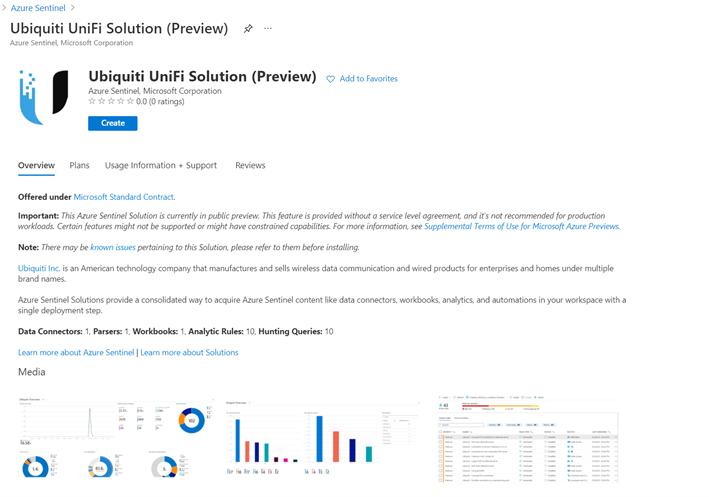
  6.  The Plans tab covers information about the license terms. All the solutions included in the Solutions gallery are available at no additional cost to install.

  7. The Usage Information + Support tab includes information about the publisher details for each solution and also a direct link to the support contact for the respective solution.


Deploy Solutions


  1. Select the Create button in the solutions detail page to deploy the solution.

  2. You can now enter information in each tab of the solutions deployment flow and move to the next tab to enable deployment of this solution as illustrated in the following diagram.  Solution deploySolution deploy 
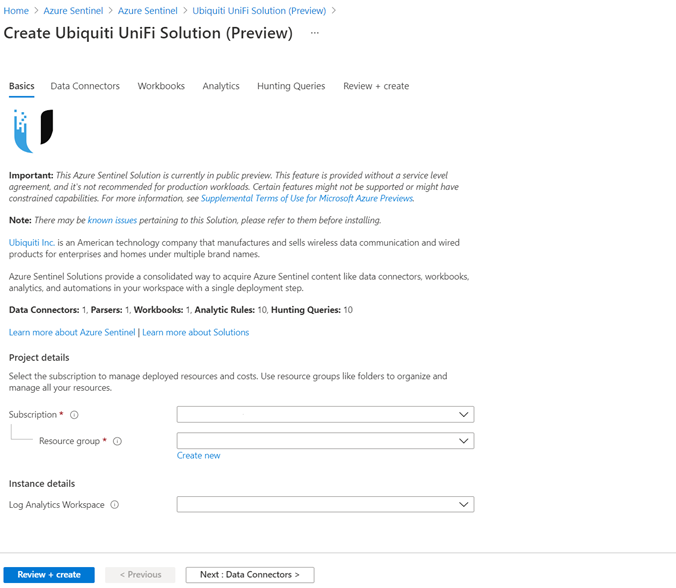

  3. Finally select Review and create that will trigger the validation process and upon successful validation select Create to run solution deployment.


  4. Visit the respective feature galleries to customize (as needed), configure, and enable the relevant content included in the Solution package. For e.g., if the Solution deploys a data connector, you’ll find the new data connector in the Data connector blade of Azure Sentinel from where you can follow the steps to configure and activate the data connector.


Partner Scenario: Deliver Solutions


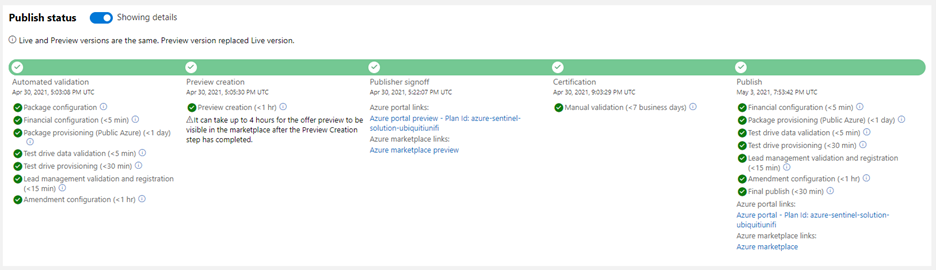
Microsoft partners like ISVs, Managed Service Providers, System Integrators, etc. can follow the 3-step process outlined below to author and publish a solution to deliver product, domain, or vertical value for their products and offerings in Azure Sentinel. Refer to the guidance on Azure Sentinel GitHub for further details on each step.  


Step 1. Create Azure Sentinel content for your product / domain / industry vertical scenarios and validate the content.


Step 2. Package content created in the step above. Use the new packaging tool that creates the package and also runs validations on it.


Step 3.  Publish your Azure Sentinel solution by creating an offer in Microsoft Partner Center, uploading the package generated in the step above and sending in the offer for certification and final publish. Partners can track progress on their offer in Partner Center dashboard view as shown in the diagram below.  Solution buildSolution build


New Azure Sentinel Solutions


The Azure Sentinel Solutions gallery showcases 32 new solutions covering depth and breadth of various product, domain, and industry vertical capabilities. These out-of-the-box content packages enable to get enhanced threat detection, hunting and response capabilities for cloud workloads, identity, threat protection, endpoint protection, email, communication systems, databases, file hosting, ERP systems and threat intelligence solutions for a plethora of Microsoft and other products and services.


SAP Continuous Threat Monitoring


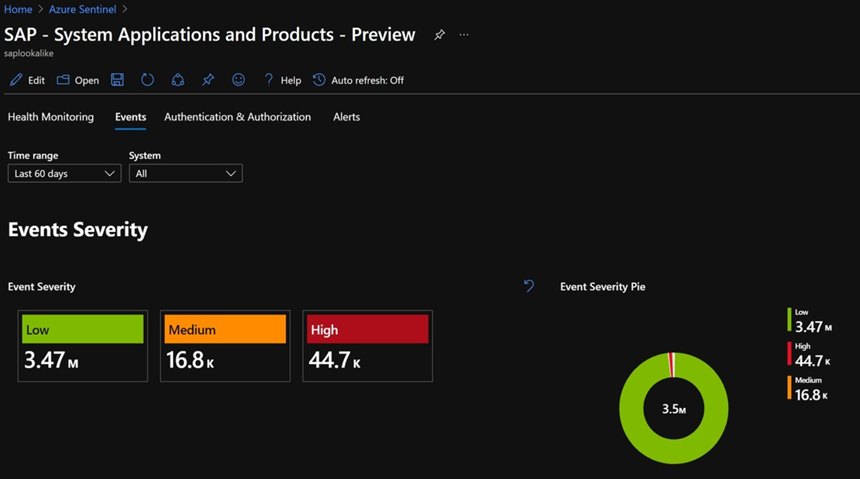
Use the SAP continuous threat monitoring solution to monitor your SAP applications across Azure, other clouds, and on-premises. This solution package includes a data connector to ingest data, workbook to monitor threats and a rich set of 25+ analytic rules to protect your applications. SAP SolutionSAP Solution


Cisco Solutions


There are two solutions for Cisco Umbrella and Cisco Identity Services Engine (ISE). The Cisco Umbrella solution provides multiple security functions to enable protection of devices, users, and distributed locations everywhere. The Cisco ISE solution includes data connector, parser, analytics, and hunting queries to streamline security policy management and see users and devices controlling access across wired, wireless, and VPN connections to the corporate network.


PingFederate


PingFederate solution includes data connectors, analytics, and hunting queries to enable monitoring user identities and access in your enterprise.


CrowdStrike Falcon Protection Platform


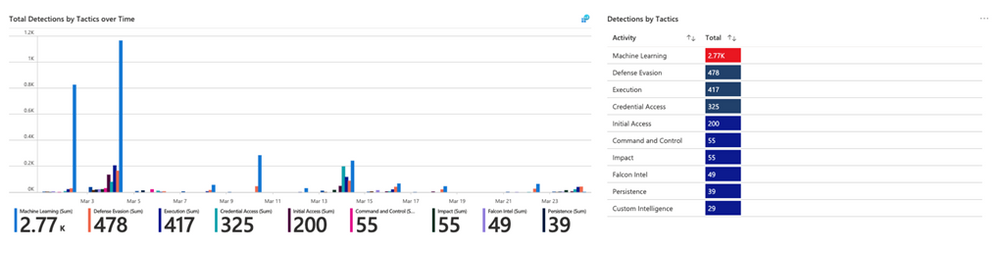
The CrowdStrike solution includes two data connectors to ingest Falcon detections, incidents, audit events and rich Falcon event stream telemetry logs into Azure Sentinel. It also includes workbooks to monitor CrowdStrike detections and analytics and playbooks for automated detection and response scenarios in Azure Sentinel. CrowdStrike SolutionCrowdStrike Solution


McAfee ePolicy Orchestrator


McAfee ePolicy Orchestrator monitors and manages your network, detecting threats and protecting endpoints against these threats leveraging the data connector to ingest McAfee ePo logs and leveraging the analytics to alert on threats.


Palo Alto Prisma


Palo Alto Prisma solution includes data connector to ingest Palo Alto Cloud logs into Azure Sentinel. Leverage the analytics and hunting queries for out-of-the-box detections and threat hunting scenarios besides leveraging the workbooks for monitoring Palo Alto Prisma data in Azure Sentinel.


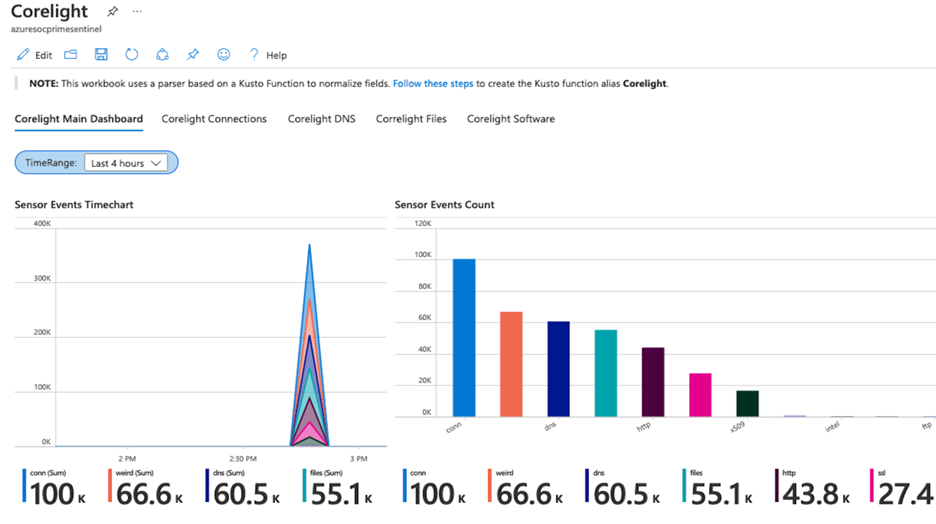
Corelight


Corelight provides a network detection and response (NDR) solution based on best-of-breed open-source technologies, Zeek and Suricata that enables network defenders to get broad visibility into their environments. The data connector enables ingestion of events from Zeek and Suricata via Corelight Sensors into Azure Sentinel. Corelight for Azure Sentinel also includes workbooks and dashboards, hunting queries, and analytic rules to help organizations drive efficient investigations and incident response with the combination of Corelight and Azure Sentinel.  Corelight SolutionCorelight Solution


Infoblox Cloud


BloxOne DDI enables you to centrally manage and automate DDI (DNS, DHCP and IPAM) from the cloud to any and all locations. BloxOne Threat Defense maximizes brand protection to protect your network and automatically extend security to your digital imperatives, including SD-WAN, IoT and the cloud. His Azure Sentinel solution powers security orchestration, automation, and response (SOAR) capabilities, and reduces the time to investigate and remediate cyberthreats.


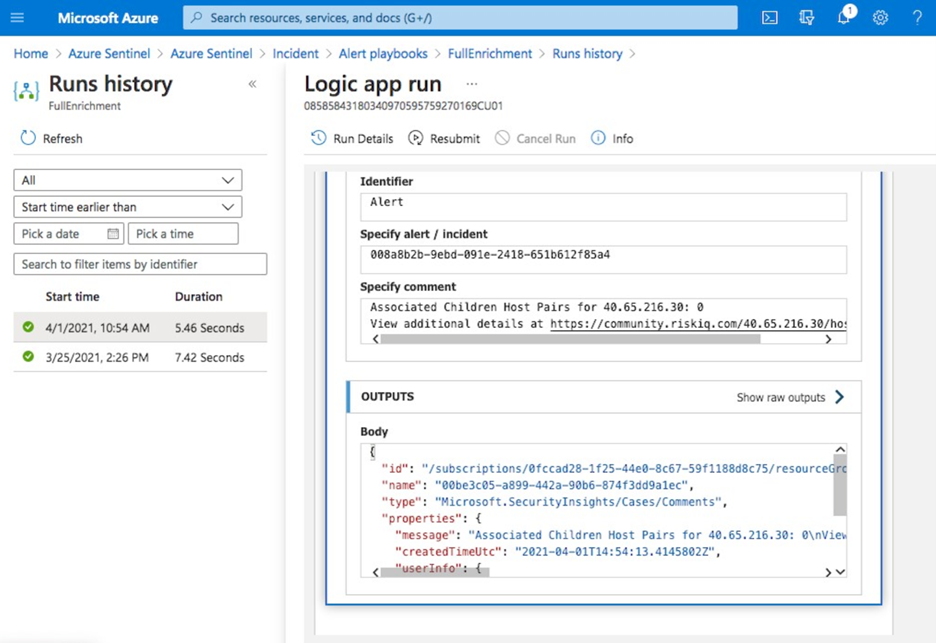
RiskIQ Illuminate Security Intelligence


RiskIQ has created several Azure Sentinel playbooks that pre-package functionality in order to enrich, add context to and automatically action incidents based on RiskIQ Internet observations within the Azure Sentinel platform. These playbooks can be configured to run automatically on created incidents in order to speed up the triage process. When an incident contains a known indicator such as a domain or IP address, RiskIQ will enrich that value with what else it’s connected to on the Internet and if it may pose a threat. If a threat is identified, RiskIQ can action the incident including elevating its status and tagging with additional metadata for analysts to review. RiskIQ SolutionRiskIQ Solution


vArmour Application Controller


Application Controller is an easy to deploy solution that delivers comprehensive real-time visibility and control of application relationships and dependencies, to improve operational decision-making, strengthen security posture, and reduce business risk across multi-cloud deployments. This solution includes data connector to ingest vArmour data and workbook to monitor application dependency and relationship mapping info along with user access and entitlement monitoring.


VMWare Carbon Black


Use this solution to monitor Carbon Black events, audit logs and notifications in Azure Sentinel and analytic rules on critical threats and malware detections to help you get started immediately.


Symantec Solutions


There are two solutions from Symantec. Symantec Endpoint protection solution enables anti-malware, intrusion prevention and firewall features of Symantec being available in Azure Sentinel and help prevent unapproved programs from running, and response actions to apply firewall policies that block or allow network traffic.


Symantec Proxy SG solution enables organizations to effectively monitor, control, and secure traffic to ensure a safe web and cloud experience by monitoring proxy traffic.


Microsoft Teams  


Teams serves a central role in both communication and data sharing in the Microsoft 365 Cloud. Since the Teams service touches on so many underlying technologies in the Cloud, it can benefit from human and automated analysis not only when it comes to hunting in logs, but also in real-time monitoring of meetings in Azure Sentinel. The solution includes analytics rules, hunting queries, and playbooks.


Slack Audit


The Slack Audit solution provides ability to get Slack events which helps to examine potential security risks, analyze your organization’s use of collaboration, diagnose configuration problems and more. This solution includes data connector, workbooks, analytic rules and hunting queries to connect Slack with Azure Sentinel.


Azure Firewall


Azure Firewall is a managed, cloud-based network security service that protects your Azure Virtual Network resources. It’s a fully stateful firewall as a service with built-in high availability and unrestricted cloud scalability.  This Azure Firewall solution in Azure Sentinel provides built-in customizable threat detection on top of Azure Sentinel. The solution contains a workbook, detections, hunting queries and playbooks.


Sophos XG Firewall


Monitor the network traffic and firewall status using this solution for Sophos XG Firewall. Furthermore, enable the port scans and excessive denied connections analytic rules to create custom alerts and track as incidents for the ingested data.


Qualys VM


Monitor and detect vulnerabilities reported by Qualys in Azure Sentinel by leveraging the new solutions for Qualys VM.


Microsoft Dynamics 365


The Dynamics 365 continuous threat monitoring with Azure Sentinel solution provides you with ability to collect Dynamics 365 logs, gain visibility of activities within Dynamics 365 and analyze them to detect threats and malicious activities. The solution includes a data connector, workbooks, analytics rules, and hunting queries.


Cloudflare


This solution combines the value of Cloudflare in Azure Sentinel by providing information about the reliability of your external-facing resources such as websites, APIs, and applications. Use the detections and hunting queries to protect your internal resources such as behind-the-firewall applications, teams, and devices.  


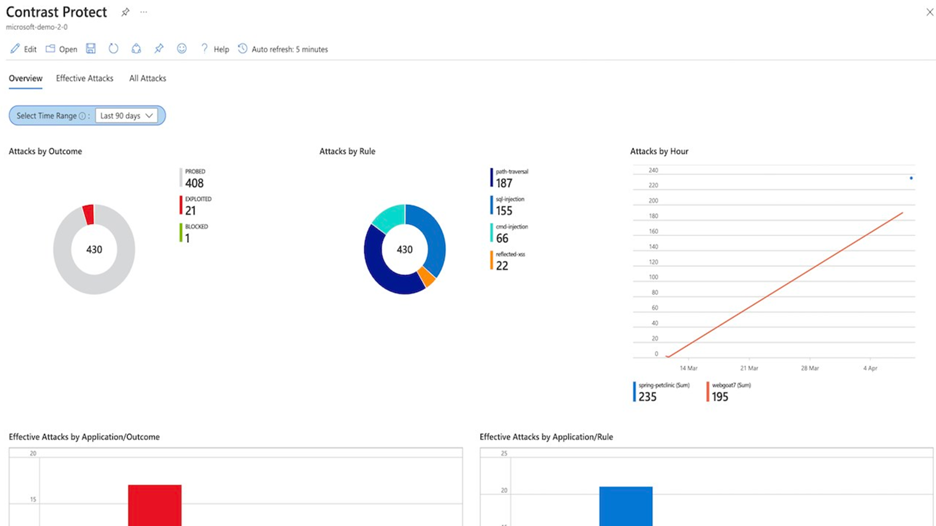
Contrast Protect


Contrast Protect empowers teams to defend their applications anywhere they run, by embedding an automated and accurate runtime protection capability within the application to continuously monitor and block attacks. Contrast Protect seamlessly integrates into Azure Sentinel so you can gain additional security risk visibility into the application layer.  Contrast Protect SolutionContrast Protect Solution


Check Point CloudGuard


This solution includes an Azure Logic App custom connector and playbooks for Check Point to offer enhanced integration with SOAR capabilities of Azure Sentinel. Enterprises can correlate and visualize these events on Azure Sentinel and configure SOAR playbooks to automatically trigger CloudGuard to remediate threats.


Senserva


Senserva, a Cloud Security Posture Management (CSPM) for Azure Sentinel, simplifies the management of Azure Active Directory security risks before they become problems by continually producing priority-based risk assessments. Senserva information includes a detailed security ranking for all the Azure objects Senserva manages, enabling customers to perform optimal discovery and remediation by fixing the most critical issues with the highest impact items first.  All Senserva’s enriched information is sent to Azure Sentinel for processing by analytics, workbooks, and playbooks in this solution.


HYAS Insight


HYAS Insight is a threat and fraud investigation solution using exclusive data sources and non-traditional mechanisms that improves visibility and triples productivity for analysts and investigators while increasing accuracy. HYAS Insight connects attack instances and campaigns to billions of indicators of compromise to understand and counter adversary infrastructure and includes playbooks to enrich and add context to incidents within the Azure Sentinel platform.


Titanium Cloud File Enrichment from ReversingLabs


TitaniumCloud is a threat intelligence solution providing up-to-date file reputation services, threat classification and rich context on over 10 billion goodware and malware files. Files are processed using ReversingLabs File Decomposition Technology. A powerful set of REST API query and feed functions deliver targeted file and malware intelligence for threat identification, analysis, intelligence development, and threat hunting services in Azure Sentinel.


Proofpoint Solutions


Two Solutions for Proofpoint enables bringing in email protection capability into Azure Sentinel. Proofpoint OnDemand Email security (POD) classifies various types of email, while detecting and blocking threats that don’t involve malicious payload. Proofpoint Targeted Attack Protection (TAP) solution helps detect, mitigate and block advanced threats that target people through email in Azure Sentinel. This includes attacks that use malicious attachments and URLs to install malware or trick users into sharing passwords and sensitive information.  


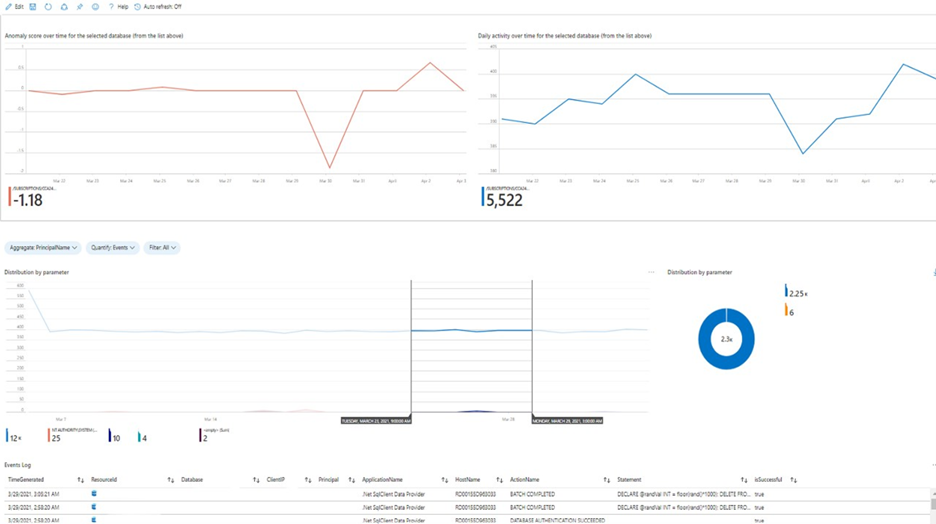
Azure SQL database


This solution provides built-in customizable threat detection for Azure SQL PaaS services in Azure Sentinel, based on SQL Audit log and with seamless integration to alerts from Azure Defender for SQL. This solution includes a guided investigation workbook with incorporated Azure Defender alerts. Furthermore, it includes analytics to detect SQL DB anomalies, audit evasion and threats based on the SQL Audit log, hunting queries to proactively hunt for threats in SQL DBs and a playbook to auto-turn SQL DB audit on. Azure SQL SolutionAzure SQL Solution


Oracle Database


Oracle Database Unified Auditing enables selective and effective auditing inside the Oracle database using policies and conditions and brings these database audit capabilities in Azure Sentinel. This solution comes with a data connector to get the audit logs as well as workbook to monitor and a rich set of analytics and hunting queries to help with detecting database anomalies and enable threat hunting capabilities in Azure Sentinel.


Ubiquity UniFi


This solution includes data connector to ingest wireless and wired data communication logs into Azure Sentinel and enables to monitor firewall and other anomalies via the workbook and set of analytics and hunting queries.


Box


Box is a single, secure, easy-to-use platform built for the entire content lifecycle, from file creation and sharing, to co-editing, signature, classification, and retention. This solution delivers capabilities to monitor file and user activities for Box and integrates with data collection, workbook, analytics and hunting capabilities in Azure Sentinel.


Closing


Azure Sentinel Solutions is just one of several exciting announcements we’ve made for the RSA Conference 2021. Learn more about other new Azure Sentinel innovations in our announcements blog.


Discover and deploy solutions to get out-of-the-box and end-to-end value for your scenarios in Azure Sentinel. Let us know your feedback using any of the channels listed in the Resources.


We also invite partners to build and publish new solutions for Azure Sentinel. Get started now by joining the Azure Sentinel Threat Hunters GitHub community and follow the solutions build guidance.
What you need to know about trigger conditions?

What you need to know about trigger conditions?

This article is contributed. See the original author and article here.

Trigger conditions is a trigger setting used to specify one or more conditional expressions which must be true for the trigger to fire.


Trigger conditions can be set using logic app designer or manually using code view; for schema reference for trigger conditions, check the following link: Schema reference for trigger and action types – Azure Logic Apps | Microsoft Docs


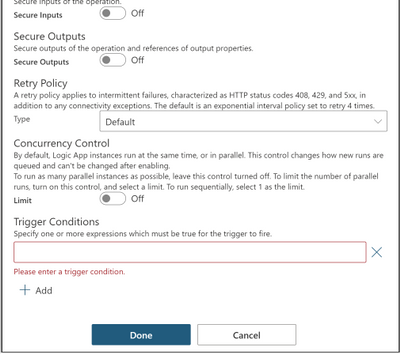
To set trigger conditions using logic app designer, follow the steps below:


1- Go to your logic app.


2- On the trigger, click on the three dots () at the top right corner.


3- Select Settings.


4- Scroll down to Trigger Conditions.


5- Specify your conditional expression.


6-Click Done.


talsaifi_4-1620288562794.png


You can set single or multiple conditions as follows:


Single Condition


talsaifi_3-1620288463557.png


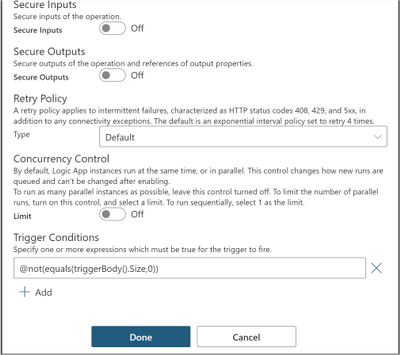
In this example, we apply trigger filter @not(equals(triggerBody().Size,0)) on the When a blob is added or modified (properties only) trigger settings under Trigger Conditions, so that the logic app is not triggered with empty files.


Multiple conditions


You can define multiple conditions but the logic app will only fire if all conditions are met. 


Two or more AND conditions


talsaifi_0-1620298102943.png


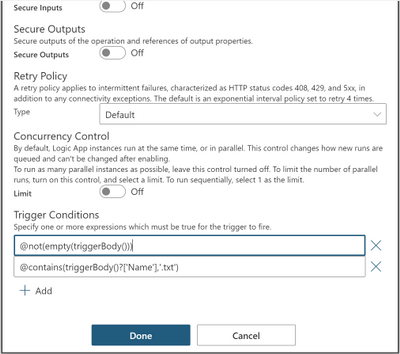
@not(empty(triggerBody())) and @contains(triggerBody()?[‘Name’],’.txt’)


This trigger will only fire if the trigger body is not empty and the file is a text file by checking if the name property contains ‘.txt’ extension inside the trigger body.


Two or more OR conditions


talsaifi_6-1620289993240.png


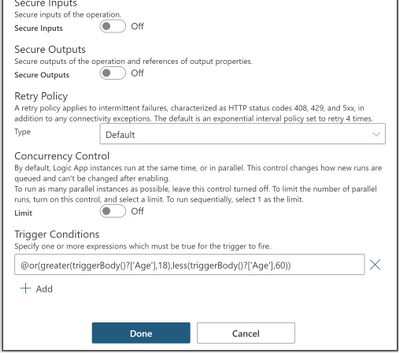
@or(greater(triggerBody()?[‘Age’],18),less(triggerBody()?[‘Age’],60))


This trigger will only fire if the age is greater than 18 or less than 60 by checking the age property inside the trigger body.


OR and AND Conditions together


talsaifi_7-1620290332938.png


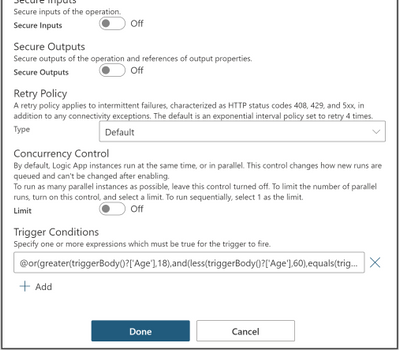
@or(greater(triggerBody()?[‘Age’],18),and(less(triggerBody()?[‘Age’],60),equals(triggerBody()?[‘Fit’],true)))


This trigger will only fire if the age is greater than 18 or less than 60 and fit is true by checking the age and fit properties inside the trigger body.


For reference guide for logical comparison functions that can be used in conditional expressions, check the following link: Reference guide for functions in expressions – Azure Logic Apps | Microsoft Docs


Split On Behavior


If you apply it on a trigger with Split On enabled, the conditions are evaluated after the splitting which guarantees that only the array


elements that match the conditions are fired.


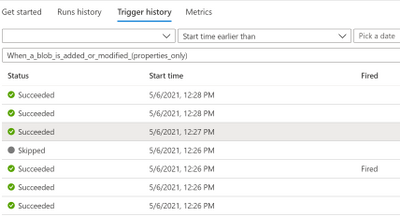
In this case, you will see one trigger event for each element in the trigger history, triggers that did not fire due to trigger conditions will be found in Trigger History.


talsaifi_1-1620293690288.png


Pros


  • Simple logic app with less steps by moving logic that would usually be inside the logic app to define if the logic app can be executed or not to inside the trigger itself.

  • Clean workflow run history that reduces operational burden by eliminating unwanted runs.

  • Reduced costs by reducing the action calls made for checking the conditions within logic app.


Cons


  • Trigger conditions are not visible which make it hard to troubleshoot; so, it is recommended to modify trigger name to indicate that there are trigger conditions set.

  • Adding trigger conditions does not support intellisense; so, it is recommended to draft your expression within an initialize variable or compose action, note that in these actions, an @ is not needed at the beginning of the expression, but within trigger conditions it is needed

  • Runs that did not meet the trigger conditions will not show in the runs history.


Lesson Learned #171: Testing a connection from multiple PowerShell script instances

This article is contributed. See the original author and article here.

Today, I worked on a very interesting situation. Our customer wants to check a connection but instead of from a single application, they are trying to run a bunch of instance of the same application to simulate a workload.


In order to test this situation, I developed this small PowerShell Script doing a simple connection and executing “SELECT 1” command around for 10000 times, but using the option of multithreading of Powershell to execute the same PowerShell script in multiple instances.


Basic points: 


  • 10 processes running in parallel from a single PC. 

  • Every process will run 1000 running 10 times SELECT 1, running the powershell script DoneThreadIndividual.ps1

  • In every execution we have the time spent in the connection (with/without connection pooling) and execution and save the information in a log file.

  • Everything is customizable, in terms of numbers, number of connections and query to execute.


Script to execute a number of Process defined


Function lGiveID([Parameter(Mandatory=$false)] [int] $lMax)
{ 
 $Jobs = Get-Job
[int]$lPending=0

Foreach ($di in $Jobs)
{
   if($di.State -eq "Running")
   {$lPending=$lPending+1}
} 
 if($lPending -lt $lMax) {return $true}
return {$false}

}
  
try
{
for ($i=1; $i -lt 2000; $i++)
{
  if((lGiveid(10)) -eq $true)
  {
   Start-Job -FilePath "C:TestDoneThreadIndividual.ps1"
   Write-output "Starting Up---"
  }
  else
  {
    Write-output "Limit reached..Waiting to have more resources.."
    Start-sleep -Seconds 20
  }
}
}
catch
   {
    logMsg( "You're WRONG") (2)
    logMsg($Error[0].Exception) (2)
   }


Script for testing – DoneThreadIndividual.ps1


$DatabaseServer = "servername.database.windows.net"
$Database = "dbname"
$Username = "username"
$Password = "password" 
$Pooling = $true
$NumberExecutions =1000
$FolderV = "C:Test"

function GiveMeSeparator
{
Param([Parameter(Mandatory=$true)]
      [System.String]$Text,
      [Parameter(Mandatory=$true)]
      [System.String]$Separator)
  try
   {
    [hashtable]$return=@{}
    $Pos = $Text.IndexOf($Separator)
    $return.Text= $Text.substring(0, $Pos) 
    $return.Remaining = $Text.substring( $Pos+1 ) 
    return $Return
   }
  catch
  {
    $return.Text= $Text
    $return.Remaining = ""
    return $Return
  }
}

#--------------------------------------------------------------
#Create a folder 
#--------------------------------------------------------------
Function CreateFolder
{ 
  Param( [Parameter(Mandatory)]$Folder ) 
  try
   {
    $FileExists = Test-Path $Folder
    if($FileExists -eq $False)
    {
     $result = New-Item $Folder -type directory 
     if($result -eq $null)
     {
      logMsg("Imposible to create the folder " + $Folder) (2)
      return $false
     }
    }
    return $true
   }
  catch
  {
   return $false
  }
 }

#--------------------------------
#Validate Param
#--------------------------------

function TestEmpty($s)
{
if ([string]::IsNullOrWhitespace($s))
  {
    return $true;
  }
else
  {
    return $false;
  }
}

Function GiveMeConnectionSource()
{ 
  for ($i=1; $i -lt 10; $i++)
  {
   try
    {
      logMsg( "Connecting to the database...Attempt #" + $i) (1)

      $SQLConnection = New-Object System.Data.SqlClient.SqlConnection 
      $SQLConnection.ConnectionString = "Server="+$DatabaseServer+";Database="+$Database+";User ID="+$username+";Password="+$password+";Connection Timeout=15" 
      if( $Pooling -eq $true )
        {
          $SQLConnection.ConnectionString = $SQLConnection.ConnectionString + ";Pooling=True"
        } 
      else
        {
          $SQLConnection.ConnectionString = $SQLConnection.ConnectionString + ";Pooling=False"
        }

      $SQLConnection.Open()
      logMsg("Connected to the database...") (1)
      return $SQLConnection
      break;
    }
  catch
   {
    logMsg("Not able to connect - Retrying the connection..." + $Error[0].Exception) (2)
    Start-Sleep -s 5

   }
  }
}

#--------------------------------
#Log the operations
#--------------------------------
function logMsg
{
    Param
    (
         [Parameter(Mandatory=$true, Position=0)]
         [string] $msg,
         [Parameter(Mandatory=$false, Position=1)]
         [int] $Color
    )
  try
   {
    $Fecha = Get-Date -format "yyyy-MM-dd HH:mm:ss"
    $msg = $Fecha + " " + $msg
    Write-Output $msg | Out-File -FilePath $LogFile -Append
    $Colores="White"
    If($Color -eq 1 )
     {
      $Colores ="Cyan"
     }
    If($Color -eq 3 )
     {
      $Colores ="Yellow"
     }

     if($Color -eq 2)
      {
        Write-Host -ForegroundColor White -BackgroundColor Red $msg 
      } 
     else 
      {
        Write-Host -ForegroundColor $Colores $msg 
      } 


   }
  catch
  {
    Write-Host $msg 
  }
}


cls


  $sw = [diagnostics.stopwatch]::StartNew()


  logMsg("Creating the folder " + $FolderV) (1)
   $result = CreateFolder($FolderV) 
   If( $result -eq $false)
    { 
     logMsg("Was not possible to create the folder") (2)
     exit;
    }
logMsg("Created the folder " + $FolderV) (1)

$LogFile = $FolderV + "Results.Log"    #Logging the operations.

$query = @("SELECT 1")


  for ($i=0; $i -lt $NumberExecutions; $i++)
  {
   try
    {

      $SQLConnectionSource = GiveMeConnectionSource #Connecting to the database.
      if($SQLConnectionSource -eq $null)
      { 
        logMsg("It is not possible to connect to the database") (2)
      }
      else
      {
       
       $SQLConnectionSource.StatisticsEnabled = 1 
       $command = New-Object -TypeName System.Data.SqlClient.SqlCommand
       $command.CommandTimeout = 60
       $command.Connection=$SQLConnectionSource
                  
         for ($iQuery=0; $iQuery -lt $query.Count; $iQuery++) 
         {
           $start = get-date
             $command.CommandText = $query[$iQuery]
             $command.ExecuteNonQuery() | Out-Null 
           $end = get-date
           $data = $SQLConnectionSource.RetrieveStatistics()
           logMsg("-------------------------")
           logMsg("Query                 :  " + $query[$iQuery]) 
           logMsg("Iteration             :  " +$i) 
           logMsg("Time required (ms)    :  " +(New-TimeSpan -Start $start -End $end).TotalMilliseconds) 
           logMsg("NetworkServerTime (ms):  " +$data.NetworkServerTime) 
           logMsg("Execution Time (ms)   :  " +$data.ExecutionTime) 
           logMsg("Connection Time       :  " +$data.ConnectionTime) 
           logMsg("ServerRoundTrips      :  " +$data.ServerRoundtrips) 
           logMsg("-------------------------")
          }
          $SQLConnectionSource.Close()

      }
    }
    catch
   {
    logMsg( "You're WRONG") (2)
    logMsg($Error[0].Exception) (2)
   }
   
}
logMsg("Time spent (ms) Procces :  " +$sw.elapsed) (2)
logMsg("Review: https://docs.microsoft.com/en-us/dotnet/framework/data/adonet/sql/provider-statistics-for-sql-server") (2)


Enjoy!

SharePoint community call – May 11th, 2021

SharePoint community call – May 11th, 2021

This article is contributed. See the original author and article here.

The SharePoint community monthly call is our general monthly review of the latest SharePoint news  (news, tools, extensions, features, capabilities, content and training), engineering priorities and community recognition for Developers, IT Pros and Makers.  This monthly community call happens on the second Tuesday of each month. You can download recurrent invite from https://aka.ms/sp-call.


Call Summary:


SPFx v1.12.1 with Node v14 and Gulp4 support is generally available.  Don’t miss the SharePoint sample gallery.  Preview the new Microsoft 365 Extensibility look book galleryVisit the new Microsoft 365 PnP Community hub at Microsoft Tech Communities!  Sign up and attend one of a growing list of Sharing is Caring events.     The Microsoft 365 Update – Community (PnP) | May 2021 is now available.  In this call, quickly addressed developer and non-developer entries in UserVoice.   We are in the process of moving from UserVoice to a 1st party solution for customer feedback/ feature requests.


A huge thank you to the record number of contributors and organizations actively participating in this PnP Community during April. Month over month, you continue to amaze.  The host of this call was Vesa Juvonen (Microsoft) @vesajuvonen.  Q&A took place in the chat throughout the call. 


210511-together-mode.gif


Featured Topic:  


SharePoint Syntex:  Product overview and latest feature updates – SharePoint Syntex – a new add on that builds on the content services capabilities already provided in SharePoint with an infusion of AI to automate and augment the classification of content – understanding, processing, compliance.  Demos on building and publishing a document understanding model using UI and on downloading a sample model, publishing and processing content using PowerShell Commandlets or APIs.     


Actions: 


  • Register for Sharing is Caring Events:

    • First Time Contributor Session – May 24th (EMEA, APAC & US friendly times available)

    • Community Docs Session – May

    • PnP – SPFx Developer Workstation Setup – May 13th 

    • PnP SPFx Samples – Solving SPFx version differences using Node Version Manager – May 20th

    • AMA (Ask Me Anything) – Microsoft Graph & MGT – June

    • First Time Presenter – May 25th

    • More than Code with VSCode – May 27th  

    • Maturity Model Practitioners – May 18th

    • PnP Office Hours – 1:1 session – Register


  • Download the recurrent invite for this call – https://aka.ms/sp-call.


You can check the latest updates in the monthly summary and at aka.ms/spdev-blog.


This call was delivered on Tuesday, May 11, 2021. The call agenda is reflected below with direct links to specific sections.  You can jump directly to a specific topic by clicking on the topic’s timestamp which will redirect your browser to that topic in the recording published on the Microsoft 365 Community YouTube Channel.


Call Agenda:


  • UserVoice status for non-dev focused SharePoint entries – 8:04

  • UserVoice status for dev focused SharePoint Framework entries – 9:04 

  • SharePoint community update with latest news and roadmap – 10:35

  • Community contributors and companies which have been involved in the past month – 11:56 

  • Topic:  SharePoint Syntex:   Product overview and latest feature updates – Sean Squires  (Microsoft) | @iamseansquires 15:28

    • Demo:  How to build and publish a document understanding model – James Eccles (Microsoft) | @jimdeccles 24:52

    • Demo:  SharePoint Syntex integration and automation options – Bert Jansen (Microsoft) | @o365bert – 39:36


The full recording of this session is available from Microsoft 365 & SharePoint Community YouTube channel – http://aka.ms/m365pnp-videos.


  • Presentation slides used in this community call are found at OneDrive.


Resources: 


Additional resources on covered topics and discussions.


Additional Resources: 


Upcoming calls | Recurrent invites:


Too many links, can’t remember” – not a problem… just one URL is enough for all Microsoft 365 community topics – http://aka.ms/m365pnp.


“Sharing is caring”


SharePoint Team, Microsoft – 12th of May 2021

REBALANCE_IN_PROGRESS error in Azure Event Hub with Kafka

REBALANCE_IN_PROGRESS error in Azure Event Hub with Kafka

This article is contributed. See the original author and article here.

Overview


Azure Event Hub provides the feature to be compatible with Apache Kafka. If you are familiar with Apache Kafka, you may have experience in consumer rebalancing in your Kafka Cluster. Rebalancing is a process that decides which consumer in the consumer group should be responsible for which partition in Apache Kafka. The error may occur when a new consumer joins/leaves a consumer group. When you use Azure Event Hub with Apache Kafka, consumer rebalancing may occur in you Azure Event Hub namespace too.


Consumer rebalancing would be a normal process for Apache Kafka. However, if the REBALANCE_IN_PROGRESS error continuously and frequently occurs in your consumer group, you may need to change your configuration to reduce the occurrence frequency of consumer rebalancing. In this post, I would like to share consumer configurations that may cause the REBALANCE_IN_PROGRESS error.


Azure Event Hub with Kafka


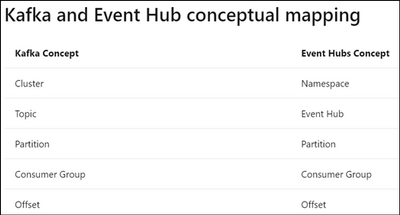
The concept for Azure Event Hub and Kafka may be different, please refer to the document Use event hub from Apache Kafka app – Azure Event Hubs – Azure Event Hubs | Microsoft Docs for Kafka and Event Hub conceptual mapping.


yawhu_0-1620800638732.png


REBALANCE_IN_PROGRESS error


yawhu_1-1620800638735.jpeg


Reference : Apache Kafka


REBALANCE_IN_PROGRESS is a consumer group related error. It is affected by the consumer’s configurations and behaviors. Normally, REBALANCE_IN_PROGRESS error might occur if your session timeout’s value is set too small or application takes too long to process records in the consumer. During rebalancing, your consumer is not able to read any record back. In this case, you will find your consumer is not reading back any records and constantly seeing REBALANCE_IN_PROGRESS. Below are common examples for when rebalancing will happen :


  • Scenarios 1
    The read back records is empty and there is heartbeat expired error at the same time.

  • Scenarios 2
    The consumer is processing large records with long processing time and there’s timeout error.


Recommendations for REBALANCE_IN_PROGRESS error


  • Recommendations 1 : Increase session.timeout.ms in consumer configuration
    yawhu_2-1620800638738.jpeg
    Reference : azure-event-hubs-for-kafka/CONFIGURATION.md at master · Azure/azure-event-hubs-for-kafka · GitHub

    Heartbeat expired error is usually due to application code crash, long processing time or temporary network issue. If the session.timeout.ms is too small and heartbeat is not sent before timeout, you will see heartbeat expired errors and it will then cause rebalancing.


  • Recommendations 2 : Decrease batch size for each poll()
    If the time spent on processing records is too large, try to poll less records at a time.


  • Recommendations 3 : Increase max.poll.interval.ms in consumer configuration and decrease the time spent on processing the read back records
    yawhu_3-1620800638740.jpeg
    Reference : azure-event-hubs-for-kafka/CONFIGURATION.md at master · Azure/azure-event-hubs-for-kafka · GitHub

    You may need to add logs to track how long the code takes to process records, please refer to the below example. If processing these records exceed the max.poll.interval.ms, it may cause rebalancing.

    Consumer< String, String> consumer = new KafkaConsumer<>(props);
    consumer.subscribe(Arrays.asList(topic));
    
    While (true) {
        log.info("Message begin processing");
        ConsumerRecords<String, String> records = consumer.poll(100);
    
        for (ConsumerRecord<String, String> record : records) {
            // do something
        }
    
        log.info("Message finish processing");
    }
    
    consumer.close()​