
by Contributed | Oct 8, 2021 | Technology
This article is contributed. See the original author and article here.
This series highlights Microsoft Learn Student Ambassadors who achieved the Gold milestone and have recently graduated from university. Each blog features a different student and highlights their accomplishments, their experience with the Student Ambassadors community, and what they’re up to now.
Today we’d like to introduce Vivekkumar Parmar who is from India and recently graduated from Dharmsinh Desai University.
Gold Student Ambassador: Vivekkumar Parmar
Responses have been edited for clarity and length.
When you first joined the Student Ambassadors community in 2018, did you have specific goals you wanted to reach, such as a particular skill or quality? What were they? Did you achieve them? How has the community impacted you in general?
When I joined, I didn’t have any prior experience hosting events and giving seminars on technical topics, but I was very excited to share my knowledge with fellow students. What I saw and experienced at my campus was that students were building amazing projects as part of a curriculum or even for self-learning or as a hobby, but once the development was completed, the code used to reside on a code repository hosting service like GitHub, but there was no practical usage of it. If it had been deployed on a cloud service platform and made available to anyone on the internet, then that same project could have been useful to solve real life problems, so after I became a Student Ambassador, I decided to make the cloud my primary area of focus and conducted various workshops and seminars on Azure. In order to host events on Azure, I had to first learn the concepts, so I explored this domain in depth and gained a thorough understanding, which has helped me in my career too.
What is an accomplishment that you’re the proudest of and why?
I’m proudest of the very first event that I hosted in February 2019 at my university, “Introduction to Cloud Services”. Since I didn’t have any prior experience in event management and delivering speeches, with the help of my classmates (shout out to them – Kaushal, Hardik, Sameer, Utsav & Virat), we planned and successfully organized the event which was attended by 80+ students.
Now why is that event very special to me? That event planted the seeds of cloud at my university. At that time, most of the students on my campus were not familiar with cloud technologies. There were a few technical clubs, but I don’t remember any event being hosted around the cloud domain. With my event, Azure was introduced in our university. It was a half day event. We started with introducing the cloud, Azure, and its services and also had a hands-on workshop at the end. [Thanks to Microsoft for those Azure student credits and Subway meal support!!] Students were really amazed to see various services offered by Azure and how they could implement it in their college projects. After attending that event, a few students took a deep dive into Azure. I used to receive messages from them regarding their queries, and I felt very proud to see them using various Azure services in their projects.
What are you doing now that you’ve graduated?
I’m passionate about cloud computing and community building. Currently, I’m mentoring a few tech communities of my university and am planning to take a few Azure certification exams in the coming months. I would like to start my career as a DevOps engineer and later become a developer advocate/evangelist. I would love to continue to speak occasionally on Azure, Cloud, DevOps, etc. to share my knowledge.
If you could redo your time with the Student Ambassadors community, is there anything you would have done differently?
Yes. I wasn’t able to interact much with Student Ambassadors from other regions. I would have loved to collaborate with Student Ambassadors from all over the world and host global hackathons and initiate projects with them.
If you were to describe the community to a student who is interested in joining, what would you say about it to convince him or her to join?
Rather than a program, I would describe Microsoft Learn Student Ambassadors as a family, a family of like-minded, amazing people from all around the world who are passionate about technology and always excited to share their knowledge and learn something new.
Being part of this community will give you an immense opportunity to represent yourself, your local community, and your university at a global level. It’ll help you grow and strengthen your skill set. And most importantly, you’ll create valuable memories that will stay with you for a very long period!
What advice would you give to new Student Ambassadors?
If you’ve recently joined this community, then first of all, congratulations and welcome! Here are few words of advice from my own experience:
- Don’t be shy. Interact as much as you can with fellow students at your college, other Student Ambassadors from across the globe, and the program team. You’ll learn many things just by communicating with them.
- “Every expert was once a beginner.” It’s never too late to start something new. You may face challenges and obstacles in the beginning, but don’t be afraid. Have faith in yourself. Members of our community are very helpful. You can reach out to anyone for help, and I’m sure that you’ll definitely find the solution.
- Participate in various events and activities going on in Teams [Editor’s note: this is the platform through which the Student Ambassadors and the program team communicate and collaborate] and hackathons, etc. as per your interests. Acquire knowledge and do some mini-projects to get hands-on experience and later share it with others by hosting events, writing blogs, or creating video tutorials. Microsoft Learn is one of the best platforms on which to gain a deep understanding of Microsoft technologies.
- Don’t just host events for the sake of doing it or achieving milestones. Enjoy that experience and live that moment that you experience even if only one attendee out of all the participants does something extra after attending your event like exploring in depth a particular technology that was taught, building a project around it, or winning hackathons using any of those technologies. That feeling of happiness and pride you feel will put you on cloud nine. Trust me!
Do you have a motto in life, a guiding principle that drives you?
“Learning is a lifelong process”, so keep exploring something new every day.
What is one random fact few people know about you?
Since my early teen years, I wanted to have martial arts training because it helps you build focus, discipline, and mental and physical strength. But unfortunately, I never got an opportunity. Hopefully someday if I get the time and chance to pursue it, then I’m up for it!
Best of luck to you in the future, Vivekkumar!
by Contributed | Oct 6, 2021 | Technology
This article is contributed. See the original author and article here.
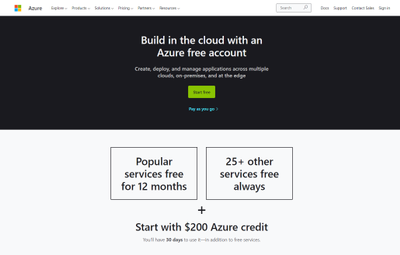
Getting started with Azure Purview for data governance is quick and easy. First, if you don’t already have an Azure account, get instant access and $200 of credit to try Azure Purview by signing up for a free account.
After you create an Azure account, sign into the Azure portal and search for Purview accounts.
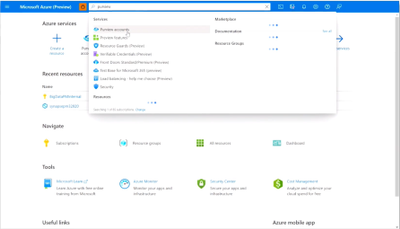
Then select Create to start an Azure Purview account. Note that you can add only one Azure Purview account at a time.
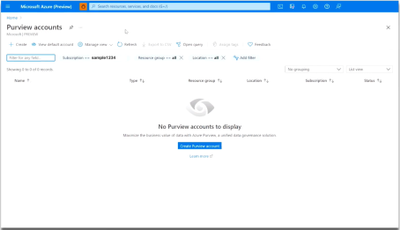
In the Basics tab, select an existing Resource group or create a new one.
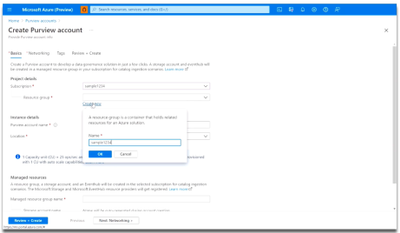
Now, enter a name for your Azure Purview account. Note that spaces and symbols are not allowed.
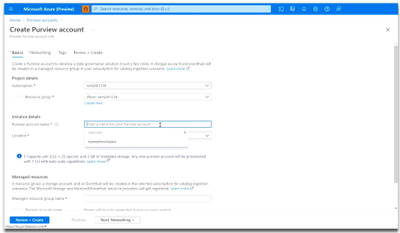
Next, choose your Location.
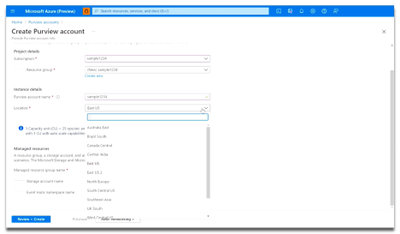
Finally, select the Review + Create button, then the Create button. Your Azure Purview account will be ready in a few minutes!
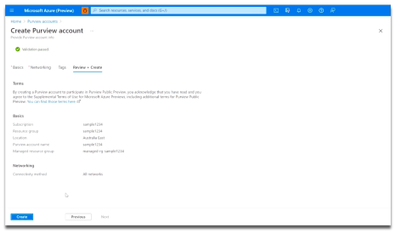
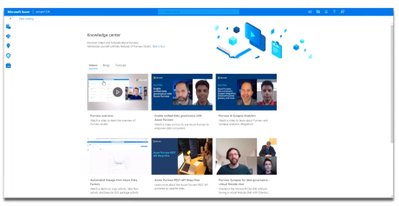
Once you’ve launched an Azure Purview account, be sure to first visit the Knowledge center in the Azure Purview Studio.
The Knowledge center can be accessed via the home page.
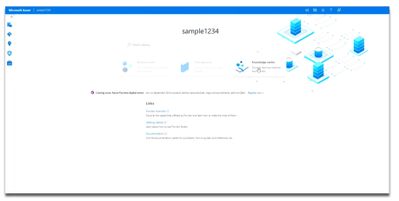
Here, you can watch videos to learn more about the capabilities of Azure Purview, read blog posts about the latest product announcements, and do tutorials to get started with registering and scanning new data sources. Learn how to set up a business glossary and take a tour of the Azure Purview Studio to familiarize yourself with key features.
Try Azure Purview today

by Contributed | Oct 6, 2021 | Technology
This article is contributed. See the original author and article here.
Building a great product means listening to what our customers need, and we’ve heard loud and clear from our customers that Zero Trust adoption is more important than ever. In the 2021 Zero Trust Adoption Report, we learned that 96% of security decision-makers state that Zero Trust is critical to their organization’s success, and 76% of organizations have at least started implementing a Zero Trust strategy. In the next couple years, Zero Trust strategy is expected to remain the top security priority and organizations anticipate increasing their investment.
Zero Trust adoption has been accelerated by the U.S. government as well. In May 2021, the White House signed an executive order calling for improvement to the nation’s cybersecurity, including advancing towards a Zero Trust architecture. More recently, the Office of Management and Budget released a draft federal strategy for moving towards Zero Trust architecture, with key goals to be achieved by 2024. Microsoft has published customer guidance and resources for meeting Executive Order objectives.
These government and industry imperatives create a huge opportunity for Microsoft and our partners to enhance support for our customers as they move towards an end-to-end Zero Trust security posture. At Microsoft, we strive to make it easy for partners, such as independent software vendors, to integrate with us so customers can easily adopt the most comprehensive security solutions. We recognize that customers take varied paths on their journey to Zero Trust and have multiple security solutions in their environment. When we work together to meet these needs, we build stronger protections for our companies and nations.
To support partner integration and Zero Trust readiness, we recently released partner integration guidance at our Zero Trust Guidance Center. This guidance is organized across the pillars of Zero Trust, supporting integrations across a wide variety of products and partners. Examples include:
We applaud those who are embracing a Zero Trust approach for security solutions. We will close out with a few examples of how ISV partners, F5 and Yubico, have benefited from this integration guidance in the Zero Trust Guidance Center.
F5 and Microsoft rescue a county from malware
Many companies rely line-of-business applications that were developed before adoption of the latest authentication protocols like SAML and OIDC. This means organization must manage multiple ways to authenticate users, which complicates user experience and increases costs.
BIG-IP Access Policy Manager (APM) is F5’s access management proxy solution that centralizes access to apps, APIs and data. BIG-IP APM integrated with Microsoft Azure AD to provide conditional access to the BIG-IP APM user interface.
Last year, Durham County enhanced security across a hybrid environment with Azure AD and F5 BIG-IP APM in the wake of a serious cybersecurity incident. F5 BIG-IP APM gave employees the unified solution they needed to access legacy on-premises apps. F5 used Azure AD to apply security controls to all their apps, enforce multifactor authentication, and use finetuned policies based on circumstances like employee login location. In addition, self-service password reset powered by the solution reduced help desk calls for passwords by 80%.
Government of Nunavut turns to Yubico and Microsoft to build phishing resistance following ransomware attack

In 2019, the Canadian government of Nunavut experienced a spear phishing attack that took down critical IT resources for the territory. In the wake of the attack, protecting identities and applications was a top priority.
Together, Azure AD and YubiKey offered a solution that upgraded the security of the Government of Nunavut and fit their unique needs. The Government of Nunavut wanted to implement a phishing-resistant authentication solution. In addition, the government agencies used a variety of Windows-based systems, and, because of their remote locations, had inconsistent network access. To address these needs, they adopted YubiKeys, which are a hardware device that can be used for multi-factor authentication with no network, power source, or client software. You can read the full story from Yubico and learn more from the video below.
Learn more
We are incredibly proud of the work our partners are doing to provide customers with critical cybersecurity solutions using the principles of Zero Trust. Check out our newly published partner integration guidance for Zero Trust readiness to learn more about opportunities.
Learn more about Microsoft identity:
by Contributed | Oct 5, 2021 | Technology
This article is contributed. See the original author and article here.
Over the last few years, we have invested heavily in Microsoft Graph to enable developers to access the rich data available in Microsoft 365. Microsoft Graph, along with OAuth 2.0, provides increased security and seamless integration with other Microsoft cloud services.
In August 2018, we announced that we were no longer going to actively invest in Exchange Web Services (EWS) APIs for Exchange Online. We also gave a strong recommendation to start migrating to Microsoft Graph for Exchange Online data access.
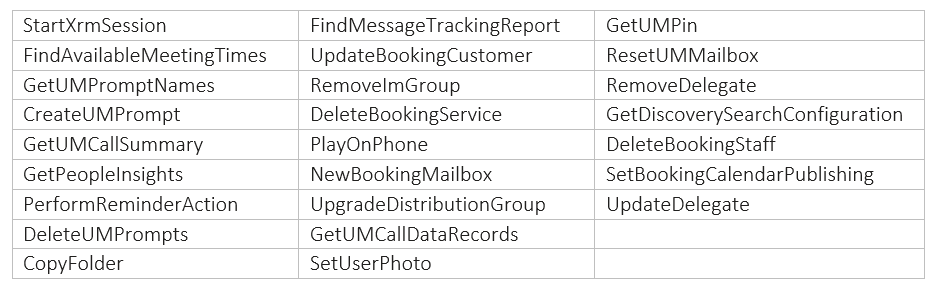
Today, we are announcing that we are going to remove the ability to create new EWS apps starting September 30, 2022. We are also announcing the deprecation of the 25 least used APIs of EWS for Exchange Online (as determined by the call volume into the service). We are deprecating these APIs to begin the process of reducing the surface area of the EWS protocol for maintenance and security purposes. Support for these APIs will no longer exist after deprecation.
The list of deprecated APIs is at the end of this post. We will introduce sunset headers in the response for these APIs that are marked for deprecation. As per our deprecation policy, we will decommission these APIs by March 31, 2022.
This set of deprecations is the first in a series of steps we will take as we sunset EWS for Exchange Online. Over time, we will identify additional APIs for deprecation when and where we see adequate parity with Microsoft Graph APIs.
EWS is a legacy API surface that has served us well, but no longer meets the security and manageability needs of modern app development. We strongly urge our ecosystem partners accessing Exchange Online data to migrate to Microsoft Graph APIs.
APIs scheduled for deprecation:
The Exchange Team and Microsoft Graph Team

by Contributed | Oct 4, 2021 | Business, Microsoft 365, Technology, Windows 11
This article is contributed. See the original author and article here.
We are excited to announce Windows 11 is now generally available. We reimagined Windows 11 to be the operating system for hybrid work. I encourage you to begin your Windows 11 pilots and upgrades today for all eligible PCs with confidence that Windows 11 is the most productive, most collaborative, and most secure version of…
The post Empower your hybrid workforce today with Windows 11 appeared first on Microsoft 365 Blog.
Brought to you by Dr. Ware, Microsoft Office 365 Silver Partner, Charleston SC.


Recent Comments