by Contributed | Oct 28, 2021 | Technology
This article is contributed. See the original author and article here.
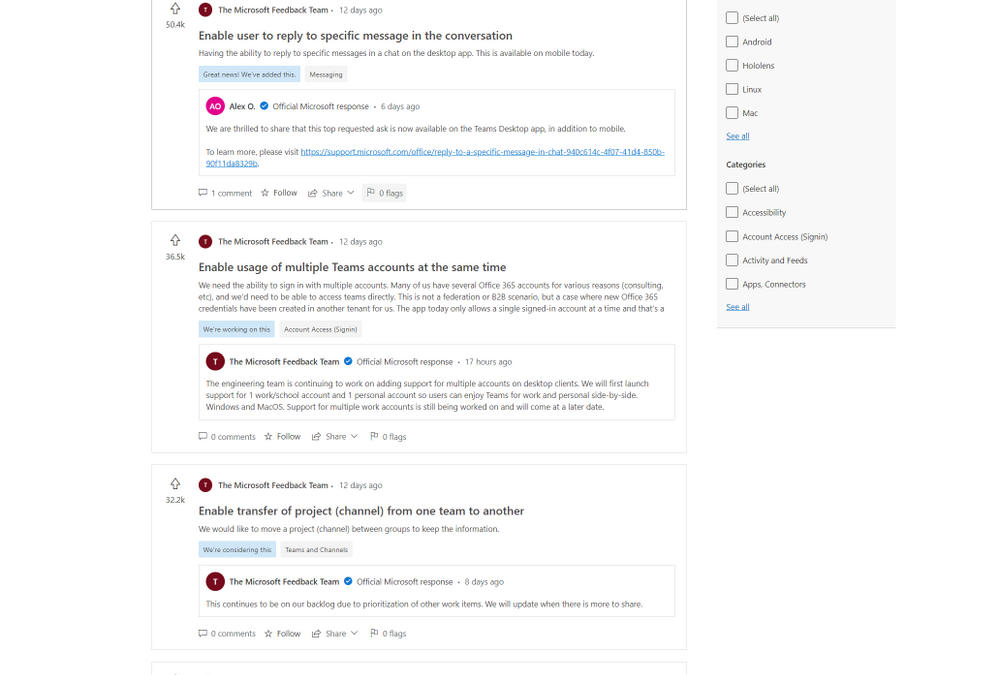
Starting today, the preview of Feedback for Microsoft Teams, a new community feedback experience from Microsoft, is available. Built on Dynamics 365 Customer Service, Feedback continues our dedication to using customer feedback to help with the further development and improvement of Teams. Since 2017, when Teams became the hub for collaboration in Microsoft 365, user submissions have driven the completion of over 500 features and improvements, and we aim to complete thousands more.
The new Feedback portal will allow users to submit their own feedback, browse other publicly submitted ideas, track official Microsoft responses, see our top voted customer ideas, upvote the feedback they agree with, and comment on feedback that matches their own. Top known feedback items remain available in the new portal.
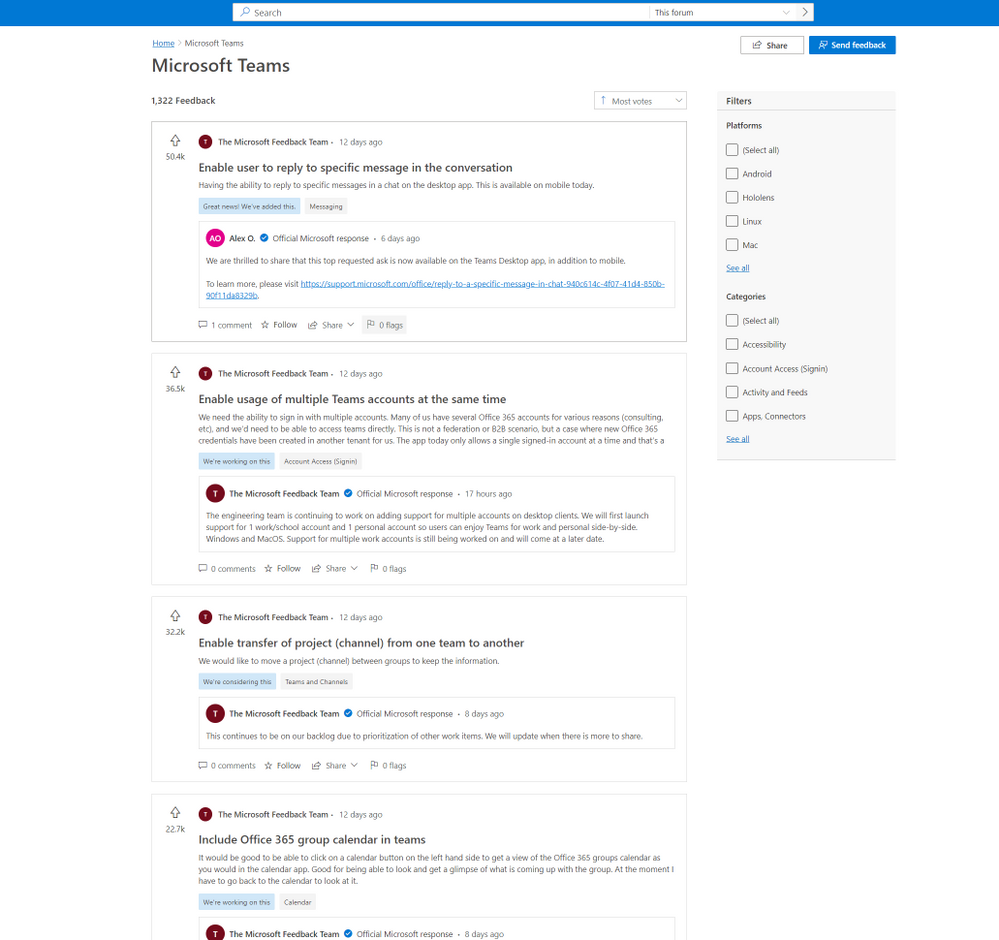
In Feedback, users will also be able to easily track their favorite ideas through the ‘star’ icon and receive notifications when those ideas are responded to by Microsoft.
Explore the new Feedback portal now at https://aka.ms/TeamsFeedback and let us know what you need most from your Teams experience. Learn more about the broad topic of Feedback at Microsoft in our documentation.
by Contributed | Oct 27, 2021 | Technology
This article is contributed. See the original author and article here.
Voices of Healthcare Cloud is a webinar series hosted by myself, @Vasu Sharma & @Joshua Thompson. My name is Shelly Avery, I am currently a Dir, Healthcare Specialist for Health and Life Sciences focusing on the largest Payor and Provider customers in the US, Vasu is a Sr Customer Success Manager for Microsoft 365 for Health and Life Sciences & Josh is a Sr Account Executive for Healthcare. The goal of this webinar series is to showcase how Healthcare is seeing positive business and clinical outcomes with cloud technology.
We will be bringing new and creative solutions to you at least once a month, so we hope you tune in live or catch the on-demand recording after the session is completed.
If you want to get direct invites for these sessions, you can let us know by filling out this form.
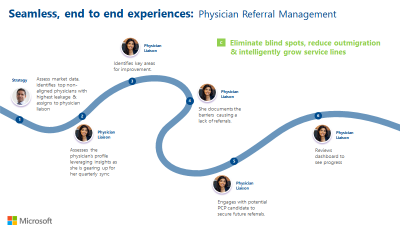
For our next session, we will be joined by Ellary Rose, Healthcare Subject Matter Expert, as she brings a wealth of knowledge around Physision Refferal & Relationship Management. She is going to speak on a handful of industry challenges around referral management such as keeping referrals in house, processing external referrals and how to manage physician relationships to acquire their referrals.
These are frequent challenges, and if the processes are ineffective, it can heavily impact patient experience and patient outcomes. By automating these processes, it helps all parties involved — the health organization retains the patient, the provider gets help for their patient quickly and the patient does not fall through the cracks resulting in better care and better outcomes!
Please join us on November 3rd to learn how your organization can positively impact Physician Referral and Relationship Management with these great process and automation tools!
This session will be on November 3rd at 11:00 PT / 12:00 MT/ 1:00 CT / 2:00 ET
Please click here to join or download the calendar invite here
We also have future sessions lined up and these topics are:
- November 10th – Patient Referral Automation
- November 17th – Data Driven Patient Engagement
- November 24th – No session (Break for Thanksgiving holiday)
Hopefully you joined our last few webinars on:
Please follow the aka.ms/HLSBlog for all this great content.
Thanks for reading, Shelly Avery | Email, LinkedIn
by Contributed | Oct 26, 2021 | Technology
This article is contributed. See the original author and article here.
Today marks the day that the latest release of Windows for IoT, Windows 10 IoT Enterprise LTSC 2021 has gone RTM for Original Equipment Manufacturers (OEMs). Windows 10 IoT Enterprise is the latest operating system offering for embedded and IoT devices. With every new release, we continue to deliver on our promise of bringing enterprise-class power, security, and manageability to the Internet of Things in addition to adding new features and capabilities, some of which are highlighted below.
This release will be available in two editions:
New Features and Capabilities in this release
There are several new features and capabilities included with Windows 10 IoT Enterprise, version 21H2. Unless otherwise noted, these features will be included in both the LTSC and SAC versions of the release.
Microsoft Edge Browser Support
Windows 10 IoT Enterprise, version 21H2, comes with in-box Microsoft Edge Browser support.
Customizable Windows Update UX
With this latest release, we are enabling you to manage your Windows update experience with genericized update message strings and screen accent colors.
Soft Real-Time
Windows 10 soft real-time is a new feature with Windows 10 IoT Enterprise, version 21H2 that allows device makers to introduce soft real-time capabilities on their devices.
Check out the following documentation to learn more:
Unified Write Filter (UWF) Updates
With Windows 10 IoT Enterprise, version 21H2, there have been many improvements to the Unified Write Filter.
- Allowing UWF Swapfile (DISK Overlay) to be created and used on any volume
- Read Only Media Mode
- Full Volume Commit in Read-Only Media mode
To learn more about how to implement these new features, review Enhanced Unified Write Filter Features
Windows Subsystem for Linux (WSL)
Starting with Windows IoT Enterprise LTSC 2021, Windows Subsystem for Linux (WSL) will be available in-box for both LTSC and SAC.
GPU Compute Support
With Windows 10 IoT Enterprise, version 21H2 there is additional GPU compute support in the Windows Subsystem for Linux (WSL) and Azure IoT Edge for Linux on Windows (EFLOW) deployments for machine learning and other compute intensive workflows.
Adding WPA3 H2E standards support
In this new release, there will be WPA3 H2E standards support for enhanced Wi-Fi security. To learn more, view Faster and more secure Wi-Fi in Windows
Where to learn more?
by Contributed | Oct 25, 2021 | Technology
This article is contributed. See the original author and article here.
Attackers are constantly evolving their phishing technique with sophisticated campaigns to subvert email protection systems like Microsoft Defender for Office 365 and make your security perimeters vulnerable. For this reason, it’s critical that SecOps professionals empower employees to be hypervigilant to such threats and report them as soon as they land in their inboxes.
Microsoft Defender for Office 365 has a fully automated detection and remediation system for emails, URLs and attachments that are reported by your employees. User and admin submissions are critical positive reinforcement signals for our machine learning based detection systems to review, triage, rapid-learn and mitigate attacks. The submission pipeline is a tightly integrated solution with automated mail-flow filters that protect your employees from similar threats.
You can learn here on how to report an email to Microsoft and manage your submissions here.
Once you report an email through the submission process, our system follows a set of actions. If you have any organizational compliance restrictions that prevents a user from reporting sensitive emails outside of your infrastructure, we recommend using the custom mailbox reporting option detailed here. This will ensure that user reported emails will come to your custom mailbox. Admins who are granted privileges to review those emails can then report them back to Microsoft.
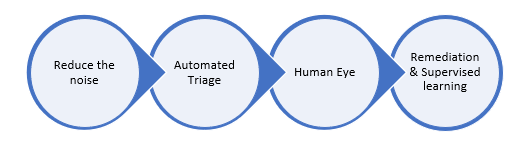
Figure 1: Behind the scenes post-submission process flow.
- Reduce the Noise: We wanted to reduce the noise from the submissions to ensure we send only clean signals for our automated triage system.
- Simulation: Your simulated messages from Attack Simulation Training or any of your 3rd party vendor will be filtered.
- Policy overrides: Wrongly classified messages due to your tenant’s ploicies or sometimes to end users’ policies are notified so that you can act at your end. From the override scenarios, we also honor your policies if they recommend detection improvements.
- Email Auth Check: We validate if the email authentication passed or failed during the email delivery.
You can learn about configuring 3rd party simulations here and learn about our secure by default strategy here.
- Automated Triage: We run our detection filters once again to identify if our systems have adapted between the time of delivery and your submission.
- All our machine learning based email filters will be run on your submissions to reclassify them in case of updated learning.
- In case of entities such as URLs and attachments in your submitted emails, we detonate them once again in our highly advanced sandbox environment to uncover the status of weaponization and assign the verdicts accordingly.
- We run a series of machine learning models exclusively on the reported submissions to identify, cluster the patterns and reclassify them in case of change in verdicts based on anomalies observed in similar submissions across our global customer base.
- We generate automated alerts on user reported phishing submissions by default and enable AIR (Automated Investigation and Response) so that these submissions will carry the verdicts from our automated triaging process. Please note that AIR is only available in MDO plan 2/E5/A5.
You can learn more about our AIR capabilities here.
- Human Eye: As the weaponization of phishing entities are dynamic, attackers constantly use multiple evasion techniques to bypass filters. That’s why a hybrid approach and human partnered machine learning based solution is the ideal method to stay on top of advanced threats and weaponization tricks.
- We prioritize submissions based on various factors such as phish severity, malware indicators, false positives, high volume anomalies, advanced pattern indicators, and whether reported by an admin or user.
- Expert graders/analysts are well trained on phish detection techniques and will be dissecting submissions through various Indicators of Compromise (IOC) and do deeper investigation on all email entities such as headers, URLs, attachments, and sender reputation to assign the right verdict on submissions.
- Graders generally deliver informed decisions as high-quality verdict signals that are being sent to the above discussed machine learning models 2(c) for continuous reinforcement learning.
- Human graded verdicts always take a higher priority and can override the verdict given by the automated triage process.
Human graders review anonymized email header and body metadata and hashed entities in a highly compliant environment that meets all the privacy guidelines from our Trust Center. You can learn more about Microsoft Trust Center here. You can also learn more about data storage here, and learn more about our data retention policies here.
- Remediation and supervised learning: The new verdict either from automated triage or human grader review will be sent for both rapid remediation and retrain our ML filters faster.
- We apply the graded labels from the automated triage system or human graders on the submitted and all related clusters belonging to this submitted pattern.
- We move all the messages from the current delivery location to the new location for all the impacted end users. For example, the system will move the messages from inbox to quarantine in case of ‘phish’ verdicts and move from Quarantine/Junk to inbox in case of ‘Good’ verdicts using our Zero-hour Auto Purge (ZAP) platform.
- We also identify IOCs by the submitted clusters and add them to our reputations to initiate instantaneous mitigation against phish and malware campaigns.
- Any new incoming mail from a similar pattern or IOC will be auto classified with the new verdict to reduce the triage load from your SecOps.
You can learn more about ZAP here.
The automated User Submission workflow is carefully designed with state-of-the-art technology to help the organizations to mitigate any False negative or False positive risks faster to reduce MTTR (Mean time to Response) for their SOC team. It also becomes important for organizations to enhance their security postures by training employees who actively participate in this phish detection submission feedback loop. Attack Simulation Training is included with Microsoft Defender for Office 365 P2 and E5 licenses and provides the necessary simulation and training capability that reduces phish vulnerabilities at the user-level. Learn more and get started using Attack Simulation Training here.
Do you have questions or feedback about Microsoft Defender for Office 365? Engage with the community and Microsoft experts in the Defender for Office 365 forum.

by Contributed | Oct 25, 2021 | Business, Microsoft 365, Technology
This article is contributed. See the original author and article here.
Hybrid work has become a part of our reality. We’ve had to rethink everything from where, when, and how we work. Navigating this new normal is both challenging and uncomfortable at times.
The post Gartner recognizes Microsoft as Leader in Unified Communications as a Service and Meetings Solutions appeared first on Microsoft 365 Blog.
Brought to you by Dr. Ware, Microsoft Office 365 Silver Partner, Charleston SC.


Recent Comments