Video Transcript:
– Up next, we’re joined by SQL engineering leader Bob Ward, to tour the latest Azure-enabled database and data integration innovations with a first look at SQL Server 2022 and what it means for your hybrid workloads, including first-time, bi-directional high availability and disaster recovery between Azure SQL Managed Instance and SQL Server, Azure Synapse link integration with SQL for ETL-free, near real-time reporting and analytics over your operational data, and new, next-generation built-in query intelligence with parameter sensitive plan optimization. So Bob, it’s great to have you back on the show.
– I love being on the show, thanks for having me.
– So first, congrats to you and the team and big news today with the announcement of SQL Server 2022. What’s been the focus on this round of updates?
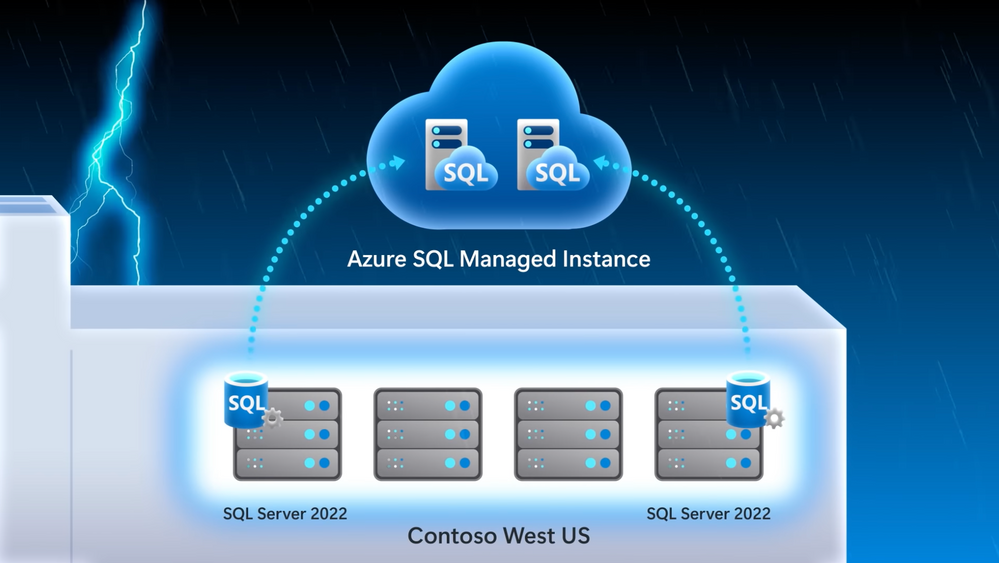
– So with every release we’re optimizing the core SQL engine to give you a consistent database experience from the cloud to on-premises, and even the Edge. As you know, most of the new innovations start in the cloud before coming to SQL Server. And this release really moves a ton of pain points in areas like disaster recovery, where for the first time you can do failover from SQL Server 2022 to Azure SQL Managed Instance in the regions you need. We’re also removing silos between your operational and analytic workloads. In the past, you’d have to ETL your operational data on a schedule to bring it into your analytics system in order to run analytics. That pain now goes away with Azure Synapse link integration for near real-time analytics and reporting. Additionally, you can now get visibility over your SQL Server data in the context of your entire data state with Azure Purview integration. Then for auditing scenarios, we’re introducing SQL Server Ledger, bringing the power of blockchain technology to verify changes by other parties, so that you can retain an immutable record of the data. And one of my favorites, we’re also bringing performance to the next level with built-in query intelligence, like parameter sensitive plan optimization that caches more than one plan for a stored procedure for consistent query performance.
– And these really seem like great updates, especially for hybrid data workloads. But this is Mechanics, though. So let’s unpack these capabilities a bit more and also see them in action.
– Sure, Jeremy, right. And as you saw, there’s a lot we can dig into with SQL Server 2022. So I’m really going to focus on my three favorites: disaster recovery, Azure Synapse integration, and built-in query intelligence.
– All right, let’s do it. So starting with disaster recovery, I know this has been traditionally a pain point for people. Today they have to spin up an Azure virtual machine or another SQL on-premises server to failover to. It’s hard to set up everything and really get it all configured and running, though, right?
– That’s true. So now it’s super easy to set up disaster recovery as a managed service with Azure SQL Managed Instance configured for you as your disaster recovery site. In fact, we’ll look at our demo company example, Wide World Importers, who want to implement disaster recovery in an easy way, especially for the email marketing campaign. I’m in SQL Server Management Studio, or SSMS. I’ve connected to my SQL Server, and you can see the Wide World Importers database. We’ve run a query to look for people that have opted into email comms. And you can see five subscribers that have opted in. In this case, I’ve already attached our Azure SQL Managed Instance to our SQL Server. All I had to do was right click the server, go to Azure SQL Managed Instance link and attach my database to the cloud. And by the way, if you’re setting this up for the first time, it will ask you to log into your Azure subscription and choose your target managed instance, and it will seed your database into the managed instance. Next, you can see an availability group and distributed availability group that was deployed and configured for me automatically. And since we’re linked to Azure SQL Managed Instance, we can also view it in the Azure portal. Now, not only is it easier to configure, but because this is a managed service, you no longer have to manage and maintain your DR infrastructure. So now with everything running, I’ll go back into SSMS and we can start to run queries against the managed instance as a read-only endpoint. I’ll set my screen up so SQL Server is in the middle and Azure SQL Managed Instance is on the right. Now, I’ll run the same query to see who’s opted in for emails. And in the results we’ll see that it’s a read-only database, and the same results that we see in SQL Server. And just to show you how quickly everything replicates, we can go back to SQL Server and insert a new subscriber, Isabella Rupp, and now I’ll run the initial query again, and we can see the results reflected in Managed Instance.
– Of course, what you just showed was a great side benefit for read replica. But that said, the main reason why we set this up was for failover. So what does the process then look like to move the active instance then to Azure SQL Managed Instance?
– That’s right, Jeremy. So now let’s take the example of an outage or a hardware upgrade where we need to failover. This time, I’ll navigate to migrate database to the cloud to initiate the failover. That takes me to a wizard to step me through the process. First, I have to sign into Azure and connect to the managed instance I want the failover to. Once I’m connected in cut-over type, I can choose planned or forced to failover. I’ll choose planned because I want to synchronize SQL Server with managed instance one last time before the failover. We’ll skip through our cleanup and summary. And when I click finish, we can monitor the steps. Now this can kind of take a few moments. Once the failover is complete, we can connect to the Azure SQL Managed Instance and add a new subscriber, in this case, Mandy Smith. We can now use managed instance for read and write workloads, whereas before it was read only. You can see from the result that a new row has been inserted.
– That’s great, the read and write capabilities make this pretty useful. Now everything’s up in the cloud, but can you restore everything then back to your SQL Server on prem?
– Jeremy, can you believe this? That’s the great thing. With SQL Server 2022 for the first time ever, you can restore a versionless Azure SQL Managed Instance database back to SQL Server. I’m going to back up the Wide World Importers managed instance database to an Azure blob storage account, using the backup URL. And now if I switch over to SQL Server 2022, I can use good old T-SQL to restore the backup file to my local SQL Server. I’ll give it a new name, like WideWorldImporters_back, so we don’t get confused. Now, when I refresh, I can see the new database has been restored. We can then query the stored database and confirm the new subscriber Mandy Smith was added, and there they are.
– So now disaster recovery is truly hybrid, but why don’t we move on to our next major update with Synapse Link, where SQL Server, now like Cosmos DB and Dataverse, can also be integrated with Azure Synapse.
– This makes a huge difference, by the way; as I mentioned, removing the need for ETL to run analytics over your operational data. So let’s go back to our Wide World Importers example. They’re using Azure Synapse Link with SQL Server to track their fleet of trucks, ETL free. Their trucks have onboard IoT sensors to track engine telemetry with time series data logs sent to Azure Data Lake. And anytime a truck loads or unloads, the onboard cargo data is updated to our SQL Server. As all of this is happening, their business analysts can connect to the analytical data in near real-time and use Power BI to track vehicle location and onboard cargo. Additionally, their data scientists can use the vehicle telemetry data with spark pools to train machine learning models to get ahead of potential issues in each truck that could affect the delivery of goods. Let me show you how this works. Starting in my Synapse workspace, you can see that I’ve established the Synapse Link relationship between the SQL pool in Synapse and my SQL Server. I’ve also already linked the specific tables that I want to link with Synapse. I could add more tables using the plus new here, but for now stick with my two vehicle tables.
– Cool, so now everything is wired up between your SQL Server and Synapse, but what else can you do now that your data is in Synapse?
– Yeah, so Azure Synapse opens up limitless data analytics, and with Synapse Link enabled, this lets me pull out insights in near real time. Now I’m back in my Synapse workspace and here are my two vehicle tables. Just to prove the data’s in sync, I’ll just run a basic top 100 rows query and you’ll see it returns almost instantly. And it gets better, because Power BI visualization is built in to the Synapse workspace, I can quickly visualize my data. And this vehicle data is tracking inventory, or cargo, on our trucks. In Power BI, all of these colored dots here in Texas represent our trucks with their location, and the diameter of each dot indicates the amount of cargo in each. And you can now see they’re all pretty similar. I’m back in SSMS and we just bought a new truck in Dallas and we finished loading our truck in Waco with more cargo. So I’ll write these updates to my SQL Server first. And because this is all linked for near real-time analytics in Synapse, if I head back to my Power BI report in my workspace and refresh it, you’ll see our new truck in Dallas with this green dot here and our Waco truck’s blue dot is larger to reflect all of its added cargo. Additionally, because the IoT devices on our trucks are logging up to our data lake and we’re an Azure Synapse, our data scientists can also build machine learning models using built-in spark pools to detect data anomalies that might put our shipments at risk, as you can see in this notebook.
– And this is really a great example of hybrid HTAP for SQL Server and really rounds out our hybrid updates. Now for all of our hardcore SQL fans who are watching, why don’t we go deeper on the changes that we made to the SQL engine itself?
– Jeremy, I’ve got to say as a longtime SQL professional, the built-in query intelligence is a game changer. It really ensures consistent performance without any code changes. For example, when you run a stored procedure, there are two types of plans possible depending on the amount of data that SQL needs to process and the parameter value pass to the stored procedure. An index seek is great for queries that return a small number of rows and an index scan is great if your query is going to return a lot more data. SQL will choose the best plan based on the scenario. That said, only the first planned run can be cached for the stored procedure. This plan will remain cached unless something evicts it from memory. So if you are the second person to run the store procedure and you need an index seat, but an index scan is in the cache, you were stuck with that plan, which usually means it takes longer to run your query. This problem is commonly known as parameter sniffing. So now instead of constantly tuning your queries, built-in query intelligence takes care of that for you. Instead of one cached plan per store procedure with parameter sensitive plan optimization, SQL can now cache multiple plans against the same stored procedure as multiple queries are run against it.
– It sounds good, but can we see it in action?
– Sure. In this example, I have a database that hosts real estate property listings with agent details in a single table. You can see here in SSMS in these two query windows, the one in the middle is best used with a seek, and the one on the right is best used with a scan. Let’s see an example of these queries in action, simulating a workload of many users. I’ll use Perfmon to track resource usage per CPU and batch requests per second, which is a common way to look at SQL query throughput. Now I’ll use the popular free tool, OStress, to run a workload for the first parameter, which uses an index seek. In fact, this is the script I’ll be running to execute the stored procedure. In Perfmon, we see a healthy use of CPU and a high throughput. You can see the workload only took a few seconds to run. Now let’s run the other workload to simulate a planned cache eviction, and an execution of the query that is best served by index scan. And while that runs, here’s my script. And you can see the first lines evicting the cache plan. Once that happens, and the second line runs, the new scan plan has taken over in cache. So let’s flip back to run our first query in this top window, which runs faster using a seek plan. But now in Perfmon, you’ll see a massive performance degradation compared to the first time we ran it. That’s because it’s forced to use the scan plan from cache. As you’ll remember, with the seek it took just like three seconds. We’re already way past that, so I’m going to cancel this. I’m going to fix this with SQL Server 2022. I don’t need to change any code, though. I’ll just enable DB compat 160, which is the new compat level for SQL Server 2022. Now I’m going to run the same commands to simulate planned cache eviction with the workload that requires a scan, like I did before, just to ensure the scan plan is cached. That’ll run for a few seconds. And normally, that would have crippled the query that prefers the seek plan. Let’s see if it’s still the case. I’ll run the query that prefers a seek plan again. You see it wasn’t slowed down. There was no performance degradation, because both plans were cached. I’m going to prove it. Let’s look behind the scenes using query store. You can see that now I have two plans for the same query statement with the same stored procedure. First, let’s look at the seek plan and then we’ll open up and look at the scan plan. Now each plan can provide the best performance for the same stored procedure based on what the parameter value needs. And the nice thing about these changes at the engine level is that SQL Server and Azure SQL, at this database compatibility level, all benefit from parameter sensitive plan optimization.
– Awesome, it’s so great to see all the updates, and really how they accrue to SQL, no matter where you’re running it. So how do you recommend people get started?
– You can learn more about SQL Server 2022 at aka.ms/SQLServer2022. And if you want to try it out, you can apply to join our private preview at aka.ms/EAPSignUp.
– Thanks Bob and of course, keep checking back to Microsoft Mechanics for all the latest updates. And be sure to subscribe to our channel if you haven’t already. And thanks for watching.



Recent Comments