by Contributed | Mar 11, 2021 | Technology
This article is contributed. See the original author and article here.
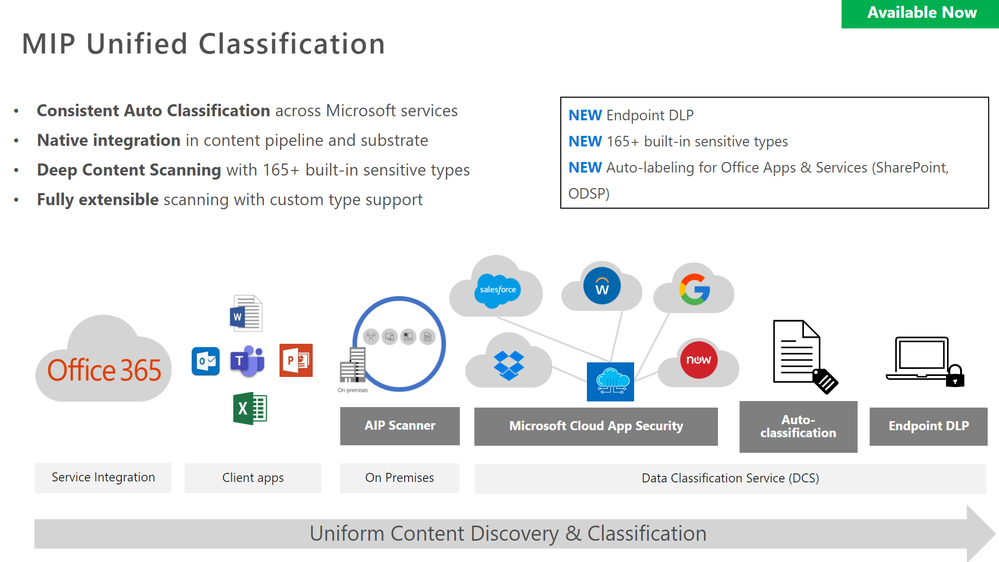
The Remote Workers DLP webinar provided an overview of Unified DLP, how to setup Teams DLP, understanding the end user experience, securing Teams content with container labels and securing Teams guests’ access.
Resources:
This webinar was presented on January 26, 2021, and the recording can be found here.
Attached to this post are:
- The FAQ document that summarizes the questions and answers that came up over the course of both Webinars.
- A PDF copy of the presentation.
Thanks to those of you who participated during the two sessions and if you haven’t already, don’t forget to check out our resources available on the Tech Community.
Thanks!
@Robin_Baldwin on behalf of the MIP and Compliance CXE team
by Contributed | Mar 11, 2021 | Technology
This article is contributed. See the original author and article here.
Let’s give GlobalCon a collective high-5 and make it GlobalCon5. Hey, don’t leave me hangin’! I’m pleased to be joining in the fun along with a wonderful lineup of speakers and depth of content.
Yes, the Collab 365 team is at it again. I don’t think they ever stopped. They have been paving the way forward for virtual events for some time, and this go around won’t disappoint. They’re planning great, unique training, presented by world-class trainers and new content – across three days. It’s easy to plug in no matter where you live, engaging Q&A throughout, with much to take with you and learn at your own pace.
GlobalCon5: “I feel the need, the need for speed!” (that’s the kind of high-5 I’m talkin’ about) ;)
GlobalCon5 – March 16-18, 2021 (online training)
Microsoft 365 is big and changes often – the GC5 team could run a conference every week! Each session brings a fresh new perspective. You’ll learn the latest to keep your skills fresh. GlobalCon5 covers Teams, Power Platform, SharePoint, and everything else stacked into Microsoft 365.
Below is a quick view of the sessions by day – including my kickoff session:
- Day 1 sessions | March 16th
- Day 2 sessions | March 17th
- Day 3 workshops | March 18th
Shout out to community “high-5’ers” Helen Jones, Mark Jones, and the #GlobalCon5 crew who are navigating this conference by day and night, supporting, and promoting the knowledge and expertise that reaffirms this: Microsoft 365 has the best tech community in the world – one that spans the globe.
See you there, Mark
by Contributed | Mar 11, 2021 | Technology
This article is contributed. See the original author and article here.
Double Key Encryption (DKE) enables customers to protect their most confidential content using a key they control, thereby allowing them to comply with regulatory requirements. DKE ensures that Microsoft cannot access their data under any circumstances.
Most customers implementing DKE are trying to limit access to their most sensitive content to users of their own tenant. But some customers asked how DKE can also be used for B2B scenarios. This blog shows the additional steps for allowing Contoso to share DKE protected content with Fabrikam users.
Please observe that this blog post does not replace the official documentation for implementing DKE, it merely describes the additional steps required.
Prerequisites
This section defines the technical prerequisites.
- The URL of the DKE service https://dke.contoso.com needs to be accessible both for Contoso and Fabrikam users.
- The DKE URL needs to be based on a DNS domain registered in the Azure AD tenant of your organisation. For instance, if you plan to use the URL https://dke.contoso.com for the DKE service, the DNS domain contoso.com needs to be registered in your tenant. Please refer to our documentation for registering a custom domain.
Overview on the steps
Making DKE available for users of the Fabrikam tenant requires several steps:
- Adapt the app registration to allow «Multitenant» authentication, if that’s not already the case.
- Trusting the Fabrikam Azure AD tenant as valid token issuer and adding the email addresses of the Fabrikam users in the configuration file.
- Grant permissions to the Fabrikam users in the sensitivity label protection settings.
- Have a Fabrikam user access a DKE protected document as first step to grant consent.
- Ask the Fabrikam Global Admin to grant consent for accessing the DKE service on behalf of all Fabrikam users.
Details to these steps are provided in the following sections.
Make sure the app registration for DKE supports «Multitenant» authentication
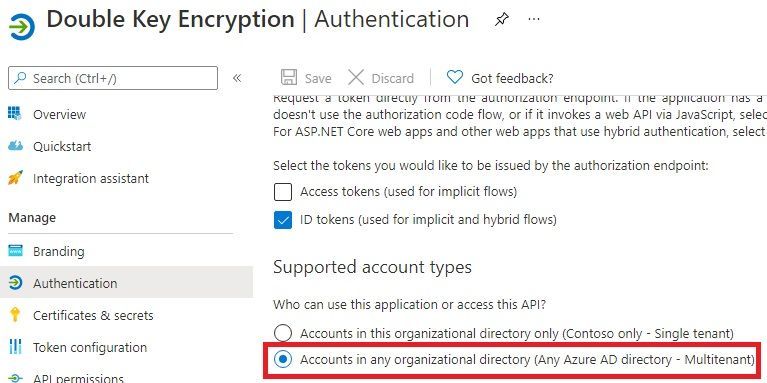
If a DKE service were meant for users of your tenant exclusively, its app registration authentication may be limited to «single tenant».
But since the DKE content needs to be accessibly to users from the Fabrikam tenants, you have to select the option «Accounts in any organizational directory (Any Azure AD directory – Multitenant)», as shown here:
Changes required on the configuration file
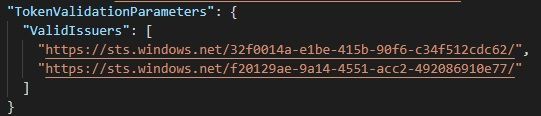
You need to ensure both the home tenant and all tenants of your business partners are contained in the configuration file.
The following configuration file excerpt shows both Contoso and Fabrikam tenants are trusted:
Email addresses of the Fabrikam users also need to be included in the configuration file. The following excerpt from the configuration file shows how Adele Wilber from Fabrikam is also allowed to access the DKE service:

Make sure the sensitivity label grants permission to Fabrikam users
Fabrikam users may only access content from your tenant, if the respective label grants them access – this applies to DKE labels as well.
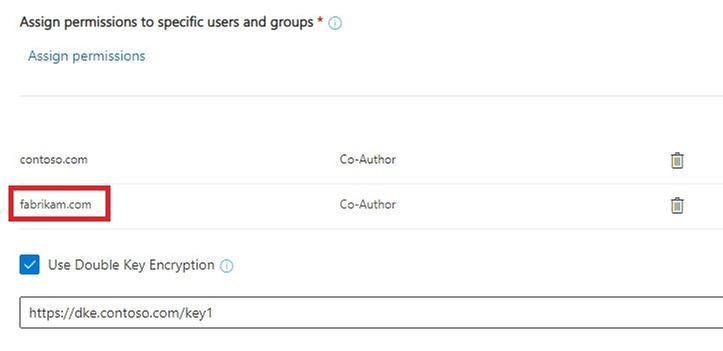
Here all users both from contoso.com and fabrikam.com may access data protected by the DKE label:
Initial steps for granting consent for users of the Fabrikam tenant
To initiate granting consent for Fabrikam users to the DKE service, a user of the Fabrikam tenant with normal privileges first needs to open a DKE protected document from Contoso.
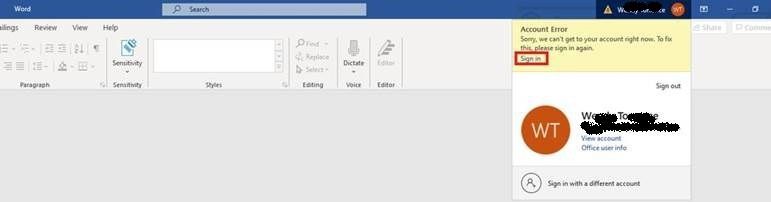
This initial attempt is expected to fail, the user will see an exclamation mark besides the account in the title bar, indicating there’s an issue with the account. (Please observe that Contoso users opening content protected by their own DKE service do not get this experience.)
The user performs the following steps:
1. Click on the account in the title bar:

2. Select «Sign in» and re-authenticate as needed:
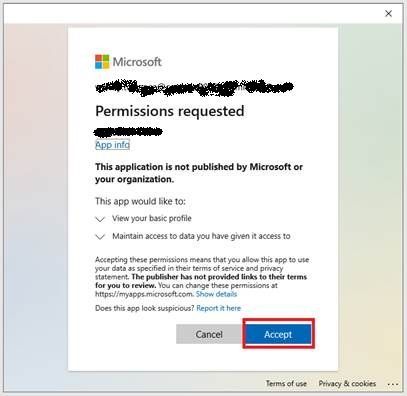
3. Accept requested permissions:
Global Admin of Fabrikam tenant grants consent for all tenant users
The following steps are needed by the Global Admin of the Fabrikam tenant in order to grant consent on behalf of his users:
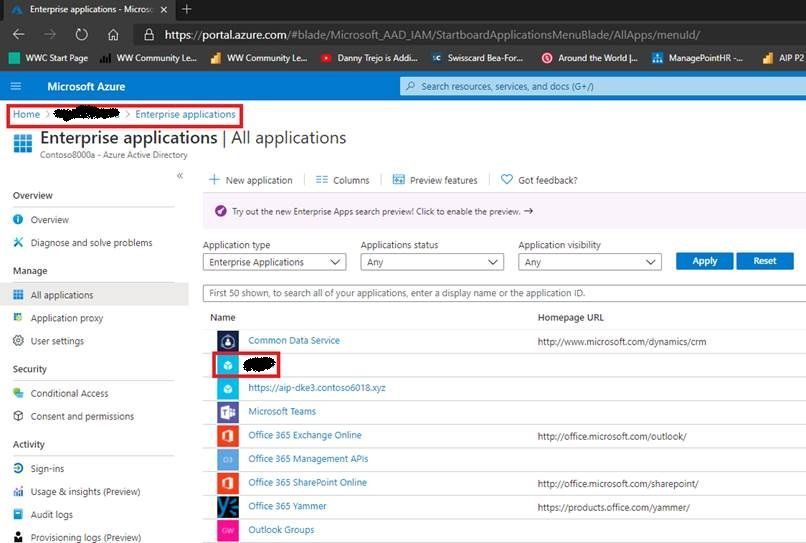
1. Sign in to the Azure portal, open “Azure Active Directory” and select “Enterprise applications”.
2. Select the Contoso DKE app:
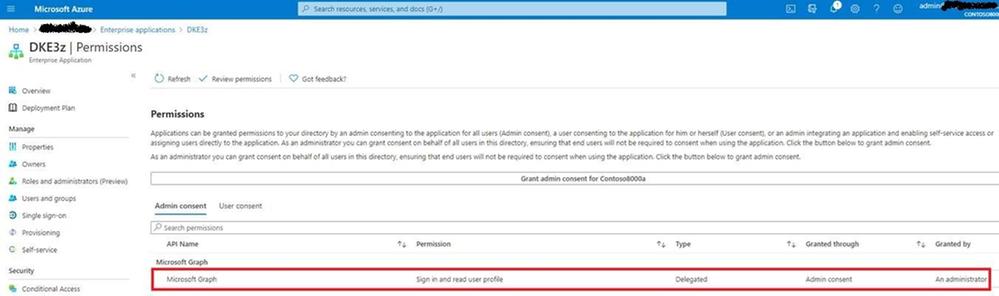
3. Select «Permissions»:
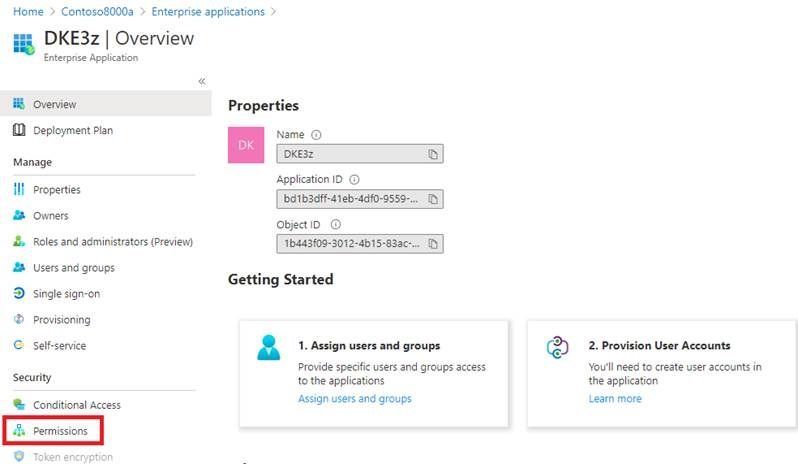
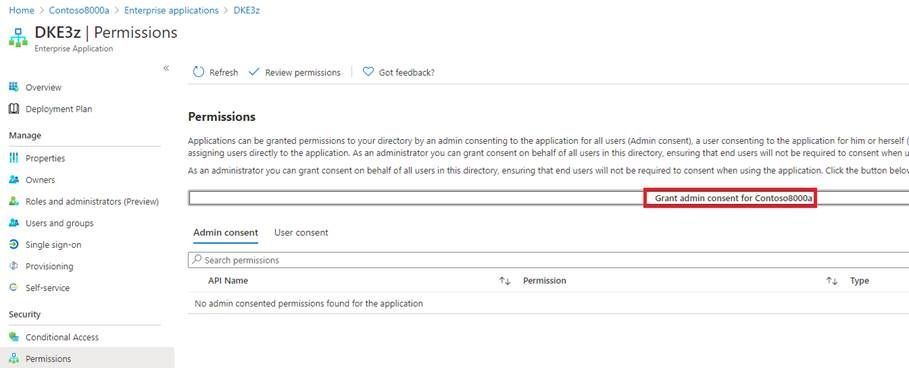
4. Select «Grant admin consent for Fabrikam»:
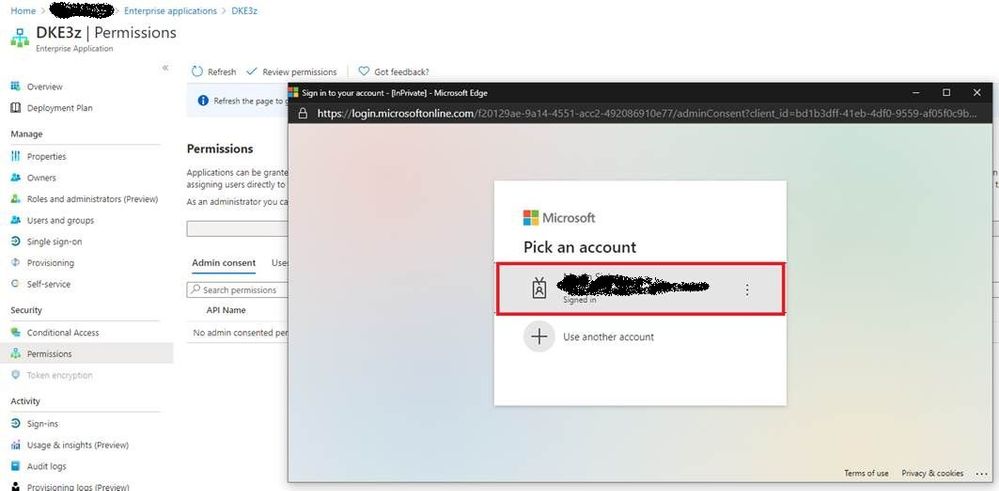
5. Re-authenticate as needed:
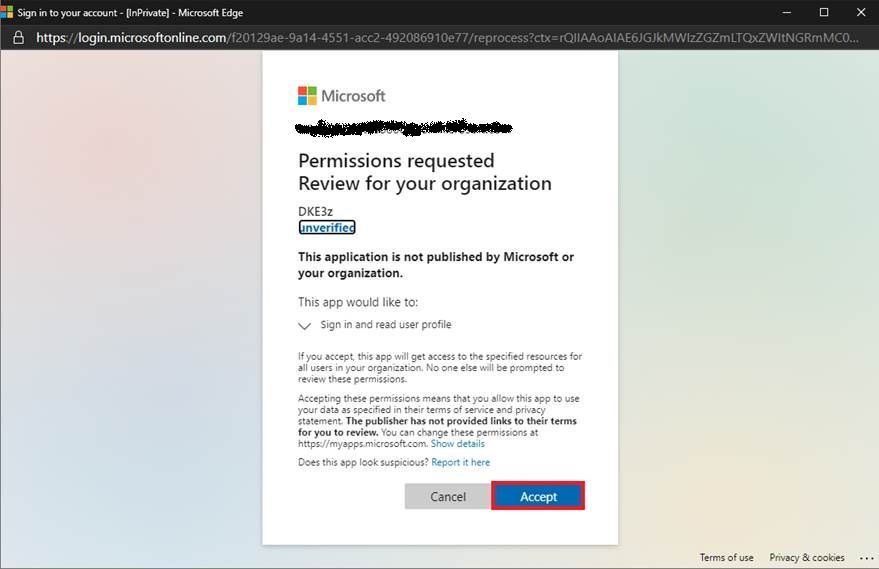
6. Accept permissions:
7. Refresh and verify the permissions are available:
Conclusion and next steps
After performing these steps, both Contoso and Fabrikam users may open DKE protected content by Contoso.
Please observe that Fabrikam users may not protect new content with the Contoso DKE service, they need to implement a DKE service of their own instead. If they intend to share DKE protected content with users from the Contoso tenant, they also need to go through the steps in this blog post.
If Contoso decides to share content with Woodgrove Bank as well, the steps described in this blog post need to be repeated with their tenant.
by Contributed | Mar 11, 2021 | Technology
This article is contributed. See the original author and article here.
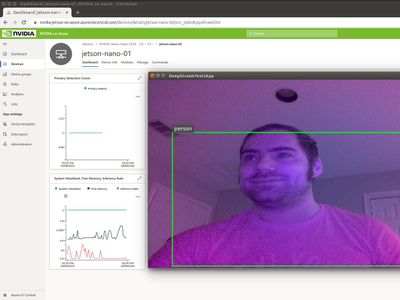
In addition to my role as a Principal Cloud Advocate and Lead for IoT Advocacy at Microsoft, I act as a professor at the University of Houston where I teach a course focused on Cloud-Powered App Development. As part of this course, we focus on AI @ the Edge Scenarios backed by Microsoft Azure IoT Services. To teach this concepts, we have chosen to target the very afforodable ($60 USD) NVIDIA Jetson Nano DevKit. This experience is catalogued in-depth in a previous article on the Microsoft Educator Developer Blog.
We find that student’s most requested point of customization for AI @ Edge solutions is in the customization of the AI models themselves. This can pose issues as there are various formats out there for developing computer vision based models, including: PyTorch, MXNet, Caffe, and Tensorflow. Oftentimes, the tooling to develop these formats results in vendor lock-in, meaning that future applications of your model may be bound by limitations depending on tooling and runtime compatibility for building and executing the model in question.
The Open Neural Network Exchange Format (ONNX) is a model standard/ format for exchanging deep learning models across platforms. It’s ability to be portable across model formats and even computer architectures makes it a prime candidate for AI model development without limitations. It can even adapt to the presence of say GPU acceleration on a given computational platform to offer enhancement of your model at runtime, without any need to redevelop your model to take advantage of those optimizations. Simply put, if you start with ONNX you can go anywhere and optimize without any extra effort.
Combining this fact with our target NVIDIA Jetson hardware, we can develop course content rooted in the development of ONNX based AI models to provide an open platform for students to build and experiment on, with the added benefit of GPU accelerated inference on low-cost embedded hardware. This allows the students to apply concepts on a device that they can physically alter with the addition of cameras, microphones, or other sensors to aid in their solutioning.
As a basis for formal understanding of how ONNX works with NVIDIA GPUs, we recommend starting with Manash Goswami’s presentation on the topic at the recent NVIDIA GTC 2020 conference (Note: that viewing this resource will require completing a free registration to NVIDIA’s Developer Program Membership).
After you have familiarized with the fundamentals, we recommend the following resources as hands-on lab or supplemental material for applying the concepts to run ONNX models on NVIDIA Jetson hardware for development of AI @ Edge solutions:
With these resources, we hope that you can employ the teaching of AI @ Edge scenarios without the fear of encountering the limitations inherent in less adaptable model formats. ONNX based model development can ensure that your models are portable across architectures and adaptable to the existence of accelerators on compatible hardware. For more information on the ONNX model format, be sure to check out https://www.onnxruntime.ai/ and for details on how to acquire NVIDIA Jetson embedded devices, check out this link.
Until next time,
Paul
by Contributed | Mar 11, 2021 | Technology
This article is contributed. See the original author and article here.
Overview
In 2021, each month we will be releasing a monthly blog covering the webinar of the month for the Low-code application development (LCAD) on Azure solution. LCAD on Azure is a new solution to demonstrate the robust development capabilities of integrating low-code Microsoft Power Apps and the Azure products you may be familiar with.
This month’s webinar is ‘Deliver Java Apps Quickly using Custom Connectors in Power Apps’ In this blog I will briefly recap Low-code application development on Azure, how the app was built with Java on Azure, app deployment, and building the app’s front end and UI with Power Apps.
What is Low-code application development on Azure?
Low-code application development (LCAD) on Azure was created to help developers build business applications faster with less code, leveraging the Power Platform, and more specifically Power Apps, yet helping them scale and extend their Power Apps with Azure services.
For example, a pro developer who works for a manufacturing company would need to build a line-of-business (LOB) application to help warehouse employees’ track incoming inventory. That application would take months to build, test, and deploy, however with Power Apps’ it can take hours to build, saving time and resources.
However, say the warehouse employees want the application to place procurement orders for additional inventory automatically when current inventory hits a determined low. In the past that would require another heavy lift by the development team to rework their previous application iteration. Due to the integration of Power Apps and Azure a professional developer can build an API in Visual Studio (VS) Code, publish it to their Azure portal, and export the API to Power Apps integrating it into their application as a custom connector. Afterwards, that same API is re-usable indefinitely in the Power Apps’ studio, for future use with other applications, saving the company and developers more time and resources. To learn more, visit the LCAD on Azure page, and to walk through the aforementioned scenario try the LCAD on Azure guided tour.
Java on Azure Code
In this webinar the sample application will be a Spring Boot application, or a Spring application on Azure, that is generated using JHipster and will deploy the app with Azure App service. The app’s purpose is to catalog products, product descriptions, ratings and image links, in a monolithic app. To learn how to build serverless PowerApps, please refer to last month’s Serverless Low-code application development on Azure blog for details. During the development of the API Sandra used H2SQL and in production she used MySQL. She then adds descriptions, ratings, and image links to the API in a JDS studio. Lastly, she applies the API to her GitHub repository prior to deploying to Azure App service.
Deploying the Sample App
Sandra leverages the Maven plug-in in JHipster to deploy the app to Azure App service. After providing an Azure resource group name due to her choice of ‘split and deploy’ in GitHub Actions she only manually deploys once, and any new Git push from her master branch will be automatically deployed. Once the app is successfully deployed it is available at myhispter.azurewebsites.net/V2APIdocs, where she copies the Swagger API file into a JSON, which will be imported into Power Apps as a custom connector.
Front-end Development
The goal of the front-end development is to build a user interface that end users will be satisfied with, to do so the JSON must be brought into Power Apps as a custom connector so end users can access the API. The first step is clearly to import the open API into Power Apps, note that much of this process has been streamlined via the tight integration of Azure API management with Power Apps. To learn more about this tighter integration watch a demo on integrating APIs via API management into Power Apps.
After importing the API, you must create a custom connector, and connect that custom connector with the Open API the backend developer built. After creating the custom connector Dawid used Power Apps logic formula language to collect data into a dataset, creating gallery display via the collected data. Lastly, Dawid will show you the data in a finalized application and walk you through the process of sharing the app with a colleague or making them a co-owner. Lastly, once the app is shared, Dawid walks you through testing the app and soliciting user feedback via the app.
Conclusion
To conclude, professional developers can rapidly build the back and front ends of the application using Java, or any programming language with Power Apps. Fusion development teams, professional developers and citizen developers, can collaborate on apps together, reducing much of the lift for professional developers. Please watch the webinar and complete the survey so, we can improve these blogs and webinars in the future.
Resources
Webinar
Low-code application development on Azure
Java on Azure resources
Power Apps resources


Recent Comments