
by Contributed | Mar 12, 2021 | Technology
This article is contributed. See the original author and article here.
SharePoint Framework Special Interest Group (SIG) bi-weekly community call recording from March 11th is now available from the Microsoft 365 Community YouTube channel at http://aka.ms/m365pnp-videos. You can use SharePoint Framework for building solutions for Microsoft Teams and for SharePoint Online.
Call summary:
New Microsoft 365 Extensibility look book gallery preview released. Work continues on Microsoft Viva Connections – an extensibility model to be previewed in weeks. Register now for March trainings on Sharing-is-caring. Latest project updates include: SPFx v1.12 release – ETA – in days. PnPjs Client-Side Libraries v2.3.0 release scheduled for March 12th, v3.0 Hub planning and discussion issues posted – issue #1636. CLI for Microsoft 365 Beta v3.7 delivered. Reusable SPFx React Controls – v2.5.0 and Reusable SPFx React Property Controls – v2.4.0 delivered. PnP Modern Search v3.18.0 released March 9th, v4.1 in progress. There were five PnP SPFx web part samples delivered last week. So useful! The host of this call is Patrick Rodgers (Microsoft) @mediocrebowler. Q&A takes place in chat throughout the call.
Actions:
- Register for Sharing is Caring Events
- First Time Contributor Session – March 22nd (EMEA, APAC & US friendly times available)
- Community Docs Session – March
- PnP – SPFx Developer Workstation Setup – April TBD
- PnP SPFx Samples – Solving SPFx version differences using Node Version Manager – April TBD
- PnP – AMA (Ask Me Anything) – SPFx Samples Edition – April 13
- First Time Presenter – March 24th
- More than Code with VSCode – March 23rd
- Maturity Model Practitioners – March 16th
- PnP Office Hours – 1:1 session – Register
- Download the recurrent invite for this call – https://aka.ms/spdev-spfx-call
Demos:
DataTable web part for rendering data from lists with advance features – this web part provides an easy way to render an interactive SharePoint custom list in DataTable view with many configuration options in the property pane. Provides all the important table formatting features like: Search & exclude from search, filter, pagination, column selection, column ordering, alternative row formatting, etc. Export the selected table data to CSV or PDF. Uses PnPjs, React property controls.
Building List Search web part for showing data flexibly from lists or libraries – this React list search web part allows the user to show data that’s pulled from different lists or libraries on multiple sites into a searchable summary list. Presenter steps through extensive, appropriate configuration options. Functionally – Select source data – sites, lists and fields, and Set up destination (summary) list columns, formatting, filtering, and on-click dynamic data functionality. Full documentation with sample.
Using a web part to control which Sites have been granted permissions in Azure AD application – the Sites Selected Admin SPFx web part enables Site Collection Admins to check which in scope apps have been added to a SharePoint site, to list Azure AD registered apps using Microsoft Graph API scope, and to add SharePoint sites to the Azure AD listed Apps. Uses functional components to granularly control apps accessing their SharePoint sites using Microsoft Graph APIs.
- No new or updated extensions last week
SPFx web part samples: (https://aka.ms/spfx-webparts)
As is the case this week, samples are often showcased in Demos. Thank you for your great work.
Agenda items:
Demos :
- DataTable web part for rendering data from lists with advance features – Chandani Prajapati | @Chandani_SPD & David Warner | @DavidWarnerII – 16:45
- Building List Search web part for showing data flexibly from lists or libraries – Alberto Gutierrez Perez (Minsait) | @albertogperez – 28:00
- Using a web part to control which Sites have been granted permissions in Azure AD application – Fredrik Thorild (Sogeti) | @taxonomythorild – 35:50
Resources:
Additional resources around the covered topics and links from the slides.
General Resources:
Other mentioned topics
Upcoming calls | Recurrent invites:
PnP SharePoint Framework Special Interest Group bi-weekly calls are targeted at anyone who is interested in the JavaScript-based development towards Microsoft Teams, SharePoint Online, and also on-premises. SIG calls are used for the following objectives.
- SharePoint Framework engineering update from Microsoft
- Talk about PnP JavaScript Core libraries
- Office 365 CLI Updates
- SPFx reusable controls
- PnP SPFx Yeoman generator
- Share code samples and best practices
- Possible engineering asks for the field – input, feedback, and suggestions
- Cover any open questions on the client-side development
- Demonstrate SharePoint Framework in practice in Microsoft Teams or SharePoint context
- You can download a recurrent invite from https://aka.ms/spdev-spfx-call. Welcome and join the discussion!
“Sharing is caring”
Microsoft 365 Patterns and Practices team – 12th of March, 2021
by Contributed | Mar 12, 2021 | Technology
This article is contributed. See the original author and article here.
Lots to talk about this week including: Project Narya, Azure VMware Solution now in Southeast Asia, Windows Server 2019 Datacenter: Azure Edition with Hot Patching support, PowerPoint Live in Microsoft Teams, Azure monitor for containers now supports Pods & Replica set live logs in AKS resource view and the Microsoft Learn Module of the week is all about Windows Server.
Advancing failure prediction and mitigation— Microsoft introduces Narya
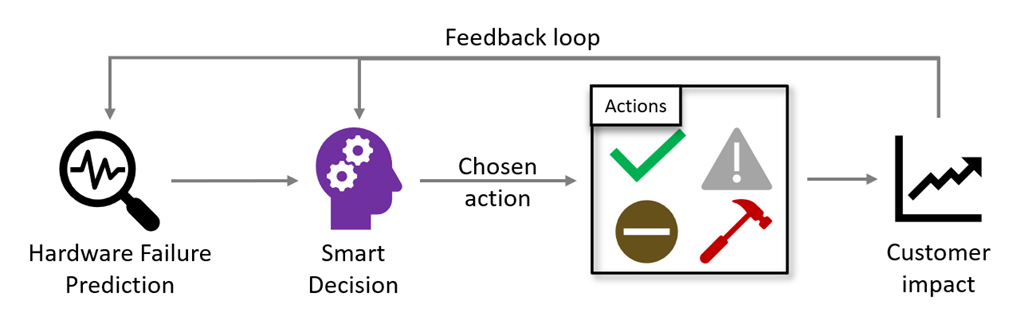
Project Narya is an end-to-end prediction and mitigation service as shared at Microsoft Ignite last week by Mark Russinovich. Not only does it predict and mitigate Azure host failures but also measures the impact of its mitigation actions and to use an automatic feedback loop to intelligently adjust its mitigation strategy.
Visit Mark’s blog post to learn more: Advancing failure prediction and mitigation with Project Narya
Azure VMware Solution now generally available in the Southeast Asia region
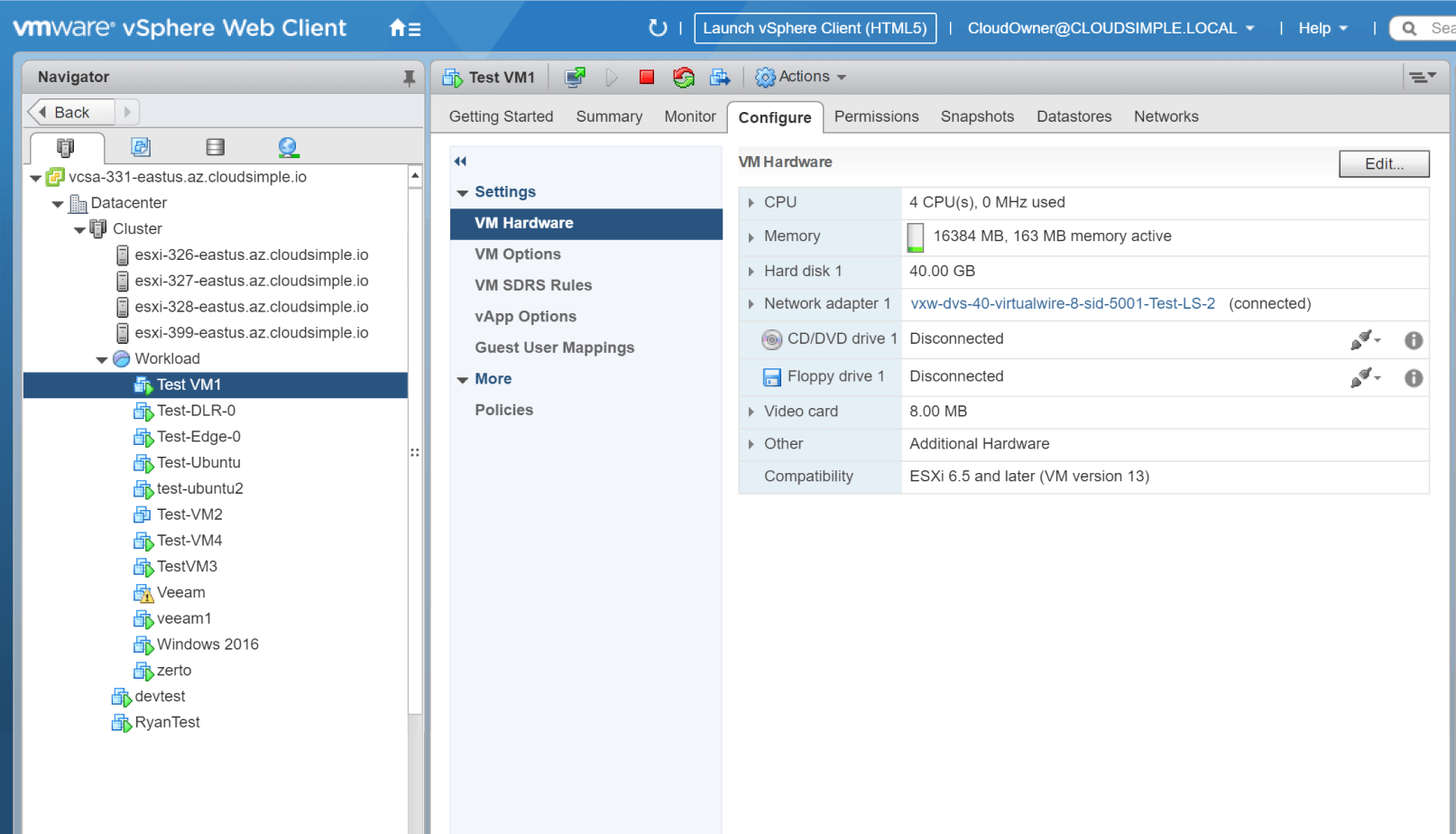
Microsoft has announced the availablity of Azure VMware Solution in the Southeast Asia (Singapore) region. Azure VMware Solution enables the ability to extend or migrate their existing on-premises VMware applications to Azure without the cost, effort or risk of re-architecting applications or retooling operations.
For updates on more upcoming region availability please visit the product by region page here: Azure VMware Solution
Windows Server 2019 Datacenter: Azure Edition with Hot Patching support
Bernardo Caldas, VP of Program Management from the Azure Edge and Platform team, recently announced the general preview of a new edition of Windows Server called Windows Server 2019 Datacenter: Azure Edition. It will be serviced in parallel to Windows Server 2019 Datacenter Core and will have the exact same feature set but will have one main addition – it supports hot patching. This enables the ability to apply patches in memory and not require a reboot of the server.
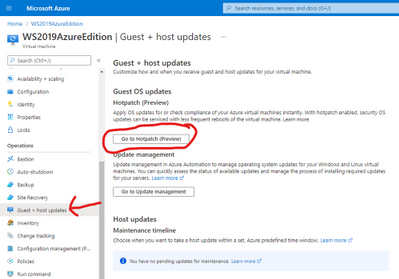
Learn more reguarding availablility and setup here: Windows Server 2019: Azure Edition
Microsoft Introduces PowerPoint Live in Microsoft Teams
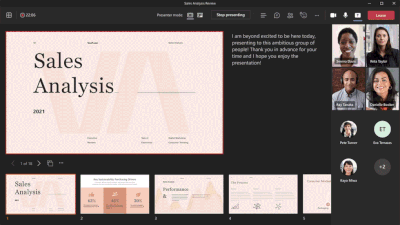
The new PowerPoint Live offering offers a better experience overall for presenters and attendees in virtual meetings. PowerPoint notes now available when you share the PowerPoint within Teams. There is seamless sharing between two presenters. Also chat pops up at the top of screen for presenter even if they don’t have the chat dialog highlighted. These features have been added to further enhance the capabilities of online presenations offering an enhancement to audience participation.
More information surrounding this can be found here: PowerPoint Live in Microsoft Teams
Azure monitor for containers now supports Pods & Replica set live logs in AKS resource view
Azure Monitor for containers now support access to pod & replica-set Live Logs of Azure Kubernetes Service (AKS) pods & replica-sets. Real-time live logs of your Kubernetes deployments can now be viewed. Admins can now search, filter, and view historic deployment pod logs in Log analytics, as well as troubleshoot and diagnose all your pod & replica-set issues.
Learn more about pod & replica-set live logs here: Viewing Kubernetes logs, events, and pod metrics in real-time
Community Events
MS Learn Module of the Week

Windows Server Deep Dive Learning paths
Built by Orin Thomas, these learning paths provide both an introduction and deep technical knowledge to including Windows Server into your organization’s infrastructure. The learning paths available include:
Our team is looking for feedback on the learning paths so let us know if anything else needed to be added or changed.

Let us know in the comments below if there are any news items you would like to see covered in the next show. Be sure to catch the next AzUpdate episode and join us in the live chat.
by Contributed | Mar 11, 2021 | Technology
This article is contributed. See the original author and article here.
Welcome back to the Security Controls in Azure Security Center blog series! This time we are here to talk about the security control: Encrypt data in transit.
Data must be encrypted when transmitted across networks to protect against eavesdropping of network traffic by unauthorized users. In cases where source and target endpoint devices are within the same protected subnet, data transmission must still be encrypted due to the potential for high negative impact of a data breach. The types of transmission may include client-to-server, server-to-server communication, as well as any data transfer between core systems and third-party systems.
Examples of insecure network protocols and their secure alternatives include:
|
Instead of…
|
Use…
|
Web Access
|
HTTP
|
HTTPS
|
File transfer
|
FTP, RCP
|
FTPS, SFTP, SCP, WebDAV over HTTPS
|
Remote Shell
|
Telnet
|
SSH2
|
Remote desktop
|
VNC
|
RDP
|
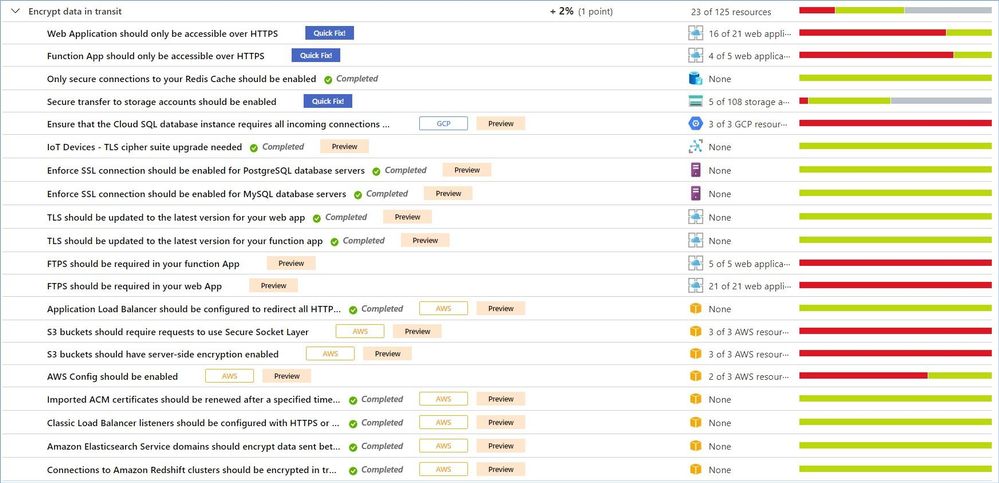
As of this writing (March 2021) this control includes 22 recommendations, and this list constantly grows as we add additional resources, e.g. AWS or GCP services. Your actual list may be different, depending on types of resources you have in your environment. To be able to increase your Secure Score by 2% (1 point) you will have to remediate all active recommendations.
Just a reminder, recommendations flagged as “Preview” are not included in the calculation of your Secure Score. However, they should still be remediated wherever possible, so that when the preview period ends, they will contribute towards your score.
Azure Security Center provides a comprehensive description, manual remediation steps, additional helpful information, and a list of affected resources for all recommendations.
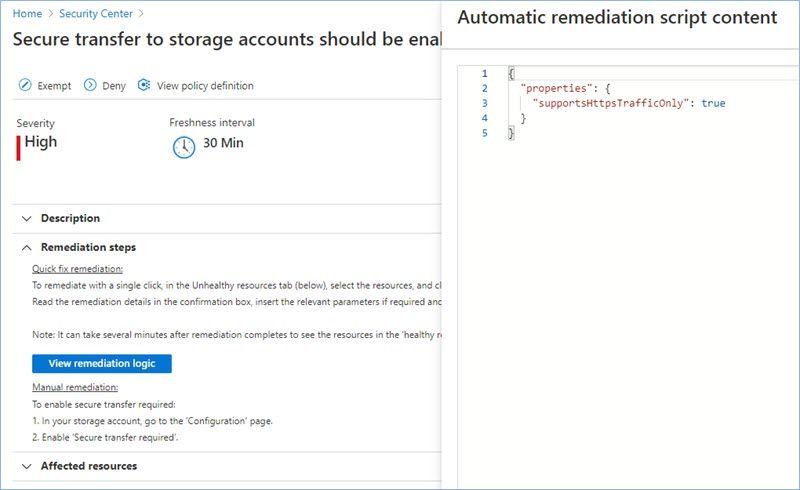
Some of the recommendations might have a “Quick Fix!” option that allows you to quickly remediate the issue. In such cases we also provide “View remediation logic” option so that you can review what happens behind the scenes when you click the “Remediate” button. In addition, you may use the remediation scripts for your own automations/templates to avoid similar issues in the future.
Let’s now review the most common recommendations from this security control.
Secure transfer to storage accounts should be enabled.
Secure transfer is an option that forces your storage account to accept requests only from secure connections (HTTPS). Use of HTTPS ensures authentication between the server and the service and protects data in transit from network layer attacks such as man-in-the-middle, eavesdropping, and session-hijacking.
You can find the related Azure policy here.
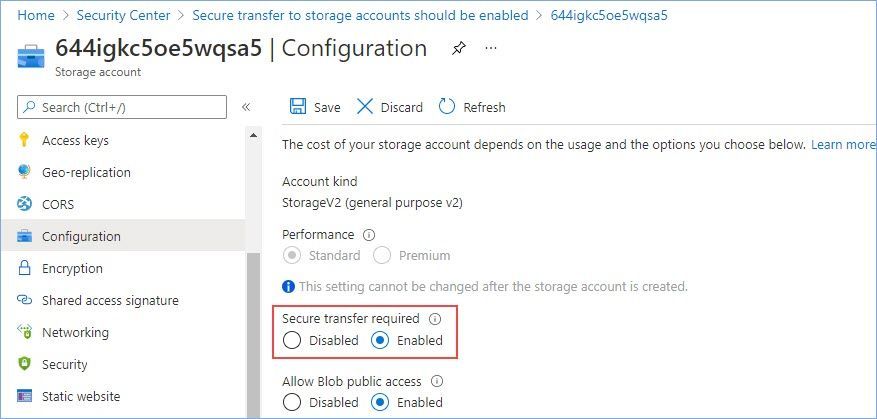
The manual remediation steps for this recommendation are:
- In your storage account, go to the ‘Configuration’ page.
- Enable ‘Secure transfer required’.
Please review our documentation to learn more about this configuration option.
Web Application should only be accessible over HTTPS.
Use of HTTPS ensures server/service authentication and protects data in transit from network layer eavesdropping attacks.
You can find the related Azure policy here.
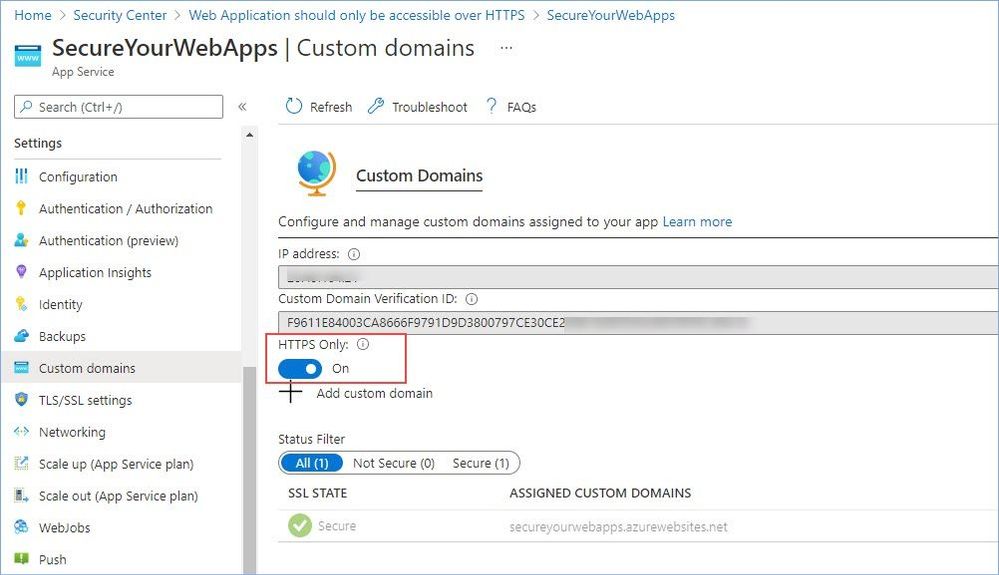
The manual remediation steps for this recommendation are:
- Go to the app service custom domains page
- In the HTTPS Only toggle select On
TLS should be updated to the latest version for your web app.
Transport Layer Security (TLS), like Secure Sockets Layer (SSL), is an encryption protocol intended to keep data secure when being transferred over a network. TLS 1.0 is a security protocol first defined in 1999 for establishing encryption channels over computer networks. Microsoft has supported this protocol since Windows XP/Server 2003. While no longer the default security protocol in use by modern Operating Systems, TLS 1.0 is still supported for backwards compatibility. Evolving regulatory requirements as well as new security vulnerabilities in TLS 1.0 provide corporations with the incentive to disable TLS 1.0 entirely.
Recommendation: Upgrade to the latest TLS version.
You can find the related Azure policy here.
The manual remediation steps for this recommendation are:
- Navigate to Azure App Service
- Select TLS/SSL settings
- Under the Protocol Settings section, choose the latest Minimum TLS Version.
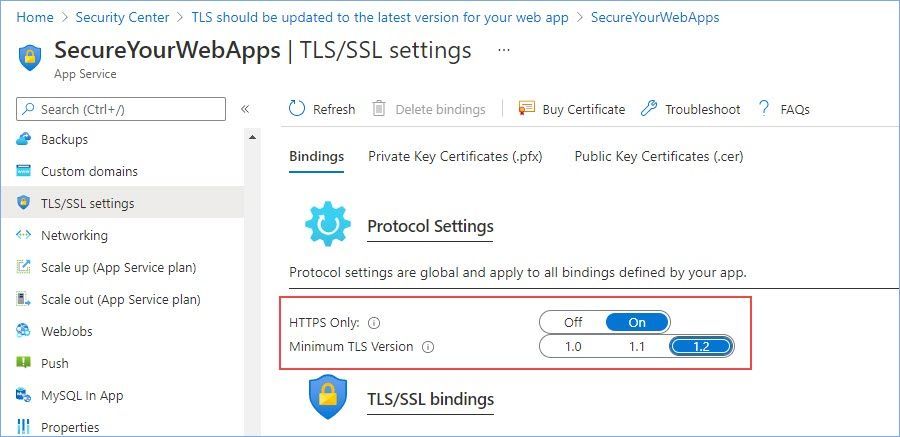
Please review our documentation to learn more about why upgrading to TLS 1.2 is very important.
FTPS should be required in your web App.
Use of HTTPS ensures server/service authentication and protects data in transit from network layer eavesdropping attacks.
You can find the related Azure policy here.
The manual remediation steps for this recommendation are:
- Go to the App Service for your API app
- Select Configuration and go to the General Settings tab
- In FTP state, select FTPS only.
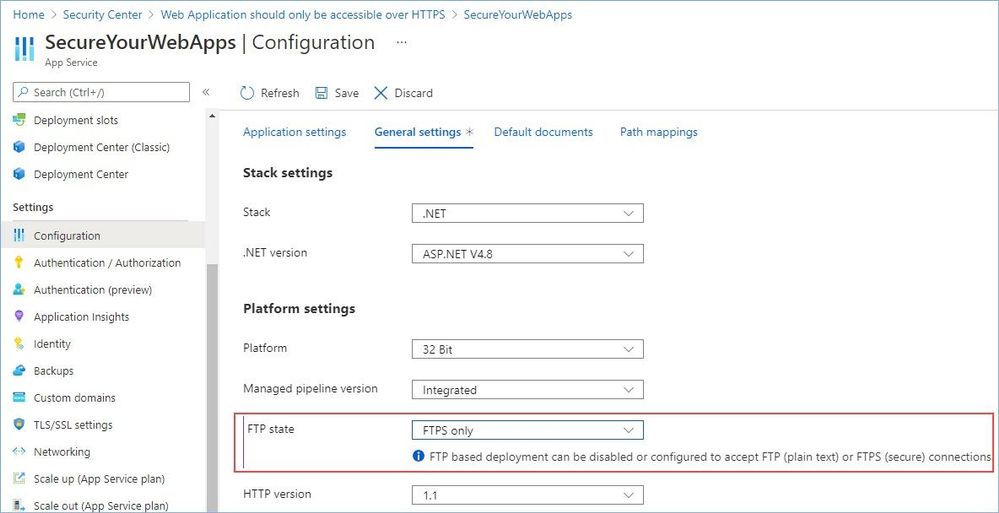
Function App should only be accessible over HTTPS.
Use of HTTPS ensures server/service authentication and protects data in transit from network layer eavesdropping attacks.
You can find the related Azure policy here.
The manual remediation steps for this recommendation are:
- Go to the Function App service custom domains page
- In the HTTPS Only toggle select On
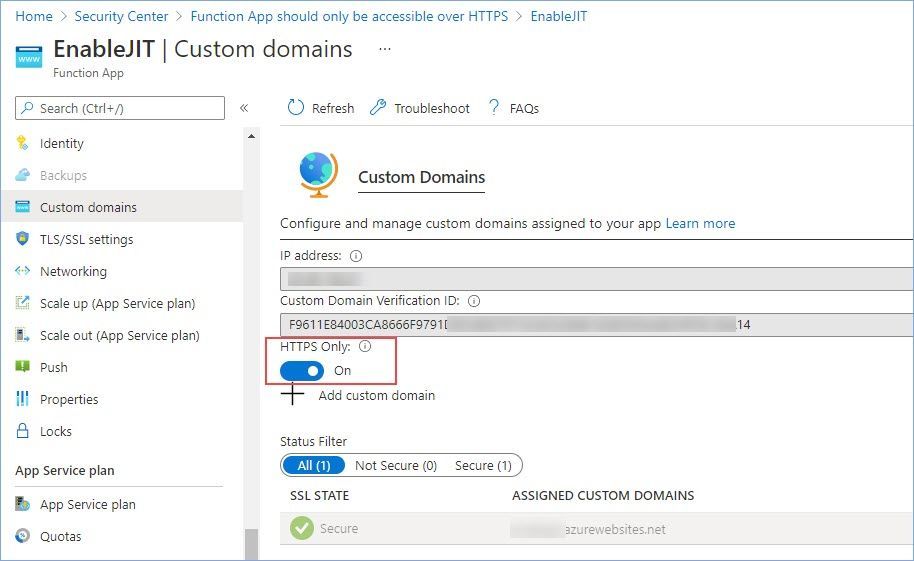
Please review our documentation to learn more about serverless functions security.
TLS should be updated to the latest version for your function app.
Azure Functions is a serverless solution that allows you to write less code, maintain less infrastructure, and save on costs. Instead of worrying about deploying and maintaining servers, the cloud infrastructure provides all the up-to-date resources needed to keep your applications running.
Recommendation: Upgrade to the latest TLS version.
You can find the related Azure policy here.
The manual remediation steps for this recommendation are:
- Navigate to Azure App Service
- Select TLS/SSL settings
- Under the Protocol Settings section, choose the latest Minimum TLS Version.
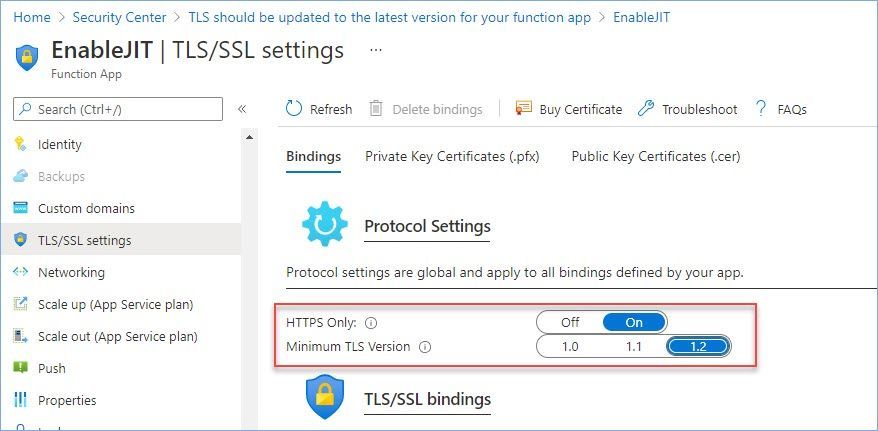
Please review our documentation to learn more about why upgrading to TLS 1.2 is very important.
FTPS should be required in your function App.
You can use FTP or FTPS to deploy your web app, function app, mobile app backend, or API app to Azure App Service. For enhanced security, you should allow FTP over TLS/SSL only. You can also disable both FTP and FTPS if you don’t use FTP deployment.
You can find the related Azure policy here.
The manual remediation steps for this recommendation are:
- Go to the App Service for your API app
- Select Configuration and go to the General Settings tab
- In FTP state, select FTPS only.
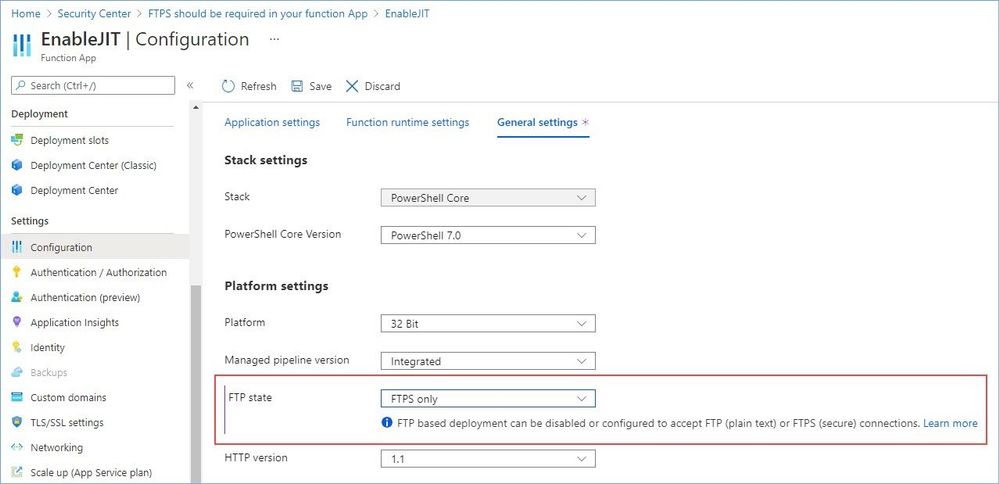
Please review our documentation to learn more about serverless functions security.
Enforce SSL connection should be enabled for MySQL database servers.
Azure Database for MySQL supports connecting your Azure Database for MySQL server to client applications using Secure Sockets Layer (SSL). Enforcing SSL connections between your database server and your client applications helps protect against ‘man in the middle’ attacks by encrypting the data stream between the server and your application. This configuration enforces that SSL is always enabled for accessing your database server.
You can find the related Azure policy here.
The manual remediation steps for this recommendation are:
- Select your Azure Database for MySQL.
- In Connection Security, set Enforce SSL connection to ‘Enabled’.
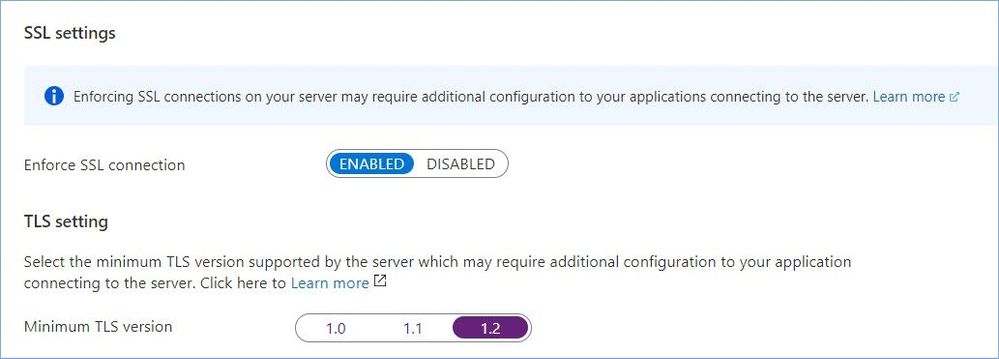
Please review our documentation to learn more about this configuration option.
Enforce SSL connection should be enabled for PostgreSQL database servers.
Azure Database for PostgreSQL supports connecting your Azure Database for PostgreSQL server to client applications using Secure Sockets Layer (SSL). Enforcing SSL connections between your database server and your client applications helps protect against ‘man in the middle’ attacks by encrypting the data stream between the server and your application. This configuration enforces that SSL is always enabled for accessing your database server.
You can find the related Azure policy here.
The manual remediation steps for this recommendation are:
- Select your Azure Database for PostgreSQL.
- In Connection Security, set Enforce SSL connection to ‘Enabled’.
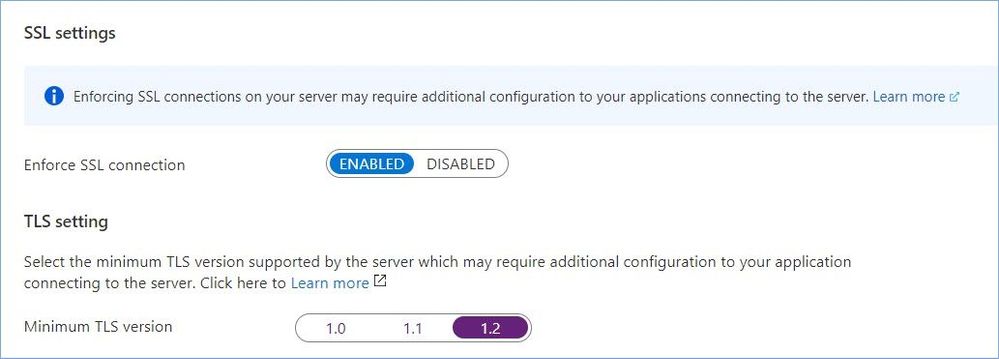
Please review our documentation to learn more about this configuration option.
Only secure connections to your Redis Cache should be enabled.
Enable only connections via SSL to Redis Cache. Use of secure connections ensures authentication between the server and the service and protects data in transit from network layer attacks such as man-in-the-middle, eavesdropping, and session-hijacking.
You can find the related Azure policy here.
The manual remediation steps for this recommendation are:
- Go to the Redis Caches, and select your redis cache.
- Select ‘Advanced settings’.
- For ‘Allow access only via SSL’, click ‘Yes’ and then click ‘Save’.
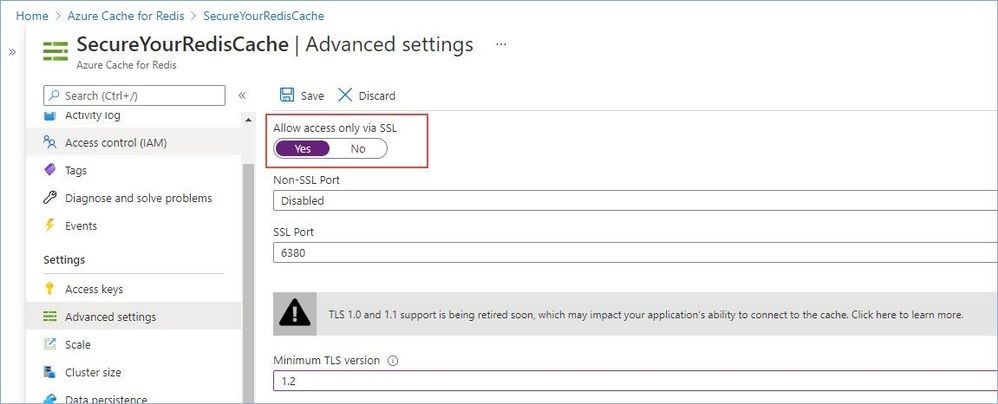
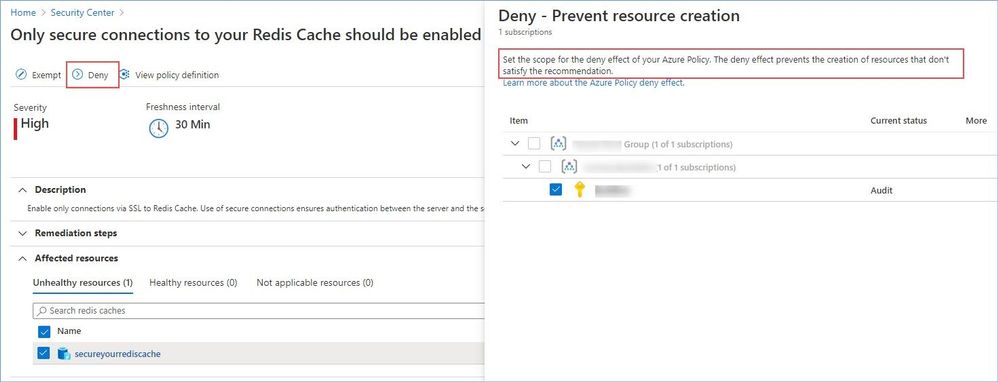
Worth mentioning that this particular recommendation has the “Deny” option that allows you to prevent creation of potentially insecure or incompliant resources, for instance:
Reference:
Security controls and their recommendations
Security recommendations – a reference guide
Recommendations with deny/enforce options
P.S. Consider joining our Tech Community where you can be one of the first to hear the latest Azure Security Center news, announcements and get your questions answered by Azure Security experts.
Reviewers
@Yuri Diogenes, Principal Program Manager, ASC CxE

by Contributed | Mar 11, 2021 | Technology
This article is contributed. See the original author and article here.
(guest post from Amrit Shandilya from the Microsoft File System Minifilter Team)
Hello! We are excited to announce that Plugfest 33 has been scheduled!
In light of global health concerns due to novel coronavirus (COVID-19), Plugfest is going virtual for the first time ever! Health and well-being of our employees, partners, customers and other guests remain our ultimate priority. In this Virtual Plugfest, VMs hosted on Azure will take the place of physical HW.
Below you will find details, useful resources, and a registration link. If you are interested in attending this online event, please review the below information and register for the event by March 23, 2021.

What is Plugfest?
The goal of Plugfest is to help you prepare your file system minifilter, network filter, or boot encryption driver for the next version of Windows by performing interoperability testing with other products.
When is Plugfest 33?
Plugfest 33 will take place in batches between Monday, April 12, 2021 and Monday, April 26, 2021.
Who are we looking for?
Independent Software Vendors (ISVs), developers writing file system minifilter drivers and/or network filter drivers for Windows.
How much does it cost?
FREE – There is no cost to attend this event.
Why should I go?
Here are four major benefits of Plugfest:
- The opportunity to test products extensively for interoperability with other vendors’ products and with Microsoft products. This has traditionally been a great way to understand interoperability scenarios and flush out any interoperability-related bugs.
- Get exclusive talks and informative sessions organized by the File System Minifilter team about topics that affect the filter driver community.
- Great opportunity to meet with the file systems team, the network team, the cluster team, and various other teams at Microsoft and get answers to your unanswered technical questions.
- Early exposure to new hardware innovations, that affect filter functionality
How do I register?
To register, please complete the Registration Form at your earliest convenience (registration closes 03/23/2021). PLEASE NOTE: We will confirm your registration via email. Confirmation emails will be sent out after registration closes.
You can learn more about File System Minifilters and Network Filters in the given links.
If you have any additional questions please email us at amshandi@microsoft.com (Amrit Shandilya).
– Amrit & The Microsoft File System Minifilter Team


by Contributed | Mar 11, 2021 | Technology
This article is contributed. See the original author and article here.
With Power Apps, we can rapidly build custom business applications that connect to our business data in a low code manner. This means that not only professional developers can develop applications but that a lot more people will be able to make apps that fit their specific use cases.
But as development is not only writing code, there are certainly some things we should do before we hit make.powerapps.com. Many developers will agree that development is 20% about writing code and 80% about communications (meetings, gathering requirements, adjusting things).
If we now introduce ‘low code development’, we work on these 20%, not on those 80%.
The issue with that is that the narrative of ‘everyone should make apps’ doesn’t reflect that there is much content out there to teach business users how to use controls, components, connectors, and ask the community when in doubt which function they should use. But there is about near to zero guidance around making better decisions about how we should approach building apps. Regardless of by whom it is developed, every app needs to be documented, maintained, and supported. Pro-developers are very aware of this, as DevOps is what they live and breathe every single day. But apart from IT departments, who will need to care about governance, application lifecycle management, etc., there are some things on the business user side that we should consider.
This post will list ten things that we should think about before we start building our apps
1- which problem does the app solve?
This sounds obvious that one would first do a proper analysis of value proposition and if the app they have in mind is a must-have solution to a specific business case or if it’s more or less ‘yet another thing to use’, although there are working alternatives in place.
understand your market
Let us take some time to segment our market and understand who (even if we build for our colleagues) needs our app. There will be roles that will rely on our app, and it will become mission-critical to them. Others will have already found applications that do similar things, or the app doesn’t solve a relevant problem. We can specifically look at underserved groups, such as blue-collar workers, and see if we can address their needs. Becoming obsessed with solving specific needs without assumptions is critical here. This means that we will need to validate the market that we have in mind. Even if we consider ourselves a business user/power user /citizen developer, doesn’t necessarily mean that we are our user and precisely know what they need.
psychological strain vs. energy of change
To make users love an app, we will need to solve their pains or address their needs and make it not too hard for them to change their behavior. If the energy they will need to change their behavior is higher than the psychological strain they face right now, they will not adopt your app. It’s unfortunately as simple as that.
2- calculate value
Now you have a fair idea of who will use your app for which use cases and also know what users are doing now:
- abuse other tools
- work on paper
- purchase 3rd party tools
- use unapproved shadow IT tools
and to which results this leads
- be busy with tasks that don’t add value
- lose information
- cause additional costs
- severe risks in terms of data security, governance, compliance etc.
tl;dr: it costs time & money
But we need to make an effort to calculate the higher costs in terms of money and time and make an estimation for the next 12 or 24 months in order. This will also help with any approval process/ get funding.
If the app we have in mind doesn’t create (enough) value, we can take this as a learning opportunity better to meet the needs of our (internal) customers.
The goal is to provide more value, not to deliver a poorly designed app that costs a little less. Of course, we can build apps ‘for fun’ or because we want to learn, or ‘just because we can’, but we should carefully distinguish those apps from apps that we want to pitch and ‘sell internally’.
3- scope
The mother of all questions: Does it scale? Will our app be something for our personal productivity? Ease a workload for a small team? Or do we talk about a mission-critical process? And even if we start with a small group of users to try out, is there a way where a broader audience could want to use it? We need to carefully identify our app’s scope, as this will impact many decisions.
4- data model
Let’s talk about our data model. Which data source will you need to get data, in which services will you write data? Which dependencies do you have, which other apps, flows, bots will be part of the solution? Of course, the consultant answer on when to use what will always be an ‘it depends’, but there are probably more reasons to look into different data sources as you are aware of:
licensing
As this is a pretty emotionally driven subject, we should handle this some more cool-headed. The idea of first understanding which needs your app solves, who would benefit from it, and how much money and time all users would save together by using it is the licensing discussion’s counterpart. Of course, organizations tend not to want to pay for additional licenses, but the idea that one could deliver excellent business value without any costs is somehow romanticized. Incorporate licensing fees for premium connectors (as you need them) in your calculation, and if the app still delivers more value than it costs, we will probably get approval/green lights for it.
If the app isn’t worth more than ~10$ per month and user, we should probably not be building it.
performance
The data sources we choose have not only impacted the licensing model but also our apps’ performance. For instance, if data needs to travel through an on-premises data gateway to a SQL server, most probably, our app will not be as fast as if the data sits in Dataverse. For an elaborated comparison on this and other data sources such as Excel, SharePoint, and more, please read this article about Considerations for optimized performance in Power Apps
developer and user experience
We can also impact the experience you as a developer will have while building the app, depending on the data source. If you ever ‘loved’ to deal with, for example, lookup columns from a SharePoint list, you will agree that you didn’t choose the easiest way to build an app. If you need to find workarounds as a developer, this will impact your user, which means that their experience won’t be as good as possible.
5- delivery
Let’s say we are about to hit make.powerapps.com, and we have a fair idea of what to do there to make an app. We will publish our app, share it, and mentally move on to something different. Now, who cares for that app? Who will maintain our app? Things can easily change when we create apps on top of cloud services. This can quickly become a not to be underestimated workload, and probably we as a business user won’t have the capacity to cover that. And even if we are not talking about adjusting to things that changed: Who will support our app? Who will answer questions? Who will implement new features?
Delivery of software should contain code (and yes, this applies to Power Apps) and proper documentation. Sharing knowledge about our app (what we use, inputs, outputs, dependencies, licensing, data model, accessibility, features, etc.) very early by writing it down to enable those who need to maintain and support our solution is essential. Making it a habit to have a changelog, where we document which features we add, remove or change, is crucial. If we think that this is too time-consuming, we should be aware that someone will need to spend more time on fixing the lack of documentation for us.
A lack of documentation will create technical debt
6- what is your minimal lvable product?
Yes, I mean it! Define your minimal lovable product. If you only heard about a minimal viable product so far, please read this article How to Build a Minimum Loveable Product. In essence? Which features will we need to make users fall in love with our app? We will build this. We will not fall into the rabbit hole of delivering the whole software in one piece but focus on the crucial parts. Once we published our first version, we gather feedback on how we can improve it. Becoming comfortable with a mindset that software is never finished can be a good idea.
7- mock-up your app
Finally- let’s talk frontend – how shall our app look like? It’s super tempting to start building screens and buttons and decide on colors etc., but we will get a better impression on the big picture of our app if we first do a mock-up. We may choose to use a professional app for that or if we will draw something (I personally do this in OneNote). Defining which screens and buttons and forms and galleries you will need will make the next steps easier.
8- componentize your app
Reinventing the wheel is always painful, and to avoid this, we can think about components in our apps so that we reuse what we (or even others in this environment in the component library) build before. While controls are an excellent way to start learning and understanding how everything works, components are the way to accelerate our process of making apps and make sure that we easily adjust them and don’t need to start over again for the next app we are making. It is also the low-code equivalent to the principle of ‘Don’t repeat yourself‘. Thinking upfront about which controls we would repeatedly use and planning to componentize these will ensure that we don’t need to start all over again. You can watch April Dunnam’s video about componetizing Power Apps to get up to speed.
9- accessibility
Accessibility is nothing that comes on top of a ready-to-publish app but should be one of your core concepts straight from the beginning. The accessibility checker in Power Apps is a good start, but it’s always worth exploring even more ideas. We can find lots of guidance on ensuring that more people can benefit from our apps, Microsoft Inclusive Design is an excellent go-to resource.
10- build in Microsoft Teams
As we are more and more working in Microsoft Teams, we should not only build applications for teams, but for (Microsoft) Teams! Considering the context of apps gives you even more ways to satisfy user needs. Coming back to the scope of our app, we need to carefully think if this app is just for our team, or if we want to make it available for the whole organization. Staying in Teams also has an impact on licensing, as you can for instance use Dataverse for Teams, which is then seeded in you Microsoft 365 license.
Conclusion
As we could see, there are quite some things to do and think about before we hit make.powerapps.com and I put these together as an approach for good practices. What do you do before you actually start developing? What would you like to add to my list?
Please comment below!


Recent Comments