by Contributed | Mar 11, 2021 | Technology
This article is contributed. See the original author and article here.
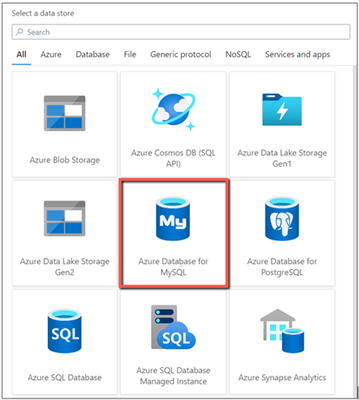
Azure Data Factory now enables Azure Database for MySQL connector in Data Flow for you to build powerful ETL processes.
With Azure Database for MySQL as source in data flows, you are able to pull your data from a table or via custom query, then apply data transformations or join with other data. When using Azure Database for MySQL as a sink, you can perform inserts, updates, deletes, and upserts so as to publish the transformation result set for downstream consumption.
You can point to Azure Database for MySQL data using either a dataset or inline mode in data flow.
Learn more from Azure Database for MySQL connector documentation.
by Contributed | Mar 11, 2021 | Technology
This article is contributed. See the original author and article here.
Today, we’re excited to announce the availability of the Azure Spring Cloud Reference Architecture. You can get started by deploying the Azure Spring Cloud Reference Architecture to accelerate and secure Spring Boot applications in the cloud at scale using validated best practices.
Over the past year, we worked with many enterprise customers to learn about their scenarios including thoughts on scaling properly, security, deployment, and cost requirements. Many of these customers have thousands of Spring Boot applications running in on-premises data centers. As they migrate these applications to the cloud, they need battle-tested architectures that instill confidence to meet the requirements set forth by their IT departments and/or regulatory bodies. In many customer environments, they also need to show direct mappings from architectures to industry-defined security controls and benchmarks. We thank these customers for the opportunity to work with them, and for helping us to build an Azure Spring Cloud Reference Architecture. Using this reference architecture, you can deploy and customize to meet your specific requirements and showcase pre-defined mappings to security controls and benchmarks.
“The availability of Azure Spring Cloud Reference architecture reduced our internal cycles of researching architecture options and Spring Cloud feature sets, which allowed us to rapidly determine how we would want to implement and scale globally.” — Devon Yost, Enterprise Architect, Digital Realty Trust
“Congratulations to you and your team for creating and providing the Azure Spring Cloud Reference Architecture free to all customers. The reference architecture is a great way for users to compare their design to how the experts at Microsoft design deployments. It is incredible for the reference architecture to include deployments using multiple technologies. We were able to compare the reference Terraform implementation and quickly understand the architecture. We have even started testing Azure DNS as highlighted in the architecture to manage our DNS using Infrastructure as Code principles.” – Armando Guzman, Principal Software Engineer, Unified Commerce, Raley’s
Ease of deploying Java applications
Azure Spring Cloud is jointly built, operated, and supported by Microsoft and VMware. It is a fully managed service for Spring Boot applications that lets you focus on building the applications that run your business without the hassle of managing infrastructure. The service incorporates Azure compute, network, and storage services in a well-architected design, reducing the number of infrastructure decisions. The Azure Spring Cloud Reference Architecture provides a deployable design that is mapped to industry security benchmarks providing a head start for compliance approval. The implementation and configuration of each service referenced in the architecture were evaluated against security controls to ensure a secure design.
Security and Managed Virtual Network
Security is a key tenet of Azure Spring Cloud, and you can secure Spring Boot applications by deploying to Azure Spring Cloud in Managed Virtual Networks (VNETs). With VNETs, you can secure the perimeters around your Spring Boot applications and other dependencies by:
- Isolating Azure Spring Cloud from the Internet and placing your applications and Azure Spring Cloud in your private networks.
- Selectively exposing Spring Boot applications as Internet-facing applications.
- Enabling applications to interact with on-premises systems such as databases, messaging systems, and directories.
- Controlling inbound and outbound network communications for Azure Spring Cloud.
- Composing with Azure network resources such as Application Gateway, Azure Firewall, Azure Front Door, and Express Route, and popular network products such as Palo Alto Firewall, F5 Big-IP, Cloudflare, and Infoblox.
Reliable deployment patterns
When you deploy a collection of Azure Resources, including Azure Spring Cloud, in your private network and interconnect these resources with on-premises systems, you can be faced with multiple questions such as:
- How do you manage costs to maximize the value delivered?
- How do you build operational processes to keep the system up and running in production?
- How do you account for performance efficiency where your system can adapt to changes in load?
- How can your system recover from failures and continue to function?
- How do you protect applications and data from threats and risks?
To address these questions, you can start with a trial-and-error approach but that takes time. The time it takes to get it right and achieve these outcomes is time not spent on your organizational objectives. A repeatable, tested deployment pattern can help you to address issues from the start.
The Azure Spring Cloud Reference Architecture addresses the following solution design components:
- Hub and spoke alignment. Aligns with the Azure landing zone, which enables application migrations and greenfield development at enterprise-scale in Azure. A landing zone is an environment for hosting your workloads, pre-provisioned through infrastructure as code.
- Well-Architected Framework. Incorporates the guiding pillars of the Azure Well-Architected Framework to improve the quality of a workload. The framework consists of five pillars of architecture excellence: Cost Optimization, Operational Excellence, Performance Efficiency, Reliability, and Security.
- Perimeter security. Secures the perimeter for full egress management, managing secrets and certificates using Azure Key Vault. Wires up with networking resources of your choice, incorporating your IT-team-supplied route tables filled with user-defined network routes. And it is ready for interacting with private links exposed by Azure resources or endpoints exposed by your on-premises systems.
- Authorized access to deployed environments. Includes securing and authorizing access into a deployed environment through a jump host machine with necessary development tools via Azure Bastion.
- Monitoring. Enables observability by wiring up for Application Performance Monitoring (APM) and publishing logs and metrics for all the resources through Azure Monitor. This provides the option to aggregate logs and metrics in an aggregator of your choice, such as Azure Log Analytics, Elastic Stack, or Splunk.
- Smoke tests. Supplies deployment scripts to deploy a line of business system and to smoke test the deployed environment.
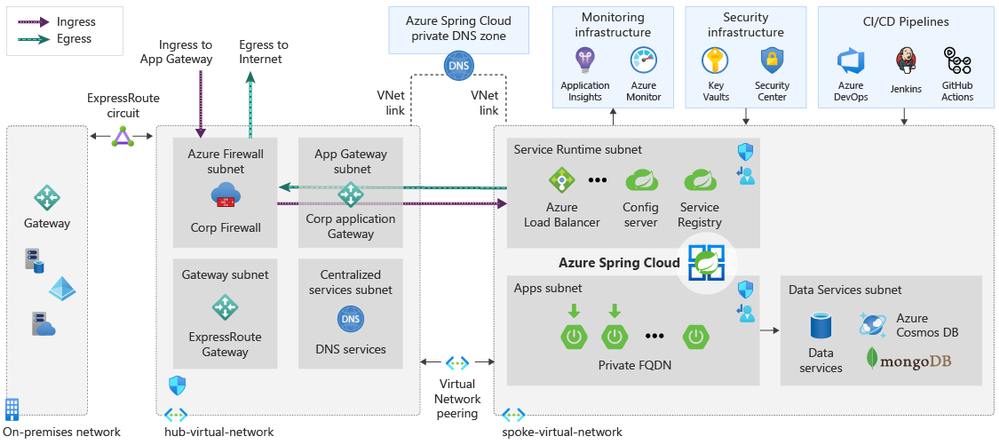
Figure 1 – the diagram represents a well-architected hub and spoke design for applications selectively exposed as public applications
Start here
This Azure Spring Cloud Reference Architecture is a foundation using a typical enterprise hub and spoke design for the use of Azure Spring Cloud. In the design, Azure Spring Cloud is deployed in a single spoke that is dependent on shared services hosted in the hub.
For an implementation of this architecture, see the Azure Spring Cloud Reference Architecture repository on GitHub. Deployment options for this architecture include ready-to-go Azure Resource Manager (ARM), Terraform, and Azure CLI scripts. The artifacts in this repository provide groundwork that you can customize for your environment and automated provisioning pipelines.
Meet the team

This Azure Spring Cloud Reference Architecture is created and maintained by Cloud Solution Architects, Java experts, and content authors at Microsoft, here in alphabetical order and row-wise from left to right:
- Armen Kaleshian – Cloud Solution Architect
- Arshad Azeem – Cloud Solution Architect
- Asir Selvasingh – Architect, Java on Azure
- Bowen Wan – Software Engineering Manager, Java on Azure
- Brendan Mitchell – Content Developer
- David Apolinar – Cloud Solution Architect
- Dylan Reed – Customer Engineer
- Karl Erickson – Content Developer
- Matt Felton – Cloud Solution Architect
- Ryan Hudson – Cloud Solution Architect
- Troy Ault – Cloud Solution Architect
Learn more about Azure Spring Cloud and start building today!
Azure Spring Cloud abstracts away the complexity of infrastructure management and Spring Cloud middleware management, so you can focus on building your business logic and let Azure take care of dynamic scaling, patches, security, compliance, and high availability. With a few steps, you can provision Azure Spring Cloud, create applications, deploy, and scale Spring Boot applications and start monitoring in minutes. We’ll continue to bring more developer-friendly and enterprise-ready features to Azure Spring Cloud.
We’d love to hear how you are building impactful solutions using Azure Spring Cloud. Get started with the Azure Spring Cloud Reference Architecture and these resources!
Resources
by Contributed | Mar 11, 2021 | Technology
This article is contributed. See the original author and article here.
SQL Assessment API provides a mechanism to evaluate the configuration of your SQL Server for best practices. The API is delivered with a ruleset containing best practice rules suggested by SQL Server Team. This ruleset is enhancing with the release of new versions but at the same time, the API is built with the intent to give a highly customizable and extensible solution. So, users can tune the default rules and create their own ones. The API can be used to assess SQL Server versions 2012 and higher and Azure SQL Managed Instance.
In this episode with Aaron Nelson, we’ll show you the basics of the SQL Assessment PowerShell commands, and how you can run the assessments for your Azure SQL Managed Instances as well as your on-prem SQL Server instances.
Watch on Data Exposed
Resources:
by Contributed | Mar 11, 2021 | Technology
This article is contributed. See the original author and article here.
After I blogged about How to send Adaptive Cards with CLI for Microsoft 365 and also used CLI to compare different ways to create SharePoint lists, I found some more commands that made me fall in love with it. CLI for Microsoft 365 has three main benefits from my point of view:
- it’s platform-agnostic and even works on Azure Cloud Shell so that every browser can be my admin machine
- the syntax is easy and almost intuitive to use for me, although I only start to not use the UI for everything I want to manage in my Microsoft 365 tenant
- documentation is clear and concise with excellent code samples.
Bonus: Caring maintainers and awesome contributors
In case you never used CLI for Microsoft 365 before, please first read how to get started with CLI Microsoft 365 where I explain how to install the CLI.
My screenshots will show that I work in PowerShell in Visual Studio Code, but you can use any other shell you like to use.
Get a list of Power Apps
Wouldn’t it be nice to get a list of apps? This is what I thought as well. We will look into the CLI for Microsoft 365 documentation find the command to list all Power Apps in this tenant, which gives us an idea, what makers are doing to be able to offer help and support as well.
After having installed CLI and logged in:
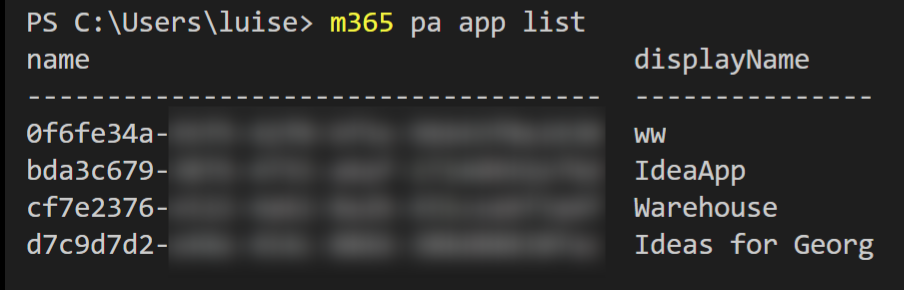
Run m365 pa app list
which will get you exactly that list – with internal names and display names:
Get an overview of custom connectors in an environment
If we allowed makers to build their custom connectors to fulfill their unique needs, we might want to look at that as well. If you never create a custom connector, you can read my blog post about how to build a custom connector.
Run m365 pa environment get –name Default-<name of your default environment>
Now, where do we get this <name of your default environment> from? This is your tenant ID, which you can obtain from the URL of any Power App running in this environment, or you can copy it from portal.azure.com, where you will find it in Azure Active Directory as Tenant ID.

- Copy this Tenant ID
- Replace
<name of your default environment> with this Tenant ID
- Run the command
Get a list of users
Obtaining a list of users on a specific SharePoint website will be helpful to get their IDs.
Run m365 spo user list –webUrl “https://m365princess.sharepoint.com/sites/m365princess“by replacing my webUrl with the tenant you are logged in and a site URL you want to query.
The response will be something like this:

Get a list of external users
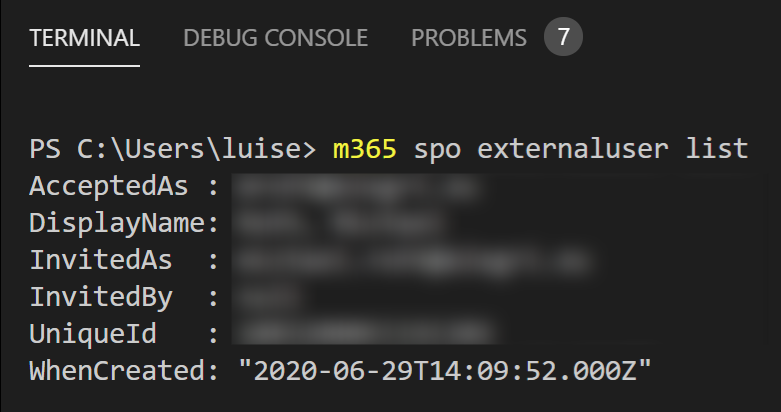
Another cool starting point is to get a list of external users. As internal users tend to invite many guests, it could help have an overview of external users and see when these external users were created. You can also obtain the ID of users.
Run m365 spo externaluser list,
remove users
With
m365 spo user remove –webUrl “https://contoso.sharepoint.com/sites/HR” –id 10 –confirm
we can remove users.
Feedback & What’s next?
I hope that you now got an idea of how you can get started with CLI for Microsoft 365 :) Shall I blog more about it and show even more commands? Still, I am curious, what would you use it for? Which are the commands that you use every single day? Please comment below!

by Contributed | Mar 11, 2021 | Technology
This article is contributed. See the original author and article here.
Today, we are excited to share 30 Days to Learn It, a guided, time-bound, personal learning challenge, built upon the Microsoft Learn interactive training platform. And as you learn, the new program helps you work towards certification – by completing a learning collection within the 30 days, you can earn a voucher once every six months for 50% off the cost of a Microsoft Certification exam.*
At Microsoft, our goal is to help make technical learning accessible to anyone who wants to acquire a new skill, chase a new career path, and stay up to date on the latest technological advances.
Technology continues to accelerate and change the world around us – requiring people and businesses to quickly innovate and adapt to the latest skills needed to thrive as a company and as an individual. To stay current, access to technical learning resources is critical. Last year we made a big bet on learning with our Global Skilling Initiative, aimed at helping 25 million people worldwide acquire critical new digital skills with free access to learning paths and content, and low-cost certifications to help people develop the skills new positions require.
30 Days of Learning
30 Days to Learn It accelerates your time to mastery of in-demand technical skills with a commitment of less than an hour each day for a month. Each learning journey introduces new technical skills and concepts using Microsoft Learn’s step-by-step tutorials, browser-based interactive coding and scripting environments, and task-based achievements. From the day you sign up, you have a month-long journey with a personal project tracker to visualize your progress through the learning content.
Today, the program launches with eight different journeys to help you gain cloud development skills using Microsoft technologies. Topics covered include AI, DevOps, cloud-native apps, serverless applications, low code, Internet of Things (IoT), machine learning (ML), and compute infrastructure. Each learning journey is designed to also provide a foundation to help you prepare for the certification exam of your preferred learning journey. A Microsoft Certification provides an industry-recognized validation of your skills and can help advance your career.
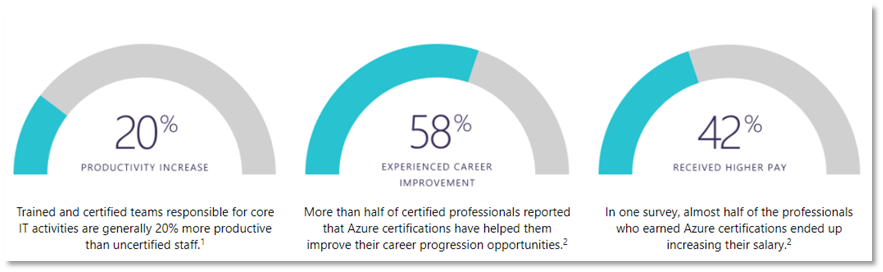
1 Source: IDC White Paper, sponsored by Microsoft, Benefits of Role-Based Certifications (June 2020)
2 Source: Nigel Frank Microsoft Azure Salary Survey (June 2020)
Okay – Start Learning!
30 Days to Learn It offers the flexibility of completing a learning journey within 30 days from the time you sign up, at your own pace, and provides the added opportunity to earn a discount voucher for a Microsoft Certification exam if you complete your learning modules in the 30-day period*.
This program is now available worldwide in 17 languages, and is currently running through the end of June 2021.
Register for 30 Days to Learn It and start your learning journey today!
* Terms & conditions apply: one (1) voucher per person every six months


Recent Comments