by Contributed | Mar 25, 2021 | Technology
This article is contributed. See the original author and article here.
It costs time and effort to perfectly align and manually position multiple elements on a slide. To help simplify the process, we are pleased to introduce Auto Fix: a new feature that enables easier, precise, and faster editing of slide content alignments. Available in PowerPoint on the web with your Microsoft 365 subscription.
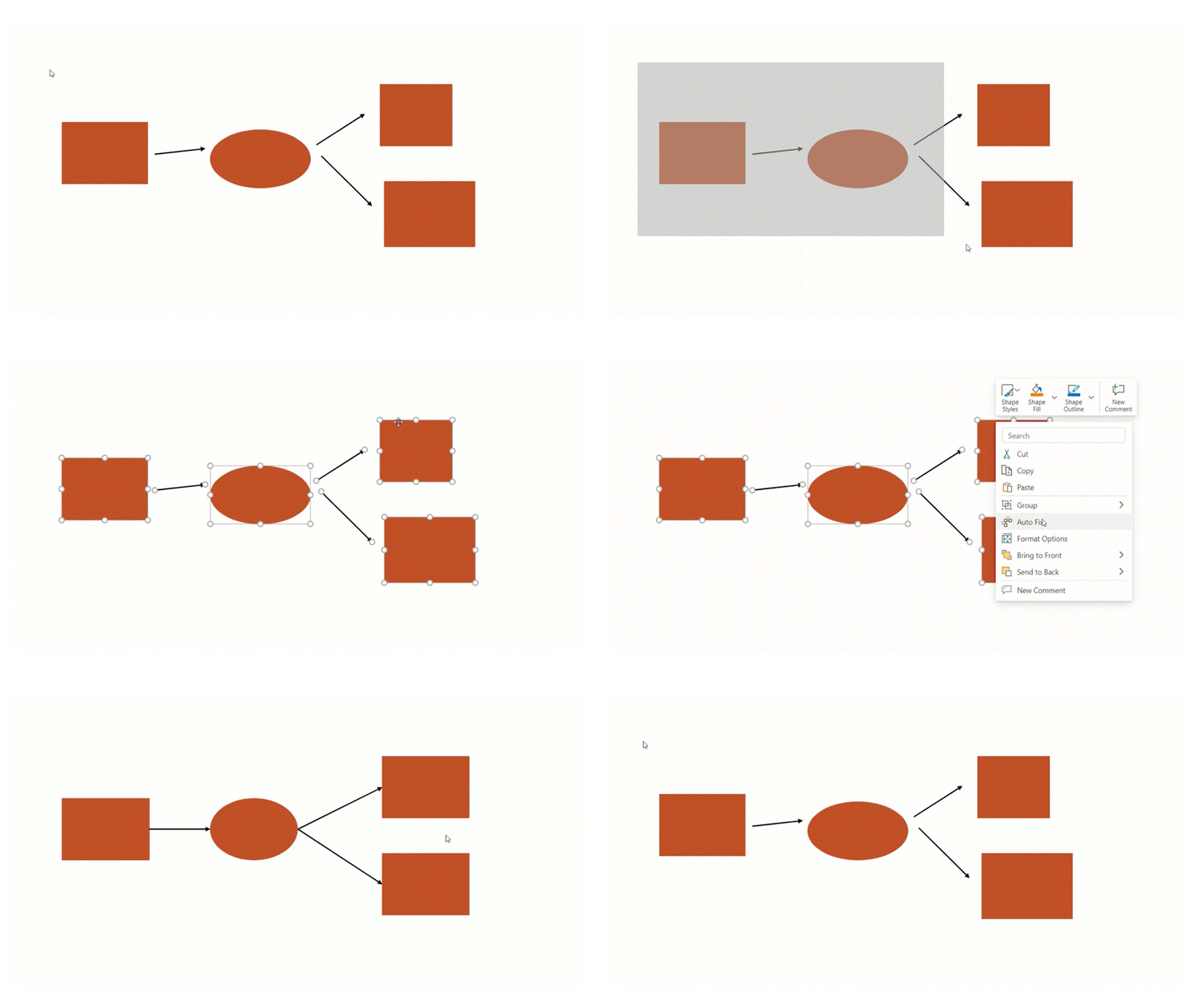
Applying Auto Fix via right-click menuThis Artificial Intelligence (AI)-powered feature automatically aligns, uniformly resizes, and distributes elements, and straightens the connectors between them leaving the user with a polished slide in just a few clicks. So, the next time you’re creating a custom diagram or flow chart, instead of manually aligning and resizing each element, simply select the elements and click Auto Fix to save time and effort.
To use Auto Fix – simply follow these steps:
- Select two or more elements on a slide.
- Do one of the following:
- Right-click one of the elements and, from the context menu, select Auto Fix.
- On the Home tab, in the Drawing group, click Arrange, and then select Auto Fix.
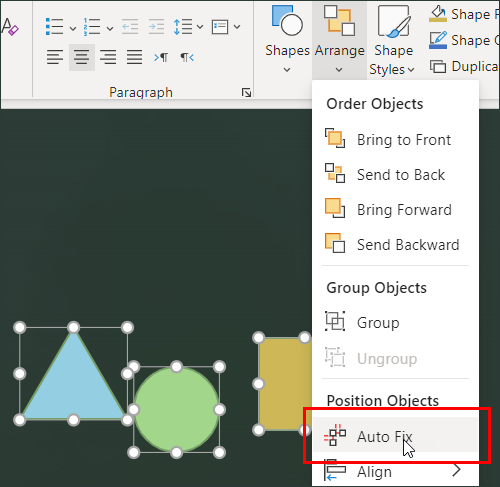
Tip: Depending on what you have selected, you may also see the Arrange menu in the Shape or Picture tabs.
Auto Fix will align, distribute, and uniformly resize all the selected elements and straighten any connectors between them.
Auto Fix works independently and will not activate if you are using SmartArt, group shapes, and elements that overlap. We plan to expand this scope once we have a better understanding of user intent behind various visualizations.
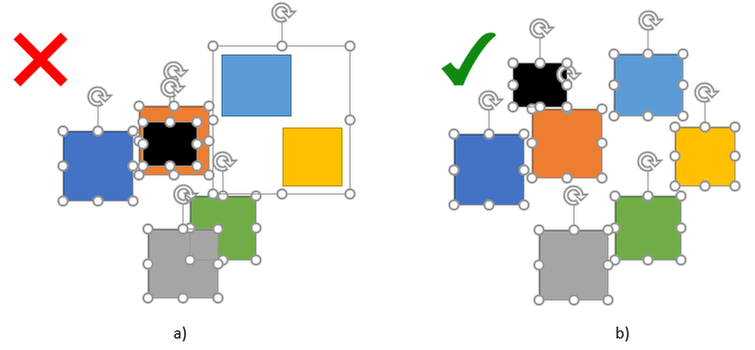 Example 2a: Elements overlap and there is a group shape; b) there are no overlaps or group shapes
Pro Tip: In scenarios of more complex visualizations, large numbers, and a variety of elements, we recommend using Auto Fix on a smaller set of elements, and then gradually polishing the elements until the entire visualization is perfectly aligned.
Get started
We are excited about the new experiences in PowerPoint and hope you will love them too! Have questions or want to leave feedback? Let us know in a comment below.
by Contributed | Mar 25, 2021 | Technology
This article is contributed. See the original author and article here.
This month’s Microsoft Endpoint Manager highlights include a guided scenario for Windows 10 in cloud configuration, Microsoft Tunnel health metrics, scale improvements to your Automated Device Enrollment experience for iOS, iPadOS, or macOS devices, and more.
On this blog and across many social platforms – including LinkedIn and Twitter – you’ve shared your feedback on What’s New in Microsoft Endpoint Manager – Microsoft Ignite 2021 Edition. Based on your response, I’m continuing the series, and I’m excited to share more of our new management and security capabilities! While you can find the full list of engineering investments, we’ve made in What’s New, here are a few of my favorite additions. Which one’s your favorite? Let me know by leaving a comment, connecting with me on LinkedIn, or by tagging me on Twitter.
We recently announced Windows 10 in cloud configuration. With the Microsoft Endpoint Manager service release 2103 in March, we are providing a guided scenario for Windows 10 that makes it even easier for you to apply a uniform, Microsoft-recommended device configuration to any Windows 10 device. We focused on engineering a simplified cloud configuration experience so it’s faster to set up and easier to use. In less than a minute, you can now go from zero policy to managing Windows 10 devices that are cloud-optimized. Watch Senior Program Manager Ravi Ashok demonstrate this new guided scenario.
Guided scenario for Windows 10 in cloud configuration
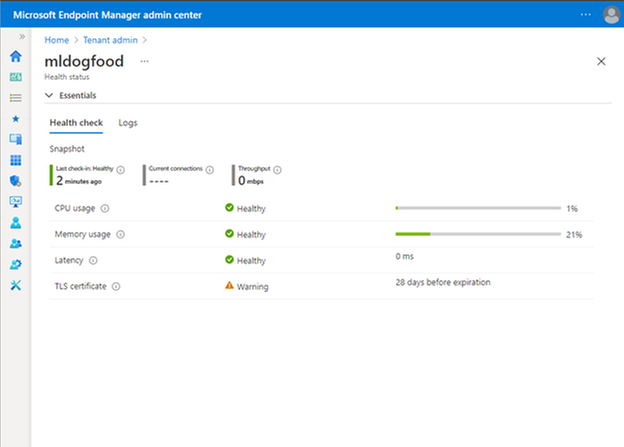
Microsoft Tunnel is an IT Pro favorite from the past two Microsoft Ignite conferences. From the start, we wanted to make the Tunnel experience as simple and easy to use as possible. New in 2103, Tunnel performance and health metrics are easier for you to see right away. In the Microsoft Endpoint Manager admin center, you can easily see the top four health checks – CPU, memory, latency, and your Transport Layer Security (TLS) certificate. You no longer need to log in to your gateway server to do this troubleshooting – this simplification brings troubleshooting to you. From the UI, you can quickly see what you need to act on, with logs available if you need to dive deeper.
Microsoft Endpoint Manager admin center view of Tunnel performance and health metrics
If you’re not up to speed on Tunnel, watch a demo starting at 08:24 in our What’s New in Microsoft Endpoint Manager session.
Finally, with this release, we’ve made significant architectural changes in our support of Apple’s Automated Device Enrollment (ADE). Many of our customers use Automated Device Enrollment to enroll large numbers of devices without touching them – perfect for a remote or distributed workforce. By making these architectural changes, we have enabled you to enroll three times the number of devices per single token with the same profile. In future releases, we’ll focus on optimizing and scaling this enrollment experience to make it even simpler. While this may seem like a minor change to highlight in this blog post, customers from healthcare to school districts have requested this improved Automated Device Enrollment experience. I’m glad we could simplify your management experience.
Next month is already shaping up to include many favorite features. As I shared before, I am incredibly proud of the work the team does, and we always work with our customers top of mind. We listen to your feedback and goals and make changes and investments that help improve the user experience and simplify IT.
As always we welcome your feedback, so leave a comment below, connect with me on LinkedIn, or tag me @RamyaChitrakar on Twitter.
by Contributed | Mar 25, 2021 | Technology
This article is contributed. See the original author and article here.
ION – We Have Liftoff!
Four years ago, we started a journey to help develop and advance decentralized identity, an emerging form of identity technology that empowers individuals and creates new business capabilities. Our goal is to put individuals, organizations, and other entities at the center of the apps, services, and digital exchanges that increasingly play a pivotal role in our lives. Among all the technical development required to deliver decentralized identity, none is more important than Decentralized Identifiers (DIDs).
DIDs are identifiers that can be used to secure access to resources, sign and verify credentials, and facilitate application data exchange. Unlike traditional usernames and email addresses, DIDs are owned and controlled by the entity itself (be it a person, device, or company), and exist independently of any external organization or trusted intermediary. Without DIDs, you can’t have a vibrant, interoperable decentralized identity and application ecosystem. Early on we recognized the existence of a secure, scalable DID implementation was a prerequisite for the kinds of applications and services we wanted to offer, so in 2019 we set out to build one.
We are excited to share that v1 of ION is complete and has been launched on Bitcoin mainnet. We have deployed an ION node to our production infrastructure and are working together with other companies and organizations to do so as well. ION does not rely on centralized entities, trusted validators, or special protocol tokens – ION answers to no one but you, the community. Because ION is an open, permissionless system, anyone can run an ION node, in fact the more nodes in operation, the stronger the network becomes. Development of ION, and the Sidetree standard ION is based on, takes place in the Decentralized Identity Foundation (DIF). Read on to learn how you can integrate ION, DIDs, and Verifiable Credentials in your applications and services.
Learn more about ION here: https://identity.foundation/ion/
Use ION DIDs
Creating an open, public, permissionless DID implementation that runs at massive scale, to the tune of thousands of operations per second, while maintaining decentralization and security was a long road – now it’s time to drive adoption. To help get DIDs into the hands of users and enable developers to easily integrate ION DIDs in wallets, decentralized apps, and credential-related services, we have contributed an open source library for generating DIDs and have opened up our ION node to provide a no-hassle option for anchoring ION DIDs:
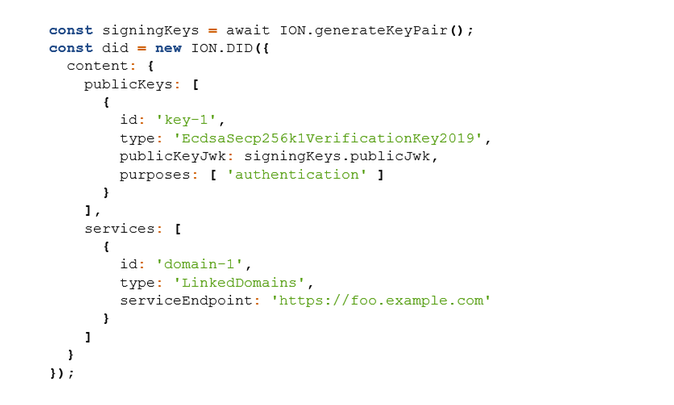
Generate ION DIDs and keys – the high-level ION.js helper library is the easiest way to start generating ION DIDs as fast as possible: github.com/decentralized-identity/ion-tools (ION.js library).
An example of generating an ION DID with the ION.js library:
Use the lower-level SDK – access a larger set of ION-related APIs that provide more granular functionality: github.com/decentralized-identity/ion-sdk (TypeScript/Node)
Anchor DIDs you generate – easily anchor your DIDs via our ION node, without having to interact with a cryptocurrency wallet or run an ION node locally: github.com/decentralized-identity/ion-tools
[ NOTE: ownership of your DIDs is based on keys you generate locally, and all ION operations are signed with those keys, so even if you use our node for anchoring DID operations (or any other node), you are always in sole control. ]
Run an ION node
Running an ION node provides the fastest lookup of ION DIDs, the highest level of security when interacting with ION DIDs, and ensures you can always resolve ION DIDs without depending on intermediaries. There are two options for running an ION node:
- Run the Dockerized version of ION: https://github.com/decentralized-identity/ion/tree/master/docker (provides an option to connect to an existing Bitcoin node)
- Install a node natively on your machine: https://identity.foundation/ion/install-guide/
Lookup ION DIDs
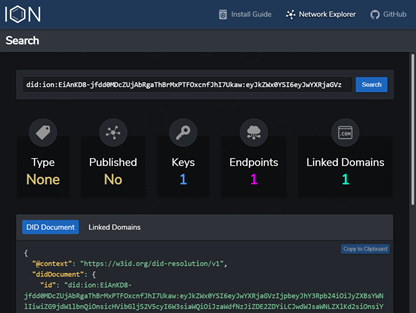
You can resolve ION DIDs to view their keys and routing endpoints using the ION Explorer interface: https://identity.foundation/ion/explorer/. This dashboard (which you’ll soon be able to run against your own local ION node) is being built-out with more views and tools as we speak, and will eventually contain interfaces to help operators monitor their local ION nodes.
Leverage ION DIDs today
Here are a few ways you can use ION DIDs right now:
- If you are a business or organization, sign up for the public preview of the Azure AD Verifiable Credential service: http://aka.ms/vcpreview
- Explore integrating OpenID Connect Self-Issued for DIDs to authenticate with sites, apps, and services that implement the draft specification: https://bitbucket.org/openid/connect/src/master/openid-connect-self-issued-v2-1_0.md
- Create a DID for yourself or your company and cryptographically link it to Web domains you control, using the DIF Well-Known DID Configuration specification: https://identity.foundation/.well-known/resources/did-configuration/.
- Use a DID to issue Verifiable Credentials, which are digital proofs that can be used to represent just about any verifiable assertion or asset, such as diplomas, membership cards, event tickets, etc.
ION’s core protocol has been standardized
Along with ION reaching v1, so too has the protocol at its core: Sidetree. Sidetree is a specification developed alongside many others at the Decentralized Identity Foundation (DIF) that enables scalable DID networks (i.e. ION, Element, Orb) to be built atop any decentralized event record system (e.g. blockchains). We would like to thank the following collaborators who have worked on specs, contributed code, or provided feedback during this process:
This work would not have been possible without the contributions of folks like Orie Steele of Transmute and Troy Ronda of SecureKey, who played key roles in shaping the Sidetree specification, our colleagues in Microsoft Research, as well as Dietrich Ayala and the Protocol Labs team, who helped integrate IPFS as the P2P file replication protocol used in ION.
Open source development and codification of standards is essential to the creation of a vibrant decentralized identity ecosystem. If you are a developer or organization interested in contributing to the Sidetree specification, ION’s open source code, or any other work underway in this area, we encourage you to join the Decentralized Identity Foundation (DIF) and its Sidetree Development & Operating Group. This group is the primary place where contributors meet to discuss various technical and operational aspects of ION and the general Sidetree protocol.
Beyond v1
With ION v1 out the door, we will be turning our attention toward optimizing the ION node implementation and adding other important features, such as:
- Deliver a light node configuration, making node operation easier for low-resource devices.
- Add tooling and support for Ed25519 and BLS12-381 keys
- Enable optimistic operation ingestion for transactions still in the mempool (reduces time to resolution)
- Codify an initial set of DID type tags (used in tagging DIDs as IoT devices, software packages, etc.)
- Enable querying of ION’s decentralized DID directory based on DID type – for example: once organizations and businesses establish DIDs, you will be able to fetch all DIDs typed as Organization, LocalBusiness, etc., to build a decentralized directory. You will also be able find all DIDs of types like SoftwareSourceCode, to create decentralized code package and app registries. (NPM? How about DPM)
While launching v1 of ION is a significant milestone, we’re still in the early phases of this journey. We have a lot left to do before we can fully realize a better, more trustworthy, more decentralized Web that empowers every person and every organization on the planet to achieve more.
Daniel Buchner
Decentralized Identity, Microsoft



Recent Comments