
by Contributed | Mar 25, 2021 | Technology
This article is contributed. See the original author and article here.
One of the performance projects I’ve focused on in PostgreSQL 14 is speeding up PostgreSQL recovery and vacuum. In the PostgreSQL team at Microsoft, I spend most of my time working with other members of the community on the PostgreSQL open source project. And in Postgres 14 (due to release in Q3 of 2021), I committed a change to optimize the compactify_tuples function, to reduce CPU utilization in the PostgreSQL recovery process. This performance optimization in PostgreSQL 14 made our crash recovery test case about 2.4x faster.
The compactify_tuples function is used internally in PostgreSQL:
- when PostgreSQL starts up after a non-clean shutdown—called crash recovery
- by the recovery process that is used by physical standby servers to replay changes (as described in the write-ahead log) as they arrive from the primary server
- by VACUUM
So the good news is that the improvements to compactify_tuples will: improve crash recovery performance; reduce the load on the standby server, allowing it to replay the write-ahead log from the primary server more quickly; and improve VACUUM performance.
In this post, let’s walk through the change to compactify_tuples, how the function used to work, and why the newly-rewritten version in Postgres 14 is faster.
Profiling the recovery process highlighted a performance problem
In PostgreSQL, the write-ahead log (called the WAL) contains sets of records with instructions and data to go with the instructions. These WAL records describe changes which are to be made to the underlying data. WAL is used to make sure each change to the data is durable in the event that PostgreSQL stops running before the underlying data is written to disk. When PostgreSQL restarts after a shutdown, all of the WAL since the last checkpoint must be replayed as part of the recovery process. The WAL is replayed in order, to reapply changes to pages which may not have been written out to disk before the database shutdown.
We did some profiling of the PostgreSQL recovery process after purposefully crashing the database after running a benchmark of an UPDATE-heavy, OLTP type workload. These profiles showed that much of the CPU load was coming from the replay of “HEAP2 CLEAN” WAL records. HEAP2 CLEAN records defragment pages in tables to remove free space left by dead tuples. HEAP2 CLEAN records are added to WAL whenever the page becomes full and more space is needed on the page.
A tuple is PostgreSQL’s internal representation of a row in a table. A single row may have many tuples representing it, but only one of these tuples will be applicable at any single point in time. Older running transactions may require access to older versions of the row (another tuple) so they can access the row as it was at the point in time when the transaction started. UPDATEs to rows cause new versions of the tuple to be created. Creating multiple versions of each row in this way is called multi-version concurrency control (MVCC.)
Removing unused space from heap pages
To understand what HEAP2 CLEAN does in PostgreSQL, we’ll need to peer into the heap page format. Let’s look at a typical (simplified) heap page with some tuple fragmentation:
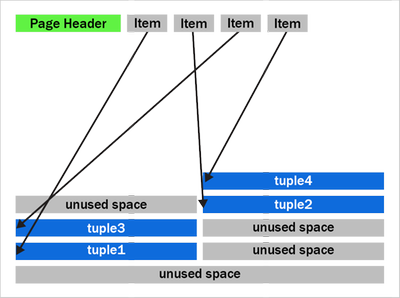 Figure 1: A PostgreSQL heap page with fragmentation due to removed tuples
We can see that after the page header comes an array of “items.” The items act as pointers to the start of each tuple. PostgreSQL writes tuples to the page starting at the end and works backwards. The page is full when the item array and tuple space would overlap.
You should also notice that the tuples at the end of the page are not exactly in the reverse order of the item pointers. Tuples 2 and 3 appear out of order here. Tuples can become out of order after some records have been updated in the page and an old item pointer gets reused.
We can also see that that there’s quite a bit of unused space on the page in figure 1. The unused space is due to VACUUM removing tuples. The HEAP2 CLEAN operation will get rid of this unused space.
In PostgreSQL 13 and earlier, the HEAP2 CLEAN operation would turn the above into:
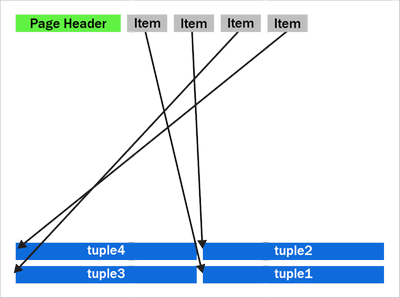 Figure 2: A defragmented heap page in PostgreSQL before the performance improvement in PostgreSQL 14 that speeds up the recovery process and VACUUM.
We can see that the empty space is gone and the tuples are now pushed up to the end of the page. Notice the tuples remain in the same order as they were, with tuples 2 and 3 remaining in the same swapped order.
How heap page compactification used to work, prior to PostgreSQL 14
The compactify_tuples function takes care of the page compactification operation for us. All the changes made are in the compactify_tuples function. Before this change, the compactify_tuples function would perform a sort on a copy of the items array. This sort allowed the tuples to get moved starting with tuples at the end of the page. In this case, the tuples are moved starting with tuple1, followed by tuple3, tuple2 and tuple4. To determine which tuples to move first, compactify_tuples used the generic C qsort function with a custom comparator function. Sorting the item array in reverse tuple offset order allowed the tuples to be moved starting at the tuples at the end of the page.
Since heap pages can contain up to a few hundred tuples, and due to how often pages can be compactified in UPDATE-heavy workloads, the qsort call could use a lot of CPU. The sort overhead was not as bad with pages just containing a few tuples.
Do we really need to sort? … Well, yes and no. If we moved tuples in item array order and didn’t sort, then we could overwrite tuples later in the page. For example, in figure 2, if we moved tuple2 toward the end of the page before moving tuple3, then we’d overwrite tuple3. When moving the tuples in-place like this, we must make sure we move tuples at the end of the page first. So, we must sort when doing this in-place move.
How to make HEAP2 CLEAN faster?
To speed up the page compactification done during HEAP2 CLEAN, we could have written a custom qsort function which inlines the comparator function. Creating a custom qsort would have reduced some function call overhead, but, no matter what we did, qsort would still average an O(n log n) complexity. It would be nice to get rid of the sort completely.
The qsort is only required so that we don’t overwrite any yet-to-be-moved tuples. So, instead of sorting, we could instead copy those tuples to a temporary in-memory buffer, that way the order we move the tuples does not matter.
The new version of compactify_tuples in PostgreSQL 14 completely eliminates the need to use qsort. Removing the sort allows us to move tuples to the end of the page in item-array order. The temporary in-memory buffer removes the danger of tuples being overwritten before they’re moved and also means that the tuples are put back in the correct order with the first tuple at the end of the page.
The new heap page format, after compactification in PostgreSQL 14, looks like this:
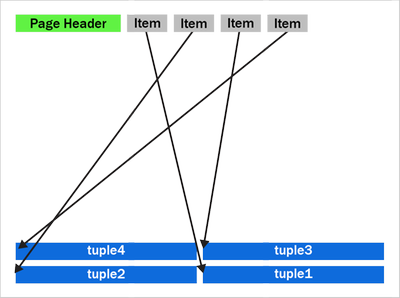 Figure 3: A newly compactified heap page after the performance improvement in PostgreSQL 14.
Notice that tuples 2 and 3 have now swapped places and the tuples are now in backwards item array order.
The new Postgres 14 code is further optimized by having a pre-check to see if the tuples are already in the correct reverse item pointer offset order. If the tuples are in the correct order, then there is no need to use the temporary buffer. We then move only tuples that come earlier (working backwards) in the page than the first empty space. The other tuples are already in the correct place. Also, now that we put the tuples back into reverse item pointer order again, we hit this pre-sorted case more often. On average, we’ll only move half the tuples on the page. New tuples which generate a new item pointer will also maintain this order for us.
Having the tuples in reverse item order may also help some CPU architectures prefetch memory more efficiently than if the tuples were in a random order in the page.
How much faster is the recovery process now in PostgreSQL 14?
My test case used a table with two INT columns and a “fillfactor” of 85 with 10 million rows. Accounting for the tuple header, this allows a maximum of 226 tuples to fit on each 8 kilobyte page.
To generate some WAL to replay, I used pgbench, a simple benchmarking program that comes with PostgreSQL, to do 12 million UPDATEs to random rows. Each of the 10 million rows will receive an average of 12 updates. I then did an unclean shutdown of PostgreSQL and started it back up again, forcing the database to perform crash recovery. Before the performance improvement, crash recovery took 148 seconds to replay the 2.2 GB of WAL.
The new version of the compactify_tuplescode took the same test 60.8 seconds. With this change and the given test case, PostgreSQL’s crash recovery became about ~2.4x faster.
|
Before the change to compactify tuples |
After the change to compactify tuples |
Performance impact of compactify tuples change |
Time to replay a
2.2 GB WAL as part of crash recovery |
148 sec |
60.8 sec |
~2.4X faster |
Previously, before the compactify_tuples change, pages with large numbers of tuples were the slowest to compactify. This was due to the qsort taking longer with large arrays. After changing compactify_tuples the performance is much more consistent with varying numbers of tuples on the page. The change does still result in a small speedup on pages even with very few tuples per page. However, the change helps the most when the number of tuples per page is large.
VACUUM performance also improved in PostgreSQL 14
VACUUM (and autovacuum) happens to make use of the same code after they remove dead tuples from a heap page. So, speeding up compactify_tuples also means a nice performance improvement for vacuum and autovacuum, too. We tried performing a VACUUM of the table updated my benchmark from earlier and saw that VACUUM now runs 25% faster in PostgreSQL 14 than it did before the compactify_tuples change. Previously it took 4.1 seconds to VACUUM the table and after the change that time went down to 2.9 seconds.
Speeding up the recovery process also means that physical standby servers are more likely to keep up pace and replay the primary’s WAL as quickly as it is being generated. So making this change to compactify_tuples also means that standby servers are less likely to lag behind the primary.
So the recovery process and vacuum will be faster in PostgreSQL 14—and there’s more work in progress, too
The change to compactify_tuples does help improve the performance of the recovery process in many cases. However, it’s also common for the recovery process to be bottlenecked on I/O rather than CPU. When recovering databases which are larger than the system’s available RAM, recovery must often wait for a page to be read from disk before any changes can be applied to it. Luckily, we’re also working on a way to make the recovery process pre-fetch pages into the kernel’s page cache so the physical I/O can take place concurrently in the background rather than having the recovery process wait for it.
For those of you who want an even bigger peek into how Postgres development happens, you can subscribe to any of the Postgres mailing lists. The PostgreSQL mailing list archives are also searchable. And if you want to learn even more about this compactify_tuples performance fix, here is the text of the actual commit to PostgreSQL 14, plus a link to the discussion on this optimization topic on the pgsql-hackers mailing list.
Author: David Rowley <drowley@postgresql.org>
Date: Wed, 16 Sep 2020 01:22:20 +0000 (13:22 +1200)
commit 19c60ad69a91f346edf66996b2cf726f594d3d2b

Optimize compactify_tuples function

This function could often be seen in profiles of vacuum and could often
be a significant bottleneck during recovery. The problem was that a qsort
was performed in order to sort an array of item pointers in reverse offset
order so that we could use that to safely move tuples up to the end of the
page without overwriting the memory of yet-to-be-moved tuples. i.e. we
used to compact the page starting at the back of the page and move towards
the front. The qsort that this required could be expensive for pages with
a large number of tuples.

In this commit, we take another approach to tuple compactification.

Now, instead of sorting the remaining item pointers array we first check
if the array is presorted and only memmove() the tuples that need to be
moved. This presorted check can be done very cheaply in the calling
functions when the array is being populated. This presorted case is very
fast.

When the item pointer array is not presorted we must copy tuples that need
to be moved into a temp buffer before copying them back into the page
again. This differs from what we used to do here as we're now copying the
tuples back into the page in reverse line pointer order. Previously we
left the existing order alone.  Reordering the tuples results in an
increased likelihood of hitting the pre-sorted case the next time around.
Any newly added tuple which consumes a new line pointer will also maintain
the correct sort order of tuples in the page which will also result in the
presorted case being hit the next time.  Only consuming an unused line
pointer can cause the order of tuples to go out again, but that will be
corrected next time the function is called for the page.

Benchmarks have shown that the non-presorted case is at least equally as
fast as the original qsort method even when the page just has a few
tuples. As the number of tuples becomes larger the new method maintains
its performance whereas the original qsort method became much slower when
the number of tuples on the page became large.

Author: David Rowley
Reviewed-by: Thomas Munro
Tested-by: Jakub Wartak
by Contributed | Mar 25, 2021 | Technology
This article is contributed. See the original author and article here.
Blog Overview
This blog will provide an overview of Modern application development. The blog will first define the modern application development approach. Then delve into the ‘7 building blocks’ of the approach starting with cloud native architecture, followed by AI, Integration, Data, Software delivery, Operations, and Security.
Each segment will define and explain the ‘building block’ and how the modern application development approach leverages the ‘building blocks’ to produce more robust applications.
What is Modern Application Development (MAD)?
Modern application development is an approach that enables you to innovate rapidly by using cloud-native architectures with loosely coupled microservices, managed databases, AI, DevOps support, and built-in monitoring.
The resulting modern applications leverage cloud native architectures by packaging code and dependencies in containers and deploying them as microservices to increase developer velocity using DevOps practices.
Subsequently modern applications utilize continuous integration and delivery (CI/CD) technologies and processes to improve system reliability. Modern apps employ automation to identify and quickly mitigate issues applying best practices like infrastructure as code and increasing data security with threat detection and protection.
Lastly, modern applications are faster by infusing AI into native architecture structures to reduce manual tasks, accelerating workflows and introducing low code application development tools to simplify and expedite development processes.
Cloud-native architectures
According to The Cloud Native Computing Foundation (CNCF), cloud native is defined as “Cloud-native technologies empower organizations to build and run scalable applications in modern, dynamic environments such as public, private, and hybrid clouds.
Containers, service meshes, microservices, immutable infrastructure, and declarative APIs exemplify this approach.
These techniques enable loosely coupled systems that are resilient, manageable, and observable. Combined with robust automation, they allow engineers to make high-impact changes frequently and predictably with minimal toil.”
Utilizing that definition, what are the key tenants of a cloud-native approach, and how does each tenant benefit you?
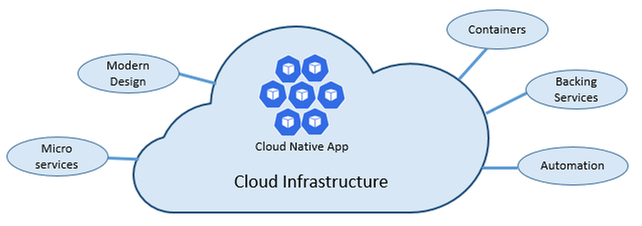
As stated above, cloud-native architectures center on speed and agility. That speed and agility are derived from 6 factors:
- Cloud infrastructure
- Modern design
- Microservices
- Containers
- Backing services
- Automation.
Cloud infrastructure is the most important factor that contributes to the speed and agility of cloud-native architecture.
3 Key Factors
- Cloud-native systems fully leverage the cloud service model using PaaS compute infrastructure and managed services.
- Cloud-native systems continue to run as infrastructure scales in or out without worrying about the back end because the infra is fully managed.
- Cloud-native systems have auto scaling, self-healing, and monitoring capabilities.
Modern Design is highly effective in part due to the Twelve-Factor Application method, which is a set of principles and practices that developers follow to construct applications optimized for modern cloud environments.
Most Critical Considerations for Modern Design
- Communication – How front ends communication with back-end services, and how back-end services communicate with each other.
- Resiliency – How services in your distributed architecture respond in less-than-ideal scenarios due to the in-process, out-process network communications of microservices architecture.
- Distributed Data – How do you query data or implement a transaction across multiple services?
- Identity – How does your service identify who is accessing it and their allotted permissions?
What are Microservices?
Microservices are built as a distributed set of small, independent services that interact through a shared fabric.
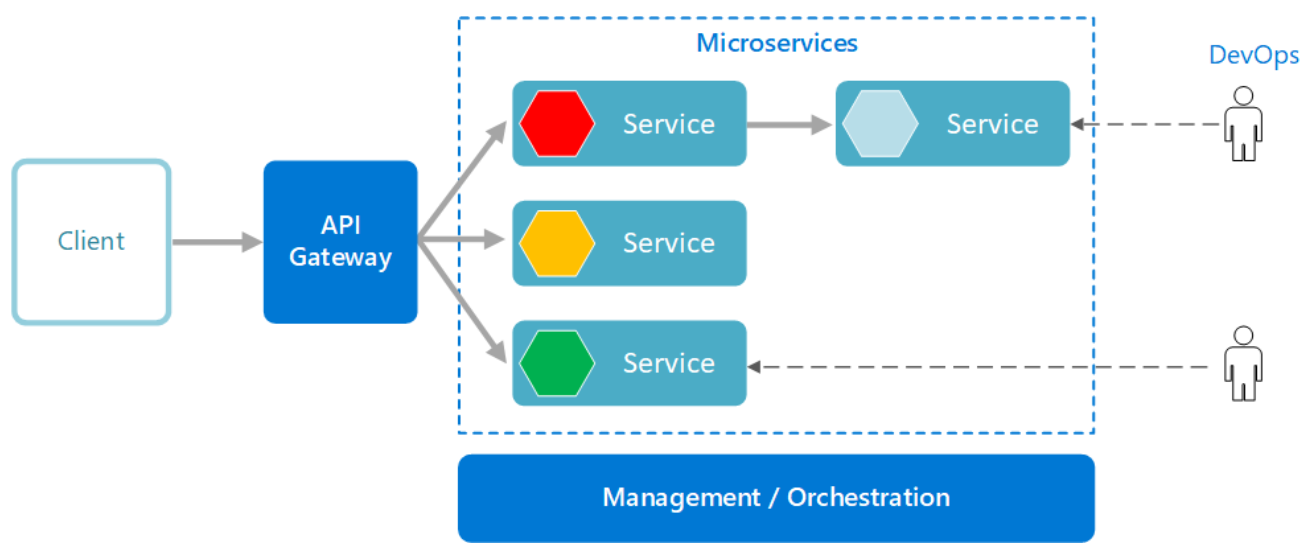
Improved Agility with Microservices
- Each microservice has an autonomous lifecycle and can evolve independently and deploy frequently.
- Each microservice can scale independently, enabling services to scale to meet demand.
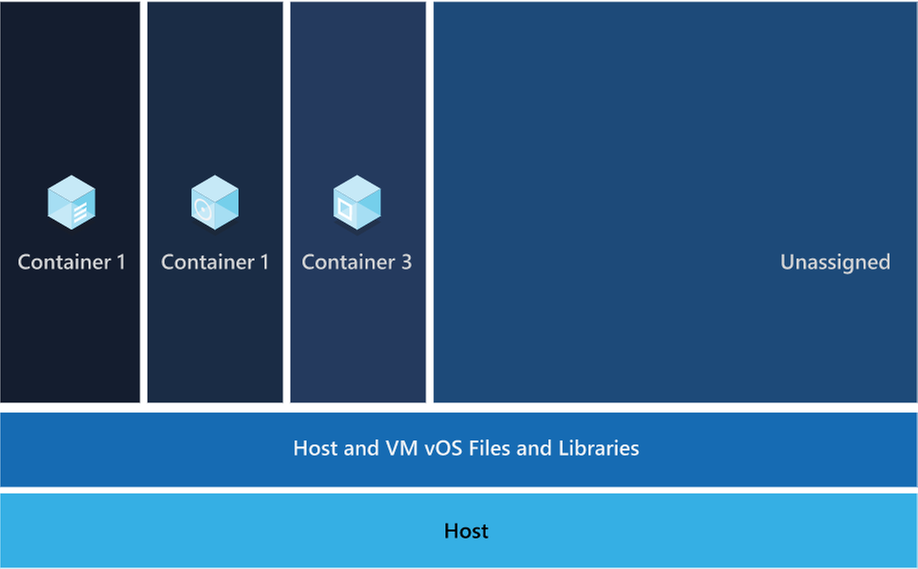
Those microservices are then packaged a container image, those images are stored in container registry. When needed you transform the container into a running container instance, to utilize the stored microservices. How do containers benefit cloud native apps?
Benefits of Containers
- Provide portability and guarantee consistency across environments.
- Containers can isolate microservices and their dependencies from the underlying infrastructure.
- Smaller footprints than full virtual machines (VMs). That smaller size increases density, the number of microservices, that a given host can run at a time.
Cloud native solutions also increase application speed and agility via backing services.
Benefits of Backing Services
- Save time and labor
- Treating backing services as attached resources enables the services to attach and detach as needed without code changes to the microservices that contain information, enabling greater dynamism.
Lastly, cloud-native solutions leverage automation. Using cloud-native architectures your infrastructure and deployment are automated, consistent, and reputable.
Benefits of Automation
- Infrastructure as Code (IaC) avoids manual environment configuration and delivers stable environments rapidly at scale.
- Automated deployment leverages CI/CD to speed up innovation and deployment, updating on-demand; saving money and time.
Artificial Intelligence
The second building block in the modern application development approach is Artificial intelligence (AI).
What comprises artificial intelligence? How do I add AI to my applications? Azure Artificial Intelligence is comprised of machine learning, knowledge mining, and AI apps and agents. Under the apps and agent’s domain there are two overarching products, Azure Cognitive Services and Bot Service, that we’re going to focus on.
Cognitive services are a collection of domain specific pre-trained AI models that can be customized with your data. Bot service is a purpose-built bot development environment with out-of-the-box templates. To learn how to add AI to your applications watch the short video titled “Easily add AI to your applications.”
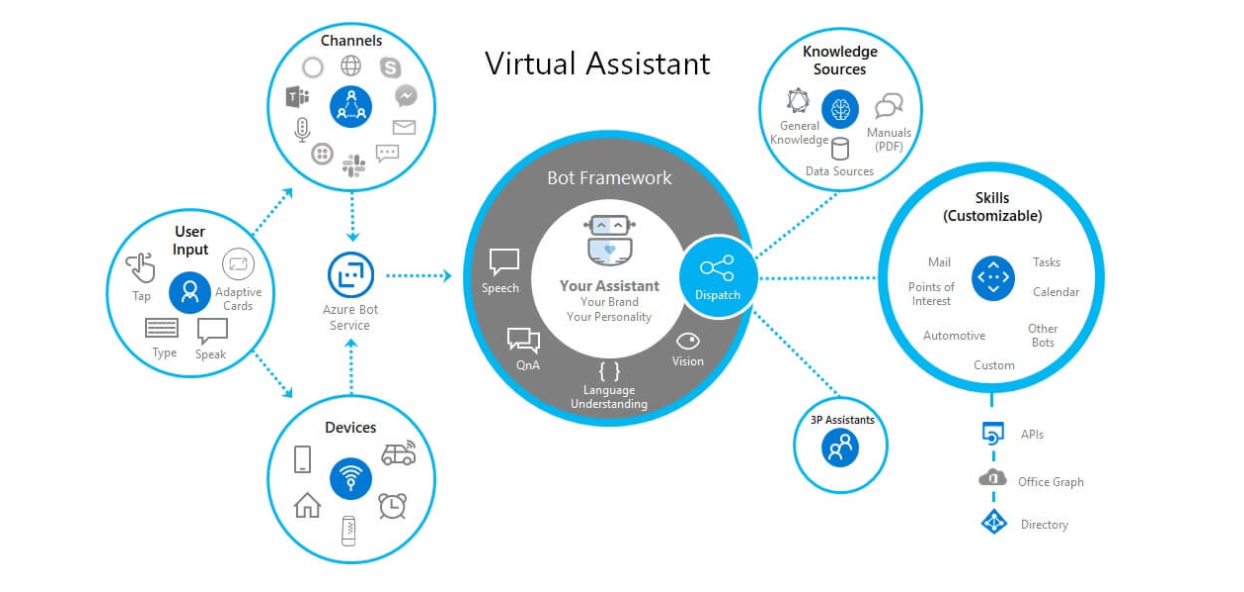
Innate Benefits
User benefits: Translation, chatbots, and voice for AI-enabled user interfaces.
Business benefits: Enhanced business logic for scenarios like search, personalization, document processing, image analytics, anomaly detection, and speech analytics.
Modern Application Development unique benefit:
Enable developers of any skill to add AI capabilities to their applications with pre-built and customizable AI models for speech, vision, language, and decision-making.
Integration
The third building block is integration.
Why is integration needed, and how is it accomplished?
Integration is needed to integrate applications by connecting multiple independent systems. The four core cloud services to meet integration needs are:
- A way to publish and manage application programming interfaces (APIs).
- A way to create and run integration logic, typically with a graphical tool for defining the workflow’s logic.
- A way for applications and integration technologies to communicate in a loosely coupled way via messaging.
- A technology that supports communication via events
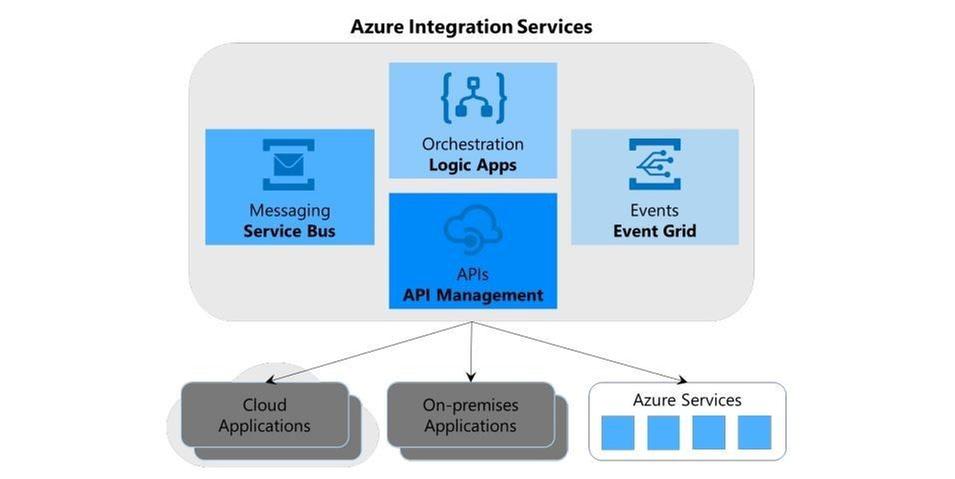
What are the benefits of Azure integration services and how do they translate to the modern app dev approach?
Azure meets all four needs, the first need is met by Azure API management, the second is met by Azure Logic Apps, the third is Azure Service Bus, and the final is met by Azure Event Grid.
The four components of Azure Integration Services address the core requirements of application integration. Yet real scenarios often require more, and this is where the modern application development approach comes into play.
Perhaps your integration application needs a place to store unstructured data, or a way to include custom code that does specialized data transformations.
Azure Integration Services is part of the larger Azure cloud platform, making it easier to integrate data, APIs, and into your modern app to meet your needs.
You might store unstructured data in Azure Data Lake Store, for instance, or write custom code using Azure Functions, to meet serverless compute tech needs.
Data
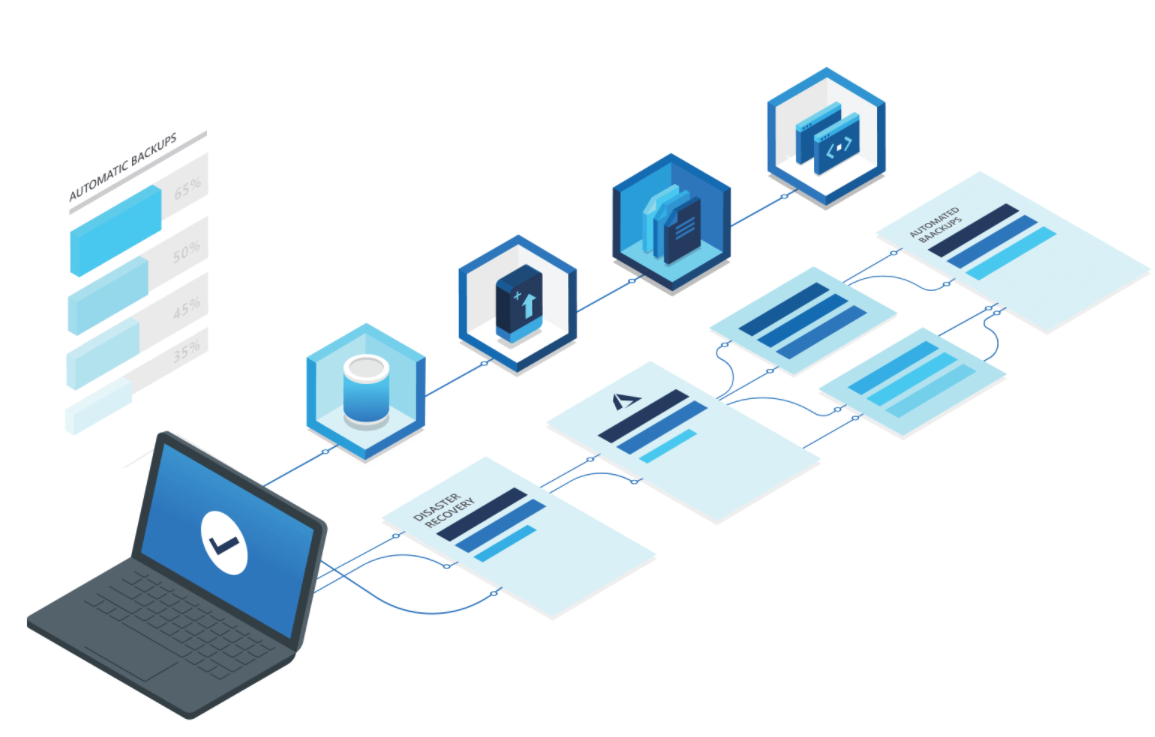
The fourth building block is data, and more specifically managed databases.
What are the advantages of managed databases?
Fully managed, cloud-based databases provide limitless scale, low-latency access to rich data, and advanced data protection—all built in, regardless of languages or frameworks.
How does the modern application development approach benefit from fully managed databases?
Modern application development leverages microservices and containers, the benefit to both technologies is their ability to operate independently and scale as demand warrants.
To ensure the greatest user satisfaction and app functionality the limitless scale and low–latency access to data enable apps to run unimpeded.
Software Delivery
The fifth building block is software delivery.
What constitutes modern development software delivery practices?
Modern app development software delivery practices enable you to meet rapid market changes that require shorter release cycles without sacrificing quality, stability, and security.
The practices help you to release in a fast, consistent, and reliable way by using highly productive tools, automating mundane and manual steps, and iterating in small increments through CI/CD and DevOps practices.
What is DevOps?
A compound of development (Dev) and operations (Ops), DevOps is the union of people, process, and technology to continually provide value to customers. DevOps enables formerly siloed roles—development, IT operations, quality engineering, and security—to coordinate and collaborate to produce better, more reliable products.
By adopting a DevOps culture along with DevOps practices and tools, teams gain the ability to better respond to customer needs, increase confidence in the applications they build, and achieve development goals faster.
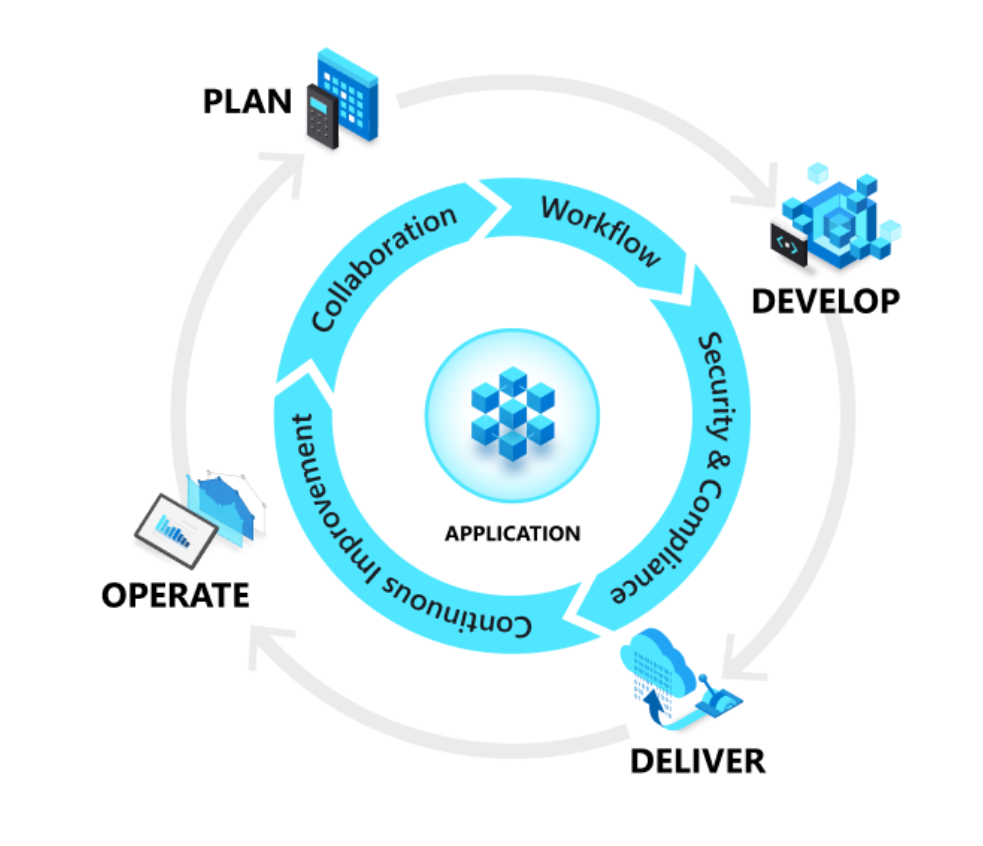
DevOps influences the application lifecycle throughout its plan, develop, deliver, and operate phases.
Plan
In the plan phase, DevOps teams ideate, define, and describe features and capabilities of the applications and systems they are building. Creating backlogs, tracking bugs, managing agile software development with Scrum, using Kanban boards, and visualizing progress with dashboards are some of the ways DevOps teams plan with agility and visibility.
Develop
The develop phase includes all aspects of coding—writing, testing, reviewing, and the integration of code by team members—as well as building that code into build artifacts that can be deployed into various environments. To develop rapidly, they use highly productive tools, automate mundane and manual steps, and iterate in small increments through automated testing and continuous integration.
Deliver
Delivery is the process of deploying applications into production environments and deploying and configuring the fully governed foundational infrastructure that makes up those environments.
In the deliver phase, teams define a release management process with clear manual approval stages. They also set automated gates that move applications between stages until they’re made available to customers.
Operate
The operate phase involves maintaining, monitoring, and troubleshooting applications in production environments. In adopting DevOps practices, teams work to ensure system reliability, high availability, and aim for zero downtime while reinforcing security and governance.
What is CI/CD?
Under continuous integration, the develop phase—building and testing code—is fully automated. Each time you commit code, changes are validated and merged to the master branch, and the code is packaged in a build artifact.
Under continuous delivery, anytime a new build artifact is available, the artifact is automatically placed in the desired environment and deployed. With continuous deployment, you automate the entire process from code commit to production.
Operations
The sixth building block is operations to maximize automation.
How do you maximize automation in your modern application development approach?
With an increasingly complex environment to manage, maximizing the use of automation helps you improve operational efficiency, identify issues before they affect customer experiences, and quickly mitigate issues when they occur.
Fully managed platforms provide automated logging, scaling, and high availability. Rich telemetry, actionable alerting, and full visibility into applications and the underlying system are key to a modern application development approach.
Automating regular checkups and applying best practices like infrastructure as code and site reliability engineering promotes resiliency and helps you respond to incidents with minimal downtime and data loss.
Security
The seventh building block is multilayered security.
Why do I need multi-layered security in my modern applications?
Modern applications require multilayered security across code, delivery pipelines, app runtimes, and databases. Start by providing developers secure dev boxes with well-governed identity. As part of the DevOps lifecycle, use automated tools to examine dependencies in code repositories and scan for vulnerabilities as you deploy apps to the target environment.
Enterprise-grade secrets and policy management encrypt the applications and give the operations team centralized policy enforcement. With fully managed compute and database services, security control is built in and threat protection is executed in real time.
Conclusion
While modern application development can seem daunting, it is an approach that can be done iteratively, and each step can yield large benefits for your team.
Access webinars, analyst reports, tutorials, and more on the Modern application development on Azure page.









































































































Recent Comments