Build Semantic Search into your apps | Latest in Azure Cognitive Search

Build Semantic Search into your apps | Latest in Azure Cognitive Search

This article is contributed. See the original author and article here.

Bring state-of-the-art search capabilities to your custom applications in content management systems with Azure Cognitive Search. Tour the latest enhancements with Semantic Search to surface relevant answers to your search queries.


Azure Cognitive Search is a PaaS solution that allows you to integrate sophisticated search capabilities into your applications. It helps you quickly ingest, enrich, and explore structured and unstructured data, and is available to everyone.


1_4tSYJXh-akLuQiqxO6wRIg.png


Azure and Bing teams have worked together to bring learned ranking models to Azure for you to leverage in your custom search solutions. Now search can extract and index information from any format, applying machine learning techniques to understand latent structure in all data. Distinguished engineer, Pablo Castro, joins host Jeremy Chapman, to walk you through the improvements and show you how the intelligence works behind these powerful capabilities.


Semantic Search—Relevance, Captions, and Answers:


  • Create similar experiences to web search engines, but for your own application and on your own data.

  • Search matches words, but also understands the context of the words relative to the words surrounding them.

  • Offers a significant improvement in relevant results; all you have to do is enable it.


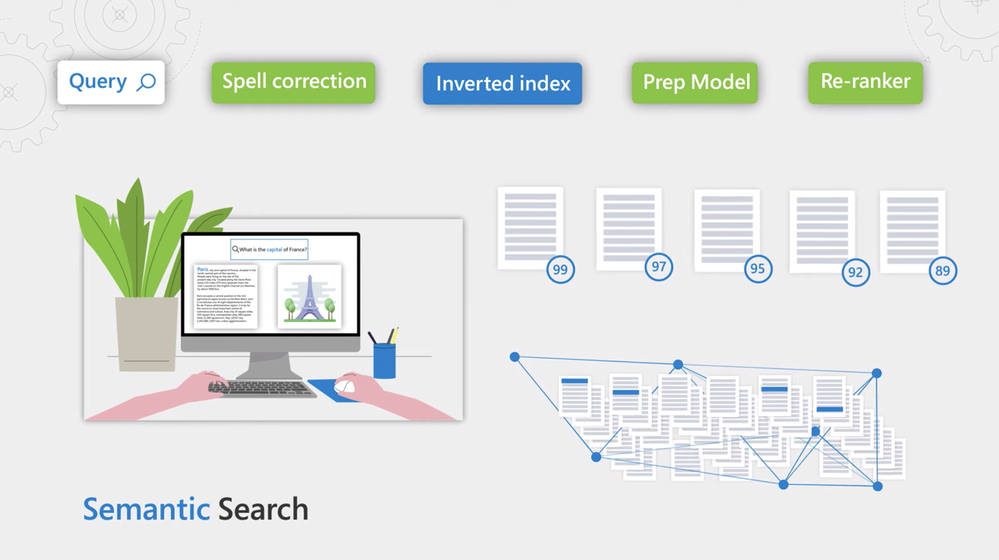
Spell correction, Inverted index, Prep model, and Re-ranker:


  • Keyword searches return exact matches and ranking is often only based on the rate of relevant frequencies of the words.

  • Capture nuances in the language for a more sophisticated machine learning model that’s course document relevant in the context of the query.


QUICK LINKS:


01:18 — Data ingestion


02:38 — Semantic Search


04:48 — How to get it running


06:59 — How the intelligence works


08:43 — Advancements in natural language processing


10:52 — How it avoids slow search results


11:35 — Wrap Up


Link References:


Get started with Azure Cognitive Search at https://aka.ms/SemanticGetStarted


Sign up for the public review of semantic search at https://aka.ms/SemanticPreview


Unfamiliar with Microsoft Mechanics?


We are Microsoft’s official video series for IT. You can watch and share valuable content and demos of current and upcoming tech from the people who build it at Microsoft.


Video Transcript:


– Up next on this special edition of Microsoft Mechanics, we’re joined by distinguished engineer Pablo Castro, to learn how you can bring state-of-the-art search capabilities to your custom applications in content management systems, including the latest enhancements with semantic search for ranking top search results and answers, that uses machine reading and comprehension to surface answers to your search queries. So, Pablo it’s a pleasure to have you on Microsoft Mechanics.


– Thanks Jeremy, happy to be here.


– And it’s a real privilege to have you on the show as one of the leaders for intelligent search at Microsoft and congrats on today’s announcements. But before we get into this though, for those of you who are new to Azure Cognitive Search, it’s a PaaS solution in Azure that allows you to integrate sophisticated search capabilities into your applications. As an example, large industrial manufacturer Howden use Azure Cognitive Search to be able to quickly drill into the details of customer equipment requests, so they can respond with accurate bids. Now, the Azure Cognitive Search platform helps you to quickly ingest, enrich and explore structured and unstructured data. And you can integrate Azure Cognitive Search into your customer-facing mobile apps or e-commerce sites and line of business apps. So Pablo, Azure Cognitive Search really brings together some of the best work for Microsoft across search and AI, and really makes it available for everyone.


– It really does. We’ve been lucky to be able to harness a lot of the amazing work of Microsoft research. We also combined it with our extensive partnership with the Bing team. We’ve developed a lot of advancements for Azure Cognitive Search. Everything starts with data ingestion, so you can bring data from any source. You can automatically pull data in from an Azure data source or you can push any data you want to the search index using the push API. Of course, this content is not uniform, it exists in different formats and it’s anything from records, to long text, to even pictures. So we taught search to extract and index information from any format, applying machine learning techniques to understand latent structure in all data. For example, we extract key phrases, tag images, the tech language, locations and organization names. And you can also bring your custom skills and models. This combination of cognitive search and with cognitive services, in fact makes search able to understand content of all nature.


– Right, and I remember a few years back, we actually showed a great example for this. So we took the John F. Kennedy files, really comprised of decades old, handwritten notes and photos and typed documents. Then with Azure Cognitive Search we could understand the data and even surface new insights that had never been seen before.


– Yeah, the sophistication of data ingestion, the smarts to understand and index content along with keyword search, it’s something we’ve had for a while. And we’ve seen many of you take advantage of this for lots of interesting scenarios. Today, we’re announcing the next step on this journey with the new semantic search capabilities that includes semantic relevance, captions and answers in preview today. I have this demo application that’s fronting a cognitive search index with a dataset that’s often used for evaluation purposes called MS Marco. Let’s search for what’s the capital of France. You can see that the results match the keywords in our search, but it looks like the ambiguity of the word capital in particular, caused top results to be a bit all over the place. We see capital punishment, capital gains, the capital of Kazakhstan, removals in France. Now, I’ll enable something brand new, semantic search. And this, I’ll auto-enable spelling as well. With semantic search, they Azure and Bing teams have worked together to bring state-of-the art learned ranking models to Azure for you to leverage in your custom search solutions. Now, if I go back to the page, you’ll see the results side-by-side, keyword search on the left, semantic search on the right. You can see how on point the new results are, they’re about France and they discuss it’s capital, with links to Britannica and World Atlas. Note, that this huge improvement in quality only required me to enable this option. Now, let’s take this to the next level with semantic captions and answers. Let me go back here into settings and enable both of these features. Not only do we see relevant results, but we can see captions under each result that are meaningful in the context of our query. We can also see an actual answer proposed by cognitive search. So now, you can create the same kind of experiences that web search engines offer but for your own application and on your own data.


– And what I love about this is that the answer is actually presented directly in the context of the search. And you don’t have to click on an additional link then, to find your answer. So what does it take then to add something like this, semantic search, into our apps?


– Well, it’s not that hard to get it running. Let’s first walk through how to ingest and enrich data in cognitive search, and then we can dive into the new semantic search. First thing to do, is to create a cognitive search service. I already have one created and I’m here in the portal with it open. I’m going to use import data to start this process. You can see, we support many Azure stores. In this case, I’m going to point to an existing blob storage account with unstructured data in it. In the next step I can enable one or more cognitive services or custom models to enrich the data I’m ingesting, so I’ll add enrichments. For example, I can enable optical character recognition, edit extraction, computer vision and more. Finally, I have the chance to customize my index definition and to set up indexer options. At this point, I’m done. And I have an ingestion process that will run automatically, detect changes, enrich data and push it into my index. I already created an index before, so we don’t have to wait for this process. Let’s go into this index and give it a quick try. I can search for say, France. And I can see the results coming back. Now in your application, you’ll typically use one of our client libraries or the HTTP API. Here, I’m in VS code and this is a typical HTTP request for the search API. Let me run it to see the results for the same search we did earlier. You can see we get the keyword search results. Now, I’ll just change the query type to semantic and reissue this query. You can see that now I’m getting the new, more relevant results, thanks to semantic relevance. That one line was all I needed, a few more tweaks will also enable captions and answers. And since these options don’t require re-indexing, you can easily try this on your existing applications as well.


– Right, and these all look like pretty simple API calls but behind the scenes at the service level, there’s a ton of complexity going on there.


– Right. We take care of the data science to give you state-of-the art search results without having to create your own ranking models from scratch. At the same time, we also take care of the infrastructure to run our ranking and machine learning models efficiently and fast.


– All of this, what you shown, would have taken a ton of effort if we were trying to build this ourselves, but what kind of improvements have you made to make all of this possible?


– So let’s start by explaining traditional keyword search. Here, you would match each word in a search query against an inverted index, which allows for fast retrieval of documents based on if they contain the words of search terms that you’re searching for. This returns documents that have those words. The problem with this is it only returns exact matches and ranking is often only based on the record relative frequencies of the words. Sometimes that’s what you want, such as when searching for part numbers like in the example you gave earlier with Howden, when you know precisely what to look for. However, when searching through content written by people, you want to capture the nuance in the language. So we added a few key components to improve search precision and recall. First, we added a step, so as a search query comes in, it passes through a new spelling correction service to improve document recall. Then we use the existing inverted index to retrieve all candidates, and we pick the top 50 candidates using a simple scoring approach that’s fast enough for scoring millions of documents quickly. We then added a new prep step for these search results by running another model that picks part of the document that matter the most based on the query. From there, the results are re-ranked via a much, much more sophisticated machine learning model that’s scores document relevance in the context of the query.


– And still there’s a lot more in terms of how the intelligence works. And in the examples that you demonstrated here, you showed how the semantic search wasn’t just matching words but also understanding the context of the words relative to the words surrounding them. So what makes all of this possible?


– This is where we take advantage of recent advancements in natural language processing. Let’s put this into context in terms of what it means for ranking and then for answers. First thing we need to do is to improve recall to find all candidate documents. So in our example search, a key concept was the word capital. The search engine needs to understand that the word capital could be related to states or provinces, money, finances or a number of other meanings. So to go beyond keyword matching, we use vector representations where we map words to high-dimensional vector space. These representations are learned, such as the words that represent similar concepts are close together in sort of a same bubble of meaning. These represent conceptual similarity, even if those words have no lexical or spelling similarity to the word capital.


– Okay, so how does it find then, the relationship between the words?


– So now that we have solved for recall, we need to solve for precision in results. Here Transformers, which is a novel neural network architecture, enabled us to think about semantic similarity, not just of individual words but of sentences and paragraphs. This uses an attention mechanism to understand long-range dependencies in terms, in ways that were impractical before. Particularly, for models this large. Our implementation starts with the Microsoft developed Turing family of models that have billions of parameters. We then go through a domain specialization process where we train models to predict relevance using data from Bing. For example, when I search for what is the capital of France, reading the whole phrase it’s able to identify the dependency between capital and France as a country, that puts capital in context and quickly return results with high confidence, in this case for Paris. And separately, we also build models oriented towards summarization as well as machine reading and comprehension. For captions, we apply a model that can extract the most relevant text passage from a document in the context of a given query. And for answers, we use a machine reading and comprehension model that identifies possible answers from documents and when it reaches a high enough confidence level, it’ll propose an answer.


– And the nice thing here is that Microsoft takes care of all the infrastructure to run these models. But as you say, they’re pretty large, so what are you doing then to operationalize these models into production to avoid slow search results?


– Yeah, you’re right. I mean, this models can be compute and memory hungry and expensive to run. So we have to right-size them and tune them for performance, all while minimizing any loss in model quality. We distill and retrain the models to lower the parameter count. So they can run fast enough to meet the latency requirements of a search engine. And then to operationalize these, we deploy these model on GPUs in Azure and when a search query comes in, we can parallelize over multiple GPUs to speed up scoring operations to rank search results.


– Great, so all of this then offers a great foundation then to achieve both high precision, as well as relevant search results. Now, there’s a lot behind just those few lines of code that light up these powerful capabilities, really as you build out your custom apps. But how can everyone learn more and then really start using this?


– You can try it out yourself. You can sign up for the public review of semantic search today at aka.ms/SemanticPreview. And we have more guidance on how to get started with Azure Cognitive Search at aka.ms/SemanticGetStarted.


– Thanks Pablo. And of course, for the latest updates across Microsoft, keep watching and streaming Microsoft Mechanics. Subscribe if you haven’t already yet and we’ll see you next time.

 

“SharePoint: 20 years young” ???

“SharePoint: 20 years young” ???

This article is contributed. See the original author and article here.

Sooooo many candles. Inhale, deep breath… SharePoint – make your wish a good one.


Time flies when you’re powering productivity. And the young feels flow with the vibrancy of a community energizing you month-over-month, year-over-year, decade-after-decade.


Soak it all in below: this multi-media blog brings a special sizzle video to celebrate all that SharePoint is at 20, a unique episode of The Intrazone interviewing several of SharePoint’s original engineers, and some fun singing and singalong gems for the community at large. Quite a tech journey – none of which would be possible with the collective people that nurtured, critiqued, used, pushed and pulled SharePoint in and beyond the enterprise over these last 20 years.


Visit SharePoint’s 20th Birthday Party! page. Join in the fun all day (Saturday, March 27th, 2021), with 2D and 3D options. Stories, videos, and prizes await across all time zones –Jeff Teper (CVP Teams, SharePoint, and OneDrive engineering) kicking it all off at 9:00AM PDT – sharing his own stories, fun videos, and a catchy community singalong. What follows is a day designed for everyone – a day to celebrate amazing people and technology across the community.


The Intrazone: “SharePoint: 20 years young


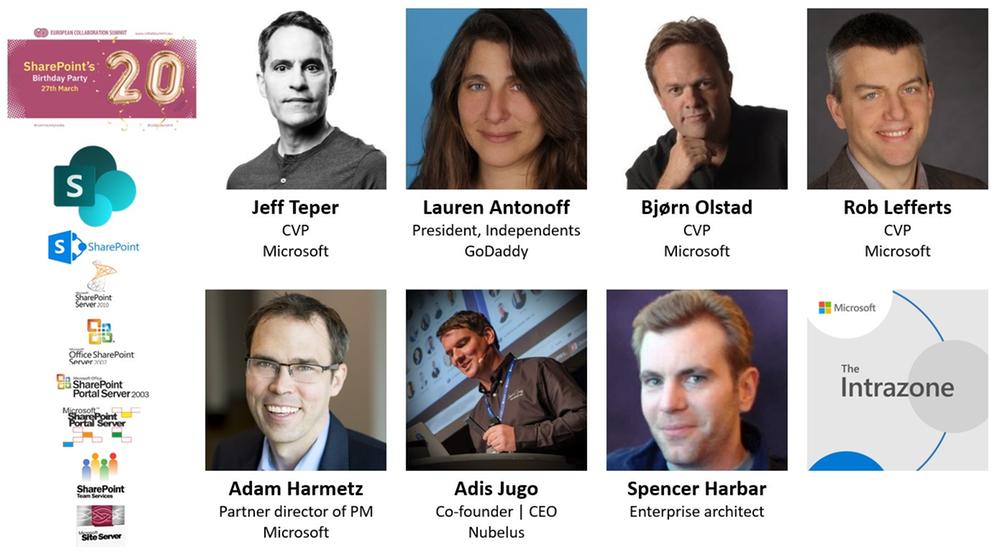
Reminisce along with the “SharePoint: 20 years young” podcast episode of The Intrazone. You’ll hear from some of the people that built SharePoint and shaped it into what it is today. SharePoint’s own captain, Jeff Teper, takes us back to the days before SharePoint had a name: Project Tahoe. And then navigate the years with some of the earliest members of the engineering team as your audible historians: Lauren Antonoff who led program management in the early connections to Office, Rob Lefferts who helped define document management, Adam Harmetz who rooted much of its ECM foundation, Bjørn Olstad who joined Microsoft as part of the FAST acquisition and now leads our Microsoft Search efforts, and community leaders Adis Jugo and Spencer Harbar – the duo behind SharePoint’s 20th Birthday Party event and longtime SharePoint consultants. Loads of fun in their stories, favorite moments, plus some special audible timeline tidbits with a song or two to round it all out.


Intrazone guests – clockwise, starting top left – first row: Jeff Teper (CVP | Microsoft), Lauren Antonoff (President, independents | GoDaddy), Bjørn Olstad (CVP | Microsoft), Rob Lefferts (CVP | Microsoft) – bottom row: Adam Harmetz (Partner director of program management | Microsoft), Adis Jugo (Co-founder and CEO | Nubelus), and Spencer Harbar (Enterprise architect).Intrazone guests – clockwise, starting top left – first row: Jeff Teper (CVP | Microsoft), Lauren Antonoff (President, independents | GoDaddy), Bjørn Olstad (CVP | Microsoft), Rob Lefferts (CVP | Microsoft) – bottom row: Adam Harmetz (Partner director of program management | Microsoft), Adis Jugo (Co-founder and CEO | Nubelus), and Spencer Harbar (Enterprise architect).


Hosts and guests


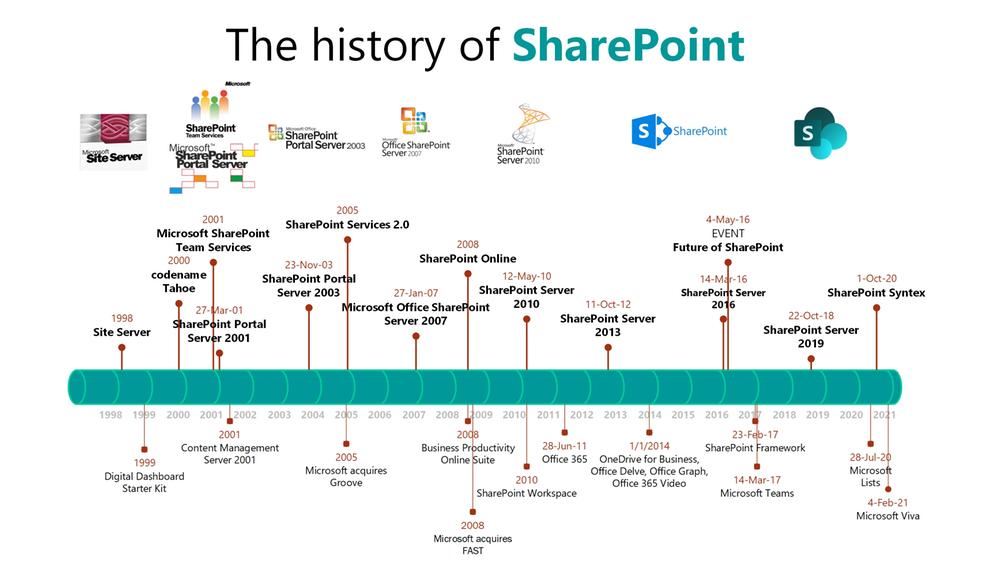
The history of SharePoint timeline – Visio diagram and list of key milestones


Timeline view of the history of SharePoint (1998 - 2021).Timeline view of the history of SharePoint (1998 – 2021).


Additional date contextual list of the what and when for SharePoint growth across versions, acquisitions and product/services spinoffs:


  • 1997-1999 | Site Server & Site Server Commerce Edition

  • 1999 | SharePoint begins as codename Tahoe connected to WebDAV


    • Alongside codename Platinum – aka, the next version of Exchange


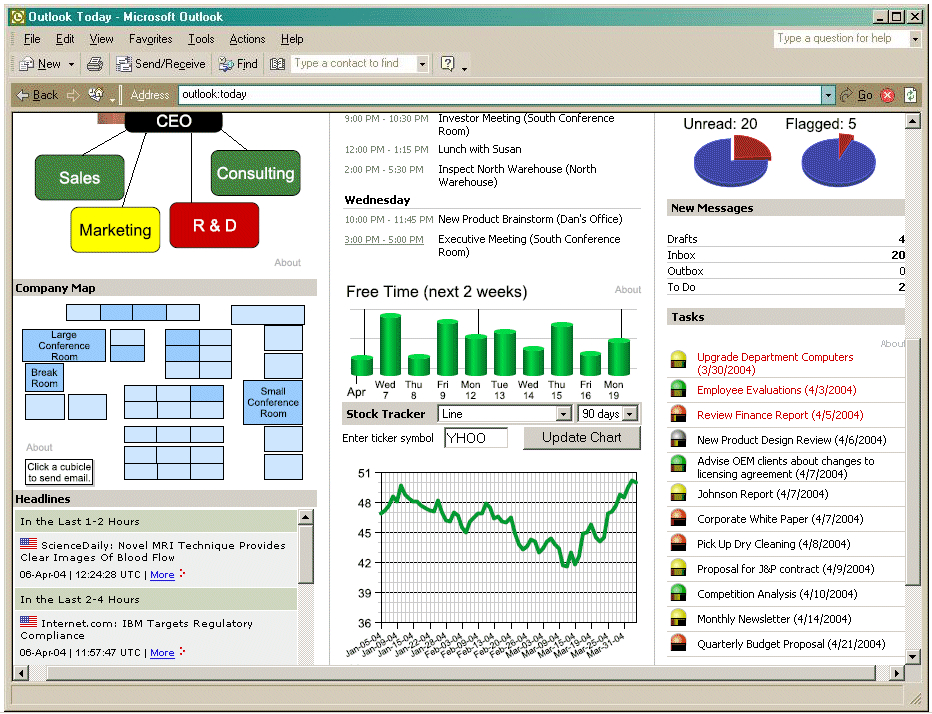
  • 1999 | Digital Dashboard Starter Kit (tools to help you customize Outlook 2000 – already billed as “


  • knowledge management solution from Microsoft)

    • Introduced “Nuggets”, what would become web parts


  • 2000 | Digital Dashboard Resource Kit, aka, Tahoe beta 1 sitting on SQL Server 2000

  • 2001 | Add a portal UI to the Digital Dashboard Resource Kit and SharePoint Portal Server 2001 is born

  • 2001 | Microsoft acquires nCompass; re-branded the product Content Management Server 2001

  • 2001 | Free Office 2000 add-on = Microsoft SharePoint Team Services (aka, the start to an online, extensible, collaborative platform)

  • 2003 | SharePoint Team Services becomes Windows SharePoint Services (WSS), and Microsoft Office SharePoint Portal Server 2003 emerges

  • 2005 | Microsoft acquires Groove (Peer-2-peer sync; pre-cursor to OneDrive sync) & Frontbridge and enters hosting infrastructure market


    • Note: Sarbanes-Oxley rears its head related to document and records management practices.


  • 2005 | Microsoft introduces Hosted and Collaboration version 3.0; includes SharePoint Services 2.0

  • 2007 | Microsoft Office SharePoint Server 2007, aka MOSS, combines STS, CMS


    • Microsoft acquires ProClarity and rebrands as Microsoft Performance Point 2007 – aka, the basis for BI at Microsoft.


  • 2008 – 2009 | Business Productivity Online Suite (BPOS) expands to offer Exchange Online, Office Communications Online, Office Live Meeting, and  SharePoint Online (built using SharePoint Server 2007)


    • Microsoft also acquires FAST, the precursor team and technology behind Microsoft Search


  • 2010 | SharePoint Server 2010; Groove is renamed SharePoint Workspace

  • 2010 | Steve Ballmer’s famous “We’re all in” speech at UW (March.4.2010)

  • 2011 | BPOS rebrands – Office 365 launches, with SharePoint Server 2010 as it’s foundation


    • Live Meeting and Office Communicator are combined to form of Lync 2010 Online – the precursor to Microsoft Teams


  • 2012 | SharePoint Server 2013; Groove sync tech is rebranded as SkyDrive Pro

  • 2014 | OneDrive for Business, Office Delve, Office Graph (now Microsoft Graph) & Office 365 Video

  • 2016 | SharePoint Server 2016

  • 2017 | SharePoint Framework #SPFx, Microsoft Stream and Microsoft Teams

  • 2018 | SharePoint Server 2019

  • 2020 | Microsoft Lists & SharePoint Syntex

  • 2021 | Microsoft Viva (Connections, Topics, Learning, and Insights)


Bonus fun you can sing along with


Jeff Teper’s, Beatles-inspired, “SharePoint at 20” birthday singalong:


“Happy Birthday, SharePoint” sung by 100s of SharePoint engineers via Teams:


Subscribe to The Intrazone today!


Listen to the show! If you like what you hear, we’d love for you to Subscribe, Rate and Review it on iTunes or wherever you get your podcasts.


Be sure to visit our show page to hear all the episodes, access the show notes, and get bonus content. And stay connected to the SharePoint community blog where we’ll share more information per episode, guest insights, and take any questions from our listeners and SharePoint users (TheIntrazone@microsoft.com). We, too, welcome your ideas for future episodes topics and segments. Keep the discussion going in comments below; we’re hear to listen and grow.


+ Listen to other Microsoft podcasts at aka.ms/microsoft/podcasts.


The Intrazone - a Microsoft podcast that covers the Microsoft 365 intelligent intranet: https://aka.ms/TheIntrazone.The Intrazone – a Microsoft podcast that covers the Microsoft 365 intelligent intranet: https://aka.ms/TheIntrazone.


And now, if you made it this far – some old links that take you down the passage of SharePoint time:


Plus a few archival image gems:


Digital Dashboard Starter Kit with "Nuggets" in Outlook 2000.Digital Dashboard Starter Kit with “Nuggets” in Outlook 2000.


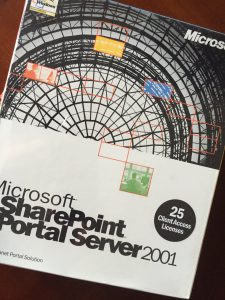
Microsoft SharePoint Portal Server 2001 box cover.Microsoft SharePoint Portal Server 2001 box cover.


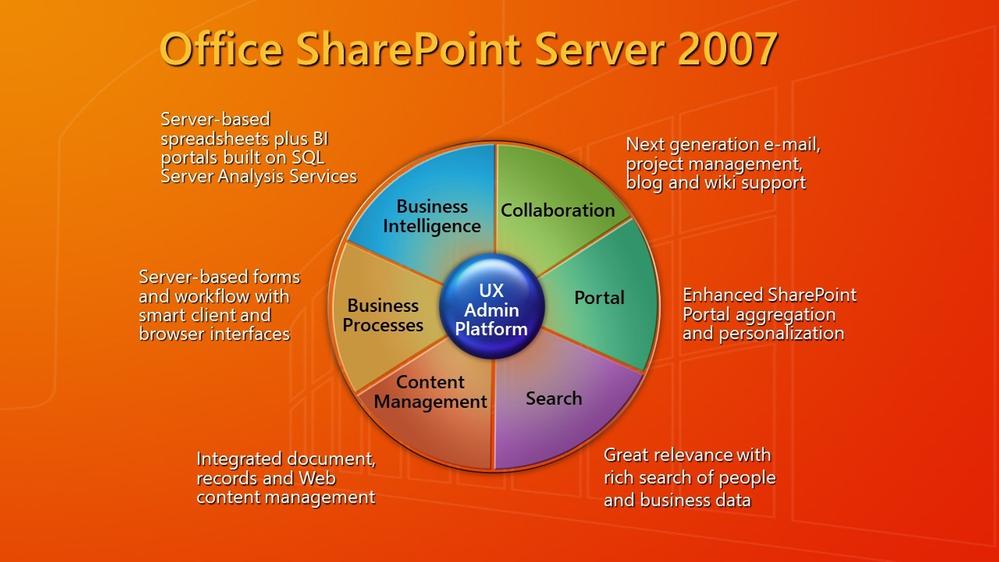
Original SharePoint Server 2007 value "pie" PowerPoint slide.Original SharePoint Server 2007 value “pie” PowerPoint slide.

Support Tip: Kernel extensions on Macs running Apple Silicon are unsupported (Macs with M1 chips)

Support Tip: Kernel extensions on Macs running Apple Silicon are unsupported (Macs with M1 chips)

This article is contributed. See the original author and article here.

Kernel extensions are used to add features at the kernel-level and access parts of the OS that are inaccessible to regular programs. Currently, they are only supported by Intune for Intel-powered macOS devices.


Kernel extensions will not work on macOS devices with the Apple Silicon chip at the moment. We recommend you to only use system extensions for any macOS devices running 10.15 and later. Read Support Tip: Using system extensions instead of kernel extensions for macOS Catalina 10.15 in Intune to learn more.


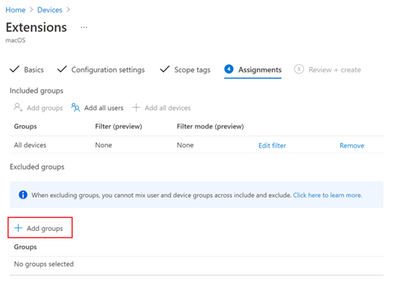
If you are using the kernel extensions settings, consider excluding macOS devices with Apple Silicon chips from receiving the kernel extension profile, as these devices refuse to install a profile if the mobile device management (MDM) policy doesn’t have a bootstrap token escrowed. You can do this by adding a group of devices to the “Exclude groups” section in the “Assignments” step of creating a profile.


Example of the "Add groups" assignment option for macOS ExtensionsExample of the “Add groups” assignment option for macOS Extensions


For more information on system extensions in Intune:


Let us know if you have any questions by replying to this post or reaching out to @IntuneSuppTeam on Twitter.

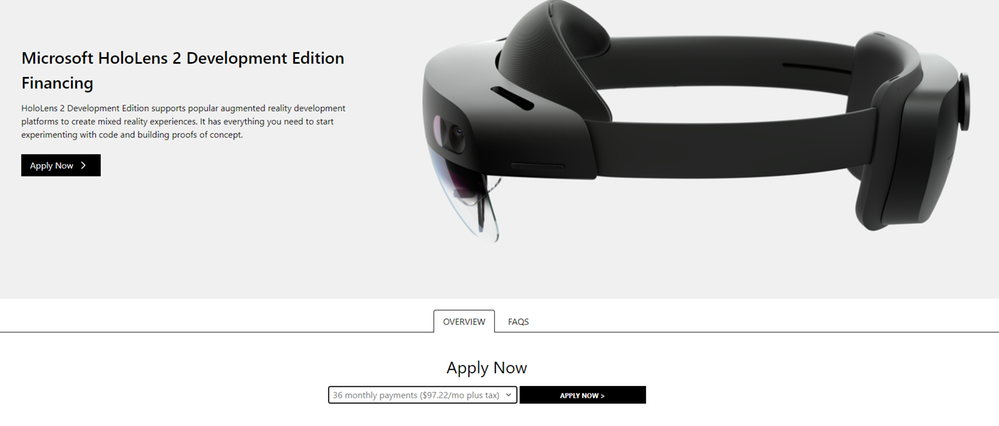
HoloLens 2 Development Edition Financing is now available in the United States

HoloLens 2 Development Edition Financing is now available in the United States

This article is contributed. See the original author and article here.

HoloLens 2 Development Edition Financing is now available in the United States 


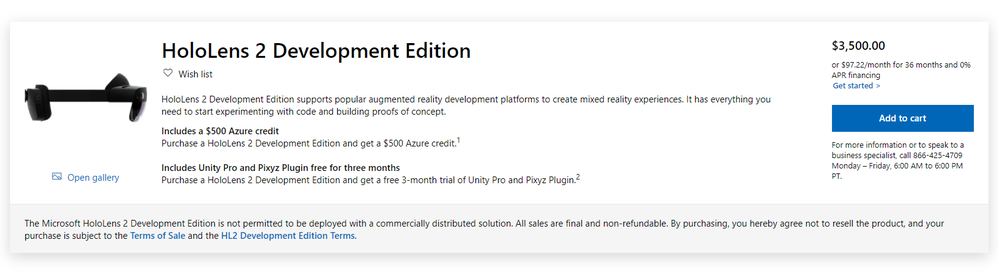
Jbmcculloch_0-1616785578991.png


We are excited to announce financing availability for HoloLens 2 Development Edition in the United States starting March 25, 2021. Financing in other regions is not available.
 
During your purchase experience via Microsoft Store, customers will have the option to get started with the financing process under the “add to cart” button.


Jbmcculloch_1-1616785579000.png


Customers will have the option of financing at different lengths, from 18 to 36 months with each financing option to include 0% interest. 


Jbmcculloch_2-1616785579024.png


Get started building mixed reality solutions


HoloLens 2 Development Edition comes with the following benefits:


HoloLens 2 Development Edition1


Value (MSRP; in USD)


HoloLens 2 device


$3,500


Azure credits


$500


3-month Unity Pro license2


$450


3-month Pixyz Plugin lincense3


$300


Total Development Edition Value


$4,750


Total cost of Development Edition


$3,500


1 Available in the US, Canada, Germany, France, the UK, Ireland, Ireland, Japan, Australia, New Zealand, Switzerland, and Italy

2 Based on Unity Pro price of $150 per month
3 Based on Pixyz Plugin annual price of $1,150 per year


HoloLens 2 Development Edition costs $3,500 and combines the capabilities of HoloLens 2 with AzureUnity, and Pixyz to empower developers to build interactive experiences and render 3D holographic content with people, places, and things. The included Unity Pro and Pixyz Plugin 3-month trials provide developers a comprehensive toolset to create and deploy immersive and engaging mixed reality experiences. With an intuitive UI and toolset, rich interactivity, and true flexibility, Unity is the most versatile and widely used real-time 3D creative development platform for visualizing products and building interactive and virtual experiences.


With the recent announcement of Microsoft Mesh and the upcoming release of the Microsoft Mesh SDK, developers will be able to build even more immersive mixed reality applications that are multiuser and cross-platform with HoloLens 2 Development Edition. Learn more about the Microsoft Mesh building blocks by reading our recent blog post, Microsoft Mesh – A Technical Overview.


We look forward to seeing the mixed reality applications you build with your HoloLens 2 Development Edition. Learn how to design, develop, and distribute your apps by visiting mixed reality developer documentation. Stay up to date on the latest developer news by joining our mixed reality developer program.

Why Hyper-V Live Migrations Fail with 0x8009030E

Why Hyper-V Live Migrations Fail with 0x8009030E

This article is contributed. See the original author and article here.


Hi everyone, my name is Tobias Kathein and I’m a Senior Engineer in Microsoft’s Customer Success Unit. Together with my colleagues Victor Zeilinger, Serge Gourraud and Rodrigo Sanchez from Customer Service & Support we’re going to discuss a real-world scenario in which a customer was unable to live migrate Virtual Machines in his newly set up Hyper-V environment.


In our scenario the customer was trying to initiate a Live Migration for a Virtual Machine from a remote system. This is quite a common scenario, that administrators open the Hyper-V Management console on an administrative Remote Desktop Services server and initiate the Live Migration of a VM between two Hyper-V hosts. The customer got doubts whether this is even opposed to work. Just to rule this one out upfront. Yes, it is opposed to work.


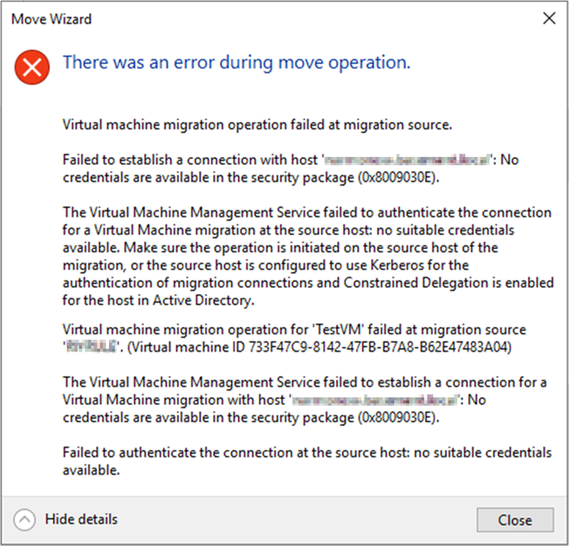
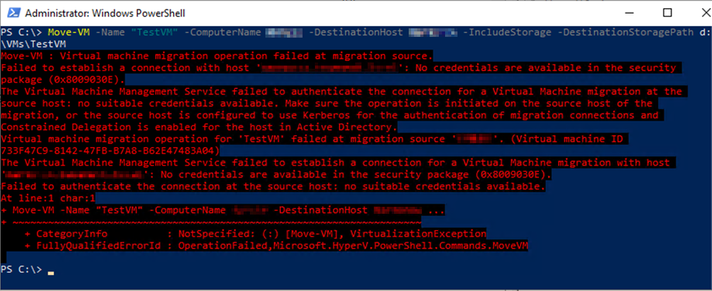
The customer was complaining that this isn’t working for him in his environment even though he set up the delegation correctly and enabled Kerberos as authentication protocol for Live Migrations. The issue wasn’t with a particular Virtual Machine, as all, even newly created VMs failed to be moved to another host. No matter if the Hyper-V Management console or the PowerShell Cmdlet Move-VM is used both fail. The error message returned is “No credentials are available in the security package (0x8009030E)”. The full error message including some additional details is shown below.


BrandonWilson_0-1616784388020.png


Even though the red error message in PowerShell looks a little bit fancier, it is the same error message that is returned telling us that there are no suitable credentials available. So, you can be assured the issue is not with the Hyper-V Management console nor with the Move-VM Cmdlet, because neither of them is working.


BrandonWilson_1-1616784388054.png


There are multiple reasons why Live Migrations fail with the message “No Credentials are available in the security package (0x8009030E).”


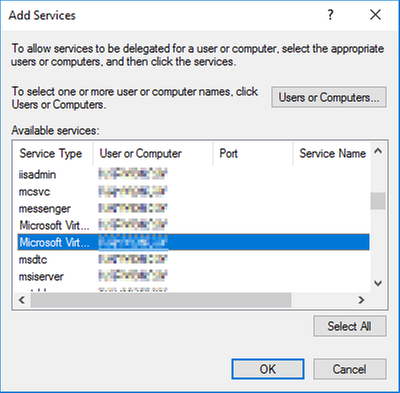
The most known cause of this issue is the absence a correct Kerberos Constrained Delegation. Either Kerberos Delegation is missing completely or for single services like in this case for CIFS or the Microsoft Virtual System Migration Service. Also don’t mix up the Microsoft Virtual System Migration Service with the Microsoft Virtual Console Service which can happen quite easily when using ADUC to configure Constrained Delegation as you can see below. The default column size doesn’t show what’s what.


BrandonWilson_2-1616784388058.png


Finding out which Kerberos Delegation entries have been configured is a little bit unclear in the ADUC. An easier way to verify all required entries are present is to run the following PowerShell command.

get-adcomputer -Identity [ComputerAccount goes here] -Properties msDS-AllowedToDelegateTo | select -ExpandProperty msDS-AllowedToDelegateTo


Starting Windows Server 2016 there is the need to select “Use any authentication protocol” when setting up the Kerberos Delegation, instead of “Use Kerberos only”. This is due to some changes made in the operating system that require protocol transition. Protocol transition is only possible if the above-mentioned option is selected. On systems older than Windows Server 2016 selecting “Use Kerberos only” is sufficient. If “Use any authentication protocol” was not selected, Live Migration initiated from remote hosts will fail.


The error message also appears when trying to move a VM and the account that is being used to initiate the Live Migration is member of the Protected Users group. Members of this group automatically have non-configurable protections applied to their accounts. Among other things the user’s credentials are not allowed to be passed along and therefore Live Migration will not work when initiated from a remote system.


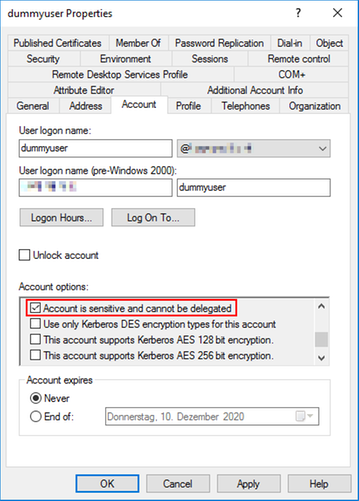
Another possibility why Live Migrations fail with this error message is when the user account being used to initiate the Live Migration has the option “Account is sensitive and cannot be delegated” set to enabled. This is sometimes configured to avoid highly privileged accounts to ensure that the credentials of these accounts cannot be forwarded by a trusted application to another computer or service. However, accounts having configured this setting cannot be used to initiate a Live Migration between two Hyper-V from a third machine.


BrandonWilson_3-1616784388061.png


And that’s it. We hope to have shed some light on this topic and the posting was helpful for you. Thanks for reading and never stop live migrating.


Disclaimer
The sample scripts are not supported under any Microsoft standard support program or service. The sample scripts are provided AS IS without warranty of any kind. Microsoft further disclaims all implied warranties including, without limitation, any implied warranties of merchantability or of fitness for a particular purpose. The entire risk arising out of the use or performance of the sample scripts and documentation remains with you. In no event shall Microsoft, its authors, or anyone else involved in the creation, production, or delivery of the scripts be liable for any damages whatsoever (including, without limitation, damages for loss of business profits, business interruption, loss of business information, or other pecuniary loss) arising out of the use of or inability to use the sample scripts or documentation, even if Microsoft has been advised of the possibility of such damages.