by Contributed | Apr 2, 2021 | Technology
This article is contributed. See the original author and article here.
Microsoft’s unified Data Loss Prevention solution provides an ever-expanding set of capabilities to address the needs of organizations to protect sensitive information from risky or inappropriate sharing, transfer, or use in the modern workplace.
Since our last announcements at spring Ignite a few weeks ago (see blog here), we are proud to introduce two new capabilities in general availability and also offer an exciting new public preview.
Advanced Controls in DLP for Email Protection – General Availability
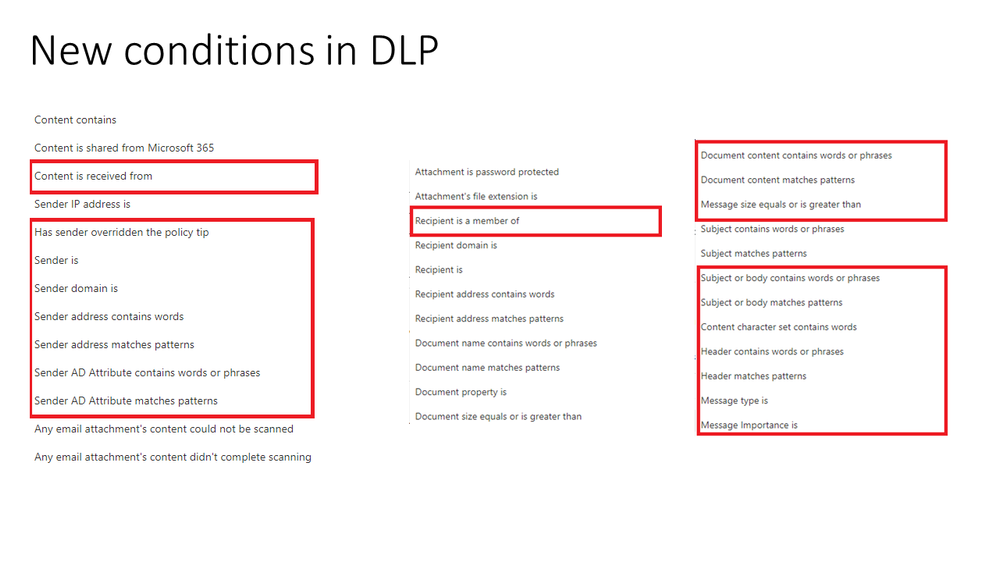
Today we are excited to announce the general availability of 27 new controls (conditions and actions) for DLP policies in Microsoft Exchange.
Some customers have previously used Exchange Transfer Rules (ETR) to define special handing actions for email messages that met specific criteria. While this approach provided them with the ability to enforce messaging policies, many deployments required a broader and more streamlined approach that leveraged integration with DLP to simplify policy creation, policy monitoring, and event remediation.
These new DLP conditions and exceptions announced in general availability for Exchange enhance the already existing capabilities in DLP (See highlighted in Figure 1: New DLP Conditions for Exchange and Figure 2: New DLP Actions and Sensitivity Labels) to offer customers the ability to configure the same conditions, exceptions, and actions they previously used in ETR, within DLP, to offer additional granular control over the scoping and application of a DLP policy, and ensure policies are applied as intended in Exchange.
This new approach provides customers with a fully consolidated view of all DLP policies, alerts, and alert management across Microsoft’s unified DLP offerings that operations teams will find valuable in their day-to-day tasks.
Figure 1: New DLP Conditions for Exchange
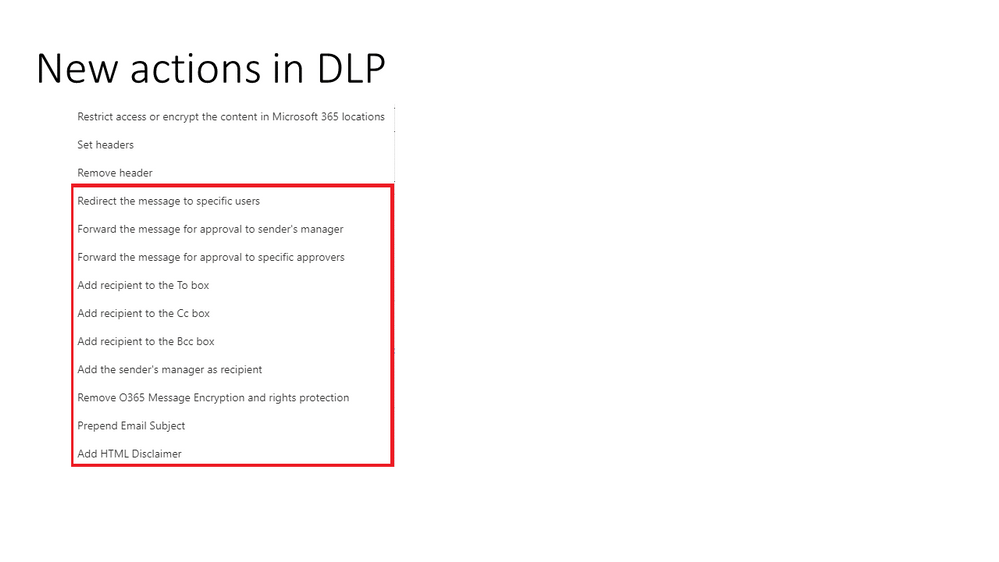
Figure 2. New DLP Actions for Exchange
Sensitivity label-aware DLP policies – General Availability
We continue to invest in developing cutting-edge information protection solutions for our customers. Microsoft Information Protection (MIP) is an intelligent, unified, and extensible solution to know your data, protect your data, and prevent data loss across an enterprise – in Microsoft 365 Apps, services, on-premises, devices, and third-party SaaS applications and services.
Sensitivity labels are a core capability of MIP. They allows customers to classify data according to sensitivity such as Public, General, Confidential, Highly Confidential or any other sensitivity label created by the organization to meet its needs.
This sensitivity information is added to the file information and is used to guide users, applications, and services in the proper handling and use of sensitive data such as:
- Protect content in Microsoft 365 Apps across different platforms and devices
- Enforce protection settings such as encryption or watermarks on labeled content
- Protect content in third-party apps and services
- Extend sensitivity labels to third-party apps and services
- Classify content without using any protection settings
- Expand the quality of insights to intelligently flag potential insider risks
With the general availability of sensitivity label-aware DLP policies, organizations can apply a MIP sensitivity label as a foundational component for a DLP policy, thereby streamlining the process to help ensure sensitive information is protected with DLP from risky or inappropriate sharing, transfer or use.

Figure 3. Sensitivity Label-aware DLP policies
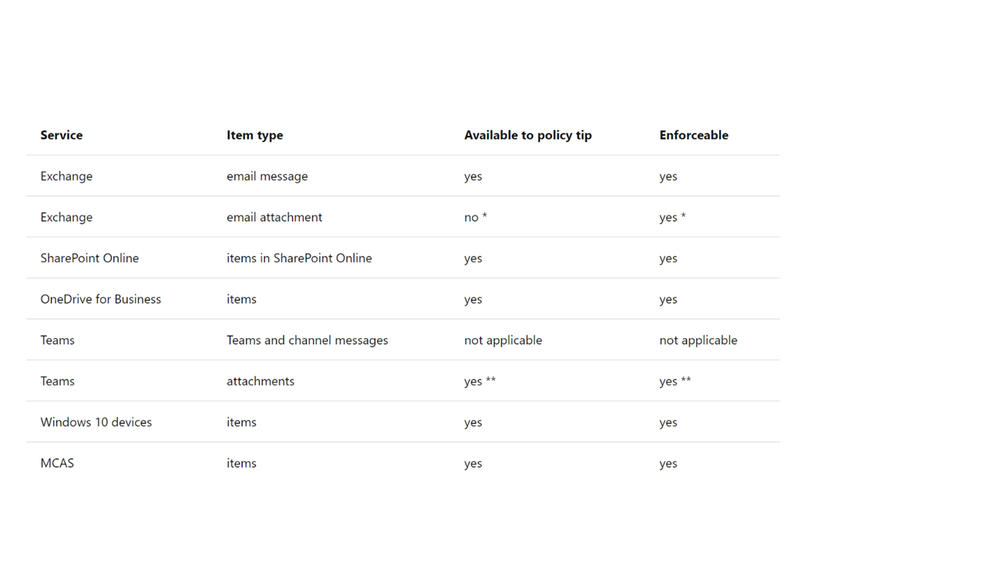
Figure 4. Supported services, items, policy tips and enforceability
Dynamic Policy Scoping by User in OneDrive for Business (Security Groups and Distribution List support) – Public Preview
Organizations often have a need to scope DLP policies in Microsoft OneDrive for Business (ODB) to specific groups of users to address the unique use cases that are applicable only to some user communities and not others.
With the public preview of security groups and distribution lists for ODB, its now easier than ever for organizations to leverage their existing security groups and distribution lists as the applicable context in an ODB DLP policy.
This means that as users are added or removed from a security group or distribution list, they are automatically added or removed from the associated ODB DLP policies without any additional configuration in the DLP policy definition itself. This approach offers significant benefits for organizations who have very large or dynamic user populations such as groups with high turnovers, or changes in business function.
Using security groups and distribution lists as the applicable context in ODB DLP policies also provides a simplified means for bulk inclusion and exclusion of user communities. This is particularly beneficial for example when a ODB DLP policy is only intended to apply to a group of users located in a specific geography, business unit, or role.
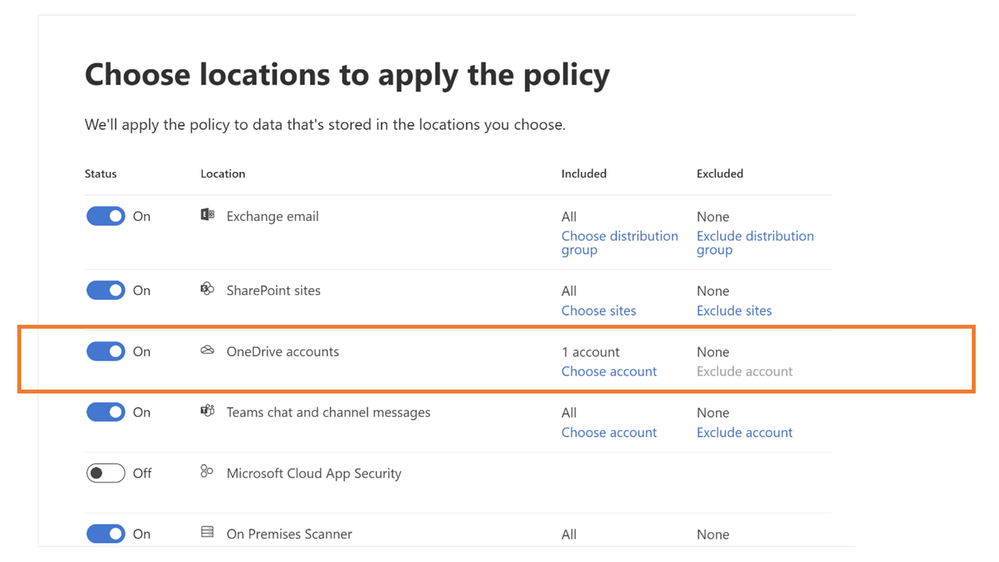
Figure 5. Security Groups and Distribution Lists for OneDrive for business
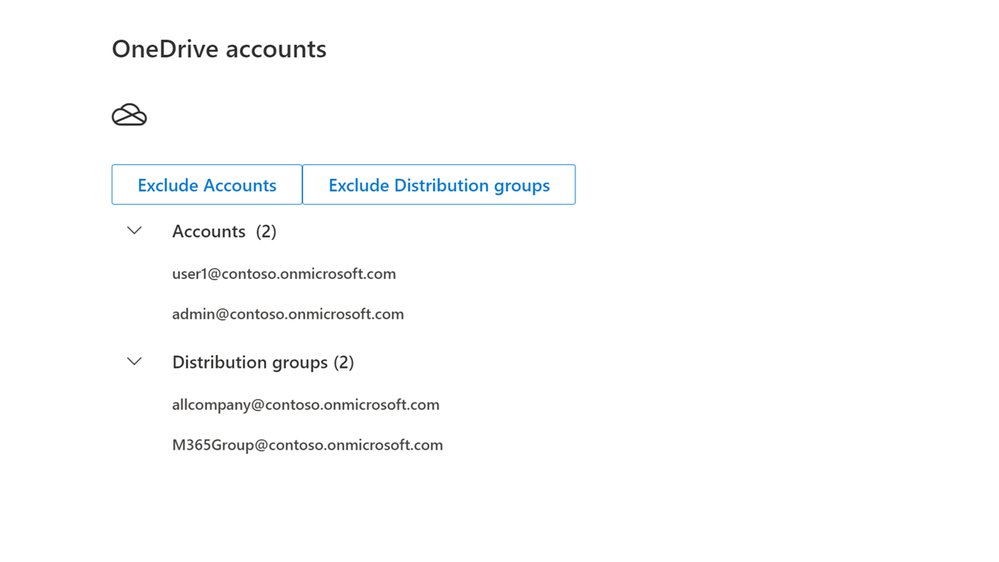
Figure 6. Security Groups and Distribution Lists – Inclusion
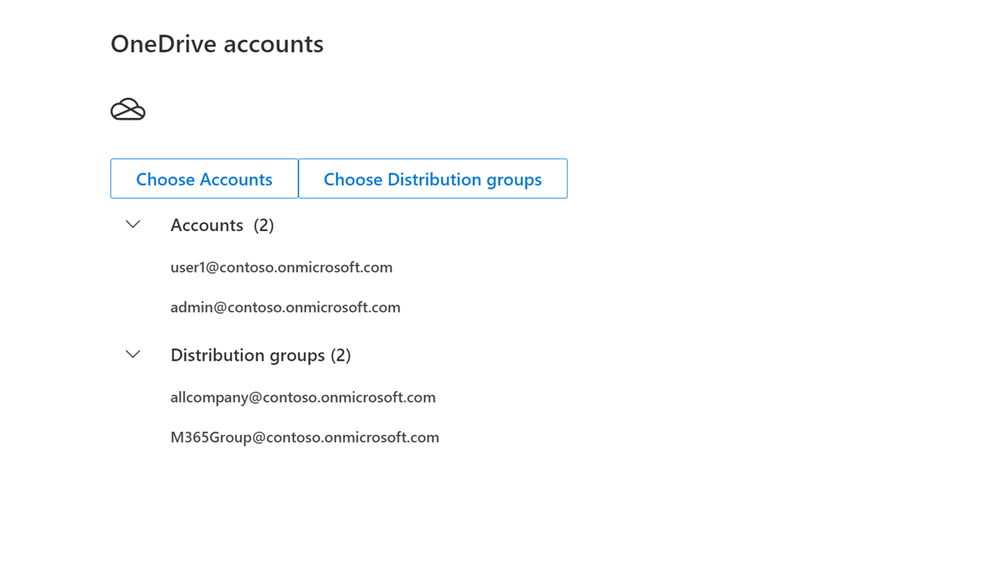
Figure 7. Security Groups and Distribution Lists – exclusion
Quick Path to Value
To help customers accelerate their deployment of a comprehensive information protection and data loss prevention strategy across all their environments containing sensitive data and help ensure immediate value, Microsoft provides a one-stop approach to data protection and DLP policy deployment within the Microsoft 365 Compliance Center.
Microsoft Information Protection (MIP) provides a common set of classification and data labeling tools that leverage AI and machine learning to support even the most complex of regulatory or internal sensitive information compliance mandates. The more than 150 sensitive information types and over 40 built-in policy templates for common industry regulations and compliance in MIP offer a quick path to value.
Consistent User Experience
No matter where DLP is applied, users have a consistent and familiar experience when notified of an activity that is in violation with a defined policy. Policy Tips and guidance are provided using a familiar look and feel users are already accustomed to from applications and services they use every day. This approach can reduce end-user training time, eliminates alert confusion, increases user confidence in prescribed guidance and remediations, and improves overall compliance with policies – without impacting productivity.
Integrated Insights
Microsoft DLP interoperates with other Security and Compliance solutions such as MIP, Microsoft Defender, and Insider Risk Management to provide broad and comprehensive coverage and visibility required by organizations to meet their regulatory and policy compliance obligations.
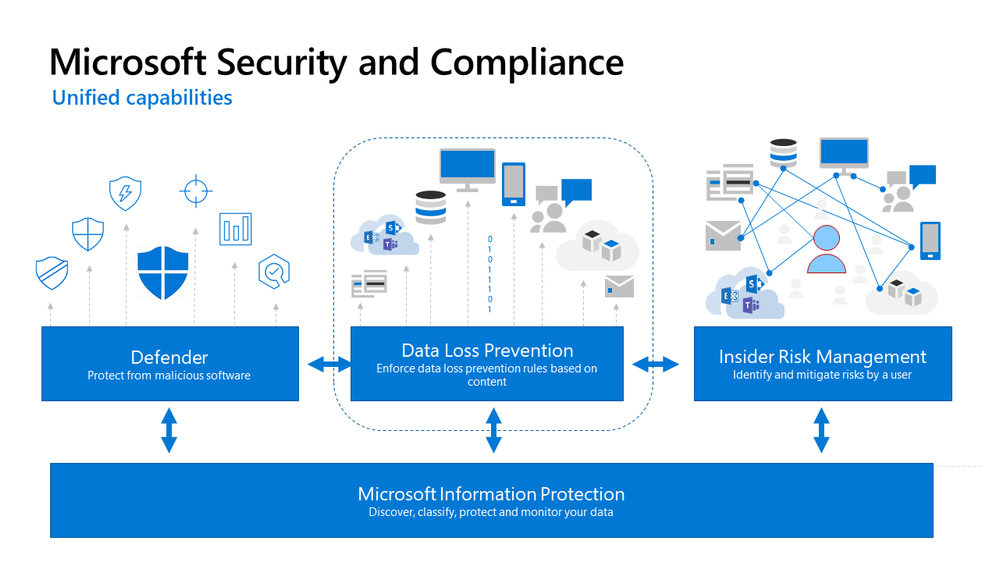
Figure 8: Integrated Insights
This approach reduces the dependence on individual and uncoordinated solutions from disparate providers to monitor user actions, remediate policy violations, and educate users on the correct handling of sensitive data at the endpoint, on-premises, and in the cloud.
Get Started
Microsoft unified DLP solution is part of a broader set of Information Protection and Governance solutions within the Microsoft 365 Compliance Suite. You can sign up for a trial of Microsoft 365 E5 or navigate to the Microsoft 365 Compliance Center to get started today.
Additional resources:
- For more information on Data Loss Prevention, please see this and this
- For videos on Microsoft Unified DLP approach and Endpoint DLP see this and this
- For more information on Advanced Controls in DLP for Email protection see this
- For more information on Sensitivity Labels as a condition for DLP policies, see this
- For a Microsoft Mechanics video on Endpoint DLP see this
- For more information on the Microsoft Compliance Extension for Chrome see and this
- For more information on DLP Alerts and Event Management, see this
- For more information on Sensitivity Labels, please see this
- For more information on conditions and actions for Unified DLP, please see this
- For the latest on Microsoft Information Protection, see this and this
Thank you,
The Microsoft Information Protection team
by Contributed | Apr 2, 2021 | Technology
This article is contributed. See the original author and article here.
April 2021 Edition Sections:
- Highlighted
- Microsoft Teams – IT Admins & Planning
- Microsoft Teams – End Users & Champions
- Security & Compliance
- Device Management
- Blogs & Articles of Interest
Highlighted
Microsoft Ignite 2021 – Microsoft Ignite 2021
Didn’t have a join the all-virtual Ignite 2021 in March? Catch up on event sessions, news, and other announcements, including government-specific sessions at Microsoft Ignite 2021 Government Sessions – Microsoft Tech Community
Microsoft Federal Collaboration and Cybersecurity Summit – Microsoft Tech Community
The Microsoft Federal Collaboration & Cybersecurity Summit is a FREE half-day virtual event designed to advance U.S. Federal agencies collaboration and cybersecurity initiatives. We are bringing together executives and leaders from the U.S. Federal agencies to deliver key insights, lessons learned, and practical guidance on a variety of topics, including advancing Cybersecurity in the Federal Government and breaking down silos to facilitate partnership with industry and academia. While the event is not open to the public, customers should have received a formal invite by the end-of-March. If you have any questions, please contact us at MSFTFedCollab@service.onmicrosoft.com.
Power Up Microsoft 365 with the Power Platform [M365 Meetup for Government] – Microsoft Tech Community
Microsoft 365’s greatest business impact can be achieved using the Power Platform family of technologies. PowerApps, Power Automate, and PowerBI are a core part of the Microsoft 365 experience and empower both citizen developers and IT to meet the mission needs of the organization. In this session, we will focus on transforming enterprise IT service administration leveraging MS PowerApps, which allows for low level IT administration without risk of high level access and permissions. Sign up for the event here!
Microsoft Teams – IT Admins & Planning
Microsoft Teams: Plan your upgrade (Start here!)
Discover everything you need to facilitate a successful upgrade to Teams. By the end of this workshop, participants will be able to: (1) Understand why a formal plan is crucial for upgrade success, (2) Identify the steps to the upgrade success framework, (3) Recognize common attributes of successful customers, and (4) Create and implement their own upgrade plan. The audience for this session is All (Business Sponsors, IT Admins, User Readiness/Change Manager, Project Lead).
- On-Demand Session
- Tuesday, April 6, 2021 at 6:00am PT
- Tuesday, April 6, 2021 at 10:00am PT
- Wednesday, April 7, 2021 at 8:00am PT
- Wednesday, April 7, 2021 at 10:00am PT
- Wednesday, April 7, 2021 at 4:00pm PT
- Tuesday, April 13, 2021 at 6:00am PT
- Tuesday, April 13, 2021 at 10:00am PT
- Wednesday, April 14, 2021 at 8:00am PT
- Wednesday, April 14, 2021 at 10:00am PT
- Wednesday, April 14, 2021 at 4:00pm PT
- Tuesday, April 20, 2021 at 6:00am PT
- Tuesday, April 20, 2021 at 10:00am PT
- Wednesday, April 21, 2021 at 8:00am PT
- Wednesday, April 21, 2021 at 10:00am PT
- Wednesday, April 21, 2021 at 4:00pm PT
- Tuesday, April 27, 2021 at 6:00am PT
- Tuesday, April 27, 2021 at 10:00am PT
- Wednesday, April 28, 2021 at 8:00am PT
- Wednesday, April 28, 2021 at 10:00am PT
- Wednesday, April 28, 2021 at 4:00pm PT
Choosing the right tools for your Microsoft 365 migration
When: Tuesday, April 6, 2021 at 9:00am PT | Moving to Microsoft 365? There are several tools and methods offered by Microsoft to help you through this journey. In this webinar we will demonstrate the various options available to enable you to successfully migrate your organizational data to Microsoft 365 so that you can empower your users for collaboration and productivity. The agenda is as follows: (1) Introduction, (2) Migration from file shares and SharePoint servers, (3) Migration from cloud providers, (4) Future investments, and (5) Conclusion and QA.
Best practices for data migrations to Microsoft 365
When: Tuesday, April 13, 2021 at 9:00am PT | If you are evaluating , kicking off or in the process of moving your organizational data to Microsoft 365 here are some recommendations from the subject matter experts based on their learnings post managing large scale migrations for multiple organizations. Tune in to learn more about the best practices that will help you run an effective, speedy and seamless migration to OneDrive and SharePoint irrespective of the tools you choose to use. The agenda is as follows: (1) Introduction, (2) How to prepare data for migration, (3) How to plan and communicate about the migration, (4) How to run a successful migration, and (5) Conclusion and QA.
Teams Chalk Talk: Get to Teams – Zero to Production
Microsoft Teams can help your employees stay connected and collaborate with each other, especially in the current unprecedented time where remote work is a reality of employees around the world. Being able to chat, do video meetings and collaborate on Office documents within Teams can help companies stay productive. Whether you are a small business, a non-profit or a large organization, you can get started with Teams within Microsoft 365 or Office 365 suite – even before deploying any other Office app or service. Join Microsoft Teams experts as we review Teams implementation for collaboration, chat and meetings. We’ll share key configurations, considerations, best practices, and resources to get your users up and running quickly. After this session, you will be able to: (1) Recognize key success factors for technical and user readiness, (2) Identify pre-requisites and tenant setup for your environment, (3) Install the Teams clients appropriate for your organization, (4) Configure policies that enable your preferred user experiences, and (5) Leverage collaboration features to enhance remote work scenarios.
Microsoft 365 Virtual Training Day: Enabling Remote Work with Microsoft Teams
To be productive in a remote environment, your employees need to be able to safely collaborate from anywhere. Microsoft 365 Virtual Training Day: Enabling Remote Work with Microsoft Teams helps you provide a remote workforce with the tools, resources and solutions they need to stay connected and productive. Join us to learn how to get the most out of Microsoft Teams online meetings, calling, video and chat, and empower your workforce to work from any location on any device. During this two-part training event, you will explore how to: (1) Enable your people to meet and collaborate from home, (2) Make productivity applications available on any device, and (3) Deliver the best remote user experience.
Teams Chalk Talk: So…you want to make calls with Microsoft Teams?
Are you ready to add PSTN calling capabilities to Microsoft Teams? Join Microsoft Teams Engineering subject-matter-experts as they demystify the options for adding PSTN calling to Teams, provide you with best practices for configuring calling options and show you how to monitor call quality. After this session, you will be able to: (1) Understand the history of voice services in Microsoft products, (2) Identify what calling options in Microsoft Teams are right for you, (3) Configure your calling options in the Teams admin portal, and (4) Monitor and use call quality tools in Teams.
- On-Demand Session
- Tuesday, April 6, 2021 at 9:00am PT
- Tuesday, April 6, 2021 at 3:00pm PT
- Tuesday, April 13, 2021 at 9:00am PT
- Tuesday, April 20, 2021 at 9:00am PT
- Tuesday, April 20, 2021 at 3:00pm PT
- Tuesday, April 27, 2021 at 9:00am PT
Teams Chalk Talk: Taking charge of AV quality experiences
Are you looking to ensure users have optimal experiences with meetings and voice capabilities in Teams? During this session, we’ll discuss tools, reporting and best practices to help you manage service quality — from establishing a proactive strategy to resolving common quality issues as they arise. We’ll build upon best practices from Teams experts and make it real with examples of common scenarios that may arise as your organization embraces meetings and voice capabilities in Teams. Join us for an expert-led workshop for guidance on key resources and actionable insights to manage audio and video quality with Microsoft Teams. Your users will thank you for it! After this session, you will be able to: (1) Define key service metrics and user experience factors for quality, (2) Recognize concepts and metrics in core tools and resources that help you assess usage and quality, (3) Identify key indicators of poor experience in common scenarios and relevant actions to address, and (4) Establish a proactive quality management strategy to ensure optimal user experience.
- On-Demand: Core Concepts
- On-Demand: Call Quality Dashboard
- Thursday, April 1, 2021 at 10:00am PT
- Tuesday, April 6, 2021 at 6:00am PT
- Wednesday, April 7, 2021 at 7:00am PT
- Thursday, April 8, 2021 at 10:00am PT
- Tuesday, April 13, 2021 at 6:00am PT
- Wednesday, April 14, 2021 at 7:00am PT
- Wednesday, April 14, 2021 at 4:00pm PT
- Thursday, April 15, 2021 at 10:00am PT
- Tuesday, April 20, 2021 at 6:00am PT
- Wednesday, April 21, 2021 at 7:00am PT
- Thursday, April 22, 2021 at 10:00am PT
- Tuesday, April 27, 2021 at 6:00am PT
- Wednesday, April 28, 2021 at 7:00am PT
- Thursday, April 29, 2021 at 10:00am PT
Teams Chalk Talk: Apps in Teams Fundamentals
Join Microsoft Teams experts as we review how you can deploy commonly-used applications directly within Teams, enabling your users to work more efficiently and effectively by accessing everything they need in a single interface. This foundational workshop covers basic capabilities across app management and security. With over 400 out-of-the-box applications available (and growing), you’re sure to find an app, or two, that your team can begin using today in Teams. After this session, you will be able to: (1) Identify suitable apps to meet the needs for your organization, (2) Recognize common attributes of successful app deployment, (3) Navigate security and compliance considerations for Teams’ apps, and (4) Determine the next steps to deploy an app to your environment.
- On-Demand Session
- Tuesday, April 6, 2021 at 8:00am PT
- Tuesday, April 6, 2021 at 4:00pm PT
- Wednesday, April 7, 2021 at 6:00am PT
- Thursday, April 8, 2021 at 10:00am PT
- Tuesday, April 13, 2021 at 8:00am PT
- Wednesday, April 14, 2021 at 6:00am PT
- Thursday, April 15, 2021 at 10:00am PT
- Tuesday, April 20, 2021 at 8:00am PT
- Tuesday, April 20, 2021 at 4:00pm PT
- Wednesday, April 21, 2021 at 6:00am PT
- Thursday, April 22, 2021 at 10:00am PT
- Tuesday, April 27, 2021 at 8:00am PT
- Wednesday, April 28, 2021 at 6:00am PT
- Thursday, April 29, 2021 at 10:00am PT
Teams Chalk Talk: Supercharge key workflows with apps in Teams
Join Microsoft Teams experts as we review high-value scenarios including incident management (help desk), employee engagement, and productivity that can be enhanced through simple integrations in Teams. We focus on popular enterprise applications your users may already be using every day. Come see how easy it is to connect your systems, increase automation, and deliver improved experiences by bringing the apps your organization relies on into Teams. After this session, you will be able to: (1) Understand common app integrations for Teams across multiple scenarios and user personas, and (2) Understand third-party apps available for key scenarios.
- Wednesday, April 7, 2021 at 10:00am PT
- Thursday, April 8, 2021 at 6:00am PT
- Thursday, April 8, 2021 at 8:00am PT
- Wednesday, April 14, 2021 at 10:00am PT
- Thursday, April 15, 2021 at 6:00am PT
- Thursday, April 15, 2021 at 8:00am PT
- Thursday, April 15, 2021 at 4:00pm PT
- Wednesday, April 21, 2021 at 10:00am PT
- Thursday, April 22, 2021 at 6:00am PT
- Thursday, April 22, 2021 at 8:00am PT
- Wednesday, April 28, 2021 at 10:00am PT
- Thursday, April 29, 2021 at 6:00am PT
- Thursday, April 29, 2021 at 8:00am PT
- Thursday, April 29, 2021 at 4:00pm PT
Microsoft Teams – End User & Champions
Get Started with Microsoft Teams
Whether you are switching from Skype for Business or brand new, join us to learn the basics of how to use Teams to chat with your colleagues and collaborate on projects. Through a series of live demonstrations and best practices, you’ll leave this session with everything you need to start using Teams. After this session, you will be able to: (1) Set up your profile and notifications in Microsoft Teams, (2) Use chat and calling for 1:1 and group conversations, sharing and collaboration in Microsoft Teams, (3) Schedule and conduct meetings in Microsoft Teams, and (4) Align your team and teamwork in Microsoft Teams.
Leverage pro tips and tricks for Microsoft Teams
Do you use Microsoft Teams on a regular basis and want to learn more? Are you looking for ways to increase your efficiency and productivity in Teams? Join us to discover ways to enhance communication and increase your efficiency and productivity within Teams. Learn how Teams can help organize your workday and make it easier to stay connected with colleagues. In this training, you will learn how to: (1) Leverage formatting best practices to help get your messages noticed and responded to, (2) Integrate tools and best practices to streamline and collaboration process, and (3) Implement strategies to manage and organize your work.
Customer Immersion Experience: Getting Started with Microsoft Teams
Whether you are switching from Skype for Business or brand new, join us to learn the basics of how to use Teams to chat with your colleagues and collaborate on projects. Join us for this session and leave this with everything you need to start using Teams. During this 2-hour interactive session, you will explore how to: (1) Set up your profile and notifications in Microsoft Teams, (2) Use chat and calling for 1:1 and group conversations, sharing and collaboration in Microsoft Teams, (3) Schedule and conduct meetings in Microsoft Teams, and (4) Align your team and teamwork in Microsoft Teams. Each session is limited to 15 participants, reserve your seat now.
Build collaborative workspaces in Microsoft Teams
Do you need an online, collaborative workspace for your project or workgroup? Join us to explore effective, virtual workspaces for projects and workgroups. Microsoft Teams offer the flexibility to set up a workspace that suits your needs. In this training, you will learn how to: (1) Determine the best approach for your collaboration needs, (2) Create workspaces for your team to provide the best teamwork experience, and (3) Determine best practices in Microsoft Teams to enhance productivity.
Microsoft Teams: Master working from home
Working from home offers the opportunity to maintain your workflow while allowing flexibility in how and where you get your work done. Shifting to a remote worker status can be an adjustment as you look for ways to balance home and work life, maintain focus and be fully productive. Microsoft Teams can help you stay connected to your team while providing access to all of the tools and resources you need to get your work done. Join us to learn tips that can help set you up for success as you transition into a ‘work from home’ scenario. During this session, we’ll share: (1) Guidance for setting up your home environment for work, (2) Best practices for maintaining your workflow while working at home, (3) Tips for staying connected to your team while remote, and (4) Insights for effectively supporting a remote team.
Run Effective Meetings with Microsoft Teams
Have you spent significant time and resources to prepare for a meeting and felt it wasn’t productive and not much was accomplished? Join us to learn how to make your meetings engaging, productive, and meaningful. Use Microsoft Teams for your entire meeting experience. In this training, you will learn how to: (1) Schedule and join meetings and initiate calls, (2) Use collaborative tools such as sharing, whiteboards, meeting notes, recording, and more, (3) Easily access important meetings and related content at any time, and (4) Assess which audio and video devices are best for your meeting needs.
Customer Immersion Experience: Running Effective Meetings with Microsoft Teams
Whether you are switching from Skype for Business or brand new, join us to learn the basics of how to use Teams to chat with your colleagues and collaborate on projects. Join us for this session and leave this with everything you need to start using Teams. During this 2-hour interactive session, you will explore how to: (1) Set up your profile and notifications in Microsoft Teams, (2) Use chat and calling for 1:1 and group conversations, sharing and collaboration in Microsoft Teams, (3) Schedule and conduct meetings in Microsoft Teams, and (4) Align your team and teamwork in Microsoft Teams. Each session is limited to 15 participants, reserve your seat now.
Integrate apps to do more in Microsoft Teams
Do you want to get more done in Teams? Receive targeted and timely updates? Access services directly through Teams? Apps let you complete tasks, receive updates and communicate. This session introduces you to the key activities needed to get started with adding applications, bots and connectors in Microsoft Teams today. Through a series of live demonstrations and best practices, you’ll leave this session with everything you need to start using apps in Teams. After this session, you will be able to: (1) See how applications, bots and connectors can help you be more efficient while working in Teams, (2) Select an application, bot or connector for your workspace, (3) Install an application, bot or connector, and (4) Use an application, bot or connector in your workspace.
Microsoft 365 Virtual Training Day: Building Microsoft Teams Integrations and Workflows
Remote work requires smarter workflows. Microsoft 365 Virtual Training Day: Building Microsoft Teams Integrations and Workflows shows you how the Microsoft Teams developer platform makes it easy to integrate your apps and services to improve productivity, make decisions faster and create collaboration around existing content and workflows. Join us to learn how to build apps for Teams and create integrated, people-centered solutions that can transform productivity in your organization, whether you’re on-site or working remotely. During this two-part training event, you will explore how to: (1) Build modern enterprise-grade collaboration solutions with Microsoft Teams, (2) Transform everyday business processes with Microsoft 365 platform integrations for Power Platform, SharePoint and Microsoft Office, and (3) Use the wealth of data in Microsoft Graph to extend Microsoft 365 experiences and build unique intelligent applications.
Security & Compliance
Customer Immersion Experience: Protecting Identity, Apps, Data and Devices
Identity is at the center of security: don’t compromise when it comes to your company’s valuable information. Join us to explore how to use secure authentication, govern access, get comprehensive protection and set the right identity foundation. During this 2-hour interactive session, you will explore how to: (1) Enable password protection, (2) Bring multi-factor authentication to your Windows 10 users, (3) Protect your users and data through Office 365 multi-factor authentication, and (4) Use conditional access to protect across devices, locations and apps. Each session is limited to 15 participants, reserve your seat now.
Customer Immersion Experience: Simplifying Your Privacy and Compliance Journey
Your business needs to control how sensitive data is managed. Join us and explore how to assess your compliance risk, protect sensitive and business critical data, and respond efficiently to data discovery requests. During this 2-hour interactive session, you will explore how to: (1) Simplify assessment of compliance risk, (2) Integrate protection and governance of data, and (3) Intelligently respond to data discovery requests. Each session is limited to 15 participants, reserve your seat now.
Customer Immersion Experience: Creating a Secure Online Meeting
With the dramatic shift to remote work, we all continue to seek creative ways to stay connected and productive in our jobs. How do we recreate those meetings, calls, and large events that previously brought us together and helped us achieve our business goals? Do we have the right tools and devices to do so? And how do we do all of this while keeping security top of mind? These aren’t easy questions to answer. This one-hour session will give you the opportunity to test drive Microsoft Teams, Yammer, and Power BI in a live cloud environment. A facilitator will guide you as you create a virtual company-wide meeting and explore how to: (1) Build a communication and collaboration hub, (2) Engage employees through chat and polls, (3) Set up automated meeting captioning, translation, and transcripts, and (4) Use analytical tools to make sense of data, categorize it, and make it easier to visualize. Each session is limited to 15 participants, reserve your seat now.
Customer Immersion Experience: Protecting Your Sensitive Information
Data needs to be protected wherever it’s stored and whenever it travels, and you need the tools to monitor policy violations and risky behavior. Join us to explore how to implement a comprehensive and integrated approach across devices, apps, cloud services, and on-premises. During this 2-hour interactive session, you will explore how to: (1) Identify, monitor and automatically protect sensitive information across Office 365, (2) Help classify and protect documents and email, and (3) Use policies to enable BYOD scenarios by protecting data at the app level. Each session is limited to 15 participants, reserve your seat now.
Microsoft 365 Virtual Training Day: Secure and Protect Your Organization
When employees are confident in their ability to collaborate remotely and securely, they are free to achieve more without worry. Learn how to protect data, devices, and applications while simplifying IT and minimizing the impact on employees at Microsoft Security Virtual Training Day: Secure and Protect Your Organization. During this free two-part learning event and accompanying Q&A, you’ll form the foundations to safeguard your company’s digital footprint. During this training event, you will explore how to: (1) Craft identity synchronization, protection, and management, (2) Utilize security in Microsoft 365, and (3) Integrate cloud app security and device management plans.
Customer Immersion Experience: Protecting Assets and Empowering Your Defenders
Today’s workforce can work from anywhere, on any device, and on any app. Security teams need to understand threat signals from disconnected products and optimize security with minimal complexity. During this 2-hour interactive session, you will explore how to: (1) Safeguard users from malware attacks such as phishing and spoofing with Office 365, (2) Use the Windows Defender ecosystem to proactively monitor and protect your users, (3) Utilize Office 365 ATP to help protect users from bad links and attachments, and (4) Let machine learning and automation protect users from threats. Each session is limited to 15 participants, reserve your seat now.
Microsoft 365 Virtual Training Day: Protect Sensitive Information and Manage Data Risk
As people increasingly shift to remote work, protecting your organization’s information and managing risk should be a top priority. Microsoft Security Virtual Training Day: Protect Sensitive Information and Manage Data Risk teaches you how to take advantage of Microsoft technologies that identify and remediate risks that arise from creating, storing, sharing, and using sensitive data. In addition, you’ll learn how to protect that data throughout its entire life cycle—on-premises and across devices, apps, and cloud services. During this two-part training event, you will explore how to: (1) Understand, identify, and protect your most sensitive data, (2) Identify and take action on insider risks and code-of-conduct violations, and (3) Utilize information protection and governance.
Device Management
Office Hours: Managing Windows 10 Devices & Updates
To support your efforts to deliver and deploy updates to the Windows 10 devices being used by remote, onsite, and hybrid workers across your organization, and manage those devices effectively, we are continuing our series of weekly “office hours” for IT professionals here on Tech Community. During office hours, we will have a broad group of product experts, servicing experts, and engineers representing Windows, Microsoft Endpoint Manager (Microsoft Intune, Configuration Manager), security, FastTrack, and more. They will be monitoring the Windows 10 servicing space and standing by to provide guidance, discuss strategies and tactics, and, of course, answer any specific questions you may have. Office hours are text-based; there is no audio or virtual meeting component. To post a question, you just need to be a member of the Tech Community. Simply visit the Windows 10 servicing space and click Start a new conversation. At the start of office hours, we’ll pin a post outlining the individuals on hand, and their areas of expertise. Can’t attend at the designated time? Again, no problem. Post a question in the Windows 10 servicing space up to 24 hours in advance and we’ll make sure we review it during office hours.
Getting Started with Windows Virtual Desktop
Businesses are shifting to a desktop experience that empowers IT and enables employees to be more productive and secure, but not all employees sit in an office or always work from secure locations. With Windows Virtual Desktop, you can set up a scalable and flexible environment to unlock mobility, productivity and security. This new 2-hour session will give you the opportunity to get hands-on experience with Windows Virtual Desktop. During this session, you will explore how to: (1) Create your first Windows Virtual Desktop architecture, (2) Create images and assign them to users, (3) Operationalize the virtual desktop infrastructure with monitoring, scaling, and image management, and (4) Explore security best practices within Windows Virtual Desktop. Each session is limited to 15 participants, reserve your seat now.
Blogs & Articles of Interest
Public Sector Blog Website | RSS Feed
Featured Blog Roundup
Microsoft Teams Blog Website | RSS Feed
Office & Microsoft 365
Enterprise identity, mobility, and security
Microsoft Azure and Development
Windows, Operations, Management, and Deployment
Support and adoption
Misc
Thanks for stopping by and reading our monthly resources. Feel free to reach out in the comments below with any comments, questions or ideas on other events to add to the list. Here in Public Sector we want to make sure we are giving you the information and insights to best serve your needs in this community.

















































Recent Comments