by Contributed | Apr 2, 2021 | Technology
This article is contributed. See the original author and article here.
It is a Good Friday to release a new version of SharePointDsc, so v4.6 has been published to the PowerShell Gallery. This release fixes a bunch of issues, but it also includes a changes to the requirements: ReverseDsc is no longer required. We removed this requirement so it is not required to install the module if you only deploy changes to SharePoint environments.
Instead the Export-SPConfiguration cmdlet now checks if the module is present and throws an error when it is not. That way, you only need ReverseDsc when you want to export an existing configuration.
You can find the SharePointDsc v4.6 in the PowerShell Gallery!
NOTE: We can always use additional help in making SharePointDsc even better. So if you are interested in contributing to SharePointDsc, check-out the open issues in the issue list, check-out this post in our Wiki or leave a comment on this blog post.
Improvement/Fixes in v4.6:
Added
- SharePointDsc
- Export-SPDscDiagnosticData cmdlet to create a diagnostic package which can easily be shared for troubleshooting
- ReverseDsc
- Added a check in Export-SPConfiguration/Start-SharePointDSCExtract to check if ReverseDsc is present or not. Show instructions if it isn’t
- Added DocIcon to export GUI
- Renamed export cmdlet to Export-SPConfiguration, to match Microsoft365DSC naming. Added old Start-SharePointDSCExtract as alias
Changed
- ReverseDsc
- Made the export GUI logic more dynamic
- SPFarmAdministrators
- Added check to see if a central admin site is returned and stop if it isn’t
- SPManagedMetaDataServiceApp
- Added check to see if a central admin site is returned and stop if it isn’t
- SPSite
- Added check to see if a central admin site is returned and stop if it isn’t
Fixed
- SPAccessServiceApp, SPAccessServices2010, SPAppManagementServiceApp, SPBCSServiceApp, SPExcelServiceApp, SPMachineTranslationServiceApp, SPManagedMetadataServiceApp, SPPerformancePointServiceApp, SPPowerPointAutomationServiceApp, SPProjectServerServiceApp, SPPublishServiceApplication, SPSearchCrawlRule, SPSearchFileType, SPSearchServiceApp, SPSecureStoreServiceApp, SPServiceAppSecurity, SPSubscriptionSettingsServiceApp, SPUsageApplication, SPUserProfileProperty, SPUserProfileSection, SPUserProfileServiceApp, SPUserProfileSyncConnection, SPUserProfileSyncService, SPVisioServiceApp, SPWordAutomationServiceApp, SPWorkManagementServiceApp
- Fixed issue with the Name parameter of Get-SPServiceApplication, which is case sensitive
- SPExcelServiceApp
- Fixed issue where PSBoundParameters was used multiple times, but manipulated at an early stage, breaking all subsequent usages
- SPInstallLanguagePack
- Fixed issue in the Norwegian Language Pack detection
- SPSearchManagedProperty
- Fixed issue where setting Searchable=True resulted in an error
- SPSearchResultSource
- Clarified the use of ScopeName and ScopeUrl with SSA as ScopeName and added examples
- SPUserProfileServiceApp
- Fixed issue where MySiteHostLocation was return from Get method including port number, which causes the Test method to fail
- SPWebAppAuthentication
- Fix issue in Get method to return Null when zone does not exist. That way the Test and Set method can detect a non-existent zone and throw a proper error.
- SPWordAutomation
- Fixed issue where the resource never went into desired state when using AddToDefault
Removed
- SharePointDsc
- Removed the ReverseDsc dependency for the SharePointDsc module since the module is only required when performing an export
A huge thanks to everybody who submitted issues and all that support this project. It wasn’t possible without all of your help!
For more information about how to install SharePointDsc, check our Readme.md.
Let us know in the comments what you think of this release! If you find any issues, please submit them in the issue list on GitHub.
Happy SharePointing!!
by Contributed | Apr 2, 2021 | Technology
This article is contributed. See the original author and article here.
We are happy to announce that the Champion Management Platform is now available! We’ve heard your feedback and love the Champion communities and work that you all are doing to drive and inspire usage of these solutions. With this first release of the Champion Management Platform we are bringing the ability to manage three core functions of a Champion program.
- Program Management: Manage the Champions in your organization by keeping a list of members, enabling the ability to signup new Champions, and providing an approval system to onboard new members into the Champion program who can be categorized by focus area and region.
- Leaderboard: Track campaigns across the champion group. You will be able to define the types of activities and point values. Champions will be able to see their ranking from a global perspective, based on people near them in location, as well as the focus area they have assigned.
- Digital Badge: Overlay a teamwork Champion badge over your profile image for display across the Microsoft 365 solutions. Showcasing this badge helps to identify Champions and provide a bit of recognition for their contributions to the role
We can not wait to hear what you think about this first release. Please provide feedback on how we can improve the experience here and keep inspiring your communities to achieve more!
Get the solution today!
Champion Management Platform – Solution Home
by Contributed | Apr 2, 2021 | Technology
This article is contributed. See the original author and article here.
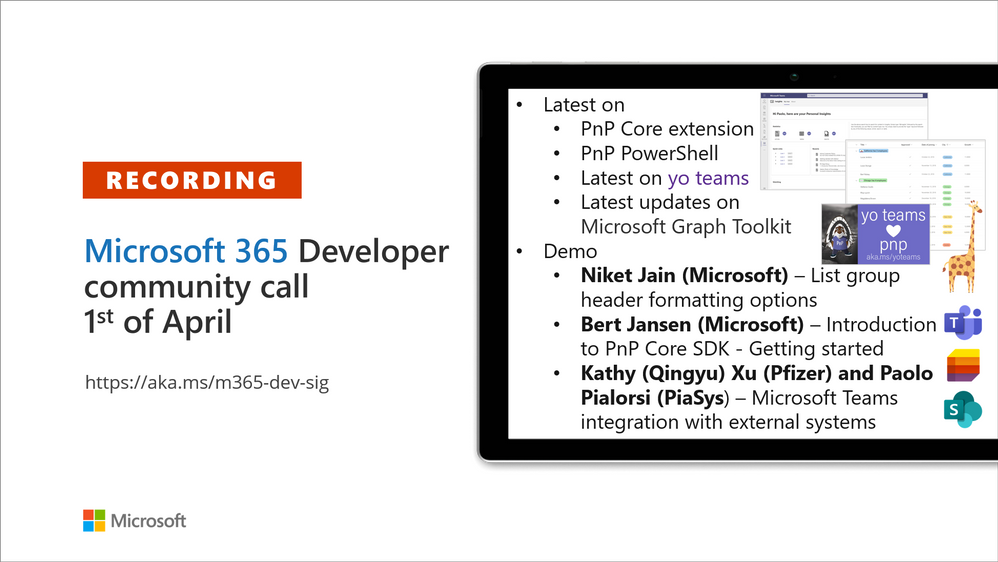
Recording of the Microsoft 365 – General M365 development Special Interest Group (SIG) community call from April 1, 2021.
Call Summary
Latest news from Microsoft 365 engineering and updates on open-source projects: PnP .NET libraries, PnP PowerShell, modernization tooling, on yo Teams, on Microsoft Graph Toolkit, and on Microsoft Teams Samples.
An update on SharePoint Framework v1.12.1 release plan. Recent PnP project releases include – PnP .NET Libraries – PnP Framework v1.4.0 and PnP Core SDK v1.1.0 and PnP PowerShell v1.5.0 (new commandlets for Microsoft Viva Connections and Syntex). yo Teams generator-teams (apps generator) v3.0.3 GA and 3.1.0 Preview, yo teams-build-core (gulp tasks) v1.0.1 + v1.1.0 Preview, and msteams-react-base-component (React UI helpers) v3.1.0, have been released. Microsoft Graph Toolkit in the works MSAL 2.0 provider and preview of OneDrive file components. Delivered 1 new Microsoft Teams sample – the first SPFx Teams Meeting sample from the community! Register now for March/April trainings on Sharing-is-caring. Register to join fellow community members to watch the 2-hour livestream – Building Apps with Microsoft Graph, on the 14th of April. The host of this call was Vesa Juvonen (Microsoft) | @vesajuvonen. Q&A takes place in chat throughout the call
Actions:
Microsoft Teams Development Samples: (https://aka.ms/TeamsSampleBrowser)

It’s together time – Spring time!
Demos delivered in this session
List group header formatting options – new list formatting options in JSON using use groupProps for Group header and footer formatters. Conditional formatting – colors, counts, icons, for all list items now available for groups of list items. Formatting capabilities in both list and gallery views. There are new tokens for group headers and footers. Copy and paste code chunks from docs.microsoft.com into Format View pane.
Introduction to PnP Core SDK – Getting started – see how PnP Core works and how a mixture of APIs – Microsoft Graph GA and Beta, Rest, CSOM, Microsoft Teams, are called behind the scenes, transparent to developer. Create basic .NET console application, add NuGet, PnP.Core and/or PnP.Core.Auth and Microsoft.Injection.Hosting packages, minimum code. Add more code to get data. Create list, add items, query the data, update data and delete list.
Customer scenario – Microsoft Teams integration with external systems – appreciate the power of Teams to deliver a SSO personal app experience to consume and share data and analytics from an external data catalog in a Microsoft 365 environment. This Proof-of-Concept solution includes search and message composition capabilities. App created in yoTeams v3.0, .NET back-end, Security Vault, consuming Alation (data catalog) APIs Uses Fluent and React Northstar library components for Teams.
Thank you for your work. Samples are often showcased in Demos.
Topics covered in this call
- Updates from Microsoft 365 Engineering – Vesa Juvonen (Microsoft) | @vesajuvonen – 7:23
- PnP.NET library updates – Bert Jansen (Microsoft) | @O365bert – 9:06
- PnP PowerShell updates – Erwin van Hunen (Valo Intranet) | @erwinvanhunen – 11:08
- yo Teams updates – Wictor Wilén (Avanade) @wictor – 13:07
- Microsoft Graph Toolkit updates – Beth Pan (Microsoft) | @beth_panx – 14:23
- Microsoft Teams Samples – Bob German (Microsoft) | @Bob1German – 16:17
Demo: List group header formatting options – Naveed Ahmed (Microsoft) – 17:56
Demo: Introduction to PnP Core SDK – Getting started – Bert Jansen (Microsoft) | @O365Bert – 25:54
Demo: Customer scenario – Microsoft Teams integration with external systems – Kathy (Qingyu) Xu (Pfizer) and Paolo Pialorsi (PiaSys) | @PaoloPia – 43:43
Resources:
Additional resources around the covered topics and links from the slides.
General resources:
Upcoming Calls | Recurrent Invites:
General Microsoft 365 Dev Special Interest Group bi-weekly calls are targeted at anyone who’s interested in the general Microsoft 365 development topics. This includes Microsoft Teams, Bots, Microsoft Graph, CSOM, REST, site provisioning, PnP PowerShell, PnP Sites Core, Site Designs, Microsoft Flow, PowerApps, Column Formatting, list formatting, etc. topics. More details on the Microsoft 365 community from http://aka.ms/m365pnp. We also welcome community demos, if you are interested in doing a live demo in these calls!
You can download recurrent invite from http://aka.ms/m365-dev-sig. Welcome and join in the discussion. If you have any questions, comments, or feedback, feel free to provide your input as comments to this post as well. More details on the Microsoft 365 community and options to get involved are available from http://aka.ms/m365pnp.
“Sharing is caring”
Microsoft 365 PnP team, Microsoft – 2nd of April 2021
by Contributed | Apr 2, 2021 | Technology
This article is contributed. See the original author and article here.
Overview
We know that some of our customers leverage Exchange transport rules to prepend subject line or insert the message body to show the email is from external senders. This approach has a few limitations which we heard:
- You can end up with duplicate [External] tags in subject line if external users keep replying to the thread (some of our customers use customized solutions to remove the duplicates).
- Adding things to subject line breaks Outlook conversation threading, as the subject line is modified, so messages no longer “belong” to the same conversation.
- Changed subject (or message body) stays as a part of the message during reply or forward, which leads to confusion if the thread becomes internal.
- There can be localization issues, as transport rules have no knowledge of client language that end-users are using.
- Those additions might take a lot of space in the subject line, making it hard to preview the subject on smaller devices.
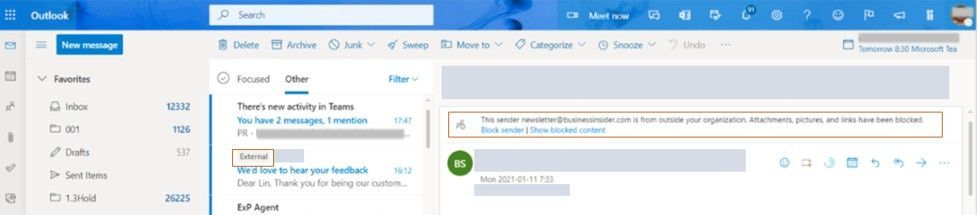
We have heard the feedback on this, and are working on providing a native experience to identify emails from senders outside your organizations (which can help protect against spam & phishing threats). This is achieved by presenting a new tag on emails called “External” (the string is localized based on your client language setting) and exposing related user interface at the top of your message reading view to see and verify the real sender’s email address.
To set this up
- Exchange Online tenant admin will need to run the cmdlet Set-ExternalInOutlook to enable the new user interface for the whole tenant (this is available now); adding certain emails and domains to the allow list via the cmdlet is also possible.
- Outlook on the web already supports this. Outlook Mobile (iOS & Android) and Outlook for Mac are rolling out this feature. Specific versions:
- Outlook on the web: available now
- Outlook for Windows: available in May 2020 (starting with Insider Fast)
- Outlook mobile (iOS & Android): version 4.2111.0 and higher
- Outlook for Mac: version 16.47 and higher
If you are using the prepend subject line transport rules currently to add an [EXTERNAL] tag in external email subject line: the new Outlook native callouts are adding a new MAPI property called IsExternalSender to the email item. Once all the (above listed) client versions you require have this functionality, to avoid emails being marked ‘External’ twice (once by new native functionality and once by the transport rule), please turn off the transport rule first before turning on Outlook native external sender callouts.
We are tracking this feature in Microsoft 365 Roadmap ID 70595. This feature can be enabled on the tenant level now.
Outlook on the web, Mac, and mobile will display an External tag in the message list. Outlook Desktop and OWA will show the sender’s email address at reading pane info bar. Outlook mobile and Outlook for Mac will only see an external tag on the message reading pane, and users will need to click the tag to see the real sender’s email address.
Outlook on the web view of External sender:
In Outlook for iOS, External sender user interface in the message list, External tag when reading chosen email and view of sender’s email address after tapping External label:
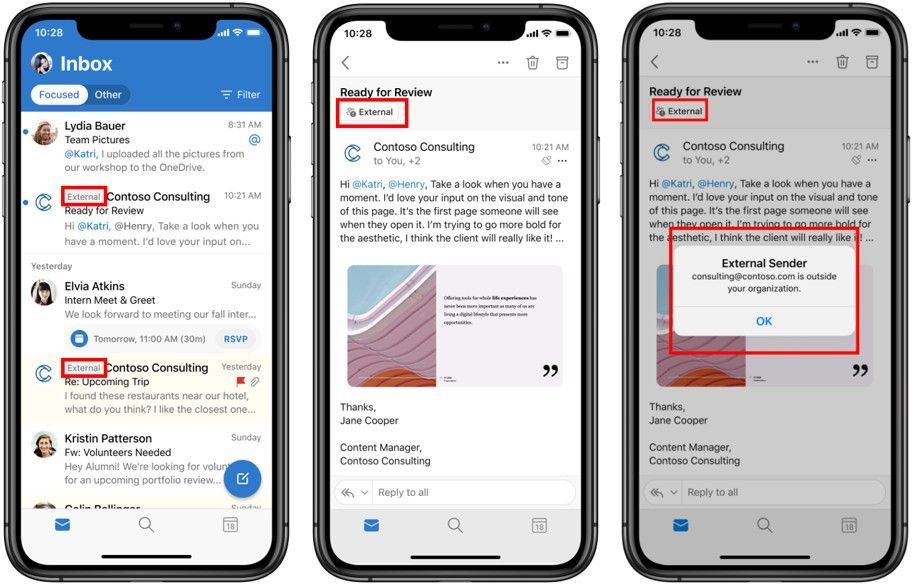
Once this feature is enabled via PowerShell, it might take 24-48 hours for your users to start seeing the External sender tag in email messages received from external sources (outside of your organization), providing their Outlook version supports it.
If enabling this, you might want to notify your users about the new feature and update your training and documentation, as appropriate.
Let us know here if you have any feedback!
The Outlook Team

by Contributed | Apr 2, 2021 | Technology
This article is contributed. See the original author and article here.
Learn Azure Communication Services Day 14 – Showing Video and Screen Share Content
Tom Morgan is a Microsoft Teams Platform developer and Microsoft MVP with more than 10 years of experience in the software development industry. For the last 8 years, Tom has worked at Modality Systems, with responsibility for delivery of the Modality Systems product portfolio. Tom is passionate about creating great software that people will find useful. He enjoys blogging and speaking about Microsoft Teams development, Office365, Bot Framework, Cognitive Services and AI, and the future of the communications industry. He blogs at thoughtstuff.co.uk and tweets at @tomorgan.

TestServer & ASP.NET Core 5: Fix “System.InvalidOperationException : Solution root could not be located using application root” with a custom Startup file
Anthony Giretti is a specialist in web technologies with 14 years of experience. He specializes in particular in Microsoft .NET and he is currently learning the Cloud Azure platform. He has twice received the Microsoft MVP award and he is also a certified Microsoft MCSD and Azure Fundamentals. Follow him on Twitter @anthonygiretti, and visit his blog for more on the C# 9 Series.

My first trip to Redmond, the 1997 Microsoft MVP Summit
Hal Hostetler is an Office Apps and Services MVP who has been in the MVP program since 1996. Now retired, Hal is a Certified Professional Broadcast Engineer and remains the regional engineer for Daystar Broadcasting and a senior consultant for Roland, Schorr, & Tower. He lives in Tucson, Arizona. For more on Hal, check out his Twitter @TVWizard

Getting started with Azure Bicep
Tobias Zimmergren is a Microsoft Azure MVP from Sweden. As the Head of Technical Operations at Rencore, Tobias designs and builds distributed cloud solutions. He is the co-founder and co-host of the Ctrl+Alt+Azure Podcast since 2019, and co-founder and organizer of Sweden SharePoint User Group from 2007 to 2017. For more, check out his blog, newsletter, and Twitter @zimmergren

Teams Real Simple with Pictures: An Approval process for List Items using Lists, Teams, Power Automate, Outlook and the new Approvals App
Chris Hoard is a Microsoft Certified Trainer Regional Lead (MCT RL), Educator (MCEd) and Teams MVP. With over 10 years of cloud computing experience, he is currently building an education practice for Vuzion (Tier 2 UK CSP). His focus areas are Microsoft Teams, Microsoft 365 and entry-level Azure. Follow Chris on Twitter at @Microsoft365Pro and check out his blog here.


Recent Comments