by Contributed | Apr 5, 2021 | Technology
This article is contributed. See the original author and article here.
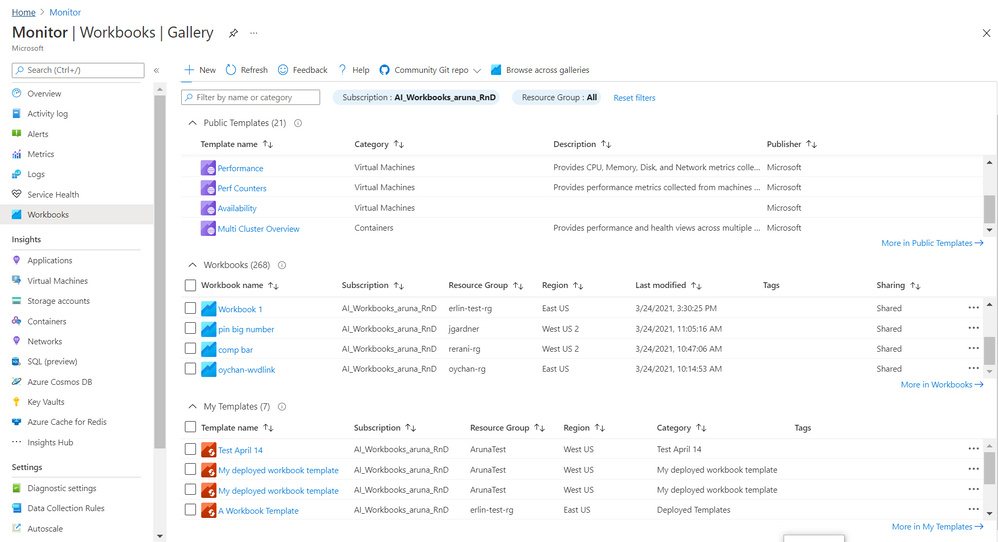
Gallery! It is Azure Portal blade where you manage and use
Azure Workbooks. We recently rolled out a
new and improved experience 
for Gallery to make it
convenient and meet growing demand for organizing, sorting, managing all workbook types – templates and your workbooks.
Here are some of the salient features
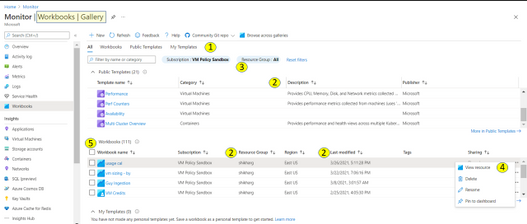
1. There are 4 tabs to help organize workbook types
- All (default) is a composite and allows to search across these types.
- Public Templates
 – Ready to use, get started functional workbooks published by Microsoft
- My Workbooks
 – Workbooks you create or are shared with you
- My Templates
 – Templates you create or are shared with you
Each tab has a full list and a total count for that type.

2. The list provides a grid with
a) info on workbook/ template beyond just the name. This includes description, last modified date, Tags, home (subscription, resource group, region), etc..
b) ability to sort on these elements (columns)

3. There is additional filter by resource group which applies to your workbooks and your templates. Note – currently it is possible to select only one subscription. When private workbooks are deprecated, it will be possible to select multiple subscription.
4. For each workbook there is an action ellipse that allows to
- View resource – Access Workbook Resource blade to get information such as resource id of the workbooks and/ or add tags to the workbook, manage locks etc
- Delete or Rename workbook
- Pin workbook to dashboard
- [coming soon] Copy Link
5. It is now possible to select multiple workbooks and do a bulk operation like delete
6. Community Git Repo on toolbar has a link to Azure Community Github Repo and in some special cases like Azure Security Center gallery it has addition link to it’s specific Repo
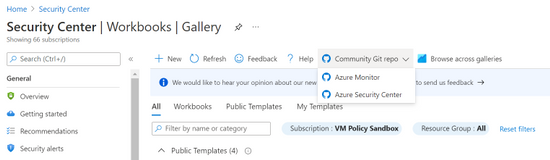
7. Browse across galleries is retained and allows to search for any workbook or template by its name independent of its home or association to a resource/ gallery
Learn more here and we would love to hear from you so share your feedback with us.
Thanks,
Azure Workbooks Team
by Contributed | Apr 5, 2021 | Technology
This article is contributed. See the original author and article here.
by Contributed | Apr 5, 2021 | Technology
This article is contributed. See the original author and article here.
Under (hopefully) rare circumstances, after developing a training script and thorough local testing, it can still happen that the same script fails when executed on a remote AML compute target. Here, we are sharing some best practices around how to debug remote workloads on Azure ML.
Debugging remote workloads can be broken down into two basic steps:
- Getting access to a command line on the remote AML compute target.
- Using command line tools for investigation and debugging.
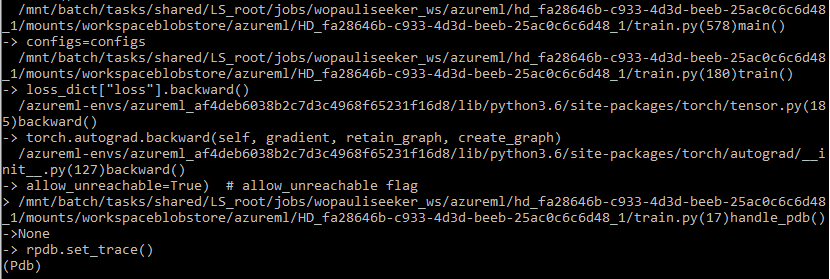
The below snapshot shows what your stack trace may look like if you follow the steps below.
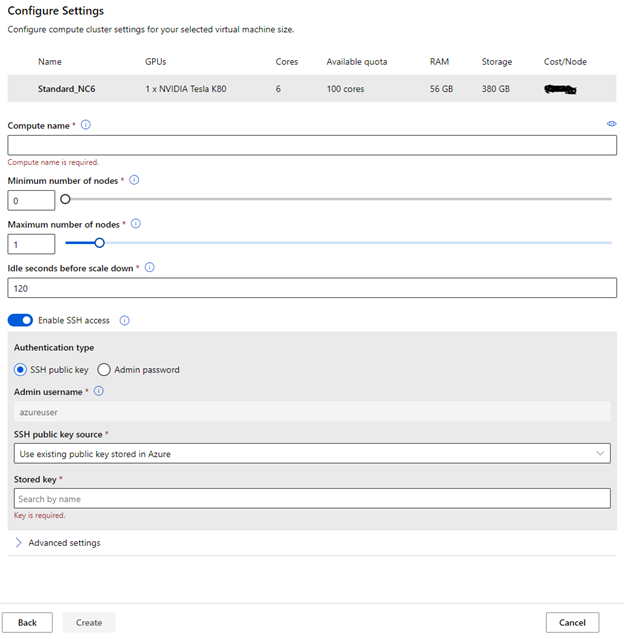
Enable SSH access to your remote AML compute target
You will have to be able to connect to your remote compute target via SSH. By default, SSH access is disabled, so you will have to make sure you enable SSH access during the provisioning of the compute target. The below screenshot shows where to find the option.
RPDB
For debugging, we are using rpdb, a wrapper for the python debugger pdb, which is part of the Python Standard Library. Using rpdb, we can connect to and debug a running process.
One of the really convenient aspects of using rpdb is that it won’t affect the performance of your training script, unless you set a breakpoint, either statically or dynamically, as described below.
Software Prerequisites
We recommend you install at least two packages, to make this work (1) rpdb and (2) netcat-openbsd. You can simply add rpdb to the pip packages of your Conda dependencies in your AzureML environment.
Netcat-openbsd can be either installed manually, when you start to debug a run (after attaching to running docker container, see below), or you can build a custom docker image for execution. For this we recommend starting from one of the base Docker images for AzureML containers, and simply adding netcat-openbsd to the packages installed by the apt package manager.
Modifying the training script for debugging
Consider the following two scenarios. Either you want to set a breakpoint and then step through the code from there, to see what is going wrong. In this case, you only have to add one line to your training script (towards the top of the training script) to create a breakpoint:
import rpdb; rpdb.set_trace()
Alternatively, you may have a training script that just somehow gets stuck, without failing. In this case, you can’t really set a breakpoint, because you don’t know where the script gets stuck. We experienced this situation when we trained a pytorch model, using multiple workers for data loading. A thread contention caused the data loader to hang, and we needed to know where/why the thread contention occurred.
If you are facing this situation, you can make some modifications to the training script that will allow you to send a signal to the training script, which will dynamically set a breakpoint at the current execution step, so you can use the debugger to figure out what is going on. To do this, add the following code to your training script.
import rpdb
def handle_pdb(sig, frame):
    rpdb.set_trace()
Then add the following code, so that the above method is called when SIGUSR1 signal is sent to the python process.
if __name__ == "__main__":
    import signal
    signal.signal(signal.SIGUSR1, handle_pdb)
Connect to your remote compute target
This first thing to do is to go to the list of nodes on your compute target, identify the run that you would like to debug, and copy the “Connection string”. This is shown in the following screenshot.
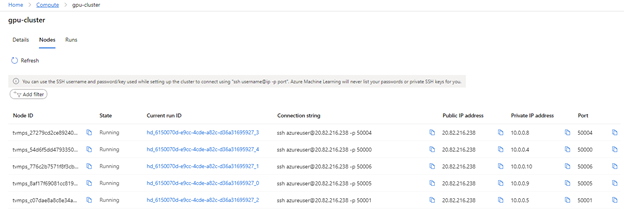
You can then use the terminal of your choice (e.g. Anaconda command prompt) to connect to the node via SSH. Once logged in, you can use the usual commands for investigation (e.g. vmstat, top, free)
Debugging
If you want to dig deeper, you can attach to the docker container, inside of which your training script is running, and start debugging.
To do this, you have to first get the ID of the running container (using “docker ps”). Then you can attach to it, using “docker attach <id>”. If you didn’t include netcat-openbsd in your docker image, you can do so after attaching to the container.
If you set a breakpoint (by adding the line “rpdb.set_trace()”, mentioned above), you can now connect to the process, using the binary “nc” from the netcat-openbsd package: “nc 127.0.0.1 4444”. This will get you to pdb for debugging. If you have never used pdb, just type “help”, and you will find the usual commands for debugging.
If you followed the above instructions, for handling the SIGUSR1 signal, you can also send a signal, to pause execution, and continue in debug mode. In other words, this allows you to set a breakpoint at the current execution step.
First, send the signal: kill -n 10 <proc_id> (or kill -s SIGUSR1 <proc_id>)
Then you can use “nc” again for connecting to pdb.
Note: Think carefully before you start debugging a running process with pdb, because you won’t be able to leave the pdb session without killing the process. You can, however, keep the job running, you’ll just have to leave the pdb session open.
Closing remarks
We hope you found this blog post useful. Our intent was to demystify remote workloads, getting you closer to debugging them like you would, if your scripts were being executed locally. Please leave questions and suggestions in the comments below!
by Contributed | Apr 5, 2021 | Technology
This article is contributed. See the original author and article here.
2020 has been a year like no other. In just a few months’ time, businesses have transformed and have accelerated their efforts to migrate to the cloud. Following our announcement of Azure VMware Solution (AVS) last year, we have been helping customers accelerate this move to cloud by providing an easy lift and shift migration. Albeit customers love the same operational experience for VMware workloads and use familiar VMware technologies like vCenter, NSX Manager, HCX etc. in AVS, they also want to leverage security integrations that they have invested in for years. Below are a few common questions that we get from customers around this topic.
How can they use the same firewalls/tools that they have been using for years?
How do they maintain the same security posture?
How can they use the same firewall for both Azure and VMware workloads in AVS?
In this blog series, we plan to discuss native security options, 3rd party firewall integration with AVS along with a deep dive into configuration details. First in the series, this blog would summarize the security options available at your disposal.
Let’s start with the built-in security capabilities that you can leverage in AVS.
Built-in security/firewall with VMware NSX-T – VMware NSX-T is the default networking stack in AVS and it provides out-of-box security features that you can use to protect your workloads. Following are the capabilities that you can leverage.
Distributed Firewall (DFW) –A stateful L3-L7 firewall that powers micro-segmentation and runs on your ESXi hosts in your AVS private cloud. DFW rules are enforced on the vNIC level of a VM workload and what that means is that the traffic is either allowed or dropped on the vNIC level based on the rule you defined. So, there is no more hair-pinning that traffic through a centralized or perimeter firewall. From a feature standpoint, it’s rich and allows you to define security rules using network or application constructs. You could group the workloads using static (IPSet/NSX constructs like Segment etc.) or dynamic membership (VM tags, guest OS etc.). Even when you have a perimeter firewall, you should secure your East-West traffic.
Gateway Firewall – A L4-L7 aware stateful North-South firewall that can be configured on NSX-T Tier-1 Gateway in AVS. It can also be used as an Inter-tenant or Inter-zone firewall i.e. filtering traffic between different tenants of your organization each with a dedicated Tier-1 Gateway.
Azure Firewall – A managed, stateful firewall with built-in HA and SLA of 99.99% (when deployed in two or more availability zones). Customers can configure L3-L7 policies to filter traffic and take advantage of threat intelligence-based filtering to alert and deny traffic from/to known malicious IP addresses and domains. Please refer to the Azure firewall feature set here.
If you are already using Azure firewall capabilities deployed in Azure Virtual WAN to protect resources in VNETs, you can connect the same virtual WAN hub over an express route connection to AVS and route internet traffic from AVS to Azure firewall.
Let’s switch gears and talk about the 3rd party firewall integration with Azure VMware Solution. There is a strong desire from customers to continue using the same firewall in AVS that they have been using in an on-premises datacenter. Based on the use-case, you could deploy a 3rd party firewall NVA in AVS private cloud or SDDC or leverage a firewall from Azure marketplace. Let’s double click on both options.
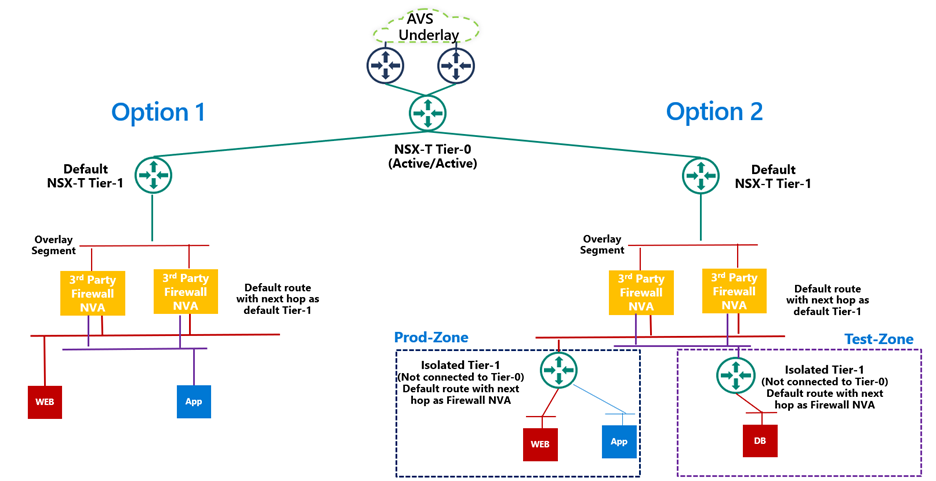
3rd Party firewall deployed as NVA in AVS private cloud or SDDC –Before we discuss this integration, it’s important to understand NSX-T deployment in AVS private cloud. When you create a private cloud in AVS, a default NSX-T Tier-0 Gateway configured in Active/Active mode and a default NSX-T Tier-1 Gateway configured in Active/Standby mode is deployed for you. Users can connect segments (logical switches) and provide East-West and North-South connectivity to the workloads connected on these segments.
A 3rd party firewall NVA can be connected southbound to the default NSX-T Tier-1 gateway and this firewall can act as a North-South firewall or East-West firewall depending upon your use case. This integration is supported in following topologies.
- Option 1: Workload segments are directly connected to the firewall and the gateway on workloads is 3rd party firewall. This topology restricts the users with numerous segments as the vNICs on the NVA becomes a limiting factor.
- Option 2: Workload segments are connected to an isolated Tier-1 and this Tier-1 gateway provides northbound connectivity to a 3rd party firewall. This topology solves the problem of limited number of vNICs on NVA as you connect 100s of workload segments to an isolated Tier-1 which connects to the firewall NVA northbound. In this topology, isolated Tier-1s simulate security zones and the firewall can provide East-West filtering between security zones and North-South filtering for all traffic.
We will discuss routing and other configuration details for these topologies in next part of this blog series.
3rd Party firewall deployed in Azure VNET – Customers can also deploy a 3rd party firewall in Azure VNET and route traffic from AVS to this firewall via Azure Virtual WAN hub. To redirect internet traffic from AVS VMs to the firewall NVA, you need to connect AVS to an express route gateway in Azure virtual WAN and propagate a default route. Next, you configure a default route in Azure Virtual WAN hub to direct internet bound traffic to a NVA in spoke VNET.

We will go through the configuration details in greater detail in upcoming blogs. Stay tuned!
Summary
Azure VMware Solution customers have multiple security options available to protect their workloads. Some of these firewalling capabilities can be used out of the box to provide East-West and North-South firewalling. Along with the built-in security capabilities, customers can also leverage the 3rd party firewalls or next-gen firewalls to provide additional security and maintain the same security posture as they have on-premises.
Following are a few resources to learn more about Azure VMware Solution.
Learn Azure VMware Solution Networking
Try Azure VMware Solution Hands-on-lab
by Contributed | Apr 5, 2021 | Technology
This article is contributed. See the original author and article here.
Howdy folks,
We started on a journey with the open standards community to empower everyone to own and control their own identity. I’m thrilled to share that we’ve achieved a major milestone in making this vision real. Today we’re announcing that the public preview for Azure AD verifiable credentials is now available: organizations can empower users to control credentials that manage access to their information.
This blog post provides an overview of our standards-based platform, and the first solution we’ve built on that platform–to enable a new form of identity verification. We’re also sharing lessons learned from customers during private preview and next steps for improving interoperability with other standards-based systems. Ankur Patel from my team is here to share more.
Best Regards,
Alex Simons (Twitter: @Alex_A_simons)
Corporate Vice President Program Management
Microsoft Identity Division
—————————————————————–
Hello again. In June 2020, we reported on the open standards community’s progress on decentralized identity. The Verifiable Credentials (VC) and Decentralized Identifiers (DID) standards have been ratified. Today, I’m thrilled to share details about the public preview capabilities of Microsoft’s platform, based on these standards, called Azure AD verifiable credentials.
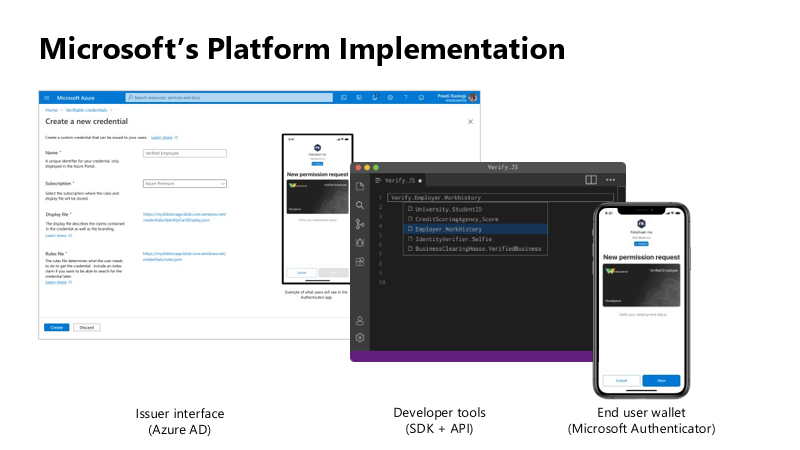
Azure AD customers can now easily design and issue verifiable credentials to represent proof of employment, education, or any other claim, so that the holder of such a credential can decide when, and with whom, to share their credentials. Each credential is signed using cryptographic keys associated with the DID that the user owns and controls.
Please visit http://aka.ms/verifyonce to learn more.
Unlike current proprietary identity systems, verifiable credentials are standards-based which makes it easy for developers to understand, and doesn’t require custom integration. Applications can request and verify the authenticity of credentials from any organization using APIs included in the platform SDK.
Just as they manage any other permission requests, users can manage and present credentials using Microsoft Authenticator, with one key difference under the hood. Unlike domain-specific credentials, verifiable credentials function as “proofs” that users control, even when they’re issued by organizations. Because verifiable credentials are attached to DIDs that users own, they can be confident that they—and only they—control who can access them and how.
Government of Flanders is one of the many early customers that leveraged the private preview capabilities to make it easier for citizens to start a new business. Today, a citizen must provide proof of income and citizenship. By presenting verifiable credentials issued by their bank as proof of income and by their government as proof of citizenship, they could easily meet these requirements. This is one of the many scenarios that came to life during private preview.
In addition to announcing public preview of the Azure AD verifiable credentials platform, we’re excited to share with you a new solution based on this approach. Usually, highly regulated interactions, such as pre-employment checks or applying for a loan, are expensive and time-consuming. Microsoft is partnering with industry leading identity verification service providers to make it possible to verify an identity once and present it to anyone. Azure AD customers can leverage this solution to validate official documents and electronic records across 192 countries to confidently verify identities. End-users can present these credentials to quickly start a job, apply for a loan, or access secure apps and services—without having to repeatedly share their sensitive information.
Please visit http://aka.ms/verifyonce to learn more about all our partners.
We’re grateful for everything we’ve learned from our customers, and to members of Decentralized Identity Foundation, Open ID Foundation, and W3C who collaborated with us to develop new standards that enable individuals and organizations to verify credentials directly.
While this is an important milestone, we have a lot of work ahead to enable verification on a larger scale while protecting individual privacy. Now that we have built the foundation, we are working on our next key milestone: continue to enrich credentials with implementations that enable additional privacy preserving features and increase our interoperability with solutions from other members of the Decentralized Identity and Verifiable Credentials community.
Let’s build a more trustworthy internet together. We were amazed by the variety of ideas that customers presented to us during private preview. We can’t wait for you to try the new platform!
Ankur Patel (@_AnkurPatel)
Principal Program Manager
Microsoft Identity Division
Resources:
Learn more about Microsoft identity:


Recent Comments