by Contributed | Apr 14, 2021 | Technology
This article is contributed. See the original author and article here.
As a major move to the more secure SHA-2 algorithm, Microsoft will allow the Secure Hash Algorithm 1 (SHA-1) Trusted Root Certificate Authority to expire. Beginning May 9, 2021 at 4:00 PM Pacific Time, all major Microsoft processes and services—including TLS certificates, code signing and file hashing—will use the SHA-2 algorithm exclusively.
Why are we making this change?
The SHA-1 hash algorithm has become less secure over time because of the weaknesses found in the algorithm, increased processor performance, and the advent of cloud computing. Stronger alternatives such as the Secure Hash Algorithm 2 (SHA-2) are now strongly preferred as they do not experience the same issues. As a result, we changed the signing of Windows updates to use the more secure SHA-2 algorithm exclusively in 2019 and subsequently retired all Windows-signed SHA-1 content from the Microsoft Download Center on August 3, 2020.
What does this change mean?
The Microsoft SHA-1 Trusted Root Certificate Authority expiration will impact SHA-1 certificates chained to the Microsoft SHA-1 Trusted Root Certificate Authority only. Manually installed enterprise or self-signed SHA-1 certificates will not be impacted; however we strongly encourage your organization to move to SHA-2 if you have not done so already.
Keeping you protected and productive
We expect the SHA-1 certificate expiration to be uneventful. All major applications and services have been tested, and we have conducted a broad analysis of potential issues and mitigations. If you do encounter an issue after the SHA-1 retirement, please see Issues you might encounter when SHA-1 Trusted Root Certificate Authority expires. In addition, Microsoft Customer Service & Support teams are standing by and ready to support you.
by Contributed | Apr 14, 2021 | Technology
This article is contributed. See the original author and article here.
Policy-driven Governance is a cornerstone in Enterprise-scale Landing Zone (ESLZ!). It’s possible to codify corporate, industry or country specific governance requirements declaratively using Azure Policy. ESLZ provides 90+ custom policies which help in meeting most common corporate governance requirements with a single click.
Benefits of these 90+ custom policies is documented in detail.
Following table lists these policies and the governance requirements they help in enforcing.
Deny-Public-Endpoints-for-PaaS-Services Policy Initiative includes following policies which apply on specific Azure services.
- Deny-PublicEndpoint-CosmosDB
- Deny-PublicEndpoint-MariaDB
- Deny-PublicEndpoint-MySQL
- Deny-PublicEndpoint-PostgreSql
- Deny-PublicEndpoint-KeyVault
- Deny-PublicEndpoint-Sql
- Deny-PublicEndpoint-Storage
- Deny-PublicEndpoint-Aks
Deploy-Diag-LogAnalytics PolicySet helps capturing Logs and Metrics as shown below.
Policy Name |
Log Categories |
Metrics |
Deploy-Diagnostics-AA |
JobLogs JobStreams DscNodeStatus |
AllMetrics |
Deploy-Diagnostics-ACI |
|
AllMetrics |
Deploy-Diagnostics-ACR |
|
AllMetrics |
Deploy-Diagnostics-ActivityLog |
Administrative Security ServiceHealth Alert Recommendation Policy Autoscale ResourceHealth |
|
Deploy-Diagnostics-AKS |
kube-audit kube-apiserver kube-controller-manager kube-scheduler cluster-autoscaler |
AllMetrics |
Deploy-Diagnostics-AnalysisService |
Engine Service |
AllMetrics |
Deploy-Diagnostics-APIMgmt |
GatewayLogs |
Gateway Requests Capacity EventHub Events |
Deploy-Diagnostics-ApplicationGateway |
ApplicationGatewayAccessLog ApplicationGatewayPerformanceLog ApplicationGatewayFirewallLog |
AllMetrics |
Deploy-Diagnostics-Batch |
ServiceLog |
AllMetrics |
Deploy-Diagnostics-CDNEndpoints |
CoreAnalytics |
|
Deploy-Diagnostics-CognitiveServices |
Audit RequestResponse |
AllMetrics |
Deploy-Diagnostics-CosmosDB |
DataPlaneRequests MongoRequests QueryRuntimeStatistics |
Requests” |
Deploy-Diagnostics-DataFactory |
ActivityRuns PipelineRuns TriggerRuns |
AllMetrics |
Deploy-Diagnostics-DataLakeStore |
Audit Requests |
AllMetrics |
Deploy-Diagnostics-DLAnalytics |
Audit Requests |
AllMetrics |
Deploy-Diagnostics-EventGridSub |
|
AllMetrics |
Deploy-Diagnostics-EventGridTopic |
|
AllMetrics |
Deploy-Diagnostics-EventHub |
ArchiveLogs OperationalLogs AutoScaleLogs |
AllMetrics |
Deploy-Diagnostics-ExpressRoute |
PeeringRouteLog |
AllMetrics |
Deploy-Diagnostics-Firewall |
AzureFirewallApplicationRule AzureFirewallNetworkRule AzureFirewallDnsProxy |
AllMetrics |
Deploy-Diagnostics-HDInsight |
|
AllMetrics |
Deploy-Diagnostics-iotHub |
Connections DeviceTelemetry C2DCommands DeviceIdentityOperations FileUploadOperations Routes D2CTwinOperations C2DTwinOperations TwinQueries JobsOperations DirectMethods E2EDiagnostics Configurations |
AllMetrics |
Deploy-Diagnostics-KeyVault |
AuditEvent |
AllMetrics |
Deploy-Diagnostics-LoadBalancer |
LoadBalancerAlertEvent LoadBalancerProbeHealthStatus |
AllMetrics |
Deploy-Diagnostics-LogicAppsISE |
IntegrationAccountTrackingEvents |
|
Deploy-Diagnostics-LogicAppsWF |
WorkflowRuntime |
AllMetrics |
Deploy-Diagnostics-MlWorkspace |
AmlComputeClusterEvent AmlComputeClusterNodeEvent AmlComputeJobEvent AmlComputeCpuGpuUtilization AmlRunStatusChangedEvent |
Run Model Quota Resource |
Deploy-Diagnostics-MySQL |
MySqlSlowLogs |
AllMetrics |
Deploy-Diagnostics-NetworkSecurityGroups |
NetworkSecurityGroupEvent NetworkSecurityGroupRuleCounter |
|
Deploy-Diagnostics-NIC |
|
AllMetrics |
Deploy-Diagnostics-PostgreSQL |
PostgreSQLLogs |
AllMetrics |
Deploy-Diagnostics-PowerBIEmbedded |
Engine |
AllMetrics |
Deploy-Diagnostics-PublicIP |
DDoSProtectionNotifications DDoSMitigationFlowLogs DDoSMitigationReports |
AllMetrics |
Deploy-Diagnostics-RecoveryVault |
CoreAzureBackup AddonAzureBackupAlerts AddonAzureBackupJobs AddonAzureBackupPolicy AddonAzureBackupProtectedInstance AddonAzureBackupStorage |
|
Deploy-Diagnostics-RedisCache |
|
AllMetrics |
Deploy-Diagnostics-Relay |
|
AllMetrics |
Deploy-Diagnostics-SearchServices |
OperationLogs |
AllMetrics |
Deploy-Diagnostics-ServiceBus |
OperationalLogs |
AllMetrics |
Deploy-Diagnostics-SignalR |
|
AllMetrics |
Deploy-Diagnostics-SQLDBs |
SQLInsights AutomaticTuning QueryStoreRuntimeStatistics QueryStoreWaitStatistics Errors DatabaseWaitStatistics Timeouts Blocks Deadlocks SQLSecurityAuditEvents |
AllMetrics |
Deploy-Diagnostics-SQLElasticPools |
|
AllMetrics |
Deploy-Diagnostics-SQLMI |
ResourceUsageStats SQLSecurityAuditEvents |
|
Deploy-Diagnostics-StreamAnalytics |
Execution Authoring |
AllMetrics |
Deploy-Diagnostics-TimeSeriesInsights |
|
AllMetrics |
Deploy-Diagnostics-TrafficManager |
ProbeHealthStatusEvents |
AllMetrics |
Deploy-Diagnostics-VirtualNetwork |
VMProtectionAlerts |
AllMetrics |
Deploy-Diagnostics-VM |
|
AllMetrics |
Deploy-Diagnostics-VMSS |
|
AllMetrics |
Deploy-Diagnostics-VNetGW |
GatewayDiagnosticLog IKEDiagnosticLog P2SDiagnosticLog RouteDiagnosticLog RouteDiagnosticLog TunnelDiagnosticLog |
AllMetrics |
Deploy-Diagnostics-WebServerFarm |
|
AllMetrics |
Deploy-Diagnostics-Website |
|
AllMetrics |
PolicySet Deploy-DNSZoneGroup-For-*-PrivateEndpoint targets Azure services as shown below.
Policy Name |
Azure Service |
Deploy-DNSZoneGroup-For-Blob-PrivateEndpoint |
Azure Storage Blob |
Deploy-DNSZoneGroup-For-File-PrivateEndpoint
|
Azure Storage File |
Deploy-DNSZoneGroup-For-Queue-PrivateEndpoint
|
Azure Storage Queue |
Deploy-DNSZoneGroup-For-Table-PrivateEndpoint
|
Azure Storage Table |
Deploy-DNSZoneGroup-For-KeyVault-PrivateEndpoint
|
Azure KeyVault |
Deploy-DNSZoneGroup-For-Sql-PrivateEndpoint
|
Azure SQL Database |
by Contributed | Apr 14, 2021 | Technology
This article is contributed. See the original author and article here.
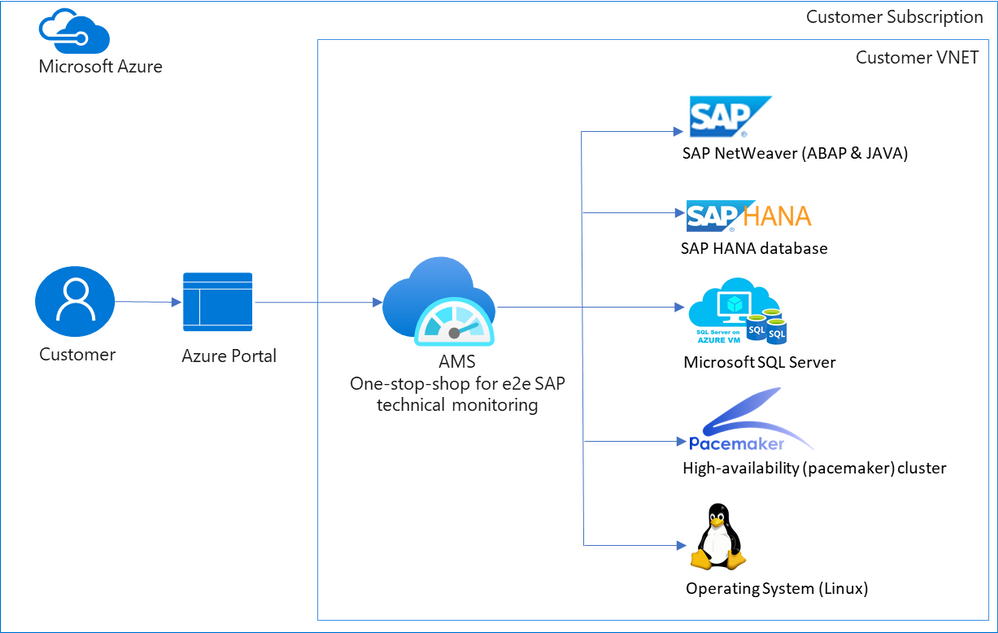
When customers move their mission critical SAP applications to Azure, a decision on which monitoring tool to use is carefully made. Various tools are evaluated, older pain points are reconsidered, and new cloud-specific monitoring needs are identified. Microsoft built Azure Monitor for SAP Solutions (AMS), currently in public preview, to address some of these needs. AMS is an Azure native monitoring solution that provides end-to-end SAP technical monitoring at one place in Azure portal.
AMS can be used by customers running their SAP workloads on Azure virtual machines as well as Azure large instances to monitor their SAP on Azure landscapes. Currently, telemetry collections for the following are supported: SAP HANA, Microsoft SQL Server and High-availability (pacemaker) clusters. And the following regions are supported: East US, East US 2, West US 2, West Europe.
Today I am excited to share the following capabilities in public preview:
- SAP NetWeaver (ABAP & JAVA)
- Operating system (SUSE & RHEL)
- Additional metrics for High-availability (pacemaker) cluster
- North Europe region
SAP NetWeaver data is collected from functions in SAP Start service which are provided on SAPControl SOAP Web Service. Following metrics are supported with this release: SAP instance availability, process availability, work process utilization, enqueue lock statistics, queue statics and trends. More to follow. Data for high-availability (pacemaker) clusters is collected from ha cluster exporter, which runs on every node in a cluster. Previously, statuses for nodes and resources were available, now customers can see information about location constraints, failure counts and trends on node and resource status. Operating systems (SUSE and RHEL) data is collected through node exporter which is required to run on each host. Metrics like:
- CPU usage by process
- Persistent memory
- Swap memory
- Memory usage
- Disk utilization,
- Network information
and more are available. OS monitoring in AMS is specifically useful for customers running workloads on Azure large instances (BareMetal).
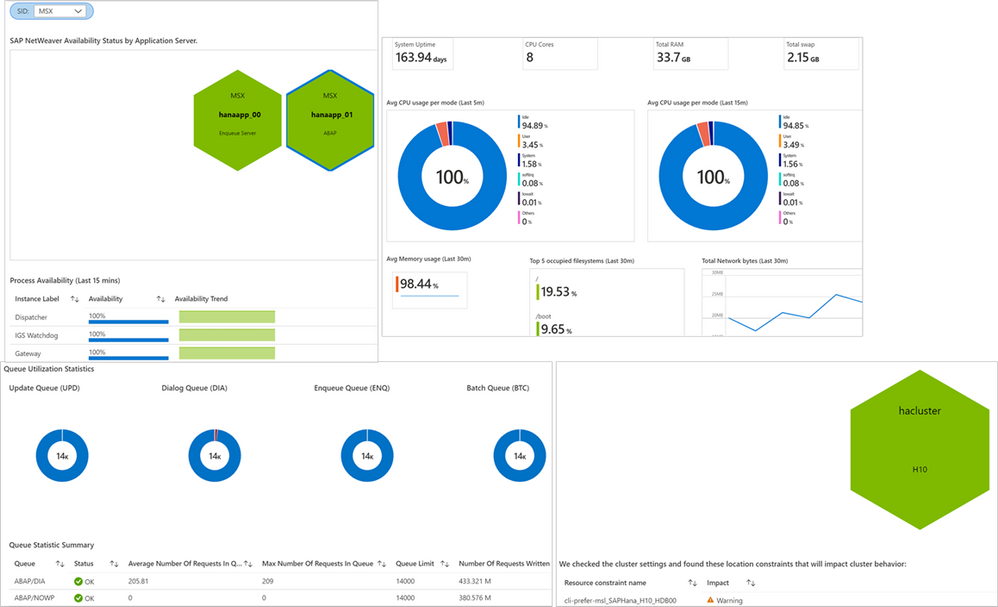 Screenshots of visualizations from AMS
With this release, AMS provides end-to-end technical monitoring for all layers in SAP’s 3-tier architecture at one place. Customers can use AMS to visualize, monitor and troubleshoot all layers and visually corelate data across them. Further, customers can create Azure dashboards, with few clicks, to visualize SAP telemetry and non-SAP telemetry (other Azure services) in single-pane-of-glass. This can be done by combining telemetry from AMS and Azure monitor.
Since end-to-end technical monitoring is available within Azure portal, both BASIS administrators and infrastructure teams in customer’s organization can use AMS to monitor SAP on Azure. Moreover, Hosters/service integrations/partners can use AMS to monitor SAP systems for their customers and view cross-tenant SAP telemetry in Azure portal through integration between AMS and Azure Light house.
To get started, log into Azure portal and search ‘Azure Monitor for SAP Solutions’ in Azure Marketplace. Please see the links below for further information.
Share your thoughts with AMS product group: AMS asks & feedback form
Learn more:
Other helpful links:
by Contributed | Apr 14, 2021 | Technology
This article is contributed. See the original author and article here.
Contributors:
Rob Garrett – Sr. Customer Engineer, Microsoft Federal
John Unterseher – Sr. Customer Engineer, Microsoft Federal
Martin Ballard – Sr. Customer Engineer, Microsoft Federal
This article replaces the previous article, which used the – now legacy – version of PnP PowerShell.
What are Learning Pathways?
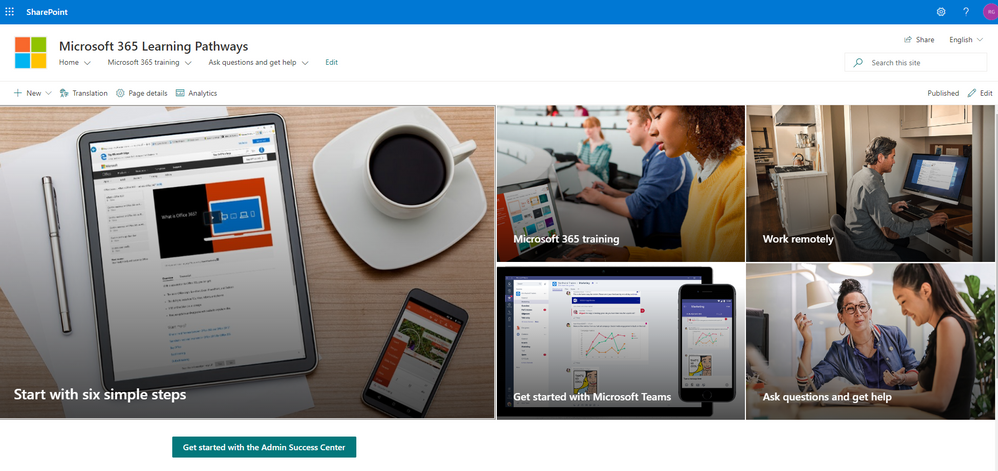
Microsoft 365 learning pathways is a customizable, on-demand learning solution designed to increase usage and adoption of Microsoft 365 services in your organization. |
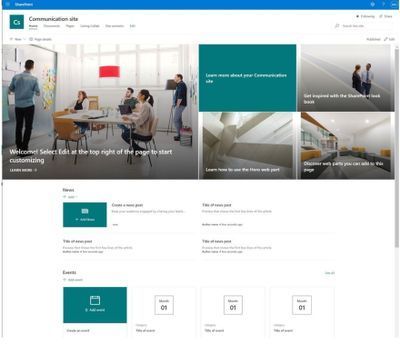
Microsoft 365 learning pathways is a customizable, on-demand learning solution designed to increase usage and adoption of Microsoft 365 services in your organization. Learning Pathways consists of a fully customizable SharePoint Online Communication site collection, with content populated from the Microsoft online catalog; so, your content is always up to date. Learning Pathways provide integrated playlists to meet the unique needs of your organization.
M365 Learning Pathways build atop of the Look Book Provisioning Service and templates (https://lookbook.microsoft.com). In a previous blog post, we detailed the nuances of the Look Book Provisioning Service and additional steps required to deploy templates to GCC High tenants. Since Learning Pathways depend on the provisioning service to create a Communication site with customizations, via a Look Book template, this post details the additional steps to follow those from the earlier blog post.
Challenge – Using Learning Pathways in GCC High
Because of provisioning limitations in the GCC High sovereign cloud, documented installation instructions result in errors. |
Microsoft strives to implement functionality parity between all sovereign clouds. However, since each Office 365 cloud type serves a different customer audience and requirements, functionality will differ between these cloud types. Of the M365 clouds – Commercial, Government Community Cloud, Government Community Cloud High, and DOD Cloud, the last two offer the least functionality to observe US federal mandates and compliance.
As Microsoft develops new functionality for Microsoft 365 and Azure clouds, we typically release new functionality to commercial customers first, and then to the other GCC, GCC High, and DOD tenants later as we comply with FedRAMP and other US Government mandates. Open-source offerings add another layer of complexity since open-source code contains community contribution and is seldom developed with government clouds in mind.
Apply Learning Pathways to GCC High
Manual configuration steps detailed below make Learning Pathways in GCC High possible.
|
Microsoft 365 Learning Pathways offers manual steps to support deployment to an existing SharePoint Online Communication site. Recall from the earlier blog post that the Look Book Provisioning Service is unable to establish a new site collection in GCC High, because of necessary restrictions. We, therefore, deploy Learning Pathways using the manual steps with a pre-provisioned Communication site collection.
Manual setup of Learning Pathways requires experience working with Windows PowerShell and the PnP PowerShell module.
Prerequisites
Before getting into the manual steps, we must meet prerequisites for manual install of Learning Pathways, the following is a summary:
- Create and designate a new Communication in SharePoint Online for Learning Pathways.
- Create a tenant-wide application catalog (steps below).
- Install the latest SharePoint PnP.
- Perform all steps as a SharePoint Tenant Administrator.
We begin by creating a new Communication site via the SharePoint Administration site:
https://mytenant-admin.sharepoint.us/_layouts/15/online/AdminHome.aspx#/siteManagement/view/ALL%20SITES
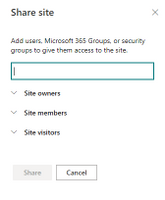
Ensure the appropriate permissions for users of the Learning Pathways site:
- Open the Learning Pathways site collection in your web browser.
- From the home page, click the Share link.
- Add students to the Site Visitors group.
- Add playlist editors of the pathways site to the Site Members group.
- Add site administrators of the pathways site to the Site Owners group.
We shall now create the tenant app catalog (if it does not already exist):
- Open the SharePoint Admin center in your browser.
https://mytenant-admin.sharepoint.us
- Select More Features in the left sidebar.
- Locate the Apps section and click Open.
https://mytenant-admin.sharepoint.us/_layouts/15/online/TenantAdminApps.aspx
- Select the App Catalog.
- If you do not already have an app catalog, provide the following details:
- Title: App Catalog
- Web Site Address Suffix: preferred suffix for the app catalog, e.g. apps.
- Administrator: SharePoint Administrator.
We shall now turn our attention to installing the latest version of PnP.PowerShell. At the time of writing this blog, the latest version of PnP.PowerShell is 1.5.x. Follow the instructions, in the box below, to install the latest pre-release version (required).
You can check the available versions of installed PnP.PowerShell with the Get-Module PnP.PowerShell -ListAvailable. If you do not have version 1.5.x or greater follow the instructions in the below box. |
PnP PowerShell installation is a prerequisite for deploying Look Book templates via PowerShell. The previous edition of this article used the – now legacy – SharePointPnpPowerShell module. At the time of writing, the new steps require the latest bits for PowerShellGet, Nuget Package Provider and PnP.PowerShell module. You only need follow these side-line steps once for a specified Windows machine.
- Open a PowerShell console as an administrator (right-click, Run As Administrator).
Note: The latest version of PnP.PowerShell is cross-platform and works with PowerShell Core (v7.x).
- Ensure unrestricted execution policy with:
Set-ExecutionPolicy Unrestricted
- Check the installed version of PowerShellGet with the following cmdlet:
Get-PackageProvider -Name PowerShellGet -ListAvailable
- If you see version 2.2.5.0 or greater, proceed to step #5.
Note: if you have PowerShell 5.1 and 7.x installed, you may have different versions of PowerShellGet for each version of PowerShell.
- Install the required version of PowerShellGet with:
Install-PackageProvider -Name Nuget -Scope AllUsers -Force
Install-PackageProvider -Name PowerShellGet -MinimumVersion 2.2.5.0 -Scope AllUsers -Force
- If you ran step #4, close and reopen your PowerShell console (again, as an administrator).
- Install PnP.PowerShell with the following:
Install-Module -Name PnP.PowerShell -AllowPrerelease -SkipPublisherCheck -Scope AllUsers -Force
- Close and reopen your PowerShell console (run as administrator not required this time).
- Confirm that PnP.PowerShell is installed with the following:
Get-Module -Name PnP.PowerShell -ListAvailable
|
- Open a new PowerShell console (v5.1 or Core 7.x).
- Ensure the PnP.PowerShell module is loaded with the following:
Import-Module -Name PnP.PowerShell
- Run the following script ONCE per tenant to create an Azure App Registration for PnP:
Note: Replace tenant with your tenant name.
Register-PnPAzureADApp -ApplicationName "PnP PowerShell" `
-Tenant [TENANT].onmicrosoft.us -Interactive `
-AzureEnvironment USGovernmentHigh `
-SharePointDelegatePermissions AllSites.FullControl User.Read.All
Login with user credentials assigned Global Administrator role.
If you previously registered PnP.PowerShell, check the App Registration in the Azure portal and make sure it has delegated permissions for AllSites.FullControl and User.Read.All.
- Make a note of the GUID returned from step 4. This is the App/Client ID of the new PnP Azure App Registration.
Deploy Learning Pathways Template
Learning Pathways deploys as from a dedicated Look Book template. The following steps details downloading the template and deploying it via PnP.PowerShell.
- Open a new PowerShell console (v5.1 or Core 7.x).
- Ensure the PnP.PowerShell module is loaded with the following:
Import-Module -Name PnP.PowerShell
- Connect to your Learning Pathways site collection with the following:
Connect-PnPOnline `
-Url "Url of your Learning Pathways Site" `
-AzureEnvironment USGovernmentHigh `
-Interactive `
-Tenant "[TENANT].onmicrosoft.us `
-Client ID "Client ID from AAD app registration in Step #16"
- Enable custom scripts on your site with the following (note: check with you security team before enabling this feature):
Set-PnPTenantSite -Identity "Url of your Learning Pathways Site" -DenyAddAndCustomizePages:$false
- Apply the template with the following:
Invoke-PnPSiteTemplate -Path M365LP.pnp
- Connect the SharePoint Framework Web Part to your learning site with the following:
Set-PnPStorageEntity `
-Key MicrosoftCustomLearningSite `
-Value "<URL of Learning Pathways site collection>" `
-Description "Microsoft 365 learning pathways Site Collection";
Set-PnPStorageEntity `
-Key MicrosoftCustomLearningTelemetryOn `
-Value $false `
-Description "Microsoft 365 learning pathways Telemetry Setting";
by Contributed | Apr 14, 2021 | Technology
This article is contributed. See the original author and article here.
SAP NetWeaver monitoring- Azure Monitoring for SAP Solutions
By
@Ramakrishna Ramadurgam
AZURE MONITOR FOR SAP SOLUTIONS
Microsoft previously announced the launch of Azure Monitor for SAP Solutions (AMS) in Public Preview– an Azure native monitoring solution for customers who run SAP workloads on Azure. With AMS, customers can view telemetry of their SAP landscapes within the Azure Portal and efficiently correlate telemetry between various layers of SAP viz-viz NetWeaver, Database and Infrastructure etc. AMS is available through Azure Marketplace in the following regions: East US, East US 2, West US 2, West Europe and North Europe. AMS does not have a license fee.
SAP NetWeaver Monitoring
SAP Systems are very complex and mission critical for many enterprises, it is imperative that we identify issues and alert based on threshold breaches with “No” human involvement. Ability to detect failures early can prevent system degradation/reliability dips of SAP systems during critical periods like Finance period closes, Payroll Processing, Holiday Sales etc. A robust and Azure native monitoring platform helps the SAP Admins to gain near real-time visibility and insights into system availability, performance and work process usage trends.
With Azure Monitor for SAP Solutions (AMS), customers can add a new provider type “SAP NetWeaver”, this provider type enables “SAP on Azure” customers to monitor SAP NetWeaver components and processes on Azure estate in Azure portal. The solution also allows for easy creation of custom visualizations and custom alerting, this new provider type ships with default visualizations that can either be used out of the box or extended to meet your requirements.
SAP NetWeaver telemetry is collected by configuring SAP NetWeaver ‘provider’ within AMS. As part of configuring the provider, customers need to provide the hostname (Central, Primary and/or Secondary Application server) of SAP system and its corresponding Instance number, Subdomain and the System ID (SID).
How SAP NW Telemetry is captured
By leveraging SAP Control Web service interface:
- The SAP start service runs on every computer where an instance of an SAP system is started.
- It is implemented as a service(sapstartsrv.exe) on Windows, and as a daemon(sapstartsrv) on UNIX.
- The SAP start service provides the following functions for monitoring SAP systems, instances, and processes.
- These services are provided on SAPControl SOAP Web Service, and used by SAP monitoring tools.
SAPStartsrv binds at port(s):
- HTTP port 5<xx>13 or HTTPS port 5<xx>14, where <xx> is the number of the instance.
- The webservice interface can be implemented via the WSDL interface definition , and this can be obtained from the below WSDL
- https://<host>:<port>?/wsdl
- The above URL is used, to generate a client proxy in web service enabled programming environments like .Net, Python.
Pre-Requisite steps to onboard to AMS-NW Provider
- The SAPcontrol webservice interface of sapstartsrv differentiates between protected and unprotected Webservice Methods, Protected methods are executed only after a successful user Authentication, this is not required for unprotected methods.
- The parameter “service/protectedwebmethods”(RZ10) , determines what methods are protected, it can have two different _Default_ values, DEFAULT or SDEFAULT.
- Customers have to do the below to unprotect any methods to enable “SAP NW Provider”
- service/protectedwebmethods = SDEFAULT -GetQueueStatistic –ABAPGetWPTable –EnqGetStatistic –GetProcessList
- After you have changed the parameter, you have to restart the sapstartsrv service using the below:
sapcontrol -nr <NR> -function RestartService
- Below are the standard out of the box SOAP Webmethods that are used for V1 Release:
Web method
|
ABAP
|
JAVA
|
Metrics
|
GetSystemInstanceList
|
X
|
X
|
Instance Availability,Message Server,Gateway,ICM, ABAP Availability
|
GetProcessList
|
X
|
X
|
If instance list is RED, we can get what Process causing that server to be RED
|
GetQueueStatistic
|
X
|
X
|
Queue Statistics(DIA/BATCH/UPD)
|
ABAPGetWPTable
|
X
|
|
Work process utilization
|
EnqGetStatistic
|
X
|
X
|
Locks
|
Asks & Feedback:
AMS asks & feedback form
AMS links:


Recent Comments