Microsoft Federal Collaboration and Cybersecurity Summit

Microsoft Federal Collaboration and Cybersecurity Summit

This article is contributed. See the original author and article here.

reg is open.jpg


Here at Microsoft, our mission is to empower every person on the planet to achieve more.

Microsoft Federal shares that commitment to further our government customers’ digital transformation, innovation, and secure government collaboration.

Please  join us  next Tuesday for our  Federal Collaboration and Cybersecurity Summit a half-day virtual event at no additional cost designed to advance U.S. Federal agencies collaboration and cybersecurity initiatives. 


Microsoft is bringing together executives and leaders from U.S. Federal agencies to deliver key insights, lessons learned, and practical guidance on:


  • Advancing Cybersecurity in the Federal Government

  • Cultural transformations that drive new ways of working and digital modernization.

  • Breaking down silos to facilitate partnership with industry and academia.

  • Connecting with people and information from the office or in the field to securely share and protect sensitive information.


In the face of unprecedented challenges today, leadership resiliency is paramount.  The high stakes of cybersecurity challenges continue to increase and evolve with no end in sight.  The frequency of cybersecurity threats and their level of sophistication have and will continue to grow and as the threat of cyber-breaches increase, so does the need for intergovernmental collaboration, communications, and data sharing.


Click HERE to register today and learn more.


Azure Marketplace new offers – Volume 130

Azure Marketplace new offers – Volume 130

This article is contributed. See the original author and article here.


We continue to expand the Azure Marketplace ecosystem. For this volume, 86 new offers successfully met the onboarding criteria and went live. See details of the new offers below:


Applications


uiCOCKPIT.png

[ui!] COCKPIT: Urban Software Institute’s [ui!] COCKPIT enables visualization of complex data from a cloud-based platform, such as [ui!] UrbanPulse. Choose from different visualizations, providing general information for the public, management decision aids, and customized applications for specific subjects.


AdstraConsumerEssentials.png

Adstra Consumer Essentials: Adstra Consumer Essentials provides a comprehensive data set of more than 230 million US-based individuals, including data elements commonly used by marketers and advertisers. The proprietary data set is drawn from various sources including public records and a leading global risk/fraud prevention provider.


AITRICS.png

AITRICS: VitalCare from AITRICS is a risk-prediction system built on Microsoft AI services. VitalCare directly collects patient data, such as vital signs and lab tests, from electronic medical records and generates prediction scores for clinical deterioration and sepsis.


AlefPlatform.png

Alef Platform: Alef Education’s platform provides data analytics to help teachers focus on where students are in their mastery of a subject. Alef provides experiential learning that enables students to apply and transfer their newly acquired skills.


AlgoSupplyChainAnalyticsCollaborativePlatform.png

Algo Supply Chain Analytics Collaborative Platform: Algo’s advanced analytics solutions help companies operate highly efficient supply chains by using AI and deep learning to maximize revenue and profit while optimizing inventory spending. Business users can interact with Algo using chat functionality through platforms such as Microsoft Teams.


ApacheWebServerwithDebian10.png

Apache Web Server with Debian 10: Cognosys provides this ready-to-run image containing Apache HTTP Server 2.4.38 installed on Debian 10 Linux. Apache includes software to handle multi-processing modes and support for SSL v3 and TLS via mod_ssl.


Apifon-Multi-channelBusinessMessagingPlatform.png

Apifon – Multi-channel Business Messaging Platform: With Apifon’s messaging platform, you can engage customers through their favorite channels, track the performance of your campaigns, and turn data into KPIs that help you increase your ROI.


atmaioConnectedProductCloud.png

atma.io Connected Product Cloud: Avery Dennison’s atma.io platform creates, manages, and assigns digital identities to products, enabling end-to-end transparency for tracking, storing, and managing events for individual products from source to consumer.


AvnetIoTConnectandSmartFactory.png

Avnet IoT Connect and Smart Factory: Built on IoTConnect and Microsoft Azure, Avnet’s Smart Factory solution helps you monitor and track the production and performance on your factory floor. Gain real-time insights for all locations and integrate your data with supply chain management systems.


AwarenessPlatform.png

Awareness Platform: This solution from i5 B. V. provides ready-to-go professional learning focused on security and privacy to reduce risky behavior by your employees. With Awareness Platform, you can customize courses with a few clicks to match your organization’s policies.


BoxOpsPlatform.png

BoxOps Platform: BoxBoat’s BoxOps is a DevSecOps service solution designed for software teams, enterprise operations, and IT staff who want to accelerate their end-to-end management of app deployment.


ChatbotSmartRH.png

Chatbot Smart RH: SMART RH from Alexys Solutions is an AI-powered chatbot designed to serve internal collaborators seeking HR assistance for leave requests, work certifications, and more. Automate HR requests and free employee time to concentrate on high-value work.


CloudCover365Exchangebackup.png

CloudCover 365: Exchange Backup: CloudCover 365 from virtualDCS lets you back up and restore Exchange Online data, including email, calendars, contacts, and more. The browser-based portal integrates with Veeam Backup 365 and Azure Active Directory.


OneDriveforBusinessCloudBackup.png

CloudCover 365:OneDrive for Business Backup: Back up OneDrive for Business data through a browser-based portal with CloudCover 365 from virtualDCS. CloudCover 365 integrates with Veeam Backup 365 and Azure Active Directory.


CompleteCloudBackupforMicrosoft365.png

Complete Cloud Backup for Microsoft 365: Implement CloudCover 365 from virtualDCS to back up and restore Microsoft 365 data, customize retention plans, schedule backups, and more. The browser-based portal integrates with Veeam Backup 365 and Azure Active Directory.


COMtracInvestigationandBriefManagementSolution.png

COMtrac Investigation & Brief Management Solution: COMtrac provides a consistent approach to managing investigations. The COMtrac platform is a management solution for cases, evidence, and briefs that can be used for all types of investigations by private sector clients and government entities.


ConnectedHeavyMachinery.png

Connected Heavy Machinery: Improve operational safety and utilization of your plants with Equiprise’s cloud-based monitoring solution built on IoT technology. Connected Heavy Machinery connects your equipment and provides you with key performance data.


CRMSensor.png

CRMSensor: Designed for retail chains, banks, healthcare providers, and convenience stores, CRMSensor is an Azure-based system that enables you to communicate interactively with customers. The solution includes an app for Android tablets and customized CRMSensor devices.


DataInsights.png

Data Insights: The oh22 Data Insights solution provides consulting, development, and implementation of a custom enterprise data solution based on Microsoft Azure Synapse Analytics, Azure Data Lake, and Azure Data Factory.


DigitalCustomerExperience.png

Digital Customer Experience: The EY Global Digital Customer Experience solution utilizes Microsoft Dynamics 365 along with an innovative array of EY tools and services, from UX to market research and content writing. Respond to digital change, cut costs, and make your organization fit for growth.


DigitalProcessIntegrationPlatform.png

Digital Process Integration Platform: PlanB. GmbH provides universal microservices for integration of your cloud-based digital services and applications. The PlanB. platform simplifies API management and integrates with on-premises systems, including ERP, CRM, project portfolio management, and manufacturing execution systems.


DigitalSalesServices.png

Digital Sales Services: Softtek enables digital sales from demand generation to e-commerce. Built on Microsoft Azure, Power BI, and Azure-based services, Digital Sales Services enables logistics, last-mile delivery, payments, and analytics.


DNAZ-DigitalBankingShrink-wrapped.png

DNA Z – Digital Banking Shrink-wrapped: DNA Z is an end-to-end digital banking solution for new or existing banks that is deployable on Microsoft Azure. The system includes a blueprint for bank policies and frameworks, fully mapped journeys, operating processes, mobile apps, and data analytics.


DockerCEwithDebian10.png

Docker CE with Debian 10: Cognosys has configured this ready-to-run image of Docker CE 20.10.4 on Debian 10 Linux. Docker Community Server is designed for developers and small teams looking to start with Docker and container-based apps. The image includes built-in orchestration, networking, and security.


EskerOrderManagementAutomation.png

Esker Order Management Automation: Order Management from Esker SA uses AI and robotic process automation to increase the efficiency of sales order processing. Customer service teams can electronically process and track faxes, emails, and orders with improved monitoring and accuracy.


ExperianOpenDataPlatform.png

Experian Open Data Platform: The Open Data Platform (ODP) gives you instant access to a customer’s financial information via Experian’s consumer and business credit information. You can easily create a picture of customer financial well-being to deliver new products and services.


GitlabCommunityEditionWithDebian10.png

GitLab Community Edition with Debian 10: Cognosys has pre-configured this ready-to-run image containing GitLab 13.9.1 on Debian 10 Linux. GitLab is a fast DevOps tool that provides a web-based method for managing Git repositories. GitLab includes wikis, issue tracking, and CI/CD pipelines.


GrafanawithDebian10.png

Grafana with Debian 10: Cognosys has pre-configured this ready-to-run image containing Grafana 7.4.3 on Debian 10 Linux. Grafana is a multi-platform, open-source web application providing analytics and interactive visualizations.


GrafanawithUbuntu1804LTS.png

Grafana with Ubuntu 18.04 LTS: Cognosys has pre-configured this ready-to-run image containing Grafana 7.4.3 on Ubuntu 18.04 LTS. Grafana is a multi-platform, open-source web application providing analytics and interactive visualizations.


GrafanawithUbuntu2004LTS.png

Grafana with Ubuntu 20.04 LTS: Cognosys has pre-configured this ready-to-run image containing Grafana 7.4.3 on Ubuntu 20.04 LTS. Grafana is a multi-platform, open-source web application providing analytics and interactive visualizations.


Haproxy18withDebian10.png

HAProxy 1.8 with Debian 10: Cognosys has pre-configured this ready-to-run image containing HAProxy 1.8.19 on Debian 10 Linux. HAProxy is an open-source, high-availability server that provides TCP/HTTP load balancing and proxying.


IBMWebSphereProductFamilyonAzureOverview.png

IBM WebSphere Product Family on Azure Overview: The IBM WebSphere product family is a suite of enterprise Java application servers that enable enterprise Java workloads on Microsoft Azure. These servers run on Microsoft Azure Red Hat OpenShift, Azure Kubernetes Service, and VMs.


IntelligentDataPlatform.png

Intelligent Data Platform: Powered by Microsoft Azure, the EY Intelligent Data Platform is a scalable solution to optimize data in real-time, generate rapid insights, enhance decision-making, and deliver greater business value. The platform supports risk management, regulatory reporting, governance, and more.


ioMoVo.png

ioMoVo: ioMoVo offers you a range of storage, data exchange, and multimedia management options for cloud or on-premises storage. This solution from Practical Solutions Inc. provides secure access to your data and lets you interconnect multiple storage platforms.


ioMoVoS.png

ioMoVoS: An add-in for the Practical Solutions Inc. ioMoVo platform, ioMoVoS provides media services such as video indexing, analysis of media with machine learning, publication to external video platforms, and more.


IoTAmbientConditionsIntelligentService.png

IoT Ambient Conditions Intelligent Service: IoT Ambient Conditions Intelligence Service helps data center operators, manufacturers, and plant operators improve their performance and reduce costs by improving the operational ambient conditions and reducing equipment maintenance.


JenkinsWithDebian10.png

Jenkins with Debian 10: Cognosys has pre-configured this ready-to-run image containing Jenkins 2.263.4 on Debian 10 Linux. Jenkins is a Java-based open-source tool providing continuous integration services for software development.


KeyScalerforAzureSphere.png

KeyScaler for Azure Sphere: Device Authority provides Sphere Security Automation powered by Keyscaler to enable end-to-end service offerings with enhanced security on Microsoft Azure Sphere.


LAMPWithDebian10.png

LAMP with Debian 10: Cognosys has pre-configured this ready-to-run image containing a LAMP (Linux Apache MySQL PHP) stack on Debian 10 Linux. This image has been designed for enterprise customers who want to deploy a secure LAMP server. This image contains Apache HTTP Server 2.4.38, PHP 7.3, and MySQL Server 8.0.23.


MicrosoftTeamsVoIPCallingSolutions.png

Microsoft Teams VoIP Calling Solutions: Add a virtualDCS calling plan to extend your Microsoft Teams solution by enabling VoIP calling to non-Teams devices and telephones. virtualDCS offers a range of telephony services that integrate with Teams to meet your business requirements.


ModernWorkplace.png

Modern Workplace: The EY Modern Workplace services provide integrated and secure solutions for collaboration built on Microsoft 365, Windows 10, and enterprise mobility. With EY, you can be confident of having the right strategy, technology, capabilities, and governance to fuel and sustain your work.


MozzazDigitalHealthPlatformSaaS.png

Mozzaz Digital Health Platform (SaaS): Mozzaz is a digital health technology company that specializes in interactive solutions for remote patient monitoring, active engagement, and virtual telehealth. The Mozzaz platform provides over 200 digital solution libraries based on clinically proven interventions.


NetFoundryEdgeRouter.png

NetFoundry Edge Router: NetFoundry Edge Routers provide zero trust connectivity between Microsoft Azure and any site, edge device, private/public clouds, and hybrid applications. Create orchestrated networks delivered as a service to replace VPNs and SD-WAN.


Nextcloud-Theself-hostedproductivityplatform.png

Nextcloud – The self-hosted productivity platform: Linnovate offers this self-hosted instance of Nextcloud Flow, enabling users to quickly and securely share files and folders. Nextcloud Flow features file access control, encryption, authentication, and ransomware recovery capabilities.


OnlineCloudBackupforSharePoint.png

Online Cloud Backup for SharePoint: Back up SharePoint data through a browser-based portal with CloudCover 365 from virtualDCS. CloudCover 365 integrates with Veeam Backup 365 and Azure Active Directory.


PachydermEnterprise.png

Pachyderm Enterprise: Pachyderm is an enterprise-grade data science platform built on Kubernetes. Deploy a Pachyderm cluster on Microsoft Azure and deploy automated machine learning workflows at scale.


PCGAnalytics.png

PCG Analytics: This service enables strategic decision-making and reporting for stakeholders inside and outside of a university. Built on Microsoft Power BI, PCG Analytics integrates with external data sources, provides role-based dashboards, and delivers comprehensive data analysis for non-technical users.


ProjecttoPlannerSync-SaaS.png

Project to Planner Sync – SaaS: PPM Works’ Microsoft Project and Planner Sync enables two-way task synchronization between Microsoft Project Online and Microsoft Planner. Give your executives the visibility they seek with this powerful tool.


PublicFinanceManager.png

Public Finance Manager: Public Finance Manager (PFM) is a blockchain solution that addresses long-standing issues challenging public finance management. PFM integrates with existing ERP systems and facilitates viewing and reconciliation of appropriation and management frameworks.


Python3withDebian10.png

Python 3 with Debian 10: Cognosys has pre-configured this ready-to-run image containing Python 3.7.3 on Debian 10 Linux. Python is an open-source programming language with support for object-oriented programming, dynamic typing, and dynamic binding.


QStockWarehouseManagementandOrderManagement.png

QStock Warehouse Management & Order Management: The QStock warehouse management solution runs on Microsoft Azure and integrates in real time with Sage Intacct. QStock offers inventory control, integrated shipping, lot and serial tracking, e-commerce support, commercial invoices, and more.


Restaurantintra.png

Restaurantintra: Restaurantintra is a SaaS-based sales reporting solution for restaurants. The software provides mobile-friendly interactions, support for multiple restaurants, sales analysis, reporting, and budgeting. This software is available in Finnish and English.


RiskIntegrityIFRS17.png

RiskIntegrity IFRS 17: RiskIntegrity helps insurers of any size transition from legacy accounting frameworks to the IFRS 17 standard. The solution integrates with existing infrastructure and supports credit insurers, reinsurers, life insurers, and non-life insurers.


RiskIntegrityLDTI.png

RiskIntegrity LDTI: RiskIntegrity helps insurers of any size transition from legacy accounting frameworks to the Long-Duration Targeted Improvements (LDTI) accounting requirements. The solution integrates with existing infrastructure and supports credit insurers, reinsurers, life insurers, and non-life insurers.


RockyDEM44.png

Rocky DEM 4.4: CrunchYard’s Rocky DEM 4.4 System is a Microsoft Azure-based VM that provides a suitable environment for users to run Rocky DEM simulations with single or multiple Nvidia GPUs. Rocky is installed and configured on the chosen VM along with Nvidia CUDA drivers.


SimplificaCI.png

SimplificaCI: The SimplificaCI platform helps organizations facilitate internal communications across multiple channels, making your company more productive and profitable. The solution integrates with desktop, mobile, calendar, and email communications. This solution is available only in Portuguese.


SkyHiveEnterprise.png

SkyHive Enterprise: SkyHive Enterprise drives rapid workforce transformation by delivering real-time, skill-level insights into internal workforces and external labor markets, identifying future skills, and facilitating individual-and company-level reskilling.


UnionBenefitandProjectTimesheetTracker.png

Union Benefit and Project Timesheet Tracker: Simplify your union payroll with the Data Pros Timesheet app, built on Microsoft SharePoint and the Microsoft Power Platform. This automation software integrates with popular payroll systems and calculates union benefit payments, insurance, USL&H, and more.


UtilityWave.png

UtilityWave: UtilityWave delivers the required capabilities to tackle the challenges of multiple legacy systems, IoT devices, and a dynamic energy grid. UtilityWave utilizes Microsoft Azure to provide a scalable platform on which utilities can build digital energy services.


VeritasAPTAREITAnalytics.png

Veritas APTARE IT Analytics: Quickly deploy Veritas APTARE IT Analytics for reporting insights into your hybrid cloud storage environment. This BYOL version provides the visibility enterprises need to identify underutilized IT resources they can repurpose to achieve significant cost savings.


VolunteerManagementSystem.png

Volunteer Management System: Web Synergies’ iVolunteer is an end-to-end volunteer management system that is designed to help not-for-profit organizations increase efficiency, reduce costs, expand community outreach, and enable effective fundraising.


WordpressWithDebian10.png

WordPress with Debian 10: Cognosys has pre-configured this ready-to-run image featuring WordPress 5.6.2 on Debian 10 Linux. WordPress is an open-source CMS that provides a templating system for content publication. This image includes MySQL Server 8.0.23, Apache HTTP Server 2.4.38, and PHP 7.3.


Consulting services


1-DaySmartMaintenanceEnvisioningWorkshop.png

1-Day Smart Maintenance Envisioning Workshop: HSO will guide you on the journey from preventive maintenance to predictive maintenance by using Microsoft Azure AI. After reviewing your business objectives, HSO consultants will brainstorm solutions to define the strategy needed to drive your desired business outcomes.


AdvancedAnalyticsDiscovery10-WeekWorkshop.png

Advanced Analytics Discovery: 10-Week Workshop: The Advanced Analytics Discovery program from Peak Indicators will architect and deliver a blueprint for your organization to deploy a solution on Microsoft Azure using services such as Azure Machine Learning, Azure Databricks, and Azure Synapse Analytics.


AIandAdvancedAnalyticsServices10-WeekProofofConcept.png

AI & Advanced Analytics Services: 10-Week Proof of Concept: Tiger Analytics will help you drive planning and optimization of brand investments to improve sales, customer acquisition, customer insights, product analytics and more. The data engineering service includes the design and development of an ETL pipeline using Azure Machine Learning services.


AzureAdvancedAnalytics10-WeekImplementation.png

Azure Advanced Analytics: 10-Week Implementation: Peak Indicators will work closely with your data science teams to deliver a pilot analytics solution built on Microsoft Azure. The engagement will focus on a use case defined with your stakeholders, development of a solution, and deployment of data science experiments and models.


AzureAppModernization2-WeekImplementation.png

Azure App Modernization: 2-Week Implementation: Softlanding’s engagement covers the benefits of Microsoft Azure and highlights Azure services that will help you modernize your applications. This offer includes guidance and deployment assistance for your developers to update on application to use Azure.


AzureApplicationMigration1-WeekAssessment.png

Azure Application Migration: 1-Week Assessment: PetaBytz’s cloud migration team will help your business get started using Microsoft Azure or optimize your current implementation. The service includes guidance on infrastructure, migration strategy for apps, and a high-level roadmap for migration planning.


AzureAutomation4-HourAssessment.png

Azure Automation: 4-Hour Assessment: In this free assessment, akquinet AG will explore the possibilities for you to automate tasks using automation tools on Microsoft Azure. This service is available for either an existing Azure tenant or a planned environment.


AzureMigration10-WeekImplementation.png

Azure Migration: 10-Week Implementation: Cybercom Group’s Cloud Migration Practice will onboard you and your applications on Microsoft Azure to enable further growth. Cybercom will migrate and modernize your digital estate.


AzureSentinel2-WeekImplementationandMaintenance.png

Azure Sentinel: 2-Week Implementation & Maintenance: Softlanding will provide you with a high-level view of your security infrastructure by deploying Microsoft Azure Sentinel, hardening your Microsoft 365 environment, and configuring baseline security reports.


AzureSynapseAnalytics5-DayImplementation.png

Azure Synapse Analytics: 5-Day Implementation: Softlanding will provide you with a strong foundation to analyze big data using Microsoft Azure Synapse Analytics and create reports built on Microsoft Power BI. This service includes data ingestion, design of data lake and data warehouse, and data cleansing.


AzureWindowsVirtualDesktop6-WeekProofofConcept.png

Azure Windows Virtual Desktop: 6-Week Proof of Concept: Stay ahead of the curve by utilizing Practical Solutions Inc.’s professional services to quickly unlock the full scope of Windows Virtual Desktop on Microsoft Azure. Practical Solutions will develop a conceptual proof of concept and deliver a roadmap for deployment.


BuildUpwithAzure-AssessmentandPropositions5-Day.png

Build Up with Azure: 5-Day Assessment & Propositions: Indacon offers a remote engagement to build up or integrate your solutions on Microsoft Azure. Indacon will identify how you can migrate or optimize environments and will define a roadmap to provide you with immediate benefits in cost, performance, and security.


CloudAdoptionFramework6-WeekImplementation.png

Cloud Adoption Framework: 6-Week Implementation: Practical Solutions Inc. (PSI) will highlight the best practices, key value, and benefits of Microsoft Azure cloud services. PSI will walk you through the Microsoft Cloud Adoption Framework, guide you through adoption, and identify key cost-saving opportunities.


CloudServicesforAzureLighthouse.png

Cloud Services for Azure Lighthouse: Practical Solutions Inc. (PSI) will support your Azure-based cloud services using Microsoft Azure Lighthouse. With Azure Lighthouse, you maintain control of your Azure tenant while PSI has the access required to support you.


ContainerswithOpenShiftonAzureImplementation.png

Containers with OpenShift on Azure: Implementation: Uni Systems provides consulting and assistance for you transition to a container-based architecture for DevOps using Red Hat OpenShift on Microsoft Azure. The engagement includes assistance in establishing DevOps practices, configuring CI/CD pipelines, cluster optimization, and more.


DataGovernance10-WeekImplementation.png

Data Governance: 10-Week Implementation: Exelegent will implement security and information governance capabilities in your healthcare organization by using Microsoft Azure Information Protection, cybersecurity frameworks, and industry best practices.


GitHubandAzureDevOps2-DayWorkshop.png

GitHub and Azure DevOps: 2-Day Workshop: Brainscale will highlight features of GitHub and Microsoft Azure DevOps to help participants decide which developer collaboration platform suits their needs. This workshop includes an overview of DevOps fundamentals and industry practices, as well guidance on migrating from older source control platforms.


MigratetoAzure4-WeekImplementation.png

Migrate to Azure: 4-Week Implementation: Foghorn Consulting experts will help you migrate to Microsoft Azure and manage your cloud operations. Foghorn provides expertise in cloud engineering, site reliability, performance optimization, and other services to improve your ROI and accelerate DevOps efforts.


MOQdigitalAzureMigration2-WeekImplementation.png

MOQdigital Azure Migration: 2-Week Implementation: MOQdigital will migrate your virtual machines to Microsoft Azure IaaS. This service is aimed at customers who want to migrate workloads in a secure manner and establish a repeatable process for server migration using Microsoft best practices.


MphasisEONQuantumComputing5-DayAssessment.png

Mphasis EON Quantum Computing: 5-Day Assessment: Mphasis’s assessment helps enterprises perform a structured analysis to determine if using quantum computing is a relevant approach for solving your specific business problem. Mphasis will evaluate software, hardware, and algorithm requirements for you.


MphasisEONQuantumComputing5-DayWorkshop.png

Mphasis EON Quantum Computing: 5-Day Workshop: Mphasis’s hands-on workshop helps enterprises create a roadmap for using quantum computing to solve business problems in machine learning, optimization, and simulation.


MphasisEONQuantumComputing6-WeekProofofConcept.png

Mphasis EON Quantum Computing: 6-Week Proof of Concept: Mphasis will create a proof of concept to establish a business case for a quantum computing solution to solve your critical business problem. This offer is led by Mphasis’s team of experts in quantum computing, data science, and Microsoft Azure.


SmartMeterAnalytics8-WeekImplementation.png

Smart Meter Analytics: 8-Week Implementation: Neudesic will process, validate, and prepare smart meter data for visualization and analysis on a hybrid cloud architecture that utilizes on-premises Microsoft SQL Server and Microsoft Power BI with Microsoft Azure HDInsight.


VOIPNETWORKSCLOUD9PROMO.png

VoIP Networks Cloud9 Promotion: VoIP Networks will act as your one-stop vendor for all facets of your telephony and networking technologies. This offer includes a central point of contact for all common carriers to maintain existing services or coordinate activation of new ones.


Hybrid Identity: Getting Users Aligned

Hybrid Identity: Getting Users Aligned

This article is contributed. See the original author and article here.


Hey folks, Eric Woodruff here – Customer Engineer still living and breathing in the world of Azure Active Directory.


Today we are going to dive into the specifics of how user accounts in Active Directory are matched to user accounts in Azure Active Directory.


For organizations that started their Azure AD journey with services such as Office 365, the implementation of Azure AD Connect (now including Azure AD Connect Cloud Sync) is relatively low effort when there is not an existing stake in the cloud.


On the flip side, when working with organizations that have already been on their cloud journey, but never synchronized their Azure AD (AAD) tenant with Active Directory (AD), there is more concern about how this process works when the same user exists in both directories.


And with this concern comes some common questions, which I hope to bring some clarity to here.


Before we jump into things, note that we have some excellent documentation that covers a lot of the details of this as well, which can be found here:


Azure AD Connect: When you already have Azure AD | Microsoft Docs


Is configuring Azure AD Connect “destructive”?


While the term destructive can be interpreted a few ways, the sum of the question is whether existing user accounts in the Azure AD tenant will be deleted or overwritten by Azure AD Connect.


One of the main reasons behind this question, is the concern that users already have group membership, RBAC roles assigned, applications they are accessing, and so on; losing this would require having to reconfigure these assignments.


The answer is no – Azure AD Connect synchronizes in a way such that any existing AAD users (referred to as cloud-mastered, but also informally as “cloud-only” or “cloud-sourced”) will remain in the directory, and new user objects from Active Directory will be created in the cloud.


What about when the same user already exists in both places?


Before we talk about how user account matching happens, let’s get a quick background on what defines object uniqueness within directories.


Object Uniqueness


In both AD and AAD, every object has an immutable ID – a unique attribute that persists for the lifetime of the user object. The immutable ID attribute in AAD is ObjectId; in AD it is objectGUID. And while many times we are used to referring to on-premises user objects in terms of their SID (security Identifier), from a directory perspective the immutable ID is what represents object uniqueness.


Because these values are what represent a unique user object, it’s what allows you to change the User Principal Name (UPN), or on-premises samAccountName, and all the groups, ACL’s, and everything assigned to that user object remain.


How Azure AD aligns user objects


If you inspect ObjectId and objectGUID, you will notice these attributes are not the same, both in format as well as value. It is up to AAD and/or Azure AD Connect to align existing user objects, which is based on sourceAnchor. Technically the attribute name is ImmutableId in AAD, sourceAnchor in the metaverse in Azure AD Connect, and usually (but not always) mS-DS-ConsistencyGuid in Active Directory. Logically immutable ID and sourceAnchor terminology can be used interchangeably when discussing the attribute that represents the tie between the AAD and AD user object.


If the user object is new, then by default Azure AD Connect will take the objectGUID of the user object, calculate the Base64 of the value, and then write it to the user object mS-DS-ConsistencyGuid attribute in AD.


Certain customer scenarios may call for using a different attribute as the data source for sourceAnchor from Active Directory, but generally customers should allow Azure AD Connect to manage this for their environment.


You can read further about sourceAnchor within Azure AD Connect here:


Azure AD Connect: Design concepts | Microsoft Docs


Handling the duality issue


The background on sourceAnchor helps paint the picture when we start to talk about user matching. We have two types of object matching within Azure AD – soft-matching and hard-matching.


Soft-matching


Soft-matching is the case where we attempt to match two disparate user objects without existing sourceAnchor information; Azure AD will attempt to match user objects based on either UPN or email address.


Soft-match by UPN

Here we are going to look at soft-matching based on the UPN. We have our user, Lee Gu, existing as a cloud-mastered user – Lee has no ImmutableId, and Directory synced is no (keyed off the hidden attribute cloudMastered being true).


Eric_Woodruff_0-1618498906985.png


Eric_Woodruff_1-1618498906989.png


To synchronize Lee, we will need to move the user object into an OU that is scoped for synchronization by Azure AD Connect, but first let’s look at the user data – note that mS-DS-ConsistencyGuid is empty.



Eric_Woodruff_2-1618498906991.png


While not required for the match itself, if we want to see what the sourceAnchor of Lee is going to be, we can leverage a quick PowerShell command:


[system.convert]::ToBase64String(([guid](get-aduser -identity $_).objectguid).ToByteArray())



Eric_Woodruff_3-1618498906993.png


Because we are impatient, we force a delta sync of Azure AD Connect, and check out the results of the UPN soft-match.





Eric_Woodruff_4-1618498906996.png


Eric_Woodruff_5-1618498906997.png


Eric_Woodruff_6-1618498906998.png


Key Takeaways:


  • The user object has been changed to a directory synchronized user account; cloudMastered has been changed from true to false.

  • User attributes from AD have flown through and updated on the user object in AAD; this is because AD is the authoritative directory.

  • The ImmutableId/sourceAnchor we calculated matches what was calculated by Azure AD Connect and written to AAD, as well as populated in AD for mS-DS-ConsistencyGuid.

  • The ObjectId in AAD has not changed. This is one is critical in showing that, whatever Lee had access to prior, that access will persist.


Soft-match by mail

This time we are going to look at soft-matching by the email address. We have our user, Foster Caleb, existing as a cloud-mastered user – Foster has no ImmutableId, and Directory synced is no.



Eric_Woodruff_7-1618498906999.png


Eric_Woodruff_8-1618498907000.png


Before we move Foster into scope for synchronization, let’s look at the user account in AD. Note that the UPN does not match between the directories, but the mail attribute does.



Eric_Woodruff_9-1618498907002.png


After our Azure AD Connect delta sync, let’s examine the results of the soft-match by mail. Because the UPN has changed, in AAD we must either query by the ObjectId or the updated UPN for our results.




Eric_Woodruff_10-1618498907005.png


Eric_Woodruff_11-1618498907007.png


Eric_Woodruff_12-1618498907011.png


Eric_Woodruff_13-1618498907012.png


Key Takeaways:


  • The user object has been changed to a directory synchronized user account; cloudMastered has been changed from true to false.

  • User attributes from AD have flown through and updated on the user object in AAD, including the UPN; this is because AD is the authoritative directory.

  • The ImmutableId/sourceAnchor has been calculated and populated in AAD and AD.

  • The ObjectId in AAD has not changed. This is one is critical in showing that, whatever Foster had access to prior, that access will persist.


Hard-matching


Unlike soft-matching, hard-matching is more common when we are discussing DR scenarios for Azure AD Connect, or cross-forest user migrations. In our example, however, we are going to show how hard-matching can effectively match two user objects that have neither a matching UPN nor email address.


A word of caution – incorrectly setting the wrong ImmutableId can cause cascading negative impact on users, which can flow into not just AAD, but also Exchange Online, as well as other services and applications that consume and key off UPN or email address.


We have our user, Lidia Holloway, existing as a cloud-mastered user – Lidia has no ImmutableId, and Directory synced is no. Note that the user object in AAD has no matching UPN nor email address in AD.





Eric_Woodruff_14-1618498907013.png


Eric_Woodruff_15-1618498907014.png


Eric_Woodruff_16-1618498907015.png


Before moving Lidia under scope for synchronization, we need to generate the ImmutableId and write it to AAD; it’s important to do this prior to scoping the user object for sync, otherwise it will just be created as a new user in AAD. Keying off the objectGUID in AD, we calculate and write the value for ImmutableId in AAD.



Eric_Woodruff_17-1618498907017.png


We run our Azure AD Connect delta sync and examine the results of the match.



Eric_Woodruff_18-1618498907019.png


Eric_Woodruff_19-1618498907019.png


Eric_Woodruff_20-1618498907021.png


Key Takeaways:


  • The user object has been changed to a directory synchronized user account; cloudMastered has been changed from true to false.

  • User attributes from AD have flown through and updated on the user object in AAD, including the UPN and mail; this is because AD is the authoritative directory.

  • The ObjectId in AAD has not changed. This is one is critical in showing that, whatever Lidia had access to prior, that access will persist.


What else is important to know about matching?


Be careful with email address matching.


Email address matching has potentially higher ramifications on the user object. Many Enterprise Applications consume the UPN as the Name ID claim, which defines the uniqueness of the user object; if this has changed the application may see the user as a new user. If Azure AD Provisioning handles user object synchronization to the application, it can usually manage these changes, but manual user provisioning or just-in-time (JIT) may see the user as a different object.


Users with administrative roles in Azure AD will bypass matching.


To prevent unaccounted for account takeover of roles with privilege assignment, any user object that has an admin role assigned in AAD will be bypassed for matching.


Speaking of administrative roles and synchronization in general, highly privileged user accounts should be separated out from regular user accounts. Further, privileged accounts should be cloud-mastered, to prevent account takeover, as well as bypass dependencies on federated identity providers. For more information about protecting Azure AD from on-premises attack vectors, refer to this blog post by our Alex Weinert:


Protecting Microsoft 365 from on-premises attacks – Microsoft Tech Community


Groups and Contact objects work too.


If the group or contact has a mail address populated, they can be soft-matched based on this attribute. We can’t set the ImmutableId on these objects, so we don’t have a method of providing for hard-matching.


Understanding where matches are evaluated.


Soft-matching happens in Azure AD, which is why a user will show as an add in Azure AD Connect instead of an update. Hard-matching can be performed by Azure AD Connect, which helps expedite directory re-synchronization in the event of a disaster; this also helps accelerate the process of standing up a staging server for Azure AD Connect and having existing users matched.


Happy Matching!


For those that are either starting their cloud journey, apprehensive about connecting their directories, or just curious about how things work under the hood, I hope this post helps shed some light.

Your questions from the Microsoft Ignite Ask the Experts sessions about Microsoft Teams…answered!

This article is contributed. See the original author and article here.

Last month many of you joined our Ask The Experts (ATE) sessions at Microsoft Ignite, specifically ATE-FS191 – Ask the Expert: Microsoft Teams Manageability and ATE-FS191-R1 – Ask the Expert: Microsoft Teams Security and Compliance. We promised that we would pull together the questions and answers and post them in a blog post, so here we are making good on that promise.


1. How easy is it to retrospectively apply data sensitivity labels at the Teams or channel level?


a. Once you get sensitivity labels enabled and set up to apply to Microsoft 365 groups/sites/teams, you’ll be able to edit a team to apply a label published. See: https://docs.microsoft.com/microsoft-365/compliance/sensitivity-labels-teams-groups-sites?view=o365-worldwide 


2. Are shared private channels available to all tenants now?


a. Private channels have been around for a while, but shared channels are not yet available.


3. Are there any plans to allow real-time reporting out of the management solution? Right now, reports are delayed until, at the very least, the meeting or call is over.


a. We will introduce this capability to Private Preview in April 2021.


4. How can an admin retrieve Teams chats if a user leaves the company and/or does a forensic audit must be done?


a. You will need to use content search and eDiscovery investigation. Note that with E5 compliance license, you can put conversations together; with basic eDiscovery, you will get the single chat messages. See: https://docs.microsoft.com/microsoftteams/ediscovery-investigation


5. Will there be a way to find which apps are being used by a team?


a. Yes, use the app usage reports by using a Graph call to enumerate apps installed per team. See: https://docs.microsoft.com/graph/api/team-list-installedapps?view=graph-rest-1.0&tabs=http


6. Will the Teams client installer change from being profile-based to computer-based? Customers mentioned that they had shared devices in learning spaces that they want to update, so users don’t have to wait or, in some cases, quit Teams and re-launch before class.


a. Yes, you can install per machine. See: https://docs.microsoft.com/microsoftteams/teams-for-vdi


7. Will we ever get the ability to delete Teams chats? Customers have mentioned that chats are really cluttered right now without this function.


a. Yes, you can do this with Retention Policies at compliance.microsoft.com. You can age conversations that are greater than a specific number of days.


8. Does Microsoft have a recommended Teams naming taxonomy/naming convention?


a. No, best practice is to follow your organization’s guidelines/requirements and take advantage of custom dictionary/taxonomy controls like preventing names. My personal recommendation is always leave room for organizational growth/expansion when creating your taxonomy.


9. Is there a way to report on activity outside the 90 days? Customers have mentioned that extended unused Teams that need to be cleaned, but identifying them might be problematic?


a. You can use the Graph API for that purpose. It can access historical data up to a year.


10. Are there any good resources for managing Teams sprawl, guest users, and general Teams hygiene?


a. You can restrict the creation of Teams and put a gating process in front of it. You can get creative with Forms and Flows via Power Automate to have users submit requests and then the helpdesk can create the team.


11. Can you manage Teams membership via a domain security group?


a. Currently, you cannot manage Teams membership using an AD security group. The Office 365 Group membership drives Teams membership, and as of right now, you cannot add nested groups to an Office 365 Group.


12. When will real-time/live analytics be available for Teams Live Events and traditional Teams meetings? It is challenging right now as an admin to troubleshoot exec calls for townhall-type sessions.


a. This feature is coming in April 2021.


13. Could someone give a basic overview of the purpose of the Network Planner in the Teams Admin Center?


a. The Network Planner is meant to give you an idea of what the impact of Teams will be on your network. It allows you to define all your network subnets and user personas so that you can pre-determine the network impact of Teams.


14. Can you talk about the controls or policies for Teams Connect regarding adding external people to channels? How are the permissions different than that for external guests today?


a. Guest access uses guest accounts that are created in the source Azure AD hosting the guest access. Teams Connect, or shared channels, does not use this method; it works by allowing federated Teams users to have access to the shared channel. Expect to have more published on this in the coming weeks.


15. Is there a Microsoft recommended solution or app to install in Teams to manage user requests for creating new Teams?


a. There is no Microsoft recommended solution I’m aware of for this. However, approaches I have seen work well involve using PowerApps that have users submit their Team request and then have the back-end helpdesk review the request and approve/reject the request. You can create some pre-checks in the flow to see if the team already exists, for example.


16. With the coming enhancements to Teams meetings recordings around captioning/speech to text, will this be discoverable with core and/or advanced eDiscovery?


a. Yes, the plan after the Stream migration of the recordings to OneDrive and SharePoint will have this functionality to retain and search with eDiscovery.


17. I have not seen wherein Teams policy in Admin Centre changed to OneDrive from Stream, is it global or group based?


a. It has been rolled out globally to most tenants, and you can delay it through PowerShell. The change is done via PowerShell today, it can be set on meeting policy level, and if it is not available yet in your tenant, you can follow this guide: https://docs.microsoft.com/microsoftteams/tmr-meeting-recording-change. It should, however, be default for all tenants.


18. We have a ton of distribution groups created on-prem and maintained with scripts. How can we use these existing groups to create and maintain Teams?


a. There are few steps you may need to consider for this: (1) Clean up the distribution groups; (2) Sync your on-prem AD with Azure AD; convert your distribution group to a Microsoft 365 group; create a team from the Microsoft 365 group. Keep in mind when you do so, the membership management will be within the converted Microsoft 365 Group after you upgrade the distribution list.


19. Will it be possible at some point to specify policies for a user group to block them completely from all external communication?


a. You can create an ExternalAccessPolicy and use New-CsBatchPolicyAssignmentOperation to assign it to multiple users at a time, based on a group in AAD regularly, though, it will not automatically add it to new users in the group.


20. We need to record all calls for our call center associates. Is there a way to make this based on group membership?


a. Compliant call recording is possible through third parties such as Verint and Numonix. I would reach out to them to check for this functionality. It should be possible in a direct routing configuration.


21. Is it possible to enable guest access per Team like you can in SharePoint, or is it all or nothing?


a. Yes, you can restrict guest access for certain Teams (Office 365 groups). The configuration is only performed via PowerShell. See: https://docs.microsoft.com/microsoft-365/solutions/per-group-guest-access?view=o365-worldwide


22. Any plans to consolidate Guest and External entities for 1:1 chat (not switching organization and minimizing end-user confusion)? Also, group chat with External entities without having to switch organizations.


a. Guest access and External access will continue to function as they are, as they each have their own use cases. However, with the new Teams Connect, you will have channels shared outside of your tenant into an external user tenant.


23. How come policies take forever to roll out – up to days??


a. It can take time, usually 2 – 4 hours. I would recommend periodically logging out and clearing cache, and logging back in. If it persists for more than a day, I recommend raising a ticket to Microsoft support. That seems like a very long time.


24. Is it possible for end-users to create a team in a different domain than the default? We would want them to be able to pick the domain; for example, teams.company.com.


a. Yes! See: https://docs.microsoft.com/microsoft-365/solutions/choose-domain-to-create-groups?view=o365-worldwide 


25. Are there any licensing requirements to be able to add members of a group to a private team?


a. There are no specific license requirements.


26. Is there a way to list all applications in Teams and which are enabled or disabled?


a. Yes, in admin.teams.microsoft.com you can see all apps and enable/disable them.


27. Hello, I work at a school with children from 4 till 18 years old. In the last couple of weeks, we have some students who like to start big group chats and add a lot of (younger) students. In these chats, there is a lot of swearing and cursing. We want to protect our younger students from this, and I am wondering if there is an option that can block being added to a group chat or at least give them a choice of being added. I know it is possible to disable the chat for these users, but that has a lot of impact on their schoolwork. I know it is not a specific security question, but it is a safety question to protect our (younger) students, but this can be a security question too if there is a breached account.


a. Have a look at Communication Compliance: https://docs.microsoft.com/microsoft-365/compliance/communication-compliance?view=o365-worldwide


28. I want to enforce MFA for all guest accounts to create secure Teams channels. Should the guest accounts have any Microsoft licenses to use MFA with their respective domain accounts?


a. You can use Conditional Access for this. The license model here is based on the licenses you have in your tenant.


29. SafeLinks are coming to Teams (which is good). Will the SafeLinks wrapper be visible to Teams participants? If so, some may read “protection.outlook.com” and assume the link to Microsoft.


a. SafeLinks act the same as they do in Outlook.


30. How can we ensure the coherence/governance of all the controls/labels we put in place? Any tool/method to use before diving into Teams configuration?


a. This is all controlled from the Compliance Center under Information Protection, where you can implement your labels and label policies.


31. Can we use the OCR example to check that sent pictures in Teams don’t contain privileged info?


a. You can use Advanced eDiscovery to check this.


32. Is it possible to prevent your users from joining Teams meetings hosted by external orgs? Currently, everyone can click on a Teams meeting link someone sent to them, and that will either load their Teams client, and they will join as authenticated or via browser as anonymous?


a. No, if the meeting or Live Event is available to “everyone”.


33. How is end-to-end encryption 1:1 different compared to an average Teams meeting?


a. E2EE is encrypted same “key” from start to endpoint, with no interception. Teams standard is encryption in transit and at rest so customers can access content as needed.


34. Is there a possibility to invite external users within channels and manage permissions on a per folder basis within the channel so that R/RW is possible within a channel and subfolders?


a. You can use granular SharePoint permissions for this.


35. Who can follow up on GDPR requests from attendees of a meeting held a while ago and provide them information on what data has been collected from them?


a. You can use the Data Subject Request (DSR) case tool by the compliance administrator. See: https://docs.microsoft.com/compliance/regulatory/gdpr-manage-gdpr-data-subject-requests-with-the-dsr-case-tool


36. What levels of staff will be able to turn on E2E encryption? IT staff generally do not lose passwords.


a. IT will have full control over what users/user groups can opt into E2EE.


37. Can you use a retention policy to prevent team owners from deleting a team?


a. Not at this time, but a retention policy will ensure all the files are saved for compliance purposes. Be mindful that Teams retention policies must exist on their own, independent of other Teams workloads. So, you need to have EOL policy for 1:1 chats, Microsoft 365 groups for group chat, and SPO policy for files held in teams


38. Is there any way to stop anyone from sharing files in Teams? We have certain locations where they don’t want to use it for file sharing.


a. Those policies are the ones set in OneDrive and SharePoint. You would need to adjust those there.


39. Is it possible having a person out of the company, out of my network become part of the Organizer Team in a Teams Live Event and so actively contribute?


a. Yes, that’s possible. Either as a Guest in your org, or they have an AAD account in their own org. There will also be improvements coming to this to make it easier.


Thank you again if you attended these sessions. We hope this recap helps you as you continue to support Teams for your customers and organizations.


For more information about all the exciting announcements around Microsoft Ignite, be sure to check out the recap episode on Inside Microsoft Teams. We have special guests Mary Jo Foley, Paul Thurrott, and Brad Sams in this episode that you don’t want to miss out.

LearnTogether: Build Apps with Microsoft Graph ?

LearnTogether: Build Apps with Microsoft Graph ?

This article is contributed. See the original author and article here.

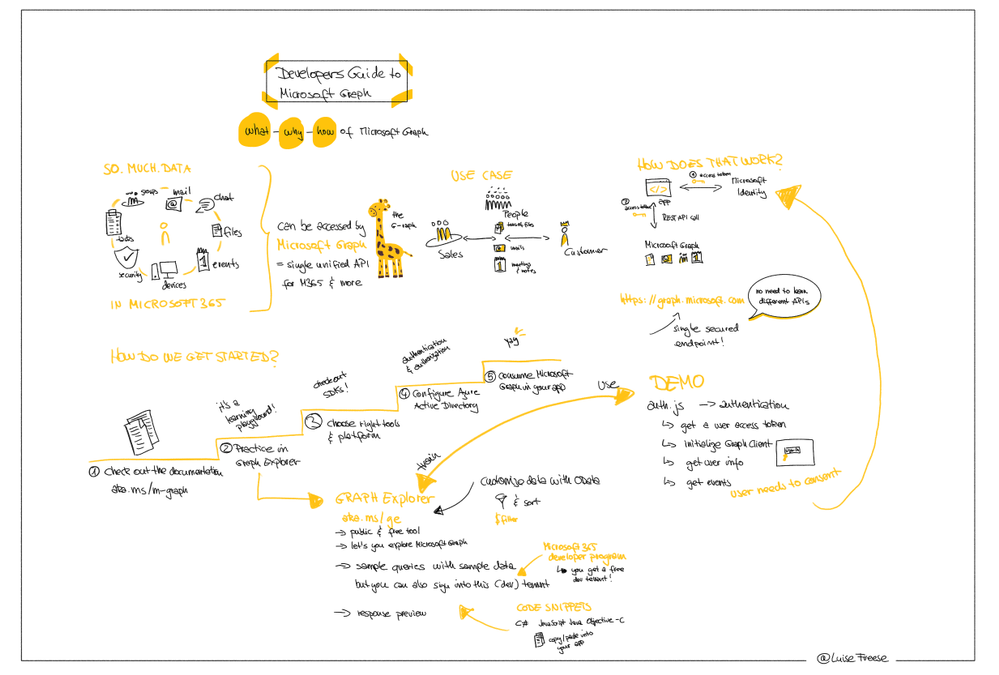
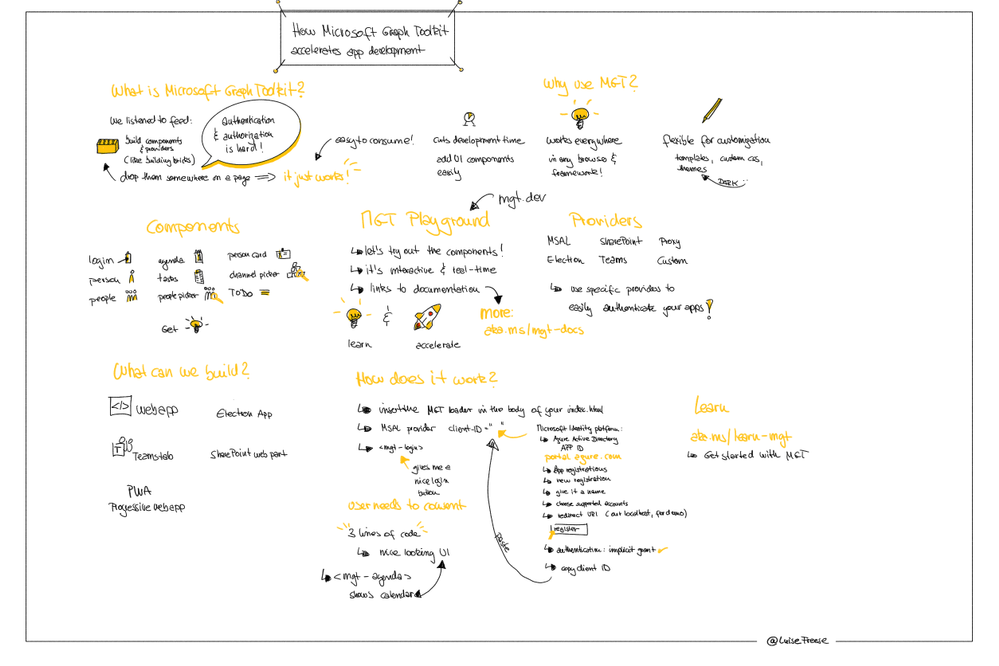
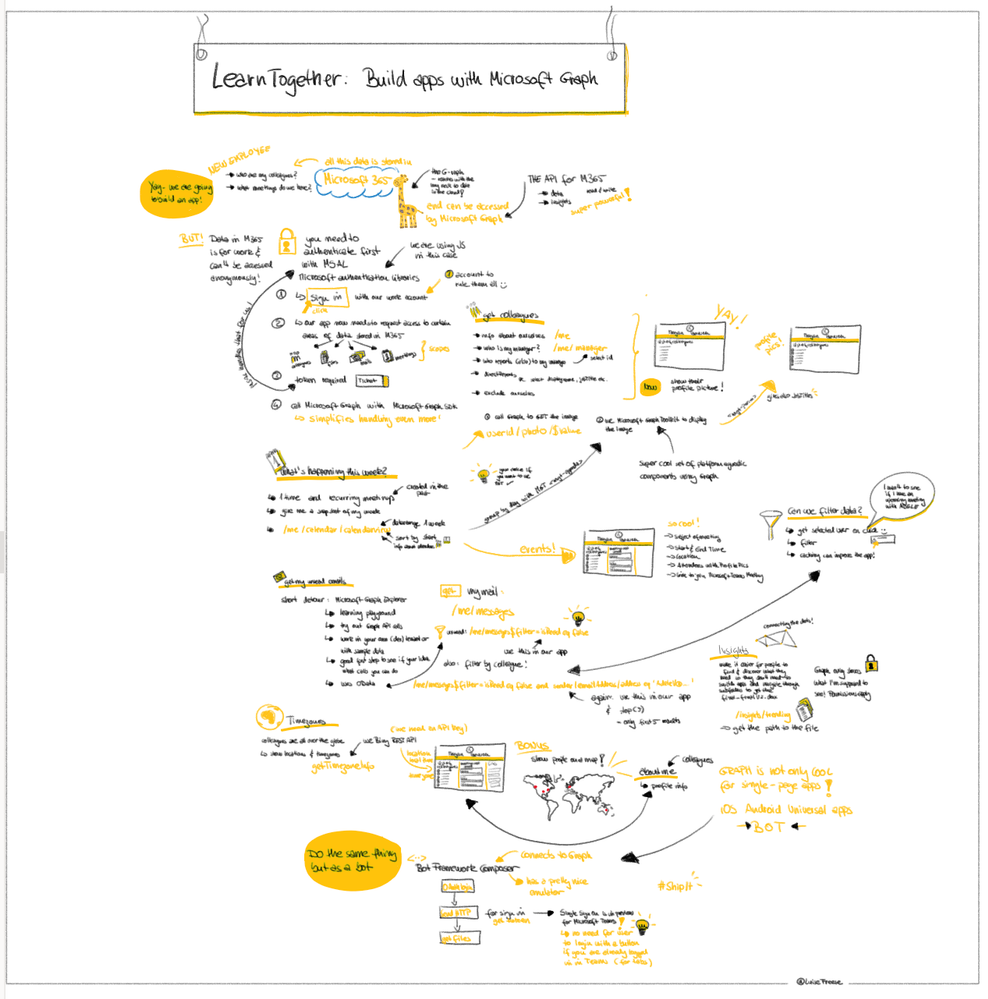
This week, I had the great pleasure to attend Microsoft’s Learn Together: Build apps for Microsoft Graph event. I also did sketchnotes of the event, you may find high resolution files (images, gifs and mp4) are available here on GitHub.




Call to action: Learn how to make apps with Microsoft Graph and complete this Microsoft Graph Learn Challenge


Segment1.png


Segment2.png


Segment3-5.png