

SharePoint Roadmap Pitstop: April 2021
This article is contributed. See the original author and article here.
April 2021 brought some great new offerings: Immersive Reader: SharePoint pages and news posts, Events Web Part: Audience Targeting, SharePoint site templates, Microsoft Lists for iOS: iPad support, Manage Microsoft Lists for iOS using InTune APP, Microsoft Lists: Visualize date with Power BI, OneDrive sync 64-bit for Windows, and more. Details and screenshots below, including our audible, “groundhog, shadow-casted” companion: The Intrazone Roadmap Pitstop: April 2021 podcast episode – all to help answer, “What’s rolling out now for SharePoint and related technologies into Microsoft 365?”
In the podcast episode, I chat with Nicole Woon (LinkedIn | Twitter), program manager on the SharePoint at Microsoft focused on all things site templates. We dig into all about the new templates, their history from the SharePoint Look Book – moving into Microsoft 365, and insights into what you can expect next for templatizing your intranet.
Nicole Woon, program manager at Microsoft [Intrazone guest], with little Mark Kashman [co-host] in the bottom right corner during our interview over Teams.
HELP AMPLIFY | India is experiencing one of the worst outbreaks of COVID cases since the start of the pandemic. Many of our colleagues and friends in India are greatly impacted. We wish to amplify the COVID resource website my colleague Prarthana Sannamani manages for anyone that will benefit from it. Thank you for considering sharing it. We are grateful the U.S. government is mobilizing to help. And as Satya Nadella shared, “Microsoft will continue to use its voice, resources, and technology to aid relief efforts, and support the purchase of critical oxygen concentration devices.”
All features listed below began rolling out to Targeted Release customers in Microsoft 365 as of April 2021 (possibly early May 2021).
Inform and engage with dynamic employee experiences
Build your intelligent intranet on SharePoint in Microsoft 365 and get the benefits of investing in business outcomes – reducing IT and development costs, increasing business speed and agility, and up-leveling the dynamic, personalized, and welcoming nature of your intranet.
Immersive Reader is coming to SharePoint pages and news posts
The Microsoft Immersive Reader tech, currently built into Word, OneNote, Outlook, Teams, and other Microsoft apps, will soon be available for SharePoint pages and news posts. The Immersive Reader uses proven techniques to improve reading and writing for people regardless of their age or ability.
 Click the Immersive Reader button to minimize aspects of the SharePoint site to best focus on the text of the page or news article.
Viewers of SharePoint pages and news posts will see a button on the page command bar to open the Immersive Reader. Note: In this initial release, the Immersive Reader will only read content contained in text web parts.
- Roadmap ID: 70737.
Audience Targeting capability for Events Web Part
This provides the ability to target specific audiences per event within the SharePoint Events Web Part. Meaning you can target specific events to different audiences – aligning with in-place options to personalize your intranet experience.
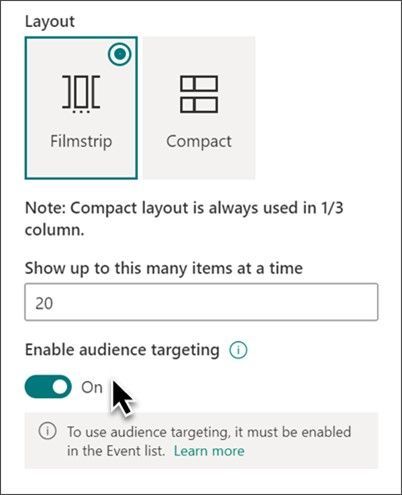 When you turn on audience targeting, you can make it so certain events within the Events web part appear, or don’t, for certain people and/or groups.
Knowing about events in your organization is great. Seeing the set of events that are meant for you based on role, region and distinct team or org, even better.
- Roadmap ID: 70815.
- Learn more.
SharePoint site templates (Nicole Woon); merge in with Next steps
This new SharePoint release of scenario-based site templates will help you expand what’s possible with content, pages, and web parts while helping you quickly get started building your own site. Each template contains pre-populated content and web parts that are fully customizable to meet the needs of your organization.
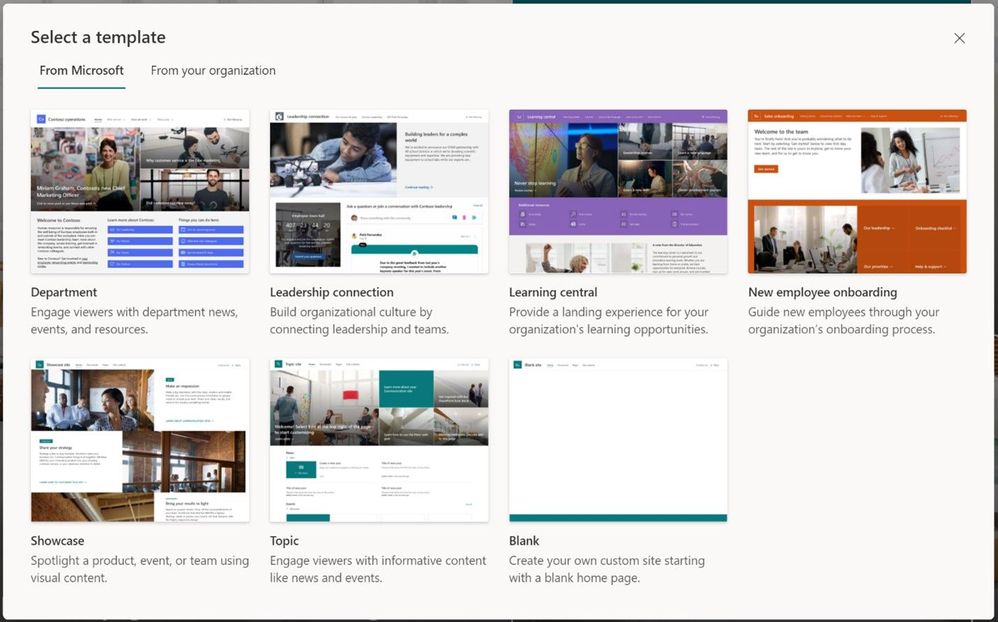 You’ll find Microsoft-provided templates when you create new sites in Microsoft 365, alongside any custom templates you may have deployed.
Current set of scenario-based site templates:
- Communication site templates
- Department – Engage and connect viewers with departmental news and resources.
- Leadership connection – Build community by connecting leadership and team members.
- Learning central – Showcase learning and training opportunities.
- New employee onboarding – Streamline and refine new hire onboarding process.
- Showcase – Spotlight a product, event, or team using visual content.
- Topic – Engage viewers with informative content like news and announcements.
- Blank – Create your own custom site starting with a blank home page.
- Team site templates
- Event planning – Coordinate and plan event details with your team.
- Project management – Create a collaboration space for your project team.
- Training and courses – Prepare course participants for learning opportunities.
- Training and development team – Plan opportunities to help others learn and grow.
- Team collaboration – Manage projects, share content, and stay connected with your team.
- Roadmap ID: 70574.
- Learn more:
- Share this template guide with end-users: Learn how to apply and customize SharePoint site templates.
- For admins using custom site templates (previously known as site designs and sometimes called third-party templates) review learn how to create a custom site template and site script.
Teamwork updates across SharePoint team sites, OneDrive, and Microsoft Teams
Microsoft 365 is designed to be a universal toolkit for teamwork – to give you the right tools for the right task, along with common services to help you seamlessly work across applications. SharePoint is the intelligent content service that powers teamwork – to better collaborate on proposals, projects, and campaigns throughout your organization – with integration across Microsoft Teams, OneDrive, Yammer, Stream, Planner and much more.
iPad support now available in Microsoft Lists for iOS
Track what matters most from the comforts of a larger touch screen device. We’re pleased to share Microsoft Lists for iOS now supports iPad. AKA, no more Lists at 2x. You’ll get a beautiful native experience to track, manage and share your information.
With the extra screen real estate, you can easily search for lists, list items, and tap directly into your favorite and recent lists – directly from the home screen. Lists looks great in both portrait and landscape modes. And it mirrors the Lists Web experience, blended within the common design of iOS.
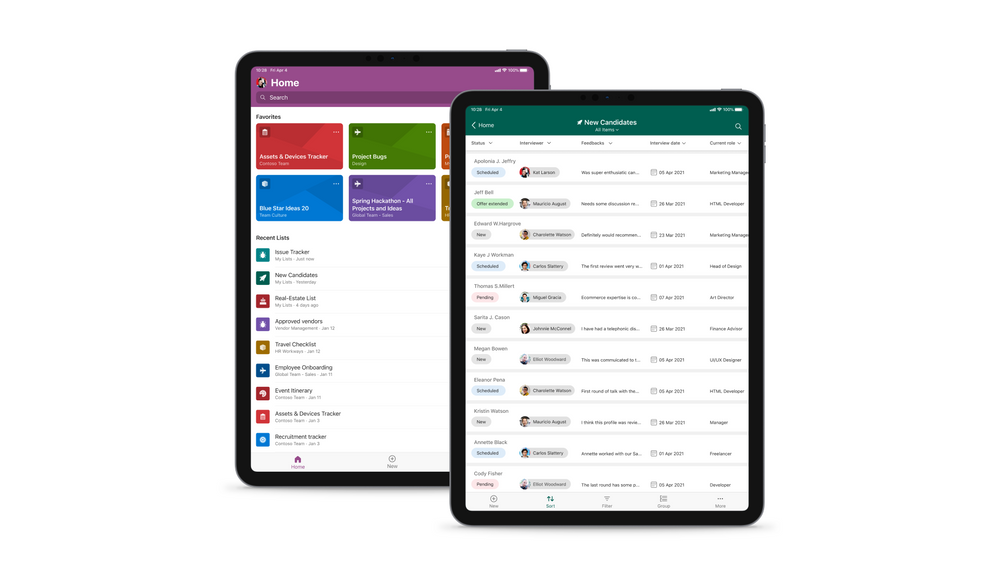 Microsoft Lists for iOS on an iPad, showing the main home screen with Search, and Favorites and Recent lists (left), and working on an individual ‘New Candidates’ list (right).
Once in a list, you’ll swipe up and down, left to right to navigate your list. You’re able to tap into a specific list item to see it’s full view form. And you can refine the view of information using filter, group by, and tapping into individual fields to make changes to drop-down menus or enter text.
- Get Microsoft Lists for iOS today and use on your iPhone or iPad.
- Roadmap ID: 70748
- Learn more.
Manage Microsoft Lists for iOS using InTune app protection policies (APP)
The Microsoft Lists iOS app is now configurable as a public app in Intune app protection policy (APP) through the Microsoft Endpoint Manager admin center. This allows app to be targeted to ensure that the data accessed is protected by app protection policies.
The app now also supports conditional access deployment through Azure admin portal. Please note that ‘Require app protection policy’ is supported which provides higher level of assurance. Lists app doesn’t currently support ‘Require approved client app’ grant access.
- Roadmap ID: 70752.
- Learn more how to enable InTune app protection policies (APP) for Lists for iOS, which includes how to create and assign app protection policies (via docs.microsoft.com).
Microsoft Lists: Visualize date with Power BI
We are excited to announce the arrival of a new guided experience in Lists that will make it easy to create business intelligence reports in Power BI using your list data as your source.
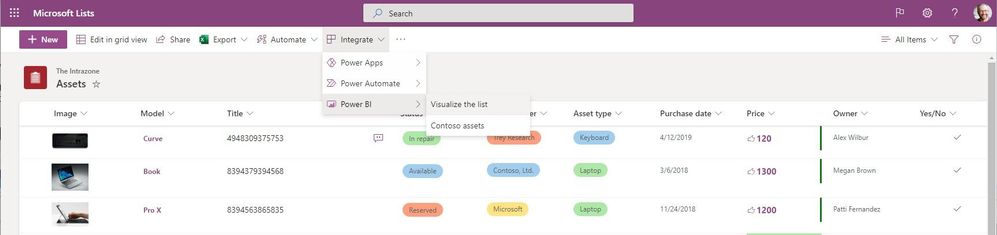 From within Microsoft Lists, click Integrate > Power BI > Visualize this list to open your data into a new Power BI dashboard.
List users will see a new menu option in Integrate > Power BI > Visualize this list, which allows users to create a new Power BI report using that list. With just one click, you’ll be able to autogenerate a basic report and customize the list columns that are shown in the report. To take further advantage of Power BI, go into Edit mode. Once a report is saved and published, it will appear in the same submenu under Integrate > Power BI.
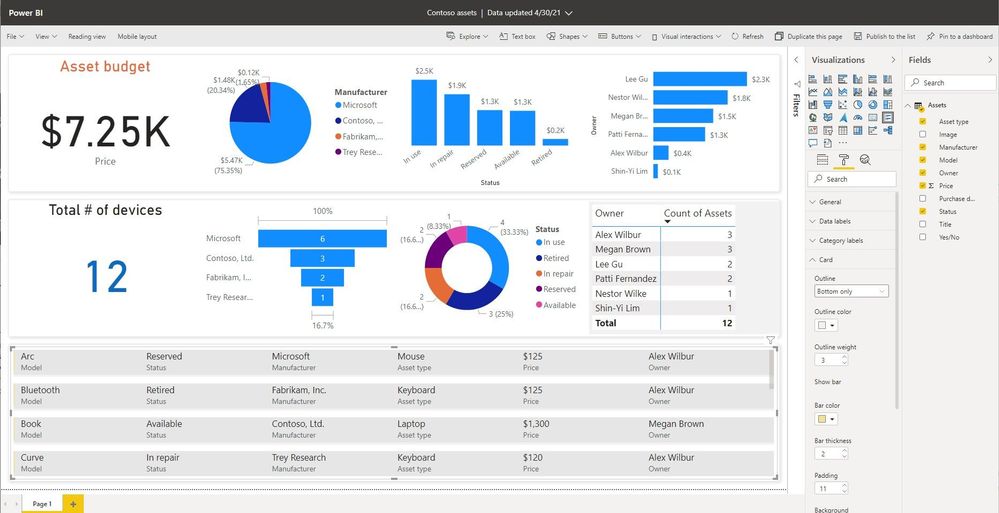 Once your list is open in Power BI, you can edit it (showing Edit mode), publish the custom dashboard back to your list, and share it.
Licensing information:
- Users with a Microsoft 365 E5 license or Power BI Pro license will have access to the full report authoring and viewing experience.
- Users without either of those licenses will be prompted by Power BI to sign up for a 60-day free trial of Power BI Pro when they attempt to save a new report or edit or view an existing report. You can turn off self-service sign-up so that the option for a trial is not exposed to List users, click here. Users with a Power BI free license may only visualize their list data but cannot publish nor view reports.
- Roadmap ID: 72175.
- Learn more:
- View and manage Power BI user licenses
- Get started creating in the Power BI service
- Quickly create reports in the Power BI service
- Enable or disable self-service sign-up and purchasing
Related technology
OneDrive sync 64-bit for Windows
We’re excited to announce that the 64-bit OneDrive sync client for Windows is now available as a public preview. This has been a long awaited and highly requested feature. You can now download the 64-bit version for use with OneDrive work, school, and home accounts.
Note : If you have a 64-bit operating system with an x64-based processor, you can choose to install either the 32-bit or 64-bit OneDrive. For ARM64 devices, you should continue to use the 32-bit OneDrive. Computers running 64-bit versions of Windows generally have more resources—such as processing power and memory.
- Roadmap ID: 70695.
- Learn more.
Exclude specific files from OneDrive sync on macOS
This new feature setting will allow you to exclude newly added OneDrive files from syncing to the cloud by file name or extension on macOS devices. This setting lets you enter keywords to prevent the OneDrive sync app from uploading certain files to OneDrive or SharePoint. You can enter complete names, such as “setup.exe” or use the asterisk (*) as a wildcard character to represent a series of characters, such as *.pst.
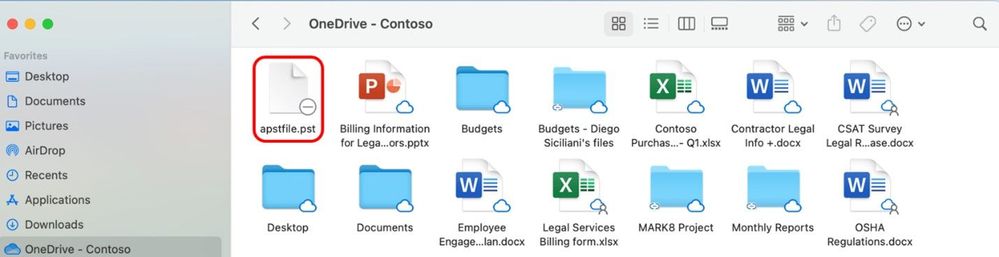 Exclude certain file types when using OneDrive sync for macOS.
If you enable this setting, the sync app doesn’t upload new files that match the keywords you specified. No errors appear for the skipped files, and the files remain in the local OneDrive folder.
- Roadmap ID: 80684.
- Learn more.
New options for attachments in Outlook on the web
This is an updated experience when you receive email attachments. We are updating the look and contents of the attachments and consolidating all options under a single menu (like Outlook for Mac and Outlook for Windows).
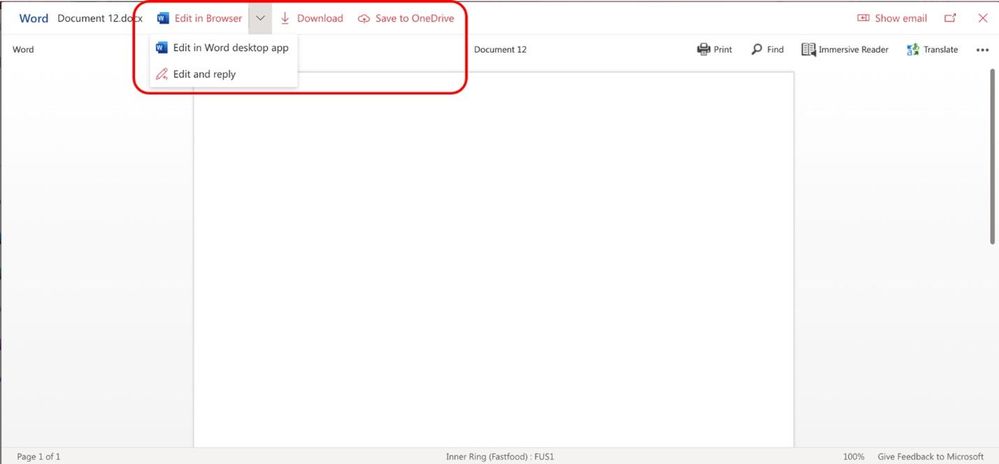 Start working on Outlook attachments with them in OneDrive as you begin to edit and share them beyond the initial email.
What this means for people with OneDrive enabled, they will see new options in this menu and in the attachment previewer for Word, Excel, and PowerPoint files, to directly begin editing Office attachments in the corresponding browser or desktop app – beginning the storage and collaboration from the SharePoint files platform – a single source of truth – not multiple versions of file attachments.
- Roadmap ID: 72212.
Upcoming Microsoft Lists virtual workshops – May 10-14, 2021
“Go further with Microsoft Lists” – Microsoft will deliver five FREE virtual workshops across various time zones. Just pick your time zone and join in. We’ve got a lot of great presenters from the product team. See how Lists evolve from SharePoint lists to empower individuals and teams to create, share and track information – including innovation in Microsoft Teams.
We will teach you how to use and create views, configure conditional formatting, adjust forms and more. Plus, we will highlight extending lists with the integrated Power Platform and answer all frequently, or infrequently, asked questions; in fact, you can submit a question in advance to ensure we cover it.
 “Go further with Microsoft Lists” – five, free Microsoft workshops across time zones (May.10-14.2021)
Get ready to become a Microsoft Lists pro, for free. Learn all you can do with Microsoft Lists – your smart information tracking app in Microsoft 365.
Learn. Connect. Inspire | Register today at https://aka.ms/MSLists/workshop
May 2021 teasers
Psst, still here? Still scrolling the page looking for more roadmap goodness? If so, here is a few teasers of what’s to come to production next month…
- Teaser #1: SharePoint Auto News Digest updates [Roadmap ID: 70606]
- Teaser #2: Migrate content from Google to Microsoft 365 [Roadmap ID: 82014]
… shhh, tell everyone.
Helpful, ongoing change management resources
- Stay on top of Office 365 changes
- Message center in Office 365
- Install the Office 365 admin app; view Message Center posts and stay current with push notifications.
- Microsoft 365 public roadmap + pre-filtered URL for SharePoint, OneDrive, Yammer and Stream roadmap items.
- SharePoint Facebook | Twitter | SharePoint Community Blog | UserVoice
- OneDrive Facebook | Twitter | OneDrive Community Blog | UserVoice
- Follow me to catch news and interesting SharePoint things: @mkashman; warning, occasional bad puns may fly in a tweet or two here and there, plus my new blog on Substack: The Kashbox.
Thanks for tuning in and/or reading this episode/blog of the Intrazone Roadmap Pitstop – April 2021 (blog/podcast). We are open to your feedback in comments below to hear how both the Roadmap Pitstop podcast episodes and blogs can be improved over time.
Engage with us. Ask those questions that haunt you. Push us where you want and need to get the best information and insights. We are here to put both our and your best change management foot forward.
Stay safe out there on the road’map, and thanks for listening and reading.
Thanks for your time,
Mark Kashman – senior product manager (SharePoint/Lists) | Microsoft)
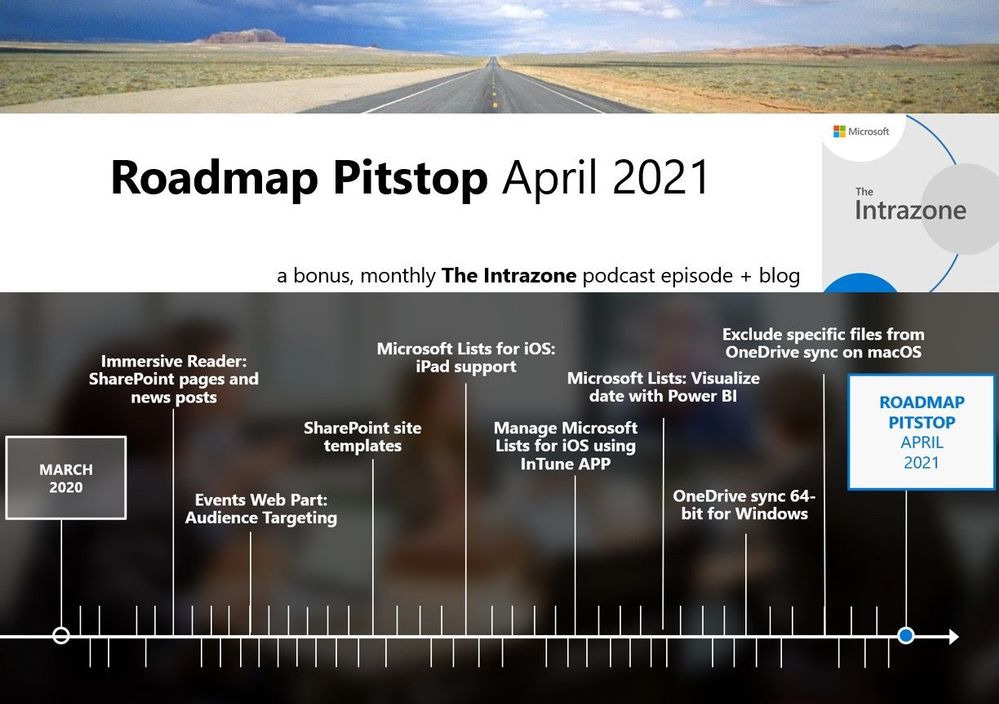 The Intrazone Roadmap Pitstop – April 2021 graphic showing some of the highlighted release features.









Recent Comments