This article is contributed. See the original author and article here.
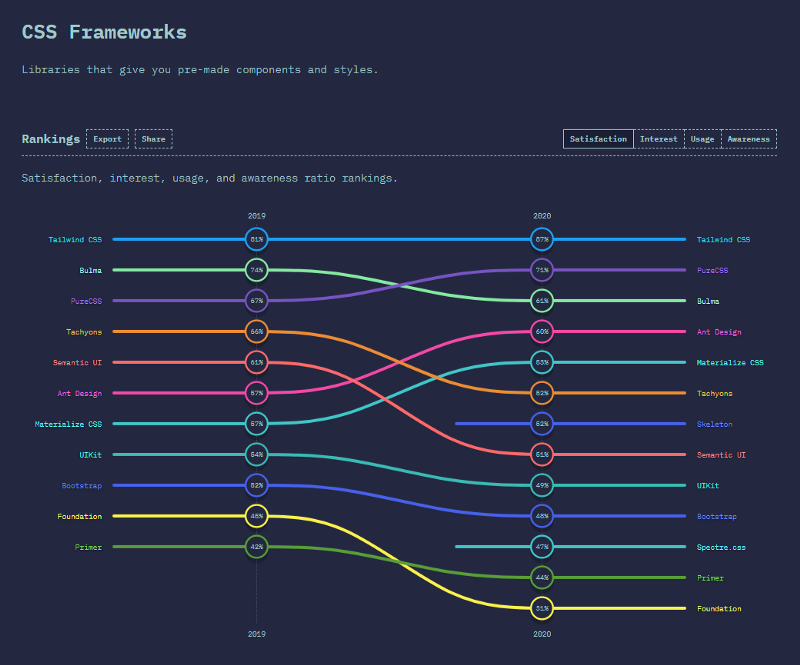
In the State of CSS 2020 survey, the Tailwind CSS becomes the number 1 CSS Framework in terms of Satisfaction and Interest in the last 2 years. It also gets the awards for The Most Adopted Technology. It seems a lot of developers like this framework. Based on my experience, this framework can help us rapidly build UI by reducing complexity when styling the UI.
State of CSS 2020 Survey — CSS Frameworks result
In this article, I will share my setup to use the Tailwind CSS in a SharePoint Framework (SPFx) project.
Prepare the SPFx Project
Prepare your SPFx project. I use a newly generated SPFx project (v1.11) but you can also use your existing SPFx project.
Install Modules
Install all modules needed by executing the command below:
Initialize Tailwind CSS by executing the command below:
npx tailwind init -p –full
The command will create the tailwind.config.js in the project’s base directory. The file contains the configurations, such as colors, themes, media queries, and so on.
The command will also create the postcss.config.js file. We need PostCSS because we will use Tailwind CSS as a PostCSS plugin.
Inject Tailwind CSS Components and Utilities
We need to create a CSS file that will be used to import Tailwind CSS styles.
Create an assets folder in the project’s base directory
The code will add the tailwindcss subtask to the SPFx Gulp Build task. It will also purge (remove unused styles) the Tailwind CSS for build with ship flag:
gulp build –ship
or
gulp bundle –ship
Add Reference to The Generated Tailwind CSS
We need to add reference the generated Tailwind CSS by adding the import code in your main .ts webpart file:
import ‘../../../assets/dist/tailwind.css’;
That’s it!
Now you can use Tailwind CSS utilities in your SPFx project.
Result
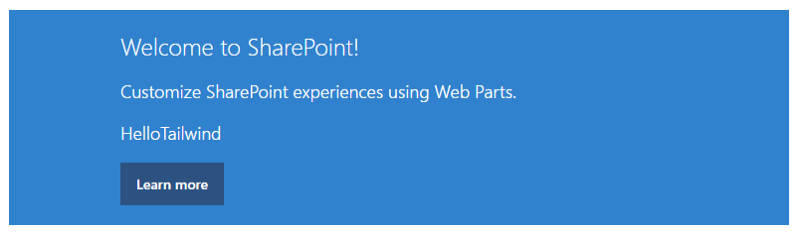
You might be familiar with the below result except it’s not using styles from the 74-lines scss/css file anymore.
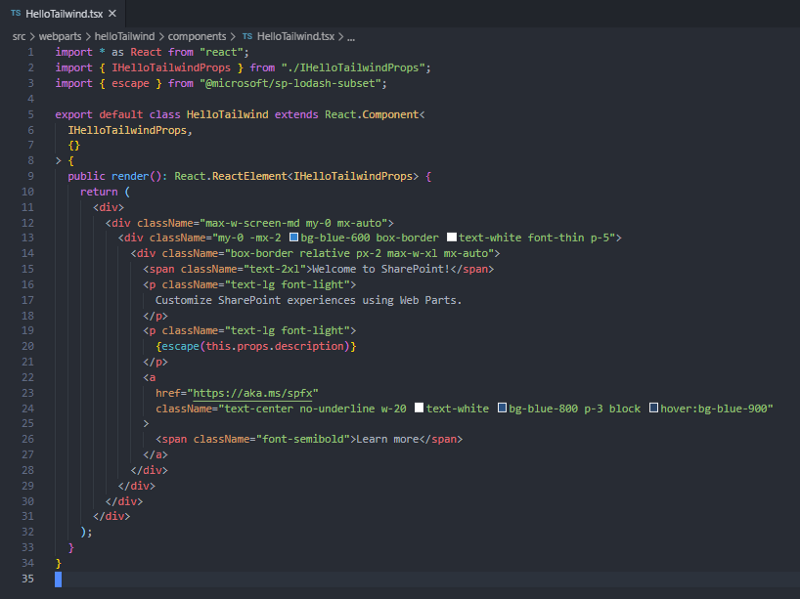
Below is the updated React component that’s using the Tailwind CSS utility classes for styling.
This article is contributed. See the original author and article here.
The Mako™ Core SDK from Global Graphics Software is perfectly placed to help software vendors and service providers integrate with Universal Print. Our SDK can help developers analyze, edit, and convert the documents at the heart of Universal Print workflows.
Case study: Modifying print job payloads
As a part of Universal Print, developers get access to a set of Microsoft Microsoft Graph APIs that allows analysis and modification of print job payload data. This feature enables a few different scenarios, including adding security (e.g. redactions or watermarks) to a Universal Print-based workflow.
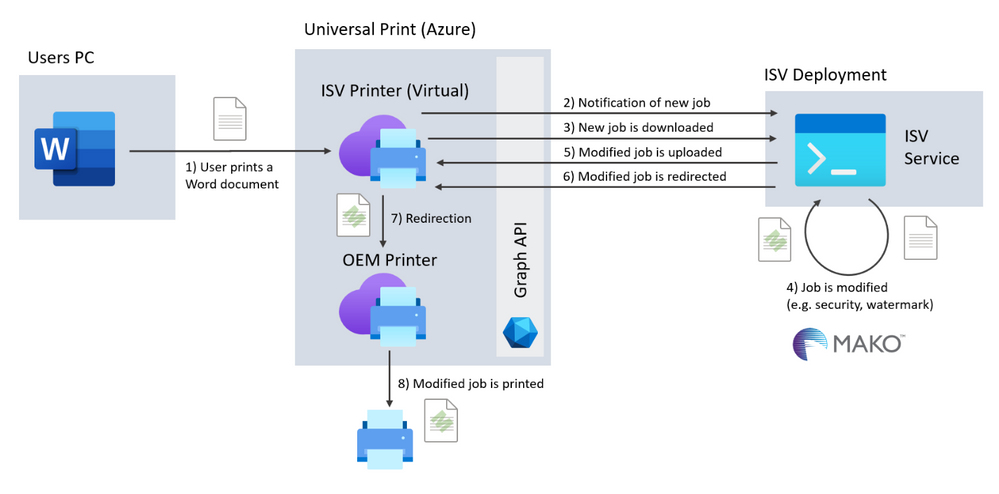
The diagram below shows a software vendor’s implementation for modifying print job payloads using Universal Print and the Graph APIs.
In the scenario, the ISV creates a service which uses the Mako SDK to modify the payload. This service could be implemented as an Azure Serverless Function or App Service deployment. Either of these would expose an endpoint which is called by the Graph’s change notifications when a print job has been sent.
Once notification has been received, the service downloads the payload and uses Mako to analyze and modify it. Once modified, the payload can be uploaded again and redirected.
Mako fits this type of workflow perfectly, since it can handle multiple page description languages (PDLs), including those commonly used in printing such as PDF, PostScript, PCL/XL and XPS.
The Mako SDK also has a PDL-agnostic document object model (DOM), meaning that your integration can edit the print job payload in the same way, regardless of the PDL you’ve been given.
Existing integrations
If you have an existing Universal Print integration, it’s likely that Mako already supports your environment, making switching easy!
The Mako SDK supports both cloud and on-premise deployments, including Azure and containerized workloads. We support many desktop and mobile environments including Windows, Linux (including Alpine), Android, iOS and MacOS.
It’s also likely that your integration uses a programming language that we already support: we natively wrote the SDK in C++ for the perfect balance of performance and ease-of-use, but we distribute it as beautifully wrapped libraries for C#, Java and Python too.
See it in action
We’ve integrated Mako into Universal Print ourselves and used it to automatically redact print jobs as they go through a Universal Print workflow. Watch at the recording of our Mako live coding webinar to see it in action.
Try it out
We’d be excited to talk to you about your Universal Print project and see how we can help. For more information about Mako, visit globalgraphics.com/mako
Thank you for reading this blog! My name is John van Zetten, a passionate teacher at the Hoornbeeck College.
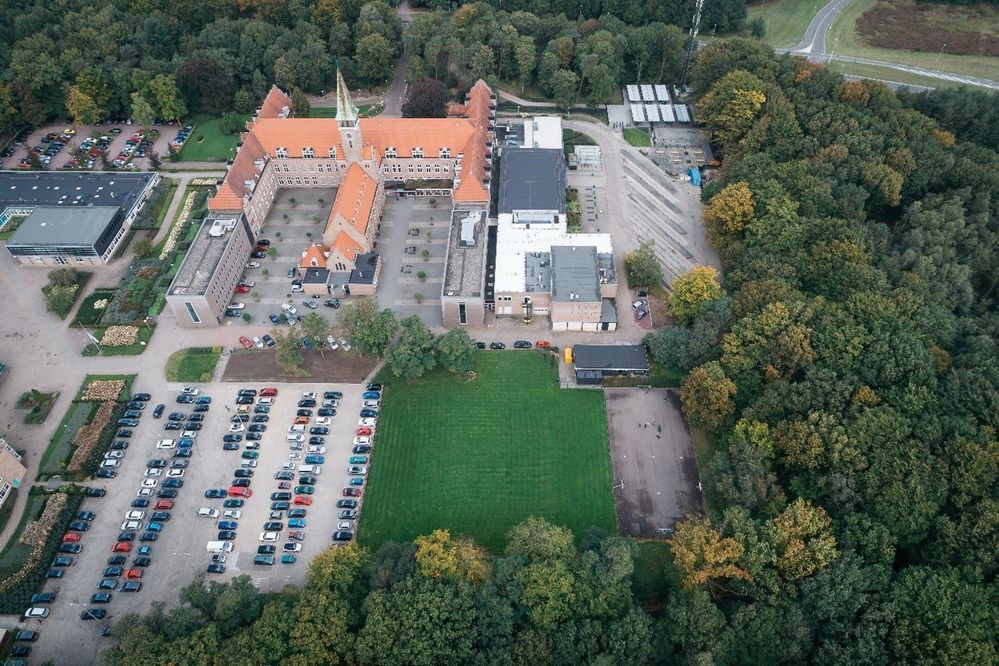
Hoornbeeck College is a Community College in the Netherlands. On 6 locations we offer 131 different studies over 4 departments. Each study prepares the student for a place in the professional field, ranging from mechanics to doctor’s assistants and from management assistants to software developers. Currently we have around 10000 students. In this blog I will focus on the training area for IT Professionals. In this study we teach our students everything they need to work in the field as an IT administrator. A couple of things that pass in review: data communications with Cisco, service management, Linux, Microsoft Office, security, scripting, and cloud-computing. The cloud-computing courses are based on Microsoft 365 and Microsoft Azure, as these are the two most used cloud platform in the SMB in the Netherlands.
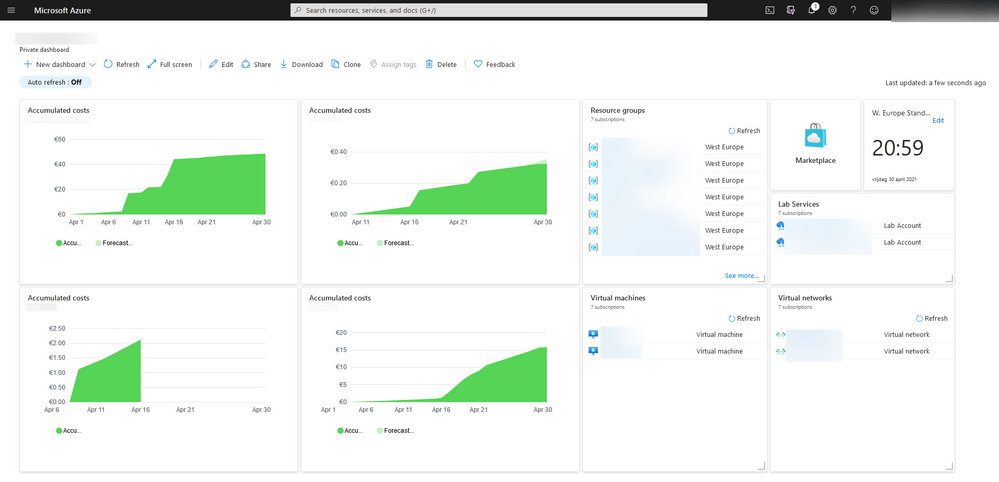
With Azure growing in the Netherlands over the last years we felt the need to embed this in our curriculum for our IT Professionals. Also: our students needed to buy an expensive laptop to run the virtual machines we use to give them hands-on experience with the technology we teach. So, we were facing two challenges: students need to have knowledge and hands-on experience with Azure, and we needed to lower cost for our course.
We started with the second bit as this was the easiest to do and because we expected that with using Azure as our primary work-load platform (instead of the students’ laptops) the students get the hands-on experience as well. A certification path was not part of our considerations at that moment. Only one instructor was certified in Azure Fundamentals AZ900 exam at that moment.
We choose our lessons series on Windows Server to host them in Azure instead of VMware Workstation. After working in/with Azure for two years, we started looking for a way to not only let them use Azure as a workload platform but also give them broader knowledge of cloud-computing and Azure. After experimenting with different teaching materials, we decided to use the Microsoft Learn for Educators curriculum for Azure Fundamentals. There were three main reasons for that:
The materials provided by Microsoft are up-to-date and complete: Everything covered in the official AZ-900 exam has a place in the course materials.
The course has a nice mix between explanation and hands-on experience via labs: the provided slide-decks give a good overview of Azure and comes with hands-on labs that you can either walk through as a teacher or let the students work through it by themselves.
It is compact, the whole curriculum could be packed into 20 hours or less: With a strong focus on the right things, there is plenty of time available for exam preparation our more hands-on experience.
Teaching with this material gives students a great chance of passing the Azure Fundamentals AZ-900 exam and adding this valuable certification to their resume. We are currently at an >75% first pass rate for AZ-900.
Implementing new course-materials always come with certain challenges. I want to share a couple of our lessons learned here:
Students need hands-on experience for good exam results. As mentioned before, we started using Azure before we jumped on the certification train. This means that our student already had quite a bit of hands-on experience before they take their exams. All students agreed that if they did not have the hands-on experience like they had, it would have been much harder to pass the exam. So, I would like to recommend to you to give them as much hands-on experience as possible. The labs provided by Microsoft are a good starting point but expanding this with other materials is very valuable.
New technology is not only a challenge for students but for teachers as well. So, if you want to implement Azure in your curriculum, make sure that you spent a decent amount of time to train your colleagues and get them to at least the Fundamentals level. The trainer-the-trainer sessions on the Learning Download Center are a good resource to do this, also the Virtual Educator Prep Sessions (VEPS) give a lot of input. Getting your feet wet is simply the best option to learn these things.
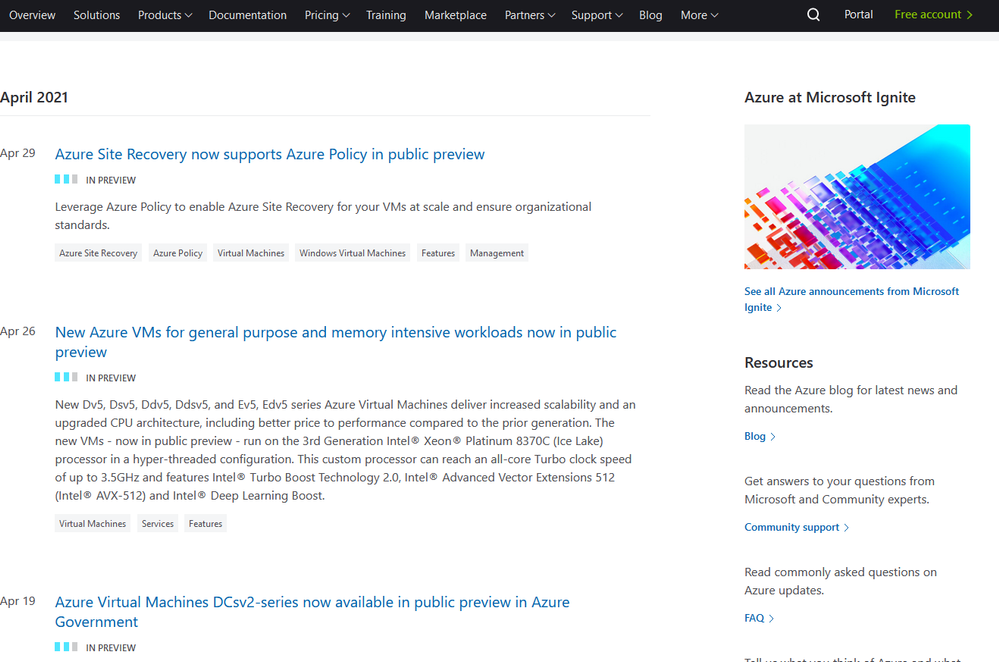
Teaching Azure means that you teach a platform that literally changes every 30 days or so. This gives a never-ending challenge of keeping you own knowledge and learning materials up to date. Keeping an eye on the roadmap so you know what is coming and be prepared! Microsoft runs various technical and training events throughout the year to help keep you upto date Microsoft Ignite and Microsoft Build are the key developer conferences.
As stagnation means decline, we are always looking for opportunities to build an even better curriculum. Currently we are looking at these options:
Microsoft 365 is a very big growth area here in the Netherlands and therefore we are implementing the Microsoft 365 Fundamentals (MS-900) to our curriculum.
As a passionate teacher and Microsoft Learn for Educators Ambassador, I am happy to share more of my insights and learn from your experience to make our lessons better together!
This article is contributed. See the original author and article here.
Welcome to the monthly Healthcare and Life Sciences blog recap, April edition! Check out the highlights below:
Power BI
Ingest Healthcare Open Data into Azure and Power BI using New GitHub Repository: Greg Beaumont, Microsoft Senior Intelligence Technical Specialist, built a repository of healthcare open data in GitHub called Power Pop Health. The solution contains low code/no code/no PowerShell deployment, so anyone can use it with nothing more than an Azure subscription and Power BI. Read more about the solution here.
Excel Analyst in a Day with Power BI: Explore how Excel and Power BI are best used together and how Excel and Power BI can be integrated in Microsoft Teams and SharePoint online. Click here to learn more and register for the event.
Dashboard in a Day with Power BI: Interested in participating in a free Power BI workshop? Click here to learn how.
Embed Power BI Reports in Healthcare EMR: Learn more about how healthcare providers are embedding Power BI reports from their EMRs/EHRs. Click here to register for the event.
Power BI at Microsoft Business Applications Summit: Join the Power BI team and learn about the next features, demos, roadmap for Power BI. Click here to learn more.
Microsoft Teams Rooms
Transitioning to Microsoft Teams Video Conference Rooms: Are your employees returning to work? Learn how to configure existing conference rooms for Teams meetings. Click here to learn more.
Confessions of Health Geeks
Microsoft Nurses Heeding the Call of Service: Learn from Molly McCarthy and Kathleen McGrow as they discuss the complexities of volunteering at a COVID-19 vaccination clinic and their hopes for the future of the COVID-19 vaccination process. Click here to watch.
Health Plan Member Experience Improvement: Microsoft’s Director of Population Health, Amy Berk, discusses some of the forces driving health plan member experience improvement. Click here to learn more.
Diversity in Clinical Trials and Drug Development: In this podcast, Claire Bonaci discusses the importance of diversity and inclusion in pharma and life sciences, specifically the importance of diversity in clinical trials. Watch the podcast here.
Tackling health inequity:Dr. Zafar Chaundry, SVP and CIO at Seattle Children’s Hospital shares how he and his team are working to expand access to healthcare and improve health equity in the greater Seattle area. Click here to watch.
MidDay Café
MidDay Café Re-launch: The MidDay Café is temporarily pausing until the re-launch on May 10th. The new format will be shorter with different content. Read the announcement here.
January’s HLS Blog Contributors:
Michael Gannotti, Principal Technical Specialist, Microsoft Teams
I live in Nottingham, UK with my family: My wife, my son who is 18 and my daughter who is 11. I am from an Iranian background that live in the UK from 2003 when I started my MSc then PhD in Computer Science at the University of Nottingham (UoN). After graduation, I became a research fellow in the same university and worked in this position for 8 years. Then I moved to Nottingham Trent University (NTU) and became a senior lecturer at the Department of Computer Science. This all means that by now, I have been in Nottingham “Universities” for 18 years (i.e., as old as son!).
Well, it starts from the last year, just in the middle of COVID lock down, that I [unnecessarily!] taking Artificial Intelligence module leadership. Although I had research background in AI and have been in the AI community and research groups, teaching AI was relatively new for me. By the way, I took leadership for the 3rd year AI module, and recently became “Computer Science – AI” Course Leader. This course is newly proposed and approved following marketing research at NTU, and will hopefully get the first students in 2022-23 academic year. Moreover, we run AI modules for MSc Computer Science and MSc Data Analytics students, and finally for Degree Apprenticeship courses. (imagine how all these arrangements took place in COVID Lockdown)
Sorry, let’s comeback… eventually at the same time of taking all of those responsibilities, I was told that Microsoft and NTU are teamed up to expand collaborations, not only for infrastructure but also for computer science education. Particularly there have been some communications between our head of department (Prof Ahmad Lotfi) and Clare Riley (HE engagement manager for Microsoft UK) that Microsoft can support free materials and certification of “Azure AI Fundamental” for a limited number of students and staff.
This was a start of making some changes to the AI module and reach to a win-win situation: For students to learn more up-to-date and practical materials that what they’d have supposed to learn, and get a free certificate by the time they graduate from NTU! For us as academics, it was a risk of doing this as a pilot program that if runs successfully can showcase a good industrial collaboration and will be continued more widely. Ahmad asked me if I can lead this pilot program, and the answer was [again unnecessarily] yes!
Leveraging Microsoft Azure-AI Fundamental
How did I incorporate the MS Learn for Educators teaching materials into the existing materials? What about assessment? Timing?… These were questions to be answered. I was myself new to Azure-AI so all of these had to be a learning-teaching experience.
The decision to make the changes was done in November 2020. By that time, no substantial change would have been allowed for a module.
The first thing I did was asking my students: Do you want to get this certificate or want me to leave it for the next year students?! Take it or leave it! If you take it, then we need to work together for good: be tolerant about unexpected changes and uncertainties. I asked them to expect changes from the start of term 2 (January 2021). I received positive messages, although in online teaching, understanding the actual views were not easy, and to be honest I still do not have a strong feeling what my students think about this program – let’s be optimistic for now!
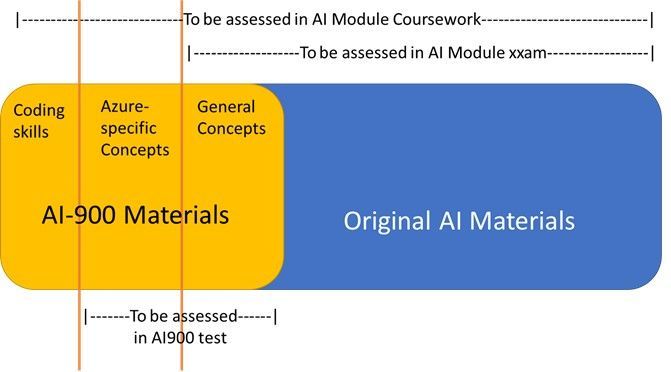
I planned my new year holidays to learn Azure-AI myself, and plan for the changes in materials and assessments. The module revamping challenge was that I needed to draw a line between the materials that are being assessed in the module exam/coursework and those which are just needed for taking the MS test. On the other hand, there are something that are covered in the Microsoft materials that are not being asked in the Microsoft test (such as coding). I followed an assessment pattern like this:
I will write later how did I incorporate the AI-900 into assessment elements (exam and coursework) together with the challenges and limitations I had.
Impact on Learning
It is perhaps too soon to fully evaluate the learning outcomes. I know that the students (and the school) were complaining about overloading unnecessary theoretical AI materials and wished a practical-focus revamp of the module. This year, although the participation was not high, there are positive feedback from the students that appreciate the change, and expressing that the modules was interesting to follow particularly when it comes to the incorporated AI-900 materials. The other evaluation result I have now, is the final stage of the coursework (out of 4), in which I asked the students to add an Azure service to their chatbot (the subject of the coursework). I just finished marking of this coursework component and I can observe more engagement and better marks for this component.
A better evaluation is to be done after the module exam as well as after the AI-900 certification test.
What Else for Now and Future?
Well, I did not limit myself to incorporating AI-900 to a particular module only. As an academic, there are many other educational benefits from Microsoft materials and technologies I can take. I would like to give some headlines here and continue on each in some later posts.
AI-900 is just incorporated into another module that I teach: Artificial Intelligence for Degree Apprenticeship course (today is its last day). The settings are different from the ordinary 3rd year AI module, due to the number of students, their maturity, their existing employment and the very short module length.
MSc projects are fantastic routes to incorporate Microsoft technology into research out of the pre-defined and limited teaching materials. I defined an MSc project to develop an Azure-based AI solution which uses fuzzy logic as the core technique. The student who picked the project up is starting the work, and I hope to get good result – updates to follow.
Active using of Azure VMs for labs. Due to more than a year in COVID, it looks like that blended labs, i.e., combining face-to-face lab-based teaching with home-based works will remain with us for some times. To have a consistent working environment for all students, Particularly for running AI-900 practical sessions, Azure VM can be used as the platform for both groups of students. This is undergoing.
International collaboration for AI teaching in High Schools
Within IEEE CIS (Computational Intelligence Society), I participate in a subgroup called High School Outreach Subcommittee with members around the globe. In the recent 2021 meeting, the members welcomed my idea in adapting Azure-AI learning materials for high school teaching activities of this committee, such as in summer schools and short courses, even as competition programs. More updates are to follow.










Recent Comments