by Contributed | May 5, 2021 | Technology
This article is contributed. See the original author and article here.
This blog dives into how to setup 1:1 call recording, end user experience and best practices for enabling this feature for users.
What is 1:1 call recording ?
This feature gives user the ability to record Microsoft® Teams call made to another user who is using Teams. Note that, this feature does not give you the ability to record 1:1 call with PSTN user.
How to enable call recording settings:
This is enabled using PowerShell. You need to modify the “Teams Calling Policy” using PowerShell. This setting is disabled by default – it must be enabled. You can either enable it for your global policy or you can create a custom policy, which has this feature enabled, and apply that policy to users who require this feature.
Set-CsTeamsCallingPolicy -Identity Global -AllowCloudRecordingForCalls $True
Note that, prior to April 12, 2021, this setting was controlled by the “Teams meeting policy”. If you allowed recording for teams meeting by setting “AllowCloudRecording” to true. After May 31, 2021, this particular setting in “Meeting Policy” only works for recording a meeting, it does not work for call recording.
End user experience:
After enabling this feature the user will have the option to ‘record a call’ in teams.
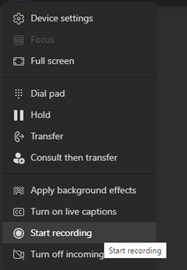
After a call is connected, users will have to click on the “more actions” icon (…) and it will give the option to start recording. In this example, John called Jane, and John started the recording.
When the recording starts the user on the other end (Jane) will get a notification that recording has started. In addition, a recording icon (red button) appears right next to the timer, even if the notification is dismissed the recording icon will stay active as long as recording is going on, so that the user is aware that the call is being recorded.
The notification still says “this meeting is being recording…” even though it is a 1:1 call, you can ignore this typo.

Where is the recording stored
The recording will be stored either in Stream or OneDrive for the user who initiated the recording. The “other” user – in this example, “Jane” will have read-only access to the recording.
Both users will be notified when the recording is ready. It will show up in the chat window for the call – in this example, John called “Jane Doe” and Jane recorded the call. The link to recording appears on both their chat window and it can be played back right on the Teams client.
In this case both John and Jane are in the same organization within the same Microsoft 365 tenant.

If the user who did not initiate the recording is an external user, then, this “recorded” user will not have access to the recording. The user who initiated the recording will have to share the recording with the user on the other organization.
After July 7, 2021, all recordings will be stored in OneDrive by default, unless your organization decides to opt-out. Following article goes into details about recording and storage for both 1:1 calls and meeting recordings.
Use OneDrive for Business and SharePoint for meeting recordings – Microsoft Teams | Microsoft Docs
This feature is for end user and does not replace or complement compliance recording. The user who initiates the recording has access to the recorded file, which in certain situation can violate compliance. For example, in certain scenarios, just the notification that the user is being recorded may not meet compliance requirement, additional disclaimers might be necessary. Another possible scenario – certain users are not allowed to keep recordings of calls in their storage. In these cases, admins need to get formal approval from the compliance team before proceeding with this setting.
Recommendation:
- Consider compliance requirement prior to enabling 1:1 recording feature.
- Start with a custom policy where this feature is enabled and add select group users to the policy. If a decision is made to enable the feature for all users, then the feature can be enabled globally.
- Both 1:1 call recording and meeting recording experience should be similar for specific users – otherwise, it can create confusion for the end-user.
- Share helpful tips with the user about where the recordings are stored.
- Consider retention policy to get remove old recordings from user’s One Drive.
Seema Rahman is the Principal Architect of Zodela Technologies. Her primary focus area is Microsoft Teams – over last 3 years, she has helped multiple mid to large size customers adopt teams as their main collaboration platform.
To write your own blog on a topic of interest as a guest blogger in the Microsoft Teams Community, please submit your idea here: https://aka.ms/TeamsCommunityBlogger
by Contributed | May 5, 2021 | Technology
This article is contributed. See the original author and article here.
This blog post is the third in a series of three examining the results of a recent IDC study, Leveraging Microsoft Learning Partners for Innovation and Impact.*
Upskilling is a key requirement in today’s IT centers, and Microsoft Learning Partners can help your organization get the greatest impact from your learning initiatives, development programs, and digital transformation efforts. Given the importance of staying ahead of quickly evolving technology, we asked IDC researchers to find out what makes a Learning Partner valuable to an organization.
Our first post in the series, New study shows the value of Microsoft Learning Partners, took a high-level look at the benefits of using a Learning Partner to meet your technical skilling needs. Among the findings: the right partner, along with high-quality content, improves outcomes. The second post, Get results from end-to-end training solutions offered by Microsoft Learning Partners, highlighted the tremendous value Learning Partners bring to organizations through their capacity to provide an end-to-end solution and to deliver value-added services to support a learner’s ability to gain and retain needed skills.
This final post explores the additional benefits. Working with a Learning Partner provides:
- Scale, flexibility, and speed. Learning Partners have the scale to support global organizations, the flexibility to tailor programs to client needs, and the speed to stand up complex programs quickly.
- Quality content and delivery. They also deliver the latest in accurate, relevant content using Microsoft Official Courseware (MOC) delivered by Microsoft Certified Trainers (MCTs).
Programs with scale, flexibility, and speed meet learning goals
Learning Partners have the scale, flexibility, and speed to set up your IT skills initiatives quickly, provide all the necessary resources, and make sure programs stay on track. As learning experts, they know how to adapt to changing circumstances and schedules and to help ensure that learning initiatives succeed.
The IDC study emphasized three areas where Learning Partners make a difference to organizations:
- The scale to work locally and globally. Whether your IT group is big or small, a Learning Partner works with you to scope and adapt their programs to your organization’s needs, such as rolling out learning across time zones.
- The flexibility to adapt to change. Learning Partners have the flexibility to adapt their deliverables to your changing requirements and business constraints.
- The speed to stay ahead of the tech. Learning Partners not only keep up with the technology but also anticipate changing requirements and help you prepare for the road ahead.
Quality always makes a difference
Quality in learning programs helps accelerate your organization’s business goals, including digital transformation. Tom O’Reilly, Head of Group Strategy at QA, talks about quality as meeting the unique needs of learners and circumstances. “You cannot execute a transformation program without offering a breadth of learning modalities and a high-quality offering in each of them,” he points out.
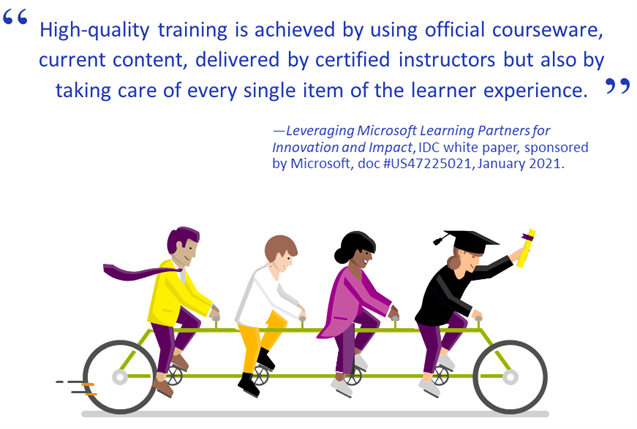
The IDC study emphasized that high-quality training comes from using official courseware and current content, delivered by certified instructors. Quality extends to the way that Learning Partners address every aspect of the learner experience—beginning with an assessment of your training needs and, for some, ending in certification exam preparation.
Some organizations view certifications as a natural outcome of a quality learning experience. Certified IT pros perform their role better,** and certifications can lead to improved IT performance. Learning Partners can help your workforce prepare for the industry’s most trusted certification.
Next step: Ask an expert about their services
To move forward with your skilling needs, consider working with a Microsoft Learning Partner with the scale, flexibility, and speed to deliver the resources that work best for your workforce—along with the quality content and instructors that can help everyone succeed.
Share your thoughts by posting your comment.
Download the IDC study white paper, Leveraging Microsoft Learning Partners for Innovation and Impact
Download the IDC study datasheet, Top reasons to get IT training from a Microsoft Learning Partner
Find a Microsoft Learning Partner

Related posts
Sharpen your technical skills with instructor-led training
Leading Learning Partners Association—a unique organization for delivering Microsoft training
Technical certifications could help drive business optimization
* IDC white paper, sponsored by Microsoft, Leveraging Microsoft Learning Partners for Innovation and Impact, #US47225021, January 2021.
** Global Knowledge, 2019 IT Skills and Salary Report, as quoted in Ten reasons to earn a Microsoft Certification.
by Contributed | May 5, 2021 | Technology
This article is contributed. See the original author and article here.
Mapping technology to Zero Trust frameworks is a challenge in many industries. We need to change our thinking in security assessment as the cloud evolves at the speed of innovation and growth, which often challenges our security requirements. We need a method to map Zero Trust approaches to technology while measuring change over time like a muscle.
Azure Sentinel: Zero Trust (TIC 3.0) Workbook
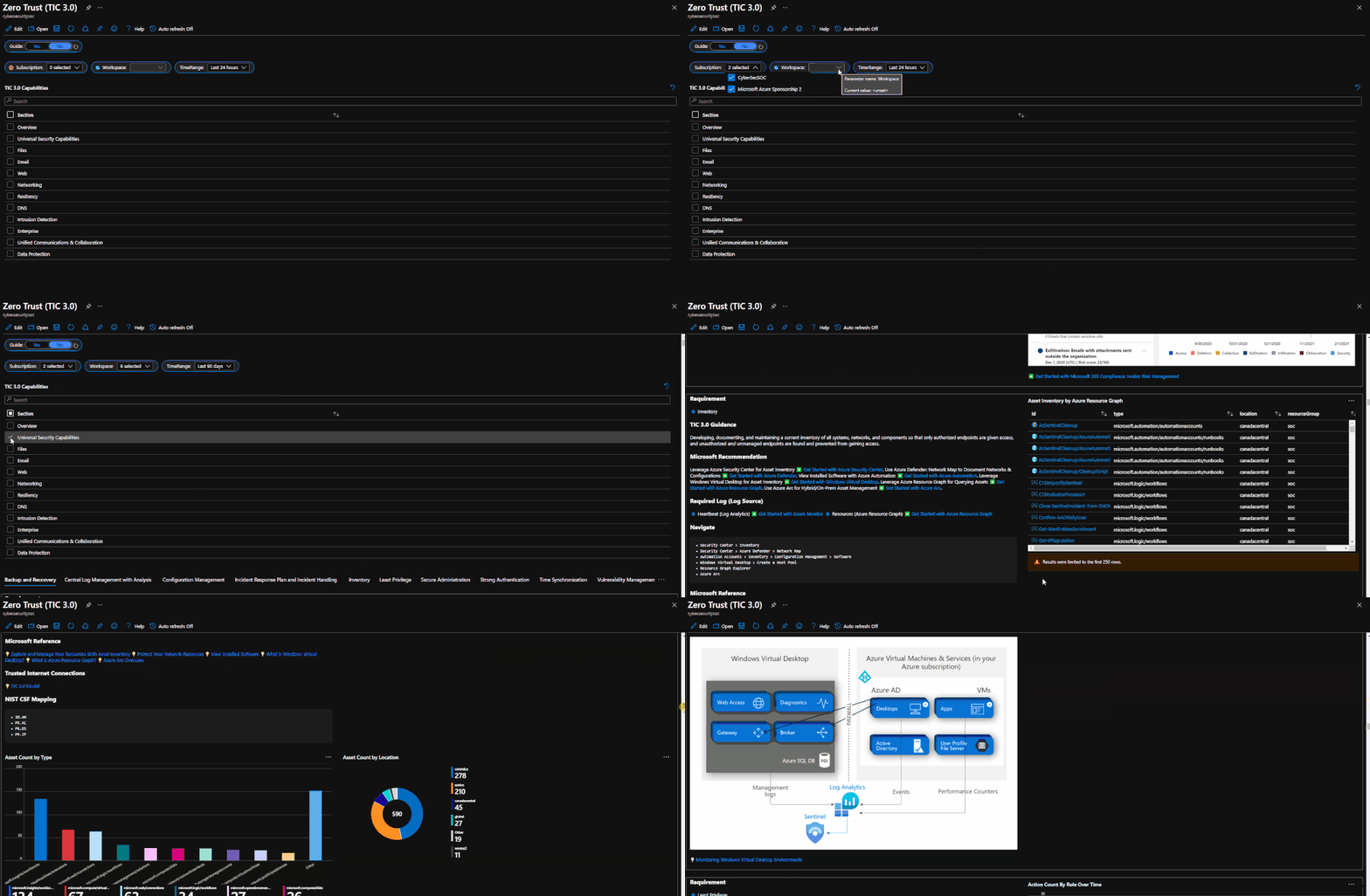
The Azure Sentinel: Zero Trust (TIC3.0) Workbook provides an automated visualization of Zero Trust principles cross walked to the Trusted Internet Connections framework. This workbook leverages the full breadth of Microsoft security offerings across Azure, Office 365, Teams, Intune, Windows Virtual Desktop, and many more. This workbook enables Implementers, SecOps Analysts, Assessors, Security & Compliance Decision Makers, and MSSPs to gain situational awareness for cloud workloads’ security posture. The workbook features 76+ control cards aligned to the TIC 3.0 security capabilities with selectable GUI buttons for navigation. This workbook is designed to augment staffing through automation, artificial intelligence, machine learning, query/alerting generation, visualizations, tailored recommendations, and respective documentation references.
Use Cases
There are several use cases for the Azure Sentinel Zero Trust (TIC 3.0) Workbook depending on user roles and requirements. The graphic below shows how a Security Engineer can leverage the workbook to review controls, evaluate tool efficiency, explore events, and investigate configurations. There are also several additional use cases where this workbook will be helpful:
Roles
- Implementers: Build/Design
- SecOps: Alert/Automation Building
- Assessors: Audit, Compliance, Assessment
- Security & Compliance Decision Makers: Situational Awareness
- MSSP: Consultants, Managed Service
Mappings
- Framework to Requirement to Microsoft Technology
Visualization
- Hundreds of Visualizations, Recommendations, Queries
Time-Bound
- Measure Posture Over Time for Maturity
Time-Saving
- Aggregation & Analysis
- Capabilities Assessment
- Navigation
- Documentation
- Compliance Mapping
- Query/Alert Generation
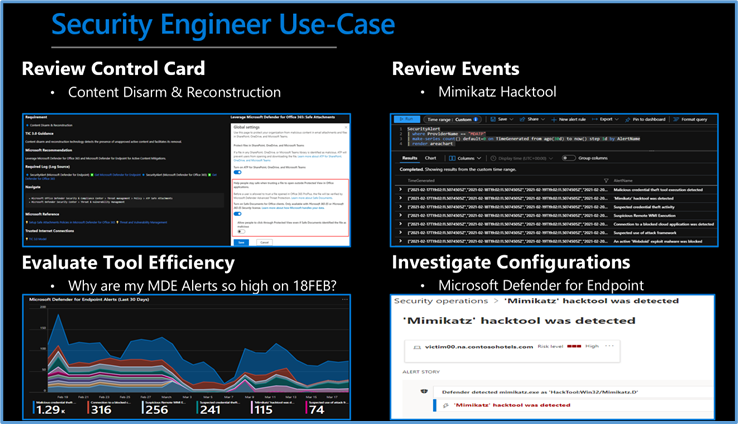 Security Engineer Use Case
Is Zero Trust Equivalent to TIC 3.0?
No, Zero Trust is a best practice model and TIC 3.0 is a security initiative. Zero Trust is widely defined around core principles whereas TIC 3.0 has specific capabilities and requirements. This workbook demonstrates the overlap of Zero Trust Principles with TIC 3.0 Capabilities. The Azure Sentinel Zero Trust (TIC 3.0) Workbook demonstrates best practice guidance, but Microsoft does not guarantee nor imply compliance. All TIC requirements, validations, and controls are governed by the Cybersecurity & Infrastructure Security Agency. This workbook provides visibility and situational awareness for security capabilities delivered with Microsoft technologies in predominantly cloud-based environments. Customer experience will vary by user and some panels may require additional configurations for operation. Recommendations do not imply coverage of respective controls as they are often one of several courses of action for approaching requirements which is unique to each customer. Recommendations should be considered a starting point for planning full or partial coverage of respective requirements.
Deploying the Workbook
It is recommended that you have the log sources listed above to get the full benefit of the Zero Trust (TIC3.0) Workbook, but the workbook will deploy regardless of your available log sources. Follow the steps below to enable the workbook:
Requirements: Azure Sentinel Workspace and Security Reader rights.
1) From the Azure portal, navigate to Azure Sentinel
2) Select Workbooks > Templates
3) Search Zero Trust and select Save to add to My Workbooks
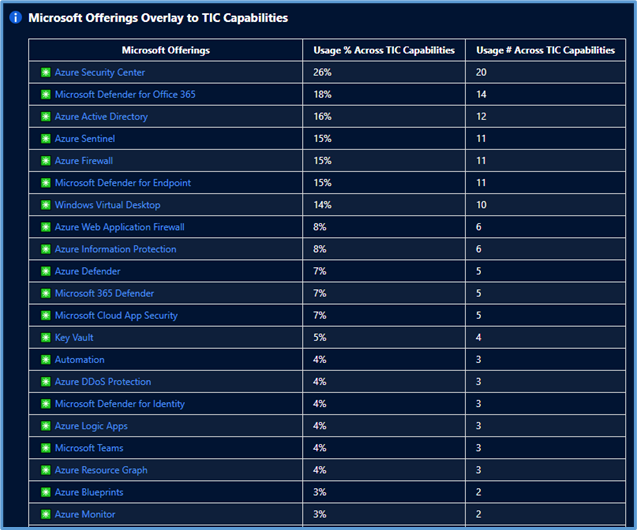 Microsoft Offerings Overlay to TIC Capabilities
Navigating the Workbook
The Legend Panel provides a helpful reference for navigating the workbook with respective colors, features, and reference indicators.
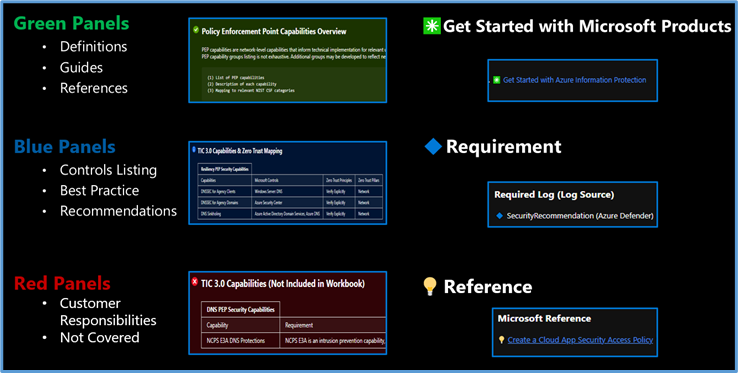 Navigating The Workbook
The Guide Toggle is available in the top left of the workbook. This toggle allows you to view panels such as recommendations and guides, which will help you first access the workbook but can be hidden once you’ve grasped respective concepts.
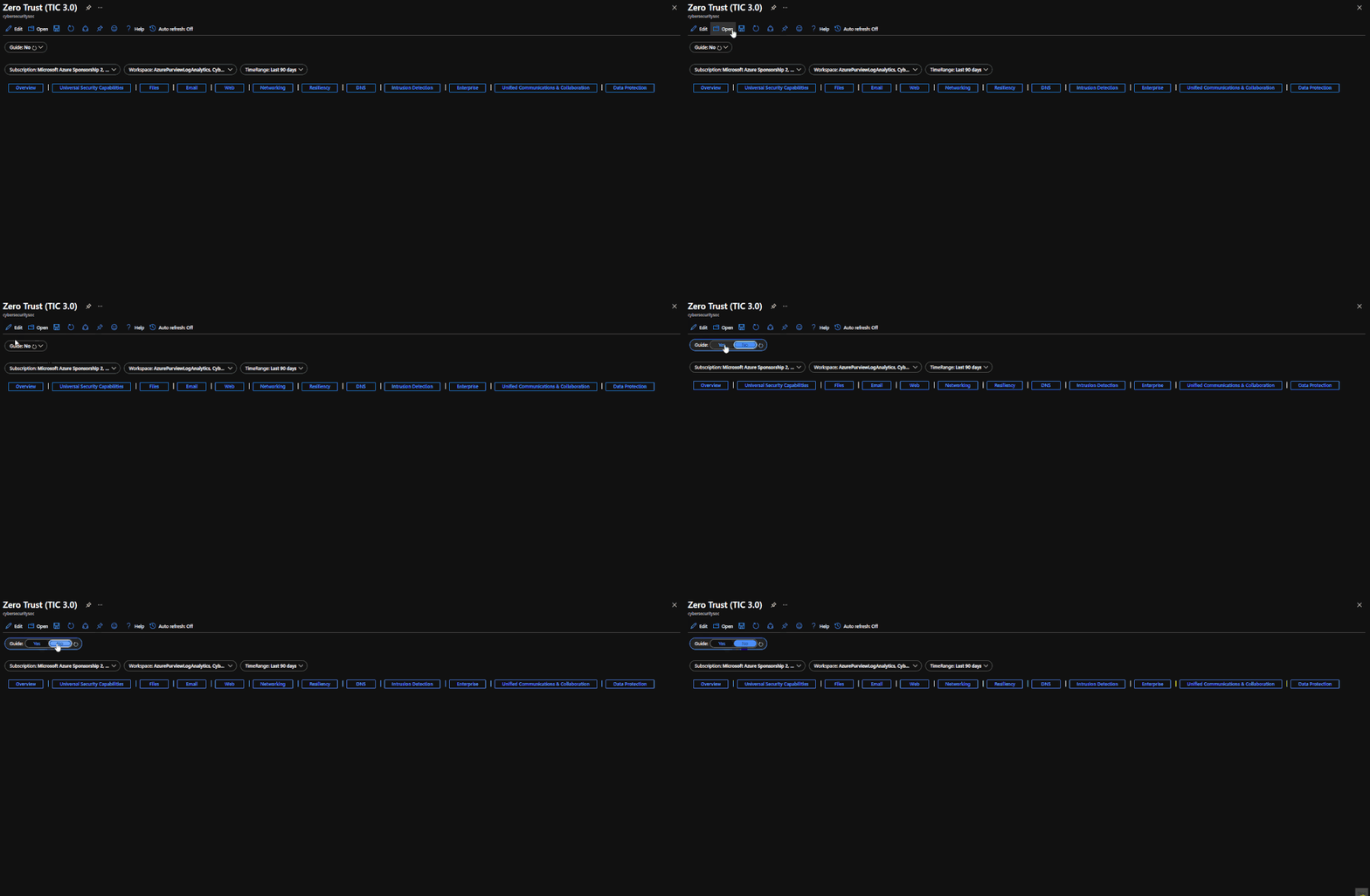 Guide Toggle
The Resource Parameter Options provide configuration options to sort control cards by Subscription, Workspace, and Time Range. The Parameter Options are beneficial for Managed Security Service Providers (MSSP) or large enterprises that leverage Azure Lighthouse for visibility into multiple workspaces. It facilitates assessment from both the aggregate and individual workspace perspectives. Time range selectors allow options for daily, monthly, quarterly, and even custom time range visibility.
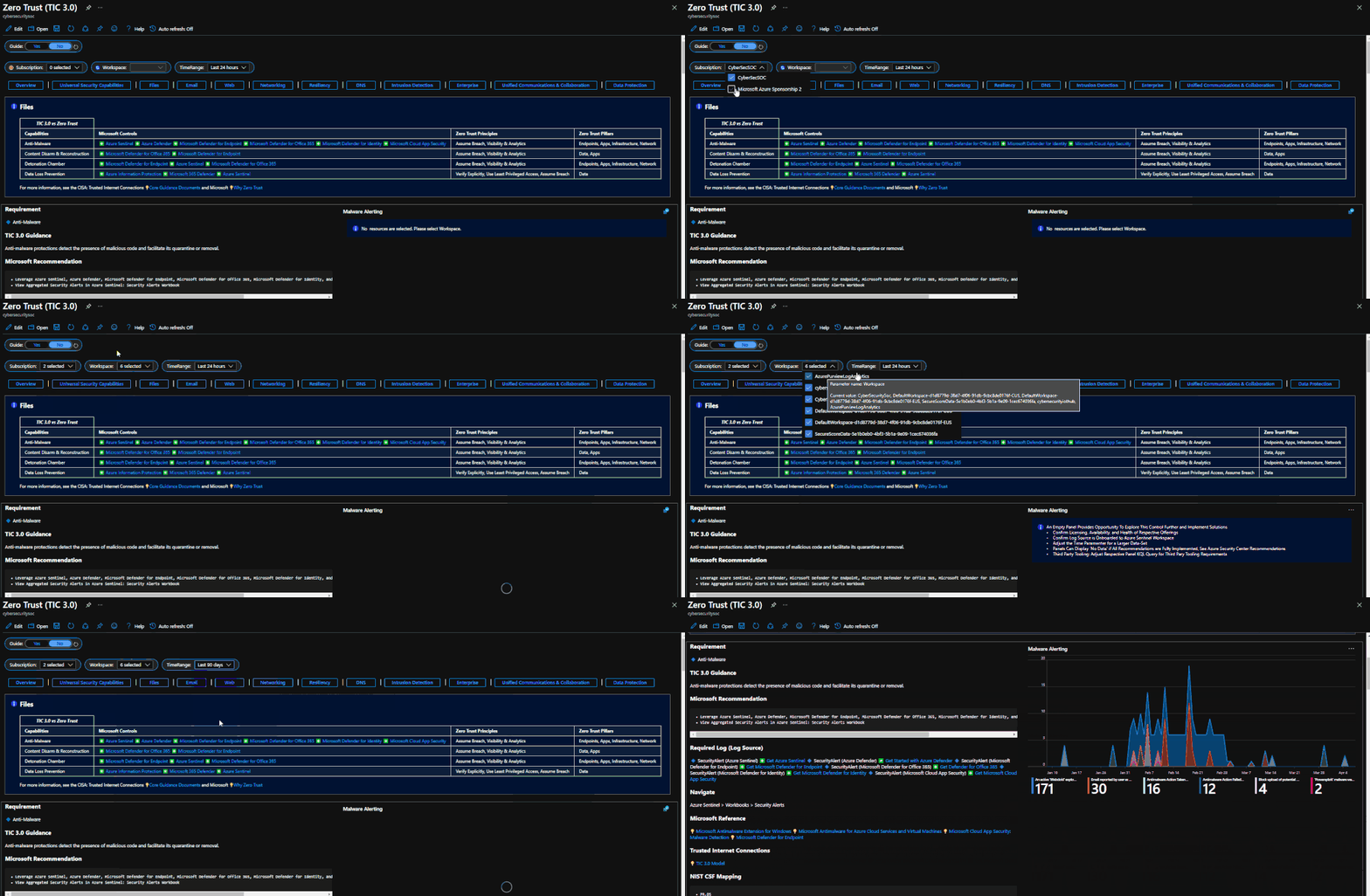 Resource Parameter Options
The Azure Sentinel Zero Trust (TIC3.0) Workbook displays each control in a Capability Card. The Capability Card provides respective control details to understand requirements, view your data, adjust SIEM queries, export artifacts, onboard Microsoft controls, navigate configuration blades, access reference materials, and view correlated compliance frameworks.
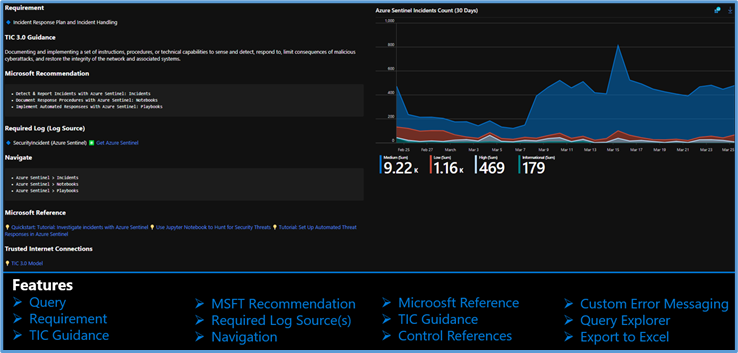 Capability Card
While using Microsoft offerings for the Zero Trust (TIC3.0) Workbook is recommended, it’s not a set requirement as customers often rely on many security providers and solutions. Below is a use-case example for adjusting a Control Card to include third-party tooling. The default KQL query provides a framework for target data, and it is readily adjusted with the desired customer controls/solutions.
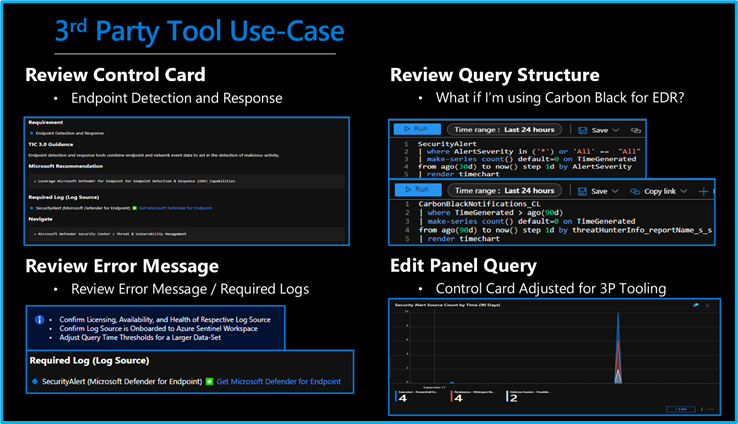 3rd Party Tool Use Case
Get Started with Azure Sentinel and Learn More About Zero Trust with Microsoft
Below are additional resources for learning more about Zero Trust (TIC3.0) with Microsoft. Bookmark the Security blog to keep up with our expert coverage on security matters and follow us at @MSFTSecurity or visit our website for the latest news and cybersecurity updates.
Disclaimer
The Azure Sentinel Zero Trust (TIC 3.0) Workbook demonstrates best practice guidance, but Microsoft does not guarantee nor imply compliance. All TIC requirements, validations, and controls are governed by the Cybersecurity & Infrastructure Security Agency. This workbook provides visibility and situational awareness for control requirements delivered with Microsoft technologies in predominantly cloud-based environments. Customer experience will vary by user, and some panels may require additional configurations and query modification for operation. Recommendations do not imply coverage of respective controls as they are often one of several courses of action for approaching requirements which is unique to each customer. Recommendations should be considered a starting point for planning full or partial coverage of respective control requirements.

by Contributed | May 5, 2021 | Technology
This article is contributed. See the original author and article here.
This series highlights Microsoft Learn Student Ambassadors who achieved the Gold milestone and have recently graduated from university. Each blog features a different student and highlights their accomplishments, their experience with the Student Ambassadors community, and what they’re up to now.
Today we’d like to introduce Sukhman Preet Singh Jawa who is from India and graduated this past winter from JECRC University in Jaipur, India.
Responses have been edited for clarity and length.
When you became a Student Ambassador in 2018, did you have specific goals you wanted to reach, and did you achieve them?
What I really wanted to do when I joined was to learn new things that are happening in technology. I was not connected to a community of people that would be actively participating in not just the development of the tech, but in adoption as well. This program gave me that platform and enabled me to connect with people around the world and discover technologies, like cloud, that back then were more like something that you would just read on a blog, and you would be like “Oh my God. What is that?”. These kinds of innovations were primarily my goal, and then after a year I was getting into it, then Microsoft Learn came and…whoa… I was just blown away. The amount of content, the amount of learning resources that were there, they were the best thing that I could hope for.
What was the one accomplishment that you’re the proudest of and why?
I wanted to build a community on my campus. I wanted people to build projects with me and participate in hackathons, so I launched a community called Microsoft Tribe. We initially invited students from our university, but the response was so overwhelming that opened it for the entire city. Last year we crossed 500 people–students and developers who are working on Microsoft technologies and trying to build the next generation of products. They are actively collaborating, teaching each other about the technologies that they know. It’s more like mutual learning, and even sharing opportunities for jobs to increase participation.
How has being a part of this community impacted you and helped to prepare you for the next chapter in your life? What are you doing now, what do you have planned?
I have been able to amass so much knowledge being in this program. Proper knowledge about not just technology. Knowledge about people, knowledge about how to pitch, how to be a part of a team, how to work together. These particular skills that I’ve acquired have enabled me to–alright, I’m going to brag here–I just founded my own startup, and I’m building products for developers to boost their productivity and enable them to have more granular control over how they’re building their products. I never thought I was going to talk about this. I was saving it for some special occasion, and I guess this is it. The scale of learnings from this program is amazing.
The Student Ambassadors program really sparked a new kind of motivation for me. Seeing all those amazing people doing all that great stuff, it inspires other Student Ambassadors to achieve more, to engage more with that community, to learn more. I won the top 100 Engineering Students Award in India, and I credit being in this program for this accomplishment. If I hadn’t been part of this program, I would have never thought of engaging with such an amazing dynamic of students and developers who are at the cutting edge or part of building the new world.
If you could go back in time, is there anything you would have done differently as a Student Ambassador?
I started as a sophomore, but had I got a time machine to go back, I would start the moment I joined college.
If you were to talk to a student who’s interested in joining the Microsoft Student Ambassadors community, let’s say you were trapped in an elevator with them for 30 seconds, what would you say to convince them to join?
I would hope the elevator stops for more than 30 seconds. This program enables you to achieve things that you would normally achieve later in your life. I would give this advice to people who generally don’t show up in tech. I would love to see more women joining this program because it embodies so much more about who you are. It is about growing yourself and community around you. You need to be a part of the program. You are going to miss out a lot of things if you don’t join. If you’re into tech, if you’re into learning, if you’re into being part of student communities, just join this program. Don’t think twice.
What advice would you give to new Student Ambassadors?
I would say start using Microsoft Learn early on. If I would have started using it when I became a Student Ambassador, I would have exponentially more knowledge than I have right now. And build connections with people you know, be a part of the community, stay immersed. Never stop dreaming about what you can build with technology. You’ve got access to such amazing people who are being part of that innovation that is happening round the corner, just reach out to them. If you have questions, just ask them.
Do you have a motto, a guiding principle that you live life by?
I have a motto–“empathy is greater than technology”. There’s a saying that we stand on the shoulders of giants, and we build upon them. As technologists, as innovators, as engineers, it becomes our responsibility to build solutions that empower people who are diverse. We must innovate and build for all of them. Be inclusive and understand the problem from the point of the person who is facing it, not from what we think that problem might be. Yeah, that’s “empathy greater than technology”.
Fellow Student Ambassadors and community members, you can always reach Sukhman on Twitter @spsxj.
Good luck to you, Sukhman, in your future endeavors! And if you’re interested in making a difference in tech, apply to join the Student Ambassadors community today.

by Contributed | May 5, 2021 | Technology
This article is contributed. See the original author and article here.
Welcome back to Reconnect, the biweekly series that catches up with former MVPs and their current activities.
This week we are thrilled to be joined by none other than eight-time titleholder Tony Champion! Hailing from Texas, Tony is a software architect with over 20 years of experience developing with Microsoft technologies.
As the owner and lead software architect of Champion DS, Tony remains active in the latest trends and technologies, creating custom solutions on Microsoft platforms. His client list includes multiple industries and includes companies such as Schlumberger, Microsoft, Boeing, MLB, and Chevron/Philips.
Tony describes his passion as creating new and engaging software that can span platforms, devices, and architectures. From XAML and C# to HTML and Javascript, Tony believes in using the right tools for the job and delivering a user experience and not just a piece of software.
Tony is an active participant in the community as a Microsoft MVP, international speaker, published author and blogger.
Tony simply describes himself as someone who has been coding for a long time and experienced both the highs and lows in this industry. Moreover, he loves to teach and jumps at the opportunity to share his knowledge.
When he’s not working or coding, Tony can normally be found with a guitar in hand.
For more information on Tony, check out his blog and Twitter @tonychampion.


Recent Comments